
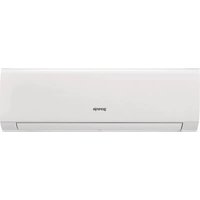
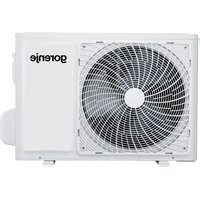
KAS35ZFT - Air conditioner GORENJE - Free user manual and instructions
Find the device manual for free KAS35ZFT GORENJE in PDF.


| Product Type | Split Air Conditioner |
| Brand | Gorenje |
| Model | KAS35ZFT |
| Cooling Capacity | 3.5 kW (12,000 BTU/h) |
| Heating Capacity | 3.8 kW (13,000 BTU/h) |
| Energy Efficiency Class (Cooling) | A++ |
| Power Supply | 220-240 V, 50 Hz |
| Indoor Unit Dimensions (W x H x D) | 800 x 300 x 200 mm |
| Outdoor Unit Dimensions (W x H x D) | 800 x 550 x 300 mm |
| Indoor Unit Weight | 10 kg |
| Outdoor Unit Weight | 30 kg |
| Refrigerant Type | R32 |
| Functions | Cooling, Heating, Dehumidification, Fan, Auto Mode |
| Control | Remote Control + Manual Buttons |
| Timer | 24-hour On/Off Timer |
| Auto Restart | Yes (after power failure) |
| Sleep Mode | Yes |
| Air Filter | Washable, Clean every 2 weeks |
| Installation | Professional installation required |
| Spare Parts Availability | Filters, remote control, PCBs available from Gorenje service |
Frequently Asked Questions - KAS35ZFT GORENJE
User questions about KAS35ZFT GORENJE
0 question about this device. Answer the ones you know or ask your own.
Ask a new question about this device
Download the instructions for your Air conditioner in PDF format for free! Find your manual KAS35ZFT - GORENJE and take your electronic device back in hand. On this page are published all the documents necessary for the use of your device. KAS35ZFT by GORENJE.
USER MANUAL KAS35ZFT GORENJE
RG57A2/BGEF (FRESH button is not available) RG57A3/BGEF

RG57B/BGE (FRESH button is not available) RG57D/BGE
KASxxFT
RG57A2/BGEF (FRESH button is not available) RG57A3/BGEF

RG57B/BGE (FRESH button is not available) RG57D/BGE
KAMxxPHH(PDAH/G)
RG57H(B)/BG(C)E RG57H(B)/BG(C)EU1

RG57H1(B)/BG(C)E; RG57H1(B)/BG(C)E-M

RG57H2(B)/BG(C)EF

RG57H3(B)/BG(C)EF
Displayed when data transmitted.

Displayed when remote controller is ON.

Battery display (low battery detection)
ECO
Not available for this unit

Displayed when TIMER ON time is set.

Displayed when TIMER OFF time is set.

Show set temperature or room temperature, or time under TIMER setting.

Displayed in Sleep Mode operation.

Indicated that the air conditioner is operating in Follow me mode

Not available for this unit

Not available for this unit

Low speed

Medium speed

High speed

Auto fan speed
▲ NOTE
Example of setting the TIMER ON program

Example of setting the TIMER ON and OFF program
Example:
You want to turn off the air conditioner after 2 hours and turn it on again after 10 hours.
- Press the TIMER OFF button.
- Press the TIMER OFF button again and set '2:0h'.
- Press the TIMER ON button.
- Press the TIMER ON button again and set '10:0h'.
- After 3 seconds, the set temperature will appear on the remote controller's display. The TIMER ON OFF icon remains visible, and the function is activated.
▲NOTE
NIGHT MODE (SLEEP):
Pressing the button will activate NIGHT MODE.
- Please read this owner's manual before operation.
- Save this manual in a safe place for future reference.
Contents
Remote controller specifications....3
Performance features ....3
Features of the remote controller buttons ....4
Indicators on display 6
Operating the remote controller 7
Handling the remote controller
Use the remote controller within 8m distance from the appliance, pointing it towards the receiver. Reception is confirmed by a beep.
CAUTION!
- The air conditioner will not operate if curtains, doors, or other materials block the signal from the remote controller to the indoor unit.
- Prevent any liquid from falling into the remote controller. Do not expose the remote controller to direct sunlight or heat.
- If the infrared signal receiver on the indoor unit is exposed to direct sunlight, the air conditioner may not function properly. Block the sunlight from falling on the receiver.
- If other electrical appliances react to the remote controller, consult your local dealer.
Remote controller specifications
| Model | |
| KASxxDCINVF02/3/4 | RG57A3/BGEF;RG57A2/BGEF;RG57B/BGE;RG57D/BGE |
| KASxxFT | RG57A3/BGEF;RG57A2/BGEF;RG57B/BGE;RG57D/BGE |
| KAMxxPHH(PDAH/G) | RG57H(B)/BG(C)E;RG57H1(B)/BG(C)E;RG57H2(B)/BG(C)EF;RG57H3(B)/BG(C)EF;RG57H1(B)/BG(C)E-M;RG57H(B)/BG(C)EU1 |
| Rated voltage | 3,0 V / Alkaline dry batteries AAA,LR03 x 2) |
| Lowest voltage of the CPU emitting signal | 2,0 V |
| Transition distance | 8 m (at voltage 3,0 V = 11 m) |
| Environment | -5°C ÷ 60 °C |
Performance features
- Operating Mode: AUTO, COOL, DRY, HEAT (Cooling only model without) and FAN.
- Timer Setting Function in 24 hours.
- Indoor Setting Temperature Range: 17°C~30°C.
- Full function of LCD (Liquid Crystal Display)

NOTE
- Button design might be slightly different from the actual one you have purchased depending on individual models.
- If indoor unit does not support specific feature than your unit cannot perform it.
KASxxDCINVF02/3/4
RG57A2/BGEF (FRESH button is not available) RG57A3/BGEF

RG57B/BGE (FRESH button is not available) RG57D/BGE
KASxxFT
RG57A2/BGEF (FRESH button is not available) RG57A3/BGEF

RG57B/BGE (FRESH button is not available) RG57D/BGE
KAMxxPHH(PDAH/G)
RG57H(B)/BG(C)E RG57H(B)/BG(C)EU1

RG57H1(B)/BG(C)E; RG57H1(B)/BG(C)E-M

RG57H2(B)/BG(C)EF

RG57H3(B)/BG(C)EF
Features of the remote controller buttons
![graph TD A["1 ON/OFF"] --> B["MODE"] B --> C["FAN"] C --> D["ION"] D --> E["SLEEP"] E --> F["SWING"] F --> G["FOLLOW ME"] G --> H["LED"] H --> I["12 13"] I --> J["4"] K["8 SHORT CUT"] --> L["9 TIMER ON"] L --> M["10 TIMER OFF"] M --> N["11"] O["15 TEMP"] --> P["8"] Q["12 13"] --> R["14"]](/content/2026/06/1368779/images/1b5ba3530ecd190f2ea8960a9775844ae6d769ff75d5fe1f54a838665f81c1c7.jpg)
KAMxxPHH(PDAH/G)
KASxxFT
KASxxDCINVF02/3/4
- ON/OFF Button: Push this button to start operation, push the button again to stop operation.
- MODE Selection Button: Each time the button is pressed, the operation mode is shifted.
- FAN SPEED Indicator: Press the FAN SPEED button to select the desired fan speed setting (Auto-Low-Med-High).
- SLEEP: Active / disable Sleep function.
- FRESH: Activate / disable lonizer.
- TURBO button: Active / disable TURBO function.
- SELF CLEAN button: Active / disable SELF CLEAN function
- UP button (▲ / +): Push this button to increase the indoor temperature setting or to increase hour on the timer setting. DOWN button (▼ / -): Push this button to decrease the indoor temperature setting or to decrease hour on the timer setting.
- SHORTCUT Button: Used to restore the current settings or resume previous settings. On the first time connecting to the power, if you push the button, the unit will operate on AUTO mode, 26°C, and fan speed is Auto. Push this button when remote controller is on, the system will automatically revert back to the previous settings including operating mode, setting temperature, fan speed level and sleep feature (if activated). If pushed for more than 2 seconds, the system will automatically restore the current operation settings
- TIMER ON Button: Press this button to initiate the auto-on time sequence. Each press will increase the auto-timed setting in 30 minutes increments. When the setting time displays 10:00, each press will increase the auto-timed setting 60 minutes increments. To cancel the auto-timed program, simply adjust the auto-on time to 0:00.
- TIMER OFF Button: Press this button to initiate the auto-off time sequence. Each press will increase the auto-timed setting in 30-minute increments. When the setting time displays 10:00, each press will increase the auto-timed setting in 60-minute increments. To cancel the auto-timed program, simply adjust the auto-off time to 0:00.
- Horizontal swing button: Used to stop or start horizontal louver movement and set the desired up/down air flow direction. The louver changes angle by 6 degrees for every press. If kept pressed for more than 2 seconds, the horizontal louver swing feature is activated.
- FOLLOW ME Button: Push this button to activate or disable the FOLLOW ME function.
- LED Button: Push this button to activate or disable the display on the indoor unit.
- ION Button: Push to activate the ionizer which will help to remove pollen and impurities from the air.
Indicators on display

TRANSMISSION Indicator:
This indicator flashes once when the remote controller transmits signals to the indoor unit. ON/OFF Indicator: This symbol appears when the unit is turned on.
DIGITAL DISPLAY area: This area will show the set temperature and, if in the TIMER mode, will show the ON and OFF settings of the TIMER.
FOLLOW ME indicator: When pressing the FOLLOW ME button in COOL or HEAT mode, the remote sensing function is activated and this indicator displays.
Mode display (FAN)
Fan speed display: Displays the selected fan speed.
OPERATION MODE Indicator: When the MODE button is pressed, it shows the current operating mode – AUTO, COOL, DRY, HEAT, FAN.
Mode display

Displayed when data is transmitted.

ECO Not available for this unit
ON Displayed when TIMER ON time is set.
OFF Displayed when TIMER OFF time is set.
8.8°F Shows set temperature or room temperature, or time under TIMER setting.
★ Displayed in Sleep Mode operation.
Indicates that the air conditioner is operating in Follow me mode
Not available for this unit
Not available for this unit

NOTE
All indicators shown in the figure are for the purpose of clear presentation. During actual operation only the relative function signs are shown.
Operating the remote controller
AUTO operation
Switch on the power and the OPERATION indication lamp on the display panel of the indoor unit starts flashing.
- Use the MODE button to select AUTO.
- Push the TEMP button to set the desired room temperature. Temperature can be set between 17°C and 30°C.
- Push the ON/OFF button to start the air conditioner.
NOTE
In the AUTO mode, the air conditioner can logically choose the mode of COOL, FAN and HEAT by sensing the difference between the actual ambient room temperature and the set temperature on the remote controller. In the AUTO mode you cannot switch the fan speed. It is automatically controlled. If the AUTO mode is not comfortable for you, the desired mode can be selected manually.
COOL/HEAT (Cooling only model without) and FAN operation

Ensure that unit is plugged in and power is available.
- Press the MODE button to select COOL, HEAT or FAN mode.
- Press the UP / DOWN buttons to set the desired temperatures within range of 17 to 30°C.
- Push the FAN SPEED to select the FAN mode of AUTO, HIGH, MED or LOW.
- Push the ON/OFF button to start the air conditioner.
NOTE
The FAN mode cannot be used to control the temperature. While in this mode, only steps 1, 3 and 4 may be performed.

DRY operation
Ensure that unit is plugged in and power is available.
- Push the MODE button to select DRY.
- Push the TEMP button to set the desired temperature from 17°C to 30°C.
- Push the ON/OFF button to start the air conditioner.
NOTE
In dehumidifying mode, you cannot switch the fan speed. It is automatically controlled.
Adjusting air flow direction
Use SWING buttons to adjust desired airflow direction.
- The louver changes angle of 6 degrees for every press. If keep pushing for more than 2 seconds, the horizontal louver swing feature is activated.
- The louver changes angle of 6 degrees for every press. If keep pushing for more than 2 seconds, the vertical louver swing feature is activated.
NOTE
When the horizontal / vertical louver position would affect the cooling or heating effect of the air conditioner, it would automatically change moving direction.

TIMER operation
Push TIMER ON button to set the auto-on time and TIMER OFF button to set the auto-off time.
TIMER ON:
- Push the TIMER ON button, then the remote controller shows TIMER ON, the last set time for the starting operation and the signal "h" will be shown on the DIGITAL DISPLAY area. You are now ready to reset the time to START the operation.
- Push the TIMER ON button again to set desired unit start time.
- After setting the TIMER ON, there will be a one-half second delay before the remote controller transmits the signal to the air conditioner. Then, after approximately another 2 seconds, the signal "h" disappears and the set temperature will re-appear on the digital display.
TIMER OFF:
- Push the TIMER OFF button and the remote controller will show TIMER OFF, the last set time for the stopping operation and the signal "h" will be shown on the DIGITAL DISPLAY area. You are now ready to reset the time of the STOP operation.
- Push the TIMER OFF button again to set the time you want to stop the operation.
- After setting the TIMER OFF, there will be a one-half second delay before the remote controller transmits the signal to the air conditioner. Then, after approximately another 2 seconds, the signal "h" disappears and the set temperature will re-appear on the digital display.
NOTE
Setting times are limited to 0.5, 1, 1.5, 2, 2.5, 3, 3.5, 4, 4.5, 5, 5.5, 6, 6.5, 7, 7.5, 8, 8.5, 9, 9.5, 10, 11, 12, 13, 14, 15, 16, 17, 18, 19, 20, 21, 22, 23 in 24 hours.
Example of TIMER setting


TIMER ON feature is useful for you when you want the unit to turn on automatically before you return home. Air conditioner will automatically start operating at the set time.
Example:
How to start the air conditioner in 6 hours.
- Press the TIMER ON button, the last setting of starting operation time and the signal 'h' will show on the display area.
- Press the TIMER ON button to display '6:0h' on the TIMER ON display.
- Wait for 3 seconds and the digital display will show the temperature again TIMER ON indicator remains on and this function is activated.
Example of combined TIMER setting


Example:
To stop the air conditioner in 2 hours and start it again in 10 hours.
- Press the TIMER OFF button.
- Press the TIMER OFF button again and set '2:0h'.
- Press the TIMER ON button.
- Press the TIMER ON button again and set '10:0h'.
- Wait for 3 seconds and the digital display will show the temperature again. The TIMER ON/OFF indicator remains on and this function is activated.
SLEEP:

Press this button to activate or disable the SLEEP function.
The Sleep function enables the unit to automatically increase (cooling) or decrease (heating) temperature by 1°C per hour for the first 2 hours and then hold it steady for 5 hours. After 7 hours, the unit will stop operation.
NOTE
The SLEEP function is only available in COOLING, HEATING, and AUTO mode.
Insert / replace batteries
In the remote controller are two dry alkaline batteries AAA (LR03x2).
- Press the cover of the batteries, remove it, insert the batteries in accordance with the + / - signs, and put back the plastic cover.
- Replace used batteries in the same order.
NOTE
- When replacing the batteries, do not use two different pieces. This can affect the performance of the remote controller.
- If you plan not to use the remote controller for a longer period of time, remove the batteries. Otherwise, leaking of the batteries can damage the remote controller.
- Average life expectancy of the batteries is 6 months at normal use.
- Replace the batteries when you do not hear beeping sound from the indoor unit when pressing buttons on the remote controller.
- Dispose used batteries into the special container.
CROATIAN
RG57
INSTRUCTIONS FOR USE
REMOTE CONTROLLER
- Before first use, carefully read these instructions for use.
- Store the instructions for future use.
Index
RG57A2/BGEF (FRESH button is not available) RG57A3/BGEF

RG57B/BGE (FRESH button is not available) RG57D/BGE
RG57A2/BGEF (FRESH button is not available) RG57A3/BGEF

RG57B/BGE (FRESH button is not available) RG57D/BGE
KAMxxPHH(PDAH/G)
RG57H(B)/BG(C)E RG57H(B)/BG(C)EU1

RG57H1(B)/BG(C)E; RG57H1(B)/BG(C)E-M

RG57H2(B)/BG(C)EF

RG57H3(B)/BG(C)EF
Displayed when data transmitted.
① Displayed when remote controller is ON.
Battery display (low battery detection)
ECO Not available for this unit
ON Displayed when TIMER ON time is set.
OFF Displayed when TIMER OFF time is set.
8.8°F Show set temperature or room temperature, or time under TIMER setting.
* Displayed in Sleep Mode operation.
Indicated that the air conditioner is operating in Follow me mode
Not available for this unit
Not available for this unit

NOTE

Example of setting the ON and OFF timer program
Example:
RG57A2/BGEF (FRESH button is not available) RG57A3/BGEF

RG57B/BGE (FRESH button is not available) RG57D/BGE
KASxxFT
RG57A2/BGEF (FRESH button is not available) RG57A3/BGEF

RG57B/BGE (FRESH button is not available) RG57D/BGE
KAMxxPHH(PDAH/G)
RG57H(B)/BG(C)E RG57H(B)/BG(C)EU1

RG57H1(B)/BG(C)E; RG57H1(B)/BG(C)E-M

RG57H2(B)/BG(C)EF

RG57H3(B)/BG(C)EF
Displayed when data is transmitted.

Displayed when the remote controller is ON.

Battery display (low battery detection)

Not available for this unit

Displayed when TIMER ON time is set.

Displayed when TIMER OFF time is set.

Shows set temperature, room temperature, or time under TIMER setting.

Displayed in Sleep Mode operation.

Indicates that the air conditioner is operating in Follow me mode.

Not available for this unit

Not available for this unit
FAN

Low speed
FAN

Medium speed
FAN

High speed
FAN
AUTO
Auto fan speed
⚠️ NOTE
RG57A2/BGEF (FRESH button is not available) RG57A3/BGEF

RG57B/BGE (FRESH button is not available) RG57D/BGE
KASxxFT
RG57A2/BGEF (FRESH button is not available) RG57A3/BGEF

RG57B/BGE (FRESH button is not available) RG57D/BGE
KAMxxPHH(PDAH/G)
RG57H(B)/BG(C)E RG57H(B)/BG(C)EU1

RG57H1(B)/BG(C)E; RG57H1(B)/BG(C)E-M

RG57H2(B)/BG(C)EF

RG57H3(B)/BG(C)EF
Displayed when data transmitted.
① Displayed when remote controller is ON. Battery display (low battery detection)
ECO Not available for this unit
ON Displayed when TIMER ON time is set.
OFF Displayed when TIMER OFF time is set.
8.8°F Shows set temperature or room temperature, or time under TIMER setting.
★ Displayed in Sleep Mode operation.
Indicated that the air conditioner is operating in Follow me mode
Not available for this unit
Not available for this unit


NOTE
![graph LR A["On"] --> B["Set"] B --> C["Stop"] C --> D["Start"] style A fill:#f9f,stroke:#333 style D fill:#bbf,stroke:#333 note right of B "2 hours later after setting" note right of D "10 hours later after setting"](/content/2026/06/1368779/images/91e2ca73f6ee7aee520ebc0e0dc9dc1851202bf072870db61e53d643f0a359ae.jpg)
Example:
RG57A2/BGEF (FRESH button is not available) RG57A3/BGEF

RG57B/BGE (FRESH button is not available) RG57D/BGE
KASxxFT
RG57A2/BGEF (FRESH button is not available) RG57A3/BGEF

RG57B/BGE (FRESH button is not available) RG57D/BGE
KAMxxPHH(PDAH/G)
RG57H(B)/BG(C)E RG57H(B)/BG(C)EU1

RG57H1(B)/BG(C)E; RG57H1(B)/BG(C)E-M

RG57H2(B)/BG(C)EF

RG57H3(B)/BG(C)EF
Displayed when data transmitted.

Displayed when remote controller is ON.

Battery display (low battery detection)

Not available for this unit

Displayed when TIMER ON time is set.

Displayed when TIMER OFF time is set.

Shows set temperature, room temperature, or time during TIMER setting.

Displayed during Sleep Mode operation.

Indicates that the air conditioner is operating in Follow Me mode.

Not available for this unit.

Not available for this unit.
FAN
Low speed.
FAN
Medium speed.
FAN
High speed.
FAN AUTO
Auto fan speed.
REMINDER

RG57A2/BGEF (FRESH button is not available) RG57A3/BGEF

RG57B/BGE (FRESH button is not available) RG57D/BGE
KASxxFT
RG57A2/BGEF (FRESH button is not available) RG57A3/BGEF

RG57B/BGE (FRESH button is not available) RG57D/BGE
KAMxxPHH(PDAH/G)
RG57H(B)/BG(C)E RG57H(B)/BG(C)EU1

RG57H1(B)/BG(C)E; RG57H1(B)/BG(C)E-M

RG57H2(B)/BG(C)EF

RG57H3(B)/BG(C)EF
Displayed when data transmitted.

Displayed when remote controller is ON.

Battery display (low battery detection)
ECO
Not available for this unit

Displayed when TIMER ON time is set.

Displayed when TIMER OFF time is set.

Show set temperature or room temperature, or time under TIMER setting.

Displayed in Sleep Mode operation.

Indicated that the air conditioner is operating in Follow me mode

Not available for this unit

Not available for this unit
FAN
Low speed
FAN
Medium speed
FAN
High speed
FAN AUTO
Auto fan speed
NOTE
NOTE
The set time is relative time. Therefore, the time is set based on the delay of real time.

NIGHT MODE:
RG57A2/BGEF (FRESH button is not available) RG57A3/BGEF

RG57B/BGE (FRESH button is not available) RG57D/BGE
KASxxFT
RG57A2/BGEF (FRESH button is not available) RG57A3/BGEF

RG57B/BGE (FRESH button is not available) RG57D/BGE
KAMxxPHH(PDAH/G)
RG57H(B)/BG(C)E RG57H(B)/BG(C)EU1

RG57H1(B)/BG(C)E; RG57H1(B)/BG(C)E-M

RG57H2(B)/BG(C)EF

RG57H3(B)/BG(C)EF
Displayed when data transmitted.

Displayed when remote controller is ON.

Battery display (low battery detection)
ECO
Not available for this unit

Displayed when TIMER ON time is set.

Displayed when TIMER OFF time is set.

Shows set temperature, room temperature, or time under TIMER setting.

Displayed in Sleep Mode operation.

Indicates that the air conditioner is operating in Follow me mode.

Not available for this unit

Not available for this unit
FAN

Low speed
FAN

Medium speed
FAN

High speed
FAN
AUTO
Auto fan speed
Example:
Example:
RG57A2/BGEF (FRESH button is not available) RG57A3/BGEF

RG57B/BGE (FRESH button is not available) RG57D/BGE
KASxxFT
RG57A2/BGEF (FRESH button is not available) RG57A3/BGEF

RG57B/BGE (FRESH button is not available) RG57D/BGE
KAMxxPHH(PDAH/G)
RG57H(B)/BG(C)E RG57H(B)/BG(C)EU1

RG57H1(B)/BG(C)E; RG57H1(B)/BG(C)E-M

RG57H2(B)/BG(C)EF

RG57H3(B)/BG(C)EF
Displayed when data is transmitted.

Displayed when the remote controller is ON.

Battery display (low battery detection)

Not available for this unit

Displayed when TIMER ON time is set.

Displayed when TIMER OFF time is set.

Shows set temperature, room temperature, or time under TIMER setting.

Displayed in Sleep Mode operation.

Indicates that the air conditioner is operating in Follow me mode.

Not available for this unit

Not available for this unit

Low speed

Medium speed

High speed

Auto fan speed
⚠️ NOTE
RG57A2/BGEF (FRESH button is not available) RG57A3/BGEF

RG57B/BGE (FRESH button is not available) RG57D/BGE
KASxxFT
RG57A2/BGEF (FRESH button is not available) RG57A3/BGEF

RG57B/BGE (FRESH button is not available) RG57D/BGE
KAMxxPHH(PDAH/G)
RG57H(B)/BG(C)E RG57H(B)/BG(C)EU1

RG57H1(B)/BG(C)E; RG57H1(B)/BG(C)E-M

RG57H2(B)/BG(C)EF

RG57H3(B)/BG(C)EF
Remote control key features
![graph TD A["1"] --> B["ON/OFF"] C["2"] --> D["MODE"] E["3"] --> F["FAN"] G["15"] --> H["ION"] I["4"] --> J["SLEEP"] K["12"] --> L["SWING"] M["13"] --> N["FOLLOW ME"] O["14"] --> P["LED"] Q["8"] --> R["SHORT CUT"] S["9"] --> T["TIMER ON"] U["10"] --> V["TIMER OFF"] W["11"] --> X["TIMER ON"] Y["TEMP"]…](/content/2026/06/1368779/images/8c034c5ceb3fb7d58bbf75a5ff5a7c2d0473bb0483963171c747651cdbc9d083.jpg)
KAMxxPHH(PDAH/G)

KASxxDCINVF02/3/4
KASxxFT
Displayed when data is transmitted.

Displayed when the remote controller is ON.

Battery display (low battery detection)

Not available for this unit

Displayed when TIMER ON time is set.

Displayed when TIMER OFF time is set.

Shows set temperature or room temperature, or time under TIMER setting.

Displayed in Sleep Mode operation.

Indicates that the air conditioner is operating in Follow me mode

Not available for this unit

Not available for this unit

Low speed
Medium speed
High speed
Auto fan speed
NOTE
The set times are limited to 0.5, 1, 1.5, 2, 2.5, 3, 3.5, 4, 4.5, 5, 5.5, 6, 6.5, 7, 7.5, 8, 8.5, 9, 9.5, 10, 11, 12, 13, 14, 15, 16, 17, 18, 19, 20, 21, 22, 23 out of 24 hours.

Example:
RG57A2/BGEF (FRESH button is not available) RG57A3/BGEF

RG57B/BGE (FRESH button is not available) RG57D/BGE
KASxxFT
RG57A2/BGEF (FRESH button is not available) RG57A3/BGEF

RG57B/BGE (FRESH button is not available) RG57D/BGE
KAMxxPHH(PDAH/G)
RG57H(B)/BG(C)E RG57H(B)/BG(C)EU1

RG57H1(B)/BG(C)E; RG57H1(B)/BG(C)E-M

RG57H2(B)/BG(C)EF

RG57H3(B)/BG(C)EF
Displayed when data is transmitted.

Displayed when the remote controller is ON.

Battery display (low battery detection)
ECO
Not available for this unit

ON
Displayed when TIMER ON time is set.

OFF
Displayed when TIMER OFF time is set.

Shows set temperature, room temperature, or time under TIMER setting.

Displayed during Sleep Mode operation.

Indicates that the air conditioner is operating in Follow me mode.

Not available for this unit

Not available for this unit

Low speed

Medium speed

High speed

Auto fan speed
ECKEPTY
RG57A2/BGEF (FRESH button is not available) RG57A3/BGEF

RG57B/BGE (FRESH button is not available) RG57D/BGE
KASxxFT
RG57A2/BGEF (FRESH button is not available) RG57A3/BGEF

RG57B/BGE (FRESH button is not available) RG57D/BGE
KAMxxPHH(PDAH/G)
RG57H(B)/BG(C)E RG57H(B)/BG(C)EU1

RG57H1(B)/BG(C)E; RG57H1(B)/BG(C)E-M

RG57H2(B)/BG(C)EF

RG57H3(B)/BG(C)EF


NOTE
Setting times are limited to 0.5, 1, 1.5, 2, 2.5, 3, 3.5, 4, 4.5, 5, 5.5, 6, 6.5, 7, 7.5, 8, 8.5, 9, 9.5, 10, 11, 12, 13, 14, 15, 16, 17, 18, 19, 20, 21, 22, 23, and 24 hours.
![graph LR A["On"] --> B["Set"] B --> C["Stop"] C --> D["Start"] style A fill:#f9f,stroke:#333 style D fill:#bbf,stroke:#333 note1["2 hours later after setting"] -.-> C note2["10 hours later after setting"] -.-> D](/content/2026/06/1368779/images/a35c3bc00c2cd025d50cc5b1558ab20594738c91d01a6936f3427decade802b6.jpg)
Example:
RG57A2/BGEF (FRESH button is not available) RG57A3/BGEF

RG57B/BGE (FRESH button is not available) RG57D/BGE
KASxxFT
RG57A2/BGEF (FRESH button is not available) RG57A3/BGEF

RG57B/BGE (FRESH button is not available) RG57D/BGE
KAMxxPHH(PDAH/G)
RG57H(B)/BG(C)E RG57H(B)/BG(C)EU1

RG57H1(B)/BG(C)E; RG57H1(B)/BG(C)E-M

RG57H2(B)/BG(C)EF

RG57H3(B)/BG(C)EF
Displayed when data transmitted.

Displayed when remote controller is ON.

Battery display (low battery detection)

Not available for this unit
ON Displayed when TIMER ON time is set.
OFF Displayed when TIMER OFF time is set.

Show set temperature or room temperature, or time under TIMER setting.

Displayed in Sleep Mode operation.

Indicated that the air conditioner is operating in Follow me mode

Not available for this unit

Not available for this unit
FAN
Low speed
FAN
Medium speed
FAN
High speed
FAN AUTO
Auto fan speed
NOTE
The setting times are limited to 0.5, 1, 1.5, 2, 2.5, 3, 3.5, 4, 4.5, 5, 5.5, 6, 6.5, 7, 7.5, 8, 8.5, 9, 9.5, 10, 11, 12, 13, 14, 15, 16, 17, 18, 19, 20, 21, 22, 23, and 24 hours.

Example:
RG57A2/BGEF (FRESH button is not available) RG57A3/BGEF

RG57B/BGE (FRESH button is not available) RG57D/BGE
KASxxFT
RG57A2/BGEF (FRESH button is not available) RG57A3/BGEF

RG57B/BGE (FRESH button is not available) RG57D/BGE
KAMxxPHH(PDAH/G)
RG57H(B)/BG(C)E RG57H(B)/BG(C)EU1

RG57H1(B)/BG(C)E; RG57H1(B)/BG(C)E-M

RG57H2(B)/BG(C)EF

RG57H3(B)/BG(C)EF

RG57A2/BGEF (FRESH button is not available) RG57A3/BGEF

RG57B/BGE (FRESH button is not available) RG57D/BGE
KASxxFT
RG57A2/BGEF (FRESH button is not available) RG57A3/BGEF

RG57B/BGE (FRESH button is not available) RG57D/BGE KAMxxPHH(PDAH/G)

RG57H(B)/BG(C)E RG57H(B)/BG(C)EU1

RG57H1(B)/BG(C)E; RG57H1(B)/BG(C)E-M

RG57H2(B)/BG(C)EF

RG57H3(B)/BG(C)EF

Example:
RG57A2/BGEF (FRESH button is not available) RG57A3/BGEF (The Fresh button does not work.)

RG57B/BGE (FRESH button is not available) RG57D/BGE (The Fresh button does not work.)
KASxxFT
RG57H1(B)/BG(C)E; RG57H1(B)/BG(C)E-M

RG57H2(B)/BG(C)EF

RG57H3(B)/BG(C)EF
Displayed when data transmitted.

Displayed when remote controller is ON.

Battery display (low battery detection)

Not available for this unit

Displayed when TIMER ON time is set.

Displayed when TIMER OFF time is set.

Shows set temperature or room temperature, or time under TIMER setting

Displayed in Sleep Mode operation.

Indicated that the air conditioner is operating in Follow me mode

Not available for this unit

Not available for this unit
Low speed
Medium speed
High speed
Automatic speed
NOTE:


- ▲ NOTE
- EXAMPLE OF SETTING THE TIMER ON PROGRAM
- EXAMPLE OF SETTING THE TIMER ON AND OFF PROGRAM
- EXAMPLE
- ▲NOTE
- NIGHT MODE (SLEEP)
- CONTENTS
- HANDLING THE REMOTE CONTROLLER
- CAUTION
- REMOTE CONTROLLER SPECIFICATIONS
- PERFORMANCE FEATURES
- NOTE
- FEATURES OF THE REMOTE CONTROLLER BUTTONS
- INDICATORS ON DISPLAY
- TRANSMISSION INDICATOR
- MODE DISPLAY (FAN)
- MODE DISPLAY
- OPERATING THE REMOTE CONTROLLER
- COOL/HEAT (COOLING ONLY MODEL WITHOUT) AND FAN OPERATION
- DRY OPERATION
- ADJUSTING AIR FLOW DIRECTION
- TIMER OPERATION
- TIMER ON
- TIMER OFF
- EXAMPLE OF TIMER SETTING
- EXAMPLE OF COMBINED TIMER SETTING
- SLEEP
- INSERT / REPLACE BATTERIES
- INDEX
- EXAMPLE OF SETTING THE ON AND OFF TIMER PROGRAM
- ⚠️ NOTE
- REMINDER
- NIGHT MODE
- REMOTE CONTROL KEY FEATURES
- ECKEPTY
Brand : GORENJE
Model : KAS35ZFT
Category : Air conditioner