
SW17H9090H - Vacuum Cleaner SAMSUNG - Free user manual and instructions
Find the device manual for free SW17H9090H SAMSUNG in PDF.


| Product Type | Canister Vacuum Cleaner |
| Model Number | SW17H9090H |
| Brand | Samsung |
| Dimensions (W x H x D) | 300 x 250 x 400 mm |
| Weight | 5.5 kg |
| Power Consumption | 2000 W |
| Dust Capacity | 2.0 L |
| Cord Length | 8.0 m |
| Filtration System | HEPA H13 filter |
| Noise Level | 78 dB(A) |
| Suction Power | 400 AW |
| Accessories Included | Crevice tool, dusting brush, upholstery nozzle, extension wand |
| Power Cable Type | Automatic rewind |
| Bag Type | Bagless (cyclonic) |
| Cleaning Radius | 10 m |
| Handle Type | Ergonomic, telescopic wand |
| Wheels | Swivel casters for easy maneuverability |
| Maintenance | Washable dust container and filter |
| Safety Features | Overheat protection, motor safety thermostat |
| Repairability | Replaceable filters, belt, and brush roll; user-serviceable parts |
| Certifications | CE, RoHS compliant |
Frequently Asked Questions - SW17H9090H SAMSUNG
User questions about SW17H9090H SAMSUNG
0 question about this device. Answer the ones you know or ask your own.
Ask a new question about this device
Download the instructions for your Vacuum Cleaner in PDF format for free! Find your manual SW17H9090H - SAMSUNG and take your electronic device back in hand. On this page are published all the documents necessary for the use of your device. SW17H9090H by SAMSUNG.
USER MANUAL SW17H9090H SAMSUNG
Vacuum Cleaner User Manual
Please read the User Manual thoroughly before operating the vacuum.
For indoor use only.
English
imagine the possibilities
Thank you for purchasing a Samsung product.
YOUR VACUUM CLEANER
07
BEFORE USING THE VACUUM CLEANER
08
08 Trio System
09 Assembly
10 Wet accessory (Option)
12 Accessory
OPERATING CLEANER
14
14 Power cord
14 On/Off
15 Power control
16 Spray extraction
MAINTENANCE
18
18 Cleaning the dust bin and grille
20 Cleaning the dust filter
22 Cleaning the outlet filter
23 Maintain floor tools
TROUBLESHOOTING
25
Safety information
SAFETY INFORMATION

- Before operating the appliance, please read this manual thoroughly and retain it for your reference.

- Because the following operating instructions cover various models, the characteristics of your vacuum cleaner may differ slightly from those described in this manual.
CAUTION/WARNING SYMBOLS USED
| WARNING | Indicates that a risk of death or serious injury exists. |
| CAUTION | Indicates that a risk of personal injury or material damage exists. |
OTHER SYMBOLS USED
| Represents something you must NOT do. | |
| Represents something you must follow. | |
| Indicates that you must disconnect the power plug from the socket. |

This vacuum cleaner is a vacuum cleaner with an installed Waterfilter system for extraction cleaning, wet vacuuming and dry vacuuming. It is intended only for use in private households. The vacuum cleaner is to be used exclusively according to the specifications of this user manual.
Failure to meet these requirements could cause injury, damage the vacuum cleaner and void your warranty.
GENERAL
- Read all instructions carefully. Before switching on, make sure that the voltage of your electricity supply is the same as that indicated on the rating plate on the bottom of the cleaner.
- Close supervision is necessary when any appliance is used by or near children. Do not allow the vacuum cleaner to be used as a toy. Do not allow the vacuum cleaner to run unattended at any time. Use the vacuum cleaner only for its intended use as described in these instructions.
- Do not use the vacuum cleaner without a dust bin and dust filter. Empty the dust bin before it is full in order to maintain the best efficiency.
- Do not use the vacuum cleaner to pick up matches, live ashes or cigarette butts. Keep the vacuum cleaner away from stoves and other heat sources. Heat can deform and discolour the plastic parts of the unit. Also do not use your vacuum cleaner to pick up sugar, salt, washing powder, chemical, dust of building materials (e.g. cement, metal shavings and so on).
- Avoid picking up hard, sharp objects with the vacuum cleaner as they may damage the cleaner parts.
Do not stand on the hose assembly. Do not put weight on the hose.
Do not block the suction or the exhaust port.
- Switch the vacuum cleaner off on the body of the machine before unplugging from the electrical outlet. Disconnect the plug from the electrical outlet before emptying the dust bin. To avoid damage, please remove the plug by grasping the plug itself, not by pulling on the cord.
- This appliance can be used by children aged from 8 years and above and people with reduced physical, sensory or mental capabilities or lack of experience and knowledge if they have been given supervision or instruction concerning use of the appliance in a safe way and understand the hazards involved. Children shall not play with the appliance. Cleaning and user
maintenance shall not be done by children without supervision.
- Children should be supervised to ensure that they do not play with the appliance.
- The plug must be removed from the socket outlet before cleaning or maintaining the appliance.
- The use of an extension cord is not recommended.
- If your vacuum cleaner is not operating correctly, switch off the power supply and consult an authorized service agent.
- If the supply cord is damaged, it must be replaced by the manufacturer or its service agent or a similarly qualified person in order to avoid a hazard.
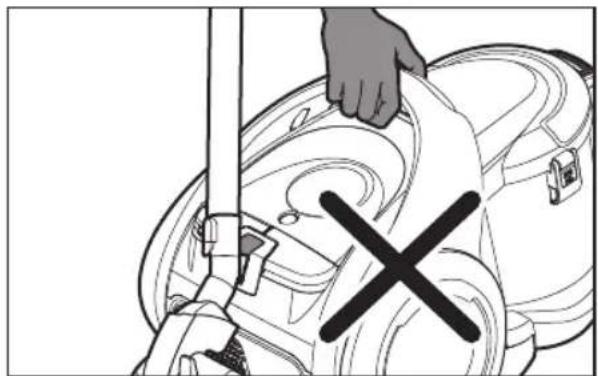
- Don't carry the vacuum cleaner by holding the hose. Use the handle on the vacuum cleaner set.
- Unplug the cleaner when not in use. Turn off the power switch before unplugging.
- Never set the vacuum cleaner in an upright position during operation or storage, it may cause a back flow of water.
- Do not overly stretch or bend the hose and tube system.
- Nozzles and tubes should not be held near the head during operation – injuries could result.
- Before cleaning, servicing, filling, emptying or in the event of malfunction, turn off all switches and unplug the mains plug.
SAFETY INSTRUCTIONS SPECIFICALLY FOR SPRAY EXTRACTION AND WET VACUUMING:
- Never point the cleaning jet at other people or animals, nor at electrical sockets or appliances.
- Persons with sensitive skin should avoid direct contact with the cleaning solution.
- If the cleaning solution contacts any mucous membranes (eyes, mouth, etc.), flush immediately with plenty of water.
- Do not use extension cords in wet areas.
- Empty all containers after wet/damp operation. Chemical substances (cleaners for carpets or hard floors) should be kept out of reach of children.
- Do not spray water on wood furniture and floor.
- Do not use any chemical substances for wet cleaning except the assigned detergent. Samsung carpet cleaner and floor cleaner are available at your local Samsung distributor.
- Store the vacuum cleaner at indoor temperature.
Your vacuum cleaner

Accessory
3-In-1 accessory
Parquet master (option)
Mini turbo (option)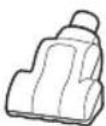
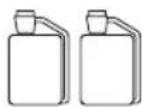
Detergent Tube set Towel
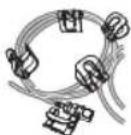
Wet Accessory
Built-in-Brush Sofa Brush (option)

Before using the vacuum cleaner
TRIO SYSTEM
Dry cleaning

Water-filter cleaning

- Fill the dust bin with fresh water for water-filter cleaning.
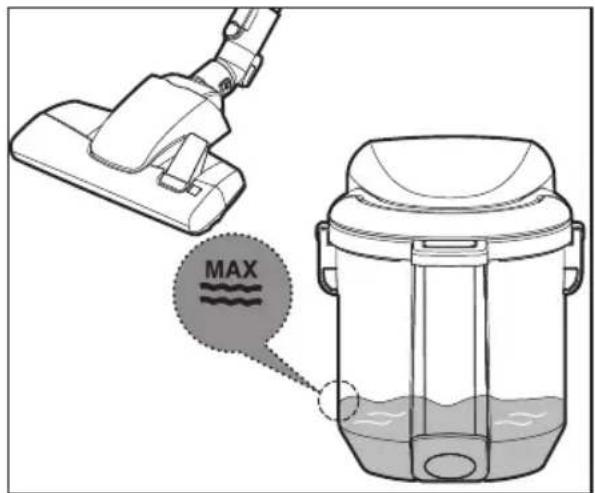
Wet cleaning

ASSEMBLY
Connecting the Hose

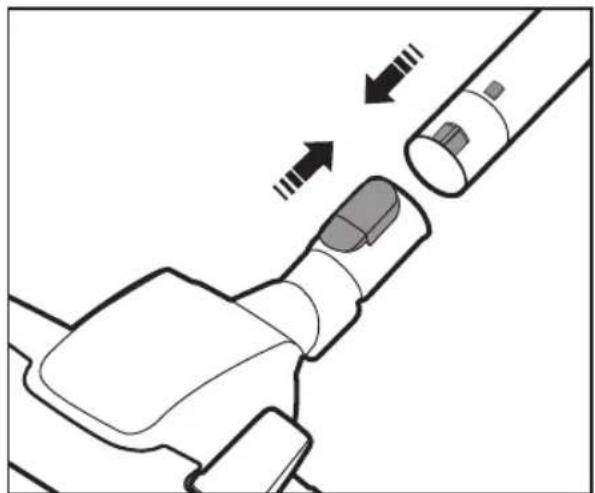
Connecting the handle and pipe

Connecting the brush

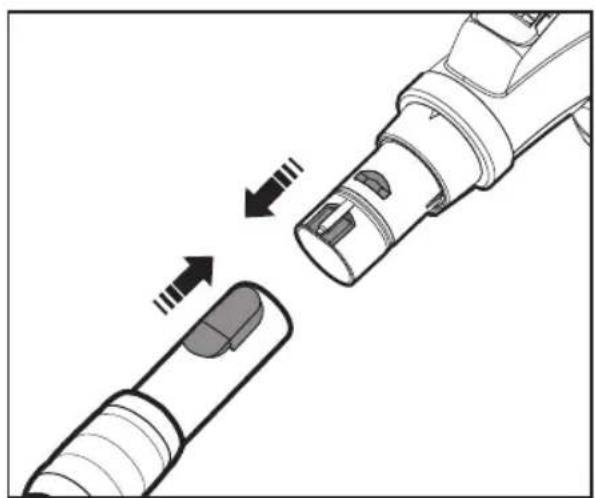
Connect the tube with the holder to the suction hose.
Assemble the connector with the handle.


• To separate the quick coupling, press the yellow button.


If the tube gets twisted, reassemble the tube holder.
When water cleaning is not used, disconnect the spray tube from the suction hose or pipe.

- For spraying water smoothly, clean the nozzle hole with a slender tool.

To use the wet sofa brush, connect this directly to the handle of the suction hose.


Never spray water on wood or leather materials.
ACCESSORY
Use the crevice tool

Use the dusting brush

Use the upholstery tool


- To use the 3-in-1 accessory, connect it directly to the handle of the suction hose.
Pipe
Adjust the length of the pipe by sliding the length control button located in the center of the telescopic pipe.

For storage, park the floor nozzle


Do not pick up the machine while the floor nozzle is parked.


Never set the cleaner in an upright position during operation or storage.

Operating the cleaner
POWER CORD

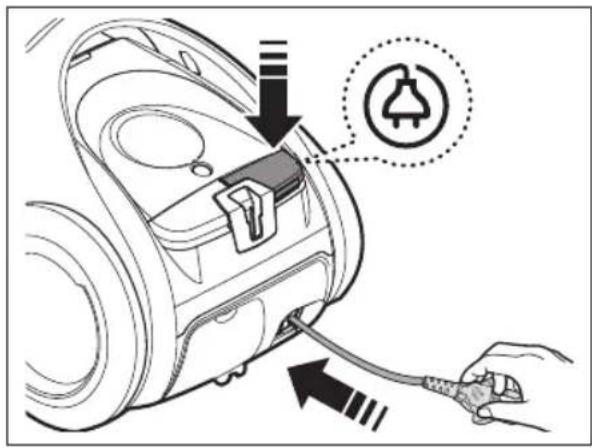

When removing the plug from the electrical outlet, grasp the plug, not the cord.
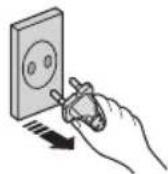

Never touch the electrical outlet or plug with wet hands.
ON/OFF

Hose (controlled by radio frequency signals)

ON/OFF

Select a lower power / higher power

Pump ON/OFF


- Don't cover the handle transmitter when you use a handle control.
- If no button is pressed for 30 minutes while cleaning, the power will shut off as a precaution. If this happens, press the ⏻ button on the main unit or replug the power cord in again.
- When you use the pump, the extraction will shut off in 30 seconds as a precaution. Press the pump button to stop the pump immediately. If you want to use this mode sequentially, press the pump button again.

- Never disassemble or recharge the batteries.
- Never heat up the batteries or throw them into a fire.
- Do not reverse (+), (-) poles.
- Dispose of the batteries property.
BATTERY TYPE : AAA Size ✗

Fill the empty water dispenser with fresh water (lukewarm, not exceeding 30 °C).

Add the SAMSUNG cleaning agent.
Dilution can be made easier with the attached measuring cup.
Dose: 12ml with 1.5l water.
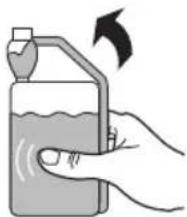

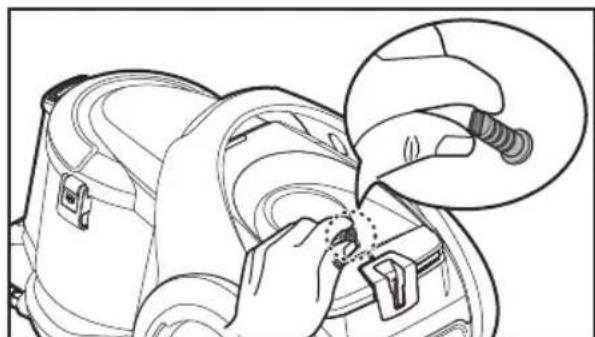
- For fresh water supply, clean the water filter regularly.


Remove the moisture inside the pipe and hose.

- For better suction of water and dust, clean the floor by pulling the built-in brush toward you.
• After water cleaning is completed, keep the operation for more than 10 seconds to remove the remaining moisture inside the pipe and hose.

Built-in Brush
To use the built-in brush on the carpet floor, pull out the side buttons.

Push the side buttons to use the built-in brush on the hard floor.

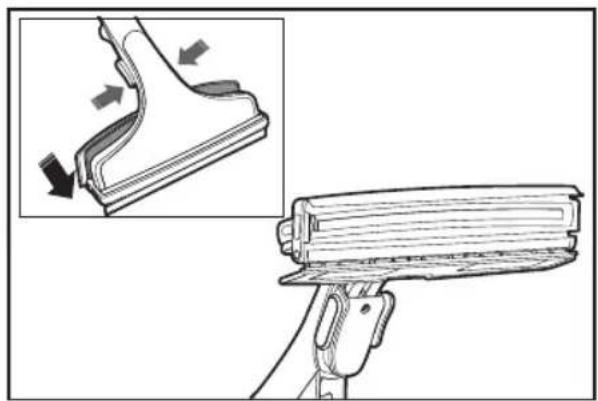
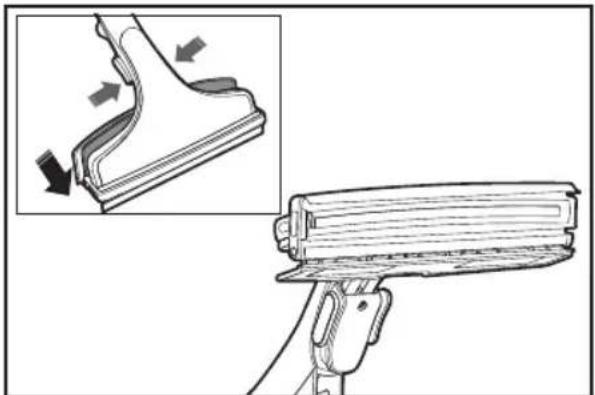
To clean the window, push the towel towards the bottom and wet the towel.

The towel can be fixed by the fixture.


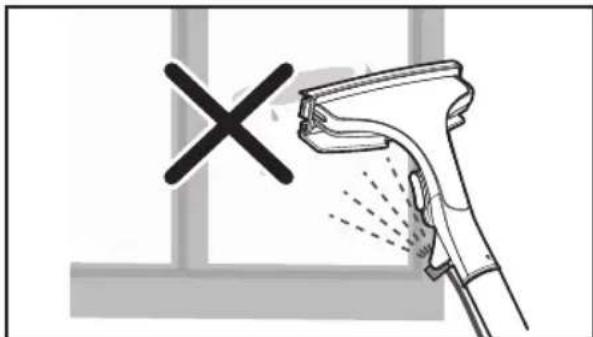
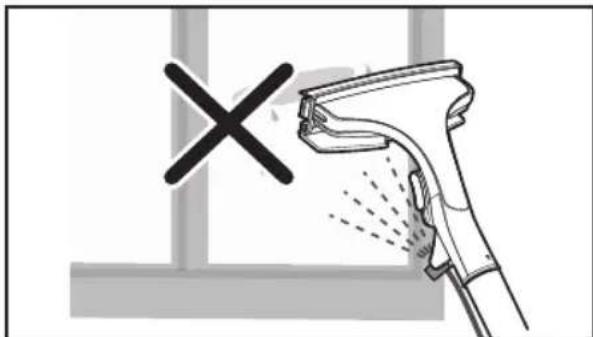
When cleaning the window, never spray the water directly. It may cause damage to wallpaper or paintings.

CLEANING THE DUST BIN AND GRILLE

Empty out the dust from the dust bin, if dust
reaches 'MAX'. Empty out the water from the dust bin, if dust reaches 'MAX'.

Fill the dust bin with fresh
water to 'MAX' for water-filter cleaning.
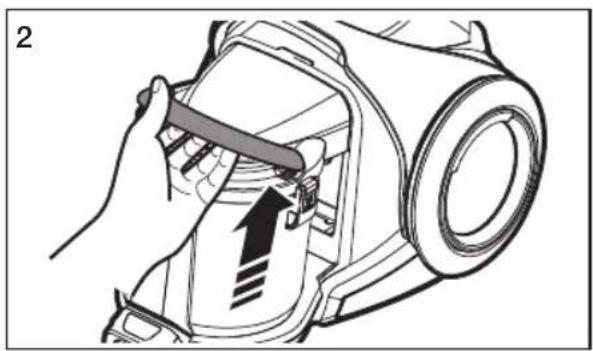
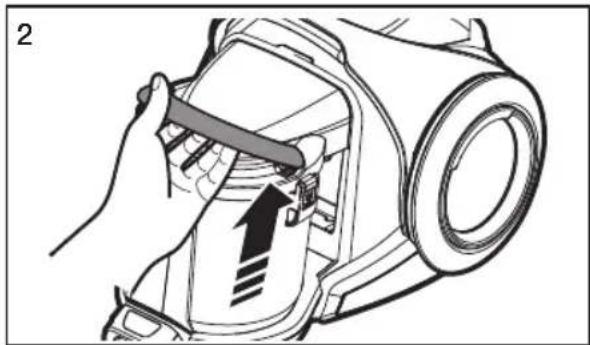
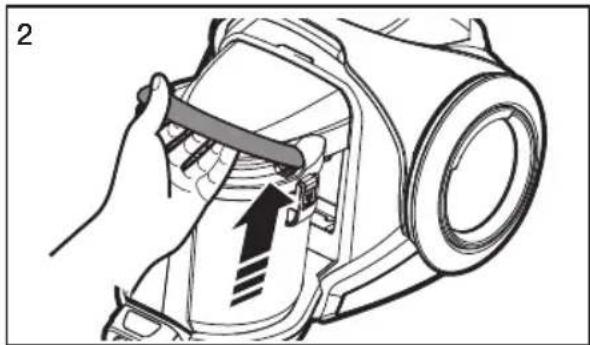
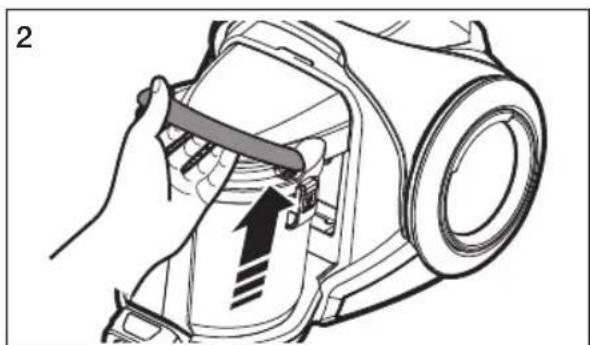
Take the dust bin out by lifting the handle.

Unless lots of water soaks through the dust filter, it will still function properly as it will evaporate naturally.
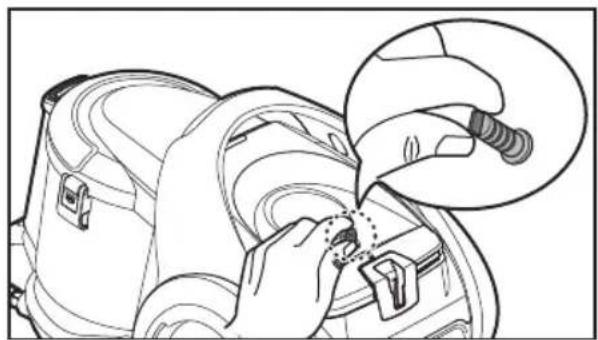
Pull each two holders and separate the dust bin cover.
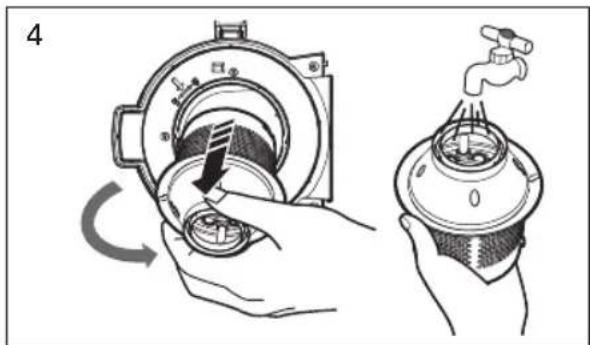
Turn the grille and take it out.

The float ball valve is in the grille. It may make a noise.


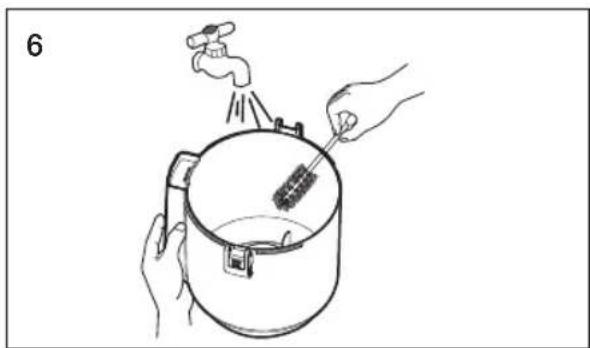
Separate and clean the dust bin duct.
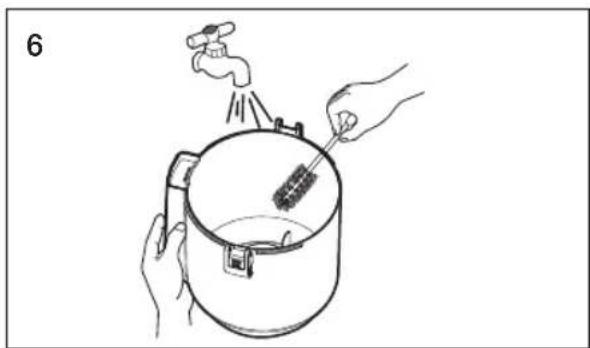
Clean the dust bin and body with water.
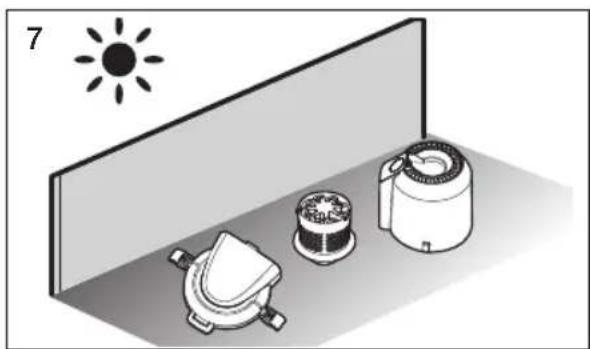
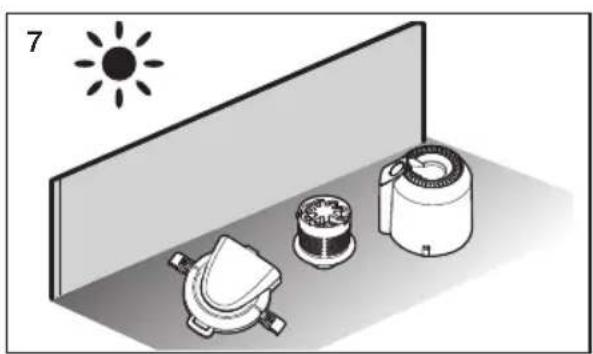
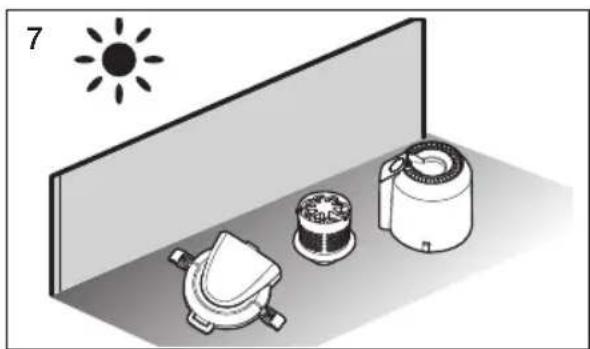
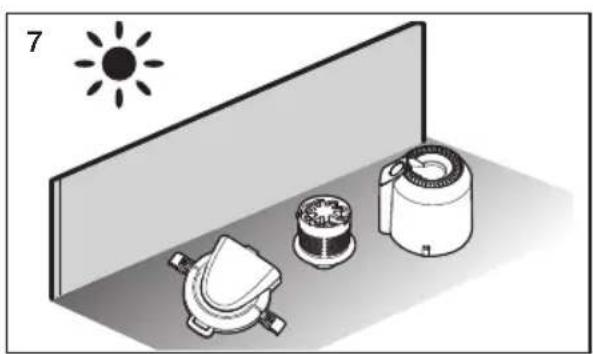
Leave the dust bin and body in the shade until completely dry.


Install the grille and turn it clockwise.

CLEANING THE DUST FILTER

- When suction is noticeably reduced continuously.
- When the sponge is heavily polluted.
Remove the fixed frame and open the dust pack cover.

Separate the sponge from the dust pack.

Wash the sponge and the filter inside the dust pack with water.
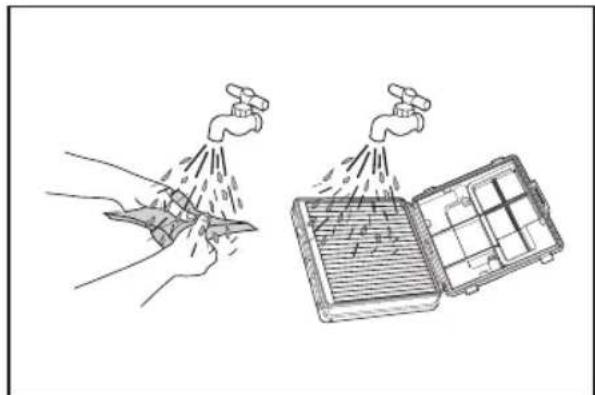

- Please replace the filter 1~2 times a year.
- Replacement filters are available at your local Samsung service center.
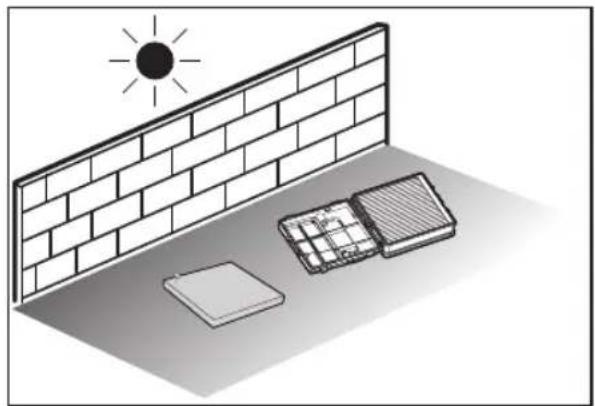
Let the sponge and filter dry in the shade for more than 12 hours.

Put the sponge into the dust pack carefully.
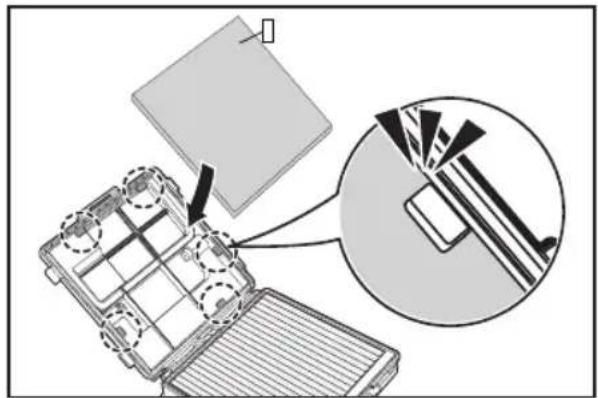
Close the dust pack cover and check the fixed frame locked property.

Pull out the outlet filter holder.

Pull out the outlet filter from set.

Shake the filter to clean.

Place the filter into the set and install holder.

Insert the outlet filter so that its black section faces outwards.
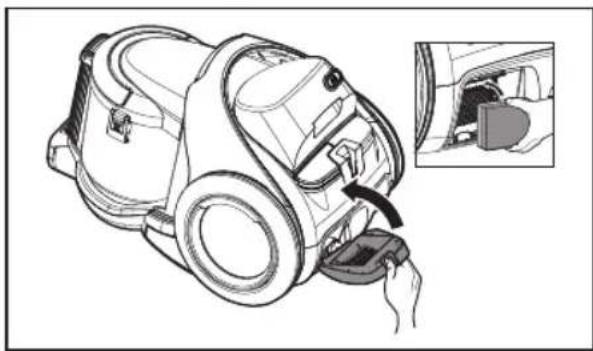

- When suction is noticeably reduced continuously or vacuum cleaner abnormally overheats, please clean the outlet filter.
- If cleaning does not resolve the problem, please replace the outlet filter.
MAINTAIN FLOOR TOOLS
2-Step brush
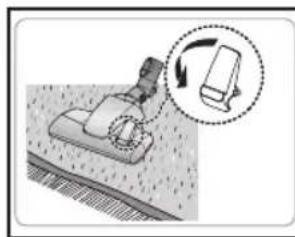
Adjust the inlet lever according to the floor surface.
Put the sponge into the dust pack carefully.
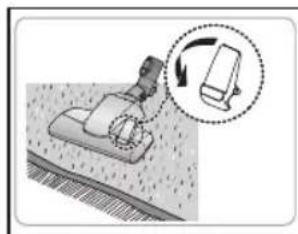
Carpet Cleaning

Floor Cleaning
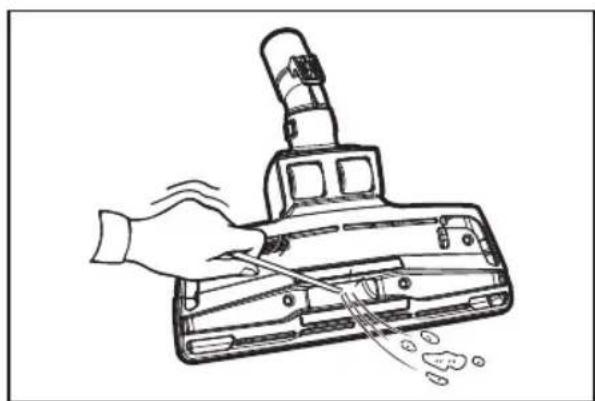
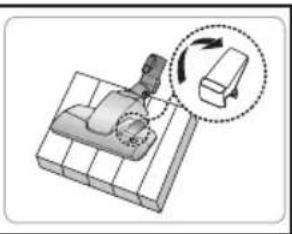
Remove waste matter completely if the inlet is blocked.

Parquet master brush (Optional)
Vacuum dust in a wide area at once.
Remove waste matter completely if the inlet is blocked.

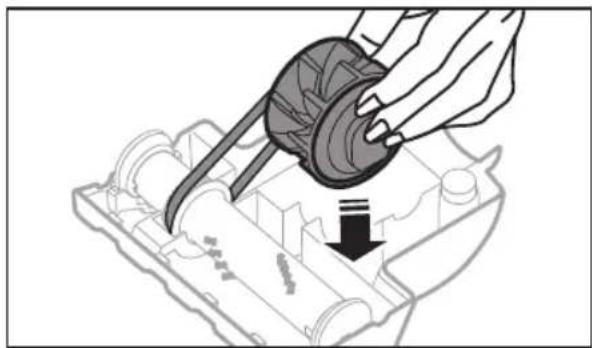
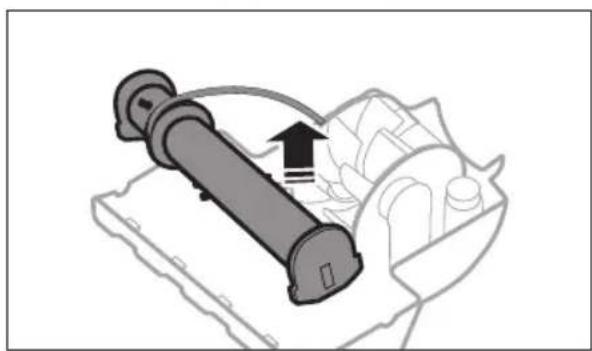
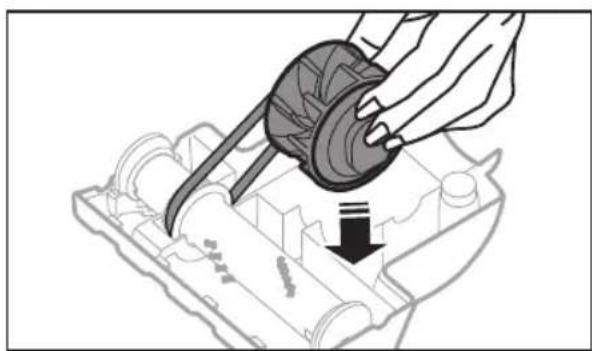
- To check belt

Check brushroll, when a clog is present or debris is visible.
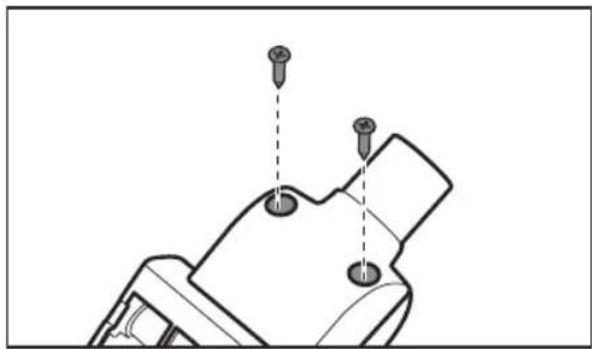


Inspect belt to ensure that it is in good condition.
If belt is broken or cracked, replace belt according to instructions.

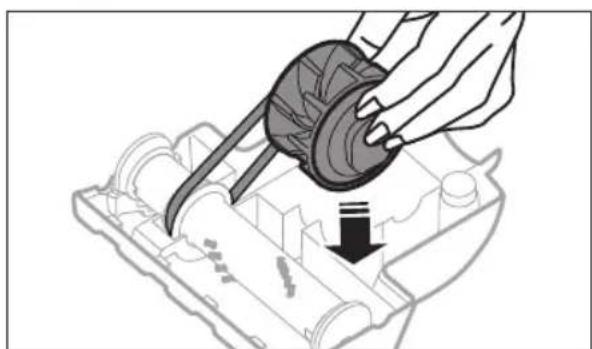
troubleshooting
| PROBLEM SOLUTION | |
| Motor downs and does not start. | Check cable, plug and socket.Leave to cool. |
| Suction force is gradually decreasing. | Check for blockage and remove. |
| Cord does not rewind fully. | Pull the cord out 2~3m and push down the cord rewind button. |
| Vacuum cleaner downs, does not pick up dirt | Check hose and replace if required. |
| Water leakage from the dust bin. | Check rubber packing inserted tightly at the upper part. |
| Excessive water drops from the inside of the body. | Some droplets on the inside body are to be expected.Please dry the aqua cyclone fully. |
| Dirty water comes out of the top of the main body | Check the fi lter is located properly.If the amount of water becomes excessive, check if water inside dust bin is over the max line and make the water level is under the max line. |
| Water comes out from the back cover. | Check the water level of the aqua cyclone.Please operate the vacuum cleaner without the aqua cyclone until water does not come out from the back cover. |
| Low or decreasing suction. | Please check fi Iters. If required clean it as illustrated in the instruction. If fi Iters are out of conditions, change them to new one. |
| Body overheating | Please check fi Iters. If required clean it as illustrated in the instruction. |
| Static electricity discharge | Please decrease power suction.Please ventilate room to increase humidity. |
| Unpleasant smell during vacuuming | Please note that there may be a slight smell during vacuuming when the cleaner is new (4-5 days). |
| Nozzle does not spray water well. | Clean the nozzle hole with a slender tool. |
| Water supply from the water tank is uneven. | Check and clean the water fi lter of the water supply hole. |
This vacuum cleaner is compliant with the following regulations:
- RTTE Directive (1999/5/EC)
- Electromagnetic Compatibility Directive: 2004/108/EEC
- Low Voltage Directive: 2006/95/EC
The official Declaration of Conformity may be found at http://www.samsung.com, go to Support
Please search Product Support and enter the model name.
SAMSUNG
Vacuum cleaner
Cleaning using a water filter

- Fill the dust container with fresh water up to the 'for cleaning using a water filter' mark.
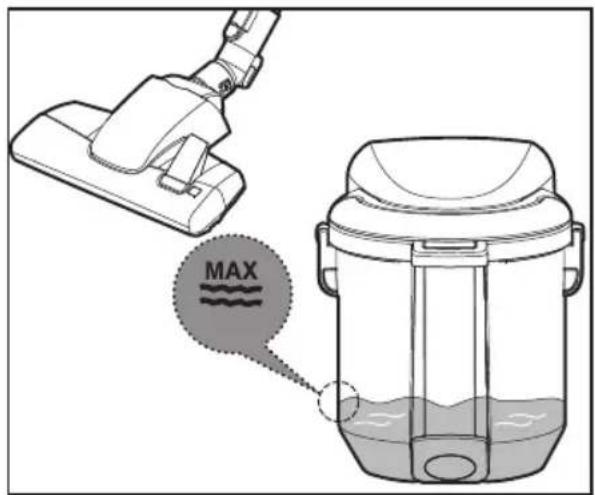
Wet cleaning
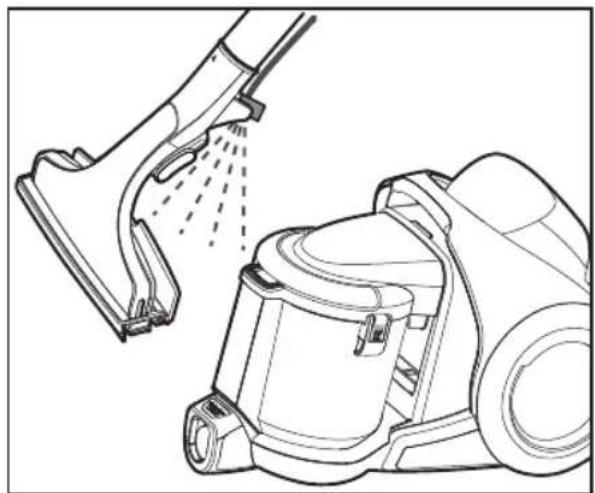
ASSEMBLY
Connecting the hose


Attach the hose to the holder.

Never spray water on wooden or leather materials.
ADDITIONAL EQUIPMENT
Use the crevice nozzle

Use the furniture nozzle


Hose (with radio signal control)

ON/OFF

Select lower power / higher power

Pump ON/OFF


- Do not cover the transmitter on the handle when using the handle control.
EXTRACTING SPRAYED LIQUID
Fill the empty water tank with fresh water (lukewarm, not exceeding 30 °C).


- Regularly clean the water filter to ensure fresh water flow.


Removing moisture from the tube and hose.

- To better vacuum water and dust from the floor, pull the built-in brush towards you.
- After removing the water, let the device run for at least another 10 seconds to remove residual moisture from the tube and hose.

Brush
To use the brush on a carpeted floor, pull out the side buttons.
Press the side buttons to use the brush on a hard floor.
To clean a window, press the cloth towards the lower end and dampen it.


CLEANING THE DUST COMPARTMENT AND GRILLE

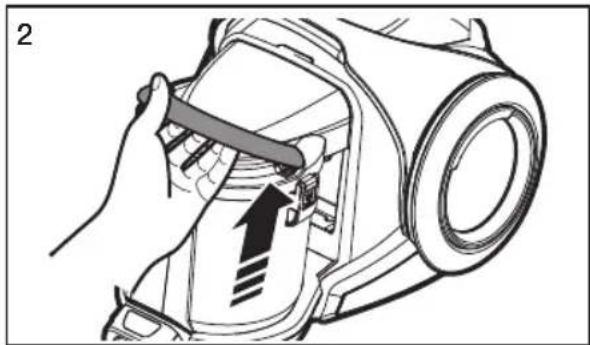
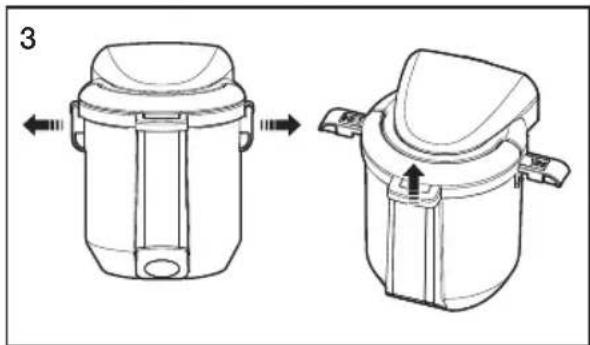


CLEANING THE DUST FILTER

- If the suction power continuously decreases.
- If the sponge is heavily soiled.
Remove the fixed frame and open the cover of the dust compartment.

Wash the sponge and filter from the dust compartment with water.


Carefully put the sponge back into the dust compartment.

Close the cover of the dust compartment and check that the fixed frame is properly secured.

CLEANING THE EXHAUST FILTER

Pull the exhaust filter out of the appliance.

Shake the filter to clean it.

Place the filter in the appliance and mount the holder.

Place the exhaust filter so that its black part faces outward.


- When suction power is continuously noticeably reduced or the vacuum cleaner heats up abnormally, clean the exhaust filter.
- If cleaning does not solve the problem, replace the exhaust filter.
FLOOR CLEANING TOOLS
2-step brush
Adjust the handle on the suction part according to the type of floor.
Carefully put the sponge back into the dust kit.

Carpet cleaning

Floor cleaning
Professional parquet brush (optional)
- Belt check

Check the brush roller when there is clogging or if debris is visible.
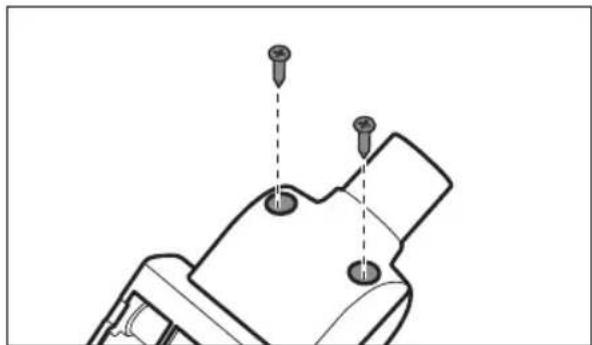


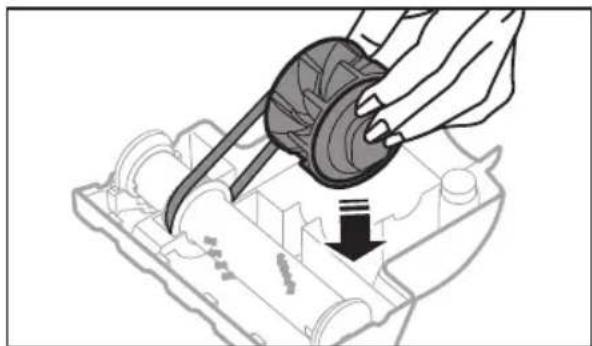
Troubleshooting
| PROBLEM REŠENJE | |
| Motor prestaje da radi i ne uključuje se. | Proverite kabl, utikač i utičnicu.Ostavite uređaj da se ohladi. |
| Snaga usisavanja se postepeno smanjuje. | Proverite da li postoji zapušenje i uklonite ga. |
| Kabl se ne uvlači u potpunosti. | Izvucite kabl 2~3 m pa pritisnite dugme za uvlačenje kabla. |
| Usisivač prestaje da radi i ne usisava prljavštinu | Proverite crevo i zamenite ga po potrebi. |
| Curenje vode iz posude za prašinu. | Proverite da li je gumena obloga ispravno postavljena sa gornje strane. |
| Iz kućišta usisivača izlazi veća količina vode. | Nekoliko kapi u unutrašnjosti kućišta predstavlja normalnu pojavu.Potpuno osušite dodatak aqua cyclone. |
| Sa gornje strane kućišta izbija prljava voda | Proverite da li je filter ispravno postavljen.Ako količina vode postane preterana, proverite da li je nivo vode u posudi za prašinu iznad maksimalnog. |
| Voda izlazi kroz zadnji poklopac. | Proverite nivo vode u dodatku aqua cyclone.Koristite usisivač bez dodatka aqua cyclone dok voda ne prestane da izlazi kroz zadnji poklopac. |
| Mala ili opadajuća snaga usisavanja. | Proverite filtere. Po potrebi ih očistite u skladu sa uputstvima. Ako su filteri istrošeni, zamenite ih novim. |
| Kućište se pregreva | Proverite filtere. Po potrebi ih očistite u skladu sa uputstvima. |
| Pražnjenje statičkog elektriciteta | Smanjite snagu usisavanja.Molimo provetrite prostoriju da bi povećali vlažnost. |
| Oseća se neprijatan miris tokom usisavanja | Kada tek kupite usisivač, tokom prvih nekoliko dana (4-5 dana) korišćenja može se blago osećati neprijatan miris. |
| Prskalica loše raspršuje vodu. | Očistite otvor prskalice tankom alatkom. |
| Dotok vode iz posude za vodu je neujednačen. | Proverite i očistite vodeni filter na otvoru dotoka vode. |
Cleaning the water filter

ASSEMBLY
Connecting the hose
Connecting the handle and tube
Connecting the brush


To use the brush for wet cleaning of upholstery, connect it directly to the handle of the suction hose.


Never spray water on wooden or leather materials.
ACCESSORIES
Using the crevice tool

Using the upholstery tool


- To use the 3-in-1 accessory, connect it directly to the handle of the suction hose.
Tube
When storing, set the floor nozzle to the rest position


Operating the vacuum cleaner
POWER CORD
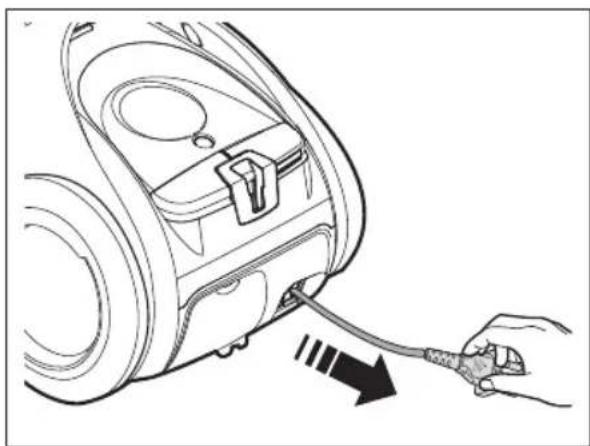


When unplugging from the power outlet, hold the plug, not the cord.


SPRAY EXTRACTION
Fill the empty water tank with fresh water (lukewarm, not exceeding 30 °C).

Add SAMSUNG cleaning solution. Use the provided measuring cup to make the solution easier.
Dose: 12 ml per 1.5 l of water
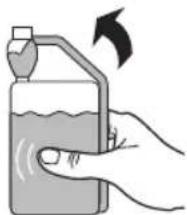

- Regularly clean the water filter to ensure a supply of fresh water.

Built-in brush
To use the built-in brush on carpet, pull out the side buttons.


Maintenance
CLEANING THE DUST CONTAINER AND FILTER

CLEANING THE DUST FILTER

Separate the sponge from the dust container.

Wash the sponge and filter in the dust container with water.


- Replace the filter 1~2 times a year.
- Replacement filters can be obtained from your local Samsung service center.
Leave the sponge and filter to dry for at least 12 hours in a shaded place.
Carefully insert the sponge into the dust container.

Close the dust container lid and check that the fixing frame is properly attached.

Pull out the exhaust filter holder.

Shake the filter to clean it.

Place the filter in the set and mount the holder.

Insert the exhaust filter with the black part facing upwards.


- If the suction power noticeably and continuously decreases or the vacuum cleaner overheats excessively, clean the exhaust filter.
- If cleaning does not solve the problem, replace the exhaust filter.
MAINTENANCE OF FLOOR NOZZLES
2-position brush
Adjust the suction opening lever according to the floor surface.
Carefully insert the sponge into the dust container.
Carpet cleaning

Floor cleaning
If the suction opening is clogged, remove accumulated debris.
Main parquet brush (option)
Vacuuming dust from a wide surface in one stroke.
If the suction opening is clogged, remove accumulated debris.


Troubleshooting
| PROBLEM RJEŠENJE | |
| Motor zapinje i ne pokreće se. | Provjerite kabel, utikač i utičnicu.Ostavite uređaj da se ohladi. |
| Usisna snaga postepeno se smanjuje. | Provjerite postoji li začepljenje i uklonite ga. |
| Kabel se ne moženamotati do kraja. | Izvucite 2-3 metra kabela i pritisnite gumb za namotavanjekabela. |
| Usisivač ne radi, skupljaprljavštinu | Provjerite crijevo i prema potrebi ga zamijenite. |
| Curenje vode iz posudeza prašinu. | Proverite je li gumena obloga ispravno postavljena s gornjestrane. |
| Iz kućišta usisivača izlaziveća količina vode. | Nekoliko kapi u kućištu uobičajeno je.U potpunosti osušite ciklon za vodu. |
| S gornje strane kućištaizlazi prljava voda | Proverite je li fi ltar ispravno postavljen.Ako količina vode postane pretjerana, proverite je li razinavode u posudi za prašinu iznad maksimalne. |
| Voda izlazi kroz stražnjipoklopac. | Proverite nivo vode u dodatku ciklonu za vodu.Koristite usisivač bez dodatka ciklona za vodu dok voda neprestane izlaziti kroz stražnji poklopac. |
| Usisavanje je slabo ilipostaje slabije. | Provjerite stanje fi ltara. Prema potrebi ih očistite u skladu silustracijama u uputama. Ako su fi ltri istrošeni, zamijenite ihnovima. |
| Pregrijavanje kućišta | Provjerite stanje fi ltara. Prema potrebi ih očistite u skladu silustracijama u uputama. |
| Pražnjenje statičkogelektriciteta | Smanjite usisnu snagu.Prozračite sobu kako biste povećali vlažnost. |
| Neugodan miris tijekomusisavanja | Kada tek kupite usisivač, tijekom prvih nekoliko dana(4-5 dana) uporabe može se blago osjećati neugodan miris. |
| Mlaznica ne prska dobrovodu. | Očistite otvor mlaznice tankim alatom. |
| Dovod vode iz spremnika za vodu jeneujednačen. | Provjerite i očistite vodeni fi ltar na otvoru za dovod vode. |


Built-in brush





CLEANING THE DUST FILTER


Cleaning carpets

Cleaning floors


ELECTRIC BROOM
07
BEFORE USING THE ELECTRIC BROOM
08
08 Trio system
09 Assembly
Master parquet (option)
Mini turbo (option)

ASSEMBLY
Connecting the hose

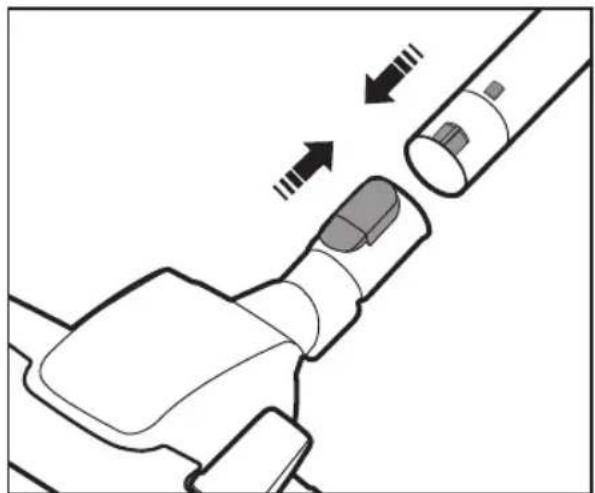

Use the upholstery tool


SPRAY CLEANING


Integrated brush


CLEAN THE DUST BIN AND GRILLE


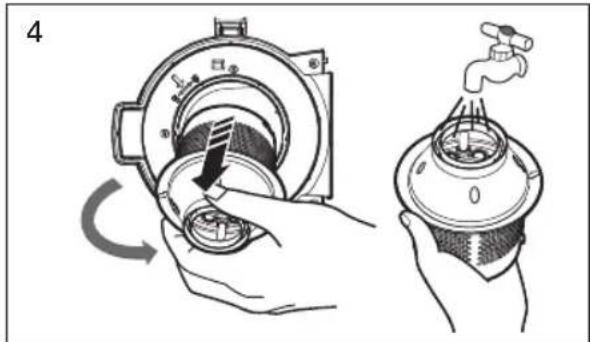


CLEANING THE DUST FILTER
Separate the sponge from the dust bag.


Carpet cleaning

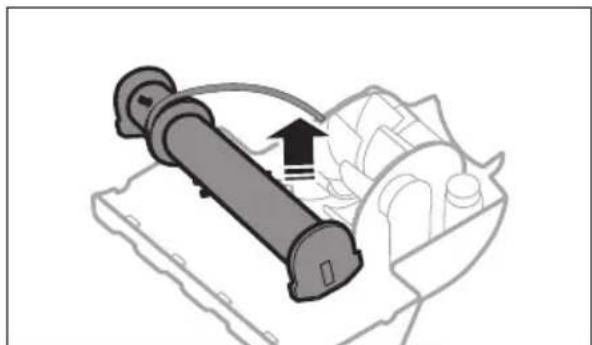


If you have any questions or comments relating to Samsung products, please contact the SAMSUNG customer care center.
| Country | Customer Care Center 📞 | Web Site |
| CROATIA 062 | SAMSUNG (062 726 7864) www.samsung.com/hr | |
| SERBIA 011 | 321 6899 www.samsung.com/rs | |
| MONTENEGRO 020 | 405 888 | |
| KOSOVO +381 | 0113216899 | |
| BOSNIA 05 | 133 1999 | |
| MACEDONIA 023 | 207 777 | |
| ALBANIA 42 | 27 5755 | |
| BULGARIA 07001 | 33 11 www.samsung.com/bg | |
| ROMANIA | 08010 SAMSUNG (08010 726 7864) only from landline, local network Romtelecom - local tariff / 021 206 01 10 for landline and mobile, normal tariff | www.samsung.com/ro |
| SLOVENIA 080 | MYSAMSUNG (080 69 726 7864) www.samsung.si |
Vacuum cleaner
User manual
ASSEMBLY


SPRAY EXTRACTION

Built-in brush


CLEANING THE DUST CONTAINER AND THE SIEVE




CLEANING THE DUST FILTER




Troubleshooting




SPRAY EXTRACTION


Built-in brush





CLEANING THE DUST FILTER


ASSEMBLY


SPRAYING



Maintenance






PERMITTED


Built-in brush


CLEAN THE DUST COLLECTOR AND THE SIEVE AS WELL




Carpet cleaning

Floor cleaning


OTHER SYMBOLS USED
ASSEMBLY
Connecting the hose

Connecting the brush


Operating the vacuum cleaner
POWER CORD


EXTRACTION CLEANING


Built-in brush


CLEANING THE DIRT CONTAINER AND GRILLE


CLEANING THE DUST FILTER


Vacuuming carpets

Vacuuming floors
- Checking the diagram


Troubleshooting
ASSEMBLY
Hose connection
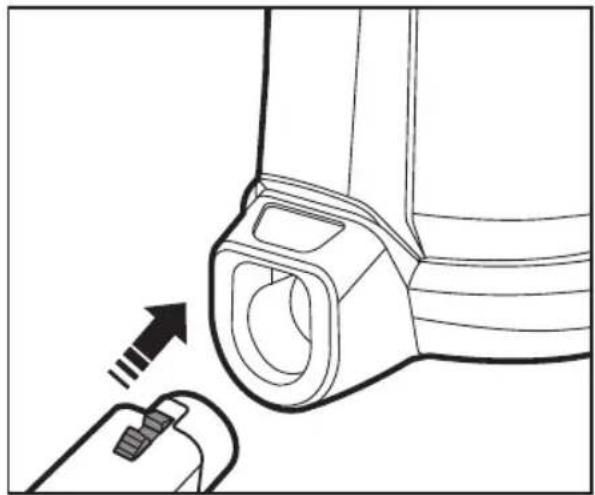
Brush connection

Connect the tube with the holder to the suction hose.
Mount the connector on the handle.


Never spray water on wooden or leather materials.
ACCESSORIES

To store the device, insert the floor nozzle into the holder.


Vacuum operation
POWER CORD


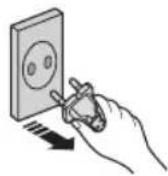
When unplugging from the electrical outlet, do not pull on the cord, but grasp the plug directly.

DEEP CLEANING WITH SPRAYING
Fill the empty water dispenser with clean water (lukewarm, up to 30 °C).

Add SAMSUNG cleaning detergent. To facilitate dilution, the included measuring cup can be used. Dosage: 12 ml per 1.5 ℓ of water
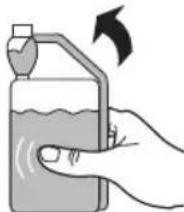


Removal of moisture from the tube and hose.

Built-in brush


CLEANING THE DUST CONTAINER AND GRILLE


CLEANING THE DUST FILTER

Separate the sponge from the dust collection unit.

Wash the sponge and filter in the dust collection unit with water.


Cleaning the carpet

Cleaning the floor
Parquet Master brush (optional)
- Checking the belt

Check whether the brush roller has picked up any lint or other visible dirt.


Check that the belt is in good condition.

Troubleshooting
ASSEMBLY
Connecting the hose


WATER SPRAYING DURING CLEANING


Integrated brush


CLEANING THE DUST CONTAINER AND CYCLONE FILTER

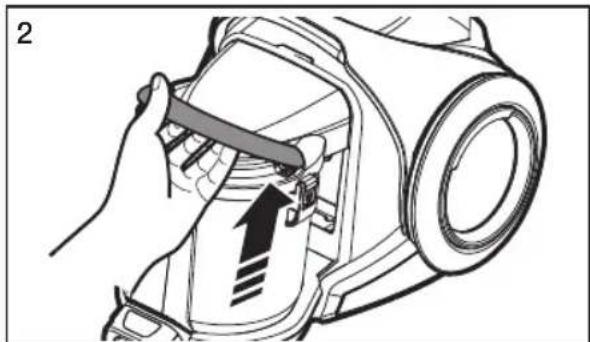


CLEANING THE DUST FILTER


Cleaning carpets

Cleaning floors
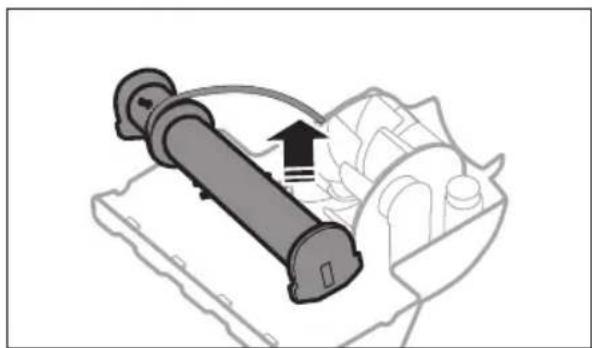


ASSEMBLY
Connecting the hose
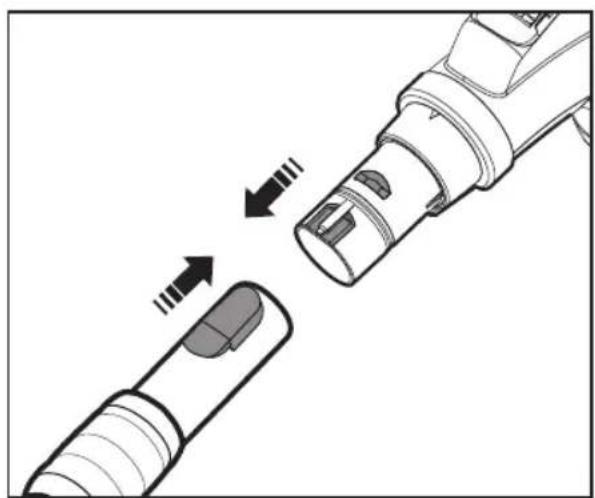

Connect the hose with the handle to the suction hose.
Connect the connector to the handle.


- To use the 3-in-1 accessory, connect it directly to the handle of the suction hose.
Hose
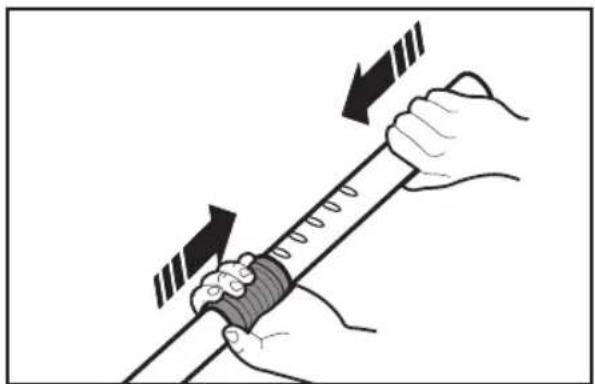
Adjust the hose length by pressing the length control button in the middle of the telescopic hose.
For storage, insert the suction accessory into the holder

Using the vacuum cleaner
POWER CORD


SPRAY EXTRACTION


Removing moisture from the inside of rigid and flexible hoses.

Built-in brush


CLEANING THE DUST CONTAINER AND MESH

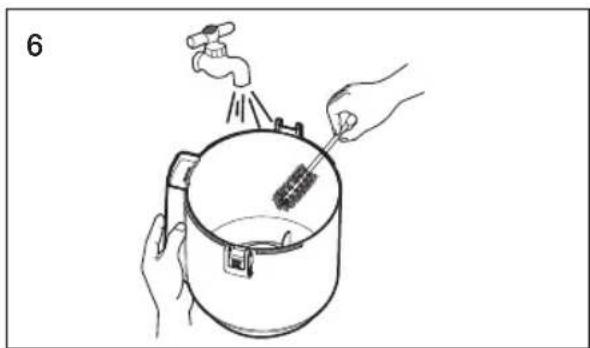
Remove dust from the dust container if the dust reaches the MAX mark. Remove water from the dust container if the dust reaches the MAX mark.


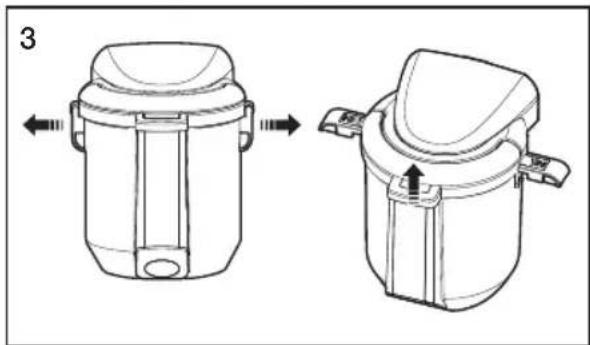
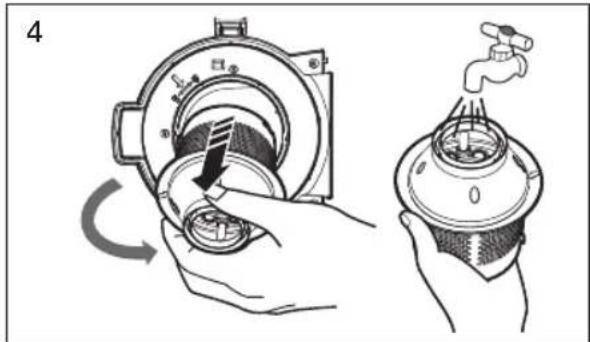
Remove and clean the dust container channel.


Install the mesh and turn it clockwise.

CLEANING THE DUST FILTER

Rinse the sponge and filter in the dust filter assembly with water.


• Replace the filter once or twice a year. - Replacement filters are available at your local Samsung service center.
Carefully place the sponge back into the dust filter assembly.

Close the dust filter assembly cover and make sure the attached frame snaps into place properly.

CLEANING THE OUTLET FILTER

Shake the filter to clean it.

Insert the filter back and install the holder.


Cleaning carpets

Floor cleaning
Parquet Master brush (optional)
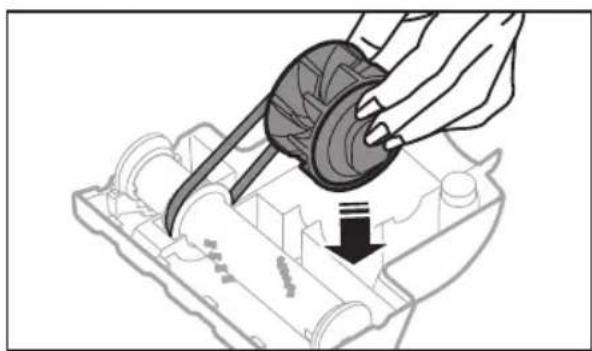
- Belt inspection


Troubleshooting
- VACUUM CLEANER USER MANUAL
- YOUR VACUUM CLEANER
- BEFORE USING THE VACUUM CLEANER
- OPERATING CLEANER
- MAINTENANCE
- TROUBLESHOOTING
- SAFETY INFORMATION
- CAUTION/WARNING SYMBOLS USED
- OTHER SYMBOLS USED
- GENERAL
- SAFETY INSTRUCTIONS SPECIFICALLY FOR SPRAY EXTRACTION AND WET VACUUMING
- ACCESSORY
- TRIO SYSTEM
- WATER-FILTER CLEANING
- ASSEMBLY
- PIPE
- OPERATING THE CLEANER
- POWER CORD
- ON/OFF
- HOSE (CONTROLLED BY RADIO FREQUENCY SIGNALS)
- BUILT-IN BRUSH
- CLEANING THE DUST BIN AND GRILLE
- CLEANING THE DUST FILTER
- MAINTAIN FLOOR TOOLS
- STEP BRUSH
- PARQUET MASTER BRUSH (OPTIONAL)
- TO CHECK BELT
- VACUUM CLEANER
- CLEANING USING A WATER FILTER
- ADDITIONAL EQUIPMENT
- HOSE (WITH RADIO SIGNAL CONTROL)
- EXTRACTING SPRAYED LIQUID
- BRUSH
- CLEANING THE DUST COMPARTMENT AND GRILLE
- CLEANING THE EXHAUST FILTER
- FLOOR CLEANING TOOLS
- PROFESSIONAL PARQUET BRUSH (OPTIONAL)
- BELT CHECK
- CLEANING THE WATER FILTER
- ACCESSORIES
- TUBE
- OPERATING THE VACUUM CLEANER
- SPRAY EXTRACTION
- CLEANING THE DUST CONTAINER AND FILTER
- MAINTENANCE OF FLOOR NOZZLES
- POSITION BRUSH
- MAIN PARQUET BRUSH (OPTION)
- ELECTRIC BROOM
- BEFORE USING THE ELECTRIC BROOM
- SPRAY CLEANING
- INTEGRATED BRUSH
- CLEAN THE DUST BIN AND GRILLE
- USER MANUAL
- CLEANING THE DUST CONTAINER AND THE SIEVE
- SPRAYING
- PERMITTED
- CLEAN THE DUST COLLECTOR AND THE SIEVE AS WELL
- EXTRACTION CLEANING
- CLEANING THE DIRT CONTAINER AND GRILLE
- CHECKING THE DIAGRAM
- VACUUM OPERATION
- DEEP CLEANING WITH SPRAYING
- CLEANING THE DUST CONTAINER AND GRILLE
- CHECKING THE BELT
- WATER SPRAYING DURING CLEANING
- CLEANING THE DUST CONTAINER AND CYCLONE FILTER
- HOSE
- USING THE VACUUM CLEANER
- CLEANING THE DUST CONTAINER AND MESH
- CLEANING THE OUTLET FILTER
- BELT INSPECTION
Brand : SAMSUNG
Model : SW17H9090H
Category : Vacuum Cleaner