SQUEEZEBOX RADIO - Digital Radio LOGITECH - Free user manual and instructions
Find the device manual for free SQUEEZEBOX RADIO LOGITECH in PDF.



| Product Type | Wireless Internet Radio |
| Brand | Logitech |
| Model | Squeezebox Radio |
| Power Supply | Power adapter with detachable plug, polarized |
| Connectivity | Wi-Fi 802.11 b/g, Ethernet 10/100 |
| Main Features | Internet radio, music services, playback from computer (via Squeezebox software), alarm, presets, headphone jack, 3.5 mm line input |
| Display | Color screen (type not specified) |
| Battery | Optional, rechargeable lithium-ion (not included) |
| Box Contents | Radio, quick start guide, 3.5 mm audio cable, power adapter |
| Care and Cleaning | Unplug before cleaning; use a dry, soft cloth; do not expose to water or liquid products |
| Safety | Do not use near water; leave 15 cm clearance above for ventilation; avoid heat sources; do not step on the cord; unplug during storms |
| Spare Parts and Repairability | No user-serviceable parts; contact qualified technician for repairs |
| Warranty | 2 years (material and workmanship) |
| Compliance | CE, IEC/EN/UL 60950-1, directive 1999/5/EC |
| Operating Conditions | 0 to 40 °C, 10-90% humidity (non-condensing) |
Frequently Asked Questions - SQUEEZEBOX RADIO LOGITECH
User questions about SQUEEZEBOX RADIO LOGITECH
0 question about this device. Answer the ones you know or ask your own.
Ask a new question about this device
Download the instructions for your Digital Radio in PDF format for free! Find your manual SQUEEZEBOX RADIO - LOGITECH and take your electronic device back in hand. On this page are published all the documents necessary for the use of your device. SQUEEZEBOX RADIO by LOGITECH.
USER MANUAL SQUEEZEBOX RADIO LOGITECH
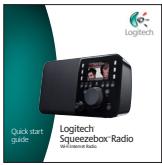
Thank you for purchasing a Logitech® Squeezebox™ Radio Wi-Fi Internet radio. We hope you have as much fun using it as we did creating it for you.
This guide covers basic hardware setup. Once hardware setup is complete, the Squeezebox Radio screens will guide you through the rest of the setup process. The Troubleshooting section at the end of the guide covers issues that you might encounter during the setup process.
For full documentation of Squeezebox Radio functionality, a feature guide is available at www.mysqueezebox.com.
Package contents
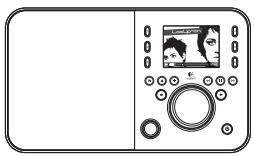
Squeezebox Radio
Quick start guide
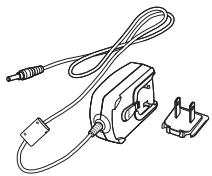
Power supply with removable plug adapter
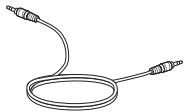
3.5mm audio cord Connects your iPod or another MP3 player
Getting help
For more information about your Squeezebox, go to www.mysqueezebox.com.
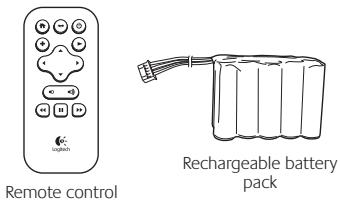
Optional Accessory Pack (www.logitech.com)
What you need to get started
To start using your Squeezebox Radio, you will need:
- A broadband Internet connection (for example, DSL or cable modem)
- The name and password of your wireless network, or a wired Ethernet connection
Find a good location
The compact size of the Squeezebox Radio makes it very easy to enjoy music anywhere in your home or office. Just make sure the location has Wi-Fi coverage or an Ethernet connection and a power outlet (not required if you have the optional rechargeable battery pack).
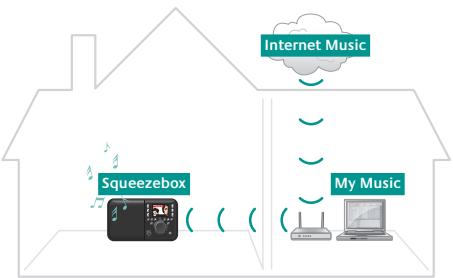
A typical Squeezebox Radio setup
| If you will be adding Squeezebox Radio to a wireless network, make sure that your Squeezebox is within range of your wireless network. | |
| <···> | If you will be setting up a wired connection, locate Squeezebox Radio within reach of an Ethernet jack. |
- Ethernet cable not included.
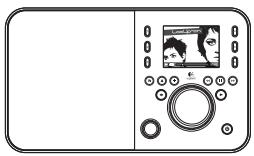
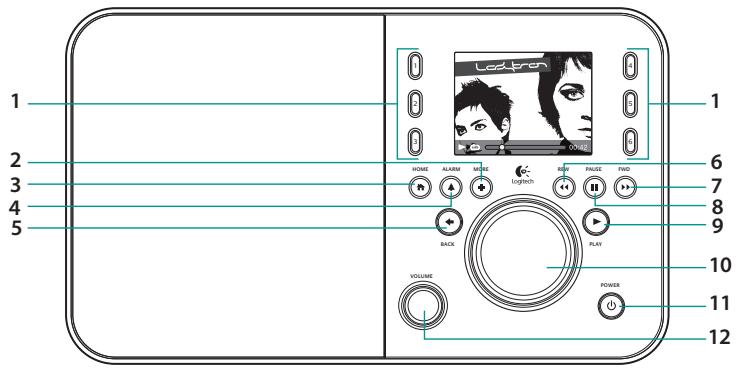
Squeezebox Radio at a glance
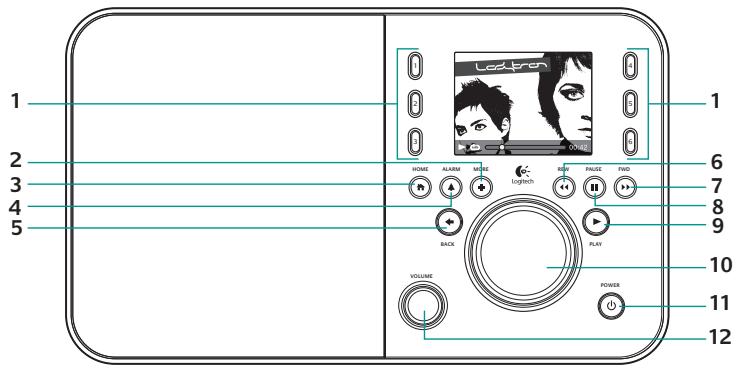
- Preset buttons
- More
- Home
-
Alarm
-
Back
- Rewind
- Forward
-
Pause/Stop
-
Play
- Pushbutton knob
- Power
- Volume Push to Mute
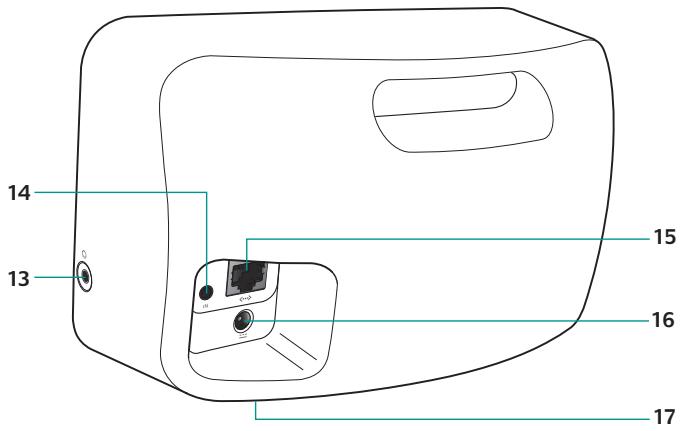
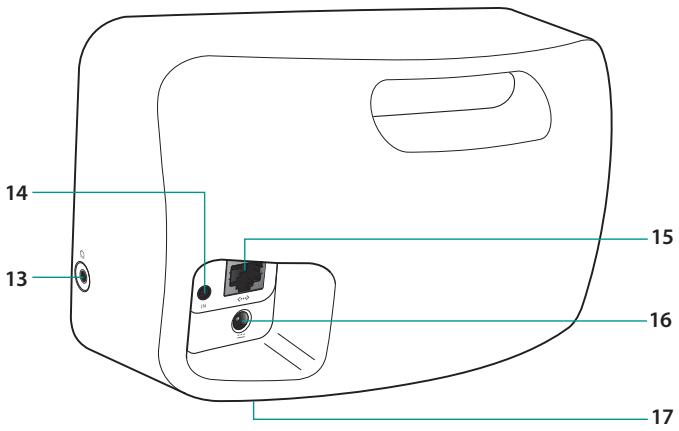
- Headphones
- 3.5mm line-in
-
Ethernet
-
Power connection
- Rechargeable battery compartment
Connect Squeezebox Radio
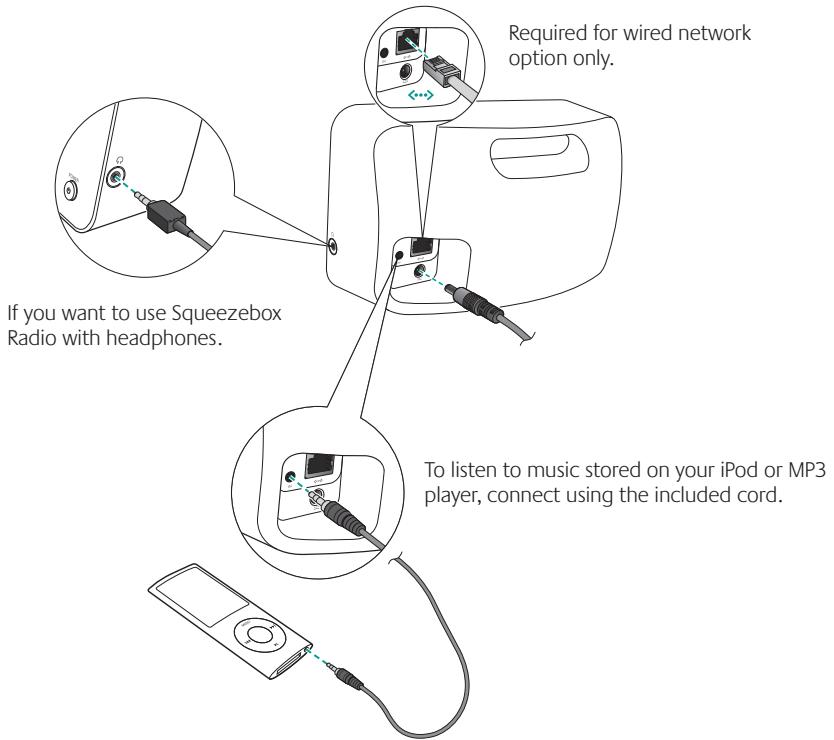
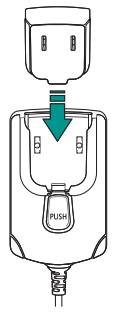
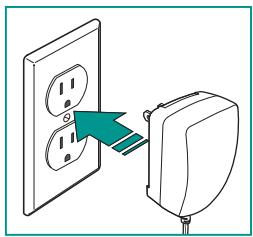
Plug in Squeezebox
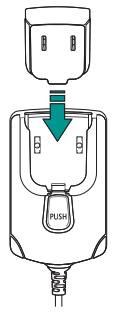
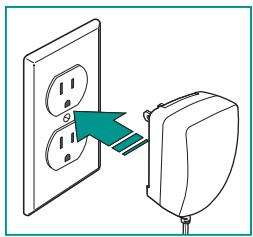
After plugging in your Squeezebox Radio, it will automatically turn on after a few seconds.

Squeezebox Radio startup screen
Go to on-screen setup
To complete the setup process, make sure your router is on, and it has an internet connection. Follow the simple on-screen steps using the push-button knob.
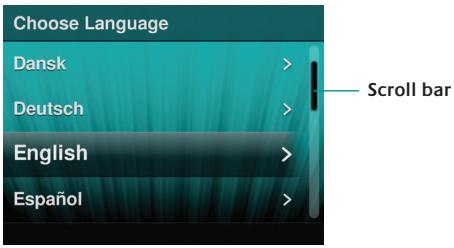
Begin the on-screen setup process
Using your Squeezebox Radio
Playing music from the internet
As a Squeezebox Radio user, you can browse and add music services and other add-on applications directly from the Squeezebox Radio, or by visiting www.mysqueezebox.com.
Playing music from your computer
After you've completed the setup process, go to www.mysqueezebox.com and download Squeezebox software. Squeezebox Radio can then play music that you have stored on your computer. Files that are in iTunes or another music library are scanned and indexed. After that, you simply select your computer name from the My Music screen on your Squeezebox, navigate to the tune you want, and play.
To learn more, download the Squeezebox Radio Feature Guide at www.mysqueezebox.com.
Troubleshooting
Reboot your Squeezebox Radio
To reboot your Squeezebox Radio, press and hold the Power button until the unit turns off; then touch the Power button to restore power.
Factory reset your Squeezebox Radio
To factory reset your Squeezebox Radio, press and hold the Power button until the unit turns off; then touch the Power button to restore power. Immediately press and hold the More button until a "Factory Reset" message appears on the screen.
Alternatively, go to Home > Settings > Advanced > Factory Reset > Continue. The Logitech logo will come up, followed by a Factory Reset message.
I don't have my wireless network name and password
If you don't know your network name and password, and you have a wireless network:
- Check to see if you have them written down somewhere.
-
Ask someone else in your home if they know them.
-
Contact the person who set up your home network.
- Check your router manual.
- Contact your router manufacturer for assistance.
As part of the setup process, you need the name and password that were assigned to your wireless network when it was installed. A network name is sometimes referred to as anSSID, and a password is sometimes referred to as a wireless key, or security key.
Can't find my network
If your network does not appear in the list of wireless networks:
- Make sure Squeezebox Radio is within range of your wireless network.
- Go to your computer to make sure your network is working.
- If your router is configured to not broadcast your network name (SSID), select Other Networks at the bottom of the list of networks, and enter yours.
- Unplug your router, wait 30 seconds, and plug it back in.
- Refer to your router documentation or contact the manufacturer for assistance.
Password not accepted
If your password was not accepted:
- Try entering it again. There could be a typo.
- Convert your password from ASCII to hexadecimal. If your network password is not accepted, it could be in ASCII format. (This only applies to WEP passwords that are either 5 or 13 characters in length.)
For more information, see our Knowledge Base at www.mysqueezebox.com/support.
Network connection not made
If Squeezebox Radio does not connect to your home network:
- Confirm that you have selected the correct network name.
-
Try selecting your network name again, or rename your network. If yours has a common name such as linksys, there could be multiple networks of that name in your neighborhood. One way to avoid this issue is to rename your wireless network to a more unique name.
-
Turn off MAC filtering. If your router is using MAC filtering, turn it off or add the MAC address on the bottom of your Squeezebox to the router's table of allowed devices.
- Unplug your router, wait 30 seconds, plug it back in and try the setup process again.
-
Contact your router vendor for assistance.
-
Squeezebox Radio normally relies on a DHCP server to provide an IP address during setup. If you prefer to use a static IP address, you can do it one of two ways:
a. Set up and connect your Squeezebox as normal using DHCP. After setup is complete, go to the Settings screen and change the IP address by entering it manually.
b. Enter a static IP address. If your router is not set to use DHCP to assign IP addresses, your Squeezebox will display an Address Problem screen. From there, you can enter your IP address, subnet mask, gateway address, and DNS server address. For help with this, contact the person who set up your wireless network, or your router vendor.* For more information on how to set a static IP address, go to: www.mysqueezebox.com/support.
Music is not playing
If music is not playing:
- Check the volume on your Squeezebox Radio.
- Add exceptions to your firewall software. If you are listening to music from your computer (using Squeezebox software), make sure there are no firewal warnings on your screen and make sure your firewal has the proper exceptions. Required exceptions include: port 3483 UDP, port 3483 TCP, and port 9000 TCP.
- As a test, try playing a different song or radio station.
- If Squeezebox Radio says "Stopped," check your Internet connection.
- You may be trying to play DRM (Digital Rights Management) encoded iTunes files. You can upgrade your iTunes library to the DRM-free format. Please visit www.apple.com iTunes for more information.
I can't find my music collection in My Music
If you want to play the music collection that is stored on your computer but your computer name does not appear in My Music:
- Make sure that you've installed Squeezebox software from www.mysqueezebox.com.
-
Make sure Squeezebox software is running.
-
Windows - Hover your mouse pointer over the software icon in your task bar. If you don't see "Squeezebox software Running," right-click on the icon and select Start Squeezebox software.
-
Macintosh - Click on System Preferences, and click on Squeezebox software. If the button displays Start Server, click it. If the button is labeled Stop Server, the application is already running.
-
If you are using a third-party firewall such as Trend Micro, Norton, McAfee or OneCare, please see our Knowledge Base at www.mysqueezebox.com/support and search for articles on your specific firewall. If your firewall is not covered by our Knowledge Base, add exceptions for three ports as follows: port 3483 UDP, port 3483 TCP, and port 9000 TCP.For information on how to make this change in your firewall software, search the internet for "exceptions, ports,.
," or contact technical support for your firewall software. - If your network uses multiple routers or Voice over IP (VoIP) or you're on a corporate network that has a complex or segmented network configuration, ensure that your computer and Squeezebox Radio are on the same network segment. This allows Squeezebox Radio to automatically connect to Squeezebox software on your computer.
Safety information

CAUTION ELECTRIC SHOCK HAZARD
- Do not use this apparatus near water.
- Do not block any ventilation openings. Install in accordance with the manufacturer's instructions.
- Do not push objects into apparatus vents or slots because fire or electric shock hazards could result.
- Maintain a minimum distance of at least 6 inches around apparatus for sufficient ventilation.
- Ventilation should not be impeded by covering the ventilation openings with items, such as newspapers, table clothes, curtains, etc.
- No naked (open) flame sources, such as lighted candles, should be placed on or near the apparatus.
- Place apparatus in a stable location so it will not fall causing product damage or bodily harm.
- Do not install near any heat sources such as radiators, heat registers, stoves, or other apparatus (including amplifiers) that produce heat.
-
Do not defeat the safety purpose of the polarized plug. A polarized plug has two blades with one wider than the other. The wide blade is provided for your safety. If the provided plug does not fit into your outlet, consult an electrician for replacement of the obsolete outlet.
-
Protect the power cord from being walked on or pinched particularly at plugs, convenience receptacles, and the point where they exit from the apparatus.
- Only use attachments/accessories specified by the manufacturer.
- Unplug this apparatus during lightning storms or when unused for long periods of time.
- Refer all servicing to qualified service personnel. Servicing is required when the apparatus has been damaged in any way, such as power-supply cord or plug is damaged, liquid has been spilled or objects have fallen into the apparatus, the apparatus has been exposed to rain or moisture, does not operate normally, or has been dropped.
- The apparatus shall be disconnected from the mains by unplugging the power cord of the apparatus from the AC mains receptacle.
- The socket-outlet shall be installed near the equipment and shall be easily accessible.
WARNING:
TO REDUCE THE RISK OF FIRE OR ELECTRIC SHOCK, DO NOT EXPOSE THIS APPARATUS TO RAIN OR MOISTURE.
Battery Warning
Caution: risk of explosion and personal injury if batteries are replaced by incorrect type. Do not open, mutilate, or expose to conducting materials (metal), moisture, liquid, fire, or heat (above 54^ or 130^ ). Doing so may cause batteries to leak or explode, resulting in personal injury. Dispense of spent, leaking, or damaged batteries according to manufacturer instructions and local laws. Do not use or charge batteries (lithium-ion rechargeables) if leaking, discolored, or deformed. Do not mix battery types. Do not charge alkaline batteries. Do not leave rechargeable batteries discharged or unused for extended periods. Battery life varies with usage. When replacing, remove all spent batteries, and do not mix old batteries with new. When device is not in use for extended periods, remove batteries to avoid leakage and store away from children in a cool, dry place at room temperature.
Power Supply Warning
Caution electric shock hazard! Warning: to reduce risk of electric shock, do not expose power supply to rain, moisture, liquid, or heat sources (e.g., radiators, heat registers, stoves, amplifiers, etc.) For indoor use only. Do not use any other power supply with product. Do not use a damaged power supply or attempt to repair one. Inspect power supply regularly for cable, plug, or casing damage.
Operating and Storage Conditions
Operating Conditions: 0.0 +40.0 (degree C), 10 - 90% Non-condensing
Non-Operating Conditions: 40.0 +70.0 (degree C), 10 - 95% (Excluding rain)
Logitech Compliance
Your product has been tested to IEC, EN, and UL 60950-1 standards. It should only be used with other certified product
For additional compliance information, go to http://www.logitech.com/compliance.
The use of this product is authorized in the following countries: AT, CY, BE, BGR, DK, UK, FI, FR, DE, GR, HU, IE,IT*, LU, NL, PT, ES, SE, IS, LI, NO, CH, CZ, PL, RO, SK, SI, EE, LV, LT, MT
- General license require for outdoor use. ** For indoor use only.
Cordless (radio transmitter) products: Hereby, Logitech Ireland Service Limited, Ballincollig Cork, Ireland, declares that this radio-frequency peripheral is in compliance with the essential requirements and other relevant provisions of Directive 1999/5/EC.
The Declaration of Conformity can be retrieved by accessing the following website address:
http://www.logitech.com/compliance
Once accessed, go to the relevant product part number to retrieve the CE Declaration of Conformity.
A message about the environment and disposal of this product

To help conserve resources and protect our health and the environment, we—and your government—use this symbol to remind you that you are obliged to treat electronic equipment, including batteries, separately from regular household waste. For more information on designated disposal/recycling centers,
please contact your local government.
Logitech hardware product limited warranty
Logitech warrants that your Logitech hardware product shall be free from defects in material and workmanship for two (2) years, beginning from the date of purchase. Except where prohibited by applicable law, this warranty is nontransferable and is limited to the original purchaser. This warranty gives you specific legal rights, and you may also have other rights that vary under local laws.
Logitech's entire liability and your exclusive remedy for any breach of warranty shall be, at Logitech's option, (1) to repair or replace the hardware, or (2) to refund the price paid, provided that the hardware is returned to the point of purchase or such other place as Logitech may direct with a copy of the sales receipt or dated itemized receipt. Shipping and handling charges may apply, except where prohibited by applicable law. Logitech may, at its option, use new or refurbished or used parts in good working condition to repair or replace any hardware product. Any replacement hardware product will be warranted for the remainder of the original warranty period or thirty(30) days, whichever is longer or for any additional period of time that may be applicable in your jurisdiction.
This warranty does not cover problems or damage resulting from (1) accident, abuse, misapplication, or any unauthorized repair, modification or disassembly; (2) improper operation or maintenance, usage not in accordance with product instructions or connection to improper voltage supply; or (3) use of consumables, such as replacement batteries, not supplied by Logitech except where such restriction is prohibited by applicable law.
How to obtain warranty support. Before submitting a warranty claim, we recommend you visit the support section at www.logitech.com/support for technical assistance. Valid warranty claims are generally processed through the point of purchase during the first thirty (30) days after purchase; however, this period of time may vary depending on where you purchased your product - please check with Logitech or the retailer where you purchased your product for details. Warranty claims that cannot be processed through the point of purchase and any other product related questions should be addressed directly to Logitech. The addresses and customer service contact information for Logitech can be found in the documentation accompanying your product and on the web at www.logitech.com/support.
Limitation of liability. LOGITECH SHALL NOT BE LIABLE FOR ANY SPECIAL, INDIRECT, INCIDENTAL OR CONSEQUENTIAL DAMAGES WHATSOEVER, INCLUDING BUT NOT LIMITED TO LOSS OF PROFITS, REVENUE OR DATA (WHETHER DIRECT OR INDIRECT) OR COMMERCIAL LOSS FOR BREACH OF ANY EXPRESS OR IMPLIED WARRANTY ON YOUR PRODUCT EVEN IF LOGITECH HAS BEEN ADVISED OF THE POSSIBILITY OF SUCH DAMAGES.
Duration of implied warranties, EXCEPT TO THE EXTENT PROHIBITED BY APPLICABLE LAW, ANY IMPLIED WARRANTY OR CONDITION OF MERCHANTABILITY OR FITNESS FOR A PARTICULAR PURPOSE OF THIS HARDWARE PRODUCT IS LIMITED IN DURATION TO THE DURATION OF THE APPLICABLE LIMITED WARRANTY PERIOD FOR YOUR PRODUCT.
Additional Rights. Some states do not allow limitations on how long an implied warranty lasts, or allow the exclusion or limitation of incidental or consequential damages, so the above limitations or exclusion may not apply to you. This warranty gives you specific legal rights, and you may also have other rights that vary from State to State or by country or other jurisdiction.
National Statutory Rights. Consumers have legal rights under applicable national legislation governing the sale of consumer goods. Such rights are not affected by the warranties in this Limited Warranty.
No Other Warranties. No Logitech dealer, agent, or employee is authorized to make any modification, extension, or addition to this warranty.
Warranty Periods. Please note that in the European Union, any warranty period less than two years shall be increased to two years.
Logitech address: Logitech Europe S.A. - CH-1110 Marges - Switzerland
Vielen Dank!
WAARSCHUWING: GEVAAR VOOR ELEKTRISCHE SCHOKKEN
Koppla in Squeezebox
AT, CY, BE, BGR, DK, UK, FI, KR, DE, GR, HI, IE, IT**, LU, NL, PT, ES, SE, IS, LI, NO, CH, CZ, PL, RO, SK, SI, EE, LV, LT MT
www.mysqueezebox.com.
Pakkauksen sisälto
Squeezebox-radio
Pikaopas
Bce, yTO HxHNO, yTO6bl HaaybI NOJb3OBA TbCya YcTPOiCTBOM
Дя pa60ы Squeezebox Radio Heo6xOДМо:
- Kaßelb Ethernet He BxOДTВ KOMПЛeKT NOCTaBKN.
BheuHn BvS Squeezebox Radio
- KhoNknpedBapntelbHOHaCTpOKN
2.ДОПОЛНИТЕльные CBeDEHIN - DomauHHraCTpaHnua
4.Будильник
5. Ha3a
6. IepemOTka Ha3aI
7. Bnpe
8. Play3a/Cron
- Bocnpoun3BedeHne
- BpaaemKa KhoIka
11.Питуни. - POMKOCTb Push to Mute
13.Hayshnki
14.3,5-MMJIINHeHbI BXOD
15. Ethernet
He n3BcTeHO cTeBOe NMn npoJb dIg 6ecnpoBDOHOn cTn
Ecn npn HnHnHn 6ecnpoBOnHO CTe N Bb He 3HaTe CeTeBOe IMN napOJIb, BblONHIne CJeDyUOpIe DeJcTBNA:
- PpOBePbTe, He 3aIncaHbI IIN rIe-lI6o 3Tn daHHbIe
-
Cnpocnte npoxkBaoux c Bamn, He 3naot JIN OH nCeTbeOe IMr n napoIb dIe 6ecnpoBOHOH cETM.
-
06paTInTeCb K TOMy YeNoBeky, KOtOpbI HaCTpaINBaI dIra BAc DOMaSHIOU Cetb.
- 06paTntecb K pykoBocdBy NO 3KcNpyaTaLm MapIpyTu3aTopa.
- 06paTntecb K npo3BODTeIIO MappyTu3aTopa 3a TexHnuecko IopdepKkoJ.
BovBMPnpoceCAyCTAHOBKN BAMNHOADoBcTcIMM NpObIb3OBaTEHINAPoNb,HTObbYCToPoiCTBO6blNOHa3NaHeNo 6ecnpoBDHO Cetn npi yctAHOBKe. CTeBoe IMMA MoKet TAKke NaBbBaTcSSID, a napOlB - KIOUOM K BoecnpoBDHO CETn (wireless key) IINI KIOUOM Be3oJACHOCTs (security key).
He ydaocb hain ceTb
Ecni CeTb He NoAIBaIeTC B CnICke 6ecPiPOBODhBix CTeY, BByIOJIHNTe CneJyIOUIne JeIcETBIA:
- 16eDNTecb, yTO Squeezebox Radio HaxoDnTcB 3OHe JeicTBnB 6ecPiobOHOcTeN.
- Tocmptnte daHbte Ha KOMIbItepe, yTO6bly6EaNTbCA B TOM, yTO cETb paBotaet.
- EcnB hAactrokax BaIe moR aupytnaTAtopBa6bApHo He cooSuatBaIe ceteBoe mya (SSID), Bb6epitke BnAky DpyntcSeti (Other Networks) HnKHeJtacn CnCkA sete n BvEidte HauBaHBeBaIe seti.
- OTKIIOHTMe MaupyTn3aTOp, IIOJoxJnte 30 cekyHd, 3aTeM BkIOHTe erO cHOBA.
- O3HaKOMbTeCb CdoKymeHTaUneI NO MapUpyTn3Atopy UIN 6paTmTeCb B cnyk6y TexHnueckO nOndepxKn erO npOn3BODnteJIa.
NapoiB He npHnT
EcnBawnapoNhe6bnnpnHrT:
1.ПлробутЕЗаHOBO VBECTI napOB.Bo3MOxHOb,ОнБыВБeDEH HENpaBnblHo.
2. IpeBbte npabI IN KOIOBBOK ASI B I cHTaDauTeHcyE CEN bau cteBOB npabI He 6bl pinnr, BO3MOXHO, OH6bl BEDeH b FOPMATE ASIIL (Tto pImeHIMO ToBko k npabI WEMEP KOTOPBEcOepkAT 5n113 CMBOBLO)
IOnonHnTeIbHaN HOpMaZuDcTynBa N HaWei 6a3e 3HaHn Ha Be6-CTpaHnCe www.mysqueezebox.com/support.
He ydaocb nOdkJIIOUHTbcra K cetn
Ecn He ydaioB noKJIOuHTb Squeezebox Radio K domaunne cTeN:
- Y6eIntecb, cyTO Bbl6paHO npaBnIbHoe Ha3BaHne cETN.
- IobTOPOHO bIbEpyNTa HABAHBE cETNI INN PNOB6yIe NpePMEHOBaT BcOEt b. EcnH aBaHBeA BAuei cTeN OChEBn POCTOE (HaNPIMep, lInkSys), cyueCTByET BeOPHToCTb HAIUMN HECKONKx CetC T cAKMIX HeBAHBMe, paCNOLOXHeHHx pO COeCTCy. EaINCTBENHN CTIO6E PeHITb 3Ty pOBnEMY -BbOp8bTb HOBOE BoOE oOpINHAAHBo HABAHBE JPNCTcI.
- OTKIIOHHTe MAC-ФИNbTpaLIO. EcIN BaIsh MaupuTy3aTOp IcNIOB3yET MAC-ФИNbTpaLIO, OTKIIOHHTe ee NIN Do6aBbTe MAC-aDPEC, yka3aHHbY B HIXKHeJ cAtn Squeezebox, B Ta6JIuY pa3peUHHbY yCTPOYCTb MaupuTy3aToPA.
-
OtklouHTe MapuTy3aTOp, noJoxJnte 30 cekyH, 3aTeM BkIOUHTe erO ChOBa HauHnTe pOuecc yctAHOBKn NOBTOPOHO.
-
06paTntecb K npOaBcy MappTytn3atopa 3a TexHnueckoN noDepKkoN
-
SqueezebexRadio Boxo 6bno 0bpaaetca K DHCP-cepBeyd n peoDCTABENHNI PO-APDECA BO PEGAMY CTAHOBKN. Ecnbl BpneDNIOHTAe NcNOBtBOBAHNE TATCHNECKOPO-IPDAPCE, TO MOKETe CdaNbA tTO cneJeUOMMNI CNOOCBMAI
a. UcTahOBnITE u IIOKJIIOHnTE SqueezeboX KAK o6bIHyO, INCIIOJIb3yA DHCP. Iocne 3aBepueHIny UcTaHOBKn IpeeiDHTe H aEkpAa "PapamETpy" (Settings) u IN3MeHNite IP-aDpeC, BVEpa erO bpyHyIO.
b. BvEJnte CTaIeKcIK IP-aDpec. EcnI MaIpUytAeTatop He IcNIOB3yet DHC PJI nH3aHcHHeYIP-aDpecoB,Ha 3KpaHe Squeezebox NoIbNTC cooBSeHene "PiPoBeC a CdePcm" (Address Problem). Ha 3ToM 3KpaHe Bbl MocTe BBeCTn CB0 IP-aDpeC, Macky PoIcSeTNI, aDpeC 1uO3a H aDpeC DNS-cepeBa. JIIN oNtNueHcy TseHcNKeYPeI OpePeknn PO daHnoi pObeMe o6patITcB K TOMU YenOBeky, KOtOpB I NaCTpAnBAM 6ecIpNoBDyH cyB, NII K npOabUly MapwpyTtAtopra.* DOnolntelbna HnFopMaunio No yctAHOBke CTaIeCKOrO IP-aDpeCaOdtTyHna HA Be6-caiTe: www.mysqueezebox.com/support.
My3bika He BOCPON3BODITCA
EcnMnMy3bIkaHeBocPon3BODITTCa:
- Поверьтей уровенг ромковсн, установленьи Ha Squeezebox Radio.
- 10ababte NckIOHEnB b6aHdMpe3.EcIb BcNtUeAte MybIky,3aNcHAnHy H a KOMIbTepe (C nOIpb3oBAHmE nporpammmoro obecepeHnne Squeezebox), y6eDITcB, cyHa hKpahe Het yBeDMolmeBb6aMpe3a, a b P6aMpe3yepyctahOBHeh He6xOIMbte NkIOHcHEny Tpe6ybeM NckIOHcHEny npot 3483 UDP, npot 3483 TCP n npot 9000 TCP.
3.ДлпроверкINВКЛОЧITEДургИМУЗКALьнUGKOMПОЗИЦИОИПANpaДиОCTAHЦIO. - Ecn Ha 3kpahe Squeezebox Radio noaBnocb coo6eHne "OctahOBJeHO" (Stopped), npobepte nokkUOHeHne K INHTpeHcy.
- You may be trying to play DRM (Digital Rights Management) encoded iTunes files. You can upgrade your iTunes library to the DRM-free format. Please visit www.apple.com iTunes for more information.
He ydaetcHaiTn My3bikaJIbHbIe 3aIncu H aKpaHe "Mora My3bka" (My Music)
Ebnb bcbioaepebc npocyuiab Mybckaihbaa3nHcKoTobbe xpaHHTcaHa baewem KOMBbIOTepe, HoBa HkpaHe "MoR Mybka" (My Music) HsBaHneBaWero KOMbIbTeRa He noBnIObS:
- Y6eIeTeCb, YTO Bbl cYbA OYBnll NpOgPAMMHOe 06ecneHMe SQueezeboX, KOtOpoe MoXHO 3aqrpyiNb C Be6-caTAta WMyssqueezeboX.
- 乙6eHITecb, yTO npOrpaMMHOe oOecneHHe Squeezebox pa60TaET.
Windows - HabeDite Kypccp Mblu Ha 3HaHOK pnpaMmbi Ha naHEni daHc EcnBb He BnDite cooBuHne "PporpaMMa Squeezebox pa60aer" (Squeezebox software Running), iEKNHTe 3HaOH npabO KNHOKKO mblu N bbl6epen "3anyctntb nporpaMMy Squeezebox" (Start Squeezebox software).
Macintosh - [L]eIJIHNTte "Papametpb ciTcEMMb" (System Preferences), a 3aTeM Squeezebox Software. EcnI noBtca KONka "3aNyCTbIb cepBep" (Start Server), haxmite ee. EcnI Je Ha KONke HauNcAHO "OctaHOBITb cepBep" (Stop Server), 3aHuNT pIiOLOKEnE yue paOtaET.
- Ecln Bbl nCnoIb3yeTe 6paHdMay3p CTPOHINHx npOuBDoTneEn, Hapmep Trend Micro, Norton, McAfee nnlOneCare, O3HaKOMBTEcB MATEPJIAMMA HaueE 3a3b3HAnHn HaBe6-CTpRnHueWwMyMsqeezeBox.com/Support, NOCBUeHNbX ImHeMoHTO STMy 6paHdMay4p. Ecln Bbl He NaSUI CbeDEnoB 6cNpONb3yEMOM Bam 6paHdMay3e B HaueB 6a3HAnHn, D06aBbTe NCKLIOEHENI DnI cIeJyoHux Tpx nopToB: nopT 3483 UDP, nopT 3483 TCP n nopT 9000 TCP. Uro6b HauIn INFOPMAUIO TO TOM, KAK BHOCITb IHMENHIN B HauCTPOIKI BAWeBO 6paHdMAY3pa, HabepeTBE NOnCKOBi CNTTEM "NCKLIOEHENI, NOpTB,
"IINl O6pATNIteB C LyjKbTy ESHHecKOng PNOJDPKKN PPOIN3BDIOTeJIa 6paHdMAY3pa. - Ecln B bawie cet nntolb yetc heccklbo kmo Mapuyn3aTOpOB nI IeTefoHnI NO INHTpeHPToKOny (VOIP) mIIN Bbl HaxoDITcB KOPnOAPAHBIOH cet no CLOXHOI nI cemtHmTOBAHOH KOHNpyAeiue, y6eDITcB TOM, tO Squeezebox Radio HaxoDTcB TOM je cermHeTc cet, YO n BA WkOMNbTEpE. 10 To NsOBnIT Squeezebox RABOTAMTHeCKn POKJIIOHbC K pOToPamHMNOy oBeCTeHnIO Squeezeboc, yCTaHOBJeHHOMy h BA wae KMONbTepe.
CbeHnno TeXnke 6e3onacNoCTn

BHMAHHEI OINTACOHTb IOPA KEHIAI 3EJKTPNHECKIM TOKOM
He nCnoJIb3yIte yCTpoIcTBO pIaOM c BDOJ.
HezakpBbBeHTBNHIOAHOOBTEBPTCH.BoIHNHOJIYCTAHOBKY B COOTBTCTBN C HTHCYPKLIIMN I3RTOBOTIBEN
He NOMUeIAte IPrEIMTeBt B OTBEPCTN I Na3bI I3dEJIa, NPOKOLBky 3TO MOKeTc IN POBIECTN K BO3rOpAHIO WNI NOPaKeHIO 3JKeKTPINHECKM TOKOM.
IIOB OIECNEHENBEHNITNIJIPOXCAHPTITE PACCTOBHIEME MEXJYU YCTOPCYTBOMIKOKPYAQUOIMMI INPDEMTAMHE IMEE He 15 CM.
H NeuayuJhe BENTHILNIO,3AKbYBaB HENTBHINIOHOBHe OTBEPCTYra3ETAMC,CanfETAMC,KaTPEPTMNA T.II.
H 登崗尼港PATAAAMENHaYCTPOBCTNEI KOKOHELIOVICTOCHNOK OTKPBTOBTAOKTAKK HAKK ZAKXHEHHBE CBEHN.
PacNONaRaIte H3nEINBE yCtOyUHbOM IIOXoKENHI, YTOb6I KNIOUYTH BO3MOXHOCTB EToPiADNEKOT, KOITOPOE MOKET PnIBECTNI KIOBPEJKOHNY UTOyCRTBAI NITPbAMM.
- He yctahabnBaiyteyCPTOBTe RDAMC sICTOCHNAMKi TENNA, TAKIMN KAK Batapev, TNETIOBLe CHTNIKU, OOBPeBaTEHNI ANDYRNE PIPIOBp (B TOM IHCNE YCUINITIE),BydJIeHNIOUE TENTNO.
YtIHTe,TOIpyrIOBAAHBA BNILNpEyDcMOTPeHaJnIgBeO3oNaChOCTNI. TPOINPIBAABOAHBa BNILNImEeDBaKOHKTAtA, ODNH m3 KOptbIX bIpe dpyrTOG. BoJIe IwPOKIKo KHOATKT CnykJTnIg DBO6eNeYHbE 63oNaCHoCTNc.EcII BxOaJIaB KOMIJIeKT BNILN He NpOxDIOIT N KIMEOUcEpo3oTeK, OOBATITcEsK 3nEETPKiQyI DnAaMeHbE 30T OyCTapeBueW
PO3eTKI.
I36baeTneonpanaHnIHpura nHTAHnIPOI HOTN I 3auEmeNHnIa KaBenei,ooCbeHNO pRoAM cPaBaEBMaMIMTHzDAMIM NMeCTAMbXoDAKaBenei u3YcTPOJCTBA.
IcnoIb3yteTolboKeToTeONHIOJIHbHEYtOPOCTB8a PNINADNEXKHOCTA, KOTOBYE kua3aHbI HrTOBOTBTEEN.
Плпдемпьн Дюрстoe,а сдак BO ВЕРМ ргозы с dedуET OKПЮЧАВ YCTPOIСТВО TO CETM.
Bce Opeaunim No 06cNkBAHINIO DoTHKbI BbINONIHITcbKaBNMnIuropOBAHHm INepcoHAnOM. PnI IObOm NpOBeKdEHmY CytPOCTCBA (hApImPe, pInp NpOBeKdEHm IyHp3PiNTAHn, NpOAdAHm BNyTPb yCTPOCTBt KaIKoCTM INJ NIOCTOPOHIXPNEIMTOB, NpOAdAHm YCPTPOCTBt NOD DOXJBb INI YCNOIBN BbCKOIN BLaXHOCTM, NaDEHN INI HENPABINbHOH PAboTE) HeoBXOIMC EOpBCHOOE OcNJyKBAHINAE.
- YctproCTBTO cIeJyOT kNIOUChT oCTm,OTcOeINHIN SHyP NITAHNAY CTPOCTBA OTOPEGTA NPEMEHONO HORA.
3NeKtPNHeCKa POeTOKaJnKHa pacONaIaBcBa B neKOdOCTYHNOm Mecr peROM c OobpyDObAHm.
PNEIOCTEPEXEHNE.
TYObIy UMEHbIITb PRCK PONAPXEKHNAJETKTPMUECKIM TOKOM,HE DONTYCKAITE BO3JECTBNHA YACTPOINCTBO NOBIIIEHHO BILAXHOCTN IJIN JOXDKI.
MepblnpedoctopoXHcTn npn 6paueHHn cakkymyIaTOPOm
BHNAMHIM!Prrn HENRAPBNIHOM BbOpe TNIa kAKMYIPTORA
BO3NHAeT KBCBbBA NIOYUHEJI TPABm. He BCKpbBaire, He
DEOpMnPIyTE, He DOnTyckAte COnPVRKCHOBEHn C nPOBDOHMnMA
MATEPRAANAM (METAMOL)He NOBBeRrAITE BO3dEETBNIO BAAHHOT
BO3DxHa, JXIDKOCTN, OTHAR BVCOKIN TMENPATy (Boeele 54^) TaKMe DECTBnM OORYT PIPBECTN K IPOTEKAHNO INI BAPByI
akyyMKITOPA H NIAHCTN U YUePB 3DOpOBtio. YTNl3NpYIe
Ia3oAOBDABHnIbe, IPOTEKAIOUIIN NIOI NPOBPEDEHnIi
akyyMHTIOPB BY B COOTBETCTBNI C NHTDPKUIMN XN POIO3BDIOYNTER
I rTOB6BAHNIIM MEOTHOZ AOKHOATENBCTBa. He IVCNLOB3yIe
BY CTOPTCBAX IN HE TbIAYTAECb NQ3aAPADYNI NITMEBO-OHNHb
akyyMHTIOPBc, ECNI OHNIOPEKTIO, OEOBCEUHEn IY
PONBEXeHnIe. He cNDyET INCN0LT0BAtB 8BATApen PA3hXTNIOB
OHNOBPemHo. He cNDyET ZAPKaTb 9eONHbE BATapeKn.
He OCTaJIbN MeNEZAPKaEMeBAk AKyMMYITOPHer BatapeN
pAPRzKHeHbMI INI HECN0lb 3YEBMbl B TEEHUEI DNETIEHBO
BPHEMNl. CPOK CYK6bB kAKyMMY100B 2ABXICUT OE PEXIMA IX
KcNPLyATAuIN. PIn 3AmzeI BATEe NEOXDDMO ZAMEHnBt CBE
IVCNLOB3OBaUMe6 BATEAp, He YCTAHABIIAB NAOHBPMHnO
BOHNe B INOCN0LB0ABuIMe6 BATEAp. ECYN TPOCTBO HE 6JEDT
IVCNLOB3OBaTB B TEEHNEI DNETIEHBO BPHEMNl, HEOXDDMO
BHyTb IN3 Hero BATEAp, CTOb6 He NODePraTbC PNCKY,
CB3aHNHO CM Vx IOPTeKOH, XPAHIne BATEAp B NEOCTYTHOM DNEET CYCNOMEET PRIN KOHMTH TEMEPATYPE.
PpeDynpexKeHneO6loKe nHTaHn
BhimaHne! Onachoctb npaKeHHaJIeKtpueckm
TOKM! NpIpynpeJHekn. TcBbI CHINITb pICK NOAPJEHHN 3eKETPMIECKM TOKOM, He noDBePraIte BLOK PINTAHU BO3ECTBIO DOXJIH, BIAKHOHO B03DyXa, JIKIXOCTN IHN IINTOCTHINOB TEPNA (TANIX KAK BATAPEO OTONNEHIN, TEENIOBLE CCHNTK4, PINTBIY, yCNIITINI IN T.I.D). ToLBO kIN CTIOPL3OBAHIN BHUTPNOMOEJHIN. He iCNOLTSyIe DpyNI E BLOK PINTAHN C DAHNBH YCPTOIBCTOM. He iCNOLTSyIe NPOBEXHIN BLOK PINTAHN I H neItaiTeCB IOHNHITb eTO. PeryIparHO OCMATPBVAITE BLOK PINTAHN AH pePNDet MPOBEXHIN KABEIN, BNKNI KOPNYCA.
YcIOBnXpaHEnnN 3KcnIpyTaUIN
X'UOBIA N'KcIpyaTcN.0, \~+40,0 (rpadycob LJeBcn), 10-%96 (Be3 KOHdcau)
UcNobria,zapaneHHeBIIyIe IKNCpYHATAaun.40. +70.0 (rpadcyoCJLeBcn),10.95% (kPome Jozda)
CoOTBeTCTBVe npOdyKcun Logitech CTaHdapTaM
IcNcIb3oBAnHe daHnHO r3dJIeY pa3peSeHOB C cNeDyIOUxCTpaHAn:
AT, CY, BE, BGR, DK, KU, FI, FR, DE, GR, HUI, IEJT*, LU, NL, PT, ES, SE, IS, LI, NO, CH, CZ, PL, RO, SK, SI, EE, LV, LT, MT
TpeSyte3 ou 6ouaIeHnE4IINIcNtOb3oAHB HBe NomeeuHEn. * PTeDHa3aHcEO ToIbKO for IcNtOb3oAHB BHTpy NiomeeuHEn.
BecpnoBovbIyhe yCPTOBCTA (pa60aIOHaNa ha paoNocacto) HactoTouMM KomnAnHry Iogtech Ireland Service Limited, (adpc-Ballincollig Cork Ireland) 3aBnAneT, 1TO dAnHIOpe pAOmOcHTOHeY uOyTOBxEOUBOJETPBOT OCHObIM TmEboSHoM IN DpyrIM COOTBeTByOuIMIOPOXeNIVIM DInpeKtNBb 1999/5/EC.
YbEOMdONMe o COOTBCTBN CTaHdAPTM CE MOxHO pOcMOPTpey, nocetBN b6c-CTpaHNYU no aDcyr:
http://www.logitech.com/compliance
HaTtOeB-CTpaHnue CneJeT UeHNKHyb H3BaHnue COOTBETCTBIOUeIIOIeNIDEN,TOB6bO3HAnKOMITCBcYBEdOMIeHEM OcoOTBETCBIVSTaHdaptmCE.
CoOooJIeHne 06OkpykaIOoIe cpeI e yTuINIaIaI aI dAnHOro IaIIeNIA

B UenKx Cooey TcBMy CoxaHEnHIO PnivOdbhX
pecyrcOB IN oxpahe 3doOpOBI LiooM Bm--Baue
PpABiHTbCTBO-HCNIOB3YEM 3OT CMBN0,
TTObH HAnOMHTb BAM, YTO bI DOnKHbYITYNIMHOBAtb
JETKPOHHe O6OpBuOBAHne (B TOM NCsIE
akymylntopBo) OTBeHNOOTbOHyh6BtOBH
OTXODOB,ДJOONHHTENBHe CBEDEHENIb 6OB IMELOUIXC JCEITPAX yTINNA3aUN/tepebaOToK MOKHO NIOYNTb y MeCTbIx OPGRAH BnACTi.
OrpaHmUeHHa rapaHTma Ha o6OpyObaHne fmpbl Logitech
Logitech rapaHnHYTOT cYTNCTBIE DEKOB T BMAETPNAIE N KCAEHTE
IIOBTOBENHIN PINOEPDBAEMORA BAMO OPOBDYIBANIA FPHMBI Logitech T BTEENHNI 2 net,HNHAA C dBtN PPOEPDBHA.3sIKHOHNEHEN CITyAEB, ZAPENEHIXHB
DcYbKOUOMM 3XaOHODABIELCBTM, HACOJIAR RApaHNTI H NOIDJEKNIPTEPADEJ,
I npAba HO e IeCNIOHB0BAHNE PAICNPCTPRAHTRIE TOJIko Na HpeBOB aNBDAELjBA. HAcOJIAR RApaHNTI PPOEPDSTABHMA BAM OPERIDNEBHXI EPOHPNDKNE PRABA,
HO y BC MOrGTy BHTB DpONIOHETIELHne PIPA B A3BCHMOCNTI 3AKHOHDATELCTBA
MECTE BAIBIO PRQPXBHAAH.
BCaNoHOTA OBTCTBENHOCTHcPfMm LogCTG hBaIe UcNkHIOJIETbHOe CpeCTBO TpRAPOB0 3auHTB B CYuHaeLoBIOHAPUHJeY cYNoBIOJ RaptAHNI 2AOKHOACOTB C bDyQnOHeM, HA cyTOMePHE pHmIo LogCTG: (1) POMHT IINI 3AMEna DAnHOHO OBOPDABOHIMATA 2BOSATR pEPER NPHY CMOIBNOS B3OEBATRA DANHOHO OBOPDABOHIM A TOT MAZHHIN, TEg OHIO bNPOHIOBEOE HINIO N IO DPTORY ABDEPYC, KZ433HOMO YdMPKIOLOGCTG, C pTIPOLOKNEHN KOJINBE T OBOHPARO HEKA IINI KBNATAHIN C dAOITI IN KZ33AHBMN NO TYHKTM NO KYKTHAM NOOYKTHAM BOAMHOHO, BAM PPDAETCR ONLTATB PAckDO HAI NOTOBTOY NEPECBKYI N oOBAPOTK, ECTNO 3TO E ZAPREDEHO DEBVTOXUYK 3AKOOHDTBCTBOOM. DPMIo LOGCTG NO COBCTHEHOMY OCMYPOTMO MEKON I NIOCTOBBAHOBIE, BOCTAOHENBEHNI Bb6BbIeB V BYTOPEBHEIN ZAPAHAE YCAH BNDKEPAECUM POABEOCH OTCINIANI DMIPOMA THA MENHI NIOBIOH OBOOPEFLO HOBOE OBOOPOBADHOANE, NOCTNUAAHOBE ZAMEMO BOBSPAAEMGO, NOKPBLaeBH TAPAHENTI, DEBVTOXUYB E T CEUEHIC CPOKA nepBOHAAHAD HAPARI NTN 30 (Trpduat)DN, B ABBSCIMOCHT OTRTO, YOT DOBIIue, INN B TVEEYE LIOBO GIOPIONHETO HIO REPNIOVA BPEMEON, KOPTOK MOBETPnIMPEMHNTBCY BCYNOBJRX BAIBI JOUPNCIKDM.
HACTOJIAR RAPTAHNE I YNOKIyBaET PNOBIM ENI YUHOp63, BOHNKAIOEoB B CBAH C (1) HECYACTbHM CTyAeM, HAYUENHEYM YCBOLOH JCKLITATALIN, HETRAPINlHbMMPIMIEHEM IMN IIObHM CAMOBOTbHM DEMOHTOM, MOIDMKIAHIN IMN DEMOTAKOM; (2) HETRAPINlHbKN EKTONIKAIATALIN IMN TEHXNCHEM OBCYIKHAVEM, HICNTOLBOAHM, HE COOTBCTBYQUIM PYKOBODTBYN IIO TIOIbTHAOBHIO TOBAPA, IMN IIOKIONHOEHM K ITOCHNHYK TOKA C HEOCOTBCTBYQUIM HAINTIPRKeHM IMN (3) ITOCHNTOBAHBM pAXOJHbX MATEPAJIOB, TAKINK KAK 3aIaNbHcBEgATEpAM, NOCTABINbMeh N He MPIMO LogTech, 33 AIOHIOHEM CTyAeB 3AETPERTA HAKIte ORpAHmEHnH, HAIHaAEMOT DEYCTBYQUIM 3AOKHOHDATEBCTOM.
CnOc6bI polyNenHnE rnapAHHIOo o6cNkBnAHn. OOC6OBaHNHHe
PnpETeHN H naRAPaHTNHoe O6cNkBnAHn OeOPmPOMT, KAp nPAINHO,
pe3eMgAaHN, B KOtOpM 6bHa I npov3BedeHa NOKyTKa, B TeUeHne pReBbX
30 (TrpAaTI) dJe nnOeIe NPnOePbETnB Tae TM EmeMe, tO3P cok MOKET
MEHNTBa B ABAISMNCTO t MECTa NPnOePbETnB Bamn TOBap. TpOcB3O yTOHNNIT
37y HNOpMAQIO y DfPmbl LogiTn Hna I npdPnPmTN P03HnHIO TOBPOB,
Tde Bb NPnOePbCBs CBOHNPbT. TepETeHN H naRAPaHTNHoe O6cNkBnAHn,
KOTOpHE H MeOTy Bb. O6PomPbH Neupez NPnPmTN PO3HnHIO TOBPOB,
a TAKCe Bc ADFYrB BonPOCb, CB3AAHnRc c PnO6PbETHehBM TOBAPOM,
Heo6xIDMO HnAPBaIBTb HENOpceDTEHNO b Adpec fPmMbL LogiTb. Adpeca N
KoTHaTKnTH HINOpMAQm h Pbnl MyB LogiTb YckAHI b JOkymEnAIAu, pPiNaIeMaON M
K npop6BeHtOMHy BAAM ToBAp, Na CAitef PmMbI www.llogiTmb.com/support.
OrnAnHeHne OBETBHEHTNCHM.ФIaMOLOGTEHEC HEPET OBETBHEHTHOCTH3A HAHECEHIVE KAKOTOJLIOOIAOKTMEKECTOYULEPBA,OPINEJFEMNOOC06BIMGOCOTBECTBAMN,KOCBEHHTO CYNJAAHOHTO NIVIOINPOIEJYLOEIOYUEPEBA,IKBJOUCAH,B TOMVNCIEYULEPS BVAIDYEUYIIEHHONIPIMBbIINDOXODIAIVINDAHbIX(TIPMIbIXNIIKOKCEBHbIXNIIKOMMEPEECKTOYUEPEBA CBB3N1C HAPUYILHEMIOJIPOPMNIOINPOIJA3MEABOMENPAHATNIYNAIHPOBVEETHEHBHAMBO TROPJABXDECSNFIΦMOLOGTEHECbIINAIBEBELIEHAOB3MOKHOCTOHAHECEHNTAKOTOYULEPSA
COPKTeBnDnIPOAaMeBAAeBAPHartNt, KOTOMEYIAE, 3A4TPEIEHbIXJEXIECTBYOLOIM 3AKOHODATEJICTCBOM, KIOJAB
PIOIPOA3BAEEMAEPAHATIAYINI INIITAPAHTIYIOIJOCTHOJINI ITOPOJADKINI IINI JIINI NIOCTIOIBOAHINIO HAI3HAHEINIO BOTOHOLIEHINIAHDAHOTO
OSOPOYBOAHINOTPAHUEHNAIOBPEMEHINICPOKEMDECTBYOLOIN
OTPAHNEHNOHPATAHNI HPNIOSEPTEHNNIHBMAMTOBAP.
DOnonHInnHbne NpRaBa, ECN, DEIe7yEckOyuee 3AOKHOaTeBcTbBOHe DOnyCKaRrOTaPAnHHbncCpOka, ECNDEYIOIOIOIOIOIOIOIOIOIOIOIOIOIOIOIOIOIOIOIOIOIOIOIOIOIOIOIOIOIOIOIOIOIOIOIOIOIOIOIOIOIOIOIOIOIOIOIOIOIOIOIOIOIOIOIOIOIOIOIOIOIOIOIOIOIOIOIOIOIOIOIOIOIOIOIOIOIOIOIOIOIOIOIOIOIOIOIOIOIOIOIOIOIOIOIOIOIOIOIOOO
HEoONHINHbne NpRaBa, ODAO, DEIe7yEckOyuee 3AOKHOaTeBcTbBOHe DOnyCKaRrOTaPAnHHbncCpOka, ECNDEYIOIOIOIOIOIOIOIOIOIOIOio IOPAraHHoe, ITOBETCTBBAH, OTOBETCTBBAH, OTOBETCTBBAH, OTOBETCTBBAH, OTOBETCTBBAH, OTOBETCTBBAH, OTOBETCTBBAH, OTOBETCTBBAH, OTOBETCTBBAH, OTOBETCTBBAH, OTOBETCTBBAH, OTOBETCTBBAH, OToBETCTBBAH, OToBETCTBBAH, OToBETCTBBAH, OToBETCTBBAH, OToBETCTBBAH, OToBETCTBBAH, OToBETCTBBAH, OToBETCTBBAH, OToBETCTBBAH, OToBETCTBBAH, OToBETCTBBAH, OToBBACmOHcOT o HAIPOHaIbHoT0o INHOHO DEYEOYEOYEOYEOYEOYEOYEOYEOYEOYEOYEOYEOYEOYEOYEOYEOYEOYEOYEOYEOYEOYEOYEOYEOYEOYEOYEOYEOYEOYEOYEOYEOYEOYEOYEOYEOYEOYEOYEOYEOYEOYEOYEOYEOYEOYEOYEOYEOYEOYEOY
HaONHOHNA3E ZAOKHOHNAI TPOReTBeKIneOnbOAnDzAOKHOHNMMI PpBAMMBA B pAMkXaDeEYBIUOeOTo HAOHNOHANBOZAOHKOHOATeBtCBA,peyRINPQIOePO npoDAkyNTOpBEBtBcNkXbTOABOP.RapAHNTc,coDPERAAeWbH aTCHOTaeU OrPAHNOHNHOARAPHTA, He OPAKTAcTnC h JaEDCTBN TAKXII PPAK.
OCTYCTBHe DApNYrApaRANTn. HNkAcKJMyDnep, aReETH NINOTCOTyDNH KPHMb LogTech He IMeHT pBaBA BHCIOHt KaKaeI-NbO bMHeHNHmN INoONIOHENHn B HA TACTOUYo PAPNTNIHO INpNDsBbT BCPCK eE dCTBNA.
ParrainthnHne nepnoDb. OOBATRHE BHMNHIAE, NTOB EBOPENOK COM KOC3eIOIbOJ
parrainthnHne nepnoDb MEEN DBYnet npDOBBAETCdo DBYNet
Aapc fmpb Logitech. Logitech Europe S.A.-CH-1110Morges -IWeuapn
Dziekujemy!
© 2009 Logitech. All rights reserved. Logitech, the Logitech logo, and other Logitech marks are owned by Logitech and may be registered. All other trademarks are the property of their respective owners. Logitech assumes no responsibility for any errors that may appear in this manual. Information contained herein is subject to change without notice.
Apple, Mac, and Macintosh are trademarks of Apple Inc., registered in the U.S. and other countries.
620-002301.003