EFB 90580 OX - Built-in oven ELECTROLUX - Free user manual and instructions
Find the device manual for free EFB 90580 OX ELECTROLUX in PDF.


| Product type | Built-in extractor hood |
| Brand | Electrolux |
| Model | EFB 90580 OX |
| Power supply | Electrical, mains voltage (see rating plate) |
| Number of speeds | 4 (including a Power speed) |
| Lighting | Maximum intensity bulb(s) |
| Grease filter | Dishwasher safe, clean every 2 months |
| Charcoal filter | Not washable, replace every 4 months |
| Filter alarm | Yes (F for grease after 100h, C for charcoal after 200h) |
| Power function | Intensive speed for 10 minutes |
| Control type | Touch controls with display |
| Minimum safety distance | 650 mm between hood and hob |
| Air outlet diameter | ≥120 mm |
| Use | Domestic only |
| Safety | Do not use with open flames; accessible parts may become hot |
| Maintenance | Clean with damp cloth and neutral detergent |
| Spare parts | Grease and charcoal filters |
| Repairability | Original spare parts recommended |
| General information | User manual available in multiple languages |
Frequently Asked Questions - EFB 90580 OX ELECTROLUX
User questions about EFB 90580 OX ELECTROLUX
0 question about this device. Answer the ones you know or ask your own.
Ask a new question about this device
Download the instructions for your Built-in oven in PDF format for free! Find your manual EFB 90580 OX - ELECTROLUX and take your electronic device back in hand. On this page are published all the documents necessary for the use of your device. EFB 90580 OX by ELECTROLUX.
USER MANUAL EFB 90580 OX ELECTROLUX
EFB60550BX
EFB70550BX
EFB90550BX
EFB60550DX
EFB90550DX
EFB60570DX
EFB90570DX
EN Cooker Hood
DE Dunstabzugshaube
FR Hotte De Cuisine
NL Afzuigkap
ES Campana
PT Exaustor
IT Cappa
SV Spisfläkt
NO Kjøkkenvifte
FI Liesituuletin
DA Emhætte
RU Вытяжка
ET Pliidikumm
LV Tvaiku Nosūcējs
LT Dangtis
UK Витяжка
HU Motorháztető

natural_image
Abstract geometric composition with three overlapping white circles on a gray background (no text or symbols)EN USER MANUAL 3
WE'RE THINKING OF YOU
Thank you for purchasing an Electrolux appliance. You've chosen a product that brings with it decades of professional experience and innovation. Ingenious and stylish, it has been designed with you in mind. So whenever you use it, you can be safe in the knowledge that you'll get great results every time.
Welcome to Electrolux
ACCESSORIES AND CONSUMABLES
In the Electrolux webshop, you'll find everything you need to keep all your Electrolux appliances looking spotless and working perfectly. Along with a wide range of accessories designed and built to the high quality standards you would expect, from specialist cookware to cutlery baskets, from bottle holders to delicate laundry bags...

natural_image
Five circular icons representing shopping, home, gear, retail, and e-commerce (no text or symbols)Visit the webshop at:
www.electrolux.com/shop
ENVIRONMENT CONCERNS
Recycle the materials with the symbol ☐ Put the packaging in applicable containers to recycle it.
Help protect the environment and human health and to recycle waste of electrical and electronic appliances. Do not dispose appliances marked with the symbol with the household waste. Return the product to your local recycling facility or contact your municipal office.
CUSTOMER CARE AND SERVICE
We recommend the use of original spare parts.
When contacting Service, ensure that you have the following data available The information can be found on the rating plate.
Model ____
PNC ____
Serial Number ____
RECOMMENDATIONS AND SUGGESTIONS
- The Instructions for Use apply to several versions of this appliance. Accordingly, you may find descriptions of individual features that do not apply to your specific appliance.
- The manufacturer will not be held liable for any damages resulting from incorrect or improper installation.
- The minimum safety distance between the cooker top and the extractor hood is 650 mm (some models can be installed at a lower height, please refer to the paragraphs on working dimensions and installation).
- Check that the mains voltage corresponds to that indicated on the rating plate fixed to the inside of the hood.
- For Class I appliances, check that the domestic power supply guarantees adequate earthing.
- Connect the extractor to the exhaust flue through a pipe of minimum diameter 120 mm. The route of the flue must be as short as possible.
- Do not connect the extractor hood to exhaust ducts carrying combustion fumes (boilers, fireplaces, etc.).
- If the extractor is used in conjunction with non-electrical appliances (e.g. gas burning appliances), a sufficient degree of aeration must be guaranteed in the room in order to prevent the backflow of exhaust gas. The kitchen must have an opening communicating directly with the open air in order to guarantee the entry of clean air. When the cooker hood is used in conjunction with appliances supplied with energy other than electric, the negative pressure in the room must not exceed 0,04 mbar to prevent fumes being drawn back into the room by the cooker hood.
- If the supply cord is damaged, it must be replaced from the manufacturer or its service agent.
USE
- The extractor hood has been designed exclusively for domestic use to eliminate kitchen smells.
- Never use the hood for purposes other than for which it has been designed.
- Never leave high naked flames under the hood when it is in operation.
- Adjust the flame intensity to direct it onto the
bottom of the pan only, making sure that it does not engulf the sides.
- Deep fat fryers must be continuously monitored during use: overheated oil can burst into flames.
- Do not flambè under the range hood; risk of fire.
- This appliance is not intended for use by persons (including children) with reduced physical, sensory or mental capabilities, or lack of experience and knowledge, unless they have been given supervision or instruction concerning use of the appliance by a person responsible for their safety.
- Children should be supervised to ensure that they do not play with the appliance.
- “CAUTION: Accessible parts may become hot when used with cooking appliances”.
MAINTENANCE
-
- Switch off or unplug the appliance from the mains supply before carrying out any maintenance work.
- Clean and/or replace the Filters after the specified time period (Fire hazard).
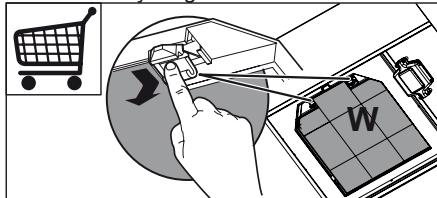
- Activated charcoal filter W These filters are not washable and cannot be regenerated, and must be replaced approximately every 4 months of operation, or more frequently with heavy usage.
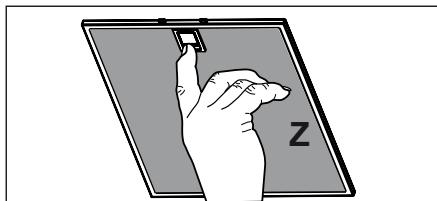
- Grease filters Z The filters must be cleaned every 2 months of operation, or more frequently for particularly heavy usage, and can be washed in a dishwasher.
natural_image
Illustration of a hand holding a small object on a tablet screen with 'Z' label (no text or symbols on the diagram itself)- Control lights, if present.
- Clean the hood using a damp cloth and a neutral liquid detergent.
CONTROLS
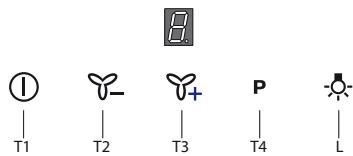
| Button | Function | Display |
| T1 | Turns the suction motor on and off at speed one. | Displays the set speed |
| Press and hold the button for approximately 5 seconds, with all the loads turned off (Motor and Lights), to turn the Activated Charcoal Filter alarm on/off. | -C flashes once , A.C. Filter alarm Activated-C flashes twice, A.C. Filter alarm Deactivated | |
| T2 | Decreases the working speed. | Displays the set speed |
| When the filters alarm is triggered, the alarm can be reset by pressing and holding this button for approximately 3 seconds. These indications are only visible when the motor is turned off. | F indicates the need to wash the metal grease filters. The alarm is triggered after the Hood has been in operation for 100 working hours.C indicates the need to change the activated char-coal filters, and also to wash the metal grease filters. The alarm is triggered after the Hood has been in operation for 200 working hours. | |
| T3 | Increases the working speed. | Displays the set speed |
| T4 | Activates Power speed from any other speed, including motor off. This speed is set to operate for 10 minutes, after which the system returns to the speed that was set before. Suitable to deal with maximum levels of cooking fumes. | Displays P. |
| L | Turns the lighting system on and off at maximum intensity. |
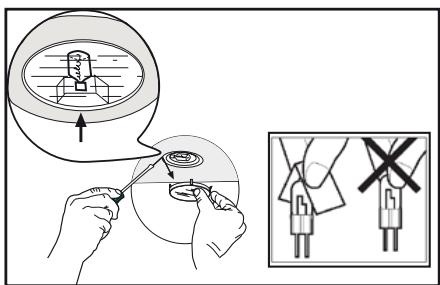
LIGHTING
WIR DENKEN AN SIE
natural_image
Five circular icons representing shopping and related services: cart, washing machine, gear, shopping bag, and shopping cart (no text or symbols)natural_image
Illustration of a hand holding a small object on a tablet screen, with no visible text or symbolsNOUS PENSONS À VOUS
natural_image
Five circular icons representing shopping, cleaning, gear, gift box, and shopping cart (no text or symbols)natural_image
Illustration of a hand holding a small object over a tablet screen with 'Z' label (no text or symbols on the diagram itself)WE DENKEN AAN U
natural_image
Five circular icons representing shopping and related services: cart, washing machine, gear, shopping cart, and shopping cart (no text or symbols)natural_image
Illustration of a hand holding a small object inside a rectangular frame, with 'Z' and '1' labels (no text or symbols on the diagram itself)PENSAMOS EN USTED
natural_image
Five circular icons representing shopping, clothing, gear, and food items (no text or symbols)natural_image
Illustration of a hand holding a small object over a tablet screen with 'Z' and letter '1' visible (no text or symbols on the diagram itself)ESTAMOS A PENSAR EM SI
natural_image
Five circular icons representing shopping and related services: cart, washing machine, gear, shopping cart, and shopping cart (no text or symbols)natural_image
Illustration of a hand holding a small object on a tablet screen, with 'Z' label visible (no text or symbols on the diagram itself)PENSATI PER VOI
natural_image
Five circular icons representing shopping, cleaning, gear, gift box, and shopping cart (no text or symbols)natural_image
Illustration of a hand holding a small object over a tablet screen with 'Z' and letter 'n' labels (no text or symbols on the diagram itself)WE'RE THINKING OF YOU
natural_image
Five circular icons representing shopping and related services: cart, washing machine, gear, shopping cart, and shopping cart (no text or symbols)natural_image
Illustration of a hand holding a small object over a tablet screen with 'Z' and letter '1' visible (no text or symbols on the diagram itself)VI TENKER PÅ DEG
natural_image
Five circular icons representing shopping and related services: cart, washing machine, gear, shopping cart, and shopping cart (no text or symbols)natural_image
Illustration of a hand holding a small object over a tablet screen with 'Z' label (no other text or symbols)- Kontrollamper hvis installert
WE'RE THINKING OF YOU
natural_image
Five circular icons representing shopping and related services: cart, washing machine, gear, shopping cart, and shopping cart (no text or symbols)natural_image
Illustration of a hand holding a small object over a screen labeled 'Z' (no text or symbols on the object itself)VI TÄENKER PÅ DIG
natural_image
Five circular icons representing shopping, clothing, gear, and food items (no text or symbols)PRODUKTNR. (PNC) ____
Serienummer ____
RÅD OG ANVISNINGER
natural_image
Illustration of a hand holding a small object over a tablet screen with 'Z' label (no text or symbols on the diagram itself)- Eventuelle kontrollamper.
МЫ ДУМАЕМ О ВАС
natural_image
Five circular icons representing shopping and related services: cart, washing machine, gear, shopping bag, and shopping cart (no text or symbols)natural_image
Illustration of a hand holding a small object on a tablet screen, labeled 'Z' (no text or symbols on the diagram itself)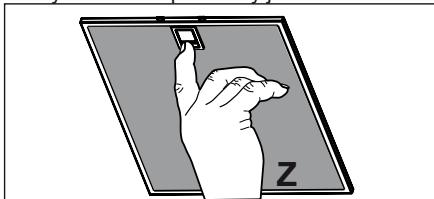
natural_image
Illustration of a hand holding a small object over a flat surface, with 'Z' label on the surface (no text or symbols on the object itself)SULLE MÕELDES
natural_image
Five circular icons representing shopping, cleaning, gear, gift box, and shopping cart (no text or symbols)natural_image
Illustration of a hand holding a small object over a tablet screen with 'Z' label (no text or symbols on the diagram itself)MĒS DOMĀJAM PAR JUMS
natural_image
Five circular icons representing shopping and related services: cart, washing machine, gear, gift box, and shopping cart (no text or symbols)natural_image
Illustration of a hand holding a small object on a tablet screen with 'Z' and letter 'n' visible (no text or symbols on the diagram itself)MES GALVOJAME APIE JUS
natural_image
Five circular icons representing shopping, washing machine, gear, shopping cart, and shopping cart (no text or symbols)natural_image
Illustration of a hand holding a small object on a tablet screen with 'Z' label (no text or symbols on the diagram itself)МИ ПРО ВАС ДУМАЄМО
natural_image
Five circular icons representing shopping and related services: cart, washing machine, gear, shopping cart, and shopping cart (no text or symbols)natural_image
Illustration of a hand holding a small object over a screen, with 'Z' and lettering (no text or symbols on the object itself)AZ ÖN ELÉGEDETTSÉGE ÉRDEKÉBEN
natural_image
Five circular icons representing shopping-related activities: cart, washing machine, gear, gift box, and shopping cart (no text or symbols)natural_image
Illustration of a hand holding a small object over a flat surface, with the letter 'Z' visible (no text or symbols on the object itself)CE