
SDR 1000 A1 - Razor SILVERCREST - Free user manual and instructions
Find the device manual for free SDR 1000 A1 SILVERCREST in PDF.


| Brand | SilverCrest |
| Model | SDR 1000 A1 |
| Product Type | Electric Shaver |
| Dimensions (approx.) | 15 × 5 × 4 cm |
| Weight (approx.) | 150 g |
| Power Supply | Rechargeable Li-ion battery, 100–240 V AC |
| Charging Time | Approx. 8 hours |
| Operating Time | Up to 45 minutes |
| Cutting System | Dual floating foils with intermediate cutter |
| Trimmer | Pop-up precision trimmer for sideburns and details |
| Shaving Modes | Wet & Dry (usable with foam or gel) |
| Cleaning | Washable under running water; cleaning brush included |
| Water Resistance | IPX4 (splash-proof) |
| Safety Features | Auto shut-off after 5 minutes of inactivity, protective cap |
| Replacement Parts | Blade unit and foil set available separately |
| Indicators | LED charging indicator |
| Accessories | Protective cap, cleaning brush, charging cable |
| Reparability | Consumer replaceable head assembly |
Frequently Asked Questions - SDR 1000 A1 SILVERCREST
User questions about SDR 1000 A1 SILVERCREST
0 question about this device. Answer the ones you know or ask your own.
Ask a new question about this device
Download the instructions for your Razor in PDF format for free! Find your manual SDR 1000 A1 - SILVERCREST and take your electronic device back in hand. On this page are published all the documents necessary for the use of your device. SDR 1000 A1 by SILVERCREST.
USER MANUAL SDR 1000 A1 SILVERCREST
Operating instructions
SE
RAKAPPARAT FÖR DAMER
Bruksanvisning
DE AT CH
DAMEN-RASIERER
Bedienungsanleitung
FI
NAISTEN IHOKARVANPOISTAJA
Käyttöohje
DK
LADYSHAVER







- Overview ....3
- Intended purpose ....5
- Safety information ....5
- Items supplied 9
- Charging ....10
- Operation ....11
6.1 Switching on and off.... 11
6.2 Shaving.... 11
6.3 Skin care after shaving.... 13
- Appliance care and cleaning 13
- Storage 15
- Replacing the shaving foil ....15
- Troubleshooting ....16
- Technical data ....18
- Disposal 18
- Warranty of the HOYER Handel GmbH .....20
2
GB




1 Shaving foil
2 Shaving head
3 Release buttons (for the shaving head)
4 Socket (for charging)
5 LED (red: while charging / green: rechargeable battery fully charged)
6 Release button (in the On/Off switch)
7 On/Off switch
8 Selector switch (trim: trim with rigid long hair trimmer 9 / shave: shave with flexible long hair trimmer 9)
9 Long hair trimmer
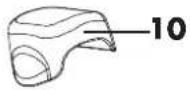
10 Protective cap
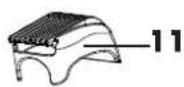
11 Trimmer attachment - short (for trimming hairs in the bikini area to a uniform length)
12 Trimmer attachment - long
13 Comfort glide attachment (for the optimum shaving angle)
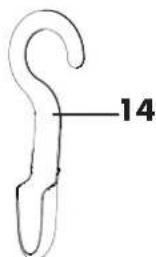
14 Appliance holder
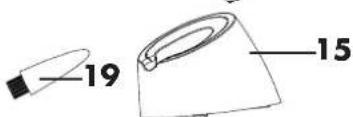
15 Charging stand
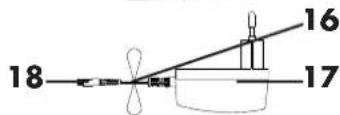
16 Power cable
17 Mains adaptor (connects to the charging station or directly to the appliance for charging)
18 Plug (connects to the socket 4 or charging stand 15)
19 Cleaning brush (for cleaning the cutter block 20, not the shaving foil 1)
20 Cutter block
Not illustrated:
21 Storage pouch


GB
3




Thank you for your trust!
Congratulations on your new lady shaver.
For a safe handling of the device and in order to get to know the entire scope of features:
- Thoroughly read these operating instructions prior to initial commissioning.
- Above all, observe the safety instructions!
- The device should only be used as described in these operating instructions.
- Keep these operating instructions for reference.
- If you pass the device on to someone else, please include these instructions.
We hope you enjoy your new lady shaver!
4
GB




The lady shaver is designed for wet and dry shaving of legs, underarms and the bikini area. It is intended for domestic use and is unsuitable for commercial purposes.

This symbol indicates that the handheld appliance is suitable for use in the shower or bath. It may be cleaned under running water. DANGER! First disconnect the appliance from the power cable.
Foreseeable misuse
WARNING! Risk of material damage!
Use only shaving foam or soapy lather for a wet shave, never shaving cream. The latter may accumulate on the cutter block.
3. Safety information
Warnings
If necessary, the following warnings will be used in these operating instructions:

DANGER! High risk: failure to observe this warning may result in injury to life and limb.
WARNING! Moderate risk: failure to observe this warning may result in injury or serious material damage.
CAUTION: Low risk: failure to observe this warning may result in minor injury or material damage.
NOTE: Points and special considerations which should be remembered when using the appliance.
GB
5




Instructions for safe operation
- This device can be used by people (including children 8 years and older) with limited physical, sensory or mental capabilities or people without adequate experience and/or understanding if they are supervised or have been instructed on how to use the device safely and have understood the risks this use entails. Children must not play with the device. Cleaning and maintenance by the user must not be performed by children without supervision.
- Keep children under 8 years of age away from the device and the power cord.
- You can clean the handheld appliance under running water. First disconnect the appliance from the power cable.

DANGER that children may swallow small parts.
The cleaning brush is small enough to be swallowed. Keep it away from children under 36 months of age.

DANGER for children
- Packaging material is not a toy. Children must not play with the plastic bags: there is a risk of suffocation.
• The appliance should be kept out of the reach of children.
6
GB


DANGER of electric shock due to moisture
- The appliance must never be charged near to a bath, shower, washbasin containing water or similar.
- Do not immerse the charging stand, the power cable or the mains adaptor in water or any other liquid. Should this happen nevertheless, have the appliance checked at a specialist workshop before using it again.
- If the charging stand is dropped into water, unplug the mains adaptor from the wall socket immediately.

DANGER of electrocution
- Only connect the mains adaptor to a properly installed wall socket that is easily accessible and supplies voltage matching the rating plate. The wall socket must also be easily accessible after connection.
• Take care that the power cable is not damaged by sharp edges or hot surfaces. Do not wind the power cable around the appliance. - Make sure that the power cable is not trapped or crushed.
- When unplugging the mains adaptor from the wall socket, always pull on the mains adaptor and not the power cable.
- Disconnect the mains adaptor from the wall socket...
... if there is a fault, ... when you are not charging the appliance, ... during thunderstorms and ... before removing the rechargeable battery for disposal.
- If there is visible damage to the appliance, charging stand, mains adaptor or the power cable, do not use the appliance.
- To avoid any risk, do not make modifications to the product. The power cable must not be replaced by a non-specialist. Repairs must be carried out by a specialist workshop or at the Service Centre.
GB
7





DANGER due to the integrated rechargeable battery
- Do not expose the appliance to direct sunlight or heat.
- When the rechargeable battery has reached the end of its serviceable life, the rechargeable battery must be removed as described in the Chapter "Disposal" on page 18 and the appliance must be disposed of. Do not attempt to replace the rechargeable battery.
- The removed rechargeable battery must not be thrown into fire or short-circuited. The rechargeable battery may overheat and explode.
- The removed rechargeable battery must not be taken apart. Should electrolyte solution leak from the rechargeable battery, avoid contact with eyes, mucous membranes and skin. Rinse the affected parts immediately with plenty of clear water and consult a doctor. The electrolyte solution may cause irritation.
WARNING about injury and skin irritation
- Do not switch the appliance on when the shaving head has been removed.
- Do not use the appliance if the shaving foil or shaving head is damaged.
- Do not shave areas of skin that are already damaged (e.g. as a result of eczema or cuts) or areas of skin that are raised (such as birthmarks or warts).
- If you have sensitive skin or suffer from allergies, test the shaver on a non-sensitive area of your leg first.
WARNING about material damage
- Only use genuine accessories.
- Do not use harsh or abrasive cleaning agents.
- Protect the appliance against knocks and do not drop it.
8
GB


- Use only shaving foam or soapy lather for a wet shave, never shaving cream. The latter may accumulate on the cutter block.
- Clean the shaving head under cold, running tap water only. Do not use warm water, cleaning agents or any other additives.
- Do not leave the appliance immersed in water. The handheld appliance is waterproof to IPX7 standard. It is protected against temporary immersion.
- Do not apply excessive pressure to the shaving foil. It is thin and easily damaged.
- Use the cleaning brush only to clean the cutter block, never to clean the shaving foil.
4. Items supplied
1 lady shaver
1 charging stand 15
1 mains adaptor 17 with power cable 16
1 protective cap 10
1 comfort glide attachment 13
2 trimmer attachments 11 / 12
1 cleaning brush 19
1 appliance holder 14
Not illustrated:
1 storage pouch 21
1 replacement shaving foil
1 set of operating instructions


GB
9


- Insert the small plug 18 into the socket on the charging stand 15 and plug the mains adaptor 17 into a wall socket.
- Place the switched off appliance in the charging stand 15. The LED 5 glows red while the rechargeable battery is being charged.
- When the LED 5 glows green (after approximately 12 hours), remove the appliance from the charging stand 15. The rechargeable battery is now fully charged. To avoid overcharging the appliance, do not leave it charging for any longer.
Before using for the first time, charge the rechargeable battery for at least 16 hours, even if the LED 5 is already glowing green.
NOTE: You can also connect the small plug 18 directly to the socket 4 on the appliance. This allows the appliance to be charged without the charging stand. Do not use the appliance while it is connected to the mains.
When fully charged the rechargeable battery provides approximately 20 minutes of operating time.
NOTE: To obtain the longest possible service life for the rechargeable battery, you should discharge the rechargeable battery fully from time to time through continued use of the appliance.
10
GB


6.1 Switching on and off
- Remove the protective cap 10 before switching on.
- To switch on, press the release button 6 and slide the On/Off switch 7 upwards.
- To switch off, slide the On/Off switch 7 downwards.
6.2 Shaving

DANGER of electrocution!
You can use the handheld appliance in the shower or bath. First disconnect the appliance from the power cable.
WARNING!
- Do not leave the appliance immersed in water.
- Use only shaving foam or soapy lather for a wet shave, never shaving cream. The latter may accumulate on the cutter block.
- Do not apply excessive pressure to the shaving foil 1. It is thin and easily damaged.
You can use the appliance both as a wet and dry shaver.
- Before a wet shave, apply generous amounts of shaving foam or soapy lather to your skin.
Shaving your legs
- Set the selector switch 8 to shave.
- For especially easy shaving you can attach the comfort glide attachment 13. This ensures that the long hair trimmer 9 and shaving foil 1 contact the skin at the correct angle and there is not too much pressure on the shaving foil 1.
- Switch the appliance on.
GB
11




- Hold the appliance so that the long hair trimmer 9 and the shaving foil 1 touch the skin with even pressure.
- Pressing gently, move the appliance slowly across your skin against the direction of the hair growth.
- After shaving, switch the shaver off and clean it as described in the Chapter "Appliance care and cleaning" on page 13.
Shaving your underarms
- Ensure that your skin is dry.
- It is especially important that the skin is pulled taut. For the underarm area, this is most easily achieved by extending your arm high above your head.
-
Underarm hair grows in various directions. For this reason it is necessary in this area to pass the shaver across the skin repeatedly and in various directions.
• To avoid injury, do not shave across skin blemishes. -
Use the appliance without an attachment and set the selector switch 8 to shave.
-
Switch the appliance on.
- Carefully move the appliance in various directions across the taut skin.
- After shaving, switch the shaver off and clean it as described in the Chapter "Appliance care and cleaning" on page 13.
Trimming the bikini area
- Set the selector switch 8 to trim to rigidify the long hair trimmer 9.
- To shape the contours, use the appliance without an attachment.
To trim hairs to one length, you can use one of the trimmer attachments 11 / 12.
12
GB


- Switch the appliance on.
- Move the appliance slowly with the long hair trimmer 9 against the direction of the hair growth.
- After trimming, switch the shaver off and clean it as described in the Chapter "Appliance care and cleaning" on page 13.
6.3 Skin care after shaving
- Skin may lose a little moisture after shaving. To avoid this, replenish your skin with body lotion, oil or cream.
- Do not apply any potential skin irritants (e.g. deodorant) to shaven skin.
- Skin is slightly sensitive to sunlight after shaving. Protect it with sunscreen.
7. Appliance care and cleaning

DANGER of electrocution!
You can clean the handheld appliance under running water. First disconnect the appliance from the power cable.
- The charging stand 15, the power cable 16 and the mains adaptor 17 must not be held under running water or immersed in water or any other liquids.
WARNING!
- Do not switch the appliance on when the shaving head 2 has been removed.
- Do not use harsh or abrasive cleaning agents.
GB
13





- Clean the shaving head 2 and the cutter block 20 only under cold, running tap water. Do not use warm water, cleaning agents or any other additives.
- Do not apply excessive pressure to the shaving foil 1. It is thin and easily damaged.
- Use the cleaning brush 19 only to clean the cutter block 20, never to clean the shaving foil 1.
NOTE: To ensure a smooth shave at all times, the appliance must be cleaned and maintained regularly.
Cleaning after each shave
- Press both release buttons 3 and take off the shaving head 2.
- Carefully tap any loose debris out of the shaving head 2.
- Clean the cutter block 20 with the cleaning brush 19.
- Rinse off the cutter block 20 and the shaving head 2 under cold, running water.
- Attachments 11 / 12 / 13 may be washed in warm water with a little added mild soap.
- Let all parts dry completely.
- Click the shaving head 2 into position on the appliance.
Periodical maintenance
- As required, wipe the appliance (not the shaving foil 1) with a slightly moistened cloth.
- Check the shaving foil 1 regularly for damage and replace it if necessary as described in the Chapter "Replacing the shaving foil" on page 15.
- Depending on the intensity of use, but at least every six months, carefully spread a little sewing machine oil onto the shaving foil 1 with your finger.
14
GB


DANGER! The appliance should be kept out of the reach of children.
- When you are not using the appliance, place the protective cap 10 on the shaving head 2.
- Use the appliance holder 14 to hang the appliance securely on a stable hook.
• You can use the storage pouch 21 to store the accessories.
9. Replacing the shaving foil
WARNING! Do not use the appliance if the shaving foil 1 is damaged.
NOTE: A replacement shaving foil is supplied with the product. You can order additional replacement shaving foils as follows:
- at www.hoyerhandel.com
- or phone the Service Centre hotline indicated in the Chapter "Warranty of the HOYER Handel GmbH" on page 20.
When does the shaving foil need replacing?
• If you can see any damage.
- If you experience a pulling sensation when shaving or the shave is less close and these signs still do not disappear after oiling the shaving foil 1. (Also see the Chapter "Appliance care and cleaning" on page 13.)
- According to the intensity of use but, as a rule, at the latest after one year.

15


- Press both release buttons 3 and take off the shaving head 2.
- The shaving foil 1 is located in a thin plastic frame. Push this frame by the sides from the top downwards and out of the shaving head.
- Carefully slide the replacement shaving foil into the shaving head 2 from below. The narrow sides of the plastic frame must fit correctly into the grooves and click into position.
- Click the shaving head 2 into position on the appliance.
10. Troubleshooting
If your appliance fails to function as required, please try this checklist first. Perhaps there is only a minor problem and you can solve it yourself.

DANGER of electrocution!
Do not attempt to repair the appliance yourself under any circumstances.
| Fault Possible causes/Action | |
| The LED 5 does not glow while charging. | Is the appliance being supplied with power?Check the connections.Is the appliance fitted correctly into the charging stand 15? |

16
GB


| Fault Possible causes/Action | |
| The appliance cannot be switched on. | Is the rechargeable battery flat?Did you press the release button 6 when switching on? |
| You experience a pulling sensation when shaving and/or the shave is less close than usual. | Oil the shaving foil 1.If that does not help, it may be necessary to replace the shaving foil 1. |
| The rechargeable battery cannot be charged or the rechargeable battery power is very low. | The rechargeable battery has reached the end of its service life.The rechargeable battery must be removed and the appliance disposed of. (See the Chapter "Disposal" on page 18) |

GB
17




| Model: SDR 1000 A1 | |
| Mains adaptor Model No.: Input: Output: Protection class: Type of protection: | HC-11-028015EU / HC-11-028015BS (UK) 100-240V ~ 50/60Hz 0,5 A max. 2,8 V =150 mA II □ IP44 |
| Type of protection of handheld appliance: | IPX7 |
| Rechargeable battery: Ni-MH, AA | 1.2 V |
Subject to technical modifications.
CE
12. Disposal
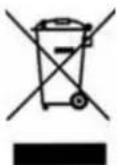
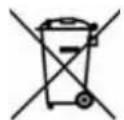
The symbol showing a wheelie bin crossed through indicates that the product requires separate refuse collection in the European Union. This applies to the product and all accessories marked with this symbol. Products identified with this symbol may not be discarded with normal household waste, but must be taken to a collection point for recycling electric and electronic appliances. Recycling helps to reduce the consumption of raw materials and protect the environment.
18


When disposing of the packaging, make sure you comply with the environmental regulations applicable in your country.
Removing the rechargeable battery
This appliance contains a permanently integrated rechargeable battery that must be removed before you dispose of the appliance.

DANGER of electrocution!
Unplug the mains adaptor from the wall socket before removing the rechargeable battery for disposal.
WARNING! Removing the rechargeable battery will destroy the appliance.
- Figure A: with a hammer, gently tap the seam between the gripping surface and the casing (on the back and sides of the appliance) to release the gripping surface.
- Figure B: pull the gripping surface off the casing.
- Figure C: move the lower part of the casing up and down until you can remove it.
- Figure D: pull the rechargeable battery casing out of the appliance and cut through both wires with pliers.
- Figure E: detach the printed circuit board from the rechargeable battery casing by cutting the two narrow sides between the printed circuit board and the rechargeable battery casing with pliers. (The connections that need to be severed are not visible from the outside.)
- Figure F: take the printed circuit board off the rechargeable battery casing.
- Figure G: remove the rechargeable battery from the rechargeable battery casing.
- Surrender the rechargeable battery and the appliance separately for suitable disposal.
GB
19





Batteries must not be discarded with your household waste. Spent batteries must be disposed of properly. Special containers are available for this purpose in shops selling batteries and at municipal collection points.
(Rechargeable) batteries marked with the following letters contain harmful substances such as: Cd (cadmium), Hg (mercury), Pb (lead).
13. Warranty of the HOYER Handel GmbH
Dear Customer,
your device is provided with a 3 year warranty starting with the purchase date. In the event of product defects, you are entitled to statutory rights against the vendor. These statutory rights are not restricted by our warranty presented in the following.
Warranty conditions
The warranty period starts with the purchase date. Please keep the original purchase receipt in a safe place. This document is required to verify the purchase.
If within three years from the purchase date of this product a material or factory defect occurs, the product will be repaired or replaced by us – at our discretion – free of charge to you. This warranty implies that within the period of three years the defective device and the purchase receipt are presented, including a brief written description of the defect and the time it occurred. If the defect is covered by our warranty, the repaired or a new product will be returned to you. No new warranty period starts with a repair or replacement of the product.
20
GB


Warranty period and statutory claims for defects
The warranty period is not extended when the warranty has been claimed. This also applies to replaced and repaired parts. Any damages and defects already existing at the time of purchase must be reported immediately upon unpacking. Repairs arising after the expiration of the warranty period are subject to a charge.
Warranty coverage
The device was produced carefully according to strict quality guidelines and tested diligently prior to delivery.
The warranty applies to material or factory defects. This warranty does not include product parts that are subject to standard wear and therefore can be considered wear parts; the same applies to damages at fragile parts, e.g. switches, rechargeable batteries or parts made of glass.
This warranty expires if the product is damaged, not used as intended or not serviced. For the proper operation of the product, all instructions listed in the operating instructions must be observed carefully. Any form of use and handling that is advised against in the operating instructions or warned against must always be avoided.
The product is only intended for private and not for commercial use. In the case of incorrect and improper treatment, use of force and interventions not performed by our authorised Service Centre, the warranty shall cease.
Handling in case of a warranty claim
In order to ensure prompt processing of your matter, please observe the following notes:
- Please keep the article number IAN: 86100 and the purchase receipt as a purchase verification for all inquiries.


21


- If faulty operation or other defects occur, first contact the Service Centre listed in the following by telephone or email.
- Then, you are able to send a product reported as defective free of charge to the service address specified to you, including the purchase receipt and the information on the defect and when it occurred.

Please visit www.lidl-service.com to download this and many other manuals, product videos and software.

Service Centre
GB Service Great Britain
Tel.: 0871 5000 720 (£ 0.10/Min.)
E-Mail: hoyer@lidl.co.uk
IE Service Ireland
Tel.: 1890 930 034
(0,08 EUR/Min., (peak))
(0,06 EUR/Min., (off peak))
E-Mail: hoyer@lidl.ie
IAN: 86100

Supplier
Please note that the following address is no service address.
First contact the aforementioned Service Centre.
HOYER Handel GmbH
Kühnehöfe 5
22761 Hamburg
Germany
22
GB


natural_image
Diagram showing a mechanical device interacting with a small elongated object, labeled 'A' (no text or symbols on the diagram itself)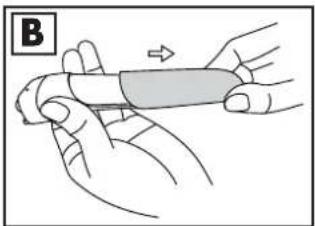
natural_image
Illustration of hands holding a cylindrical object with an arrow indicating direction (no text or symbols)
natural_image
Line drawing of a hand holding a small object with an arrow indicating direction (no text or symbols)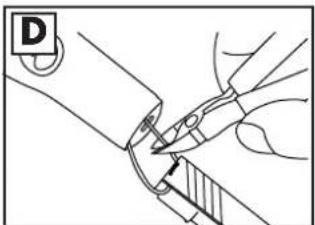
natural_image
Line drawing of a hand holding a tool with a shaded grip, no text or symbols present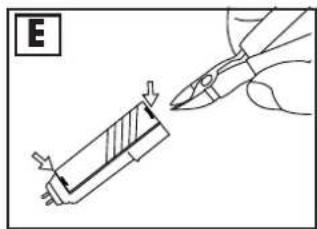

natural_image
Illustration of a hand holding a tool with an arrow indicating upward motion (no text or symbols)
natural_image
Diagram of a mechanical assembly with a rolled roller and directional arrows (no text or symbols)




natural_image
Pure color palette bar with no text or symbols, showing grayscale gradient and a color swatch (no text or symbols)HOYER HANDEL GMBH
Kühnehöfe 5
D-22761 Hamburg
Status of information · Tiedot päivitetty · Informationsstatus ·




- RAKAPPARAT FÖR DAMER
- DAMEN-RASIERER
- NAISTEN IHOKARVANPOISTAJA
- LADYSHAVER
- Thank you for your trust!
- Foreseeable misuse
- WARNING! Risk of material damage!
- Safety information
- Warnings
- Instructions for safe operation
- DANGER that children may swallow small parts.
- DANGER for children
- DANGER of electric shock due to moisture
- DANGER of electrocution
- DANGER due to the integrated rechargeable battery
- WARNING about injury and skin irritation
- WARNING about material damage
- Items supplied
- Switching on and off
- Shaving
- DANGER of electrocution!
- WARNING!
- Shaving your legs
- Shaving your underarms
- Trimming the bikini area
- Skin care after shaving
- Appliance care and cleaning
- Cleaning after each shave
- Periodical maintenance
- Replacing the shaving foil
- When does the shaving foil need replacing?
- Troubleshooting
- CE
- Disposal
- Removing the rechargeable battery
- Warranty of the HOYER Handel GmbH
- Warranty conditions
- Warranty period and statutory claims for defects
- Warranty coverage
- Handling in case of a warranty claim
- Service Centre
- Supplier
- HOYER HANDEL GMBH
Brand : SILVERCREST
Model : SDR 1000 A1
Category : Razor