
SRR 800 A1 - Razor SILVERCREST - Free user manual and instructions
Find the device manual for free SRR 800 A1 SILVERCREST in PDF.


| Product type | Electric shaver |
| Model | SRR 800 A1 |
| Brand | SilverCrest |
| Dimensions (approx.) | 12 × 6 × 5 cm |
| Weight (approx.) | 180 g |
| Power supply | Rechargeable Li-Ion battery, 5V DC via USB cable |
| Battery runtime | Approximately 45 minutes |
| Charging time | Approximately 8 hours |
| Wet & dry use | Yes, suitable for wet and dry shaving |
| Blade system | Three rotary blades with floating heads |
| Trimmer | Pop-up precision trimmer for long hairs and sideburns |
| Display | LED battery and charge indicator |
| Waterproof | IPX7, washable under running water |
| Cleaning | Rinse with water; cleaning brush included |
| Safety features | Travel lock, overheat protection |
| Replacement parts | Replacement foil and cutter block available |
| Included accessories | USB charging cable, cleaning brush, protective cap |
| Country of origin | China |
Frequently Asked Questions - SRR 800 A1 SILVERCREST
User questions about SRR 800 A1 SILVERCREST
0 question about this device. Answer the ones you know or ask your own.
Ask a new question about this device
Download the instructions for your Razor in PDF format for free! Find your manual SRR 800 A1 - SILVERCREST and take your electronic device back in hand. On this page are published all the documents necessary for the use of your device. SRR 800 A1 by SILVERCREST.
USER MANUAL SRR 800 A1 SILVERCREST
Rechargeable Travel Shaver SRR 800 A1
GB IE
User manual and service information
DE AT
English....2
Deutsch 20
Content
Introduction......3
Intended use....3
Supplied items....4
Technical data....5
Safety instructions 6
Copyright 9
Prior to use....9
Charging the battery 10
First use 11
Cleaning / maintenance....12
Cleaning 12
Maintenance....13
Environmental and disposal information ....14
Removing the battery....15
Conformity information 17
Troubleshooting 17
Warranty and servicing advice....18
Introduction
Thank you for purchasing a SilverCrest product.
The SilverCrest SRR 800 A1 rechargeable travel shaver, referred to below as shaver, is supplied with a 100-240V\~ mains charger and is thus ideal for travelling. The shaving system ensures optimal shaving results.
Intended use
The shaver may only be used privately and not for industrial or commercial purposes. Furthermore, the shaver may not be used outdoors. This shaver meets all relevant norms and standards in conjunction with CE conformity. In the event of any modification to the shaver that was not approved by the manufacturer, compliance with these standards is no longer guaranteed. The manufacturer does not accept any liability for any resulting damage or faults in such cases.
Please observe the regulations and laws in the country of use.
Supplied items
- Shaver
- Protective cover
- Mains charger
- USB cable
- Travel case
- Cleaning brush (included in the travel case)
• These instructions
These instructions have a fold-out cover. The shaver is illustrated with a numbering system on the inside of the cover. The numbers indicate the following:
1 Protective cover
2 Shaving foil
3 Shaving foil frame
4 Cutter block
5 Release (on both sides)
6 On/off switch
7 Switch guard
8 Power indicator
9 USB port
Technical data
Shaver
| Input voltage 5V | m |
| Input current 0.15A | |
| Charging time 8 hours | |
| Dimensions approx. 60 x 92 x 27 mm (W x H x D) | |
| Weight approx. 103.5 g | |
| Operating temperature +5 °C to +40 °C |
Mains charger SSA031F050015UKU
| Input voltage 100-240V | ~50/60Hz |
| Rated current 0.15A | |
| Output voltage 5V | m |
| Output current 0.15A | |
| Protection class II |
Safety instructions
Before using the shaver for the first time, please read the following instructions carefully and take note of the safety warnings, even if you are familiar with the use of electronic devices. Store these instructions in a safe place for future reference. If you sell the shaver or pass it on, always include these instructions.

This symbol indicates important information for safe operation of the shaver and the safety of the user.

This symbol indicates that the shaver is not watertight and may not be used in the shower or bath.

This symbol indicates other important information on the topic.

This shaver is not intended for use by persons (including children) with limited physical, sensory or mental abilities or for those lacking experience and/or knowledge unless they are supervised by a person responsible for their safety or if this person has instructed them on how to use the shaver correctly. Children should always be supervised to ensure that they do not play with the shaver.

Small parts can be fatal if swallowed. Also note that there is a risk of suffocation if air passages are blocked by the plastic packaging.

Keep the shaver and the mains charger out of the reach of children.

CAUTION! Keep the shaver and the mains charger dry.
The shaver and the mains charger are not watertight and may never be used in the shower or bath. Furthermore, the shaver and mains charger may never be completely immersed in water. It poses an electric shock risk!

If the shaver falls into water, first unplug the charger from the mains as there is a risk of an electric shock otherwise!

If you notice any smoke, unusual noises or strange odours, switch off the shaver immediately and unplug the charger from the mains socket. In these cases, the shaver should not be used until it has been inspected by authorised service personnel. Never inhale smoke from a potential device fire. If you have inhaled smoke, however, consult a doctor. The inhalation of smoke can be harmful.

The shaver may not be damaged in order to avoid hazards.

Ensure that no fire sources (e.g. burning candles) are placed on or near the shaver. It poses a fire hazard!

The shaver may not be exposed to any direct heat sources (e.g. heating) or any direct sunlight or artificial light. Also ensure that the shaver is not exposed to any excessive shocks or vibrations. Furthermore, no foreign objects may penetrate the shaver. Otherwise, the shaver could be damaged.

The shaver may not be exposed to extreme temperature fluctuations as this could result in condensation and electrical short circuits.
Mains charger and USB cable

Never touch the mains charger with wet hands as this may cause a short circuit or an electric shock.

A damaged mains charger or USB cable can cause fire or an electric shock. Check the mains charger and the USB cable from time to time. Do not use adapter plugs or extension cables that do not comply with applicable safety standards, and do not make any alterations to the mains charger or USB cable!

Never place furniture or other heavy objects on the USB cable and take care that the cable is not kinked, especially near the plug and connection socket. Ensure that the USB cable is neither clamped nor in contact with hot surfaces. Never tie a knot in the USB cable and do not tie it to other cables. Ensure that all cables are placed so that no one can trip over them and they do not cause an obstruction.

Always handle the USB cable by the connector and do not pull on the cable itself.
Copyright
All information contained in these instructions is subject to copyright and is provided for information purposes only.
It is only permitted to copy or duplicate data and information express and written consent of the author. This also includes commercial use of the content and data.
The text and illustrations are based on the state of the art at the time of printing.
Prior to use
Remove the shaver and the accessories from the packaging.
Check the shaver for signs of damage. If damaged, the shaver may not be used.
Charging the battery
The shaver is equipped with a high-performance NiMH battery. You can charge it with the supplied mains charger and USB cable.

The shaver must be switched off before it is charged. Thus check in advance whether the shaver is switched off and, if necessary, push the on/off switch [6] downwards to switch off the shaver.

To extend the built-in battery life, we recommend that you discharge the battery fully before recharging it. The performance of the shaver deteriorates or the shaver stops once the battery is fully discharged.
To charge the battery, connect the small connector of the supplied USB cable to the USB port [9]. Then connect the large connector of the supplied USB cable to the mains charger. Insert the charger into a mains socket. The power indicator [8] now lights up red and thus indicates that the shaver is connected to the mains power supply. A full charge cycle takes approximately 8 hours. Then unplug the charger from the mains socket to save energy. Separate the USB cable from the charger and the shaver.

You can also charge the shaver directly via a USB port on your computer. In this case, connect the large connector of the supplied USB cable directly to the USB port on your computer instead of connecting the mains charger.

Some computers turn off the power supply of the USB ports when they are switched off. If the power indicator [8] of the shaver does not light up, make sure that your computer is switched on.
First use

Only use the shaver for dry shaving.
Remove the protective cover [1]. Press the switch guard [7] and push the on/off switch [6] upwards to switch on the shaver. Move the shaver over your skin while exercising slight pressure against the direction of facial hair growth. Always hold the shaver at a right angle to the skin. You can also hold the skin taut with your other hand to raise your facial hair.

Please note that there may be a slight redness or irritation of the skin after shaving. This is quite normal because your skin must first get used to this manner of shaving. It may take two to three weeks for your skin to get used to the shaver.
Switch off the shaver after shaving by pushing the on/off switch [6] downwards. After using the shaver, put the protective cover [1] back on the shaving foil frame [3] . Clean the shaver as described in the following section.
Cleaning / maintenance
Cleaning

Unplug the shaver from the mains power supply before cleaning as there is a risk of an electric shock!

Switch off the shaver before cleaning it in order to avoid hazards.

Never immerse the shaver in water or other liquids. Otherwise, liquid will penetrate it because the casing is not watertight.

Do not use compressed air, scouring pads or corrosive cleaning agents to clean the shaver.

The shaving foil [2] must not be cleaned with the cleaning brush because this would damage the shaving foil [2].
It is recommended that the shaver is cleaned after each use to achieve optimal shaving results.
Only use a clean, slightly damp cloth to clean the casing of the shaver and never use any corrosive liquids.
Remove the protective cover [1]. Press both sides of the release [5] and remove the shaving foil frame [3]. Tap the shaving foil frame [3] out on to a flat surface. Then clean the cutter block [4] and around it with the cleaning brush. Put the shaving foil frame [3] and then the protective cover [1] back on after cleaning.
Maintenance
Replace the shaving foil [2] and the cutter block [4] if they show signs of wear and tear. The shaving foil [2] and cutter block [4] should both be replaced at the same time for optimal shaving results.
You can obtain information on spare parts via our service hotline (see page 19). To facilitate replacement, the shaving foil [2] is only available with the shaving foil frame [3].

Before replacing the shaving foil [2] and the cutter block [4], unplug the shaver from the mains power supply as there is a risk of an electric shock!

CAUTION! RISK OF INJURY!
Switch off the shaver before replacing the shaving foil [2] and the cutter block [4] .
Do not press the shaving foil [2] as this can be easily damaged and sharp cut edges can arise as a result.
Only grip the cutter block [4] at both ends.
Proceed as follows to replace the shaving foil [2] and the cutter block [4]:
Remove the protective cover [1]. Press both sides of the release [5] and remove the shaving foil frame [3]. Grip the cutter block [4] at both ends and pull it upwards. Put the new cutter block [4] and then the new shaving foil frame [3] on again. Then put the protective cover [1] on again.
Environmental and disposal information

natural_image
Symbol of a trash bin crossed with no text or numbers, representing environmental restriction (no text present)When this symbol appears on a product, this indicates that the product is subject to the European Directive 2002/96/EC. All electrical and electronic devices must be disposed of separately from household waste at designated disposal points. Disposal of old devices in this manner will prevent harm to the environment and human health hazards. For further information regarding disposal of old devices in accordance with the directive, contact your local government office or the retailer where you purchased the device.
Dispose of the packaging in an environmentally compatible manner. Cardboard can be put out for municipal paper collections or brought to public collection points for recycling. Films and plastic used for packaging the device are collected by your local disposal services and disposed of in an environmentally compatible manner.
Removing the battery
This shaver contains a built-in battery. Remove the battery before you dispose of the shaver.

Unplug the shaver from the mains power supply before removing the battery as there is a risk of an electric shock!

CAUTION! RISK OF INJURY!
Switch off the shaver before removing the battery.
Do not press the shaving foil [2] as this can be easily damaged and sharp cut edges can arise as a result.
Only grip the cutter block [4] at both ends.

Warning! The shaver is destroyed when the battery is removed.
Remove the protective cover [1]. Press both sides of the release [5] and remove the shaving foil frame [3]. Grip the cutter block [4] at both ends and pull it upwards.
natural_image
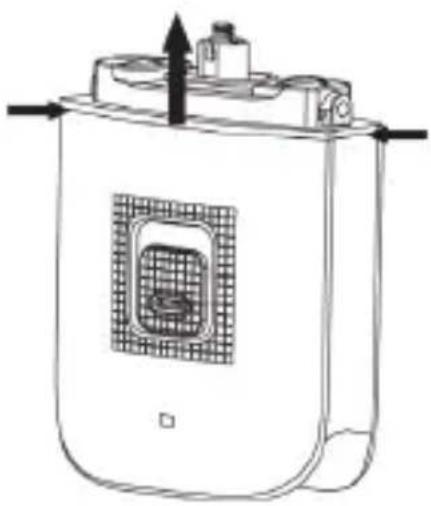
Line drawing of a cylindrical container with a grid-patterned vent and an upward arrow, no text or symbols present.Insert a screwdriver between the frame and casing and then pull the frame up and off.
natural_image
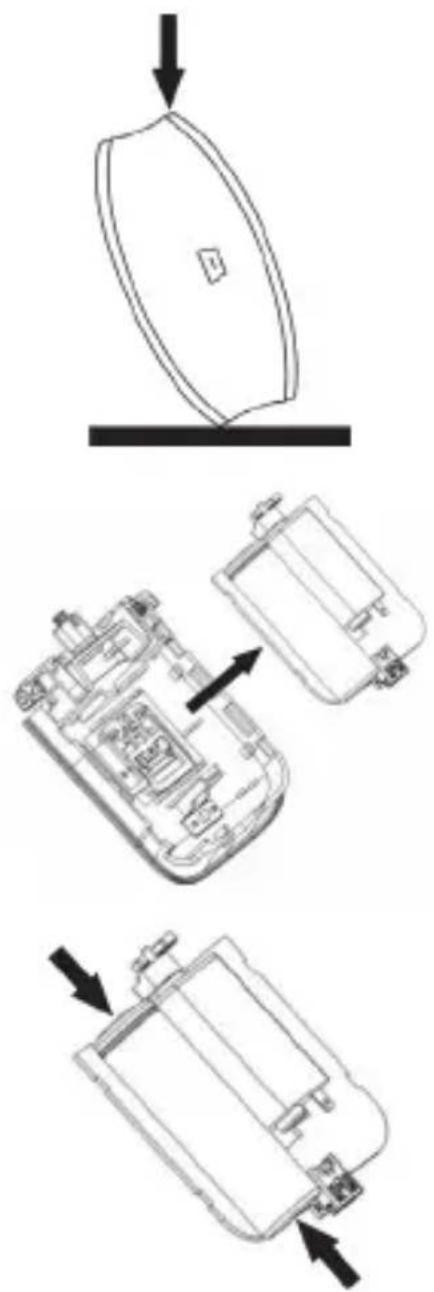
Technical line drawing showing three views of a device with arrows indicating assembly or movement (no text or symbols present)Keep one side of the shaver on a firm surface. Then tap lightly with a hammer on the opposite side to open the casing.
Remove the electronics from the casing.
Prise the battery from the board by severing the connections with a wire cutter.
Separate the battery and shaver for appropriate disposal.
Remember to protect the environment. Used batteries should not be disposed of in household waste. They must be taken to a collection point for old batteries. Please note that only discharged batteries may be deposited in battery recycling bins. Care must be taken to ensure that batteries that are not fully discharged do not short circuit.
Conformity information
CE
This device meets the basic requirements and other relevant regulations of the EMC Directive 2004/108/EC, the Low Voltage Directive 2006/95/EC, the RoHS Directive 2011/65/EU and the ErP Directive 2009/125/EC. The Declaration of Conformity can be found at the end of this manual.
Troubleshooting
| Problem Possible cause Solution | |
| The shaver does not shave as well as usual. | The shaving system is dirty or is blocked by long hair. |
| The shaving system is damaged or worn. | Replace the shaving foil [2] and the cutter block [4] (refer to the section "Maintenance"). |
| The shaver is not working. | The battery is empty. Charge the battery (refer to the section "Charging the battery"). |
Warranty and servicing advice
Warranty of TARGA GmbH
This device is sold with three years warranty from the date of Please keep the original receipt in a safe place as proof of purchase. Before using your product for the first time, please read the enclosed documentation or online help. Should any problems arise which cannot be solved in this way, please call our hotline. Please have the article number and, if available, the serial number to hand for all enquiries. If it is not possible to solve the problem on the phone, our hotline support staff will initiate further servicing procedures depending on the fault. Within the warranty period the product will be repaired or replaced free of charge as we deem appropriate. No new warranty period commences if the product is repaired or replaced. Consumables such as batteries, rechargeable batteries and lamps are not covered by the warranty.
Your statutory rights towards the seller are not affected or restricted by this warranty.

Service

Phone: 0207 - 36 50 744
E-Mail: service.GB@targa-online.com

Phone: 01 - 242 15 83
E-Mail: service.IE@targa-online.com

Phone: 800 - 62 175
E-Mail: service.MT@targa-online.com

Phone: 800 - 92 496
E-Mail: service.CY@targa-online.com
IAN: 88621

Manufacturer
TARGA GmbH
Coesterweg 45
59494 SOEST
GERMANY
Inhalt
Einleitung....21
natural_image
Symbol of a trash bin crossed with no text or numbers, representing waste sorting or disposal (no text present)natural_image
Line drawing of a cylindrical container with a grid pattern and an upward arrow, no text or symbols present.natural_image
Technical line drawing showing three views of a device with arrows indicating assembly or movement (no text or symbols present)EU Declaration of Conformity
Address:
Targa GmbH
Coesterweg 45
59494 Soest, Germany
Product:
Rechargeable Shaver
Model:
Silvercrest SBR 800 Δ1
Identification number:
IAN 88621
The product complies with the requirements of the following European directives:
2006/95/EC
Low Voltage Directive (LVD)
2004/108/EC
Electromagnetic Compatibility
2011/65/EU
Restriction of the use of certain hazardous
substances in electrical and electronic equipment
2009/125/EC
Energy Relating Products
Compliance was proved by the application of the following standards:
LVD:
EN 61558-1:2005+A1:2009
EN 61558-2-16: 2009
EMC:
EN 55014-1: 2006 + A1: 2009 + A2: 2011
FN 55014-2·1997+A1·2001+A2·2008
EN 61000-3-2: 2006 + A1: 2009 + A2: 2009
EN 61000-3-3:2008
Rohs:
EN 62321: 2009
ErP:
Regulation 278/2009
Year of CE marking:
2013
Soest, 14 ^th June 2013

Matthias Klauke, Managing Director




- Rechargeable Travel Shaver SRR 800 A1
- Content
- Introduction
- Intended use
- Supplied items
- Technical data
- Safety instructions
- Mains charger and USB cable
- Copyright
- Prior to use
- Charging the battery
- First use
- Cleaning / maintenance
- Cleaning
- Maintenance
- Environmental and disposal information
- Removing the battery
- Conformity information
- CE
- Warranty and servicing advice
- Warranty of TARGA GmbH
- Service
- Manufacturer
- Inhalt
- EU Declaration of Conformity
- Address:
- Product:
- Model:
- Identification number:
- 2006/95/EC
- 2004/108/EC
- 2011/65/EU
- 2009/125/EC
- LVD:
- EMC:
- Rohs:
- ErP:
- Year of CE marking:
- Soest, 14 th June 2013
Brand : SILVERCREST
Model : SRR 800 A1
Category : Razor