
CUBE-ST - Guitar amplifier ROLAND - Free user manual and instructions
Find the device manual for free CUBE-ST ROLAND in PDF.


| Product Type | Portable Guitar Amplifier |
| Brand | Roland |
| Model | CUBE-ST (CUBE Street) |
| Power Supply | Included AC adapter or 6 AA batteries (not included) |
| Battery Life | Approximately 15 hours with alkaline batteries |
| Input Channels | 2 channels: MIC/LINE and GUITAR/INSTRUMENT |
| Simulated Amplifier Types | JC CLEAN, BLACK PANEL, BRT COMBO, CLASSIC STACK, R-FIER STACK, ACQUISCT SIM, INSTRUMENT (8 types total) |
| Built-in Effects | Chorus, Flanger, Phaser, Tremolo (EFX); Delay, Reverb (DELAY/REVERB) |
| Built-in Tuner | Yes, with manual and chromatic modes |
| Inputs | 1 INPUT jack (1/4 inch), 1 AUX IN jack (stereo mini-jack) |
| Outputs | 1 STEREO PHONES jack (stereo mini-jack), 1 FOOT SW jack (1/4 inch) |
| MUTE Function | Yes, controllable via optional footswitch |
| Footswitch Compatibility | BOSS FS-5U or FS-6 (optional) |
| Input Level Selector | MIC/LINE for channel 1 |
| Equalization | BASS, MIDDLE (channel 2 only), TREBLE on each channel |
| Protection Circuit | Yes, power-on delay |
| Dimensions | Not specified |
| Weight | Not specified |
| Included Accessories | AC adapter, manual |
Frequently Asked Questions - CUBE-ST ROLAND
User questions about CUBE-ST ROLAND
0 question about this device. Answer the ones you know or ask your own.
Ask a new question about this device
Download the instructions for your Guitar amplifier in PDF format for free! Find your manual CUBE-ST - ROLAND and take your electronic device back in hand. On this page are published all the documents necessary for the use of your device. CUBE-ST by ROLAND.
USER MANUAL CUBE-ST ROLAND
Thank you, and congratulations on your choice of the Roland CUBE STREET battery-powered stereo amp.
Before using this unit, carefully read the sections entitled
- IMPORTANT SAFETY INSTRUCTIONS (page 2)
- USING THE UNIT SAFELY (page 2-3)
- IMPORTANT NOTES (page 4)
Additionally, in order to feel assured that you have gained a good grasp of every feature provided by your new unit, Owner's manual should be read in its entirety.
The manual should be saved and kept on hand as a convenient reference.
Main Features
- Compact and lightweight stereo amp
This is a 5W (2.5W + 2.5W) stereo amp with two newly developed high-efficiency 16cm (6.5 inch) speakers.
- Dual power operation with batteries or AC
Dual power operation makes it easy to take this amp anywhere.
Six AA alkaline batteries allow approximately 15 hours of operation. (Battery life will depend on the conditions of use.)
- Two channel independent preamplifier
< Mic/line channel >
- The mic/line channel provides a dedicated two-band equalizer as well as delay/reverb.
- A footswitch (sold separately) can be used to turn mute or delay/reverb on and off.
In addition to accepting input from a guitar or electronic musical instrument, this channel accommodates microphone input as well.
Eight types of COSM amp
For use when connecting an electric guitar, a variety of famous guitar amp models, including "JC," are provided. There's also an "instrument amp" that's ideal when connecting an acoustic guitar or an electronic instrument such as a keyboard, as well as a dedicated mic amp.
COSM (Composite Object Sound Modeling) is proprietary Roland modeling technology, which analyzes the way in which sound is affected by elements such as electronic circuitry, structure, and materials, and combines these elements to reconstruct the desired sound.
- Six types of digital effects
In addition to four types of EFX (chorus, flanger, phaser, tremolo), delay and reverb are also provided.
A footswitch (sold separately) can be used as an on/off switch for EFX or delay/reverb.
Tuner
You can tune your instrument while leaving its guitar connected.
- Stereo AUX input
A convenient mini-stereo jack for connecting your MP3 player or CD player is provided, allowing stereo playback together with the mic/line input and guitar/instrument input.
- Headphones
A headphones jack is provided for practicing at night.
IMPORTANT: THE WIRES IN THIS MAINS LEAD ARE COLOURED IN ACCORDANCE WITH THE FOLLOWING CODE.
BLUE: NEUTRAL
BROWN: LIVE
As the colours of the wires in the mains lead of this apparatus may not correspond with the coloured markings identifying the terminals in your plug, proceed as follows:
The wire which is coloured BLUE must be connected to the terminal which is marked with the letter N or coloured BLACK.
The wire which is coloured BROWN must be connected to the terminal which is marked with the letter L or coloured RED.
Under no circumstances must either of the above wires be connected to the earth terminal of a three pin plug.
USING THE UNIT SAFELY
INSTRUCTIONS FOR THE PREVENTION OF FIRE, ELECTRIC SHOCK, OR INJURY TO PERSONS
About WARNING and CAUTION Notices
| WARNING | Used for instructions intended to alert the user to the risk of death or severe injury should the unit be used improperly. |
| CAUTION | Used for instructions intended to alert the user to the risk of injury or material damage should the unit be used improperly. * Material damage refers to damage or other adverse effects caused with respect to the home and all its furnishings, as well to domestic animals or pets. |
About the Symbols
| ▲ | The △ symbol alerts the user to important instructions or warnings. The specific meaning of the symbol is determined by the design contained within the triangle. In the case of the symbol at left, it is used for general cautions, warnings, or alerts to danger. |
| ◎ | The ⊙ symbol alerts the user to items that must never be carried out (are forbidden). The specific thing that must not be done is indicated by the design contained within the circle. In the case of the symbol at left, it means that the unit must never be disassembled. |
| ◎ | The ● symbol alerts the user to things that must be carried out. The specific thing that must be done is indicated by the design contained within the circle. In the case of the symbol at left, it means that the power-cord plug must be unplugged from the outlet. |
ALWAYS OBSERVE THE FOLLOWING
WARNING
- Before using this unit, make sure to read the instructions below, and the Owner's Manual.

- Do not open (or modify in any way) the unit or its AC adaptor.

- Do not attempt to repair the unit, or replace parts within it (except when this manual provides specific instructions directing you to do so). Refer all servicing to your retailer, the nearest Roland Service Center, or an authorized Roland distributor, as listed on the "Information" page.

-
Never use or store the unit in places that are:
-
Subject to temperature extremes (e.g., direct sunlight in an enclosed vehicle, near a heating duct, on top of heat-generating equipment); or are
- Damp (e.g., baths, washrooms, on wet floors); or are
- Humid; or are
- Exposed to rain; or are
- Dusty; or are
-
Subject to high levels of vibration.
-
Make sure you always have the unit placed so it is level and sure to remain stable. Never place it on stands that could wobble, or on inclined surfaces.


WARNING
- Be sure to use only the AC adaptor supplied with the unit. Also, make sure the line voltage at the installation matches the input voltage specified on the AC adaptor's body. Other AC adaptors may use a different polarity, or be designed for a different voltage, so their use could result in damage, malfunction, or electric shock.

- Use only the attached power-supply cord. Also, the supplied power cord must not be used with any other device.

- Do not excessively twist or bend the power cord, nor place heavy objects on it. Doing so can damage the cord, producing severed elements and short circuits. Damaged cords are fire and shock hazards!

- This unit, either alone or in combination with an amplifier and headphones or speakers, may be capable of producing sound levels that could cause permanent hearing loss. Do not operate for a long period of time at a high volume level, or at a level that is uncomfortable. If you experience any hearing loss or ringing in the ears, you should immediately stop using the unit, and consult an audiologist.

WARNING
- Do not allow any objects (e.g., flammable material, coins, pins); or liquids of any kind (water, soft drinks, etc.) to penetrate the unit.


-
Immediately turn the power off, remove the AC adaptor from the outlet, and request servicing by your retailer, the nearest Roland Service Center, or an authorized Roland distributor, as listed on the "Information" page when:
-
The AC adaptor, the power-supply cord, or the plug has been damaged; or
- If smoke or unusual odor occurs
- Objects have fallen into, or liquid has been spilled onto the unit; or
- The unit has been exposed to rain (or otherwise has become wet); or
-
The unit does not appear to operate normally or exhibits a marked change in performance.
-
In households with small children, an adult should provide supervision until the child is capable of following all the rules essential for the safe operation of the unit.

- Protect the unit from strong impact. (Do not drop it!)

- Do not force the unit's power-supply cord to share an outlet with an unreasonable number of other devices. Be especially careful when using extension cords—the total power used by all devices you have connected to the extension cord's outlet must never exceed the power rating (watts/amperes) for the extension cord. Excessive loads can cause the insulation on the cord to heat up and eventually melt through.

- Before using the unit in a foreign country, consult with your retailer, the nearest Roland Service Center, or an authorized Roland distributor, as listed on the "Information" page.

- Batteries must never be recharged, heated, taken apart, or thrown into fire or water.


CAUTION
- The unit and the AC adaptor should be located so their location or position does not interfere with their proper ventilation.

- Always grasp only the plug on the AC adaptor cord when plugging into, or unplugging from, an outlet or this unit.

- At regular intervals, you should unplug the AC adaptor and clean it by using a dry cloth to wipe all dust and other accumulations away from its prongs. Also, disconnect the power plug from the power outlet whenever the unit is to remain unused for an extended period of time. Any accumulation of dust between the power plug and the power outlet can result in poor insulation and lead to fire.

CAUTION
- Try to prevent cords and cables from becoming entangled. Also, all cords and cables should be placed so they are out of the reach of children.

- Never climb on top of, nor place heavy objects on the unit.

- Never handle the AC adaptor or its plugs with wet hands when plugging into, or unplugging from, an outlet or this unit.

- Before moving the unit, disconnect the AC adaptor and all cords coming from external devices.

- Before cleaning the unit, turn off the power and unplug the AC adaptor from the outlet (p. 10).

- Whenever you suspect the possibility of lightning in your area, disconnect the AC adaptor from the outlet.

- If used improperly, batteries may explode or leak and cause damage or injury. In the interest of safety, please read and observe the following precautions (p. 9).


- Carefully follow the installation instructions for batteries, and make sure you observe the correct polarity.
- Avoid using new batteries together with used ones. In addition, avoid mixing different types of batteries.
- Remove the batteries whenever the unit is to remain unused for an extended period of time.
- If a battery has leaked, use a soft piece of cloth or paper towel to wipe all remnants of the discharge from the battery compartment. Then install new batteries. To avoid inflammation of the skin, make sure that none of the battery discharge gets onto your hands or skin. Exercise the utmost caution so that none of the discharge gets near your eyes. Immediately rinse the affected area with running water if any of the discharge has entered the eyes.
-
Never keep batteries together with metallic objects such as ballpoint pens, necklaces, hairpins, etc.
-
Used batteries must be disposed of in compliance with whatever regulations for their safe disposal that may be observed in the region in which you live.

- Should you remove screws, keep them in a safe place out of children's reach, so there is no chance of them being swallowed accidentally.

- Do not remove the speaker grille and speaker by any means. Speaker not user replaceable. Shock hazardous voltages and currents are present inside the enclosure.

In addition to the items listed under "USING THE UNIT SAFELY" on page 2, please read and observe the following:
Power Supply: Use of Batteries
- Do not connect this unit to same electrical outlet that is being used by an electrical appliance that is controlled by an inverter (such as a refrigerator, washing machine, microwave oven, or air conditioner), or that contains a motor. Depending on the way in which the electrical appliance is used, power supply noise may cause this unit to malfunction or may produce audible noise. If it is not practical to use a separate electrical outlet, connect a power supply noise filter between this unit and the electrical outlet.
- The AC adaptor will begin to generate heat after long hours of consecutive use. This is normal, and is not a cause for concern.
- The use of an AC adaptor is recommended as the unit's power consumption is relatively high. Should you prefer to use batteries, please use the alkaline type.
- When installing or replacing batteries, always turn off the power on this unit and disconnect any other devices you may have connected. This way, you can prevent malfunction and/or damage to speakers or other devices.
- Before connecting this unit to other devices, turn off the power to all units. This will help prevent malfunctions and/or damage to speakers or other devices.
Placement
- Using the unit near power amplifiers (or other equipment containing large power transformers) may induce hum. To alleviate the problem, change the orientation of this unit; or move it farther away from the source of interference.
- This device may interfere with radio and television reception. Do not use this device in the vicinity of such receivers.
- Noise may be produced if wireless communications devices, such as cell phones, are operated in the vicinity of this unit. Such noise could occur when receiving or initiating a call, or while conversing. Should you experience such problems, you should relocate such wireless devices so they are at a greater distance from this unit, or switch them off.
- Do not expose the unit to direct sunlight, place it near devices that radiate heat, leave it inside an enclosed vehicle, or otherwise subject it to temperature extremes. Also, do not allow lighting devices that normally are used while their light source is very close to the unit (such as a piano light), or powerful spotlights to shine upon the same area of the unit for extended periods of time. Excessive heat can deform or discolor the unit.
- When moved from one location to another where the temperature and/or humidity is very different, water droplets (condensation) may form inside the unit. Damage or malfunction may result if you attempt to use the unit in this condition. Therefore, before using the unit, you must allow it to stand for several hours, until the condensation has completely evaporated.
-
Do not allow rubber, vinyl, or similar materials to remain on the unit for long periods of time. Such objects can discolor or otherwise harmfully affect the finish.
-
Do not paste stickers, decals, or the like to this instrument. Peeling such matter off the instrument may damage the exterior finish.
- Depending on the material and temperature of the surface on which you place the unit, its rubber feet may discolor or mar the surface. You can place a piece of felt or cloth under the rubber feet to prevent this from happening. If you do so, please make sure that the unit will not slip or move accidentally.
Maintenance
- For everyday cleaning wipe the unit with a soft, dry cloth or one that has been slightly dampened with water. To remove stubborn dirt, use a cloth impregnated with a mild, non-abrasive detergent. Afterwards, be sure to wipe the unit thoroughly with a soft, dry cloth.
- Never use benzine, thinners, alcohol or solvents of any kind, to avoid the possibility of discoloration and/or deformation.
Additional Precautions
- Use a reasonable amount of care when using the unit's buttons, sliders, or other controls; and when using its jacks and connectors. Rough handling can lead to malfunctions.
- When connecting / disconnecting all cables, grasp the connector itself—never pull on the cable. This way you will avoid causing shorts, or damage to the cable's internal elements.
- To avoid disturbing your neighbors, try to keep the unit's volume at reasonable levels. You may prefer to use headphones, so you do not need to be concerned about those around you (especially when it is late at night).
- When you need to transport the unit, package it in the box (including padding) that it came in, if possible. Otherwise, you will need to use equivalent packaging materials.
- Some connection cables contain resistors. Do not use cables that incorporate resistors for connecting to this unit. The use of such cables can cause the sound level to be extremely low, or impossible to hear. For information on cable specifications, contact the manufacturer of the cable.
- When turning the unit upside-down, get a bunch of newspapers or magazines, and place them under the four corners or at both ends to prevent damage to the buttons and controls. Also, you should try to orient the unit so no buttons or controls get damaged.
- When turning the unit upside-down, handle with care to avoid dropping it, or allowing it to fall or tip over.
IMPORTANT SAFETY INSTRUCTIONS. 2
USING THE UNIT SAFELY 2
IMPORTANT NOTES 4
Contents 5
English
Panel descriptions. 6
Control Panel. 6
Connecting the AC adaptor. 9
A Note About Batteries. 9
TUNING 9
Connections 10
Switching the Power On and Off.....10
Deutsch
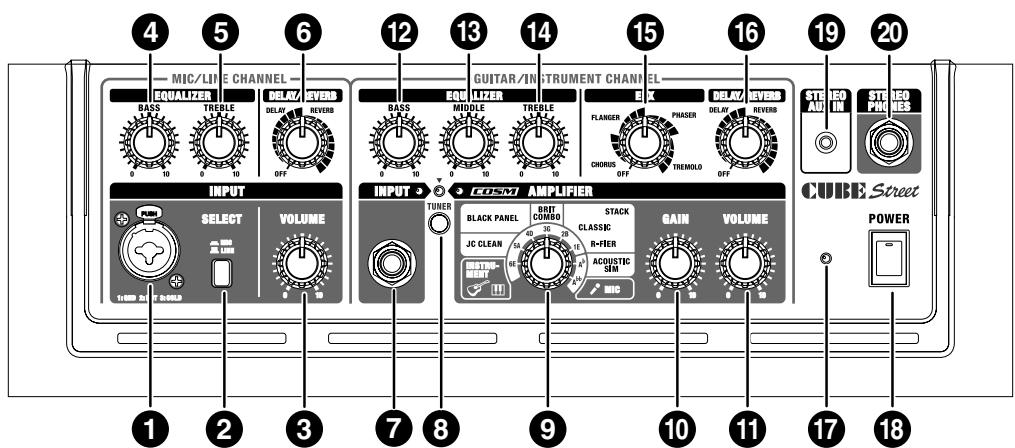
Connect your mic or line instrument (e.g., acoustic guitar or keyboard) here.
2. SELECT Switch
Push this to choose the input level that's appropriate for the device you've connected (mic/line). When this is in the Line position, you'll be able to use an acoustic guitar or keyboard.
3. VOLUME Knob
Adjusts channel volume.
EQUALIZER
4. BASS Knob
Adjusts the tone quality of the lower range.
5. TREBLE Knob
Adjusts the tone quality of the upper range.
DELAY/REVERB
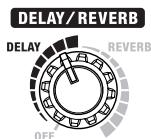
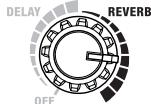
6. DELAY/REVERB Knob
Turn this knob to DELAY or REVERB to switch to that effect. Turn the knob to adjust the amount of effect applied.
- Graduations for DELAY, REVERB on a panel are for reference. Be sure to check the sound as you adjust the effects.
DELAY
Turn the knob to change the time and amount of delay effects.
REVERB
Spacious-sounding stereo reverb is provided. Turn the knob to adjust the reverb level.
DELAY/REVERB
GUITAR/INSTRUMENT CHANNEL
7. INPUT Jack
Here you can connect your electric guitar, acoustic guitar, electronic instrument such as a keyboard, or mic.
8. TUNER Switch
The switch lights in red when the tuner function is on; the switch is unlit when the tuner is off.
For more detailed information, refer to p. 9.
9. Type Switch
You can select from the following eight types.
When the tuner function is on, you can use this to select the name of the string to be tuned (p. 9).
INSTRUMENT
Select this if you've connected an acoustic guitar or an electronic instrument such as a keyboard.
JC CLEAN
This is a model of Roland's famous JC-120 Jazz Chorus guitar amplifier. The ultra-clean, ultra-flat sound offers a smooth.
This becomes more effective when used in combination with a external effector.
BLACK PANEL
This is modeled on the classic Fender Twin Reverb amplifier, used in a wide variety of musical styles, from country to blues, jazz and rock. Exhibiting rich lows and a bright high end.
BRIT COMBO
This is modeled on the Vox AC-30TB, the rock amplifier that created the Liverpool sound of the '60s. It can produce a broad range of sounds, from clean to overdrive, with increased distortion and greater power in the low-midrange when the amplifier's gain is boosted.
CLASSIC STACK
This is modeled on the sound and response of a Marshall JMP1987. The legendary JMP1987 is renowned for its smooth tone and presence-perfect for classic and hard rock.
R-FIER STACK
This is modeled on the MESA/Boogie Rectifier. This super high gain amp is capable of producing slash metal, grunge, and a wide range of other lead sounds.
ACOUSTIC SIM
By combining acoustic guitar simulation with COSM amplifier modeling technology, this original amplifier model gives you a dynamic acoustic guitar sound using a standard electric guitar.
MIC
Select this position when microphone is connected.
- Howling could be produced depending on the location of microphones relative to speakers. This can be remedied by:
- Changing the orientation of the microphone(s).
- Relocating microphone(s) at a greater distance from speakers.
- Lowering volume levels.
- All product names mentioned in this document are trademarks or registered trademarks of their respective owners, and are not related to Roland Corporation. In this manual, these names are used as appropriate ways to indicate sounds that are simulated using COSM technology.
10.GAIN Knob
Adjusts distortion level.
11.VOLUME Knob
Adjusts channel volume.
EQUALIZER
12.BASS Knob
Adjusts the tone quality of the lower range.
13.MIDDLE Knob
Adjusts the tone quality of the midrange.
14.TREBLE Knob
Adjusts the tone quality of the upper range.
- Because COSM faithfully models the special features and characteristics of a variety of amplifiers; no sound will be produced when BASS, MIDDLE, and TREBLE knob are all set to 0 while the Type switch is set to BLACK PANEL.
EFX (Effects)
15.EFX (Effects) Knob
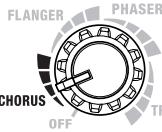
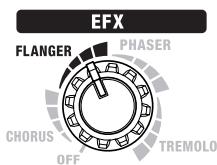
Turn this knob to chorus, flanger, phaser, or tremolo to select the corresponding effect. Turn the knob to adjust the amount of effect applied. You can also turn EFX on and off using optional footswitches (BOSS FS-5U or FS-6).
- Graduations for CHORUS, FLANGER, PHASER, TREMOLO on a panel are for reference. Be sure to check the sound as you adjust the effects.
CHORUS
This is a spacially synthesized chorus. With spacially synthesized chorus, a method available only in stereo, the chorus effect is created by taking the sound from the right
speaker (from which the effect sound is output), and the sound from the left speaker (which outputs the direct sound), and then mixing them in the actual space. This creates a greater lateral spread than that produced when the sounds are mixed electronically, providing a more natural sense of breadth.
FLANGER
This creates a flanging effect that creates a sort of spinning sensation with the sound.
PHASER
This effect adds a variable phaseshifted signal to the direct sound, giving the sound a swirling character.
TREMODO
Tremolo is an effect that creates a cyclic change in volume.
EFX

EFX

EFX
DELAY/REVERB
16.DELAY/REVERB Knob
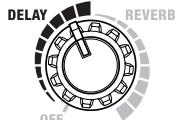
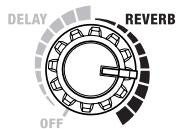
Turn this knob to DELAY or REVERB to switch to that effect. Turn the knob to adjust the amount of effect applied.
DELAY
Turn the knob to change the time and amount of delay effects.
DELAY/REVERB
REVERB
Spacious-sounding stereo reverb is provided. Turn the knob to adjust the reverb level.
DELAY/REVERB
17.Power Indicator
This indicator lights when the unit is turned on.
- When operating on battery power only, the unit's indicator will become dim during play when battery power gets too low.
- Sounds may distort easily or may cut off when played at high volume as the battery power begins to fade, but this is normal and does not indicate a malfunction. In such instances, either replace the batteries or use the AC adaptor included with the unit.
18. POWER Switch
This switches the power on and off.
- This unit is equipped with a protection circuit. A brief interval (a few seconds) after power up is required before the unit will operate normally.
- If you need to turn off the power completely, first turn off the POWER switch, then unplug the power cord from the power outlet. Refer to "Power Supply: Use of Batteries" (p. 4).
19.AUX IN Jack
You can connect a CD player, MP3 player or other kind of device and have it play along with your guitar or other kind of devices. This accepts a stereo miniature phone plug.
* Determine the volume level by adjusting the volume control of the connected device.
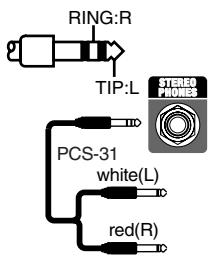
20.STEREO PHONES Jack
Connect headphones to this jack.
- No sound is played through the unit's speaker while the STEREO PHONES jack is in use.
TIP
If you use a PCS-31 connection cable, you'll also be able to use this as a stereo recording output.
- If you're using a monaural cable, the effect might be difficult to discern.
21.FOOT SW (Footswitch) Jack
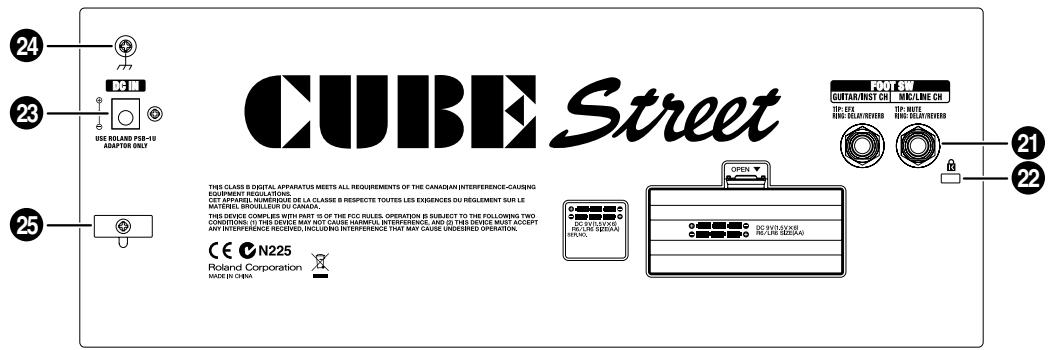
A footswitch (BOSS FS-5U or FS-6; sold separately) connected here can be used to switch on/off MUTE and DELAY/REVERB for the MIC/LINE CH, and EFX and DELAY/REVERB for the GUITAR/INST CH.
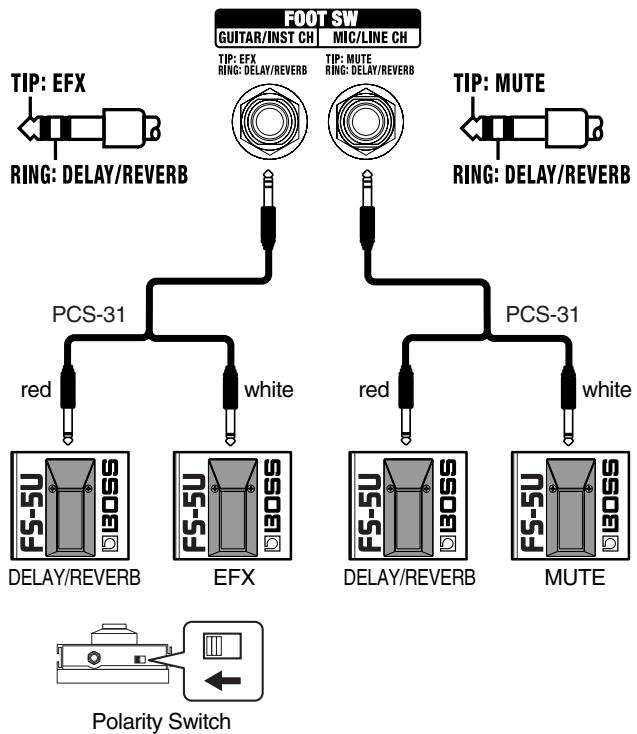
- If you use a monaural cable to connect just one footswitch, you'll only be able to control MUTE for the MIC/LINE CH, and EFX for the GUITAR/INST CH.
22.Security Slot (
http://www.kensington.com/
23.AC Adaptor Jack
Connect the included AC adopter to this jack.
- Use only the AC adaptor included with the CUBE STREET.
24. Grounding terminal
Depending on the circumstances of a particular setup, you may experience a discomforting sensation, or perceive that the surface feels brittle to the touch when you touch this device, microphones connected to it, or the metal portions of other objects, such as guitars. This is due to an infinitesimal electrical charge, which is absolutely harmless. However, if you are concerned about this, connect the ground terminal with an external ground. When the unit is grounded, a slight hum may occur, depending on the particulars of your installation. If you are unsure of the connection method, contact the nearest Roland Service Center, or an authorized Roland distributor, as listed on the "Information" page.
Unsuitable places for connection
Water pipes (may result in shock or electrocution)
Gas pipes (may result in fire or explosion)
- Telephone-line ground or lightning rod (may be dangerous in the event of lightning)
25.Cord Hook
Hook the AC adaptor cord here (p. 9).
Connecting the AC adaptor
NOTE
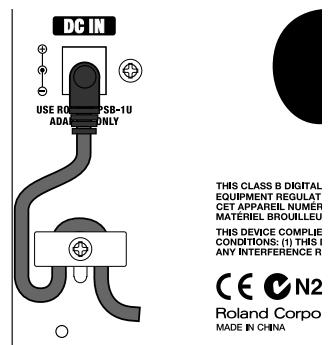
Use only the AC adaptor included with the CUBE STREET. Use of other AC adaptors may damage the amp or result in other problems.
To prevent the inadvertent disruption of power to your unit (should the plug be pulled out accidentally), and to avoid applying undue stress to the AC adaptor jack, anchor the power cord using the cord hook, as shown in the illustration.
NOTE
Place the AC adaptor so the side with the indicator (see illustration) faces upwards and the side with textual information faces downwards. The indicator will light when you plug the AC adaptor into an AC outlet.

A Note About Batteries
In addition to the AC adaptor, the CUBE STREET can also be powered with six AA batteries (optional). Insert the batteries as shown in the figure, making sure that the batteries are oriented correctly.
If there are batteries in the unit while an AC adaptor is being used, normal operation will continue should the line voltage be interrupted (power blackout or power cord disconnection).
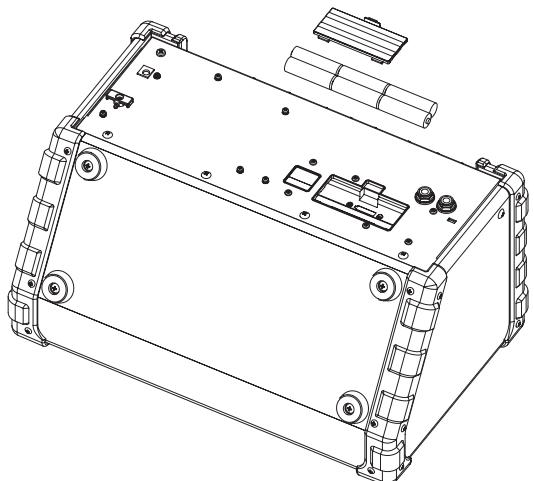
- When installing or replacing batteries, always turn off the power on this unit and disconnect any other devices you may have connected. This way, you can prevent malfunction and/or damage to speakers or other devices.
- Expected battery life under continuous use:
Alkaline: approx. 15 hours
This figure will vary depending on the actual conditions of use.
TUNING
You can use "manual tuning," whereby you switch to each individual string to tune it separately, and "chromatic tuning," which automatically determines the closest pitch to that played by the string.
Tuning in "Manual Mode"
- Press the TUNER switch.
-
Use the Type switch to select the name of the string you want to tune, then play a single note on the open string.
-
The sound of the guitar/instrument channel will not be heard from the unit's speakers while you're using the tuner function.
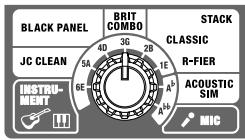
| TypeSwitch Position | String Name |
| 6E | Open sixth string |
| 5A | Open fifth string |
| 4D | Open fourth string |
| 3G | Open third string |
| 2B | Open second string |
| 1E | Open first string |
| Ab | Open fifth string (half step (semitone) down) |
| Ab | Open fifth string (whole step (whole tone) down) |
-
Reference Pitch: A4 = 440 Hz
-
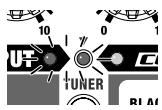
Tune the string until the green indicator lights.
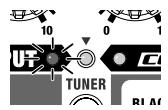
- When the pitch is even lower, the indicator flashes.
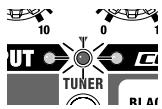
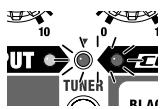
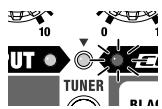
- When the pitch is even higher, the indicator flashes.
Tuning in "Chromatic Mode"
- Hold down the TUNER switch for at least one second so that the red indicator flashes.
- Play a single note on the open string you want to tune.
- Tune the string until the green indicator lights.
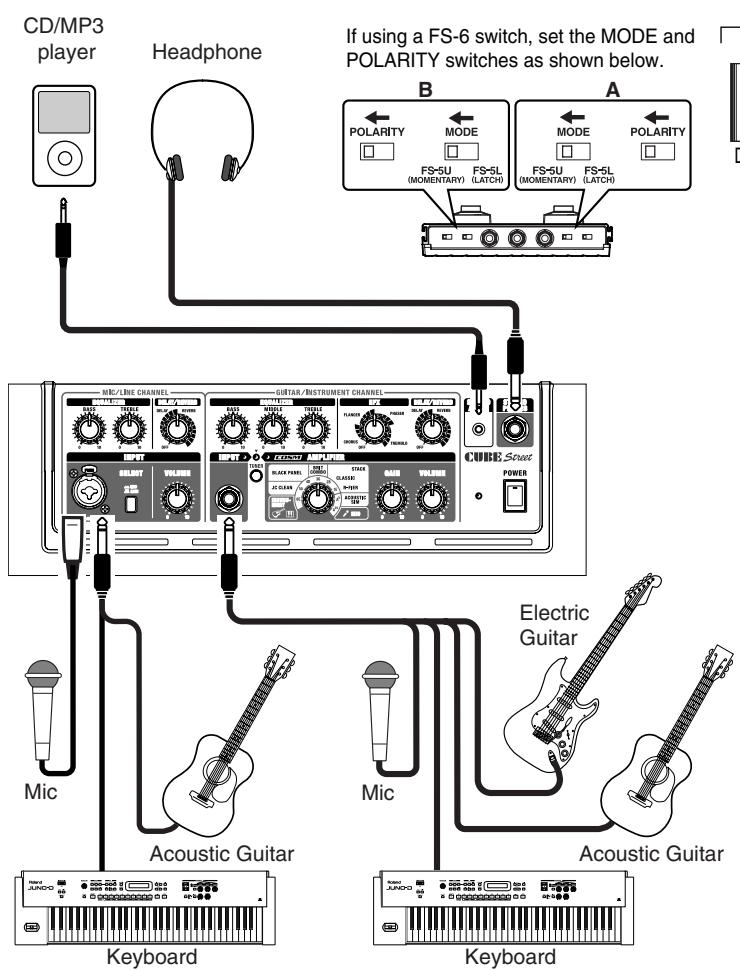
Refer to the figure shown below to connect the CUBE STREET to other equipment.
Switching the Power On and Off
Once the connections have been completed, turn on power to your various devices in the order specified. By turning on devices in the wrong order, you risk causing malfunction and/or damage to speakers and other devices.
- Make sure that all volume controls on the CUBE STREET and connected devices are set to 0.
- Turn on all the devices connected to the CUBE STREET's input jacks (INPUT jack and AUX IN jack).
- Turn on the CUBE STREET.
- Adjust the volume levels for the devices.
- Before switching off the power, lower the volume on each of the devices in your system and then TURN OFF the devices in the reverse order to which they were switched on.
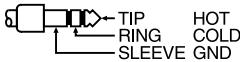
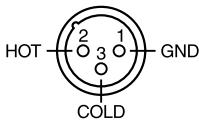
- This instrument is equipped with balanced XLR/TRS type jacks for microphoes. Wiring diagrams for these jacks are shown below. Make connections after first checking the wiring diagrams of other equipment you intend to connect.
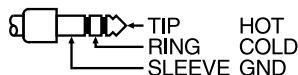
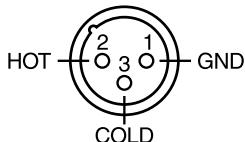
- If there are batteries in the unit while an AC adaptor is being used, normal operation will continue should the line voltage be interrupted (power blackout or power cord disconnection).
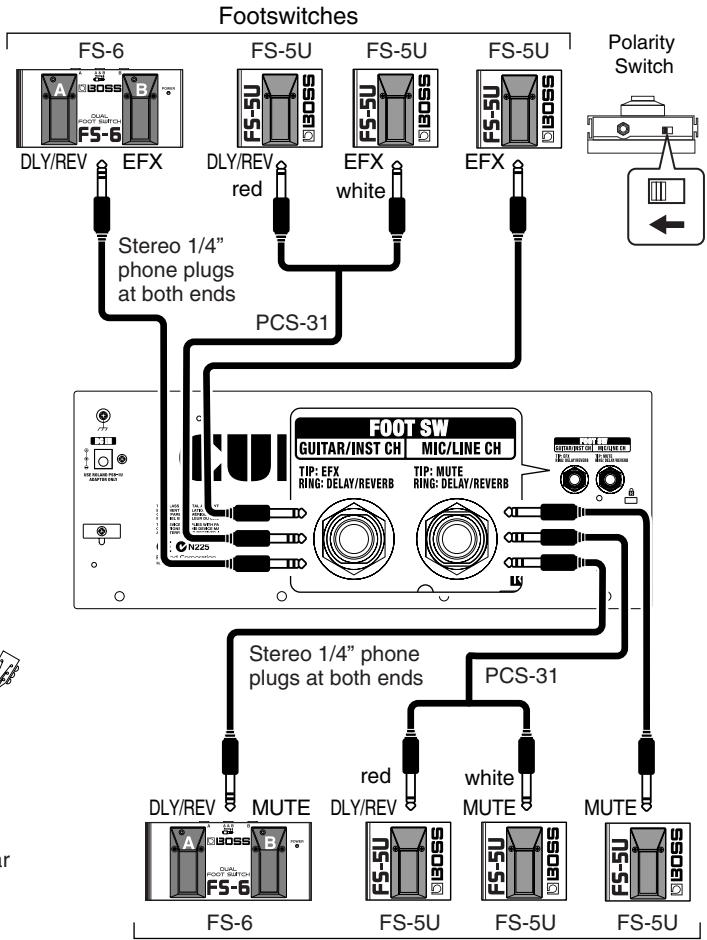
Footswitches
-
When operating on battery power only, the unit's indicator will become dim when battery power gets too low. Replace the battery as soon as possible.
-
Howling could be produced depending on the location of microphones relative to speakers. This can be remedied by:
-
Changing the orientation of the microphone(s).
- Relocating microphone(s) at a greater distance from speakers.
-
Lowering volume levels.
-
This unit is equipped with a protection circuit. A brief interval (a few seconds) after power up is required before the unit will operate normally. For protection from sudden big sound, always make sure to have the volume level turned down before switching on power. Even with the volume all the way down, you may still hear some sound when the power is switched on and off, but this is normal, and does not indicate a malfunction.
-
If you need to turn off the power completely, first turn off the POWER switch, then unplug the power cord from the power outlet. Refer to "Power Supply: Use of Batteries" (p. 4).
- To prevent malfunction and/or damage to speakers or other devices, always turn down the volume, and turn off the power on all devices before making any connections.
- Before making the connections, be sure that the volume setting of the VOLUME knob for both amplifiers is set to "0."
- When connection cables with resistors are used, the volume level of equipment connected to the inputs may be low. If this happens, use connection cables that do not contain resistors, such as those from the Roland PCS series.
Bedienfeld
MIC/LINE CHANNEL
1. Buchse INPUT
THIS CLASS B DIGITAL EQUIPMENT REGULAT CET APPAREL NUMBER MATERIEL BROULELEU THIS DEVICE COMPILE CONDITIONS: (1) THIS I ANY INTERFERENCE R C C N2 Roland Corpo MADE IN CHINA
HINWEIS
THIS CLASS B DIGITAL EQUIPMENT REGULAT CET APPAREL, NUMBER MATERIAL BROULEUR THIS DEVICE COMPLIANT WITH THE FOLLOWING ANY INTERFERENCES:

CECN2 RolandCorpo MADE IN CHINA
NOTA
21.Conector FOOT SW (Pedal)
THIS CLASS B DIGITAL EQUIPMENT REGULAT CET APPAREL NUMER MATERIAL BROULEUR AND CONDITION: THE 1) THIS I ANY INTERFERENCE R
CECN2 RolandCorpo MADE IN CHINA
NOTA
STEREO 5 W (2.5 W + 2.5 W)
Nominal Input Level (1 kHz)
MIC/LINE Channel: -50 / -10 dBu
GUITAR/INSTRUMENT Channel: -10 dBu
STEREO AUX IN: -10 dBu
- 0dBu = 0.775Vrms
Speakers
16 cm (6.5 inches) x 2
Controls
POWER Switch
(MIC/LINE Channel)
SELECT Switch (MIC/LINE)
VOLUME Knob
EQUALIZER Knobs (BASS, TREBLE)
DELAY/REVERB Knob
(GUITAR/INSTRUMENT Channel)
TUNER Switch
TYPE Switch
GAIN Knob
VOLUME Knob
EQUALIZER Knobs (BASS, MIDDLE, TREBLE)
EFX Knob
DELAY/REVERB Knob
Indicators
TUNER
POWER
Connectors
(MIC/LINE Channel)
Input Jacks (XLR type, 1/4'' phone type)
Foot Switch Jack (1 / 4 TRS phone type, TIR: mute,
RING: DELAY/REVERB)
(GUITAR/INSTRUMENT Channel)
Input Jack (1 / 4 phone type)
Foot Switch Jack (1/4" TRS phone type, TIR: EFX,
RING: DELAY/REVERB)
AUX IN Jack (Stereo miniature phone type)
PHONES Jack (Stereo 1/4'' phone type)
AC Adaptor Jack
Power Supply
DC 9 V: AC Adaptor or
Dry Battery (LR6 (AA) type) (optional) × 6
Current Draw
235 mA
Dimensions
Connection Cable: PCS-31
- In the interest of product improvement, the specifications and/ or appearance of this unit are subject to change without prior notice.
For EU Countries

∴ m = 3/11 ;
This symbol indicates that in EU countries, this product must be collected separately from household waste, as defined in each region. Products bearing this symbol must not be discarded together with household waste.
DE Dieses Symbol beweet, dass这点symbol in EU-Landern getrennt vom Haumull gesammelt werden muss gemäß den regionalen Bestimmungen. Mit这点symbol gekennzeichnete Produkte dürfen nicht zusammen mit den Haumull entsorgt werden.
FR Ce symbole indique que dans les pays de l'Union europeenne, ce produit doit etre collecte separement des ordures menagères selon les directives en vigueur dans chacun de ces pays. Les produits portant ce symbole ne doit pas etre mis au rebut avec les ordures menagères.
Questo significato indica che nei paesi della Comunità europea questo prodotto devese essere smaltito separatamente dai normali rifiuti domestici, seconda la legalità in vigore in ciascun paese. I prodotti che riportano questo significato non devono essere smaltiti insieme ai rifiuti domestici. Ai sensi dell'art. 13 del D.Lgs. 25 luglio 2005 n. 151.
Es Este symbolo indica que en los paies de la Union Europea this producto debe recogerse aparte de los residuos domesticos, tal como este regulado en cada zona. Los productos con este symbolo no se deben depositar con los residuos domesticos.
Estesimbolo indica que nos paises da UE, a recolha esta produits devera ser feita separamente do lixo domestico, de accordo com os regulamentos de cada regiao. Os produits que aparecem thissymbolo não devearo ser eliminados juntamente com o lixo domestico.
NL Dit symbol geeft aan dat in landen van de EU dit product geschieren van huishoudelijk afval moot worden aangeboden, zoals bepaald per gemeente of regio. Producten die van dit symbolonzijn voorzien, mogen Niet samen met huishoudelijk afval worden verwijderd.
Dette symbol angiver, at i EU-lande skal dette produit opsamples adskilt fra husholdningsaftald, som defineret i herself enkelt region. Produktier med dette symbol må违法犯罪 undammen med husholdningsaftald.
Dette symbolet indikerer at produktet mā behandles som spezialavfall i EU-land, iht. til retningsinjer for den entkelte regionen, og ilke kastesammen med vanlig husholdningsavfall. Produktör som er merket med dette symbolet, mā ilkke kastesammen med vanlig husholdningsavfall.
SE Symbolen anger att i EU-länder maste den har Produkten kasseras separat frän hushàlsavfall, i enliget med varje regions bestammelser. Produktker med den har symbolen fär inte kasseras tillsammans med hushàlsavfall.
Fi Täm merkinta ilmaisee,ettu tuoce on EU-maissa kerattava erillaa kotitalousjatteista kunkin alueen voimassa olevien märäysten mukaisesti. Talla merkinnallar varustettuja tuotteita ei saa havittaa kotitalousjatteiden mukana.
Hu Ez a szimbolum az jelenti, hogy az Europai Unioban ezt a termeket a haztartasi hulladektol elkūnítve, az adtgi roband érvényes szabályozászerint kell gýjütiñ. Az ezzel a szimbolummal ellatott termeketakem nizsbad a haztartasi hulladek koze dobni.
Symbol oznacza, ze zgodnie z regulacjami w owdpowednim regionie, w krajach UE produktu nie nalezy wyrzucac z odpadami domowymi. Produktów opatrzonych tym symbolem nie mayna utlylizowac razem z odpadami domowymi.
Tento symbol udáva, ze v zemich EU músi byt tento vyrobek sbrán oddělené od domácho odapdu, jak je určeno pro každý region. Vyrobky nesouci tento symbol se nésni vyhazovat spolu s domácim odadem.
SK Tento symbol vyjadruje, ze v krajinach EU sa musi zber tohto produktu vykonávat oddelene od domoveho oppadu, podfa nariadićn platn'yh konkrétnej krajine. Produktys tymto symbolom sa nesmú vyhadzovat spolu s domovým opadom.
See sümbool nătab, et EL-ia maadeules tubel see toode olemprigtist eraldi koguda, nii nagu on igas piirkonnas māraratletud. Selle simboliga margritud totoed ei tohi āra visata koos olmeprugica.
LT Sis simbolis rodo, kad ES salyse sis produktas turi buti surenkamas atskirai nuo buitiniu atieku, kaip nustatyta kiekviename regione. Siuo simboliu pazenklinti Produktai neturi buti ismetami kartu su buitinemis atliekomis.
Sis symbols norada, ka ES valstis produitu jaiveac atseviaki no majsaimnecibas atkrittiumi, ka noteikts katra regiana. Produktus ar so simulobu nedirkst izmest kopar majsaimnecibas atkrittiumi.
Ta simb oznacuje, da je treba proizvod v drzavah EU zbirati loceno od gospodinjskih odpadkov, takoto deloceno v vsaki regiji. Proizvod s tem znakom ni dovoljeno odlagatzi skupaj z gospodinjskimi odpadki.
To ovoAo auto vOnodovoi otu cnoe gE.E. to ovzexquevo nooiv nei va ovLeyeta woyot aTo ta voLouta onua ana atogmuata, ouqovva oe opoIbTeovtou axtae npoyqT. Ta ooviao novgovou to ovzexquevo ojofo dev nei va atoppictovatma tTa onaxa anoppigmuata.
For China
有关产品中所含有害物质的说明
This equipment has been tested and found to comply with the limits for a Class B digital device, pursuant to Part 15 of the FCC Rules. These limits are designed to provide reasonable protection against harmful interference in a residential installation. This equipment generates, uses, and can radiate radio frequency energy and, if not installed and used in accordance with the instructions, may cause harmful interference to radio communications. However, there is no guarantee that interference will not occur in a particular installation. If this equipment does cause harmful interference to radio or television reception, which can be determined by turning the equipment off and on, the user is encouraged to try to correct the interference by one or more of the following measures:
- Reorient or relocate the receiving antenna.
- Increase the separation between the equipment and receiver.
- Connect the equipment into an outlet on a circuit different from that to which the receiver is connected.
- Consult the dealer or an experienced radio/TV technician for help.
This device complies with Part 15 of the FCC Rules. Operation is subject to the following two conditions:
(1) this device may not cause harmful interference, and
(2) this device must accept any interference received, including interference that may cause undesired operation.
Unauthorized changes or modification to this system can void the users authority to operate this equipment.
This equipment requires shielded interface cables in order to meet FCC class B Limit.
For Canada
NOTICE
This Class B digital apparatus meets all requirements of the Canadian Interference-Caising Equipment Regulations.
AVIS
Al Fanny Trading Office 9, EBN Hagar Al Askalany Street.
ARD E1 Golf, Heliopolis, Cairo 11341, Egypt
TEL: 20-2-417-1828
REUNION
Maison FO - YAM Marcel
25 Rue Jules Hermann,
Chaudron - BP79 97 491
St Clotilde Cedex,
REUNION ISLAND
TEL: (0262) 218-429
SOUTH AFRICA
T.O.M.S. Sound & Music (Pty)Ltd.
2 ASTRON ROAD DEN
JOHANNBESBURG ZA 2
SOUTH AFRICA
TEL: (011)4173400
Paul Bothner(PTY)Ltd.
Royal Cape Park, Unit 24
Londonderry Road, Ottery 7800
Cape Town, SOUTH AFRICA
TEL: (021) 799 4900
ASIA
CHINA
Roland Shanghai Electronics Co., Ltd.
5F: No.1500 Pingliang Road
Shanghai 200090, CHINA
TEL: (021) 5580-0800
Roland Shanghai Electronics Co., Ltd.
(BEIJING OFFICE)
10F. No.18 3 Section Anhuaxil Chaoyang District Beijing
100011 CHINA
TEL: (010) 6426-5050
HONG KONG
Tom Lee Music Co., Ltd.
Service Division
22-32 Pun Shan Street, Tsuen
Wan, New Territories,
HONG KONG
TEL: 2415 0911
Parsons Music Ltd.
8th Floor, Railway Plaza, 39 Chatham Road South, T.S.T, Kowloon, HONG KONG
TEL: 2333 1863
INDIA
Rivera Digitec (India) Pvt. Ltd. 411, Nirman Kendra Mahalaxmi Flats Compound Off. Dr. Edwin Moses Road, Mumbai-400011, INDIA TEL: (022) 2493 9051
INDONESIA
PT Cita IntiRama
JL. Cideng Timur No. 15J-15O
Jakarta Pusat
INDONESIA
TEL: (021) 6324170
KOREA
Cosmos Corporation 1461-9, Seocho-Dong, Seocho Ku, Seoul, KOREA TEL: (02)3486-8855
MALAYSIA
Roland Asia Pacific Sdn. Bhd 45-1, Block C2, Jalan PJU 1/39, Dataran Prima, 47301 Petaling Jaya, Selangor, MALAYSIA TEL: (03) 7805-3263
VIET NAM
Suoi Nhac Company, Ltd 370Cach Mang Thang Tam St. Dist.3, Ho Chi Minh City, VIET NAM Tel:9316540
PHILIPPINES
G.A.Yupangco & Co. Inc. 339 Gil J.Puyat Avenue Makati, Metro Manila 1200, PHILIPPINES TEL: (02) 899 9801
SINGAPORE
SWEE LEE MUSIC COMPANY PTE. LTD. 150 Sims Drive, SINGAPORE 387381 TEL:6846-3676
TAIWAN
ROLAND TAIWAN ENTERPRISE CO., LTD. Room 5, 9fL. No. 112 Chung Shan N.Road Sec.2, Taipei, TAIWAN, R.O.C.
TEL: (02) 2561 3339
THAILAND
Theera Music Co., Ltd.
330 Sai Vernk NakornKasem,
New Road, Sumpantawongse,
Bangkok 10100, THAILAND
TEL: (02) 224-8821
AUSTRALIA/ NEW ZEALAND
AUSTRALIA/
NEW ZEALAND
Roland Corporation Australia Pty.,Ltd. 38 Campbell Avenue Dee Why West.NSW 2099 AUSTRALIA
For Australia
Tel: (02) 9982 8266
For New Zealand
Tel: (09) 3098 715
CENTRAL/LATINAMERICA
ARGENTINA
Instrumentos Musicales S.A.
Av.Santa Fe 2055
(1123) Buenos Aires
ARGENTINA
TEL: (011) 4508-2700
BARBADOS
A&B Music Supplies LTD 12 Webster Industrial Park Wildey, St.Michael, Barbados TEL: (246)430-1100
BRAZIL
Roland Brasil Ltda.
Rua San Jose, 780 Sala B
Parque Industrial San Jose
Cotá - São Paulo - SP, BRAZIL
TEL: (011) 4615666
CHILE
Comercial Fancy II S.A.
Rut.: 96,919,420-1
Nataniel Cox #739, 4th Floor
Santiago - Centro, CHILE
TEL: (02) 688-9540
COLOMBIA
Centro Musical Ltda.
Cra 43 B No 25 A 41 Bododega 9
Medellin, Colombia
TEL: (574)3812529
COSTA RICA
JUAN Bansbach Instrumentos
Musicales
Ave.1. Calle 11, Apartado
10237,
San Jose, COSTA RICA
TEL: 258-0211
CURACAO
Zeelandia Music Center Inc.
Orionweg 30
Curacao, Netherland Antilles
TEL: (305)5926866
DOMINICAN REPUBLIC
Instrumentos Fernando Giral
Calle Proyecto Central No.3
Ens.La Esperilla
Santo Domingo, Dominican Republic
TEL:(809)683 0305
ECUADOR
Mas Musika Rumichaca 822 y Zaruma Guayquil - Ecuador TEL: (593-4)2302364
EL SALVADOR
OMNI MUSIC
75 Avenida Norte y Final
Alameda Juan Pablo II,
Edificio No.4010 San Salvador,
EL SALVADOR
TEL: 262-0788
GUATEMALA
Casa Instrumental
Calzada Roosevelt 34-01,zone 1
Ciudad de Guatemala
Guatemala
TEL:(502)599-2888
HONDURAS
Almacen Pajaro Azul S.A.de C.V.
BO.Paz Barahona
3 Ave.11 Calle S.O
San Pedro Sula, Honduras
TEL: (504) 553-2029
MARTINIQUE
Roland Ireland
G2 Calmont Park, Calmont Avenue, Dublin 12
Republic of IRELAND
TEL: (01) 4294444
ITALY
Roland Italy S. p. A.
Viale delle Industrie 8, 20020 Arese, Milano, ITALY
TEL: (02) 937-78300
NORWAY
MOCO INC.
No.41 Nike St., Dr.Shariyati Ave., Roberoye Cerahe Mirdamad
Tehran, IRAN
TEL: (021) 285-4169
ISRAEL
Halilit P. Greenspoon & Sons Ltd.
8 Retzif Ha'alia Hashnia St.
Tel-Aviv-Yafo ISRAEL
TEL: (03) 6823666
JORDAN
MUSIC HOUSE CO. LTD.
FREDDY FOR MUSIC
P.O. Box 922846
Amman 11192 JORDAN
TEL: (06) 5692696
KUWAIT
EASA HUSAIN AL-YOUSIFI & SONS CO. Abdullah Salem Street, Safat, KUWAIT TEL:243-6399
LEBANON
Chahine S.A.L.
George Zeidan St., Chahine
Bldg., Achrafieh, P.O.Box: 16-5857
Beirut, LEBANON
TEL: (01) 20-1441
OMAN
TALENTZ CENTRE L.L.C.
Malatlan House No.1
Al Noor Street, Ruwi
SULTANATE OF OMAN
TEL: 2478 3443
QATAR
Al Emadi Co. (Badie Studio & Stores) P.O.Box 62, Doha, QATAR TEL:4423-554
SAUDI ARABIA
aDawlaiah Universal Electronics APL Corniche Road, Aldossary Bldg., 1st Floor, Alkhobar, 31952 SAUDI ARABIA
P.O.Box 2154,Alkhobar 31952 SAUDI ARABIA TEL: (03)8982081
SYRIA
Technical Light & Sound Center
Rawda, Abdul Qader Jaza Bldg. No. 21, P.O.BOX 133 Damascus, SYRIA
TEL: (011) 223-5384
TURKEY
ZUHAL DIS TICARET A.S.
Galipe Dede Cad. No.37
Beyoglu - Istanbul / TURKEY
TEL: (0212) 249 85 10
U.A.E.
Zak Electronics & Musical Instruments Co. L.L.C.
Zabeel Road, Al Sheroq Bldg., No. 14, Ground Floor, Dubai, U.A.E.
TEL: (04) 3360715
NORTH AMERICA
CANADA
Roland Canada Ltd.
(Head Office)
5480 Parkwood Way
Richmond B.C., V6V 2M4
CANADA
TEL: (604) 270 6626
Roland Canada Ltd. (Toronto Office) 170 Admiral Bouleva Mississauga On LST CANADA
TEL: (905) 362 9707
U.S.A.
Roland Corporation U.S. 5100 S. Eastern Avenue Los Angeles, CA 90040-2938, U.S.A.
TEL: (323) 890 3700


- MAIN FEATURES
- USING THE UNIT SAFELY
- INSTRUCTIONS FOR THE PREVENTION OF FIRE, ELECTRIC SHOCK, OR INJURY TO PERSONS
- ALWAYS OBSERVE THE FOLLOWING
- WARNING
- CAUTION
- POWER SUPPLY: USE OF BATTERIES
- PLACEMENT
- MAINTENANCE
- ADDITIONAL PRECAUTIONS
- ENGLISH
- DEUTSCH
- SELECT SWITCH
- VOLUME KNOB
- EQUALIZER
- BASS KNOB
- TREBLE KNOB
- DELAY/REVERB
- DELAY/REVERB KNOB
- DELAY
- REVERB
- GUITAR/INSTRUMENT CHANNEL
- INPUT JACK
- TUNER SWITCH
- TYPE SWITCH
- INSTRUMENT
- JC CLEAN
- BLACK PANEL
- BRIT COMBO
- CLASSIC STACK
- R-FIER STACK
- ACOUSTIC SIM
- MIC
- 10.GAIN KNOB
- 11.VOLUME KNOB
- 12.BASS KNOB
- 13.MIDDLE KNOB
- 14.TREBLE KNOB
- EFX (EFFECTS)
- 15.EFX (EFFECTS) KNOB
- CHORUS
- FLANGER
- PHASER
- TREMODO
- 16.DELAY/REVERB KNOB
- 17.POWER INDICATOR
- POWER SWITCH
- 19.AUX IN JACK
- 20.STEREO PHONES JACK
- TIP
- 21.FOOT SW (FOOTSWITCH) JACK
- 22.SECURITY SLOT (
- 23.AC ADAPTOR JACK
- GROUNDING TERMINAL
- 25.CORD HOOK
- CONNECTING THE AC ADAPTOR
- NOTE
- A NOTE ABOUT BATTERIES
- TUNING
- TUNING IN "MANUAL MODE
- TUNING IN "CHROMATIC MODE
- SWITCHING THE POWER ON AND OFF
- BEDIENFELD
- MIC/LINE CHANNEL
- BUCHSE INPUT
- HINWEIS
- NOTA
- 21.CONECTOR FOOT SW (PEDAL)
- NOMINAL INPUT LEVEL (1 KHZ)
- SPEAKERS
- CONTROLS
- (MIC/LINE CHANNEL)
- (GUITAR/INSTRUMENT CHANNEL)
- INDICATORS
- CONNECTORS
- POWER SUPPLY
- CURRENT DRAW
- DIMENSIONS
- FOR EU COUNTRIES
- 有关产品中所含有害物质的说明
- NOTICE
- AVIS
- REUNION
- SOUTH AFRICA
- ASIA
- CHINA
- HONG KONG
- INDIA
- INDONESIA
- KOREA
- MALAYSIA
- VIET NAM
- PHILIPPINES
- SINGAPORE
- TAIWAN
- THAILAND
- AUSTRALIA/ NEW ZEALAND
- AUSTRALIA
- NEW ZEALAND
- CENTRAL/LATINAMERICA
- ARGENTINA
- BARBADOS
- BRAZIL
- CHILE
- COLOMBIA
- COSTA RICA
- CURACAO
- DOMINICAN REPUBLIC
- ECUADOR
- EL SALVADOR
- MARTINIQUE
- ITALY
- NORWAY
- ISRAEL
- JORDAN
- KUWAIT
- LEBANON
- OMAN
- QATAR
- SAUDI ARABIA
- SYRIA
- TURKEY
- U.A.E
- NORTH AMERICA
- CANADA
- U.S.A
Brand : ROLAND
Model : CUBE-ST
Category : Guitar amplifier