
BA-55 - Sound Amplifier ROLAND - Free user manual and instructions
Find the device manual for free BA-55 ROLAND in PDF.


| Product type | Portable sound amplifier |
| Brand | ROLAND |
| Model | BA-55 |
| Dimensions | 355 x 265 x 481 mm |
| Weight | 9 kg (without batteries) |
| Power supply | 8 AA (LR6) batteries or 12 V AC adapter |
| Battery life | Approximately 6 hours (alkaline or Ni-MH batteries) |
| Output power | 10 W + 10 W |
| Speakers | 2 x 16 cm (6.5 inches) |
| Audio inputs | MIC (XLR/TRS), LINE AUDIO (RCA and mini-jack), LINE INST (6.35 mm jack) |
| Audio outputs | LINE OUT (RCA) |
| Wireless microphone | DR-WM55 included |
| Anti-feedback function | Yes, automatically activated with microphone volume |
| Echo effect | Yes, adjustable (natural to repeat) |
| Equalizer | Bass (LOW) and treble (HIGH) |
| Tone | Yes, with volume adjustment |
| Auto-off | Yes, after approximately 2 hours of inactivity |
| Vertical/horizontal use | Vertical: mono (voice) / Horizontal: stereo (music) |
| Included accessories | DR-WM55 wireless microphone, AC adapter, power cord, user manual |
| Options | ST-A95 stand, additional DR-WM55 wireless microphone |
Frequently Asked Questions - BA-55 ROLAND
User questions about BA-55 ROLAND
0 question about this device. Answer the ones you know or ask your own.
Ask a new question about this device
Download the instructions for your Sound Amplifier in PDF format for free! Find your manual BA-55 - ROLAND and take your electronic device back in hand. On this page are published all the documents necessary for the use of your device. BA-55 by ROLAND.
USER MANUAL BA-55 ROLAND
As the colours of the wires in the mains lead of this apparatus may not correspond with the coloured markings identifying the terminals in your plug, proceed as follows:
The wire which is coloured GREEN-AND-YELLOW must be connected to the terminal in the plug which is marked by the letter E or by the safety earth symbol or coloured GREEN or GREEN-AND-YELLOW.
The wire which is coloured BLUE must be connected to the terminal which is marked with the letter N or coloured BLACK. The wire which is coloured BROWN must be connected to the terminal which is marked with the letter L or coloured RED.
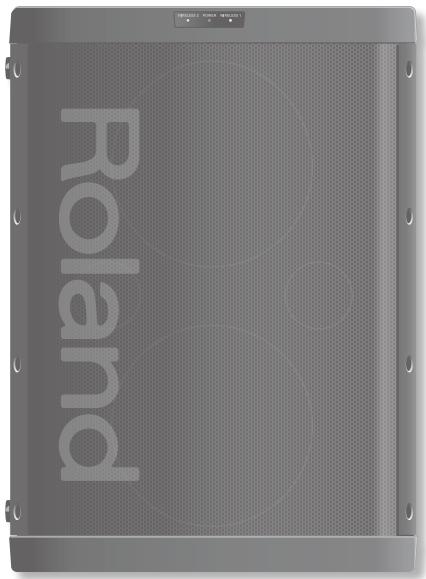
Owner's Manual
Portable Amplifier
BA-55
Great Sound Anywhere
High-quality wireless mic is included.
Digital wireless transmission (2.4 GHz digital) minimizes loss of audio quality.
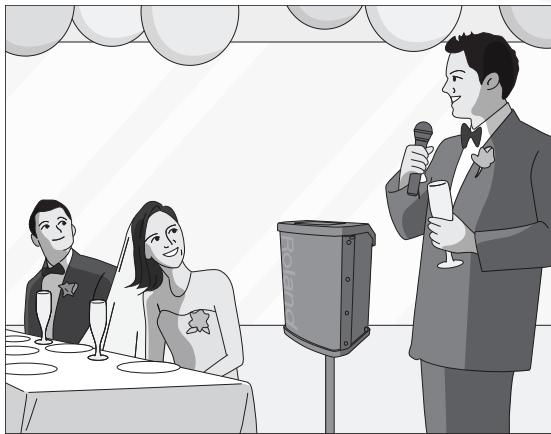
Indoor or Outdoor
Two-way power—use batteries or AC adaptor
Battery life is approximately 6 hours, allowing convenient use anywhere, indoors or outdoors.

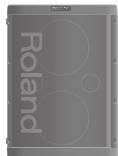
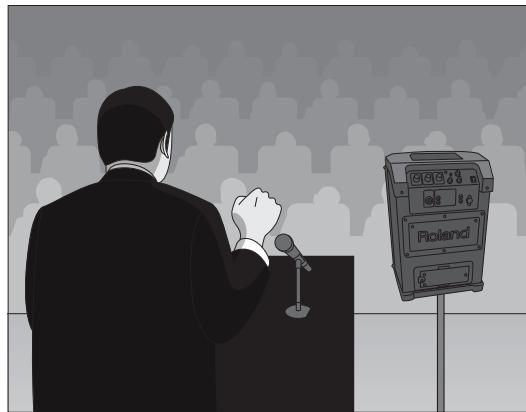
Place Vertically for a Speech
When the unit is placed vertically it will enter mono mode, and the audio will be optimized for maximum projection distance. This is ideal for speeches.
Anti-Feedback Function
Reduces mic feedback (whine or howl).
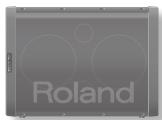
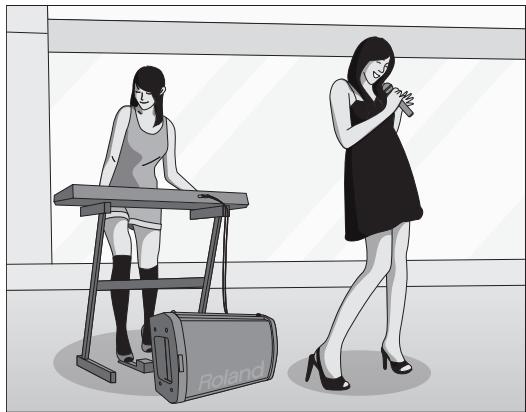
Place Horizontally for Music
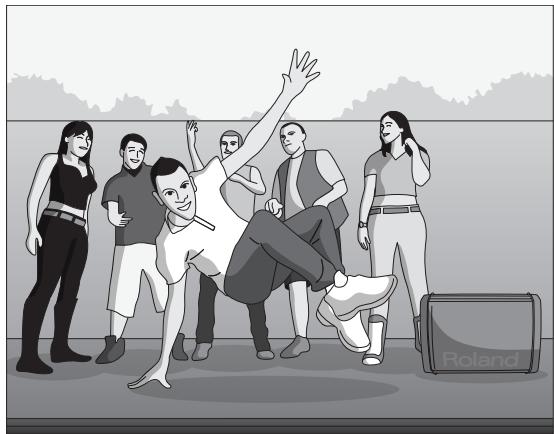
When the unit is placed horizontally it will enter stereo mode, and the audio will be optimized for music.
Mic Echo
It's easy to apply an echo that's ideal for karaoke.
Before using this unit, carefully read the sections entitled: "USING THE UNIT SAFELY" (p. 2), and "IMPORTANT NOTES" (p. 4). These sections provide important information concerning the proper operation of the unit. Additionally, in order to feel assured that you have gained a good grasp of every feature provided by your new unit, Owner's manual should be read in its entirety. The manual should be saved and kept on hand as a convenient reference.
INSTRUCTIONS FOR THE PREVENTION OF FIRE, ELECTRIC SHOCK, OR INJURY TO PERSONS
About WARNING and CAUTION Notices
| ▲WARNING | Used for instructions intended to alert the user to the risk of death or severe injury should the unit be used improperly. |
| ▲CAUTION | Used for instructions intended to alert the user to the risk of injury or material damage should the unit be used improperly. * Material damage refers to damage or other adverse effects caused with respect to the home and all its furnishings, as well to domestic animals or pets. |
About the Symbols
| A | The △symbol alerts the user to important instructions or warnings. The specific meaning of the symbol is determined by the design contained within the triangle. In the case of the symbol at left, it is used for general cautions, warnings, or alerts to danger. |
| B | The ○symbol alerts the user to items that must never be carried out (are forbidden). The specific thing that must not be done is indicated by the design contained within the circle. In the case of the symbol at left, it means that the unit must never be disassembled. |
| C | The ●symbol alerts the user to things that must be carried out. The specific thing that must be done is indicated by the design contained within the circle. In the case of the symbol at left, it means that the power-cord plug must be unplugged from the outlet. |
ALWAYS OBSERVE THE FOLLOWING
WARNING
Do not open (or modify in any way) the unit or its AC adaptor.

Do not attempt to repair the unit, or replace parts within it (except when this manual provides specific instructions directing you to do so). Refer all servicing to your retailer, the nearest Roland Service Center, or an authorized Roland distributor, as listed on the "Information" page.
Never install the unit in any of the following locations.
- Subject to temperature extremes (e.g., direct sunlight in an enclosed vehicle, near a heating duct, on top of heat-generating equipment); or are
- Damp (e.g., baths, washrooms, on wet floors); or are
- Exposed to steam or smoke; or are
- Subject to salt exposure; or are
- Humid; or are
- Exposed to rain; or are
- Dusty or sandy; or are
- Subject to high levels of vibration and shakiness.
This unit should be used only with a rack or stand that is recommended by Roland.
When using the unit with a rack or stand recommended by Roland, the rack or stand must be carefully placed so it is level and sure to remain stable. If not using a rack or stand, you still need to make sure that any location you choose for placing the unit provides a level surface that will properly support the unit, and keep it from wobbling.


WARNING
Be sure to use only the AC adaptor supplied with the unit. Also, make sure the line voltage at the installation matches the input voltage specified on the AC adaptor's body. Other AC adaptors may use a different polarity, or be designed for a different voltage, so their use could result in damage, malfunction, or electric shock.

Use only the attached power-supply cord. Also, the supplied power cord must not be used with any other device.

Do not excessively twist or bend the power cord, nor place heavy objects on it. Doing so can damage the cord, producing severed elements and short circuits. Damaged cords are fire and shock hazards!

This unit, either alone or in combination with an amplifier and speakers, may be capable of producing sound levels that could cause permanent hearing loss. Do not operate for a long period of time at a high volume level, or at a level that is uncomfortable. If you experience any hearing loss or ringing in the ears, you should immediately stop using the unit, and consult an audiologist.

Do not place containers containing liquid on this product. Never allow foreign objects (e.g., flammable objects, coins, wires) or liquids (e.g., water or juice) to enter this product. Doing so may cause short circuits, faulty operation, or other malfunctions.


WARNING
Immediately turn the power off, remove the AC adaptor from the outlet, and request servicing by your retailer, the nearest Roland Service Center, or an authorized Roland distributor, as listed on the "Information" page when:
- The AC adaptor, the power-supply cord, or the plug has been damaged; or
- If smoke or unusual odor occurs
- Objects have fallen into, or liquid has been spilled onto the unit; or
- The unit has been exposed to rain (or otherwise has become wet); or
- The unit does not appear to operate normally or exhibits a marked change in performance.
In households with small children, an adult should provide supervision until the child is capable of following all the rules essential for the safe operation of the unit.
Protect the unit from strong impact.
(Do not drop it!)
Do not force the unit's power-supply cord to share an outlet with an unreasonable number of other devices. Be especially careful when using extension cords---the total power used by all devices you have connected to the extension cord's outlet must never exceed the power rating (watts/amperes) for the extension cord. Excessive loads can cause the insulation on the cord to heat up and eventually melt through.
Before using the unit in a foreign country, consult with your retailer, the nearest Roland Service Center, or an authorized Roland distributor, as listed on the "Information" page.
Batteries must never be recharged, heated, taken apart, or thrown into fire or water.




Never expose batteries to excessive heat such as sunshine, fire or the like.
Incorrect handling of batteries, rechargeable Ni-MH battery, or a battery charger can cause leakage, overheating, fire, or explosion. Before use, you must read and strictly observe all of the precautions that accompany the batteries, rechargeable Ni-MH battery, or battery charger.
When using rechargeable Ni-MH battery and a charger, use only the combination of rechargeable Ni-MH battery and charger specified by the battery manufacturer.

CAUTION
The unit and the AC adaptor should be located so their location or position does not interfere with their proper ventilation.

This (BA-55) for use only with Roland stand ST-A95. Use with other stands is capable of resulting in instability causing possible injury.

Even if you observe the cautions given in the owner's manual, certain types of handling may allow this product to fall from the stand, or cause the stand to overturn. Please be mindful of any safety issues before using this product.

Always grasp only the plug on the AC adaptor cord when plugging into, or unplugging from, an outlet or this unit.

At regular intervals, you should unplug the AC adaptor and clean it by using a dry cloth to wipe all dust and other accumulations away from its prongs. Also, disconnect the power plug from the power outlet whenever the unit is to remain unused for an extended period of time. Any accumulation of dust between the power plug and the power outlet can result in poor insulation and lead to fire.

Try to prevent cords and cables from becoming entangled. Also, all cords and cables should be placed so they are out of the reach of children.

Never climb on top of, nor place heavy objects on the unit.

Never handle the AC adaptor or its plugs with wet hands when plugging into, or unplugging from, an outlet or this unit.

Before moving the unit, disconnect the AC adaptor and all cords coming from external devices.

Before cleaning the unit, turn off the power and unplug the AC adaptor from the outlet (p. 10).

Whenever you suspect the possibility of lightning in your area, disconnect the AC adaptor from the outlet.

If used improperly, batteries may explode or leak and cause damage or injury. In the interest of safety, please read and observe the following precautions (p. 9).

- Carefully follow the installation instructions for batteries, and make sure you observe the correct polarity.

- Avoid using new batteries together with used ones. In addition, avoid mixing different types of batteries.

- Remove the batteries whenever the unit is to remain unused for an extended period of time.

- If a battery has leaked, use a soft piece of cloth or paper towel to wipe all remnants of the discharge from the battery compartment. Then install new batteries. To avoid inflammation of the skin, make sure that none of the battery discharge gets onto your hands or skin.
Exercise the utmost caution so that none of the discharge gets near your eyes. Immediately rinse the affected area with running water if any of the discharge has entered the eyes.
- Never keep batteries together with metallic objects such as ballpoint pens, necklaces, hairpins, etc.
Used batteries must be disposed of in compliance with whatever regulations for their safe disposal that may be observed in the region in which you live.
Batteries may reach a high temperature; please be careful to avoid burning yourself.
Power Supply
- Do not connect this unit to same electrical outlet that is being used by an electrical appliance that is controlled by an inverter (such as a refrigerator, washing machine, microwave oven, or air conditioner), or that contains a motor. Depending on the way in which the electrical appliance is used, power supply noise may cause this unit to malfunction or may produce audible noise. If it is not practical to use a separate electrical outlet, connect a power supply noise filter between this unit and the electrical outlet.
- The AC adaptor will begin to generate heat after long hours of consecutive use. This is normal, and is not a cause for concern.
- Before connecting this unit to other devices, turn off the power to all units. This will help prevent malfunctions and/or damage to speakers or other devices.
Power Supply: Use of Batteries
- When installing or replacing batteries, always turn off the power on this unit and disconnect any other devices you may have connected. This way, you can prevent malfunction and/or damage to speakers or other devices.
- Batteries are supplied with the unit. The life of these batteries may be limited, however, since their primary purpose was to enable testing.
- If the batteries run extremely low, the sound may distort or interruptions in the sound may occur at high volume levels, but this does not indicate a malfunction. If this occurs, please replace the batteries or use the included AC adaptor.
- If operating this product on batteries, please use alkaline batteries or rechargeable Ni-MH battery.
Placement
- Using the unit near power amplifiers (or other equipment containing large power transformers) may induce hum. To alleviate the problem, change the orientation of this unit; or move it farther away from the source of interference.
- This device may interfere with radio and television reception. Do not use this device in the vicinity of such receivers.
- Noise may be produced if wireless communications devices, such as cell phones, are operated in the vicinity of this unit. Such noise could occur when receiving or initiating a call, or while conversing. Should you experience such problems, you should relocate such wireless devices so they are at a greater distance from this unit, or switch them off.
- Do not expose the unit to direct sunlight, place it near devices that radiate heat, leave it inside an enclosed vehicle, or otherwise subject it to temperature extremes. Also, do not allow lighting devices that normally are used while their light source is very close to the unit (such as a piano light), or powerful spotlights to shine upon the same area of the unit for extended periods of time. Excessive heat can deform or discolor the unit.
- When moved from one location to another where the temperature and/or humidity is very different, water droplets (condensation) may form inside the unit. Damage or malfunction may result if you attempt to use the unit in this condition. Therefore, before using the unit, you must allow it to stand for several hours, until the condensation has completely evaporated.
- Do not allow rubber, vinyl, or similar materials to remain on this unit for long periods of time. Such objects can discolor or otherwise harmfully affect the finish.
-
Do not paste stickers, decals, or the like to this instrument. Peeling such matter off the instrument may damage the exterior finish.
-
Depending on the material and temperature of the surface on which you place the unit, its rubber feet may discolor or mar the surface.
You can place a piece of felt or cloth under the rubber feet to prevent this from happening. If you do so, please make sure that the unit will not slip or move accidentally. - Do not put anything that contains water (e.g., flower vases) on this unit. Also, avoid the use of insecticides, perfumes, alcohol, nail polish, spray cans, etc., near the unit. Swiftly wipe away any liquid that spills on the unit using a dry, soft cloth.
Maintenance
- To clean the unit, use a dry, soft cloth; or one that is slightly dampened. Try to wipe the entire surface using an equal amount of strength. Rubbing too hard in the same area can damage the finish.
- Never use benzine, thinners, alcohol or solvents of any kind, to avoid the possibility of discoloration and/or deformation.
Additional Precautions
- Use a reasonable amount of care when using the unit's buttons, sliders, or other controls; and when using its jacks and connectors. Rough handling can lead to malfunctions.
- When connecting / disconnecting all cables, grasp the connector itself—never pull on the cable. This way you will avoid causing shorts, or damage to the cable's internal elements.
- To avoid disturbing your neighbors, try to keep the unit's volume at reasonable levels.
- When you need to transport the unit, package it in the box (including padding) that it came in, if possible. Otherwise, you will need to use equivalent packaging materials.
- Some connection cables contain resistors. Do not use cables that incorporate resistors for connecting to this unit. The use of such cables can cause the sound level to be extremely low, or impossible to hear. For information on cable specifications, contact the manufacturer of the cable.
- MMP (Moore Microprocessor Portfolio) refers to a patent portfolio concerned with microprocessor architecture, which was developed by Technology Properties Limited (TPL). Roland has licensed this technology from the TPL Group.
USING THE UNIT SAFELY 2
IMPORTANT NOTES 4
Panel Descriptions 6
Amp Unit 6
Wireless Microphone (DR-WM55) 8
Getting Ready 9
Preparing the BA-55 9
9
Connecting the AC adaptor. 10
Switching the Power On and Off 11
Preparing the Wireless Mic. 11
Installing Batteries. 11
Using a Mic. 12
Using a Wireless Mic. 12
Pairing 12
Using the Mic 13
Using a Wired Mic 13
Using an Audio Player or Instrument 14
Playing the BA-55 in Stereo 14
Using an Audio Player 14
Using an Instrument. 14
Convenient Functions 15
Applying Echo to the Mic's Sound. 15
Adjusting the Tonal Character (Equalizer) 15
Preventing Feedback (Anti-Feedback) 15
Sounding a Chime 15
Playing Sound Through Another System 16
Automatically Turning the Power Off (Auto Power Off) 16
Storing the Mic and AC Adaptor 16
Mounting the BA-55 on the Dedicated Stand. 17
Examples of Using the BA-55 18
Business 18
Education 19
Performance 20
Events 21
Troubleshooting 22
Main Specifications 23
Amp Unit
- All illustrations of the product appearing in this manual depict the black model.
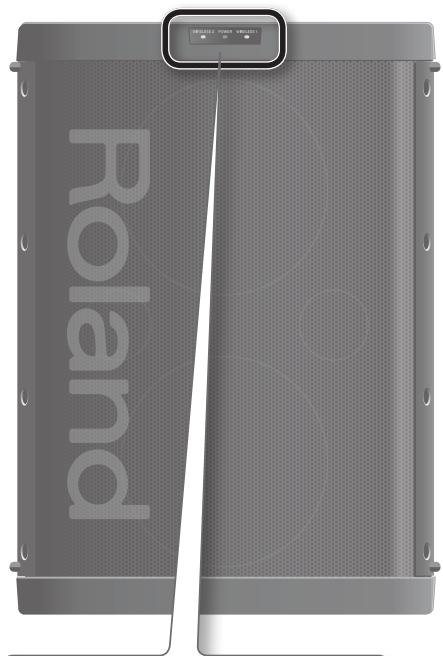
Front
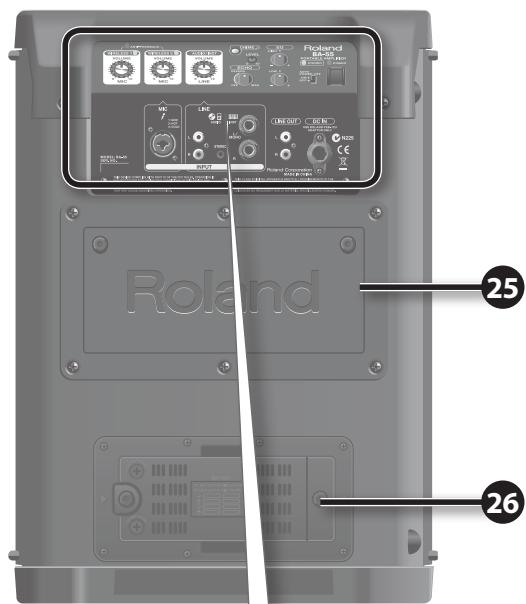
Rear
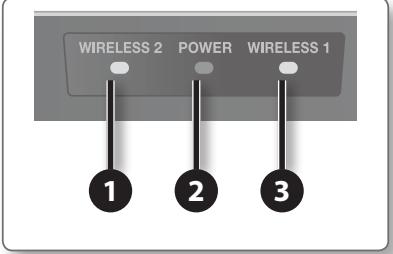
WIRELESS 2 indicator
Lights when a signal from the wireless mic 2 is being received (p. 12).
2 POWER indicator
This will light if the power is on.
3 WIRELESS 1 indicator
Lights when a signal from the wireless mic 1 is being received (p. 12).
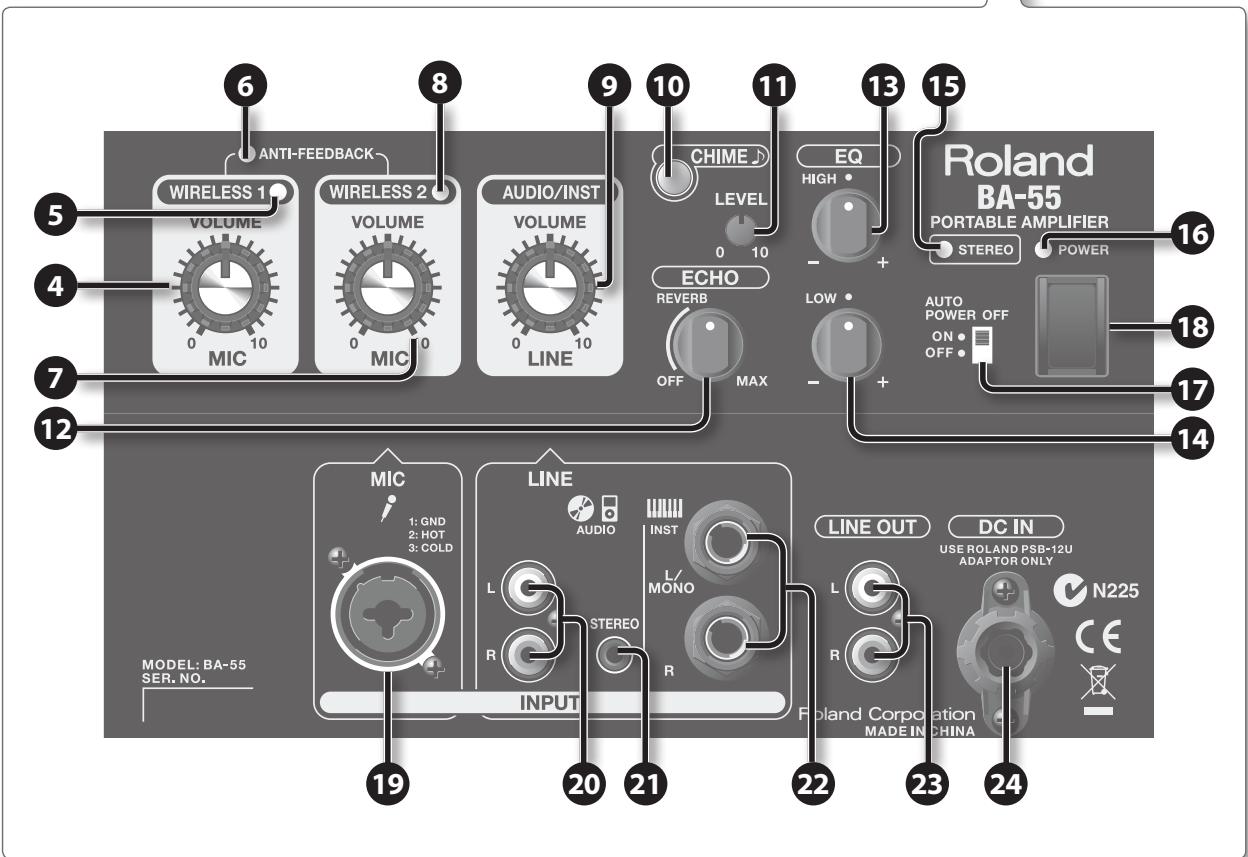
4 WIRELESS 1 [VOLUME] knob
Adjusts the volume of the wireless mic 1 (p. 12).
5 WIRELESS 1 indicator
Lights when a signal from the wireless mic 1 is being received (p. 12).
6 ANTI-FEEDBACK indicator
Lights when the anti-feedback function (p. 15) is operating.
WIRELESS 2 [VOLUME] knob
Adjusts the volume of the wireless mic 2 or a wired mic connected to the MIC jack (p. 13).
8 WIRELESS 2 indicator
Lights when a signal from the wireless mic 2 is being received (p. 12).
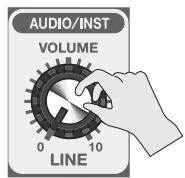
9 AUDIO/INST [VOLUME] knob
Adjusts the volume of the device connected to the LINE jacks (p. 14).
[CHIME] button
Press this button to sound a chime (p. 15).
11 CHIME [LEVEL] knob
Adjusts the volume of the chime (p. 15).
[ ECHO] knob
Adjusts the amount of echo applied to the mic (p. 15).
13 EQ (EQUALIZER) [HIGH] knob
Adjusts the tone of the high-frequency range (p. 15).
EQ (EQUALIZER) [LOW] knob
Adjusts the tone of the low-frequency range (p. 15).
STEREO indicator
Lights when the BA-55 is in stereo mode (p. 14).
16 POWER indicator
This will light if the power is on.
[AUTO POWER OFF] Switch
This switches the power-conservation feature. When set to "ON," the BA-55 will automatically turn off after no operation has been performed for a certain length of time (p. 16)
18 [POWER] Switch
This switches the power on and off (p. 11)
MIC input Jack
You can connect a wired mic to this jack (p. 13).
20 LINE AUDIO Input Jack: RCA PIN type
You can connect a CD player or digital audio player to these jacks (p. 14).
21 LINE AUDIO Input Jack: Stereo mini type
You can connect a CD player or digital audio player to these jacks (p. 14).
22 LINE INST Input Jack
These are 1/4'' phone input jacks.
You can connect electronic musical instruments here. Use the L/MONO jack if you're making a monaural connection (p. 14).
23 LINE OUT Jack
You can connect a recording device to these jacks, or connect them to external powered speakers to expand your system.
24 DC IN (AC Adaptor) Jack
Connect the included AC adaptor here (p. 10).
25 Storage compartment
The included wireless mic and AC adaptor can be stored here (p. 16).
26 Battery Case
Install batteries here. The entire battery case can be removed and installed with the batteries (p. 11).
Wireless Microphone (DR-WM55)
The BA-55 can use two dedicated wireless mics at the same time. Use the included mic or a separately sold mic (Roland DR-WM55). Commercially available wireless mics cannot be used.
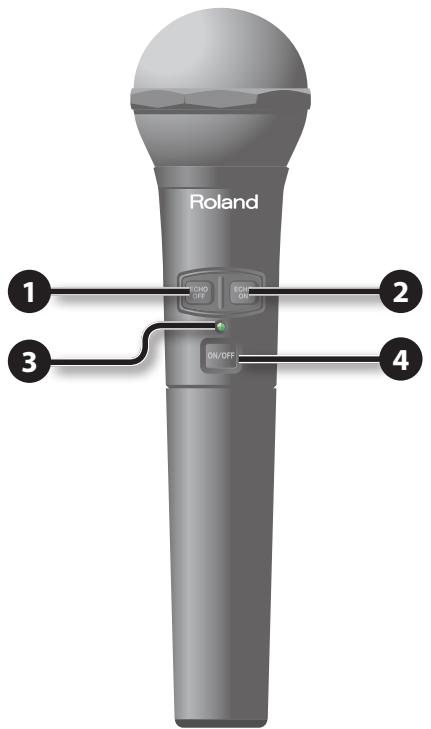
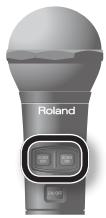
ECHO OFF] switch
This turns off the echo that applies to the wireless mic (p. 15).
2 [ECHO ON] switch
This turns on the echo that applies to the wireless mic (p. 15). If the panel's [ECHO] knob is in the OFF position, there will be no echo even if you press the [ECHO ON] switch.
3 Power indicator
This will light when the wireless mic is switched on (p. 12).
4 Power switch
This turns the wireless mic's power on/off (p. 13).
Preparing the BA-55
This unit can operate using its AC adaptor or on batteries. Use the AC adaptor if you're indoors or near an electrical outlet. Use batteries if you're outdoors or if an electrical outlet is unavailable.
Installing Batteries
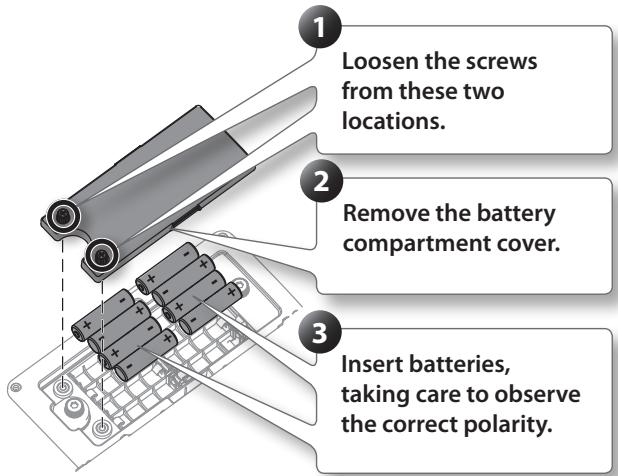
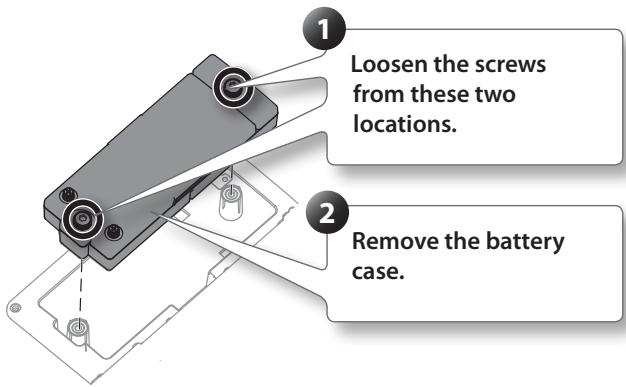
Removing the battery case
Although it is possible to replace the batteries without removing the battery case, battery replacement will be easier if you remove the battery case.
- We recommend that you keep batteries installed in the unit even though you'll be powering it with the AC adaptor. That way, you'll be able to continue a performance even if the cord of the AC adaptor gets accidentally disconnected from the unit.
- To prevent malfunction and speaker damage, make sure to switch off the BA-55's power before you insert or replace its batteries, and before connecting it to other devices.
- Take care that no metal object touches the contacts of the battery case. This can short-circuit the batteries, causing the case to overheat or burn.
About batteries
Batteries that can be used with the BA-55 and the DR-WM55 wireless mic
BA-55
- Alkaline battery (AA, LR6) x 8
- Rechargeable Ni-MH battery (AA, HR6) x 8
Wireless Microphone:(DR-WM55)
- Alkaline battery (AA, LR6) x 2
-
Rechargeable Ni-MH battery (AA, HR6) x 2
-
Rechargeable Ni-MH batteries cannot be recharged by the BA-55 itself. You'll need to use a commercially available battery charger.
-
When operating on battery power only, the unit's indicator will become dim when battery power gets too low. Replace the battery as soon as possible.
- The wireless mic's power indicator will blink when the mic batteries run low. Replace the battery as soon as possible.
Expected battery life under continuous use:
BA-55
| Type of battery | Battery life |
| Alkaline battery (AA, LR6) | approx. 6 hours |
| Rechargeable Ni-MH battery (AA, HR6) | approx. 6 hours |
Wireless Microphone (DR-WM55)
| Type of battery | Battery life |
| Alkaline battery (AA, LR6) | approx. 24 hours |
| Rechargeable Ni-MH battery (AA, HR6) | approx. 24 hours |
Caution regarding batteries
- Incorrect handling of batteries, rechargeable Ni-MH battery, or a battery charger can cause leakage, overheating, fire, or explosion. Before use, you must read and strictly observe all of the precautions that accompany the batteries, rechargeable Ni-MH battery, or battery charger.
- When using rechargeable Ni-MH batteries and a charger, use only the combination of rechargeable Ni-MH battery and charger specified by the battery manufacturer.
- Carefully follow the installation instructions for batteries, and make sure you observe the correct polarity.
- Avoid using new batteries together with used ones. In addition, avoid mixing different types of batteries.
- Carefully read and observe the cautions and handling instructions that accompany the batteries.
- Remove the batteries whenever the unit is to remain unused for an extended period of time.
- If a battery has leaked, use a soft piece of cloth or paper towel to wipe all remnants of the discharge from the battery compartment. Then install new batteries. To avoid inflammation of the skin, make sure that none of the battery discharge gets onto your hands or skin. Exercise the utmost caution so that none of the discharge gets near your eyes. Immediately rinse the affected area with running water if any of the discharge has entered the eyes.
- Never keep batteries together with metallic objects such as ballpoint pens, necklaces, hairpins, etc.
- When using rechargeable Ni-MH batteries, please be aware that the battery life will normally shorten each time they are recharged.
Connecting the AC adaptor
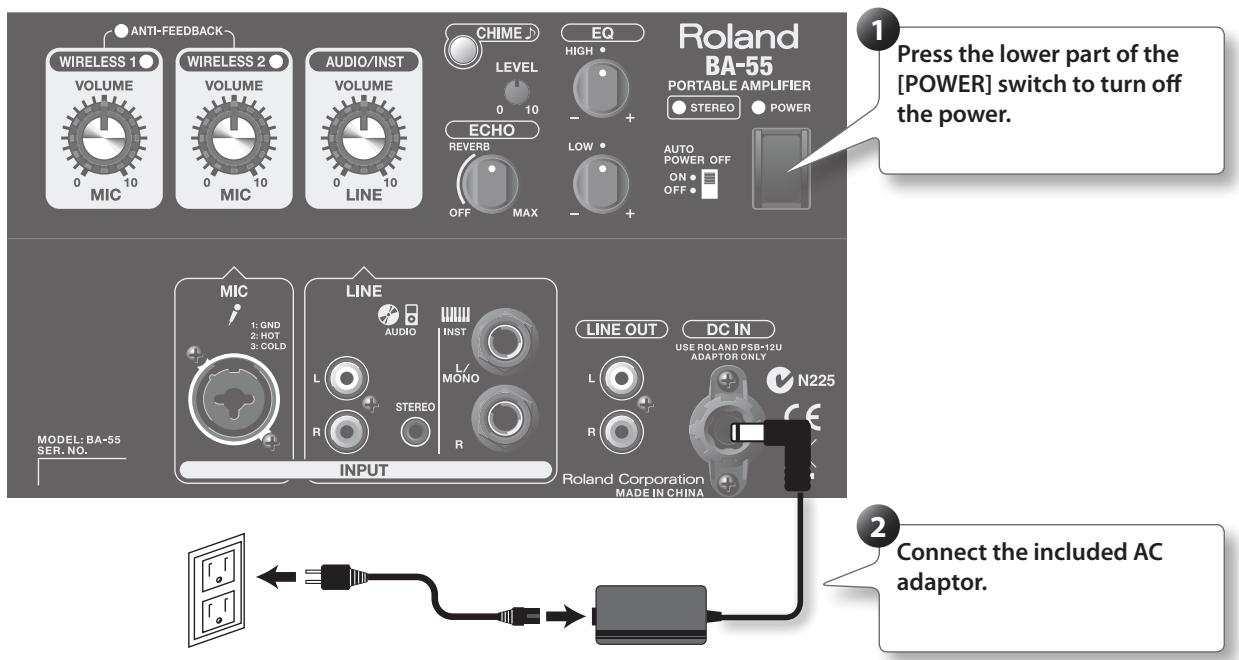
Switching the Power On and Off
-
Once the connections have been completed (p. 13, p. 14) turn on power to your various devices in the order specified. By turning on devices in the wrong order, you risk causing malfunction and/or damage to speakers and other devices.
-
Make sure that the power to all equipment is turned off.
- Set each of the BA-55's [VOLUME] knobs to 0.
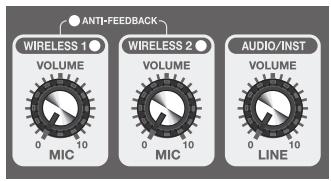
- Connect any external devices such as an audio player or electronic musical instrument.
- Switch on the power to any external equipment connected to the LINE Input jacks.
- Press the upper part of the [POWER] switch to turn on the BA-55's power.
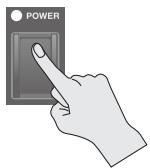
- This unit is equipped with a protection circuit. A brief interval (a few seconds) after power up is required before the unit will operate normally.
-
Before switching the power on/off, always be sure to turn the volume down. Even with the volume turned down, you might hear some sound when switching the power on/off. However, this is normal and does not indicate a malfunction.
-
Switch on any equipment connected to the LINE OUT jack.
Switching the Power Off
Turn the power off by reversing the order in which you turned the power on.
Preparing the Wireless Mic
Here's how to get the included wireless mic (DR-WM55) ready for use.
Installing Batteries
- Turn off the mic's power switch.
- Turn the grip in the direction of the arrow to remove it.
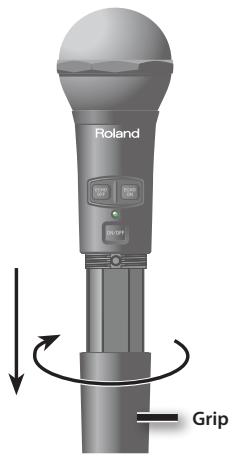
- Insert the batteries, making sure that the polarity is correct.
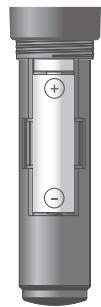
- Turn the grip in the direction of the arrow to reattach it.
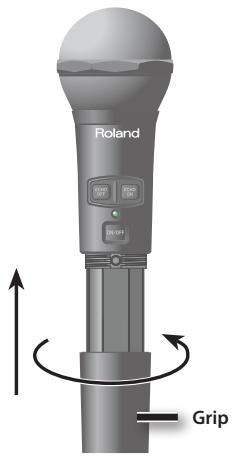
Using a Wireless Mic
Here's how to produce sound using the DR-WM55 wireless mic.
Pairing
When using the included wireless mic for the first time, the BA-55 must detect the mic you're using. This process is called "pairing." Once the wireless mic has been paired, the connection will be remembered even while the BA-55's power is switched off. The next time you turn on the power, the mic will already be paired.
Pairing to the WIRELESS 1 channel
When shipped from the factory, the included wireless mic is already paired to the WIRELESS 1 channel. If you want to redo the pairing, or if you want to pair a different mic than the currently paired mic, proceed as follows.
- Turn on the power of the BA-55 while holding down the [CHIME] button (p. 11).
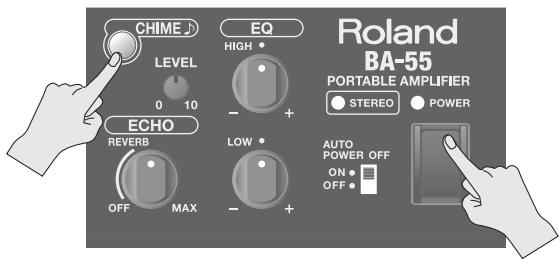
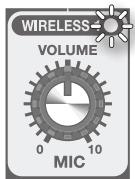
- Hold down the [CHIME] button until the WIRELESS 1 indicator blinks.
The BA-55 will enter pairing mode. In this example, we'll pair the wireless mic with the WIRELESS 1 channel.
- Turn on the power switch of the wireless mic while holding down the [ECHO ON] switch.
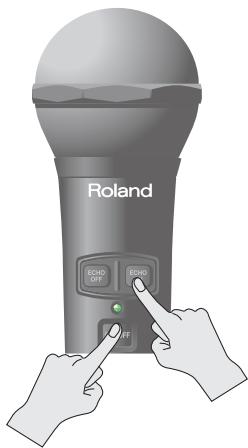
The BA-55 will automatically detect the wireless mic. When the connection has been established, the blinking will change to steadily lit. Pairing is now complete.
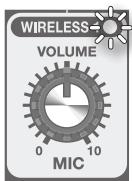
When pairing is completed, pairing mode will be cancelled and the system will return to normal operating mode.
- Pairing mode will be cancelled if pairing is not accomplished within 30 seconds from the time that the WIRELESS 1 indicator starts blinking.
Pairing the second mic
Here's how to pair the second mic to the WIRELESS 2 channel.
- Turn on the BA-55's power while holding down the [CHIME] button (p. 11).
- Hold down the [CHIME] button until the WIRELESS 1 indicator blinks.
The BA-55 will enter pairing mode.
- Press the [CHIME] button once again.
The WIRELESS 2 indicator will blink. In this example, we'll pair the wireless mic with the WIRELESS 2 channel.
- Turn on the power switch of the second wireless mic while holding down the [ECHO ON] switch.
The BA-55 will automatically detect the wireless mic. When the connection has been established, the blinking will change to steadily lit.
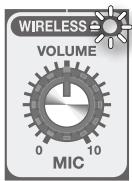
When pairing is completed, pairing mode will be cancelled and the system will return to normal operating mode.
- Pairing mode will be cancelled if pairing is not accomplished within 30 seconds from the time that the WIRELESS 2 indicator starts blinking.
Using the Mic
Once pairing has been completed, you can start using the mic with the BA-55.
- Turn on the power switch of the DR-WM55.
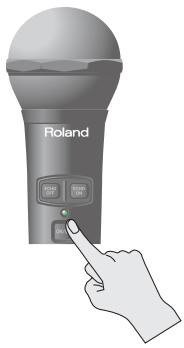
- While speaking into the mic, use the MIC [VOLUME] knob to adjust the volume.
To adjust the volume of the first wireless mic, use the WIRELESS 1 [VOLUME] knob. To adjust the volume of the second wireless mic, use the WIRELESS 2 [VOLUME] knob.
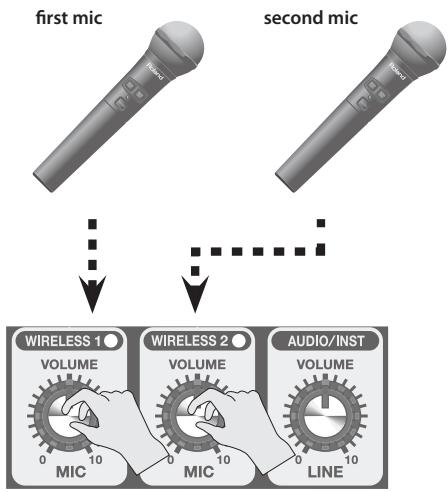
- If you leave the wireless mic powered on, its power will automatically turn off two hours after the last operation.
Using a Wired Mic
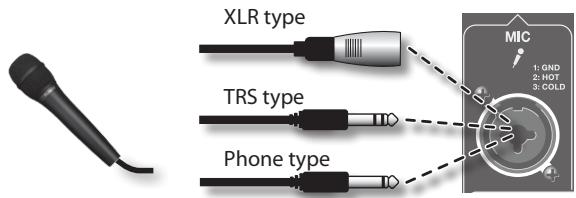
You can use a commercially available wired mic with the BA-55.
- Connect your microphone to the MIC input Jack.
If the mic has a switch, turn the switch on.
- Switch on the BA-55's power (p. 11).
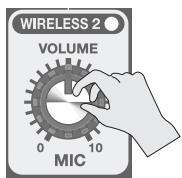
- While speaking into the mic, use the WIRELESS 2 [VOLUME] knob to adjust the volume.
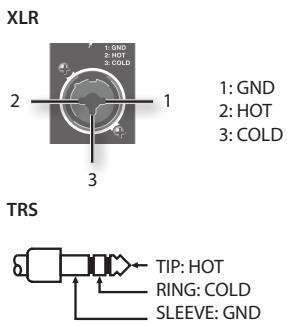
- This instrument is equipped with balanced (XLR/TRS) type jacks. Wiring diagrams for these jacks are shown below. Make connections after first checking the wiring diagrams of other equipment you intend to connect.
- If the second wireless mic is on, no sound from the wired mic will be output.
- This jack does not supply phantom power.
Playing the BA-55 in Stereo
The BA-55 contains two speakers. When the unit is placed vertically, it will play back in monaural mode. When the BA-55 is placed horizontally, it will automatically enter stereo mode; the two speakers will operate as left and right (L/R) stereo speakers.
In stereo mode, the BA-55's audio quality will be optimized for music playback. This is ideal when you've connected a CD player or digital audio player to play back music, or when you're playing a musical instrument.
- Place the BA-55 horizontally, so the rubber feet on its side are in contact with the floor.
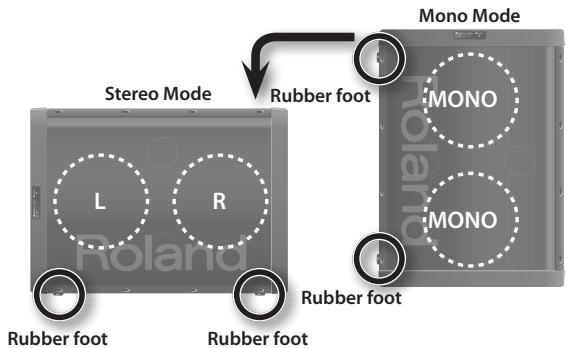
The STEREO indicator on the back panel (p. 7) will light.
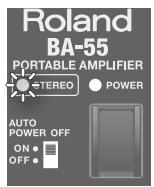
- When placing the unit horizontally, handle with care to avoid dropping it, or allowing it to fall or tip over.
Using an Audio Player
Here's how to connect an audio player such as a CD player or digital audio player for playback.
- To prevent malfunction and/or damage to speakers or other devices, always turn down the volume, and turn off the power on all devices before making any connections.
-
When connection cables with resistors are used, the volume level of equipment connected to the inputs (INPUT jacks) may be low. If this happens, use connection cables that do not contain resistors.
-
Place the BA-55 horizontally.
It will automatically enter stereo mode.
- Connect the output jacks of your CD player or digital audio player to the BA-55's LINE AUDIO Input jack
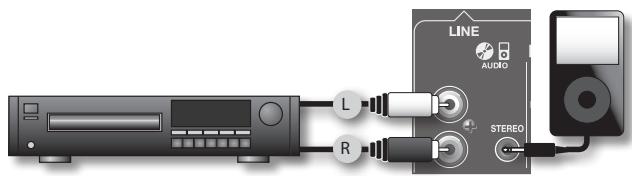
-
As appropriate for the type of cable you're using, you can use either the stereo mini-phone jack or the RCA phono jacks.
-
Set the AUDIO/INST [VOLUME] to 0.
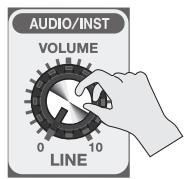
- Switch on your audio player's power.
- Switch on the BA-55's power (p. 11).
- Raise the volume of your audio player.
- Play back music on your audio player.
- Use the AUDIO/INST [VOLUME] knob to adjust the volume.
Using an Instrument
Here's how to connect a keyboard to the LINE INST input jacks for performance.
- Place the BA-55 horizontally. It will automatically enter stereo mode.
- Connect your keyboard to the LINE INST input jacks. Use the L/MONO jack if you're making a monaural connection.
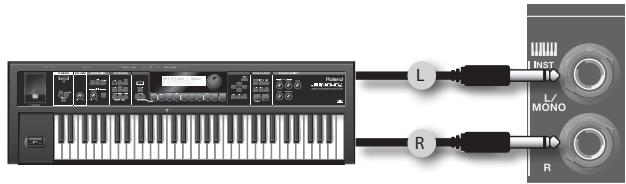
- Set the AUDIO/INST [VOLUME] to 0.
- Switch on the keyboard's power.
- Switch on the BA-55's power (p. 11).
- Raise the volume of the keyboard.
- Use the AUDIO/INST [VOLUME] knob to adjust the volume.
Applying Echo to the Mic's Sound
Here's how to add echo (reverbberation) to the sound of the mic.
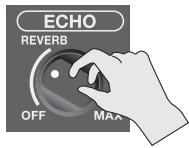
Turning the ECHO [LEVEL] knob toward the right will gradually increase the reverberation. The left half of the knob's range (OFF-center) applies a natural-sounding rever, and the right half of the range (center - MAX) applies a repeating echo that's ideal for karaoke.
If the BA-55 is in stereo mode, an even more spacious echo effect will be produced.
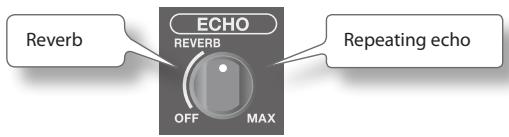
The echo specified by this knob's setting can be turned on/off using the mic's [ECHO ON] switch and [ECHO OFF] switch.
- Echo is applied only to the mic input. It won't be applied to sound that is input via the LINE jacks.
Adjusting the Tonal Character (Equalizer)
Here's how to adjust the tonal character of the sound produced by the speakers.
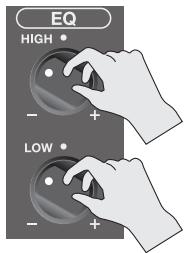
Turning the [HIGH] knob toward " ^+ " will boost the upper range, making the sound brighter.
If the sound is muffled, turning this knob toward "+" will make the sound clearer. If the sound is harsh, turning this knob toward "-" will make the sound more mellow.
Turning [LOW] knob toward " ^+ " will boost the low frequencies, giving the sound more depth.
If the sound lacks depth, turning this knob toward "+" will make the sound richer. If the sound is muddy, turning the knob toward "-" will make the sound clearer.
Preventing Feedback (Anti-Feedback)
This suppresses acoustic feedback (a whine or howl) caused by the mic.
What is acoustic feedback?
If a mic is pointed at the speaker, or if the system is operated at a high volume, an unpleasant oscillation (whine or howl) may occur; this is called feedback.
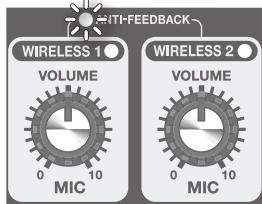
The BA-55 provides an anti-feedback function that suppresses feedback. The anti-feedback function will operate automatically when any of the MIC [VOLUME] knobs are turned to the right.
MEMO
The ANTI-FEEDBACK indicator will light when the anti-feedback function is operating. If both of the MIC [VOLUME] knobs are set to 0, the anti-feedback function will be off.
-
If the anti-feedback function is not enough to suppress feedback, take the following steps
-
Change the direction of the microphone
- Move the microphone away from the speakers
- Lower the volume
Sounding a Chime
A chime will sound when you press the [CHIME] button. This is an ideal way to get the attention of the audience at an event before making an announcement.
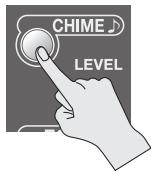
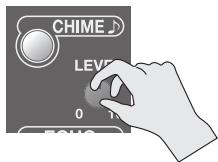
Use the CHIME [LEVEL] knob to adjust the volume of the chime.
Playing Sound Through Another System
The BA-55 provides LINE OUT jacks, which you can connect to a mixer or recorder.
Using these jacks, the sound being played through the BA-55 can also be played through another PA system, or recorded.
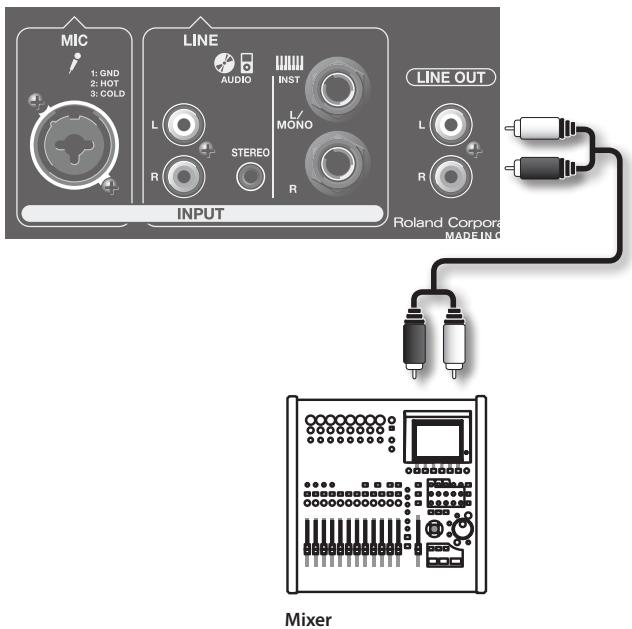
Playing sound through another PA system
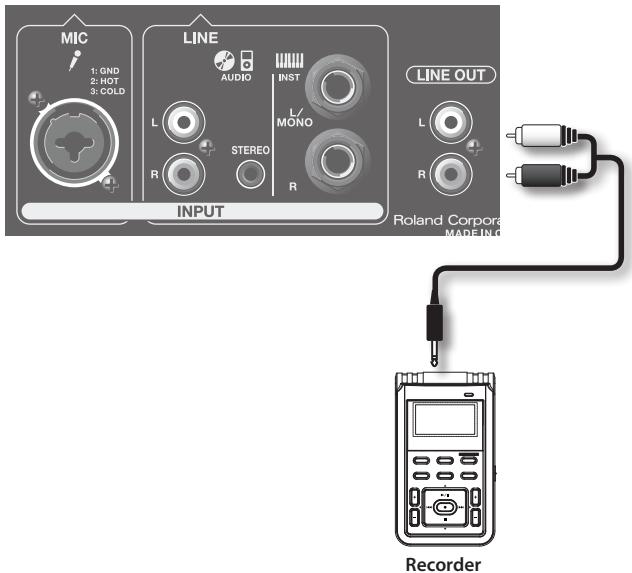
Recording
Automatically Turning the Power Off (Auto Power Off)
The BA-55 has an automatic power off function, which automatically turns off the power when the unit has not been operated for a certain period of time.
If the [AUTO POWER OFF] switch is on, the auto power off function will be enabled; the power will turn off automatically if there has been no operation or sound produced for approximately 2 hours. (When the BA-55 is shipped from the factory, the auto power off function is turned on.)
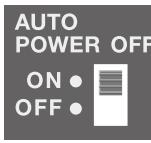
If you want to turn the power on again, set the [POWER] switch to the off position and then turn the power on.
Storing the Mic and AC Adaptor
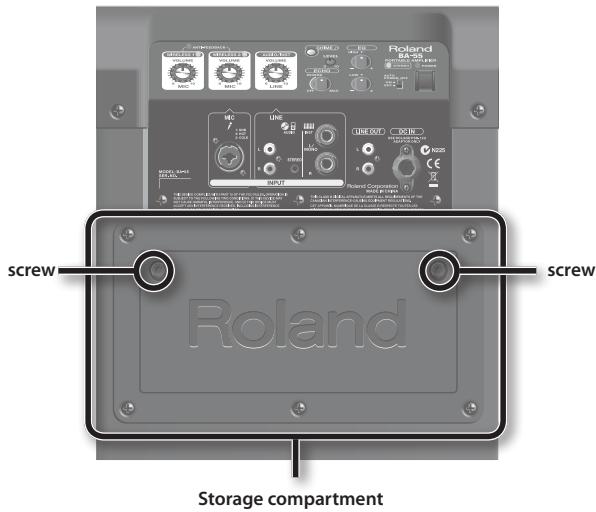
The BA-55's rear panel has a storage compartment for holding the included wireless mic and AC adaptor.
To detach the compartment cover, loosen the two screws shown in the illustration.
The wireless mic and AC adaptor can be stored in the compartment.
Mounting the BA-55 on the Dedicated Stand
By using a speaker stand (Option: ST-A95), you can mount the BA-55 at the optimal height for use as a monitor speaker or simple PA device.
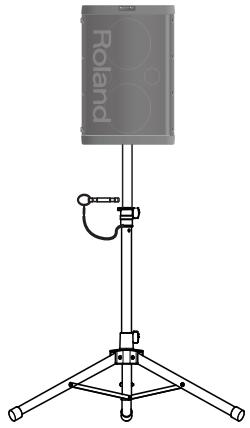
NOTE
- Always have at least one other person assist you when mounting the BA-55 on a speaker stand, or when adjusting the height of the stand while the BA-55 remains mounted on it.
- Be careful not to pinch your fingers, when you assemble.
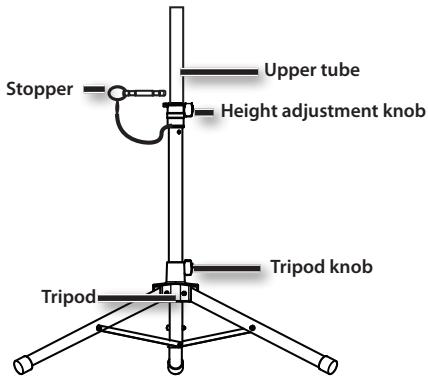
1. Loosen tripod knob and open the tripod.
After opening the tripod, tighten the tripod knob again.
- The distance between lower ends of the tripod should be 98 cm as shown in figures on the below. If the tripod is not opened wide enough, the stand may be unstable.
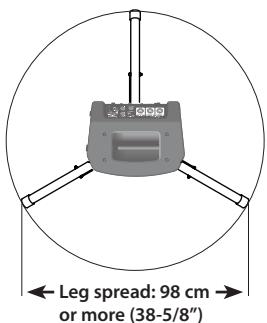
2. Loosen height adjustment knob and make upper tube longer.
- Set up upper tube at the required height and insert the stopper into the hole in upper tube.
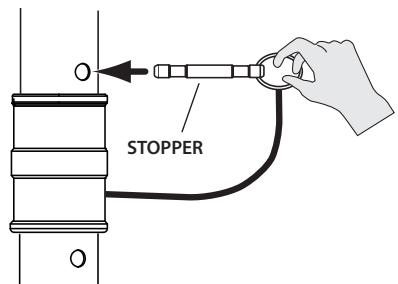
- Use the ST-A95 only with the stopper inserted into upper tube.
4. Tighten height adjustment knob.
- Fit the hole on the BA-55 onto upper tube.
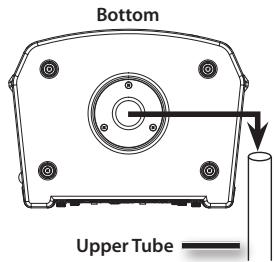
WARNING
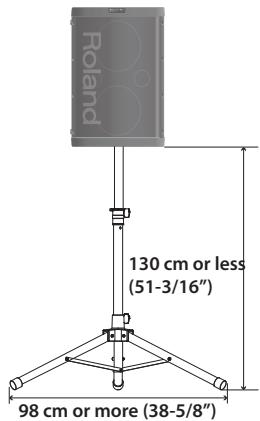
- The BA-55 is designed to be used only in combination with a Roland-manufactured speaker stand (ST-A95).
Do not use it with any other stand. - As shown in the illustration below, adjust the speaker stand to a height of no more than 130cm , and open the tripod to a spread of 98cm or more.
- Adjusting the speaker stand to a height greater than 130~cm or the tripod to a spread of less than 98~cm may allow the system to fall over, resulting in damage or personal injury.
- If you use the BA-55 with a speaker stand, do not place it on an unstable or tilted location.
You must place the system on a stable, horizontal location. - Cables connected to the BA-55 should have enough slack, so that they will not cause an accident if someone trips over them.
- To prevent accidents caused by falling objects, do not place anything on top of a BA-55 that is mounted on a speaker stand.
Business
You can use the wireless mic to deliver lectures or presentations in a small hall or meeting room.
Seminar or lecture
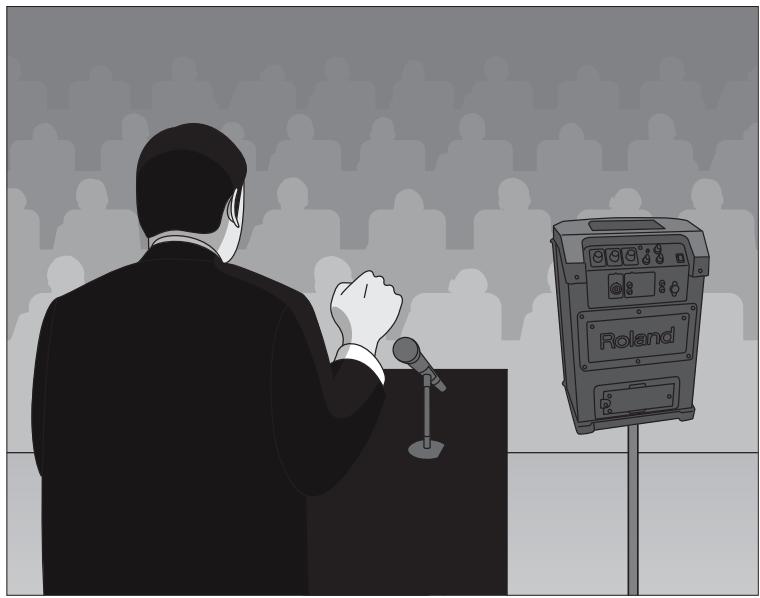
Setup
- Place the BA-55 vertically on a table or stand.
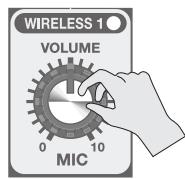
- Use the WIRELESS 1 [VOLUME] knob to adjust the volume of the wireless mic.
You can use a second wireless mic to conduct a question-and-answer session with the audience. Use the WIRELESS 2 [VOLUME] knob to adjust the volume of the audience mic.
Reference
"Using a Wireless Mic" (p. 12)
Presentation
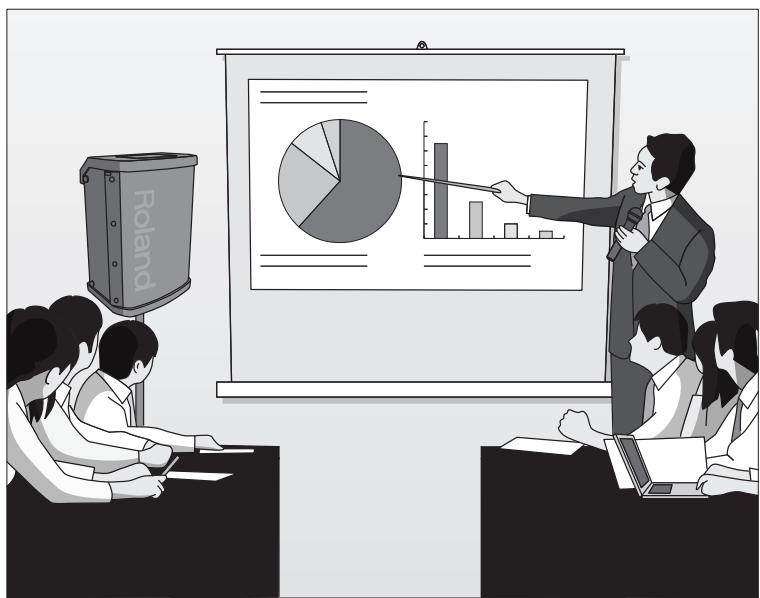
Setup
- Place the BA-55 vertically on a table or stand.
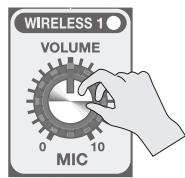
- Use the WIRELESS 1 [VOLUME] knob to adjust the volume of the wireless mic.
- If the audio output of the computer you're using to show the presentation is connected to the BA-55's LINE AUDIO input jack, the sound from the computer can also be played through the BA-55.
Use the AUDIO/INST [VOLUME] knob to adjust the volume of the audio from the computer.
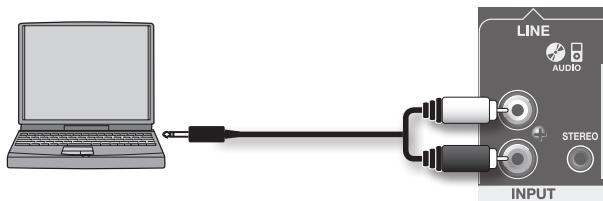
Reference
Using a Wireless Mic(p.12)
- "Using an Audio Player or Instrument" (p. 14)
Education
Background music from a digital audio player can be played through the BA-55 for children's games or for sports lessons. You can also use the wireless mic to provide guidance for instruction.
Musical games for children
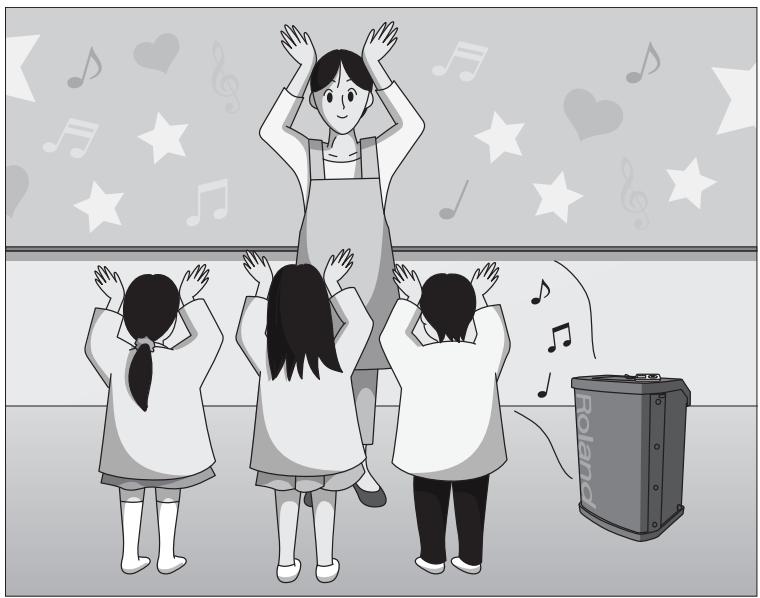
Setup
- Connect your digital audio player or CD player to the BA-55's LINE input jacks.
Use the AUDIO/INST [VOLUME] knob to adjust the volume.
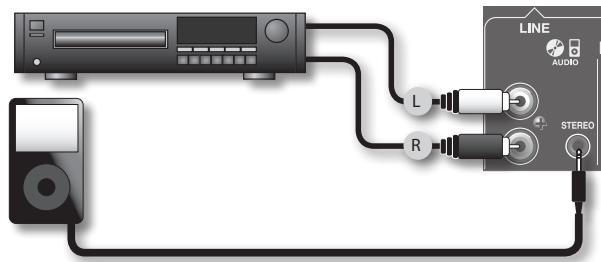
Reference
"Using an Audio Player" (p. 14)
Sports instruction
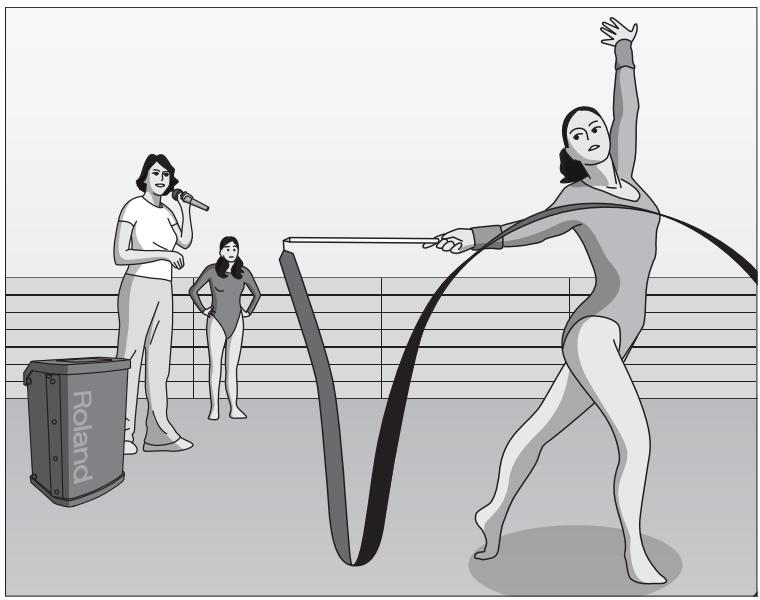
Setup
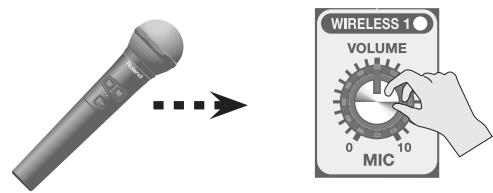
- Use the WIRELESS 1 [VOLUME] knob to adjust the volume of the wireless mic.
- Connect the digital audio player or CD player producing the background music to the BA-55's LINE input jacks. Use the AUDIO/INST [VOLUME] knob to adjust the volume.
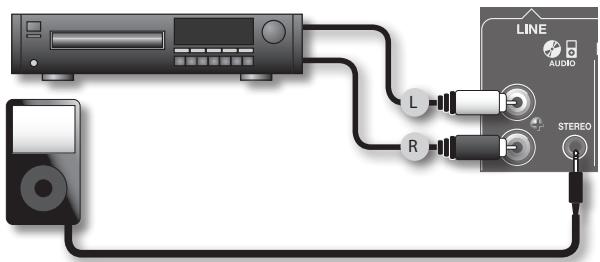
Reference
"Using an Audio Player" (p. 14)
Performance
You can use the BA-55 in stereo mode to deliver high-quality music for a street dance, or connect an electronic musical instrument (such as a keyboard) and use it with the wireless mic for a small-scale live performance.
Street dance
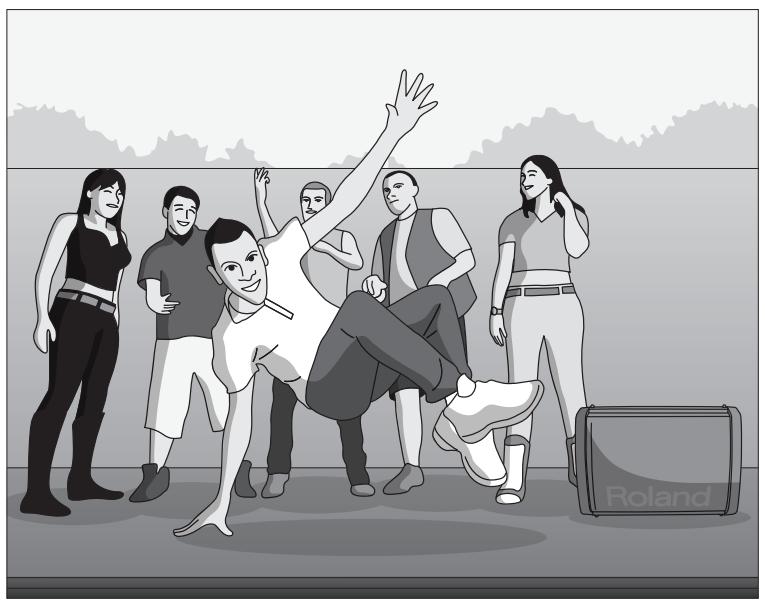
Setup
- Place the BA-55 horizontally so that it operates in stereo mode.
- Connect the digital audio player providing the background music to the BA-55's LINE input jacks.
Use the AUDIO/INST [VOLUME] knob to adjust the volume.
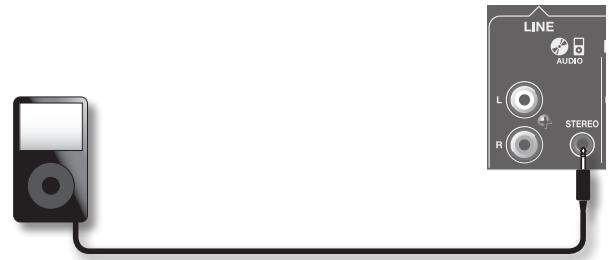
Reference
Using an Audio Player(p.14)
"Playing the BA-55 in Stereo"(p. 14)
Instrumental performance
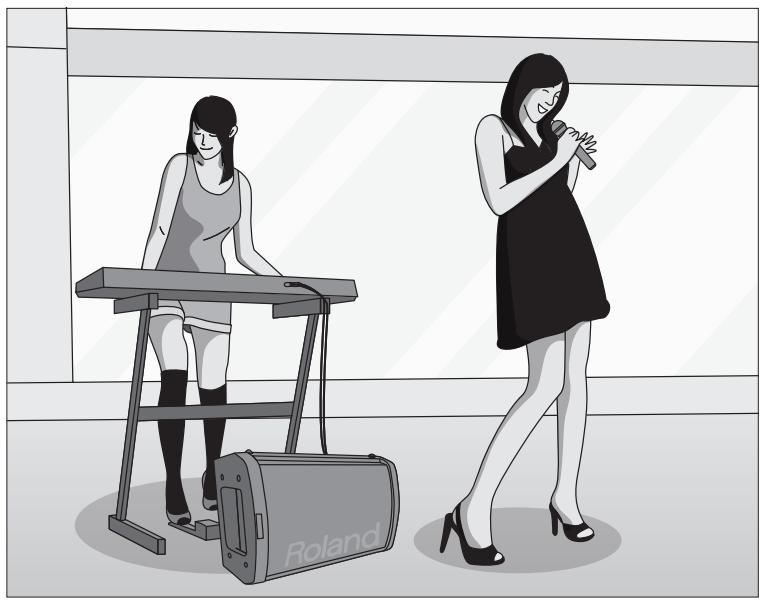
Setup
- Place the BA-55 horizontally so that it operates in stereo mode.
- Connect your electronic instrument to the LINE INST input jacks. If you're using a monaural instrument such as a guitar, connect it to L/MONO.
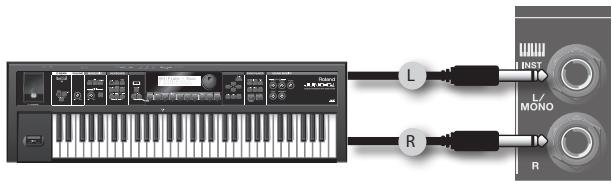
- Use the WIRELESS 1 [VOLUME] knob to adjust the volume of the wireless mic.
- If you're using a wired mic, connect it to the MIC input jack. Use the WIRELESS 2 [VOLUME] knob to adjust the volume of the wired mic.
- If you want to apply a natural-sounding reverb to the vocal, set the [ECHO] knob between OFF and the center position.
Reference
"Playing the BA-55 in Stereo"(p. 14)
Using an Instrument(p.14)
- "Using a Wired Mic" (p. 13)
Applying Echo to the Mic's Sound(p.15)
Events
At a party, the master of ceremonies can use the wireless mic. People can also enjoy singing karaoke along with background music.
Outdoor party
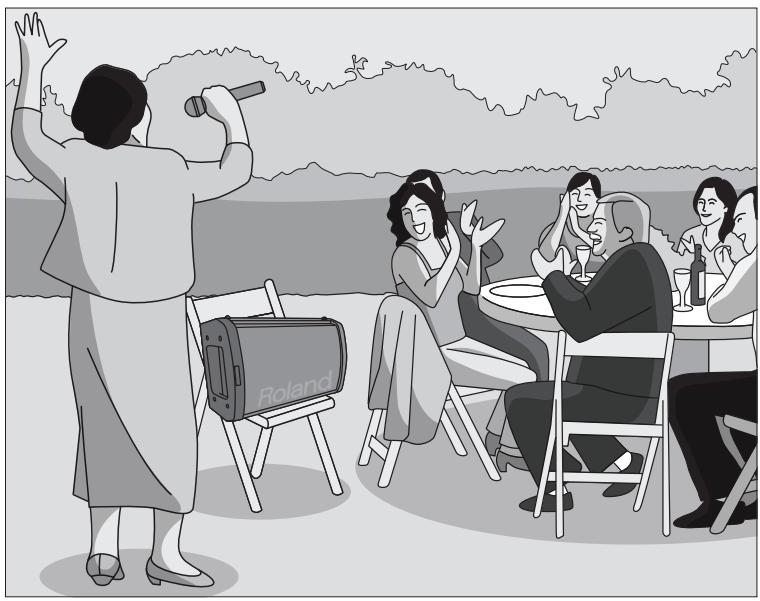
Setup
- Place the BA-55 horizontally so that it operates in stereo mode.
- Connect the digital audio player providing the karaoke or background music to the BA-55's LINE input jacks.
Use the AUDIO/INST [VOLUME] knob to adjust the volume.
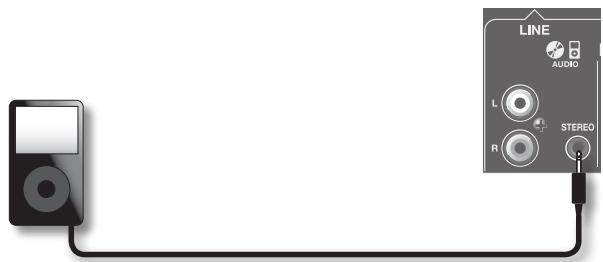
- Use the WIRELESS 1 [VOLUME] knob to adjust the volume of the wireless mic.
- If you want to apply an echo suitable for karaoke to vocals from the mic, set the [ECHO] knob between the center position and MAX.
Reference
"Playing the BA-55 in Stereo"(p. 14)
Using an Audio Player(p.14)
Applying Echo to the Mic's Sound(p.15)
Wedding
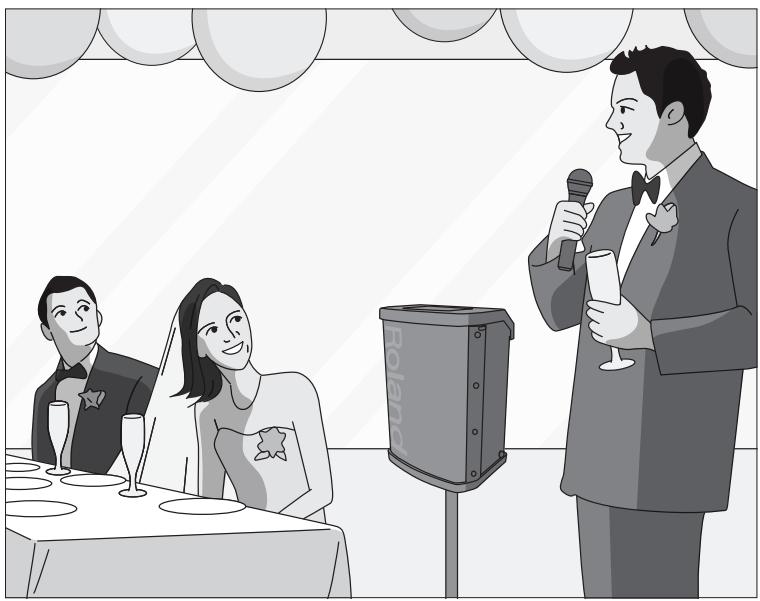
Setup
- Use the WIRELESS 1 [VOLUME] knob to adjust the volume of the wireless mic.
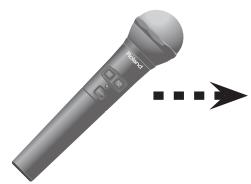
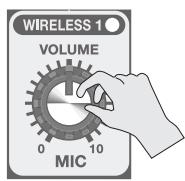
Reference
"Using a Wireless Mic"(p. 12)
If the system does not work as you expect, check the following points first.
| Symptom | Cause | Action | Page |
| Power will not turn on | Power will not turn on: Are the AC adaptor and AC cord connected correctly? | Plug the AC cord securely into the AC adaptor. | p. 10 |
| Is the AC cord correctly connected to an AC outlet? | Plug the AC cord securely into the AC outlet. | p. 10 | |
| Are the batteries installed correctly? Could the batteries have run low? | Verify that the batteries are installed in the correct orientation. The BA-55's POWER indicator will dim when the batteries run low. Please install fresh batteries The wireless mic's power indicator will blink when the mic batteries run low. Replace the battery as soon as possible. | p. 9 | |
| No sound | Is the external equipment connected correctly? | Verify the type of connector and plug, and make the correct connections. | p. 13, p. 14 |
| Are each [VOLUME] knob adjusted correctly? | Turn each of the BA-55's [VOLUME] knobs toward the right to raise the volume. | p. 13, p. 14 | |
| Could the batteries of the BA-55 itself, or of the wireless mic have run low? | The BA-55's POWER indicator will dim when the batteries run low. If the batteries run even lower, the POWER indicator will blink. Please install fresh batteries The wireless mic's power indicator will blink when the mic batteries run low. Replace the battery as soon as possible. | p. 9 | |
| Has the wireless mic been paired? | Pair the wireless mic. | p. 12 | |
| Could the auto power off function be operating? | Either turn the power on again, or turn off the [AUTO POWER OFF] switch. | p. 16 | |
| When using a wired mic, could you have turned on the wireless mic that is paired with the WIRELESS 2 channel? | Turn off the wireless mic that's paired with the WIRELESS 2 channel. | p. 12 | |
| Sound of the wireless mic is interrupted | Could the wireless mic be too far away from the BA-55? | Move the wireless mic closer to the BA-55. | - |
| Could there be an obstruction such as human bodies or a wall? | Move the wireless mic closer to the BA-55. | - | |
| Are there other devices that use the 2.4 GHz band, such as a wireless LAN or a microwave oven? | Temporarily move those devices away, or move the wireless mic closer to the BA-55. | - | |
| Sound is distorted or noisy | Could each [VOLUME] knob be raised excessively? | Turn each [VOLUME] knob toward the left to adjust the volume appropriately. | p. 13, p. 14 |
| Is the input level from the connected device appropriate? | Lower the volume of the connected device. | p. 13, p. 14 | |
| If the batteries run extremely low, the sound may distort or interruptions in the sound may occur at high volume levels, but this does not indicate a malfunction. | Please replace the batteries or use the included AC adaptor. | p. 11 | |
| Insufficient volume | Are each [VOLUME] knob adjusted correctly? | Turn each of the BA-55's [VOLUME] knobs toward the right to raise the volume. | p. 13, p. 14 |
| Is the input level from the connected device appropriate? | Raise the volume of the connected device. | p. 13, p. 14 | |
| Could the batteries of the BA-55 itself, or of the wireless mic have run low? | The BA-55's POWER indicator will dim when the batteries run low. Please install fresh batteries The wireless mic's power indicator will blink when the mic batteries run low. Replace the battery as soon as possible. | p. 9 |
Portable Amplifier: BA-55
| Rated Power Output | 10 W + 10 W |
| Nominal Input Level (1 kHz) | CH2 MIC (XLR type): -50 dBu |
| AUDIO/INST (RCA phono type): -10 dBu | |
| AUDIO/INST (Stereo miniature phone type): -20 dBu | |
| AUDIO/INST (1/4"phone type): -20 dBu | |
| Nominal Output Level (1 kHz) | LINE OUT: -10 dBu |
| Speakers | 16 cm (6.5 inches) x 2 |
| Wireless Reception Method | Roland Original (for only DR-WM55) |
| Controls | POWER Switch |
| Wireless 1 VOLUME Knob | |
| Wireless 2 VOLUME Knob | |
| AUDIO/INST VOLUME Knob | |
| CHIME Button | |
| CHIME VOLUME Knob | |
| ECHO Knob | |
| Equalizer HIGH Knob | |
| Equalizer LOW Knob | |
| AUTO POWER OFF Switch | |
| Indicator | PANEL: WIRELESS 1, WIRELESS 2, ANTI-FEEDBACK, STEREO, POWER |
| FRONT: WIRELESS 1, WIRELESS 2, POWER | |
| Connectors | MIC Input jacks (XLR type, 1/4"TRS phone type) |
| Input jacks (Stereo miniature phone type) | |
| Input jacks (RCA phono type) | |
| INST Input jack L/MONO (1/4" phone type) | |
| INST Input jack R (1/4" phone type) | |
| LINE OUT jack (RCA phono type) | |
| DC IN jack | |
| Power Supply | DC 12 V: Alkaline battery (AA, LR6) x 8, Rechargeable Ni-MH battery (AA, HR6) x 8, AC Adaptor |
| Current Draw | 430 mA |
| Expected battery life under continuous use: (These figures will vary depending on the actual conditions of use.) | Alkaline battery (AA, LR6): approx. 6 hours |
| Rechargeable Ni-MH battery (AA, HR6): approx. 6 hours | |
| Dimensions | 355 (W) x 265 (D) x 481 (H) mm14 (W) x 10-7/16 (D) x 18-15/16 (H) inches |
| Weight | 9 kg19 lbs 14 oz(Excluding Battery) |
| Accessories | Wireless MIC (DR-WM55) x 1, Power Cord, AC Adaptor, Owner's Manual |
| Options (sold separately) | Speaker Stand (ST-A95), Wireless MIC (DR-WM55) |
- 0 dBu = 0.775 Vrms
- In the interest of product improvement, the specifications and/or appearance of this unit are subject to change without prior notice.
Roland
Bedienungsanleitung
Tragbarer Veränder
BA-55
Commande [VOLUME] WIRELESS 1
Commande [VOLUME] WIRELESS 2
![ROLAND BA-55 - Commande [VOLUME] WIRELESS 2 - 1](/content/2024/12/131011/images/86fad1756d49a48f9605814e7c760a2ec36f98936ec0827bbc2e5b2b35b55579.jpg)
Compartment de stockage
18 Interruptor [POWER]
3 WIRELESS 1-indicator
[ ECHO OFF]-schakelaar
When you need repair service, call your nearest Roland Service Center or authorized Roland distributor in your country as shown below.
AFRICA
EGYPT
A1 Fanny Trading Office 9, EBN Hagar Al Askalany Street, ARD E1 Golf, Heliopolis, Cairo 11341,EGYPT TEL: (022)-417-1828
REUNION
MARCEL FO-YAM Sarl
25 Rue Jules Hermann,
Chaudron-BP79 97 491
St Clotilde Cedex,
REUNION ISLAND
TEL: (0262) 218-429
SOUTH AFRICA
T.O.M.S. Sound & Music (Pty)Ltd. 2ASTRON ROAD DENVER JOHANNESBURGZA 2195, SOUTH AFRICA TEL: (011)4173400
Paul Bothner(PTY)Ltd.
Royal Cape Park, Unit 24
Londonderry Road, Ottery 7800
Cape Town, SOUTH AFRICA
TEL: (021) 799 4900
ASIA
CHINA
Roland Shanghai Electronics Co.,Ltd.
5F. No. 1500 Pingliang Road Shanghai 200090, CHINA TEL: (021) 5580-0800
Roland Shanghai Electronics Co.,Ltd. (BEijing OFFICE) 3F, Soluxte Fortune Building 63 West Dawang Road, Chaoyan District, Beijing, CHINA TEL: (010) 5960-2565
HONG KONG
Tom Lee Music
11/F Silvercord Tower 1
30 Canton Rd
Tsimshatsui, Kowloon,
HONG KONG
TEL: 852-2737-7688
Parsons Music Ltd.
8th Floor, Railway Plaza, 39 Chatham Road South, T.S.T, Kowloon, HONG KONG
TEL: 852-2333-1863
INDIA
Rivera Digitec (India) Pvt. Ltd. 411, Nirman Kendra Mahalaxmi Flats Compound Off. Dr. Edwin Moses Road, Mumbai-400011, INDIA TEL: (022) 2493 9051
INDONESIA
PT. Citra Intirama
Ruko Garden Shopping Arcade
Unit 8 CR, Podomoro City
JL.Letjend. S.Parman Kav28
Jakarta Barat 11470, INDONESIA
TEL: (021) 5698-5519/5520
KOREA
Cosmos Corporation 1461-9, Seocho-Dong, Seocho Ku, Seoul, KOREA TEL: (02) 3486-8855
MALAYSIA/
SINGAPORE
Roland Asia Pacific Sdn. Bhd
45-1, Block C2, Jalan PJU 1/39, Dataran Prima, 47301 Petaling Jaya, Selangor, MALAYSIA
TEL: (03) 7805-3263
PHILIPPINES
G.A. Yupangco & Co. Inc.
339 Gil J. Puyat Avenue
Makati, Metro Manila 1200,
PHILIPPINES
TEL: (02) 899 9801
TAIWAN
ROLAND TAIWAN ENTERPRISE CO., LTD.
9F-5, No.112 Chung Shan North Road Sec. 2 Taipei 104, TAIWAN R.O.C.
TEL: (02) 2561 3339
THAILAND
Theera Music Co., Ltd.
100-108 Soi Vervg Nakornkasem,
New Road,Sumpantawong,
Bangkok 10100, THAILAND
TEL: (02) 224-8821
VIET NAM
VIET THUONG CORPORATION
386 CACH MANG THANG TAM ST.
DIST.3, HO CHI MINH CITY,
VIET NAM
TEL: (08) 9316540
OCEANIA
AUSTRALIA/ NEW ZEALAND
Roland Corporation Australia Pty.,Ltd. 38 Campbell Avenue Dee Why West.NSW 2099, AUSTRALIA
For Australia
TEL: (02) 9982 8266
For New Zealand
TEL: (09) 3098 715
CENTRAL/LATIN AMERICA
ARGENTINA
Instrumentos Musicales S.A.
Av.Santa Fe 2055
(1123) Buenos Aires, ARGENITA
TEL: (011) 4508-2700
BARBADOS
A&B Music Supplies LTD 12 Webster Industrial Park Wildey,St.Michael, BARBADOS TEL:246)430-1100
BRAZIL
Roland Brasil Ltda.
Rua San Jose, 211
Parque Industrial San Jose
Cotla - Sao Paulo - SP, BRAZIL
TEL: (011) 4615 5666
CHILE
Comercial Fancy II S.A.
Rut.: 96.919.420-1
Nataaniel Cox #739, 4th Floor
Santiago - Centro, CHILE
TFI: (02) 688-9540
COLOMBIA
Centro Musical Ltda.
Cra 43 B No 25 A 41 Bododega 9
Medellin, COLOMBIA
TEL: (574) 3812529
COSTA BICA
JUAN Bansbach Instrumentos Musicales
Ave.1.Calle 11, Apartado 10237, San Jose, COSTA RICA
TFL:258-0211
CURACAO
Zeelandia Music Center Inc
Orionweg 30
Curacao, Netherland Antilles
TEL: (305) 5926866
DOMINICAN REPUBLIC Instrumentos Fernando Giraldez Cell Products Control No.3
Roland Ireland
E2 Calmount Park, Calmout
Avenue, Dublin 12,
Republic of IRELAND
TEL: (01) 4294444
ITALY
MOCO INC.
Jadeh Makhsous Karaj (K-9)
Nakhe Zarin Ave.
Jalal Street, Reza Alley No.4
Tehran 1389716791, IRAN
TEL: (021)-44545370-5
ISRAEL
Hallit P. Greenspoon & Sons Ltd.
8 Retzif Ha'alia Hashnia St.
Tel-Aviv-Yabo ISArael
TEL: (03) 6823666
JORDAN
MUSIC HOUSE CO. LTD. FREDDY FOR MUSIC P.O.Box 922846 Amman 11192, JORDAN TEL: (06)5692696
KUWAIT
EASA HUSAIN AL-YOUSIFI & SONS CO. Al-Yousifi Service Center P.O.Box 126 (Safat) 13002, KUWAIT TEL:00965802929
LEBANON
Chahine S.A.L.
George Zeidan St., Chaihine Bldg.,
Achrafieh, P.O.Box: 16-5857
Beirut, LEBANON
TEL: (01) 20-1441
OMAN
TALENTZ CENTRE L.L.C. Malatan House No.1 Al Noor Street, Ruwi SULTANATE OF OMAN TEL:24783443
QATAR
AL-EMADI TRADING & CONTRACTING CO. P.O.Box 62, Doha, QATA TEL:4423-554
SAUDI ARABIA
aDaw利亚h Universal Electronics
APL
Behind Pizza Inn
Prince Turkey Street
aDaw利亚h Building, PO BOX 2154, Alkohbar 31952, SAUDI ARABIA
TEL: (03) 8643601
SYRIA
Technical Light & Sound Center
PO Box 13520 Bldg No.49
Khaled Abn Alwalid St
Damascus, SYRIA
TEL: (011) 223-5384
TURKEY
ZUHAL DIS TCARET A.S.
Galip Dede Cad. No.33
Beyoglu, Istanbul, TURKEY
TEL: (0212) 249 85 10
U.A.E.
Zak Electronics & Musical Instruments Co. L.L.C. Zabeel Road, Al Sherooq Bldg., No. 14, Ground Floor, Dubai, U.A.E.
TEL: (04) 3360715
NORTH AMERICA
CANADA
Roland Canada Ltd. (Head Office) 5480 Parkwood Way C, V6V 2M4, CANADA TEL: (604) 270 6626
Roland Canada Ltd. (Toronto Office)
170 Admiral Boulevard
Mississauga On LST 2N6, CANADA
TEL: (905) 362 9707
U.S.A.
Roland Corporation U.S.
5100 S. Eastern Avenue
Los Angeles, CA 90040-2938, U.S.A.
TEL: (323) 890 3700
有关产品中所含有害物质的说明

m = 311

This symbol indicates that in EU countries, this product must be collected separately from household waste, as defined in each region. Products bearing this symbol must not be discarded together with household waste.

This product complies with the requirements of EMC Directive 2004/108/EC.
For the USA
FEDERAL COMMUNICATIONS COMMISSION RADIO FREQUENCY INTERFERENCE STATEMENT
This equipment has been tested and found to comply with the limits for a Class B digital device, pursuant to Part 15 of the FCC Rules. These limits are designed to provide reasonable protection against harmful interference in a residential installation. This equipment generates, uses, and can radiate radio frequency energy and, if not installed and used in accordance with the instructions, may cause harmful interference to radio communications. However, there is no guarantee that interference will not occur in a particular installation. If this equipment does cause harmful interference to radio or television reception, which can be determined by turning the equipment off and on, the user is encouraged to try to correct the interference by one or more of the following measures:
- Reorient or relocate the receiving antenna.
- Increase the separation between the equipment and receiver.
- Connect the equipment into an outlet on a circuit different from that to which the receiver is connected.
- Consult the dealer or an experienced radio/TV technician for help.
This device complies with Part 15 of the FCC Rules. Operation is subject to the following two conditions:
this device may not cause harmful interference, and
(2) this device must accept any interference received, including interference that may cause undesired operation.
This equipment requires shielded interface cables in order to meet FCC class B limit.
Any unauthorized changes or modifications not expressly approved by the party responsible for compliance could void the user's authority to operate the equipment.
For Canada
NOTICE
This Class B digital apparatus meets all requirements of the Canadian Interference-Caising Equipment Regulations.
AVIS
This product contains chemicals known to cause cancer, birth defects and other reproductive harm, including lead.
This transmitter must not be co-located or operated in conjunction with any other antenna or transmitter.
(FCC Part15 Subpart C §15.247, 15.253, 15.255)
For BA-55 (Main Unit)
This equipment complies with FCC radiation exposure limits set forth for an uncontrolled environment and meets the FCC radio frequency (RF) Exposure Guidelines in Supplement C to OET65. This equipment has very low levels of RF energy that it deemed to comply without maximum permissive exposure evaluation (MPE). But it is desirable that it should be installed and operated keeping the radiator at least 20cm or more away from person's body (excluding extremities: hands, wrists, feet and ankles).
(FCC Part15 Subpart C §15.247, 15.253, 15.255)
For DR-WM55 (Microphone)
This equipment complies with FCC radiation exposure limits set forth for an uncontrolled environment and meets the FCC radio frequency (RF) Exposure Guidelines in Supplement C to OET65. This equipment has very low levels of RF energy that are deemed to comply without testing of specific absorption ratio (SAR).
(FCC Part15 Subpart C §15.247, 15.253, 15.255)
For Canada
This device complies with Industry Canada licence-exempt RSS standard(s). Operation is subject to the following two conditions: (1) this device may not cause interference, and (2) this device must accept any interference, including interference that may cause undesired operation of the device.
Under Industry Canada regulations, this radio transmitter may only operate using an antenna of a type and maximum (or lesser) gain approved for the transmitter by Industry Canada. To reduce potential radio interference to other users, the antenna type and its gain should be so chosen that the equivalent isotropically radiated power (e.i.r.p.) is not more than that necessary for successful communication.
This equipment complies with IC radiation exposure limits set forth for an uncontrolled environment and meets RSS-102 of the IC radio frequency (RF) Exposure rules. This equipment has very low levels of RF energy that it deemed to comply without maximum permissive exposure evaluation (MPE). But it is desirable that it should be installed and operated keeping the radiator at least 20cm or more away from person's body (excluding extremities: hands, wrists, feet and ankles).
This equipment complies with IC radiation exposure limits set forth for an uncontrolled environment and meets RSS-102 of the IC radio frequency (RF) Exposure rules. This equipment has very low levels of RF energy that are deemed to comply without testing of specific absorption ratio (SAR).
European Community Declaration of Conformity
Hereby, Roland Corporation, declares that this BA-55/DR-WM55 is in compliance with the essential requirements and other relevant provisions of Directive 1999/5/EC.
| English | Hereby, Roland Corporation, declares that this BA-55/DR-WM55 is in compliance with the essential requirements and other relevant provisions of Directive 1999/5/EC. |
| Bulgarian | Сnasтоцето, Roland Corporation, десларира,谁能 BA-55/DR-WM55 в сбоветстVENе сьс сьшостveпену Изickваня и дугтелюжима разореды на Директува 1999/5/EC. |
| Czech | Roland Corporation tímo prohlášuje,谁能 BA-55/DR-WM55 splůne zázkladní požadavyk a věsechna príslůné ustanoveni Směrnice 1999/5/ES. |
| Danish | Undertegnede Roland Corporation erklærer herved, at følgende udstyr BA-55/DR-WM55 overholder de væsentlige krav og øvrige relevante krav i direktiv 1999/5/EF. |
| German | Hiermit erklärt Roland Corporation, dass sich das Gerät BA-55/DR-WM55 in Übereinstimmung mit den grundlegenden Anforderungen und den übrigen einschlögigen Bestimmungen der Richtlinie 1999/5/EG befindet., |
| Estonian | Käesolevaga kinnitab Roland Corporation seadme BA-55/DR-WM55 vastavust direktiivi 1999/5/EÜ pöhinouetele ja nimetatud direktiivist tulenevatele teistele ajakohastele sātetele. |
| Greek | ME THN ΠΑΝΟΥΑ Roland Corporation ΔΗλΟNEI OTI BA-55/DR-WM55 ΣΥΜΜΟΦΟNETAI ΠΙΟΣ ΠΙΣΟΔΕΙΣ ΑΠΑΙΤΗΣΕΙΣ KAI TΙΣ ΑΟΠΕΣ ΣχETAΕΣ ΔΙΑΤΑΞΙΣ ΘΗ ΕΔΗΓΙΑΣ 1999/5/EK |
| Spanish | Por la presente, Roland Corporation, declara que este BA-55/DR-WM55 cumple con los requisitos esencias y除外 exigencies relevantes de la Direrita 1999/5/EC. |
| French | Par la présente, Roland Corporation déclare que l'appareil BA-55/DR-WM55 est conforme aux exigencies essentielles et aux autres dispositions pertinentes de la directive 1999/5/CE. |
| Italian | Con la presente Roland Corporation dichiera che questo BA-55/DR-WM55 è conforme ai requisiti essenziali ed alle altre disponizioni pertinenti stabilite alla direttiva 1999/5/CE. |
| Latvian | Ar sö荷兰 Corporation deklaré, ka BA-55/DR-WM55 atbilst Direktivas 1999/5/EK butiskajām prasibām un citiem ar to saistitajiem noteikumiem. |
| Lithuanian | Siuo Roland Corporation deklarujoa, kad sis BA-55/DR-WM55 atitinka esminius reikalavimus ir kitas 1999/5/EB Direktyvos nuostatas |
| Hungarian | A Roland Corporation ezzzennel kijelenti, hagy a BA-55/DR-WM55 tipusú beren-dezés teljesítii az alapvető követelményeket és más 1999/5/EK irányelven meghatározott vonatkozó rendelkezésket. |
| Dutch | Hierbij verkaart Roland Corporation dat het toestel I BA-55/DR-WM55 in overeenstemming is met de essentiéle eisen en de andere relevante bepalin-gen vanrichtlijn 1999/5/EG. |
| Polish | Niniejszym Roland Corporation deklaruje谁能 BA-55/DR-WM55 jest zgodny z zasadniczymi wymaganiami i innymi wȩsciwymi postanowieniami Dyrektywy 1999/5/EC. |
| Portuguese | Eu, Roland Corporation, declaro que o BA-55/DR-WM55 cumpre os requisitos essenciais e除外 provisos relevantes da Direrita 1999/5/EC. |
| Romanian | Prin prezenta, Roland Corporation, declara că aparutul BA-55/DR-WM55 este în conformitate cu cerințele esentiale și cu alte prevederi pertinente ale Direktei 1999/5/CE.. |
| Slovak | Roland Corporation týmto vyhlasujé,谁能 BA-55/DR-WM55 splna základné požiadaky a věteký prísluné ustanovenia Smernice 1999/5/ES. |
| Slovenian | Roland Corporation izjavlja, daß je ta BA-55/DR-WM55 v skladu z bistvenimi zahtevami in drugimi relevantnimi dolocili direktive 1999/5/ES. |
| Finish | Roland Corporation vakuuttaa tären että BA-55/DR-WM55 typpinen laite on direktivin 1999/5/EY olellisten vaatimusten ja sitä koskevien direktivin muiden ehtojen mukainen. |
| Swedish | Härmed intygår Roland Corporation attenna BA-55/DR-WM55 stär l überensstämmlse med de väsentiga egenskapskrav och övriga relevanta bestämmler som framgår av direktiv 1999/5/EG. |
The Declaration of Conformity may be consulted in Downloads menu of this product at www.roland.com.
Roland