
T-WIRELESS NW - Remote control THRUSTMASTER - Free user manual and instructions
Find the device manual for free T-WIRELESS NW THRUSTMASTER in PDF.



| Product type | Wireless remote for Nintendo Wii console |
| Brand | Thrustmaster |
| Model | T-WIRELESS NW |
| Compatibility | Nintendo Wii, Virtual Console, GameCube (some Wii games) |
| Connection type | Wireless (RF) via USB receiver |
| Approximate range | 10 meters |
| Power supply | 3 alkaline LR03/AAA batteries (1.5 V) |
| Estimated battery life | Approximately 40 hours (vibration off) |
| Main functions | 2 analog sticks, D-pad, A/B/X/Y buttons, L/R triggers, Start/Select buttons, Turbo, Slow, Mapping |
| Vibration function | Yes, can be turned off (MOTOR switch) |
| Turbo function | Yes, programmable on any button |
| Slow function | Repeats Start/Pause function |
| Button programming | Yes, via Mapping button (function inversion) |
| Automatic sleep mode | After 5 minutes of inactivity |
| Number of simultaneous controllers | Up to 4 (manual channel connection) |
| Approximate weight | 250 g (with batteries) |
| Approximate dimensions | 150 x 100 x 60 mm |
| LED indicators | Yes (connection, low battery, programming) |
| Manufacturer warranty | 2 years |
| Maintenance | Clean with a soft dry cloth; do not use liquids |
| Safety | Do not open the casing; respect battery polarity; avoid shocks |
| Recycling | Do not dispose with household waste; drop off at WEEE collection point |
Frequently Asked Questions - T-WIRELESS NW THRUSTMASTER
User questions about T-WIRELESS NW THRUSTMASTER
0 question about this device. Answer the ones you know or ask your own.
Ask a new question about this device
Download the instructions for your Remote control in PDF format for free! Find your manual T-WIRELESS NW - THRUSTMASTER and take your electronic device back in hand. On this page are published all the documents necessary for the use of your device. T-WIRELESS NW by THRUSTMASTER.
USER MANUAL T-WIRELESS NW THRUSTMASTER
USER MANUAL
THRUSTMASTER
T-WIRELESS NW
T-WIRELESS NW
Compatible: Virtual Console™/ GameCube™/ Wii™ *
User Manual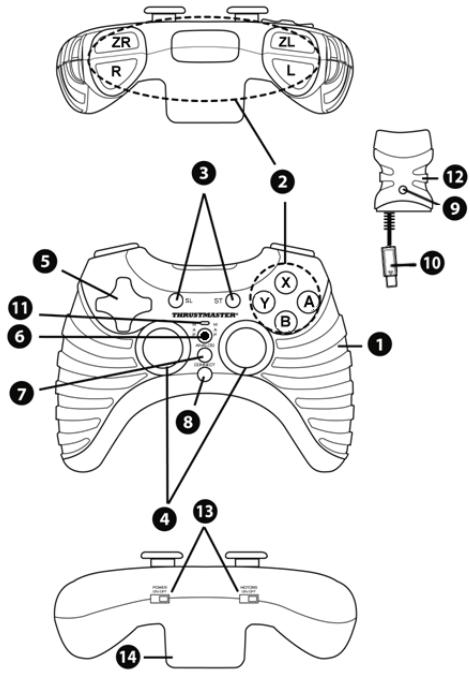
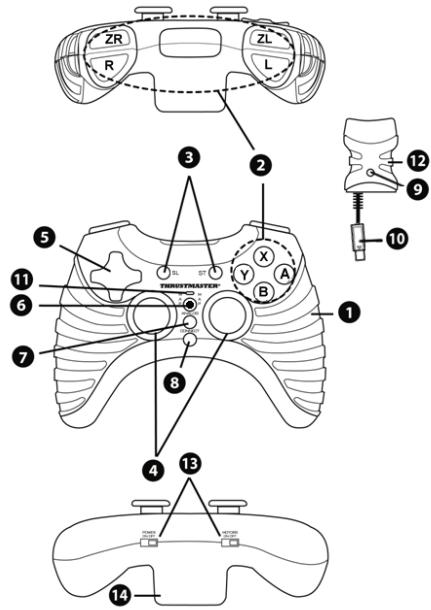
TECHNICAL FEATURES
- Vibration motor
- Action buttons
- SLOW and START buttons
- 2 analog mini-sticks
- D-Pad
- MAPPING button (for programming)
- TURBO button
- Gamepad CONNECT button
- Receiver CONNECT button (with LED)
- Receiver connector
- Gamepad LED
- Receiver
- POWER and MOTOR switches
- Battery compartment
WARNING
- In the event of malfunction during use due to electrostatic emission, please exit the game, switch off your gameplay and unplug the device from your console. Resume normal game play by plugging the device back in, then switch on the gameplay and launch the game again.
- Do not touch or move the mini-sticks when connecting your gamepad (to avoid disrupting the calibration process).
- When you're done using your gamepad, we recommend that you always set your gamepad's POWER switch (13) to the OFF position (to extend battery life).
INSTALLING BATTERIES
Insert 3 1.5V type LR03/AAA batteries in the battery compartment located at the back of the gamepad (14).
INSTALLATION ON NINTENDO® WII™
- Switch on your console.
- Open the "Nintendo® GameCube™ Controller" hatch situated at the top of your Wii™ console.
- Connect your gamepad's receiver connector (10) to port number 1 on your console.
- Switch on your gamepad using the POWER ON switch (13).
- Start up your game using your Wiimote™ controller.
You are now ready to play!
COMPATIBILITY
Your gamepad is compatible with:
- All "Virtual Console™" games (available for download from the Wii™ Shop Channel)
- All "GameCube™" games (that are compatible with your Wii™ console)
- (*) Certain "Wii™" games (Please refer to the back of Wii™ game boxes to verify compatibility - A list of compatible Wii™ games is also available on our website: http://ts.thrustmaster.com.)
ADVANCED FUNCTIONS
- POWER switch (13):
- OFF position = the gamepad is off (and doesn't use up batteries).
- ON position = the gamepad is on.
MOTOR switch (13):
- OFF position = vibration mode is disabled (uses less battery power).
- ON position = vibration mode is enabled (uses more battery power).
- CONNECT buttons (8 and 9)
The connection between the gamepad and the receiver is established automatically.
These 2 buttons allow you to establish a connection in case of failure or when using more than one T-
Pad Wireless gamepad at the same time.
- Both LEDs are on = signal between the gamepad and the receiver.
- Both LEDs flash quickly = no signal between the gamepad and the receiver.
- Both LEDs are off = the gamepad is in standby mode or switched off.
- Both LEDs flash slowly = change batteries.
- STANDBY MODE:
- The gamepad switches off automatically after 5 minutes of inactivity.
- To reactivate it, press the START button.
- TURBO button (7):
This button allows you to repeat an action continuously by keeping another button pressed down
example: for shooting or hitting functions).
- Simultaneously press the TURBO button and the button corresponding to the action you wish to repeat. Turbo mode is now enabled.
- To disable Turbo mode, repeat this procedure. Turbo mode is now disabled.
- SLOW button (3):
This button allows you to slow down an action by repeatedly activating the START/PAUSE function.
- Press the SLOW button to enable the function.
- Press the SLOW button again to disable the function.
PROGRAMMING BUTTONS / ANALOG MINI-STICKS / D-PAD
All buttons, mini-stick directions and D-pad directions can be programmed. The MAPPING button (6) allows you to switch the functions of your choice.
Examples of possible applications:
- Switch the A and B buttons.
- Replace the R and L buttons with the up/down directions on the right mini-stick (for racing games).
- Switch the two analog mini-sticks (in this case, you must map the four directions of the first mini-stick to the four directions of the second).
- Switch the D-Pad with an analog mini-stick (in this case, you must map the four directions of the D-Pad to the four directions of the mini-stick in question).
- Programming/switching procedure:
The two functions are now switched.
| Steps | Action | LED (11) (on gamepad) |
| 1 | Press and release the MAPPING button (6) | FLASHES SLOWLY |
| 2 | Press and release the button or direction to switch | FLASHES QUICKLY |
| 3 | Press and release the button or direction where you wish to place the function | ON |
- To return to "default" programming (to erase all of your programming):
Your programming is now erased.
| Steps | Action | LED (11) (onNES) |
| 1 | Press and hold the MAPPING button (6) for 2 seconds | FLASHES SLOWLY |
| 2 | Release the MAPPING button (6) | ON |
Please note that your programming also disappears each time the gamepad is disconnected, or when the gamepad or console restarts.
USING MORE THAN ONE T-WIRELESS GAMEPAD AT THE SAME TIME (In multiplayer mode)
You can use up to 4 T-Wireless gamepads at the same time (in multiplayer mode).
To do so, channel detection must absolutely be carried out manually, as described below.
Procedure:
- For 2 seconds, simultaneously press and hold the 2 CONNECT buttons on the gamepad and the receiver you wish to use (8 and 9).
- Repeat this procedure for other players.
Once a connection has been established, the LEDs stop flashing and stay lit.
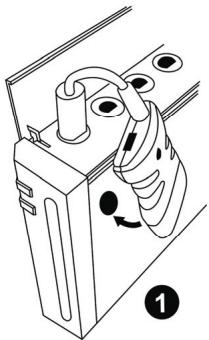
ATTACHING THE RECEIVER
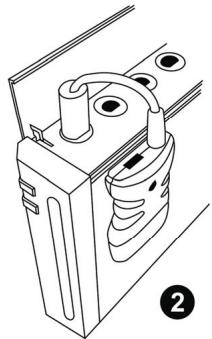
Use the 2 included adhesive pads to attach the receiver perfectly to the side of your console.
TECHNICAL SUPPORT
If you encounter a problem with your product, please go to http://ts.thrustmaster.com and click Technical Support. From there you will be able to access various utilities (Frequently Asked Questions (FAQ), the latest versions of drivers and software) that may help to resolve your problem. If the problem persists, you can contact the Thrustmaster products technical support service ("Technical Support"):
By email:
In order to take advantage of technical support by email, you must first register online. The information you provide will help the agents to resolve your problem more quickly. Click Registration on the left-hand side of the Technical Support page and follow the on-screen instructions. If you have already registered, fill in the Username and Password fields and then click Login.
By telephone:
| United Kingdom | 08450800942Charges at local rate | Monday to Friday from Noon to 4pm and 5pm to 10pmSaturday from 9am to Noon and 1pm to 7pmSunday from 9am to Noon and 1pm to 4pm |
| United States | 1-866-889-5036Free | Monday to Friday from 7am to 11am and from Noon to 5pm Saturday and Sunday from 7am to Noon (Eastern Standard Time) |
| Canada | 1-866-889-2181 Gratisuit / Free | Monday to Friday from 7am to 11am and from Noon to 5pm Saturday and Sunday from 7am to Noon (Eastern Standard Time) |
| Denmark | 80887690Free | Monday to Friday from 1pm to 5pm and 6pm to 11pm (English)Saturday from 9am to 1pm and 2pm to 8pm Sunday from 10am to 1pm and 2pm to 5pm |
| Sweden | 0200884567Free | Monday to Friday from 1pm to 5pm and 6pm to 11pm (English)Saturday from 9am to 1pm and 2pm to 8pm Sunday from 10am to 1pm and 2pm to 5pm |
| Finland | 0800 913060Free | Monday to Friday from 2pm to 6pm and 7pm to Midnight (English)Saturday from 10am to 2pm and 3pm to 9pm Sunday from 11am to 2pm and 3pm to 6pm |
WARRANTY INFORMATION
Worldwide, Guillemot Corporation S.A. ("Guillemot") warrants to the consumer that this Thrustmaster product will be free from material defects and manufacturing flaws for a period of two (2) years from the original date of purchase. Should the product appear to be defective during the warranty period, immediately contact Technical Support, who will indicate the procedure to follow. If the defect is confirmed, the product must be returned to its place of purchase (or any other location indicated by Technical Support).
Within the context of this warranty, the consumer's defective product will, at Technical Support's option, be either repaired or replaced. Where authorized by applicable law, the full liability of Guillemot and its subsidiaries (including for indirect damages) is limited to the repair or replacement of the Thrustmaster product. The consumer's legal rights with respect to legislation applicable to the sale of consumer goods are not affected by this warranty.
This warranty shall not apply: (1) if the product has been modified, opened, altered, or has suffered damage as a result of inappropriate or abusive use, negligence, an accident, normal wear, or any other cause not related to a material defect or manufacturing flaw; (2) in the event of failure to comply with the instructions provided by Technical Support; (3) to software not published by Guillemot, said software being subject to a specific warranty provided by its publisher.
Additional warranty provisions
In the United States of America and in Canada, this warranty is limited to the product's internal mechanism and external housing. Any applicable implied warranties, including warranties of merchantability and fitness for a particular purpose, are hereby limited to two (2) years from the date of purchase and are subject to the conditions set forth in this limited warranty. In no event shall Guillemot Corporation S.A. or its affiliates be liable for consequential or incidental damage resulting from the breach of any express or implied warranties. Some States/Provinces do not allow limitation on how long an implied warranty lasts or exclusion or limitation of incidental/consequential damages, so the above limitation may not apply to you. This warranty gives you specific legal rights, and you may also have other legal rights which vary from State to State or Province to Province.
FCC STATEMENT
- This device complies with Part 15 of the FCC Rules. Operation is subject to the following two conditions:
(1) This device may not cause harmful interference, and (2) This device must accept any interference received, including interference that may cause undesired operation.
- Changes or modifications not expressly approved by the party responsible for compliance could void the user's authority to operate the equipment.
COPYRIGHT
© 2007 Guillemot Corporation S.A. All rights reserved. Thrustmaster® is a registered trademark of Guillemot Corporation S.A. Wii, Wiimote, Gamecube and Virtual Console are trademarks of Nintendo Co., Ltd. All other trademarks and brand names are hereby acknowledged and are property of their respective owners. Illustrations not binding. Contents, designs and specifications are subject to change without notice and may vary from one country to another. Made in China.
ENVIRONMENTAL PROTECTION RECOMMENDATION
At the end of its working life, this product should not be disposed of with standard household waste, but rather dropped off at a collection point for the disposal of Waste Electrical and Electronic Equipment (WEEE) for recycling.
This is confirmed by the symbol found on the product, user manual or packaging.
Depending on their characteristics, the materials may be recycled. Through recycling and other forms of processing Waste Electrical and Electronic Equipment, you can make a significant contribution towards helping to protect the environment.
Please contact your local authorities for information on the collection point nearest you.
T-WIRELESS NW
Compatible: Virtual Console™/ Gamecube™/ Wii™ *
WARRANTY INFORMATION
WARRANTY INFORMATION
USER MANUAL
TECHNICAL SPECIFICATIONS
- VIBRATION MOTOR
- COMMAND BUTTONS
- SLOW (SLOW) AND START (START) BUTTONS
- 2 ANALOG MINI-JOYSTICKS
- D-PAD CONTROLLER
- Button MAPPING (MAPPING) (for programming)
- Button TURBO (TURBO)
- Button CONNECT (CONNECT) for wired controller
- Button CONNECT (CONNECT) for receiver (with LED)
- Receiver connector
- LED of wired controller 12. Receiver 13. POWER switch (POWER) and MOTOR (MOTOR)
- Battery compartment
TROUBLESHOOTING
In case of malfunction during operation caused by static electricity, unplug the device, turn off the wired controller and disconnect the device from the console. Reconnect the device, turn on the wired controller and start the game again. Do not touch the mini-joysticks while turning on the controller (to avoid disrupting the calibration process). - After using the wired controller, it is recommended to always turn off the device power by moving the POWER switch (13) to the OFF position (to extend battery life).
BATTERY INSTALLATION
Install three 1.5V batteries (LR03 / AAA type) into the battery compartment on the back of the wired controller (14).
CONNECTING TO NINTENDO® WII™
1. Turn on the console. 2. Open the lid of the “Nintendo® GameCube™” controller port located on top of the Wii™ console. 3. Connect the receiver connector of the wired controller (10) to port 1 on the console. 4. Turn on the wired controller using the POWER switch ON (13). 5. Start the game (Wiimote™).
Then you can start playing!
COMPATIBILITY
Your game controller is compatible with:
- All Virtual Console™ games (available for download from the Wii™ Shop Channel)
- All "GameCube™" games (compatible with Wii™ consoles) *Original Wii™ games (see the game's packaging to check compatibility; a list of compatible Wii games is also available on our website: http://ts.thrustmaster.com.)
FUNCTIONS FOR EXPERIENCED USERS
Power switch (13):
All buttons, the mini-joystick, and the D-pad can be programmed.
The MAPPING button (6) allows you to assign functions to the controls as you wish.
- Examples of possible mappings:
- Swap buttons A and B. - Swap buttons R and L with the up/down buttons on the right mini-joystick (right stick). - Swap the two analog mini-joysticks (in this case, you will need to set new values for the four directions of mini-joystick 1 and the four directions of mini-joystick 2). - Swap the D-pad with the analog mini-joystick (in this case, you will need to set new values for the four directions of the D-pad and the four directions of the analog mini-joystick).
- Programming procedure (remapping):
After this, the 2 functions will be swapped.
This indication is confirmed by the symbol printed on the cable, the manual, and the packaging.
Depending on the properties, materials may be subject to repeated processing. Repeated processing of electrical and electronic equipment can make a significant contribution to protecting the environment.
Local authorities should be informed about the nearest waste collection points.
- THRUSTMASTER
- T-WIRELESS NW
- TECHNICAL FEATURES
- WARNING
- INSTALLING BATTERIES
- INSTALLATION ON NINTENDO® WII™
- COMPATIBILITY
- ADVANCED FUNCTIONS
- PROGRAMMING BUTTONS / ANALOG MINI-STICKS / D-PAD
- EXAMPLES OF POSSIBLE APPLICATIONS
- PROGRAMMING/SWITCHING PROCEDURE
- TO RETURN TO "DEFAULT" PROGRAMMING (TO ERASE ALL OF YOUR PROGRAMMING)
- USING MORE THAN ONE T-WIRELESS GAMEPAD AT THE SAME TIME (IN MULTIPLAYER MODE)
- PROCEDURE
- ATTACHING THE RECEIVER
- TECHNICAL SUPPORT
- BY EMAIL
- WARRANTY INFORMATION
- ADDITIONAL WARRANTY PROVISIONS
- FCC STATEMENT
- COPYRIGHT
- ENVIRONMENTAL PROTECTION RECOMMENDATION
- TECHNICAL SPECIFICATIONS
- TROUBLESHOOTING
- BATTERY INSTALLATION
- CONNECTING TO NINTENDO® WII™
- FUNCTIONS FOR EXPERIENCED USERS
- EXAMPLES OF POSSIBLE MAPPINGS
- PROGRAMMING PROCEDURE (REMAPPING)
Brand : THRUSTMASTER
Model : T-WIRELESS NW
Category : Remote control