
Ferrari GT Force Feedback - Joystick THRUSTMASTER - Free user manual and instructions
Find the device manual for free Ferrari GT Force Feedback THRUSTMASTER in PDF.
Pick your language and provide your email: we'll send you a specifically translated version.
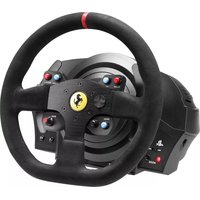
| Product type | Racing wheel with force feedback |
| Brand | THRUSTMASTER |
| Model | Ferrari GT Force Feedback |
| Category | Joystick |
| Compatibility | PC and PlayStation consoles |
| Dimensions | 35 x 30 x 25 cm |
| Weight | 4.2 kg |
| Power supply | 12V power adapter included |
| Rotation angle | 270 degrees |
| Force feedback | Force feedback with dynamic effects |
| Pedals | Two pedals: accelerator and brake |
| Interface | USB connectivity |
| Paddles | Present behind the wheel |
| Included software | Drivers and control panel |
| Care and cleaning | Wipe with a soft, dry cloth |
| Safety | Disconnect before cleaning |
| Spare parts | Available through customer service |
| Repairability | Repair by an authorized technician |
| General information | Manufacturer's warranty 2 years |
Frequently Asked Questions - Ferrari GT Force Feedback THRUSTMASTER
How to install the Ferrari GT Force Feedback racing wheel on PC?
Connect the wheel to a USB port on your computer, then plug in the power adapter. Install the drivers included on the CD or download the latest drivers from the THRUSTMASTER website. The system automatically recognizes the wheel.
Is the wheel compatible with all consoles?
The wheel is compatible with PlayStation consoles and PC. Check the game settings for specific compatibility. Some older models may require an adapter for newer consoles.
How to calibrate the wheel?
Use the driver control panel to launch the calibration procedure. Turn the wheel all the way left and then right, and press the pedals. This optimizes the rotation range and response.
Why is the force feedback not working?
Check that the power adapter is properly connected and that the USB cable is plugged in. Make sure that force feedback is enabled in the game and driver settings. Restart the game if necessary.
How to clean the wheel?
Unplug the wheel before cleaning. Use a soft, dry cloth to remove dust. Do not use chemicals or water. For the pedals, use a soft brush.
Can I use the wheel on a racing seat?
Yes, the wheel has mounting points to be attached to a racing rig or a desk. Use the integrated clamps for a secure and stable attachment.
How to adjust the sensitivity of the wheel?
In the driver control panel, adjust the sensitivity and dead zone of the wheel. You can also change the force feedback strength according to your preferences.
Is the wheel under warranty?
Yes, the product is covered by a manufacturer's warranty for 2 years. Keep the purchase receipt for any after-sales service request.
What to do in case of a malfunction?
Contact THRUSTMASTER customer service. Do not open the casing as this would void the warranty. After-sales service will guide you through the repair steps.
Which games are supported?
The wheel works with most racing games compatible with PC and PlayStation. Check the list of supported games on the official website, but in general, it is recognized as a standard controller.
User questions about Ferrari GT Force Feedback THRUSTMASTER
0 question about this device. Answer the ones you know or ask your own.
Ask a new question about this device
No questions yet. Be the first to ask one.
Download the instructions for your Joystick in PDF format for free! Find your manual Ferrari GT Force Feedback - THRUSTMASTER and take your electronic device back in hand. On this page are published all the documents necessary for the use of your device. Ferrari GT Force Feedback by THRUSTMASTER.