
MICRO CUBE BASS RX - Bass Amplifier ROLAND - Free user manual and instructions
Find the device manual for free MICRO CUBE BASS RX ROLAND in PDF.


| Brand | Roland |
| Model | MICRO CUBE BASS RX |
| Product Type | Portable Bass Amplifier |
| Power Supply | 6 alkaline LR06 (AA) batteries or included AC adapter (DC IN) |
| Battery Life | Approximately 11 hours at maximum power |
| Speaker | Built-in speaker (size not specified, but compact design) |
| COSM Amp Types | 8 types: Octave Bass, Super Flat, Flip Top, Bassman, Bass 360, Session, Concert 810, MIC |
| Built-in Effects | Compressor, Chorus, Flanger, T-WAH, Delay, Reverb |
| Equalizer | 3 bands: Bass, Mid, Treble |
| Rhythm Guide | 11 patterns (metronome, rock, blues, etc.) with variations and tap tempo setting |
| Tuner | Chromatic and manual tuner for 4, 5 or 6 string bass |
| Inputs | 1 x 1/4" input (INPUT), 1 auxiliary input (1/4" and stereo mini-jack) |
| Outputs | 1 stereo headphone/recording output (REC OUT/PHONES) |
| External Pedal | Connector for foot switch pedal (BOSS FS-5U/FS-6) for rhythm guide control |
| Grounding | Ground terminal for connection to external ground |
| Strap | Carrying strap included |
| Security Lock Slot | Kensington security lock slot |
| Maintenance and Cleaning | Clean with a soft, dry cloth. Do not use solvents. |
| Spare Parts and Repairability | AC adapter and strap included. For repair, contact an authorized Roland center. |
| General Information | Class B digital amplifier. Compliant with Canadian regulations. |
Frequently Asked Questions - MICRO CUBE BASS RX ROLAND
User questions about MICRO CUBE BASS RX ROLAND
0 question about this device. Answer the ones you know or ask your own.
Ask a new question about this device
Download the instructions for your Bass Amplifier in PDF format for free! Find your manual MICRO CUBE BASS RX - ROLAND and take your electronic device back in hand. On this page are published all the documents necessary for the use of your device. MICRO CUBE BASS RX by ROLAND.
USER MANUAL MICRO CUBE BASS RX ROLAND
Thank you, and congratulations on your choice of the Roland MICRO CUBE BASS RX Amplifier.
Before using this unit, carefully read the sections entitled: "USING THE UNIT SAFELY" and "IMPORTANT NOTES" (p. 2; p. 4).
These sections provide important information concerning the proper operation of the unit. Additionally, in order to feel assured that you have gained a good grasp of every feature provided by your new unit, Owner's manual should be read in its entirety. The manual should be saved and kept on hand as a convenient reference.
Main Features
A compact, high-performance bass amplifier ideal for practising at home
Equipped with four newly developed 10-cm (4-inch) speakers, this compact but powerful 5-watt stereo power amp (2.5 watt + 2.5 watt) delivers a clear bass sound.
Dual power operation with alkaline batteries (6 x AA) or AC adaptor (p. 5)
Dual power operation allows the amplifier to be used anywhere.
Wide range of tone variation provided by eight different COSM amp types (p. 6)
Adds the original amps SUPER FLAT and OCTAVE BASS to the standard 5-type bass amp modeling. Combined with the three-band equalizer, enables finely textured sound creation. Can also be used as a simple PA system using the MIC.
COSM (Composite Object Sound Modeling) is proprietary Roland modeling technology, which analyzes the way in which sound is affected by elements such as electronic circuitry, structure, and materials, and combines these elements to reconstruct the desired sound.
Three internal effect systems (six types) optimized for bass (p. 7)
In addition to the COMPRESSOR indispensable for bass sound, the amp is also equipped with an EFX system (CHORUS, FLANGER, and T-WAH) and DELAY/REVERB.
RHYTHM GUIDE function makes practical rhythm training easy (p.9)
Contains preset rhythms from 11 genres (33 patterns) such as ROCK, JAZZ, LATIN and METRONOME. The optional footswitch allows you to operate the START/STOP and TAP TEMPO controls with your feet while playing.
Tuner function supports six-string bass tunings (p. 9)
The amp is equipped with a bass tuning function that supports six-string bass tunings.
AUX IN allows stereo playback (p. 8)
You can connect a CD/MP3 player to the AUX IN jack and play the music in stereo.
Stereo headphone output supported (p. 8)
The amplifier has a stereo PHONES jack that can also be used as a REC OUT jack.
USING THE UNIT SAFELY
INSTRUCTIONS FOR THE PREVENTION OF FIRE, ELECTRIC SHOCK, OR INJURY TO PERSONS
About WARNING and CAUTION Notices
| ▲WARNING | Used for instructions intended to alert the user to the risk of death or severe injury should the unit be used improperly. |
| ▲CAUTION | Used for instructions intended to alert the user to the risk of injury or material damage should the unit be used improperly. * Material damage refers to damage or other adverse effects caused with respect to the home and all its furnishings, as well to domestic animals or pets. |
About the Symbols
| ▲ | The △ symbol alerts the user to important instructions or warnings. The specific meaning of the symbol is determined by the design contained within the triangle. In the case of the symbol at left, it is used for general cautions, warnings, or alerts to danger. |
| ◎ | The ⊙ symbol alerts the user to items that must never be carried out (are forbidden). The specific thing that must not be done is indicated by the design contained within the circle. In the case of the symbol at left, it means that the unit must never be disassembled. |
| ◆ | The ● symbol alerts the user to things that must be carried out. The specific thing that must be done is indicated by the design contained within the circle. In the case of the symbol at left, it means that the power-cord plug must be unplugged from the outlet. |
ALWAYS OBSERVE THE FOLLOWING
WARNING
- Do not attempt to repair the unit, or replace parts within it (except when this manual provides specific instructions directing you to do so). Refer all servicing to your retailer, the nearest Roland Service Center, or an authorized Roland distributor, as listed on the "Information" page.
-
Never use or store the unit in places that are:
-
Subject to temperature extremes (e.g., direct sunlight in an enclosed vehicle, near a heating duct, on top of heat-generating equipment); or are
- Damp (e.g., baths, washrooms, on wet floors); or are
- Humid; or are
- Exposed to rain; or are
- Dusty; or are
- Subject to high levels of vibration.
Make sure you always have the unit placed so it is level and sure to remain stable. Never place it on stands that could wobble, or on inclined surfaces.


WARNING
- Be sure to use only the AC adaptor supplied with the unit. Also, make sure the line voltage at the installation matches the input voltage specified on the AC adaptor's body. Other AC adaptors may use a different polarity, or be designed for a different voltage, so their use could result in damage, malfunction, or electric shock.
- Use only the attached power-supply cord. Also, the supplied power cord must not be used with any other device.

- Do not excessively twist or bend the power cord, nor place heavy objects on it. Doing so can damage the cord, producing severed elements and short circuits. Damaged cords are fire and shock hazards!
- This unit, either alone or in combination with an amplifier and headphones or speakers, may be capable of producing sound levels that could cause permanent hearing loss. Do not operate for a long period of time at a high volume level, or at a level that is uncomfortable. If you experience any hearing loss or ringing in the ears, you should immediately stop using the unit, and consult an audiologist.
WARNING
- Do not allow any objects (e.g., flammable material, coins, pins); or liquids of any kind (water, soft drinks, etc.) to penetrate the unit.


-
Immediately turn the power off, remove the AC adaptor from the outlet, and request servicing by your retailer, the nearest Roland Service Center, or an authorized Roland distributor, as listed on the "Information" page when:
-
The AC adaptor, the power-supply cord, or the plug has been damaged; or
- If smoke or unusual odor occurs
- Objects have fallen into, or liquid has been spilled onto the unit; or
- The unit has been exposed to rain (or otherwise has become wet); or
-
The unit does not appear to operate normally or exhibits a marked change in performance.
-
In households with small children, an adult should provide supervision until the child is capable of following all the rules essential for the safe operation of the unit.
- Protect the unit from strong impact.
(Do not drop it!)
WARNING
- Do not force the unit's power-supply cord to share an outlet with an unreasonable number of other devices. Be especially careful when using extension cords—the total power used by all devices you have connected to the extension cord's outlet must never exceed the power rating (watts/amperes) for the extension cord. Excessive loads can cause the insulation on the cord to heat up and eventually melt through.
Before using the unit in a foreign country, consult with your retailer, the nearest Roland Service Center, or an authorized Roland distributor, as listed on the "Information" page.
- Batteries must never be recharged, heated, taken apart, or thrown into fire or water.

- Never expose batteries to excessive heat such as sunshine, fire or the like.


CAUTION
- The unit and the AC adaptor should be located so their location or position does not interfere with their proper ventilation.
- Always grasp only the plug on the AC adaptor cord when plugging into, or unplugging from, an outlet or this unit.
- At regular intervals, you should unplug the AC adaptor and clean it by using a dry cloth to wipe all dust and other accumulations away from its prongs. Also, disconnect the power plug from the power outlet whenever the unit is to remain unused for an extended period of time. Any accumulation of dust between the power plug and the power outlet can result in poor insulation and lead to fire.
- Try to prevent cords and cables from becoming entangled. Also, all cords and cables should be placed so they are out of the reach of children.
- Never climb on top of, nor place heavy objects on the unit.
- Never handle the AC adaptor or its plugs with wet hands when plugging into, or unplugging from, an outlet or this unit.
- Before moving the unit, disconnect the AC adaptor and all cords coming from external devices.
Before cleaning the unit, turn off the power and unplug the AC adaptor from the outlet (p. 5). - Whenever you suspect the possibility of lightning in your area, disconnect the AC adaptor from the outlet.


CAUTION
- If used improperly, batteries may explode or leak and cause damage or injury. In the interest of safety, please read and observe the following precautions (p. 5).


- Carefully follow the installation instructions for batteries, and make sure you observe the correct polarity.
- Avoid using new batteries together with used ones. In addition, avoid mixing different types of batteries.
- Remove the batteries whenever the unit is to remain unused for an extended period of time.
- If a battery has leaked, use a soft piece of cloth or paper towel to wipe all remnants of the discharge from the battery compartment. Then install new batteries. To avoid inflammation of the skin, make sure that none of the battery discharge gets onto your hands or skin. Exercise the utmost caution so that none of the discharge gets near your eyes. Immediately rinse the affected area with running water if any of the discharge has entered the eyes.
- Never keep batteries together with metallic objects such as ballpoint pens, necklaces, hairpins, etc.
Used batteries must be disposed of in compliance with whatever regulations for their safe disposal that may be observed in the region in which you live.
Should you remove the grounding terminal screw, keep it in a safe place out of children's reach, so there is no chance of it being swallowed accidentally.
- Do not remove the speaker grille and speaker by any means. Speaker not user replaceable. Shock hazardous voltages and currents are present inside the enclosure.
Power Supply: Use of Batteries
- Do not connect this unit to same electrical outlet that is being used by an electrical appliance that is controlled by an inverter (such as a refrigerator, washing machine, microwave oven, or air conditioner), or that contains a motor. Depending on the way in which the electrical appliance is used, power supply noise may cause this unit to malfunction or may produce audible noise. If it is not practical to use a separate electrical outlet, connect a power supply noise filter between this unit and the electrical outlet.
- The AC adaptor will begin to generate heat after long hours of consecutive use. This is normal, and is not a cause for concern.
- The use of an AC adaptor is recommended as the unit's power consumption is relatively high. Should you prefer to use batteries, please use the alkaline type.
- When installing or replacing batteries, always turn off the power on this unit and disconnect any other devices you may have connected. This way, you can prevent malfunction and/or damage to speakers or other devices.
- Before connecting this unit to other devices, turn off the power to all units. This will help prevent malfunctions and/or damage to speakers or other devices.
Placement
- Using the unit near power amplifiers (or other equipment containing large power transformers) may induce hum. To alleviate the problem, change the orientation of this unit; or move it farther away from the source of interference.
- This device may interfere with radio and television reception. Do not use this device in the vicinity of such receivers.
- Noise may be produced if wireless communications devices, such as cell phones, are operated in the vicinity of this unit. Such noise could occur when receiving or initiating a call, or while conversing. Should you experience such problems, you should relocate such wireless devices so they are at a greater distance from this unit, or switch them off.
-
Do not expose the unit to direct sunlight, place it near devices that radiate heat, leave it inside an enclosed vehicle, or otherwise subject it to temperature extremes. Also, do not allow lighting devices that normally are used while their light source is very close to the unit (such as a piano light), or powerful spotlights to shine upon the same area of the unit for extended periods of time. Excessive heat can deform or discolor the unit.
-
When moved from one location to another where the temperature and/or humidity is very different, water droplets (condensation) may form inside the unit. Damage or malfunction may result if you attempt to use the unit in this condition. Therefore, before using the unit, you must allow it to stand for several hours, until the condensation has completely evaporated.
- Do not allow rubber, vinyl, or similar materials to remain on the unit for long periods of time. Such objects can discolor or otherwise harmfully affect the finish.
- Do not paste stickers, decals, or the like to this instrument. Peeling such matter off the instrument may damage the exterior finish.
- Depending on the material and temperature of the surface on which you place the unit, its rubber feet may discolor or mar the surface. You can place a piece of felt or cloth under the rubber feet to prevent this from happening. If you do so, please make sure that the unit will not slip or move accidentally.
Maintenance
- For everyday cleaning wipe the unit with a soft, dry cloth or one that has been slightly dampened with water. To remove stubborn dirt, use a cloth impregnated with a mild, non-abrasive detergent. Afterwards, be sure to wipe the unit thoroughly with a soft, dry cloth.
- Never use benzine, thinners, alcohol or solvents of any kind, to avoid the possibility of discoloration and/or deformation.
Additional Precautions
- Use a reasonable amount of care when using the unit's buttons, sliders, or other controls; and when using its jacks and connectors. Rough handling can lead to malfunctions.
- When connecting/disconnecting all cables, grasp the connector itself—never pull on the cable. This way you will avoid causing shorts, or damage to the cable's internal elements.
- To avoid disturbing your neighbors, try to keep the unit's volume at reasonable levels. You may prefer to use headphones, so you do not need to be concerned about those around you (especially when it is late at night).
- When you need to transport the unit, package it in the box (including padding) that it came in, if possible. Otherwise, you will need to use equivalent packaging materials.
- Some connection cables contain resistors. Do not use cables that incorporate resistors for connecting to this unit. The use of such cables can cause the sound level to be extremely low, or impossible to hear. For information on cable specifications, contact the manufacturer of the cable.
Inserting Batteries
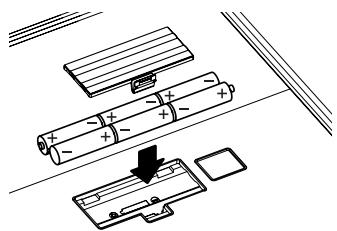
Remove the lid of the battery compartment and insert 6 AA batteries, making sure that they are correctly oriented.
- To avoid malfunction and/or damage to speakers or other devices, always turn off the power on this unit and disconnect any other devices
- When closing the lid of the battery compartment, first insert the catches on the lid into the matching cavities, then push the lid down firmly until you hear a click.
Using Batteries
Please note the following points.
- If there are batteries in the unit while an AC adaptor is being used, normal operation will continue should the supply of current be interrupted (power outage or power cord disconnection).
- Use only alkaline batteries (LR6). You cannot use any other type of battery.
- Battery Life
- Used continuously at maximum power: approx. 11 hours
- (These figures will vary depending on the actual conditions of use)
- When operating on battery power only, the unit's power indicator (p.6) will become dim when battery power gets too low. Replace the batteries as soon as possible.
- Sounds may distort easily or may cut off when played at high volume as the battery power begins to fade, but this is normal and does not indicate a malfunction. Either replace the batteries or use the AC adaptor included with the unit.
Connecting the AC Adaptor
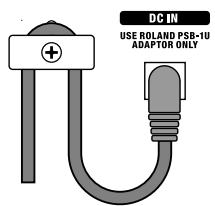
- Insert the DC plug of the supplied AC adaptor into the unit's AC adaptor jack.
By anchoring the AC adaptor cord using the cord hook, as shown in the illustration, you can prevent situations such as the adaptor becoming unplugged or unreasonable pressure being exerted on the AC adaptor jack.
-
To avoid faulty operation or damage to the speakers, you should disconnect the unit from other devices and switch off its power when connecting the AC adaptor.
-
Connect the supplied power cord to the AC adaptor, and plug it into an AC outlet.
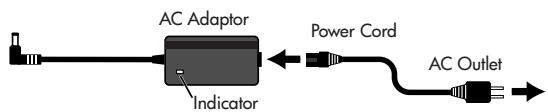
Place the AC adaptor so the side with the indicator (see illustration) faces upwards.
- The indicator will light when you plug the AC adaptor into an AC outlet.
Using the Unit With the AC Adaptor
Please note the following points.
- Although the unit can operate on batteries alone, connecting the AC adaptor to the unit while it has batteries inserted ensures that power is supplied from the AC adaptor, reducing battery consumption.
- Use only the AC adaptor included with the MICRO CUBE BASS RX.
Use of other AC adaptors may damage the amp or result in other problems.
Switching the Power On and Off
Once the connections have been completed, turn on power to your various devices in the order specified. By turning on devices in the wrong order, you risk causing malfunction and/or damage to speakers and other devices.
- Make sure that all volume controls on the MICRO CUBE BASS RX and connected devices are set to 0.
- Turn on all the devices connected to the MICRO CUBE BASS RX's INPUT jack and AUX IN jack.
- Turn on the MICRO CUBE BASS RX.
- Adjust the volume levels for the devices.
- Before switching off the power, lower the volume on each of the devices in your system, and then turn off the devices in the reverse of the order followed when switching them on.
NOTE
Due to a circuitry protection feature, this unit requires a few moments after power up before it is ready for normal operation. To avoid sudden, high-volume sound, always make sure to have the volume level turned down before switching on power.
NOTE
Even with the volume all the way down, you may still hear some sound when the power is switched on and off, but this is normal, and does not indicate a malfunction.
Attaching the Strap
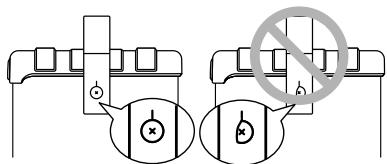
Attach the supplied strap to the strap pin as shown in the illustration.
NOTE
Attach the strap securely so that it does not easily become detached. If the strap is loose, and you use it that way when carrying the MICRO CUBE BASS RX, the amp could be dropped, possibly resulting in damage or injury.
NOTE
Use only the provided strap. The included strap is meant for exclusive use with the MICRO CUBE BASS RX. Do not use this strap for other products.
NOTE
Do not spin or swing the MICRO CUBE BASS RX while holding it by the strap. This is extremely dangerous, as it may cause the strap to become detached; or, if the motion is repeated enough, may even break the strap.
Control Panel
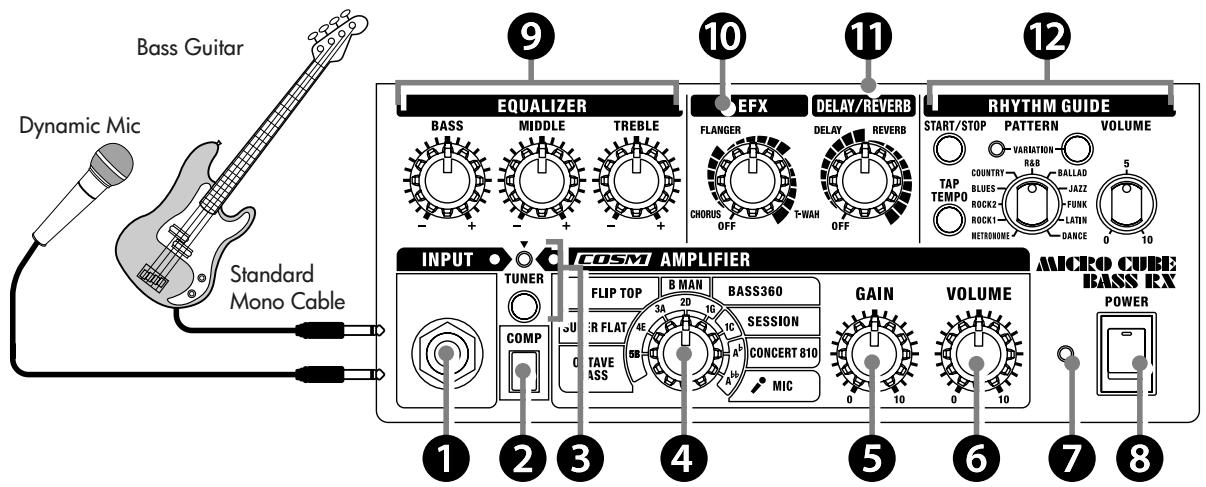
1. INPUT Jack
Connect your bass guitar or microphone here.
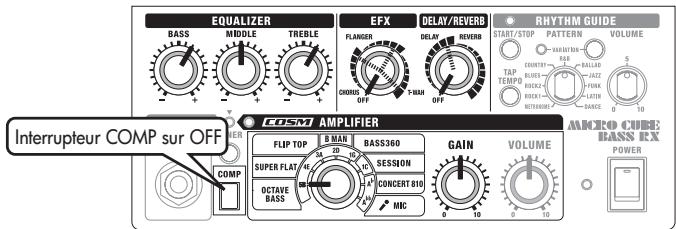
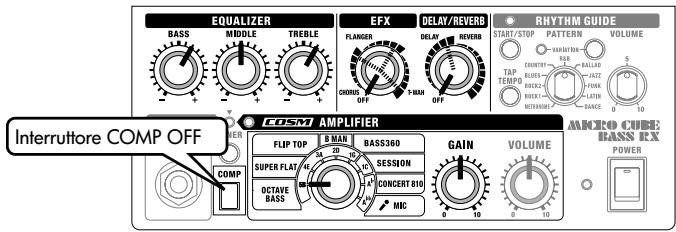
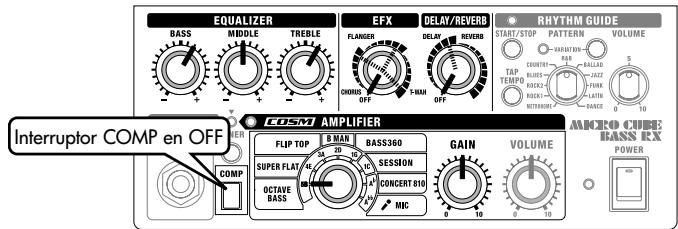
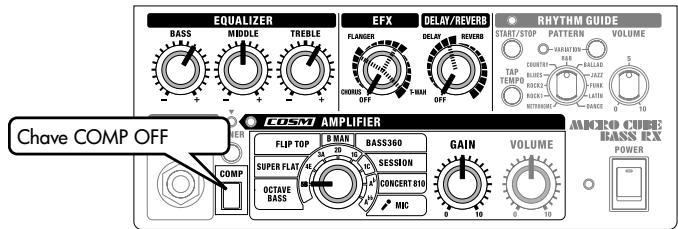
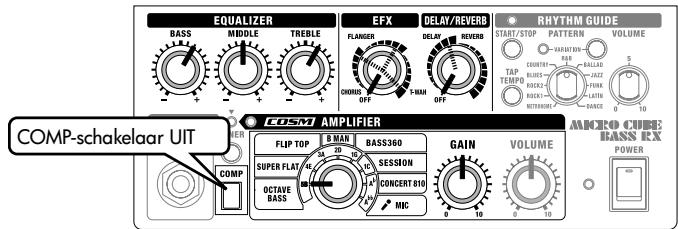
2. COMP (COMPRESSOR) Button
Pressing the COMP button switches on the COMPRESSOR function. This allows you to compress high level signals without distorting the original sound. It also suppresses the attack portions and delivers a smooth, consistent sound.
3. TUNER
The tuner function supports six-string bass tunings.
In addition to manual tuning, in which strings are specified, you can also use it as a chromatic tuner.
Using the Tuner Function (p. 9)
4. AMP TYPE Knob
You can select from eight COSM amp types. When the TUNER function is on, you can specify a string (note name).
- The product names mentioned in this document are trademarks or registered trademarks of their respective owners, and are not related to Roland Corporation. In this manual, these names are used because it is the most practical way of describing the sounds that are simulated using COSM technology.
OCTAVE BASS
This original amp type creates sounds one octave below the input sounds and layers them together to create a fatter bass sound.
- This function does not work properly when playing chords.
Mute the other strings and play a single note.
SUPER FLAT
An original amp featuring a wide-range frequency response.
This amp type provides faithful reproduction of the connected bass's own sound. This is a great type for all kinds of connected instruments.
It is ideal for reproduction of an electric upright bass.
FLIP TOP
Models the Ampeg B-15 (1 x 15"). This amp provided the underpinning for many of the most famous Motown hits.
It features a fat sound, while the amp's compact cabinet produces a distinct contour.
B MAN
Models the Fender Bassman 100 ( 4 × 12^n ). This amp has been a favorite since the inception of electric basses.
It features the sonic characteristics of tube amps, whereby increasing the distortion yields a slightly fatter sound.
BASS 360
Models the acoustic 360 (1 x 18"). This amp was used in the '70s not only by famous jazz bassists, but by funk and hard rock players as well. It is characterized by a warm low end, and a contoured midrange.
SESSION
Models the SWR SM-400 + Goliath (4 × 10^) + Big Ben (1 × 18^) . This tweeter-equipped amp is representative of the "L.A. Sound" that emerged in the '80s. It features a wide-range tone that balances presence in the low end with a clear, open sound.
CONCERT 810
Models the Ampeg SVT + 810E (8 x 10"). This amp typifies the rock sound that relied heavily on combinations of high-output, tube amp sections and large-sized cabinets. The characteristic sound is one of overwhelming low-frequency sound pressure.
MIC
Select this when a microphone is connected.
-
Please note the following points when using a microphone.
-
Feedback could be produced depending on the location of microphones relative to the unit. This can be remedied by:
-
Changing the orientation of the microphone(s).
- Relocating microphone(s) at a greater distance from the unit.
-
Lowering volume levels.
-
The sound will be distorted if you turn the GAIN knob up too high. Set the GAIN knob to as high a value as possible before the sound distorts to get the best signal-to-noise ratio.
- Use a dynamic microphone.
You cannot use a condenser microphone or a plug-in powered microphone that requires a power supply.
5. GAIN Knob
Adjusts the input level. Adjust the input level to suit the signal level of musical instruments connected to the INPUT jack.

Using a high GAIN setting allows you to get an overdrive sound.
TIP
Set the GAIN knob to as high a value as possible before the sound distorts to get the clearest sound.
6. VOLUME Knob
Adjusts the volume of the bass guitar (microphone).
7. Power Indicator
This indicator lights when the unit is turned on.
- When operating on battery power only, the unit's indicator will become dim during play when battery power gets too low. Replace the batteries as soon as possible.
8. POWER Switch
Turns the power on and off.
Switching the Power On and Off (p. 5)
9. EQUALIZER
This is a three-band equalizer. Three knobs allow you to adjust the tone of the bass guitar.
BASS Knob: Adjusts the tone quality of the lower range.
MIDDLE Knob: Adjusts the tone quality of the midrange.
TREBLE Knob: Adjusts the tone quality of the upper range.
10. EFX (Effects) Knob
Turn this knob to chorus, flanger, or T-Wah to select the corresponding effect. You can also adjust the amount of effect applied by turning the knob to the desired position.
- Graduations for CHORUS, FLANGER and T-WAH on the panel are for reference. Be sure to check the sound as you adjust the effects.
CHORUS (spacially synthesized chorus)
This is a spacially synthesized chorus.
With spacially synthesized chorus, a method available only in stereo, the chorus effect is created by taking the sound from the right speaker (from which the effect sound is output), and the sound
from the left speaker (which outputs the direct sound), and then mixing them in the actual space. This creates a greater lateral spread than that produced when the sounds are mixed electronically, providing a more natural sense of breadth.
- The chorus effects are designed so they exhibit the greatest effectiveness when you use the unit's built-in speakers. Effectiveness may differ when REC OUT/PHONE are used instead of the built-in speakers.
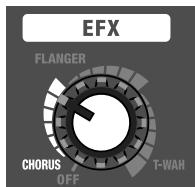
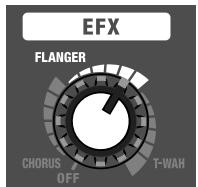
FLANGER
This creates a flanging effect that creates a sort of spinning sensation with the sound. This effect is characterized by a cool, metallic spinning sensation.
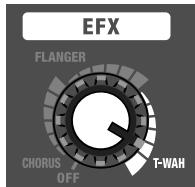
T-WAH
The filter responds to the volume level of the connected instrument. This creates a distinctive effect whereby the filter responds to the performance.
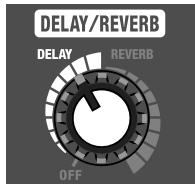
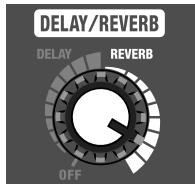
11. DELAY/REVERB Knob
Turn this knob to DELAY or REVERB to switch to that effect. You can also adjust the amount of effect applied by turning the knob to the desired position.
- Graduations for DELAY and REVERB on the panel are for reference. Be sure to check the sound as you adjust the effects.
DELAY
Turn the knob to adjust the delay effect.
REVERB (Stereo reverb)
Turn the knob to adjust the reverb effect.
12. RHYTHM GUIDE
The unit is equipped with drum/percussion-based rhythm patterns that are useful for solo practicing. In addition to practicing with your desired beat, you can also use it as a metronome.
Using the RHYTHM GUIDE (p.9)
PATTERN Knob
Selects the genre of rhythm pattern.
START/STOP Button
Starts/stops the RHYTHM GUIDE. When you start the RHYTHM GUIDE, its indicator flashes in tempo with the music.
TAP TEMPO Button
Sets the tempo of the RHYTHM GUIDE. Tap this button two or more times at the desired tempo and the RHYTHM GUIDE will play at that tempo.
VARIATION Button
Selects the variation of the rhythm pattern. Each genre contains three types of rhythm variations. Pressing the VARIATION button cycles you through the available variations; the VARIATION indicator will be unlit, will light green, or will light red to indicate the change in variation.
VOLUME Knob
Adjusts the volume of the RHYTHM GUIDE.
Rear Panel
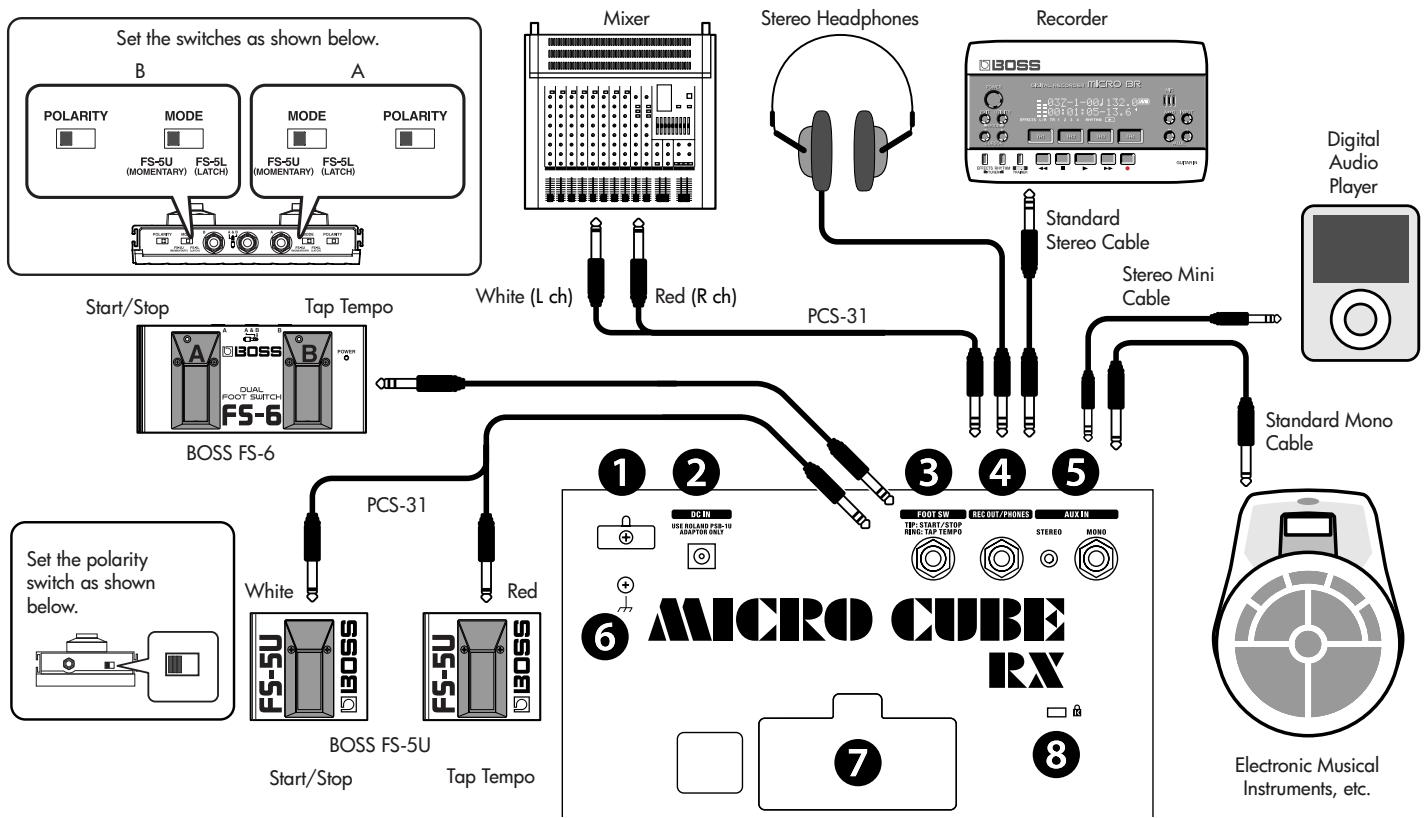
1. Cord Hook
Hook the AC adaptor cord here.
Connecting the AC Adaptor (p. 5)
2. AC Adaptor Jack
Connect the included AC adaptor to this jack.
Use only the AC adaptor included with the MICRO CUBE BASS RX.Use of other AC adaptors may damage the amp or result in other problems.
Connecting the AC Adaptor (p. 5)
3. FOOT SW (Footswitch) Jack
If you connect a footswitch (the optional BOSS FS-5U or FS-6), you can operate the RHYTHM GUIDE function (START/STOP and TAP TEMPO).
4. REC OUT/PHONES Jack
Connect stereo headphones or a recording device to this jack. It supports stereo output.
- No sound is played through the unit's speaker while the REC OUT/PHONES jack is in use.
5. AUX IN Jack
You can connect devices such as a CD player, digital audio player or electronic musical instrument, and have it play along with your bass guitar. Offers two types of jacks for external input; a mono 1/4'' phone jack and a stereo-mini jack. Use the appropriate cable (optional) for the device that you are connecting.
- Determine the volume level by adjusting the volume control of the connected device.
6. Ground Terminal
Depending on the circumstances of a particular setup, you may experience a discomforting sensation, or perceive that the surface feels brittle to the touch when you touch this device, microphones connected to it, or the metal portions of other objects, such as guitars. This is due to an infinitesimal electrical charge, which is absolutely harmless. However, if you are concerned about this, connect the ground terminal with an external ground. When the unit is grounded, a slight hum may occur, depending on the particulars of your installation. If you are unsure of the connection method, contact the nearest Roland Service Center, or an authorized Roland distributor, as listed on the "Information" page.
Unsuitable places for connection
Water pipes (may result in electrical shock)
Gas pipes (may result in fire or explosion)
Telephone-line ground or lightning rod (may be dangerous in the event of lightning)
7. Battery Compartment
Insert 6 AA batteries. Use only alkaline batteries (LR6).
You cannot use any other type of battery.
Inserting Batteries (p. 5)
8. Security Slot (K)
You can connect commercially available anti-theft security cables and other security devices to the unit.
http://www.kensington.com/
Using the Tuner Function
The MICRO CUBE BASS RX is equipped with a tuner function that supports six-string bass tunings. In addition to manual tuning, in which individual strings are specified, you can also use it as a chromatic tuner.
- Use manual tuning when the strings are substantially out of tune (such as after changing strings).
Manual Tuning
1. Press the TUNER button.
The unit enters Tuner mode, and the TUNER button lights. When the unit is in Tuner mode, no sound is played through the speakers or the REC OUT/PHONES jack.
2. Use the AMP TYPE knob to select the string that you want to tune.
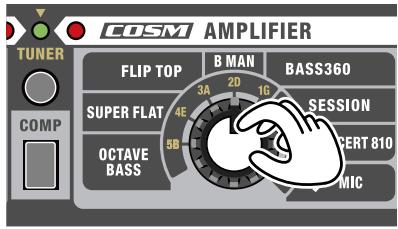
| Knob Position | String (Note Name) |
| 5B | Open fifth string of a five-string bass guitar with an additional low string (B) |
| 4E | Open fourth string of a four-string bass guitar (E) |
| 3A | Open third string of a four-string bass guitar (A) |
| 2D | Open second string of a four-string bass guitar (D) |
| 1G | Open first string of a four-string bass guitar (A) |
| 1C | Open first string of a five-string bass guitar with an additional high string, or the open first string of a six-string bass guitar (C) |
| Ab | Open third string of a four-string bass guitar (semitone down) (Ab) |
| Ab | Open third string of a four-string bass guitar (whole tone down) (G) |
3. Play a single note on the open string that you want to tune.
Tune the string until the green indicator lights.
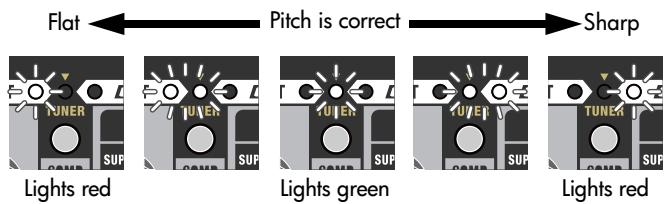
- The red indicator flashes if the pitch is substantially out of tune.
4. When you have finished tuning, press the TUNER button once again.
- The reference pitch is A = 440 Hz . This cannot be changed.
Chromatic Tuning
If you press the TUNER button for one second or more, you can also use the unit as a "chromatic tuner", which automatically determines the closest note name to the one played.
As with manual tuning, chromatic tuning allows you to play a single note on the string that you want to tune. Tune the string until the green indicator lights.
Using the RHYTHM GUIDE
The MICRO CUBE BASS RX is equipped with drum/percussion-based rhythm patterns that are useful for solo practicing. In addition to practicing with your desired beat, you can also use it as a metronome.
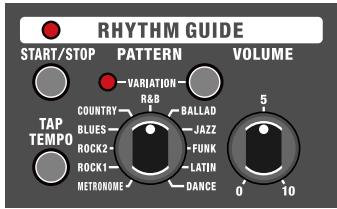
1. Select the rhythm genre using the PATTERN knob.
| METRONOME | ROCK1 | ROCK2 | BLUES |
| COUNTRY | R&B | BALLAD | JAZZ |
| FUNK | LATIN | DANCE |
2. Press the START/STOP button to start the RHYTHM GUIDE.
When the RHYTHM GUIDE is started, the RHYTHM GUIDE indicator lights.
3. Adjust the RHYTHM GUIDE volume using the RHYTHM GUIDE VOLUME knob.
4. Select a rhythm variation by pressing the VARIATION button.
Each genre contains three types of rhythm variations. Pressing the VARIATION button cycles you through the available variations; the VARIATION indicator will be unlit, will light green, or will light red to indicate the change in variation.
5. Adjust the variation to the tempo that you want to play to.
Press the TAP TEMPO button two or more times at the desired tempo to get the RHYTHM GUIDE to play at that tempo.
Sample Settings
ALL ROUND (SUPER FLAT)
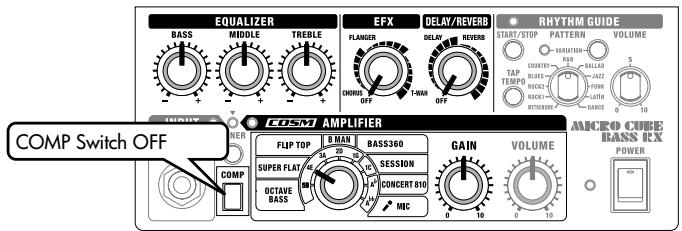
An amp sound featuring a wide-range frequency response.
This amp type enables clear reproduction of your instrument's sound.
This also makes it perfect when connecting bass modeling processors or using sound modules like bass synth.
If you are using an electric upright bass, you should try lowering TREBLE.
FINGER & FRETLESS
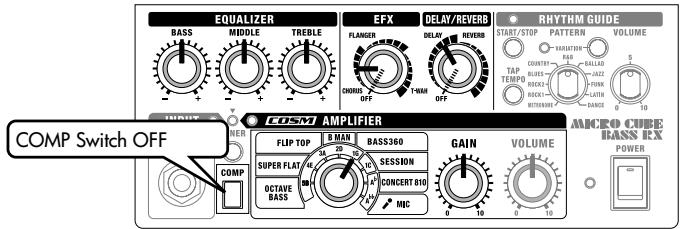
A bass sound that was popular in the seventies.
This is suited for a Jazz Bass with a rear pickup used. You can get a distinctive fat sound when the bass is fingered near the rear pickup.
In addition, using this setting while playing harmonics in combination with a chorus and a delay enables sounds featuring exquisite reverberation.
SLAP BASS
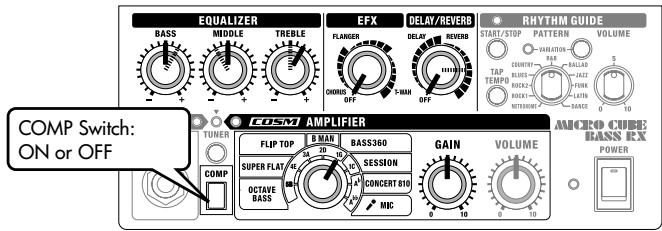
This setting is suitable for a great slap bass sound. You can get a sticky sound by switching on the COMPRESSOR (COMP). If you apply some reverb, you can create a more sumptuous sound.
To obtain the attacking sound used in rock music, raise the BASS
and TREBLE settings to produce a sound with greater power.
You can add to this effect by reducing the MIDDLE setting.
FUNK WAH (SUPER FLAT/SESSION)
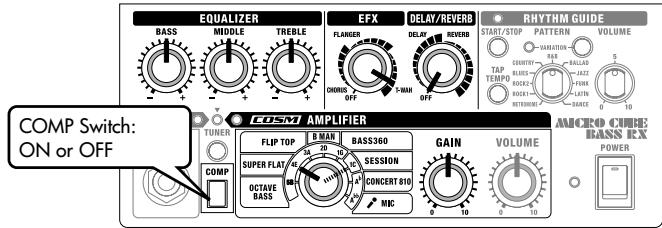
This setting employs the T-WAH feature for a funky sound that responds to the bass touch. The WAH effect becomes even more prominent with the SUPER FLAT or SESSION amp types, which feature response up to the high-frequency range. Use the T-WAH knob to adjust the sensitivity. Adjust the WAH effect with the knob settings according to the output of the connected bass. You can get a different sound for each different playing style, such as slap, muted or glissando.
You can get a light WAH sound by switching the COMPRESSOR (COMP) on in the slap playing style.
OCTAVE IMAGE (OCTAVE BASS)
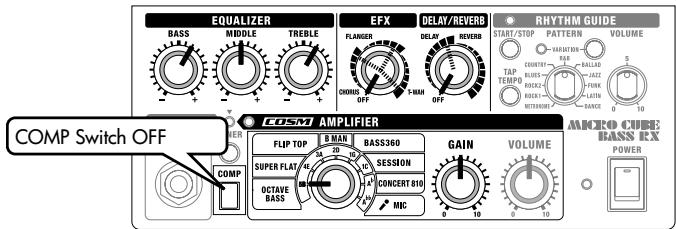
This is a thicker bass sound created by mixing input sounds with sounds one octave below them.
This is effective in solo performances that use high positions.
You can create some impressive sounds by applying effects like
T-WAH or combining them with DELAY.
MEMO
Adjust the VOLUME knob to an appropriate volume level.
OCTAVE IMAGE (OCTAVE BASS)
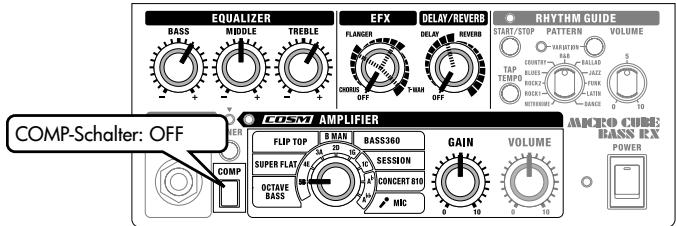
OCTAVE IMAGE (OCTAVE BASS)
3. Jack FOOT SW (interruptto a pedale)
OCTAVE IMAGE (OCTAVE BASS)
3. Conector FOOT SW (pedal)
OCTAVE IMAGE (OCTAVE BASS)
Colocando as pilhas (p. 35)
2. Plugdo adaptador CA
Colocando as pilhas (p. 35)
3. Plugge FOOT SW (Pedal)
Colocando as pilhas (p. 35)
8. Slot de Segurarca

OCTAVE IMAGE (OCTAVE BASS)
OCTAVE IMAGE (OCTAVE BASS)
Nominal Input Level (1 kHz)
INPUT:
-10 dBu
STEREO AUX IN:
-10 dBu
MONO AUX IN:
-10 dBu
Speakers
10 cm (4 inches) x 4
Controls
POWER Switch
TUNER Switch
COMP Switch
COSM AMPLIFIER:
TYPE Switch (OCTAVE BASS/SUPER FLAT/FLIP TOP/B MAN/BASS360/
SESSION/CONCERT 810/MIC)
GAIN Knob
VOLUME Knob
EQUALIZER:
BASS Knob/MIDDLE Knob/TREBLE Knob
EFX Knob (CHORUS/FLANGER/T-WAH)
DELAY/REVERB Knob
RHYTHM GUIDE:
START/STOP Switch
TAP TEMPO Switch
PATTERN Knob (METRONOME/ROCK1/ROCK2/BLUES/COUNTRY/
Input Jack (1/4" phone type)
Foot Switch Jack (1/4" TRS phone type)
STEREO AUX IN Jack (Stereo miniature phone type)
MONO AUX IN Jack (1/4" phone type)
REC OUT/PHONES Jack (Stereo 1/4" phone type)
AC Adaptor Jack
Grounding Terminal
Power Supply
DC 9 V: AC Adaptor(Accessory) or
Dry battery LR6 (AA) type (alkaline)(optional) × 6
Current Draw
186 mA
Dimensions
296(W) x 207(D) x 294(H) mm
11-11/16(W) x 8-3/16(D) x 11-5/8(H) inches
Weight
6.8 kg/15 lbs(including Batteries)
Accessories
Strap/Power Cord/AC Adaptor/Owner's Manual
Options
Foot Switch (BOSS FS-5U, FS-6)/Connection Cable (PCS-31)/
0 dBu = 0.775 Vrms
* In the interest of product improvement, the specifications and/or appearance of this unit are subject to change without prior notice.
Block Diagram
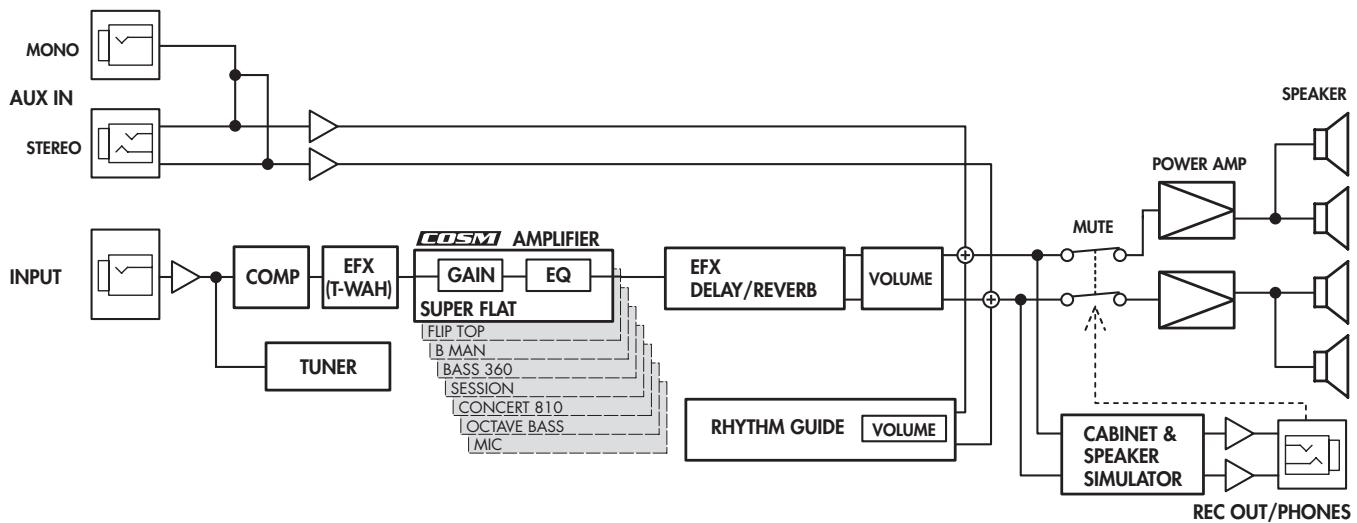
* No sound is played through the unit's speaker while the PHONES jack is in use.
For the U.K.
IMPORTANT: THE WIRES IN THIS MAINS LEAD ARE COLOURED IN ACCORDANCE WITH THE FOLLOWING CODE.
BLUE: NEUTRAL
BROWN: LIVE
As the colours of the wires in the mains lead of this apparatus may not correspond with the coloured markings identifying the terminals in your plug, proceed as follows:
The wire which is coloured BLUE must be connected to the terminal which is marked with the letter N or coloured BLACK. The wire which is coloured BROWN must be connected to the terminal which is marked with the letter L or coloured RED.
Under no circumstances must either of the above wires be connected to the earth terminal of a three pin plug.
-For the USA
FEDERAL COMMUNICATIONS COMMISSION RADIO FREQUENCY INTERFERENCE STATEMENT
This equipment has been tested and found to comply with the limits for a Class B digital device, pursuant to Part 15 of the FCC Rules. These limits are designed to provide reasonable protection against harmful interference in a residential installation. This equipment generates, uses, and can radiate radio frequency energy and, if not installed and used in accordance with the instructions, may cause harmful interference to radio communications. However, there is no guarantee that interference will not occur in a particular installation. If this equipment does cause harmful interference to radio or television reception, which can be determined by turning the equipment off and on, the user is encouraged to try to correct the interference by one or more of the following measures:
Reorient or relocate the receiving antenna.
- Increase the separation between the equipment and receiver.
- Connect the equipment into an outlet on a circuit different from that to which the receiver is connected.
- Consult the dealer or an experienced radio/TV technician for help.
This device complies with Part 15 of the FCC Rules. Operation is subject to the following two conditions:
(1) this device may not cause harmful interference, and
(2) this device must accept any interference received, including interference that may cause undesired operation.
Unauthorized changes or modification to this system can void the users authority to operate this equipment.
This equipment requires shielded interface cables in order to meet FCC class B Limit.
For Canada
NOTICE
This Class B digital apparatus meets all requirements of the Canadian Interference-Caising Equipment Regulations.
AVIS
This symbol indicates that in EU countries, this product must be collected separately from household waste, as defined in each region. Products bearing this symbol must not be discarded together with household waste.

Al Fanny Trading Office 9, EBN Hagar Al Askalany Street,
ARD E1 Golf, Heliopolis, Cairo 11341, Egypt
TEL: (022)-418-5531
REUNION
Maison FO - YAM Marcel
25 Rue Jules Hermann,
Chaudron - BP79 97 491
Ste Clotilde Cedex,
REUNION ISLAND
TEL: (0262) 218-429
SOUTH AFRICA
T.O.M.S. Sound & Music (Pty)Ltd.
2 ASTRON ROAD DENVER
JOHANNESBURG ZA 2195, SOUTH AFRICA
TEL: (011)4173400
Paul Bothner(PTY)Ltd.
Royal Cape Park, Unit 24
Londonderry Road, Ottery 7800 Cape Town, SOUTH AFRICA TEL: (021) 799 4900
ASIA
CHINA
Roland Shanghai Electronics Co., Ltd.
5F. No.1500 Pingliang Road
Shanghai 200090, CHINA
TEL: (021) 5580-0800
Roland Shanghai Electronics Co., Ltd.
(BEIJING OFFICE)
10F. No.18 3 Section Anhuaxili
Chaoyang District Beijing
100011 CHINA
TEL: (010) 6426-5050
HONG KONG
Tom Lee Music Co., Ltd.
Service Division
22-32 Pun Shan Street, Tsuen Wan, New Territories,
HONG KONG
TEL: 2415 0911
Parsons Music Ltd.
8th Floor, Railway Plaza, 3 Chatham Road South, T.S: Kowloon, HONG KONG
TEL: 2333 1863
INDIA
Rivera Digitec (India) Pvt. Ltd. 411, Nirman Kendra Mahalaxmi Flats Compound Off. Dr. Edwin Moses Road, Mumbai-400011, INDIA TEL: (022) 2493 9051
INDONESIA
PT Cita IntiRama
JL. Cideng Timur No. 15J-15O
Jakarta Pusat
INDONESIA
TEL: (021) 6324170
KOREA
Cosmos Corporation 1461-9, Seocho-Dong, Seocho Ku, Seoul, KOREA TEL: (02) 3486-8855
MALAYSIA
Roland Asia Pacific Sdn. Bhd. 45-1, Block C2, Jalan PJU 1/39, Dataran Prima, 47301 Petaling Jaya, Selangor, MALAYSIA TEL: (03) 7805-3263
VIET NAM
Suoi Nhac Company, Ltd
370 Cach Mang Thang Tam St.
Dist.3, Ho Chi Minh City,
VIET NAM
TEL: 9316540
PHILIPPINES
G.A. Yupangco & Co. Inc. 339 Gil J. Puyat Avenue Makati, Metro Manila 1200, PHILIPINES TEL: (02) 899 9801
SINGAPORE
SWEE LEE MUSIC COMPANY PTE. LTD. 150 Sims Drive, SINGAPORE 387381 TEL:6846-3676
TAIWAN
ROLAND TAIWAN
ENTERPRISE CO., LTD.
Room 5, 9fL. No. 112 Chung
Shan N. Road Sec.2, Taipei,
TAIWAN, R.O.C.
TEL: (02) 2561 3339
THAILAND
Theera Music Co., Ltd.
100-108 Soi Verng
Nakornkasem, New
Road Sumpantawongse, Bangkok 10100 THAILAND
TEL: (02) 224-8821
AUSTRALIA/ NEW ZEALAND
AUSTRALIA/
NEW ZEALAND
Roland Corporation Australia Pty., Ltd. 38 Campbell Avenue Dee Why West. NSW 2099 AUSTRIA
For Australia
Tel: (02) 9982
For New Zea
Tel: (09) 3098
CENTRAL/LATIN AMERICA
ARGENTINA
Instrumentos Musicales S.A.
Av.Santa Fe 2055
(1123) Buenos Aires
ARGENTINA
TEL: (011) 4508-2700
BARBADOS
A&B Music Supplies LTD
12 Webster Industrial Park
Wildey, St.Michael, Barbados
TEL: (246)430-1100
BRAZIL
Roland Brasil Ltda.
Rua San Jose, 780 Sala B
Parque Industrial San Jose
Cotá - São Paulo - SP, BRAZIL
TEL: (011) 4615 5666
CHILE
Comercial Fancy II S.A.
Rut.: 96.919.420-1
Nataniel Cox #739, 4th Floor
Santiago - Centro, CHILE
TEL: (02) 688-9540
COLOMBIA
Centro Musical Ltda.
Cra 43 B No 25 A 41 Bododega 9
Medellin, Colombia
TEL: (574)3812529
COSTA RICA
JUAN Bansbach Instrumentos
Musicales
Ave.1.Calle 11, Apartado
10237,
San Jose, COSTA RICA
TEL: 258-0211
CURACAO
Zeelandia Music Center Inc.
Orionweg 30
Curacao, Netherland Antilles
TEL:(305)5926866
DOMINICAN REPUBLIC
Instruments Fernando Giral
Calle Proyecto Central No.3
Ens.La Esperilla
Santo Domingo,
Dominican Republic
TEL:(809)6830305
ECUADOR
Mas Musika Rumichaca 822 y Zaruma Guayaquil - Ecuador TEL:(593-4)2302364
EL SALVA
OMNI MUSIC
75 Avenida Norte y Final
Alameda Juan Pablo II,
Edificio No.4010 San Salvador,
EL SALVADOR
TEL: 262-0788
GUATEMALA
Casa Instrumental
Calzada Roosevelt 34-01, zona 11
Ciudad de Guatemala
Guatemala
TEL: (502) 599-2888
HONDURAS
Almacen Pajaro Azul S.A. de C.V.
BO.Paz Barahona
3 Ave.11 Calle S.O
San Pedro Sula, Honduras
TEL: (504) 553-2029
MARTINIQUE
Roland Ireland
G2 Calmount Park, Calmout
Avenue, Dublin 12
Republic of IRELAND
TEL: (01) 4294444
ITALY
Roland Italy S. p. A.
Viale delle Industrie 8, 20020 Arese, Milano, ITALY
TEL: (02) 937-78300
NORWAY
Roland Scandinavia Avd.
Kontor Norge
Lilleakerevien 2 Postboks
Lilleaker N-0216 Oslo
NORWAY
TEL: 2273 0074
POLAND
ROLAND POLSKA SP. Z.O.O.
UL. Gibraltarska 4.
PL-03 664 Warsaw
POLAND
TFL: (022) 679, 4419
PORTUGAL
Roland Iberia, S.L.
Portugal Office
Cais das Pedras, 8/9-1 Dto
4050-465, Porto, PORTUGAL
TEL: 22 608 00 60
ROMANIA
FBS LINES
Piata Libertatii 1, 535500 Gheorgheni ROMANIA
TEL: (266) 364 609
RUSSIA
MuTek Dorozhnaya ul3.korp.6 117 545 Moscow, RUSSIA TEL: (095) 981-4967
SLOVAKIA
DAN Acoustic s.r.o.
Povaszka 18.
SK - 940 01 Nové Zámky
TEL: (035) 6424 330
SPAIN
Roland Iberia, S.L.
Paseo Garcia Faria, 33-35
08005 Barcelona SPAIN
TEL: 93493 9100
SWEDEN
Roland Scandinavia A/S SWEDISH SALES OFFI Danvik Center 28, 2 tr. S-131 30 Nacka SWEDEN TEL: (0) 08 702 00 20
SWITZERLAND
Roland (Switzerland) AG
Landstrasse 5, Postfach, CH-4452 Itingen, SWITZERLAND
TEL: (061) 927-8383
UKRAINE
EURHYTHMICS Ltd. P.O.Box:37-a.Nedecey Str. 30 UA-89600 Mukachevo UKRAINE
TEL: (03131) 414-40
UNITED KINGDOM
Roland (U.K.) Ltd.
Atlantic Close, Swansea
Enterprise Park, SWANSEA
SA7 9F,
UNITED KINGDOM
TEL: (01792) 702701
MIDDLE EAST
BAHRAIN
Moon Stores
No.1231&1249 Rumaytha
Building Road 3931, Manama
339 BAHRAIN
TEL: 17 813 942
IRAN
MOCO INC.
No.41 Nike St., Dr.Shariyati Ave,
Roberoye Cerahe Mirdamad
Tehran, IRAN
TEL: (021)-2285-4169
ISRAEL
Halilit P. Greenspoon & Sons Ltd.
8 Retzif Ha'alia Hashnia St.
Tel-Aviv-Yaho JSRAEL
TEL: (03) 6823666
JORDAN
MUSIC HOUSE CO. LTD.
FREDDY FOR MUSIC
P.O. Box 922846
Amman 11192 JORDAN
TEL: (06) 5692696
KUWAIT
EASA HUSAIN AL-YOUSIFI
& SONS CO.
Al-Yousifi Service Center
P.O.Box 126 (Safat) 13002
KUWAIT
TEL: 00 965 802929
LEBANON
Chahine S.A.L.
George Zeidan St., Chahine Bldg., Achrafieh, P.O.Box: 16-5857
Beirut, LEBANON
TEL: (01) 20-1441
OMAN
TALENTZ CENTRE L.L.C.
Malatlan House No.1
Al Noor Street, Ruwi
SULTANATE OF OMAN
TEL: 2478 3443
QATAR
Al Emadi Co. (Badie Studio & Stores)
P.O. Box 62, Doha, QATAR
TEL: 4423-554
SAUDI ARABIA
aDawliah Universal Electronics APL Behind Pizza Inn Prince Turkey Street aDawliah Building, PO BOX 2154, Alkhobar 3152 SAUDI ARABIA TEL: (03) 8643601
SYRIA
Technical Light & Sound Center
Rawda, Abdul Qader Jazairi St.
Bldg. No. 21, P.O.BOX 13520, Damascus, SYRIA
TEL: (011) 223-5384
TURKEY
ZUHAL DIS TICARET A.S.
Galip Dede Cad. No.37
Beyoglu - Istanbul / TURKEY
TEL: (0212) 249 85 10
U.A.E.
Zak Electronics & Musical Instruments Co. L.L.C.
Zabeel Road, Al Sherooq Bldg., No. 14, Ground Floor, Dubai, U.A.E.
TEL: (04) 3360715
NORTH AMERICA
CANADA
Roland Canada Ltd.
(Head Office)
5480 Parkwood Way
Richmond B.C., V6V 2M4
CANADA
TEL: (604) 270 6626
Roland Canada Ltd.
(Toronto Office)
170 Admiral Boulevard
Mississauga On L5T 2N6
CANADA
TEL: (905) 362 9707
U.S.A.
Roland Corporation U.S. 5100 S.Eastern Avenue Los Angeles,CA 90040-2938, U.S.A.
TEL: (323)8903700