DUAL TRIGGER GUN NW - Gaming accessory THRUSTMASTER - Free user manual and instructions
Find the device manual for free DUAL TRIGGER GUN NW THRUSTMASTER in PDF.


| Product type | Game accessory (gun for Wii) |
| Brand | Thrustmaster |
| Model | Dual Trigger Gun NW |
| Compatibility | Nintendo Wiimote and Nunchuk |
| Trigger system | Dual trigger: trigger #1 (Wiimote B button) for firing, trigger #2 (Wiimote A button) for reload/second weapon/jump |
| Game modes | Arcade position (without Nunchuk) and machine gun position (with Nunchuk) |
| Nunchuk compartment | Detachable, attached via side mounting system |
| Wiimote access | Access door for Wiimote compartment and cable storage |
| Cable guide | Integrated for Nunchuk cable routing |
| Main material | Plastic |
| Approximate weight | 200 g (without Wiimote or Nunchuk) |
| Approximate dimensions | 30 x 15 x 8 cm |
| Power supply | Powered by Wiimote (batteries not included) |
| Warranty | 2 years from purchase date |
| Technical support | Website: http://fs.thrustmaster.com, phone: France 0 826 09 21 03, Canada 1-866-889-2181 (toll-free) |
| Care and cleaning | Clean with a dry, soft cloth. Do not use solvents. |
| Usage precautions | Do not modify, open, or alter the product. Use only with official Wiimote and Nunchuk. |
| Recycling | Do not dispose of with household waste. Deposit at WEEE collection point. |
| Country of manufacture | China |
| Copyright year | 2009 |
Frequently Asked Questions - DUAL TRIGGER GUN NW THRUSTMASTER
User questions about DUAL TRIGGER GUN NW THRUSTMASTER
0 question about this device. Answer the ones you know or ask your own.
Ask a new question about this device
Download the instructions for your Gaming accessory in PDF format for free! Find your manual DUAL TRIGGER GUN NW - THRUSTMASTER and take your electronic device back in hand. On this page are published all the documents necessary for the use of your device. DUAL TRIGGER GUN NW by THRUSTMASTER.
USER MANUAL DUAL TRIGGER GUN NW THRUSTMASTER
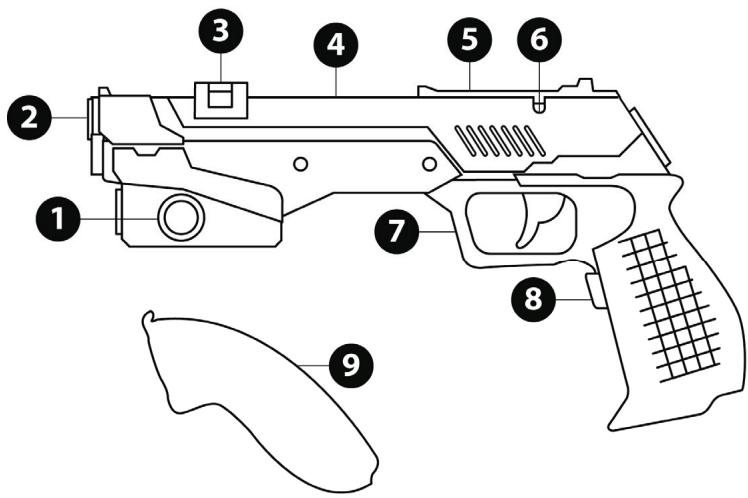
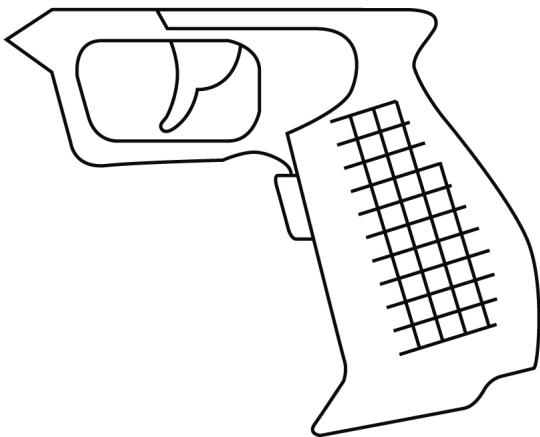
- Attachment system for the Nunchuk™ compartment
- Wii RemoteTM pointer access
- Wij Remote™ access hatch
- Compartment for Wii RemoteTM
-
Cable storage access hatch
-
Cable slot
- Trigger 1 (= button B on Wii Remote™)
- Trigger 2 (= button A on Wii Remote™)
- Detachable Nunchuk™ compartment
INSTALLING THE WII REMOTE™ AND NUNCHUK™ IN THE "DUAL TRIGGER GUN NW"
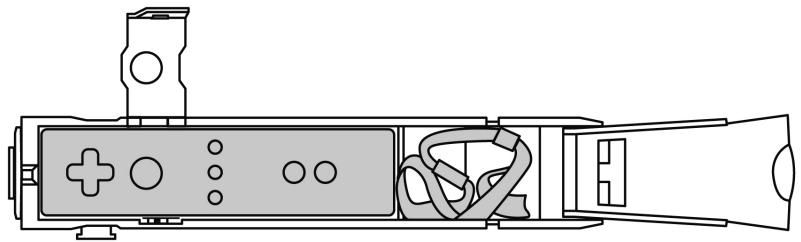
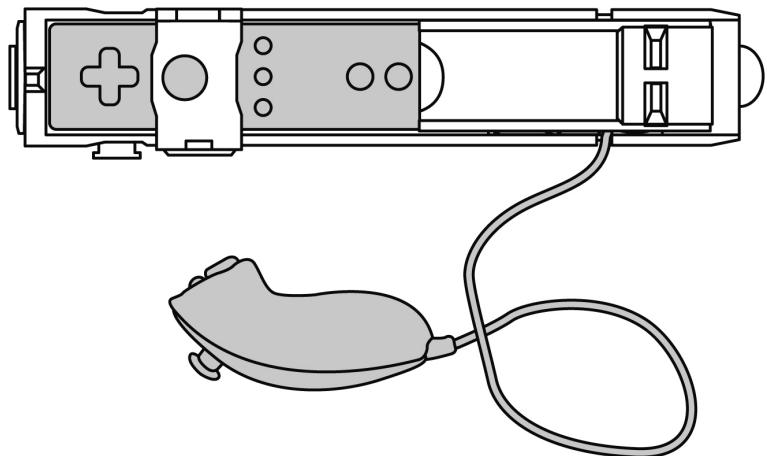
- Open the Wii Remote™ access hatch (3) as well as the cable storage access hatch (5).
- Insert the Wii Remote™ into its compartment (4), as well as the wrist strap in the cable compartment.
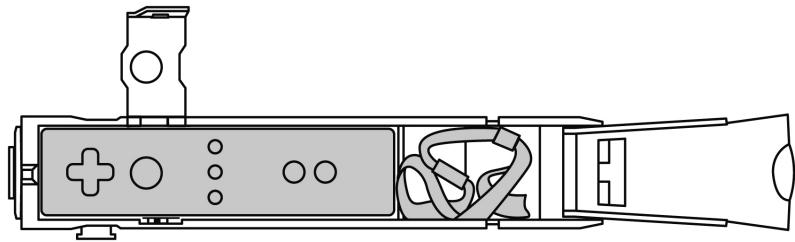
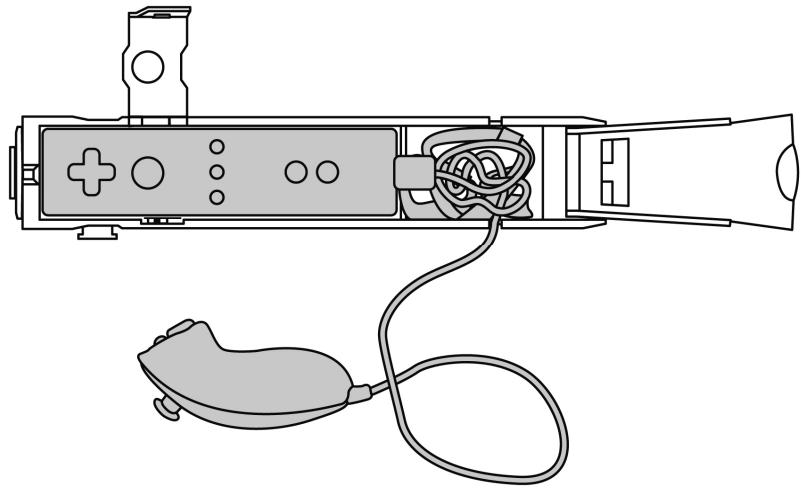
- Insert the Nunchuk™ plug into the Wii Remote™ connector, and put part of its cable in the cable compartment. Thread its cable through the cable slot (6).
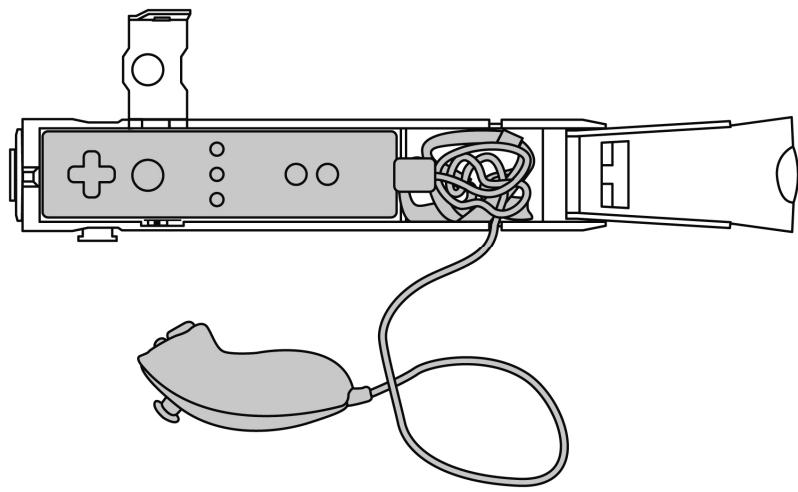
- Close the 2 access hatches.
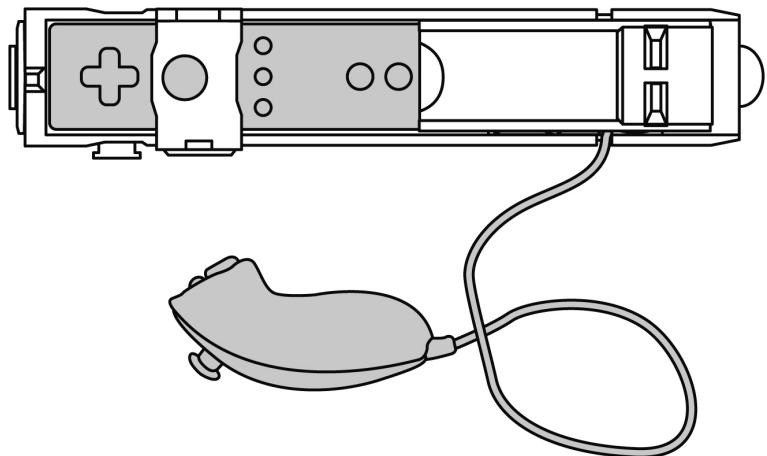
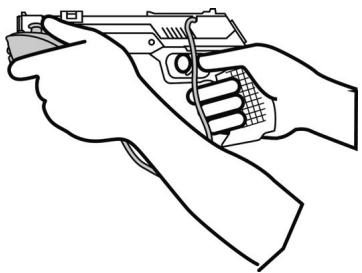
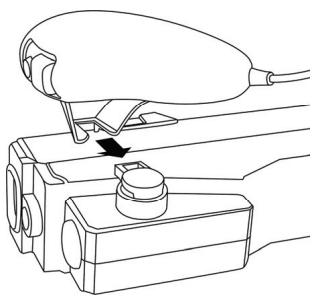
- Insert the Nunchuk™ compartment (9) onto the attachment system (1) on the gun, and position the Nunchuk™ in its compartment.

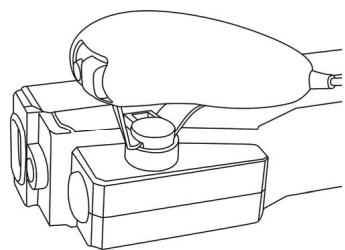
You are now ready to play!
DUAL TRIGGER SYSTEM
The "Dual Trigger Gun Nw" offers you the advantage of being equipped with two triggers.
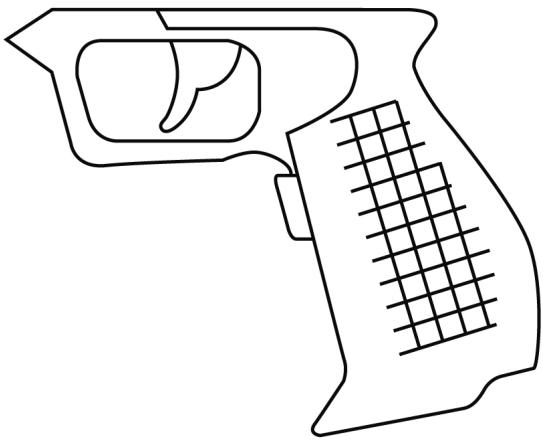
Trigger 1 (7):
- Features a mechanism which activates button "B" located on the back of the Wii Remote™.
- Is easily accessible using your index finger.
- Is generally used for the shooting function.
Trigger 2 (8):
- Features a mechanism which activates button "A" located on the top front part of the Wii Remote™.
- Located on the pistol grip, is easily accessible using your middle finger or ring finger.
- Is generally used for reload, second weapon, jump or other functions.
Note:
To change the function assigned to the triggers, simply access your game's "Controller Options" and select the function you wish to use for the "A" and "B" buttons on the Wii Remote™.
The "Dual Trigger Gun Nw" offers you the advantage of being equipped with a dual position system, thanks to its Nunchuk™ compartment on the side, which is detachable.
To switch from one position to the other, simply attach or detach the Nunchuk™, as well as its compartment and its plug.
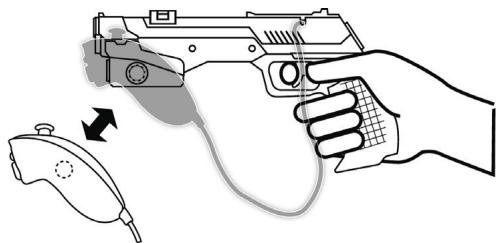
"Arcade Gun" type position:
- The Nunchuk™ compartment as well as the Nunchuk™ and its plug are detached.
- Uses only the functions of the Wii Remote™.
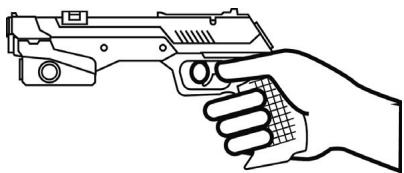
"Machine Gun" type position:
- The Nunchuk™ compartment as well as the Nunchuk™ and its plug are attached.
- Uses the functions of the Wii Remote™ and the Nunchuk™.
TECHNICAL SUPPORT
If you encounter a problem with your product, please go to http://ts.thrustmaster.com and click Technical Support. From there you will be able to access various utilities (Frequently Asked Questions (FAQ), the latest versions of drivers and software) that may help to resolve your problem. If the problem persists, you can contact the Thrustmaster products technical support service ("Technical Support"):
By email:
In order to take advantage of technical support by email, you must first register online. The information you provide will help the agents to resolve your problem more quickly. Click Registration on the left-hand side of the Technical Support page and follow the on-screen instructions. If you have already registered, fill in theUsername and Password fields and then click Login.
By telephone:
| United Kingdom | 08450800942Charges at local rate | Monday to Friday from Noon to 4pm and 5pm to 10pm Saturday from 9am to Noon and 1pm to 7pm Sunday from 9am to Noon and 1pm to 4pm |
| United States | 1-866-889-5036Free | Monday to Friday from 7am to 11am and from Noon to 5pm Saturday and Sunday from 7am to Noon (Eastern Standard Time) |
| Canada | 1-866-889-2181Free | Monday to Friday from 7am to 11am and from Noon to 5pm Saturday and Sunday from 7am to Noon (Eastern Standard Time) |
| Denmark | 80887690Free | Monday to Friday from 1pm to 5pm and 6pm to 11pm (English) Saturday from 9am to 1pm and 2pm to 8pm Sunday from 10am to 1pm and 2pm to 5pm |
| Sweden | 0200884567Free | Monday to Friday from 1pm to 5pm and 6pm to 11pm (English) Saturday from 9am to 1pm and 2pm to 8pm Sunday from 10am to 1pm and 2pm to 5pm |
| Finland | 0800 913060Free | Monday to Friday from 2pm to 6pm and 7pm to Midnight (English) Saturday from 10am to 2pm and 3pm to 9pm Sunday from 11am to 2pm and 3pm to 6pm |
WARRANTY INFORMATION
Worldwide, Guillemot Corporation S.A. ("Guillemot") warrants to the consumer that this Thrustmaster product will be free from material defects and manufacturing flaws for a period of two (2) years from the original date of purchase. Should the product appear to be defective during the warranty period, immediately contact Technical Support, who will indicate the procedure to follow. If the defect is confirmed, the product must be returned to its place of purchase (or any other location indicated by Technical Support).
Within the context of this warranty, the consumer's defective product will, at Technical Support's option, be either repaired or replaced. Where authorized by applicable law, the full liability of Guillemot and its subsidiaries (including for indirect damages) is limited to the repair or replacement of the Thrustmaster product. The consumer's legal rights with respect to legislation applicable to the sale of consumer goods are not affected by this warranty.
This warranty shall not apply: (1) if the product has been modified, opened, altered, or has suffered damage as a result of inappropriate or abusive use, negligence, an accident, normal wear, or any other cause not related to a material defect or manufacturing flaw; (2) in the event of failure to comply with the instructions provided by Technical Support; (3) to software not published by Guillemot, said software being subject to a specific warranty provided by its publisher.
Additional warranty provisions
In the United States of America and in Canada, this warranty is limited to the product's internal mechanism and external housing. Any applicable implied warranties, including warranties of merchantability and fitness for a particular purpose, are hereby limited to two (2) years from the date of purchase and are subject to the conditions set forth in this limited warranty. In no event shall Guillemot Corporation S.A. or its affiliates be liable for consequential or incidental damage resulting from the breach of any express or implied warranties. Some States/Provinces do not allow limitation on how long an implied warranty lasts or exclusion or limitation of incidental/consequential damages, so the above limitation may not apply to you. This warranty gives you specific legal rights, and you may also have other legal rights which vary from State to State or Province to Province.
COPYRIGHT
© 2009 Guillemot Corporation S.A. All rights reserved. Thrustmaster® is a registered trademark of Guillemot Corporation S.A. Wii and Wii Remote are trademarks of Nintendo Co., Ltd. All other trademarks and brand names are hereby acknowledged and are property of their respective owners. Illustrations not binding. Contents, designs and specifications are subject to change without notice and may vary from one country to another. Made in China.
ENVIRONMENTAL PROTECTION RECOMMENDATION
At the end of its working life, this product should not be disposed of with standard household waste, but rather dropped off at a collection point for the disposal of Waste Electrical and Electronic Equipment (WEEE) for recycling.
This is confirmed by the symbol found on the product, user manual or packaging.
Depending on their characteristics, the materials may be recycled. Through recycling and other forms of processing Waste Electrical and Electronic Equipment, you can make a significant contribution towards helping to protect the environment.
Please contact your local authorities for information on the collection point nearest you.
FAQs, tips and drivers available at www.thrustmaster.com
DUAL TRIGGER GUN + NW
Pour Nintendo® Wii™
INFORMATIONS RELATIVES À LA GARANTIE
Position "Arcade Gun":
INFORMATIE MET BETREKKING TOT DE GARANTIE
YCTAHOBKA WII REMOTE™ IN NUNCHUK™
B "DUAL TRIGGER GUN NW"
- OtkpoiTe KpbIshky Doctyna Wii RemoteTM (3), a Toke KpbIshky otlenenna dny Ka6eJIa (5).
- YctahOBite Wii RemoteTM B ero otTeJeHne (4), a pemeHb Ha 3aIaCTbe B otTeJeHne dna Ka6eJI.
- Bctabte wtekep NunchukTM B rhe3do Wii RemoteTM u yctahOBnTe yactb ero kaebna B OTdelenHe nIra Kaebna. IpoTaNHe Tkaebnb Ypee3 na3 dIa (6).
- 3akpoIte 2 KpbIuKn.
- Bctabbte otdehenne NunchukTM (9) B cntemy kpeilenen (1) ha nictoene paacnojoknte NunchukTM BCBOEM otdehenn.

Tenepb MoXHO haUHAmb uApY!
CNCTEMAДBOHHO TPNITPEPA
Blaoradapra "Dual Trigger Gun Nw" y bac ectb da tprrepa.
Tprrep 1 (7):
- 06opydoBAn MexaHn3MOM, KOtOpbI BkIIOuAeT KHOJky "B", paCNoIooJeHHyo Ha 3aHnei actu Wi RemoteTM.
-JIerKoOcTyneHДЯуka3aTeNbHoro naIbua.
-ObHyNo nCnoNb3yetyTcIaФyHKuINCTpeNbbl.
Tprrrep 2 (8):
- 06opuyoBan MexaHm3MOM, KOTOpbI BKJIIOUaET KHOJky "A", paCNOIOKeHHyO Ha BepxHei nepedneu qactn Wii RemoteTM.
-PacnoonKeHa pyKoTke nCToJeta,JeKoOcTyIeH dIa cpeHero 6e3bImHHoro naIbua.
-ObbyHNO nCnOJIb3yETcA DnI nepe3aepdKn, BTOPOrO opJxN, npBIXKOB INI npYnX yHKU.
Птумецни: Ангелух:
Дя u3MeHHeuФyHKU,Ha3NaYeHbIX Ha mpu2aepbI, 6oJoume 6 MeHIO "TapaMePbI KOHmPonnepa" eawe UzaPbI u bIbepumeФyHKUO, KOMOpYIO 6bIXomume HauHauumb Ha KhONku"A"u"B"Wii RemoteTM.
CNUCTEMA DBOHORO NIOJOXEHNIA
IcnoJIb3yra "Dual Trigger Gun Nw", y Bac ectb Bo3MOxHocTh 6bnaIaTb CnCTeMoI DBOHOro noJoxHeN, 6laorapar cbeHOMy OTeJeHHIO nJnunchukTM ha 6Oky.
© 2009 Guillemot Corporation S.A. Bce npaba 3aunTuenb. Thrustmaster® JnBnTcTepoBAnHbIM TOBAPbIM 3nAOKom Guillemot Corporation S.A. Wili, Wimote JnBnTcTOpobM KnpoNtio CoMPoNcoNcoNcoNcoNcoNcoNcoNcoNcoNcoNcoNcoNcoNcoNcoNcoNcoNcoNcoNcoNcoNcoNcoNcoNcoNcoNcoNcoNcoNcoNcoNcoNcoNcoNcoNcoNcoNcoNcoNcoNcoNcoNcoNcoNcoNcoNcoNcoNcoNcoNCOBAtpeBaIbnHcOeBcTbCBOCTbYIOUxIN bIaNDeIeB. INIIIOCTpaIuMN OMTy He NpOHCTbCBOATbePaeBbIbnHcIbIcNDJIINm. COEpaXbHIcNE. TEXNHueCKeNE XApAKETPCNTNK INyHKUN MOrYT IImeHTbCB6 Be3 pJeDYNpEKeJdHIna NOTNIbATcBcIpaRNaMHybIX cTpaH. VsroTOBHeHO B KItae.
PEKOMEHDAUINIPO3AUHTEOKPYKAIOUEN CPEDbI
Tocne OOKHAnBa CPOsCnKbBdA HcNtOe3IeNBeIe He cNeyTeY TYNIOINABBT BMeVcBcBbIM MycOpOM, BO hNtKeIc6oBaOTXoD8NtEKnPCHecKOHO NtEKnPCHOrHOOBOpDobAHn.
DAHJIa HcuaeNtOBnTBePdAeCTCootBbETCTByOuIM CMBBOJNM, HAHECEHbHM HaI3dJIne, pykoBDCTBO NOIb30BATEII INYIKAOBY.
B 3aBnMoCTN OT CBOIcTB, MaTePnAbI bMOrT nepeBaTaBCra B NObTOpHyo nepepa60Ky.
TOBTHOPHAR NEPEPOKO TKA OTOB NO3KPTCKEFO TNO3KPTPOHORO 06OpYBOAHAN MOKET BHECTNHTIELbHb NkBAD TOCXAHPENDE OKPYKAAIOIe Cpebl.
6Obpatntecb M MechtbIe OprAhbl Bnactm 3a HcOpmaueH e 6bnKxauHem PNKHe pnpema TAKHX OTXoDko
OmaembHa yacmo 3adaaemble oonpocbl, coembl u dpaueepbI, umeomca Ha www.thrustmaster.com
DUAL TRIGGER GUN + NW
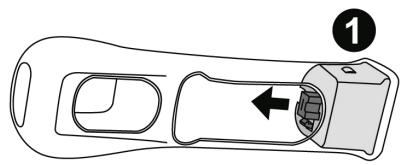
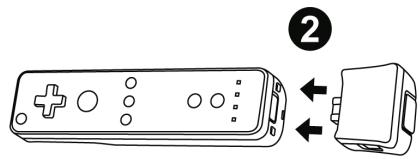
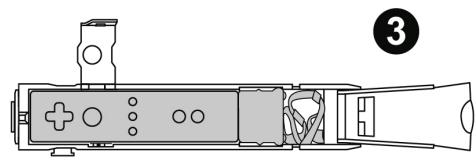
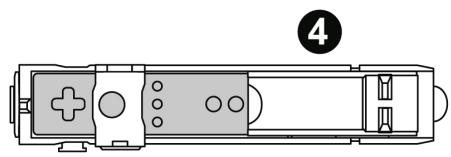
WII MOTIONPLUS™ - TIPS
| ENG | 1) Separate the Wii MotionPlus™ from its silicone protection. |
| 2) Connect the Wii MotionPlus™ to the rear end of your Wii Remote™. | |
| 3) Insert the Wii MotionPlus™ + Wii Remote™ assembly in the Dual Trigger Gun+ Nw compartment. | |
| 4) Close the 2 access hatches - You are now ready to play! | |
| FRA | 1) Retirez le Wii MotionPlus™ de sa protection silicone |
| 2) Branchez le à l'arrête de la Wiimote™ | |
| 3) Insérez l'ensemble dans le compartment du « Dual Trigger Gun+ Nw » | |
| 4) Refermez les 2 trappes d'accès - Vous étés maintainant prét à jour! | |
| DEU | 1) Entfermen Sie den Silikonschutz von der Wii MotionPlus™. |
| 2) Verbinden Sie die Wii MotionPlus™ mit dem hinteren Ende ihrer Wimie Remote™. | |
| 3) Legen Sie die Wii MotionPlus™ + Wimie Remote™ in das Dual Trigger Gun+ Nw Fach ein. | |
| 4) Schließen Sie die 2 Zugangsklappen - Sie sind nun spielbereit! | |
| NED | 1) Haal de siliconen protector van de Wii MotionPlus™ af. |
| 2) Kluk de Wii MotionPlus™ op dechyzerijde van de Wimie afstandsbediening. | |
| 3) Plaats de combi van Wimie MotionPlus™ + Wimie Remote™ nlll apposito vano della Dual Trigger Gun+ Nw. | |
| 4) Sluit de 2 beugels en het apparaat is klaar voor gebruik! | |
| ITA | 1) Separa il Wimie MotionPlus™ alla relativa protezione in silicone. |
| 2) Collega il Wimie MotionPlus™ alla parte posteriore del tuo Wimie Remote™. | |
| 3) Inserisci l'insieme Wimie MotionPlus™ + Wimie Remote™ nell'apposito vano della Dual Trigger Gun+. | |
| 4) Chiudi i 2 sportelli di accesso - Ora sei primo per gliacare! | |
| ESP | 1) Separa el Wimie MotionPlus™ de su proteccion de siliconea. |
| 2) Conecta el Wimie MotionPlus™ a la parte trasera del mando de Wimie™. | |
| 3) Inserta el Conjunto Wimie MotionPlus™ + mando de Wimie™ en el compartmentimento de la Dual Trigger Gun+ Nw. | |
| 4) Cierra las dos tapas de accesso: yá está preparado para jugar! | |
| POR | 1) Retire o Wimie MotionPlus™ da responsiva proteccion de silicone. |
| 2) Ligue o Wimie MotionPlus™ à base do Wimie Remote™. | |
| 3) Insira o conjunto Wimie MotionPlus™ + Wimie Remote™ no compartmentamento do Dual Trigger Gun+ Nw. | |
| 4) Feche as dues tampas de accesso - Está primo para começar a jogar! | |
| RUS | 1) BvInbTe Wimie MotionPlus™ И симлковогою постктора. |
| 2) PodknoчITE Wimie MotionPlus™ к задени有很大почткюнглорра Wimie Remote™. | |
| 3) Podmectrite KOMIIKET, coctoTsiuMnИ Wimie MotionPlus™ И Wimie Remote™, в оtmelенце пистоleta Dual Trigger Gun+ Nw. | |
| 4) Зakротe 2 Кршк дocstуla - Терь можно нашинаху!у! |