
DH-315 D - Dehumidifier FAGOR - Free user manual and instructions
Find the device manual for free DH-315 D FAGOR in PDF.



| Brand | FAGOR |
| Model | DH-315 D |
| Product type | Dehumidifier |
| Power supply | 220-240 V ~ 50 Hz |
| Power | 380 W |
| Maximum coverage area | 110 m² |
| Tank capacity | 5,6 L |
| Operating temperature range | 5 °C to 32 °C |
| Operating modes | Dehumidification, Ventilation |
| Fan speeds | High speed, Low speed |
| Automatic defrost | Yes (between 5 °C and 12 °C) |
| Full tank indicator | Red LED indicator + audible alarm |
| 3-minute protection | Yes (delayed restart after power cut) |
| Air outlets | Upper and rear (adjustable) |
| Water drainage | Removable tank or connection for flexible hose (1 inch diameter) |
| Air filter | Washable with warm water (max 40 °C) |
| Filter cleaning | Every week |
| Display | LCD screen: temperature or humidity |
| Safety instructions | Do not use near water, do not block air inlets/outlets, keep upright |
| Repairability | Only entrust to an approved Technical Support Service |
| Recyclable packaging materials | Yes |
Frequently Asked Questions - DH-315 D FAGOR
User questions about DH-315 D FAGOR
0 question about this device. Answer the ones you know or ask your own.
Ask a new question about this device
Download the instructions for your Dehumidifier in PDF format for free! Find your manual DH-315 D - FAGOR and take your electronic device back in hand. On this page are published all the documents necessary for the use of your device. DH-315 D by FAGOR.
USER MANUAL DH-315 D FAGOR
The manufacturer reserves the right to modify the models described in this User's Manual.
Pon3BODHTeNbOCTaBnEET3aCobOn npaBO 3aMeHb MoJeN, OINcAHbIe B DaHHOM PyKOBoDCTBe Nol3BaTeJIa.
N.I.F. F-20.020.517 - B°. San Andrés, n° 18 • Apartado 49 - 20500 MONDRAGON (Guipuzcoa) ESPANA
Octubre 2004
FAGOR

DESHUMIDIFICADOR / DESUMIDIFICADOR / DEHUMIDIFIER /
DÉSHUMIDIFICATEUR / LUFTENTFEUCHTER / DEUMIDIFICATORE /
AΦYΓPANTHPAΣ / PÁRAMENTESÍTÖ / ODVLHČOVAC
/ODWILZACZPOWIETRZA /ABCOPEATOP/OCYUINTEJBBO3DUXA
MOD.:
DH-315 D
N.I.F. F-20.020.517 - B°. San Andrés, n° 18 • Apartado 49 - 20500 MONDRAGON (Guiúzcoa) ESPANA

FAGOR

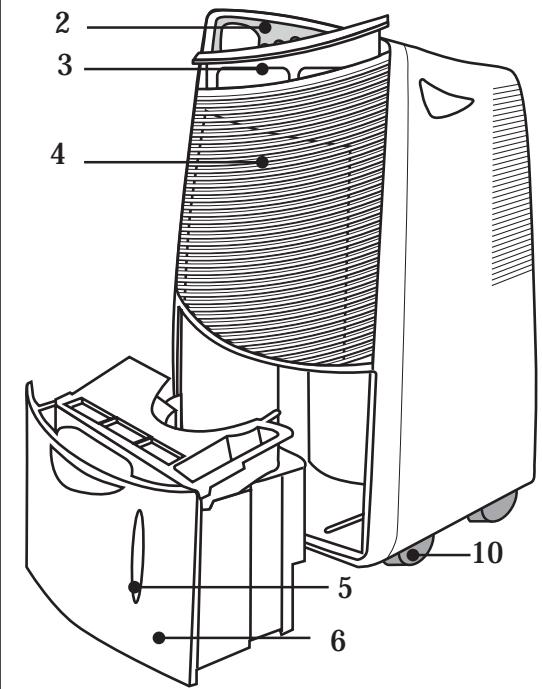
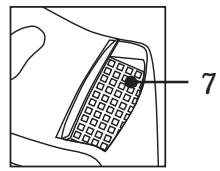
Fig. 1
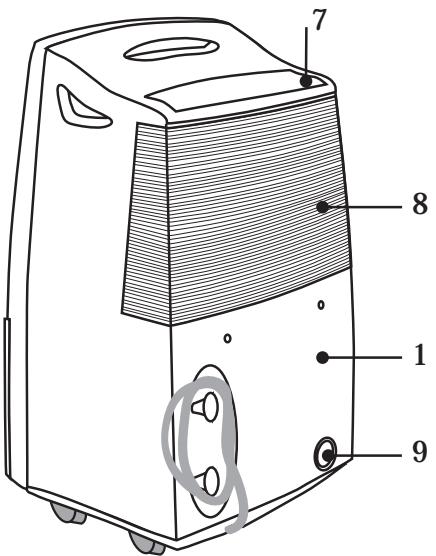
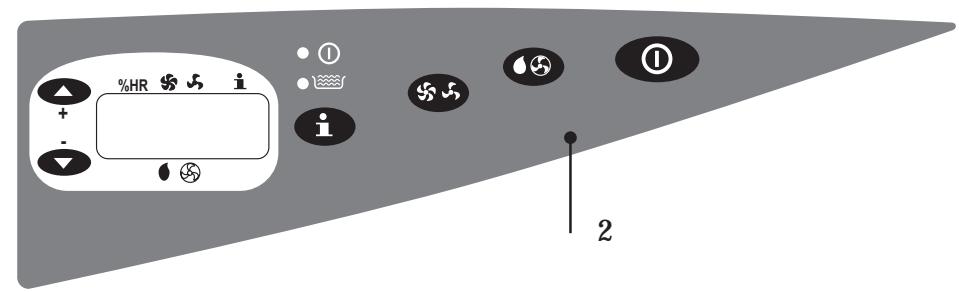
Fig. 2
| Voltage / Frequency | 220V-240V~50Hz |
| Power | 380W |
| Suitable for rooms up to | 110m² |
| Tank capacity | 5,6 L |
| Operating temperatures | 5°C ÷32°C |
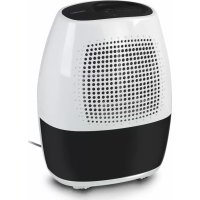
2.DESCRIPTION OF THE APPLIANCE
- Rear casing
- Control panel
- Air filter
- Air inlet
- Water level indicator
- Water tank
- Top air outlet
- Bottom air outlet
- Drainage connector
- Wheels
Interference suppression: this appliance has been interference-suppressed in accordance with the interference-suppression directives.
Electromagnetic compatibility: this appliance has been suppressed in accordance with the EMC (electromagnetic compatibility) directives.
3. SAFETY WARNINGS
- Before using this appliance for the first time, carefully read this instruction manual and keep it in a safe place for future use. This will help you get the best use out of the appliance and ensure maximum safety.
- On removing packaging, check that the appliance is in perfect condition. If in doubt, contact your nearest Technical Service Centre.
- Packaging items (plastic bags, polystyrene foam, etc.) must be kept out
of the reach of children, as they could be dangerous.
- Before using the appliance check that the mains voltage supply in your home is the same as that indicated on the appliance's specifications plate.
- The electrical safety of this appliance is only guaranteed if it is connected to an efficient earth installation in accordance with the current electrical safety standards. The manufacturer cannot accept any liability for damage or injury caused by an installation that is not properly earthed. If in doubt, please contact a qualified electrician.
- If the mains socket is not compatible with the appliance plug, call a qualified electrician to replace the socket with a suitable type. If you are going to make a permanent connection, this must be done by a qualified electrician in accordance with the national standards for electrical safety.
- We do not recommend the use of adapters, plugs and/or extension leads. If it is absolutely necessary to use such elements, only use single or multiple adapters and extension leads complying with current safety standards, taking care not to exceed the power limit indicated on the adapter and/or extension lead.
- This appliance is only for domestic use. Any other use is considered unsuitable and therefore dangerous.
- In the event of a breakdown, switch the appliance off and do not try to fix it yourself. If the appliance is in need of repair, only contact an authorised Technical Service Centre and insist on the use of original spare parts. A failure to respect this advice may jeopardise the safety of the appliance.
- The user should not try and replace the power cord. If it should become damaged and need to be replaced, only contact an authorised Technical Service Centre. Do not use the appliance with a damaged power cord or plug.
- The manufacturer is not liable for any damage or injury arising from incorrect, unsuitable or irresponsible use or from repairs carried out by non-qualified people.
When using electrical appliances, a series of basic rules of safety must be followed.
PARTICULARLY:
- Warning: This appliance must not be used close to bathtubs, showers or sinks.
- Do not install the appliance close to heat sources, or in places in which the air may contain gases, oil or sulphur, or areas exposed to sunlight.
- Do not handle the appliance with wet hands.
- The alteration or modification of the functional characteristics of the appliance may lead to possible danger.
- Unplug the appliance when not in use and before carrying out any maintenance or cleaning work.
- When unplugging the appliance, never pull on the power cord.
- Never poke objects through the air outlet, as this could be dangerous with the fan operating at high speed. It is best to turn the air outlet so that air is directed to the room as whole.
Warning: This appliance must always be kept in the vertical position. When moving the appliance, always keep it in the vertical position. Before moving it, empty the tank. After moving it, wait at least one hour before switching it on.
- Place the dehumidifier on a flat, hard, even surface. This appliance requires a support surface with a slope of less than 50^ ; otherwise noise and vibration may increase considerably and the water tank may cause splashes.
- Whenever you start up the appliance, remove the air grille. When you switch off the appliance, replace the grille to prevent objects from getting inside.
- To guarantee correct operation, keep at least 50~cm of free space around the appliance. Do not obstruct the air inlet or outlet.
-
Close the doors and windows in the room where you are going to use the appliance.
-
Clean the filter once a week. Do not expose the filter to direct sunlight.
- Before moving the appliance from one place to another, empty the water tank.
- Do not place any objects in the tank, and do not fill it with any liquid.
- This appliance must always remain in the vertical position. Never lay it down, not even for storage or transportation.
- The temperature limits in the room where the appliance is to be used are between 5^ and 32^ . The appliance will stop dehumidifying if the temperature is outside these limits.
- The appliance has an automatic defrosting system that will come into operation at intervals, when the room temperature is between 5^ - 12^ . When this system is operating, the compressor stops dehumidifying. The fan continues to operate during this operation. The compressor will start operating again once defrosting has been completed.
5. FUNCTION INSTRUCTIONS
1. Operating modes
DEHUMIDIFIER OR VENTILATION
2. Three-minute protection device
If the appliance stops operating due to a lack of current, etc. the compressor will start up again after three minutes as a protective measure. Wait three minutes before switching it on again.
3. Water-tank-full indicator
If the water tank is full, the red light will come on and the alarm will sound.
4. Air filter
To remove the air filter, pull up on the handle.
5. Automatic defrosting
If room temperature is less than 12^ ice may build up in the evaporator. The appliance will defrost automatically after a certain period of time in operation.
6. Flexible drain hose
Condensation water can be drained out, using the flexible hose that can be connected to the rear of the appliance.
7.FAN
The fan has two speeds.
At high speed, the dehumidifying effect is better.
At low speed, the dehumidifying effect is not as good, but it is quieter.
8. Multidirectional air flow
The air outlet can be directed upwards or backwards.
6. OPERATING INSTRUCTIONS
OPERATING PANEL (Fig. 2)
Buttons

"STOP/START" button. Press it to switch the appliance on or off.

"MODE" button. Press it to select "VENTILATION" or "DEHUMIDIFIER" mode.

"FAN" button. Press it to select "HIGH VENTILATION SPEED" or "LOW VENTILATION SPEED".

"DISPLAY" button. Press it to display the "TEMPERATURE or HUMIDITY" on the liquid crystal display.
Indicators

Green ON light
When you press to switch the appliance on, the green light comes on. It will go off when you switch the appliance off. NOTE: The appliance will not automatically switch back on, even when the power is restored, after a power cut. Press the button again to switch it back on.

RED water-tank-full light
If the water tank is full or not properly in place, the red light will flash and the alarm will sound, until the tank has been emptied or has been put properly back into place. Note: In VENTILATION mode, the red light will flash, if the water tank is full or is not properly in place.
However, this will not affect the
VENTILATION functions.
Display screen
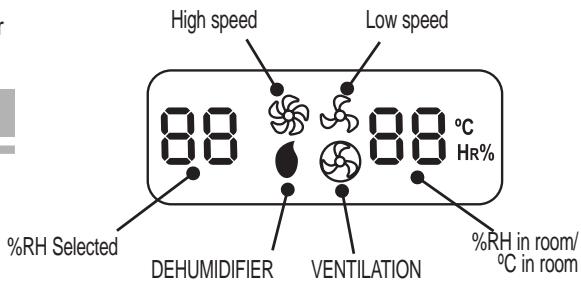
Instructions:
- When you press the symbols and

, button, the will appear crystal display;
- When you press the VENTILATION button, the symbols and will appear alternately on the liquid crystal display;
- When you press the display button i the humidity and temperature will appear alternately on the liquid crystal display.
7. HOW TO USE THE APPLIANCE
A. Basic requirements:
Normal temperature range: the ambient temperature range is: 5^ - 32^ Input voltage: 220V -240V 50Hz Position: place it on a horizontal surface (slope of less than 5^ )
B. How it operates
1. How the DEHUMIDIFIER operates
Press the ① button. The unit will start to operate in the mode pre-established by the manufacturer and the symbol "b0 88" will appear on the liquid crystal display. In this case, the humidity is 60% RH . If you want to change this configuration, follow the instructions given below:
Adjusting the humidity
The humidity can be adjusted in DEHUMIDIFIER mode. Each time you press the , button you increase the humidity value by 5 % RH up to 80 % RH.
Each time you press the button, you decrease the humidity value by 5% RH , down to 30% RH . If you press the button again, the —, symbol will appear, which indicates "continuous" operation. In this case, the compressor will continue to operate, without affecting the humidity level, until the tank is filled.
NOTE: If the preset humidity level is higher than the ambient humidity, the compressor will stop and the fan will continue to operate.
Press the ① button, the unit will stop working. Next time you switch the appliance on, it will operate with the level of humidity set the time before.
2. How VENTILATION operates
Press the ① button to switch the appliance on and the ② button to select VENTILATION mode; the ③ symbol will appear on the liquid crystal display. In this mode, the air inside the room is ventilated and purified without changing the humidity.
3. Adjusting the air flow
Press the button to select the fan speed.
High fan speed, at which the unit dehumidifies rapidly;
Low fan speed, at which dehumidification is carried out slowly, but more quietly.
4. Display unit 1
This unit is fitted with a display. At first the ambient relative humidity appears on the screen. If you want to find out the temperature in the room, press the button and the 0^ will appear for 5 seconds. After which the original display will return.
5. Adjusting the air flow outlet
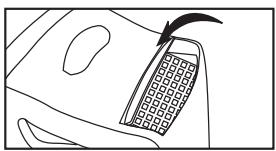
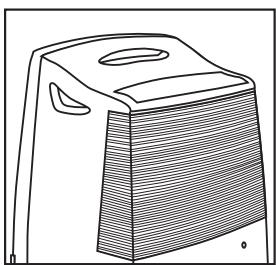
This unit has two air flow outlets: upwards, adjusting the grille at the back, and backwards. The appliance comes with the grille closed and you have to open it each time you switch on the appliance.
NOTE: Close the ventilation grille after use to prevent any objects from getting inside the unit.
8. DISPOSING OF CONDENSATION WATER
Condensation water can be disposed of in two ways:
A. Removable water tank
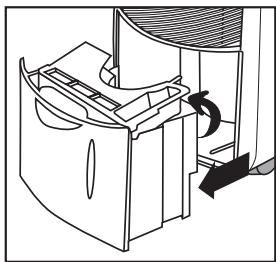
The condensation water is collected directly in the tank. When it is full, an indicator light will light up on the control panel, the alarm will sound and the appliance will automatically switch off. This tank is easy to remove for emptying. Once empty, make sure that you put it properly back into place so that the indicator light goes off, otherwise the appliance will not work. When the light comes on and the compressor stops, wait a few minutes before removing the tank from its
housing, to prevent any residual condensation water from dripping inside the appliance.
Once the tank has been properly replaced in its housing, the appliance will take about 3 minutes to start.
B. Removal outside
The condensation water can be drained out through a hose connected to the back of the appliance:
- Remove the water tank.
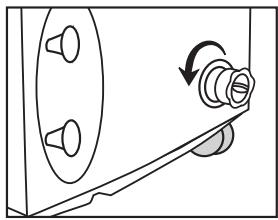
- Unscrew the connector located on the back of the appliance; connect the hose in its place and run it to a drain.
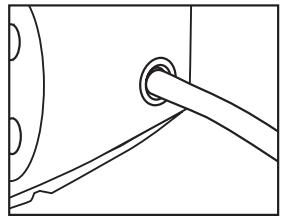
- Fit the connector to the pipe located inside the appliance, just above the tank.
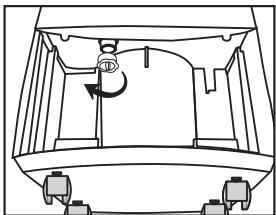
- Fit the water tank back into the appliance.
- Connect a flexible hose with an interior diameter of 1 inch to the rear drainage port.
Note: Make sure that you put the water take properly back into place, otherwise, the appliance will not work.
9. MAINTENANCE AND CLEANING
Unplug the appliance before carrying o any cleaning or maintenance work.
Do not clean the appliance under a tap or with a hose. Clean the outside with a damp cloth and then dry it with a dry one.
Do not use petrol, alcohol or solvents to clean it.
Do not spray insecticides or similar on the appliance.
Cleaning the filter
You should clean the filter once a week. To remove the filter, pull up on it. Use a vacuum cleaner to remove any dust that has built up. If it is very dirty, you can wash it in warm water, making sure that the water temperature is not higher than 40^ .
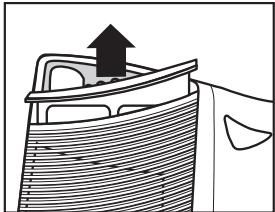
Do not use alcohol, petrol, benzene, etc., to clean the filter. Do not expose the filter to sunlight to dry it.
Make sure that it is completely dry before putting it back into place.
Storage method
If you are not going to use the appliance for a long period of time, proceed as follows to extend its useful life:
- Unplug the appliance.
- Empty the condensation water tank.
- Clean the air filter and put it back into its housing.
- Keep the appliance in its operating position, do not lay it down. Protect it from dust with a sheet of plastic.
10. TROUBLESHOOTING GUIDE
Below we suggest some possible causes of problems that you should check before calling for service. If after checking these suggestions, the appliance still does not work, please contact your nearest
authorised service centre.
Do not tamper with the appliance. Do not try and change or repair any electrical components.
If you call for service in any of the cases detailed below, you will be charged for any expenses incurred, even during the warranty period.
Does not work
Is the plug loose?
- Has the fuse blown?
Is the water tank properly in place or is it full of water?
Low dehumidification capacity
Is the air filter dirty?
Is the room temperature too low?
Is the air inlet or outlet blocked?
- Has the temperature been set properly?
Does not reach the preset humidity level after a long period of operation
- Has the door or window been opened too much?
Is there an appliance in operation that generates humidity?
Is the room too big?
Makes too much noise during operation
Is the floor uneven or too soft?
- Has the appliance been put properly in place?
The compressor stops working in dry mode and the on light is flashing
Is the fan motor working? If the motor is still working, the appliance is in defrost mode.
The alarm does not sound when the water tank is full or sounds when it is still not full.
Is there any water or an object on the tank's floating plate stopping it from rotating?
- Has the water tank been fitted properly?
11. WASTE ELIMINATION

The materials used in the packaging, product and accessories can be recycled. Correct separation of waste materials will allow recyclable
materials to be re-used.
When the appliance is no longer useful, you should cut its cord to put it out of action and dispose of it using a suitable waste elimination procedure. For further information on this matter, consult your local authorities.
FR
1. SPECIFICATIONS TECHNIQUES
- 2.DESCRIPTION OF THE APPLIANCE
- SAFETY WARNINGS
- When using electrical appliances, a series of basic rules of safety must be followed.
- PARTICULARLY:
- FUNCTION INSTRUCTIONS
- Operating modes
- Three-minute protection device
- Water-tank-full indicator
- Air filter
- Automatic defrosting
- Flexible drain hose
- 7.FAN
- Multidirectional air flow
- OPERATING INSTRUCTIONS
- OPERATING PANEL (Fig. 2)
- Buttons
- Indicators
- Green ON light
- RED water-tank-full light
- However, this will not affect the
- VENTILATION functions.
- Display screen
- Instructions:
- HOW TO USE THE APPLIANCE
- Basic requirements:
- How it operates
- How the DEHUMIDIFIER operates
- Adjusting the humidity
- How VENTILATION operates
- Adjusting the air flow
- Display unit 1
- Adjusting the air flow outlet
- DISPOSING OF CONDENSATION WATER
- Removal outside
- MAINTENANCE AND CLEANING
- Cleaning the filter
- Storage method
- TROUBLESHOOTING GUIDE
- Does not work
- Low dehumidification capacity
- Does not reach the preset humidity level after a long period of operation
- Makes too much noise during operation
- The compressor stops working in dry mode and the on light is flashing
- The alarm does not sound when the water tank is full or sounds when it is still not full.
- WASTE ELIMINATION
- FR
- SPECIFICATIONS TECHNIQUES
Brand : FAGOR
Model : DH-315 D
Category : Dehumidifier