
CD32GB - Cd player/recorder BIGBEN INTERACTIVE - Free user manual and instructions
Find the device manual for free CD32GB BIGBEN INTERACTIVE in PDF.


| Product type | CD player/recorder |
| Brand | Bigben Interactive |
| Model | CD32GB |
| Dimensions (W x H x D) | 430 x 100 x 300 mm |
| Weight | 3.5 kg |
| Power supply | AC 230V, 50 Hz |
| Power consumption | 15 W |
| Main functions | Playback and recording of audio CDs, track programming, random play, repeat |
| Supported formats | Audio CD, CD-R, CD-RW |
| Audio input | 3.5 mm jack (line-in) |
| Audio output | 3.5 mm jack (headphone), RCA jacks (line-out) |
| Display | Backlit LCD display |
| Remote control | Included |
| Included accessories | RCA audio cable, power adapter |
| Maintenance and cleaning | Clean with a soft, dry cloth. Do not use liquid or abrasive products. |
| Safety | Read the instructions carefully before use. Do not expose to humidity or extreme temperatures. |
| Spare parts and repairability | Repairability index: 6.5/10. Available parts: laser unit, motor, motherboard. |
| Warranty | 2 years |
| General information | Device complies with CE standards. Made in China. |
Frequently Asked Questions - CD32GB BIGBEN INTERACTIVE
User questions about CD32GB BIGBEN INTERACTIVE
0 question about this device. Answer the ones you know or ask your own.
Ask a new question about this device
Download the instructions for your Cd player/recorder in PDF format for free! Find your manual CD32GB - BIGBEN INTERACTIVE and take your electronic device back in hand. On this page are published all the documents necessary for the use of your device. CD32GB by BIGBEN INTERACTIVE.
USER MANUAL CD32GB BIGBEN INTERACTIVE
MANUEL D'INSTRUCTIONS
INDICATEUR STEREO FM
MODE REPETITION (repeat 1)
Read this instruction and safety manual carefully before use. Keep this manual in a safe place for further reference.
WARNINGS
To reduce the risk of fire or electric shock, do not expose this EXPLANATION OF GRAPHIC SYMOBOLS. product to rain or moisture
| HARZARD WARNING | The lightning symbol inside an equilateral triangle warns the user of the presence inside the product of uninsulated hazardous electric voltages powerful enough to represent an electrocution risk. | |
| RISK OF ELECTRIC SHOCK DO NOT OPEN | ||
| CAUTION: TO MINIMISE THE RISK OF ELECTRIC SHOCK, NEVER REMOVE THE COVER. THIS PRODUCT CONTAINS NO USER-SERVICEABLE PARTS. ONLY QUALIFIED REPAIR TECHNICIANS SHOULD WORK ON THIS EQUIPMENTS. | The exclamation mark symbol inside an equilateral triangle warns the user that important operating and servicing (troubleshooting) instructions are contained in the documentation accompanying the product. | |
CD32
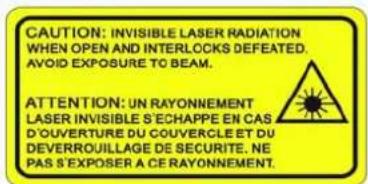
HAZARD WARNING: TO REDUCE THE RISK OF FIRE OR ELECTRIC SHOCK, DO NOT EXPOSE THIS PRODUCT TO RAIN OR MOISTURE. CLASS 1 LASER PRODUCT

CAUTIONS INVISIBLE LASER RAD WHEN OPEN AND INTER DEFEATED. AVOID EXP TO BEAM.
This product contains a low-power emitter.
PRECAUTIONS FOR USE
To ensure safe use of this product, please follow the Condensation advice below:
advice below.
Positioning
● Water droplets or condensation may from inside it is moved into a very warm, humid atmosphere.
- Do not use the product in extremely hot, cold, dusty or damp condition.
- Condensation can cause the product to malfunction.
- Place the product on a smooth, flat surface.
- Leave the set in a warm room for 1 to 2 hours to allow the condensation to evaporate.
Place it on a well-ventilated position; do not cover in the event of a problem, unplug the power cord and with fabric or stand on a rug or carpet. contact a qualified repair technician.
Power supply Before using this product, check that its rated voltage matches your mains power supply voltage. Ventilation precautions Never obstruct the product's ventilation holes.
Safety instructions Warning concerning liquids • Do not allow liquids to splash or spill onto the product
- Never pull on the power cord when plugging in or unplugging the product: always use the plug pulling the product. Do not allow liquids to spread or spin onto the product, and never stand a liquid-filled container (vase, jar, etc.) on the top of it.
cord could damage it and create a risk of electric shock. Warning concerning excessive sound levels
- Unplug the product from the mains socket if you do not intend to use it for an extended period. - Owing to this product's extremely low noise output and extended dynamic range, the user may be tempted to turn up the volume louder than necessary.
- The On/Off button does not isolate the product from the power supply. To disconnect the product from the mains power supply, you must unplug the power cord. - The sound output may be excessively high, to the point of damaging the product's headphones, or
This product should only be used in a horizontal
- This product should only be used in a horizontal position.
The Ground Truth image displays a single, solid horizontal line. According to Rule 2 (UNDERSCORE & LINE RULES), this is a stylistic or background line, not a placeholder underscore. Therefore, the OCR result must ignore it and output nothing or only meaningful text.
(no text)
For your convenience, record the model number and serial number for future reference.
Serial number :

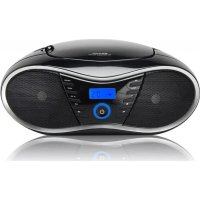
PORTABLE CD BOOMBOX WITH
ANALOGUE AM/FM RADIO

INSTRUCTION MANUAL
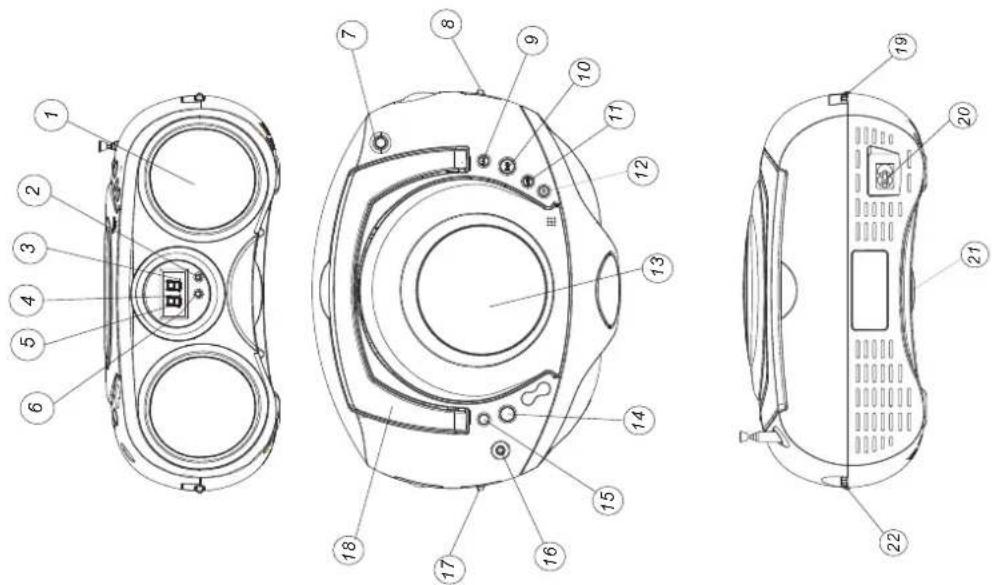
FUNCTIONS AND CONTROLS
Front panel
Top panel
Rear panel
FRONT AND TOP PANEL
- SPEAKER
PROGRAM INDICATOR
(2) 1. 2. 3. 4. 5. 6. 7. 8. 9. 10. 11. 12. 13. 14. 15. 16. 17. 18. 19. 20. 21. 22. 23. 24. 25. 26. 27. 28. 29. 30. 31. 32. 33. 34. 35. 36. 37. 38. 39. 40. 41. 42. 43. 44. 45. 46. 47. 48. 49. 50. 51. 52. 53. 54. 55. 56. 57. 58. 59. 60. 61. 62. 63. 64. 65. 66. 67. 68. 69. 70. 71. 72. 73. 74. 75. 76. 77. 78. 79. 80. 81. 82. 83. 84. 85. 86. 87. 88. 89. 90. 91. 92. 93. 94. 95. 96. 97. 98. 99.
PLAY/PAUSE INDICATOR - Flash continuously - PAUSE indicator. - Light - PLAY indicator.
- DISPLAY
· display of CD functions.
FM STEREO INDICATOR - display of FM stereo indications.
TEL 5002616 AUTENIX
- TELESCOPIC ANTENNA - improvement of FM reception.
BAND SELECTOR (AM·FM·FM ST.) - frequency band selection: AM, FM or FM ST.
-
NEXT CD: next tracks.
-
PLAY/PAUSE CD: start or pauses CD playback.
-
BACK
CD: return to the previous track.
- STOP
CD: stops CD playback or delete a program.
- CD DOOR
- CD compartment door open/close mark (OPEN/CLOSE).
- PROGRAM
programming and control of programmed track number.
- REPEAT
CD: repeat a track/CD/program.
-
STEREO HEADPHONE JACK - connect for the 3.5mm stereo head
-
FUNCTION SELECTOR
- source selection CD or RADIO and power off.
REAR PANEL
[Non-Text]
[Non-Text]
[Non-Text]
[Non-Text]
[Non-Text]
[Non-Text]
[Non-Text]
[Non-Text]
[Non-Text]
[Non-Text]
[Non-Text]
[Non-Text]
[Non-Text]
[Non-Text]
[Non-Text]
[Non-Text]
[Non-Text]
[Non-Text]
[Non-Text]
[Non-Text]
[Non-Text]
[Non-Text]
[Non-Text]
[Non-Text]
[Non-Text]
[Non-Text]
[Non-Text]
[Non-Text]
[Non-Text]
[Non-Text]
[Non-Text]
[Non-Text]
[Non-Text]
[Non-Text]
[Non-Text]
AC POWER SUPPLY - power supply cord connection
VOLUME CONTROL
- sound level control.
20.
(1) 本说明仅供参考。
24
21.
[Non-Text]
22.
REPEAT 1/ALL INDICATOR
●Flash continuously - REPEAT 1 indicator.
○Light - REPEAT ALL indicator.
- Flash continuously - PAUSE indicator.
- Light - PLAY indicator.
- REPEAT 1/ALL INDICATOR
- Flash continuously - REPEAT 1 indicator.
- Light - REPEAT ALL indicator.
Top panel
[Non-Text]
[Non-Text]
[Non-Text]
[Non-Text]
Rear panel
The Ground Truth image displays a single, solid horizontal line. According to Rule 2 (UNDERSCORE & LINE RULES), this is a stylistic or background line, not a placeholder underscore. Therefore, the OCR result must ignore it and output nothing or only meaningful text. The provided OCR content is "____", which consists of four underscores. This is an incorrect interpretation of the line as a placeholder, violating the rule that stylistic lines must be ignored. The OCR has hallucinated underscores where none should exist based on the GT's visual context. Hence, the OCR result is inconsistent with the Ground Truth.
GENERAL OPERATION
If you would like, the electrical power supply can be used to save the batteries. Make sure that the unit is unplugged from the wall outlet before inserting the batteries.
USING THE DC POWER SUPPLY
Open the battery compartment and insert 8 R14 batteries with respect to the "+" and "-" polarity indications in the compartment.
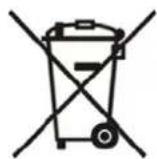
Important: When replacing the batteries, make sure you dispose of the old batteries in accordance with applicable regulations. They should be disposed of in a location specifically designated for that purpose so they can be recycled safely and without posing any risk for the environment. Do not burn or bury them. Incorrect use of the batteries may result in electrolyte leakage having a corrosive effect in the compartment.
- Do not mix different types of batteries: do not use alkaline batteries with saline batteries, for example. only use batteries of the type recommended by the manufacturer. - Do not mix old and new batteries when inserting new ones.
- If the unit is not to be used for an extended period of time, remove the batteries from the unit. - Batteries shall not be exposed to excessive heat such as sunshine, fire or the like.
- Warning: excessive sound pressure from earphones and headphones can cause hearing loss.
USING THE AC POWER SUPPLY
- Make sure that the voltage indicated on the manufacturer's nameplate in the battery compartment corresponds to the voltage supplied by your electrical installation. If this is not the case, consult your dealer or service center.
- Connect the electrical power cable the unit then plug it into the wall outlet. The wall outlet must be located near the product and be easily accessible.
- To turn power to the apparatus off, unplug the power supply cable from the wall outlet.
- To protect the unit during violent thunderstorms, unplug the power supply cable from the wall outlet.
RADIO
To listen to the FM radio, extend the telescopic antenna and orient it for optimum reception. Reduce the length of the antenna if the signal is too strong (if you are very near the transmitter, for example).
As the unit is equipped with a built-in antenna, the telescopic antenna does not have to be used to listen to AM stations. Move the entire unit to orient the built-in antenna.
PARS RECEPTION
RADIO RECEPTION 1 Set the FUNCTION
1. Set the FUNCTION SELECTOR to RADIO. 2. Position the FREQUENCY BAND SELECT
- Turn the TUNING CONTROL to search for the desired station.
NOTE: The FM stereo indicator comes on if the FREQUENCY BAND SELECTOR is set on FM stereo and you have tuned the radio to an FM stereo station.
- Adjust VOLUME CONTROL for the desired volume level.
- When you have finished listening to the radio, position the FUNCTION SELECTOR to OFF to turn the unit off.
2. 用干粉、干粉、干粉、干粉、干粉、干粉、干粉、干粉、干粉、干粉、干粉、干粉、干粉、干粉、干粉、干粉、干粉、干粉、干粉、干粉、干粉、干粉、干粉、干粉、干粉、干粉、干粉、干粉、干粉、干粉、干粉、干粉、干粉、干粉、
STEREO HEADPHONE JACK Plug stereo headphones (not included), equipped with a 3.5mm mini-plug, into the PHONES jack (on top of the unit, left-hand side) for private listening, without disturbing those around you.
Balance with HOLDINGS (as of 12/06/2023)
Reduce the VOLUME to a low level before putting on the headphones. You can then adjust the VOLUME progressively to a comfortable level.
[Non-Text]
-
Connect the electrical power cable the unit then plug it into the wall outlet. The wall outlet must be located near the product and be easily accessible.
-
To turn power to the apparatus off, unplug the power supply cable from the wall outlet.
- To protect the unit during violent thunderstorms, unplug the power supply cable from
POWER SUPPLY
CD PLAYER OPERATION
CD PLAYBACK
The CD player supports audio discs, CD-R and CD-RW. Do not attempt to read CD-ROM, CDi, VCDs, DVDs
Note: Even if this portable radio-CD player is able to read CD-R and CD-RW discs, in addition to conventional compact discs, it is not possible to offer a 100% guarantee that all CD-R/RW discs can be read; playback depends on the quality and condition of the blank discs that you use, among other things. A playback failure does not necessarily indicate that the unit is malfunctioning.
- Position the FUNCTION SELECTOR on CD (the display unit briefly displays - - -).
-
To open the CD player door, raise it by the corner marked OPEN/CLOSE.
-
Insert a CD, CD-R or CD-RW disc, printed surface facing upwards and gently press the CD player door to close it.
-
Start playback by pressing PLAY/PAUSE.
-
Press PLAY/PAUSE to interrupt or resume playback.
- To stop CD playback, press STOP.
NOTE: CD playback stops automatically when:
the CD comparing the radio function i
SELECTING A DIFFERENT TRACK
During playback, press NEXT or BACK on the unit or remote control unit to select a track.
- Briefly press NEXT to pass to the next track or press NEXT several times until the desired track
- number appears in the display. Briefly press BACK to return to the start of the current track.
• Press BACK several times to find a previous track.
SEARCHING FOR A PASSAGE ON A TRACK
- Press and hold BACK or NEXT to read the track must forward mode at reduced volume.
- When you have found the desired passage, release the BACK or NEXT button(normal playback resumes automatically).
REPEAT
Repeat: playback of the current track continuously. Repeat all: playback of the entire CD continuously.
PROGRAMMING OF TRACK NUMBERS
Up to 20 tracks can be programmed in any order. If desired, a given track can be programmed more than once. 1. In STOP mode, press BACK or NEXT to select a track
- When the desired track number appears, press the PROG button once to record the track (the display
unit displays "prog", briefly followed by the track number selected).
-
Repeat steps 1 and 2 to select and program the desired tracks.
-
To start playback of your programmed tracks, press PLAY/PAUSE.
PROGRAM CHECK
in STOP mode, press the PROG. button. (the display unit displays the track numbers in the order programmed).
DELETING A PROGRAM
Perform the following operations to delete the memory: • Open the CD door:
Open the 6D door,
Select the RADIO source;
Press STOP once.
(1) 2023年1月1日
[Non-Text]

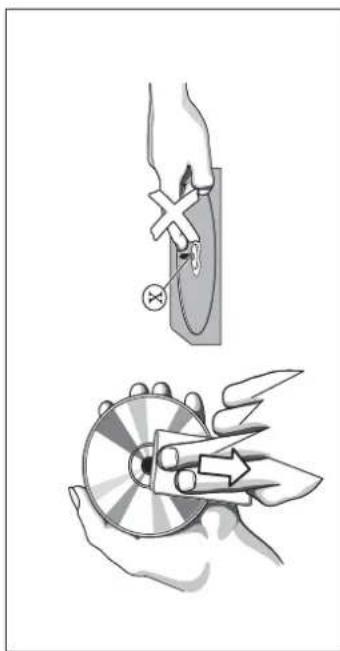
CLEANING CDs
- Use a soft and clean cloth to wipe away fingerprints or dust from the surface of the disc.
- Wipe in a straight motion from the center to the edge. Very small dust particles and slight smudges have absolutely no effect on the sound quality.
- Never use chemical products such as sprays for conventional (vinyl) records, anti-static aerosols, benzene or thinners to clean your CDs.
- To reduce the risk of scratches, always store CDs in their case when not used.
- Do not expose CDs to direct sunlight, high humidity or excessively high temperatures for long periods of time.
- Never write or affix labels to the CD's surfaces.
CLEANING THE LENS
If the lens is dirty, the sound may skip and the CD may not be read correctly. Open the CD door and clean the lens as follows:
- Unplug the power cord.
• Dust or dry particles:
Blow on the lens several times using a camera lens brush, then wipe it gently with the brush to remove the dust. Then blow again on the lens.
the dust. Then blew again on the ends.
If you are unable to clean the lens with the camera lens brush, use a dry cotton swab to clean the surface, from the center to the outside.
TROUBLESHOOTING
TROUB LESHOOTING
If a problem occurs, check the points below before taking the apparatus in for repair.
If you are unable to solve a problem using the indications provided below, contact your dealer or after-sales service center.
WARNING: Under no circumstances should you attempt to repair the apparatus yourself; doing so will void the guarantee.
Problem Solution
GENERAL Power supply
AUDIO SECTION Output power (RMS)





IMPORTED BY BIGBEN INTERACTIVE SA
ZI DES PORTES DU NORD
62820 LIBERCOURT - FRANCE
. DO 12V--- 6 x OM-2/N14 batteries (not included)
: 257(L) x 118(W) x 200(H) mm
(1) 2017年1月1日
: 8 Ohms
:ø 3.5mm
: ∅ 3.5mm
: AC 230V \~ 50Hz
The Ground Truth image displays a single, solid horizontal line. According to Rule 2 (UNDERSCORE & LINE RULES), this is a stylistic or background line, not a placeholder underscore. Therefore, the OCR result must ignore it and output nothing or only meaningful text. The provided OCR content is "____", which consists of four underscores. This is an incorrect interpretation of the line as a placeholder, violating the rule that stylistic lines must be ignored. The OCR has hallucinated placeholder underscores where none should exist in the GT. Hence, the OCR result is inconsistent with the Ground Truth.
. DO 12V--- 6 x OM-2/4 batteries (not included)
: 257(L) x 118(W) x 200(H) mm
: 1.48 kg
The Ground Truth image displays a single, solid horizontal line. According to Rule 2 (UNDERSCORE & LINE RULES), this is a stylistic or background line, not a placeholder underscore. Therefore, the OCR result must ignore it and output nothing or only meaningful text. The provided OCR content is "____", which consists of four underscores. This is an incorrect interpretation of the line as a placeholder, violating the rule that stylistic lines must be ignored. The OCR has hallucinated placeholder underscores where none should exist in the GT. Hence, the OCR result is inconsistent with the Ground Truth.
. DO 12V--- 6 x OM-2/4 batteries (not included)
: 257(L) x 118(W) x 200(H) mm
: 1.48 kg
(No text)
. DO 12V--- 6 x OM-2/4 batteries (not included)
: 257(L) x 118(W) x 200(H) mm
: 1.48 kg
(No text)
. DO 12V--- 6 x OM-2/4 batteries (not included)
: 257(L) x 118(W) x 200(H) mm
: 1.48 kg
The Ground Truth image displays a single, solid horizontal line. According to Rule 2 (UNDERSCORE & LINE RULES), this is a stylistic or background line, not a placeholder underscore. Therefore, the OCR result must ignore it and output nothing or only meaningful text. The provided OCR content is "____", which consists of four underscores. This is an incorrect interpretation of the line as a placeholder, violating the rule that stylistic lines must be ignored. The OCR has hallucinated placeholder underscores where none should exist in the GT. Hence, the OCR result is inconsistent with the Ground Truth.
. DO 12V--- 6 x OM-2/R14 batteries (not included)
: 257(L) x 118(W) x 200(H) mm
: 1.48 kg
The Ground Truth image displays a single, solid horizontal line. According to Rule 2 (UNDERSCORE & LINE RULES), this is a stylistic or background line, not a placeholder underscore. Therefore, the OCR result must ignore it and output nothing or only meaningful text. The provided OCR content is "____", which consists of four underscores. This is an incorrect interpretation of the line as a placeholder, violating the rule that stylistic lines must be ignored. The OCR has hallucinated placeholder underscores where none should exist in the GT. Hence, the OCR result is inconsistent with the Ground Truth.
. DO 12V--- 6 x OM-2/R14 batteries (not included)
: 257(L) x 118(W) x 200(H) mm
[Non-Text]
The Ground Truth image displays a single, solid horizontal line. According to Rule 2 (UNDERSCORE & LINE RULES), this is a stylistic or background line, not a placeholder underscore. Therefore, the OCR result must ignore it and output nothing or only meaningful text. The provided OCR content is "____", which consists of four underscores. This is an incorrect interpretation of the line as a placeholder, violating the rule that stylistic lines must be ignored. The OCR has hallucinated placeholder underscores where none should exist in the GT. Hence, the OCR result is inconsistent with the Ground Truth.
. DO 12V--- 6 x OM-2/R14 batteries (not included)
: 257(L) x 118(W) x 200(H) mm
[Non-Text]
• The electrical power cord is not plugged in • The CD is scratched or very dirty.
■ Check the power cord connections.
- The batteries are dead/not inserted correctly. - The laser lens is covered with condensation.
■ Check the installation and charge of the ■ Wait until condensation disappears from the lens.
THE DISPLAY UNIT DOES NOT FUNCTION The CD-R is blank or the disc is not finalized. CORRECTLY/THE BUTTONS DO NOT FUNCTION Use a finalized CD-R.
• Electrostatic discharge. THE CP IS NOT READ
- Turn the unit on and disconnect it. Plug it back in a few seconds later • The CD is scratched or very dirty.
■ Replace/clean CD. See Maintenance.
- The laser lens is covered with condensation. - Wait until condensation disappears from the lens.
THE CD SKIP TRACKS
• The CD is scratched or dirty.
■ Replace/clean CD. See Maintenance.
- A program sequence us activated. - Exit the programming mode(s).
Weight
Frequer
Frequency range
MUSIC SEATION
AUDIO SECTION
Output power (RMS)
(The technical characteristics are liable to change without notice)
[Non-Text]
Dimensions of unit
Weight
Frequer
AUDIO
AUDIO SECTION
Output power (RMS)
Speaker
Headpho
Headphone
bigben interactive
RADIO PORTÁTIL CD
CD32


- REPEAT 1
- REPEAT ALL
- LECTURA NORMAL
MANUALE D'ISTRUZIONI

FR94320992977

RICEZIONE FM / FM STEREO
- REPEAT 1
- REPEAT ALL
- LETTURA NORMALE
![graph LR A["*1."] --> B["REPEAT 1"] C["."] --> D["REPEAT ALL"] E["."] --> F["NORMAL PLAYBACK"] G["."] --> F](/content/2026/06/1295746/images/89d446f21bece55182afc79edb3164639ce5992ed94286d0f55d6c2d62a2e400.jpg)
SPECIFICATIONS
Alimentazione:
AC 230V/50Hz
MANUAL DE INSTRUÇÕES
RECEPÇÃO FM / FM STEREO
BEDIENUNGSANLEITUNG
GEBRUIKSAANWIJZING
ONTVANGST FM / FM STEREO
- REPEAT 1
- REPEAT ALL
- NORMAAL AFSPELEN
![graph LR A["REPEAT 1"] --> B["REPEAT ALL"] B --> C["NORMAL PLAYBACK"] C --> A](/content/2026/06/1295746/images/911e3e7fffcdc29ece7cc7939a03e4413c50fd55d0bbbb6da8e6e67d218aff58.jpg)




- MANUEL D'INSTRUCTIONS
- INDICATEUR STEREO FM
- MODE REPETITION (REPEAT 1)
- WARNINGS
- CD32
- CAUTIONS INVISIBLE LASER RAD WHEN OPEN AND INTER DEFEATED. AVOID EXP TO BEAM
- PRECAUTIONS FOR USE
- FUNCTIONS AND CONTROLS
- GENERAL OPERATION
- USING THE AC POWER SUPPLY
- RADIO RECEPTION 1 SET THE FUNCTION
- SET THE FUNCTION SELECTOR TO RADIO. 2. POSITION THE FREQUENCY BAND SELECT
- 用干粉、干粉、干粉、干粉、干粉、干粉、干粉、干粉、干粉、干粉、干粉、干粉、干粉、干粉、干粉、干粉、干粉、干粉、干粉、干粉、干粉、干粉、干粉、干粉、干粉、干粉、干粉、干粉、干粉、干粉、干粉、干粉、干粉、干粉、
- BALANCE WITH HOLDINGS (AS OF 12/06/2023)
- POWER SUPPLY
- CD PLAYER OPERATION
- CD PLAYBACK
- SELECTING A DIFFERENT TRACK
- PROGRAMMING OF TRACK NUMBERS
- DELETING A PROGRAM
- CLEANING CDS
- CLEANING THE LENS
- TROUBLESHOOTING
- TROUB LESHOOTING
- GENERAL POWER SUPPLY
- AUDIO SECTION OUTPUT POWER (RMS)
- IMPORTED BY BIGBEN INTERACTIVE SA
- BIGBEN INTERACTIVE
- RADIO PORTÁTIL CD
- RICEZIONE FM / FM STEREO
- SPECIFICATIONS
- RECEPÇÃO FM / FM STEREO
- BEDIENUNGSANLEITUNG
- GEBRUIKSAANWIJZING
- ONTVANGST FM / FM STEREO
Brand : BIGBEN INTERACTIVE
Model : CD32GB
Category : Cd player/recorder