
CD52CATS2 - Cd player/recorder BIGBEN INTERACTIVE - Free user manual and instructions
Find the device manual for free CD52CATS2 BIGBEN INTERACTIVE in PDF.


| Product type | CD player/recorder |
| Brand | Bigben Interactive |
| Model | CD52CATS2 |
| Dimensions (W x H x D) | 430 x 100 x 300 mm |
| Weight | 2.5 kg |
| Power supply | AC 230V, 50 Hz mains |
| Power consumption | 15 W |
| Main functions | Playback, recording on CD-R/RW, track programming, repeat, random play |
| Connectors | RCA audio output, headphone output (3.5 mm jack), RCA audio input |
| Display | LCD screen |
| Compatible formats | Audio CD, CD-R, CD-RW |
| Maintenance | Clean with a soft, dry cloth. Do not use solvents. |
| Lens cleaning | Use a lens cleaning disc (sold separately) |
| Safety | Do not open the casing, do not expose to moisture, unplug before cleaning |
| Spare parts | Remote control available as an option, laser lens not user-replaceable |
| Repairability | Entrust to a qualified professional |
| Warranty | 2 years |
| Included accessories | RCA audio cable, remote control, user manual |
| Operating temperature | 5°C to 35°C |
| Operating humidity | 20% to 80% |
Frequently Asked Questions - CD52CATS2 BIGBEN INTERACTIVE
User questions about CD52CATS2 BIGBEN INTERACTIVE
0 question about this device. Answer the ones you know or ask your own.
Ask a new question about this device
Download the instructions for your Cd player/recorder in PDF format for free! Find your manual CD52CATS2 - BIGBEN INTERACTIVE and take your electronic device back in hand. On this page are published all the documents necessary for the use of your device. CD52CATS2 by BIGBEN INTERACTIVE.
USER MANUAL CD52CATS2 BIGBEN INTERACTIVE
LECTEUR CD PORTABLE AVEC RADIO FM STÉRÉO -MANUEL D'UTILISATION-
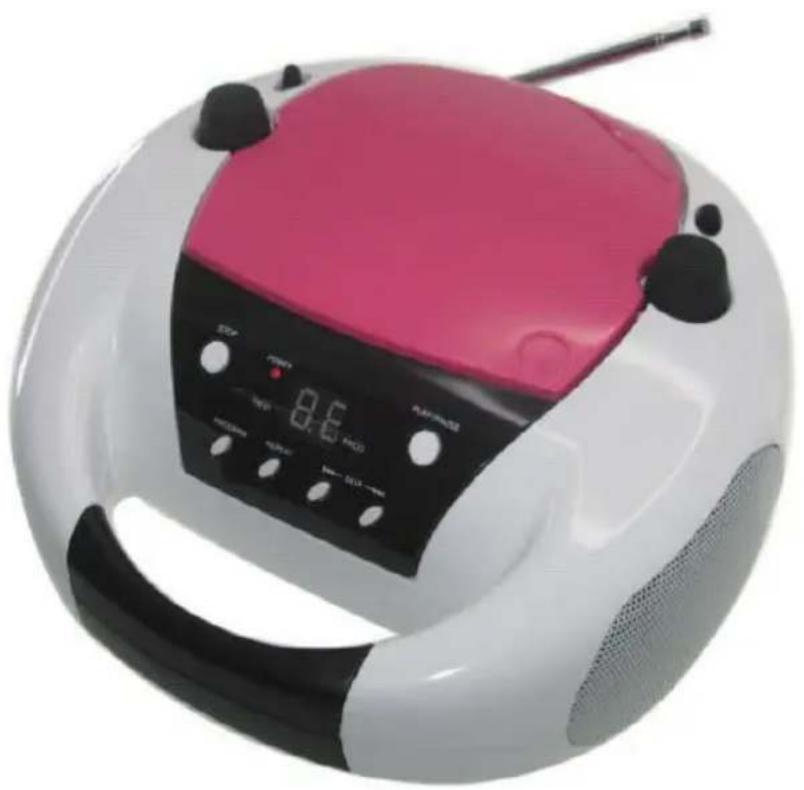
CD52
MODE D'EMPLOI
LISEZ COMPLÈTEMENT CE MANUEL D'UTILISATION AVANT D'UTILISER CET APPAREIL ET CONSERVEZ CE LIVRET POUR VOUS Y RÉFÉRER ULTÉRIEUREMENT.

ATTENTION RISQUE DE CHOC ÉLECTRIQUE NE PAS OUVRIR

ATTENTION : POUR RÉDUIRE LE RISQUE DE CHOC ÉLECTRIQUE, NE PAS RETIRER LE COUVERCLE (OU LA FACE ARRIÈRE). L'INTÉRIEUR DE L'APPAREIL NE CONTIENT AUCUNE PIÈCE RÉPARABLE PAR L'UTILISATEUR. CONFIER LES RÉPARATIONS À DU PERSONNEL D'ENTRETIEN QUALIFIÉ.

SOURCE D'ALIMENTATION
customerservice@bigben-interactive.be
SPAIN, sat@bigbeninteractive.es
www.bigben.eu
Fabriqué en Chine


PORTABLE STEREO CD PLAYER WITH FM RADIO
- USER MANUAL -

MODEL N°. CD52
OPERATING INSTRUCTIONS
PLEASE READ THIS USER MANUAL COMPLETELY BEFORE OPERATING THIS UNIT AND RETAIN THIS BOOKLET FOR FUTURE REFERENCE.

CAUTION RISK OF ELECTRIC SHOCK DO NOT OPEN

CAUTION: TO REDUCE THE RISK OF ELECTRIC SHOCK, DO NOT REMOVE COVER (OR BACK). NO USER SERVICEABLE PARTS INSIDE. REFER SERVICING TO QUALIFIED SERVICE PERSONNEL.

The lightning flash with arrowhead symbol, within an equilateral triangle, is intended to alert the user to the presence of un-insulated "dangerous voltage" within the product's enclosure that may be of sufficient magnitude to constitute a risk of electric shock to persons.

The exclamation point within an equilateral triangle is intended to alert the user to the presence of important operating and maintenance (servicing) instructions in the literature accompanying the appliance.
WARNING:
TO REDUCE THE RISK OF FIRE OR ELECTIC SHOCK, DO NOT EXPOSE THIS APPLIANCE TO RAIN OR MOISTURE.
CAUTION:
- IF THE SUPPLY CORD IS DAMAGED, IT MUST BE REPLACED BEFORE FURTHER USE IN ORDER TO AVOID A HAZARD.
- USE OF CONTROLS OR ADJUSTMENTS OR PERFORMANCE OF PROCEDURES OTHER THAN THOSE SPECIFIED HEREIN MAY RESULT IN HAZARDOUS RADIATION EXPOSURE.
- DO NOT INSTALL THIS EQUIPMENT IN A CONFINED SPACE, SUCH AS A BOOK CASE OR BUILT IN CABINET.
- THE APPARATUS MUST NOT BE EXPOSED TO DRIPPING OR SPLASHING.

Visible and invisible laser radiation when open and interlocks defeated. Avoid exposure to beam.

Crossed out "Wheelie bin" indicates this appliance must not be disposed with ordinary household waste. When this appliance has reached end of its useful life, it must be disposed of in accordance with local by-laws. Consult our local waste disposal authority (WEEE Directive).
LOCATION OF CONTROLS

- Rotary VOLUME Control
- Function Selector ( FM RADIO, OFF, CD)
- AC Socket
- Rod Antenna
- Band Switch - FM, FM Stereo
- Tuning Control
- Aux In
- CD Door
- Power Indicator
-
Display
-
Program Indicator
- FM ST Indicator
- Speaker
- ▶ PLAY / PAUSE Button
- SKIP UP Button
- SKIP DOWN Button,
- REPEAT Button
- PROGRAM Button
- ■ STOP Button
- Battery Door
POWER SOURCE
This Unit is designed to operate on normal 230V \~ 50Hz household power source. Do not attempt to operate the system using other power sources. This may result in damage to the unit and void your warranty.
RADIO OPERATION
- Set the Function Selector to FM RADIO position.
- Select desired radio station by Tuning control
- Adjust volume to desired level.
• To turn off the radio, set the Function Selector to Power OFF position
• To achieve optimum reception, adjust system position & extend fully rod antenna.
Set the Function Selector to CD position. Insert a CD disc and TOC Information will display.
PLAY/PAUSE button
- Press this button at stop mode, system will go to Play mode.
- Press this button at play mode, system will go to Pause mode.
- Press this button at pause mode, system will resume to Play mode.
■ STOP button
• In Play or Pause mode, system changes to Stop mode
• In Program Entry mode, system exit Program Entry mode.
• In Random Play mode, system changes to Stop mode and release Random function.
SKIP UP button
- Change the starting play track during Stop mode, cyclic to the first track if it is in the last track.
- Skip to next track during Normal play, cyclic to the first track if it is at last track.
- Press the key for 2 sec, Fast-Forward will execute.
- Skip to next programmed track during Program play, cyclic to the first programmed track.
SKIP DOWN button
- Change the starting play track during Stop mode, cyclic to the last track if it is at the first track.
- Skip to previous track during Normal play, cyclic to the last track if it is at the first track.
- Press the key for 2 sec, Fast-Rewind will execute.
- Skip to previous programmed track during Program play, cyclic to the first programmed track.
REPEAT Play
• 2 Selective modes: Repeat and Repeat All.
• During Repeat mode, the system repeats current track on CD.
- During Repeat All mode, the system repeats all tracks on CD; when it reaches end of final track, it will return to the first track.
PROGRAM Play
Program entry available during Stop mode only. Pls. follow instruction below:
- By pressing [PROG] button, system displays PROG and track number flashes.
- By pressing [▶ SKIP UP] / [◀ SKIP DOWN] button, you can choose desired track number to program.
- Press [PROG] again to confirm, the system keeps that track number and goes to next program mode.
- The system can hold 20 CD programs. After the system registered with maximum programs, no further entry allowed.
- If [STOP] button is pressed during program entry mode, the system removes earlier (Programmed) contents and returns to stop mode.
- If [PLAY/PAUSE] button is pressed when the system holds program content, it starts program play and the display shows PROG.
- If [▶ SKIP UP] / [◀ SKIP DOWN] button is pressed during the program play, the system skips to next / previous programmed track.
- If [STOP] button is pressed during Program play, the system stops playing but keeps the program contents. Until [STOP] key is pressed again, the system removes program content and goes to Stop mode.
Remark : Saving energy when the unit has no sound output about 15 minutes on CD mode and LINE IN mode, it will be switched to stand-by automatically. It can be switched ON the unit by switching the Function selector again.
AUX-IN OPERATION
Plug 3.5mm audio cable (supplied) one end to the Aux in socket on the back of the unit, the other end to an external sound source with a Line or Headphone analogue output to play through the unit's speakers. While Aux-in function is being in use, CD player will be no function.
SPECIFICATION
Power Supply : AC 230V \~ 50 Hz
Power Consumption : 13W
Radio Section : FM 87.5 – 108 MHz
Don't throw the electrical and electronic appliances into the usual dustbin.
- Bring them to a collecting point.
- Some parts contained in these a appliances may be dangerous for health and environment.

Imported by Bigben Interactive SA
CRT2 – Rue de la Voyette
59818 Lesquin Cedex
www.bigben.eu

customerservice@bigben-interactive.be
SPAIN, sat@bigbeninteractive.es
www.bigben.eu
Made in China


REPRODUCTOR DE CD ESTÉREO PORTÁTIL CON RADIO FM
- MANUAL DEL USUARIO -

MODELO N° CD52
customerservice@bigben-interactive.be
SPAIN, sat@bigbeninteractive.es
www.bigben.eu
Fabricado en China


LETTORE CD STEREO PORTATILE CON RADIO FM - MANUALE UTENTE -

N. MODELLO: CD52
ISTRUZIONID'USO
PRIMADIUTILIZZAREL'APPARECCHIO, LEGGEREPER INTEROILPRESENTEMANUALEECONSERVARLOPER CONSULTAZIONIFUTURE.

ATTENZIONE PERICOLO DI SCOSSE ELETTRICHE NON APRIRE

ATTENZIONE: PER RIDURRE IL PERICOLO DI SCOSSE ELETTRICHE, NON RIMUOVERE LA COPERTURA SUPERIORE (O IL PANNELLO POSTERIORE). IL LETTORE NON CONTIENE COMPONENTI RIPARABILI DALL'UTENTE. PER QUALSIASI RIPARAZIONE RIVOLGERSI A PERSONALE DI ASSISTENZA QUALIFICATO.

C/ Heman Cortes 12, 1º Iqz, 28004 Madrid, Spain
FABRIQUÉ EN CHINE / MADE IN CHINA
HOTLINE
customerservice@bigben-interactive.be
SPAIN, sat@bigbeninteractive.es
www.bigben.eu
Prodotto in Cina


LEITOR PORTÁTIL DE CD ESTÉREO COM RÁDIO FM - MANUAL DO UTILIZADOR -

MODELO N.° CD52
customerservice@bigben-interactive.be
SPAIN, sat@bigbeninteractive.es
www.bigben.eu
Fabricado na China

TRAGBARER STEREO-CD-PLAYER MIT UKW-RADIO
MODELL Nr. CD52
BEDIENUNGSANLEITUNG
customerservice@bigben-interactive.be
SPAIN, sat@bigbeninteractive.es www.bigben.eu
Made in China


DRAAGBARE STEREO CD-SPELER MET FM-RADIO - GEBRUIKSAANWIJZING -

MODELNR. CD52
VEILIGHEIDSINSTRUCTIES
LEES DEZE GEBRUIKSAANWIJZING VOLLEDIG DOOR ALVORENS DEZE EENHEID TE BEDIENEN, EN BEWAAR DIT BOEKJE VOOR UW ADMINISTRATIE.

WAARSCHUWING
KANS OP ELEKTRISCHE SCHOK
NIET OPENEN

WAARSCHUWING: OM HET RISICO VAN ELEKTRISCHE SCHOKKEN TE BEPERKEN, MAG U DE AFSCHERMING (OF ACHTERKANT) NIET VERWIJDEREN. IN DE EENHEID BEVINDEN ZICH GEEN ONDERDELEN DIE DOOR DE GEBRUIKER KUNNEN WORDEN GEREPAREERD. LAAT REPARATIES UITVOEREN DOOR GEKWALIFICEERD ONDERHOUDSPERSONEEL.

customerservice@bigben-interactive.be
SPAIN, sat@bigbeninteractive.es
www.bigben.eu
Made in China




- LECTEUR CD PORTABLE AVEC RADIO FM STÉRÉO -MANUEL D'UTILISATION
- MODE D'EMPLOI
- ATTENTION RISQUE DE CHOC ÉLECTRIQUE NE PAS OUVRIR
- SOURCE D'ALIMENTATION
- PORTABLE STEREO CD PLAYER WITH FM RADIO
- USER MANUAL
- OPERATING INSTRUCTIONS
- CAUTION RISK OF ELECTRIC SHOCK DO NOT OPEN
- WARNING
- CAUTION
- LOCATION OF CONTROLS
- POWER SOURCE
- RADIO OPERATION
- PLAY/PAUSE BUTTON
- STOP BUTTON
- SKIP UP BUTTON
- SKIP DOWN BUTTON
- REPEAT PLAY
- PROGRAM PLAY
- AUX-IN OPERATION
- SPECIFICATION
- REPRODUCTOR DE CD ESTÉREO PORTÁTIL CON RADIO FM
- MODELO N° CD52
- LETTORE CD STEREO PORTATILE CON RADIO FM - MANUALE UTENTE
- MODELLO: CD52
- ISTRUZIONID'USO
- ATTENZIONE PERICOLO DI SCOSSE ELETTRICHE NON APRIRE
- HOTLINE
- LEITOR PORTÁTIL DE CD ESTÉREO COM RÁDIO FM - MANUAL DO UTILIZADOR
- TRAGBARER STEREO-CD-PLAYER MIT UKW-RADIO
- BEDIENUNGSANLEITUNG
- DRAAGBARE STEREO CD-SPELER MET FM-RADIO - GEBRUIKSAANWIJZING
- VEILIGHEIDSINSTRUCTIES
- WAARSCHUWING
- KANS OP ELEKTRISCHE SCHOK
- NIET OPENEN
Brand : BIGBEN INTERACTIVE
Model : CD52CATS2
Category : Cd player/recorder