
Accent - Weather Station TFA - Free user manual and instructions
Find the device manual for free Accent TFA in PDF.


| Product type | Digital weather station |
| Brand | TFA |
| Model | Accent |
| Dimensions (approx.) | 150 x 100 x 20 mm |
| Weight (approx.) | 200 g (without batteries) |
| Power supply | 3 AA batteries (LR06) or AC adapter (not included) |
| Outdoor sensor | Wireless sensor (433 MHz) included, up to 30 m range |
| Indoor temperature | Range: 0°C to +50°C, accuracy ±1°C |
| Outdoor temperature | Range: -20°C to +50°C, accuracy ±1°C |
| Indoor humidity | Range: 20% to 95%, accuracy ±5% |
| Outdoor humidity | Range: 20% to 95%, accuracy ±5% |
| Atmospheric pressure | Display in hPa, with trend |
| Weather forecast | Symbols: sunny, cloudy, rainy, stormy |
| Clock functions | Display of time, date, alarm, snooze, calendar |
| Display | Backlit LCD screen (blue or white) |
| Memory | Recording of min/max values |
| Care and cleaning | Clean with a soft, slightly damp cloth; do not use solvents |
| Safety | Keep out of reach of children; do not expose to rain or excessive humidity |
| Spare parts and repairability | Additional outdoor sensors available as an option; repair by TFA after-sales service |
| General information | User manual available for free download in PDF format on the manufacturer's website |
Frequently Asked Questions - Accent TFA
User questions about Accent TFA
0 question about this device. Answer the ones you know or ask your own.
Ask a new question about this device
Download the instructions for your Weather Station in PDF format for free! Find your manual Accent - TFA and take your electronic device back in hand. On this page are published all the documents necessary for the use of your device. Accent by TFA.
USER MANUAL Accent TFA
No part of this manual may be reproduced without written consent of TFA Dostmann. The technical data are correct at the time of going to print and may change without prior notice. The latest technical data and information about your product can be found by entering your product number on our homepage
DECLARATION OF CONFORMITY
Herewith we declare, that this wireless transmission device does comply with the essentials requirements of R&TTE Directive 1999/5/EC.
A copy of the signed and dated Declaration of Conformity is available on request via info@tfa-dostmann.de.
EU-DECLARATION DE CONFORMITE
Operating Instructions
Mode d'emploi
Istruzioni
natural_image
White rectangular electronic device with ventilation slots and a small indicator button (no visible text or symbols)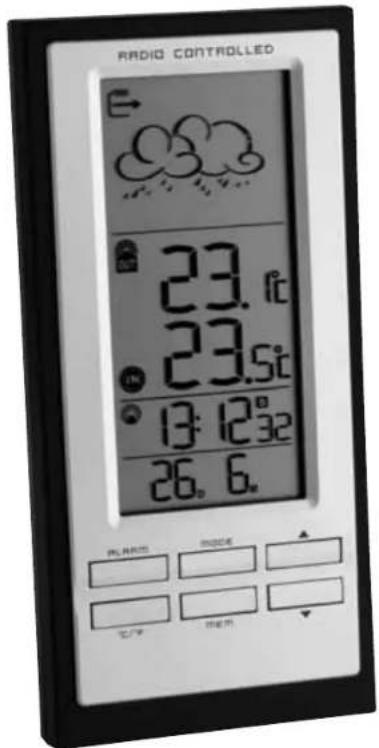
Kat. Nr. 35.1094
RoHS


ACCENT - Wireless weather station

ACCENT - Wireless weather station

1. Content
- Receiver (Display unit)
• Outdoor transmitter
• Instruction Manual
1.1 Functions
• Outdoor temperature wireless (433 MHz), distance range up to 30 m (free field)
- Indoor temperature
• Maximum and minimum values
- Weather forecast icon
• Tendency of atmospheric pressure
• Radio controlled clock with different alarms and date
- Dual time
- For wall mounting or table standing
2. Elements
2.1 Receiver (Display unit) (Fig. 1)
LCD
① Weather symbol and Trend pointer
② Outdoor temperature wave icon, outdoor and indoor temperature/Max/Min memory, battery icon for outdoor sensor
③ Radio controlled time and icon, dual time and battery icon for weather station
④ Date/alarm times and symbols
Buttons
A1: ALARM button
A2: MODE button
A3: ▲ button
A4: °C/°F button
A5: MEM button
A6: ▼ button
Housing (Fig. 2)
B1: Wall mount hole
B2: Battery compartment
B3: Stand (fold out)
2.2. Sensor unit (Transmitter) (Fig. 2)
Button
C1: RESET button
Housing
C2: Wall mount hole
C3: Battery compartment (screwed)
3. Getting started
3.1 Insert batteries
- Place both instruments on a desk with a distance of approximately 1.5 meter. Check that no other electronic devices are close.
- Open the battery compartment of the transmitter (screwed).
- Remove the insulation strip.
- Open the battery compartment of the weather station and remove the insulation strip.
- All LCD segments will light up for about a few seconds.
3.2 Reception of outdoor temperature
- The unit is now ready to use and starts to scan the outdoor sensor data.
- On the display of the weather station appears 3 different symbols:
- station is now scanning the DCF time signal
- radio controlled time reception
- no signal since approx. 15 minutes
- If the reception of the outdoor temperature fails, “--,-” appears on the display and the reception will be repeated again every 8 hours. Check the batteries and try it again. Check if there is any source of interference.
- Manual scanning of the DCF time signal can be helpful. Hold ▼ button for 3-5 seconds.
3.3 Radio controlled time reception
- The clock will scan the DCF frequency signal and the DCF symbol flashes on the LCD. When the signal is received successfully after 3-5 minutes, the radio controlled time and the DCF symbol appears permanently.
• There are 4 different reception icons:
- reception is activ
- reception is very good
- no reception/time is set manual
No icon - reception is deactivated
- Press ▲ button for 3-5 seconds to activate/deactivate the reception manually.
- In case the clock cannot detect the DCF-signal (for example due to disturbances, transmitting distance, etc.), the time can be set manually.
- The clock will then work as a normal quartz clock. (see 4.1 Setting of clock and calendar).
ACCENT - Wireless weather station

Notes:
The time base for the radio controlled time is a Caesium Atomic Clock operated by the Physikalisch Technische Bundesanstalt Braunschweig which has a time deviation of less than one second in one million years. The time is coded and transmitted from Mainflingen near Frankfurt via frequency signal DCF-77 (77.5 kHz) and has a transmitting range of approximately 1500 km. Your radio-controlled clock receives this signal and converts it to show the precise time in summer or wintertime. "S" appears on the display during summer time. The quality of the reception depends greatly on the geographic location. In normal cases, there should be no reception problems within a 1500 km radius around Frankfurt.
Please take note of the following:
- Recommended distance to any interfering sources like computer monitors or TV sets is a minimum of 1.5 - 2 metres.
- Within ferro-concrete rooms (basements, superstructures), the received signal is naturally weakened. In extreme cases, please place the unit close to a window and/or point its front or back towards the Frankfurt transmitter.
- During night-time midnight until appr. 4.00 h in the morning), the atmospheric disturbances are usually less severe and reception is possible in most cases. A single weekly reception is adequate to keep the accuracy deviation below 1 second.
4. How to operate
4.1 Manual setting of clock and calendar
- Hold MODE button in normal mode. The day-of-week language digit is flashing. Press ▲ or ▼ button to adjust it. Day-of-week language: German (GE), French (FR), Italian (IT), Spanish (SP), Dutch (NE), Swedish (SW) and English (EN).
- Press MODE button and the setting sequence is shown as follows: Years, month, date, month/day or day/month sequence, 12 and 24 hours system indication, hours and minutes. Press ▲ or ▼ button to make the desired settings
- Display of date day/month (DM) or month/day (MD): Press ▲ or ▼ button to select between month/date (M/D, American version) or date/month (D/M, European version).
• In 12 HR system PM appears after 12 h on the display. - Confirm with MODE button.
- Holding ▲ or ▼ button, you will enter fast mode.
- The instrument will quit automatically the setting mode, if there is no button used within 60 seconds.
4.2 Dual time
- Press MODE button two times in normal mode.
• ZONE appears on the display. - Hold MODE button.
- 0:00+ flashes on the display. Press ▲ or ▼ button to adjust the time zone in 30 min. steps (+15/-13) for the dual time.
- Holding ▲ or ▼ button, you will enter fast mode.
- Confirm with MODE button.
ACCENT - Wireless weather station

4.3 Indication of time
- Each press on the MODE button in normal mode will change the display between: → Time with seconds
→ Time with day-of-week - Dual time with day of week
→ Dual time with seconds
4.4 Alarm setting
- Press ALARM button.
- OFF or the last adjusted alarm time and W appears on the display.
- You can now adjust the alarm time for the weekdays (Monday until Friday).
- Press and hold ALARM button.
• The hour digit is flashing. Press ▲ or ▼ button to adjust hours. - Press ALARM button again and set minutes in the same way.
- Holding ▲ or ▼ button, you will enter fast mode.
- Confirm with ALARM button.
- Alarm time and W appears on the display. The alarm is activated.
- Press ALARM button again
- OFF or the last adjusted alarm time and S appears on the display.
- You can adjust the alarm time for the weekend (Saturday and Sunday) or a special alarm time in the same way.
- Confirm with ALARM button.
- Alarm time and S appears on the display. The alarm is activated.
- Press ALARM button again
- S and W appears on the display. Both alarm times are activated.
- Once the alarm starts to ring (3 different sounds), W or S flashes.
- Press ALARM button to stop the alarm.
• The alarm stays active from Monday until Friday.
- Please consider that you have to activate the weekend or special alarm time always new.
- To activate/turn off (OFF) the alarm function, press ▲ or ▼ button in the desired alarm mode.
5. °C/°F function
- Press °C/°F button to change between °C (Celsius) or °F (Fahrenheit) as temperature unit.
6. Max./Min. memory
- Press MEM button in normal mode and the lowest outdoor and indoor temperature is displayed since the last reset.
• MIN appears on the display. - Press MEM button in normal mode again and the highest outdoor and indoor temperature is displayed since the last reset.
• MAX appears on the display. - Press MEM button again and you will return to normal mode.
- Hold MEM button in the desired mode to clear the recorded MAX/MIN reading (5 sec.).
ACCENT - Wireless weather station

7. Weather forecast symbols
- There are 5 different weather symbols (sunny, slightly cloudy, cloudy, rainy, snow).
- The icons displayed forecasts the weather in terms of getting better or worse and not necessarily sunny or rainy as each icon indicates. For example, if the current weather is cloudy and the rainy icon is displayed, it does not mean that the product is faulty because it is not raining. It simply means that the air pressure has dropped and the weather is expected to get worse but not necessarily rainy.
8. Trend pointer
- The trend pointer displayed on the LCD indicates if the pressure is increasing, steady or decreasing.
9. Positioning of display unit and the transmitter
- With the foldable leg at the back of the unit, the base station can be placed onto any flat surface or wall mounted at the desired location by the hanging hole at the back of the unit. Avoid the vicinity of any interfering field like computer monitors or TV sets and solid metal objects.
- Choose a shady and dry position for the transmitter. (Direct sunshine falsifies the measurement and continuous humidity strains the electronic components needlessly).
- Check the transmission of 433 MHz signal from the transmitter to the display unit (transmission range 30 m free field). Within ferro-concrete rooms (basements, superstructures), the received signal is naturally weakened.
- If necessary choose another position for transmitter and/or display unit.
- To wall mount the transmitter, use a nail to affix the wall bracket to the desired wall, plug in the remote sensor to the bracket.
10. Battery replacement
- Change the batteries in both instruments (station and transmitter see 3.1) when the battery symbol ⚙ of the station or the transmitter appears on the display.

For your safety:
- Keep these instruments and the batteries out of the reach of children.
- Batteries must not be thrown into a fire, short-circuited, taken apart or recharged. Risk of explosion!
- Batteries contain harmful acids. Low batteries should be changed as soon as possible to prevent damage caused by leaking.
- Never use a combination of old and new batteries together, nor batteries of different types. Wear chemical-resistant protective gloves and safety glasses when handling leaking batteries.
- This product should only be used as described within these instructions.
- Unauthorized repairs, modifications or changes to the product are prohibited.
- Do not place your product near extreme temperatures, vibrations or shocks.
- Protect it from moisture.
- Clean the devices with a soft damp cloth. Do not use solvents or scouring agents.
ACCENT - Wireless weather station

11. Waste disposal
This product has been manufactured using high-grade materials and components which can be recycled and reused.

Never dispose of empty batteries and rechargeable batteries in household waste.
As a consumer, you are legally required to take them to your retail store or to an appropriate collection site depending on national or local regulations in order to protect the environment.
The symbols for the heavy metals contained are:
Cd=cadmium, Hg = mercury; Pb=lead

This instrument is labelled in accordance with the EU Waste Electrical and Electronic Equipment Directive (WEEE).
Please do not dispose of this instrument in household waste. The user is obligated to take end-of-life devices to a designated collection point for the disposal of electrical and electronic equipment, in order to ensure environmentally-compatible disposal.
12. Specifications
Batteries: 2 x 1.5 V AA weather station (included) 2 x 1.5 V AA for the transmitter (included)
Transmission distance
in open field: 30 meter max.
Frequency: 433 MHz
Measuring interval sensor: 45 sec.
Temperature:
Measuring unit: °C/°F
Measuring range outdoor: -30°C...+60°C (-22°F...+140°F)
indoor: -5ircC...+50ircC (23°F...+122°F)
Operating temperature: -10ircC...+60ircC ( 14ircF...+140ircF )
Measuring range ≤ -30°C: LLL appears in the display
Measuring range ≥ +60°C: HHH appears in the display


- ACCENT - Wireless weather station
- Content
- Functions
- Elements
- Receiver (Display unit) (Fig. 1)
- LCD
- Buttons
- Housing (Fig. 2)
- Sensor unit (Transmitter) (Fig. 2)
- Button
- Housing
- Getting started
- Insert batteries
- Reception of outdoor temperature
- Radio controlled time reception
- Notes:
- Please take note of the following:
- How to operate
- Manual setting of clock and calendar
- Dual time
- Indication of time
- Alarm setting
- °C/°F function
- Max./Min. memory
- Weather forecast symbols
- Trend pointer
- Positioning of display unit and the transmitter
- Battery replacement
- For your safety:
- Waste disposal
- Specifications
Brand : TFA
Model : Accent
Category : Weather Station