
TV6700 - Lamp ABUS - Free user manual and instructions
Find the device manual for free TV6700 ABUS in PDF.


| Product type | Outdoor security light with motion detector |
| Brand | ABUS |
| Model | TV6700 |
| Dimensions (L x H x D) | 200 x 150 x 100 mm |
| Weight | 0.5 kg |
| Power supply | 230 V AC, 50 Hz |
| Bulb type | Integrated LED, 10 W |
| Luminous flux | 800 lumens |
| Color temperature | 4000 K (neutral white) |
| Detection angle | 120° |
| Detector range | 12 meters |
| Time delay setting | 5 seconds to 5 minutes |
| Protection rating | IP44 |
| Protection class | II |
| Operating temperature | -20°C to +40°C |
| Main functions | Twilight motion detector, automatic activation |
| Maintenance and cleaning | Clean with a soft, dry cloth. Do not use abrasive products. |
| Safety | Disconnect the power supply before any intervention. Professional installation recommended. |
| General information | ABUS TV6700 security light, ideal for automatic outdoor lighting. |
Frequently Asked Questions - TV6700 ABUS
User questions about TV6700 ABUS
0 question about this device. Answer the ones you know or ask your own.
Ask a new question about this device
Download the instructions for your Lamp in PDF format for free! Find your manual TV6700 - ABUS and take your electronic device back in hand. On this page are published all the documents necessary for the use of your device. TV6700 by ABUS.
USER MANUAL TV6700 ABUS

IR-Scheinwerfer
natural_image
Technical line drawing of a mechanical component with flanges and a central aperture (no text or symbols)TV6700
CE
1. Vorwort
natural_image
Diagram of a mechanical component with directional arrows indicating motion or force (no text or symbols)
natural_image
Abstract curved arrow graphic with shadow (no text or symbols)IR Illuminator
Installation Guide
- IR-Scheinwerfer ....1
Installationsanleitung
• Projecteur infrarouge ......21
Instructions d'installation
• Illuminatore IR......31
Istruzioni per l'installazione
• IR-schijnwerper......41
Installatieaanwijzingen
• IR-projektør ....51
Installationsvejledning

natural_image
Technical line drawing of a mechanical device with circular housing and mounting flanges (no text or symbols)TV6700

1. Preface
Dear Customer,
Thank you for purchasing this ECOLINE IR illuminator.
You made the right decision in choosing this state-of-the-art technology, which complies with the current standards of domestic and European regulations. The CE has been proven and all related certifications are available from the manufacturer upon request. To maintain this status and to guarantee safe operation, it is your obligation to observe these operating instructions.
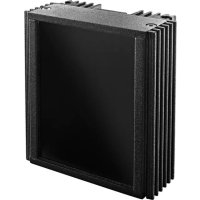
This ECOLINE IR illuminator is fitted with 24 infrared LEDs. It guarantees long life and a high degree of reliability. The illuminator uses first-class microelements that are resistant to external electromagnetic fields. It offers cutting-edge technology for advanced video surveillance.
2. Scope of delivery
IR illuminator Installation instructions Fixing bracket Fastening screws
3. Features
The IR illuminator of the ECOLINE series has the following specifications:
a) Range up to 10m
(up to 18m, depending on the degree of reflection in the environment)
b) 70^ radiation angle
c) Protection level IP67 (for internal or external use)
d) Lifetime of LEDs up to 6000 hours
e) Low power consumption
f) Automatic switch-on/off by daylight sensor
4. Precautions
To protect your guarantee rights and avoid damage, open the housing of the IR Illuminator only if directed by a specialist or our technical support staff.
Operate the IR illuminator only within the specified temperature, humidity and power ranges.
Operating the IR illuminator outside the prescribed range can lead to reduced product life and early malfunction. Greatly exceeding the specified operating range can also result in immediate failure of the LEDs. All specifications can be found in the technical data.
Handle the IR illuminator with care.
When installing the floodlight, make sure it is not subject to excessive physical stress (shocks, vibrations, etc.). It should be installed in a place that is free from shocks and vibration. Incorrect handling and transport can lead to damage to the illuminator.
6. Description of the IR Illuminator
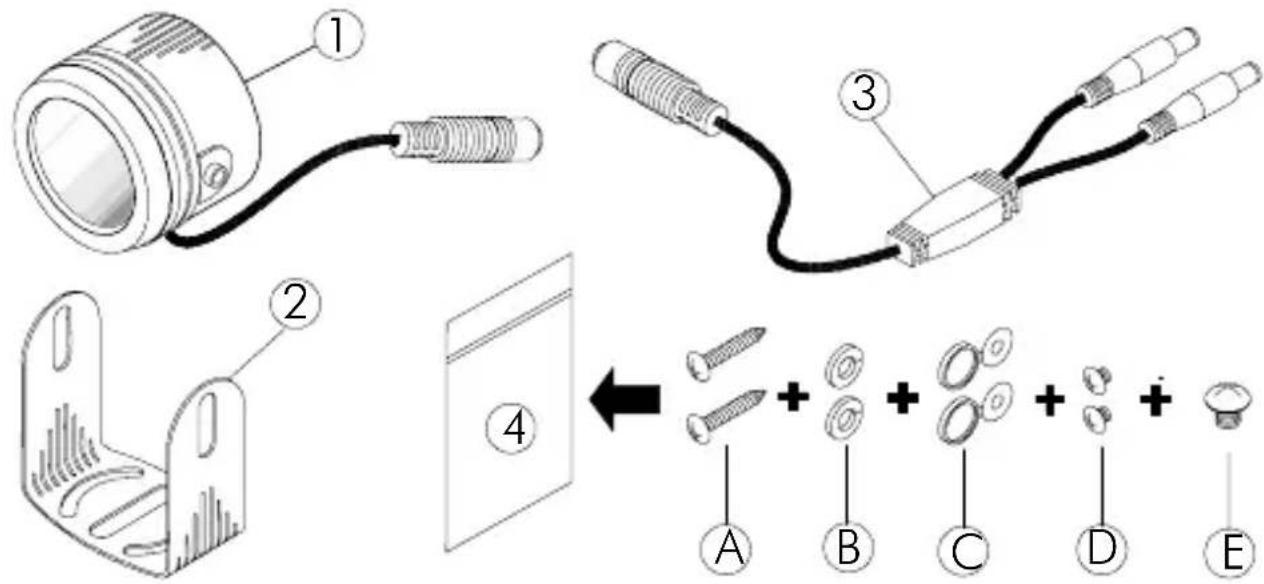
(1) IR illuminator
(2) Fixing bracket
(3) Cable connection splitter
(4) Accessories bag
(A) Wall fastening screws
(B) Washers
/(C) Cover for fixing screws
(D) Fixing screws
(E) Screw for fixing bracket to a camera
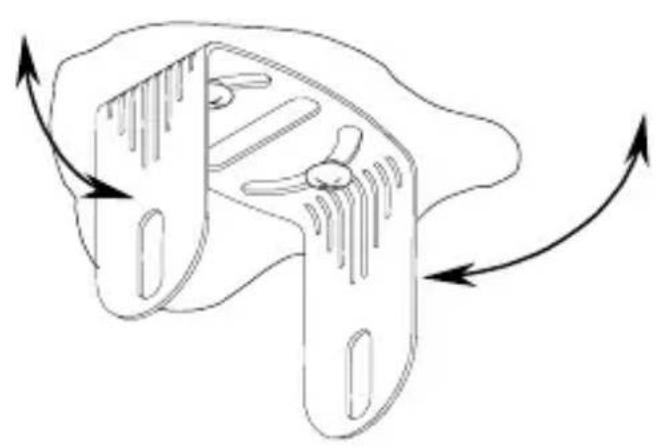
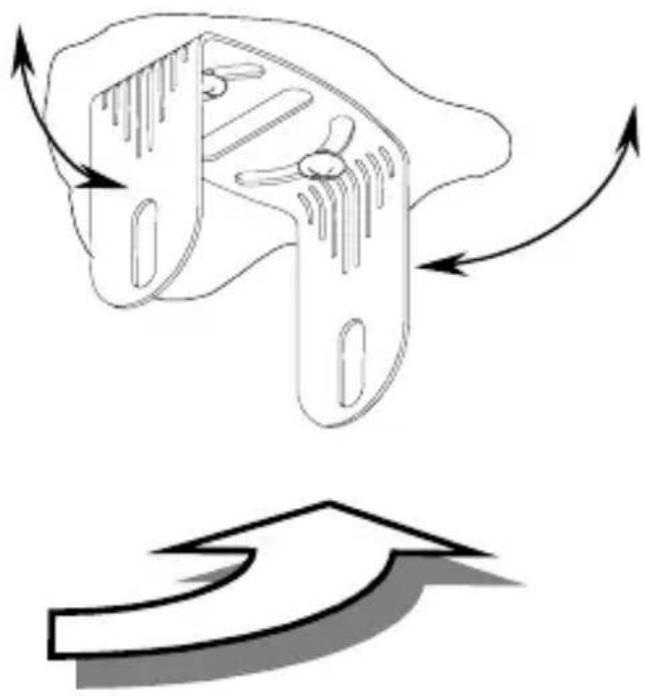
7.1 Wall mounting
- Select a suitable place to mount the illuminator.
- Fix the bracket at a suitable position.


natural_image
Diagram showing a mechanical component with directional arrows indicating motion or flow, no text or symbols present.- Fix the illuminator to the bracket using the screws supplied.
- Make sure the illuminator is pointing in the same direction as the camera.
- Install the illuminator as near as possible to the object you want to monitor.
- Note that the range of the illuminator is largely dependent on the amount of reflected light in the surroundings and the IR sensitivity of the camera used.

7.2 Camera mounting
-
It is also possible to mount the illuminator directly on to a camera, providing the camera has a screw socket with the correct thread on its upper surface.
-
Fix the bracket using the screw provided.
-
Make sure the illuminator is pointing in the same direction as the camera.
-
Note that the range of the illuminator is largely dependent on the amount of reflected light in the surroundings and the IR sensitivity of the camera used.

8. Connecting and aligning
- Connect a 12V DC power supply to the power input of the illuminator. Check for correct polarity.

- The illuminator is activated by a daylight sensor (below 10 Lux).
- Check the orientation and angle of the illuminator.
- If necessary, adjust the angle of the illuminator and then tighten the screws.
9. Changing the IR LEDs
The LEDs used will operate for an average of 6000 hours. This corresponds to about 2 years. If you notice a deterioration in range after this time, replace the IR LEDs. A suitable replacement PCB (article no. TV6701) is available.
- Technical data
| Model number TV | 6700 |
| Power source 12V DC | |
| Power consumption | 2.5W |
| Illumination 24 IR LEDs | |
| Lifetime Ca. 6000 hours / 2 years | |
| Wavelength | 850nm |
| Radiation angle 70° | |
| Range 10m – | 18m |
| Protection type IP | 67 |
| Ambient operating temperature | -10°C – +50°C |
| Dimensions / Weight | ∅53 x 37mm / 200g |


natural_image
Technical line drawing of a mechanical component with circular housing and mounting flanges (no text or symbols)TV6700
CE
1. Préface
Chère cliente, cher client,
Illuminatore IR
natural_image
Technical line drawing of a mechanical component with circular housing and mounting holes (no text or symbols)TV6700

1. Prefazione
Egregio Cliente,
natural_image
Diagram showing a mechanical component with directional arrows indicating motion or force, no text or symbols present.IR-schijnwerper
natural_image
Technical line drawing of a mechanical device with circular components and mounting holes (no text or symbols)TV6700

1. Voorwoord
Geachte klant,
IR-projektør
natural_image
Technical line drawing of a mechanical component with circular housing and mounting flanges (no text or symbols)TV6700

1. Forord
Kære kunde.

natural_image
Diagram showing a mechanical component with directional arrows indicating motion or force, no text or symbols present.
- IR-Scheinwerfer
- Vorwort
- IR Illuminator
- Installation Guide
- Preface
- Scope of delivery
- Features
- Precautions
- Operate the IR illuminator only within the specified temperature, humidity and power ranges.
- Handle the IR illuminator with care.
- Description of the IR Illuminator
- Wall mounting
- Camera mounting
- Connecting and aligning
- Changing the IR LEDs
- Préface
- Illuminatore IR
- Prefazione
- IR-schijnwerper
- Voorwoord
- IR-projektør
- Forord
Brand : ABUS
Model : TV6700
Category : Lamp