
FUBE50012 - Remote control ABUS - Free user manual and instructions
Find the device manual for free FUBE50012 ABUS in PDF.


| Product type | Remote control for door opening system |
| Brand | ABUS |
| Model | FUBE50012 |
| Dimensions | Approx. 60 x 30 x 12 mm |
| Weight | Approx. 20 g (with battery) |
| Power supply | 1 CR2032 3V button cell |
| Frequency | 433 MHz (typical) |
| Range | Up to 30 m in open field |
| Main functions | Remote control for garage door, gate, or barrier |
| Number of channels | 1 channel |
| Coding | Fixed or rolling code (depending on version) |
| Housing material | ABS plastic |
| Color | Black or white (depending on version) |
| Operating temperature | -20°C to +60°C |
| Protection rating | IP44 (splash resistant) |
| Maintenance and cleaning | Clean with a soft, dry cloth; avoid solvents |
| Safety | Protection against shock and humidity |
| Spare parts | Replacement battery available; protective shell optional |
| Repairability | Battery replaceable; electronics not user-serviceable |
| Warranty | 2 years (depending on retailer) |
Frequently Asked Questions - FUBE50012 ABUS
User questions about FUBE50012 ABUS
0 question about this device. Answer the ones you know or ask your own.
Ask a new question about this device
Download the instructions for your Remote control in PDF format for free! Find your manual FUBE50012 - ABUS and take your electronic device back in hand. On this page are published all the documents necessary for the use of your device. FUBE50012 by ABUS.
USER MANUAL FUBE50012 ABUS
Security Tech Germany
natural_image
Symbol of a trash bin crossed out by two diagonal lines, no text or labels present© ABUS Security-Center GmbH & Co. KG, August 2014

Security Tech Germany
FUBE50012 USER GUIDE
[UK] User Guide......9
Thank you for purchasing this wireless remote control. In choosing our product, you now have a piece of equipment that is built according to state-of-the-art technology.
This document refers to the V1.3 software version of the wireless remote control. This user guide contains important installation and operation information. Store this user guide in a safe place for future reference. This user guide belongs to this product – bear this in mind if you pass on this product to others.
Conformity
ABUS Security-Center GmbH & Co. KG, hereby declares that the device with item number FUBE50012 complies with the essential requirements and other relevant provisions of Directive (1999/5/EG). The declaration of conformity can be obtained from the following address: ABUS Security-Center GmbH & Co. KG, Linker Kreuthweg 5, 86444 Affing, GERMANY"
Intended use

Read the notes and advice in this user guide carefully. If you do not follow these instructions, your guarantee claim becomes invalid. No liability can be accepted for resulting damages. No part of the product may be changed or modified in any way. The remote control is not waterproof. Please avoid direct contact with water. Everything possible has been done to ensure that the contents of this user guide is correct. However, neither the author nor ABUS Security-Center GmbH & Co. KG can be held liable for loss or damages caused by incorrect or improper use or failure to observe the safety instructions and warnings. We reserve the right to make changes to these instructions without prior notice.
Refer to the end of the user guide for more notes and information on operating the wireless remote control. [beginning on page 48]
Information on the battery
The device is supplied with direct current from a 3V lithium battery. To guarantee a long service life and avoid fire and injury, please note the following:
- Do not dispose of the battery in domestic waste.
- The battery must not be directly exposed to heat or sunlight, and must not be stored in a place with a very high temperature.
- The battery must not be burned.
• The battery must not come into contact with water. - The battery must not be dismantled, pierced or otherwise damaged.
• The battery contacts must not be short-circuited.
• The battery must be kept away from small children. - The battery cannot be recharged.
Disposal
Disposal as per directive WEEE 2002/96 EC

natural_image
Symbol of a trash bin crossed out by diagonal lines, representing no waste or discharge (no text or labels)The product contains valuable raw materials. At the end of its service life, dispose of the product according to the applicable legal requirements. Within the EU, the product and its accessories must be collected and disposed of separately. Devices displaying this symbol may not be disposed of as domestic waste. Please contact your dealer or dispose of the products at the local collection point for electronic waste.
Features
The wireless remote control is used for arming and disarming alarm systems. It indicates the current status of the alarm system. A switching output can also be armed as an option. The wireless remote control has a panic feature. This can also be used for controlling 868 MHz transceivers in the Secvest/Terxon product range.
Technical data
Wireless frequency:
Transmission power:
Range (outdoors):
Range (indoors):
Power supply:
Operating temperature:
Humidity:
Dimension (WxHxD):
Weight: 35 g
Security level:
Environmental class:
Standard: EN 50131-3
868.6625 MHz
max. 10 mW (amplifier output)
approx. 200 m
Depending on ambient conditions
Lithium battery type / CR 2450 Li-Mn 3V
-10°C to +40°C
max. 75% (non-condensing)
36.2 x 62 x 17 mm
2 (EN 50131-1:2006)
II (EN 50131-1:2006)
Operation
Inserting or changing the battery
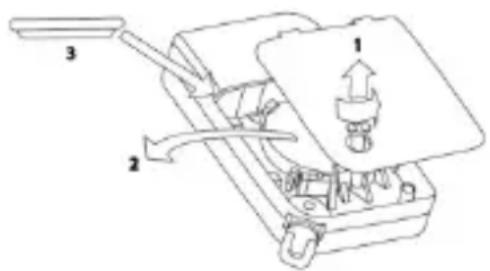
Before the wireless remote control can be used, the battery has to be inserted. When inserting the battery, all the LED pairs light up red and green one after another which show that all the LEDs are working properly.
Reading the software version
The software version of the remote control is then shown by the two LEDs at the top. The main version is shown by the flashing red LED and the sub version is shown by the flashing green LED.
Learning in
Follow the steps described in the user guide for the compatible component. The “*” button can be used for “arming internally” or for switching an output.
Find out more details from the user guide for the compatible component.
Customer service and support
End consumer
Please consult your dealer or installer if you have any questions.
Dealer/installer
Consult our website for product information.
© ABUS Security-Center GmbH & Co. KG, August 2014

Security Tech Germany
FUBE50012 NOTICE D'UTILISATION
[UK] User Guide 9
natural_image
Symbol of a trash bin crossed out by two diagonal lines, no text or labels present© ABUS Security-Center GmbH & Co. KG, August 2014

Security Tech Germany
FUBE50012 GEBRUIKERSHANDLEIDING
[UK] User Guide 9
natural_image
Symbol of a trash bin crossed out by two diagonal lines, no text or labels presentSecurity Tech Germany
FUBE50012 BETJENINGSVEJLEDNING
[UK] User Guide 9
natural_image
Symbol of a trash bin crossed out by two diagonal lines, no text or labels present© ABUS Security-Center GmbH & Co. KG, august 2014

Security Tech Germany
FUBE50012 INSTRUKCJA OBSŁUGI
[UK] User Guide 9
natural_image
Symbol of a trash bin crossed out by two diagonal lines, no text or labels present[UK] Arming the alarm system
When arming the system, you are not allowed to be in the controlled area. When using alarm panels which are installed regarding VdS3438 this device is not allowed for arming or disarming the panel.
[UK] Arming internally
[FR] Activer en interne
[NL] Intern activeren
flowchart
graph LR
    A["Hand Press"] --> B["Lock Icon"]
    B --> C["Green Box with * and ? symbols"]
    C --> D["Lock Pad with unknown symbol"]
[DE] Deaktivieren
[UK] Disarming
[FR] Désactiver
[NL] Deactiveren
[DK] Deaktivering
[PL] Wyłączenie
![ABUS FUBE50012 - [DE] Deaktivieren - 1](/content/2026/06/1280355/images/042978965bd057d97185bc6ffde38dafa9bc060f8ca00be50c1d4898a0c71911.jpg)
flowchart
graph LR
    A["Hand with lock"] --> B["Lock switch"]
    B --> C["Padlock update with padlock icon"]
    C --> D["Password verification with padlock icon"]
[UK] Disarming after alarm
[DK] Deaktivering after alarm
flowchart
graph LR
    A["Hand with lock"] --> B["Lock switch"]
    B --> C["Padlock update with padlock icon"]
    C --> D["Password lock state change with red warning circle"]
[DE]
Statusabfrage
[→Anlage aktiviert]
[UK]
Status query
[→System is armed]
[FR]
flowchart
graph LR
    A["Hand Press"] --> B["Lock Icon with *"]
    B --> C["Lock icon with *"]
    C --> D["Lock icon with ?"]
| [DE] | Statusabfrage | [→Anlage intern aktiviert] |
| [UK] | Status query | [→System is armed internally] |
| [FR] | Vérification de l’état de l’alarme | [→système activé en interne] |
| [NL] | Status opvragen | [→installatie intern geactiveerd] |
| [DK] | Statusforespørgsel | [→Anlæg delaktiveret] |
| [PL] | Odczyt stanu | [→System uaktywniony wewnętrznie] |
![ABUS FUBE50012 - [→Anlage aktiviert] - 1](/content/2026/06/1280355/images/182f29e56c5e17af753cff74c79ed845844860ca308fcc5c6c88ffdbbf131818.jpg)
flowchart
graph LR
    A["Hand with question mark"] --> B["Switch: Lock icon"]
    B --> C["Lock icon with * and ? symbols inside a lock box"]
    C --> D["Lock icon with * and ? symbols inside a lock box"]
[DE]
Statusabfrage
[→System is disarmed]
[FR]
flowchart
graph LR
    A["Hand with question mark"] --> B["Lock State with lock icon"]
    B --> C["Green shaded padlock with lock symbol (*, ?, unknown keys"]
    C --> D["Lock State with lock icon with lock symbol (*, ?, unknown keys"]
[UK] Trigger panic alarm
[FR] Déclencher l'alarme agression
[NL] Overvalalarm activeren
[DK] Udløs overfaldsalarm
[PL] Wyzwalanie alarmu napadowego

flowchart
graph LR
    A["Lock"] --> B["Switch state"]
    C["Unlock"] --> B
    B --> D["Padlock icon with unknown status"]
    D --> E["Padlock icon with unknown status"]
[DE] Empfangszeit
[UK] Reception time
[FR] Temps de transmission
[NL] Ontvangsttijd
[DK] Modtagelsestid
[PL] Czas odbioru
![ABUS FUBE50012 - [DE] Empfangszeit - 1](/content/2026/06/1280355/images/937bf870faf594db834125f686e836ff57e0fd2619ee979aac5e70d2e6b5e2e8.jpg)
flowchart
graph LR
    A["Hand holding lock icon"] --> B["10 s *"]
    B --> C["Mobile lock icon with question mark"]
    C --> D["20 s"]
* [DE] Werkseinstellung / [UK] Default setting / [FR] Paramétrage par défaut / [NL] Fabrieksinstelling / [DK] Fabriksindstilling / [PL] Ustawienie fabryczne
[UK] Switching output


- FUBE50012 USER GUIDE
- Conformity
- Intended use
- Refer to the end of the user guide for more notes and information on operating the wireless remote control. [beginning on page 48]
- Information on the battery
- Disposal
- Features
- Technical data
- Operation
- Inserting or changing the battery
- Reading the software version
- Learning in
- Customer service and support
- End consumer
- Dealer/installer
- FUBE50012 NOTICE D'UTILISATION
- FUBE50012 GEBRUIKERSHANDLEIDING
- FUBE50012 BETJENINGSVEJLEDNING
- FUBE50012 INSTRUKCJA OBSŁUGI
- [DE] Deaktivieren
- [DE]
- Statusabfrage
- [→Anlage aktiviert]
- [DE] Empfangszeit
Brand : ABUS
Model : FUBE50012
Category : Remote control