
DEH-7250SD - Receiver PIONEER - Free user manual and instructions
Find the device manual for free DEH-7250SD PIONEER in PDF.


| Product Type | Car Stereo Receiver |
| Model | Pioneer DEH-7250SD |
| Dimensions (W x H x D) | 178 mm x 50 mm x 160 mm |
| Weight | 1.5 kg |
| Power Supply | 12V DC (11-16V allowable) |
| Maximum Power Output | 50 W x 4 channels |
| Continuous Power Output (RMS) | 22 W x 4 channels (at 4 ohms, 1% THD) |
| Playback Media | CD, CD-R/RW, MP3/WMA on CD, SD memory card |
| Tuner Bands | FM, AM |
| FM Frequency Range | 87.5 – 107.9 MHz |
| AM Frequency Range | 530 – 1720 kHz |
| Audio Outputs | Front, Rear (preamp RCA), Subwoofer (preamp RCA) |
| Audio Inputs | AUX (mini stereo jack), CD changer (optional) |
| Display Type | LCD with multi-color illumination (selectable) |
| Detachable Face | Yes, detachable to prevent theft |
| SD Card Slot | Yes, supports up to 32 GB SDHC |
| Equalizer | 3-band parametric EQ (low, mid, high) |
| Remote Control | Yes, included wired remote (optional wireless) |
| Clock Function | Yes, 12/24 hour format |
| Security Code | Yes, programmable to deter theft |
| Fuse Rating | 10 A (replace with same type) |
| Recommended Cleaning | Use soft dry cloth for face; lens cleaner for CD mechanism |
| Operating Temperature | -20°C to +60°C |
Frequently Asked Questions - DEH-7250SD PIONEER
User questions about DEH-7250SD PIONEER
0 question about this device. Answer the ones you know or ask your own.
Ask a new question about this device
Download the instructions for your Receiver in PDF format for free! Find your manual DEH-7250SD - PIONEER and take your electronic device back in hand. On this page are published all the documents necessary for the use of your device. DEH-7250SD by PIONEER.
USER MANUAL DEH-7250SD PIONEER
ThankyouforpurchasingthisPIONEERproduct.
Toensureproperuse, pleasereadthroughthismanualbeforeusingthisproduct. It is especially important that you read and observe WARNINGS and CAUTIONS in thismanual.Pleasekeepthemanualinasafeandaccessibleplaceforfuturereference.
01 BeforeYouStart
Aboutthisunit3
Incaseoftrouble3
Demomode3
Reversemode3
Resettingthemicroprocessor3
Aboutthismanual4
02 Operatingthisunit
Headunit5
Remotecontrol5
BasicOperations5
Useandcareoftheremotecontrol6
Menuoperationsidenticalforfunction
settings/audioadjustments/initialsettings/lists7
Tuner7
-BasicOperations7
-Storingandrecallingstations7
-Functionsettings7
CD/CD-R/CD-R\Wandexternalstorage devices(USB,SD)8
-BasicOperations8
-Displayingtextinformation9
-Usinglists9
-Advancedoperationsusingspecial buttons10
-Functionsettings10
iPod11
-BasicOperations11
-Displayingtextinformation11
-Browsingforasong11
-Advancedoperationsusingspecial buttons12
-Functionsettings12
AudioAdjustments13
-Advancedoperationsusingspecial buttons13
-Audiofunctionsettings13
InitialSettings14
OtherFunctions16
-UsingtheAUXsource16
-Clockdisplay16
-Switchingthedisplayindicationand buttonillumination16
-Usingdifferententertainment displays16
AdditionalInformation
Troubleshooting18
Errormessages18
Handlingguideline20
Compressedaudiocompatibility(disc,USB, SD)21
iPodcompatibility23
Sequenceofaudiofiles23
Copyrightandtrademark23
Specifications26
Aboutthisunit

CAUTION
- Donotallowthisunittocomeintocontact withliquids. Electricalshockcouldresult. Also, damagetothisunit, smoke, andoverheatingcouldresultfromcontactwithliquids.
- "CLASS1LASERPRODUCT" Thisproductcontainsalaserdiodeofhigher classthan1.Toensurecontinuedsafety,do notremoveanycoversorattemptogainaccesstotheinsideoftheproduct.Referallservicingtoqualifiedpersonnel.
• Always keep the volumelowen ought to hear outsidesounds. - Avoidexposuretomoisture.
- If the battery is disconnected, any preset memory will be erased.
CAUTION:
USEOFCONTROLORADJUSTMENTOR PERFORMANCEOFPROCEDURES OTHERTHANTHOSESPECIFIEDHEREIN MAYRESULTINHAZARDOUSRADIATION EXPOSURE.
CAUTION:
THEUSEOFOPTICALINSTRUMENTS WITHTHISPRODUCTWILLINCREASE EYEHAZARD.

Incaseoftrouble
Should this unit fail to operate properly, please contact your dealer or nearest authorized PIONEER Service Station.
Demomode

Important
- Failuretoconnecttheredlead(ACC)ofthis unittoaterminalcoupledwithignitionswitch on/offoperationsmayleadtobatterydrain.
- Remember that if the featured demo continues operating when the care engine is turned off, it may drain battery power.
ThedemoautomaticallystartswhentheignitionswitchissettoACCorONwhiletheunitisturnedoff.Turningofftheunitdoesnotcanceldemomode.Tocancelthedemomode, pressDISP/→/SCRL. Press DISP/→/SCRL againtostart.Operatingthedemowhilethe ignitionswitchissettoACCmaydrainbattery power.
Reversemode
If you donot perform an operation within about 30 seconds, screen indications start to reverse, and then continuereversing every 10 seconds. Pressing button BAND/ESC when powerto this unit is turned off while the ignition switch cissetto ACC or ON cancelst there-verse mode. Press button BAND/ESC againto start there reverse mode.
Resettingthemicroprocessor
Themicroprocessormustberesetunderthe followingconditions:
- Priortousingthisunitforthefirsttime afterinstallation
- Iftheunitfailstooperateproperly
- Whenstrangeorincorrectmessagesappearonthedisplay

natural_image
Diagram of a device with a pen inserted into a slot, showing no text or symbolsRESETbutton
1Removethefrontpanel.
2PressRESETwithapentiporother pointedinstrument.
Aboutthismanual
In the following instructions, USB memories, USB portable audioplayers, and SD memory cards are collectively referred to as "external storage devices (USB, SD)." If only USB memories and USB portable audioplayers are indicated, they are collectively referred to as "USB storage devices." In this manual, iPod and iPhone will be referred to as iPod.
Headunit
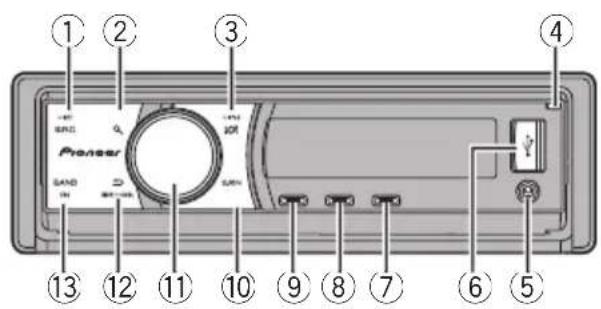
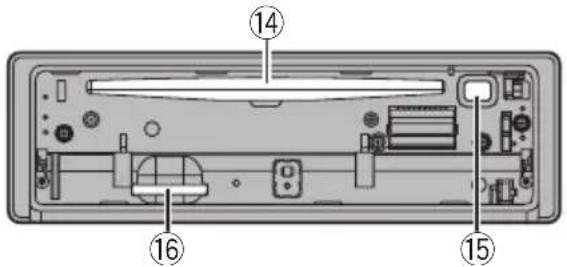
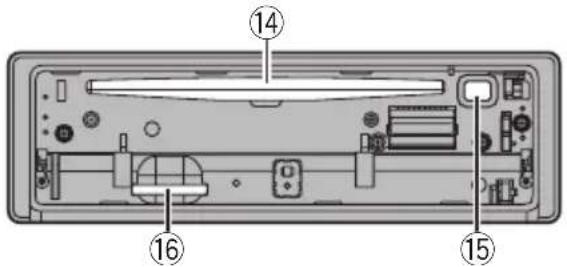
| PartPart | ||
| 1SRC/OFF9 | /LOC | |
| 2 | Q(list)10S.Rtrv | |
| 3 | XX/iPod11 | MULTI-CONTROL(M.C.) |
| 4 | Openbutton12DISP/ | /SCRL |
| 5 | AUXinputjack(3.5mmstereojack) | 13BAND/ESC |
| 6 | USBport14Discloadingslot | |
| 7 | ∅/DISPOFF15▲(eject) | |
| 8 | ▽/BASS16 | SDmemorycard slotYoucanseetheSD memorycardslotif youremovethe frontpanel. |

CAUTION
UseanoptionalPioneerUSBcable(CD-U50E)to connecttheUSBaudioplayer/USBmemory to theUSBport.SincetheUSBaudioplayer/USB memoryisprojectedforwardfromtheunit,itis dangeroustoconnectdirectly. Donotusetheunauthorizedproduct.
Remotecontrol
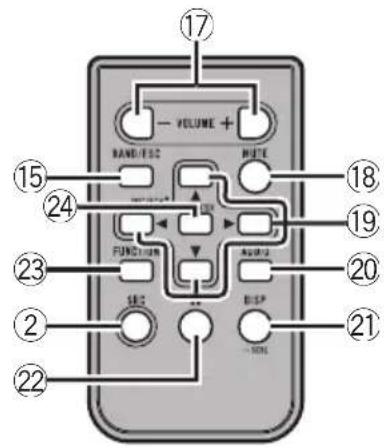
PartOperation
| 17VOLUME | Presstoincreaseordecreasevolume. |
| 18MUTE | Presstomute.Pressagaintoun-mute. |
| 19▲/▼/◄/► | Presstoperformmanualseektuning,fastforward,reverseandtracksearchcontrols.Alsousedforcontrollingfunc-tions. |
| 20AUDIO | Presstoselectanaudiofunction. |
| 21DISP/SCRL | Presstoselectdifferentdisplays.Pressandholdtoscrollthroughthetextinformation. |
| 22II | Presstopauseorresume. |
| 23FUNCTION | Presstoselectfunctions.Pressandholdtorecalltheinitialsettingmenuwhenthesourcesareoff. |
| 24LIST/ENTER | Presstodisplaythedisctitle,tracktitle,folder,orfilelistde-pendingonthesource.Whileintheoperatingmenu,presstocontrolfunctions. |

BasicOperations

Important
- Handlegentlywhenremovingorattaching thefrontpanel.
Operatingthisunit
- Avoid subjecting the front panel to excessive shock.
- Keepthefrontpaneloutofdirectsunlightand hightemperatures.
- Removeanycablesanddevicesattachedto thisunitbeforedetachingthefrontpanelto avoiddamagethedeviceorvehicleinterior.
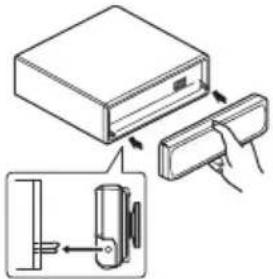
Removingthefrontpaneltoprotectyourunitfromtheft
1 Presstheopenbuttontoopenthefrontpanel.
2Griptheleftsideofthefrontpanelandpullit gentlyoutward.
3 Alwayskeepthedetachedfrontpanelintheprotectiondevicesuchasprotectioncase.
Re-attachingthefrontpanel
1 Reattachthefrontpanelbyholdingituprightto theunitandclippingitsecurelyintothemountinghooks.
Turningtheuniton
1 PressSRC/OFFtoturntheuniton.
Turningtheunitoff
1 Press SRC/OFF and hold until the unit turns off.
Selectingasource
[1]PressSRC/OFFtocyclebetween: TUNER (tuner)—CD (built-in CD player)—USB (USB)/IPOD (iPod)—SD (SD memory card)—AUX(AUX)
Adjustingthevolume
1 |TumM.C.toadjustvolume.

Note
Whenthisunit'sblue/whiteleadisconnectedto thevehicle'sauto-antennarelaycontrolterminal, thevehicle'santennaextendswhenthisunit's sourceisturnedon.Toretracttheantenna,turn thesourceoff.
Useandcareoftheremote control
Usingtheremotecontrol
1 Pointtheremotecontrolinthedirectionofthe frontpaneltooperate. Whenusingforthefirsttime,pulloutthefilm protrudingfromthetray.
Replacingthebattery
1 Slidethetrayoutonthebackoftheremotecontrol.
2 Insertthebatterywiththeplus(+)andminus(-) polesalignedproperly.

natural_image
Diagram of a mechanical or laboratory setup with a tool and a circular component, no visible text or symbols
WARNING
- Keepthebatteryoutofthereachofchildren. Shouldthebatterybeswallowed,consulta doctorimmediately.
- Batteries(batterypackorbatteriesinstalled) must not be exposed to excessive heats such as sunshine, fireorthelike.

CAUTION
• UseoneCR2025(3V) lithium battery.
- Removethebatteryiftheremotecontrolisnot usedforamonthorlonger.
- Thereisadangerofexplosionifthebatteryis incorrectlyreplaced.Replaceonlywiththe sameorequivalenttype.
- Donothandlethebatterywithmetallictools.
- Donotstorethebatterywithmetallicobjects.
- Ifthebatteryleaks,wipetheremotecontrol completelycleanandinstallanewbattery.
- Whendisposingofusedbatteries,comply withgovernmentalregulationsorenvironmentalpublicinstitutions' rulesthatapplyinyour country/area.

Important
- Donotstoretheremotecontrolinhighttemperaturesordirectsunlight.
Operatingthisunit
• Theremote control may not function properly indirect sunlight.
- Donotlettheremotecontrolfallontothe floor,whereitmaybecomejammedunderthe brakeoracceleratorpedal.
Menuoperationsidentical forfunctionsettings/audio adjustments/initial settings/lists
| ReturningtothepreviousdisplayReturningtothepreviouslist/category(thefolder/Categoryonelevelhigher)1PressDISP/ ⇌/SCRL. |
| ReturningtothemainmenuReturningtothetoptieroflist/category1PressandholdDISP/ ⇌/SCRL. |
| ReturningtotheordinarydisplayCancelingtheinitialsettingmenu1Press BAND/ESC. |
| Returningtotheordinarydisplayfromthelist/category1Press BAND/ESC. |

Tuner BasicOperations

①Bandindicator
②○(stereo)indicator
③LOCindicator
Appearswhenlocalseektuningison.
④Presetnumberindicator
⑤Signallevelindicator
⑥Frequencyindicator
| Selectingaband1 Press BAND/ESC until the desired band (FM-1, FM-2, FM-3 for FM or AM) is displayed. |
| Manualtuning(stepbystep)1 PushM.C.leftorright. |
| Seeking1 PushandholdM.C.leftorright.YoucancancelseektuningbypushingM.C.leftorright.WhilepushingandholdingM.C.leftorright,you canskipstations.SeektuningstartsassoonasyoureleaseM.C. |
Storingandrecallingstations
Youcaneasilystoreuptosixstationsforeach bandaspresets.
1Press Q (list).
Presetscreenisdisplayed.
2UseM.C.tostoretheselectedfrequencyinmemory.
Turntochangethepresetnumber.Pressand holdtostore.
3UseM.C.toselectthedesiredstation.
Turntochangethestation.Presstoselect.
■ AllstationsstoredforFMbandscanbere-calledfromeachindependentFMband.
■Youcanalsochangethestationbypushing M.C.upordown.
■Toreturntotheordinarydisplay,pressBAND/ESCor (list).
Functionsettings
1PressM.C.todisplaythemainmenu.
2TurnM.C.tochangethemenuoption andpresstoselectFUNCTION.
3TurnM.C.toselectthefunction.
Afterselecting, perform the following procedure to set the function.
BSM(beststationsmemory)
BSM(beststationsmemory)automaticallystoresthe sixstrongeststationsintheorderoftheirsignal strength.
1|PressM.C.toturnBSMon.
•Tocancel, press M.C. again.
Local(localseektuning)
Localseektuningletsyoutuneinonlythoseradiostationswithsufficientlystrongsignalsforgoodreception.
1 | PressM.C.toturnlocalon.
•Tocancel, press M.C. again.
2 Push M.C. left or right to select the desired setting.
FM: Level 1—Level 2—Level 3—Level 4 AM: Level 1—Level 2
Largersettingnumberishigherlevel.Thehighest levelsettingallowsreceptionofonlytheststrongest stations,whilelowersettingsletyoureceiveprogressivelyweakerstations.

CD/CD-R/CD-RWandexternal storagedevices(USB,SD)
BasicOperations
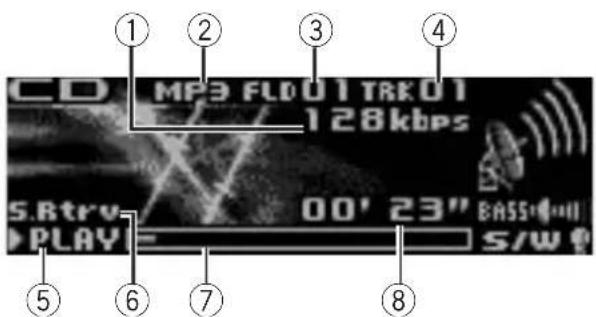
①Bitrate/samplingfrequencyindicator Showsthebitrateorsamplingfrequencyof thecurrenttrack(file)whenthecompressed audioisplaying.
- WhenplayingbackVBR(variablebit rate)-recordedWMAfiles,theaverage bitratevalueisdisplayed.
- WhenplayingbackVBR(variablebit rate)-recordedMP3files, VBRisdisplayinsteadofbitratevalue.
- WhenplayingbackVBR(variablebit rate)-recordedAACfiles,theaveragebit
ratevalueisdisplayed. However, dependingonthesoftwareusedtodecode AACfiles, VBRmaybedisplayed.
②WMA/MP3/AAC/WAVindicator
Showsthetypeofaudiofilecurrentlyplaying
whenthecompressedaudioisplaying.
③Foldernumberindicator
Showsthefoldernumbercurrentlyplaying
whenthecompressedaudioisplaying.
④Tracknumberindicator
⑤PLAY/PAUSEindicator
⑥S.Rtrvindicator AppearswhenSoundRetrieverfunctionison.
⑦Songtime(progressbar)
⑧Playtimeindicator
PlayingaCD/CD-R/CD-RW
1 Presstheopenbuttonontoopenthefrontpanel.
2 Insertthedisc, labelsideup, intothediscloading slot.
① Ifadischasalreadybeeninserted, press SRC/OFF to select the built-in CD player.
EjectingaCD/CD-R/CD-RW
1 Presstheopenbuttontoopenthefrontpanel.
2Press(eject).
PlayingsongsonaUSBstoragedevice
1 OpentheUSBconnectorcover.
2 PlugintheUSBstoragedeviceusingaUSB cable.
StopplayingaUSBstoragedevice
① You may disconnect the USB storage device at anytime.
PlayingsongsonanSDmemorycard
1 Presstheopenbuttonontoopenthefrontpanel.
2Removethefrontpanel.
3 InsertanSDmemorycardintotheSDcardslot. Insertitwiththecontactsurfacefacingdownand pressthecarduntilclicksandcompletelylocks.
4 Re-attachthefrontpanel.
5 Press SRC/OFF to select SD as the source. Playbackwillstart.
StopplayinganSDmemorycard
1 Presstheopenbuttonontoopenthefrontpanel.
2 Removethefrontpanel.
3 PresstheSDmemorycarduntilitclicks. TheSDmemorycardisejected.
4 PullouttheSDmemorycard.
5 Re-attachthefrontpanel.
Selectingafolder
1 PushM.C.upordown.
Operatingthisunit
| Selectingatrack1PushM.C.leftorright. |
| Fastforwardingorreversing1PushandholdM.C.leftorright. |
| Returningtorootfolder1Press and holdBAND/ESC. |
| SwitchingbetweenencompressedaudioandCD-DA1PressBAND/ESC. |

Notes
- When playing compressed audio, there is no sound during fast forward or reverse.
- USBportableaudioplayersthatcanbe chargedviaUSBwillberechargedwhen pluggedinandtheignitionswitchissetto ACCorON.
- DisconnectUSBstoragedevicefromunit whennotinuse.
- IfplugandplayisonandaUSBstoragedeviceispresent,dependingonthetypeofdevice,thesourcemayswitchtoUSB automaticallywhenyouturnontheengine. Pleasechangeplugandplaysettingasnecessary.RefertoUSBplug&play(plugandplay) onpage15.
Displayingtextinformation
| Selectingthedesiredtextinformation1PressDISP/ ⇌/SCRL.CDTEXTdiscs:Playtime— ⚫:discartistname and ⏻:tracktitle—:discartistnameand: disctitle— ⚫:disctitleand:tracktitle—: trackartistnameand ⏻:tracktitle—:track titleandplaytime— ⏻:tracktitle,.trackartist nameand ⚫:disctitleWMA/MP3/AAC/WAV: ⏻:tracktitleandplay time— ⏻:tracktitleand:artistname—: tracktitleand ⚫:albumtitle—:fi:nameand □: folder name—play time— ⚫: artist name and ⚫:albumtitle—:tracktitle,:artistname and ⚫:albumtitle |
| Scrollingthetextinformationtotheleft1PressandholdDISP/ ⇌/SCRL. |

Notes
- Incompatible text stored with the audio file may not be displayed for may be displayed incorrectly.
- Depending on the version of iTunes used to write MP3 files onto adisc, comment information maybe incorrectly displayed.
- WhenWindowsMediaPlayer11isusedtoencodetheWAVfiles,textinformationcanbe displayed.
Usinglists
When using the external storage devices, you can select the desired song search method. One is Selecting and playing files / tracks from thenamelist and the other is Browsing for a song. These searching method can be selected in the initial settings.
- WhenusingaCD, youcanonlyuseSelect-ingandplayingfiles/tracksfromthename list.
Selectingandplayingfiles/tracks fromthenamelist
1Press(list)toswitchtothefile/track namelistmode.
2UseM.C.toselectthedesiredfilename (orfoldername).
| Changingfileorfoldername1TumM.C. |
| Playing1Whenafileortrackisselected,pressM.C. |
| Seeingalistofffiles(orfolders)intheselectedfolder1Whenafolderisselected,pressM.C. |
| Playingasongintheselectedfolder1Whenafolderisselected,pressandholdM.C. |

Note
Tracktitlelistwilldisplaythelistoftracktitleson aCDTEXTdisc.
Browsingforasong
1Press(list)toswitchtothetopmenu ofthelistsearch.
2UseM.C.toselectacategory/song.
| Changingthenameofsongorcategory1TurnM.C.Artists (artists)—Albums (albums)—Songs (songs)—Genres(genres) |
| Playing1Whenasongisselected,pressM.C. |
| Seeingalistof songsintheselectedcategory1Whenacategoryisselected,pressM.C. |
| Playingasongintheselectedcategory1Whenacategoryisselected,pressandholdM.C. |

Notes
- Beforeusingthisfunction,youneedtooperatethefunctionintheinitialsettingmenu. RefertoMusicbrowse(listsetting)onpage 15.
- Thisunitmustcreateanindexinordertoffacilitate Artists, Albums, Songs, and Genres searches. Typically, it will take approximately 70 second to create an index for 1000 songs, and were recommend that upto 3000 songs be used. Pleasenotethat certainty types of file may take long to index than others.
- DependingonthenumberoffilesintheUSB storagedevice,theremaybeadelaywhendis-playingalist.
- Keysmaynothaveanyeffectduringthecreationofanindexorlist.
- Listsarerecreatedeachtimetheunitis turnedon.
Advancedoperationsusing specialbuttons
Selectingarepeatplayrange
1 Press ⇌/LOCtocyclebetweenthefollowing:
•DISC-Repeatalltracks
- TRACK-Repeatthecurrenttrack
• FOLDER—Repeat the current folder
- TRACK-Repeatthecurrentfile
• FOLDER—Repeat the current folder
- ALL-Repeatallfiles
CD/CD-R/CD-RW
Externalstoragedevice(USB,SD)
Enhancingcompressed audio and restoring rich sound (soundretriever)
1 PressS.Rtrvtocyclebetween:
1 is effective for low compression rates, and 2 is effective for high compression rates.
OFF(off)—1—2
Functionsettings
1PressM.C.todisplaythemainmenu.
2TurnM.C.tochangethemenuoption andpresstoselectFUNCTION.
3TurnM.C.toselectthefunction.
Afterselecting, perform the following procedure to set the function.
Playmode(repeatplay)
1 PressM.C.toselectarepeatplayrange.
Fordetails, refertoSelectingarepeatplayrangeon thispage.
Randommode(randomplay)
1PressM.C.toturnrandomplayonoroff.
Pause(pause)
1 PressM.C.topauseorresume.
SoundRetriever(soundretriever)
Automaticallyenhancescompressedaudioandre-storesrichsound.
1 PressM.C.toselectthedesiredsetting. Fordetails,refertoEnhancingcompressedaudio andrestoringrichsound(soundretriever)onthis page.

iPod
BasicOperations

①Repeatindicator
②Songnumberindicator
③Shuffleindicator
④PLAY/PAUSEindicator
⑤S.Rtrvindicator
AppearswhenSoundRetrieverfunctionison.
⑥Songtime(progressbar)
⑦Playtimeindicator
| PlayingsongsoniPod1OpentheUSBconnectorcoverandpluginan iPodusingtheiPodDockConnectortoUSB Cable. |
| Selectingatrack(chapter)1PushM.C.leftorright. |
| Fastforwardingorreversing1PushandholdM.C.leftorright. |

Notes
•TheiPod's batterywillbechargediftheignitionswitchissettoACCorON,whileconnected.
- While the iPod is connected to this unit, the iPod cannot be turned on or off unless the control mode is set to iPod.
- DisconnectheadphonesfromtheiPodbefore connectingtothisunit.
•TheiPodwillturnoffabouttwominutesafter theignitionswitchissettoOFF.
Displayingtextinformation
| Selectingthedesiredtextinformation | |
| 1 |PressDISP/ | > /SCRL. |
| Playtime—:artistnameand:songtitle—:artistnameand :albumtitle—:albumtitleand :songtitle—:songtitleandplaytime—:songtitle, :artistnameand:albumtitle | |
Scrollingthetextinformationtotheleft
1PressandholdDISP/ →/SCRL.

Note
IncompatibletextsavedontheiPodwillnotbe displayedbytheunit.
Browsingforasong
1 Press 🔒 (list)toswitchtothetopmenu ofthelistsearch.
2 UseM.C.toselectacategory/song.
| Changingthenameofsongorcategory1TurnM.C.Playlists (playlists)—Artists (artists)—Albums (albums)—Songs (songs)—Podcasts (podcasts)—Genres (genres)—Composers (composers)—Audiobooks(audiobooks) |
| Playing1Whenasongisselected,pressM.C. |
| Seeingalistof songsintheselectedcategory1Whenacategoryisselected,pressM.C. |
| Playingasongintheselectedcategory1Whenacategoryisselected,pressandholdM.C. |
| Searchingbyalphabetinthelist1Whenalistfortheselectedcategoryisdisplayed, pressQ/LISTtoswitchtoalphabetsearchmode.2Turn M.C. to select a letter.3Press M.C. to display the alphabetical list.If alphabet search is aborted, NOT FOUND is displayed. |

Note
DependingonthenumberoffilesintheiPod, theremaybeadelaywhendisplayingalist.
Advancedoperationsusing specialbuttons
Selectingarepeatplayrange
1|Press ⇌/LOCtocyclebetweenthefollowing:
•ONE-Repeatthecurrentsong
- ALL – Repeat all songs in the selected list
Playingallsongsinarandomorder(shuffleall)
1Press xx/iPodtoturnshuffleallon.
Playingsongsrelatedtothecurrentlyplayingsong Youcanplaysongsfromthefollowinglists.
—Albumlistofcurrentlyplayingartist
—Songlistofcurrentlyplayingalbum
—Albumlistofcurrentlyplayinggenre
1 Press and hold M.C. to switch to the link play mode.
|2| Turn M.C. to change the mode; press to select.
- Artist – Plays an album of currently playing artist.
- Album – Plays a song of currently playing album.
- Genre – Plays an album of currently playing genre.
Theselected song/album will be played after the currently playings song.
- Theselected song/album may be cancelled if you operate functions other than link search (e.g. fast forward and reverse).
- Ifnorelatedalbums/songsarefound, Notfound isdisplayed.
- Dependingonthesongselectedtoplay,theend ofthecurrentlyplayingsongandthebeginning oftheselectedsong/albummaybecutoff.
Operatingthisunit'siPodfunctionfromyouriPod Thisfunctionisnotcompatiblewiththefollowing iPodmodels.
—iPodnano1stgeneration
—iPod5thgeneration
Thisunit'siPodfunctionallowsyoutoconductoperationsfromyouriPodandlistentoitusingyourcar's speakers.
- Press XX/iPodandholdtoswitchthecontrol mode.
- iPod – This unit's iPod function can be operated from the connected iPod.
- AUDIO – This unit's iPod function can be operated from this unit.
Enhancingcompressed audio and restoring rich sound (soundretriever)
RefertoEnhancingcompressedaudioandrestoring richsound(soundretriever)onpage10.
Functionsettings
1PressM.C.todisplaythemainmenu.
2TurnM.C.tochangethemenuoption andpresstoselectFUNCTION.
3TurnM.C.toselectthefunction.
Afterselecting, perform the following procedure to set the function.
Playmode(repeatplay)
- Refer to Play mode (repeat play) on page 10. HowevertherepeatrangeisdifferentfromCD/USBstoragedevice.RefertoSelectingarepeatplayrangeonthispage.
Shufflemode(shuffle)
1 PressM.C.toselectyourfavoritesetting.
- Shuffle Songs – Play back songs in the selectedlistinrandomorder.
- Shuffle Albums – Play back songs from a randomlyselectedalbuminorder.
- ShuffleOFF-Cancelrandomplay.
Shuffleall(shuffleall)
1 PressM.C.toturnshuffleallon. Toturnoff, setShufflemode in the FUNCTION menutooff.
Linkplay(linkplay)
① Turn M.C. to change the mode; press to select. Fordetailsaboutthesettings,refertoPlaying songsrelatedtothecurrentlyplayingsongonthis page.
Controlmode(controlmode)
1 PressM.C. to select your favoritesetting. Fordetails about these settings, refer to Operating this unit's iPod function from your iPod on this page.
PAUSE(pause)
• Refer to Pause (pause) on page 10.
Audiobooks(audiobookspeed)
Theplaybackspeedofaudiobookcanbechanged.
1 PressM.C. to select your favoritesetting.
- Faster – Playback faster than normal speed - Normal–Playback innormalspeed
- Slower – Playback slower than normal speed
SoundRetriever(soundretriever)
• Refer to Sound Retriever (sound retriever) on page10.

Notes
- SwitchingthecontrolmodetoiPodpauses song playback.OperatetheiPodtoresume playback.
- The following functions are still accessible from the uniteven if the control mode is set to iPod.
—Volume
—Fastforward/reverse
—Trackup/down
—Pausing
—Switchingthetextinformation
- WhenthecontrolmodeissettoiPod, operationsarelimitedasfollows:
—OnlyControlmode(controlmode), PAUSE(pause)andSoundRetriever (soundretriever)functionsareavailable.
—Browsefunctioncannotbeoperatedfrom thisunit.
AudioAdjustments

①Audiodisplay
Showstheaudioadjustmentstatus.
Advancedoperationsusing specialbuttons
Subwooferon/offsetting
1|Press 📋/BASStoselectthesubwooferon/offsettingmenu.
2 Press M.C. to turn subwoofer output on or off.
3 Push M.C. left or right to select the phase of subwooferoutput.
Bassboost
1 Pressandhold /BASS to select the bass boost setting menu.
2 Push M.C. up or down to select a desired level.
Audiofunctionsettings
1PressM.C.todisplaythemainmenu.
2TurnM.C.tochangethemenuoption andpresstoselectAUDIO.
3TurnM.C.toselecttheaudiofunction.
Afterselecting, perform the following procedure to set the audio function.
Fader/Balance(fader/balanceadjustment)
1 Push M.C. up or down to adjust front/rear speaker balance.
F15toR15isdisplayedasthefront/rearspeaker balancemovesfromfronttorear.
• F/RO isthepropersetting when only two speakers are used.
- When the rear output setting is Rear SP :S/W, you cannot adjust front/rearspeaker balance. Referto S/W control (rear output and subwoo-fersetting) on page 16.
2 Push M.C. left or right to adjust left/right speaker balance.
L15toR15isdisplayedastheleft/rightspeaker balancemovesfromlefttoright.
Powerful(equalizerrecall)
1 Push M.C. left or right to select an equalizer curve.
Powerful—Natural—Vocal—Custom1—Custom2—Flat—Superbass
- When Flat is selected no adjustments are madetothesound.
100Hz(equalizeradjustment)
You can adjust the currently selected equalizer curve settings as desired. Adjusted equalizer curves settings are memorized in Custom1 or Custom2.
- A separate Custom1 curve can be created for eachsource.Ifyoumakeadjustmentswhena curveotherthanCustom2isselected,theequalizercurvesettingswillbememorizedinCustom1.
- A Custom2 curve can be created common to all sources. If you make adjustments when the Custom2 curve is selected, the Custom2 curve will be updated.
1) Recall the equalizer curve you want to adjust.
2 Push M.C. left or right to select the equalizer bandtoadjust. 100Hz—315Hz—1.25kHz—3.15kHz—8kHz
[3] Push M.C. up or down to adjust the equalizer curve. +6 to -6 is displayed as the equalizer curve is increased or decreased.
LOUD(loudness)
Loudnesscompensatesfordeficienciesinthelow-andhigh-frequencyrangesatlowvolume.
1PressM.C.toturnloudnessonoroff.
② Push M.C. left or right to select the desired setting.
Low (low)—Mid (mid)—High (high)—OFF (off)
SubW.1(subwooferon/offsetting)
Thisunitisequippedwithasubwooferoutputwhich canbeturnedonoroff.
1 Press M.C. to turn subwoofer output on or off.
2 Push M.C. left or right to select the phase of subwooferoutput.
Push M.C. left to select reverse phase and Reverse appears in the display. Push M.C. right to select normal phase and Normal appears in the display.
SubW.2(subwooferadjustment)
Whenthesubwooferoutputison,youcanadjustthe cut-offfrequencyandtheoutputlevelofthesubwoofer.
Only frequencies lower than those in these selected range are outputted from the subwoofer.
[1] Push M.C. left or right to select cut-off frequency.
50Hz—63Hz—80Hz—100Hz—125Hz
2 Push M.C. up or down to adjust the output level of the subwoofer.
EachtimeM.C.ispushedupordown,subwoofer levelincreasesordecreases.+6to-24isdisplayedasthelevelisincreasedordecreased.
Bass(bassboost)
1 Push M.C. up or down to select a desired level. 0 to +6 is displayed as the level is increased or decreased.
HPF(highpassfilteradjustment)
When you donotwantlowsoundsfromthesubwooferoutputfrequencyrangetoplayfromthefrontorrearspeakers, turnontheHPF(highpassfilter). Only frequencieshigherthanthoseintheselectedrange are outputfromthefrontorrearspeakers.
1PressM.C.toturnhighpassfilteronoroff.
2 Push M.C. left or right to select cut-off frequency.
50Hz—63Hz—80Hz—100Hz—125Hz
SLA(sourceleveladjustment)
SLA(Sourceleveladjustment)letsyouadjustthevolumelevelofeachsourcetopreventradicalchangesinvolumewhenswitchingbetweensources.
- SettingsarebasedontheFMvolumelevel,which remainsunchanged. Beforeadjustingsourcelevels,comparetheFM volumelevelwiththelevelofthesourceyouwish toadjust.
• The AM volume level can also be adjusted with source level adjustments.
1 Push M.C. up or down to adjust the source volume. Adjustment range: +4 to -4

Note
WhenselectingFMasthesource,youcannot switchtoSLA.
InitialSettings

①Functiondisplay
• Showsthefunctionstatus.
1PressSRC/OFFandholduntiltheunit turnsoff.
2PressM.C.andholduntiltheinitialsettingmenuappearsinthedisplay.
Operatingthisunit
3TurnM.C.toselecttheinitialsetting.
Afterselecting, perform the following procedure to set the initial setting.
Languageselect(multilanguage)
Foryourconvenience, thisunitequipsmultiplelanguagedisplay.Youcanselectthelanguagebestsuitedtoyourfirstlanguage.
|1|PressM.C.toselectthelanguage. English—Español—Português
Calendar(settingthedate)
1 Push M.C. left or right to select the segment of the calendardisplayyouwishtoset.
Day—Month—Year
2 Push M.C. up or down to set the date.
Clock(settingtheclock)
1 Push M.C. left or right to select the segment of theclockdisplayyouwishtoset.
Hour—Minute
2 Push M.C. up or down to put a clock right.
- You can match the clock to times signal by pressing M.C.
- If 00 to 29, the minutes are rounded down. (e.g., 10:18 becomes 10:00.)
- If 30 to 59, the minutes are rounded up. (e.g., 10:36 becomes 11:00.)
EngineTimealert(elapsedtimedisplaysetting)
Thissettingallowsyoutomeasurethelengthoftime thatelapsesfromwhenthemachineisturnedonand displaytheamountofelapsedtimepersetperiod. Also,youwillhearalarm.
①PressM.C.toselectyourfavoritesetting. OFF—15Minutes—30Minutes
FMstep(FMtuningstep)
TheFMtuningstepemployedbyseektuningcanbe switchedbetween100kHz,thepresetstep,and50 kHz.
Ifseektuningisperformedin50kHzsteps, stations maybetunedinimprecisely. Tuneinthestationswith manualtuningoruseseektuningagain.
1 PressM.C.todisplaythesettingmode.
2 Turn M.C. to select the FM tuning step. 50kHz(50kHz)—100kHz(100kHz)
AMSTEP(AMtuningstep)
TheAMtuningstepcanbeswitchedbetween9kHz, thepresetstep,and10kHz.Whenusingthetunerin North,CentralorSouthAmerica,resetthetuning stepfrom9kHz(531kHzto1602kHzallowable)to10 kHz(530kHzto1640kHzallowable).
1PressM.C.toselecttheAMtuningstep. 10KHZ(10kHz)—9KHZ(9kHz)
USBplug&play(plugandplay)
ThissettingallowsyoutoswitchyoursourcetoUSB/IPODautomatically.
[1] Press M.C. to turn the plug and play on or off.
- ON – When USB storage device/iPod is connected, the source is automatically switched to USB/IPOD. If you disconnect your USB storage device/iPod, this unit's source is turned off.
- OFF – When USB storage device/iPod is connected, the source is not switched to USB/IPOD automatically. Please change the source to USB/IPOD manually.
Musicbrowse(listsetting)
When using the external storage devices, you can search for the desired songs from the file/folder list or artist/album/song/genrecategorylist.
- ThissettingcanbesettoeitherUSBmemoryor SDcard.
• Musicbrowse can be used with ID3tagVer.2. - Itmaytaketimetomaketheartist/album/song/genrecategorylist.
- Fordetailsconcerningoperation,pleaseesethe followingsection.RefertoBrowsingforasongon page10.
①PressM.C.toselectyourfavoritesetting.
- OFF-file/folderlistcanbeused.
- USB memory –When a USB storage device is used, asongcanbeselectedfromtheartist/album/song/genrelist.
- SD card –When an SD card is used, a song canbeselectedfromtheartist/album/song/genrelist.
Warningtone(warningtonesetting)
Ifthefrontpanelisnotdetachedfromtheheadunit withinfoursecondsofturningofftheignition,awarningtonesounds.Youcanturnoffthewarningtone.
1 Press M.C. to turn the warning tone on or off.
AUX(auxiliaryinput)
Activate this setting when using auxiliary device connected to this unit.
[1]PressM.C.toturnauxiliarysettingonoroff.
Dimmer(dimmersetting)
Topreventthedisplayfrombeingtoobrightatnight, thedisplayisautomaticallydimmedwhenthecar's headlightsareturnedon.Youcanturnthedimmeron oroff.
1 | Press M.C. toturndimmeronoroff.
Brightness(displaybrightnesssetting)
[1] Push M.C. left or right to adjust the brightness level.
0 to 15 is displayed as the level is increased or decreased.
- Whendimmerisfunctioning, thebrightness level can be adjusted 0 to 10.
S/Wcontrol(rearoutputandsubwoofersetting)
Thisunit'srearoutput(rearspeakerleadsoutputand RCArearoutput)canbeusedforfull-rangespeaker (Rear SP :F.Range) or subwoofer (Rear SP :S/W) connection.IfyouswitchtherearoutputsettingtoRear
SP:S/W, you can connect are speakers lead directly to asubwoofer without using an auxiliary amp.
1 | PressM.C. to switch therear output setting.
- Whennosubwooferisconnectedtotherear output,selectRearSP:F.Range(full-range speaker).
- Whenasubwooferisconnectedtotherear output, selectRearSP:S/W(subwoofer).
- Evenifyouchangethissetting,thereisnooutput unlessyouturnthesubwooferoutputon(referto Sub W.1 (subwoofer on/off setting) on page 14).
- If you chan get his setting, subwoofer output in the audiomenu will return to the factory settings.
- BothrearspeakerleadoutputsandRCArearoutputareswitchedsimultaneouslyinthissetting.
Demonstration(demodisplaysetting)
1 PressM.C.tpturnthedemodisplayonoroff.
- Youcanalsoturnonorofffeatureddemoby pressingDISPwhilethisunitisturnedoff.For moredetails,refertoDemomodeonpage3.
Reversemode(reversemodesetting)
1 Press M.C. to turn the reverse mode on or off.
- Youcanalsoturnonoroffreversemodeby pressingBANDwhilethisunitisturnedoff. Formoredetails,refertoReversemodeon page3.
Ever-scroll(scrollmodesetting)
When EverScrollissettoON, recorded text information scrolling continuously in the display. SettoOFF if you prefer the information to scroll just once.
1 PressM.C.toturntheeverscrollonoroff.
OtherFunctions
UsingtheAUXsource
1Insertthestereominiplugintothe AUXinputjack.
2PressSRC/OFFtoselectAUXasthe source.

Note
AUX cannot be selected unless the auxiliary setting is turned. Formed details, refer to AUX (auxiliary input) on the previous page.
Clockdisplay
- Press/DISPOFFtoselectthedesired setting.
Clockoff—clockdisplay—elapsedtimedisplay
Switchingthedisplayindication andbuttonillumination
Displayindicationandbuttonilluminationcan beswitchedonoroff.
●Pressandhold 📋 /DISPOFF.
Pressingandholding ⏻/DISPOFFswitches thedisplayindicationandbuttonillumination onoroff.
■Evenifthdisplayindicationisturnedoff,operationcanbeconducted.Ifoperationisconductedwhilethedisplayindicationisoff,displaywilllightupforafewsecondsandthenturnoff again.
Usingdifferententertainment displays
Youcanenjoyentertainmentdisplayswhilelisteningtoeachsoundsource.
1PressM.C.todisplaythemainmenu.
2TurnM.C.tochangethemenuoption andpresstoselectENTERTAINMENT.
Operatingthisunit
3TurnM.C.tochangethedisplay.
Backgroundvisual—genre—backgroundpicture1—backgroundpicture2—backgroundpicture3—backgroundpicture4—simpledisplay—moviescreen1—moviescreen2—calendar
■Genredisplaychangesdependingonthe genreofmusic.
■Genredisplaymaynotoperatecorrectlydependingontheapplicationusedtoencodeaudio files.
AdditionalInformation
Troubleshooting
| SymptomCauseAction(See) | ||
| Thedisplay automatically returnstothe ordinarydis-play. | Youdidnotper-formanyopera-tionwithinabout 30seconds. | Performoperation again. |
| Therepeatplay rangechanges unexpectedly. | Dependingon therepeatplay range,these-lectedrangemay changewhense-lectinganother folderortrack,or whenfastfor-warding/rever-sing. | Selecttherepeat playrangeagain. |
| Asubfolderis notplayed back. | Subfolderscan-notbeplayed whenFOLDER (folderrepeat)is selected. | Selectanotherre-peatplayrange. |
| NOXXXXap-pearswhena displayischan-ged(e.g.,NO TITLE). | Notextinforma-tionembedded | Switchthedisplay orplayanother track/file. |
| Thedisplayis illuminated whentheunit isturnedoff. | Demomodeis on. | PressDISP/ ⚫/ SCRLtocancel demomode. |
| Theunitismal-functioning. Thereisinter-ference. | Youareusinga device,suchasa cellphone,that transmitselectro-magneticwaves neartheunit. | Moveelectricalde-vicesthatmaybe causingtheinter-ferenceawayfrom theunit. |

Errormessages
Whenyoucontactyourdealeroryournearest PioneerServiceCenter,besuretonotethe errormessage.
Built-inCDPlayer
| MessageCauseAction | ||
| ERROR-11,12, 17,30 | DirtydiscCleandisc. | |
| ScratcheddiscReplacedisc. | ||
| ERROR-10,11, 12,15,17,30, A0 | Electricalormechanical | Turntheignition switchOFFand backON,orswitch toadifferent source,thenback totheCDplayer. |
| ERROR-15Theinserteddisc isblank | Replacedisc. | |
| ERROR-22,23UnsupportedCD format | Replacedisc. | |
| FORMAT READ | Thereissome-timesadelaybetweenthestartof playback and whenyoustartto hearanysound | Waituntilthemes-sagedisappears andyouhear sound. |
| NOAUDIO | Theinserteddisc doesnotcontain anyplayablefiles | Replacedisc. |
| SKIPPED | Theinserteddisc containsDRM protectedWMA files | Replacedisc. |
| PROTECT | Allthefileson theinserteddisc areembedded withDRM | Replacedisc. |
Externalstoragedevice(USB,SD)
| MessageCauseAction | ||
| NODEVICE | Whenplugand playisoff,no USBstoragedeviceisconnected. | •Turntheplug andplayon.•Connectacom- patileUSBsto- ragedevice. |
| FORMAT READ | Thereissome- timesadelaybe- tweenthestartof playbackand whenyoustartto hearanysound | Waituntilthemes- sagedisappears andyouhear sound. |
Additional Information
| NOAUDIO | NosongsTransfertheaudio | |
| filestotheUSB storagedeviceand connect. | ||
| Theconnected USBstoragedevicehassecurity enabled | FollowtheUSB storagedevicein-structionstodis-ablethesecurity. | |
| SKIPPEDTheconnected USBstoragedevicecontains WMAfilesem-beddedwith WindowsMed-iaTMDRM9/10 | Playanaudiofile notembeddedwith WindowsMedia DRM9/10. | |
| PROTECTAllthefilesinthe USBstoraged-viceareem-beddedwith WindowsMedia DRM9/10 | Transferaudiofiles notembeddedwith WindowsMedia DRM9/10tothe USBstoragede-viceandconnect. | |
| CHECKUSBTheUSBconnec-tororUSBcable hasshort-circuited. | Checkthatthe USBconnectoror USBcableisnot caughtinsome-thingordamaged. | |
| Theconnected USBstoragede-viceconsumes morethan500 mA(maximum allowablecur-rent). | ||
| CHECKSDOvercurrentto theSDmemory card | EjecttheSDmem-orycardandthen insertitagain. | |
| Communication failure | ||
| NOTCOMPATIBLE | Notcompatible USBdevice | Disconnectyour deviceandreplace itwithacompati-bleUSBstorage device. |
| ERROR-19 | Communication failure | Performoneofthe followingoperations.-Turntheignition switchOFFand backON.-Disconnector ejecttheexternal storagedevice.-Changetoadifferentsource.Then,returntothe USBorSDsource. |
| ERROR-23 | USBstoragedeviceisnotformattedwith FAT12,FAT16or FAT32 | USBstoragedev- viceshouldbefor-mattedwithFAT12,FAT16orFAT32. |
| CHECKING ➤TAGS | Theunitiscreatinganindexor listforthemusic browsefunction. | Pleasewaituntil thisoperationhas beencompleted. |
iPod
| MessageCauseAction | ||
| NODEVICEWhenplugand playisoff, no USBstoragedeviceoriPodis connected. | •Turntheplug andplayon.•Connectacom-patibleiPod. | |
| FORMAT READ | Thereissome-timesadelaybeteenthestartof playbackand whenyoustartto hearanysound | Waituntilthemes-sagedisappears andyouhear sound. |
| ERROR-19Communication failure | Disconnectthe cablefromiPod.OnceiPod'smain menuisdisplayed, reconnectcable. ResettheiPod. | |
| iPodfailure | ||
AdditionalInformation
| ERROR-16 | OldiPodfirm-wareversions | UpdatetheiPod version. |
| iPodfailureDisconnectthe | ||
| cablefromiPod.OnceiPod'smain menuisdisplayed, reconnectcable. ResettheiPod. | ||
| N/AUSBNotcompatible iPod | Disconnectyour deviceandreplace itwithacompati-bleiPod. | |
| CHECKUSBiPodoperates correctlybut doesnotcharge | Checkifthecon- nectioncablefor iPodshortedout (e.g.,notcaughtin metalobjects). Afterchecking, turntheignition switchOFFand backONordiscon- necttheiPodand reconnect. | |
| STOPNosongsTransfersongsto | iPod. | |
| Nosongsinthe currentlist Selectalistthat containssongs. | ||

Handlingguideline
Discsandplayer
Useonlydiscsfeaturingeitheroffollowingtwologos.


Use12-cmdisc.Donotuse8-cmdiscoranadapter for8-cmdisc.
Useonlyconventional,fullycirculardiscs.Donotuse shapeddiscs.
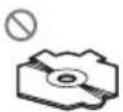

| DonotinsertanythingotherthanaCDintotheCD loadingslot. |
| Donotusecracked,chipped,warped,orotherwise damageddiscsastheymaydamagetheplayer. |
| UnfinalizedCD-R/CD-R\Wdiscplaybackisnotpossible. |
| Donottouchtherecordedsurfaceofthediscs. |
| Storediscsintheircaseswhennotinuse. |
| Avoidleavingdiscsinexcessivelyhotenvironments includingunderdirectsunlight. |
| Donotattachlabels,writeonorapplychemicalsto thesurfaceofthediscs. |
| TocleanaCD,wipethediscwithasoftclothoutward fromthecenter. |
| Condensationmaytemporarilyimpairtheplayer's performance.Leaveittoadjusttothewarmertemperatureforaboutonehour.Also,wipeanydamp discswithasoftcloth. |
| Playbackofdiscsmaynotbepossiblebecauseof disccharacteristics,discformat,recordedapplication,playbackenvironment,storageconditions,and soon. |
| Roadshocksmayinterruptdisc playback. |
| Readtheprecautionsfordiscsbeforeusingthem. |
Externalstoragedevice(USB,SD)
Addressanyquestionsyouhaveaboutyourexternal storagedevice(USB,SD)tothemanufacturerofthe device.
Donotleavetheexternalstoragedevice(USB,SD)in anyplacewithhightemperatures.
Depending on the external storage device (USB, SD), the following problem may occur.
- Operationsmayvary.
- Thisunitmaynotrecognizethestoragedevice.
- Thefilemaynotbeplayedbackproperly.
USBstoragedevice
ConnectionsviaaUSBhubarenotsupported.
DonotconnectanythingotherthanaUSBstorage device.
AdditionalInformation
FirmlysecuretheUSBstoragedevicewhendriving. DonotlettheUSBstoragedevicefallontothefloor, whereitmaybecomejammedunderthebrakeoracceleratorpedal.
Depending on the USB storage device, the following problem may occur.
• Thedevicemaygeneratenoiseintheradio.
SDmemorycard
This unitsupportsonlythefollowingSDmemory cards.
•SD
• miniSD
- microSD
•SDHC
KeeptheSDmemorycardoutofthereachofchildren.ShouldtheSDmemorycardbeswallowed,consultadoctorimmediately.
DonottouchtheconnectorsoftheSDmemorycard directlywithyourfingersorwithanymetaldevice.
DonotinsertanythingotherthananSDmemorycard intotheSDcardslot.lfametalobject(e.g.acoin)is insertedintotheslot,theinternalcircuitsmaybreak andcausemalfunctions.
When inserting aminiSDormicroSD, use an adapter. Donot use an adapter which has metal part sother than the connector sexposed.
DonotinsertadamagedSDmemorycard(e.g. warped, labelpeeledoff)asitmaynotbeejected fromtheslot.
DonottrytoforceanSDmemorycardintotheSD cardslotastheSDmemorycardorthisunitmaybe damaged.
WhenyouejectanSDmemorycard, pressitand holduntilclicks.ItisdangeroustopresstheSD memorycardandreleaseyourfingerimmediatelyas theSDcardmayshootoutoftheslotandhityouin theface,etc.IftheSDmemorycardshootsoutofthe slot,itmaygomissing.
iPod
DonotleavetheiPodindirectsunlightforextended amountsoftime.Extendedexposuretodirectsun-lightcanresultiniPodmalfunctionduetotheresult-inghightemperature.
Donotleavethei Podinanyplace with hightemperatures.
Toensureproperoperation,connectthedockconnectorcablefromtheiPoddirectlytothisunit.
FirmlysecuretheiPodwhendriving.Donotletthe iPodfallontothefloor,whereitmaybecomejammed underthebrakeoracceleratorpedal.
Fordetails.refertotheiPod'smanuals.
AboutiPodsettings
- WhenaniPodisconnected, this unitchangesthe EQ(equalizer) setting of the Podtooffinorderto optimizetheacoustics. When you disconnect the iPod, the EQ return to the original setting.
- You cannot set Repeats to off thei Pod when using this unit. Repeats automatically changed to all when connecting thei Pod to this unit.
DualDiscs
DualDiscsaretwo-sideddiscsthathavearecordable CDforaudioononesideandarecordableDVDfor videoontheother.
SincetheCDsideofDualDiscsisnotphysicallycompatiblewiththegeneralCDstandard,itmaynotbe possibletoplaytheCDsidewiththisunit.
FrequentloadingandejectingofaDualDiscmayresultinscratchesonthedisc.Seriousscratchescan leadtoplaybackproblemsonthisunit.Insome cases,aDualDiscmaybecomestuckinthedisloadingslotandwillnoteject.Topreventthis,werecommendyourefrainfromusingDualDiscwiththisunit.
PleaserefertotheinformationfromthediscmanufacturerformoredetailedinformationaboutDualDiscs.

Compressedaudio compatibility(disc,USB,SD)
WMA
Fileextension:.wma
Bitrate:48kbpsto320kbps(CBR).48kbpsto384kbps(VBR)
Samplingfrequency:32kHz,44.1kHz,48kHz
WindowsMediaAudioProfessional, Lossless, Voice/DRMStream/Streamwithvideo: No
AdditionalInformation
MP3
| Fileextension:.mp3 |
| Bitrate:8kbpsto320kbps |
| Samplingfrequency:8kHzto48kHz(32kHz,44.1 kHz,48kHzforeemphasis) |
| CompatibleID3tagversion:1.0,1.1,2.2,2.3,2.4(ID3 tagVersion2.xisgivenpriorityoverVersion1.x.) |
| M3uplaylist:No |
| MP3i(MP3interactive),mp3PRO:No |
WAV
| Fileextension:.wav |
| Quantizationbits:8and16(LPCM),4(MSADPCM) |
| Samplingfrequency:16kHzto48kHz(LPCM),22.05 kHzand44.1kHz(MSADPCM) |
AAC
| Compatibleformat: AACencodedbyiTunes |
| Fileextension:.m4a |
| Samplingfrequency:11.025kHzto48kHz |
| Transmissionrate:16kbpsto320kbps,VBR |
| AppleLossless:No |
| AACfileboughtontheiTunesStore(.m4pfileextension):No |
Supplementalinformation
| Onlythefirst32characterscanbedisplayedasafilename(includingthefileextension)orafoldername. |
| ThisunitmaynotoperatecorrectlydependingontheapplicationusedtoencodeWMAfiles. |
| Theremaybeaslightdelaywhenstartingplaybackofaudiofilesembeddedwithmagedata. |
Disc
| Playablefolderhierarchy:uptoeighttiers(Apractical hierarchyislessthantwotiers.) |
| Playablefolders:upto99 |
| Playablefiles:upto999 |
| Filesystem:ISO9660Level1and2,Romeo,Joliet |
| Multi-session playback:Yes |
| Packetwritedatatransfer:No |
| Regardless of the length of blank section between the song of the original recording, compressed audio discs play with short pause between songs. |
Externalstoragedevice(USB,SD)
| Playablefolderhierarchy:uptoeighttiers(Apractical hierarchyislessthantwotiers.) |
| Playablefolders:upto1500 |
| Playablefiles:upto15000 |
| Playbackofcopyrightprotectedfiles:No |
| Partitionedexternalstoragedevice(USB,SD):Only thefirstplayablepartitioncanbeplayed. |
| Theremaybeaslightdelaywhenstartingplaybackof audiofilesonanexternalstoragedevice(USB,SD) withnumerousfolderhierarchies. |
SDmemorycard
| ThereisnocompatibilityforMultiMediaCards (MMC). |
| CompatibilitywithallISDmemorycardsisnotguaranteed. |
| ThisunitisnotcompatiblewithSD-Audio. |

CAUTION
Pioneeracceptsnoresponsibilityfordataloston theUSBmemory/USBportableaudioplayer/SD memorycard/SDHCmemorycardevenifthat dataislostwhileusingthisunit.
iPodcompatibility
ThisunitsupportsonlythefollowingiPodmodels. SupportediPodsoftwareversionsareshownbelow. Olderversionsmaynotbesupported.
- iPodnano4thgeneration(softwareversion1.0.3)
- iPodnano3rdgeneration(softwareversion1.1.3)
- iPodnano2ndgeneration(softwareversion1.1.3)
- iPodnano1stgeneration(softwareversion1.3.1)
- iPodtouch2ndgeneration(softwareversion3.0)
- iPodtouch1stgeneration(softwareversion3.0)
- iPodclassic120GB(softwareversion2.0.1)
- iPodclassic(softwareversion1.1.2)
- iPod5thgeneration(softwareversion1.3)
• iPhone3GS(softwareversion3.0)
• iPhone3G(softwareversion3.0)
• iPhone(softwareversion3.0)
DependingonthegenerationorversionoftheiPod, somefunctionscannotbeoperated.
OperationsmayvarydependingonthesoftwareversionofiPod.
When using an iPod, iPod Dock Connect to USB Cable is required.
PioneerCD-IU50interfacecableisalsoavailable.For details,consultyourdealer.
About the file/format compatibility, refertoi Podmanuals.
AudioBook, Podcast: Yes

CAUTION
Pioneeracceptsnoresponsibilityfordataloston theiPodevenifthatdataislostwhileusingthis unit.
Sequenceofaudiofiles
Theusercannotassignfoldernumbersand specify playbacksequenceswiththisunit.
Exampleofahierarchy

flowchart
graph TD
    A["01"] --> B["02"]
    A --> C["03"]
    A --> D["04"]
    A --> E["05"]
    B --> F["①"]
    B --> G["②"]
    C --> H["③"]
    C --> I["④"]
    D --> J["⑤"]
    D --> K["⑥"]
Level 1 Level 2 Level 3 Level 4
:Folder Compressed audiofile 01to05:Folder number ①to⑥:Playback sequence
Disc
Folderselectionsequenceorotheroperation may differ depending on the encoding or writing software.
Externalstoragedevice(USB,SD)
Playbacksequenceisthesameasrecorded sequenceintheexternalstoragedevice(USB, SD).
- Ifbrowsingforasongfunctionisengaged, playbacksequenceischangedtoalphabetic-orderintheselectedcategory. Tospecifythe playbacksequence, the following method is recommended.
①Createthefilenameincludingnumbersthat specifythe playbacksequence(e.g., 001xxx.mp3and099yyy.mp3).
2 Putthosefilesintoafolder.
3 Savethefoldercontainingfilesontheexternal storagedevice(USB,SD).
However, depending on the system environment, you cannot specify the playback sequence.
ForUSBportableaudioplayers,thesequence isdifferentanddependsontheplayer.
Copyrightandtrademark
iTunes
AppleandiTunesaretrademarksofApple Inc., registeredintheU.S.andothercoun-tries.
AdditionalInformation
MP3
Supplyofthisproductonlyconveysalicense forprivate,non-commercialuseanddoesnot conveyalicensenorimplyanyrighttouse thisproductinanycommercial(i.e.revenue-generating)realtimebroadcasting(terrestrial, satellite,cableand/oranyothermedia),broadcasting/streamingviainternet,intranetsand/orothernetworksorinotherelectroniccontentdistributionsystems,suchaspay-audioor audio-on-demandapplications.Anindependentlicenseforsuchuseisrequired.Fordetails,pleasevisit http://www.mp3licensing.com.
WMA

WindowsMediaandtheWindowslogoaretrademarksorregisteredtrademarksofMicrosoft CorporationintheUnitedStatesand/orother countries.
Thisproductincludestechnologyownedby MicrosoftCorporationandcannotbeusedor distributedwithoutalicensefromMicrosoft Licensing,Inc.
SDmemorycard

SDLogoisattrademark.

miniSDLogoisatrademark.

microSDLogoisattrademark.

SDHCLogoisattrademark.
iPod

iPodisatrademarkofAppleInc., registered in the U.S. and other countries.
"MadeforiPod"meansthatanelectronicaccessoryhasbeendesignedtoconnectspecifi-callytoiPodandhasbeencertifiedbythedevelopertomeetAppleperformancestan-dards.
Apple is not responsible for the operation of this device or its compliance with safety and regulatory standards.
iPhone

iPhoneisatrademarkofAppleInc.
AdditionalInformation
"WorkswithiPhone" meansthatanelectronic accessoryhasbeendesignedtoconnectspecificallytoiPhoneandhasbeencertifiedby thedeveloppertomeetAppleperformance standards.
Appleisnotresponsiblefortheoperationof thisdeviceoritscompliancewithsafetyand regulatorystandards.
AdditionalInformation
Specifications
General
Ratedpowersource......14.4VDC (allowablevoltagerange: 12.0Vto14.4VDC)
Groundingsystem......Negativetype
Maximumcurrentconsumption 10.0A
Equalizer(5-BandGraphicEqualizer): Frequency.....100/315/1.25k/3.15k/8kHz Gain.....±12dB
HPF: Frequency.....50/63/80/100/125Hz Slope.....-12dB/oct
Subwoofer(mono): Frequency.....50/63/80/100/125Hz Slope.....-18dB/oct Gain.....+6dBto-24dB Phase.....Normal/Reverse
Bassboost: Gain.....+12dBto0dB
CDplayer
System....Compactdiscaudiosystem
Usablediscs....Compactdisc
Signal-to-noiseratio....94dB(1kHz)(IEC-Anetwork)
Numberofchannels......2(stereo) MP3decodingformat......MPEG-1&2AudioLayer3 WMAdecodingformat......Ver.7,7.1,8,9,10,11(2ch audio) (WindowsMediaPlayer)
AACdecodingformat......MPEG-4AAC(iTunesencodedonly)(.m4a) (Ver.8.2andearlier)
WAVsignalformat....LinearPCM&MSADPCM (Non-compressed)
USB
USBstandardspecification ....USB2.0fullspeed
Maximumcurrentsupply...500mA Filesystem.....FAT12,FAT16,FAT32
MP3decodingformat......MPEG-1&2AudioLayer3
WMAdecodingformat......Ver.7,7.1,8,9,10,11(2ch audio) (WindowsMediaPlayer)
AACdecodingformat......MPEG-4AAC(iTunesencodedonly)(.m4a) (Ver.8.2andearlier)
WAVsignalformat....LinearPCM&MSADPCM (Non-compressed)
SD
Compatiblephysicalformat Version2.00
Maximum memory capacity 32GB(forSDandSDHC)
Filesystem.....FAT12,FAT16,FAT32
MP3decodingformat......MPEG-1&2AudioLayer3
WMAdecodingformat......Ver.7,7.1,8,9,10,11(2ch audio) (WindowsMediaPlayer)
AACdecodingformat......MPEG-4AAC(iTunesencodedonly)(.m4a) (Ver.8.2andearlier)
WAVsignalformat....LinearPCM&MSADPCM (Non-compressed)
FMtuner
Frequencyrange.....87.5MHzto108.0MHz
Usable sensitivity .... 9 dBf (0.8 μV/75 Ω, mono, S/N:30dB)
Signal-to-noiseratio....72dB(IEC-Anetwork)
AMtuner
Frequencyrange....531kHzto1602kHz(9kHz) 530kHzto1640kHz(10kHz)
Usablesensitivity.....25μV(S/N:20dB)
Signal-to-noiseratio....62dB(IEC-Anetwork)
Infraredremotecontrol
Wavelength....940nm±50nm
Output......typ;12mw/srperInfrared LED

Note
Specificationsandthedesignaresubjecttomodificationswithoutnotice.
Índice
GraciasporhaberadquiridoesteproductoPIONEER.
natural_image
Diagram of a device with a pen inserted into a panel, showing no text or symbolsBotónRESET
1Extraigaelpaneldelantero.
2PulseRESETconlapuntadeunbolígra-fouotroinstrumentopuntiagudo.
Acercadeestemanual
| ParteParte | ||
| 1SRC/OFF9 | /LOC | |
| 2 | Q (lista)10S.Rtrv | |
| 3 | xx/iPod11 | MULTI-CONTROL(M.C.) |
| 4BotónAbrir12DISP/ | /SCRL | |
| 5 | Conectordeentra-daAUX(conector estéreode3,5mm) | 13BAND/ESC |
| 6PuertoUSB14 | Ranuradecargade discos | |
| 7 | /DISPOFF15▲(expulsar) | |
| 8 | /BASS16 | Ranuraparalatar-jetademoriaSDAlextraerlacarátu-la,podráverlara-nuradelatarjeta dememoriaSD. |

PRECAUCIÓN
Encendidodelaunidad
natural_image
Diagram of a mechanical or laboratory procedure showing a tool interacting with a circular component (no text or symbols visible)
ADVERTENCIA
natural_image
Diagram of a device with a pen inserted into a panel, showing internal components and no visible text or symbols.BotãoRESET
1Removaopainelfrontal.
2PressioneRESETcomapontadeuma canetaououtroinstrumento pontiagudo.
natural_image
Diagram of a laboratory procedure showing a pipette and test tube on a test tube (no text or labels)
ADVERTÊNCIA
①Displaydeáudio
Mostraostatusdoajustedeáudio.
①Displaydefunção
OFF—15Minutes—30Minutes
FMstep(PassodesintoniaFM)
OpassodesintoniaFMempregadopelasintoniapor buscapodeseralternadoentre100kHz, opassoprogramadoe50kHz.
Seasintoniaporbuscaforexcutadaempassosde 50kHz,asemissoraspoderãosersintonizadasde formaimprecisa.Sintonizeasemissorasutilizandoa sintoniamanualouutilizenovamenteasintoniapor busca.
1PressioneM.C.paravisualizaromododeajuste.
②GireM.C.paraselecionaropassodesintoniaFM. 50kHz(50kHz)—100kHz(100kHz)
AMSTEP(PassodesintoniaAM)
OpassodesintoniaAMpodeseralternadoentre9 kHz, opassoprogramadoe10kHz. AoutilizarosintonizadoraAméricadoNorte, CentraloudoSul, rea-justeopassodesintoniade9kHz(531a1602kHz permissível) para10kHz(530a1640kHzpermissível).
1 Pressione M.C. paraselecionaropassodesintonia AM.
Audiobook, Podcast: sim

CUIDADO
natural_image
Diagram of a device with a pen inserted into a slot, showing no text or symbolsRESET按鈕
部位部位
| 1SRC/OFF9 | ↔/LOC | ||
| 2 | (清單)10S.Rtrv | ||
| 3 | xx/iPod11 | MULTI-CONTROL(M.C.) | |
| 4 | 開啟按鈕 | 12 | DISP/⊃/SCRL |
| 5 | AUX輸入插孔(3.5mm立體聲插孔) | 13 | BAND/ESC |
| 6 | USB埠 | 14 | 碟片槽 |
| 7 | ∅/DISP OFF | 15 | ▲(退出) |
| 8 | ▽/BASS16 | SD記憶卡插槽若取下前面板,就能看見SD記憶卡插槽。 | |

注意
①音訊顯示
顯示音訊調整狀態。
使用特殊按鈕進行進階操作
重低音揚聲器開/關設定
①功能顯示
- 顯示功能狀態。
1 按住SRC/OFF直至本機關閉。
OFF—15Minutes—30Minutes
FM step (FM調頻間隔)
50kHz (50 kHz) -100kHz (100 kHz)
AM STEP (AM調頻間隔)
10 KHZ (10 kHz) -9 KHZ (9 kHz)
USB plug&play(隨插即用)
機身....178mmx50mmx168mm (WindowsMediaPlayer)
訊噪比 94 dB (1 kHz) (IEC-A網
路)
聲道數 2(立體聲)
MP3解碼格式 ......MPEG-1&2 Audio Layer 3
(Windows Media Player)
(Windows Media Player)
(Windows Media Player)
AUX ل baking OFF/SRC 1

1
①ظولاضر ع
Super bass—Flat—Custom2
① loحة عرض الصوت
(اب Pharmaceuticals) PAUSE
natural_image
Diagram of a laboratory procedure showing a pipette inserted into a test tube with a magnified view (no text or labels)
natural_image
Diagram of a device with a pen inserted into a component, showing no text or symbolsRESET
1 فك اللوحة adamية.
Visit us on the World Wide Web at
http://pioneer.jp/group/index-e.html
Pioneer Gulf.FZE
http://www.pioneer-uae.com
Pioneer Electronics Australia. Pty.Ltd
http://www.pioneeraus.com.au
Pioneer Electronics Asiacentre.Pte
http://www.pioneer.com.sg
Pioneer (HK) Ltd.
http://www.pioneerhongkong.com.hk
Pioneer High Fidelity Taiwan Co., Ltd.
http://www.pioneer-twn.com.tw
Pioneer International Latin America S.A.
http://www.pioneer-latin.com
PIONEERCORPORATION
4-1,MEGURO1-CHOME,MEGURO-KU
TOKYO153-8654,JAPAN
PIONEERELECTRONICS(USA)INC.
P.O.Box1540, LongBeach, California90801-1540, U.S.A.
TEL:(800)421-1404
PIONEEREUROPENV
Haven1087, Keetberglaan1, B-9120Melsele, Belgium/Belgique
TEL:(0)3/570.05.11
PIONEERELECTRONICSASIACENTREPTE.LTD.
253AlexandraRoad,#04-01,Singapore159936
TEL:65-6472-7555
PIONEERELECTRONICSAUSTRALIAPTY.LTD.
178-184BoundaryRoad, Braeside, Victoria3195, Australia
TEL:(03)9586-6300
PIONEERELECTRONICSOFCANADA, INC.
300AllstateParkway, Markham, OntarioL3R0P2, Canada
TEL:1-877-283-5901
TEL:905-479-4411
PIONEERELECTRONICSDEMEXICO,S.A.deC.V.
Blvd.ManuelAvilaCamacho13810piso
Col.LomasdeChapultepec,Mexico,D.F.11000
TEL:55-9178-4270
先鋒股份有限公司
總公司:台北市中山北路二段44號13樓
電話:(02)2521-3588
先鋒電子(香港)有限公司
香港九龍尖沙嘴海港域世界商業中心
9樓901-6室
電話:(0852)2848-6488
PublishedbyPioneerCorporation.
Copyright©2009byPioneerCorporation.
Allrightsreserved.
- ThankyouforpurchasingthisPIONEERproduct.
- BeforeYouStart
- Operatingthisunit
- AdditionalInformation
- Aboutthisunit
- CAUTION
- Incaseoftrouble
- Demomode
- Important
- Reversemode
- Resettingthemicroprocessor
- Aboutthismanual
- BasicOperations
- Operatingthisunit
- Note
- Useandcareoftheremote control
- WARNING
- Menuoperationsidentical forfunctionsettings/audio adjustments/initial settings/lists
- Tuner BasicOperations
- Storingandrecallingstations
- 2UseM.C.tostoretheselectedfrequencyinmemory.
- 3UseM.C.toselectthedesiredstation.
- Functionsettings
- 2TurnM.C.tochangethemenuoption andpresstoselectFUNCTION.
- 3TurnM.C.toselectthefunction.
- BSM(beststationsmemory)
- Local(localseektuning)
- CD/CD-R/CD-RWandexternal storagedevices(USB,SD)
- Notes
- Displayingtextinformation
- Usinglists
- Selectingandplayingfiles/tracks fromthenamelist
- Browsingforasong
- Advancedoperationsusing specialbuttons
- CD/CD-R/CD-RW
- Externalstoragedevice(USB,SD)
- OFF(off)—1—2
- Playmode(repeatplay)
- Randommode(randomplay)
- Pause(pause)
- SoundRetriever(soundretriever)
- iPod
- Press 🔒 (list)toswitchtothetopmenu ofthelistsearch.
- UseM.C.toselectacategory/song.
- Shufflemode(shuffle)
- Shuffleall(shuffleall)
- Linkplay(linkplay)
- Controlmode(controlmode)
- Audiobooks(audiobookspeed)
- AudioAdjustments
- Subwooferon/offsetting
- Bassboost
- Audiofunctionsettings
- 1PressM.C.todisplaythemainmenu.
- 2TurnM.C.tochangethemenuoption andpresstoselectAUDIO.
- 3TurnM.C.toselecttheaudiofunction.
- Fader/Balance(fader/balanceadjustment)
- Powerful(equalizerrecall)
- 100Hz(equalizeradjustment)
- LOUD(loudness)
- SubW.1(subwooferon/offsetting)
- SubW.2(subwooferadjustment)
- Bass(bassboost)
- HPF(highpassfilteradjustment)
- SLA(sourceleveladjustment)
- InitialSettings
- 3TurnM.C.toselecttheinitialsetting.
- Languageselect(multilanguage)
- Calendar(settingthedate)
- Clock(settingtheclock)
- EngineTimealert(elapsedtimedisplaysetting)
- FMstep(FMtuningstep)
- AMSTEP(AMtuningstep)
- USBplug&play(plugandplay)
- Musicbrowse(listsetting)
- Warningtone(warningtonesetting)
- AUX(auxiliaryinput)
- Dimmer(dimmersetting)
- Brightness(displaybrightnesssetting)
- S/Wcontrol(rearoutputandsubwoofersetting)
- Demonstration(demodisplaysetting)
- Reversemode(reversemodesetting)
- Ever-scroll(scrollmodesetting)
- OtherFunctions
- UsingtheAUXsource
- Clockdisplay
- Switchingthedisplayindication andbuttonillumination
- Usingdifferententertainment displays
- 3TurnM.C.tochangethedisplay.
- Errormessages
- Additional Information
- Handlingguideline
- Discsandplayer
- USBstoragedevice
- SDmemorycard
- DualDiscs
- Compressedaudio compatibility(disc,USB,SD)
- WMA
- iPodcompatibility
- Sequenceofaudiofiles
- Disc
- Copyrightandtrademark
- iTunes
- MP3
- iPhone
- Specifications
- General
- CDplayer
- USB
- SD
- FMtuner
- AMtuner
- Infraredremotecontrol
- Índice
- GraciasporhaberadquiridoesteproductoPIONEER.
- Acercadeestemanual
- PRECAUCIÓN
- ADVERTENCIA
- 1Removaopainelfrontal.
- ADVERTÊNCIA
- OFF—15Minutes—30Minutes
- FMstep(PassodesintoniaFM)
- AMSTEP(PassodesintoniaAM)
- CUIDADO
- 注意
- 使用特殊按鈕進行進階操作
- 按住SRC/OFF直至本機關閉。
- FM step (FM調頻間隔)
- AM STEP (AM調頻間隔)
- USB plug&play(隨插即用)
- Super bass—Flat—Custom2
- PIONEERCORPORATION
Brand : PIONEER
Model : DEH-7250SD
Category : Receiver