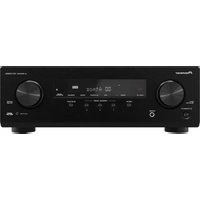
Elite SC-09TX - Receiver PIONEER - Free user manual and instructions
Find the device manual for free Elite SC-09TX PIONEER in PDF.


Pick your language and provide your email: we'll send you a specifically translated version.
| Product Type | AV Receiver |
| Model | Elite SC-09TX |
| Brand | Pioneer |
| Channels | 9.2 |
| Power Output (8 ohms, 20 Hz-20 kHz, 0.08% THD) | 140 W per channel |
| Amplifier Design | Class D (Direct Energy HD) |
| Audio Features | Dolby TrueHD, DTS-HD Master Audio, Dolby Pro Logic IIz, Neural Surround |
| Video Features | HDMI 1.3a with Deep Color, 1080p upscaling, Video Scaler (Faroudja DCDi) |
| HDMI Inputs/Outputs | 6 inputs / 2 outputs |
| Network Connectivity | Ethernet, DLNA, Internet Radio, Sirius Satellite Radio |
| Dimensions (W x H x D) | 17.1 x 8.3 x 18.1 inches (434 x 210 x 460 mm) |
| Weight | 62.6 lbs (28.4 kg) |
| Power Consumption | 980 W (standby: 0.5 W) |
| THX Certification | THX Ultra2 Plus |
| Multi-Zone Support | 3 zones (zone 2/3 HD) |
| Auto Room Calibration | MCACC (Advanced) |
| On-Screen Display | GUI via HDMI |
| Remote Control | SR Remote (pre-programmed) + Learning |
| Cleaning Instructions | Wipe with dry cloth; avoid solvents. |
| Spare Parts Availability | Contact Pioneer support or authorized service centers. |
| Repairability | Limited; professional service required for internal components. |
Frequently Asked Questions - Elite SC-09TX PIONEER
How do I connect my speakers to the SC-09TX?
Use high-quality speaker wire with banana plugs or bare wire. Connect each speaker to the corresponding binding post (Front, Center, Surround, etc.). Ensure proper polarity (+ to +, - to -). Refer to the speaker setup section in the manual for specific configurations.
Does the SC-09TX support 4K video passthrough?
The SC-09TX has HDMI 1.3a inputs/outputs, which support 1080p video but not 4K. For 4K, you would need a newer receiver or connect your 4K source directly to your TV and use audio return channel (ARC) if available.
How can I update the firmware on my receiver?
Firmware updates can be done via USB or Ethernet. Visit the Pioneer support page, download the latest firmware file, and follow the instructions. Connect the receiver to your network or use a USB drive with the firmware file. Do not power off during update.
What is MCACC and how do I use it?
MCACC (Multi-Channel Acoustic Calibration) is Pioneer's auto room calibration system. Connect the included microphone to the front panel input, place it at your main listening position, and run the MCACC setup from the on-screen menu. It adjusts speaker distances, levels, and equalization.
Can I use the SC-09TX with a 4-ohm speaker?
Yes, the SC-09TX is rated for 4-ohm speakers. However, ensure proper ventilation as lower impedance can cause the amplifier to run hotter. Avoid running multiple 4-ohm speakers in parallel to prevent overload.
Why is there no sound from my subwoofer?
Check the subwoofer connection to the pre-out (LFE). Ensure the subwoofer is powered on and the volume is set appropriately. In the receiver menu, verify that speakers are set to 'Small' and the crossover frequency is set (usually 80 Hz). Also, check if 'Subwoofer' is enabled in the speaker configuration.
How do I set up multi-zone audio?
Connect Zone 2/3 speakers to the corresponding terminals. In the receiver menu, assign which sources go to each zone. You can control zones via the remote or front panel. Note that Zone 2 supports analog and digital sources, while Zone 3 is limited to analog.
What is the difference between Dolby Pro Logic IIz and standard Pro Logic?
Dolby Pro Logic IIz adds front height channels for a more immersive sound envelope. The SC-09TX can process IIz to use extra speakers placed above the front left/right speakers. It creates a sense of vertical space without dedicated overhead speakers.
My remote control stopped working. What should I do?
First, replace the batteries. Ensure there are no obstructions between the remote and the receiver's IR sensor. If the remote is a learning model, you may need to reprogram it. Try resetting the remote by removing batteries and pressing all buttons for 5 seconds.
How can I clean the front panel and vents?
Use a soft, lint-free cloth slightly dampened with water or a mild detergent solution. Do not use alcohol, ammonia, or abrasive cleaners. For vents, use a vacuum cleaner with a brush attachment to remove dust. Ensure the unit is unplugged while cleaning.
User questions about Elite SC-09TX PIONEER
0 question about this device. Answer the ones you know or ask your own.
Ask a new question about this device
No questions yet. Be the first to ask one.
Download the instructions for your Receiver in PDF format for free! Find your manual Elite SC-09TX - PIONEER and take your electronic device back in hand. On this page are published all the documents necessary for the use of your device. Elite SC-09TX by PIONEER.
USER MANUAL Elite SC-09TX PIONEER
Manual assistant
Powered by Anthropic
Waiting for your message
Product information
Brand : PIONEER
Model : Elite SC-09TX
Category : Receiver