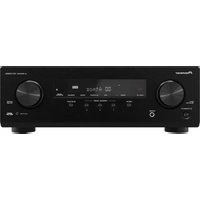
AVX-P7650DVD - Receiver PIONEER - Free user manual and instructions
Find the device manual for free AVX-P7650DVD PIONEER in PDF.


Pick your language and provide your email: we'll send you a specifically translated version.
| Product type | In-dash car DVD receiver with flip-down monitor |
| Brand | Pioneer |
| Model | AVX-P7650DVD |
| Category | Receiver |
| Display size | 6.5-inch wide touchscreen |
| Disc playback | DVD-Video, Video CD, CD, MP3, WMA |
| Tuner | AM/FM with RDS |
| Maximum power output | 50 W × 4 channels |
| Preamp outputs | 2 pairs (front and rear) |
| Audio/video inputs | Auxiliary input (AV-IN) and rear camera input |
| Dimensions (W × H × D) | 178 × 100 × 160 mm (standard 2-DIN) |
| Weight | 2.4 kg |
| Power supply | 12 V DC negative ground |
| Operating temperature | −10 °C to +60 °C |
| Installation | Conforms to ISO 7736 for 2-DIN car stereos |
| Accessories included | Remote control, wiring harness, mounting sleeve |
| Maintenance | Wipe the screen and exterior with a soft dry cloth; avoid chemical cleaners |
| Safety notice | Designed for 12 V vehicles; do not install where it may obstruct driving |
| Spare parts and repairability | Service through authorized Pioneer dealers for genuine replacement parts |
| Manual language | English (other languages available upon request) |
Frequently Asked Questions - AVX-P7650DVD PIONEER
How do I reset the Pioneer AVX-P7650DVD?
Press the RESET button located near the front panel using a pointed object, such as a pen tip. This restores the factory defaults and clears minor electronic glitches.
Can I play DVDs from all regions?
The AVX-P7650DVD is designed for Region 1 typically, but some units may be region-free. Check the labels on the unit and DVD case. Multi-region playback usually requires a hardware modification.
How do I set the clock?
Press the MENU button, then select Settings → Clock. Use the arrow buttons to adjust hours and minutes, and confirm with ENTER. The clock can be set to 12-hour or 24-hour format.
How do I connect an external audio device?
Use the AUX input (AV-IN) located on the rear of the unit. Connect the audio/video cable from your device to the RCA jacks, then select AUX as the source on the display.
Why is there no sound from the speakers?
Check that the volume level is not too low or muted. Verify the speaker wires are properly connected and the fader/balance settings are centered. Also ensure the built-in amplifier is on and the source is playing.
How do I clean the touchscreen without damaging it?
Use a soft, dry microfiber cloth to gently wipe the screen. Do not use water, alcohol, or abrasive cleaners. Avoid pressing hard; this can damage the touch layer.
What disc formats are supported?
The unit plays DVD-Video, Video CD, CD-DA, MP3 and WMA files. For MP3/WMA, ensure the disc is finalized and files are recorded within the compatible bitrate and sample rate ranges.
Can I watch TV on this receiver?
The AVX-P7650DVD itself does not have a built-in TV tuner. However, you can connect an external TV tuner module via the auxiliary AV input if it provides a video signal.
How do I program radio stations?
Tune to the desired station manually, then press and hold one of the preset buttons (1-6) until the preset number flashes. The station is stored, repeat for other stations.
Is the unit compatible with a backup camera?
Yes, the AVX-P7650DVD has a dedicated rear camera input. Connect a compatible backup camera and the display will automatically show the camera image when reverse gear is engaged.
User questions about AVX-P7650DVD PIONEER
0 question about this device. Answer the ones you know or ask your own.
Ask a new question about this device
No questions yet. Be the first to ask one.
Download the instructions for your Receiver in PDF format for free! Find your manual AVX-P7650DVD - PIONEER and take your electronic device back in hand. On this page are published all the documents necessary for the use of your device. AVX-P7650DVD by PIONEER.
USER MANUAL AVX-P7650DVD PIONEER
Manual assistant
Powered by Anthropic
Waiting for your message
Product information
Brand : PIONEER
Model : AVX-P7650DVD
Category : Receiver