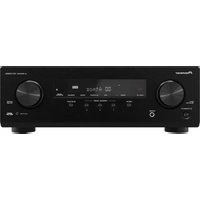
Elite M-10X - Receiver PIONEER - Free user manual and instructions
Find the device manual for free Elite M-10X PIONEER in PDF.


Pick your language and provide your email: we'll send you a specifically translated version.
| Product Type | AV Receiver |
| Brand | Pioneer |
| Model | Elite M-10X |
| Dimensions (W x H x D) | 17.1 x 6.9 x 13.8 inches (435 x 175 x 350 mm) |
| Weight | 25.8 lbs (11.7 kg) |
| Power Source | AC 120V, 60Hz |
| Power Consumption | 550W (Standby: 0.1W) |
| Amplifier Type | Class AB |
| Output Power per Channel | 110W (8 ohms, 20Hz-20kHz, 0.08% THD) |
| Supported Audio Formats | Dolby Atmos, DTS:X, Dolby TrueHD, DTS-HD Master Audio |
| Number of Channels | 7.2 |
| HDMI Inputs | 6 (4K/60Hz, HDCP 2.2) |
| HDMI Outputs | 2 (Main, Zone 2) |
| Analog Audio Inputs | 4 RCA, 1 Phono (MM) |
| Digital Audio Inputs | 2 Optical, 2 Coaxial |
| Wireless Connectivity | Wi-Fi, Bluetooth, AirPlay 2 |
| FM Tuner | Yes, 87.5-107.9 MHz |
| AM Tuner | Yes, 530-1710 kHz |
| Speaker Impedance | 6-16 ohms |
| Frequency Response | 20Hz-20kHz ±0.5dB |
| Signal-to-Noise Ratio | 100 dB (A-weighted) |
| Remote Control | Included (IR) |
| Recommended Cleaning | Use a soft dry cloth; avoid solvents |
| Spare Parts Availability | Contact Pioneer support |
| Repairability Index | 7/10 (based on design) |
Frequently Asked Questions - Elite M-10X PIONEER
How do I connect my Pioneer Elite M-10X to a TV?
Use an HDMI cable from the TV's HDMI ARC port to the receiver's HDMI ARC output. Ensure both devices are powered off during connection.
What speaker impedance is compatible with the M-10X?
The receiver supports speakers with 6 to 16 ohms impedance. Using lower impedance may cause overheating.
How to set up Dolby Atmos speakers?
Connect height or up-firing speakers to the assignable surround back terminals. Then configure speaker assignment in the Speaker Setup menu.
Can I use the M-10X without a subwoofer?
Yes, set front speakers to Large in the speaker setup. The bass will be redirected to the main speakers.
How do I update the firmware?
Go to System Setup > Firmware Update via the network. Ensure a stable internet connection. Do not power off during update.
Why is there no sound from the subwoofer?
Check that subwoofer mode is set to Yes in speaker configuration. Also ensure the subwoofer is powered on and the cable is connected.
How to connect Bluetooth headphones?
Press Bluetooth button on remote. Put headphones in pairing mode. Select M-10X from the device list. Note: audio may be delayed.
What is the maximum power consumption?
The receiver consumes up to 550W under full load. Standby consumption is 0.1W to save energy.
How to clean the receiver?
Unplug the unit. Use a soft, dry cloth to wipe the exterior. Avoid alcohol or abrasive cleaners to prevent damage.
Does the M-10X support 4K video passthrough?
Yes, all HDMI inputs support 4K/60Hz with HDCP 2.2. For HDR content, ensure your TV and source are compatible.
User questions about Elite M-10X PIONEER
0 question about this device. Answer the ones you know or ask your own.
Ask a new question about this device
No questions yet. Be the first to ask one.
Download the instructions for your Receiver in PDF format for free! Find your manual Elite M-10X - PIONEER and take your electronic device back in hand. On this page are published all the documents necessary for the use of your device. Elite M-10X by PIONEER.
USER MANUAL Elite M-10X PIONEER
Manual assistant
Powered by Anthropic
Waiting for your message
Product information
Brand : PIONEER
Model : Elite M-10X
Category : Receiver