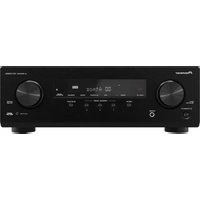
HTP-3600 - Receiver PIONEER - Free user manual and instructions
Find the device manual for free HTP-3600 PIONEER in PDF.


Pick your language and provide your email: we'll send you a specifically translated version.
| Product Type | Home Theater Receiver |
| Brand | Pioneer |
| Model | HTP-3600 |
| Audio Channels | 5.1 |
| Power Output | 100 W per Channel (6 ohms, 1 kHz, 10% THD) |
| Total Harmonic Distortion | 0.05% |
| Dimensions (W x H x D) | 435 mm x 150 mm x 350 mm |
| Weight | 8.2 kg |
| Power Supply | AC 220-240 V, 50/60 Hz |
| Power Consumption | 400 W |
| Standby Power Consumption | 0.5 W |
| Audio Inputs | 3 x RCA, 2 x Optical, 1 x Coaxial |
| Audio Outputs | 1 x Subwoofer Pre-out, 6 x Speaker Terminals |
| Video Inputs | 4 x HDMI |
| Video Outputs | 1 x HDMI (ARC) |
| Tuner | FM/AM |
| Bluetooth | Yes (Built-in) |
| Remote Control | Included |
| Display | Fluorescent Dot Matrix |
| Cleaning | Wipe with soft dry cloth |
| Safety | Do not expose to rain or moisture |
| Repairability | Service parts available (contact Pioneer) |
Frequently Asked Questions - HTP-3600 PIONEER
How do I connect my receiver to my TV?
Connect the HDMI output of the receiver to an HDMI input on your TV. If your TV supports HDMI ARC, use that port for two-way audio. Ensure the TV is set to the correct input source.
How do I reset the receiver to factory settings?
Turn off the receiver, then press and hold the ADVANCED SETUP button on the front panel while turning the power back on. Use the PRESET buttons to select "Factory Reset" and confirm with ENTER.
How do I set up the FM radio stations?
Connect the supplied FM antenna to the FM terminal. Press TUNER to select FM, then use TUNING to search for stations. To save presets, press MEMORY while a station is tuned.
The receiver has no sound, what should I do?
Check that the speaker wires are properly connected to the correct terminals. Ensure the source device is playing and the receiver is set to the right input. Also verify that the mute is off and the volume is not too low.
Can I connect a Bluetooth device?
Yes, the HTP-3600 supports Bluetooth streaming. Press the BLUETOOTH button on the receiver, then pair your device by selecting "Pioneer HTP-3600" from the Bluetooth settings on your phone or tablet.
How do I clean the receiver?
Before cleaning, unplug the receiver. Use a soft dry cloth to wipe the exterior. Do not use chemical solvents, as they may damage the finish.
What is the recommended speaker impedance?
The receiver is designed for speakers with an impedance of 6 ohms or higher. Using speakers with lower impedance may cause overload and damage.
The remote control does not work, how do I fix it?
First replace the batteries. Ensure the remote sensor on the receiver is not blocked and the power cord is connected. If the remote still fails, try to pair it again by pressing the RESET button on the remote if available.
How do I update the firmware?
The HTP-3600 does not have a USB port for firmware updates. Check the Pioneer support website for any available updates via CD or network if your model supports it. In general, this model may not offer user-installable updates.
Why is the receiver overheating?
Ensure the receiver has proper ventilation around it. Do not place it in a confined space. With continuous high volume, the power amplifier generates heat. If it becomes too hot, the protection circuit may activate.
User questions about HTP-3600 PIONEER
0 question about this device. Answer the ones you know or ask your own.
Ask a new question about this device
No questions yet. Be the first to ask one.
Download the instructions for your Receiver in PDF format for free! Find your manual HTP-3600 - PIONEER and take your electronic device back in hand. On this page are published all the documents necessary for the use of your device. HTP-3600 by PIONEER.
USER MANUAL HTP-3600 PIONEER
Manual assistant
Powered by Anthropic
Waiting for your message
Product information
Brand : PIONEER
Model : HTP-3600
Category : Receiver