
DEH-3250UB - Receiver PIONEER - Free user manual and instructions
Find the device manual for free DEH-3250UB PIONEER in PDF.


| Product Type | Car Stereo Receiver |
| Brand | Pioneer |
| Model | DEH-3250UB |
| Dimensions (W x H x D) | 178 x 50 x 165 mm (1-DIN) |
| Weight | 1.2 kg |
| Power Supply | 12V DC (car battery) |
| Maximum Power Output | 50 W x 4 (max) |
| Continuous Power Output (RMS) | 22 W x 4 |
| Built-in Amplifier | Yes (MOSFET) |
| CD Player | Yes (CD/CD-R/RW) |
| Radio Tuner | FM/AM with RDS |
| Audio Playback Formats | CD, MP3, WMA, WAV |
| Front USB Port | Yes (USB 2.0) |
| Auxiliary Input | Yes (3.5 mm front) |
| Remote Control | Yes (IR wired remote included) |
| Display Type | LCD (multi-color) |
| Equalizer | 5-band graphic EQ |
| Bluetooth | No |
| Security Code | Yes (anti-theft) |
| Detachable Face | Yes |
Frequently Asked Questions - DEH-3250UB PIONEER
User questions about DEH-3250UB PIONEER
0 question about this device. Answer the ones you know or ask your own.
Ask a new question about this device
Download the instructions for your Receiver in PDF format for free! Find your manual DEH-3250UB - PIONEER and take your electronic device back in hand. On this page are published all the documents necessary for the use of your device. DEH-3250UB by PIONEER.
USER MANUAL DEH-3250UB PIONEER
ThankyouforpurchasingthisPIONEER product.
Toensureproperuse, pleasereadthrough this manualbeforeusingthisproduct.Itisesespeciallyimportantthatyoureadandobserve
WARNINGSandCAUTIONsinthismanual.
Please keep the manual in as safe and accessible place for further reference.
Incaseoftrouble
Should this unit fail to operate properly, please contact your dealer or nearest authorized PIONEERServiceStation.
Aboutthisunit

CAUTION
- Donotallowthisunittocomeintocontact withliquids. Electricalshockcouldresult. Also, damagetothisunit, smoke, andoverheatingcouldresult from contact with liquids.
- "CLASS1LASERPRODUCT" Thisproductcontainsalaserdiodeofhigher classthan1.Toensurecontinuedsafety,do notremoveanycoversorattemptogainaccesstotheinsideoftheproduct.Referallservicingtoqualifiedpersonnel.
• Always keep the volumelowen ought to hear outsidesounds. - Avoidexposuretomoisture.
- If the battery is disconnected, any preset memory will be erased.
CAUTION: USEOFCONTROLRADJUSTMENTOR PERFORMANCEOFPROCEDURES OTHERTHANTHOSESPECIFIEDHEREIN MAYRESULTINHAZARDOUSRADIATION EXPOSURE.
CAUTION: THEUSEOFOPTICALINSTRUMENTS WITHTHISPRODUCTWILLINCREASE EYEHAZARD.

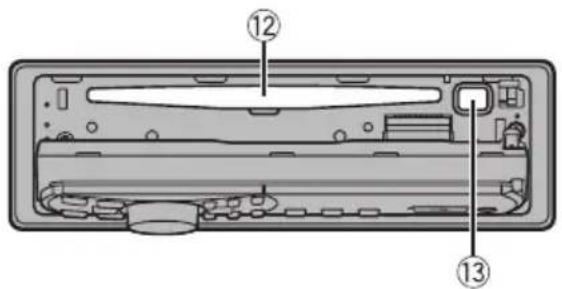
Headunit
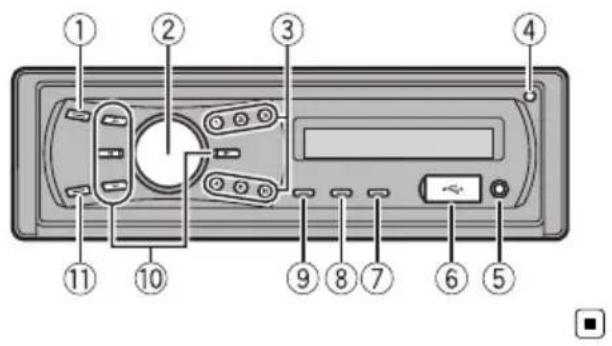
Headunit(frontpanelopen)

| PartPart | |||
| 1 | SRC/OFF | 8 | DISP/→/SCRL |
| 2 | MULTI-CONTROL(M.C.) | 9 | Q (list) |
| 3 | 1 to 6 | 10 | ▲/▼/◄/► |
| 4 | Open button | 11 | BAND/ESC |
| 5 | AUXinputjack(3.5mmstereojack) | 12 | Discloadingslot |
| 6 | USBport13▲(eject) | ||
| 7 | ∅ (clock) | ||

CAUTION
- UseanoptionalPioneerUSBcable(CD-U50E) toconnecttheUSBaudioplayer/USBmemorytotheUSBport.SincetheUSBaudio player/USBmemoryisprojectedforwardfrom theunit,itisdangeroustoconnectdirectly. Donotusetheunauthorizedproduct.
• To avoid malfunction, makes sure that no metal objects come into contact with the terminals when the front panel is open.
Remotecontrol

PartOperation
| 14VOLUME | Presstoincreaseordecreasevolume. |
| 15MUTE | Presstomute.Pressagaintoun-mute. |
| 16AUDIO | Presstoselectanaudiofunction. |
| 17DISP/SCRL | Presstoselectdifferentdisplays.Pressandholdtoscrollthroughthetextinformation. |
| 18II | Presstopauseorresume. |
| 19FUNCTION | Presstoselectfunctions.Pressandholdtorecalltheinitialsettingmenuwhenthesourcesareoff. |
| 20LIST/ENTER | Presstodisplaythedisctitle,tracktitle,folder,orfilelistdependingonthesource.Whileintheoperatingmenu,presstocontrolfunctions. |

Displayindication

| IndicatorState | ||
| 1 | (disc) | Thedisc(album,nameisdis-played.Albumsearchrefinementthe iPodbrowsingfunctionisinuse. |
| 2 | (artist) | Thedisc(track)artistnameisdis-played.Artistsearchrefinementthe iPodbrowsingfunctionisinuse. |
| 3 | Maindis-playsec-tion | •Tuner:bandandfrequency•Built-inCD,USBBandiPod: elapsed playbacktime and textinformation |
| 4 | (song) | Thetrack(song,nameisdis-played.Aplayableaudiofilehasbeense-lectedwhileoperatingthelist.Songsearchrefinementthe iPodbrowsingfunctionisinuse. |
| 5 | Anuppertieroffolderormenu exists. | |
| 6 | (folder)Thelistfunctionisoperated. | |
| 7 | Alowertieroffolderormenuex-ists.Itflasheswhenasong/albumre-latedtothesongcurrentlyplaying isselectedfromiPod. | |
| 8 | LOCThelocalseektuningison. | |
| 9 | LOUD(loudness) | Theloudnessison. |
| 10 | (stereo) | Theselectedfrequencyisbeing broadcastedinstereo. |
| 11 | (repeat)Trackorfolderrepeatison. | |
| 12 | (x)(ran-dom) | Randomplayison. |
| 13 | (x(shuf-fle) | Shufflefunctionisonwhilethe iPodsourceisbeingselected. |
| 14 | (S.Rtrv(soundre-triever) | Thesoundretrieverfunctionis on. |

BasicOperationsofthisunit

Important
- Handlegentlywhenremovingorattaching thefrontpanel.
- Avoid subjecting the front panel to excessive shock.
- Keepthefrontpaneloutofdirectsunlightand hightemperatures.
- Removeanycablesanddevicesattachedto thisunitbeforedetachingthefrontpanelto avoiddamagethedeviceorvehicleinterior.
| RemovingthefrontpaneltoprotectyourunitfromtheftThefrontpanelcanbedetachedtodetertheft.1 Presstheopenbuttontoopenthefrontpanel.2 Griptheleftsideofthefrontpanelandpullitgentlyoutward.Takecarenottogripittootightlyortodropthefrontpanelandprotectitfromcontactwithwaterorotherfluidstoppreventpermanentdamage.3 Putthefrontpanelintotheprovidedprotectivecaseforsafekeeping. |
Re-attachingthefrontpanel1 Reattachthefrontpanelbyholdingituprighttotheunitandclippingitsecurelyintothemount-inghooks. |
| Turningtheuniton1 PressSRC/OFFtotumtheuniton. |
| Turningtheunitoff1 Press SRC/OFF and hold until the unit turns off. |
| Selectingasource1 PressSRC/OFFtocyclebetween:TUNER (tuner)—CD (built-in CD player)—USB(USB)/IPOD(iPod)—AUX(AUX) |
| Adjustingthevolume1 TumM.C.toadjustvolume. |
Operatingthisunit

Notes
- Whenthisunit'sblue/whiteleadisconnected tothevehicle'sauto-antennarelaycontrol terminal,thevehicle'santennaextendshwhen thisunit'ssourceisturnedon.Toretractthe antenna,turnthesourceoff.
- Inthismanual,iPodandiPhonewillbereferredtoasiPod.
Useandcareoftheremote control
Usingtheremotecontrol
[1]Pointtheremotecontrolinthedirectionofthe frontpaneltooperate. Whenusingforthefirsttime,pulloutthefilm protrudingfromthetray.
Replacingthebattery
①Slidethetrayoutonthebackoftheremotecontrol.
2 Insert the battery with the plus (+) and minus (−) polesalignedproperly.

natural_image
Diagram of a mechanical or laboratory procedure showing a tool interacting with a component, no text or symbols present.
Important
- Donotstoretheremotecontrolinhighttemperaturesordirectsunlight.
• Theremote control may not function properly indirect sunlight. - Donotlettheremotecontrolfallontothe floor,whereitmaybecomejammedunderthe brakeoracceleratorpedal.

WARNING
- Keepthebatteryoutofthereachofchildren. Shouldthebatterybeswallowed,consulta doctorimmediately.
- Batteries(batterypackorbatteriesinstalled) must not be exposed to excessive heats such as sunshine, fireorthelike.

CAUTION
• UseoneCR2025(3V) lithium battery.
- Removethebatteryiftheremotecontrolisnot usedforamonthorlonger.
- Thereisadangerofexplosionifthebatteryis incorrectlyreplaced.Replaceonlywiththe sameorequivalenttype.
- Donothandlethebatterywithmetallictools.
- Donotstorethebatterywithmetallicobjects.
- If the battery leaks, wipetheremote control completely clean and install anew battery.
- Whendisposingofusedbatteries,comply withgovernmentalregulationsorenvironmentalpublicinstitutions’rulesthatapplyinyour country/area.
Menuoperationsidentical forfunctionsettings/audio adjustments/initial settings/lists
| ReturningtothepreviousdisplayReturningtothepreviouslist/category(thefolder/Categoryonelevelhigher)1PressDISP/ ⇌/SCRL. |
| ReturningtothemainmenuReturningtothetoptieroflist1PressDISP/ ⇌/SCRL. |
| ReturningtotheordinarydisplayCancelingtheinitialsettingmenu1Press BAND/ESC. |
| Returningtotheordinarydisplayfromthelist/category1Press BAND/ESC. |

Tuner

Important
If you are using this unit in North, Central or South America, reset the AM tuning step (referto AMSTEP (AM tuning step) on page 12).
BasicOperations
Selectingaband
1 Press BAND/ESC until the desired band (F1, F2, F3 for FM or AM) is displayed.
Manualtuning(stepbystep)
1Press◄or►.
Seeking
[1] Press and hold ◀ or ▶, and then release. Youcancancelseektuningbybrieflypressing ◀ or ▶. While pressing and holding ◀ or ▶, you can skip stations.Seektuningstartsassoonasyoure-lease ◀ or ▶.
Storingandrecallingstations
Youcaneasilystoreuptosixstationsforeach bandaspresets.
- When you find a station that you want to store in memory, press one of the preset tuning buttons (1 to 6) and hold until the preset number stops flashing.
Storedradiostationfrequencycanberecalled bypassingthepresettuningbutton.
■Youcanalsorecallstoredradiostationsby pressing▲or▼duringthefrequencydisplay.
Functionsettings
1PressM.C.todisplaythemainmenu.
2TurnM.C.tochangethemenuoption andpresstoselectFUNCTION.
3TurnM.C.toselectthefunction.
Afterselecting, perform the following procedure to set the function.
BSM(beststationsmemory)
BSM(beststationsmemory)automaticallystoresthe sixstrongeststationsintheorderoftheirsignal strength.
1 PressM.C.toturnBSMon. Tocancel, pressM.C.again.
1 PressM.C.todisplaythesettingmode.
2 Turn M.C. to select the desired setting.
FM: OFF—LEVEL 1—LEVEL 2—LEVEL 3—LEVEL 4
AM:OFF—LEVEL1—LEVEL2
Largersettingnumberishigherlevel.Thehighest levelsettingallowsreceptionofonlythestrongest stations,whilelowersettingsletyoureceiveprogressivelyweakerstations.
3 PressM.C.toconfirmtheselection.

Note
Operationiscompleteevenifthemenuiscancelledbeforebeingconfirmed.
CD/CD-R/CD-RWandUSB storagedevices
BasicOperations
| Openthefrontpanel1 Presstheopenbutton.Discloadingslotappears. |
| PlayingaCD/CD-R/CD-RW1 Insertthedisc,labelsideup,intothediscloading slot.2 Ifadischasalreadybeeninserted,pressSRC/OFFtoselectthebuilt-inCDplayer. |
| EjectingaCD/CD-R/CD-RW1 Press▲. |
| PlayingsongsonaUSBstoragedevice1 OpentheUSBconnectorcoverandpluginthe USBstoragedeviceusingaUSBcable. |
| StopplayingaUSBstoragedevice1 YoumaydisconnecttheUSBstoragedeviceat anytime. |
Operatingthisunit
| Selectingafolder1 Press ▲ or ▼. |
| Selectingatrack1 Press ◀ or ▶. |
| Fastforwardingorreversing1 Press and hold ◀ or ▶. |
| Returningtorootfolder1 Press and holdBAND/ESC. |
| SwitchingbetweencompressedaudioandCD-DA1|PressBAND/ESC. |

Notes
- When playing compressed audio, there is no sound during fast forward or reverse.
- USBportableaudioplayersthatcanbe chargedviaUSBwillberechargedwhen pluggedinandtheignitionswitchissetto ACCorON.
- DisconnectUSBstoragedevicefromunit whennotinuse.
- IfplugandplayisonandaUSBstoragedeviceispresent,dependingonthetypeofdevice,thesourcemayswitchtoUSB automaticallywhenyouturnontheengine. Pleasechangeplugandplaysettingasnecessary.RefertoUSB(plugandplay)onpage12.
Displayingtextinformation
| Selectingthedesiredtextinformation 1 PressDISP/ /SCRL.CD TEXT discs: Play time—disc title—disc artistname—tracktitle—trackartistnameWMA/MP3: Play time—folder name—file name—track title—artist name—album title—comment—bitrate—folderandtracknumbersWAV: Play time—folder name—file name—samplingfrequency—folderandtracknumbers |
| Scrollingthetextinformationtotheleft 1 PressandholdDISP/ /SCRL. |

Notes
- Incompatible text stored with the audio file may not be displayed for may be displayed incorrectly.
- Depending on the version of iTunes used to write MP3 files onto adisc, comment information maybe incorrectly displayed.
- WhenplayingbackVBR(variablebitrate)-recordedWMAfiles,theaveragebitratevalueis displayed.
- WhenplayingbackVBR(variablebitrate)-recordedMP3files, VBRisdisplayedinsteadof bitratevalue.
Selectingandplayingfiles/ tracksfromthenamelist
1Presstoswitchtothefile/track namelistmode.
2UseM.C.toselectthedesiredfilename (orfoldername).
| Changingfileorfoldername1TumM.C. |
| Playing1Whenafileortrackisselected,pressM.C. |
| Seeingalistofffiles(orfolders)intheselectedfolder1Whenafolderisselected,pressM.C. |
| Playingasongintheselectedfolder1Whenafolderisselected,pressandholdM.C. |

Note
Tracktitlelistwilldisplaythelistoftracktitleson aCDTEXTdisc.
Advancedoperationsusing specialbuttons
Selectingarepeatplayrange
1|Press6/ ⇌ tocyclebetweenthefollowing:
CD/CD-R/CD-RW
•DISC–Repeatalltracks
- TRACK-Repeatthecurrenttrack
• FOLDER—Repeat the current folder
- TRACK-Repeatthecurrentfile
• FOLDER—Repeat the current folder
- ALL-Repeatallfiles
USBaudioplayer/USBmemory
Playingtracksinrandomorder
1|Press5/ ×× toturnrandomplayonoroff. Tracksinaselectedrepeatrangeareplayed in randomorder.
Pausing playback
1 Press 2/PAUSE to pause or resume.
Enhancingcompressed audio and restoring rich sound (sound retriever)
1Press1/S.Rtrvtocyclebetween: OFF(off)—1—2 1iseffectiveforlowcompressionrates,and2is effectiveforhighcompressionrates.
Functionsettings
1PressM.C.todisplaythemainmenu.
2TurnM.C.tochangethemenuoption andpresstoselectFUNCTION.
3TurnM.C.toselectthefunction.
Afterselecting, perform the following procedure to set the function.
REPEAT(repeatplay)
1PressM.C.todisplaythesettingmode.
2 Turn M.C. to select a repeat play range. Fordetails, referto Selecting are repeat play range on this page.
3PressM.C.toconfirmtheselection.
RANDOM(randomplay)
1 Press M.C. to turn random play on or off.
PAUSE(pause)
1 PressM.C.topauseorresume.
S.RTRV(soundretriever)
Automaticallyenhancescompressedaudioandre-storesrichsound.
1 PressM.C. to display the setting mode.
2 Turn M.C. to select the desired setting. Fordetails, referto Enhancing compressed audio and restoring rich sound (sound retriever) on this page.
3 PressM.C.toconfirmtheselection.

Note
Operationiscompleteevenifthemenuiscancelledbeforebeingconfirmed.
iPod
BasicOperations
PlayingsongsoniPod
① OpentheUSBconnectorcoverandpluginan iPodusingtheiPodDockConnectortoUSB Cable.
Selectingatrack(chapter)
1 Press◄or►.
Fastforwardingorreversing
1 Press and hold ◀ or ▶.

Notes
- TheiPod's battery will be charged if the ignition switch is set to ACCorON, while connected.
- While the iPodis connected to this unit, the iPod cannot be turned on or off unless the control mode is set to IPOD.
- DisconnectheadphonesfromtheiPodbefore connectingtothisunit.
•TheiPodwillturnoffabouttwominutesafter theignitionswitchissettoOFF.
Displayingtextinformation
| Selectingthedesiredtextinformation|1|PressDISP/ ⇌/SCRL.Play time—song title—artist name—album title—numberofsongs |
| Scrollingthetextinformationtotheleft|1|PressandholdDISP/ ⇌/SCRL. |

Note
IncompatibletextsavedontheiPodwillnotbe displayedbytheunit.
Browsingforasong
1Presstoswitchtothetopmenuof thelistsearch.
2UseM.C.toselectacategory/song.
| Changingthenameofsongorcategory1TumM.C.PLAYLISTS (playlists)—ARTISTS (artists)—AL-BUMS (albums)—SONGS (songs)—PODCASTS (podcasts)—GENRES (genres)—COMPOSERS (composers)—AUDIOBOOKS(audiobooks) |
| Playing1Whenasongisselected,pressM.C. |
| Seeingalistof songsintheselectedcategory1Whenacategoryisselected,pressM.C. |
| Playingasongintheselectedcategory1Whenacategoryisselected,pressandholdM.C. |
| Searchingbyalphabetinthelist1Whenalistfortheselectedcategoryisdisplayed, press 🔒 toswitchtoalphabetsearchmode.2TumM.C.toselectaletter.3Press M.C. to display the alphabetical list. Ifalphabetsearchisaborted.NOTFOUNDisdis-played. |

Note
DependingonthenumberoffilesintheiPod, theremaybeadelaywhendisplayingalist.
Advancedoperationsusing specialbuttons
| Selectingarepeatplayrange1Press6/ ⇌ tocyclebetweenthefollowing:•ONE-Repeatthecurrentsong•ALL- Repeat all songs in the selected list |
| Playingallsongsinarandomorder(shuffleall)1Press5/ ×× toturnshuffleallon. |
| Pausing playbackRefertoPausing playbackonthepreviouspage. |
| PlayingsongsrelatedtothecurrentlyplayingsongYoucanplaysongsfromthefollowinglists.•Albumlistofcurrentlyplayingartist•Songlistofcurrentlyplayingalbum•Albumlistofcurrentlyplayinggenre1Press and holdM.C.to switch to the link play mode.2TurnM.C.to change the mode; press to select.•ARTIST- Plays an album of currently playing artist.•ALBUM- Plays a song of currently playing album.•GENRE- Plays an album of currently playing genre.Theselectedsong/albumwillbeplayedafterthe currentlyplayingsong.Theselectedsong/albummaybecancelledifyouoperatefunctionsotherthanlinksearch(e.g.fastforwardandreverse).Ifnorelatedalbums/songsarefound,NOTFOUND isdisplayed.Dependingonthesongselectedtoplay,theendof thecurrentlyplayingsongandthebeginningofthe selectedsong/albummaybecutoff. |
| Operatingthisunit'siPodfunctionfromyouriPod Thisfunctionisnotcompatiblewiththefollowing iPodmodels.•iPodnano1stgeneration•iPod5thgenerationThisunit'siPodfunctionallowsyoutoconductoperationsfromyouriPodandlistentoitusingyourcar's speakers.1Press4/IPODto switch the control mode.•IPOD- This unit's iPod function can be operatedfromtheconnectediPod.•AUDIO- This unit's iPod function can be operatedfromthisunit. |
| Enhancingcompressedaudioandrestoringrich sound(soundretriever)RefertoEnhancingcompressedaudioandrestoring richsound(soundretriever)onthepreviouspage. |
Functionsettings
1PressM.C.todisplaythemainmenu.
2TurnM.C.tochangethemenuoption andpresstoselectFUNCTION.
3TurnM.C.toselectthefunction.
Afterselecting, perform the following procedure to set the function.
REPEAT(repeatplay)
- Refer to REPEAT (repeat play) on page 8. HowevertherepeatrangeisdifferentfromCD/USBstoragedevice.RefertoSelectingarepeatplayrangeonthepreviouspage.
SHUFFLE(shuffle)
1PressM.C.todisplaythesettingmode.
2 Turn M.C. to select your favorite setting.
- SONGS – Play back songs in the selected list inrandomorder.
• ALBUMS – Play back songs from a randomly selectedalbuminorder. - OFF-Cancelrandomplay.
3|PressM.C.toconfirmtheselection.
SHUFFLEALL(shuffleall)
1PressM.C.toturnshuffleallon.
To turn off, set SHUFFLE in the FUNCTION menu tooff.
LINKPLAY(linkplay)
1PressM.C.todisplaythesettingmode.
2 Turn M.C. to change the mode; press to select. Fordetailsaboutthesettings,refertoPlaying songsrelatedtothecurrentlyplayingsongonthe previouspage.
CTRL(controlmode)
1PressM.C.toselectyourfavoritesetting.
Fordetailsaboutthesettings,refertoOperating thisunit'siPodfunctionfromyouriPodonthepreviouspage.
PAUSE(pause)
• Refer to PAUSE (pause) on page 8.
AUDIOBOOK(audiobookspeed)
Theplaybackspeedofaudiobookcanbechanged.
1 PressM.C. to display the setting mode.
2 Turn M.C. to select your favorite setting.
- FASTER – Playback faster than normal speed
•NORMAL-Playbackinnormalspeed - SLOWER-Playbackslowerthannormal speed
3 PressM.C.toconfirmtheselection.
S.RTRV(soundretriever)
• Refer to S.RTRV (sound retriever) on page 8.

Notes
- Operationiscompleteevenifthemenuiscancelledbeforebeingconfirmed.
- SwitchingthecontrolmodetoIPOD pauses song playback. Operatethei Podtoresume playback.
- The following functions are still accessible from the uniteven if the control mode is set to IPOD.
—Volume
—Fastforward/reverse
—Trackup/down
—Pausing
—Switchingthetextinformation
- WhenthecontrolmodeissettoIPOD, operationsarelimitedasfollows:
— Only CTRL (control mode), PAUSE (pause) and S.RTRV(soundretriever)functions are available.
—Browsefunctioncannotbeoperatedfrom thisunit.
AudioAdjustments
1PressM.C.todisplaythemainmenu.
2TurnM.C.tochangethemenuoption andpresstoselectAUDIO.
3TurnM.C.toselecttheaudiofunction.
Afterselecting, perform the following procedure to set the audio function.
Operatingthisunit
FAD/BAL(fader/balanceadjustment)
Youcanchangethefader/balancesetting.
1 PressM.C. to display the setting mode.
2 Press M.C. to cycle between fader and balance.
3 Turn M.C. to adjust speaker balance.
Adjustmentrange(front/rear):F15toR15
Adjustmentrange(left/right):L15toR15
FRO isthepropersettingwhenonlytwospeakers areused.
EQUALIZER(equalizerrecall)
TherearesixstoredsettingsDYNAMIC(dynamic),
VOCAL (vocal), NATURAL (natural), CUSTOM (custom), FLAT (flat) and POWERFUL (powerful).
- When FLAT is selected no adjustments are made to the sound.
1 PressM.C.todisplaythesettingmode.
2TumM.C.toselecttheequalizer.
DYNAMIC—VOCAL—NATURAL—CUSTOM—FLAT—POWERFUL
3 PressM.C.toconfirmtheselection.
TONECTRL(equalizeradjustment)
Youcanadjustthebass/mid/treblelevel.
- Adjustedequalizercurvesettingsarestoredin CUSTOM.
1PressM.C.todisplaythesettingmode.
2 Press M.C. to select BASS (bass)/MID (mid)/TRE-BLE(treble).
3TumM.C.toadjustthelevel.
Adjustmentrange:+6to-6
LOUDNESS(loudness)
Loudnesscompensatesfordeficienciesinthelow-andhigh-frequencyrangesatlowvolume.
1PressM.C.todisplaythesettingmode.
2 Turn M.C. to select the desired setting. OFF (off)—LOW(low)—HIGH (high)
3 PressM.C.toconfirmtheselection.
SLA(sourceleveladjustment)
SLA(Sourceleveladjustment) lets you adjust the volume level of each source to prevent radical changes in volumewhenswitching between sources.
- SettingsarebasedontheFMvolumelevel,which remainsunchanged. Beforeadjustingsourcelevels,comparetheFM volumelevelwiththelevelofthesourceyouwish toadjust.
• The AM volume level can also be adjusted with source level adjustments.
|1|PressM.C.todisplaythesettingmode.
[2] Turn M.C. to adjust the source volume. Adjustmentrange:+4to-4
3PressM.C.toconfirmtheselection.

Notes
- WhenselectingFMasthesource,youcannot switchtoSLA.
- Operationiscompleteevenifthemenuiscancelledbeforebeingconfirmed.
InitialSettings
1PressSRC/OFFandholduntiltheunit turnsoff.
2PressM.C.andholduntilCLOCKSETappearsinthedisplay.
3TurnM.C.toselecttheinitialsetting.
Afterselecting, perform the following procedure to set the initial setting.
CLOCKSET(settingtheclock)
1 PressM.C.todisplaythesettingmode.
2PressM.C.toselectthesegmentoftheclockdisplayyouwishtoset.
EachtimeyoupressM.C.,onesegmentofthe clockdisplayisselected.
Hour—Minute
Asyouselectsegmentsoftheclockdisplay,the selectedsegmentflashes.
3|TumM.C.toadjusttheclock.
FMSTEP(FMtuningstep)
TheFMtuningstepemployedbyseektuningcanbe switchedbetween100kHz,thepresetstep,and50 kHz.
- Ifseektuningisperformedin50kHzsteps, stationsmaybetunedinimprecisely.Tuneinthestationswithmanualtuningoruseseektuning again.
- Thetuningstepremainsat50kHzduringmanual tuning.
1 PressM.C.todisplaythesettingmode.
[2] Turn M.C. to select the FM tuning step. 50KHZ(50kHz)—100KHZ(100kHz)
3PressM.C.toconfirmtheselection.
AMSTEP(AMtuningstep)
TheAMtuningstepcanbeswitchedbetween9kHz, thepresetstep,and10kHz.Whenusingthetunerin North,CentralorSouthAmerica,resetthetuning stepfrom9kHz(531kHzto1602kHzallowable)to10 kHz(530kHzto1640kHzallowable).
①PressM.C.todisplaythesettingmode.
② Turn M.C. to select the AM tuning step.
10KHZ(10kHz)—9KHZ(9kHz)
3PressM.C.toconfirmtheselection.
AUX(auxiliaryinput)
Activate this setting when using auxiliary device connected to this unit.
1 Press M.C. to turn AUX on or off.
USB(plugandplay)
ThissettingallowsyoutoswitchyoursourcetoUSB/IPODautomatically.
1 Press M.C. to turn the plug and play on or off. ON-WhenUSBstoragedevice/iPodisconnected,thesourceisautomaticallyswitchedto USB/IPOD.IfyoudisconnectyourUSBstorage device/iPod,thisunit'ssourceisturnedoff. OFF-WhenUSBstoragedevice/iPodisconnected, the source is not switched to USB/IPOD automatically.PleasechangethesourcetoUSB/IPODmanually.

Note
Operationiscompleteevenifthemenuiscancelledbeforebeingconfirmed.
UsingtheAUXsource
1Insertthestereominiplugintothe AUXinputjack.
2PressSRC/OFFtoselectAUXasthe source.

Note
AUX cannot be selected unless the auxiliary setting is turned on. Formed details, refer to AUX (auxiliary input) on this page.
Turningtheclockdisplay onoroff
●Presstoturntheclockdisplayonor off.

Note
Theclockdisplaydisappearstemporarilywhen youperformotheroperations,buttheclockdisplayappearsagainafter25seconds.

WARNING
- Usespeakersover50W(outputvalue)andbetween4Ωto8Ω(impedancevalue).Donot use1Ωto3Ωspeakersforthisunit.
- Theblackcableisground.Wheninstalling thisunitorpoweramp(soldseparately),make suretoconnectthegroundwirefirst.Ensure thatthegroundwireisproperlyconnectedto metalpartsofthecar'sbody.Thegroundwire ofthepowerampandtheoneofthisunitor anyotherdevicemustbeconnectedtothecar separatelywithdifferentscrews.Ifthescrew forthegroundwireloosensorfallsout,it couldresultinfire,generationofsmokeor malfunction.

Other devices
(Another electronic
device in the car)
Metal parts of car's body

Important
- Wheninstallingthisunitinavehiclewithout anACC(accessory)positionontheignition switch,failuretoconnecttheredcabletothe terminalthatdetectsoperationoftheignition keymayresultinbatterydrain.

ACC position

No ACC position
- Usethisunitwitha12-voltbatteryandnegativegroundingonly.Failuretodosomayresultinafireormalfunction.
- Topreventashort-circuit,overheatingormal-function,besuretofollowthedirections below.
—Disconnectthenegativeterminalofthe batterybeforeinstallation.
—Securethewiringwithcableclampsoradhesivetape.Wrapadhesivetapearound wiringthatcomesintocontactwithmetal partstoprotectthewiring.
—Placeallcablesawayfrommovingparts, suchasthegearshiftandseatrails.
—Placeallcablesawayfromhotplaces, suchasneartheheateroutlet.
—Donotconnecttheyellowcabletothebatterybypassingitthroughtheholetotheenginecompartment.
—Coveranydisconnectedcableconnectors withinsulatingtape.
—Donotshortenanycables.
—Nevercuttheinsulationofthepowercable ofthisunitinordertosharethepower withotherdevices.Thecurrentcapacityof thecableislimited.
—Useafuseoftheratingprescribed.
—Neverwirethenegativespeakercabledirectlytoground.
—Neverbandtogethernegativecablesof multiplespeakers.
- Whenthisunitison, controlsignalsaresent throughtheblue/whitecable. Connect this cabletothesystemremotecontrolofanexternalpoweramporthevehicle'sauto-antenna relaycontrolterminal (max.300mA12VDC). If the vehicle is equipped with a glass antenna, connect it to the antennaboosterpower supply terminal.
- Neverconnecttheblue/whitecabletothe powerterminalofanexternalpoweramp. Also,neverconnectittothepowerterminalof theautoantenna.Doingsomayresultinbatterydrainoramalfunction.
Connectiondiagram
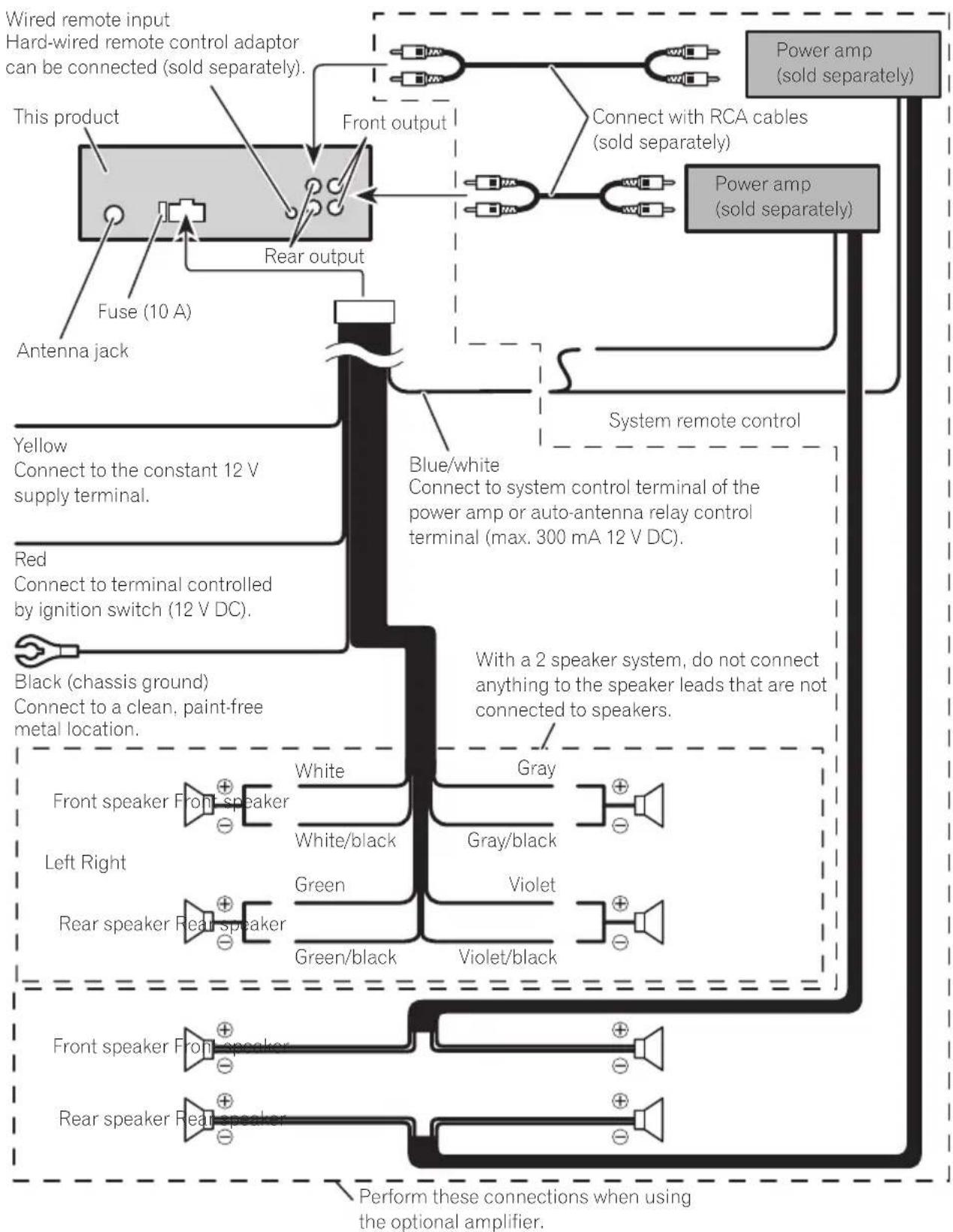
flowchart
graph TD
    A["This product"] --> B["Fuse (10 A)"]
    B --> C["Rear output"]
    C --> D["Front output"]
    D --> E["Power amp (sold separately)"]
    E --> F["Power amp (sold separately)"]
    F --> G["Connect with RCA cables (sold separately)"]
    G --> H["Blue/white Connect to system control terminal of the power amp or auto-antenna relay control terminal (max. 300 mA 12 V DC)."]
    H --> I["System remote control"]
    I --> J["White"]
    I --> K["Gray"]
    I --> L["Green"]
    I --> M["Violet"]
    I --> N["Violet/black"]
    O["Black (chassis ground) Connect to a clean, paint-free metal location."] --> P["Front speaker Front speaker"]
    P --> Q["White"]
    P --> R["White/black"]
    S["Left Right"] --> T["Rear speaker Rear speaker"]
    T --> U["Green"]
    T --> V["Violet/black"]
    W["Wired remote input"] --> X["Hard-wired remote control adaptor can be connected (sold separately)."]
    X --> Y["Power amp (sold separately)"]
    Y --> Z["Perform these connections when using the optional amplifier."]


Important
- Checkallconnectionsandsystemsbefore finalinstallation.
- Donotuseunauthorizedpartsasthismay cause malfunctions.
- Consultyourdealerifinstallationrequiresdrillingofholesorothermodificationstothevehicle.
- Donotinstallthisunitwhere: —itmayinterferewithoperationofthevehicle. —itmaycauseinjurytoapassengerasaresultofasuddenstop.
- These semiconductor laser will be damaged if it overheats. Install this unit away from hot places such as near the heater outlet.
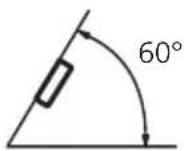
- Optimumperformanceisobtainedwhenthe unitisinstalledatanangleoflessthan60°.
- Toensureproperheatdispersalwhenusing thisunit, makesureyouleaveamplespace behindtherearpanelandwrapanyloose cablessotheyarenotblockingthevents wheninstallingtheunit.
DINfront/rearmount
Thisunitcanbeproperlyinstalledeitherfrom "Front"(conventionalDINfront-mount)or "Rear"(DINrear-mountinstallation, utilizing threadedscrewholesonthesidesofunit chassis). Fordetails, refertothefollowinginstallationmethods.
DINFront-mount
1Insertthemountingsleeveintothe dashboard.
Forinstallationinshallowspaces, usethesuppliedmountingsleeve. If thereisenough
space, usethemountingsleevethatcame withthevehicle.
2Securethemountingsleevebyusinga screwdrivertobendthemetaltabs(90°) intoplace.
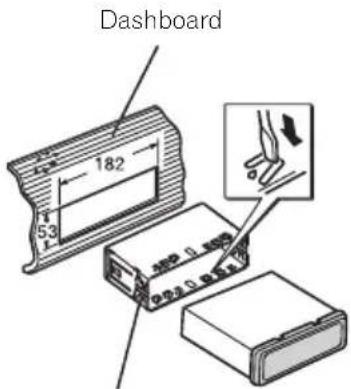
Mountingsleeve
3Installtheunitasillustrated.
Usecommerciallyavailablepartswheninstalling.
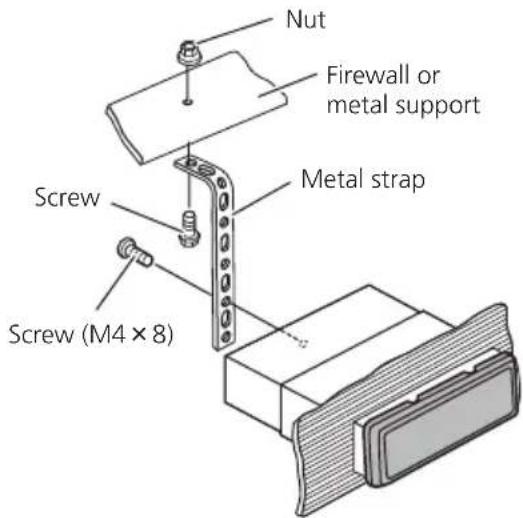
■ Makesurethattheunitisinstalledsecurelyin place. An unstable installation may cause skipping or other malfunctions.
DINRear-mount
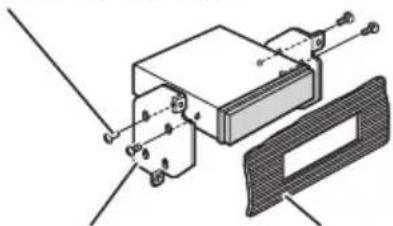
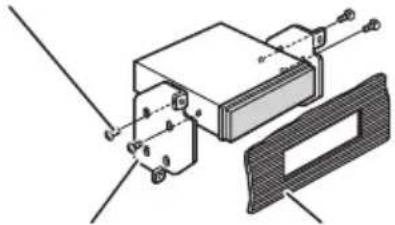
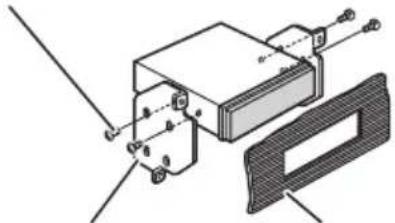
1 Determinetheappropriateposition wheretheholesonthebracketandthe sideoftheunitmatch.

natural_image
Diagram showing circular objects with downward arrows entering a rectangular container (no text or symbols)2Tightentwoscrewsoneachside.
Trussscrew(5mm×8mm)
natural_image
Technical diagram of a mechanical assembly with labeled components (no readable text or symbols)MountingbracketDashboardorconsole
Removingtheunit
1 Extendtopandbottomofthetrimring outwardstoremovethetrimring. (When reattachingthetrimring, pointtheside with thegroovedown.)

natural_image
Diagram showing two rectangular components with an arrow indicating transformation or alignment (no text or symbols)Trimring
- Releasingthefrontpanelallowseasieraccesstothetrimring.
2Insertthesuppliedextractionkeysinto bothsidesoftheunituntiltheyclickinto place.
3Pulltheunitoutofthedashboard.

natural_image
Diagram showing a mechanical device interacting with a block, with hands pulling the components (no text or symbols present)
Troubleshooting
| SymptomCauseAction | ||
| Thedisplay automatically returnstothe ordinarydis-play. | Youdidnotper-formanyopera-tionwithinabout 30seconds. | Performoperation again. |
| Therepeatplay rangechanges unexpectedly. | Dependingon therepeatplay range.these-lectedrangemay changewhense-lectinganother folderortrack,or whenfastfor-warding/rever-sing. | Selecttherepeat playrangeagain. |
| Asubfolderis notplayed back. | Subfolderscan-notbeplayed whenFOLDER (folderrepeat)is selected. | Selectanotherre-peatplayrange. |
| NOXXXXap-pearswhena displayischan-ged(e.g.,NOTITLE). | Notextinforma-tionembedded | Switchthedisplay orplayanother track/file. |
| Theunitismal-functioning. Thereisinter-ference. | Youareusinga device,suchasa cellphone,that transmitselectro-magneticwaves neartheunit. | Moveelectricalde-vicesthatmaybe causingtheinter-ferenceawayfrom theunit. |

Errormessages
Whenyoucontactyourdealeroryournearest PioneerServiceCenter,besuretonotethe errormessage.
Built-inCDPlayer
| MessageCauseAction | |
| ERROR-11,12, 17,30 | DirtydiscCleandisc. |
| ScratcheddiscReplacedisc. | |
| ERROR-10,11, 12,15,17,30, A0 | Electricalorme-chanical | Turntheignition switchOFFand backON,orswitch toadifferent source,thenback totheCDplayer. |
| ERROR-15Theinserteddisc isblank | Replacedisc. | |
| ERROR-22,23UnsupportedCD format | Replacedisc. | |
| FRMTREAD | Thereissome-timesadelaybetweenthestartof playback and whenyoustartto hearanysound | Waituntilthemes-sagedisappears andyouhear sound. |
| NOAUDIO | Theinserteddisc doesnotcontain anyplayablefiles | Replacedisc. |
| SKIPPED | Theinserteddisc containsDRM protectedWMA files | Replacedisc. |
| PROTECT | Allthefileson theinserteddisc areembedded withDRM | Replacedisc. |
USBstoragedevice
| MessageCauseAction | ||
| NODEVICE | Whenplugand playisoff, no USBstoragedeviceisconnected. | •Turntheplug andplayon.•Connectacom- patableUSBsto- ragedevice. |
| FRMTREAD | Thereissome-timesadelaybe-tweenthestartof playback and whenyoustartto hearanysound | Waituntilthemes-sagedisappears andyouhear sound. |
| NOAUDIO | NosongsTransfertheaudio | |
| filestotheUSB storagedeviceand connect. | ||
| Theconnected USBstoragede-vicehassecurity enabled | FollowtheUSB storagedevicein- structionstodis- ablethesecurity. | |
Additional Information
| SKIPPED | Theconnected USBstoragede-vicecontains WMAfilesem-beddedwith WindowsMed-iaTMDRM9/10 | Playanaudiofile notembeddedwith WindowsMedia DRM9/10. |
| PROTECTAllthefilesinthe USBstoragede-viceareem-beddedwith WindowsMedia DRM9/10 | Transferaudiofiles notembeddedwith WindowsMedia DRM9/10tothe USBstoragede-viceandconnect. | |
| N/AUSBTheUSBstorage deviceconnected toisnotsup-portedbythis unit. | ConnectaUSB MassStorage Classcompliant device. | |
| CHECKUSBTheUSBconnec-tororUSBcable hasshort-circuited. | Checkthatthe USBconnectoror USBcableisnot caughtinsome-thingordamaged. | |
| Theconnected USBstoragede-viceconsumes morethan500 mA(maximum allowablecur-rent). | ||
| ERROR-18Notcompatible USBdevice | Disconnectyour deviceandreplace itwithacompati-bleUSBstorage device. | |
| ERROR-19Communication failure | Performoneofthe followingopera-tions.-Turntheignition switchOFFand backON.-Disconnector ejecttheUSBsto-ragedevice.-Changetoadif-ferentsource.Then,returntothe USBsource. | |
| ERROR-23 | USBstoragede-viceisnotfor-mattedwithFAT16orFAT32 | USBstoragede-viceshouldbefor-mattedwithFAT16orFAT32. |
iPod
| MessageCauseAction | |
| NODEVICEWhenplugand playisoff,no USBstoragede-viceoriPodis connected. | •Turntheplug andplayon.•Connectacom- patibleiPod. |
| FRMTREADThereissome- timesadelaybe- tweenthestartof playbackand whenyoustartto hearanysound | Waituntilthemes- sagedisappears andyouhear sound. |
| ERROR-19Communication failure | Disconnectthe cablefromiPod.OnceiPod'smain menuisdisplayed, reconnectcable. ResettheiPod. |
| iPodfailureDisconnectthe cablefromiPod.OnceiPod'smain menuisdisplayed, reconnectcable. ResettheiPod. | |
| ERROR-16,18OldiPodfirm- wareversions | UpdatetheiPod version. |
| iPodfailureDisconnectthe cablefromiPod.OnceiPod'smain menuisdisplayed, reconnectcable. ResettheiPod. | |
| CHECKUSBiPodoperates correctlybut doesnotcharge | Checkifthecon- nectioncablefor iPodshortedout (e.g.,notcaughtin metalobjects). Afterchecking, turntheignition switchOFFand backONordiscon- necttheiPodand reconnect. |
| NOSONGSNosongs | Transfersongsto iPod. |
AdditionalInformation
STOP
Nosongsinthe currentlist
Selectalistthat containssongs.

Handlingguideline
Discsandplayer
Useonlydiscsfeaturingeitheroffollowingtwologos.


Use12-cmdisc.Donotuse8-cmdiscoranadapter for8-cmdisc.
Useonlyconventional,fullycirculardiscs.Donotuse shapeddiscs.


DonotinsertanythingotherthanaCDintotheCD loadingslot.
Donotusecracked, chipped, warped, or otherwise damaged discsastheymaydamagetheplayer.
UnfinalizedCD-R/CD-RWdiscplaybackisnotpossible.
Donottouchtherecordedsurfaceofthediscs.
Storediscsintheircaseswhennotinuse.
Avoidleavingdiscsinexcessivelyhotenvironments includingunderdirectsunlight.
Donotattachlabels, writeonorapplychemicalsto thesurfaceofthediscs.
TocleanaCD, wipethediscwithasoftclothoutward from the center.
Condensationmaytemporarilyimpairtheplayer's performance.Leaveittoadjusttotherwarmertemperatureforaboutonehour.Also,wipeanydamp discswithasoftcloth.
Playbackofdiscsmaynotbepossiblebecauseof disccharacteristics, discformat, recordedapplication, playbackenvironment, storageconditions, and soon.
Roadshocksmayinterruptdiscplayback.
Read the precautions for discs before using them.
USBstoragedevice
AddressanyquestionsyouhaveaboutyourUSBstoragedevicetothemanufacturerofthedevice.
ConnectionsviaaUSBhubarenotsupported.
DonotconnectanythingotherthanaUSBstorage device.
DonotleavetheUSBstoragedeviceinanyplacewith hightemperatures.
FirmlysecuretheUSBstoragedevicewhendriving. DonotlettheUSBstoragedevicefallontothefloor, whereitmaybecomejammedunderthebrakeoracceleratorpedal.
DependingontheUSBstoragedevice, the following problemsmayoccur.
- Operationsmayvary.
- Thisunitmaynotrecognizethestoragedevice.
• Thefilemaynotbeplayedbackproperly.
• The device may generate noise in the radio.
iPod
DonotleavetheiPodindirectsunlightforextended amountsoftime.Extendedexposuretodirectsun-lightcanresultiniPodmalfunctionduetotheresult-inghightemperature.
Donotleavethei Podinanyplace with hightemperatures.
Toensureproperoperation,connectthedockconnectorcablefromtheiPoddirectlytothisunit.
FirmlysecuretheiPodwhendriving.Donotletthe iPodfallontothefloor,whereitmaybecomejammed underthebrakeoracceleratorpedal.
AdditionalInformation
Fordetails, refertotheiPod'smanuals.
AboutiPodsettings
- YoucannotoperatetheiPodEqualizeronPioneer products. WerecommendthatyousettheiPod Equalizertooff, beforeconnectingtothisunit.
- You cannot set Repeat to off the Pod when using this unit. Repeats automatically changed to all when connecting the Pod to this unit.
DualDiscs
DualDiscsaretwo-sideddiscsthathavearecordable CDforaudioononesideandarecordableDVDfor videoontheother.
SincetheCDsideofDualDiscsisnotphysicallycompatiblewiththegeneralCDstandard,itmaynotbe possibletoplaytheCDsidewiththisunit. FrequentloadingandejectingofaDualDiscmayresultinscratchesonthedisc.Seriousscratchescan leadtoplaybackproblemsonthisunit.Insome cases,aDualDiscmaybecomestuckinthedisloadingslotandwillnoteject.Topreventthis,werecommendyourefrainfromusingDualDiscwiththisunit. PleaserefertotheinformationfromthediscmanufacturerformoredetailedinformationaboutDualDiscs.

Compressedaudio compatibility(disc,USB)
WMA
Fileextension:.wma
Bitrate:48kbpsto320kbps(CBR),48kbpsto384kbps(VBR)
Samplingfrequency:32kHz,44.1kHz,48kHz
WindowsMediaAudioProfessional, Lossless, Voice/DRMStream/Streamwithvideo: No
MP3
Fileextension::mp3
Bitrate:8kbpsto320kbps
Sampling frequency: 16kHz to 48kHz (32, 44.1, 48 kHz foreemphasis)
CompatibleID3tagversion:1.0,1.1,2.2,2.3,2.4(ID3 tagVersion2.xisgivenpriorityoverVersion1.x.)
M3uplaylist:No
MP3i(MP3interactive),mp3PRO:No
WAV
Fileextension:.wav
Quantizationbits:8and16(LPCM),4(MSADPCM)
Sampling frequency: 16kHz to 48kHz (LPCM), 22.05 kHz and 44.1kHz (MSADPCM)
Supplementalinformation
Onlythefirst32characterscanbedisplayedasafilename(includingthefileextension)orafoldername.
Thisunitmaynotoperatecorrectlydependingonthe applicationusedtoencodeWMAfiles.
Theremaybeaslightdelaywhenstartingplaybackof audiofilesembeddedwithimagedata.
Disc
Playablefolderhierarchy:uptoeighttiers(Apractical hierarchyislessthantwotiers.)
playable folders: upto99
playablefiles:upto999
Filesystem:ISO9660Level1and2,Romeo,Joliet
Multi-session playback: Yes
Packetwritedatatransfer: No
Regardless of the length of blank section between the song so the original recording, compressed audio discs play with short pause between songs.
USBstoragedevice
Playablefolderhierarchy:uptoeighttiers(Apractical hierarchyislessthantwotiers.)
playable folders: upto500
playablefiles:upto15000
Playbackofcopyrightprotectedfiles:No
AdditionalInformation
PartitionedUSBstoragedevice:Onlythefirstpartition canbeplayed.
Theremaybeaslightdelaywhenstartingplaybackof audiofilesonaUSBstoragedevicewithnumerous folderhierarchies.

CAUTION
Pioneeracceptsnoresponsibilityfordataloston theUSBstoragedeviceevenifthatdataislost whileusingthisunit.
iPodcompatibility
ThisunitsupportsonlythefollowingiPodmodels. SupportediPodsoftwareversionsareshownbelow. Olderversionsmaynotbesupported.
- iPodnano4thgeneration(softwareversion1.0.3)
- iPodnano3rdgeneration(softwareversion1.1.3)
- iPodnano2ndgeneration(softwareversion1.1.3)
- iPodnano1stgeneration(softwareversion1.3.1)
- iPodtouch2ndgeneration(softwareversion2.2.1)
- iPodtouch1stgeneration(softwareversion2.2.1)
- iPodclassic120GB(softwareversion2.0.1)
- iPodclassic(softwareversion1.1.2)
- iPod5thgeneration(softwareversion1.3)
- iPhone3G(softwareversion2.2.1)
- iPhone(softwareversion2.2.1)
DependingonthegenerationorversionoftheiPod, somefunctionscannotbeoperated.
OperationsmayvarydependingonthesoftwareversionofiPod.
WhenusinganiPod,iPodDockConnectortoUSB Cableisrequired.
PioneerCD-IU50interfacecableisalsoavailable.For details,consultyourdealer.
Compatiblefile:MP3(.mp3)/WAV(.wav)/AAC(.m4a)
Compatible format: AAC(16Kbpsto320Kbps), AAC VBR, Protected AAC (Purchased from iTunes Music Store)/MP3(16Kbpsto320Kbps), MP3VBR/Audible (Format2,3,4), AppleLossless, AIFF, WAV
AudioBook, Podcast: Yes

CAUTION
Pioneeracceptsnoresponsibilityfordataloston theiPodevenifthatdataislostwhileusingthis unit.
Sequenceofaudiofiles
Theusercannotassignfoldernumbersand specify playbacksequenceswiththisunit.
Exampleofahierarchy

flowchart
graph TD
    A["01"] --> B["02"]
    A --> C["03"]
    A --> D["04"]
    A --> E["05"]
    B --> F["①"]
    B --> G["②"]
    C --> H["③"]
    C --> I["④"]
    D --> J["⑤"]
    D --> K["⑥"]
Level 1 Level 2 Level 3 Level 4
:Folder Compressed audiofile 01to05:Folder number ①to⑥:Playback sequence
Disc
Folderselectionsequenceorotheroperation may differ depending on the encoding or writing software.
USBstoragedevice
Playbacksequenceisthesameasrecorded sequenceintheUSBstoragedevice.
Tospecifytheplaybacksequence, the following method is recommended.
①Createthefilenameincludingnumbersthat specifythe playbacksequence(e.g., 001xxx.mp3and099yyy.mp3).
2 Putthosefilesintoafolder.
3 SavethefoldercontainingfilesontheUSB storagedevice.
However, depending on the system environment, you cannot specify the playback sequence.
ForUSBportableaudioplayers,thesequence isdifferentanddependsontheplayer.
Copyrightandtrademark
iTunes
AppleandiTunesaretrademarksofApple Inc., registeredintheU.S.andothercoun-tries.
MP3
Supplyofthisproductonlyconveysalicense forprivate,non-commercialuseanddoesnot conveyalicensenorimplyanyrighttouse thisproductinanycommercial(i.e.revenue-generating)realtimebroadcasting(terrestrial, satellite,cableand/oranyothermedia),broadcasting/streamingviainternet,intranetsand/orothernetworksorinotherelectroniccontentdistributionsystems,suchaspay-audioor audio-on-demandapplications.Anindependentlicenseforsuchuseisrequired.Fordetails,pleasevisit http://www.mp3licensing.com.
WMA

WindowsMediaandtheWindowslogoaretrademarksorregisteredtrademarksofMicrosoft CorporationintheUnitedStatesand/orother countries.
Thisproductincludestechnologyownedby MicrosoftCorporationandcannotbeusedor distributedwithoutalicensefromMicrosoft Licensing,Inc.
iPod

iPodisatrademarkofAppleInc., registered in the U.S. and other countries.
"MadeforiPod" meansthatanelectronicaccessoryhasbeendesignedtoconnectspecificallytoiPodandhasbeencertifiedbythedevelopertomeetAppleperformancestandards.
Apple is not responsible for the operation of this device or its compliance with safety and regulatory standards.
iPhone

iPhoneisattrademarkofAppleInc.
"WorkswithiPhone" meansthatanelectronic accessoryhasbeendesignedtoconnectspecificallytoiPhoneandhasbeencertifiedby thedevelopertomeetAppleperformance standards.
Appleisnotresponsiblefortheoperationof thisdeviceoritscompliancewithsafetyand regulatorystandards.
Specifications
General
Ratedpowersource.....14.4VDC
Groundingsystem......Negativetype
AdditionalInformation
Maximumcurrentconsumption 10.0A
Dimensions(W×H×D):
DIN
Continuouspoweroutput...22W×4(50Hzto15000
Hz,5%THD,4Ωload,both
channelsdriven)
Load impedance ....4 Ω (4 Ω to 8 Ω allowable)
Preoutmaximumoutputlevel
2.0V
Tonecontrols:
Bass
Frequency.....100Hz
Gain....±12dB
Mid
Frequency.....1kHz
Gain....±12dB
Treble
Frequency.....10kHz
Gain....±12dB
CDplayer
System....Compactdiscaudiosystem
Usablediscs....Compactdisc
Signal-to-noiseratio....94dB(1kHz)(IEC-Anetwork)
Numberofchannels......2(stereo)
MP3decodingformat......MPEG-1&2AudioLayer3
WMAdecodingformat......Ver.7,7.1,8,9,10,11(2ch audio)
(WindowsMediaPlayer)
WAVsignalformat....LinearPCM&MSADPCM (Non-compressed)
USB
USBstandardspecification
...USB2.0fullspeed
Maximumcurrentsupply....500mA
Minimummemorycapacity
256MB
USBClass....MSC(MassStorageClass)
Filesystem.....FAT16,FAT32
MP3decodingformat......MPEG-1&2AudioLayer3
WMAdecodingformat......Ver.7,7.1,8,9,10,11(2ch audio)
(WindowsMediaPlayer)
WAVsignalformat....LinearPCM&MSADPCM
(Non-compressed)
FMtuner
Frequencyrange....87.5MHzto108.0MHz
Usable sensitivity ....11 dBf (0.7 V/75 , mono, S/N:30dB)
Signal-to-noiseratio....72dB(IEC-Anetwork)
AMtuner
Frequencyrange.....531kHzto1602kHz(9kHz)
530kHzto1640kHz(10
kHz)
Usablesensitivity.....25μV(S/N:20dB)
Signal-to-noiseratio......62dB(IEC-Anetwork)
Infraredremotecontrol
Wavelength....940nm±50nm
Output......typ;12mw/srperInfrared LED

Note
Specificationsandthedesignaresubjecttomodificationswithoutnotice.
Antesdecomenzar
ParteParte
| 1 | SRC/OFF | 8 | DISP/⊃/SCRL |
| 2 | MULTI-CONTROL(M.C.) | 9 | ola (lista) |
| 3 | 1 a 6 | 10 | ▲/▼/◄/► |
| 4 | Botón Abrir | 11 | BAND/ESC |
| 5 | Conectordeentra-daAUX(conector estéreode3,5mm) | 12 | Ranuradecargade discos |
| 6 | PuertoUSB13▲(expulsar) | ||
| 7 | ∅ (reloj) | ||

PRECAUCIÓN
natural_image
Diagram of a mechanical or laboratory procedure showing a tool interacting with a sample holder (no text or symbols visible)
Importante
AM: OFF—LEVEL 1—LEVEL 2
natural_image
Diagram showing downward arrows pointing to circular patterns inside a rectangular container (no text or symbols)2Aprietelosdostornillosencadalado.
Tornillodecabezaredonda(5mm×8mm)
natural_image
Technical diagram of a mechanical assembly with mounting brackets and a rectangular component (no text or symbols)CarcasaSalpicaderooconsola
Retiradadelaunidad
natural_image
Diagram showing two rectangular components with an arrow indicating transformation or alignment (no text or symbols)Anillodeguarnición
natural_image
Diagram showing a mechanical device interacting with a block, with hands pulling the components (no text or symbols present)
Solucióndeproblemas

ParteParte
| 1 | SRC/OFF | 8 | DISP/⊃/SCRL |
| 2 | MULTI-CONTROL(M.C.) | 9 | (Q (Lista) |
| 3 | 1 a 6 | 10 | ▲/▼/◄/► |
| 4 | Botão Abrir | 11 | BAND/ESC |
| 5 | Conectordeentra-daAUX(conectoresléreode3,5mm) | 12 | Slotdecarrega-mentodedisco |
| 6 | Porta USB | 13 | ▲ (Ejetar) |
| 7 | ∅ (Hora) |

CUIDADO
natural_image
Diagram of a laboratory procedure showing a pipette and test tube with a magnified view (no text or symbols)
Importante
AM:OFF—LEVEL1—LEVEL2
FMSTEP(PassodesintoniaFM)
OpassodesintoniaFMempregadopelasintoniapor buscapodeseralternadoentre100kHz,opassoprogramadoe50kHz.
AMSTEP(PassodesintoniaAM)
OpassodesintoniaAMpodeseralternadoentre9 kHz, opassoprogramadoe10kHz. AoutilizarosintonizadoraAméricado Norte, Centraloudo Sul, rea-justeopassodesintoniade9kHz (531a1602kHz permissível) para 10kHz (530a1640kHz permissível).
natural_image
Diagram showing downward arrows pointing to circular patterns on a rectangular object (no text or symbols)2Apertedoisparafusosemcadalado.
Parafusosdecabeçatreliçada(5mm×8mm)
natural_image
Technical diagram of a mechanical assembly with mounting brackets and a cover plate (no text or symbols)natural_image
Diagram showing two rectangular components with an arrow indicating transformation or alignment (no text or symbols)Aneldeacabamento
- Sevocêretiraropainelfrontal, oacessoao aneldeacabamentoficarámaisfácil.
natural_image
Diagram showing a mechanical device interacting with a rectangular block, with hands holding the components (no text or symbols present)iPhoneéumamarcacomercialdaAppleInc.
主機(前面板打開)
部位部位
| 1 | SRC/OFF | 8 | DISP/⊃/SCRL |
| 2 | MULTI-CONTROL(M.C.) | 9 | (清單) |
| 3 | 1至6 | 10 | /// |
| 4 | 開啟按鈕 | 11 | BAND/ESC |
| 5 | AUX輸入插孔(3.5mm立體聲插孔) | 12 | 碟片槽 |
| 6 | USB埠 | 13 | (退出) |
| 7 | 4(時鐘) |

注意
DYNAMIC—VOCAL—NATURAL—CUSTOM—FLAT—POWERFUL
3 按M.C.確認選擇。
TONE CTRL(等化器調整)
您可以調整低音/中音/高音等級。
natural_image
Pure diagram of a container with circular patterns and downward arrows indicating flow or movement (no text or symbols)安装
2 鎖緊各邊的兩顆螺絲。
十字槽螺絲(5 mm × 8 mm)

natural_image
Technical diagram of a mechanical assembly with labeled components (no text or symbols present)托架
儀表板或操縱台
移除本機
natural_image
Diagram showing two rectangular components with an arrow indicating transformation or alignment (no text or symbols)飾環
- 拆下前面板後,可更輕易的進入飾環。
natural_image
Diagram showing a mechanical device interacting with a block, with hands pulling the components (no text or symbols present)
故障排除
iPod是Apple Inc.的商標。
.Apple Inc ﹠ ﹠ ﹠ ﹠ ﹠ ﹠ ﹠ ﹠ ﹠ ﹠ ﹠ ﹠ ﹠ ﹠ ﹠ ﹠ ﹠ ﹠ ﹠ ﹠ ﹠ ﹠ ﹠ ﹠ ﹠ ﹠ ﹠ ﹠ ﹠ ﹠ ﹠ ﹠ ﹠ ﹠(\text{iPhone}) ﹠ ﹠ ﹠ ﹠ ﹠(\text{(iPhone }) ﹠ ﹠ ﹠(\text{(iPhone }) Works with iPhone ﹠(\text{(iPhone }) ﹠(\text{(iPhone }) ﹠(\text{(iPhone }) ﹠(\text{(iPhone }) ﹠(\text{(iPhone }) ﹠(\text{(iPhone }) ﹠(\text{(iPhone }) ﹠(\text{(iPhone }) ﹠(\text{(iPhone }) ﹠(\text{(iPhone }) (\text{apple}) \apple) \\text{apple}) \apple) \\text{apple}) \apple) \\text{apple}) \apple) \\text{apple}) \apple) \\text{apple}) \apple) \\text{apple}) \apple) \\text{apple}) \n=m=m=m=l=t=l=i=i=m=o=o=i=i=o=i=i=i=i=i=i=i=i=i=i=i=i=i=i=i=i=i=i=i=i=i=i=i=i)(apple) \\text{apple}) \apple) \\text{apple}) \apple) \\text{apple}) \apple) \\text{apple}) \apple) \\text{apple}) \apple) \\text{apple}) \apple) \\text{apple}) \$\mathbf{\Phi}_{\mathbf{\Phi}}^{\mathbf{\Phi}}_{\mathbf{\Phi}}^{\mathbf{\Phi}}_{\mathbf{\Phi}}^{\mathbf{\Phi}}_{\mathbf{\Phi}}^{\mathbf{\Phi}}_{\mathbf{\Phi}}^{\mathbf{\Phi}}_{\mathbf{\Phi}}^{\mathbf{\Phi}}_{\mathbf{\Phi}}^{\mathbf{\Phi}}_{\mathbf{\Phi}}^{\mathbf{\Phi}}_{\mathrm{g}}^{\mathbf{\Phi}}_ {\mathbf{\Phi}}^{\mathbf{\Phi}}_ {\mathbf{\Phi}}^{\mathbf{\Phi}}_ {\mathbf{\Phi}}^{\mathbf{\Phi}}_ {\mathbf{\Phi}}^{\mathbf{\Phi}}_ {\mathbf{\Phi}}^{\mathbf{\Phi}}_ {\mathbf{\Phi}}^ {\mathbf{\Phi}}_ {\mathbf{\Phi}}^ {\mathbf{\Phi}}_ {\mathbf{\Phi}}^ {\mathbf{\Phi}}_ {\mathbf{\Phi}}^ {\mathbf{\Phi}}_ {\mathbf{\Phi}}^ {\mathbf{\Phi}}_ {\mathbf{\Phi}}^ {\mathbf{\Phi}}_ {\mathbf{\Phi}}^ {\mathbf{\Phi}}_ {\mathbf{\Phi}}^ {\mathbb{F}}_ {\mathbf{\Phi}}^ {\mathbb{F}}_ {\mathbf{\Phi}}^ {\mathbb{F}}_ {\mathbf{\Phi}}^ {\mathbb{F}}_ {\mathbf{\Phi}}^ {\mathbb{F}}_ {\mathbf{\Phi}}^ {\mathbb{F}}_ {\mathbf{\Phi}}^ {\mathbb{F}}_ {\mathbf{\Phi}}^ {\mathbb{F}}_{\mathbf{\Phi}}^ {\mathbb{F}}_ {\mathbf{\Phi}}^ {\mathbb{F}}_ {\mathbf{\Phi}}^ {\mathbb{F}}_ {\mathbf{\Phi}}^ {\mathbb{F}}_ {\mathbf{\Phi}}^ {\mathbb{F}}_ {\mathbf{\Phi}}^ {\mathbb{F}}_ {\mathbf{\Phi}}^ {\mathbb{F}}_ {\mathbb{F}}^ {\mathbb{F}}_ {\mathbf{\Phi}}^ {\mathbb{F}}_ {\mathbf{\Phi}}^ {\mathbb{F}}_ {\mathbf{\Phi}}^ {\mathbb{F}}_ {\mathbf{\Phi}}^ {\mathbb{F}}_ {\mathbf{\Phi}}^ {\mathbb{F}}_ {\mathbf{\Phi}}^ {\mathbb{F}}_ {\mathbf{\Phi}}^{*})(\left[\begin{array}{c:c:c:c:c:c:c:c:c:c:c:c:c:c:c:c:c:c:c:c:c:c:c:c:c:c:c:c:c:c:c:c:c:c:c:c:c:c:c:c:c:c:c:c:c:c:c:c:c:c:c:c:c:c:c:c:c:c:c:c:c:c:c:c:c:c:c:c:c:c:c:c:c:c:c:c:c:c:c:c:c:c:c:c:c:c:c:c:c:c:c:c:c:c:c:c:c:c:c:c:c:}\end{array}\right]).

natural_image
Technical diagram of a mechanical assembly with labeled components (no readable text or symbols)كتيفة التركيلب
فلك الوحدة
natural_image
Diagram showing two rectangular components with an arrow indicating transformation or alignment (no text or symbols)بِيْطَ
natural_image
Diagram showing a mechanical device being processed into a block, with hands pulling the components (no text or symbols present)
natural_image
Diagram showing circular particles entering a container with downward arrows indicating flow or movement (no text or symbols)
—CUSTOM—NATURAL—VOCAL—DYNAMIC
POWERFUL—FLAT
■
زاهجلا
نوفة يللمام

Visit us on the World Wide Web at
http://pioneer.jp/group/index-e.html
Pioneer Gulf.FZE
http://www.pioneer-uae.com
Pioneer Electronics Australia. Pty.Ltd
http://www.pioneeraus.com.au
Pioneer Electronics Asiacentre.Pte
http://www.pioneer.com.sg
Pioneer (HK) Ltd.
http://www.pioneerhongkong.com.hk
Pioneer High Fidelity Taiwan Co., Ltd.
http://www.pioneer-twn.com.tw
Pioneer International Latin America S.A.
http://www.pioneer-latin.com
PIONEERCORPORATION
4-1,MEGURO1-CHOME,MEGURO-KU
TOKYO153-8654,JAPAN
PIONEERELECTRONICS(USA)INC.
P.O.Box1540, LongBeach, California90801-1540, U.S.A.
TEL:(800)421-1404
PIONEEREUROPENV
Haven1087, Keetberglaan1, B-9120Melsele, Belgium/Belgique
TEL:(0)3/570.05.11
PIONEERELECTRONICSASIACENTREPTE.LTD.
253AlexandraRoad,#04-01,Singapore159936
TEL:65-6472-7555
PIONEERELECTRONICSAUSTRALIAPTY.LTD.
178-184BoundaryRoad, Braeside, Victoria3195, Australia
TEL:(03)9586-6300
PIONEERELECTRONICSOFCANADA, INC.
300AllstateParkway, Markham, OntarioL3R0P2, Canada
TEL:1-877-283-5901
TEL:905-479-4411
PIONEERELECTRONICSDEMEXICO,S.A.deC.V.
Blvd.ManuelAvilaCamacho13810piso
Col.LomasdeChapultepec,Mexico,D.F.11000
TEL:55-9178-4270
先鋒股份有限公司
總公司:台北市中山北路二段44號13樓
電話:(02)2521-3588
先鋒電子(香港)有限公司
香港九龍尖沙嘴海港域世界商業中心
9樓901-6室
電話:(0852)2848-6488
PublishedbyPioneerCorporation.
Copyright©2009byPioneerCorporation.
Allrightsreserved.
- ThankyouforpurchasingthisPIONEER product.
- Incaseoftrouble
- Aboutthisunit
- CAUTION
- BasicOperationsofthisunit
- Important
- Operatingthisunit
- Notes
- Useandcareoftheremote control
- WARNING
- Menuoperationsidentical forfunctionsettings/audio adjustments/initial settings/lists
- Tuner
- BasicOperations
- Storingandrecallingstations
- Functionsettings
- BSM(beststationsmemory)
- Note
- CD/CD-R/CD-RWandUSB storagedevices
- Displayingtextinformation
- Selectingandplayingfiles/ tracksfromthenamelist
- Advancedoperationsusing specialbuttons
- CD/CD-R/CD-RW
- USBaudioplayer/USBmemory
- REPEAT(repeatplay)
- RANDOM(randomplay)
- PAUSE(pause)
- S.RTRV(soundretriever)
- iPod
- Browsingforasong
- 1Presstoswitchtothetopmenuof thelistsearch.
- 2UseM.C.toselectacategory/song.
- 2TurnM.C.tochangethemenuoption andpresstoselectFUNCTION.
- 3TurnM.C.toselectthefunction.
- SHUFFLE(shuffle)
- SHUFFLEALL(shuffleall)
- LINKPLAY(linkplay)
- CTRL(controlmode)
- AUDIOBOOK(audiobookspeed)
- AudioAdjustments
- 2TurnM.C.tochangethemenuoption andpresstoselectAUDIO.
- 3TurnM.C.toselecttheaudiofunction.
- FAD/BAL(fader/balanceadjustment)
- EQUALIZER(equalizerrecall)
- TONECTRL(equalizeradjustment)
- LOUDNESS(loudness)
- SLA(sourceleveladjustment)
- InitialSettings
- CLOCKSET(settingtheclock)
- FMSTEP(FMtuningstep)
- AMSTEP(AMtuningstep)
- AUX(auxiliaryinput)
- USB(plugandplay)
- UsingtheAUXsource
- 2PressSRC/OFFtoselectAUXasthe source.
- Turningtheclockdisplay onoroff
- Connectiondiagram
- DINfront/rearmount
- DINFront-mount
- 1Insertthemountingsleeveintothe dashboard.
- 2Securethemountingsleevebyusinga screwdrivertobendthemetaltabs(90°) intoplace.
- 3Installtheunitasillustrated.
- DINRear-mount
- Removingtheunit
- Errormessages
- Additional Information
- AdditionalInformation
- Handlingguideline
- Discsandplayer
- USBstoragedevice
- DualDiscs
- Compressedaudio compatibility(disc,USB)
- WMA
- MP3
- WAV
- Supplementalinformation
- Disc
- iPodcompatibility
- Sequenceofaudiofiles
- Copyrightandtrademark
- iTunes
- iPhone
- Specifications
- General
- CDplayer
- USB
- FMtuner
- AMtuner
- Infraredremotecontrol
- Antesdecomenzar
- PRECAUCIÓN
- Importante
- Retiradadelaunidad
- CUIDADO
- FMSTEP(PassodesintoniaFM)
- AMSTEP(PassodesintoniaAM)
- 2Apertedoisparafusosemcadalado.
- 注意
- TONE CTRL(等化器調整)
- 安装
- 鎖緊各邊的兩顆螺絲。
- 移除本機
- PIONEERCORPORATION
Brand : PIONEER
Model : DEH-3250UB
Category : Receiver