
DEH-2450UB - Receiver PIONEER - Free user manual and instructions
Find the device manual for free DEH-2450UB PIONEER in PDF.


| Product Type | Car Stereo Receiver |
| Brand | Pioneer |
| Model | DEH-2450UB |
| Dimensions (W x H x D) | Approx. 7 x 2 x 6.5 inches (178 x 50 x 165 mm) |
| Weight | Approx. 2.6 lbs (1.2 kg) |
| Power Supply | 14.4V DC (10.8 - 15.1V allowable) |
| Maximum Power Output | 50 W x 4 |
| Continuous Power Output | 22 W x 4 RMS |
| Playback Media | CD, CD-R/RW, USB, MP3/WMA/WAV |
| USB Connectivity | Front USB port, supports up to 32 GB |
| Tuner Bands | FM, AM (MW/LW) |
| FM Sensitivity (IHF) | 8 dBf (0.7 µV) |
| AM Sensitivity (S/N 20dB) | 20 µV |
| Audio Outputs | 1 pair preamp outputs (2V) |
| Equalizer | 5-band graphic equalizer |
| Display | Negative LCD with multi-color illumination |
| Remote Control | Included wired remote |
| Detachable Face | Yes, with security code |
| AUX Input | 3.5 mm front auxiliary input |
| Subwoofer Control | Yes, with phase selection |
| High Pass Filter | 50/80/125 Hz |
| Low Pass Filter | 50/80/125 Hz |
| Chassis Type | DIN mount |
| Warranty | 1 year limited |
Frequently Asked Questions - DEH-2450UB PIONEER
User questions about DEH-2450UB PIONEER
0 question about this device. Answer the ones you know or ask your own.
Ask a new question about this device
Download the instructions for your Receiver in PDF format for free! Find your manual DEH-2450UB - PIONEER and take your electronic device back in hand. On this page are published all the documents necessary for the use of your device. DEH-2450UB by PIONEER.
USER MANUAL DEH-2450UB PIONEER
REPRODUCTOR DE CD CON RECEPTOR RDS
CD PLAYER COM RDS
CD RDS 接收機
ThankyouforpurchasingthisPIONEER product
To ensure proper use, please read through this manual before using this product. It is especially important that you read and observe WARNING and CAUTIONsin this manual. Please keep the manual in a safe and accessible place for further reference.
Aboutthisunit
CAUTION:
USEOCONTROLORADJUSTMENTOR PERFORMANCEOFPROCEDURES OTHERTHANTHOSESPECIFIEDHEREIN MAYRESULTINHAZARDOUSRADIATION EXPOSURE. CAUTION: THEUSEOFOPTICALINSTRUMENTS WITHTHISPRODUCTWILLINCREASE EYEHAZARD.

CAUTION
- Donotallowthisunittocome intocontact with liquids. Electricalshockcouldresult. Also, damagetothisunit, smoke, and overheatingcouldresult from contact with liquids.
• Always keep the volume of enough to hear outsidesounds. - Avoidexposuretomoisture.
- If the battery is disconnected or discharged, any preset memory will be erased.
CAUTION
Thisproduclisaclass1aserproductclassifiedundertheSafetyoflaserproducts.IEC 60825-1:2007.andcontainsacsas1Miascr module.Toensurecontinuedsafely,donolremovoanycoverscrattemptogainacccsto theinsidoctheproduct.Referalservicingo qualifiedpersonnel.
CLASS 1 LASER PRODUCT
CAUTION—CLASS 1M INVISIBLE LASER RADIATION WHEN OPEN, DO NOT VIEW DIRECTLY WITH OPTICAL INSTRUMENTS.
Note
Functionsettingoperationsarecompletedeven ifthemenuiscancelledbeforetheoperations areconfirmed.
Aboutthismanual
- In the following instructions, USB memories and USB audio players are collectively referred to as "USB storage device".
- In this manual, iPod and iPhone will be referred to as "iPod".
Demomode
Important
- Failure to connect the bed (ACC) of this unit to a terminal coupled with ignition switch on offoperals may lead to battery drain.
- Remember that if the feature demo continues operating when the care engine is turned off, it may drain battery power.
Beforeyoustart
The demostartsautomat callyfycoudonotoperat thisunit withinabout30second since the unitwaslastoperatedcriftheignitionswitch this settoACCorONwhiletheunit sturnedoff. To cancellthedemonome,youneedlodisplaythe initialsettings. Select DEMO(demodisplaysetting)ancturnoffthedomodispay Fordetails, refer to initialsettings on page9.
Incaseoftrouble
Should this sunilfaillcooperaleproperly, please contact your dealer or nearest authorized PIONEERServiceStation.

Operatingthisunit
Headunit
DEH-3450UB

PartPart
| 1▲(eject/3) | → (back/display) | |
| 2 | a (list)@←▶ | |
| 3 | MULTI-CONTROL(M.C.) | 10 BAND40 (iPodcontra) |
| 4 | SRC/OFF | 11 1 to 6 |
| 5 | D sc loading slot@ | |
| 6 | USB sort | 13 AUX inout jack(3.5mm stereoack) |
| 7 | Cui (color) | 14Dotach button |
DEFH-2450UB
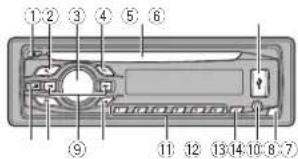
PartPart
| 1 | ▲ (eject) | 8 | ⊃ (back/display) |
| 2 | # (list)(9) ◀ |
PartPart
| 3 | MULTI-CONTROL(M.C.) | 10 | BAND( iPod control) |
| 4 | SRC/OFF | 11 | 1 to 6 |
| 5 | Disc loading slot2 | DISP OFF | |
| 6 | USB port | 19 | AUX input jack(3.8 mm stereo jack) |
| 7 | 20 | Detach button |
CAUTION
- Use an optional Pioneer USB cable (CD-U50E) to connect the USB audio player/USB memory as any device connected directly to the unit will protrude out from the unit and may be dangerous.
• Dorol use, unauthorized products.
Remotecontrol

Part Operation
| 15VOLUME | Press to increase or decrease volume. |
| 16MUTE | Press to mute. Press again to unrule. |
Operatingthisunit
| Part | Operation |
| 1▲/▼ | Press to recall presentations. Press to select the next/previous folder. |
| 1#AUDIO | Press to select an audio function. |
| 1#DISP/SCRL | Press to select different dispays. Press and hold to turn dimmer on or off. |
| 211 | Press to pause or resume play back. |
| 22 FUNC-TION | Press to select functions. |
| 23 LIST/ENTER | Press to display the disc title, track title, folder, or file list depending on the source. Press to display the list depending on the source. While in the operating menu, press to control functions. |
Displayindication

| Indicator | State | |
| 1 | Main dis-play sco-t on | Tuner: band and frequencyRDS: programservice name, FTY information and other literal informationBuilt in CD, USB storage device and Post: e apsec playback lines and led in-formation |
| 2 | dis | The I function is beingoper-ated. |
| 3 | LOC | Local seek tuning is on. |
| 4 | TA (TA)TA function is on. | |
| 5 | TP (TP) | A TP station is tuned in. |
| 6 | (re-post) | Track onto der repeats on. |
| 7 | XX (ran-dom/shu-flio) | Random play ison.The iPod source isselected and this shuttle or shuttleall function ison. |
| 8 | SBtry(sound re-liever) | The soundretriever function is on. |
| 9 | (iPod control) | This unit's iPod funct on is op-erated from your iPod. |
Setupmenu
When you turn the ignition switch to ON after installation, setup menu appears redisplay. You can set upthemenu options below.
1 After installation of this unit, turn the ignition switchtoON. SETUP appears.
Operatingthisunit
2TurnM.C.toswitchtoYES.PressM.C.to select.
■If you don't operate for 30 seconds, these setup menu will not be displayed.
■Ifyouprefemotoselupathistime.tumM.C. toswitchtoNO.Presstoselect.
If you select NO, you cannot setup in the setup menu.
3Performthefollowingprocedurestoset themenu.
To proceed to the next menu option, you need to confirm your selection.
CLOCKSET(settingtheclock)
①TurnM.C.teadjusthour.
2) Press M.C. to select minute.
3TurnM.C.leadjustminute.
4) PressM.C.toconfirmtheselection.
FMSTEP(FMuringstep)
Normally the FM tuning step employed by seek tuning is 50kHz. When AFor IAison, the tuning step automatically changes to 100kHz. It maybe preferable loset the tuning steps to 50kHz when Aison.
- Thetuningslepremizinsat50k Hzduringmanualtuning.
TlumM.C.toselecttheHtuningstep.
50(50kHz)—100(100kHz)
2PressM.C.1oc confirm the selection.
MWSTEP(MWtuningstep)
The MWtuningstep can be switched between 9kHz and 10kHz. Whonusing the function in North, Centra or South America, rosetthatuning step from 8kHz (531kHz to 602kHz allow ab elto 10kHz (530kHz to 1640kHz owable).
TJumM.C.toselecttheM-Wtuningstep.
9 (9 kHz)—10 (10 kHz)
2) Press M.C. to confirm the selection.
DEMO(demod splaysetting)
1 Turn M.C. to sel the demo display to on or off.
2 PressM.C.toconf rmtheselection.
QUITappears
4Tofinishyoursettings,turnM.C.toselect
YES.Presstoselect.
■ifyouprefertochangeyoursettingagain,turn
M.C. to switch to NO Press to select.
Notes
- You can setup the menu options in the initial settings. For details about these settings, refer to initial settings on page 9.
- Youcancancelsetupmenubypassing SRC/OFF.
Basicoperations
Important
- Handlegently when removing or attaching the front panel.
- Avoid subjecting the front panel to excessive shock.
- Kecothetra front panel out of direct sunlight and high temperature.
• To avoid damaging the device or vehicle interior, remove any cables and devices attached to the front panel before delaching it.
Operatingthisunit
Removing the front panel to protect your unit from theft
1 Pressthedelachbutton:loreleaselhefront cancel.
2 Push the front panel upward (1) and then pull it downward(1) you.

3 Always keep the detached front panel line protection devices such as protect on case.
Re-attachingthefrontpanel
ITSlidothefrontpaneltocholoft. Makesuretoinsetttheabsonthe eftsideof theheadunitinotheslotsontheirortpanel.

[2] 'resstherights:deofthetron:paneluntilitis firmlysealed.
If you cannot all attach the front panel to the head until successfully makes sure that you are placing the front panel onto the head unit correctly. Forcing the front panel into placemay result in damage to the front panel or has unit.
Turringthe.uniton
1 Press SRC/OFF to turn the unit on.
Turringtheumioft
1 Press and hold SRC/OFF until the unit turns off.
Selectingasource
1 Press SRC/OFF to cycle between: TUNER (lune)—CD (built-in CD player)—USB (USB)/iPod(iPod)—AUX(AUX)
Adjustingthevolume
1TumM.C. toad ustthevo lume.

CAUTION
Forsafety reasons, park your vehicle when removing the front panel.
Note
Whenthisunit'sblue/white leadisconnected to the vehicle'sauto-antennarelaycontrol terminal, the vehicle'santenna extends when this unit'ssourceisturnedon. To retract the antenna turnthesourceoff.
Useandcareoftheremote control
Usingtheremotecontrol
TPointtherometacrolinthed ractionofthe frontpanoltooperate. When using forthe first time, pull out the film protruding from the tray.
Replacingthebatery
①Slidethatrayoutonthebackoftheremple control.
2 Insert the battery with the plus (+)and minus (-)po:esaligned:properly.

Operatingthisunit

WARNING
- Keep the battery out of each of children. Should the battery besallowed, consult a doctor immediately.
- Batteries(batterypackorbatteriesinstalled) must not be exposed to excessive heats such as sunshino, fireorthelike.

CAUTION
• UsecoreCR2025(3V) lithium battery.
- Remove the battery if there mole control is not used for a month longer.
- Thorcisadangcrotexplosion the battery is incorrectly replaced. Replace only with the same corequivalent type.
• Donothandlethebatterywithmetallictools
- Donotstorethebatterywithmetallic objects.
- If the battery leaks, wipe the remote control completely clean and install anew battery.
- When disposing of used batteries, comply with governmental regulations on environmental public institutions' rules that apply in your country/area.

Important
- Donotstoretheremotecontrolinhighttemperaturescordirectsunlight.
• Theremotecontrol may not function properly indirect sunlight. - Donotlettheremotecontro fallontothe floor,whereit maybecomejammedunder thebrakeoracceleratorpedal.
Menuoperationsidentical forsetupmenu/function settings/audioadjustments/initialsettings/lists
| ReturningtothopreviousdisplayReturningtothoprevious(stithefolderonelevelhigher):TPress ▷. |
| ReturningtotheordinarydisplayCancelingtheirnaltsettingmenu/setupmenuTPressBAND/ ▲ |
| ReturningtotheordinarydisplayfromhelistTPressBAND/ ▲ |
Tuner
Basicoperations
Selectingaband
1 PressBAND/ until the desired band (F1, F2, F3 for FM, MW or S1, S2 for shortwave) is displayed.
Recallingpreselations □ Press ◀ or ▶.
- It MAN (manual tuning) is selected in SEEK, you cannot recall presentations. You need to select PCH(presetchannel) in SEEK. For details about this settings, therefore SEEK(left/right key setting) or then next page.
Operatingthisunit
| Manualtuning(stepbystop):1 Press◀or▶.IF PCH(presa channel) is selected in SEEK,youcannottun cujordownmanually.YouneedloselectMAN(manualtuning)nSEEK.Fordelai saboul theselling, referloSEEK(fctt/rightko settingionthenextpage. |
| Seeking1 Press and hold◀or▶, and then release.Youancancelseettuningbybrieflypressing◀or▶While-pressinger:holding◀or▶,youcanskipstations.Seektuningstartssassonesyourelease◀or▶. |
Note
Thisunit'sAF(alternativefrequenciessearch) functioncanbeturnedonancoff.AFshouldbe offormorturingoperation(refertoAF(alternativefrequenciessearch)onthenextpage).
Storingandrecallingstations foreachband
Usingpreset tuning buttons
1Whenyoufindastationthatyouwant tostoreinmemory,pressoneofthepreset tuningbuttons(1to6)andholduntilthe presetnumberstopsflashing.
2Pressoneofthepresettuningbuttons(1 to6)toselectthedesiredstation.
SwitchingtheRDSdisplay
-Press.
Programservicename—PTYinformation—Entertainment—Frequency
■PTYinformationandthetrequencyappearonthedisplayforeignseconds.
■Dependingontheband, textinformation can be changed.
■ Text information item sthatcanbechangecad-pendorthearea.
PTYlist
NEWS/INFO
NEWS(News), AFFAIRS(Currentaffairs), INFO (Information), SPORT(Sports), WEATHER(Weather), FINANCE(Finance)
POPULAR
POPMUS(Popularmusic),ROCKMUS(Rock music),EASYMUS(Easylistening),OTHMUS (Othermusic),JAZZ(Jazz),COUNTRY(Country music),NATMUS(Nationalmusic),OLDIES (Oldlesmusic),FOLKMUS(Folkmusic)
CLASSICS
L.CLASS(lightclassica).CLASSIC(Classical)
OTHERS
EDUCATE (Education), DRAMA (Drama), CULTURE (Culture), SCIENCE (Science), VARIED (Varied), CHILDREN (Children's), SOCIAL (Social affairs), RELIGION (Religion), PHONEIN (Phone in), TOURING (Travel), LEISURE (Leisure), DOCUMENT (Documentaries)
Functionsettings
1PressM.C.todisplaythemainmenu.
2TurnM.C.tochangethemenuoption andpresstoselectFUNCTION.
3TurnM.C.toselectthefunction.
Afterselecting, perform the following procedure to set the function.
- If MW, 51 or 52 is selected, only BSM, LOCALandSEEKisavailable.
Operatingthisunit
BSM(beststationsmemory)
BSM(beststationsmemory)automaticallystores thesixstrongeststations intheorderoftheirs g-nalstrength.
1) PressM.C.tcturnBSMon. Tocancel, pressM.C.again.
REGION(regional)
When AF sused, theregionalfunctionlimits the selectionofstationstothosebroadcastingregionalprograms.
1) Press M.C. tcturntheregional function nor off.
MW/shortwave: OFF—LV1—LV2
The highest level setting allows reception of only the strongest stations, while lower levels allow thereception of weaker stations.
PTYSEARCH(programtypeselection)
You cantune into astation using PTY(program type) information.
1 PressM.C. to display the setting mode.
2 Turn M.C. to select the desired setting.
NEWS/INFO POPULAR CLASSICS OTHERS
3 PressM.C.tobeginthesearch.
The unit searches for a station broadcasting that type of program. When a station is found, its programservicon name is displayed. For PTY(program type IDcode) information, refer to the previous page.
The program of somestations may differ from that indicated by neurotransmitted PTY.
If noslationis broadcasting the type of program you search for, NOTFOUND is
playedforabouttwosecondsandthenthe tunereturnstoftheorginalstation.
TA(trafficannouncementsstandby)
1 PressM.C. lot traffic announcement standby on or off.
AF(alternative frequency search)
TPressM.C.totumAFonoroff.
NEWS(newsprogram interruption)
1 PressM.C.totumtheNEWSfunctionanor off.
SEEK(left/rightkeysett ng)
You can assign a function to the left and right keys of the unit.
SelectMAN(manualtuning)totuneupordown manuallyorselectPCH(presetchannel)toswitch betweenpreselchannels.
1 Press M.C. to select MAN or PCH
Operatingthisunit
CD/CD-R/CD-RWandUSB storagedevices
Basicoperations
PlayingaCD/CD-R/CD-RW
[1] Insert the disc into the disc loadings of with the abelside up.
EjectingaCD/CD-R/CD-RW
1 Press
PlayingsongsonalUSBstoragedevice
TOpentheUSBportcover.
2 Plug in the USB storagedovice using a USB cable.
Asongwill be played automatically.
Stopping playback koffilesona USBstoragedevice
☐ You may disconnect the USB storage device at anytime.
The units stops playback.
Selectingafolder
1Press1/ ∧ or2/.V
Selectingatrack
1 Press◄ or ►
Fastforwardingorreversing
1 Press and hold ◀ or ▶
- When playing compressed audio, there is no
soundduringfastforwardreverse.
Returningtorootfolder
1 PressandholdBAND/
SwitchingbetweencompressedaudioandCD-DA
1 PressBAND!
Switchingbetweenplaybackmemorydevices Youcanswitchoctwoonplaybackmemorydevices onUSBstoragedevicoswithmonthanoneMass StorageDevice-compatiblememorydevice.
1PressBAND/
- Youcanswitchbetweenupto32different memorydevices.
Note
DisconnectUSBstoragedevicesfromtheunit whennotinuse.
Displayingtextinformation
Selectingthedesiredtextinformation T|Press
- Depending on the version of Tunes used to write MP3 textile standard attributes, incompatible text stored within a audio file may be displayed incorrectly.
• Text information item that can be changed dependonthemedia.
Selectingandplayingfiles/ tracksfromthenamelist
1PresstosWitchtothefile/trackname listmode.
2UseM.C.toselectthedesiredfilename (orfoldername).
Changing the file or folder name
TlumM.C.
Playing
1) When a file track is selected, press M.C.
Viewingalistofthefiles(orfolders)inthese- lectedfolder
Whenafolderisselected, pressM.C.
Playingasongirtheselectedfolder
1 When a folder is selected, press and hold M.C.
Operatingthisunit
Advancedoperationsusing specialbuttons
Selecting arepeatplayrange
1Press6/ ⇌ tocyclebetweenthefollowing;
CD/CD-R/CD-RW
•ALL-Repeatalltracks
•ONE-Repeat the current track
- FLD-Repeallthecurrent folder
USBaudioplayer/USBmemory
•ALL-Repeatallfiles
•ONE-Repeal the current file
•FLD—Repeatthecurrentfolder
Playingtracksinrandomorder
1 Press5/ ×totumrandomplayonoroff
Tracks naselectedrepeatrangeareplayed in
randomorder.
• To chargesongsduringrandomplay,press
toswitchtothenexttrack.Pressing←restarts playbackofthecurrenttrackfromthebeg in
ningofthesong
Pausing playback
Press 4/PAUSE to pause or resume.
Enhancingcompressed audio and restoring rich
sound(soundretriever)
1 Press 3/S.Rtrv to cycle between:
1—2—OFF(off)
1 is effective for low compression rates, and 2
selective for high compression rates.
Functionsettings
1PressM.C.todisplaythemainmenu.
2TurnM.C.tochangethemenuoption andpresstoselectFUNCTION.
3TurnM.C.toselectthefunction.
Afterselecting,performthefollowingprocedurestosetthefunction.
REPEAT(repeatplay)
1 PressM.C. to select are equal play range.
Fordetails,refertoSelectingarepeatplayrange
onthispage
RANDOM(randomplay)
1PressM.C.iotumrandomplayonoroff.
PAUSE(pause)
1 PressM.C.opauseorresume.
S.RTRV(soundrat clever)
Automatically enhances compressed audio and
restorerichsound.
1PressM.C.toselectthedesiredsetting.
Fordetails, refertoEnhancingcompressed
audicandrestorinorichsound(soundreiriever)
onthispage
iPod
Basicoperations
PlayingsongsonaniPod
①OpentheUSBportcover.
② ConnectariPoctotheUSBcableusingan
iPodDockConnector.
Asongwillbeplayedautomatically.
Selectingasong(chapter)
1 Press◄ or ►
Selectinganalbum
1Press1/ ∧ or2/V
• The album may not be selected correctly if the
iPodhasmorethanonealbumwiththesame
titleedit.Selectthealbumvc.jwanttolisten
tousinglistsearch.Fordetails.refertoBrows-
ingforasongonthispage.
Fastforwardingorreversing
1 Press and hold ◀ or ▶.
Operatingthisunit
Notes
•The Podcannoteturnedonoroffwhenthe
controlmodeissettoCTRLAUDIO
• DisconnectheadphonesfromtheiPodbe-
foreconnectingittothisunit.
•The Podwillturnoffabouttwominutesafter
theignitionswitchissettoOFF.
Displayingtextinformation
Selecting the desired text information
1Press
Browsingforasong
1Presstoswitchtothetopmenuoflist
search.
2UseM.C.toselectacategory/song.
Changing the name of the song or category
1TumM.C.
Play ists—artists—albums—songs—podcasts
— genres — composers — audiobooks
Playing
When asongisselected.pressM.C.
Viewingalistafsongsintheselectedcategory
1 When acategori is selected, press M.C.
Playingasongintheselectedcategory
1) When acategoriisselected, pressandhold
M.C.
Searchingthelistbyalphabet
1 Whenalistforthaselectedcategoryisdis-
played, press 🔒 to switch to alphabet search
mode.
•Youalsocanswitchloalphabetsearch
modebyturingM.C.tw ce.
2 TumM.C.toselectaletter
3 PressM.C. lod splaythealphabetic isl.
•Tocancelsearching.press
Notes
- You can play playlists created with the PC application (MusicSphere). The application will be available on our website.
- Playlists that you created with the PC application (MusicSphere) are displayed in abbreviated form.
Advancedoperationsusing specialbuttons
Selecting arepeatplayrange
□Press6/ → tocyclebetweenthefollowing:
•OFF-Repeatof
•ONE-Repeatthecurrentsong
• ALL – Repeat all songs in the selected list
• You cannot select OFF when CTRL AUDIO is
selected.RefertoOperating(thisunit'siPod
functionfromyourPodonthenextpage.
Playing all songs in random order (shuffle all)
1Press5/ ×tolumshuffleallen.
- When the control mode is set to CTRL iPod/
CTRLAPP, shuff eplayison.
Pausing playback
1 Press 4/PAUSE to pause or resume.
Enhancing compressed audio and restoring rich
sound(soundretriever)
1 Press 3/S.Rtrv to cycle between:
1—2—OFF(off)
1iseffectiveforlowcompressionrales, and 2
iseffectiveforhighcompressionrates
Playingsongsrelatedtothe currentlyplayingsong
Youcanplaysongsfromthefollowinglists.
• Albumlistofthecurrentlyplayingartist
• Songlistofthecurrentlyplayingalbum
• Albumlistofthecurrentlyplayinggenre
Section
Operatingthisunit
1PressandholdM.C.toswitchtolinkplay mode.
2TurnM.C.tochangethemode;pressto select.
• ARTIST – Plays an album of the artist currently being played.
- ALBUM – Plays a song from the album currently being played.
- GENRE – Plays an album from the genre currently being played.
Theselected song/album will be played after the currently playingsong.
Notes
- Theselectedsong/album may be canceled if you operate functions other than link search (e.g. fastforward and reverse).
- Depending on the song selected today, the end of the currently play songs and the beginning of these ectedsong/a bum maybe cutoff.
Operatingthisunit'siPod functionfromyouriPod
Youcar lists to the sound from your iPod applications using your car's speakers when CTRLAPP is selected.
- This function is not compatible with iPoo nano1stgeneration.
APPModelscompatiblewiththe following Pool models. - iPhone4(softwareversion4.1orlater)
- iPhone3GS(softwareversion3.0orlater)
• iPhone3G(softwareversion3.0d later) - iPhone(softwareversion3.0crlater)
- iPodtouch4thgeneration (softwareversion 4.1 or later)
- iPodtouch3rdgeneration(softwareversion 3.0orlater)
- iPodtouch2ndgeneration(softwareversion 3.0orlater)
- iPodtouch1stgeneration(softwareversion 3.0orlater)
- PressBAND/ toswitchthecontrol mode.
- CTRL iPod - This unit's iPod function can be operated from the connected Pod.
- CTRL APP – Play back the sound from your Podapplications.
- CTRL AUDIO – This unit's iPod function can beoperated from this unit.
Notes
- Switching the control mode to CTRL iPod/CTRLAPPpausessong playback. Operate the iPodtoresume playback.
- The following functions are still accessible from the unit even if the control model is set to CTRLiPod/CTRLAPP.
—Pausing
—Fastforward/reverse
—Selectingasong(chapter)
- When the control mode is set to CTRL iPod, operations are limited as follows:
—Thefunctionsett ngsarenotavailable.
—The browse function cannot be operated from this unit.
Functionsettings
1PressM.C.todisplaythemainmenu.
2TurnM.C.tochangethemenuoption andpresstoselectFUNCTION.
3TurnM.C.toselectthefunction.
Afterselecting perform the following procedure to set the function.
- When the control mode is set to CTRL iPod/CTRLAPP, only PAUSE or S.RTRV saval-able.
Operatingthisunit
REPEAT(repeatplay)
1 PressM.C. loselect arepeat play range Fordetails, refer to Selecting arepeat play range on the previous page.
SHUFFLE(shuffle)
1 PressM.C. to select your favoritesetting.
- SNG – Play back songs in the selected list inrandomorder.
• ALB – Play back songs from a randomly selected albumin order.
•OFF-Cancelrandomplay
SHUFFLEALL(shuffleall)
^1 PressM.C.totumshuffleallon. loturnoff.setSHUFFLEintheFUNCTION manulboff.
LINKPLAY(lirkplay)
1 PressM.C.todisplaythesettingmode.
2 Turn M.C. to change the mode; press to select Fordetails about these settings, refer to Playing songs related to the currently playing song on the previous page.
PAUSE(pause)
PressM.C.topauseorresume.
AUDIOBOOK(audiobookspeed)
1 PressM.C. to display the setting mode.
2 Turn M.C. to select your favorite setting.
- FASTER – Playback at a speed faster than
normal
•NORMAL-Playbacknormalspeed
•SLOWER-Playmac:ataspeedslower
thannormal
3 PressM.C.toconfirmtheselection.
S.RTRV(sound retrieve)
Automaticallyenhancescompressedaudio and restoresrichsound.
1 Press M.C. to select the desired setting.
Fordetails refer to enhancing compressed audio and restoring rich sound (sound retriever) or the previous page.
Audioadjustments
1PressM.C.todisplaythemainmenu.
2TurnM.C.tochangethemenuoption andpresstoselectAUDIO.
3TurnM.C.toselecttheaudiofunction.
Afterselecting, perform the following procedure to set the audio function.
FAD/BAL(fader/balanceadjustment)
TPressM.C.tod splaythesettingmode.
2|PressM.C.tocyclebetweenfader(front/rear) andbalance(left/right).
3lumM.C.toadjustspeakerbalance.
- When here output and RCA output setting are SW, you cannot adjust or not/are speaker balance. Refer to REAR-SP (rear output setting) on then next page. Refer to PREOUT (pre output setting) on then next page.
PRESETEQ(equalizerrecal)
1PressM.C.tcd splaythesettingmode.
2TumM.C.toselecttheequalizer.
DYNAMIC VOCAL NATURAL CUSTOM —FLAT—POWERFUL
3 PressM.C.toconfirmtheselection.
- You can also switch the equalizer bypassing EQL repeatedly (DFH-2450LB).
TONECTRL(oual zeradjustment)
Operatingthisunit
- Adjustedequalizercurveset ringsarestoredin
CUSTOM
1PressM.C. toolplaythesettingmode.
2 Press M.C. to select BASS (bass)/MID (mid)/TREBLE(treble).
3 Turn M.C. toad just the level. Adjustment range: +6 to -6
LOUD(loudness)
Loudnesscompensatesfordeficienciesinthelow-frequencyandhigh-frequencyrangesatlowvolume.
1 PressM.C. to select the desired red setting OFF (off)—LOW(low)—HI (high)
SUB.W(subwocteron/offsetting)
This unit is equipped with subwoofer output which can be turned on or off.
1 Press M.C. to select the desired setting. NOR (normal phase)—REV (reverse phase)— OFF (subwooferoff)
SUB.WCTRL(subwooferadjustment)
The cut-off frequency and output level can be adjusted when the subwoofer output is on. Only frequencies slow than nose in these selected range output: from the subwoofer.
- When you select OFF in SUB.W, you cannot select this function. For details, refer to SUB.W (subwooferon/offsetting) on this page.
1 PressM.C. display these setting mode.
2 PressM.C.tocycicetweenthocut-offfrequencyandoutputlevelofthesubwoofer. Cut-offfrequency(Cu)-offrecquencydisplay flashes.)—Output evel(Outputleveldisplay flashes.)
3 Turn M.C. lose ecltnedesiredsetting. Cut off frequency: 50HZ—63HZ—80HZ—100HZ—125HZ Output level: -24 to +6
SLA(sourceleveladjustment)
SLA (Source level adjustment) lets you adjust the volume of each source to prevent radical changes in volume when switching between sources.
- Settings are based on the TV volume level, which remains unchanged.
- TheM/Wvo umelevelcanalsobeadjusted withthisfunction.
- When selecting FMasthesource, you cannot switch to SLA.
1PressM.C.rod splaythesettingmode.
2 lumM.C.toadjustthesourcevo ume. Adjustment range: +4 to -4
3PressM.C.ocanfirmthese selection.
Initialsettings
1PressandholdSRC/OFFuntiltheunit turnsoff.
2PressM.C.andholduntilfunctionname appearsinthedisplay.
3TurnM.C.toselecttheinitialsetting.
Afterselecting,performthefollowingproce- dureslosettheinitialsetting.
CLOCKSET setting the clock
TProssM.C.rod splaythesettingmode.
2 PressM.C. to select the segment of the clock display you wish to set. Hour—Minute
3 lumM.C.toadjusttheclock.
FMSTEP(Fituningstep)
Operatingthisunit
Normally, the HMtuningstepemoloyedbyseek tuningis50kHz When AFoTA son, the tuning stepautomatically changes to 20kHz. It maybe preferable to set the tuning step to 50kHz when AFison.
• Thelurings:epremainsal50kHz during man-ualtuning.
1 PressM.C. loselect the FM tun ng step. 50(50kHz)—100(100kHz)
MWSTEP(MWtuningstep)
The MWlunngstepcanbeswitchedbetween 9kHz and 10kHz. When using the function in North Central or South America, resettinutuning step from 9kHz (531kHz to 1802kHz allowable) to 10kHz (530kHz to 1640kHz allowable).
TPressM.C. to select the MW tuning step. 9 (9 kHz)—10 (10 kHz)
AUTO-PI(autoPiseek)
The unit can automatically search for different social times the same programming, evenduring prosect recall.
1PressM.C.totumAutoPlseekonoroff.
AUX(auxiliary input)
Activalethissett ngwhenusinga auxiliary deviceconnectedtoth sun t. TPressM.C.totumAUXonoroff.
USBPNP(plugando ay)
In setting allows you to switch your source to USB/iPod automatically.
- PressM.C.Iolumtheplugantplayfunction onoraf
ON - WhenUSBstoragedevice/iPod disconnected, depending on the type of device, the source is automatic y-switch to USB/iPod when you turn on the engine. If you connect your USB storage device/iPod, this unit's source is turned off.
OFF- When aUSBstoragedevice/iPodisconnected, the source is not switched to USB/
iPodautomatically. Please change the source to USB/iPod manually.
REAR-SP(rea outputself ng)
Thereersoakorloadsoutputcanbousedfortull rangespeakerorsubwooferconnection. If you switchtoSW, you can connectarersoakorloaddirectlytoasubwooferwithoutusing an auxiliary ramp.
Initial y, REAR-SP is set for rearful -rangespeaker connection (FUL).
1 PressM.C. to select the desired setting.
FUL—SW
- Evenifyouhangetthisettingtherewill benooutputyouselectOFFinSUB.W (RefertoSUB.W(subwoo/eron/offsetting) onthispage).
- If you change this setting, subwoofer output in the audiomenu will return to the factory settings.
PREOUT(preoutsetting)
Section
Section
Operatingthisunit
The RCA output scanning used for an speaker or subwoofer connection.
Iyousw IchtoSW,youcanconnectarearspeak-erloaddirect-ytoasulowooferwithoutusingan auxiliaryamp.
Initially, PREOUT self-for-rearful-rangespeaker connection(SW).
1) Press M.C. to select the desired setting. SW—REA
• Even if you change this soft ng, there will be no output by you select OFF in SUB.W (Refer to SUB.W (subwooferon/offsetting) on the previous page).
- If you change this setting, subwoofer out put in the audio menu will return to the factory settings.
DEMO(demoisclaysetting)
1PressM.C.tctumthedemodisprayor crof
SCROLL(scroll modesetting)
Wheneverscrol issettoON recordadtextinformationscrollscontinuouslyinthedisplay.Setto OFF you prefertheinformationtoscrolljust once.
TPressM.C.toturntheoversclo lonooff.
Selectingtheilluminationcolor
OnlyforDEFI-3450UB
Thisunitisequiopedwith multiple-colorillumination.Youcanselectdesiredcolorstothekeys anddisplayofthisunit.Youalsocancustomize thecolorsyouwantlouse.
Selectingthekeycolorfromthe illuminationcolorlist
OnlyforDEH-3450UB
You can select desired colors for the key soft this unit.
1Press COLOR.
2TurnM.C.todisplayKEYCOLORand presstoselect.
3TurnM.C.toselecttheilluminationcolor.
You can select one option from the following list.
• 30 preset colors (WHITE to ROSE)
• SCAN(cycethroughalcolors)
• 3 sets of colors (WARM AMBIENT CALM)
•CUSTOM(customizedi luminationcolor)
4PressM.C.toconfirmtheselection.
Notes
- When SCAN is selected, the system automatically cycles through the 30 preset colors.
- When WARM is selected, the system automatically cycles through new warm colors.
- When AMBIENT is selected, the system automatically cycles through the ambient colors.
- When CALM selected, the system automatically cycles through the calm colors
- When CUSTOM is selected, the customized colorsaved disselected.
- Tocance selecting the illumination color, press COLOR.
Selectingthedisplaycolorfrom theilluminationcolorlist
OnlyforDEH-3450UB
You can select the desired colors for the display of this unit.
1Press COLOR.
2TurnM.C.todisplayDISPCOLORand presstoselect.
3TurnM.C.toselecttheilluminationcolor.
You can select one option from the following list.
• 30 preset colors (WHITE to ROSE)
Operatingthisunit
• SCAN(cyclothrougnallcolors)
• 3 sets of colors (WARM, AMBIENT, CALM)
•CUSTOM(customizeilluminationcolor)
4PressM.C.toconfirmtheselection.
Note
Fordetails about colorsonthelist, refer to Selecting the key color from the illumination color list on this page.
Selectingkeyanddisplaycolor fromtheilluminationcolorlist
OnlyforDEH-3459UB
You can select the desired colors for the keys and display of this unit.
1Press COLOR.
2TurnM.C.todisplayBOTHCOLORand presstoselect.
3TurnM.C.toselecttheilluminationcolor.
You can select one option from the following list.
- 30 preset colors (WHITE to ROSE)
• SCAN(cyclethroughallcolors)
4PressM.C.toconfirmtheselection.
Notes
- You cannot select 3 sets of preset colors and CUSTOM in this function.
• Once you select acolorin this function, colors the keys and display of this unit automatically switch the color you selected.
• Fordetails about colors on the list, refer to Selecting the key color from the illumination color location this page.
Customizingtheilluminationcolor
OnlyforDEH-3450UB
1Press COLOR.
2TurnM.C.todisplayKEYCOLORor
DISPCOLOR.Presstoselect.
3PressM.C.andholduntilthecustomizing illuminationcolorsettingappearsinthedisplay.
4PressM.C.toselecttheprimarycolor.
R(red)—G(green)—B(blue)
5TurnM.C.toadjustthebrightnesslevel. Adjustmentrange:0to60
■You cannot select level below 10 for all three
R (rec), G (green), and B (blue) at the same time.
■You can also perform the same operation on other colors.
Notes
- You cannot create a custom illumination
colorwhenSCANcrasetofcolors(WARM,
AMBIENT, or CALM)isselected
- You can create custom illumination colors
forbothKEYCOLORandDISPCOLOR.
Switchingthedimmersetting
You can adjust the brightness of illumination.
●Pressandhold

UsinganAUXsource
1InsertthestereominiplugintotheAUX inputjack.
2PressSRC/OFFtoselectAUXasthe source.
Note
AUX cannot be selected unless the auxiliary setting is turned. Formoredetails refer to AUX (auxiliary input) on the previous page.
Operatingthisunit
Turningtheclockdisplayon oroff
●Presstoturntheclockdisplayonoroff
(DEH-3450UB).
Press ⊙ /DISPOFFtoturntheclockdisplay onoroff(DEH-2450UB).
■ Theclockdisplaydisappearstemporallywhen youperformotheroperations,bultheclockdisplay appearsagainafter25seconds.
Turningthedisplayofforon
OnlyforDEH-2450UB
●Pressandhold
② /DISPOFFuntilthedis-
playturnsoffandon.
Installation
Connections

WARNING
- Usespeakersover5GW(outputvalue)and between4Ωlo&Ω(impedancevalue).Do nouse'Ωto3Ωspeakersforthisunit.
• The blackcaploisground. When installing this unitorpoweramp(soldseparate y), makesureloconnectthegroundwire first. Ensurchthatthogrounow reisproperly connected diometalparisoof hecar'sbody. The groundwire of the poweramp and the one of this unitorany other device must be connected for hecar separately with different screws. If the screw for the groundwire loosansortfallsout, it could result in fire generation not smoke normal function.
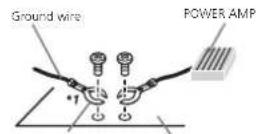
Other devices Metal parts of car's body (Another electronic device in the car)
"Non supplied for this unit.

Important
- When installing this unit, a vehicle without an ACC (accessory) position on the ignition switch, failure to connect thered cable to the terminal that detects operation of the ignition key may result in battery drain.

ACC position

No ADC position
• Usethisunitwitha12-vo tbatteryandnegativegroundingonly.Failureledosomayresultinaireormalfunction.
- Topreventashort-circuit,overheatingormal-function,besuretefollowthedrections below.
—Disconnectthenegativeterminaloftthebatterbeforeinstallation.
—Securethewiringwithcableclampsoradnesivetape.Wrapaches vetapearounddwiring thatcomesintocontactwithmetalpartstoprotectthewiring.
—Place all cables away from moving parts, such astheshift ever and seatrails.
—Place all cables away from hot places, such as near the heater outlet.
—Donotconnecttheyellowcap atomebattery bypassingitthroughthenolecogene compartment.
—Coverany disconnected cable connectors with insulating tape.
—Donotshortenarycables.
—Nevercutthe insu ationof nepowercable of this sunit nordertosnarethepower with other devices. The current capacity of the cable is limited.
—Useful softening proscribed.
—Neverwire renegativespeakercabledirectly loground.
—Neverbandtogethernegat vocablesofmulti
plespeakers.
- When this unilson, controlsignals are sent through cable, the vehicle's aulto-antenna, the vehicle's aulto terminal, the vehicle's aulto terminal, the vehicle's aulto terminal, the vehicle's aulto terminal, the vehicle's aulto terminal, the vehicle's aulto terminal, the vehicle's aulto terminal, the vehicle's aulto terminal, the vehicle's aulto terminal, the vehicle's aulto terminal, the vehicle's aulto terminal, the vehicle's aulto terminal, the vehicle's aulto terminal, the vehicle’s aulto terminal, the vehicle’s aulto terminal, the vehicle’s aulto terminal, the vehicle’s aulto terminal, the vehicle’s aulto terminal, the vehicle’s aulto terminal, the vehicle’s aulto terminal, the vehicle’s aulto terminal, the vehicle’s aulto terminal, the vehicle’s aulto terminal, the vehicle’s aulto terminal, the vehicle’s aulto terminal, the vehicle’s aulto terminals, the vehicle’s aulto terminals, the vehicle’s aulto terminals, the vehicle’s aulto terminals, the vehicle’s aulto terminals, the vehicle’s aulto terminals, the vehicle’s aulto terminals, the vehicle’s aulto terminals, the vehicle’s aulto terminals, the vehicle’s aulto terminals, the vehicle’s aulto terminals, the vehicle’s aulto terminals, the vehicle’s aulto terminals, the vehicle's aulto terminals, the vehicle's aulto terminals, the vehicle's aulto terminals, the vehicle's aulto terminals, the vehicle's aulto terminals, the vehicle's aulto terminals, the vehicle's aulto terminals, the vehicle's aulto terminals, the vehicle's aulto terminals, the vehicle's aulto terminals, the vehicle's aulto terminals, the vehicle's aulto terminals, the vehicle's aulto terminal, the vehicle's aulto terminal, the vehicle's aulto terminal, the vehicle's aulto terminal, the vehicle's aulto terminal, the vehicle's aulto terminal, the vehicle's aulto terminal, the vehicle's aulto terminal, the vehicle's aulto terminal, the vehicle's aulto terminal, the vehicle's aulto terminal, the vehicle's aulto terminal, the vehicle' sullon' sullon' sullon' sullon' sullon' sullon' sullon' sullon' sullon' sullon' sullon' sullon' sullon' sullon' sullon' sullon' sullon' sullon' sullon' sullon' sullon' sullon' sullon' sullon' sullon' sullan' sullan' sullan' sullan' sullan' sullan' sullan' sullan' sullan' sullan' sullan' sullan' sullan' sullan' sullan' sullan' sullan' sullan' sullan' sullan' sullan' sullan' sullan' sullan' sullan' sulln' sulln' sulln' sulln' sulln' sulln' sulln' sulln' sulln' sulln' sulln' sulln' sulln' sulln' sulln' sulln' sulln' sulln' sulln' sulln' sulln' sulln' sulln' sulln' sulln' sullnl 'sullnl 'sullnl 'sullnl 'sullnl 'sullnl 'sullnl 'sullnl 'sullnl 'sullnl 'sullnl 'sullnl 'sullnl 'sullnl 'sullnl 'sullnl 'sullnl 'sullnl 'sullnl 'sullnl 'sullnl 'sullnl 'sullnl 'sullnl 'sullnl 'sullnl 'Sollnl 'sollnl 'sollnl 'sollnl 'sollnl 'sollnl 'sollnl 'sollnl 'sollnl 'sollnl 'sollnl 'sollnl 'sollnl 'sollnl 'sollnl 'sollnl 'sollnl 'sollnl 'sollnl 'sollnl 'sollnl 'sollnl 'sollnl 'sollnl 'sollnl 'sollnl 'Sollnl 'sollnl 'sollnl 'sollnl 'sollnl 'sollnl 'sollnl 'sollnl 'sollnl 'sollnl 'sollnl 'sollnl 'sollnl 'sollnl 'sollnl 'sollnl 'Sollnl 'sollnl 'sollnl 'sollnl 'sollnl 'sollnl 'sollnl 'sollnl 'sollnl 'Sollnl 'sollnl 'sollnl 'sollnl 'sollnl 'sollnl 'sollnl 'sollnl 'Sollnl 'Sollnl 'Sollnl 'Sollnl 'Sollnl 'Sollnl 'Sollnl 'Sollnl 'Sollnl 'Sollnl 'Sollnl 'Sollnl 'Sollnl 'Sollnl 'Sollnl 'Sollnl 'Sollnl 'Sollnl 'Sollnl 'Sollnl 'Sollnl 'Sollnl 'Sollnl 'Sollnl 'Sollnl ' Sollnl "Sollnl "Sollnl "Sollnl "Sollnl "Sollnl "Sollnl "Sollnl "Sollnl "Sollnl "Sollnl "Sollnl "Sollnl "Sollnl "Sollnl "Sollnl "Sollnl "Sollnl "Sollnl "Sollnl "Sollnl "Sollnl "Sollnl "Sollnl "Sollnl "Sollnl " S olll n l l n l n l n l n l n l n l n l n l n l n l n l n l n l n l n l n l n l n l n l n l n l n l n l n l n l n l n l n l n l n l n l n l n l n l n l n l n l n l n l n l n l n l n l n l n l n l n l n l n l n l
- Neverconnecttoblue/whitocabiothe powerterminalofanexternalpoweramp. Also,neverconnectitothepower-terminal oftheautoantenna.Doingsomeyresult in batterydrainoramalfunction.
Section
Installation
Thisunit

①Powercordinput
②Rearoutputsubwooferoutput
①I rentoutout
④Antemainput
⑤Fuse(10A)
⑤Wiredremoteinput
Hard wire remote control adaptor can be connected (so close separately).
Powercord
Performtheseconnectionswhennotconnectingarcaspeakerleadtoasubwocter.

flowchart
graph TD
    subgraph_Channel_1["①"]
        A1["①"] --> B1["②"]
        B1 --> C1["③"]
        C1 --> D1["④"]
        D1 --> E1["⑤"]
        E1 --> F1["⑥"]
        F1 --> G1["⑦"]
        G1 --> H1["⑧"]
        H1 --> I1["⑨"]
        I1 --> J1["⑩"]
        J1 --> K1["⑪"]
        K1 --> L1["⑫"]
        L1 --> M1["⑬"]
        M1 --> N1["⑭"]
        N1 --> O1["⑮"]
        O1 --> P1["⑯"]
        P1 --> Q1["⑰"]
        Q1 --> R1["⑱"]
        R1 --> S1["⑲"]
        S1 --> T1["⑳"]
        T1 --> U1["⑴"]
        U1 --> V1["⑵"]
        V1 --> W1["⑶"]
        W1 --> X1["⑷"]
        X1 --> Y1["⑧"]
        Y1 --> Z1["⑨"]
        Z1 --> AA["⑩"]
        AA --> AB["⑪"]
        AB --> AC["⑫"]
        AC --> AD["⑬"]
        AD --> AE["⑭"]
        AE --> AF["⑮"]
        AF --> AG["⑯"]
        AG --> AH["⑰"]
        AH --> AI["⑱"]
        AI --> AJ["⑲"]
        AJ --> AK["⑳"]
        AK --> AL["㉑"]
        AL --> AM["㉒"]
        AM --> AN["㉓"]
        AN --> AO["㉔"]
Perform these connections when using asub-woofer without the optical amplifier.

flowchart
graph TD
    L["Input L"] --> F["Component F"]
    F --> SW["Output SW"]
    SW --> 10["Component 10"]
    10 --> 12["Component 12"]
    12 --> 13["Component 13"]
    13 --> 14["Component 14"]
    14 --> 15["Output 15"]
    15 --> 16["Component 16"]
    16 --> 17["Component 17"]
    17 --> 18["Component 18"]
    18 --> 19["Output 19"]
    19 --> 20["Component 20"]
    20 --> 21["Component 21"]
    21 --> 22["Output 22"]
    style L fill:#f9f,stroke:#333
    style F fill:#ccf,stroke:#333
    style SW fill:#cfc,stroke:#333
    style 10 fill:#fcc,stroke:#333
    style 12 fill:#cff,stroke:#333
    style 13 fill:#ffc,stroke:#333
    style 14 fill:#cfc,stroke:#333
    style 15 fill:#fcc,stroke:#333
    style 16 fill:#cfc,stroke:#333
    style 17 fill:#fcc,stroke:#333
    style 18 fill:#cfc,stroke:#333
    style 19 fill:#fcc,stroke:#333
    style 20 fill:#cfc,stroke:#333
①Topowercordinput
②Left
③Right
④ Frontspeaker
⑤Rearspeaker
⑥White
⑦White/black
⑧Gray
⑨Gray/black
⑩Green
⑪Green/black
12Violet
⑬Violet/black
⑭Black(chassisground)
Connect to a clean, paint-free metal allocation.
⑮Yellow
Connectiotheconstant12Vsupplyterm
nal.
⑯Rec
Connect to terminal controlled by ignition
switch(12VDC).
⑰Blue/white
Connectosystemontrolterminal of the
poweramporauto-antennarelaycontroller
minal(max.300mA12VDC)
⑪ Subwoofer(4Ω)
Installation
When using a subwoofer of 70 W (2 Ω), be sureloconnectthesubwooferotheviolet and violet/blackleadsofthisunit. Donot connectanythingtothegreenandgreen/ blackleads.
②Notused.
②Subwoofer(4Ω)×2
Notes
- Witha2speakersystem, donotconnectanythingtothespeakerleadsthatarenotconnectedtospeakers.
- Changetheinitialsettingofthisunit.Refer to REAR-SP (rear output setting) on page 9. ReferloPREOUT(precoulsetting)orpage9. Theseubwooferoutputofthisunitismenaural.
Poweramp(soldseparately)
Perform these connections when using the optional amplifier.

flowchart
graph TD
    A["①"] --> B["②"]
    B --> C["③"]
    B --> D["④"]
    B --> E["⑤"]
    B --> F["⑥"]
    G["①"] --> H["②"]
    H --> I["③"]
    H --> J["④"]
    H --> K["⑤"]
    H --> L["⑥"]
    M["⑦"] --> N["②"]
    N --> O["③"]
    N --> P["④"]
    N --> Q["⑤"]
    N --> R["⑥"]
①Systemremotecontrol
ConnecttoBlue/whitecable.
②Poweramp(soloseparately)
③ConnectwithRCAcables(soldseparately)
④ToFrontoutput
⑤ Frontspeaker
⑥ToRearcutputorsubwooferoutput
⑦Rearspeakerorsubwooster
Installation
Important
- Checkall connectionsandsystemsbefore final installation.
• Donoluse: unauthorized parlsasthismay cause malfunctions. - Consultyourdealerifinstallationrequires drillingofholesorthermodificationstothe vehicle.
- Donot install this suritwhere:
— It may interfere with operation of the vehicle.
— It may cause injury to a passenger as a result of a sudden stop.
- Thesemiconductorlasenwillbedamagedif
itoverheats.Installthisunitawayfromhot
placesuchasneartheheateroutlet.
• Optimum performance is obtained when the unitis installed at an angle of less than 60°.

- When installing loensure proper heating dispersion when using this unit, makes sure you leave examples pace behind there are panel and wrap any loose cableless they are no blocking the events.
DINfront/rearmount
This unit can be properly installed using either front mountorrear mount installation. Use commercially available parts when installing.
Installation
DINFront-mount
1Insertthemountingsleeveintothedashboard.
For installation in shallowspaces, usethosup- piedmountings eeve. If hereisenoughspace, usethemountingsloevethatcamewiththev- hicle.
2Securethemountingsleevebyusinga screwdrivertobendthemetaltabs(90°)into place.

①Dashboard
②Mountingsleeve
3Installtheunitasillustrated.

①Nut
②Firewall or metalsupport
③Metalstrap
④ Screw
⑤ Screw(M4×8)
■ Makesurethalltheuritisinstalledsecurelyin place. An unstable installation may cause skipping or thermal functions.
DINRear-mount
1 Determinetheappropriateposition wheretheholesonthebracketandtheside oftheunitmatch.

2Tightentwoscrewsoneachside.

①Trusscrew(5mm×8mm)
②Mountingbracket
③Dashboardorconsole
Removingtheunit
1Removethetrimring.

①Trimming
②Notchedtab
•Releasing the front panel allows sea erosion
cesstothet irring.
- When reattaching their mring, point the
sidewiththenetcheetabdown.
2Insertthesuppliedextractionkeysinto bothsidesoftheunituntiltheyclickinto place.
Installation
3Pulltheunitoutofthedashboard.

Removingandre-attachingthe frontpanel
You can remove the front panel to protect your unit from theft.
oanelupwardandpullittowardyou.
Fordetails,refertoRemovingthefrontpanello
protect your unit from the field and re-attaching the front panel on page 4.
Section
Appendix
Additionalinformation
Troubleshooting
SymptomCauseAction
| Thedisplay-lumination turnson and ofatrandom. | Demomodes on. | Turnoffedemo displaysetting. |
| Thedisplay automatically return tothe ordinary display. | You did not perform any operation within about 30 seconds. | Performoperation again. |
| Therepeat play range chargesun- expectedly. | Depending on the repeat play range, those- lectearange may change when another folder or track is being selected orduring fast forwarding/reversing. | Selecttherepeat playrangeagain. |
| Asubfolders notplayed back. | Subfoldars can not be stayed whenFLD(fold- erapate) selected. | Selectanother- pealplayrange. |
| NOXXXXappearswhena displays charged(NOTITLE,forexamo c). | There is non-bedded text-in- formation. | Switchthed splay or playanother track/tie. |
SymptomCauseAction
| The unit is malfunctioning.There is interference. | You are using a device, such as acellu ar phone, that transm tselec-tric wavesnear theunit. | Move electric cal dev cost that may because the interference away from the unit |
Errormessages
When you contact your dealer or your nearest PioneerServiceCenter, besuretonotetheerror message.
Built-inCDPlayer
MessageCauseAction
| ERROR-07, 11,12,17,30 | Theciscisdirty.Ceanmecisc. | |
| Theciscis scratched | Replacerheolsc. | |
| ERROR-07, 10,11,12, 15,17,30, A0 | Thereisanelecl-tricalomechanical error | Turnthe ignition switchOFFand backON or switchload differ-entsource,then backtotheCD player. |
| ERROR-15Theinsorteddisclisblank. | Replacethecisc. |
| ERROR-23UnsupportedCDformat. | Replacethecisc. |
| FRMTREADSometimesthere sadelaybetweenthastartofplaybackandwhenycusarttohearanysound. | Waituntilthemssagedisap-poarsardyouhoersound. |
Additionalinformation
MessageCauseAction
| NOAUDIOTheinsertad d scdoesnot containany rayablefiles. | Replacehedisc. |
| SKIPPEDIncinserted d sccortains DRMprotected fills. | Replacehedisc. |
| PROTECTAllthelleson thinserted d scareem-beddeowith DRM. | Replacehedisc. |
USBstoragedevice/iPod
MessageCauseAction
| NODEVICEWhenplugano day soft, no USBstoragedeviceonPodis connected. | •Turntheplug andalayon.•Connectaccom- pateUSBstor- agedevice/Pod. |
| FRMTREADSometimes There sadelay between the sta toplayback and when you start ohearany sound. | Waituntithe messaged sao-pearsanyou hoarsound. |
| NOAUDIOThereareno songs. | Transferheaudio filiestothelUS3 storagadevice andconnect. |
| Theconnected USBstoragedevicehassecuri-lyenable. | FollowtheLSR storagedevicloin-structionstocis-ablehesecurity. |
MessageCauseAction
| SKIPPEDTheconnectedUSBstoragedevicecontainsfilesembeddedwithWindowsMediaTMDRM9/10. | PlayanaudiofilenotembaddedwithWindowsMediaDRM9/10. |
| PROTECTA/althctfics intheUSBstoragodeviceareem-bodiedwithWindowsMediaDRM9/10, | TransferaudiofilesnotembededwithWindowsMediaDRM9/10totheUSBstoragede-viceandconnect |
| N/AUSBTheUSBdeviceconnectedola notsupported bythisunit. | ConnectaUSBMassStorageClasscompliant device.Disconnect yourdevicand replace twith a compatibleUSB storagedevice. |
Additionalinformation
MessageCauseAction
| CHECKUSBTheUSBconnectororUSB cablehasshort-circalled. | Check that the USB connectoror USB cableisnot caughtinsome-thingorgan-aged. |
| Theconnected USBstorageviceconsumos more than 500mA(max-muma Iowable current). | Disconnect the USBstorageviceandolorct useil.Turnthe gnitionswitchto Off,thantoACC orONanother conractorily compliantUSB storagedevices. |
| TheiPodoperatescorrectly burdoesnot charge. | Makesurate connectioncable fortheiPodhas notshortedout (e.g.,notcaught nmetalobjects). Afterchecking turnthe gnition switchOFFand backON,andis-connecttheiPod andreconnect. |
MessageCauseAction
| ERROR-19Communicationfailed. | Performoneofthefo-lawingoperations.-Turn theignitionswitch OFFandbackON.-DisconnecttheUSBstoragedevice.-Changptoadiffenetsource.Then,returntheUSBsource. |
| iPodfailure.DisconnectthecablefromtheiPod.OnceetheiPod'smanmenuisdisplayed,reconnecttheiPodandresetit. | |
| ERROR-23 USBstoragede-vicewasnolfor-mattedwithFAT12,FAT16orFAT32. | USBstoragede-viceshouldbefor-mattedwithFAT12,FAT16orFAT32. |
| ERROR-16 ThePodfilmwereversionisold.iPodfailure.Disconnectthe cablefromthe iPod.Oncathe iPod'sma n menudis-playes,reconnect theiPodandreset it. | UodetchoiPod version; |
| STOPThereareno | Selectalis(that |
| songs/ntno | contains songs. |
| current list. |
Additionalinformation
MessageCauseAction
| NOTFOUNDNorelated songs. | Transfersongsto thelPod. |
Handlingguidelines
Discsandplayer
Useonlydiscosthatfeaturereeitherofthefollowing twologos.


Use12-cmdiscs.Donotuse8-cmdiscsoran adapterfor8-cmdiscs.
Use only conventional, fully circular discs. Donot uses shapeod discs.


Donotinsertanyth ngotherthanaCDimothe CDloadingsot.
Dono, use cracked, chipped, warped, or other-wiseamagoddiscastnoymayo damagothoplay er.
UnfinalizedCD-R/RWalscscannohepleyed back.
Dano touch herecordedsurface of neciscs.
Stored discs in the rcases when not nuse.
Donor attach labels, write on or apply chemicals to the surface of the discs.
IocleanaCD, wipethediswithasoftclothoutwardfromthecenter.
Condensation may temporarily impair the player's performance. Let stressor about one hour to adjust a warmer temperature. Also, wipe any damp disc so off with asoftio cth.
Playbackofdiscsmayntbepossio becauseof disccharacteristics,disformal,recordedappli- tion,playbackenvironment,storageconditions, andsoor.
RoadshocksmayInterruptolscplayback.
When using discsthatcan beprinted on labelsurfaces, check the instructions and the warnings of the discs. Depending the discs, inserting and ejecting may not be possible. Using such discs may result in damage to this equipment.
Donotattachcommercialyavailable apelsor othermaterialstothedscs.
- Thed scsmaywarpmakingthediscunplayable.
• The labels may come off a ring layback and prevent rejection of the discs, which may result in damage to the requirement.
USBstoragedevice
ConnectionsviaUSBhucarenotsupportec.
DonolconnectanythingotherthanaUSBstoragedewc.
Appendix
Additionalinformation
Firm ysecurethe USBstoragedevicewhendrving. Donotler:the USBstoragedevicefallont:the floor,whereitmaybecomejammedunderthe prakooracceleratorpedal.
Depending on the USB storage device, the following problem may occur.
• Operations may vary.
• The storage device may not be recognized.
- Filesmaynotbeplayedbackproperly.
• Tradevicemaygeneratenciseintheradio.
iPod
DonotleavetreiPodir placeswithhightemperatures.
To ensure proper operation, connected to a connector from the P: directly both sunt.
Firm ysecure the Podwhendrving Donot atthe Podfallonothefloor,whereitraybecome jammedundertheoreakeoracce eratorpedal.
About Podsettings
- WhenaniPodisconnected, In sun t changes theEQ(equalizer)settingofthaiPodtooffin ordertoptimizothcacoustics. Whenyoudis connectthePod.theEQreturnstoltheoriginal setting.
- You cannot set Report to other Pod when using north sun t. Repeat sautomatically changed to All when the Pod disconnected to this unit.
Incompatible text saved on the Postwell not displayed by the unit.
DualDiscs
DualDiscsaretwo-sidedd scsthathavearecordableCDforaudicononesideandarecordable DVDforvideoonthcotner.
Since the CDside of Dual Discs is not physically compatible with the general CD standard it may not possible to play the CDside within this unit. Frequent loading and ejecting of a Dual Discmay result in scratches on the sd. Serious scratches can lead to playback problems within this unit. In some cases, a Dual Disc may be correct, in the discealing slot and will not reject. Top prevent this, we recommend you refra Infrom using Dual Disc with this unit.
Pleaserefertotheinformationfromthediscmanufacturerformoredetailedinformationabout DualDiscs.
Compressedaudio compatibility(disc,USB)
WMA
Fileextension.wma
Bitrate:48kbpsto320kops(CBR),48kbpsto 364kbps(VBR)
Samplingfrequency:32kHz,44.1kHz,48kHz
Windows/Ad aAudioProfessional,lossless. Voice/DRMSstream/Streamwithvideo:Nor.com- patible
MP3
Fileextension.mp3
Bitrate:8kbpsto320kbps(CBR),VBR
Sampling frequency: 9kHz to 48kHz (32kHz, 44.1kHz, 48kHz for emphasis)
Additionalinformation
Compatible IDtagvers on:1.0,1.1,2.2.2.3.2.4 (IDtagVersion2.xisgivenpriorityoverVersion 1.x.)
M3uplaylist:Notcompatible
MP3 (MP3interactive), rp3PRO:Notcompatible
WAV
Fileextension:way
Quantizationbits:8and16(LPCM),4(MS ADPCM)
Sampling frequency: 16kHz to 48kHz (LPCM), 22.05kHz and 44.1kHz (MSADPCM);
Supplementalinformation
Onlythefirst32characterscanbecisplayedasa. filename(includingthefileextension)orafolder name.
This unit may not operate correctly depending on the application used to encode WMA files.
There may be slight delay at the start of playback of audio files embedded with magedal or audio files stored on USB storage device that has numerous folder hierarchy as
Disc
Playablefolder hierarchy: uploeignilliers (Aprac- lcalhierarchyislesslhartworliers).
Playablefolders:upto89
Playablefiles:uptc999
Filesystem:ISO9680Level1and2.Romeo,Joliet
Multi-session playback: Compatible
Packetwntedatatransfer:Notcompatible
Regardless of the length of blank sections between the songs from the original recording, compressed audio disc play with short pause between songs.
USBstoragedevice
Playaolofo derhiorarchy uptooghtiers (Aorac tical hierarchy isless thanwotiers).
Playablefo dererupto500
Playablefiles:upto15000
Playbackof:copyright-prosec:esfiles:Notcompati- io
Partitioned USB storage device. Only the first partition can be played.
Theremaybeas igneto aywhenstartingplayback to audio filesona USBstoragedevicewithnumorousfolderin crarchios.

CAUTION
- Pioneer cannot guarantee compatibility with all USB mass storage devices and assumes no responsibility for any loss of data on mediaplayers, smartphones, or other devices while using this product.
- Donot eavediscsoraUSBstoragedevice inanyplacethatissubjecttohightemperatures.
Additionalinformation
iPodcompatibility
This units supports only the following Podmodels. Supported Pool software versions are shown below. Older versions may not be supported. Made for
- iPhone4(softwareversion4.1)
• iPhone3GS(softwareversion3.0.1)
• iPhone3G(softwareversion2.0)
• iPhone is software version 1.1.1)
- ilPocnanofthgeneration(softwareversion 1.0)
- iPocinano5thgeneration(softwareversion 1.0.1)
• iPodnana4thgeneration(softwareversion 1.0)
• iPocnanoSrdgeneration(softwareversion 1.0)
- iPodnana2ndgeneration(softwareversion 1.1.2)
• iPodnano1stgeneration (softwareversion 1.2.0)
• iPoctou.cn4thgeneration(softwareversion 4.1)
- iPoclouch3rdgeneration(softwareversion 3.1.1)
- iPoctouch2ndgeneration(softwareversion 2.1.1)
- iPoctou.cn1 stgeneration (softwareversion 1.1)
• iPodc assic160GB(softwarevers or 2.0.2)
• iPod classic120GB(softwarevers or 7.0)
• iPod classic(softwareversion1.0)
Depending on the regeneration version of the iPod, some functions may not be available.
Operations may vary depending on the software version of iPod.
When using an iPod, an iPod Dock Connector USB Cable is required.
APioneerCD-IU51Interfacecare salsoavailable Fordetails consultyourdealer.
About the file format compatibility refer to the Podmanuals.
Audiobook, Podcast Compatioia

CAUTION
Pioneeraccepts no responsibility for data lost on the Pod even if that data is lost while this unit is used.
Sequenceofaudiofiles
The user cannot assign to numbers and specify playback sequences with this unit.
Exampleofahierarchy

Level 1 Level 2 Level 3 Level 4

01to05:Folder number
① to ⑥ Playnack sequence
Disc
For derselect orsequenceorotheroperation may differ depending on the encoding or writing software.
USBstoragedevice
PlaybacksequenceisthesameasrecordedsequenceintheUSBstoragedevice. Tospecifytheplaybacksequence,the following methodisrecommended.
1 Createfilenamethatincludesnumbers tnatspecifytreplaybacksequence(e.g. 001xxx.mp3and099yyy.mp3).
2 Putthosefilesntcafolder.
Additionalinformation
3 SavethetoldercontainingfilesontheUSB storagedevice.
However, depending on the system environment, you may not be able to specify the playback sequence.
For USB portable audio players, these sequences different and depend on the player.
Copyrightandtrademark
iTunes
Apple and Tunes are trademarks of Apple Inc. registered in the U.S. and other countries.
MP3
Supply of this product only conveys salicensor for private non-commercial use and does not convey a censen or imply any g hllc usethis product in any commercial (i.e. revenue-generating) real time broadcasting (derrestrial, satellite, cable and crany othermed a), broadcasting/ streaming via internet, intranets and/or other networks nor here electron content distribution systems, such as pay audio audio on demand applications. An independent license for such use is required. Ford details please visit http://www.mp3licensing.com.
WMA
Windows/Mediaiseitherareg.steredtrademark or trademarkofMicrosoftCorporationinthe UnitedStatesand/orothercountries. Thisproductincluostechno ogyowned by MicrosoftCorporationandcanno.beusedor distributedwithoutalicensefromMicrosoft Licensing,Inc.
iPod&iPhone
iPhone, iPod, iPodclassic, iPodnano, and iPod touchareltrademarksof AppleInc., registered in the U.S. and other countries.
"Made for iPod" and "Made for iPhone" mean thatane electronicaccessoryhasbeenecisigned toconnectspecificallyto PodoriPhone,respectively,anchasbeocertifiedbythedeveloperto meetAppleperformancestandards.Appleis notresponsiofoferheoperationofthisdevice oritscompliancewithsafetyandregulatory standards.Pleasenotelthatneuseorthisaccessorywith PodoriPhonemayaffectwireless performance.
Appendix

Appendix
Additionalinformation
Specifications
General
Ratadpowersource.....14.4VDC
(al owab evol agarange)
12.0Vto14.4VDC
Groundingsystem.....Necativetype
Maximum consumer consumption
10.08
Dimensions(W×H×D)
DN
Continuous power output
52W×4(50Hz)to15000Hz,
5%THD 4Ωload, both chan-
ne screen
load impedance 4Ω (4Ω to 8Ω allowable)
Preout maximum output level
7.09
Tunecontrols:
Bass
Frequency.....100Hz
Gain 12d3
M
Frequency.....1kl?
Cair = 12dB
Iable
frequency.....10<H
Gain....+12dB
Subcofer(mono):
Frequency.....50Hz/63Hz/20Hz/100Hz
12:
Slupe
+0cBto-24dB
Phase......Normal/Reverse
CDplayer
System....Compactdiscaudicsystem
Usabiediscs....Compactdisc
Signal to noise,io .....94dB(1kHz)(EC Anetwork)
Numero channels....2(sierce)
MP3ecodingformat....MPEG-1&2AudioLayer3
WMalecod noformat...Ver.7.7.1.8.9.10.11.12(2ch
a und po
(Windows/Media Player)
WAVisionalurnal.....Linea PCM&MSADPCM
(Non-compressed)
USB
USBstandardspecification
US\$2.0fullspeed
Maximumcurrentsupply
A
USBClass....MSC(MassStorageClass)
Filesystem.....FAT12.FAT16.FAT32
MP3decodingformat.....MPFG-1&2Audiolaver3
WMAdecod nolomral....Ver.7,7.1.8.9,10.11,12(2ch
a.u.
(Windows/Media Player)
WAVsignFormat.....Linea-PCM&MSADPCM
(Non-compressed)
FMtuner
Frequencyrange.....87.5VHz=108.0MHz
Usable sensibility 9 dB (0.8μW/75Ω mono, S/N)
30dBi
Signal-to-noise ratio.....12dB (IIC/A network)
MWtuner
Frequency range.....531kl (zto' 602kl (z/9kl (z))
530kHz+1640kHz/10kHz
Usablesensitivity 25μV/(S/N:20dB)
Signal to nonsertrile.....62dB(OC Anetwork)
SWtuner
Frequencyrange.....2300kHzto7738kHz
(2300kl) zto2495kl 12.2940
kHz4215kHz4540kHz
51(5kH=5800)H=6455
kHz 7100kHz to 7735kHz
0509kl-162407Eid-lb
05001 L2E 976M H
[500K] [213] [348K] [2, 1]
(1) 40000000
KHZC10070KHZ1500AH
1016735K12,1750K12.0
17985k12,180154125018
135kHz,21340kHzto21975
(Hz)
Ustolcsensitivila.....250V(S/N:20dB)
Signal to noise ratio ..... 62 dB (CC-A network)
Note
Specificationsandtacedesignaresubectto
modifications without notice.

natural_image
Two horizontal rounded rectangular shapes with no text or symbols
English
19En
Antesdecomenzar
| ParteParte | ||
| 1▲(expulsar)8 | ⊃ (aerleposlerond splen) | |
| 2 | Q (listai)9◀▶ | |
| 3 | MULTI-CONTROL(M.C.) | 10 BAND/∅ (controldei*od) |
| 4 | SRC/OFF | 11 1 a 6 |
| 5 | Ranura docargace discos | 12 ∅ (reloj) |
| 6 | Puerto USB | 13 Conector daentracia AUX(co-nector restreode3,5 mm) |
| 7 | Qun (color) | 14Botón dosoltar |
DEH-2450UB
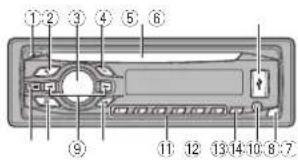
ParteParte
| 1 | (expulsar) | 8 | (parte posterior/discay) |
| 2 | (ista) | ▲/▶ | |
| 3 | MULTI-CONTROL (M.C.) | 10 | BAND (control ce iPod) |
| 4 | SRC/OFF | 11 | 1 & 6 |
| 5 | Ranura decarga de discos | 12 | DISP OFF |
| 6 | Puerto USB | 13 | Conector decontrade AUX(co- nector estéreode 3.5 mm) |
| 7 | EOL | 14 | Botón desolta |
PRECAUCIÓN
Indicador Estado
TPulseM.C.parasococ on are pasodesintomideFM.
50(50kHz)—100(100kHz)
MWSTEP(pasodesintoriaMW)
9 (9 kHz)—10 (10 kHz)
flowchart
graph TD
    L["Speaker L"] -->|①| Bus["Bus"]
    R["Speaker R"] -->|②| Bus
    Bus -->|③| Bus
    Bus -->|④| Bus
    Bus -->|⑤| Bus
    Bus -->|⑥| Bus
    Bus -->|⑦| Bus
    Bus -->|⑧| Bus
    Bus -->|⑨| Bus
    Bus -->|⑩| Bus
    Bus -->|⑪| Bus
    Bus -->|⑫| Bus
    Bus -->|⑬| Bus
    Bus -->|⑭| Bus
    Bus -->|⑮| Bus
    Bus -->|⑯| Bus
    Bus -->|⑰| Bus
    Bus -->|⑱| Bus
    Bus -->|⑲| Bus
    Bus -->|⑳| Bus
    Bus -->|㉑| Bus
    Bus -->|㉒| Bus
    Bus -->|㉓| Bus
    Bus -->|㉔| Bus
①Tuerca ②Murocertafuegoosoportedemeta ③Correametallica ④Tomillo ⑤Tomillo(M×8)
- iPodclassic160GB version software2.0.2
• iPodclassic120GBivers onpalsoftware7.01
(Windows Media Player)
FormatodeseñalWAV....PCVI neal&MSADPCM (Nocomprim dc)
SintonizadordeFM
Intervalodefrecuencias...de57.5MHz108.0VHz
11580kHza12215kHz,de
natural_image
Two horizontal oval shapes with rounded ends, one black and one white, separated by a vertical line (no text or symbols)Español
39Es
| ParteParte | ||
| 1▲(Ejelari)8 | → (vol ar/exibir) | |
| 2 | 9 (Ista)9 ◀▶ | |
| 3 | MULTI-CONTROL(M.C.) | 10 BAND4 (Contro-ede iPod) |
| 4 | SRC/OFF | 11 1 a 6 |
| 5 | Siol decarrega-mentode disco | 12 2 (I hora) |
| 6 | Porta USB | 13 Conector deen-trinaAUX (con-nectorestéreo ce3,5 mm) |
| 7 | Cu# (Cor)10 | BotãoDosanca-xer |
DEH-2450UB

| ParteParte | ||
| 1▲(Fjatar)8: | ⇒ (voltar/exibir) | |
| 2 | ○ (Lista)9 ◀▶ | |
| 3 | MULTI-CONTROL(M.C.) | 10 BAND/ (Contro-keda iPod) |
| 4 | SRC/OFF | 11 1 a 6 |
| 5 | Slot decarrega-mentode disco | 12 /DISP OFF |
| 6 | Porta USB | 13 Corrector deen-trade AUX (connectoresléreo de3.5 mm) |
| 7 | EQAI | 14 Botão Desencaixar |
AVISO
FMSTEP(PassodesintoniaHM)
Normalmente, opassodesintoniaFMempragado palasinioni aporbu scaede50kl Iz.QuandoAT suTAest verativo. opassodesintoniamucaráautomaticamentepara 100kHz Podeserpreferível ajustaropassodesintoniaa50kl IzquandoAF estiverativo.
• Opassodes non apermaneceab0kHzdu-ranteasirtorlamanual.
9 (9 kHz)—10 (10 kHz)
•OFF-Dosativarafunçãol Repotir
•ONE-Recelearnúsicaatual
- ALL – Repele todas as músicas da lista seleccioneda
FMSTEP(Passodesintonia FM)
MWSTEP(PassodesintoniaMW)
OpassodosintoniaMWoodescralternadocontro 9kHz10kHz, Aoutil zarosintonizadoraAméricado Norte. Contraloudo Sul, roajusteopasso dosintoniade 9kHz (531kHz 1602kHz permissivel) para 10kHz (530kHz 1640kHz permissivel).
1 Pressione M.C. para seleccionaropassodesintonia MW.
9 (9 kHz)—10 (10 kHz)
flowchart
graph TD
    subgraph_Channel_1["Channel 1"]
        L["Input L"] --> F["Channel F"]
        F --> SW["Channel SW"]
    end
    subgraph_Channel_2["Channel 2"]
        R["Input R"] --> SW
    end
    L -->|①| R
    F -->|②| R
    SW -->|③| R
    SW -->|④| R
    SW -->|⑤| R
    SW -->|⑥| R
    SW -->|⑦| R
    SW -->|⑧| R
    SW -->|⑨| R
    SW -->|⑩| R
    SW -->|⑪| R
    SW -->|⑫| R
    SW -->|⑬| R
    SW -->|⑭| R
    SW -->|⑮| R
    SW -->|⑯| R
    SW -->|⑰| R
    SW -->|⑱| R
    SW -->|㉑| R
    SW -->|㉒| R
    SW -->|㉓| R
    SW -->|㉔| R
    SW -->|㉕| R
    SW -->|㉖| R
    SW -->|㉗| R
    SW -->|㉘| R
    SW -->|㉙| R
    SW -->|㉚| R
①Porca ②Firewallousuportedemetal ③Tirademeta ④Parafuso ⑤Parafuso(M4×8)
Audiobook, Podcast: Compativel
AVISO
Windows/Media Player
FormatodesinalWAV....PCM linearMMSADPCM
(Nã corractede)
USB
Ver. 7, 1, 5, 9, 10, 11, 12
(éudice?canais)
(Windows\Med Player)
FormatodesinalWAY....PCM linear&MSADPCM
(Não com oçado)
SintonizadordeFM
kHz=1.25kHz 4.540kHz
3.175kHz,5.820kHz,6.455
kHz,7.100kHz,7.335kHz
9.500kHz21 975kHz
19.500kl/la:10.135kl/2
11.580kl ba12.215kl
13.570kHz 13.870kHz
1+ 20Hz a1b 73kHz
17.50kHz 17.98kHz
13.015kHz7019.125kHz
21 340kHz 21 925kHz
Sensibiliqueau level... 28uV/S r.a/ Ruido:20 dB
Relações na suuído
62dB(redelFC-A)
Nota
Asespecificosedeiones,losuje losa
| 部位部位 | |||
| 1▲(退出)6 | ⊃(返回/显示) | ||
| 2 | Q(清单) | 9 | ◄/► |
| 3 | MULTI-CONTROL(M.C.) | 10 | BAND/∅(IPc2控制) |
| 4 | SRC/OFF | 11 | 1至6 |
| 5 | 玻片槽 | 12 | ∅(时鐘) |
| 6 | USB路 | 13 | MAX输入插孔(3.5mm立體電解孔) |
| 7 | C#(颜色) | 14 | 拆卸接組 |
DEH 2450UB
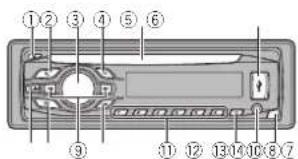
| 部位部位 | ||
| 1▲(退出)④ | (返回/显示) | |
| 2 | (清单) | 4/▶ |
| 3 | MULTI-CONTROL(M.C.) | BAND/∅(IPsd控制) |
| 4 | SRC/OFF | 1至6 |
| 5 | 螺片槽 | ∅/DISPOFF |
| 6 | SR焊 | 点X输入插孔(3.5mm立脚撑插孔) |
| 7 | Eddel | 脉折扣拉把 |

注意
操作本機
9 (9 kHz) - 10 (10 kHz)
2 按M.C.确定选择。
DEMO(示範顯示設定)
flowchart
graph TD
    subgraph Left_BLK
        L1["②"] --> A1["6"]
        A1 --> B1["8"]
        B1 --> C1["3"]
        C1 --> D1["+"]
    end
    subgraph Right_BLK
        F1["③"] --> A2["6"]
        A2 --> B2["10"]
        B2 --> C2["3"]
        C2 --> D2["+"]
    end
    Left_BLK --> SW["④"]
    Left_BLK --> SW2["⑤"]
    Left_BLK --> SW3["⑥"]
    Left_BLK --> SW4["⑦"]
    Left_BLK --> SW5["⑧"]
    Left_BLK --> SW6["⑨"]
    Left_BLK --> SW7["⑩"]
    Left_BLK --> SW8["⑪"]
    Left_BLK --> SW9["⑫"]
    Left_BLK --> SW10["⑬"]
    Left_BLK --> SW11["⑭"]
    Left_BLK --> SW12["⑮"]
    Left_BLK --> SW13["⑯"]
    Left_BLK --> SW14["⑰"]
    Left_BLK --> SW15["⑱"]
    Left_BLK --> SW16["⑲"]
    Left_BLK --> SW17["⑳"]
    Left_BLK --> SW18["㉑"]
    Left_BLK --> SW19["㉒"]
    Left_BLK --> SW20["㉓"]
    Left_BLK --> SW21["㉔"]
    Left_BLK --> SW22["㉕"]
    Left_BLK --> SW23["㉖"]
    Left_BLK --> SW24["㉗"]
    Left_BLK --> SW25["㉘"]
    Left_BLK --> SW26["㉙"]
    Left_BLK --> SW27["㉚"]
    Left_BLK --> SW28["㉛"]
    Left_BLK --> SW29["㉜"]
    Left_BLK --> SW30["㉝"]
natural_image
Two horizontal oval shapes with rounded ends, one black and one white, on a plain background (no text or symbols)甲文
712htw


2Zhtw

natural_image
Two horizontal oval shapes with rounded ends, one black and one white, on a plain background (no text or symbols)^+ ^-
732htw
معلومات إضافية
USB
(Windows Media Player) Linear PCM & MS ADPCM .... WAV
FMA
(Windows Media Player) Icos-DCM & MS ADCM WAV
Linear PCM & MS ADPCM …… WAV ★★
[Unreadable]
معلومات إضافية
معلومات إضافية
ت.لط


لکشالی کوکدحولآب
ال Effective Characteristic: 1.3.2.3.4.5.6.7.8.9.10.11.12.13.14.15.16.17.18.19.20.21.22.23.24.25.26.27.28.29.30.31.32.33.34.35.36.37.38.39.40.41.42.43.44.45.46.47.48.49.50.51.52.53.54.55.56.57.58.59.60.61.62.63.64.65.66.67.68.69.70.71.72.73.74.75.76.77.78.79.80.81.82.83.84.85.86.87.88.89.90.91.92.93.94.95.96.97.98.99.100
m = 311
| ### | ### | ||
| ###( | (###)▲ | 1 | |
| ▶/◀ | 9 | (###)Q | 2 |
حول هذا الدليل
natural_image
Two horizontal rounded rectangles side by side, no text or symbols present
اطلاعات بيشتر
اطلاعات بیشر
WMA 17,11,2,3,4,5,6,7,8,9,10,11,12,13,14,15,16,17,18,19,20,21,22,23,24,25,26,27,28,29,30,31,32,33,34,35,36,37,38,39,40,41,42,43,44,45,46,47,48,49,50,51,52,53,54,55,56,57,58,59,60
(سداي ۰ کنگه)
(Windows Media Player)
MS ADPCM : PCM WAV
(درمشر)
USB
(Windows Media Player)
MS ADPCM, PCM ..... WAV
(درمفر)
FM موج يب
Windows Media Audio Professional ·Lossless Voice/DRM Stream/Stream
MP3
①
② مُحْلَدًا بَا إِشْكِيَان فَرَى
①
④
(M4 × 8) ≈ ⑤
—CLASSICS—POPULAR—NEWS/INFO
OTHERS
BEHSTD TO TANHE TAPISH DAD, MIE SHOD W NOT FOUND
KLASSIC (KLASIK) CLASS L.

Fa
استفاده از دستگاه
استفاده از دستگاه
بلاو
عملکردهای اصلی
| الإستعمال | |
| F3 -F2 -F1 (B.A.B.D.N) [1] | |
| S2 -S1 -S1 MW, FM | |
| ### | |
| ### | |
| SEEK | MAN (Caklārī) ### ## ## ## ## ## ## ## ## ## ## ## ## ## ## ## ## ## ## ## ## ## ## ## ## ## ## ## ## ## ## ## ## ## ## ## ## ## ## ## ## ## ## ## ## ## ## ## ## ## ## ## ## ## ## ## ## ## ## ## ## ## ## ## ## ## ## ## ## ## ## ## ## ## ## ## ## ## ## ## ## ## ## ## ## ## ## ## ## ## ## ## ## ## ## ## ## ## ## ## ## # |
| SEEK | MAN (Caklārī) ### ## ## ## ## ## ## ## ## ## ## ## ## ## ## ## ## ## ## ## ## ## ## ## ## ## ## ## ## ## ## ## ## ## ## ## ## ## ## ## ## ## ## ## ## ## ## ## ## ## ## ## ## ## ## ## ## ## ## ## ## ## ## ## ## ## ## ## ## ## ## ## ## ## ## ## ## ## ## ## ## ## ## ## # |
| SEEK | MAN (Caklārī) #### ## ## ## ## ## ## ## ## ## ## ## ## ## ## ## ## ## ## ## ## ## ## ## ## ## ## ## ## ## ## ## ## ## ## ## ## ## ## ## ## ## ## ## ## ## ## ## ## ## ## ## ## ## ## ## ## ## ## ## ## ## ## ## ## ## ## ## ## ## ## ## ## ## ## ## ## ## ## ## ## ## ## ## ## ## ## ## ## ## ## ## ## ## ## ## ## ## ## ## ### |
| SEEK | MAN (Caklārī) ### ## ## ## ## ## ## ## ## ## ## ## ## ## ## ## ## ## ## ## ## ## ## ## ## ## ## ## ## ## ## ## ## ## ## ## ## ## ## ## ## ## ## ## ## ## ## ## ## ## ## ## ## ## ## ## ## ## ## ## ## ## ## ## ## ## ## ## ## ## ## ## ## ## ## ## ## ## ## ## ## ## ## ## ### |
| SEEK | MAN (Caklārī) #### ## ## ## ## ## ## ## ## ## ## ## ## ## ## ## ## ## ## ## ## ## ## ## ## ## ## ## ## ## ## ## ## ## ## ## ## ## ## ## ## ## ## ## ## ## ## ## ## ## ## ## ## ## ## ## ## ## ## ## ## ## ## ## ## ## ## ## ## ## ## ## ## ## ## ## ## ## ## ## ## ## ## ## ### |
| SEEK | MAN (Caklārī) ##### ## ## ## ## ## ## ## ## ## ## ## ## ## ## ## ## ## ## ## ## ## ## ## ## ## ## ## ## ## ## ## ## ## ## ## ## ## ## ## ## ## ## ## ## ## ## ## ## ## ## ## ## ## ## ## ## ## ## ## ## ## ## ## ## ## ## ## ## ## ## ## ## ## ## ## ## ## ## ## ## ## ## ## ## ## ## ## ## ## ## ## ## ## ## ## ## ## ## ## #### |
| SEEK | MAN (Caklārī) #### ## ## ## ## ## ## ## ## ## ## ## ## ## ## ## ## ## ## ## ## ## ## ## ## ## ## ## ## ## ## ## ## ## ## ## ## ## ## ## ## ## ## ## ## ## ## ## ## ## ## ## ## ## ## ## ## ## ## ## ## ## ## ## ## ## ## ## ## ## ## ## ## ## ## ## ## ## ## ## ## ## ## ## # |
| SEEK | MAN (Caklārī) ##### ## ## ## ## ## ## ## ## ## ## ## ## ## ## ## ## ## ## ## ## ## ## ## ## ## ## ## ## ## ## ## ## ## ## ## ## ## ## ## ## ## ## ## ## ## ## ## ## ## ## ## ## ## ## ## ## ## ## ## ## ## ## ## ## ## ## ## ## ## ## ## ## ## ## ## ## ## ## ## ## ## ## ## # |
| SEEK | MAN (Caklārī)###### ###### ###### ###### ###### ###### ###### ###### ###### ###### ###### ###### ###### ###### ###### ###### ###### ###### ###### ###### ###### ###### ###### ###### ###### ###### ###### ###### ###### ###### ###### ###### ###### ###### ###### ###### ###### ###### ###### ###### ###### ###### ###### ###### ###### ###### ###### ###### ###### ###### ###### ##### |
| SEEK | MAN (Caklārī)###### ###### ###### ###### ###### ###### ###### ###### ###### ###### ###### ###### ###### ###### ###### ###### ###### ###### ###### ###### ###### ###### ###### ###### ###### ###### ###### ###### ###### ###### ###### ###### ###### ###### ###### ###### ###### ###### ###### ###### ###### ###### ##### |
| SEEK | MAN (Caklārī)#### ###### ###### ###### ###### ###### ###### ###### ###### ###### ###### ###### ###### ###### ###### ###### ###### ###### ###### ###### ###### ###### ###### ###### ###### ###### ###### ###### ###### ###### ###### ###### ###### ###### ###### ###### ###### ###### ###### ###### ###### ###### ###### ###### ###### ###### ###### ###### ###### ###### ######
###### ###### ###### ###### ###### ###### ###### ###### ###### ###### ###### ###### ###### ###### ###### ###### ###### ###### ###### ###### ###### ###### ###### ###### ###### ###### ###### ###### ###### ###### ###### ###### ###### ###### ###### ###### ###### ###### ###### ###### ###### ###### ###### ###### ###### ###### ###### ###### ###### 1 |
(AUX) AUX—(iPod) iPod/(USB) USB

استفاده از دستگاه
قبل از شروع به کار

| ### | ### | |
| (###)### | 8 | (###)▲ |
| ▶/◀ | 6 | (###)9 |
| ### (BAND) (iPod) | 13 | MULTI-CONTROL (M.C.) |
| 6 1 | 1 | SRC/OFF |
| # /DISP OFF | 12 | ### ### ### ### ### ### ### ### ### ### ### ### ### ### ### ### ### ### ### ### ### ### ### ### ### ### ### ### ### ### ### ### ### ### ### ### ### ### ### ### ### ### ### ### ### ### ### ### ### ### ### ### ### ### ### ### ### ### ### ### ### ### ### ### ### ### ### ### ### ### ### ### ### ### ### ### ### ### ### ### ### ### ### ### ### ### ### ### ### ### ### ### ### ### ### ### ### ### ### ### ### ###### |
| A### | ||
| (###)### (###)### (###)### (###) | 12 | USB ### ### ### ### ### ### ### ### ### ### ### ### ### ### ### ### ### ### ### ### ### ### ### ### ### ### ### ### ### ### ### ### ### ### ### ### ### ### ### ### ### ### ### ### ### ### ### ### ### ### ### ### ### ### ### ### ### ### ### ### ### ### ### ### ### ### ### ### ### ### ### ### ### ### ### ### ### ### ### ### ### ### ### ### ### ### ### ### ### ### ### ### ### ### ### ### ### ### ### ## |
| ### ### ### ### ### ### ### ### ### ### ### ### ### ### ### ### ### ### ### ### ### ### ### ### ### ### ### ### ### ### ### ### ### ### ### ### ### ### ### ### ### ### ### ### ### ### ### ### ### ### ### ### ### ### ### ### ### ### ### ### ### ### ### ### ### ### ### ### ### ### ### ### ### ### ### ### ### ### ### ### ### ### ### ### ### ### ### ### ### ### ### ### ### ### ### ### ### ### ## | ||

دستگاه اصلی
DEH-3450UB

Visit us on the World Wide Web at
http://pioneer.jp/group/index-e.html
Pioneer Gulf.FZE
http://www.pioneer-uae.com
Pioneer Electronics Australia. Pty.Ltd
http://www.pioneer.com.au/
Pioneer Electronics Asiacentre.Pte
Pioneer (HK) Ltd.
Pioneer High Fidelity Taiwan Co., Ltd.
http://www.pioneer.com.sg
http://www.pioneerhongkong.com.hk
http://www.pioneer-twn.com.tw
Pioneer International Latin America S.A.
http://www.pioneer-latin.com
PIONEERCORPORATION
1-1, Shin-ogura, Saiwai-ku, Kawasaki-shi,
Kanagawa212-0031,JAPAN
PIONEERELECTRONICS(USA)INC.
P.O.Box1540,LongBeach,California90801-1540,U.S.A.
TEL:(800)421-1404
PIONEEREUROPENV
Haven1087,Keetberglaan1,B-9120Melsele,Belgium/Belgique
TEL:(0)3/570.05.11
PIONEERELECTRONICSASIACENTREPTE.LTD.
253AlexandraRoad,#04-01,Singapore159936
TEL:65-6472-7555
PIONEERELECTRONICSAUSTRALIAPTY.LTD.
5ArcoLane,Heatherton,Victoria,3202Australia
TEL:(03)9586-6300
PIONEERELECTRONICSOFCANADA,INC.
340FerrierStreet,Unit2,Markham,OntarioL3R2Z5,Canada
TEL:1-877-283-5901
TEL:905-479-4411
PIONEERELECTRONICSDEMEXICO,S.A.deC.V.
Blvd.ManuelAvilaCamacho13810piso
Col.LomasdeChapultepec,Mexico,D.F.11000
TEL:55-9178-4270
先锋股份有限公司
台北市內湖區瑞光路407號8樓
电话:(02)2657-3588
① 沈 (22, 203, 15
先锋電子(香港)有限公司
香港九龍長沙灣道909號5樓
電話:(0852)2848-6488
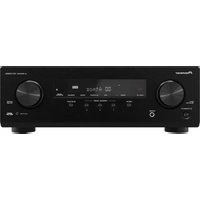
- ThankyouforpurchasingthisPIONEER product
- Aboutthisunit
- CAUTION:
- CAUTION
- Note
- Aboutthismanual
- Demomode
- Important
- Beforeyoustart
- Incaseoftrouble
- Operatingthisunit
- Headunit
- Setupmenu
- 2TurnM.C.toswitchtoYES.PressM.C.to select.
- 3Performthefollowingprocedurestoset themenu.
- CLOCKSET(settingtheclock)
- FMSTEP(FMuringstep)
- MWSTEP(MWtuningstep)
- DEMO(demod splaysetting)
- 4Tofinishyoursettings,turnM.C.toselect
- YES.Presstoselect.
- Notes
- Basicoperations
- Useandcareoftheremote control
- WARNING
- Menuoperationsidentical forsetupmenu/function settings/audioadjustments/initialsettings/lists
- Tuner
- Storingandrecallingstations foreachband
- Usingpreset tuning buttons
- SwitchingtheRDSdisplay
- PTYlist
- NEWS/INFO
- POPULAR
- CLASSICS
- OTHERS
- Functionsettings
- 3TurnM.C.toselectthefunction.
- BSM(beststationsmemory)
- REGION(regional)
- PTYSEARCH(programtypeselection)
- NEWS/INFO POPULAR CLASSICS OTHERS
- TA(trafficannouncementsstandby)
- AF(alternative frequency search)
- NEWS(newsprogram interruption)
- SEEK(left/rightkeysett ng)
- CD/CD-R/CD-RWandUSB storagedevices
- Displayingtextinformation
- Selectingandplayingfiles/ tracksfromthenamelist
- Advancedoperationsusing specialbuttons
- CD/CD-R/CD-RW
- USBaudioplayer/USBmemory
- REPEAT(repeatplay)
- RANDOM(randomplay)
- PAUSE(pause)
- S.RTRV(soundrat clever)
- iPod
- Browsingforasong
- 2UseM.C.toselectacategory/song.
- Playingsongsrelatedtothe currentlyplayingsong
- 1PressandholdM.C.toswitchtolinkplay mode.
- 2TurnM.C.tochangethemode;pressto select.
- Operatingthisunit'siPod functionfromyouriPod
- - PressBAND/ toswitchthecontrol mode.
- 1PressM.C.todisplaythemainmenu.
- 2TurnM.C.tochangethemenuoption andpresstoselectFUNCTION.
- SHUFFLE(shuffle)
- SHUFFLEALL(shuffleall)
- LINKPLAY(lirkplay)
- AUDIOBOOK(audiobookspeed)
- S.RTRV(sound retrieve)
- Audioadjustments
- 2TurnM.C.tochangethemenuoption andpresstoselectAUDIO.
- 3TurnM.C.toselecttheaudiofunction.
- FAD/BAL(fader/balanceadjustment)
- PRESETEQ(equalizerrecal)
- DYNAMIC VOCAL NATURAL CUSTOM —FLAT—POWERFUL
- TONECTRL(oual zeradjustment)
- CUSTOM
- LOUD(loudness)
- SUB.W(subwocteron/offsetting)
- SUB.WCTRL(subwooferadjustment)
- SLA(sourceleveladjustment)
- Initialsettings
- 1PressandholdSRC/OFFuntiltheunit turnsoff.
- 2PressM.C.andholduntilfunctionname appearsinthedisplay.
- 3TurnM.C.toselecttheinitialsetting.
- CLOCKSET setting the clock
- FMSTEP(Fituningstep)
- AUTO-PI(autoPiseek)
- AUX(auxiliary input)
- USBPNP(plugando ay)
- REAR-SP(rea outputself ng)
- FUL—SW
- PREOUT(preoutsetting)
- Selectingtheilluminationcolor
- Selectingthekeycolorfromthe illuminationcolorlist
- 2TurnM.C.todisplayKEYCOLORand presstoselect.
- 3TurnM.C.toselecttheilluminationcolor.
- 4PressM.C.toconfirmtheselection.
- Selectingthedisplaycolorfrom theilluminationcolorlist
- 2TurnM.C.todisplayDISPCOLORand presstoselect.
- Selectingkeyanddisplaycolor fromtheilluminationcolorlist
- 2TurnM.C.todisplayBOTHCOLORand presstoselect.
- Customizingtheilluminationcolor
- Switchingthedimmersetting
- UsinganAUXsource
- Turningtheclockdisplayon oroff
- Turningthedisplayofforon
- Installation
- Connections
- Poweramp(soldseparately)
- DINfront/rearmount
- DINFront-mount
- DINRear-mount
- Removingtheunit
- Removingandre-attachingthe frontpanel
- Additionalinformation
- Errormessages
- Handlingguidelines
- Discsandplayer
- USBstoragedevice
- About Podsettings
- DualDiscs
- Compressedaudio compatibility(disc,USB)
- WMA
- MP3
- WAV
- Supplementalinformation
- Disc
- iPodcompatibility
- Sequenceofaudiofiles
- Copyrightandtrademark
- iTunes
- iPod&iPhone
- Specifications
- General
- CDplayer
- USB
- FMtuner
- MWtuner
- SWtuner
- Antesdecomenzar
- PRECAUCIÓN
- MWSTEP(pasodesintoriaMW)
- SintonizadordeFM
- AVISO
- FMSTEP(PassodesintoniaHM)
- MWSTEP(PassodesintoniaMW)
- Nota
- 注意
- 操作本機
- DEMO(示範顯示設定)
- معلومات إضافية
- FMA
- حول هذا الدليل
- اطلاعات بيشتر
- اطلاعات بیشر
- FM موج يب
- استفاده از دستگاه
- بلاو
- عملکردهای اصلی
- ###### ###### ###### ###### ###### ###### ###### ###### ###### ###### ###### ###### ###### ###### ###### ###### ###### ###### ###### ###### ###### ###### ###### ###### ###### ###### ###### ###### ###### ###### ###### ###### ###### ###### ###### ###### ###### ###### ###### ###### ###### ###### ###### ###### ###### ###### ###### ###### ###### 1
- قبل از شروع به کار
- دستگاه اصلی
- PIONEERCORPORATION
Brand : PIONEER
Model : DEH-2450UB
Category : Receiver