
GPHONE100BK - Telephone Sunstech - Free user manual and instructions
Find the device manual for free GPHONE100BK Sunstech in PDF.


| Product type | Landline phone |
| Brand | Sunstech |
| Model | GPHONE100BK |
| Dimensions (approx.) | 22 x 18 x 8 cm |
| Weight (approx.) | 450 g |
| Power supply | Wired RJ11, 9V DC power adapter |
| Screen | LED digital display |
| Main functions | Calls, directory, speakerphone, hands-free function, caller ID |
| Compatibility | Analog telephone lines (PSTN) |
| Care and cleaning | Clean with a soft, dry cloth. Do not use abrasive products. |
| Safety | Do not expose to moisture or extreme temperatures. Disconnect before cleaning. |
| Spare parts and repairability | Contact Sunstech customer service or an authorized dealer for parts. |
| General information | Device complies with European standards. Domestic use. |
Frequently Asked Questions - GPHONE100BK Sunstech
User questions about GPHONE100BK Sunstech
0 question about this device. Answer the ones you know or ask your own.
Ask a new question about this device
Download the instructions for your Telephone in PDF format for free! Find your manual GPHONE100BK - Sunstech and take your electronic device back in hand. On this page are published all the documents necessary for the use of your device. GPHONE100BK by Sunstech.
USER MANUAL GPHONE100BK Sunstech
Read the following recommended safety precautions carefully.
Moisture and Water

Do not use this device in a humid and damp place (avoid the bathroom, the sink in the kitchen, etc). Do not expose this device to rain or water, as this may be dangerous and do not place objects filled with liquids, such as flower vases, on top.
the connected device(s) If any solid object or liquid falls into the cabinet, unplug immediately and have it checked by qualified personnel before operating it any further.
Cleaning

natural_image
Simple line drawing of spray bottles and a crossed-out X symbol (no text or labels)Before cleaning, unplug this device from the wall outlet. Do not use an aggressive liquid or aerosol cleaners. Use a soft and dry cloth.
Ventilation
The slots and openings on the device are intended for ventilation and to ensure reliable operation. To prevent overheating, these opening must not be blocked or covered in anyway. When installing this unit make sure to leave space sufficient around the unit to ensure the ventilation to improve heat radiation.
Do not expose the unit to extreme conditions of heat, cold or moisture
Heat and Flames

natural_image
Illustration of a burning flame next to a lit candle (no text or symbols)The device should not be placed near to open flames or sources of intense heat such as an electric heater. Ensure that no open flame sources, such as candles, are placed on top of the device. Batteries should not be exposed to excessive heat such as sunshine, fire or the like.
Replacement Parts
When replacement parts are required, make sure that the service technician has used replacement parts, which are specified by the manufacturer or have the same
specifications as the original one. Unauthorized substitutions may result in fire, electrical shock or other hazards. Please contact the brand or manufacturer that will redirect you to the nearest technical service which will supply or change the replacement parts
Servicing

natural_image
Simple line drawing of a screwdriver with a crossed X mark (no text or symbols)Please refer all servicing to qualified personnel of the brand. Do not remove the cover yourself as this may result in an electric shock.
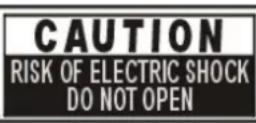
Risk of electric shock
The lightning flash with arrowhead symbol, within an equilateral triangle, is intended to alert the user to the presence of not insulate, “dangerous voltage” within the product’s enclosure that may be of sufficient magnitude to constitute a risk of electric shock of persons.
The exclamation point within an equilateral triangle is intended to alert the user to the presence of important operating and maintenance (servicing) instructions in the literature accompanying the appliance.




Waste Disposal
Instructions for waste disposal:
- Packaging and packaging aids are recyclable and should principally be recycled. Packaging materials, such as a plastic bag, must be kept away from children.
- Batteries, including those which are heavy metal-free, should not be disposed of with household waste. Please dispose of used batteries in an environmentally friendly manner. Find out about the legal regulations which apply in your area- Do not try to recharge batteries, can have a danger of explosion. Replace batteries only with the same or equivalent type.
This symbol on the product or on its packaging means that your electrical device should be disposed at the end of its service life, separately from your household wastes. There are separate collection systems for recycling in the EU. For more
information, please contact the local authority or the dealer where you purchased the product.

Symbol for equipment

Headphone Volume

natural_image
Line drawing of a stylized telephone handset with a bulb (no text or symbols)In your device has headphones jack, please note that excessive sound pressure from earphones and headphones can cause hearing loss.
Installation
To prevent injury, this device must be securely attached to the wall in accordance with the installation instructions when mounted to the wall (if the option is available).
Warning:
Do not leave your device in standby or operating mode when you leave your house.

natural_image
Illustration of weather and outdoor activities including sun, rain, shower, toilet, and water (no text or symbols)The Standby / On button does not fully switch off this product. Moreover the device continues to consume power in standby mode. In order to separate the device completely from mains, the mains plug has to be pulled from the mains socket. Because of that the device should be set up in a way, that an unobstructed access to
the mains socket is guaranteed, so that in case of emergency the mains plug can be pulled immediately. During periods of prolonged non-use, the device should be disconnected from the mains power supply.
Electrical device not in the hands of children
Never let children use electrical devices unsupervised. Children cannot always recognize any possible dangers. Batteries / accumulators can be life threatening when swallowed. Store batteries out of the reach of children. In case of swallowing a battery, medical aid has to be sought immediately. Also keep the packaging away from children as there is danger of suffocation.
INTRODUCTION
Thank you for purchasing our products with advanced IC and novel design, excellent performance. It meets all the standards of approval from the telecom dept. Please read this user's guide before use.
SAFETY INSTRUCTION
When using your telephone equipment, the following basic safety precautions should always be followed to reduce the risk of injury to persons:
Read, understand and follow all warnings and instructions
✿ Unplug the product from the wall outlet before cleaning. Do not use liquid cleaners or aerosol cleaners. Use a soft damp cloth for cleaning. Delete this line
Do not place this product on unstable surfaces. The product may drop, causing serious damage to the product.
Do not overload wall outlets and extension cords as this can result in fire or electric shock. Delete this line
✿ Never spill liquid of any kind on the product.
Avoid moving or disconnecting this unit during a heavy storm, as there may be a remote risk of electric shock from lightning and thunder.
✿ Unprofessional person cannot open telephone even meets troubles, please send to service center.
FEATURES
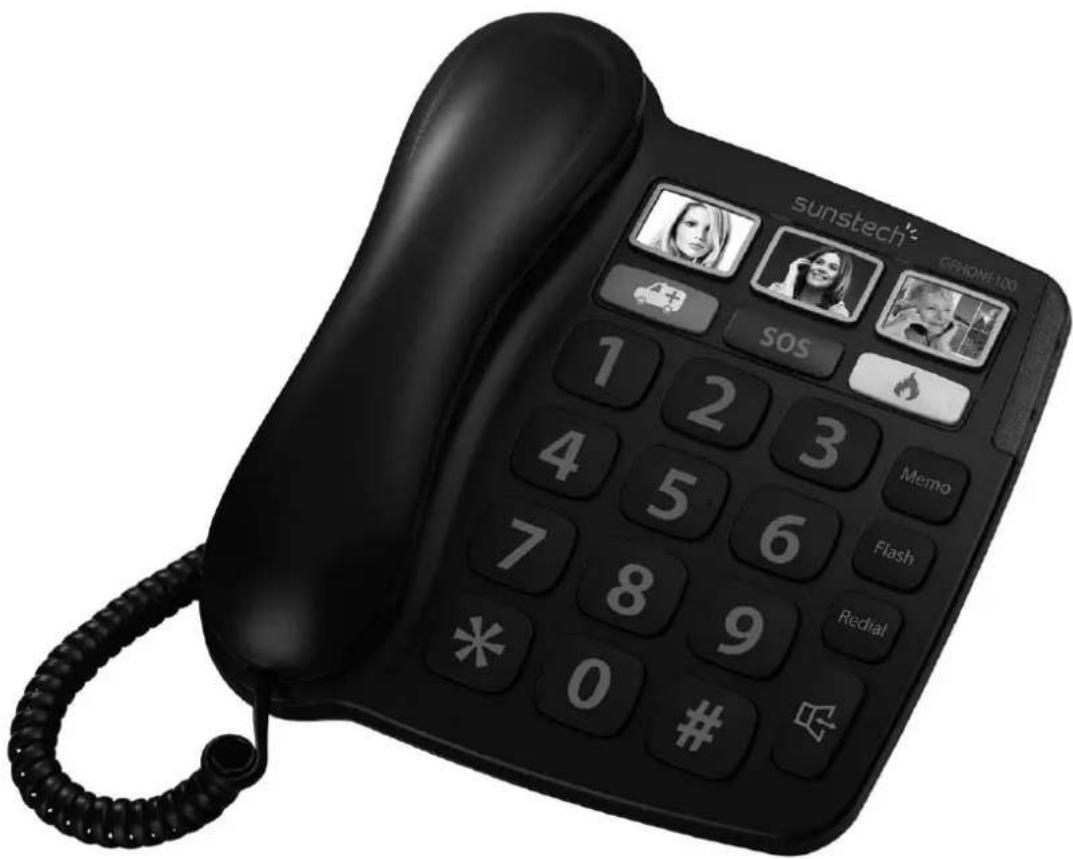
- Jumbo keypad
● 3 direct memory keys with photo insert
● Large Ringer light indicator
● Hearing aid compatible
● Enhanced quality of handset receiver
● 3 one-touch and 10 two-touch memories
● Redial the last dialed number - Flash, Pause function
● Hands-free dialing and speakerphone
● Hands-free volume HI/MID/LO adjustable
● Ringer volume HI/MID/OFF adjustable
Made in China


① Important No.3
⑤ Flash
⑨ Important No.1
⑬ Numerical Key
② Ring LED
⑥ Redial
⑩ Emergent No.2
⑭ LINE
③ Emergent No.3
⑦ HF
⑪ Emergent No.1
⑮ RING(OFF/LO/HI)
④ Memo
⑧ Important No.2
⑫ Handset Volume
⑯ VOLUME(LO/MID/HI)
INSTALLATION
- Insert one end of line cord into LINE jack of the phone, the other connects with your local network.
- Use coiled cord connects the base unit and the handset.
RECEIVING A CALL
From handset
- Pick up the handset and talk to the other party.
- When finished, return the handset to the base.
Switching to speakerphone
- When using the handset, press key and return the handset to the base.
- When finished, press 🔒 key again.
From speakerphone
- When the telephone rings, press 🔒 key and talk to the caller. For the other party to hear your voice clearly, speak into the speaker from a distance of 32cm or less.
- When finished, press 🔒 key again.
MAKING A CALL
From handset
- Pick up the handset.
- When you hear the dial tone, dial the desired number.
- When finished, return the handset to the base.
From Speakerphone
-
Press key
-
When you hear the dial tone, dial the desired number.
-
When finished, press key again.
Redial
- Pick up the handset or press 🔊 key
- Press Redial key, the last dialed number will be dialed again.
Store the important numbers
-
Pick up the handset or press 📋 key, then press Memo key until the unit makes a sound.
-
Dial the phone number you want to store.
-
Press one of , , , , or key
Dial out the important numbers
Pick up the handset or press 🔒 key, then press one of 🎥, 🏠, 📁, SOS, 🔊 or 🕐 or 🖱 key to dial the stored number out.
Note: If you store family or friend numbers in 📄 or on key, you can put he or she photo in it.
To store the number in two-touch memory
- Pick up the handset or press key, then press Memo key until the unit makes a sound.
-
Dial the phone number you want to store.
-
Press the Memo key again.
- Press one of numerical keys (0, 1, 2 , 9) to store the number under that chosen digit.
Make a call from two-touch memory
Pick up the handset or press key, press the Memo key and then press one of the digital keys (0, 1, 2, ..., 9) to dial the stored number.
FLASH FUNCTION
The flash function of FLASH key can support some special network service, such as call waiting, call transfer, etc. These services require a subscription and the operations depend on the different exchanger.
HANDSET VOLUME BOOSTER FUNCTION
- At handset conversation mode, if you feel the handset volume is too low, press once to increase the volume about 10 dB to help you to hear clearly.
- Press key again or pick up the handset next time, the handset volume returns to primary state.
PAUSE
When dialing, press Redial key to insert a 3.6 seconds pause time between two digits numbers.
ADJUSTING RINGER VOLUME
Slider RING switch to HI (High), LO (Low) or OFF (off) according to you need.
ADJUSTING SPEAKERPHONE VOLUME
Slider VOL switch to ■ ▶ (High), (Middle) or (Low) according what you need.
TROUBLE SHOOTING
No voice
√ Check if the handset is on the phone or line is broken.
One-touch memory key doesn't work
√ Check if you have stored number in it, if not, please store the number again.
* Two-touch memory key doesn't work
√ Check if you have stored number in it, if not, please store the number again.
√ If you are not dial the Memo key before you dial out the two-touch memory key.
Noise
√ Check if the circuit is broken, change the circuit.
√ Check if the connector is moist or rust, change the connector.
Ring once then disconnect when receive a call. Dialing function is available
√ Check if connector is in a moist environment.
√ Check if too many extensions are used together or the quality of extension is not good enough, change the bad extension.
Warranty conditions
- The warranty of this product is for 2 years since the purchase date.
- The warranty will exclude breakdowns caused by bad use of the product, wrong installation or installation in not desirable places for a proper maintenance of the product, rips, updates of the products that are not the supplied by the brand, pieces wore away for its use or for not domestic or inappropriate use. Also are excluded breakdowns caused for manipulations of the products by people or companies alien to our company.
- For any request regarding the warranty terms, the purchase receipt must be attached.

Correct disposal of this Product
(Waste Electrical & Electronic Equipment(WEEE)
Your product is designed and manufactured with high quality materials and components which can be recycled and reused.
This symbol means that electrical and electronic equipment, at their end of-life should be disposed of separately from your household waste.
Please dispose of this equipment at your local community waste collection/recycling centre.
In the European Union there are separate collection systems for used electrical and electronic products. Please help us to conserve the environment we live in!
DECLARATION OF CONFORMITY
Council Directive(s) to which conformity is declared:
Directive (1999/5/EC) - R&TTE
Directive (2011/65/EC) - RoHS
Application of the Standards:
EN 60950-1:2006+A11:2009+A1:2010+A12:2011
EN 55024:1998+A1+A2
EN 55022:2010
Manufacturer's name:
AFEX SUNS, S.A.
Manufacturer's address:
C/Pallars 189, 08005 Barcelona
Type of equipment:
HOME TELEPHONE
Trade:
SUNSTECH
Model no.:
GPHONE100
We, the undersigned, hereby declare under our sole responsibility that the specified equipment is in conformity with the above Directive(s) and Standard(s)
Place: Barcelona

(Signature)
Víctor Planas Bas
(Full name)
Date: 23 - March - 2015
General Manager
(Position)
sunstech
GPHONE100
MANUAL DE USUARIO
natural_image
Simple line drawing of spray bottles and a crossed-out X symbol (no text or labels)natural_image
Illustration of a burning flame next to a lit candle (no text or symbols)natural_image
Simple line drawing of a screwdriver crossed with a cross mark (no text or symbols)natural_image
Line drawing of a stylized telephone receiver with a bulb and connector (no text or symbols)natural_image
Illustration of weather and heating symbols including sun, rain, thermometer, shower, and bathtub (no text or labels)Directive (1999/5/EC) - R&TTE Directive (2011/65/EU) - RoHS
natural_image
Simple line drawing of spray bottles, a spray bottle with smoke, and a crossed-out 'X' symbol (no text or labels)natural_image
Illustration of a burning flame next to a lit candle (no text or symbols)natural_image
Simple line drawing of a screwdriver crossed with a cross mark (no text or symbols)natural_image
Line drawing of a stylized telephone handset with a button (no text or symbols)natural_image
Illustration of weather and outdoor activities including sun, rain, shower, toilet, and bathtub (no text or symbols)DÉCLARATION DE CONFORMITÉ
Directive (1999/5/EC) - R&TTE
Directive (2011/65/EC) - RoHS
natural_image
Simple line drawing of a spray bottle, a spray can, and a crossed-out black X (no text or symbols)natural_image
Illustration of a burning flame next to a lit candle (no text or symbols)natural_image
Simple line drawing of a pair of scissors crossed out by a black X (no text or symbols)natural_image
Line drawing of a stylized telephone handset with a button (no text or symbols)natural_image
Illustration of weather-related symbols including sun, rain, shower, and a cup (no text or labels)Directive (1999/5/EC) - R&TTE
Directive (2011/65/EC) - RoHS
- Moisture and Water
- Cleaning
- Ventilation
- Heat and Flames
- Replacement Parts
- Servicing
- Risk of electric shock
- Waste Disposal
- Headphone Volume
- Installation
- Warning:
- Electrical device not in the hands of children
- INTRODUCTION
- SAFETY INSTRUCTION
- FEATURES
- RECEIVING A CALL
- From handset
- Switching to speakerphone
- From speakerphone
- MAKING A CALL
- Redial
- Store the important numbers
- Dial out the important numbers
- To store the number in two-touch memory
- Make a call from two-touch memory
- FLASH FUNCTION
- HANDSET VOLUME BOOSTER FUNCTION
- PAUSE
- ADJUSTING RINGER VOLUME
- ADJUSTING SPEAKERPHONE VOLUME
- TROUBLE SHOOTING
- Warranty conditions
- Correct disposal of this Product
- DECLARATION OF CONFORMITY
- Directive (1999/5/EC) - R&TTE
- Directive (2011/65/EC) - RoHS
- sunstech
- GPHONE100
- MANUAL DE USUARIO
- Directive (1999/5/EC) - R&TTE Directive (2011/65/EU) - RoHS
- DÉCLARATION DE CONFORMITÉ
Brand : Sunstech
Model : GPHONE100BK
Category : Telephone