
31.3301.01 - Rangefinder TFA - Free user manual and instructions
Find the device manual for free 31.3301.01 TFA in PDF.


| Product type | Laser distance meter |
| Brand | TFA |
| Model | 31.3301.01 |
| Measuring range | 50 meters |
| Measurement accuracy | ±2 mm |
| Measurement units | meters (m), feet (ft), inches (in) |
| Main functions | Distance, area, volume, Pythagoras (2-point) |
| Laser type | Class 2 laser, 635 nm, <1 mW |
| Display | Backlit LCD screen |
| Power supply | 2 AAA batteries (1.5 V) |
| Battery life | Approximately 5,000 measurements |
| Dimensions (L × W × H) | 100 × 60 × 30 mm |
| Weight (with batteries) | 150 g |
| Housing material | ABS plastic with rubber coating |
| Protection rating | IP54 (splash and dust resistant) |
| Operating temperature | 0 °C to +40 °C |
| Storage temperature | -20 °C to +60 °C |
| Included accessories | Batteries, wrist strap, storage case, user manual |
| Care and cleaning | Clean with a soft, dry cloth. Avoid solvents. |
| Safety | Do not look directly into the laser beam. Keep out of reach of children. |
| Warranty | 2 years (according to manufacturer's conditions) |
Frequently Asked Questions - 31.3301.01 TFA
User questions about 31.3301.01 TFA
0 question about this device. Answer the ones you know or ask your own.
Ask a new question about this device
Download the instructions for your Rangefinder in PDF format for free! Find your manual 31.3301.01 - TFA and take your electronic device back in hand. On this page are published all the documents necessary for the use of your device. 31.3301.01 by TFA.
USER MANUAL 31.3301.01 TFA
1. Before you start using it
- Please make sure to read the instruction manual carefully. This information will help you to familiarise yourself with your new device, to learn all of its functions and parts, to find out important details about its first use and how to operate it, and to get advice in the event of faults.
- Following and respecting the instructions in your manual will prevent damage to your instrument and loss of your statutory rights arising from defects due to incorrect use.
- We shall not be liable for any damage occurring as a result of non following of these Instructions. Likewise, we take no responsibility for any incorrect readings and for any consequences which may result from them.
- Please take particular note of the safety advice!
- Please keep this instruction manual for future reference.
2. Field of operation and all the benefits of your new instrument at a glance
• Measurement of distances
• Calculation of areas and volumes
- Pythagoras function for indirect distance measurement of areas difficult to access, like roof edges
- Shortcut keys for addition and subtraction
• Memory function of the last 20 measurements
- Continuous measurement (tracking) and minimum and maximum measurement
- Backlight
- With tripod thread
• Simple and fast operation
3. For your safety
- This product is exclusively intended for the field of application described above. It should only be used as described within these instructions.
- Unauthorized repairs, modifications or changes to the product are prohibited.

Caution!
Risk of injury:
TFA Dostmann GmbH & Co.KG. Zum Ottersberg 12, D-97877 Wertheim.
Never look directly into the laser beam. EN 60 825-1:2007: <1 mW/ 630 - 670 nm
- Do not point the laser beam toward people or animals and do not look into the laser beam. It can cause permanent damage to the eye.
Laser Distance Meter

- Keep this instrument and the battery out of the reach of children.
- Do not work with the measuring tool in an explosive environment.
- Batteries must not be thrown into a fire, short-circuited, taken apart or recharged. Risk of explosion!
- Never use a combination of old and new batteries together, nor batteries of different types.
- Batteries contain harmful acids. Low batteries should be changed as soon as possible to prevent damage caused by leaking.
- Wear chemical-resistant protective gloves and safety glasses when handling leaking batteries.

Important information on product safety!
- Do not place your product near extreme temperatures, vibrations or shocks.
- Do not leave the unit near objects of high temperature.
- Do not immerse the unit in water. Water can penetrate and cause malfunction.
- Protect it from moisture.
- Measurement error can occur when measuring toward colorless liquids, glass, Styrofoam or similar surfaces at high gloss targets that deflect the laser beam.
4. Components
A. Buttons (Fig. 1)
A 1: Measurement
A 2: Measurement basis A 3: Light + unit
A 4: Addition A 5: Subtraction
A 6: Functions A 7: Clear + OFF
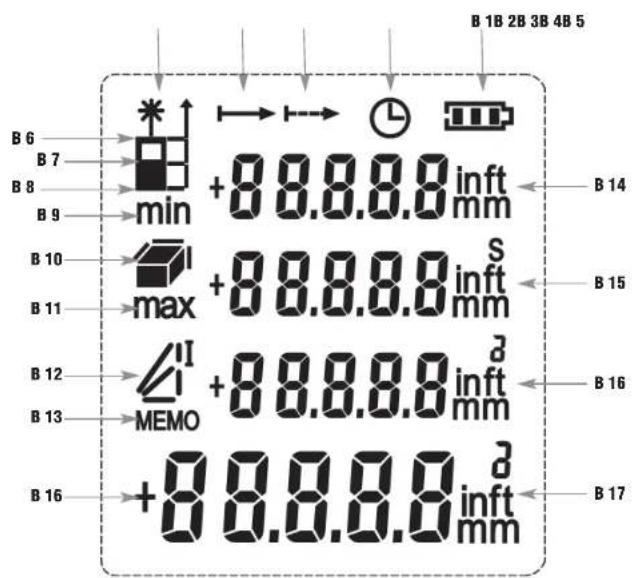
B. Display (Fig. 2)
B 1: Battery symbol B 2: Self-timer active
B 3: Continuous measurement B 4: Single distance
B 5: Laser active B 6: Front measurement basis
B 7: Middle measurement basis B 8: Bottom side measurement basis
B 9: Minimum B 10: Measurement area / Volume
B 11: Maximum B 12: Indirect measurement 1 + 2
B 13: Memory values B 14: 1. Display line
B 15: 2. Display line B 16: 3. Display line
B 17: Main display line
Laser Distance Meter

5. Operation
• Each button operation is acknowledged with a beep.
- If the device is on and no measurement is taking place, the laser automatically turns off.
6. Getting started
- Open the battery compartment at the back and insert two new batteries 1.5 V AAA, polarity as illustrated.
- Press the MEAS button to switch on the instrument.
• The device will alert you with a beep and the backlight is activated. - The laser function is activated. The symbol will be flashing.
• The unit is ready for use. - On the display appear the battery symbol, the measuring unit (default: m) and the measurement basis (default: bottom side).
• The device will turn off automatically after two minutes. - Press and hold the C/OFF button to deactivate the device immediately.
6.1 Setting of the measurement basis
- To start an accurate measurement, you should first set the correct measurement basis.
- Bottom side measurement basis - The length of the device is included in the measurement.
- Middle measurement basis - The length of the device starting from the tripod thread is included.
- Front measurement basis - The measurement is based on the real length.
- Press the first button on the left side to select between the bottom side measurement basis (default), the middle or the front measurement basis.
- The measurement basis should be taken into account for each new measurement.
6.2 Setting of the measuring unit
- Press and hold the UNIT button to change between "m" (default), "ft" or "in" as measuring unit.
6.3 Measuring of the single distance
- Press the MEAS button.
- Orientate the device properly.
- Aim with the red laser point toward the end point of the
section to be measured. - Press the MEAS button.
• The device will alert you with a beep and the laser point will be flashing. - On the display appears the measured distance.
• After the measurement the laser automatically turns off. - Press the C/OFF button to clear the result.

Laser Distance Meter

Troubleshooting
- If the display shows 'Err 21 or 22' after a measurement, press the C / OFF button to delete the last measurement.
- Start a new measurement process.
6.4 Continuous measurement (tracking) and maximum and minimum
- Press and hold the MEAS button to activate the continuous measurement.
- On the display appear max and min.
• A continuous tone will sound. - A measurement will be automatically started every 0.5 seconds.
- The unit automatically stores the maximum and minimum distance.
- The actual measured distance is displayed in the summary line.
- Press the MEAS button to deactivate the function.
• The laser function turns off. The symbol disappears. - Press the C/OFF button to return to normal mode.
6.5 Addition and subtraction
- Press the + or - button to add the next measurement to the current measurement or subtract from it.
- On the display appears in the first line the last measurement and a second line (with + or -) and a summary line.
• The laser function is activated. The symbol will be flashing. - Press the MEAS button to measure a new distance.
- On the display appears the new measured value in the second line.
• In the summary line appears the sum or the difference.
• This process can be repeated if necessary. - The sum or the difference appears always in the summary line, the new measured value in the second line and the previous sum or difference in the first line.
- Press the C/OFF button twice to return to normal mode.
6.6 Area measurement
- Press the F button.
- On the display appears a rectangle
• The laser function is activated. The symbol will be flashing.
• The side to be measured (length) will be flashing. - Press the MEAS button.
- On the display appears the result.
- The new side to be measured (width) will be flashing.
- Press the MEAS button.

Laser Distance Meter

- The device calculates automatically the area and shows you the result in * m 2*.
- The result area appears in the summary line, the single measurements in the first and second line
- Press the C/OFF button three times to return to normal mode.
6.7 Volume measurement
- Press the F button twice.
- On the display appears the symbol for a cuboid
• The laser function is activated. The symbol will be flashing.
• The side to be measured (length) will be flashing.
- Press the MEAS button.
- On the display appears the result.
- The new side to be measured (width) will be flashing.
- Press the MEAS button.
- On the display appears the result.
• The new side to be measured (height) will be flashing.
- Press the MEAS button.
- The device calculates automatically the volume and gives the result in "m ^3 ".
- The volume result appears in the summary line, the single measurements in the first, second and third line.
- Press the C/OFF button four times to return to normal mode.
6.8 Indirect measurement 1 - right angle triangle
- According to the Pythagoras function, the distance can be determined through indirect measurements.
- Press the F button three times.
- On the display appears the symbol for a triangle
• The laser function is activated. The symbol will be flashing.
• The side to be measured (a) will be flashing. - Press the MEAS button.
- On the display appears the result.
• The new side to be measured (c) will be flashing. - Press the MEAS button.
- The device calculates automatically the missing side (b=x) and gives the result in 'm'.
- The result appears in the summary line, the single measurements in the first and second line.
- Press the C/OFF button three times to return to normal mode.


Laser Distance Meter

6.9 Indirect measurement 2 - Determining a distance using 3 measurements
- Press the F button four times.
- On the display appears the symbol .
• The laser function is activated. The symbol will be flashing.
• The side to be measured (a) will be flashing. - Press the MEAS button.
- On the display appears the result.
• The new side to be measured (c1) will be flashing. - Press the MEAS button.
- On the display appears the result.
• The new side to be measured (c2) will be flashing. - Press the MEAS button.
- The device calculates automatically the distance (b2 = x) and gives the result in 'm'.
- The result appears in the summary line, the single measurements in the first, second and third line.
- Press the C/OFF button four times to return to normal mode.
6.10 Memory function
- Press the F button five times.
- On the display appear MEMO and 01.
• The laser function turns off. The symbol disappears. - Check with the + or - button the last measurements taken.
• There are twenty data stored. - Once a new measurement is taken, this one will be stored and the oldest measurement will be automatically deleted.
- Press the C/OFF button to return to normal mode.
6.11 Setting of the self-timer
- Press the F button six times.
- On the display appears the symbol for the self-timer beside the battery symbol.
• The self-timer is set to 5 seconds (default)
• The laser function is activated. The symbol will be flashing. - Press briefly the + or - button, the seconds (1 - 60 seconds) are shown step by step.
- Press and hold the + or - button until the desired time is indicated.
- Press the MEAS button to perform a measurement.
• The countdown starts. - The device will alert you with a beep in the last five seconds before the measurement starts.
- On the display appears the result.
- Press the C/OFF button to return to normal mode.
Laser Distance Meter

7. Backlight
- Press the UNIT button to activate or deactivate the backlight.
- If the UNIT button is not pressed, the backlight switches off automatically after a few seconds.
8. Fastening
- Pull the cord through the attachment hole on the device and knot it.
9. Care and maintenance
• The sensor is the most delicate part of the device. Please protect the sensor part from dirt.
- Clean the device with a soft damp cloth. Do not use solvents or scouring agents.
- Remove the batteries if you do not use the product for a long period of time.
9.1 Battery replacement
• The battery symbol appears permanently on the display.
- Change the batteries when the battery symbol appears on the display.
- Confirm the device is powered off before changing the battery
- Open the battery compartment and insert two new batteries 1.5 V AAA, polarity as illustrated.
- Close the battery compartment again.
10. Troubleshooting
Problems Solution
No display → Press the MEAS button to switch on the instrument
→ Ensure that the batteries' polarities are correct
→ Change the batteries
Incorrect indication → Change the batteries
Indication 21 → Signal too weak - repeat the process
Indication 22 or 32 → Error in the calculation - Repeat procedure
If your device fails to work despite these measures contact the supplier from whom you purchased it.
11. Waste disposal
This product has been manufactured using high-grade materials and components which can be recycled and reused.
Never dispose of empty batteries and rechargeable batteries in household waste. As a consumer, you are legally required to take them to your retail store or to an appropriate collection site depending on national or local regulations in order to protect the environment.
The symbols for the heavy metals contained are: Cd=cadmium, Hg = mercury, Pb=lead

This instrument is labelled in accordance with the EU Waste Electrical and Electronic Equipment Directive (WEEE).
Please do not dispose of this instrument in household waste. The user is obligated to take end-of-life devices to a designated collection point for the disposal of electrical and electronic equipment, in order to ensure environmentally-compatible disposal.
12. Specifications
Operating temperature - 5 °C .... + 40 °C
Storage temperature - 20 °C ... + 60 °C
Accuracy ±1.5 mm
Measuring range 0,05 ... 40,0 m
Tripod thread 1/4 inch
Laser class 2
Automatic off-function
of the device 120 seconds
Automatic off-function
of the laser function 60 seconds
Laser type 630...670 nm, < 1 mW
Power consumption Batteries 2 x 1,5 V AAA
Dimensions 55 x 28 x 114 mm
Weight 94 g (instrument only)
No part of this manual may be reproduced without written consent of TFA Dostmann. The technical data are correct at the time of going to print and may change without prior notice. The latest technical data and information about your product can be found by entering your product number on our homepage.
10/2014
Télémetre laser

[Non-Text]
[Non-Text]
[Non-Text]
Laser afstandsmeter

5. Bediening
A 4: Sumar A 5: Restar
A 6: Funciones A 7: Eliminar + OFF
B. Pantalla (Fig. 2)
- Before you start using it
- Field of operation and all the benefits of your new instrument at a glance
- For your safety
- Laser Distance Meter
- Important information on product safety!
- Components
- Buttons (Fig. 1)
- Display (Fig. 2)
- Operation
- Getting started
- Setting of the measurement basis
- Setting of the measuring unit
- Measuring of the single distance
- Troubleshooting
- Continuous measurement (tracking) and maximum and minimum
- Addition and subtraction
- Area measurement
- Volume measurement
- Indirect measurement 1 - right angle triangle
- Indirect measurement 2 - Determining a distance using 3 measurements
- Memory function
- Setting of the self-timer
- Backlight
- Fastening
- Care and maintenance
- Battery replacement
- Troubleshooting
- Problems Solution
- Waste disposal
- Specifications
- Télémetre laser
- Laser afstandsmeter
- Bediening
- Pantalla (Fig. 2)
Brand : TFA
Model : 31.3301.01
Category : Rangefinder