
Q2U - Microphone SAMSON - Free user manual and instructions
Find the device manual for free Q2U SAMSON in PDF.


| Product Type | Dynamic Microphone |
| Brand | Samson |
| Model | Q2U |
| Connections | USB (Type B) and XLR (3-pin) |
| Polar Pattern | Cardioid |
| Frequency Response | 50 Hz - 15 kHz |
| Impedance | 600 ohms |
| Sensitivity | -54 dBV/Pa |
| Dimensions (microphone only) | 185 mm x 51 mm (diameter) |
| Weight (microphone only) | 538 g (approx.) |
| Power | Via USB 5V or 48V phantom power (XLR) |
| Power Consumption | 100 mA max (USB) |
| Built-in Controls | Mute button, headphone volume control |
| Headphone Output | 3.5mm jack |
| Included Accessories | Desktop stand, 3m USB cable, shock mount, windscreen |
| Maintenance and Cleaning | Wipe with a dry, soft cloth. Do not use chemicals. |
| Safety | Do not expose to moisture or extreme temperatures. Unplug before cleaning. |
| Spare Parts and Repairability | Contact Samson customer service for replacement parts. |
| General Information | Hybrid USB/XLR dynamic microphone ideal for podcasting, singing, and voice-over. |
Frequently Asked Questions - Q2U SAMSON
User questions about Q2U SAMSON
0 question about this device. Answer the ones you know or ask your own.
Ask a new question about this device
Download the instructions for your Microphone in PDF format for free! Find your manual Q2U - SAMSON and take your electronic device back in hand. On this page are published all the documents necessary for the use of your device. Q2U by SAMSON.
USER MANUAL Q2U SAMSON
User Manual of Product 1:
Samson Technologies Q2U USB/XLR Dynamic Microphone Recording and Podcasting Pack (Includes Mic Clip, Desktop Stand, Windscreen and Cables), silver
User Manual of Product 2:
Audio-Technica ATH-M20X Professional Studio Monitor Headphones, Black
SAMSON
Q2U
Recording and Podcasting Pack
USB/XLR Dynamic Microphone with Accessories
natural_image
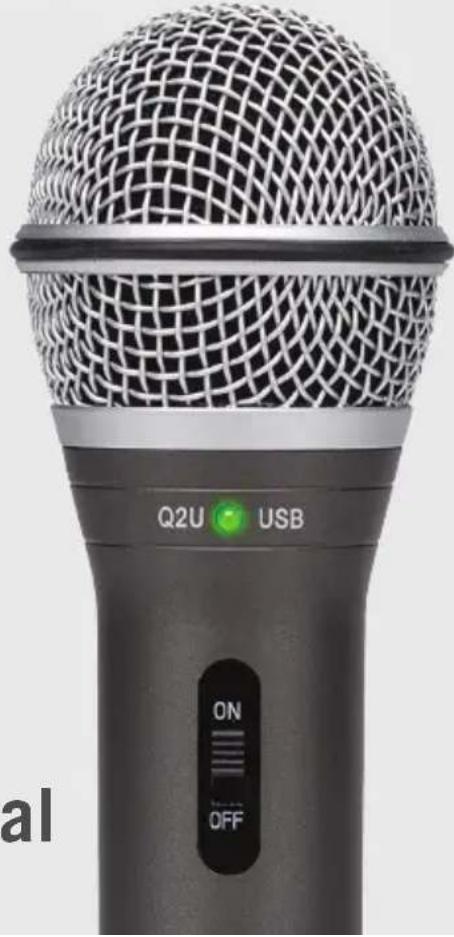
Close-up of a black Q2U USB microphone with mesh grille and control buttons (no readable text beyond labels)Owner's Manual
Introduction
Congratulations on your purchase of the Q2U Recording and Podcasting Pack from Samson! The Q2U combines the convenience of digital and analog audio capture into one microphone. With XLR and USB outputs, the Q2U is the easily fits into your home studio and mobile recording, as well as stage performance. The pack includes a desktop tripod stand, mic clip, foam windscreen, XLR cable and USB cable...everything you need to start recording right out of the box.
For recording music, podcasts, house of worship services, meetings or conferences, the Q2U is the perfect solution for recording quality digital audio on your computer or sound reinforcement. Just plug in and start creating!
Features
- Dynamic Microphone with USB digital output and standard XLR analog output.
- Full range, linear frequency response for accurate sound reproduction.
- Unidirectional, pick-up pattern picks up the sound in front of the microphone and minimizes ambient and background noise.
- Compatible with most any Mac or PC recording software
- Onboard headphone amplifier with level control for zero-latency monitoring, plus you can use the output to connect active studio monitors.
• Computer-controlled analog Input Gain makes it easy to set the proper level and get a clean signal. - A desktop tripod stand, tripod extension, mic clip, foam windscreen, 10' USB cable and 10' XLR cable are included to easily set up the microphone right out of the box.
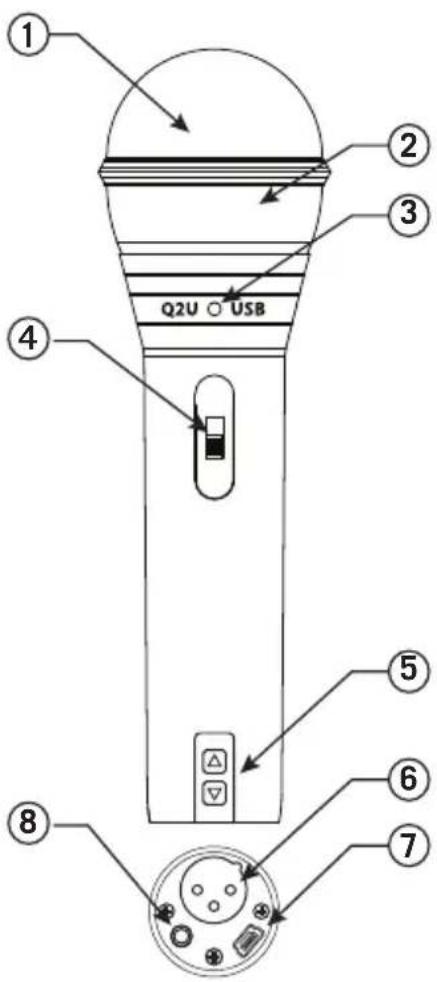
Q2U Layout
- Windscreen – Dual stage grill protects the capsule and helps reduce wind noise and p-popping.
- Capsule – Internally shock mounted dynamic microphone element with cardioid pick up pattern.
- LED – The dual color Power/Clip LED lights green to indicate power, and flashes red when the input mic is overloaded or clipping.
- ON/OFF switch – Used to turn the microphone USB and XLR outputs on or off.
- Output Level control – Up and Down buttons control the headphone output volume.
- XLR connector – Standard Male XLR connector with analog output for connecting to a standard microphone preamp.
- USB – Mini-B size USB connector for interfacing with your PC or Mac computer.
- Headphone Output - 3.5mm stereo jack for connecting headphones or studio monitors. The headphone output provides a mix of the direct signal from the microphone and the audio playback from the computer.
Getting Started - Connecting to a Computer
Using the Q2U with a computer is a simple procedure that takes just a few minutes. Simply connect the included USB cable to an available USB port on your computer and begin recording.
Using the Q2U with Windows Computers
- From the Start Menu, open the Control Panel and select Sound.
Under the Playback and Recording tabs, select the Samson Q2U as the audio device. - To adjust the gain of the microphone, click the Properties button, and then select the Levels tab. You can view the volume level as either a percentage or in dB, by right clicking on the number box.
- If the microphone LED is lighting red, turn this control down until the LED no longer flashes red.
- In the Playback tab, select the Level tab and set the computer's Master Volume to 100%. Use the Q2U's Output Level buttons to control the overall output from the headphones or speaker.
- To adjust the direct monitoring level in the Playback tab by moving the fader labeled Microphone.
Using the Q2U with Apple OSX
- Open System Preferences from the dock or the main Apple Menu.
- Select the Sound preference icon, choose the Input tab and select Q2U.
- Set the gain of the Q2U by adjusting the Input volume slider at the bottom of the Sound dialog box.
- Set the Q2U as playback volume by clicking the Output tab and select Q2U, adjust the Output volume slider at the bottom of the Sound dialog box to the maximum setting and use the Q2U's front panel Volume knob to control the overall output from the headphones or speakers.
- To turn direct monitoring on or off, open the Audio/MIDI Setup utility located in the Utility folder inside the Applications folder. Then click the check-box in the Thru column in Audio/MIDI Setup.
Quick Start
Follow this simple quick start for a typical set-up to start recording.
Using the Q2U with a computer
- Unpack the Q2U, and position the microphone on the desktop stand.
- Set the Q2U's ON/OFF switch to the "ON" position and point the end of the microphone towards the performer.
- Connect headphones to the Headphone output located on the bottom of the microphone.
- Plug the mini-B (small) end of the USB cable to the Q2U and plug the other end of the cable into an available USB port on your computer.

natural_image
Line drawing of a microphone connected to a laptop and an ear headphones (no text or symbols)-
Launch your recording software, turn down the main output level and select the Q2U for the input and outputs.
-
Set up a mono record track in your software.
-
Set the level of the microphone following the instructions in "Getting Started - Connecting to a Computer".
-
Set the level of your headphones to a comfortable listening level by using the Up and Down Output Level Control buttons.
-
Press the record button and start creating.
Microphone Placement
In order to maximize the quality of your recordings, you should pay careful attention to the placement and positioning of the Q2U for the instrument or vocalist that you are miking. The Q2U is a unidirectional microphone with a cardioid pickup pattern. Cardioid microphones, exhibit a phenomenon known as proximity effect. Proximity effect is a resulting change in the frequency response of a microphone based on the position of the mic capsule relative to the sound source. In general, as the microphone moves closer to the sound source, the bass response increases.
You can also make subtle changes to the frequency response by making minor adjustment to the position. Specifically, when you point a cardioid mic directly at the sound source (on axis) you will get the best frequency response, however when you start pointing the microphone slightly away (off axis) you will notice the high frequency response dropping off and the microphone will start to sound like it has more bass and less highs.
For most vocal applications you'll want to position the microphone directly in front of the artist about 4 to 18 inches. This will pickup the voice while minimizing unwanted background or ambient noise. If you are close miking vocals, and notice plosive sounds, like p-pops, caused by plosive consonants set the microphone to a slight angle to reduce p-popping. Slight changes to the angle of the microphone in reference to the sound source can make some pretty amazing equalization adjustments. This can be a very useful technique in capturing the optimum sound of drum set, acoustic guitar, piano or other instruments in a live room or sound stage. Experimentation and experience are the best teachers in getting good sounds, so plug in and start creating!
Using the Q2U with a mixer
Using the XLR Output you can connect the Q2U to a standard PA mixer for live sound applications or when recording through an audio interface.
Connect the included XLR cable to your mixer
Set the ON/OFF switch to the "ON" position.
Follow the manufacturer's instructions for setting the microphone level of the mixer or audio interface.
P-Popping
Sometimes when recording vocals certain plosive consonants (like hard “P” and “B” sounds) overload the input of the microphone which causes clipping and adds distortion to your recording. These are some of the worst sounds that can make their way into your recording. Once recorded, they are almost impossible to remove and can be very distracting to your listener. In addition to the dual stage grill, the Q2U includes a large foam windscreen which reduces the effect of the blasts of air from vocalists when pronouncing words that include these hard consonant sounds. The pop filter also helps to protect the microphone element from moisture.
Stand Mounting
The Q2U includes a tripod desktop microphone stand. The desktop stand includes an extension piece. This allows you to raise the height of the microphone towards the performers mouth.
Additionally, the Q2U can be mounted to any standard microphone stand using the included mic clip. Simply screw the Q2U mic clip on to your mic stand or boom arm and adjust the microphone to the desired angle.
Polar Pattern & Frequency Response
Two characteristics of a microphone are its polar pattern and frequency response. The polar pattern describes the directionality of the microphone and the frequency response is a graphical representation to how the microphone reacts to different frequencies.
The Q2U is a unidirectional microphone which captures sound in front of the microphone and rejects sound from the sides and back. This allows for better separation of performers or instruments in the studio, and picks up more of the performer sound in relation to the sound of the room. For information on microphone technique visit samsontech.com.

radar
| Angle (°) | Value | | --------- | ----- | | 0 | 100 | | 30 | 95 | | 60 | 90 | | 90 | 85 | | 120 | 80 | | 150 | 75 | | 180 | 70 | | 210 | 65 | | 240 | 60 | | 270 | 55 | | 300 | 50 | | 330 | 45 |Polar Pattern

line
| x | y | | ------ | ----- | | 2020k | -15 | | 10k | -10 | | 5k | -5 | | 2k | 0 | | 1k | 0 | | 500 | 0 | | 200 | 0 | | 10050 | 0 | | >10050 | -15 |Frequency Response
Specifications
Element Type . . . . . . . . . . Dynamic
Polar pattern .... Cardioid
Frequency Response ..... 50Hz - 15 kHz
Power Requirements ..... 5V DC USB Power
Controls. . . . . . . . . . . . . . . . . On/Off Switch, Headphone Volume
Output Connectors . . . . . . . . . . . . . . . . . . . . . . . . . . . . . . . . . . . . . . . . . . . . . . . . . . . . . . . . . . . . . . . . . . . . . . . . . . . . . . . . . . . . . . . . . . . . . . . . . 3.5mm TRS Stereo Headphone
Sample Rate. 44.1/48kHz
Bit Rate 16bit
Sensitivity . . . . . . . . . . . . . . -54 dBV/Pa
Max SPL. 148 dB SPL
Headphone Output Power ..... 10mW @ 16 ohms
Included Accessories ..... USB cable, XLR cable, tripod stand, tripod extension, microphone clip, foam windscreen
Weight 11.2oz / 317.5g
Dimensions . . . . . . . . . . . . . 7.5 " x 2.2 " (diameter) / 190 mm x 55 mm (diameter)
At Samson, we are continually improving our products, therefore specifications and images are subject to change without notice.
Important Safety Information
Note: This equipment has been tested and found to comply with the limits for a Class B digital device, pursuant to Part 15 of the FCC rules. These limits are designed to provide reasonable protection against harmful interference in a residential installation. This equipment generates, uses and can radiate radio frequency energy and, if not installed and used in accordance with the instructions, may cause harmful interference to radio communications. However, there is no guarantee that the interference will not occur in a particular installation. If this equipment does cause harmful interference to radio or television reception, which can be determined by turning the equipment off and on, the user is encouraged to try to correct the interference by one or more of the following measures:
- Reorient or relocate the receiving antenna.
- Increase the separation between the equipment and receiver.
- Connect the equipment into an outlet on a circuit different from that of the receiver.
- Consult the dealer or an experienced radio/TV technician for help
WARNING: Listening to music at high volume levels and for extended durations can damage one's hearing. In order to reduce the risk of damage to hearing, one should lower the volume to a safe, comfortable level, and reduce the amount of time listening at high levels.
Please use the following guidelines established by the Occupational Safety Health Administration (OSHA) on maximum time exposure to sound pressure levels before hearing damage occurs.
• 90 dB SPL at 8 hours
• 95 dB SPL at 4 hours 100 dB SPL at 2 hours
• 105 dB SPL at 1 hour 110 dB SPL at 1/2 hour
• 115 dB SPL at 15 minutes
• 120 dB SPL - avoid or damage may occur
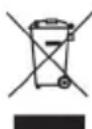
If you want to dispose this product, do not mix it with general household waste. There is a separate collection system for used electronic products in accordance with legislation that requires proper treatment, recovery and recycling.
Private household in the 28 member states of the EU, in Switzerland and Norway may return their used electronic products free of charge to designated collection facilities or to a retailer (if you purchase a similar new one).
For Countries not mentioned above, please contact your local authorities for a correct method of disposal.
By doing so you will ensure that your disposed product undergoes the necessary treatment, recovery and recycling and thus prevent potential negative effects on the environment and human health.
Présentation
natural_image
Line drawing of a microphone connected to a laptop and headphones (no text or symbols)line
| x | y | | ------- | --- | | 2020k | -12 | | 10k | -8 | | 5k | -4 | | 2k | -2 | | 1k | 0 | | 500 | 0 | | 200 | 0 | | 10050 | 0 | | 10000 | -2 | | 10000 | -12 |natural_image
Line drawing of a laptop connected to a microphone and headphones (no text or symbols)Abtastrate 44,1/48 kHz
Bitrate. 16 Bit
natural_image
Line drawing of a microphone connected to a laptop and an ear headphones (no text or symbols)natural_image
Line drawing of a laptop connected to a microphone and headphones (no text or symbols)natural_image
Man wearing headphones and a jacket, standing outdoors with blurred background figures (no visible text or symbols)
natural_image
Close-up of a control panel with black and white buttons arranged in rows (no visible text or symbols)
natural_image
Man wearing headphones and headset singing into a microphone at a dimly lit audio workstation (no visible text or symbols)
natural_image
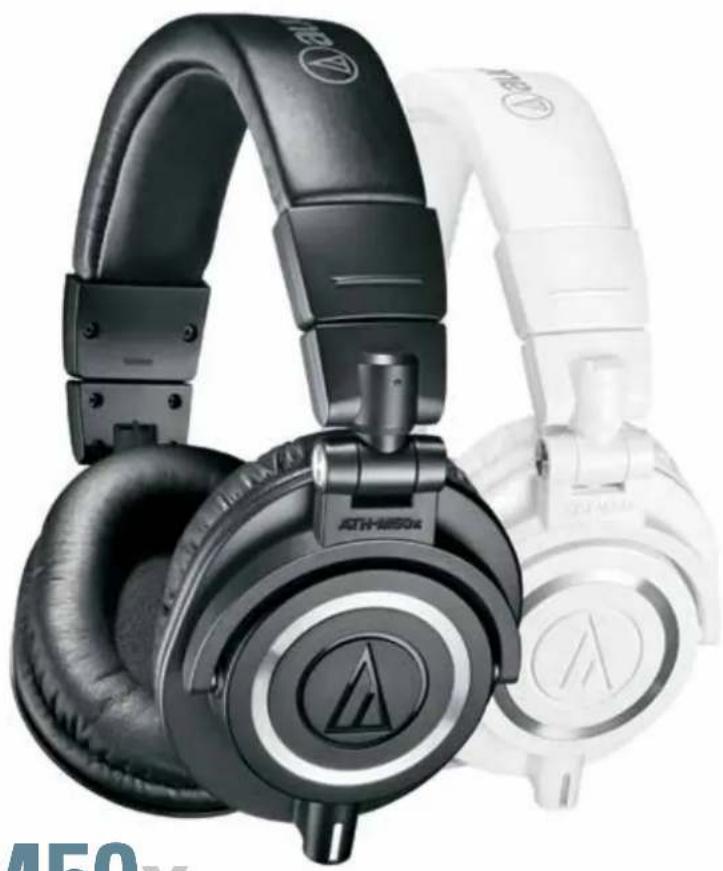
A man playing guitar with headphones and a microphone in a studio setting (no visible text or symbols)Online reviewers, top audio professionals and cult followers have long agreed that the ATH-M50 is an unmatched combination of audio and build quality, whether in the studio or on the go. That award winning formula is embodied in the newly remastered M-Series line, with a model perfectly suited for every discerning ear.
PURE. PROFESSIONAL. PERFORMANCE.
natural_image
Close-up of black and white athletic headsets with brand logos, no visible text or symbols on the products themselves.
natural_image
Black hardcover headphones with adjustable design (no visible text or labels)ATH-M50x
This is the most critically acclaimed model in the M-Series line, praised by top audio engineers and pro audio reviewers year after year. The ATH-M50x features the same coveted sonic signature, now with refined earpads and detachable cables. From large-aperture drivers to sound isolating earcups and robust construction, the M50x provides an unmatched experience for the most critical audio professionals.
- Critically acclaimed sonic performance praised by top audio engineers and pro audio reviewers
- Proprietary 45 mm large-aperture drivers with rare earth magnets and copper-clad aluminum wire voice coils
- Exceptional clarity throughout an extended frequency range, with deep, accurate bass response
- Circumaural design contours around the ears for excellent sound isolation in loud environments
- 90^ swiveling earcups for easy, one-ear monitoring
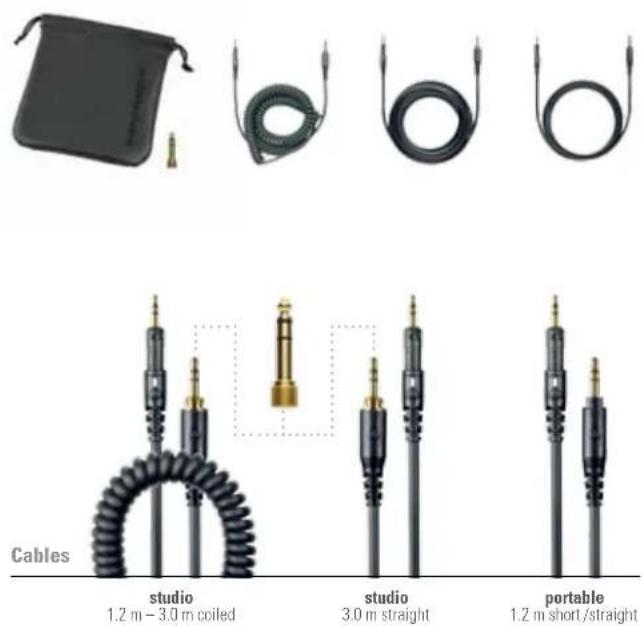
• Professional-grade earpad and headband material delivers more durability and comfort - Detachable cable (3 cables included)
Driver 45 mm
Magnet Neodymium
Voice Coil CCAW (Copper-clad aluminum wire)
Frequency Response 15 – 28,000 Hz
Maximum Input Power 1,600 mW at 1 kHz
Sensitivity 99 dB
Impedance 38 ohms
Weight
285 g (10 oz) without cable and connector
Included Accessories

natural_image
Black ATN 800x audio headphones with charging cable and logo (no text-heavy elements)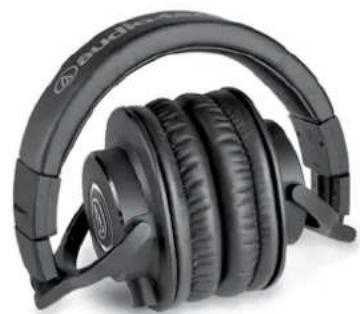
natural_image
Black audio headphones with earbuds and headband (no visible text or labels)ATH-M40x
The high-performance ATH-M40x professional headphones are tuned flat for incredibly accurate audio monitoring across an extended frequency range. Your studio experience is enhanced with superior sound isolation and swiveling earcups for convenient one-ear monitoring. Engineered with pro-grade materials and robust construction, the M40x excels in professional studio tracking and mixing, as well as DJ monitoring.
• Cutting-edge engineering and robust construction
- 40 mm drivers with rare earth magnets and copper-clad aluminum wire voice coils
- Tuned flat for incredibly accurate sound monitoring across the entire frequency range
- Circumaural design contours around the ears for excellent sound isolation in loud environments
- 90^ swiveling earcups for easy, one-ear monitoring
• Professional-grade earpad and headband material delivers more durability and comfort
- Detachable cable (2 cables included)
Driver 40 mm
Magnet Neodymium
Voice Coil CCAW (Copper-clad aluminum wire)
Frequency Response 15 - 24,000 Hz
Maximum Input Power 1,600 mW at 1 kHz
Sensitivity 98 dB
Impedance 35 ohms
Weight
240 g (8.5 oz) without cable and connector
Included Accessories

natural_image
Three black medical or medical devices: a clasp, coiled tubing, and a separate coiled tube (no visible text or symbols)
natural_image
Close-up of black audio/video cables with coiled cable, no visible text or symbolsstudio
1.2 m - 3.0 m coiled
studio
3.0 m straight

natural_image
Black audio headphones with attached earbuds, no visible text or symbols on the head or background.ATH-M30x
With enhanced audio clarity and sound isolation, the ATH-M30x professional monitor headphones are tuned for highly detailed audio. Featuring strong mid-range definition, these versatile monitoring headphones are ideal in a variety of situations. Designed primarily for studio tracking and mixing, they offer added features for increased portability, making them a great choice for field recording.
• Advanced build quality and engineering
- 40 mm drivers with rare earth magnets and copper-clad aluminum wire voice coils
- Tuned for enhanced detail, with excellent mid-range definition
- Circumaural design contours around the ears for excellent sound isolation in loud environments
- Convenient single-side cable exit
Driver 40 mm
Magnet Neodymium
Voice Coil CCAW (Copper-clad aluminum wire)
Frequency Response 15 - 22,000 Hz
Maximum Input Power 1,300 mW at 1 kHz
Sensitivity 96 dB
Impedance 47 ohms
| Cable | 3.0 m (9.8'), left-side exit |
| Weight | 220 g (7.8 oz) without cable and connector |
| Included Accessories | 1/4 " (6.3 mm) screw-on adapter, pouch |
natural_image
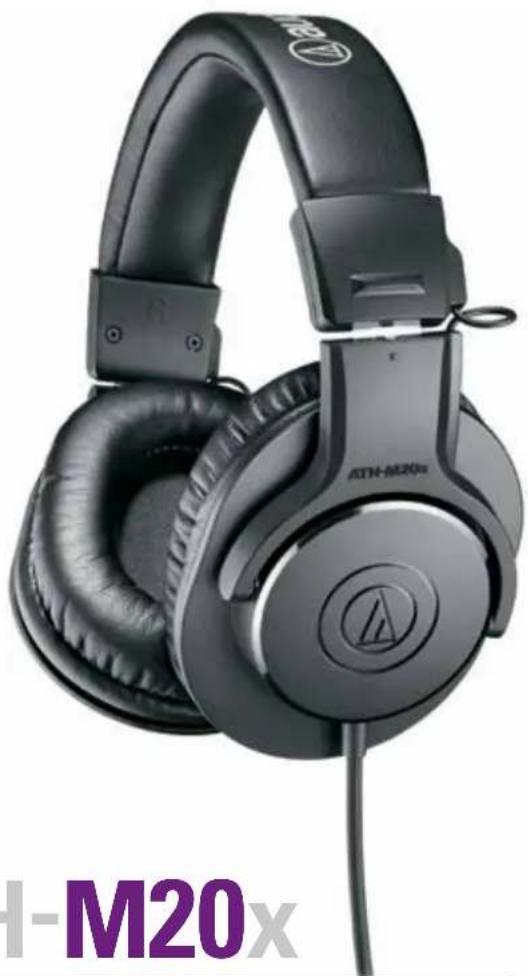
Black ATN-M20x headphones with visible branding and logo, no text or symbols on the device itselfATH-M20x
The ATH-M20x professional monitor headphones are a great introduction to the critically acclaimed M-Series line. Modern design and high-quality materials combine to deliver a comfortable listening experience, with enhanced audio and effective isolation. An excellent choice for tracking and mixing.
• Advanced build quality and engineering
- 40 mm drivers with rare earth magnets and copper-clad aluminum wire voice coils
- Tuned for enhanced low-frequency performance
- Circumaural design contours around the ears for excellent sound isolation in loud environments
- Convenient single-side cable exit
Driver 40 mm
Magnet Neodymium
Voice Coil CCAW (Copper-clad aluminum wire)
Frequency Response 15 – 20,000 Hz
Maximum Input Power 700 mW at 1 kHz
Sensitivity 96 dB
Impedance 47 ohms
| Cable | 3.0 m (9.8'), left-side exit |
| Weight | 190 g (6.7 oz) without cable and connector |
| Included Accessories | 1/4 " (6.3 mm) snap-on adapter |

natural_image
Abstract geometric logo with a stylized letter 'A' inside a circular frame (no text or symbols)
- User Manual of Product 1:
- User Manual of Product 2:
- SAMSON
- Q2U
- Recording and Podcasting Pack
- Introduction
- Features
- Q2U Layout
- Getting Started - Connecting to a Computer
- Using the Q2U with Windows Computers
- Using the Q2U with Apple OSX
- Quick Start
- Using the Q2U with a computer
- Microphone Placement
- Using the Q2U with a mixer
- P-Popping
- Stand Mounting
- Polar Pattern & Frequency Response
- Specifications
- Important Safety Information
- Présentation
- ATH-M50x
- ATH-M40x
- ATH-M30x
- ATH-M20x
Brand : SAMSON
Model : Q2U
Category : Microphone