
F89 - Keyboard KeepOut - Free user manual and instructions
Find the device manual for free F89 KeepOut in PDF.


| Product type | Wired keyboard |
| Brand | KeepOut |
| Model | F89 |
| Connectivity | USB Type-A |
| Key layout | AZERTY (French) |
| Number of keys | 104 keys |
| Backlight | No |
| Dimensions (W x D x H) | 440 x 140 x 30 mm |
| Weight | 800 g |
| Cable length | 1.5 m |
| Power supply | USB bus-powered |
| Compatible operating systems | Windows, macOS, Linux |
| Main material | ABS plastic |
| Main functions | Text input, function keys, numeric keypad |
| Care and cleaning | Clean with a soft, slightly damp cloth; do not use solvents |
| Safety | Do not expose to water or extreme temperatures |
| Spare parts and repairability | No spare parts available; if defective, replace the device |
| General information | Indoor use only; operating temperature: 0°C to 40°C |
Frequently Asked Questions - F89 KeepOut
User questions about F89 KeepOut
0 question about this device. Answer the ones you know or ask your own.
Ask a new question about this device
Download the instructions for your Keyboard in PDF format for free! Find your manual F89 - KeepOut and take your electronic device back in hand. On this page are published all the documents necessary for the use of your device. F89 by KeepOut.
USER MANUAL F89 KeepOut
Thank you for choosing the Keep Out gaming keyboard F89
Description
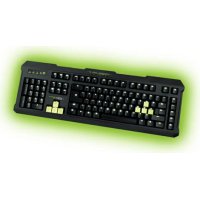
The F89 is a professional gaming keyboard that does not leave anyone indifferent as performance and design have been meticulously cared for the most demanding gamers.
This model uses a kind of membrane with a special design that provides minimal tired feeling and at the same time a minimum response time. Comes with additional software and numerous keys with multimedia features.
F89 keys include LED backlighting in various colors which can be modified using a special key. With 5 additional programmable macro keys. All keys are removable which allows a perfect cleaning of the keyboard.
This model has an internal memory which can store up to 3 profiles and each of these can store different macros for a unique gaming experience.
Technical Specifications
Retro illuminated keys adjustable lighting in different colors.
Colors: Green, blue, yellow, turquoise, violet, white, red. 109 keys and silent membrane life up to 20,000,000 keystrokes.
3 customizable profiles. Additional software Additional 8 interchangeable keys (WASD and arrow keys).
12 keys for multimedia control
5 programmable macro keys to create Gaming Mode, which allows the activation / desactivation of the Windows key
USB 2.0 Cable made of reinforced nylon anti ghosting system
Compatible with Windows XP / Vista / 7/8
Package Contents
-Gaming Keyboard F89
-Quick Installation Guide in multiple languages
-Keys W, A, S, D and additional cursors. Special tool for extracting keys
-Software Installation CD
Note:
Make sure that your package contains the items described above. If you find any items are missing or damaged, please contact your dealer.
Installation
- Connection: Connect the Gaming Keyboard in a free USB port on your pc.
- Insert the included installation CD in your drive.
- Double-click My Computer, select your DVD drive and run the autorun.exe file.
- Install the drivers for your device.
- Once installed, restart your pc.
Software
1. Lighting
-To change the keyboard backlight it must be done manually using the following commands:
-. Press the bulb button to set the color you want
-. Press Fn + "Page Down" to reduce lighting
-. Press Fn + "Retro Page" to increase lighting
-. Press Fn + bulb to set the lighting or intermittently
EN
2. Profiles
- Open the software from Start / All Programs or icon of the taskbar in the lower right corner of your desktop.
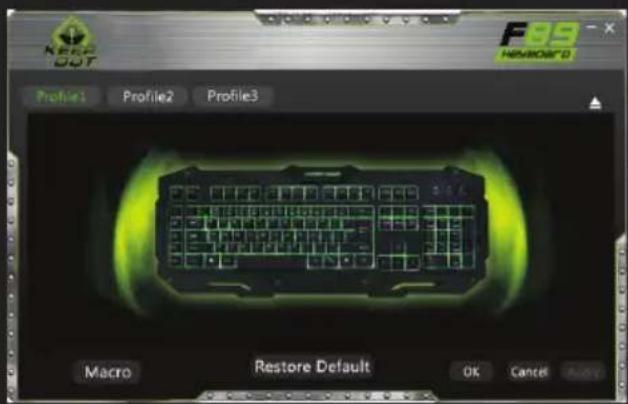
- In the Gaming Keyboard memory, you can save to 3 profiles. Just click on any of them and "Apply" to activate.
3. Macro Function
- To program a macro, follow these steps: (For example we will set the "G1" key)
- . First, click the key you want to program, in this case "G1". Then the configuration window opens.
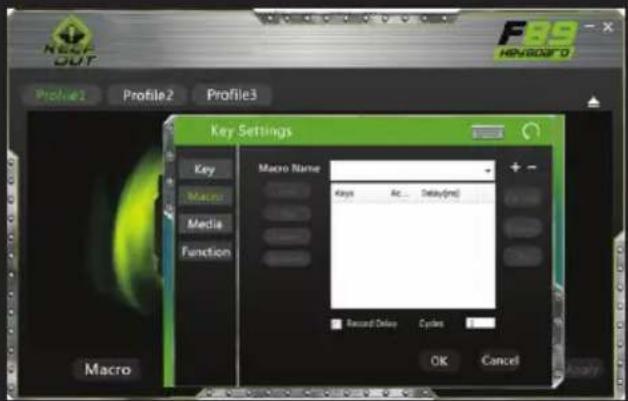
- To create a new 'Macro click on "+" and if you want you can assign a custom name to the macro.
- To record the macro click the "Record" option, it will start recording the "Macro". For example, if you want to burn the letter combination "WASD" press "Record" and then press on your keyboard the letters "WASD". When finished, click "Record". (You can also change the "Delay time", for this click on the "Delay" column, as shown in the picture.

- The "delay" is the delay between the keystrokes that are entered in the macro. It is measured in milliseconds.
-Once we have programmed the macro, click on "OK" to save. Now every time you press the "G1" key, you will be writing the "WASD" command.
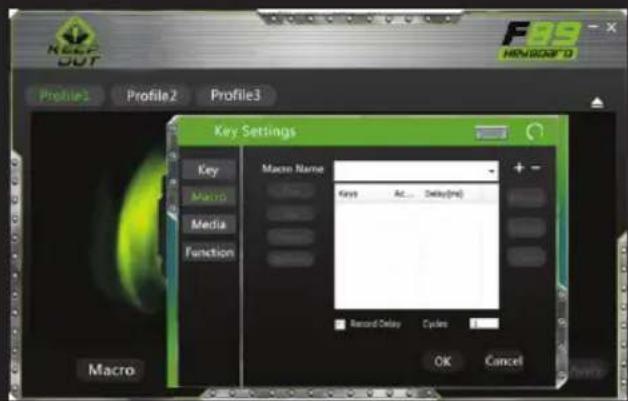
-We can also assign a function to a key as a "Copy", "Paste", and "Open". We'll just have to click the button you want to modify and assign a function as shown in the picture, then click "Ok".

-To create macros manually (without using the software), you must follow the following steps:
- Press the "REC" button to see the LEDs flashing top right. (LEDs "Shift", "Num Lock)
- Now press the key you want to record (ex: "G1"), then the LED indicator on the top right of the keyboard will blink faster.
- Now we can press the keys with which we want to perform the "G1" function. (For example, press WASD).
-. To end recording, press "REC" after doing this, every time you click the "G1" key will be operating the WASD keys. How to cancel the macros? - Press "REC" and you'll see the LED on the top right of the keyboard flashing.
-. Now press cancel which we want, in this case "G1".
-. Finally press "REC" and the macro will be canceled.
4. "Fn" Keys
The Fn key in combination with other keys performs multimedia and special functions:
- Fn + F1 Open media player
- Fn + F2 decrease volume
-
Fn + F3 increase volume
-
Fn + F4 to disable sound
- Fn + F5 Stop
- Fn + F6 Previous Track
- FN + F7 Play / Pause
- Fn + F8 Next Track
- Fn + F9 Open mail
- Fn + F10 Open the default browser
- Fn + F11 Lock the keypad
- Fn + F12 Calculator
- Fn + Q keyboard response speeds (30/60 milliseconds)
5. "Gaming Key" Windows lock feature.
Pressing the FN Key Windows + to enable or disable the Windows key, so that nothing hinders you during play sessions.
6. Restore defaults
You can restore defaults by clicking the "Restore Default" button on the software keyboard.
Technical Support
Please more information on installing and configuring this product go to our website www.keepoutgaming.com or write an email to the following address: support@keep-out.eu
ES
Introducción

- U Gaming Keyboard memorije, možete pohraniti do 3 profila Samo kliknite na bilo koji od njih i "Primijeni" aktivirati.
3. Makro funkcija
- Da programirati makro, slijedite ove korake: (Na primjer ćemo postaviti tipku "G1")
- Prvo, kliknite na tipku koju želite programirati, u ovom slučaju "G1". Tada se otvara prozor konfiguracije.

- "Kašnjenje" je kašnjenje između tipke koje su registrirane u makro. To se mjeri u milisekundama.
-Nakon što smo programirani makro, kliknite na "U redu" za spremanje. Sada svaki put kad pritisnete "G1" tipku, što će se pisati "WASD" naredba.
- Gaming Keyboard F89
- In de Gaming Keyboard geheugen, kunt u maximaal
3 profielen.

Como cancelar as macros?
sistem anti-ghosting
Compatibil cu Windows XP / Vista / 7/8

The content of this guide is subject to typographical errors.

keepoutgaming.com

EC DECLARATION OF CONFORMITY
We declare under our sole responsibility that the product:
Brand name: KEEP OUT
Model no: F100, F110, F89, F80
Product description: Gaming Usb Keyboard
The measurements shown in this test report were made in accordance with the procedures given in the:
- EMC DIRECTIVE: 2004/108/EC
- RoHS DIRECTIVE: 2011/65/EU
To which this declaration is based on with full conformance to the following European norms and standards:
- EN 55022:2010
- EN 61000-3-2:2006+A1:2009+A2:2009
- EN 61000-3-3:2008
- EN 55024:2010
- EN 61000-4-2:2009, EN 61000-4-3:2006+A1:2008+A2:2010
- EN 61000-4-4:2012, EN 61000-4-5:2006
- EN 61000-4-6:2009, EN 61000-4-8:2010, EN 61000-4-11:2004
Signed Jun 25, 2014

Jose Luis Ruiz Gómez
Managing Director
KEEP OUT
ADD: Polígono Industrial Guadalquivir
Gelves (Sevilla), Spain.
Website: www.keepoutgaming.com
CE


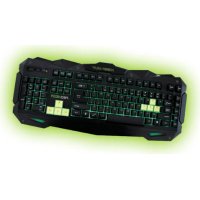
Brand : KeepOut
Model : F89
Category : Keyboard