Avtek 1EVF12 - Projection screen

1EVF12 - Projection screen Avtek - Free user manual and instructions

Find the device manual for free 1EVF12 Avtek in PDF.

📄 96 pages English EN Download 💬 AI Question 10 questions ⚙️ Specs
Notice Avtek 1EVF12 - page 13
Pick your language and provide your email: we'll send you a specifically translated version.
Product type Manual projection screen
Brand Avtek
Model 1EVF12
Diagonal size 100 inches (254 cm)
Aspect ratio 16:9
Screen material Matte white
Gain 1.0
Viewing angle 160°
Weight 8 kg
Cabinet dimensions (L x H x D) 250 cm x 10 cm x 10 cm
Power supply None (manual)
Key features Image projection, manual retraction mechanism, anti-wrinkle system
Care and cleaning Gently clean with a dry, non-abrasive cloth. Do not use solvents or chemicals.
Safety Handle with care, avoid impacts. Do not pull the screen violently. Keep out of reach of children during installation.
Spare parts and repairability Replacement screen available from the manufacturer.
General information Indoor use. Operating temperature: 10–35 °C. Suitable for home theater and meeting rooms.
Cabinet color Black
Installation type Wall or ceiling mount
Return mechanism Built-in tension spring

Frequently Asked Questions - 1EVF12 Avtek

How to install the Avtek 1EVF12 screen?
Attach the cabinet to the wall or ceiling using the provided brackets. Ensure the surface is flat and sturdy. Unroll the screen manually by pulling the bottom handle. Use a spirit level to ensure it is horizontal.
How to clean the screen?
Use a soft, dry cloth to remove dust. For stubborn stains, slightly dampen the cloth with distilled water and wipe gently. Never use detergents or abrasive products.
What to do if the screen is wavy?
Minor waves often disappear after a few days of use. If they persist, check that the cabinet is properly fixed and the screen is correctly tensioned. You can also run a low-temperature iron on the back of the screen (at your own risk).
Can I use this screen with a laser projector?
Yes, the Avtek 1EVF12 screen is compatible with all types of projectors, including laser projectors, LED, and DLP. Ensure the projector's brightness is suitable for the screen size.
What are the exact dimensions of the screen?
The diagonal is 100 inches (254 cm) with a 16:9 aspect ratio. The projection area measures approximately 221 cm wide by 124 cm high. The cabinet is 250 cm long with a 10 cm section.
Is the cabinet recessable?
The cabinet is designed for surface installation (wall or ceiling). It is not intended for recessed mounting. However, you can hide it in a false ceiling if access remains possible.
How to mount the screen to the ceiling?
Use the supplied mounting brackets and anchors suitable for your ceiling (concrete, plaster, etc.). Ensure the ceiling can support a weight of 8 kg. Securely attach by aligning the cabinet parallel to the wall.
Is there a warranty?
The legal warranty of conformity is 2 years. For manufacturing defects, contact Avtek customer service. Keep the purchase receipt as proof.
Can the screen be replaced?
Yes, replacement screens are available from Avtek. Contact technical support to order a screen suitable for the 1EVF12 model. Replacement requires disassembling the cabinet and tensioning the new screen properly.
What is the weight of the screen?
The complete screen weighs approximately 8 kg. This weight must be considered for choosing fixings and the type of wall or ceiling.

User questions about 1EVF12 Avtek

0 question about this device. Answer the ones you know or ask your own.

Ask a new question about this device

The email remains private: it is only used to notify you if someone responds to your question.

No questions yet. Be the first to ask one.

Download the instructions for your Projection screen in PDF format for free! Find your manual 1EVF12 - Avtek and take your electronic device back in hand. On this page are published all the documents necessary for the use of your device. 1EVF12 by Avtek.

USER MANUAL 1EVF12 Avtek

Framed Projection Screen

(Rys. 1)

Diagram showing a person sitting on the ground facing a camera with an arrow indicating direction (no text or symbols)

(Rys. 2)

Illustration of a person using a treadmill with motion arrows indicating movement (no text or symbols)

Line drawing of a person sitting on a bench with a tool, labeled 'Rys. 10' (no other text or symbols)

Diagram of a folded paper structure with an arrow indicating rotation, labeled 'Rys. 11' (no other text or symbols)

Line drawing of a person sitting on a platform with a ruler, labeled 'Rys. 13' (no other text or symbols)

Simple line drawing of a person climbing a ladder (no text or symbols)

Illustration of hands holding a black fabric or material, labeled 'Rys. 15' at bottom (no other text or symbols)

Rys. 18

Illustration of a hand adjusting a mechanical component with a curved arrow indicating rotation (no text or symbols)

Rys. 21

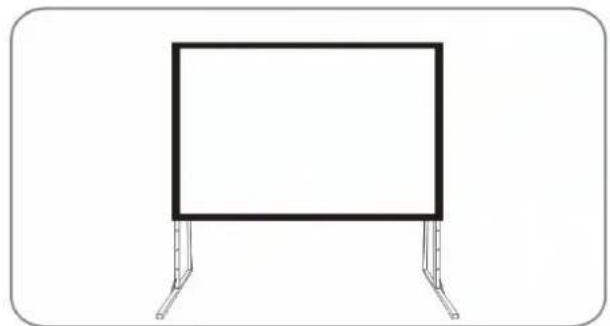
Simple line drawing of a rectangular frame mounted on two metal supports (no text or symbols)

H1 H2

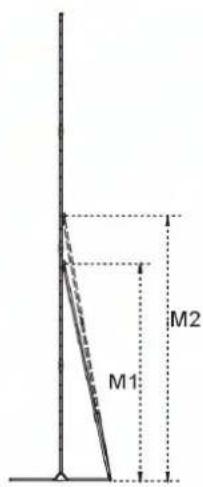
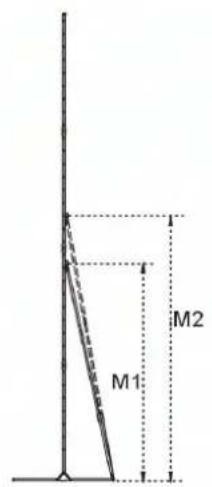
M1 M2

Uwaga!

Nie wolno...

Safety warning sign with prohibition symbol and cross mark, showing incorrect safety instruction

Thank you for choosing our screen.

Please read through the user manual before using the screen. Correct usage and maintenance will insure a long life for the product.

User instructions

■ Dust, dirt and scratches on the projection surface will affect the picture quality, take note of the points below to prevent this:

  1. Do not touch the projection surface with hands.
  2. Do not write or draw on the projection surface.
  3. Do not use fingers or sharp objects to point on the projection surface, this will damage the screen fabric.
  4. Use a soft damp cloth to clean the projection surface, do not use chemical cleaning agents or alcohol. Use clean water.

■ After using the screen, disassemble the screen and store it in the box provided.
■ To avoid accidental damage and injury the screen should only be operated by adults.

Product Description

■ Design:

The aluminium frame is designed to be light weight and easily operated. This makes it easy to carry, assemble and disassemble.

■ Screen Fabric:

The screen fabric is attached to the rectangular frame and held in place by several press studs, which ensure an evenly stretched and perfectly flat surface.

Projection fabric has a viewing angle of 100° and a gain of 1.0.

Can be folded many times with out damage or distortion.

■ Assembly:

The screen can be assembled in 3 minutes and with out the use of tools. When not in use the screen is stored in an impact resistant carrying case.

■ Ideal for:

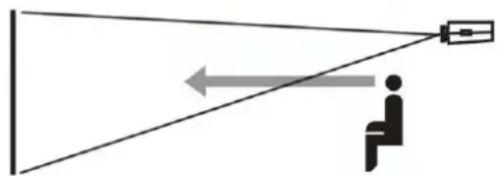
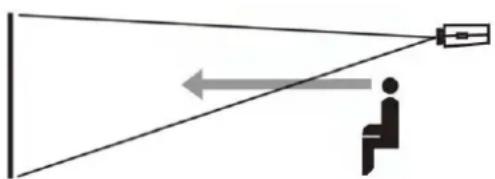
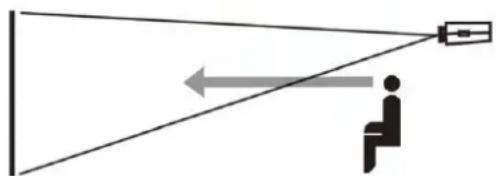
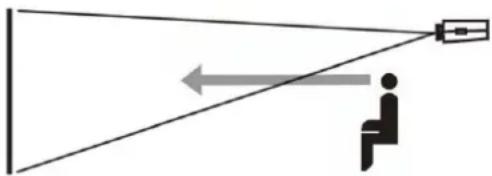
Business meetings, churches, schools, family centers and industrial training rooms. Correct use of the projection screen will ensure better results. For projection assemble and view the screen as indicated in Fig. 1 & 2.
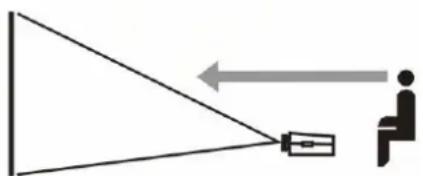
Diagram showing a person sitting at the camera receiving an object from a triangular mirror, with an arrow indicating direction (no text or symbols)

(Fig. 1)

Diagram showing a person sitting on the floor facing a camera with an arrow indicating direction (no text or symbols)

(Fig. 2)

Content and accessories list: When unpacking the screen, check that all the parts from the appropriate list are there. Use the parts as instructed by the user manual.

Part list

FOLD 500
PartPart numberQuantity
Screen fabric21Pcs
Folding legs32Pcs
Screen fabric bag41Pcs
Hand screws M8X80512Pcs
Hand screws M8X5052Pcs
User manual61Pcs
QC PASS71Pcs
Fabric bag carton box81/2Pcs
Aluminum storage box92Pcs
Folding frame102Pcs
Connecting pole114Pcs
Hand screw M8X161216Pcs
Service card131Pcs

Part list

FOLD 240, 300, 360, 400 (4:3); FOLD 180, 220, 280, 340, 380 (16:9)
PartPart numberQuantity
Folding frame11Pcs
Screen fabric21Pcs
Folding legs32Pcs
Screen fabric bag41Pcs
Hand screws M8X5058/10Pcs
User manual61Pcs
QC Pass71Pcs
Fabric bag carton box81Pcs
Aluminum storage box91Pcs
Service card131Pcs

Note: The part lists above are subject to change without prior notice.

Start diagrams

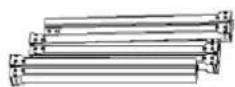
  1. Folding frame

Avtek 1EVF12 - Start diagrams - 1

  1. Screen fabric - front projection

Avtek 1EVF12 - Start diagrams - 2

  1. Left and right folding legs

Avtek 1EVF12 - Start diagrams - 3

  1. Screen fabric bag

Simple line drawing of a rectangular object with a horizontal line and a small square mark on the top (no text or symbols)

  1. Hand screw M8X80, M8X50

Avtek 1EVF12 - Start diagrams - 5

  1. User manual

Avtek 1EVF12 - Start diagrams - 6

  1. QC PASS

Avtek 1EVF12 - Start diagrams - 7

  1. Fabric bag carton

Avtek 1EVF12 - Start diagrams - 8

  1. Aluminum storage

Avtek 1EVF12 - Start diagrams - 9

  1. Folding frame

Avtek 1EVF12 - Start diagrams - 10

  1. Connecting pole

Avtek 1EVF12 - Start diagrams - 11

  1. Hand screw M8X16

Avtek 1EVF12 - Start diagrams - 12

Assembly instructions

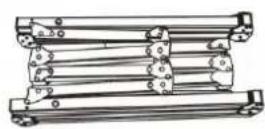
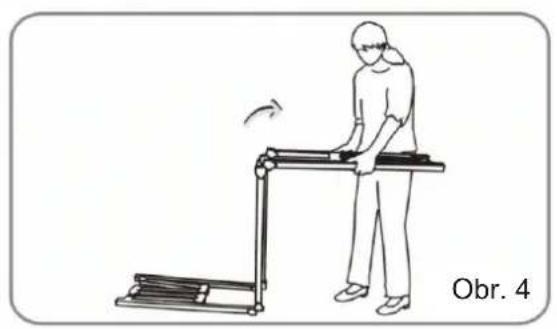
  1. Take the frame out of the box and place it on a flat surface, Unfold the longer sections first, (Fig. 3 + 4)

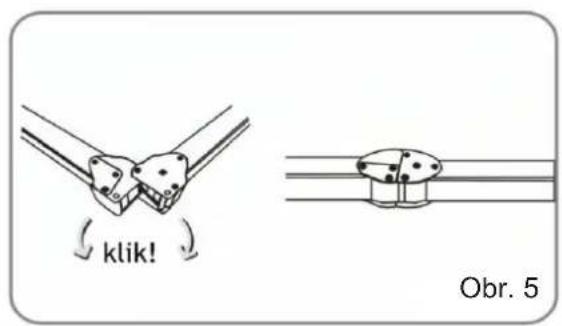
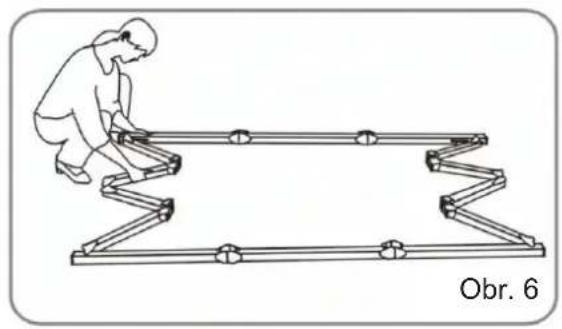
  2. Unfold the frame until the latch on the hinge "clicks" into place. Repeat the procedure for the shorter sections. (Fig. 5 + 6)

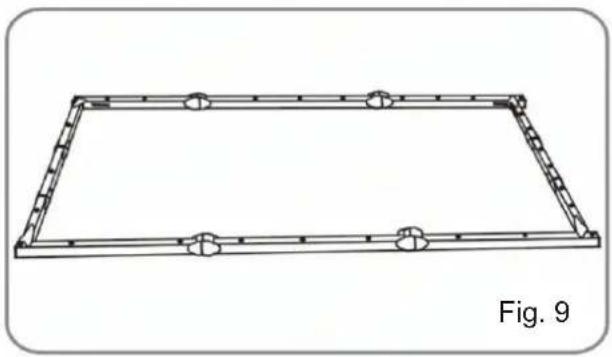
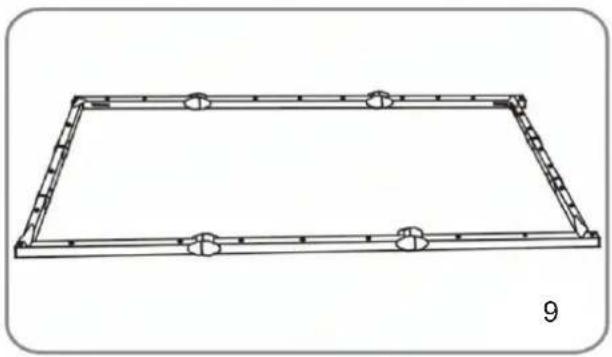
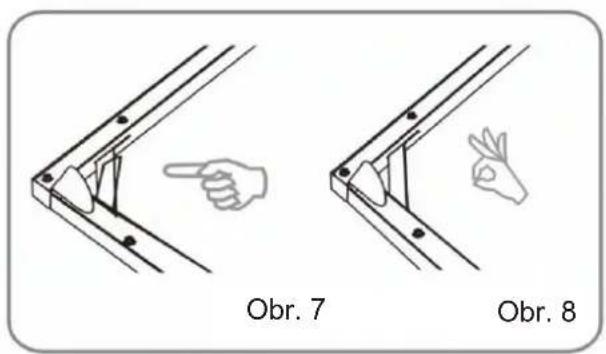
  3. Make sure all 4 corners of the frame are at 90° and the hinged support bar is straight and not bent, (Fig. 7 - 9)
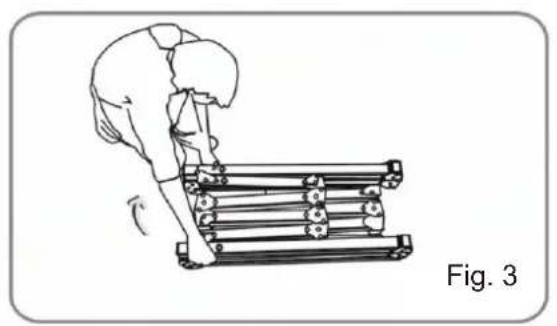
Illustration of a person climbing a roller with a guide stick, labeled 'Fig. 3' (no text or symbols on the diagram itself)

Illustration of a person using a treadmill with motion arrows indicating movement (no text or symbols)

click! Fig. 5

Illustration of a person climbing a zigzag structure (no text or symbols)

Two mechanical clamping diagrams labeled Fig. 7 and Fig. 8, showing hand positioning and force application (no text or symbols beyond labels)

Technical line drawing of a rectangular frame with bolt holes, labeled Fig. 9 (no text or symbols on the diagram itself)

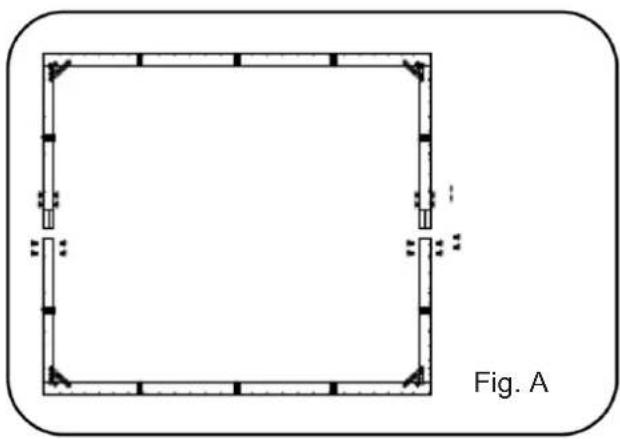
Attach the upper frame to the lower frame and fasten two frames with M8X16 screws. (Fig. A-B)

FOLD 500 250" Assembly instructions
Pure geometric diagram of a square frame with corner markers, no text or symbols present

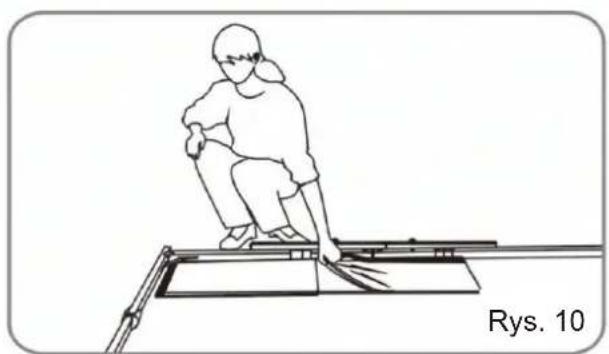
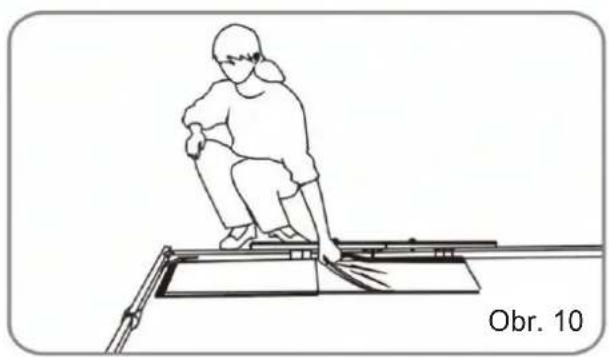
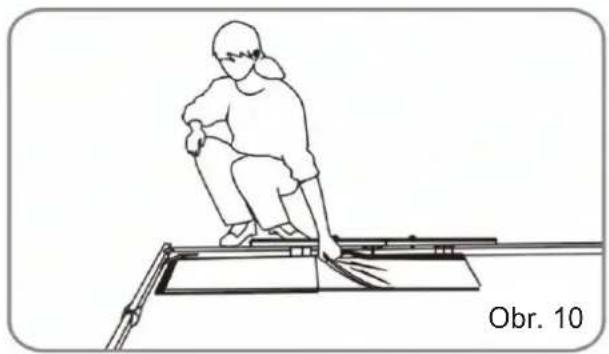
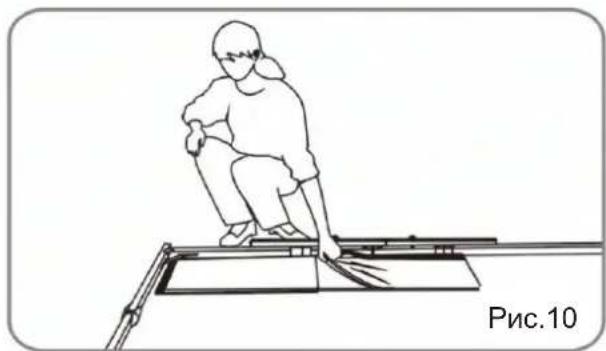
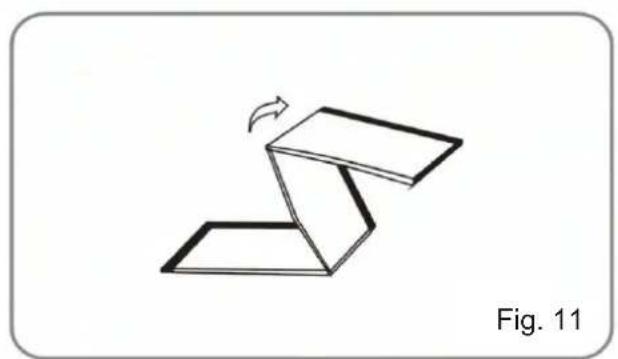
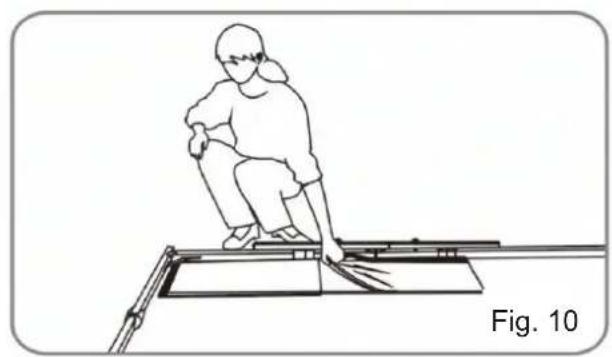
  1. Take the screen fabric out of the bag and put it inside the frame next to the corner. Unfold as shown in the diagram. (Fig. 10 + 11).

Simple geometric diagram of a square frame with corner brackets and no text or symbols

Line drawing of a person sitting on a bench with a tool, labeled 'Fig. 10' (no text or symbols on the diagram itself)

Diagram of a folded paper or sheet with a curved arrow indicating rotation, labeled 'Fig. 11' (no text or symbols on the diagram itself)

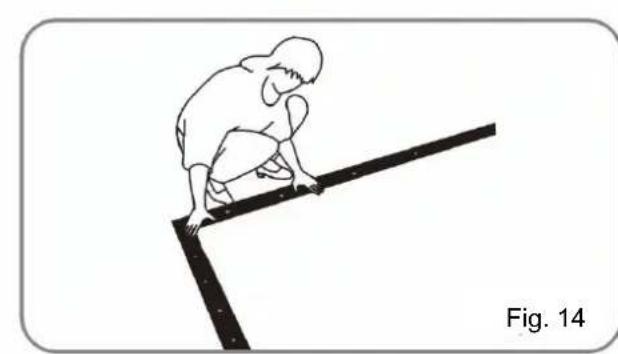
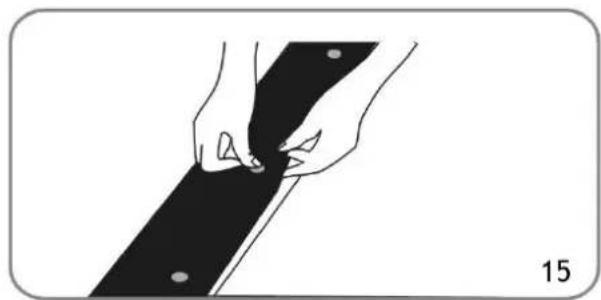
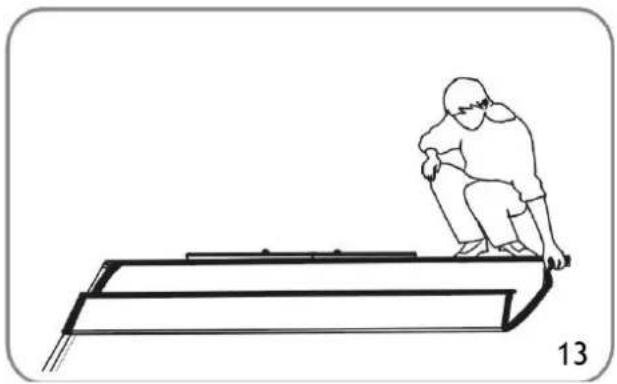
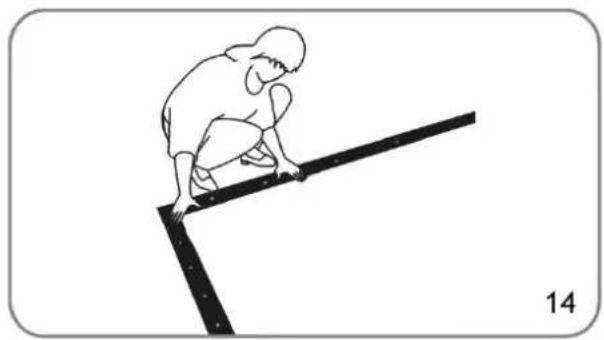
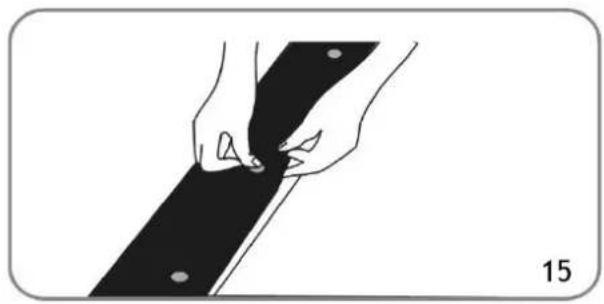
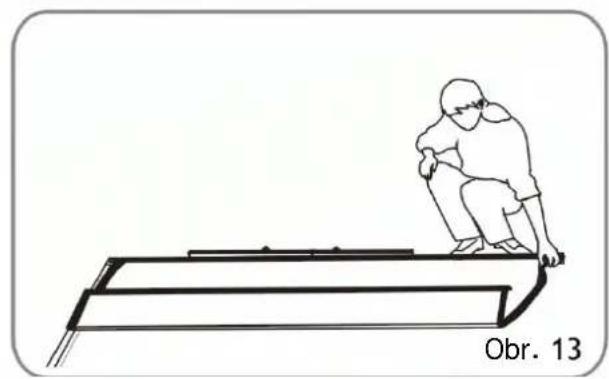
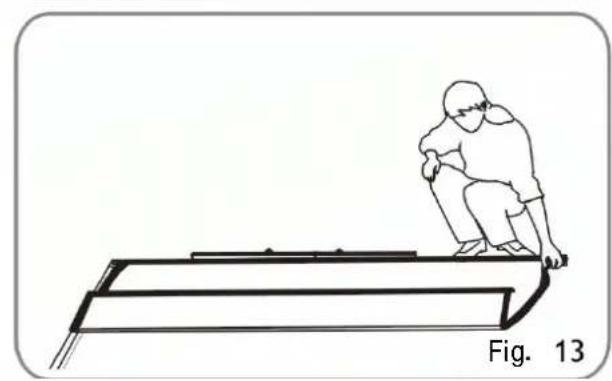
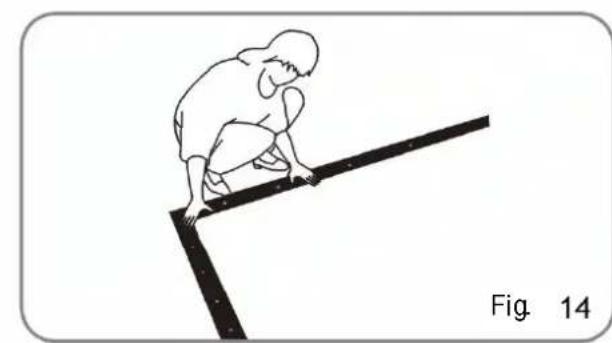
  1. Once the screen fabric is fully unfolded, secure it to the frame by the press studs. Secure the press studs in the order shown in Fig. 1 2-15.

Simple diagram of a square with directional arrows, labeled Fig. 12 (no text or symbols within the diagram itself)

Line drawing of a person sitting on a ramp, labeled Fig. 13 (no text or symbols on the diagram itself)

Simple line drawing of a person kneeling on a pole, no text or symbols present

Illustration of hands holding a black object with a pointed tip, labeled Fig. 15 (no text or symbols on the object itself)

  1. Jake the folding legs out of the box and unfold as shown in Fig. 1 6. and make sure the hinges click into place.

Line drawing of a person using a walking walkway device (no text or symbols)

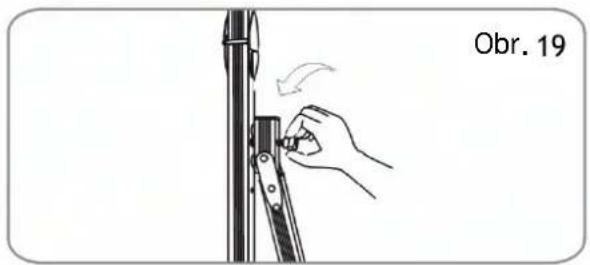
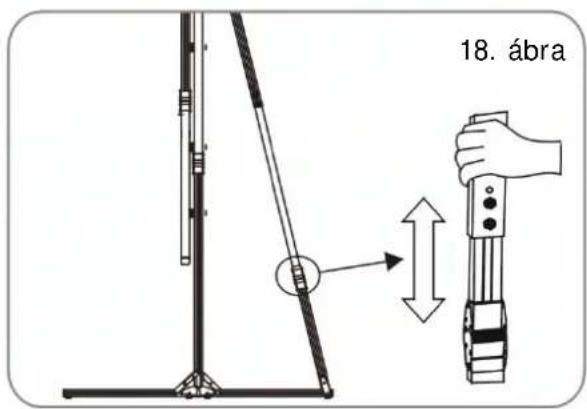
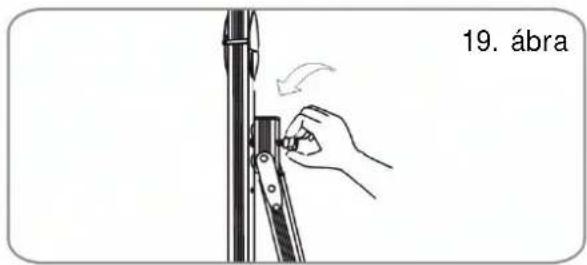
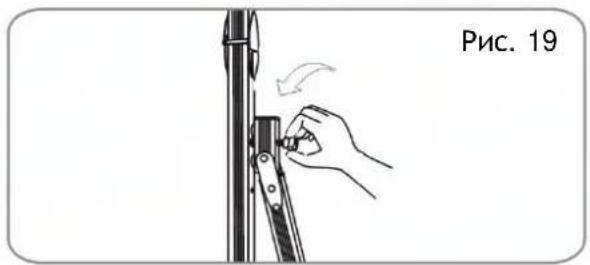
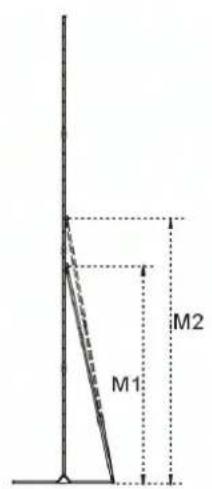
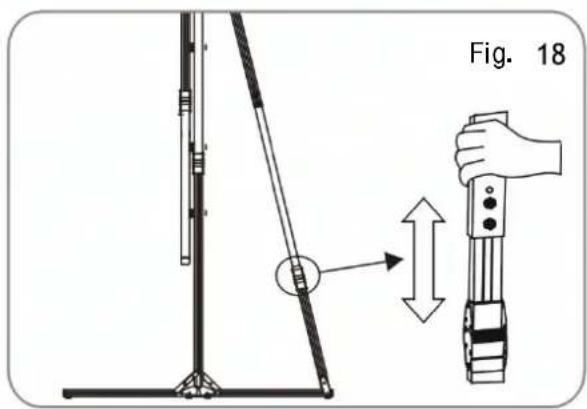
  1. Once the legs are locked in place use the hand screws to secure the support leg to the vertical leg in an appropriate position. The support leg can be adjusted to an appropriate length. If the frame is attached to the legs higher up then the support leg should also be attached higher up. (Fig. 1 7-19)

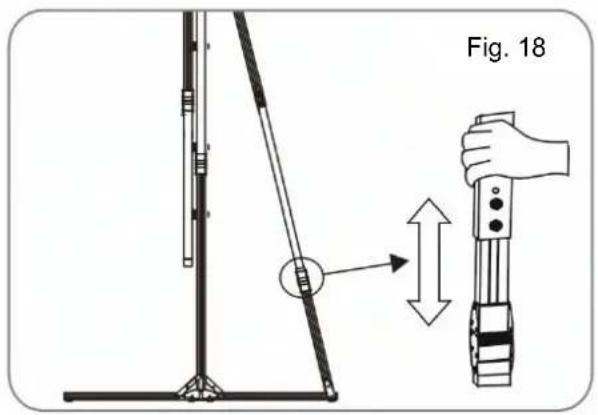
Illustration of a hand adjusting a mechanical component with an arrow indicating rotation (no text or symbols)

Fig. 18

Illustration of a hand adjusting a mechanical component with an arrow indicating rotation (no text or symbols)

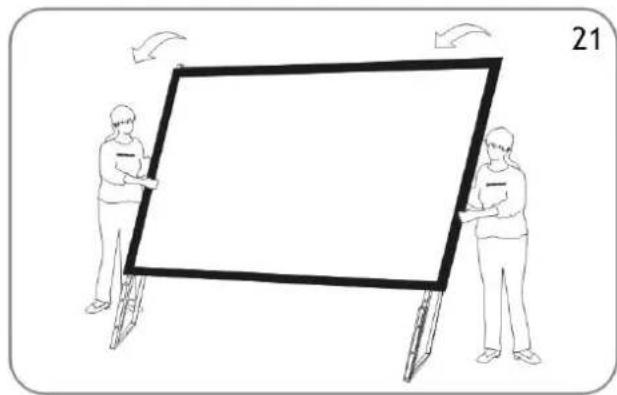
  1. Lay the frame on the floor and position the legs over the sides of the frame. Use the hand screws to attach the frame to the legs just little before tighten two sides of them firmly.(Fig. 20 + 21)

Line drawing of a person using a mechanical device to install a frame, with an inset showing a close-up of the component (no text or symbols)

Illustration of two people holding a large rectangular frame with arrows indicating rotation or movement (no text or symbols)

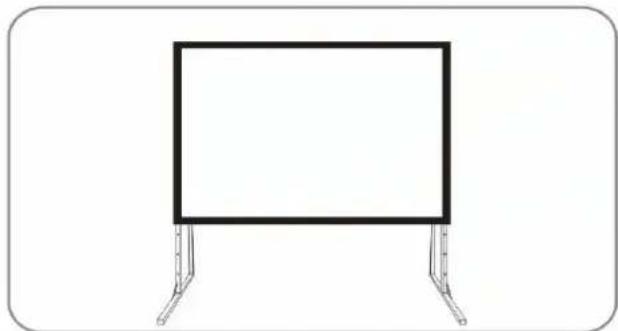
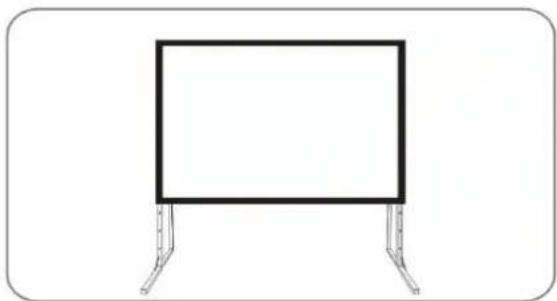
  1. When the frame is in the vertical position fold the front facing feet of the legs out. Assembly is complete and the projection screen will be stable on a flat surface. (Fig. 22)

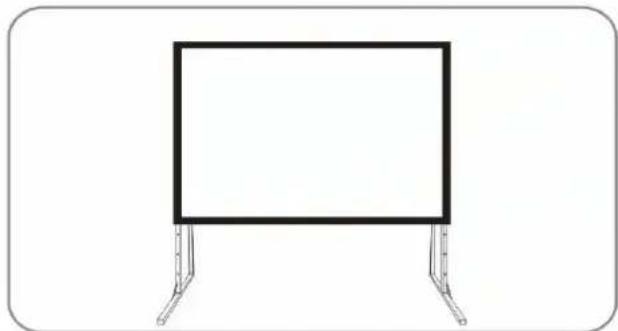
Simple line drawing of a rectangular panel with directional arrows, labeled Fig. 22 (no text or symbols on the diagram itself)

Simple line drawing of a rectangular frame mounted on two metal supports (no text or symbols)

  1. After using the screen disassemble the screen and store it in the box provided.

To disassemble the screen, implement the assemble procedure in reverse order.

Technical line drawing of a rectangular frame with two internal compartments and mounting holes (no text or symbols)

Safety Notice

Avtek 1EVF12 - Safety Notice - 1

Misuse of the screen may cause damage to the screen, or injury to persons.

Avtek 1EVF12 - Safety Notice - 2

The projection screen must be set up on a stable surface where there is sufficient space. Failure to do so may cause the screen to fall over causing damage to the screen and injury to persons.
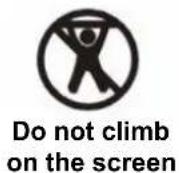
Avtek 1EVF12 - Safety Notice - 3

Do not hang things from the screen or climb on it. Doing so may cause the screen to fall off and damage the screen and cause injury.

Avtek 1EVF12 - Safety Notice - 4

After using the projection screen disassemble the screen and store it in the box provided. This will protect it from dust, dirt and accidental damage.

Avtek 1EVF12 - Safety Notice - 5

Do not disassemble the screen. Doing so may damage the screen and may cause injury. If the screen needs to be repaired contact the dealer from which the screen was purchased.

Note: If the screen is faulty or is damaged in any way do not try to repair the projection screen yourself. Contact customer service to arrange for it to be repaired. The projection screen parts and specifications are subject to change with out prior notice.

Screen Specifications

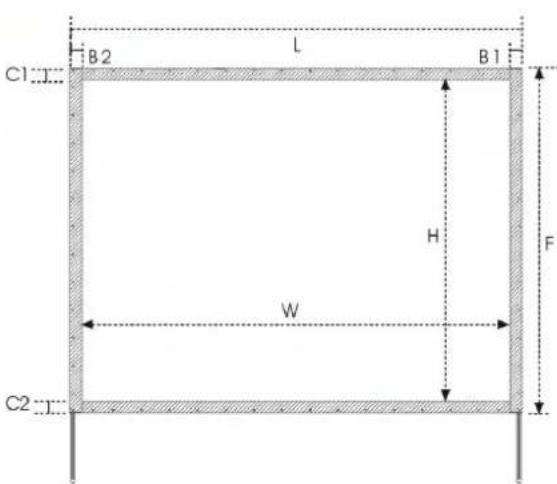
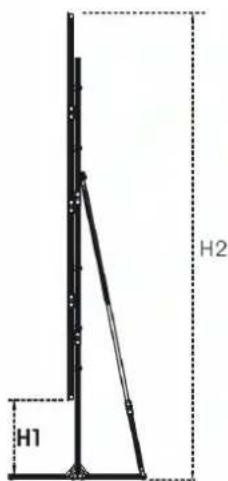
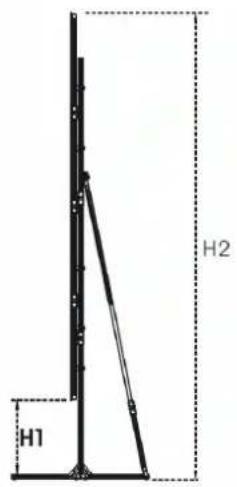
ModelRatioAlu-minium sizeGainProjection area W*H (mm)Total Width L (mm)Total Height F (mm)B1 (mm)B2 (mm)C1 (mm)C2 (mm)Height H2 (mm)Height H1 (mm)Support leg height. M (mm)
maxminmaxminM1M2
2404:332*321,02438*182826382028100100100100342522251393193//
3004:332*321,03048*22863248248610010010010040282678154019016602260
3604:332*321,03658*27433858294310010010010042563206131226216602260
4004:332*321,04064*30484264324810010010010043303430108618616602260
5004:332*641,05080*38105280401010010010010055384188153018016602260
18016:932*321,02032*1143219213238080808022341634934334//
22016:932*321,02438*13722638157210010010010022941844724274//
28016:932*321,03048*17273248192710010010010027692169849249//
34016:932*321,03658*205738582257100100100100361427141354454//
38016:932*321,04064*22864264248610010010010041013261162172116602260

C1 B2 L B1 H F W C2

H1 H2

M1 M2

Notice

Do Not...

Safety warning sign with prohibition symbol and cross mark, showing a person holding a device on a whiteboard

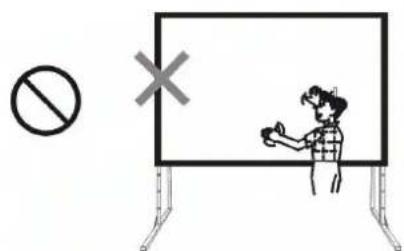
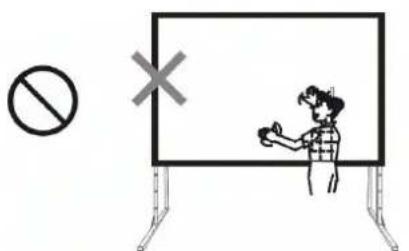
Do not touch the projection surface with hands.
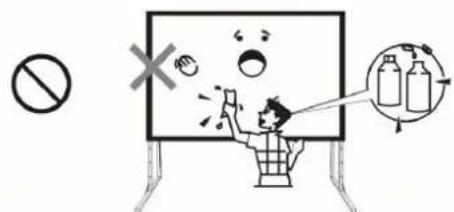
Safety warning illustration showing a person using a device to clean bottles, with a no-smoking symbol and a 'X' mark indicating no smoking.

Do not use chemical cleaning agents to clean the projection surface.
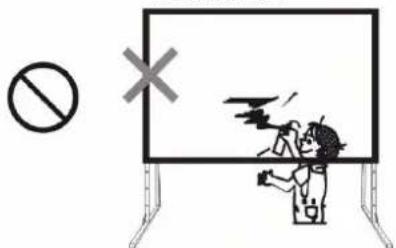
Safety warning sign with prohibition symbol and explosion symbol, showing incorrect safety and accident detection

Do not draw or write on the projection surface.

Safety warning illustration showing no tool, wrench, hammer, and cross symbol with hazard symbols

Do not disassemble the screen.

Correct...
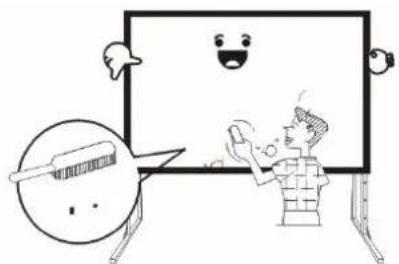
Cartoon illustration of a smiling person gesturing toward a blank board with speech bubbles (no text or symbols)

Use a soft cloth or brush to clean the projection surface..
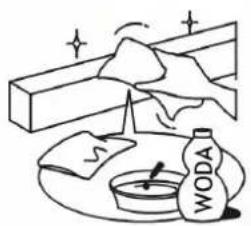
Illustration of a person cleaning a wall with a cloth, water bottle, and cloth (no text or symbols)

Use water and a soft cloth to clean the screen.
Illustration of a person with a warning symbol and speech bubble, likely indicating an alert or warning about safety.

After using the screen disassemble the screen and store it in the box provided.

Simple line drawing of a smiling face inside a mirror with a handle, no text or symbols present

(Abb. 1)

Diagram showing a person sitting on the floor facing a camera with an arrow indicating direction (no text or symbols)

(Abb. 2)

Avtek 1EVF12 - Notice - 10

Avtek 1EVF12 - Notice - 11

Avtek 1EVF12 - Notice - 12

Line drawing of a person climbing a roller with gears, labeled '3' (no text or symbols on the diagram itself)

Illustration of a person using a treadmill with a rotating arm (no text or symbols)

click! 5

Illustration of a person climbing a zigzag metal structure (no text or symbols)

7 8

Pure structural frame diagram with no text, numbers, or symbols

Line drawing of a person sitting on a bench with a tool, no text or symbols present

Diagram of a folded paper or sheet with a curved arrow indicating rotation (no text or symbols)

Line drawing of a person sitting on a ramp with head down, no text or symbols present

Simple line drawing of a person climbing a slope (no text or symbols)

Illustration of hands holding a black object with dots, no text or symbols present

Illustration of a hand adjusting a mechanical component with an arrow indicating rotation (no text or symbols)

18

Illustration of a hand adjusting a mechanical component with an arrow indicating motion (no text or symbols)

Illustration of two people holding a large rectangular frame with arrows indicating motion (no text or symbols)

Simple line drawing of a rectangular frame mounted on two metal supports (no text or symbols)

H1 H2

M1 M2

Achtung!

Nicht...

Safety warning sign with prohibition symbol and cross mark, showing a person holding a device in front of a whiteboard

(dessin 1)

Diagram showing a person sitting on the floor facing a camera with an arrow indicating direction (no text or symbols)

(dessin 2)

Illustration of a person using a treadmill with a rotating arm (no text or symbols)

FOLD 500

Instruction d'installation version 250"

Line drawing of a person sitting on a bench with a tool, no text or symbols present

Diagram of a folded paper or sheet with a curved arrow indicating rotation (no text or symbols)

Line drawing of a person sitting on a ramp with a numbered label (13) at the bottom, no text or symbols present.

Simple line drawing of a person climbing a slope (no text or symbols)

Illustration of hands holding a black rectangular object with holes, no text or symbols present

Illustration of a hand adjusting a mechanical component with an arrow indicating rotation (no text or symbols)

18

Illustration of a hand adjusting a mechanical component with an arrow indicating rotation (no text or symbols)

Illustration of two people pushing a large rectangular frame with arrows indicating motion (no text or symbols)

Simple line drawing of a rectangular frame mounted on two metal supports (no text or symbols)

H1 H2

M1 M2

Attention!

Il est interdit...

Avtek 1EVF12 - Attention! - 1

Simple line drawing of a person standing at a desk with a large 'X' symbol in the background (no text or labels)

Obr. 1

Diagram showing a person sitting on the floor facing a camera with an arrow indicating direction (no text or symbols)

Obr. 2

Illustration of a person using a treadmill with motion arrow indicating rotation (no text or symbols)

klik! Obr. 5

Illustration of a person climbing a zigzag metal structure (no text or symbols)

Obr. 7 Obr. 8

Technical line drawing of a rectangular frame with bolt holes, labeled 'Obr. 9' (no other text or symbols)

Line drawing of a person sitting on a bench with a tool, no text or symbols present

Diagram of a folded paper or sheet with a curved arrow indicating rotation, labeled 'Obr. 11' (no text on diagram itself)

Line drawing of a person sitting on a ladder-like structure, labeled 'Obr. 13' (no other text or symbols)

Simple line drawing of a person climbing a slope with a ruler, labeled 'Obr. 14' (no text or symbols on the diagram itself)

Illustration of hands holding a black object with circular holes, labeled 'Obr. 15' (no other text or symbols)

Obr. 18

Illustration of a hand adjusting a mechanical component with motion arrows (no text or symbols)

Obr. 21

Simple line drawing of a rectangular frame mounted on two metal supports (no text or symbols)

H1 H2

M1 M2

Pozor!

Nesmí se...

Safety warning sign with prohibition symbol and cross mark, showing a person giving a thumbs-up in front of a whiteboard

Obr. 1

Diagram showing a person sitting on the floor facing a camera with an arrow indicating direction (no text or symbols)

Obr. 2

  1. Ručná skrutka M8X80, M8X50

Avtek 1EVF12 - Pozor! - 3

Avtek 1EVF12 - Pozor! - 4

Illustration of a person climbing a roller with a gear mechanism, labeled 'Obr. 3' (no text on diagram itself)

Illustration of a person using a treadmill with motion arrows indicating movement (no text or symbols)

Technical line drawing of a rectangular frame with bolt holes, labeled 'Obr. 9' (no other text or symbols)

Line drawing of a person sitting on a bench with a tool, labeled 'Obr. 10' (no other text or symbols)

Diagram of a folded paper or sheet with a curved arrow indicating rotation, labeled 'Obr. 11' (no other text or symbols)

Line drawing of a person sitting on a ladder-like structure, labeled 'Obr. 13' (no other text or symbols)

Simple line drawing of a person climbing a slope with a ruler, labeled 'Obr. 14' (no other text or symbols)

Illustration of hands holding a black object with circular holes, labeled 'Obr. 15' (no other text or symbols)

Obr. 18

Illustration of a hand adjusting a mechanical component with an arrow indicating motion (no text or symbols)

Obr. 21

Simple line drawing of a rectangular frame mounted on two metal supports (no text or symbols)

H1 H2

M1 M2

Pozor!

Nesmie sa...

Safety warning sign with prohibition symbol and cross mark, showing a person giving a thumbs-up in front of a whiteboard

Po projekčnej ploche nepíšte ani nekreslite.

Avtek 1EVF12 - Pozor! - 2

Diagram illustrating electrical circuitry with labeled components and symbols including a switch, resistor, capacitor, and fuse.

  1. ábra

Diagram showing a person sitting on the floor facing a camera with an arrow indicating direction (no text or symbols)

  1. ábra

klik! 5. ábra

Illustration of a person climbing a zigzag structure with a 6.50 bar labeled (no text or symbols on the diagram itself)

7. ábra 8. ábra

Simple line drawing of a rectangular frame with evenly spaced circular elements, labeled '9. ábra' below (no other text or symbols)

FOLD 500

A 250" változat

11. ábra

Illustration of hands holding a black fabric or material, labeled '15. ábra' (no other text or symbols)

18. ábra

19. ábra

H1 H2

M1 M2

Figyelem!

Nem szabad...

Safety warning sign with prohibition symbol and cross mark, showing a person giving a thumbs-up in front of a whiteboard

Рис. 1

Diagram showing a person sitting on the floor facing a camera with an arrow indicating direction (no text or symbols)

Рис. 2

Illustration of a person using a treadmill with motion arrows indicating movement (no text or symbols)

Line drawing of a person sitting on a bench with tools, no text or symbols present

Diagram of a folded paper structure with a curved arrow indicating rotation (no text or symbols)

Line drawing of a person sitting on a ladder, no text or symbols present

Illustration of a person climbing a slope with a ruler, labeled 'Рис. 14' (no text on the diagram itself)

Illustration of hands holding a black strip with dots, labeled 'Рис. 15' (no other text or symbols)

Рис. 18

Illustration of a hand adjusting a mechanical component with motion arrows (no text or symbols)

Рис. 21

Simple line drawing of a rectangular frame mounted on two metal supports (no text or symbols)

H1 H2

M1 M2

Внимание!

Нельзя...

Safety warning sign with prohibition symbol and cross mark, showing a person giving a thumbs-up in front of a screen

Fig. 1

Diagram showing a person sitting on the floor facing a camera with an arrow indicating direction (no text or symbols)

Fig. 2

Illustration of a person using a treadmill with a rotating arm, labeled as Fig. 4 (no text or symbols on the diagram itself)

Line drawing of a person sitting on a bench with a tool, labeled 'Fig. 10' (no text or symbols on the diagram itself)

Diagram of a folded paper or sheet with a curved arrow indicating rotation, labeled 'Fig. 11' (no text or symbols on the diagram itself)

Line drawing of a person sitting on a ladder-like structure, labeled Fig. 13 (no text or symbols on the diagram itself)

Line drawing of a person climbing a slope, labeled 'Fig. 14' (no other text or symbols)

Illustration of hands holding a black object with circular holes, labeled 'Fig. 15' (no text or symbols on the diagram itself)

Fig. 18

Illustration of a hand adjusting a mechanical component with a curved arrow indicating motion (no text or symbols)

Fig. 21

Simple line drawing of a rectangular frame mounted on two metal supports (no text or symbols)

H1 H2

M1 M2

Atentie!

Este interzisă...

Safety warning sign with prohibition symbol and cross mark, showing a person giving a check to a monitor

Abstract geometric logo design with white stylized letters on black background (no text or symbols)

avtek

http://www.avtek.eu

Manual assistant
Powered by Anthropic
Waiting for your message
Product information

Brand : Avtek

Model : 1EVF12

Category : Projection screen