
SDV2740 - TV Antenna PHILIPS - Free user manual and instructions
Find the device manual for free SDV2740 PHILIPS in PDF.


| Product type | Indoor TV antenna |
| Brand | Philips |
| Model | SDV2740 |
| Supported frequencies | VHF (174-230 MHz) and UHF (470-862 MHz) |
| Maximum gain | 30 dB (amplified) |
| Power supply | 5 V DC via coaxial cable (mains adapter included) |
| Cable length | 1.5 meters |
| Connector | F-type female (IEC male adapter supplied) |
| Dimensions (W x D x H) | 180 x 120 x 35 mm |
| Weight | 150 g |
| Reception range | Up to 50 km (depending on local conditions) |
| Amplification type | Built-in low-noise amplifier |
| Number of TV sockets | 1 output |
| Mounting | On base (free-standing) or wall mount |
| Rotation angle | 360° horizontal, 180° vertical |
| Compatibility | DTT, DVB-T/T2, analog |
| Maintenance | Wipe with a soft, dry cloth. Do not use abrasive products. |
| Safety | Do not expose to water or moisture. Disconnect before cleaning. |
| Spare parts | Mains adapter and coaxial cable available from after-sales service. |
| Reparability | Device not user-serviceable. Contact Philips after-sales service. |
| Included accessories | Mains adapter, coaxial cable, IEC adapter, wall mount. |
Frequently Asked Questions - SDV2740 PHILIPS
User questions about SDV2740 PHILIPS
0 question about this device. Answer the ones you know or ask your own.
Ask a new question about this device
Download the instructions for your TV Antenna in PDF format for free! Find your manual SDV2740 - PHILIPS and take your electronic device back in hand. On this page are published all the documents necessary for the use of your device. SDV2740 by PHILIPS.
USER MANUAL SDV2740 PHILIPS
natural_image
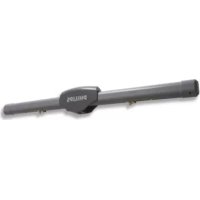
Black Philips 3.0 wireless router with two antennas (no visible text or symbols on body)Register your product and get support at: www.philips.com/welcome
EN Amplified indoor antenna 2
2. Your indoor television antenna 3
2.1 Product overview 3
3. Getting Started 3
3.1 Installation 3
3.2 Connect to your TV 4
3.3 Setting up your antenna 4
4. Using your television antenna 5
4.1 For VHF/FM reception 5
4.2 For UHF reception 5
4.3 Setting up a digital tuner 5 with this antenna
5. Frequently asked questions 6
6. Warranty and service 6
1 Important
Take time to read this manual before you use your Philips indoor television antenna. It contains important information and notes regarding installation and set up.
All rights reserved. Reproduction in whole or in part is prohibited without the written consent of the copyright owner. Trademarks are the property of Koninklijke Philips Electronics N.V. or their respective owners.
Disposal of your old product
Your product is designed and manufactured with high quality materials and components, which can be recycled and reused.
Please inform yourself about your local collection system for electrical and electronic products.
Please act according to your local rules and do not dispose of your old products with your normal household waste. The correct disposal of your old product will help prevent potential negative consequences for the environment and human health.
Take the package to your local recycling center.

2 Your indoor
television antenna
Congratulations on your purchase and welcome to Philips!
To fully benefit from the support that Philips offers, register your product at www.philips.com/welcome.
2.1 Product overview
A 120V AC/6V DC power adaptor, included
B Gain control knob
C VHF antenna
D 6V DC connection
E Out to TV connection
F UHF antenna
G Stand

natural_image
Simple line drawing of an electrical plug with a terminal connector (no text or symbols)
3 Getting Started
STOP
Before you start: For this antenna work properly, you must access the menu on the television you are connecting this antenna to (consult your television owner's manual) then set it to receive the signal from an ANTENNA or OFF AIR instead of CABLE or SATELLITE.
3.1 Installation
Determining Signal Strength
Before installation determine the best location for optimum reception. It is important for the antenna to have an unobstructed path to the transmitter. For best results, the antenna should be facing towards transmitter.
Tip
Tip
Where possible, choose a location near a window which will give the antenna a clear view of the transmitter.
Tip
Tip
Do not place the antenna on a metal surface.

natural_image
Technical line drawing of a device rear panel with labeled components (D and E), no readable text or symbols beyond labels
3.2 Connect to your TV
1 Connect one end of the coaxial cable to signal output of the antenna and the other end to the input on your TV receiver. ①
2 Connect DC plug to the antenna and the power supply to a 120V AC outlet. ②
3.3 Setting up your antenna
Antenna can be set up on a flat surface (table) on a horizontal or vertical position.
Note
Horizontal position for UHF and VHF. Vertical position for UHF only, and keep the dipoles to minimum length.
Horizontal position: Attach the stand to the back of the antenna in a horizontal position using the two screws provided. ③
Vertical position: Attach the stand to the back of the antenna in a vertical direction using the two screws provided.④
Mounting on the Wall: Mount two wood screws with center distance of 63 mm (2.5") into the wall. Hang the two notch holes onto the two wood screws on the wall.⑤


natural_image
Diagram showing a connected electrical plug and cable connector (no text or symbols visible)
natural_image
Technical line drawing of a mechanical component with an inset close-up view (no text or symbols)
natural_image
Technical diagram of a vehicle chassis with internal components and a magnified inset showing internal structure (no text or symbols)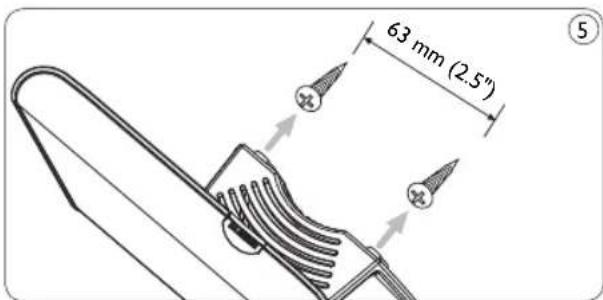
4 Using your indoor television antenna
4.1 For VHF/FM reception
1 Extend the telescoping dipoles to the longest possible length. ⑥
2 Turn your TV to the desired channel. Adjust the dipoles by moving in different directions up and down, until reception is achieved. ⑦
3 Turn on the amplifier by rotating the gain control knob towards the max position until better reception is achieved. ⑧
Note
You may need to turn the gain control down to a lower setting for best reception.
4.2 For UHF reception
1 Turn your TV to the desired channel.
2 Turn on the amplifier by rotating the gain control knob towards the max position until reception is improved.
Note
You may need to turn the gain control down to a lower setting for best reception.
Tip
This antenna can be placed on a horizontal orientation to extend reception choices.

natural_image
Simple line drawing of a device with two vertical posts and upward arrows indicating motion (no text or symbols)


4.3 Setting up a digital tuner with this antenna
Digital TV tuners require you to program the tuner with the available channels in your area. Generally this automatic process is part of the set-up of the tuner. However, if you do not have the antenna set up properly you may find that the tuner receives no viewable channels.
If you have access to a rooftop antenna or another antenna which is currently connected to a digital tuner you may use the antenna to program the tuner. The channels will be memorized in the tuner - which will make aligning this antenna easier.
Another method is to connect the antenna directly to your TV (not using the tuner) and tune to analog channels to find best location of the antenna, then re-connect the digital tuner – if you have adequate signal level you should be able to program the tuner.
5 Frequently asked questions
Will this antenna work with Analog transmissions?
Yes, this antenna is capable of receiving analog television broadcasts in the UHF and VHF bandwidths.
Will this antenna receive digital or work with HD-ATSC broadcasts?
Yes, this antenna is designed to receive Digital ATSC and HDTV broadcasts in the UHF and VHF bandwidths.
Where should I place the antenna in order to get the best reception possible?
Where possible, choose a location that is near a window which will give the antenna a clear view of the transmitter.
Note
For best reception you should also avoid placing the antenna on a metal surface which may cause interference.
How do I know how much gain (amplification) is required to receive a clear picture?
Once you have the VHF dipoles extended to the longest length turn on the amplifier. It is easiest to start with the maximum gain and then reduce as needed. In some case you may receive a clearer picture with less gain than the maximum setting.
Can I set this antenna up with a digital tuner?
Yes, this antenna can be set up with a digital tuner. See section 4.3 of your user manual.
6 Warranty & Service
Warranty information can be found at: www.philips.com/welcome
For technical support, send us an email with the model number of the product and a detailed description of your problem to: accessoriesupport@philips.com
Table des matières
1. Important 7
natural_image
Diagram showing a connected electrical plug and cable with a component inside a device (no text or symbols visible)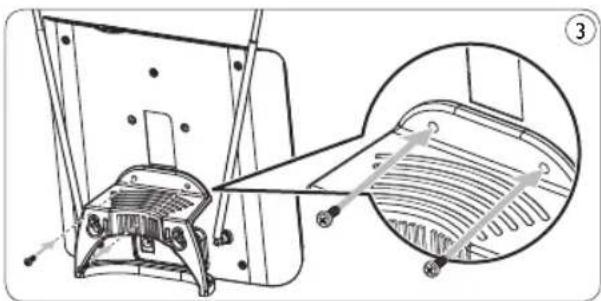
natural_image
Technical line drawing of a mechanical component with an inset close-up view (no text or symbols)
natural_image
Technical line drawing of a mechanical component with internal parts and an inset view showing internal structure (no text or symbols)
natural_image
Simple line drawing of a device with two vertical posts and upward arrows indicating motion (no text or symbols)

natural_image
Diagram showing a small electrical component connected to an electronic device panel with a cable (no text or symbols visible)
natural_image
Technical line drawing of a mechanical component with an inset close-up view (no text or symbols)
natural_image
Technical diagram of a mechanical component with internal parts and a magnified inset showing internal structure (no text or symbols)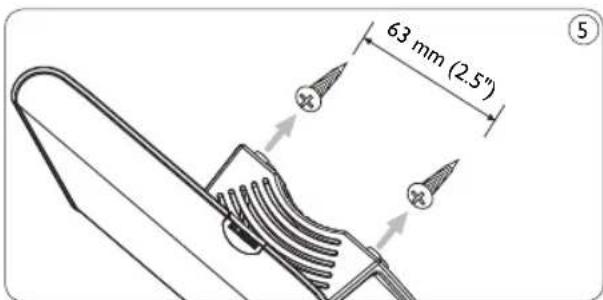
natural_image
Simple line drawing of a device with two vertical posts and upward arrows indicating motion (no text or symbols)

All rights reserved.


- Your indoor television antenna 3
- Getting Started 3
- Using your television antenna 5
- Frequently asked questions 6
- Warranty and service 6
- Important
- Disposal of your old product
- Your indoor
- television antenna
- Product overview
- Getting Started
- STOP
- Installation
- Determining Signal Strength
- Tip
- Connect to your TV
- Setting up your antenna
- Note
- Using your indoor television antenna
- For VHF/FM reception
- For UHF reception
- Setting up a digital tuner with this antenna
- Frequently asked questions
- Will this antenna work with Analog transmissions?
- Will this antenna receive digital or work with HD-ATSC broadcasts?
- Where should I place the antenna in order to get the best reception possible?
- How do I know how much gain (amplification) is required to receive a clear picture?
- Can I set this antenna up with a digital tuner?
- Warranty & Service
- Table des matières
- Important 7
Brand : PHILIPS
Model : SDV2740
Category : TV Antenna