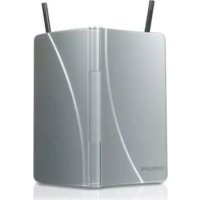
SDV2711 - TV Antenna PHILIPS - Free user manual and instructions
Find the device manual for free SDV2711 PHILIPS in PDF.



| Product type | Indoor TV antenna |
| Brand | Philips |
| Model | SDV2711 |
| Reception bands | VHF, UHF, FM |
| Antenna type | Telescopic dipoles (VHF/FM) and UHF reflector |
| Connectivity | Coaxial cable with IEC connector |
| Power supply | Passive (no external power required) |
| Dimensions (estimated) | 30 x 20 x 5 cm |
| Weight (estimated) | 150 g |
| Main functions | Analog and digital TV reception (DVB-T/ATSC), HD compatible, FM reception |
| Installation instructions | Place near a window, avoid metal surfaces, point toward the transmitter |
| Maintenance and cleaning | Clean with a soft dry cloth |
| Safety | Follow electronic equipment recycling guidelines |
| Spare parts and repairability | Not available, device not repairable |
| General information | Manual available in French, English, Spanish; warranty via www.philips.com/welcome |
Frequently Asked Questions - SDV2711 PHILIPS
User questions about SDV2711 PHILIPS
0 question about this device. Answer the ones you know or ask your own.
Ask a new question about this device
Download the instructions for your TV Antenna in PDF format for free! Find your manual SDV2711 - PHILIPS and take your electronic device back in hand. On this page are published all the documents necessary for the use of your device. SDV2711 by PHILIPS.
USER MANUAL SDV2711 PHILIPS
natural_image
Exterior view of a silver wireless router with two antennas (no visible text or symbols)Register your product and get support at: www.philips.com/welcome
EN Indoor antenna 2
2. Your indoor television antenna 3
2.1 Product overview 3
3. Getting Started 3
3.1 Installation 3
3.2 Connect to your TV 4
4. Using your television antenna 4
4.1 For VHF/FM reception 4
4.2 For UHF reception 4
4.3 Setting up a digital tuner with this antenna 5
5. Frequently asked questions 5
6. Warranty and service 5
1 Important
Take time to read this manual before you use your Philips indoor television antenna. It contains important information and notes regarding installation and set up.
© 2008 Koninklijke Philips Electronics N.V. All rights reserved. Reproduction in whole or in part is prohibited without the written consent of the copyright owner. Trademarks are the property of Koninklijke Philips Electronics N.V. or their respective owners.
Disposal of your old product
Your product is designed and manufactured with high quality materials and components, which can be recycled and reused.
Please inform yourself about the local separate collection system for electrical and electronic products.
Please act according to your local rules and do not dispose of your old products with your normal household waste. The correct disposal of your old product will help prevent potential negative consequences for the environment and human health.
Take the package to your local recycling center.

2 Your indoor television antenna
Congratulations on your purchase and welcome to Philips!
To fully benefit from the support that Philips offers, register your product at www.philips.com/welcome.
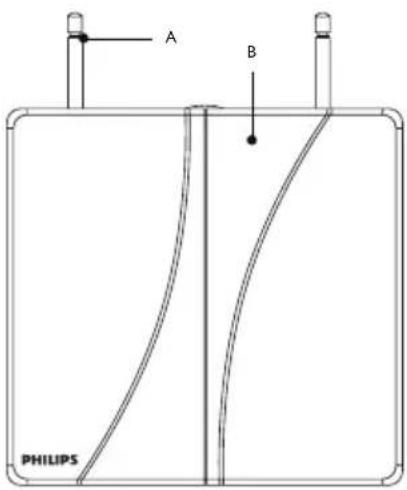
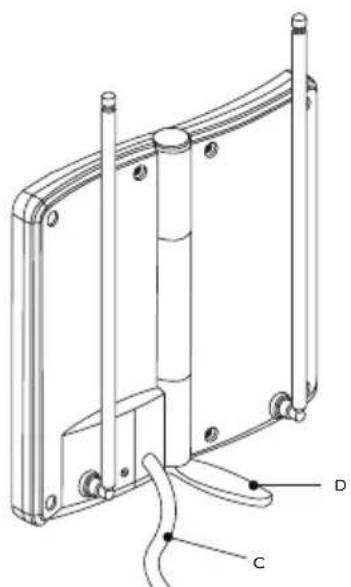
2.1 Product overview
A VHF antenna
B UHF antenna
C Out to TV connection
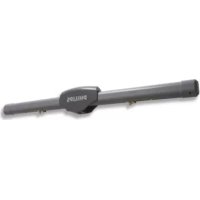
D Supporting plate
natural_image
Technical line drawing of a mechanical assembly with labeled components (no text or symbols present)3 Getting Started

Before you start: For this antenna to work properly, you must access the menu on the television you are connecting this antenna to (consult your television owner's manual) then set it to receive the signal from an ANTENNA or OFF AIR instead of CABLE or SATELLITE.
3.1 Installation
Determining Signal Strength
Before installation determine the best location for optimum reception. It is important for the antenna to have an unobstructed path to the transmitter. For best results, the antenna should be facing towards transmitter.
Tip
Where possible, choose a location near a window which will give the antenna a clear view of the transmitter.
Tip
Do not place the antenna on a metal surface.
3.2 Connect to your TV
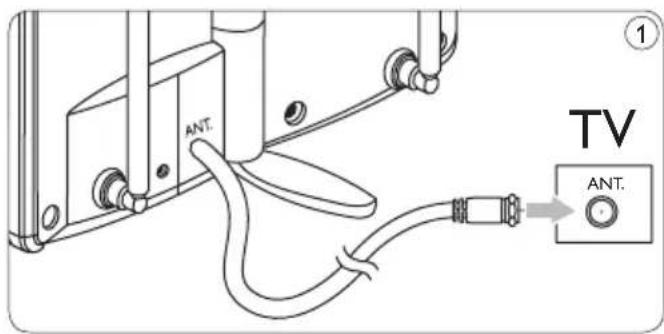
1 Open the antenna and connect the coaxial cable to the input on your TV receiver. ①
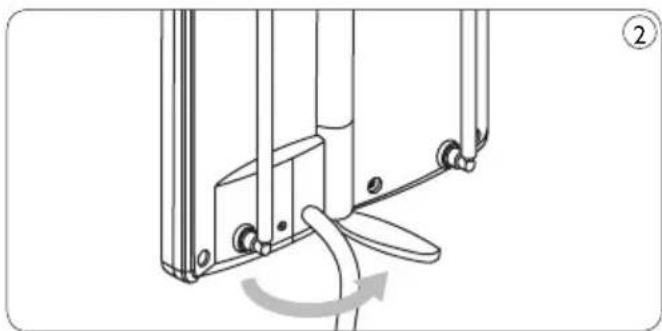
2 Open the supporting plate on the back of the antenna (maximum angle of opening is 120 degrees) in order to make the antenna stand straight. ②
4 Using your indoor television antenna
4.1 For VHF/FM reception
1 Extend the telescoping dipoles to the longest possible length. ③
2 Turn your TV or FM radio to the desired channel/station. Adjust the dipoles by moving in different directions up and down, until reception is achieved. ④
4.2 For UHF reception
1 Turn your TV to the desired channel.
2 Point the UHF reflector towards the transmitter until reception is achieved. ⑤

Note
For best results you should point your antenna in the direction of the transmitter.
natural_image
Mechanical assembly diagram showing a rotating component with a curved arrow indicating rotation (no text or symbols)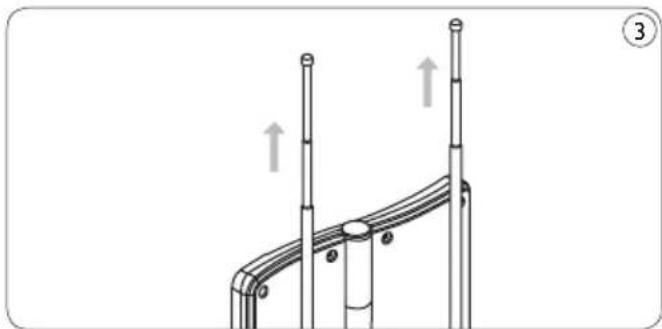
natural_image
Technical diagram of a mechanical assembly with two vertical rods and a curved base, showing upward force indicators (no text or symbols)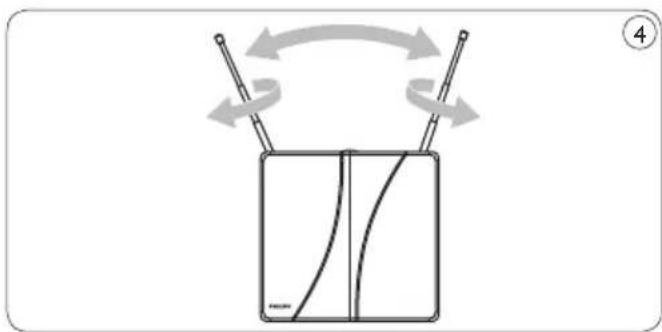
natural_image
Diagram of a container with curved lines and two rods, showing rotational motion (no text or symbols)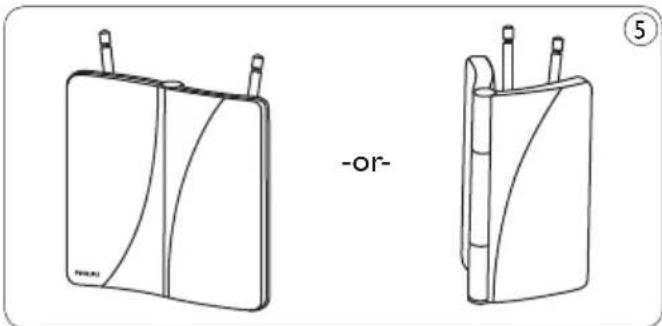
natural_image
Two line drawings of electronic devices with wires, one labeled '-or-' and the other marked '⑤', no text or symbols present.4.3 Setting up a digital tuner with this antenna
Digital TV tuners require you to program the tuner with the available channels in your area. Generally this automatic process is part of the set-up of the tuner. However, if you do not have the antenna set up properly you may find that the tuner receives no viewable channels.
If you have access to a rooftop antenna or another antenna which is currently connected to a digital tuner you may use the antenna to program the tuner. The channels will be memorized in the tuner - which will make aligning this antenna easier.
Another method is to connect the antenna directly to your TV (not using the tuner) and tune to analog channels to find best location of the antenna, then re-connect the digital tuner – if you have adequate signal level you should be able to program the tuner.
5 Frequently asked questions
Will this antenna work with analog transmissions?
Yes, this antenna is capable of receiving analog television broadcasts in the UHF and VHF bandwidths.
Will this antenna receive digital or work with HD-ATSC broadcasts?
Yes, this antenna is designed to receive Digital ATSC and HDTV broadcasts in the UHF and VHF bandwidths.
Where should I place the antenna in order to get the best reception possible?
Where possible, choose a location that is near a window which will give the antenna a clear view of the transmitter.
Note
For best reception you should also avoid placing the antenna on a metal surface which may cause interference.
Can I set this antenna up with a digital tuner?
Yes, this antenna can be set up with a digital tuner. See section 4.3 of your user manual.
6 Warranty & Service
Warranty information can be found at: www.philips.com/welcome
For technical support, send us an email with the model number of the product and a detailed description of your problem to: accessoriesupport@philips.com
Table des matières
1. Important 6
natural_image
Technical line drawing of a mechanical assembly with labeled components C and D (no text or symbols beyond labels)natural_image
Mechanical assembly diagram showing a lever mechanism with a curved arrow indicating rotation (no text or symbols present)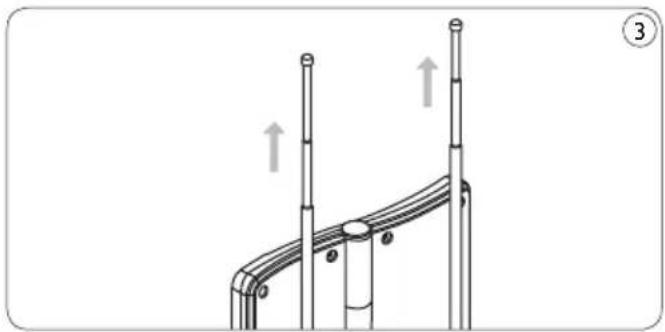
natural_image
Diagram of a mechanical or structural assembly with two vertical rods and circular components, no visible text or symbols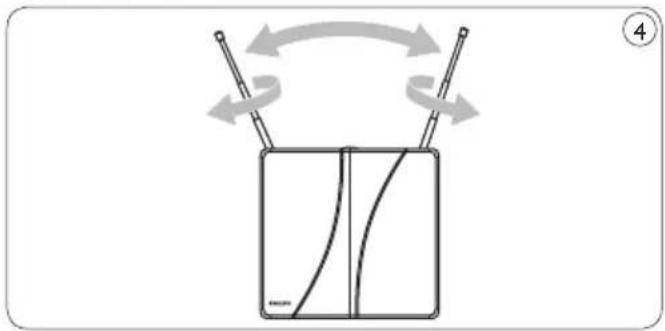
natural_image
Diagram of a device with rotating arms and curved internal lines, no text or symbols present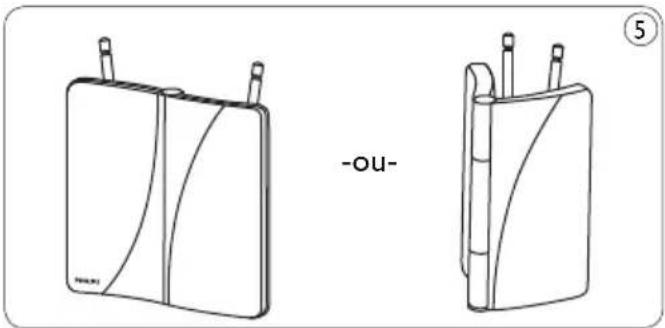
natural_image
Two line drawings of electronic devices with wires and connectors, one labeled '-ou-' (no text or symbols on device body)natural_image
Technical line drawing of a mechanical assembly with labeled components (no text or symbols present)3 Introducción

natural_image
Mechanical assembly diagram showing a lever mechanism with a curved arrow indicating rotation (no text or symbols present)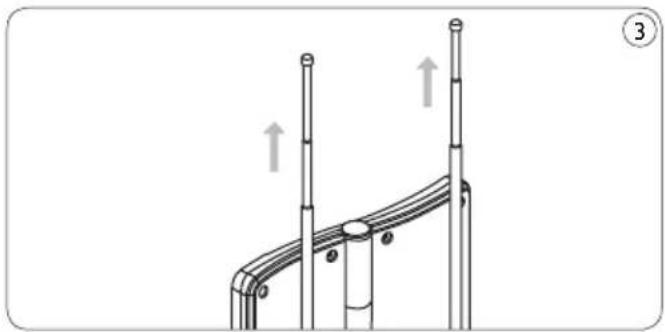
natural_image
Diagram of a curved pipe system with two vertical posts and directional arrows indicating movement (no text or symbols)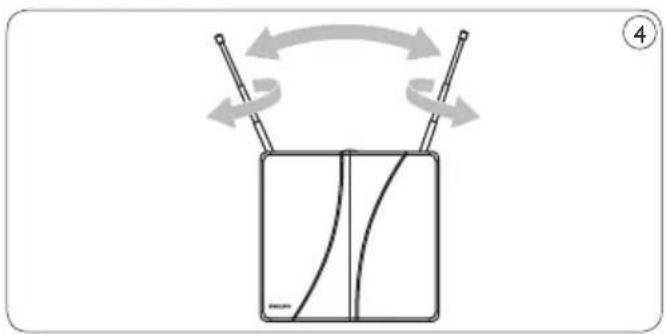
natural_image
Diagram of a device with rotating arms and curved internal lines, no text or symbols present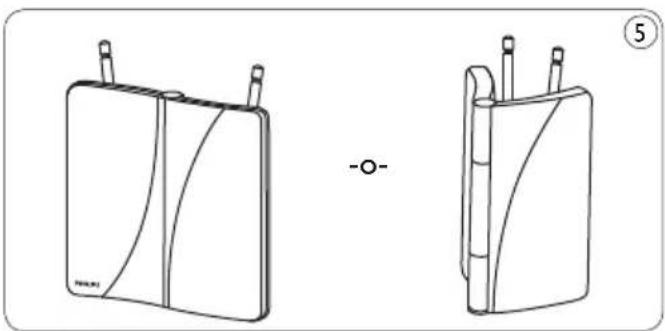
natural_image
Two line drawings of electronic devices with wires and connectors, no text or symbols present


- Your indoor television antenna 3
- Getting Started 3
- Using your television antenna 4
- Frequently asked questions 5
- Warranty and service 5
- Important
- Disposal of your old product
- Your indoor television antenna
- Product overview
- Getting Started
- Installation
- Determining Signal Strength
- Tip
- Connect to your TV
- Using your indoor television antenna
- For VHF/FM reception
- For UHF reception
- Note
- Setting up a digital tuner with this antenna
- Frequently asked questions
- Will this antenna work with analog transmissions?
- Will this antenna receive digital or work with HD-ATSC broadcasts?
- Where should I place the antenna in order to get the best reception possible?
- Can I set this antenna up with a digital tuner?
- Warranty & Service
- Table des matières
- Important 6
- Introducción
Brand : PHILIPS
Model : SDV2711
Category : TV Antenna