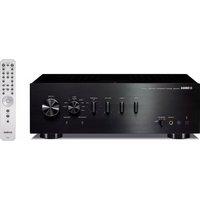
A-S701 - Receiver YAMAHA - Free user manual and instructions
Find the device manual for free A-S701 YAMAHA in PDF.


| Product Type | Integrated Stereo Amplifier (Receiver) |
| Brand | Yamaha |
| Model | A-S701 |
| Output Power | 100 W per channel (8 ohms, 20 Hz – 20 kHz) |
| Dimensions (W x H x D) | 435 x 151 x 443 mm |
| Weight | 11.5 kg |
| Power Supply | 230 V AC, 50 Hz |
| Power Consumption | 260 W |
| Compatible Speaker Impedance | 4 to 16 ohms |
| Analog Inputs | 4 line inputs (CD, Tuner, Line 1, Line 2), 1 phono input (MM) |
| Outputs | 2 speaker pairs (A/B), pre-out, headphone output |
| Main Functions | Pure Direct, tone control (bass/treble), Loudness, speaker selector A/B |
| Maintenance and Cleaning | Clean with a soft, dry cloth. Do not use solvents or abrasive products. |
| Safety | Do not expose to humidity, heat sources or shocks. Unplug before cleaning. |
| Spare Parts and Repairability | Contact an authorized Yamaha service center for any repair or replacement of parts. |
| General Information | Manual downloadable in PDF format from the manufacturer's website or from notice-facile.com |
Frequently Asked Questions - A-S701 YAMAHA
User questions about A-S701 YAMAHA
0 question about this device. Answer the ones you know or ask your own.
Ask a new question about this device
Download the instructions for your Receiver in PDF format for free! Find your manual A-S701 - YAMAHA and take your electronic device back in hand. On this page are published all the documents necessary for the use of your device. A-S701 by YAMAHA.
USER MANUAL A-S701 YAMAHA
Integrated Amplifier
Please read these precautions carefully before proceeding.
Be sure to follow the instructions
Please carefully read and observe the following precautions to avoid harm to people or damage to your personal property.
After reading this document thoroughly, please retain it in a location that anyone using the product can access at any time.
- Contact the following customer center for inspection or repair.
- The store you purchased the product
- Yamaha dealer
- This product is intended for use as a general household device. Do not use it in any field or activity requiring a high degree of reliability in relation to human lives or valuable assets.
- Please note that Yamaha cannot accept any liability for any losses resulting from improper use or unauthorized modification of the product.

WARNING
These precautions alert you to the possibility of death or serious injury to yourself or others.
If you notice any abnormality
- If any of the following abnormalities occur, immediately shut down the power.
- The power cord or plug becomes damaged.
- Unusual smells, noise or smoke are emitted from the product.
- An object or some water has been dropped into the product.
- Cracks or other damage appear on the product.
- There is a sudden loss of sound during use of the product.
Follow the steps below to shut down the power. - Turn off the power to this product.
- Disconnect the power cord plug from the AC outlet.
Continuing to use the product as-is may result in fire, electrical shock or damage to the product. Request inspection or repair immediately.
Power supply
- Do not damage the power cord.
- Do not place the power cord near heat sources such as heaters.
- Do not forcefully bend or modify the power cord.
- Do not damage the power cord.
- Do not place heavy objects on the power cord.
- Do not staple the power cord.
Using a frayed power cord with the core wire exposed may result in fire, electrical shock or damage to the product. - During lightning or electrical storms, do not touch this product, power plug or power cord.
Otherwise, electrical shock may be caused. - Use the voltage specified for this product.
Using an incorrect voltage may result in fire, electrical shock or damage to the product. - (A-S701) Be sure to use only the item listed below to supply power: - Included power cord
Otherwise, fire, burns or damage to the product may be caused. - (A-S701) Do not use the following Included accessory with other devices.
- Power cord Otherwise, fire, burns or damage to the product may be caused.
-
Check the power cord plug periodically and remove any dirt or dust that may have accumulated. Otherwise, fire or electrical shock may be caused.
-
Be sure to fully insert the power cord plug into an AC outlet. Otherwise, electrical shock, or fire or damage to the product due to short circuit may be caused.
- Insert the power cord plug into the AC outlet that is visible and easily accessible.
If some trouble or malfunction occurs, you should be able to immediately disconnect the plug from the AC outlet easily. Even when the power switch is turned off, as long as the power cord is not unplugged from the wall AC outlet, the product is not disconnected from the power source completely. - If you hear thunder or suspect approaching lightning, quickly turn off the power switch and pull the power plug from the AC outlet. Failure to observe this may cause a fire or malfunctions.
- If you plan not to use the product for a long period of time, remove the power cord plug from the AC outlets. Otherwise, fire or damage to the product may be caused.
Do not disassemble
- Do not modify or disassemble this product. Otherwise, fire, electrical shock, injury or damage to the product may be caused.
Water warning
- Do not use this product in damp or wet conditions, such as a bathroom or rainy outdoor location.
- Do not place on this product any containers (such as vases or medicine bottles) that contain liquids.
If liquid spills into the product, fire, electrical shock or damage to the product may be caused. - Do not insert the power cord plug into or remove it from the AC outlet with wet hands. Do not handle this product with wet hands. Otherwise, electrical shock or damage to the product may be caused.
Fire warning
- Do not handle open flames near this product. Otherwise, fire may be caused.
Handling
- Do not drop this product or apply any strong impact to the product. Otherwise, fire, electrical shock or damage to the product may be caused.
Batteries
- Do not swallow batteries.
- Keep batteries away from children.
Otherwise, they may swallow the batteries by accident. Leaking battery liquid may cause loss of vision or inflammation. If the battery case on this product is not completely sealed, stop using the product and keep it away from children. If someone has swallowed a battery by accident, consult a physician immediately. If a battery is swallowed, it can cause serious chemical burns or melting of body tissue within two hours, leading to possible death. - Do not throw batteries into an open fire.
- Do not expose batteries to high temperatures, such as direct sunlight or an open fire.
Otherwise, they may explode, resulting in fire or injury.
- If battery liquid is leaking, do not touch the liquid.
Otherwise, loss of vision or chemical burns may be caused. If you touch the battery liquid, wash it away with water immediately, and consult a physician.
- Do not use batteries other than the specified type.
- Do not use old and new batteries together.
- Do not use different types of batteries together.
- Do not insert batteries in an orientation opposite from the polarity indication.
- Do not break down the battery.
- Do not charge non-rechargeable dry cell batteries.
Otherwise, they may explode or battery liquid may leak, resulting in fires, burns, loss of vision, inflammation, or damage to the product. If you touch the battery liquid, wash it away with water immediately, and consult a physician.
- Do not carry the batteries in a pocket or bag or store them along with a piece of metal.
Otherwise, the batteries may short-circuit, leading to an explosion or leaking liquid, which could result in fires, loss of vision, or injuries. - If you plan not to use the product for a long period of time, or if the batteries are completely discharged, remove them from the remote control.
Otherwise, battery liquid may leak, possibly resulting in loss of vision, inflammatory injury, or damage to the product. - Before you store or discard the batteries, apply a piece of tape to the connectors to insulate them.
If the battery connectors come into contact with other batteries or metallic objects, they may explode or battery liquid may leak, possibly resulting in fire, burns, loss of vision, or inflammatory injury.

CAUTION
These precautions alert you to the possibility of physical injury to yourself or others.
Power supply
- If the power cord plug inserted into the AC outlet is wiggly or loose, do not use that outlet.
Otherwise, fire, electrical shock or burns may be caused. - When removing the power cord plug from the product or an outlet, always hold the plug itself and not the cord.
Otherwise, the power cord may be damaged, resulting in fire or electrical shock.
Installation
- Do not place this product in an unstable position or a location subject to vibration.
Otherwise, the product may fall or tip over, resulting in injuries or damage to the product. - Do not block the heat dissipation of this product when installing it.
- Do not cover the product with a cloth or table cloth.
- Do not install the product on a carpet or rug.
- Do not block the vents (heat dissipation slits).
- Make sure that the top surface faces up. Do not install the product on its sides or upside down.
- Do not use the product in a confined, poorly-ventilated location. Inadequate ventilation may result in overheating inside the product, possibly causing damage and fire or malfunction.
Make sure that there is adequate space around the product at least 30 cm above, 20 cm at the sides and 20 cm behind.
- Install this product in accordance with the instructions described in the following manual.
- Owner's Manual Otherwise, the product may fall or tip over, resulting in injuries or damage to the product.
- During earthquakes, stay away from this product. Otherwise, the product may fall or tip over, resulting in injuries.
- Do not install the product in a place where it may come into contact with salt air, corrosive gases, oily fume or steam.
Otherwise, the product may fall or tip over, resulting in injuries or damage to the product.
• (A-S701, A-S501) When transporting or moving this product, always use Two people or more people.
Attempts to lift the product by too few people or by yourself may result in back injuries. In addition, the product may be dropped, which could cause people in the vicinity to be injured, or cause damage to the product.
- Before moving this product, be sure to turn off the power switch and remove all connected cables.
Otherwise, the cables might be caught by a foot or hand, and the product may fall or tip over, resulting in injuries or damage to the product.
Connections
- If you plan to connect external devices, first read the owner's manual for each device, and connect them in accordance with the instructions. If you do not follow the instructions correctly, injury or damage to the product may be caused.
Hearing loss
- Do not expose yourself to high volume sound for an extended period of time.
Otherwise, hearing loss may be caused. If you experience any hearing abnormality, consult a physician. - If you plan to connect this product to any other devices, first turn off the power to all devices.
Otherwise, hearing loss, electrical shock or damage to the product may be caused. - Before turning on the power to or using this product, set the volume level to minimum. Before turning off the power to this product, set the volume levels of this product and all connected devices to minimum. Otherwise, hearing loss or damage to the product may be caused.
- When turning on the power to the audio system, always turn on the power to the power amplifier LAST. When turning off the power to the audio system, turn off the power to the power amplifier FIRST.
Otherwise, hearing loss or damage to the product may be caused.
Maintenance
- Before cleaning the product, be sure to remove the power cord plug from the AC outlet.
Otherwise, electrical shock may be caused.
Handling
- Do not touch the surface to which this label is attached.
The surface may become heated during use of this product, and touching the surface may result in burns. - Do not drop a foreign object, such as a piece of metal or paper, into any gap on this product.
Otherwise, fire, electrical shock or damage to the product may be caused. - Keep small parts away from infants.
Otherwise, they may swallow them by accident. - Do not apply the following excessive force to this product.
- Resting your weight on this product
- Placing heavy objects on this product
- Stacking up this product
- Applying excessive force to the buttons, switches, or I/O connectors Otherwise, injury or damage to the product may be caused.
- Do not pull connected cables.
Otherwise, the product may fall or tip over, resulting in injuries or damage to the product.

Precautions for use
NOTICE
Follow the precautions below to avoid malfunction and damage to this product and to prevent the loss of data.
Power supply
- If you plan not to use this product for a long period of time, remove the power cord plug from the AC outlet. Even when the [∅] (Standby/On) switch is turned off, a small amount of current still flows through this product.
Installation
- Depending on the environment in which you use the product, a phone, radio or TV may generate noise. In that case, change the product location or orientation, or the surrounding environment.
- Do not install this product in a place subject to:
-Direct sunlight
- Extremely high or low temperatures
- Excessive dust
Otherwise, malfunction or damage to the product may be caused.
- Do not install this product in a place where condensation can form due to rapid, drastic changes in ambient temperature. Using the product while condensation is present may cause damage to the product. If there is a reason to believe that condensation might have occurred on or in this product, leave it for several hours without turning on the power. You can start using the product when the condensation has completely dried.
Maintenance
- Use a dry, soft cloth to clean this product. Do not use benzine, thinner, detergent or chemical rag to clean the surface of the product. Otherwise, the surface may be discolored or deteriorate.
Important information
NOTE
This section describes precautions to be observed during use, functional restrictions, and supplemental information that may be helpful for you.
Disposal or transfer
- If you plan to transfer ownership of this product, include this document and the supplied accessories along with the product.
- Follow the rules of your local authority to dispose of this product and its accessories.
- Follow the rules of your local authority to dispose of used batteries.
CONTENTS
USEFUL FEATURES .... 1
SUPPLIED ACCESSORIES...... 1
CONTROLS AND FUNCTIONS...... 2
Front panel 2
Rear panel 4
Remote control....6
CONNECTIONS....9
Connecting speakers and source components...9
Connecting power cable....10
PLAYBACK...... 11
Playing a source 11
Adjusting to the desired sound.... 12
TROUBLESHOOTING...... 13
SPECIFICATIONS 15
About this manual
• indicates a tip for your operation.
- The illustrations used in this Owner's Manual are A-S701.
- Depending on the model, there are some countries/regions where it may not be sold.
USEFUL FEATURES
This unit allows you to:
◆Enjoy the highest sound quality of compact discs by using the CD direct function (A-S701 only) (see page 12)
◆Enjoy pure, high fidelity sound by using the Pure Direct function (see page 12)
◆Save power by using AUTO POWER STANDBY switch (see page 4)
◆Use the remote control of this unit to operate a Yamaha tuner and/or CD player (see page 7)
◆Boost bass sounds by connecting a subwoofer (see page 9)
SUPPLIED ACCESSORIES
Please check that you received all of the following parts.
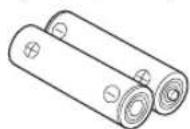
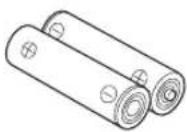
Remote control Batteries (x2)
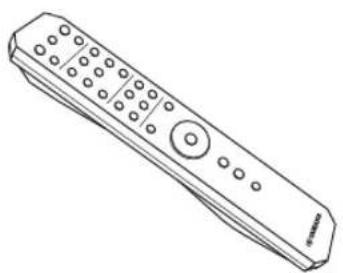
natural_image
Line drawing of a remote control device (no text or symbols)(AA, R6, UM-3)
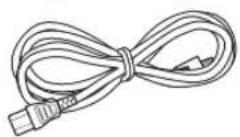
Power cable (A-S701 only)
CONTROLS AND FUNCTIONS
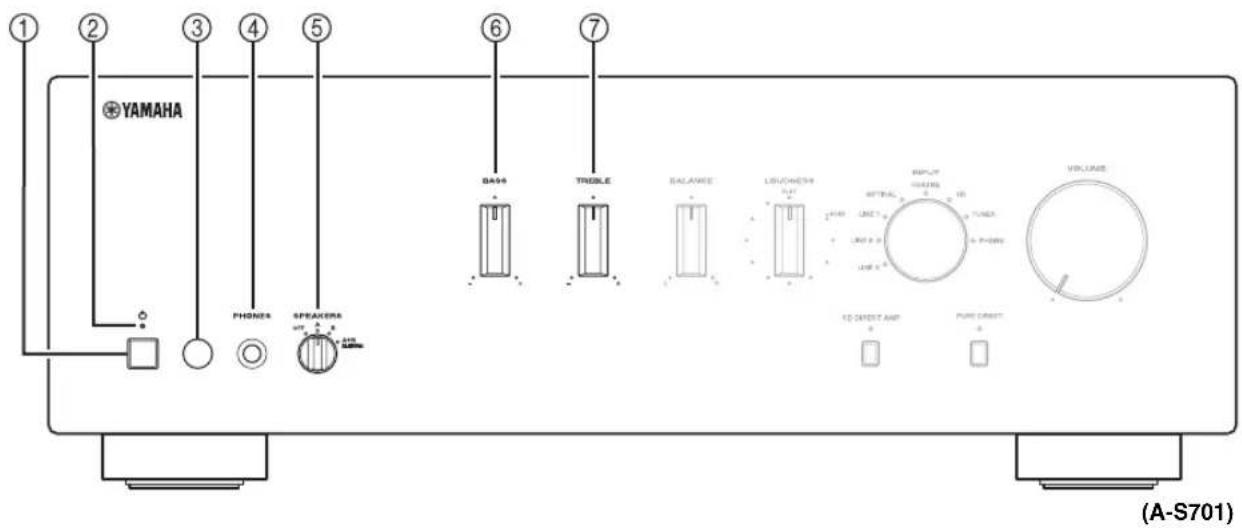
Front panel

① (power) switch
Turns on and off the power of this unit.
Note
Even when this unit is turned off, this unit consumes a small amount of power.
②Power indicator
| Indicator Status | |
| Brightly lit The power of this unit is “on”. | |
| Dimly lit | This unit is in “standby” mode.For details on the “standby” mode, see page 6. |
| Off The power of this unit is “off”. | |
③Remote control sensor
Receives infrared signals from the remote control.
④PHONES jack
Connect your headphones.
⑤SPEAKERS selector
| Selector position | Speaker status |
| OFF Both sets of speakers are off. | |
| A or B | The set of speakers connected to the A or B terminals is on. |
| A+B BI-WIRING Both sets of speakers are on. | |
⑥BASS control
Increases or decreases the low frequency response.
The 0 position produces a flat response.
Control range: -10 dB to +10 dB
⑦TREBLE control
Increases or decreases the high frequency response.
The 0 position produces a flat response.
Control range: -10 dB to +10 dB

⑧BALANCE control
Adjusts the sound output balance of the left and right speakers to compensate for sound imbalances.
Note
If you rotate the BALANCE control to the end of L (left) or R (right), the opposite side of channel is muted.
⑨LOUDNESS control
Retain a full tonal range at any volume level (see page 12).
⑩ INPUT selector and indicators
Selects the input source you want to listen to. The input source indicators light up when the corresponding input sources are selected.

The input source names correspond to the names of the connection jacks on the rear panel.
⑪ VOLUME control
Increases or decreases the sound output level.
⑫CD DIRECT AMP button and indicator (A-S701 only)
Reproduces CD sound in the highest signal quality (see page 12).
The indicator above it lights up when this function is turned on.
⑬PURE DIRECT button and indicator
Reproduces any input source in the purest sound possible (see page 12).
The indicator above it lights up when this function is turned on.
Rear panel

Used to connect a CD player (see page 9).
②PHONO jacks and GND terminal
Used to connect a turntable that uses an MM cartridge, and to ground the terminal (see page 9).
③Audio input/output jacks
Used to connect external components, such as a tuner, etc (see page 9).
④ DIGITAL (OPTICAL) jack
Used to connect a component with a digital optical output (see page 9).
⑤ DIGITAL (COAXIAL) jack
Used to connect a component with a digital coaxial output (see page 9).
⑥DC OUT jack
For supplying power to a Yamaha AV accessory. For details on connections, refer to the instruction manual of the AV accessory.
⑦SPEAKERS A/B terminals
Used to connect one or two speaker sets (see page 9).
⑧SUBWOOFER OUT jack
Used to connect a subwoofer with built-in amplifier (see page 9).
[Non-Text]
The SUBWOOFER OUT jack attenuates signals over 90 Hz.
⑨ AUTO POWER STANDBY switch
| Switch position | Status |
| ON | The unit enters standby mode automatically if not operated for 8 hours. |
| OFF | The unit does not enter standby mode automatically. |
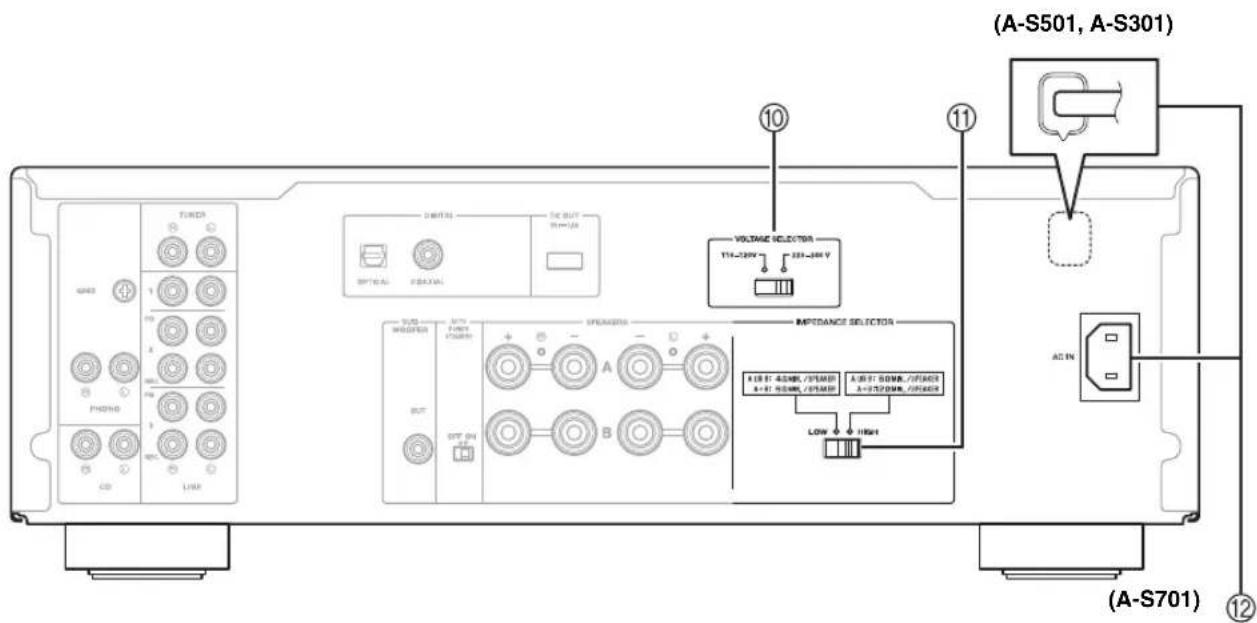
⑩ VOLTAGE SELECTOR (General model only)
Used to set to your local main voltage (see page 10).
⑪ IMPEDANCE SELECTOR switch
CAUTION
Do not change the IMPEDANCE SELECTOR switch while the power is turned on, as doing so may damage the unit.
If the IMPEDANCE SELECTOR switch may not be fully slid to either position, remove the power cable and slide the switch all the way to either position.
Select the switch position according to the impedance of the speakers.
| Speaker connection | Speaker impedance | Switch position |
| SPEAKERS A or SPEAKERS B | 6 Ω or higher HIGH | |
| 4 Ω or higher LOW | ||
| SPEAKERS A and SPEAKERS B | 12 Ω or higher HIGH | |
| 8 Ω or higher LOW | ||
| Bi-wiring | 6 Ω or higher HIGH | |
| 4 Ω or higher LOW |
⑫AC IN (A-S701)
Used to connect the supplied power cable to an AC wall outlet (see page 10).
Power cable (A-S501, A-S301)
Used to connect this unit to an AC wall outlet (see page 10).
Remote control

①Infrared signal transmitter
Sends infrared signals.
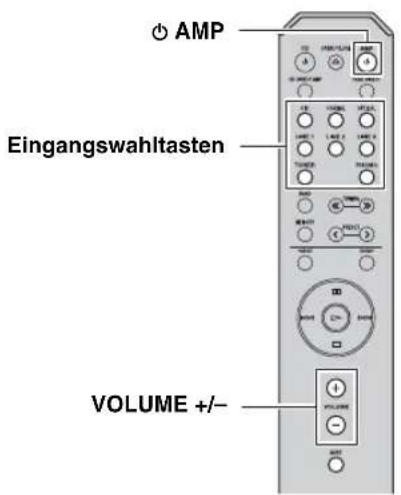
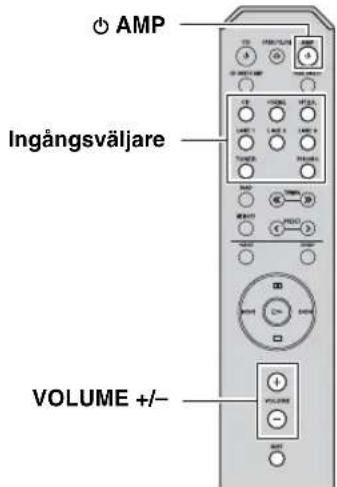
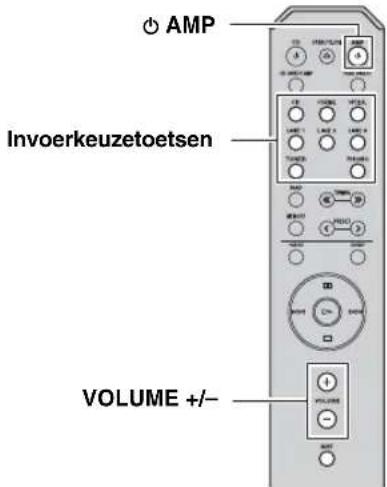
② AMP
Turns this unit on, or sets it to standby mode.
③ OPEN/CLOSE
Opens/closes the disc tray of the Yamaha CD player. Refer to the owner's manual of your CD player for details.
Note
Even when using a Yamaha CD player, certain components and features may not be available.
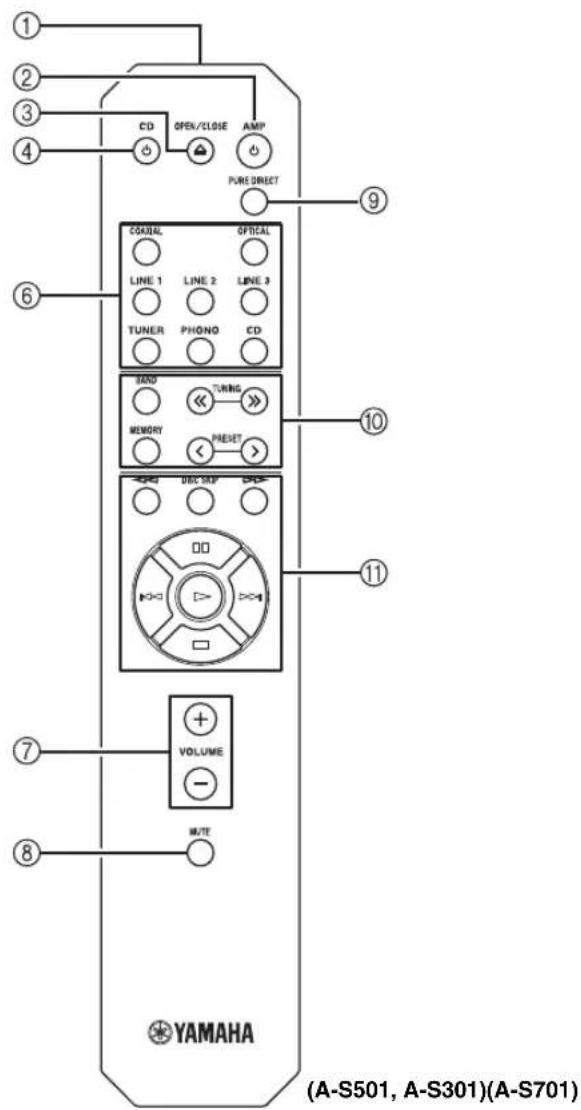
④ CD
Turns the Yamaha CD player on, or sets it to standby mode. Refer to the owner's manual of your CD player for details.
Note
Even when using a Yamaha CD player, certain components and features may not be available.
⑤CD DIRECT AMP (A-S701 only)
Reproduces CD sound in the highest signal quality (see page 12).
⑥Input selector buttons
Selects the input source you want to listen to.

The input source names correspond to the names of the connection jacks on the rear panel.
⑦VOLUME +/-
Increases or decreases the sound output level.
⑧MUTE
Reduces the current volume level by approximately 20 dB. Press again to restore the audio output to the previous volume level. Pressing the VOLUME +/- also cancels muting.
The input indicator on the front panel for the current input source blinks while the output is muted.
⑨PURE DIRECT
Reproduces any input source in the purest sound possible (see page 12).
⑩Yamaha tuner control buttons
The following buttons can be used to control various functions of a Yamaha tuner.
Refer to your component's owner's manual for more information.
BAND
Selects the reception band (FM/AM).
TUNING << / >>
Selects the tuning frequency.
MEMORY
Stores the current FM/AM station as a preset.
PRESET
Selects a preset FM/AM station.
Note
Even when using a Yamaha tuner, certain components and features may not be available.
⑪Yamaha CD player control buttons
The following buttons can be used to control a Yamaha CD player.
Refer to your component's owner's manual for more information.
◀◀Rewinds playback
▷▷Fast-forwards playback
DISC SKIP Skips to the next disc in a CD changer (A-S501, A-S301 only)
□□Pauses playback
Skips backward
▶▶|Skips forward
▷Starts playback
□Stops playback
Note
Even when using a Yamaha CD player, certain components and features may not be available.
■Installing batteries ■Operation range
Point the remote control at the remote control sensor on this unit and remain within the operating range shown below.

AA, R6, UM-3 batteries

■Notes on remote control and batteries
- The area between the remote control and this unit must be clear of large obstacles.
- Be careful not to spill water or other liquids on the remote control.
- Be careful not to drop the remote control.
-
Do not leave or store the remote control in the following conditions:
-
places of high humidity, such as near a bathroom
- places of high temperatures, such as near a heater or stove
- places of extremely low temperatures
- dusty places
- Change all batteries if you notice the operation range of the remote control narrows.
- If the batteries run out, immediately remove them from the remote control to prevent an explosion or acid leak.
- If you find leaking batteries, discard the batteries immediately, taking care not to touch the leaked material. If the leaked material comes into contact with your skin or gets into your eyes or mouth, rinse it away immediately and consult a doctor. Clean the battery compartment thoroughly before installing new batteries.
- Do not use old batteries together with new ones. This may shorten the life of the new batteries or cause old batteries to leak.
- Do not use different types of batteries (such as alkaline and manganese batteries) together. Batteries that look the same may have a different specification.
- Dispose of batteries according to your regional regulations.
- Keep the batteries in a location out of reach of children.
Batteries can be dangerous if a child were to put in his or her mouth.
- If you plan not to use this unit for a long period of time, remove the batteries from this unit. Otherwise, the batteries will wear out, possibly resulting in a leakage of battery liquid that may damage this unit.
CONNECTIONS
Connecting speakers and source components
Make sure to connect L (left) to L, R (right) to R, “+” to “+” and “-” to “-”. If the connections are faulty, no sound will be heard from the speakers, and if the polarity of the speaker connections is incorrect, the sound will be unnatural and lack bass. Refer to the owner’s manual for each of your components.
Make sure to use RCA cables or optical cable to connect audio components.
CAUTION
Do not connect this unit or other components to the main power until all connections between components are complete.

flowchart
graph TD
    A["CD player"] --> B["Audio out"]
    A --> C["CD recorder, etc."]
    A --> D["Subwoofer Tape deck, Subwoofer A+B"]
    A --> E["LeftRight"]
    F["Turntable"] --> G["Audio out"]
    F --> H["GND"]
    I["Tuner"] --> J["Audio out"]
    I --> K["L"]
    L["DVD player, etc."] --> M["Audio out"]
    L --> N["L"]
    O["TV, etc."] --> P["Audio out"]
    O --> Q["Audio out"]
    R["BD player, etc."] --> S["Audio out"]
    R --> T["CDAXIAL"]
    U["Speakers A LeftRight"] --> V["Speaker B"]
    W["VOLTAGE SELECTOR 110-120V 330-246V IMPEDANCE"] --> X["SPEAKERS"]
    Y["Audio In"] --> Z["CD recorder, etc."]
    AA["Audio Out"] --> AB["CD player"]
    AC["Audio In"] --> AD["CD recorder, etc."]
    AE["Audio Out"] --> AF["CD recorder, etc."]
    AG["Audio In"] --> AH["CD recorder, etc."]
    AI["Audio Out"] --> AJ["CD recorder, etc."]
    AK["Audio In"] --> AL["CD recorder, etc."]
Only PCM signals can be input to the DIGITAL (OPTICAL/COAXIAL) jacks of this unit. For details on the supported PCM signals, see page 15.

- The PHONO jacks are designed for connecting a turntable with an MM cartridge.
- Connect your turntable to the GND terminal to reduce noise in the signal. However, for some turntables, you may hear less noise without the GND connection.
CONNECTIONS
■REC jacks
- The audio signals are not output via the LINE 2 REC or LINE 3 REC output jacks when LINE 2 or LINE 3 is selected with the INPUT selector.
- The VOLUME, BASS, TREBLE, BALANCE and LOUDNESS controls and the CD DIRECT function (or the PURE DIRECT function) have no effect on the source being recorded.
■Connecting speaker cables
①Remove approximately 10 mm of insulation from the end of each speaker cable.
②Twist the bare wires of the cable firmly together.
③Unscrew the knob.
④ Insert one bare wire into the hole in the side of each terminal.
⑤Tighten the knob to secure the wire.

Red: positive (+) Black: negative (−)
CAUTION
- Set the IMPEDANCE SELECTOR switch according to the impedance of the speakers to be connected (see page 5).
- Do not let bare speaker wires touch each other or any metal part of this unit. This could damage this unit and/or the speakers.
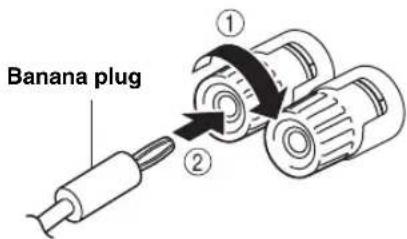
■Connecting via banana plug (North America, General, China and Australia models only)
①Tighten the knob.
②Insert the banana plug into the end of the corresponding terminal.
■Bi-wire connection
In the case of speakers supporting the bi-wiring connection, the tweeter/midrange unit and woofer of the speakers can be driven independently through connections shown in the following figure, allowing you to enjoy clear mid- and high-range sounds.
Rear panel
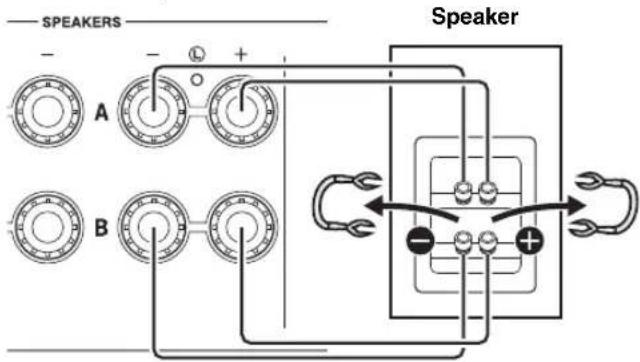
Connect the other speaker to the other set of terminals in the same way.
Note
When making bi-wire connections, remove the shorting bridges or cables on the speaker. Refer to the speakers' instruction manuals for more information.

To use the bi-wire connections, set the SPEAKERS selector on the front panel to the A+B BI-WIRING position.
Connecting power cable
CAUTION
(General model only)
Before connecting the power cable, make sure you set VOLTAGE SELECTOR of this unit according to your local voltage. Improper setting of VOLTAGE SELECTOR may cause fire and damage to this unit.
■AC IN (A-S701)
Connect the supplied power cable to AC IN after all other connections are complete.
■Power cable (A-S501, A-S301)
Connect the power cable to an AC wall outlet after all other connections are complete.

PLAYBACK
Playing a source
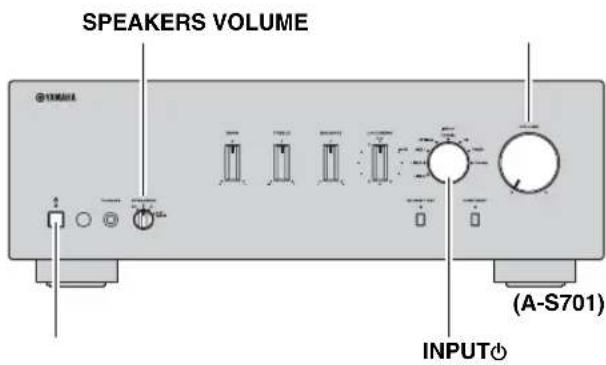

1 Rotate the VOLUME control on the front panel fully counter-clockwise so as not to play sounds loud suddenly.
2 Press ⏻ (power) switch on the front panel inward to turn on this unit.
3 Rotate the INPUT selector on the front panel (or press one of the Input selector buttons on the remote control) to select the input source you want to listen to.
The indicator for the selected input source lights up.
4 Rotate the SPEAKERS selector on the front panel to select SPEAKERS A, B or A+B BI-WIRING.

Set the SPEAKERS selector to the A+B BI-WIRING position when two sets of speakers are connected using bi-wire connections, or when using two sets of speakers simultaneously (A and B).
5 Play the selected input source.
6 Rotate the VOLUME control on the front panel (or press VOLUME +/- on the remote control) to adjust the sound output level.

You can adjust to the desired sound by using the BASS, TREBLE, BALANCE and LOUDNESS controls, the CD DIRECT AMP button, or the PURE DIRECT button on the front panel.
7 When finished listening, press ⏻ (power) switch on the front panel outward to turn off this unit.

If AMP on the remote control is pressed while the (power) switch on the front panel is in the position, this unit enters standby mode. Press AMP again to turn this unit on.
Adjusting to the desired sound
VOLUMELOUDNESS
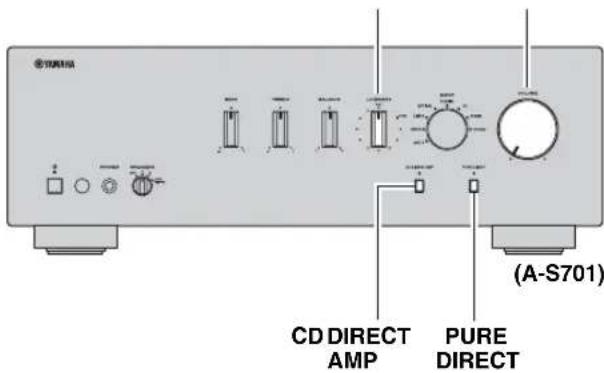
■Making it easier to hear the high- and low-frequency ranges even at low volume (LOUDNESS)
Enjoy natural sound even at low volume by lowering the mid-range sound level and compensating for the human ears' loss of sensitivity to high- and low-frequency ranges at low volume.
CAUTION
If the CD DIRECT AMP function (or the PURE DIRECT function) is turned on with the LOUDNESS control set at a certain level, the input signals bypass the loudness control, resulting in a sudden increase in the sound output level. To prevent your ears or the speakers from being damaged, be sure to press the CD DIRECT AMP button (or the PURE DIRECT button) AFTER lowering the sound output level or AFTER checking that the LOUDNESS control is properly set.
1 Set the LOUDNESS control to the FLAT position.
2 Rotate the VOLUME control on the front panel (or press VOLUME +/- on the remote control) to set the sound output level to the loudest listening level that you would listen to.
3 Rotate the LOUDNESS control counterclockwise until the desired volume is obtained.
■Reproducing pure, high fidelity sound (PURE DIRECT)
When the PURE DIRECT function is on, noise can be reduced by bypassing the circuit that the audio input signal is not using and stopping the power supply to the circuit.
Therefore, in all input sources, you can enjoy music playback in straight and high quality sound.
The indicator above the PURE DIRECT button lights up when this function is turned on.
Note
The BASS, TREBLE, BALANCE and LOUDNESS controls do not function while the PURE DIRECT function is turned on.
■Reproducing CD sound with the highest sound quality (CD DIRECT AMP) (A-S701 only)
When selecting the input source other than CD, if you press the CD DIRECT AMP button, the input source switches to CD.
CD Direct Amp feature
Stop power supply to the unnecessary circuit for CD playback, convert the input signal to the normal phase and reverse phase, and balance transfer to the electronic volume. With the following effects, a more faithful sound to the original will be provided.
- improved signal-to-noise ratio
• external noise canceling - reduced distortion
Notes
• The BASS, TREBLE, BALANCE and LOUDNESS controls do not function while the CD DIRECT AMP function is turned on.
- Be sure to connect the CD player to the CD input jacks if you use the CD direct function.
- The CD DIRECT AMP function is turned off if the following operation is performed.
- Select an input source other than CD for the INPUT selector.
- The PURE DIRECT function is turned on.
TROUBLESHOOTING
Refer to the chart below if this unit does not function properly. If the problem you are experiencing is not listed below or if the instructions below do not help, turn off this unit, disconnect the power cable, and then contact the nearest authorized Yamaha dealer or service center.
| Problem Cause | Remedy | See page | |
| This unit fails to turn on. | The power cable is not connected or the plug is not completely inserted. | Connect the power cable firmly. | 10 |
| The Θ AMP is pressed on the remote control while this unit is turned off. | Press Θ (power) switch on the front panel to on. | 2 | |
| The impedance setting of the connected speaker is too small. | Use speaker(s) with proper speaker impedance. | 5 | |
| The protection circuitry has been activated because of a short circuit, etc. | Check that the speaker wires are not touching each other and then turn the power of this unit back on. | 10 | |
| There is a problem with the internal circuitries of this unit. | Disconnect the power cable and contact the nearest authorized Yamaha dealer or service center. | — | |
| This unit turns off suddenly and the power indicator blinks. | The speaker wires are touching each other or shorting out against the rear panel. | Connect the speaker cables properly and press the Θ (power) switch again. The INPUT indicators blink and the volume is decreased to the lowest setting automatically, then the INPUT indicators stop flashing and the last input source selected lights up. Confirm normal sound output from speakers by increasing the volume gradually. | 10 |
| The speaker is malfunctioning. | Replace the speaker set and press the Θ (power) switch again. The INPUT indicators blink and the volume is decreased to the lowest setting automatically, then the INPUT indicators stop flashing and the last input source selected lights up. Confirm normal sound from speakers by increasing the volume gradually. | — | |
| The protection circuitry has been activated because of excessive input or excessive volume level. | Rotate the VOLUME control on the front panel to decrease the volume level and then turn the power on again. | — | |
| The protection circuitry has been activated due to excessive internal temperature. | Allow about 30 minutes for the temperature inside this unit to decrease, rotate the VOLUME control on the front panel to lower the volume and then turn the power on again. Set the unit in a place where heat can readily dissipate from the unit. | — | |
| The IMPEDANCE SELECTOR switch is not fully slid to either position. | Turn the power off and slide the IMPEDANCE SELECTOR switch all the way to the correct position. | 5 | |
| The IMPEDANCE SELECTOR switch is not set to the correct position. | Set the IMPEDANCE SELECTOR switch to the position that corresponds to the impedance of your speakers. | 5 | |
| This unit has been exposed to a strong external electric shock (such as lightning or strong static electricity). | Turn off this unit, disconnect the power cable, plug it back in after 30 seconds, then use the unit normally. | — | |
| There is a problem with the internal circuitries of this unit. | Disconnect the power cable and contact the nearest authorized Yamaha dealer or service center. | — | |
| No sound. Sound is muted. | Press MUTE on the remote control or rotate the VOLUME control. | 7 | |
| Incorrect cable connections. Connect the stereo cable for audio units and the speaker wires properly. If the problem persists, the cables may be defective. | 9 | ||
TROUBLESHOOTING
| Problem Cause | Remedy | See page | |
| No sound. Playback has been stopped on the connected component. | Turn the component on and start playback. | 11 | |
| No appropriate input source has been selected. | Select an appropriate input source with the INPUT selector on the front panel (or one of the Input selector buttons on the remote control). | ||
| The SPEAKERS selector is not set properly. | Set the corresponding SPEAKERS selector to A, B or A+B BI-WIRING position. | ||
| The output audio source setting on the connected component is not PCM. | Only PCM audio sources can be played via the DIGITAL (OPTICAL/COAXIAL) jacks of this unit. Set the output audio source of the connected component to PCM. | ||
| The sound suddenly goes off. | The automatic power down function has activated. | Confirm that there are no other issues causing this problem, and then turn this unit on again. To turn off the AUTO POWER STANDBY function, set the AUTO POWER STANDBY switch to OFF on the rear panel. | 4 |
| Only the speaker on one side can be heard. | Incorrect cable connections. Connect the cables properly. If the problem persists, the cables may be defective. | 9 | |
| Incorrect setting for the BALANCE control. | Set the BALANCE control to the appropriate position. | 3 | |
| There is a lack of bass and no ambience. | The + and - wires are connected in reverse at the amplifier or the speakers. | Connect the speaker wires to the correct + and - phase. | 10 |
| A “humming” sound can be heard. | Incorrect cable connections. Connect the audio plugs firmly. If the problem persists, the cables may be defective. | 9, 10 | |
| No connection from the turntable to the GND terminal. | Make the GND connection between the turntable and this unit. | 9 | |
| The volume level cannot be increased, or the sound is distorted. | The component connected to the LINE 2 REC or LINE 3 REC jacks of this unit is turned off. | Turn on the power of the component. | — |
| The sound is degraded when listening with headphones connected to a CD player connected to this unit. | This unit is turned off or is in standby mode. | Turn on the power of this unit. | — |
| The sound level is low. | Sound is muted. Press MUTE on the remote control or rotate the VOLUME control. | 7 | |
| The loudness control function is operating. | Turn down the volume, set the LOUDNESS control to the FLAT position, and then adjust the volume again. | 12 | |
| The volume level is low while playing a record. | The turntable is connected to the jacks other than the PHONO jacks. | Connect the turntable to the PHONO jacks. | 9 |
| The record is being played on a turntable with an MC cartridge. | Use a turntable equipped with an MM cartridge. | 9 | |
| Using the BASS, TREBLE, BALANCE and LOUDNESS controls does not affect the sound. | The CD DIRECT function or the PURE DIRECT function is turned on. | The CD DIRECT function or the PURE DIRECT function must be turned off to use those controls. | 12 |
SPECIFICATIONS
AUDIO SECTION
| Item A-S701 A-S501 A-S301 | ||||
| Minimum RMS output power | 8 Ω, 20 Hz to 20 kHz, 0.019% THD | 100 W + 100 W | 85 W + 85 W | 60 W + 60 W |
| 6 Ω, 20 Hz to 20 kHz, 0.038% THD (Except for Asia and China models) | 120 W + 120 W 100 | W + 100 W 70 W + 70 W | ||
| Dynamic power per channel (IIIF) | 8 Ω 140 W 130 W 100 W | |||
| 6 Ω 170 W 150 W 120 W | ||||
| 4 Ω 220 W 185 W 140 W | ||||
| 2 Ω 290 W 220 W 150 W | ||||
| Maximum power per channel | 1 kHz, 0.7% THD, 4 Ω (U.K. and Europe models only) | 160 W 120 W | 95 W | |
| IEC power | 1 kHz, 0.019% THD, 8 Ω (U.K. and Europe models only) | 115 W 100 W | 75 w | |
| Power band width | 0.04% THD, 50 W, 8 Ω | 10 Hz to 50 kHz | — | — |
| 0.04% THD, 42.5 W, 8 Ω | — | 10 Hz to 50 kHz | — | |
| 0.04% THD, 30 W, 8 Ω | — | — | 10 Hz to 50 kHz | |
| Damping factor (SPEAKERS A) | 1 kHz, 8 Ω | 240 or more | 210 or more | |
| Maximum Effective Output Power (JEITA) | 1 kHz, 10% THD, 8 Ω (Asia, China and General models only) | 145 W 130 W | 100 W | |
| 1 kHz, 10% THD, 6 Ω (General model only) | 170 W | — | — | |
| Input sensitivity/Input impedance | PHONO (MM) | 3.0 mV/47 kΩ | ||
| CD, etc. | 200 mV/47 kΩ | |||
| Maximum input signal | PHONO (MM) (1 kHz, 0.03% THD) | 45 mV or more | ||
| CD etc. (1 kHz, 0.5% THD) | 2.2 V or more | |||
| Output level/Output impedance | REC OUT | 200 mV/1.0 kΩ or less | ||
| SUBWOOFER OUT (Cut Off Frequency: 100 Hz) | 3.5 V/1.2 kΩ | |||
| PHONES jack rated output/ Impedance | CD, etc. (Input 1 kHz, 200 mV, 8 Ω) | 470 mV/470 Ω | 430 mV/470 Ω | 360 mV/470 Ω |
| Frequency response | CD, etc. (20 Hz to 20 kHz) | 0 ± 0.5 dB | ||
| CD, etc. PURE DIRECT on (10 Hz to 100 kHz) | 0 ± 1.0 dB | |||
| RIAA equalization deviation | PHONO (MM) | ± 0.5 dB | ||
| Total harmonic distortion | PHONO (MM) to REC OUT (20 Hz to 20 kHz, 2.5 V) | 0.03 % or less | ||
| CD, etc. to SPEAKERS (20 Hz to 20 kHz, 50 W, 8 Ω) | 0.019 % or less — | — | ||
| CD, etc. to SPEAKERS (20 Hz to 20 kHz, 45 W, 8 Ω) | — | 0.019 % or less | — | |
| CD, etc. to SPEAKERS (20 Hz to 20 kHz, 30 W, 8 Ω) | — | — | 0.019 % or less | |
SPECIFICATIONS
| Item A-S701 A-S501 A-S301 | |||||
| Signal to noise ratio (IHF-A network) | PHONO (MM)(5 mV input shorted) | 82 dB or more | |||
| CD, etc. PURE DIRECT on(200 mV input shorted) | 99 dB or more | ||||
| CD DIRECT AMP on 104 dB or more — — | |||||
| Residual noise (IHF-A network) 40 μV | |||||
| Channel separation | CD, etc. (5.1 kΩ input shorted,1 kHz) | 65 dB or more | |||
| CD, etc. (5.1 kΩ input shorted,10 kHz) | 50 dB or more | ||||
| Tone control characteristics | BASS | Boost/Cut (20 Hz) | ± 10 dB | ||
| Turnover frequency | 400 Hz | ||||
| TREBLE | Boost/Cut (20 kHz) | ± 10 dB | |||
| Turnover frequency | 3.5 kHz | ||||
| Continuous loudness control Attenuation (1 kHz) – 30 dB | |||||
| Supported digital audio format(OPTICAL/COAXIAL) | PCM (2-ch) 192/176.4/96/88.2/48/44.1/32 kHz | ||||
| PCM word depth 24 bit/16 bit | |||||
GENERAL
| Item A-S701 A-S501 A-S301 | ||||
| Power supply | U.S.A. and Canada models AC 120 V, 60 Hz | |||
| Asia model | AC 220-240 V, 50/60 Hz | |||
| General model | AC 110-120 V/220-240 V, 50/60 Hz | |||
| China model | — | AC 220 V, 50 Hz | ||
| Korea model | — — | AC 220 V, 60 Hz | ||
| Australia model | AC 240 V, 50 Hz | |||
| U.K. and Europe models | AC 230 V, 50 Hz | |||
| Power consumption | U.S.A and Canada, General, Australia, U.K and Europe models | 270 W | 240 W | 190 W |
| Asia model | 230 W | 220 W | 170 W | |
| China model | — | 220 W | 170 W | |
| Korea model | — — | 190 W | ||
| Standby power consumption | 0.5 W | |||
| Maximum power consumption | 1 kHz 6 Ω 10% THD (General model only) | 580 W | 510 W | 430 W |
| Dimensions | W × H × D | 435 × 151 × 387 mm (17-1/8" × 6" × 15-1/4") | ||
| Weight | 11.2 kg (24.7 lb) | 10.3 kg (22.7 lb) | 9.0 kg (19.8 lb) | |
* The contents of this manual apply to the latest specifications as of the publishing date. To obtain the latest manual, access the Yamaha website then download the manual file.
Information for users on collection and disposal of old equipment and used batteries:


These symbols on the products, packaging, and/or accompanying documents mean that used electrical and electronic products and batteries should not be mixed with general household waste.
For proper treatment, recovery and recycling of old products and used batteries, please take them to applicable collection points, in accordance with your national legislation.
By disposing of these products and batteries correctly, you will help to save valuable resources and prevent any potential negative effects on human health and the environment which could otherwise arise from inappropriate waste handling.
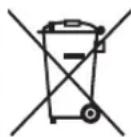
For more information about collection and recycling of old products and batteries, please contact your local municipality, your waste disposal service or the point of sale where you purchased the items.
For business users in the European Union:
If you wish to discard electrical and electronic equipment, please contact your dealer or supplier for further information.

Cd
Information on Disposal in other Countries outside the European Union:
These symbols are only valid in the European Union. If you wish to discard these items, please contact your local authorities or dealer and ask for the correct method of disposal.
Note for the battery symbol (bottom two symbol examples):
This symbol might be used in combination with a chemical symbol. In this case it complies with the requirement set by the EU Battery Directive for the chemical involved.
(weee_battery_eu_en_02)
PRÉCAUTIONS D'USAGE
ACCESSOIRES FOURNIS .... 1
COMMANDES ET FONCTIONS ...... 2
Panneau avant 2
natural_image
Line drawing of a remote control device with no text or symbols(AA, R6, UM-3)
④Prise DIGITAL (OPTICAL)
⑧Prise SUBWOOFER OUT
flowchart
graph TD
    A["Speaker A"] --> B["Inductive Component 1"]
    B --> C["Speaker B"]
    C --> D["Inductive Component 2"]
    D --> E["Speaker C"]
    E --> F["Inductive Component 3"]
    F --> G["Speaker D"]
    G --> H["Inductive Component 4"]
    H --> I["Speaker E"]
    I --> J["Inductive Component 5"]
    J --> K["Speaker F"]
    K --> L["Inductive Component 6"]
    L --> M["Speaker G"]
    M --> N["Inductive Component 7"]
    N --> O["Speaker H"]
    O --> P["Inductive Component 8"]
    P --> Q["Speaker I"]
    Q --> R["Inductive Component 9"]
    R --> S["Speaker J"]
    S --> T["Inductive Component 10"]
    T --> U["Speaker K"]
    U --> V["Inductive Component 11"]
    V --> W["Speaker L"]
    W --> X["Inductive Component 12"]
    X --> Y["Speaker M"]
    Y --> Z["Inductive Component 13"]

natural_image
Line drawing of a remote control device (no text or symbols)(AA, R6, UM-3)

④Buchse DIGITAL (OPTICAL)
⑧Buchse SUBWOOFER OUT
natural_image
Line drawing of a remote control device with no text or symbols(AA, R6, UM-3)

Strömsladd
(endast A-S701)

REGLAGE OCH FUNKTIONER
Frontpanel

① (Strömbrytare)
④ DIGITAL-uttag (OPTICAL)
⑤DIGITAL-uttag (COAXIAL)
⑧SUBWOOFER OUT-uttag
natural_image
Line drawing of a remote control device (no text or symbols)(AA, R6, UM-3)

■Collegamento bi-wire

natural_image
Line drawing of a remote control device with no text or symbols(AA, R6, UM-3)

④Toma DIGITAL (OPTICAL)
⑤Toma DIGITAL (COAXIAL)

natural_image
Line drawing of a remote control device (no text or symbols)(AA, R6, UM-3)

Netsnoer (alleen A-S701)

REGELAARS EN HUN FUNCTIES
Voorpaneel
①-knop (aan/uit)
natural_image
Line drawing of a remote control device (no text or symbols)①Входные гнезда CD

https://download.yamaha.com/
- Be sure to follow the instructions
- WARNING
- These precautions alert you to the possibility of death or serious injury to yourself or others.
- If you notice any abnormality
- Power supply
- Do not disassemble
- Water warning
- Fire warning
- Handling
- Batteries
- CAUTION
- These precautions alert you to the possibility of physical injury to yourself or others.
- Installation
- Connections
- Hearing loss
- Maintenance
- Precautions for use
- NOTICE
- Important information
- NOTE
- Disposal or transfer
- CONTENTS
- About this manual
- USEFUL FEATURES
- SUPPLIED ACCESSORIES
- CONTROLS AND FUNCTIONS
- ① (power) switch
- ③Remote control sensor
- ④PHONES jack
- ⑥BASS control
- ⑦TREBLE control
- ⑧BALANCE control
- ⑨LOUDNESS control
- ⑩ INPUT selector and indicators
- ⑪ VOLUME control
- ⑫CD DIRECT AMP button and indicator (A-S701 only)
- ⑬PURE DIRECT button and indicator
- Rear panel
- ⑩ VOLTAGE SELECTOR (General model only)
- ⑪ IMPEDANCE SELECTOR switch
- ⑫AC IN (A-S701)
- Power cable (A-S501, A-S301)
- Remote control
- ⑦VOLUME +/-
- ⑧MUTE
- ⑨PURE DIRECT
- ⑩Yamaha tuner control buttons
- BAND
- TUNING << / >>
- MEMORY
- PRESET
- ⑪Yamaha CD player control buttons
- ■Installing batteries ■Operation range
- ■Notes on remote control and batteries
- Connecting speakers and source components
- ■REC jacks
- ■Connecting speaker cables
- ■Connecting via banana plug (North America, General, China and Australia models only)
- ■Bi-wire connection
- Connecting power cable
- ■AC IN (A-S701)
- ■Power cable (A-S501, A-S301)
- PLAYBACK
- Playing a source
- Adjusting to the desired sound
- ■Making it easier to hear the high- and low-frequency ranges even at low volume (LOUDNESS)
- ■Reproducing pure, high fidelity sound (PURE DIRECT)
- ■Reproducing CD sound with the highest sound quality (CD DIRECT AMP) (A-S701 only)
- CD Direct Amp feature
- Notes
- TROUBLESHOOTING
- SPECIFICATIONS
- Information for users on collection and disposal of old equipment and used batteries:
- For business users in the European Union:
- Information on Disposal in other Countries outside the European Union:
- Note for the battery symbol (bottom two symbol examples):
- PRÉCAUTIONS D'USAGE
- ACCESSOIRES FOURNIS .... 1
- COMMANDES ET FONCTIONS ...... 2
- ④Buchse DIGITAL (OPTICAL)
- ⑧Buchse SUBWOOFER OUT
- REGLAGE OCH FUNKTIONER
- ① (Strömbrytare)
- ④ DIGITAL-uttag (OPTICAL)
- ⑤DIGITAL-uttag (COAXIAL)
- ⑧SUBWOOFER OUT-uttag
- ■Collegamento bi-wire
- ④Toma DIGITAL (OPTICAL)
- ⑤Toma DIGITAL (COAXIAL)
- REGELAARS EN HUN FUNCTIES
- ①-knop (aan/uit)
- ①Входные гнезда CD
Brand : YAMAHA
Model : A-S701
Category : Receiver