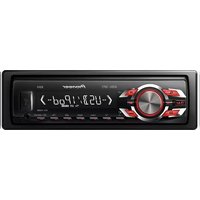
MVH-1450UB - Receiver PIONEER - Free user manual and instructions
Find the device manual for free MVH-1450UB PIONEER in PDF.


| Product Type | Digital Media Receiver (Car Stereo) |
| Brand | Pioneer |
| Model | MVH-1450UB |
| Dimensions (W x H x D) | 178 x 50 x 165 mm (standard single-DIN) |
| Weight | 0.8 kg (1.76 lbs) |
| Power Supply | 12V DC, negative ground |
| Maximum Power Output | 4 x 50W |
| Display | LCD with information display |
| Tuner Bands | FM (87.5-108 MHz), AM (531-1602 kHz) |
| USB Playback | MP3, WMA, WAV (FAT32 file system) |
| AUX Input | Front panel 3.5 mm jack |
| Equalizer | 13-band graphic equalizer with presets |
| Bluetooth | Not built-in (external adapter via AUX optional) |
| iPod/iPhone Compatibility | Yes, via USB (direct digital control) |
| Clock | Analog/digital display with adjustable brightness |
| Remote Control | Included (wired IR and wired remote input) |
| Maintenance | Clean with soft, dry cloth; avoid solvents |
| Safety | 10A fuse; disconnect battery before installation |
| Spare Parts | Fuse, wiring harness, mounting sleeve, trim ring |
| Repairability | User-replaceable fuse; service by qualified technician for other repairs |
| General Information | Category: Receiver; Use: Car audio system; Manual available in PDF |
Frequently Asked Questions - MVH-1450UB PIONEER
User questions about MVH-1450UB PIONEER
0 question about this device. Answer the ones you know or ask your own.
Ask a new question about this device
Download the instructions for your Receiver in PDF format for free! Find your manual MVH-1450UB - PIONEER and take your electronic device back in hand. On this page are published all the documents necessary for the use of your device. MVH-1450UB by PIONEER.
USER MANUAL MVH-1450UB PIONEER
RDS MEDIA CENTER RECEIVER
RECEPTOR Y CENTRO DE COMUNICACIONES RDS
MEDIA CENTER RECEIVER COM RDS
RDS媒體中心接收器
ThankyouforpurchasingthisPIONEER product
To ensure proper use, pleasereach through this manual before using this product. It is especially important that you read and observe WARN-
ING sandCAUTIONsin this manual. Please keep the manual in as safe and accessible place for further reference.
Aboutthisunit

CAUTION
- Donotallowthisunittcome intocontact with liquids. Electricalshockcouldresult. Also, demagetothisunit, smoke, and overheatingcouldresult from contact with liquids.
• Always keep the volume low enough to clear out sidesounds.
• Avoid exposure to moisture. - If the battery is connected or discharged, any preset memory will be erased.
Note
Functionsettingoperationsarecompletedeven ifthemenuscancelledbeforetheoperations areconfirmed.
Aboutthismanual
- In the following instructions, USB memories and USB audioplayers are collectively referred to as "USB storage device".
- In this manual, iPod and iPhone will be referred to as "iPod".
Demomode
Important
- Failure to connect the lead (ACC) of this unit to a terminal coupled with ignition or switch on/off operation on may lead battery drain.
- Remember that the feature deo continues operating when the care engine sturned off, it may drain battery power.
The demo starts a manual call if yououdonctoperat this unit within about 30 second since the unit was last operating for it ignition switch set to ACCorON while the unit sturned off. To cancel the demo mode, you need to display the initial settings. Select DEMO (demodisplay setting) and turn off the mod spray. For details, refer to initial settings on page 8.
Incaseoftrouble
Shoulcth sunittailtooperateproperly, please contact your dealer or nearest authorized PIONEERServiceStation.
Operatingthisunit
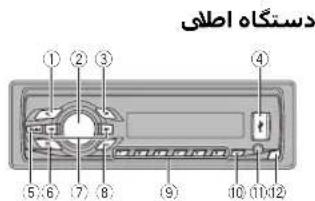
Headunit

PartPart
| 1 | Q (ist) | 7 | ◀▶ |
| 2 | MULTI-CONTROL(M.C.) | 8 | BAND/ (iPod control) |
| 3 | SRC/OFF | 9 | 1/▲:06/↔ |
| 4 | USB port | 10 | ◎/DISP OFF |
| 5 | EQA | 11 | AUX input jack(3.5 mm/sterojack) |
| 6 | →(back/display) | 12 | Delacn button |

CAUTION
• Use an optional Pioneer USB cable (CD-U50E) to connect the USB audio player/USB memory as any device connected directly to the unit will protrude out from the unit and may be dangerous.
• Donotuseunauthorizedproducts.
Remotecontrol

| Part | Operation | |
| 13 | VOLUME | Pressorncosacrococmac volume. |
| 14 | MUTE | Pressormute.Pressagainto unmute. |
| 15 | ▲/▼ | Pressorecalpreselsations, Prostoselocthonixot/pro- vicusfideroralbum. |
| 16 | AUDIO | Pressrodisplayauroiofun-tion. |
| 17 | DISP/SCRL | Pressroselectdiferentdis-plays. Pressancholdoturndmmer onoroff. |
| 18 | II | Prostospauscorosumoclay-back. |
| 19 | FUNC-TION | Pressrodisplayfunctions. |
| 20 | LIST/ENTER | Pressrodisplaytheistde-pondingonthasource. Whileintheoperatingmenu, presslocontrofunctions. |
Operatingthisunit
Displayindication
| 1 | |
| 2 4 6 | |
| 87 93 5 |
IndicatorState
| 1 | Maindis-playsac-tion | •Tuner bandandfrequency•RDS:programservice name,PTY information and otherlical information•USBstoragedevice and Pod elapse playback timeandtxtinformation |
| 2 | Q list | The istfunctionisbeingoper-aiest. |
③LOCLocalseektuningison.
| 4 | TA (TA)TAfunctionison. |
⑤ TP (TP)ATPstationstunedin.
| 6 | re-peat) | Trackanfolder/repeatison. |
| 7 | ×× (ran-corn/shu-fla) | Randomplayison.The Podsourceisselected andtheshuffle/shuffleal function son. |
| S.Rtrv | |
| (8) | (soundre-triever) |
| 9 | (iPod control) | Thisuril'siPodfunctionisoperatectromyouriPod. |
Setupmenu
When you turn the ignition switch to ON after installation, setup menu appears on display. You can set up them on options below.
1Afterinstallationofthisunit,turnthe ignitionswitchtoON. SETUPappears.
2TurnM.C.toswitchtoYES.PressM.C.to select.
■ If you do not operate for 30 seconds, the setup menu will not be displayed.
■ If you prefer not to set up a this time, turn M.C. to switch to NO. Press to select.
If you select NO, you cannot setup in the setup menu.
3Performthefollowingprocedurestoset themenu.
Topreceedlothenext:menuaction.youneedto confirmyourselection.
CLOCKSET(settingtheclock)
1 TurnM.C.toadjustour.
2 PressM.C.toselectminute.
3 TurnM.C.toadjustrinue
4 PressM.C.toconfirmtheselection
FMSTEP(FM/tuningsep)
Normally, the FM tuning step was oyed by seek tuning is 50kHz When AF on A is on, the tuning step automatically changes to 100kHz. It maybe preferable to set the tuning step to 50kHz when AF is on.
• Theluringstepremainsal50kHz during manual-tuning
Turr M.C. to select the FM tuning step.
50(50kHz) — 100(100kHz)
2 PressM.C.loconfirmtheselection
MWSTEP(M/W/tuningstep)
Operatingthisunit
The MVtuningstepcan beswitched between 9kHz and 10Hz. When using the tunerin North Central or South America, reset the turing step from 3kHz (531kHz to 1602kHz lowable) to 10kHz (530kHz to 1840kHz lowable).
① Turn M.C. to select the MW tuning step.
9 (9 kHz)—10 (10 kHz)
2 PressM.C.loconfrrtheselection.
DEMO(dem edisplaysetting)
1 Turn M.C. to set the demo display to on or off.
2 PressM.C.toconf rm theselection.
QUIT appears
4Tofinishyoursettings,turnM.C.toselect YES.Presstoselect.
■If you prefer to change your setting again turn M.C. loswitch to NO. Pressloselect.
Notes
- Youcanselupthemenuoptionsinthe initial settings. For details about these settings, refer to initial settings on page 8.
- Youcancancelsetupmenubypressing SRC/OFF.
Basicoperations
Important
- Handlegentlywhenremovingorattaching thefrontpanel.
- Avoidsubjectingthefrontpaneltoexcessive shock.
- Keep the front panel out of direct sunlight and night temperatures.
- To avoid damaging the device or vehicle interior, remove any cables and devices attached to the front panel before stopping it.
Removing the front panel to protect your unit from the it
1 Pressthedelacht:ulltorlorelease thefront paroi.
2 Push the front panel upward (I); and then pull forward(II)you.

3 Always keep the detached front panel in a protection device such as protection case.
Re-attaching front pane
11 Sliodhotfrontpaneltotheleft. Makesuretoinsertthetaosontheleftsideof theheaduntrlotheslotsonhefrontpanel.

2 Presstherightsidcottnofrontpanelurtilis firmlysealed.
If you cannot attach the front panel to the head units successfully, makes sure that you are placing the front panel onto the head unit correctly. Forcing the front panel into placemay result in damage the front panel on road unit.
Turning the un ton
1 Press SRC/OFF to turn the unit on
Turning the un toff
Press and hold SRC/OFF until the unit turns off
Section
Operatingthisunit
Selectingasource
1 Press SRC/OFF to cycle between: TUNER (luner)—USB (USB)/iPod (iPod)— AUX(AUX)
Adjustingthevo lme T|TurnM.C. to adjust the volume.

CAUTION
Forsafetyreasons, park your vehicle when removing the front panel.
Note
Whenthisunit'solue/white eadisconnectedto thevehicle'sauto-antennarelaycontrolterminal.thevehicle'santennaextendswhenthis unit'ssourceisturnedon.FOREtracttheantenna.turnthesourceoff.
Useandcareoftheremote control
Usingtheremolecontrol
T) Pointtherometacontrolinthed rctionofthe frontpanelcooperate. When using forthefirsttime, pull out the film protruding from the tray.
Replacingthebattery
①Slidethatrayout on the back of the remole control.
2 Insert the battery with the ous(+) and minus (-) poles aligned properly.


WARNING
- Keeolthebatteryyouofthereachofchildren. Shoudthebatteryboswallowoo.consulta doctorimmediately.
- Batteries(batterypackorbatteries installed) must not be exposed to excess vehicle such as sunshine, fire or the bike.

CAUTION
• Use one CR2025 (3 V) lithium battery
- Removalheballery if theremole controlis not used for a month longer.
• There is a dangerous explosion if the battery is incorrectly replaced. Replace only with the same equivalent type.
- Denothandlethebatterwithmetallictools.
- Do not store the battery with metallic objects.
• If the battery leaks, wiptheremote control completely clean and install anew battery.
- Whend sposingofusedbatteries,comply with governmentalregulatonscrewn-mentalpublicinstitutions'rulestnatapelyin yourcountry/area.

Important
- Donotstoretheremotecontrol in hight temperature sordirect sunlight.
- Theremotecontrol may not function properly indirect sunlight.
- Donotlettheremotecontrolfallontothe floor,whereitmaybecomejammedunder thebrakeoracceleratorpedal.
Operatingthisunit
Menuoperationsidentical forsetupmenu/function settings/audioadjustments/initialsettings/lists
Returningtotheproviousdisplay Returningtotheproviouslist(theto derone eve higher)
TPress
Returning the ordinary display Canceling the initial setting menu/setup menu
1PressBAND/
Returning the ordinary display from the list TPressBAND/
Tuner
Basicoperations
Selectingaband
ressBAND/ until the desired band (F1, F2 F3 for FM, MW or S1, S2 for shortwave) is displayed.
Recalling presetstations
1 Press◄ or ►
- If MAN (manual tuning) is selected in SEEK you cannot recall presetsations. You need to select PCH (presetcherne) in SEEK. For details about those settings, refer to SEEK (left/right key setting) on the next page.
Manualtuning(stepbystep)
1 Press ▶ or ▶
- If PCH (presel channel) is selected in SEEK, you cannot tuncupordownmanually. You needloselectMAN( manual tuning)inSEEK. For details about the settings, refer to SEEK (left/right key setting) on nonextpage.
Seeking
1 Press and hold ◀ or ▶, and then release. You can cancel seek tuning by brief expressing
◀or▶. Whilepressingandholding◀or▶,youcan skipstations.Seektuningstartsassoonas yourelease◀or▶.
Note
Thisunit's AF(alternative frequenciessearch) function can be turned on and off. AF should be off to normal tuning operation(referto AF(alternative frequenciessearch) on the next page).
Storingandrecallingstations foreachband
Usingpresettuningbuttons
1Whenyoufindastationthatyouwant tostoreinmemory,pressoneofthepreset tuningbuttons(1/ ^ to6/)andholduntil thepresetnumberstopsflashing.
2Pressoneofthepresettuningbuttons (1/^ to6/)toselectthedesiredstation.
SwitchingtheRDSdisplay
-Press.
Programservicename—PTYinformation—Entertainment—Frequency
■FTYinformationandthofrequencyappearonthedisplayforeightseconds.
■Depending on the band, text information can be charged.
Operatingthisunit
■ Text information tem sthatcanbechargedo-pendorthearea.
PTYlist
NEWS/INFO
NEWS(News), AFFAIRS(Currentaffairs), INFO (Information), SPORT(Sports), WEATHER(Weather), FINANCE(Finance)
POPULAR
POPMUS(Popularmusic),ROCKMUS(Rock music),EASYMUS(Easylistening),OTHMUS (Othermusic),JAZZ(Jazz).COUNTRY(Country music),NATMUS(Nationalmusic),OLDIES (Oldiasmusic),FOLKMUS(Folkmusic)
CLASSICS
L.CLASS(Light:classical).CLASSIC(Classical)
OTHERS
EDUCATE (Education), DRAMA (Drama), CULTURE (Culture), SCIENCE (Science), VARIED (Varied), CHILDREN (Children's), SOCIAL (Social affairs), RELIGION (Religion), PHONEIN (Phone in), TOURING (Travel), LEISURE (Leisure). DOCUMENT (Documentaries)
Functionsettings
1PressM.C.todisplaythemainmenu.
2TurnM.C.tochangethemenuoption andpresstoselectFUNCTION.
3TurnM.C.toselectthefunction.
After-selecting, perform the following procedure to set the function.
- If MW, S1 or S2 is selected, only BSM, LOCALandSEEKisavailable.
BSM(beststationsmemory)
BSM(beststations:memory)automaticallystores thesix:strongestations in the order of their signal strength. 1PressM.C.otumBSMon. Tocancel.pressM.C.again.
REGION(regional)
When AF is used, theregional function on limit the selection of station stot nose broadcast ing reg on alprograms. 1 Press M.C. to umtharagional function on or off.
LOCAL(localsee during)
- PressM.C. close the desired setting. FM: OFF LV1 LV2 LV3 LV4 MV/shortwave: OFF—LV1—LV2 Then ghest levels selling all own recept on of only the strongest stations, while lower levels allow where exception of weaker stations.
PTYSEARCH(programtypeselection)
Operatingthisunit
Youcantune ntoastationusing?IY(program type)information. 1PressM.C lod.solaythesell nomone.
21umM.C.teselectthedesiredsetting. NEWS/INFO—POPULAR—CLASSICS OTHERS
3 ProssM.C.to begin to search. The unit searches/or basalab Broadcasting that typeol program. When a prior is found, its program or video on a media displayed for PTI (program typeol Dcode) information, refer to this page. The program of the analyst may differ from that in relation by the transmitted PTI. In station is broadcasting the typeol program you search another. NOTFOUNDDis displays forebourse two seconds and then the turn return instel being malstation.
TA(trafi:cannouncementsstandby)
1 Press M.C. column traffic announcement stand by on or off.
AF(alternativefrequenciessearch)
TPressM.C.totumA.Fenoroff.
NEWS (rewsprogram interruption)
1PressM.C.toturnthe\FWSfunctiononer off.
SEEK(eft/rightkeysetting)
Youcan assign a function to the left and right keys of the unit. Select MAN (manual running) for one upordown manually or select PCH (preset channel) to switch between preset channels. 1 Press M.C. to select MAN or PCH
USBstoragedevice
Basicoperations
PlayingfilesonaUSBstoragedevice 1 CoentheUSBportcover. 2 PlugintheUSBstorageddev ceusingaUSB cable. Playbackisperformedautomatically.
Stopping playbackoff lesson a USB storage device [1] You may disconnect the USB storage device anytime. The unit stops playback.
Selectingafolder TPress1/ ▲ or2/.
Selectingafile 1 Press◄ or ►
Fastforwardingoverversing 1 Press and hold ▶ or ▶. • When playing compressed audio, there is no sound during fastforwarderoverse.
Returningtorootfolder □PressandholdBAND/
Switching between playback, memory devices You can switch between playback, memory devices on USB storage devices with more than one mass Storage Device compatible memory device. 1 Press BAND? • You can switch between two or three different memory devices.
Note
Disconnect USB storage devices from the unit when not in use.
Section
02
Operatingthisunit
Displayingtextinformation
| Selectingthedesiredextinformation |
| TPress |
| • Depending the version of tunesused to write/ F3filestomed afi types, incompatible text stored within an aud ofile may be displayed incorrectly. |
Selectingandplayingfilesfrom thenamelist
| 1Presstoswitchtothefilenamelist mode. |
2UseM.C.toselectthedesiredfilename (orfoldername).
| ChangingthetleorfoldemameTJlumM.C. |
| PlayingTJwnerafi cisslected,pressM.C. |
| Viewinga istoftheti es(orolders)inthese- lechedfolderTJwner atc derisselected, pressM.C. |
| Playingafiler the selected folderTJwner atc derisselected, pressandhole M.C. |
Advancedoperationsusing specialbuttons
| Selectingaropcatplayrange | |
| 1Press6' ⇌ locyclebetweenthefollowing: | |
| •ALL-Repeatalfiles | |
| •ONE-Repoathocurrentfile | |
| •FLD-Repealthecurrenfolder |
Playngfilesinrandomorder
| Press5/ × toum random playonoroff. |
| Filesinaselected repeatrange are played in random order. |
| • Toc nangesongs during random play, press to switch to then ex track. Pressing • restart may back of current track from the beginning of the song. |
Pausingplayback
| 1 | Press 4:PAUSE to pause or resume |
| Enhancing compressed audio and restoring rich sound(soundreliever) |
1 Press 3/S.Rtrv to cycle between:
1 2 OFF(off)
| 1 | selfective for low compression rates, and 2 |
| iseffective for high compress or rates. | |
Functionsettings
1PressM.C.todisplaythemainmenu.
2TurnM.C.tochangethemenuoption andpresstoselectFUNCTION.
3TurnM.C.toselectthefunction.
Afterselecting perform the following procedures to the function.
REPEAT(repeatplay)
1 PressM.C.loselectarepeatplayrange Fordetails, referto.Selectingarepeatplayrange onthispage.
Operatingthisunit
RANDOM(random play)
1PressM.C.tolumrandomplayonoroff.
PAUSE(pause)
TPressM.C.topausaornesume.
S.RTRV(soundretriever)
Automatically enhances compressed audio and restores rich sound.
1 Press M.C. to select the red setting. Fordetails, refer to Enhancing compressed audio and restoring rich sound (sound reinver) on this page.
iPod
Basicoperations
| PlayingsongsoraniPixl □OpentheUSBportcover. □ConnectaniPodttheUSBcableusingan iPixlDoc<Connector> Playback sperformedautomatically. |
| Selectingsong(chapter) 1 Press ▶ or ▶. |
| Selectingan album 1Press1/ ▲ or 2/√ •Thea bummayrolbeselectedcorrectly if the iPodhas moethanonca burwiththosame titlecit. Selectthealbumyouwanttoliston tusingisbsearch Fordelails.refertoBrows- ingforasongorthispage. |
| Fastforward ngorreversing 1 Press and hold ▶ or ▶ |
Notes
• TheiPodcannotbeturnedonorofwhenthe controlmodeissettoCTRLAUDIO.
- DisconnectheadphonesfromthePodbeforeconnectingiltothisunit.
• TheiPodwillturnoffabouttwominutesafter the gnitionswitchissettoOFF.
Displayingtextinformation
Selecting the desired text information
1Press
Browsingforasong
1Presstoswitchtothetopmenuoflist search.
2UseM.C.toselectacategory/song.
| Changing the name of the song or categoryTJumM.C.Play its—artists—albums—songs—podcasts—genres—composers—aud ebooks |
| PlayingTJWhen asong is so cted, press M.C. |
| Viewing artist of songs in the selected categoryTJWhen acategory is so cted, press M.C. |
| Playing asong in the selected categoryTJWhen acagory is so cted, press and hold M.C. |
| Searching the list by alphabet1When is for these selected category scis-played, press 2 to switch alphabet search mode.Youals ocan switch alphabet search mode by turning M.C twice.2TJum M.C. to select a letter.3Press M.C. to splay the alphabetic list.Iocancel searching, press D. |
Operatingthisunit
Notes
- You can play playlists created with the PC application (MusicSphere). The application will be available on our website.
- PlayliststhatyoucreatedwiththePCapplication(MusicSphere)aredisplayedinabbreviatedform.
Advancedoperationsusing specialbuttons
Selectingarepeatplayrange
Press6/ tocyclebetweenthefollowing:
- OFF-Repeatoff
•ONE-Repeathecurrentsong
• ALL – Repeat all songs in the selected list - You cannot select OFF when CTRL AUDIO is selected. Refer to Operating this unit's iPod function from your Podorth this page.
Playing all songs in random order (shuffle all)
1Press5/ ×tolumshuffleallon.
When the control mode is set to CTRL iPod/
CTRLAPP, shufflep ayison.
Pausing playback
1 Press 4:PAUSE to pause or resume.
Enhancing compressed audio and restoring rich sound (sound retriever)
1 Press 3/S.Rtrv to cycle between:
1—2—OFF(off)
1iseffectiveforlowcompressionrales,and2
selective for high compression rates
Playingsongsrelatedtothe currentlyplayingsong
You can plays songs from the following lists.
• Albumlistofthecurrentlyplayingartist
• Songlistofthecurrentlyplayingalbum
• Albumlistofthecurrentlyplayinggenre
1PressandholdM.C.toswitchtolinkplay mode.
2TurnM.C.tochangethemode;pressto select.
• ARTIST – Plays an album of the artist currently being played.
- ALBUM – Plays a song from the album currently being played.
- GENRE – Plays an album from the genre currently being played.
Theselected song/album will be played after the currently playings song.
Notes
- Theselectedscng/albummaybecanceledif youoperatefunctionssotherthanlinksearch (e.g.fastforwardandreverse).
- Depending on the song selected to play, the end of the currently playings song and the beginning of these selected songs/album maybe cutoff.
Operatingthisunit'siPod functionfromyouriPod
You can list to the sound from your Pod applications using your car's speakers, when
CTRLAPPisselected.
- This function is not compatible with iPod nano1st generation.
APPMode is compatible with the following iPod models.
• iPhone4(softwareversion4.1orlater)
• iPhone3GS(softwareversion3.0orlater)
• iPhone3G(softwareversion3.0orlater)
• iPhone(softwareversion3.0orlater) - iPodtouch4thgeneration(softwareversion 4.1orlater)
- iPodtouch3rdgeneration(softwareversion 3.Corlater)
- iPodtouch2ndgeneration(softwareversion 3.0orlater)
- Podtouch1stgeneration(softwareversion 3.0orlater)
●PressBAND/ toswitchthecontrol mode.
- CTRL iPod – This unit's iPod function can be operated from the connected iPod.
- CTRL APP – Play back the sound from your iPod applications.
- CTRL AUDIO – This Unit's iPod function can beoperated from this unit.
Notes
- Switching the control mode to CTRL iPod/CTRLAPPpaussong playback. Operate theiPodtoresume playback.
- The following functions are still accessible from the unit even if the control mode is set to CTRLiPod/CTRLAPP.
—Pausing
—Fastforward/reverse
—Selectingasong(chapter)
- When the control mode is set to CTRL iPod, operations are limited as follows:
—The function settings are not available.
—The browsefunction cannot be operated from this unit.
Functionsettings
1PressM.C.todisplaythemainmenu.
2TurnM.C.tochangethemenuoption andpresstoselectFUNCTION.
3TurnM.C.toselectthefunction.
Afterselecting, perform the following procedure to set the function.
- When the control mode is set to CTRL iPod/CTRLAPP, only PAUSE or S.RTRV is available.
REPEAT(repeatplay)
1 Press M.C. losaleclarepeatplayrange. For details, refer to Selecting arepeatplayrange on this page.
SHUFFLE(shuffle)
1 PressM.C. to select your favoritesetting.
- SNG – Play back songs in the selected list inrandomorder.
- ALB – Play back songs from a randomly selected albumin order.
- OFF-Cancelrandomplay
SHUFFLEALL(shuffleall)
TPressM.C.toturnshuffleallon. Totumoff, set SHUFFLEintheFUNCTION menuloff.
LINKPLAY(linkplay)
1 PressM.C.todisplaythesettingmode.
②TurnM.C.ochangethamode;presstoselect. For details about these settings, refer to Playing songs related to the currently playing song on this page.
PAUSE(pause)
1 PressM.C.topause resume.
AUDIOBOOK(audiobookspeed)
1 PressM.C.todisplaythesettingmode.
2TurnM.C.toselectyourfavoritesetting.
- FASTER – Playback at a speed faster than
normal
• NORMAL-Playbackatnorma speed
•SLOWER-Playbackataspeedslower
thannormal
3 PressM.C.toconfirmtheselection.
Operatingthisunit
S.RTRV(sound retr even)
Automatically enhances compressed audio board restores rich sound.
1) Press M.C. to select the desired setting. For details refer to enhancing compressed audio and restoring rich sound (sound retriever) on the previous page.
Audioadjustments
1PressM.C.todisplaythemainmenu.
2TurnM.C.tochangethemenuoption andpresstoselectAUDIO.
3TurnM.C.toselecttheaudiofunction.
Afterselecting, perform the following procedure to set the audio function.
FAD/BAL(faster/balanceadjustment)
1) Press M.C. to display the setting mode. 2) Press M.C. to cycle between front/rear and balance (left/right).
3|lumM.C.toadjustspeakerbalance.
- When herearoutput and RCAoutput setting are SW, you cannot adjust front/rearspeaker balance. Rote to REAR-SP (rearoutput setting) or then next page. Rote to PREOUT (preout setting) or then next page.
PRESETEQ(equalizerrecall)
1) PrassM.C.tcdisplaythesettingmode.
2TumM.C.toselecttheequalizer
DYNAMIC VOCAL NATURAL CUSTOM —FLAT—POWERFUL
3 PressM.C.toconfirmtheselection.
- You can also switch the equalizer by pressing EQU repeatedly.
TONECTRL(equalizeradjustment)
•Adjustedequalizercurvesettingsarestoredin
CUSTOM
TPressM.C.todisplaythesettingmode.
2 Press M.C. to select BASS (bass)/MID (midi)/TREBLE(treble).
3 TurM.C.toadjustnelevel. Adjustment range: +6 to -6
LOUD(leadness)
Loucnesscompensatesfordeficiencies nthelow-frequencyandh gh-frequencyrangesatlowvol-time.
[1] PressM.C. to select next reset setting OFF (off) — LOW(low) — HI (high)
SUB.W(subwooferor/offsetting)
This is a secure equipped with asubwoo'erout which can be returned on or off.
1 PressM.C. to select necessary resetting. NOR (normal phase) — REV (reverse phase) OFF(subwoofer off)
SUB.WCTRL(subwoofered)justment)
The cut-off frequency and output level can be adjusted when the subwoofer output is on. Only frequencies lower than those in the selected range are outputted from the subwoofer.
- When you select OFF in SUB.W, you cannot select this function. Fordetails, refer to SUB.W (subwooferon/offsetting) on this page.
1 PressM.C. to display the setting mode.
[2] PressM.C.tocycle between the cut-off frequency and output level of the subwoofer. Cut-off frequency (Cut-off frequency display flashos.)—Output level (Output level display flashos.)
3 Turn M.C. to select the desired setting. Cut-off frequency: 50HZ—63HZ—80HZ—100HZ—125HZ Output level: -24 to +6
Operatingthisunit
SLA(sourceleveladjustment)
SLA(Sourceleveladjustment)atsyouadjustthe volumelevelofeachsourceoprowontradical changesinvolumewhenswitchingbetweensources
- SettingsarebasedonthalMvolumelevel, whichremainsunchanged.
- The MVV volume level can also be adjusted with this function.
- When selecting FMasthesource, you cannot switch to SLA.
①PressM.C.todisplaythesettingmode.
- Turn M.C. to adjust the source volume. Adjustment range +4 to -4
3 PressM.C.toconfirmtheselection.
Initialsettings
1PressandholdSRC/OFFuntiltheunit turnsoff.
2PressM.C.andholduntilfunctionname appearsinthedisplay.
3TurnM.C.toselecttheinitialsetting.
Afterselecting, perform the following procedures to set the initial setting.
CLOCKSET(seting her cck)
TPressM.C.tocisplaythesettingmode.
2 PressM.C. to select tonnesegmentoftheclock display you wish to set. Hour—Minute
3 lumM.C.toadjusttheclock.
FMSTEP(FMtuningstep)
Normally the HMtuningstopemployeobyseek tuningis60kHz. When AForTAison, the tuning stepautomatically changesto100kHz. If maybe preferable to set the tuning step to 50kHz when AFison.
- Thetuningstepremainsatsat50kHz during manualturing.
1 PressM.C. to select the FMtunings.ep. 50(50kHz)—100(100kHz)
MWSTEP(MWtuningstep)
TrieMWlunings epcar beswitched between 9kHz to 10kHz. Whonus ngthofuncorn/Norn, Contra or South America, resotthatuning step from 8kHz (531kHz to 602kHz allowable) to 10kHz (530kHz to 160kHz allowable).
TPressM.C.toselecttheMWTuringstop 9 (9 kHz)—10 (10 kHz)
AUTO-PI(autoPIseek)
The unit can automatic ysearch for different station with the same programming event during presetrecall.
1PressM.C.toturnAutoPlseekonoroff.
AUX(auxiaryinpu)
Activate this setting when using an auxiliary device corrected this unit. TPressM.C.toturnAUXonoroff.
USBPNP(p upandplay)
Operatingthisunit
Thisett ngalowsyoutoswitchyoursource USB/iPodautomatically.
1 PressM.C. lolumtheplugantplayfunction onprofit
ON-WhenaUSBstoragedevice/iPodisconnected,depending on the type of device, the source is automatically switched to USB/iPod when you turn the engine. If you connect your USB storagedevice/iPod, this unit's source is turned off.
OFF-WhonaUSBstoragedevice/iPodisconnected, thesourceisnotswitchedtoUSB/
iPodautomatically. Please change the source to USB/iPod manually.
REAR-SP(rearoutputsell np)
The arcaespeakorloadsoutputcanbousodforfull rangesbeakerorsubwooferconnection. IfyouswitchtoSW,youcanconnectaranspeakorloaddirectlytoasubwooferwithoutusingan auxil aryamp.
Initially, REAR-SP is set for rearful -rangespeaker connection (FUL).
pressM.C. to select the desired setting.
FUL—SW
• Evenifyouchangetthissettingtherew ll benooutputifyouselectOFFinSUB.W (RefertoSUB.W(subwooferon/offsetting) onthepreviouspage).
- If you change this setting, subwoofer output in the audio or menu will return to the factory settings.
PREOUT(precoutsetting)
The RCA outputscanbeusectorearspeakeror subwoo'erconnection.
If you switch to SW, you can connect are speakers and add directly to a web or without using an auxiliary amp.
Initially, PREOUTtiset for rearfull-rangespeaker connection(SW).
1 PressM.C. loselect the desired setting. SW—REA
• Even if you change this setting, there will on outputify yourself OFF in SUB.W (Refer. oSUB.W(subwork or off setting) on the previous page).
• If you touch an goethi ssetting, subwooferout: outinthea diomenu will return the factorysettings.
DEMO(demod splaysetting)
1PressM.C.toturnthedemod splayenoroff.
SCROLL(scroll modesetting)
Whenever scroll is set to ON, record text information scroll continuously in the display. Set to OFF if you refer the information scroll just once.
PressM.C.tolumthe severscrollonoroff.
Switchingthedimmersetting
You can adjust the brightness of illumination.
●Pressandhold

UsinganAUXsource
1 InsertthestereominiplugintotheAUX inputjack.
2PressSRC/OFFtoselectAUXasthe source.
Operatingthisunit
Note
AUX cannot be selected unless the auxiliary setting is turned on. Formoredetails refer to AUX (auxiliary input) on the previous page.
Turningtheclockdisplayon oroff
●Press/DISPOFFtoturntheclockdisplayonoroff.
■Theclockdisplaycisappearstemporarilywhen youperformotheroperations,buttheclockdisplay appearsagainafter25seconds.
Turningthedisplayofforon
●Pressandhold/DISPOFFuntilthedisplayturnsoffandon.
Section
Installation
Connections

WARNING
- Usespeakersoverb3W(outputvalue)and between4Ωlo8Ω(impedancevalue). Do notuse1Ωlo3Ωspeakersforthisunit.
• The black cable ground. When installing this un-tor powerer spring (sold separately), makes re connected the ground wire first. Ensurate that ground wire is properly connected to metal parts of hear body. The ground wire of the power ramp and heone of this un-tor any other vehicle must be connected to the car separately with different screws. If theserew for the ground wire also sens for falls out, it could result in fire generation of smokearmal function.
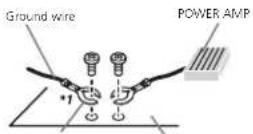
Other devices Metal parts of car's body (Another electronic device in the car)
"Non supplied for this unit.
Important
- When installing this unit in vehicle without an ACC (accessory) position on the ignition switch, failure to connect there accessible to the terminal thaldelects operation of the ignition key may result in battery drain.

ACC position

No ACC position
• Use this unit with a 12-volt battery and negative grounding only. Failure to do so may result in fireormal function.
- Topreventashort-circuit, overheating formal-function, besuretofollowedirections below.
— Disconnect the negative terminal of the battery before installation.
— Secure the wiring with cable clamps or adhesive tape. Wrap adhesive tape around wiring that comes into contact with metal parts to protect the wiring.
— Place all cables away from moving parts, such as the shift lever and seat rails.
— Place all cables away from not places, such as near the heater outlet.
— Do not connect the yellow cable to the battery by passing it through the hole to the engine compartment.
— Cover any disconnected cable connectors with insulating tape.
— Do not shorten any cables.
— Never cut the insulation of the power cable of this unit in order to share the power with other devices. The current capacity of the cable is limited.
— Use a fuse of the rating prescribed
— Never wire the negative speaker cable directly to ground.
— Never band together negative cables of multiple speakers.
- When this unilison, contro signals are sent through the blue/whitebaccie. Connect this cableto system remcote control of an external power ramp theveh cie'sauto-antenna clay control terminal (max. 300 mA 12VDC). The vehic disc equipped with a glassanenna, connect it heartenna, boost power supply terminal.
- Neverconnecttheblue/whitocabletothe powerterminalofanexternalpoweramp. Also,neverconnectttothepowerterminal oftheautoantenna.Doingsomeyresultin batterydraincramalfunction.
Installation
This unit
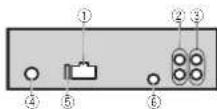
①Powercordinput
②Rearoutputsuowooferoutput
③Frontoutput
④Antennainput
⑤Fuse(10A)
⑥Wiredremoteinput
Hard wiredreme control adaptor can be connected (sold separately).
Power cord
Performtheseconnectionswhannotconnectingareaspeakerleadtoas.bwoofer.

flowchart
graph TD
    subgraph_L["1"]
        A1["①"] --> B1["②"]
        B1 --> C1["③"]
        C1 --> D1["④"]
        D1 --> E1["⑤"]
        E1 --> F1["⑥"]
        F1 --> G1["⑦"]
        G1 --> H1["⑧"]
        H1 --> I1["⑨"]
        I1 --> J1["⑩"]
        J1 --> K1["⑪"]
        K1 --> L1["⑫"]
        L1 --> M1["⑬"]
        M1 --> N1["⑭"]
        N1 --> O1["⑮"]
        O1 --> P1["⑯"]
        P1 --> Q1["⑰"]
        Q1 --> R1["⑱"]
        R1 --> S1["⑲"]
        S1 --> T1["⑳"]
        T1 --> U1["㉑"]
        U1 --> V1["㉒"]
        V1 --> W1["㉓"]
        W1 --> X1["㉔"]
        X1 --> Y1["㉕"]
        Y1 --> Z1["㉖"]
        Z1 --> AA["㉗"]
        AA --> AB["㉘"]
        AB --> AC["㉙"]
        AC --> AD["㉚"]
        AD --> AE["㉛"]
    end
    subgraph_R["2"]
        B2["③"] --> C2["④"]
        C2 --> D2["⑤"]
        D2 --> E2["⑥"]
        E2 --> F2["⑦"]
        F2 --> G2["⑧"]
        G2 --> H2["⑨"]
        H2 --> I2["⑩"]
        I2 --> J2["⑪"]
        J2 --> K2["⑫"]
        K2 --> L2["⑬"]
        L2 --> M2["㉜"]
        M2 --> N2["㉝"]
        N2 --> O2["㉞"]
        O2 --> P2["㉟"]
        P2 --> Q2["㉟"]
        Q2 --> R2["㉟"]
    end
    style L fill:#f9f,stroke:#333
    style R fill:#f9f,stroke:#333
Perform these connections when using asub-woofer without the optional amplifier.

flowchart
graph TD
    A["Speaker L"] --> B["Amplifier ①"]
    B --> C["Capacitor ②"]
    D["Switch F"] --> E["Amplifier ③"]
    E --> F["Capacitor ④"]
    G["Switch SW"] --> H["Amplifier ⑤"]
    H --> I["Capacitor ⑥"]
    J["Switch ⑦"] --> K["Amplifier ⑧"]
    K --> L["Capacitor ⑨"]
    M["Switch ⑩"] --> N["Amplifier ⑪"]
    N --> O["Capacitor ⑬"]
    P["Switch ⑪"] --> Q["Amplifier ⑫"]
    Q --> R["Capacitor ⑬"]
    S["Switch ⑭"] --> T["Amplifier ⑭"]
    T --> U["Capacitor ⑮"]
    V["Switch ⑮"] --> W["Amplifier ⑯"]
    W --> X["Capacitor ⑰"]
① Topowercordinout
② left
③Right
(4) Frontspeaker
⑤Rearspeaker
⑤White
⑦White/black
⑧Gray
⑨Gray/black
@Green
⑪Green/black
⑫Violet
d3Violet/black
⑭Black(chassisground)
Connect:loaclean.painl-freemetallocation.
15Yellow
Connectoltheconstant12Vsuopvtermi-
nél.
@Red
Connectlateralcontrolledbyignition
switch(12VDC)
⑰Blue/white
Connectosystemcontrolterminalofthe
poweramporaulo-antennarelaycontroller-
minal(max,300mA12VDC).
⑱Subwoofer(4Ω)
Installation
⑲ When using a subwoofer of 70 W (2 Ω), be sureloconnect:thesubwoofertol:eviolet and violet/blackleadsof this unit. Donot connect anything to the green and green/blackleads.
@Notused.
②Subwoofer(4Ω)×2
Notes
- Witha2speakersystem.donotconnectanythingtothespeakerleadsthatarenotconnectedlspeakers.
- Changethe nit al setting of this unit. Refer to REAR-SP (rear output setting) on page 9. Refer to PREOUT (preout setting) on page 9. The subwoofer output of this unit is monaural.
Poweramp(soldseparately)
Perform these connections when using the options amplifier.

flowchart
graph TD
    A["①"] --> B["②"]
    B --> C["③"]
    B --> D["④"]
    B --> E["⑤"]
    B --> F["⑥"]
    G["⑦"] --> H["②"]
    H --> I["③"]
    H --> J["⑥"]
    H --> K["⑦"]
①Systemremotecontrol
ConnecttoBlue/whitecable
②Poweramp(soldseparately)
③ConnectwithRCAcables(soldseparately)
④ToFrontoutput
⑤Frontspeaker
⑥ToRearoutputsubwooferoutput
(7)Rearspeakerorsubwoofer
Installation
Important
- Checkallconnectionsandsystemsbefore finalinstallation.
• Donoluseunauthorizedparlsasthismay cause malfunctions. - Consult your dealer installation requires drilling of holes or other modifications to the vehicle.
- Denot install this unit where: — it may interfere with operation of the vehicle. — it may cause injury to pass passenger as a result of as sudden stop.
- These semiconductor laser will be damaged if it overheats. Install this unit away from hot places such as near the heater outlet.
- Optimumperformanceisobtainedwhenthe unitisinstalledatanangleof essthan60°.

- When installing, loensureproperhealdispersal when using this unit, makes sure you leave a space behind therearpane and wrapanylocsecaclessoltheyarenotblockingthevents.
Leave ample space

DINfront/rearmount
This unit can be properly installed using either front-mounted rear-mounted installation.
Installation
Usecommerc a i yavailablepartswheninsta- ling.
DIN Front-mount
1Insertthemountingsleeveintothedashboard.
For installation in shallow spaces, use the supplied mountings sleeve. If there is enough space, use the mountings sleeve that can with the vehicle.
2Securethemountingsleevebyusinga screwdrivertobendthemetaltabs(90°)into place.

① Dashboard
② Mountingsieve
3Installtheunitasillustrated.
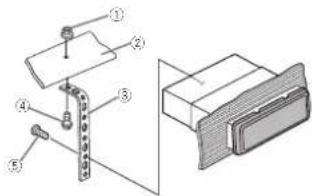
①Nut
②Firewallormetalsupport
③Metal strap
④Screw
⑤Screw(M4×8)
■ Makesureth attheunitis installed securely in place. An nur stable installation may cause skipping or other malfunctions.
DIN Rear-mount
1 Determinetheappropriate position wheretheholesonthebracketandtheside oftheunitmatch.
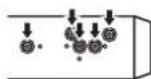
2Tightentwoscrewsoneachside.

①Trusscrew(5mm×8mm)
②Mountingbrackel
④Dashboard console
Removing the unit
1Removethetrimring.
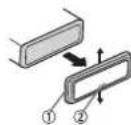
①limring
②Notchedtab
- Releasing the front panel allows easier access to the trim ring.
Section
03
Installation
- When roattaching the trimming point the side with then oched tabo own.
2Insertthesuppliedextractionkeysinto bothsidesoftheunituntiltheyclickinto place.
3Pulltheunitoutofthedashboard.

Removingandre-attachingthe frontpanel
You can remove the front panel to protect your unit from theft. Presstedetachoutonandpushthefront paneluowardandpullitowardyou. For details, refer to removing the front panel to protect your unit from theft and re-attaching the front panel on page 3.

En
Additionalinformation
Troubleshooting
SymptomCauseAction
| Thedisplay screen changcsat random. | Demomodels on. | Turnoffthedemo displaysetting. |
| Thedisplay screen changcsat random in-steadoteis-playingthe clockcontinuouslyoven withtheclock displayturned on. | Demomodels on. | Turnoffthedemo displaysetting. |
| Thedisplay screen changesat randomeven with the display:ff turnedoff. | Demomodeis on. | Turnoffthedemo displayselling. |
| Thedisplay automatically rotumstorcho ord narydis- play. | You did not perform any operation within about 30 seconds. | Performoperation again. |
| Therepeat playrange changesun- expectedly. | Decendingon therepeat lay range, these-lectedrange maychange when another to be or crack is beingselected orduring/last forwarding/reversing. | Selecttherepeat playrangeagain. |
SymptomCauseAction
| Asubholderis notplayed back. | Sustfolderscan-notbeplayed whenFLDifold-errepeachse-lected. | Selectanotherre-peatplayrange. |
| NOXXXXappearswhana d splayls changoc!NO TITLE.(orex-amc c). | Thereisnoem-bedded extin-formation. | Switchthed splay orplayanother trackfli.c. |
| Theunits malfunction-ing. Thereisinter-ference. | Youareusinga device suchas acellular phone that transmitselectr:wavasnear theunit. | Moveelectrical devicesthatmay becausingthai-terferenceaway fromtheunit. |
Errormessages
When you contact your dealer or your nearest Pioneer Service Center, be sure to get the error message.
USBstoragedevice/iPod
| MessageCauseAction | |
| NODEVICEWhenplugandplaysoft noUSBstoragedevicePodisconnects. | •Turnthaplugarplayon.•Connectacom-particleUSBstoragedevice/Pod. |
| FRMTREADSometimesthercisacc bybetweenthestarioofplaybackandwhervyoustarttoharanyscurd. | Watuntil hemessagedisappearsandyouhearsound. |
Additionalinformation
MessageCauseAction
| NOAUDIOTherearano songs. | Transfertheaudio fiestacheUSB storagedevice andconnect. |
| Theconnected USBstoragedevicehassecur-tyonabled. | FollowtheUSB storagedevice in-structionstoxlis-ablethosecurity. |
| SKIPPEDTheconnected USBstoragedevicacontans filesembeced with Windows MediaTMDRM9/10. | Playanaud of file nonembedded withWindows MediaDRM9/10. |
| PROTECTAllrefilesin theUSBstorage devicarecem- bedledwith WindowsMedia, DRM9/10. | Transferaudio filesnotem- cdedwith Win windowsMedia DRM9/10tothe USBstoragede-viceandconnect. |
| N/AUSBTheUSBdevice connectectois notsuaported bythisunit. | ConnectaUSB MassStorage Classcompliant device.Disconnect yourdeviceand replace with a compatibleUSB storagedevice. |
MessageCauseAction
| CHECKUSBTheUSBconnectororUSB cablehasnot-circuited | Checkthatthe USBconnectororUSBcablesnot caught nsomethingordamaged. |
| Theconnected USBstoragcodevicoconsumes more than 500mA(maxi mumallowable current). | D:connectthe USBstoragcodevicoanddonot use ITurnthe ignitionswitchto CFF thentoACC orONandthen connectiony compliantUSB storagedevices. |
| ThaiPodoperatescorrectly butdoesnot charge. | Makasuratha connect orcable forthePodhas notshortabout (e.g.,notaught inmetalobjects). Afterchecking, turntheignition switchOFFand backON and s-connecttheilPod and reconnect. |
Additionalinformation
MessageCauseAction
| ERROR-19Communicationfailed. | Performoneofthefollowingoperations:-Turn:heignitionswitch:OFTandbackON.-DisconnecttheUSRsoragede-vice.-Changelocdif-fenentsource.Ithen,returntotheUSBsource. |
| IPostfailure.DisconnectthacablefromtheIPod.OncetneIPod'smainmcnuisdis-played,reconnecttheIPodandresel.it. | |
| ERROR-23 USBstoragedev-vicewasnofor-mattedwithFAT12,FAT16orFAT32. | USBstoragedev-viceshouldbefor-mattedwithFAT12,FAT16orFAT32. |
| ERROR-16 InclPodfirmwareversionisold.iPodfailure.Disconnectthe cablefromthe iPod.Oncatne iPod'smain meruisdis-played.reconned the iPodandreset it. | Updatethis iPod version. |
| STOPThereareno | Selec:alistthat |
| songsinthe | containssongs. |
| currentist. |
MessageCauseAction
| NOTFOUNDNorelated songs. | Transfer songsto the Pod. |
Handlingguidelines
USBstoragedevice
| ConnectionsviaUSBhucarenotsupportac. |
| DonotconnectanythingotherthanaUSBstoragedevice. |
| FirmlysecuretheUSBstoragedevicehenetriving DonocettheUSBstoragedevicefallontothefloorwheratmaybecomejammundrethebrakeoracceleratorsoedal. |
| DependingongintheUSBstoragedevicathefollowingoroblomsmayoccur. |
| • Operationsmayvary. |
| • Trestoragedevicemaynolberecognized. |
| • Fiosmayntboplayodblackoropily. |
| • Thedevicemaygeneratonolsointheracio. |
iPod
| Donolleavelthe Pod inplaceswithhigh temperatures. |
| To ensure proper operation,connectthedockconnectorcadafrom thePooclinochytathisunit. |
| Hirmly securethePoo whendriving.Donctlethe Pod fall only the floor, where it may become jammedundorthobrakooraccelerator podal. |
Appendix
Additionalinformation
About Podsettings
- WhenaniPodisconnected to sun tchanges theEQ(equalizer setting of thePodtooffin ordertooptimize theacoustics. When you disconnect thePod.theEQreturnstoltheoriginal setting.
- You cannot set Repeat to offer the Pod when using north sun t. Repeat automatically changed to All when the Pod disconnected to this unit.
Incompatible text saved on the Podwill not ordered by Egyptheunit.
Compressedaudio compatibility(USB)
WMA
Fileextension::wma
Bit rate: 48kbps to 320kbps (CBR), 48kbps to 384kbps (VBR)
Sampling frequency:32kHz,44.1kHz,48kHz
Windows MediaAudioProfessional, Lossless, Voice/DRMSream/Streamwith video; Not compatible
MP3
Fileextension:mc3
Bit rate:8kbpslo:320kbps(CBR).VBR
Sampling frequency: 8kHz to 48kHz (32kHz, 44.1kHz, 48kHz foreemphasis)
CompatibleID3tagversion:1.0,1.1,2.2,2.3,2.4 (ID3tagVers on2.xisgivenpriorityoverVersion 1.x.)
M3uplaylist:Notcompatible
MP3i(MP3interactive).mp3PRO:Notcompatible
WAV
Fileextension:way
Quantizationbits:Band16(LPCM).4(MS ADPCM)
Sampling frequency: 16kHz to 48kHz (LPCM), 22.05kHz and 44.1kHz (MSADPCM)
Supplementalinformation
Onlythefirst32characterscanoeisplayedasa filename(includingthefileextension)orafolder name.
This run may not operate correctly depending on the application used to encode WMAfiles.
There may be a light delay at the start of playback, ifaud of files embedded with magadata or audio files stored on USB storage device that has numerous folder hierarchies.
USBstoragedevice
Playablefolder hierarchys:uptoelightliers(Apractical hierarchyislessthantwotiers).
Plavablefoldersupto500
Playablefiles:upto15000
Playbacko copyright-protected files: No compatible
Partitioned USBstoragedevice: Only the first partition can be played.
There may be a ghtdelay when starting play-backofaud of filesonal USB storage device with numerous folder hierarchies.
Additionalinformation

CAUTION
•Pioneercannolguaranteecompatibilitywith allUSBmassstoragedevicesandassumes nonresponsibilityforanylossofdateon med aplayers,smartphones,orotherdevi- ceswhilausingthisproduct.
- DonotleavtheUSBstoragedevicinary pace with high temperatures.
iPodcompatibility
This units supports only net following Podmodels. Supported Podsoftware versions are shown below. Oldervers on may not be supported. Made for
• iPhone4(softwareversion4.1)
• iPhone3CS(softwarevers on 3.0.1)
• iPhone3G(softwareversion2.0)
• iPhone (softwareversion1.1.1)
• iPod nano6th generation (softwareversion 1.0)
• iPod nano5th general inc software version 1.0.1
- iPodnano4th generation (softwareversion 1.0)
• iPodnano3rdgeneration (softwareversion 1.0)
- iPodrano2ndgeneration(softwareversion 1.1.2)
• iPodnano1stgeneration(softwareversion 1.2.0)
- iPodtouch4thgeneration(softwareversion 4.1)
- iPodtouch3rdgeneration(softwareversion 3.1.1)
- iPodtouch2ndgeneration(softwareversion 2.1.1)
- iPodtouch1stgeneration(softwareversion 1.1)
- iPodclassic160CB(softwareversion2.0.2)
• iPodclassic120GB(softwareversion2.0)
• iPodclassic(softwareversion1.0)
Depending on the general conversion of the Pod some functions may not be available.
Operations may vary depending on the software version of iPod.
When using an iPod, an iPod Dock Connect to USB Cable is required.
APioneer-CD-IU51interfacecableisalsoavailable.FordetaIs,consultyouDealer.
Additionalinformation
About the file format compatibility, refer to the iPodmanuas.
Audiobook, Podcast: Compatible

CAUTION
Pioneoracceptsnoresponsibilityfordatalost ontheiPod,even ifthaldalaislostwhile this unitisused.
Sequenceofaudiofiles
Theuser cannot assign holdemumbers and specify playback sequences with this unit.
Exampleofahierarchy
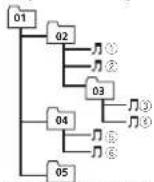
Level 1 Level 2 Level 3 Level 4
Folder Compressed audio file 01to05:Folder number ①to(s):Playback sequence
USBstoragedevice
Playbacksequence:sthesameasrecordedsequenceintheUSBstoragedevce. Tospecifytheplaybacksequence.thefollowing methodisrecommended.
1 Createafenamethatincludesnumbers thatspecifytheplaybacksequence(e.g., 001xxx.mo3and099yyy.mp3).
[2] Putthosefilesintoafolder. [3] SavethefoldercontainingfilesontheUSB storagedevice.
However, depending on the system environment, you may not be able to specify the playbackse
quence. ForUSBportableaudioplayers, thesequences is different and depends on the player.
Copyrightandtrademark
iTunes
AppleandiTunesaretrademarksofAppleInc., registeredintheU.S.andothercountrès.
MP3
Supply of this production by convey a license for private non-commercial use and does not convey a licensen or simply nghtous this product in any commercial (i.e. revenue-generating) real time broadcasting (terrestrial, satellite, cable and/cranyothermal), broadcasting/ streaming via internet, intranets and other networks, no the electron content distribution systems, such as pay-audio audio-on-demand applications. An independent license for such use is required. For details, please visit http://www.mp3licensing.com.
WMA
WindowsMediaiseitheraregisteredtrademark ortrademarkoffMicrosoftCorporationinthe UnitedStatesand/orothercountries. Thisproductincludesstechnologyownedby MicrosoftCorporationandcannotbeuseder distributedwithoutalicensefromMicrosoft Licensing,Inc.
iPod&iPhone
iPhone, iPod, iPodclassic, iPodnano and iPodouchareltrademarks of Apple Inc., registered in the U.S. and other countries. "Made for iPod" and "Made for iPhone" mean that alanelectronic accessory has been designed to connect specifically to PodoriPhone, respectively, and has been certified food by the developerto meet Apple performance standards. Apple is not responsible for the operation of this device or compliance with safety and regulatory standards. Please note that he uses this accessory with iPodi Phone may affect wire ess performance.
Additionalinformation
Specifications
General
Rated power source.....14.4VDC (fallowable voltages range: 12.0V to 14.4V DC)
Groundingsystem.....Negal-type Maximum current consumption
Dimensions(W×H×D): DIN Chassis.....78mm×50mm×165mm
Continuous power output 22W × 4(50Hz to 1500Hz) 3% IHD, 4Ω load, both channels driven)
Load impedance .... 4Ω (4Ω to 8Ω allowable) Preout maximum output level
2.09 Tonecontrols:
Bass Frequency.....100Hz Gain.....±12dB
Mid Frequency.....1kHz Gain.....+12dB
Insole Frequency.....10kHz Gain.....±12dB
Subwoo'er(mone): Frequency ....501 Hz/631 Hz/801 Hz/1001 Hz/ 126 Hz
Slope....-18dB/ord Gain....5dBto-24dB Phase.....Normal/Reverse
USB
US standards specification
USB2.0fullspeed
Maximum instruments apply
1A USBClass VSC(VasaStorageClass)
Filesystem.....FAT12.FAT16.FAT32
MP3Decodingformal.....M-16-82Audio_Layc-3
WMAcododinglornal...Ver 7,7.1,8.9.10,11.12(2ch audio)
(WindowsMediaPlayer)
WAVsignational....LinearFCM&MSADFCM (Non-compressed)
FMtuner
Frequency range .....87.5V/12to108.0V/12 Usable sensitivity .....9dBf (0.8μV/75Ω mono. S/N: 30d3)
Signal-to-noise ratio.....72cB(1=C-Ancwork)
MWtuner
Frequency range.....531k |zto1602kl |z(9x11z) 530kl |zto*640kl |z(10k |z)
Usablesensitivity.....2cpV(S/N:20dB)
Signal-to-no seratio....52cB(1=C Anclwork)
SWtuner
Frequency range.....2300kHz to 773kHz (2300Hz to 2495Hz, 2,940 Hz to 2.5MHz to 4540Hz to b175kHz, b520kHz to 676kHz Hz to 7100kHz to 773kHz 9500kHz to 2195kHz (9500kHz to 10135kHz, 7,11 500kHz to 2216kHz, 13570 Hz to 13870Hz to 15100kHz to to 1575Hz to 17500kHz to 1793kHz to 3015kHz to 138kHz to 340kHz to 21975 kHz)
Usablesensitivity.....28μV(S/N 20dB) Signal-to-noiseratio.....62dB(IFC-Anetwork)
Note
Specificationsandthedes gnaresubjectto modificationswithoutnotice.
Appendix

| Parte | Parte | ||
| 1 | Q (ista) | 7 | ◀▶ |
| 2 | MULTI-CONTROL(M.C.) | 8 | BAND/ (control delPod) |
| 3 | SRC/OFF | 9 | 1/∧ e6/ ≈ |
| 4 | Puerto USB | 10 | ∅ /DISP OFF |
| 5 | E&AI | 11 | Conectordeen-tradaAUX(co-rectorestérence 3.5mm) |
| 6 | ∅(oarleposte-iorid splay) | 12 | Botóndesollar |

PRECAUCIÓN
9 (9 kHz)—10 (10 kHz)
9 (9 kHz)—10 (10 kHz)
①Tuerca
②Murocortafugocsoportedemetal
② Corneametálica
④Torrillo
⑤Tornille(M×8)
MPFG-132Aud of ever?
Formatodedecuificac onWMA
Ver.7,7',8,9',0.11,12
(udio2canales)
(WindowMediaPlayer)
Formalodeschialway...PCMI prox&MSAD-FCM
(Nocoprim del
SintonizadordeFM
natural_image
Two horizontal oval shapes with rounded ends, one black and one white, side by side (no text or symbols)Español
33Es
ParteParte
| 1 | Q (Lista) | 2 | ◀▶ |
| 2 | MULTI-CONTROL(M.C.) | 3 | BAND/ (Contro edel-Pod) |
| 3 | SRC/OFF | 3 | 1/∧ e6/↔ |
| 4 | Porta USB | 4 | ∅ /DISP OFF |
| 5 | E&L | 5 | Conectordeen-tradaAUX(co-rectorestérence 3,5 mm) |
| 6 | ⇒(vollar/exibir) | 6 | BotãoDesencal-xar |
AVISO
FMSTEP(PassodesinctoriaFM)
Normalmente, opassodesintoria-Memoregaco pelesintoniaprobuscaéde50kHz. QuandoAF ouTAestiverativo, opassodesintomiamudar/automaticamentepara100k lz.Podeserpreferível ajustaropassodes intoniaa50kHzquandoAF estiverativo.
• Opassodesintoniapermanacea50kHzdu- ranteasintoniamana.
9 (9 kHz)—10 (10 kHz)
MWSTEP(Passodes rtonia MW)
Opassodesinton a/Wpodosoraltemadocontro 9kHz10kHz, Aputilizarosintonizadora/Américado Norte, Centraludo Sul, najustoopasao dosintoniado 3 kHz (53 kHz-2a 160Hz permissivel), para 10kHz (530kHz 1640kHz permissivel).
TPressioneM.C.parase electronaropassodesinatorialMw.
9 (9 kHz)—10 (10 kHz)
AUTO-PI(BuscautomárcadePl)
flowchart
graph TD
    subgraph_Channel_1["Channel 1"]
        L["Input L"] --> F["Channel F"]
        F --> SW["Channel SW"]
    end
    subgraph_Channel_2["Channel 2"]
        R["Input R"] --> SW
    end
    L -->|①| R
    F -->|②| R
    SW -->|③| R
    SW -->|④| R
    SW -->|⑤| R
    SW -->|⑥| R
    SW -->|⑦| R
    SW -->|⑧| R
    SW -->|⑨| R
    SW -->|⑩| R
    SW -->|⑪| R
    SW -->|⑫| R
    SW -->|⑬| R
    SW -->|⑭| R
    SW -->|⑮| R
    SW -->|⑯| R
    SW -->|⑰| R
    SW -->|⑱| R
    SW -->|㉑| R
    SW -->|㉒| R
    SW -->|㉓| R
    SW -->|㉔| R
    SW -->|㉕| R
    SW -->|㉖| R
    SW -->|㉗| R
    SW -->|㉘| R
    SW -->|㉙| R
    SW -->|㉚| R
①Porca
②Firewallousuportedemetal
③Tirademeta
①Parafuso
⑤Parafuso(M4×8)
Audiobook, Podcast: Compostivel
AVISO
...... UCA Emission: 100%
DUN
(Windows/MediaPlayer)
Formarccesina WAV.....PCMLinear&MSADPCM
(Naocorr paclado)
SintonizadordeFM
kHz4.215kHz,4.540kHz
5.175kHz,b.820kHz,6.455
kl |7,7.100kl za7,735kl |z
9.500kHz=21.975kHz
(9.500kHz=10.135kHz
17.366kHz, 17.355kHz,
10.615kHz 13.135kHz, 21.340kHz 21.975kHz)
部位部位
| 1 | Q(清单) | 7 | ◄/► |
| 2 | MULTI-CONTROL(M.C.) | 8 | BAND/∅(IPc2控制) |
| 3 | SRC/OFF | 9 | 1/∧≠6/↔ |
| 4 | US3串 | 10 | ∅/DISP OFF |
| 5 | E&AI | 11 | MAX输入插孔(3.5mm立圈聲插孔) |
| 6 | ⊃(返回/演示) | 12 | 拆卸按钮 |
注意
部位操作功能
9 (9 kHz) -10 (10 kHz)
2 按M.C.確認選擇
操作本機
DEMO(示節表示設定)
1 樂動M.C.可打開或製品示範顯示。
2 按M.C.确误选择
出現QUIT
DYNAMIC—VOCAL—NATURAL—CUSTOM—FLAT—POWERFUL
3 按M.C.確認選擇
9 (9 kHz) - 10 (10 kHz)
AUTO-PI(自動P線帯
(WincoatedialPlayer)
VAV未选格式.... 线性PCMMS APO
(無壓箱)
FM調諧器
(Windows Media Player)
2 ∪ ∪ ∪ ∪ ∪ ∪ ∪ ∪ ∪ ∪ ∪ ∪ ∪ ∪ ∪ ∪ ∪ ∪ ∪ ∪ ∪ ∪ ∪ ∪ ∪ ∪ ∪ ∪ ∪ ∪ ∪ ∪ ∪ ∪ ∪ ∪ ∪ ∪ ∪ ∪ ∪ ∪ ∪ ∪ ∪ ∪ ∪ ∪ ∪ ∪ ∸
m = 311
-
[Non-Text]
21
to
m = 311
10
IA
-
i.e!
[Non-Text]
4
1
•
-
ir
一
al
1
3
-
公司
3
-
-
1
一
A
[Unreadable]
20
一
μ
[Unreadable]
-
L
*
•
g
-
35
一
31
| الإجمالي | البسمتلاًة | ||
| يجب أن يكون جهازUSB انتسيلةأر FAT16 أو FAT12.FAT32 | لم تد تبینة جهازUSB انتسيلةFAT16或 FAT12.Ar FAT12.FAT32 | ERROR-23 | . UNSB معر pmدکات USB أر کل USB مع موصل لب. USB لب. ب.الن. CHECKUSB مغزطية USB ولا مستخدمه USB من ۰۰ مُرطاب المُكَمْعِ لُمْرِدٍ وار لِيْعَطِيْقَعِلَ (٢) إِجَوَ مُسْرَّاِ صَّرَة (٣) إِيُّلًا .OFF أر و وضع انتُخْجِل ACC نم بِمْصِيل STOP مُهَانَفَدَجُوا دُوا دُوا دُوا دُوا دُوا دُوا دُوا دُوا دُوا دُوا دُوا دُوا دُوا دُوا دُوا دُوا دُوا دُوا دُوا دُوا دُوا دُوا دُوا دُوا دُوا دُوا دُوا دُوا دُوا دُوا دُوا دُوا دُوا دَ |
| بِمْجِلَاًالإجمالي | |||
| بِمْجِلَاًالإجمالي لِيْعَطِيْتَكَأَكَالْمَعِدَةٍ (٤) بِعَدَ التُحَقَلَةٍ، أَر مِقَانَّحَ الشَّفْلِيَّى لِيْعَرْمَفَ عَلَّفَ الْتُشْعَلِيَّى لِيْعَرْمَفَ عَلَّفَ الْتُشْعَلِيَّى لِيْعَرْمَفَ عَلَّفَ الْتُشْعَلِيَّى لِيْعَرْمَفَ عَلَّفَ الْتُشْعَالِيُّى لِيْعَرْمَفَ عَلَّفَ الْتُشْعَلِيَّى لِيْعَرْمَفَ عَلَّفَ الْتُشْعَلِيَّى لِيْعَرْمَفَ عَلَّفَ الْتُشْعَلِيَ" | مُحْمَرْدَ عَرْضَالِقَنْسَةٍ لِيْعَرْمَفَ عَلَّفَ الْتُشْعَلِيَّى لِيْعَرْمَفَ عَلَّفَ الْتُشْعَلِيَّى لِيْعَرْمَفَ عَلَّفَ الْتُشْعَلِيَّى лِيْعَرْمَفَ عَلَّفَ الْتُشْعَلِيَّى لِيْعَرْمَفَ عَلَّفَ الْتُشْعَلِيَّى لِيْعَرْمَفَ عَلَّفَ الْتُشْعَلِيَّى لَيْعَرْمَفَ عَلَّفَ الْتُشْعَلِيَّى لِيْعَرْمَفَ عَلَّفَ الْتُشْعَلِيَّى لِيْعَرْمَفَ عَلَّفَ الْتُشْعَلِيَّى لِ يُعَرْمَفَ عَلَّفَ الْتُشْعَلِيَّى لِيْعَرْمَفَ عَلَّفَ الْتُشْعَلِيَّى لِيْعَرْمَفَ عَلَّفَ الْتُشْعَلِيَّى لِيْ geَرْمَفَ عَلَّفَ الْتُشْعَلِيَّى لِيْ geَرْمَفَ عَلَّفَ الْتُشْعَلِيَّى لِيْ geَرْمَفَ عَلَّفَ الْتُشْعَلِيَّى لِيْ geُرْمَفَ عَلَّفَ الْتُشْعَلِيَّى لِيْ geَرْمَفَ عَلَّفَ الْتُشْعَلِيَّى لِيْ geَرْمَفَ عَلَّفَ الْتُشْعَلِيَّى لِيْ geَمْرَدَ عَرْضَالِقَنْسَةٍ لِيْ geَمْرَدَ عَرْضَالِقَنْسَةٍ لِيْ geَمْرَدَ عَرْضَالِقَنْسَةٍ لِيْ geَمْرَدَ عَرْضَالِقَنْسَةٍ لِيْ geَمْرَدَ وَمَدْدُمَدْدُمَدْدُمَدْدُمَدْدُمَدْدُمَدْدُمَدْدُمَدْدُمَدْدُمَدْدُمَدْدُمَدْدُمَدْدُمَدْدُمَدْدُمَدْدُمَد ^1 | ||
| بِمْجِلَاًالإجمالي | |||
| بِمْجِلَاًالإجمالي لِيْعَرْمَفَ عَلَّفَ الْتُشْعَلِيَّى لِيْ geَمْرَدَ عَلَّفَ الْتُشْعَلِيَّى لِيْ geَمْرَدَ عَلَّفَ الْتُشْعَلِيَّى لِيْ geَمْرَدَ عَلَّفَ الْتُشْعَلِيَّى لِيْ geَمْرَد·مُحْمَرْدَ عَلَّفَ الْتُشْعَلِيَّى لِيْ geَمْرَدَ عَلَّفَ الْتُشْعَلِيَّى لِيْ geَمْرَدَ عَلَّفَ الْتُشْعَلِيَّى لِيْ geَمْرَرَدَ عَلَّفَ الْتُشْعَلِيَّى لِيْ geَمْرَرَدَ عَلَّفَ الْتُشْعَلِيَّى لِيْ geَمْرَرَدَ عَلَّفَ الْتُشْعَلِيَّى لِيْGeo\text { مِنْتَالِمِيمِ } | |||
| بِمْجِلَاًالإجمالي لِيْعَرْمَفَ عَلَّفَ الْتُشْعَلِيَّى لِيْ geَمْرَدَ عَلَّفَ الْتُشْعَلِيَّى لِيْ geَمْرَدَ عَالْتُشْعَلِيَّى لِيْ geَمْرَدَ عَلَّفَ الْتُشْعَلِيَّى لِيْ geَمْرَدَ عَلَّفَ الْتُشْعَلِيَّى لِيْ geَمْرَدَ عَلَّفَ الُمْتُمُمُمُمُمُمُمُمُمُمُمُمُمُمُمُمُمُمُمُمُمُمُمُمُمُمُمُمُمُمُمُمُمُمُمُمُمُمُمُمُمُمُمُمُمُمُمُمُمُمُmُمُمُمُمُمُمُمُمُمُمُمُمُمُمُمُمُمُمُمُمُمُمُمُمُمُمُمُمُمُمُمُمُمُمُمُمُمُمُمُمُمُمُمُمُمُمُمُمُمُмُمُمُمُمُمُمُمُمُمُمُمُمُمُمُمُمُمُمُمُمُمُمُمُمُمُمُمُمُمُمُمُمُمُمُمُمُمُمُمُمُمُمُمُمُمُمُمُمُمُมُمُمُمُمُمُمُمُمُمُمُمُمُمُمُمُمُمُمُمُمُمُمُمُمُمُمُمُمُمُمُمُمُمُمُمُمُمُمُمُمُمُمُمُمُمُمُمُمُمُ مُحْمَرْدَ عَلَّفَ الْتُشْعَلِيَّى لِيْ geَمْرَدَ عَلَّفَ الْتُشْعَلِيَّى لِيْ geَمْرَدَ عَلَّفَ الْتُشْعَلِيَّى لِي ^1 | |||
| بِمْجِلَاًالإجمالي لِيْعَرْمَفَ عَلَّفَ الْتُشْعَلِيَّى لِيْ geَمْرَدَ عَلَّفَ الْتُشْعَلِيَّى لِي ^1 | |||
| بِمْجِلَاًالإجمالي لِيْعَرْمَفَ عَل'الْتُشْعَلِيَّى لِي ^1 | |||
| بِمْجِلَاًالإجمالي لِيْعَرْمَفَ عَل'الْتُشْعَلِيَّى لِي ^1 | |||
| بِمْجِلَاًالإ lushامِ لِيْعَرْمَفَ عَل'الْتُشْعَلِيَّى لِي ^1 | |||
| بِمْجِلَاًالإجمالي لِيْعَرْمَفَ عَل'الْتُشْعَلِيَّى لِي ^1 | NOTFOUND | ||
| بِمْجِلَاًالإجمالي لِيْعَرْمَفَ عَل'الْتُشْعَلِيَّى لِي ^1 | |||
| بِمْجِلَاًالإجمالي لِيْعَرْمَفَ عَل'الْتُشْعَлِيَّى لِي ^1 | |||
| بِمْجِلَاًالإجمالي لِيْعَرْمَفَ عَل'الْتُشْعَلِيَّى لِي ^1 | |||
| بِمْجِلَاًالإجمالي لِيْعَمَرْمَفَ عَل'الْتُشْعَلِيَّى لِي ^1 | |||
| بِمْجِلَاًالإجمالي لِيْعَرْمَفَ عَل'الْتُشْعَلِيَّى لِي ^1 | |||
مطومات إضافية
التركيب

رسائل الخطاً
لکشالای فعیک حودلآب
(١) ماحد
②
③ ند模拟ش
④
(5)
(2)
1.2
الستير
| مزجلا | مزجلا | |
| ▶/◀ | 7 | (الدمة) 9 |
| WIFBAND(iPod) | 8 | MULTI-CONTROL(M.C.) |
| ###1 | 9 | OFF/SRC |
| DISP OFF: 2 | 10 | USB منت |
| ### (مُسْنِسَ اسْتَرِ وَىمْتَ) | 11 | F@nd |
| ### فصل | 12 | (شَكْبِلَارِ حَوْجِ) |

natural_image
Two horizontal rounded rectangles side by side, no text or symbols present
اطلاعات بيشتر

USB
الإستعمال: USB 2.0 ..... USB
الإستعمال: USB 1 ..... USB
الإستعمال: USB 1 ..... USB
(MSC) ..... USB
(MSC) ..... USB
(FAT12 : FAT16 : FAT32 .....
MPEG-1 & 2 Audio Layer 3 ..... MP3 .....
(Windows Media Player) .....
MS ADPCM .....
PCM .....
(WAV .....
) .....FM ..... mono- dBF (V - μV/2.5) ..... (IEC-A ..... MW ..... (IEC-A ..... SW .....) .....) .....) .....) .....) .....) .....) .....) .....) .....) .....) .....) .....) .....) .....) .....) .....) .....) .....) .....) .....) .....) .....) .....) .....) .....###) ..... (IEC-A ..... (IEC-A ..... (IEC-A ..... (IEC-A ..... (IEC-A ..... (IEC-A ..... (IEC-A ..... (IEC-A ..... (IEC-A ..... (IEC-A ..... (IEC-A ..... (IEC-A ..... (IEC-A ..... (IEC-A ..... (IEC-A ..... (IEC-A ..... (IEC-A ..... (IIEC-A ..... (IEC-A ..... (IEC-A ..... (IEC-A ..... (IEC-A ..... (IEC-A ..... (IEC-A ..... (IEC-A ..... (IEC-A ..... (IEC-A ..... (IEC-A ..... (IEC-A ..... (IEC-A ..... (IEC-A ..... (IEC-A ..... (IEC-A ..... (IEC-A ..... |
Fa 17

اطلاعات بيشتر
اطلاعات بيشتر
eatal iPod take into the next iPod, if it is
متصل کنید USB
[Unreadable]
—CLASSICS—POPULAR—NEWS/INFO
OTHERS
BEH SDIT DO TALIHE TEMAISH DADE MIE THOD W NOT FOUND
| ### | |
| ### | VOLUME |
| ### | MUTE |
| ### | ▲/▼ |
| ### | AUDIO |
| ### | SCRL/DISP |
| ### | ### |
| ### | FUNCTION |
| ### | LIST/ ENTER |
Visit us on the World Wide Web at
http://pioneer.jp/group/index-e.html
Pioneer Gulf.FZE
http://www.pioneer-uae.com
Pioneer Electronics Australia. Pty.Ltd
http://www.pioneer.com.au/
Pioneer Electronics Asiacentre.Pte
Pioneer (HK) Ltd.
Pioneer High Fidelity Taiwan Co., Ltd.
http://www.pioneer.com.sg
http://www.pioneerhongkong.com.hk
http://www.pioneer-twn.com.tw
Pioneer International Latin America S.A.
http://www.pioneer-latin.com
PIONEERCORPORATION
1-1, Shin-ogura, Saiwai-ku, Kawasaki-shi,
Kanagawa212-0031,JAPAN
PIONEERELECTRONICS(USA)INC.
P.O.Box1540,LongBeach,California90801-1540,U.S.A.
TEL:(800)421-1404
PIONEEREUROPENV
Haven1087,Keetberglaan1,B-9120Melsele,Belgium/Belgique
TEL:(0)3/570.05.11
PIONEERELECTRONICSASIACENTREPTE.LTD.
253AlexandraRoad,#04-01,Singapore159936
TEL:65-6472-7555
PIONEERELECTRONICSAUSTRALIAPTY.LTD.
5ArcoLane,Heatherton,Victoria,3202Australia
TEL:(03)9586-6300
PIONEERELECTRONICSOFCANADA,INC.
340FerrierStreet,Unit2,Markham,OntarioL3R2Z5,Canada
TEL:1-877-283-5901
TEL:905-479-4411
PIONEERELECTRONICSDEMEXICO,S.A.deC.V.
Blvd.ManuelAvilaCamacho13810piso
Col.LomasdeChapultepec,Mexico,D.F.11000
TEL:55-9178-4270
先锋股份有限公司
台北市內湖區瑞光路407號8樓
电话:(02)2657-3588
① 沈 (22, 203, 15
先锋電子(香港)有限公司
香港九龍長沙灣道909號5樓
電話:(0852)2848-6488
- ThankyouforpurchasingthisPIONEER product
- Aboutthisunit
- CAUTION
- Note
- Aboutthismanual
- Demomode
- Important
- Incaseoftrouble
- Operatingthisunit
- Headunit
- Remotecontrol
- Setupmenu
- 2TurnM.C.toswitchtoYES.PressM.C.to select.
- 3Performthefollowingprocedurestoset themenu.
- CLOCKSET(settingtheclock)
- FMSTEP(FM/tuningsep)
- MWSTEP(M/W/tuningstep)
- DEMO(dem edisplaysetting)
- QUIT appears
- 4Tofinishyoursettings,turnM.C.toselect YES.Presstoselect.
- Notes
- Basicoperations
- Re-attaching front pane
- Turning the un ton
- Useandcareoftheremote control
- WARNING
- Menuoperationsidentical forsetupmenu/function settings/audioadjustments/initialsettings/lists
- Tuner
- Storingandrecallingstations foreachband
- Usingpresettuningbuttons
- SwitchingtheRDSdisplay
- PTYlist
- NEWS/INFO
- POPULAR
- CLASSICS
- OTHERS
- Functionsettings
- 3TurnM.C.toselectthefunction.
- BSM(beststationsmemory)
- REGION(regional)
- LOCAL(localsee during)
- PTYSEARCH(programtypeselection)
- TA(trafi:cannouncementsstandby)
- SEEK(eft/rightkeysetting)
- USBstoragedevice
- REPEAT(repeatplay)
- RANDOM(random play)
- PAUSE(pause)
- S.RTRV(soundretriever)
- iPod
- Displayingtextinformation
- Browsingforasong
- Advancedoperationsusing specialbuttons
- Playingsongsrelatedtothe currentlyplayingsong
- 1PressandholdM.C.toswitchtolinkplay mode.
- 2TurnM.C.tochangethemode;pressto select.
- Operatingthisunit'siPod functionfromyouriPod
- ●PressBAND/ toswitchthecontrol mode.
- 1PressM.C.todisplaythemainmenu.
- 2TurnM.C.tochangethemenuoption andpresstoselectFUNCTION.
- SHUFFLE(shuffle)
- SHUFFLEALL(shuffleall)
- LINKPLAY(linkplay)
- AUDIOBOOK(audiobookspeed)
- S.RTRV(sound retr even)
- Audioadjustments
- 3TurnM.C.toselecttheaudiofunction.
- FAD/BAL(faster/balanceadjustment)
- PRESETEQ(equalizerrecall)
- DYNAMIC VOCAL NATURAL CUSTOM —FLAT—POWERFUL
- CUSTOM
- LOUD(leadness)
- SUB.W(subwooferor/offsetting)
- SUB.WCTRL(subwoofered)justment)
- SLA(sourceleveladjustment)
- Initialsettings
- 3TurnM.C.toselecttheinitialsetting.
- CLOCKSET(seting her cck)
- MWSTEP(MWtuningstep)
- AUTO-PI(autoPIseek)
- AUX(auxiaryinpu)
- REAR-SP(rearoutputsell np)
- FUL—SW
- SCROLL(scroll modesetting)
- Switchingthedimmersetting
- UsinganAUXsource
- Turningtheclockdisplayon oroff
- ●Press/DISPOFFtoturntheclockdisplayonoroff.
- Turningthedisplayofforon
- Installation
- Connections
- This unit
- Power cord
- DINfront/rearmount
- DIN Front-mount
- 1Insertthemountingsleeveintothedashboard.
- DIN Rear-mount
- Removing the unit
- Removingandre-attachingthe frontpanel
- Additionalinformation
- Errormessages
- Compressedaudio compatibility(USB)
- WMA
- MP3
- WAV
- Supplementalinformation
- iPodcompatibility
- Sequenceofaudiofiles
- Copyrightandtrademark
- iTunes
- iPod&iPhone
- Specifications
- General
- USB
- FMtuner
- MWtuner
- SWtuner
- PRECAUCIÓN
- SintonizadordeFM
- AVISO
- FMSTEP(PassodesinctoriaFM)
- MWSTEP(Passodes rtonia MW)
- AUTO-PI(BuscautomárcadePl)
- 注意
- 操作本機
- DEMO(示節表示設定)
- FM調諧器
- مطومات إضافية
- التركيب
- رسائل الخطاً
- لکشالای فعیک حودلآب
- اطلاعات بيشتر
- PIONEERCORPORATION
Brand : PIONEER
Model : MVH-1450UB
Category : Receiver