PowerShot SX240 HS - Camera CANON - Free user manual and instructions
Find the device manual for free PowerShot SX240 HS CANON in PDF.


User questions about PowerShot SX240 HS CANON
0 question about this device. Answer the ones you know or ask your own.
Ask a new question about this device
Download the instructions for your Camera in PDF format for free! Find your manual PowerShot SX240 HS - CANON and take your electronic device back in hand. On this page are published all the documents necessary for the use of your device. PowerShot SX240 HS by CANON.
USER MANUAL PowerShot SX240 HS CANON
Before use, make sure the following items are included in the package. If anything is missing, contact your camera dealer.

Camera Battery Pack
NB-6L (with terminal cover)

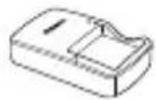
Battery
Charger
CB-2LYE
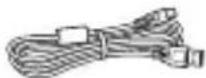
Interface Cable
IFC-400PCU
Wrist Strap
WS-DC11*1
Getting Started
(This Guide)
DIGITAL CAMERA
Manuals Disk ^4
DIGITAL CAMERA
Solution Disk ^*3
Warranty
System Booklet
*1 For attachment instructions, refer to the Camera User Guide on the DIGITAL CAMERA Manuals Disk.
*2 Contains the Camera User Guide and ImageBrowser EX User Guide (p. 8).
*3 Contains software used with the camera. For installation instructions, refer to the Camera User Guide, and for instructions on use, refer to the ImageBrowser EX User Guide.
Compatible Memory Cards
A memory card is not included.
The following memory cards (sold separately) can be used, regardless of capacity. For details on the number of shots and recording time per memory card, refer to “Specifications” in the Camera User Guide.
- SD memory cards *
• SDHC memory cards * - SDXC memory cards *
- Eye-Fi cards
* Conforms to SD specifications. However, not all memory cards have been verified to work with the camera.
About Eye-Fi Cards
This product is not guaranteed to support Eye-Fi card functions (including wireless transfer). In case of an issue with an Eye-Fi card, please check with the card manufacturer.
Also note that an approval is required to use Eye-Fi cards in many countries or regions. Without approval, use of the card is not permitted. If it is unclear whether the card has been approved for use in the area, please check with the card manufacturer.
Charging the Battery

text_image
Diagram showing two electronic components with labeled parts and directional arrows indicating process flow or movement.1 Remove the cover and insert the battery.
After aligning the ▲ marks on the battery and charger, insert the battery by pushing it in ( )and down ( ). ②
natural_image
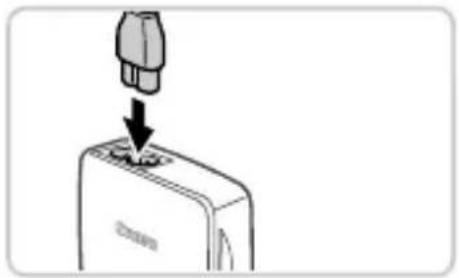
Diagram showing a plug inserted into a device with a downward arrow indicating insertion (no text or symbols present)2 Charge the battery.
Once you connect the power cord to the charger and plug the cord into a power outlet, the lamp will light up orange.
- When charging is finished, the lamp turns green. Remove the battery.
For details on charging time and the number of shots or recording time available with a fully charged battery, refer to "Specifications" in the Camera User Guide.
Inserting the Battery and Memory Card
text_image
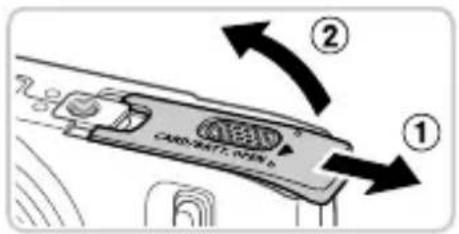
CARD BATT, VEN 1 ① ②1 Open the cover.
- Slide the cover(1) and open it ( )②
text_image
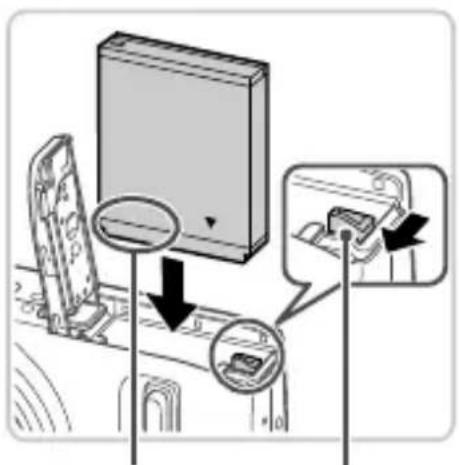
Diagram showing a device with labeled components and directional arrows indicating movement or assembly steps.2 Insert the battery.
While pressing the battery lock in the direction of the arrow, insert the battery as shown and push it in until it clicks into the locked position.
To remove the battery, press the battery lock in the direction of the arrow.
Battery Lock1
natural_image
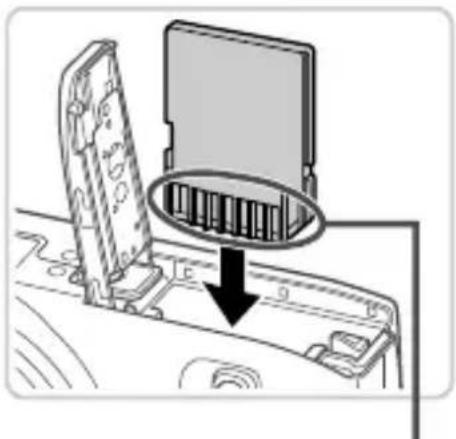
Diagram showing a device with an open rear panel and a magnified inset of internal components (no text or symbols)Terminals
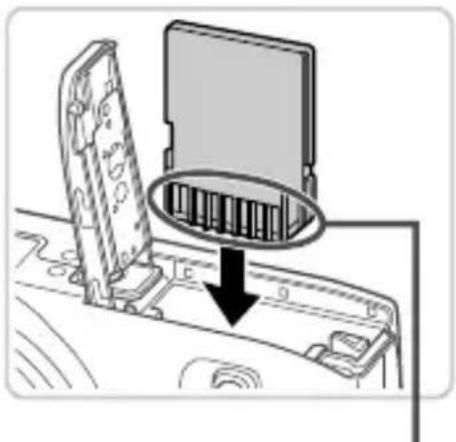
Check the card's write-protect tab and insert the memory card.
Recording is not possible on memory cards with a write-protect tab when the tab is in the locked (downward) position. Slide the tab up until it clicks into the unlocked position.
- Insert the memory card facing as shown until it clicks into the locked position.
To remove the memory card, push it in until you feel a click, and then slowly release it.

text_image
CARD/WATC OPEN 5 ① ②Close the cover.
- Lower the cover(1) and hold it down as you slide it, until it clicks into the closed position (2).
Setting the Date and Time

natural_image
Simple line drawing of a car's front panel with a black downward arrow indicating a drop or action (no text or symbols)Turn the camera on.
- Press the ON/OFF button.
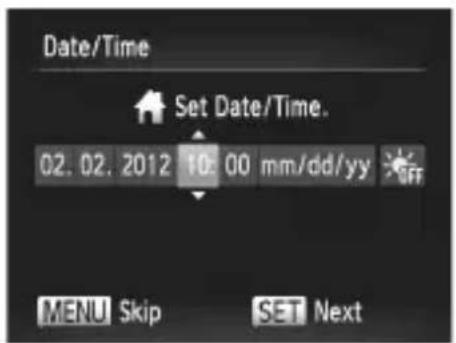
The Date/Time screen is displayed.
text_image
Date/Time Set Date/Time. 02.02.2012 10:00 mm/dd/yy OFF MENU Skip SET NextSet the date and time.
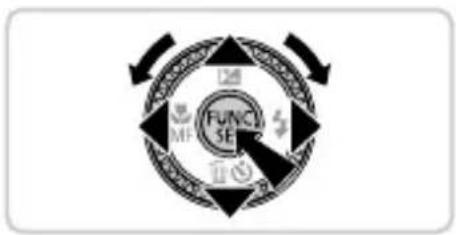
- Press the ◀▶ buttons to choose an option.
- Press the ▲▼ buttons or turn the Ⓞ dial to specify the date and time.
- When finished, press the FUNC SET button.
flowchart
graph TD
    A["FUNCTION SE"] --> B["Outer Ring"]
    B --> C["Inner Ring"]
    C --> D["Outer Ring"]
    D --> E["Outer Ring"]
    E --> F["Outer Ring"]
    F --> G["Outer Ring"]
    G --> H["Outer Ring"]
    H --> I["Outer Ring"]
    I --> J["Outer Ring"]
    J --> K["Outer Ring"]
    K --> L["Outer Ring"]
    L --> M["Outer Ring"]
    M --> N["Outer Ring"]
    N --> O["Outer Ring"]
    O --> P["Outer Ring"]
    P --> Q["Outer Ring"]
    Q --> R["Outer Ring"]
    R --> S["Outer Ring"]
    S --> T["Outer Ring"]
    T --> U["Outer Ring"]
    U --> V["Outer Ring"]
    V --> W["Outer Ring"]
    W --> X["Outer Ring"]
text_image
02.02.2012 10:00 New York MENU Previous SET OK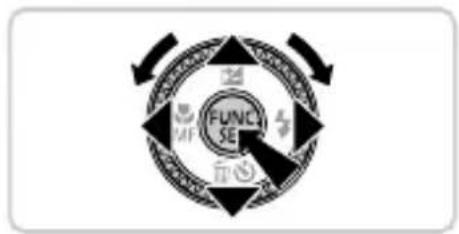
flowchart
graph TD
    A["FUNCE"] --> B["Outer Ring"]
    B --> C["Inner Ring"]
    C --> D["Outer Ring"]
    D --> E["Outer Ring"]
    E --> F["Outer Ring"]
    F --> G["Outer Ring"]
    G --> H["Outer Ring"]
    H --> I["Outer Ring"]
    I --> J["Outer Ring"]
    J --> K["Outer Ring"]
    K --> L["Outer Ring"]
    L --> M["Outer Ring"]
    M --> N["Outer Ring"]
    N --> O["Outer Ring"]
    O --> P["Outer Ring"]
    P --> Q["Outer Ring"]
    Q --> R["Outer Ring"]
    R --> S["Outer Ring"]
    S --> T["Outer Ring"]
    T --> U["Outer Ring"]
    U --> V["Outer Ring"]
    V --> W["Outer Ring"]
    W --> X["Outer Ring"]
    X --> Y["Outer Ring"]
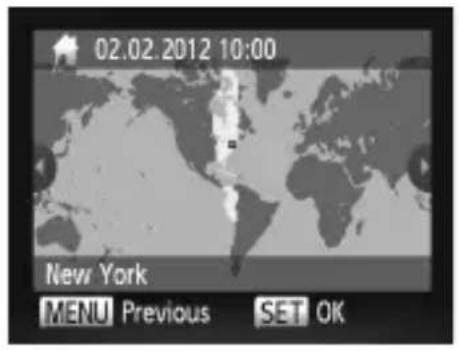
3 Set the local time zone.
- Press the ◀▶ buttons or turn the Ⓞ dial to choose your local time zone.
- Press the Ⓗ button when finished. After a confirmation message, the setting screen is no longer displayed.
To turn off the camera, press the ON/OFF button.
Changing the Date and Time
To adjust the date and time once you have set it, do the following.
1 Press the MENU button.
2 Move the zoom lever to choose the 🎩 tab.
3 Press the ▲▼ buttons or turn the ⏱ dial to choose [Date/Time], and then press the Ⓗ function SET button.
4 Follow step 2 again to complete the setting.
5 Press the MENU button.
Display Language
natural_image
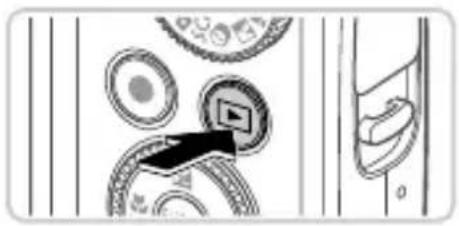
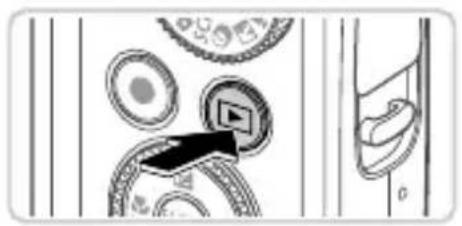
Diagram showing a mechanical component with arrows indicating direction, no readable text or symbols present1 Enter Playback mode.
- Press the ▶ button.

Access the setting screen and choose a language.
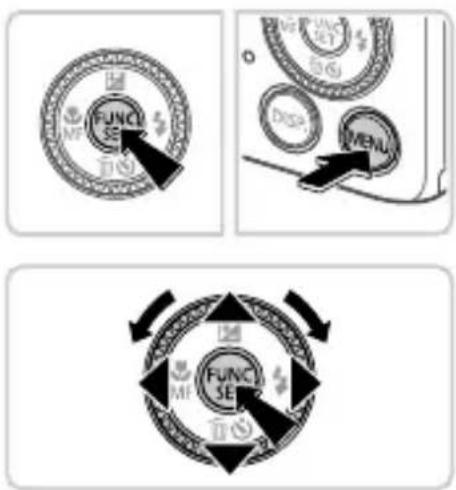
- Press and hold the FUNC SET button, and then immediately press the MENU button.
- Press the ▲▼◀▶ buttons or turn the ⏱ dial to choose a language, and then press the Ⓗ FUNC SET button.
Trying the Camera Out
Shooting
natural_image
Diagram of a device's handle with a black downward arrow pointing to a button (no text or symbols)Turn the camera on and enter AUTO mode.
- Press the ON/OFF button.
- Set the mode dial to AUTO.

text_image
2400
natural_image
Diagram of a car dashboard with steering wheel, dashboard, and rearview (no text or symbols)Compose the shot.
To zoom in and enlarge the subject, move the zoom lever toward [▲] (telephoto) as you watch the screen, and to zoom away from the subject, move it toward [▲] (wide angle).

text_image
Diagram illustrating two steps of a hand holding a rectangular object, labeled ① and ②, with a circular base and mechanical components below.Shoot still images.
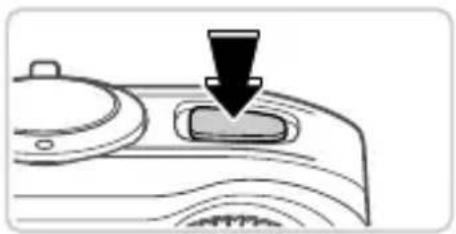
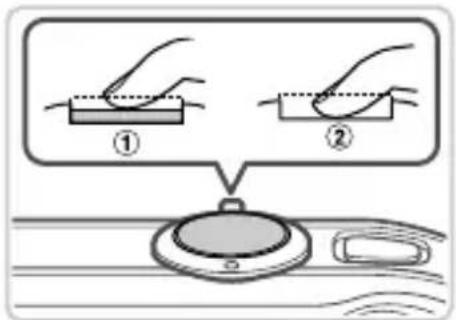
- Press the shutter button lightly ( ).
The camera beeps twice after focusing, and AF frames are displayed to indicate image areas in focus. Press the shutter button all the way down ( )
natural_image
Pure mechanical diagram showing a cursor clicking a button with circular components and a magnified view of a device (no text or symbols)Shoot movies.
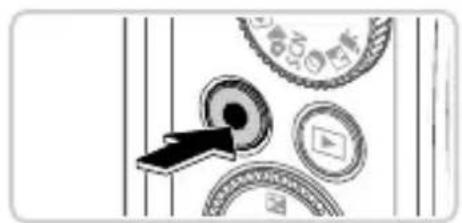
- Press the movie button to start shooting, and press it again to stop.
Viewing

natural_image
Diagram showing a device interacting with circular components and a door, no visible text or symbols1 Enter Playback mode.
- Press the ▶ button.
flowchart
graph TD
    A["FUNC SET"] --> B["MF"]
    B --> C["MP"]
    C --> D["MP"]
    D --> E["MP"]
    E --> F["MP"]
    F --> G["MP"]
    G --> H["MP"]
    H --> I["MP"]
    I --> J["MP"]
    J --> K["MP"]
    K --> L["MP"]
    L --> M["MP"]
    M --> N["MP"]
    N --> O["MP"]
    O --> P["MP"]
    P --> Q["MP"]
    Q --> R["MP"]
    R --> S["MP"]
    S --> T["MP"]
    T --> U["MP"]
    U --> V["MP"]
    V --> W["MP"]
    W --> X["MP"]
    X --> Y["MP"]
    Y --> Z["MP"]
2 Browse through your images.
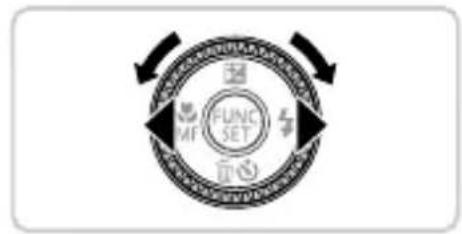
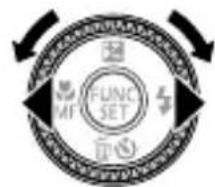
To view the previous or next image, press the ◀▶ buttons or turn the ⏻ dial.
Movies are identified by a E icon. To play movies, go to step 3.
flowchart
graph TD
    A["FUNC SE"] --> B["Outer Ring"]
    B --> C["Inner Ring"]
    C --> D["Outer Ring"]
    D --> E["Inner Ring"]
    E --> F["Outer Ring"]
    F --> G["Inner Ring"]
    G --> H["Outer Ring"]
    H --> I["Inner Ring"]
    I --> J["Outer Ring"]
3 Play movies.
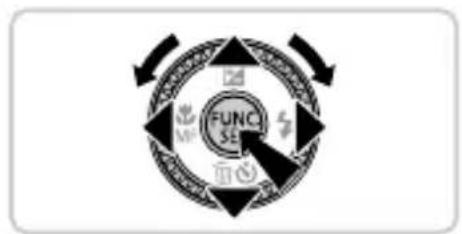
- Press the ⬤️ button, choose ▶ (either press the ▲▼ buttons or turn the Ⓞ dial), and then press the ⬤️ button again.
- Press the ⬤ button to access the movie control panel, choose (either press the ◀ buttons or turn the ⭕ dial), and then press the ⬤ button again.
- To adjust the volume, press the ▲▼ buttons. - Playback now begins, and after the movie is finished, SET is displayed.
Erasing the Images
To erase the image you chose in step 2, do the following. Note that erased images cannot be recovered.
1 Press the ▼ button.
2 After [Erase?] is displayed, press the ◀▶ buttons or turn the ⏰ dial to choose [Erase], and then press the FUNC.SET button.
Viewing the Manuals
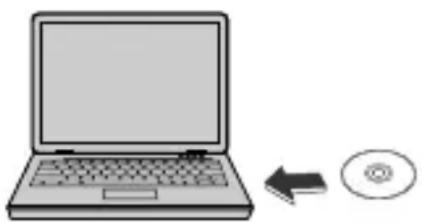
Refer to the manuals on the included DIGITAL CAMERA Manuals Disk for a more in-depth understanding of the camera, or when using software on the DIGITAL CAMERA Solution Disk. Adobe Reader is required to view the PDF manuals. Microsoft Word/Word Viewer can be installed to view the Word manuals (required only for manuals for the Middle East).
natural_image
Illustration of a laptop with an arrow pointing to a CD (no text or symbols present)Insert the DIGITAL CAMERA Manuals Disk in the computer's CD-ROM drive.
- Follow the instructions displayed to view the manual.
| Camera User Guide | Explains how to use all functions of this camera, lists product specifications, and explains procedures for installing the included software. |
| ImageBrowser EXUser Guide | Instructions for the included software |
European Union (and EEA) only.

natural_image
Two identical hand-drawn trash bin symbols crossed with diagonal lines, no text or labels presentThese symbols indicate that this product is not to be disposed of with your household waste, according to the WEEE Directive (2002/96/EC), the Battery Directive (2006/66/EC) and/or your national laws implementing those Directives. If a chemical symbol is printed beneath the symbol shown above, in accordance with the Battery Directive, this indicates that a heavy metal (Hg = Mercury, Cd = Cadmium, Pb = Lead)
is present in this battery or accumulator at a concentration above an applicable threshold specified in the Battery Directive.
This product should be handed over to a designated collection point, e.g., on an authorized one-for-one basis when you buy a new similar product or to an authorized collection site for recycling waste electrical and electronic equipment (EEE) and batteries and accumulators. Improper handling of this type of waste could have a possible impact on the environment and human health due to potentially hazardous substances that are generally associated with EEE.
Your cooperation in the correct disposal of this product will contribute to the effective usage of natural resources.
For more information about the recycling of this product, please contact your local city office, waste authority, approved scheme or your household waste disposal service or visit www.canon-europe.com/environment.
(EEA: Norway, Iceland and Liechtenstein)
CAUTION
RISK OF EXPLOSION IF BATTERY IS REPLACED BY AN INCORRECT TYPE.
DISPOSE OF USED BATTERIES ACCORDING TO LOCAL REGULATION.
SX260 HS
In certain countries and regions, the use of GPS may be restricted.
Therefore, be sure to use GPS in accordance with the laws and regulations of your country or region. Be particularly careful when traveling outside your home country.
For PowerShot SX260 HS:
• Hereby, Canon Inc., declares that this AM014C is in compliance with the essential requirements and other relevant provisions of Directive 1999/5/EC.
- Please contact the following address for the original Declaration of Conformity:
CANON EUROPA N.V.
Bovenkerkerweg 59-61, 1185 XB Amstelveen, The Netherlands CANON INC.
30-2, Shimomaruko 3-chome, Ohta-ku, Tokyo 146-8501, Japan


Lieferumfang
text_image
Diagram showing two electronic components with labeled parts and directional arrows indicating process flow or movement.natural_image
Diagram showing a plug inserted into a device with a downward arrow indicating insertion (no text or symbols present)text_image
Diagram showing device connection with labeled parts and directional arrows indicating movement or interactionnatural_image
Diagram showing a device with a labeled component and an arrow pointing to a folder (no text or symbols present)Anschlüsse
natural_image
Simple line drawing of a device with a black downward arrow pointing to a button (no text or symbols)natural_image
Diagram showing a mechanical component with arrows indicating direction, no visible text or symbolsnatural_image
Diagram of a device's handle with a black arrow pointing to a button (no text or symbols)
natural_image
Circular device with a switch labeled 'AUTO' and a circular dial pattern (no readable text or symbols beyond the label)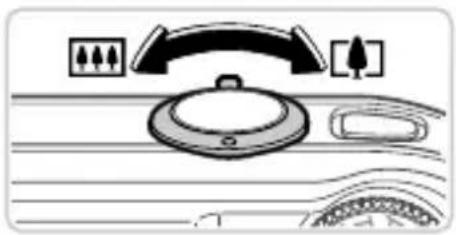
natural_image
Diagram of a car dashboard with steering wheel, dashboard, and rearview (no text or symbols)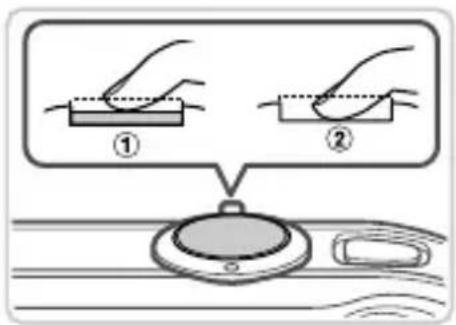
text_image
Diagram illustrating two steps of a mechanical or electrical procedure, labeled ① and ②, with a magnified view below.natural_image
Abstract diagram with circular elements and a black arrow pointing to a central dark circle (no text or symbols)natural_image
Diagram showing a mechanical assembly with rollers and a device, no visible text or symbolsnatural_image
Illustration of a laptop with a CD icon showing an arrow pointing to it (no text or symbols present)natural_image
Two identical hand-drawn trash bins with cross-bracing, no text or symbols present30-2, Shimomaruko 3-chome, Ohta-ku, Tokyo 146-8501, Japan


Contenu du coffret
text_image
Diagram showing two electronic devices with labeled components and directional arrows indicating process flow or movement.natural_image
Simple line drawing of a plug inserted into a battery, showing a downward arrow (no text or symbols)2 Chargez la batterie.
text_image
CARD-HAT OPEN 5 ① ②text_image
Diagram showing device connection with labeled components and directional arrows indicating movement or interactionnatural_image
Diagram showing a device with a labeled component and an arrow pointing to a folder (no text or symbols present)Bornes
natural_image
Simple line drawing of a device with a downward arrow pointing to a button (no text or symbols)natural_image
Diagram showing mechanical components with arrows indicating a specific section (no text or symbols present)1 Activez le mode de lecture.
natural_image
Diagram of a device's handle with a black arrow pointing to a button (no text or symbols)natural_image
Diagram of a dashboard with steering wheel, gear, and car (no text or symbols)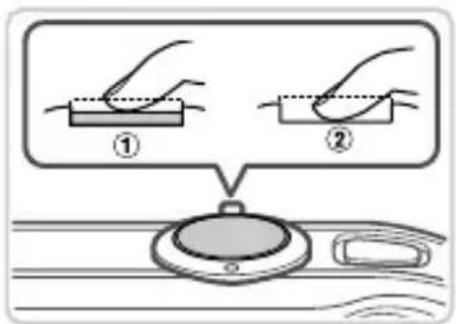
text_image
Diagram illustrating two steps of a mechanical or electrical procedure, labeled ① and ②, with a magnified view below showing the component.Composez la vue.
natural_image
Abstract diagram with circular elements and a black arrow pointing to a central dark circle (no text or symbols)natural_image
Diagram showing a mechanical component with a central device and surrounding parts (no text or symbols)1 Activez le mode de lecture.
flowchart
graph TD
    A["FUNC SET"] --> B["MF"]
    B --> C["Return to Center"]
    C --> D["Return to Right"]
2 Parcourez vos images.
natural_image
Illustration of a laptop with a CD icon showing an arrow pointing to it (no text or symbols present)natural_image
Two identical cross-marked trash bin symbols with no text or labels, accompanied by a black rectangular symbol below (no text or labels present)30-2, Shimomaruko 3-chome, Ohta-ku, Tokyo 146-8501, Japan
text_image
Diagram showing two electronic device components with labeled parts and directional arrows indicating process flow.natural_image
Diagram showing a plug inserted into a battery labeled 'Canon' (no text or symbols on the diagram itself)text_image
Diagram showing a device with labeled components and directional arrows indicating movement or assembly steps.natural_image
Diagram showing a device with a labeled component and an arrow pointing to a folder (no text or symbols present)Terminales
text_image
CARD/BATT OPEN ① ②Cierre la tapa.
natural_image
Simple line drawing of a device handle with a black downward arrow pointing to the button (no text or symbols)Encienda la cámara.
text_image
Diagram showing mechanical components with a black arrow pointing to a component, possibly indicating a motion or assembly step.text_image
FUNC SET MENU
flowchart
graph TD
    A["FUNC SE"] --> B["Top"]
    A --> C["Bottom"]
    A --> D["Left"]
    A --> E["Right"]
    A --> F["Center"]
natural_image
Diagram of a device's handle with a black arrow pointing to a button (no text or symbols)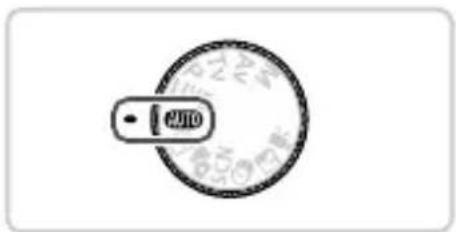
text_image
1200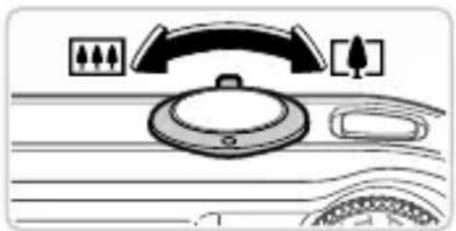
natural_image
Diagram of a dashboard with control panel and fan (no text or symbols)
text_image
Diagram illustrating two steps of a mechanical or electrical procedure, labeled ① and ②, with a magnified view below showing the component.natural_image
Abstract diagram with circular elements and arrows, no readable text or symbolsGrabar vídeos.
natural_image
Diagram showing a mechanical assembly with rollers and a device, no visible text or symbolsnatural_image
Illustration of a laptop with an arrow pointing to a CD (no text or symbols present)natural_image
Two identical hand-drawn trash bins with cross-bracing, no text or symbols present30-2, Shimomaruko 3-chome, Ohta-ku, Tokyo 146-8501, Japan

text_image
Diagram showing two electronic components with labeled parts and directional arrows indicating process flow or movement.natural_image
Diagram showing a plug inserted into a device with a downward arrow indicating insertion (no text or symbols present)text_image
CARD/Ticket, 1/2.5 ① ②text_image
Diagram showing a device with labeled components and directional arrows indicating movement or assembly steps.natural_image
Diagram showing a device with a labeled component and an arrow pointing to a folder (no text or symbols present)Terminali
text_image
CAND/BATT OPENnatural_image
Diagram of a car interior showing a button with a downward arrow (no text or symbols)Accendere la fotocamera.
natural_image
Diagram showing a mechanical component with arrows indicating direction, no readable text or symbols presenttext_image
FUNC SE M DISP MENU FUNC SE M DISPnatural_image
Diagram of a car interior with a black arrow pointing to a button (no text or symbols)natural_image
Diagram of a car dashboard with steering wheel, dashboard, and rearview (no text or symbols)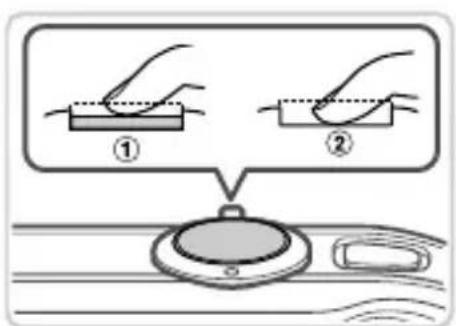
text_image
Diagram illustrating two steps of a hand holding a rectangular object, labeled ① and ②, with a circular device underneath.Comporre lo scatto.
natural_image
Abstract diagram with circular elements and arrows, no readable text or symbolsnatural_image
Diagram showing a mechanical component with a central device and surrounding parts (no text or symbols)flowchart
graph TD
    A["FUNC SET"] --> B["MF"]
    B --> C["Return to Center"]
    C --> D["Return to Right"]
natural_image
Illustration of a laptop with an arrow pointing to a CD (no text or symbols present)natural_image
Two identical hand-drawn trash bins with 'X' marks crossed out by diagonal lines, no text or symbols present.text_image
Diagram showing two electronic device components with labeled parts and directional arrows indicating process flow.natural_image
Diagram showing a plug inserted into a device with a downward arrow indicating insertion (no text or symbols present)Laad de batterij op.
text_image
Diagram showing car interior components with labeled parts and directional arrows indicating movement or insertion.Plaats de batterij.
natural_image
Diagram showing a device with a labeled component and an arrow pointing to a rectangular device (no text or symbols present)Aansluitpunten
natural_image
Diagram of a car's door handle with a black arrow pointing to the button (no text or symbols)Schakel de camera in.
natural_image
Diagram showing a mechanical component with arrows indicating direction, no visible text or symbolstext_image
FUNC SET MENU
flowchart
graph TD
    A["FUNC SE"] --> B["Top"]
    A --> C["Bottom"]
    A --> D["Left"]
    A --> E["Right"]
    A --> F["Center"]
natural_image
Diagram of a device's handle with a black downward arrow pointing to a button (no text or symbols)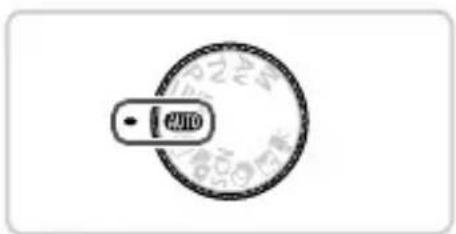
text_image
AUTO
natural_image
Diagram of a car dashboard with steering wheel, dashboard, and rearview (no text or symbols)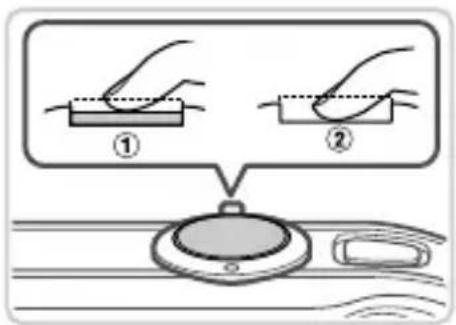
text_image
Diagram illustrating two steps of a mechanical or electrical procedure, labeled ① and ②, with a magnified view below showing the component.Schakel de camera in en open de modus AUTO.
natural_image
Abstract diagram with circular elements and arrows, no readable text or symbolsMaak filmopnamen.
natural_image
Diagram showing a mechanical assembly with rollers and a device, no visible text or symbolsflowchart
graph TD
    A["FUNC SET"] --> B["MF"]
    B --> C["Return to Center"]
    C --> D["Return to Right"]
natural_image
Illustration of a laptop connected to an CD/DVD icon (no text or symbols)natural_image
Two identical hand-drawn trash bins with cross-bracing, no text or symbols presenttext_image
Diagram showing two electronic device components with labeled parts and directional arrows indicating process flow.natural_image
Diagram of a device with a plug inserted into a battery, showing a downward arrow indicating insertion or disassembly (no text or symbols present)text_image
CARD-HEAT OPEN ① ②1 Abra a tampa.
Deslize a tampa ① ) e abra-a ( )2

text_image
Diagram showing device connection with labeled components and directional arrows indicating movement or interaction2 Insira a bateria.
natural_image
Diagram showing a device with a labeled component and an arrow pointing to a rectangular device (no text or symbols present)Terminais
text_image
① CARD/CACT.OPEN 5 ②Fecha a tampa.
natural_image
Diagram of a car interior with a black arrow pointing to a button (no text or symbols)Ligue a câmara.
natural_image
Diagram showing a mechanical component with arrows indicating direction, no readable text or symbols presentnatural_image
Diagram of a device's handle with a black arrow pointing to a button (no text or symbols)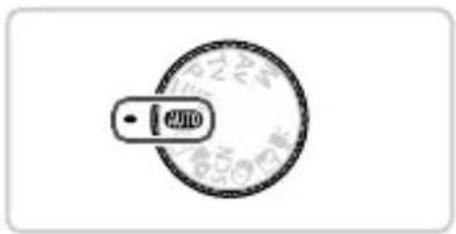
text_image
250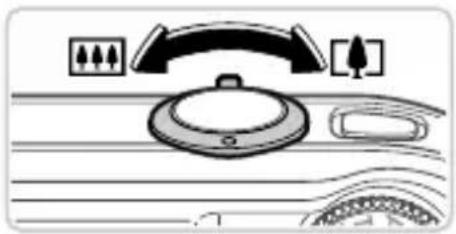
natural_image
Diagram of a car dashboard with steering wheel, rearview mirror, and front view of dashboard (no text or symbols)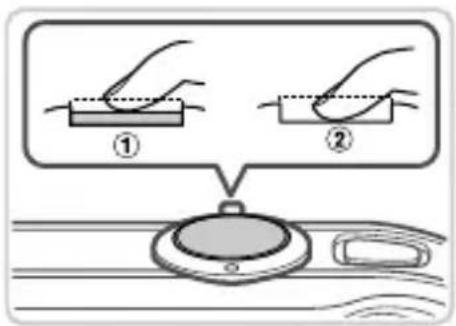
text_image
Diagram illustrating two steps of a hand holding a rectangular object, labeled ① and ②, with a magnified view below showing the same object.natural_image
Abstract diagram with circular elements and a black arrow pointing to a central dark circle (no text or symbols)Grave filmes.
natural_image
Diagram showing a mechanical assembly with rollers and a device, no visible text or symbolsnatural_image
Illustration of a laptop connected to an CD and an arrow indicating data transfer (no text or symbols present)natural_image
Two identical hand-drawn trash bins with cross-bracing, no text or symbols present30-2, Shimomaruko 3-chome, Ohta-ku, Tokyo 146-8501, Japan
CE
Kassens indhold
text_image
Diagram showing two electronic device components with labeled parts and directional arrows indicating process flow.natural_image
Diagram showing a device with a plug inserted into a base, indicated by a downward arrow (no text or symbols present)2 Oplad batteriet.
text_image
① CARD/Ticket, 1/2.5 ②Åbn dækslet.
text_image
Diagram showing a device with labeled components and directional arrows indicating movement or assembly.2 Isæt batteriet.
- Skub batterilåsen i pilens retning, isæt batteriet som vist, og tryk på det, indtil det klikker på plads i låst position. - Tryk batterilåsen i pilens retning for at fjerne batteriet.
BatterilåsPc
natural_image
Diagram showing a device with a labeled component and an arrow pointing to a rectangular device (no text or symbols present)Poler
natural_image
Diagram of a device's handle with a black arrow pointing to a button (no text or symbols)Tænd kameraet.
natural_image
Diagram showing mechanical components with arrows indicating direction (no text or symbols)1 Skift til afspilningstilstand.
Tryk på knappen ▶.
text_image
FUNCI SE MF MINI MINI MINI MINI MINI MINI MINI MINI MINI MINI MINI MINI MINI MINI MINI MINI MINI MINI MINI MINI MINI MINI MINI MINI MINI MINI MINI MINI MINI MINI MINI MINI MINI MINInatural_image
Diagram of a device's handle with a black downward arrow pointing to a button (no text or symbols)natural_image
Diagram of a car dashboard with steering wheel, dashboard, and rearview (no text or symbols)Tag stillbilleder.
text_image
Diagram illustrating two steps of a hand holding a rectangular object, labeled ① and ②, with a magnified view below showing the same object.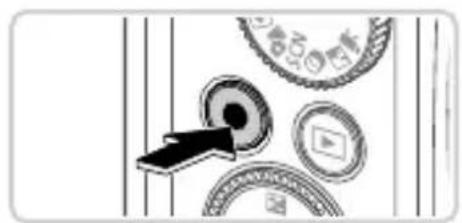
natural_image
Abstract diagram with circular elements and arrows, no readable text or symbolsOptag film.
Tryk på filmknappen for at starte optagelsen, og tryk på den igen for at stoppe.
Visning
natural_image
Diagram showing mechanical components and a close-up view of a device (no text or symbols)1 Skift til afspilningstilstand.
Tryk på knappen ▶.

flowchart
graph TD
    A["FUNC SET"] --> B["MF"]
    B --> C["MP"]
    C --> D["MP"]
    D --> E["MP"]
    E --> F["MP"]
    F --> G["MP"]
    G --> H["MP"]
    H --> I["MP"]
    I --> J["MP"]
    J --> K["MP"]
    K --> L["MP"]
    L --> M["MP"]
    M --> N["MP"]
    N --> O["MP"]
    O --> P["MP"]
    P --> Q["MP"]
    Q --> R["MP"]
    R --> S["MP"]
    S --> T["MP"]
    T --> U["MP"]
    U --> V["MP"]
    V --> W["MP"]
    W --> X["MP"]
    X --> Y["MP"]
    Y --> Z["MP"]
2 Gennemse billederne.
natural_image
Illustration of a laptop with a CD icon showing an arrow pointing to it (no text or symbols present)natural_image
Two identical hand-drawn trash bins with 'X' marks crossed out by diagonal lines, no text or symbols present.30-2, Shimomaruko 3-chome, Ohta-ku, Tokyo 146-8501, Japan
text_image
Diagram showing two electronic device components with labeled parts and directional arrows indicating process flow.natural_image
Diagram showing a plug inserted into a device with a downward arrow indicating insertion (no text or symbols present)2 Ladda batteriet.
text_image
Diagram showing a device with labeled components and directional arrows indicating movement or assembly steps.2 Sätt i batteriet.
natural_image
Diagram showing a device with a labeled component and an arrow pointing to a folder (no text or symbols present)Kontakter
text_image
DINAVELT OPEN ① ②Stäng luckan.
natural_image
Simple line drawing of a device handle with a black downward arrow pointing to a button (no text or symbols)Slå på kameran.
natural_image
Diagram showing a mechanical component with arrows indicating direction, no visible text or symbolstext_image
FUNC SET MENU
flowchart
graph TD
    A["FUNC SE"] --> B["Top"]
    A --> C["Bottom"]
    A --> D["Left"]
    A --> E["Right"]
    A --> F["Center"]
natural_image
Diagram of a device's handle with a black downward arrow pointing to a button (no text or symbols)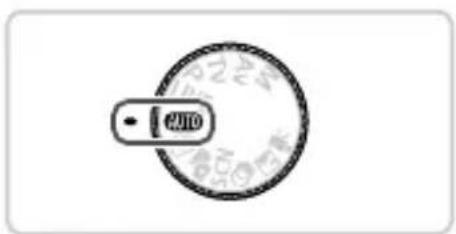
text_image
2400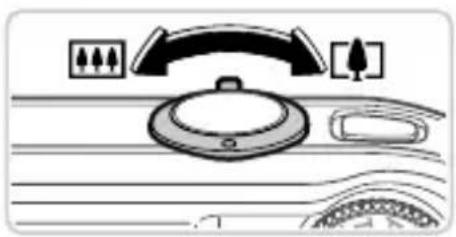
natural_image
Diagram of a car dashboard with steering wheel, dashboard, and rearview (no text or symbols)
text_image
Diagram illustrating two steps of a hand holding a rectangular object, labeled ① and ②, with a magnified view below showing the same object.natural_image
Abstract diagram with circular elements and a black arrow pointing to a central dark circle (no text or symbols)Spela in videoscener.
natural_image
Diagram showing a mechanical component with a central device and surrounding parts (no text or symbols)flowchart
graph TD
    A["FUNC SET"] --> B["MF"]
    B --> C["Return to Center"]
    C --> D["Return to Right"]
natural_image
Illustration of a laptop with a CD icon showing an arrow pointing to it (no text or symbols present)natural_image
Two identical hand-drawn trash bins with cross-bracing, no text or symbols present30-2, Shimomaruko 3-chome, Ohta-ku, Tokyo 146-8501, Japan
Pakkauksen sisältö
text_image
Diagram showing two electronic components with labeled parts and directional arrows indicating process flow or movement.natural_image
Diagram showing a plug inserted into a device with a downward arrow indicating insertion (no text or symbols present)2 Lataa akku.
text_image
Diagram showing a device with labeled components and directional arrows indicating movement or interaction.2 Aseta akku.
natural_image
Diagram showing a device with a highlighted internal component and an arrow pointing to it (no text or symbols present)Liitännät
text_image
CARD/WRAFT OPEN 3 ① ②Sulje kansi.
natural_image
Diagram of a car's side panel with a black arrow pointing to the button (no text or symbols present)Kytke kameraan virta.
text_image
Diagram showing a mechanical or electrical component with a black arrow pointing to a labeled component, possibly indicating a switch or adjustment.text_image
FUNC SET MENU
flowchart
graph TD
    A["FUNC SE"] --> B["Top"]
    A --> C["Bottom"]
    A --> D["Left"]
    A --> E["Right"]
    A --> F["Center"]
natural_image
Diagram of a device's handle with a black downward arrow pointing to a button (no text or symbols)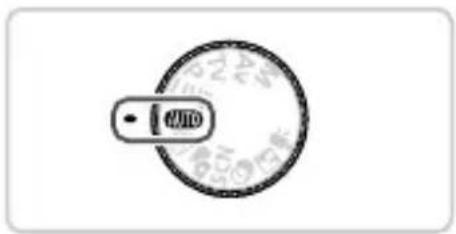
natural_image
Circular dial indicator with a pointer labeled 'M10' (no additional text or symbols)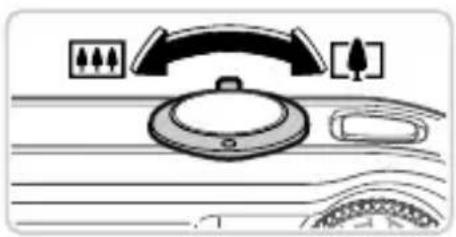
natural_image
Diagram of a car dashboard with steering wheel, dashboard, and rearview (no text or symbols)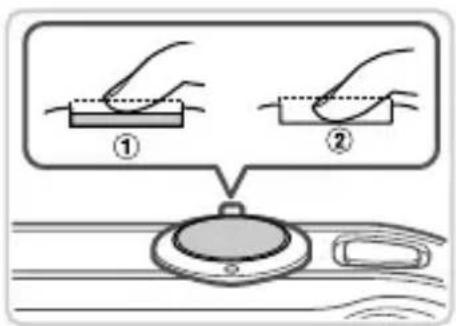
text_image
Diagram illustrating two steps of a hand holding a rectangular object, labeled ① and ②, with a magnified view below showing the same object.natural_image
Pure mechanical assembly diagram without any text, numbers, or symbolsnatural_image
Illustration of a mechanical device with circular components and a screen, no visible text or symbolsflowchart
graph TD
    A["FUND SET"] --> B["Symbol 1"]
    A --> C["Symbol 2"]
    A --> D["Symbol 3"]
    A --> E["Symbol 4"]
    A --> F["Symbol 5"]
    A --> G["Symbol 6"]
    A --> H["Symbol 7"]
    A --> I["Symbol 8"]
    A --> J["Symbol 9"]
    A --> K["Symbol 10"]
    A --> L["Symbol 11"]
    A --> M["Symbol 12"]
    A --> N["Symbol 13"]
    A --> O["Symbol 14"]
    A --> P["Symbol 15"]
    A --> Q["Symbol 16"]
    A --> R["Symbol 17"]
    A --> S["Symbol 18"]
    A --> T["Symbol 19"]
    A --> U["Symbol 20"]
Selaa kuvia.
natural_image
Illustration of a laptop with an arrow pointing to a CD (no text or symbols present)natural_image
Two identical hand-drawn trash bin symbols crossed with diagonal lines, no text or labels present.30-2, Shimomaruko 3-chome, Ohta-ku, Tokyo 146-8501, Japan
CE
Obsah balení
text_image
Diagram showing two electronic device components with labeled parts and directional arrows indicating process flow.natural_image
Diagram showing a plug inserted into a device with a downward arrow indicating insertion (no text or symbols present)2 Nabijte baterii.
text_image
Diagram showing device connection with labeled parts and directional arrows indicating movement or assembly.2 Vložte baterii.
natural_image
Diagram of a computer monitor with an open rear panel and a black arrow pointing to a slot (no text or symbols present)Konektory
text_image
CARD/BATT OPENZavřete krytku.
natural_image
Simple line drawing of a car interior with a downward arrow pointing to the button (no text or symbols)Zapněte fotoaparát.
natural_image
Diagram showing a mechanical component with arrows indicating direction, no visible text or symbolsnatural_image
Diagram showing a car interior with a downward arrow and a circular dial (no text or symbols)natural_image
Diagram of a car dashboard with steering wheel, dashboard, and rearview controls (no text or symbols)2 Proved'te kompozici snímku.
text_image
Diagram showing two hands holding a rectangular object with dotted lines, labeled ① and ②, above a circular device with a battery.natural_image
Pure mechanical diagram showing a cursor clicking a button on a circular component with surrounding gears and symbols (no text or labels)natural_image
Illustration of a kitchen sink with a computer monitor and circular components (no text or symbols)natural_image
Illustration of a laptop with a CD icon showing an arrow pointing to it (no text or symbols present)natural_image
Two identical trash bin icons crossed with diagonal lines, no text or symbols present30-2, Shimomaruko 3-chome, Ohta-ku, Tokyo 146-8501, Japan
© CANON INC. 2012 VYTIŠTĚNO V EU
CE
A csomag tartalma
text_image
Diagram showing two electronic device components with labeled parts and directional arrows indicating process flow.natural_image
Diagram showing a device with a plug inserted into a base, indicated by a downward arrow (no text or symbols present)text_image
Diagram showing a device with labeled components and directional arrows indicating movement or assembly.natural_image
Diagram showing a device with a labeled component and an arrow pointing to a rectangular panel (no text or symbols present)Csatlakozók
text_image
Cable/Start, OPEN 1 ① ②Csukja be a fedelet.
natural_image
Diagram of a mechanical component with a downward arrow indicating a process or operation (no text or symbols present)text_image
Diagram showing mechanical components with a labeled directional arrow and a magnified inset viewtext_image
FUNC SET MENU
flowchart
graph TD
    A["FUNC SE"] --> B["Top"]
    A --> C["Bottom"]
    A --> D["Left"]
    A --> E["Right"]
    A --> F["Center"]
natural_image
Diagram of a device's handle with a black downward arrow pointing to a button (no text or symbols)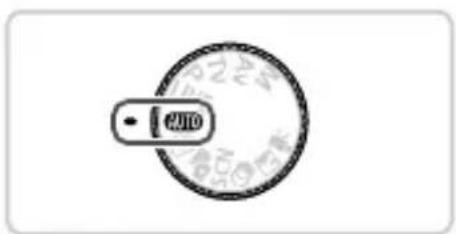
text_image
2400
natural_image
Diagram of a car dashboard with steering wheel, dashboard, and rearview (no text or symbols)
text_image
Diagram illustrating two steps of a hand holding a rectangular object, labeled ① and ②, with a magnified view below showing the same object.natural_image
Pure mechanical diagram showing a cursor clicking a button with circular components and a play button (no text or symbols)natural_image
Illustration of a mechanical device with a close-up view of its component (no text or symbols visible)flowchart
graph TD
    A["FUNC SET"] --> B["MF"]
    B --> C["Return to Center"]
    C --> D["Return to Right"]
natural_image
Illustration of a laptop with an arrow pointing to a CD (no text or symbols present)natural_image
Two identical hand-drawn trash bins with cross-bracing, no text or symbols presenttext_image
Diagram showing two electronic device components with labeled parts and directional arrows indicating process flow.natural_image
Diagram showing a plug inserted into a device with a downward arrow indicating insertion (no text or symbols present)2 Naładuj baterię.
text_image
Diagram showing a device with labeled components and directional arrows indicating movement or assembly steps.2 Włóż baterię.
natural_image
Diagram showing a device with a labeled component and an arrow pointing to a rectangular panel (no text or symbols present)Styki
natural_image
Diagram of a device's handle with a black downward arrow pointing to a button (no text or symbols)1 Włącz aparat.
natural_image
Diagram showing a mechanical or electrical component with circular elements and a black arrow pointing to a component (no text or symbols present)natural_image
Diagram of a device's handle with a black arrow pointing to a button (no text or symbols)natural_image
Diagram of a car dashboard with steering wheel, dashboard, and rearview (no text or symbols)Zrób zdjęcia.
text_image
Diagram illustrating two steps of a hand holding a rectangular object, labeled ① and ②, with a magnified view below showing the same object.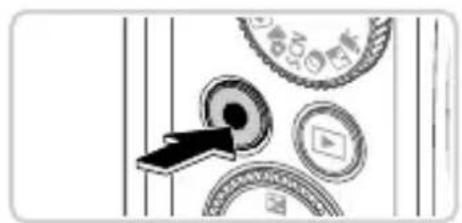
natural_image
Abstract diagram with circular elements and arrows, no readable text or symbolsNagraj filmy.
natural_image
Diagram showing mechanical components and a close-up view of a device (no text or symbols present)natural_image
Illustration of a laptop with an arrow pointing to a CD (no text or symbols present)natural_image
Two identical hand-drawn trash bins with cross-bracing, no text or symbols present30-2, Shimomaruko 3-chome, Ohta-ku, Tokyo 146-8501, Japan
Obsah balenia
text_image
Diagram showing two electronic device components with labeled parts and directional arrows indicating movement or change.natural_image
Diagram showing a plug inserted into a device with a downward arrow indicating insertion (no text or symbols present)2 Nabite batériu.
- Po pripojení napájacieho kábla k nabíjačke a zasunutí do elektrickej zásuvky sa indikátor rozsvieti na oranžovo. - Po dokončení nabíjania sa indikátor rozsvieti na zeleno. Vyberte batériu. - Podrobné informácie o čase nabíjania a počte záberov alebo čase záznamu s plne nabitou batériou nájdete v časti „Technické parametre“ v Užívatel'skej príručke k fotoaparátu.
text_image
Diagram showing a device with labeled components and directional arrows indicating movement or assembly steps.2 Vložte batériu.
natural_image
Diagram of a computer monitor with an open lid and cable rack, showing internal components (no text or symbols)Konektory
text_image
CARD/BATT OPEN ① ②4 Zatvorte kryt.
natural_image
Simple line drawing of a device's handle with a black downward arrow pointing to a button (no text or symbols)1 Zapnite fotoaparát.
natural_image
Diagram showing a mechanical component with arrows indicating direction, no visible text or symbols1 Prejdite do režimu prehrávania.
Stlačte tlačidlo ▶.

text_image
FUNCL MF SE F FINCE M DISA MENU FUNCL MF SE F FINCE Mtext_image
Diagram illustrating car speed control steps with directional arrows and a rotary dial labeled 'AUTO'.Zapnite fotoaparát a prejdite do režimu AUTO.
Stlačte tlačidlo ON/OFF.
• Volič režimov nastavte do polohy AUTO.
text_image
Diagram illustrating two steps of a mechanical or electrical procedure, labeled ① and ②, with a circular component underneath.Skomponujte záber.
natural_image
Abstract diagram with circular elements and arrows, no readable text or symbolsZhotovte videosekvencie.
natural_image
Diagram showing a device with a screen and circular components, no visible text or symbols1 Prejdite do režimu prehrávania.
Stlačte tlačidlo ▶.
flowchart
graph TD
    A["FUNC SET"] --> B["Top Circle"]
    B --> C["Bottom Circle"]
    C --> D["Left Arrow"]
    D --> E["Right Arrow"]
    E --> F["Down Arrow"]
    F --> G["Up Arrow"]
    G --> H["Down Arrow"]
natural_image
Illustration of a laptop with an arrow pointing to a CD icon (no text or symbols present)natural_image
Two identical waste sorting bins with diagonal cross lines and a black rectangular symbol below (no text or labels)30-2, Shimomaruko 3-chome, Ohta-ku, Tokyo 146-8501, Japan
© CANON INC. 2012 VYTLAČENÉ V EÚ
CE

Pakendi sisu
text_image
Diagram showing two electronic components with labeled parts and directional arrows indicating process flow or movement.natural_image
Simple line drawing of a device with a plug inserted into a base, showing a downward arrow (no text or symbols)2 Laadige aku täis.
text_image
Diagram showing a device with labeled components and directional arrows indicating movement or assembly steps.2 Sisestage aku.
natural_image
Diagram showing a device with a labeled component and an arrow pointing to a rectangular slot (no text or symbols present)Kontaktid
natural_image
Line drawing of a device's handle with a black arrow pointing to a button (no text or symbols)Lülitage kaamera sisse.
natural_image
Diagram showing a mechanical or electrical component with circular elements and a black arrow pointing to a component (no text or symbols present)text_image
FUNC SET MENU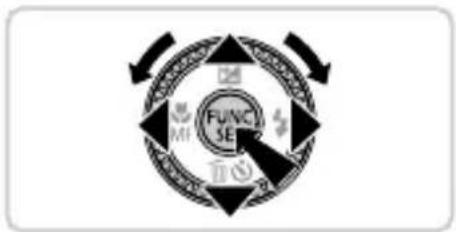
flowchart
graph TD
    A["FUNC SE"] --> B["Outer Ring"]
    B --> C["Inner Ring"]
    C --> D["Outer Ring"]
    D --> E["Outer Ring"]
    E --> F["Outer Ring"]
    F --> G["Outer Ring"]
    G --> H["Outer Ring"]
    H --> I["Outer Ring"]
    I --> J["Outer Ring"]
    J --> K["Outer Ring"]
    K --> L["Outer Ring"]
    L --> M["Outer Ring"]
    M --> N["Outer Ring"]
    N --> O["Outer Ring"]
    O --> P["Outer Ring"]
    P --> Q["Outer Ring"]
    Q --> R["Outer Ring"]
    R --> S["Outer Ring"]
    S --> T["Outer Ring"]
    T --> U["Outer Ring"]
    U --> V["Outer Ring"]
    V --> W["Outer Ring"]
    W --> X["Outer Ring"]
    X --> Y["Outer Ring"]
natural_image
Simple line drawing of a device's handle with a black downward arrow pointing to a button (no text or symbols)
text_image
1200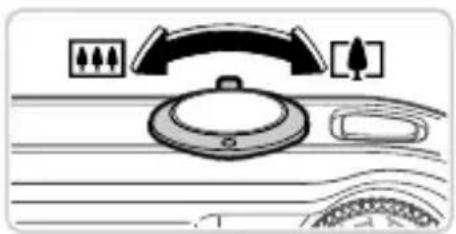
natural_image
Diagram of a car dashboard with steering wheel, dashboard, and rearview (no text or symbols)
text_image
Diagram showing two hands performing a step on a device, labeled ① and ②, with a magnified view below.natural_image
Abstract diagram with circular elements and a black arrow pointing to a central dark circle (no text or symbols)Filmige.
natural_image
Diagram showing mechanical components and a close-up view of a device (no text or symbols present)flowchart
graph TD
    A["FUNC SET"] --> B["MF"]
    B --> C["End"]
2 Sirvige kujutisi.
natural_image
Illustration of a laptop connected to an CD and an arrow indicating data transfer (no text or symbols present)natural_image
Two identical hand-drawn trash bins with cross-bracing, no text or symbols present30-2, Shimomaruko 3-chome, Ohta-ku, Tokyo 146-8501, Japan
CE
lepakojuma saturs
text_image
Diagram showing two electronic device components with labeled parts and directional arrows indicating process flow.natural_image
Simple line drawing of a device with a plug inserted into a base, showing a downward arrow (no text or symbols)natural_image
Diagram showing a device with a labeled component and an arrow pointing to a rectangular slot (no text or symbols present)Kontakti
natural_image
Simple line drawing of a device's handle with a black arrow pointing to the button (no text or symbols)flowchart
graph TD
    A["FUNCH SE"] --> B["Arrow Left"]
    B --> C["Arrow Right"]
    C --> D["Arrow Bottom"]
    D --> E["Arrow Up"]
    E --> F["Arrow Down"]
    F --> G["Arrow Up"]
    G --> H["Arrow Down"]
    H --> I["Arrow Left"]
    I --> J["Arrow Up"]
    J --> K["Arrow Down"]
    K --> L["Arrow Left"]
    L --> M["Arrow Up"]
    M --> N["Arrow Down"]
    N --> O["Arrow Left"]
    O --> P["Arrow Up"]
    P --> Q["Arrow Down"]
    Q --> R["Arrow Left"]
    R --> S["Arrow Up"]
    S --> T["Arrow Down"]
    T --> U["Arrow Left"]
    U --> V["Arrow Up"]
    V --> W["Arrow Down"]
    W --> X["Arrow Left"]
    X --> Y["Arrow Up"]
    Y --> Z["Arrow Down"]
text_image
Diagram showing a mechanical or electrical component with a black arrow pointing to a labeled component, likely indicating a switch or adjustment.text_image
FUNC SET MENU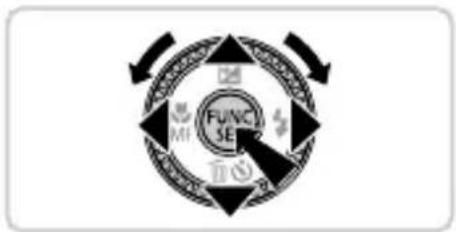
flowchart
graph TD
    A["FUNC SE"] --> B["Outer Ring"]
    B --> C["Inner Ring"]
    C --> D["Outer Ring"]
    D --> E["Outer Ring"]
    E --> F["Outer Ring"]
    F --> G["Outer Ring"]
    G --> H["Outer Ring"]
    H --> I["Outer Ring"]
    I --> J["Outer Ring"]
    J --> K["Outer Ring"]
    K --> L["Outer Ring"]
    L --> M["Outer Ring"]
    M --> N["Outer Ring"]
    N --> O["Outer Ring"]
    O --> P["Outer Ring"]
    P --> Q["Outer Ring"]
    Q --> R["Outer Ring"]
    R --> S["Outer Ring"]
    S --> T["Outer Ring"]
    T --> U["Outer Ring"]
    U --> V["Outer Ring"]
    V --> W["Outer Ring"]
    W --> X["Outer Ring"]
    X --> Y["Outer Ring"]
natural_image
Line drawing of a car interior with a black downward arrow pointing to a button (no text or symbols)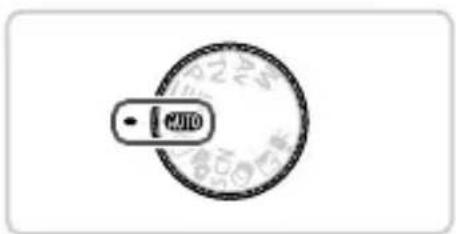
text_image
AUTO
natural_image
Diagram of a car dashboard with steering wheel, dashboard, and rearview controls (no text or symbols)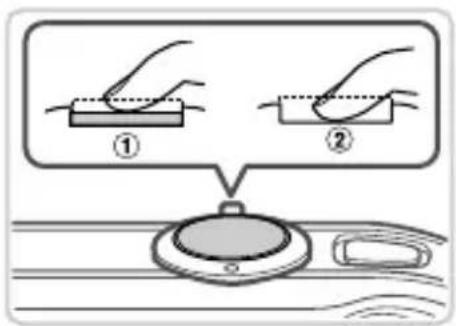
text_image
Diagram showing two hands holding a rectangular object with dotted lines, labeled ① and ②, above a circular device.leslēdziet kameru un iestatiet režīmu AUTO.
Nospiediet pogu ON/OFF.
Pagrieziet režimu disku stāvoklī AUTO.
Veiciet kadrēšanu.
natural_image
Abstract diagram with circular elements and a black arrow pointing to a central circular element (no text or symbols)Filmējiet.
natural_image
Diagram showing a device interacting with circular components and a door, no visible text or symbolsflowchart
graph TD
    A["FUNC SET"] --> B["MF"]
    B --> C["End"]
natural_image
Illustration of a laptop with a CD icon showing an arrow pointing to it (no text or symbols present)natural_image
Two identical hand-drawn trash bin symbols crossed with diagonal lines, no text or labels present30-2, Shimomaruko 3-chome, Ohta-ku, Tokyo 146-8501, Japan
© CANON INC. 2012 IESPIESTS EIROPAS SAVIENĪBĀ
Pakuotės turinys
text_image
Diagram showing two electronic device components with labeled parts and directional arrows indicating process flow or movement.natural_image
Simple line drawing of a device with a plug inserted into a base, showing a downward arrow (no text or symbols)text_image
Diagram showing a device with labeled components and directional arrows indicating movement or assembly steps.2 Idëkite akumuliatorių.
natural_image
Simple line drawing of a device's handle with a black downward arrow pointing to a button (no text or symbols)1 ljunkite fotoaparata.
text_image
Diagram showing mechanical components with a black arrow pointing to a component, likely illustrating a turning or disassembly process.natural_image
Diagram of a device's handle with a black downward arrow pointing to a button (no text or symbols)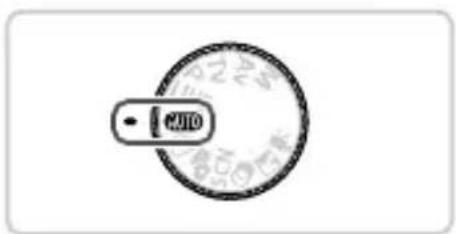
text_image
AUTO
natural_image
Diagram of a car dashboard with steering wheel, dashboard, and rearview (no text or symbols)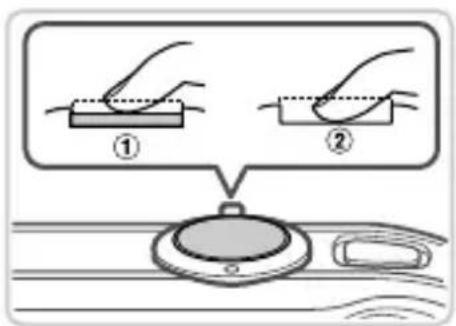
text_image
Diagram illustrating two steps of a hand holding a rectangular object, labeled ① and ②, with a magnified view below showing the same object.natural_image
Abstract diagram with circular elements and a black arrow pointing to a central dark circle (no text or symbols)Filmuokite.
natural_image
Diagram showing mechanical components and a device with a black arrow pointing to a component (no text or symbols present)natural_image
Illustration of a laptop with an arrow pointing to a CD icon (no text or symbols present)natural_image
Two identical hand-drawn trash bin symbols crossed with diagonal lines, no text or labels presenttext_image
Diagram showing two electronic components with labeled parts and directional arrows indicating process flow or movement.natural_image
Diagram showing a device with a plug inserted into a base, indicated by a downward arrow (no text or symbols present)text_image
Diagram showing device connection with labeled parts and directional arrows indicating movement or assembly.natural_image
Simple line drawing of a car's front panel with a black downward arrow pointing to the button (no text or symbols)Ανάψτε τη μηχανή.
text_image
Diagram showing mechanical components with a black arrow pointing to a component, likely illustrating a turning or positioning process.text_image
FUNC SET MENU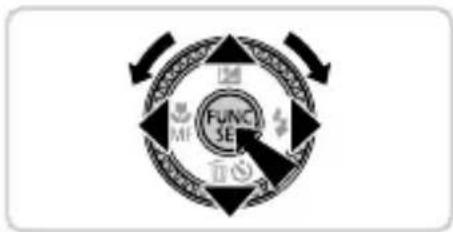
flowchart
graph TD
    A["FUNC SE"] --> B["Outer Ring"]
    B --> C["Inner Ring"]
    C --> D["Outer Ring"]
    D --> E["Outer Ring"]
    E --> F["Outer Ring"]
    F --> G["Outer Ring"]
    G --> H["Outer Ring"]
    H --> I["Outer Ring"]
    I --> J["Outer Ring"]
    J --> K["Outer Ring"]
    K --> L["Outer Ring"]
    L --> M["Outer Ring"]
    M --> N["Outer Ring"]
    N --> O["Outer Ring"]
    O --> P["Outer Ring"]
    P --> Q["Outer Ring"]
    Q --> R["Outer Ring"]
    R --> S["Outer Ring"]
    S --> T["Outer Ring"]
    T --> U["Outer Ring"]
    U --> V["Outer Ring"]
    V --> W["Outer Ring"]
    W --> X["Outer Ring"]
    X --> Y["Outer Ring"]
natural_image
Diagram of a device's handle with a black downward arrow pointing to a button (no text or symbols)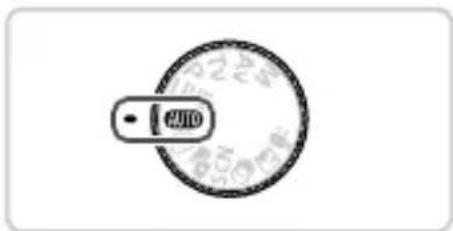
text_image
2400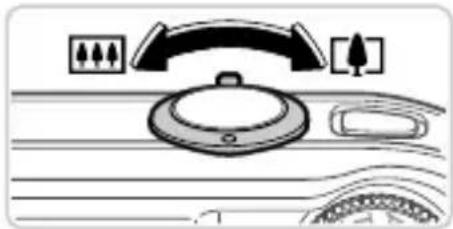
natural_image
Diagram of a car dashboard with steering wheel, rearview mirror, and dashboard (no text or symbols)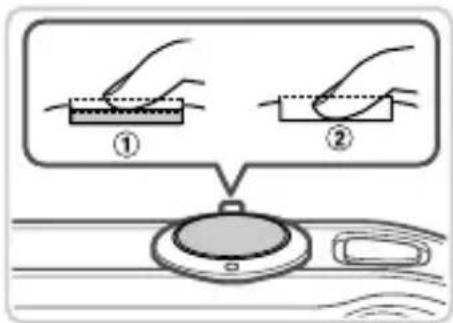
text_image
Diagram illustrating two steps of fabric cutting or surface treatment, labeled ① and ②, with a magnified view below.natural_image
Abstract graphic with circular elements and arrows, no readable text or symbolsΛήψη ταινιών
natural_image
Illustration of a medical or laboratory procedure with anatomical components and a close-up view of a device (no text or symbols present)natural_image
Illustration of a laptop with a CD icon showing an arrow pointing to it (no text or symbols present)natural_image
Two identical hand-drawn trash bins with cross-bracing, no text or symbols present30-2, Shimomaruko 3-chome, Ohta-ku, Tokyo 146-8501, Japan