Digital optical, analog RCA (L/R), 3.5 mm jack (right side)
Soundbar Power
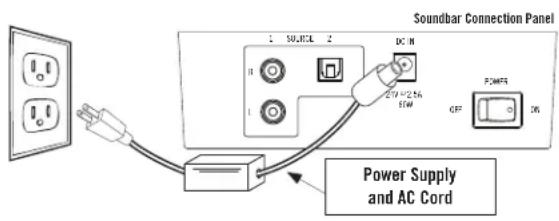
External power supply, DC input 24V=2.5A (check label)
Subwoofer Power
AC power cord, on/off switch
Power Consumption
Not specified
Soundbar Weight
Approximately 3 kg (for wall mount, minimum capacity 3 kg)
Subwoofer Weight
Not specified
Dimensions (Soundbar)
Not specified
Dimensions (Subwoofer)
Not specified
Main Functions
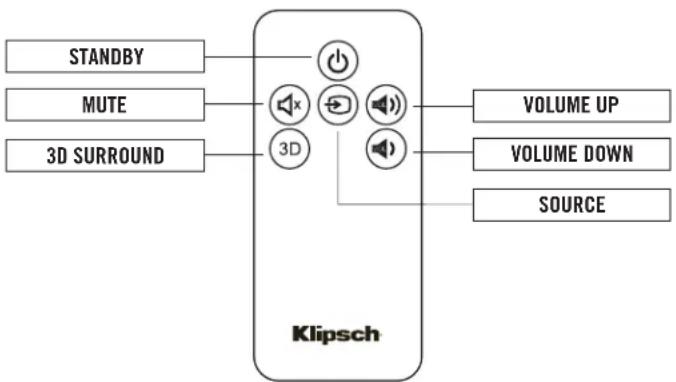
Volume control, mute, source selection, 3D surround, auto standby (after 10 min no signal)
Included Accessories
Soundbar, subwoofer, power supply, dual RCA cable, rubber feet, remote control, quick installation guide, wall template, 1.5 m digital optical cable
Wall Mounting
Yes, via keyhole slots on the back (screws not included)
Maintenance and Cleaning
Wipe with a soft dry cloth; do not use water, solvents, or abrasive cleaners; vacuum the grille with a soft brush
Safety
Do not spray liquid on speakers or controls; unplug before cleaning
Spare Parts and Repairability
Not specified; contact Klipsch customer service (1-866-441-8208)
Frequently Asked Questions - HD Theater SB 3 KLIPSCH
How do I connect the soundbar to my TV?
Use a digital optical cable (included) or an analog RCA cable (included). Connect one end to the TV's audio output and the other to the corresponding input on the back of the soundbar. You can also use the 3.5mm jack via an adapter (not included) from a headphone output.
Why is the subwoofer's LED staying red?
The red light means the subwoofer is searching for the wireless signal from the soundbar. Make sure the soundbar is on (green or orange LED) and both devices are powered. If the problem persists, perform a manual pairing: insert a paperclip into the small hole on the back of the soundbar (near the RCA inputs) for 5 seconds, then do the same on the subwoofer (hole labeled 'FACTORY USE ONLY'). The LED should turn blue.
How do I program my TV remote to control the soundbar?
Put the soundbar into learning mode: press and hold the SOURCE and MUTE buttons on the soundbar (about 3 seconds) until the LED flashes red and green. Press SOURCE once (steady orange LED). Point your TV remote at the soundbar and press the desired button (e.g., volume) 4 times. If the 4th press makes the LED flash green, the function is learned. Repeat for other buttons (volume, mute, source).
What if the soundbar produces no sound?
Check that the soundbar is plugged in and the rear switch is ON. Make sure the status LED is not red (standby) but green or orange. Check the volume on the soundbar and the source (TV). Verify that the audio cable is fully inserted and that the selected source is correct (press SOURCE).
How do I activate 3D surround mode?
Press the 3D button on the included remote. A white LED lights up on the soundbar to confirm activation. To deactivate, press the same button again. This mode simulates expanded surround sound without additional speakers.
Do the soundbar and subwoofer go into standby automatically?
Yes, if no audio signal is received for about 10 minutes, both devices automatically go into standby (steady red LED). They wake up automatically when a signal is detected. You can also use the on/off switch on the back.
Can I mount the soundbar on the wall?
Yes, the soundbar has keyhole slots on the back for wall mounting. Use the included template to drill holes. Screws must support at least 3 kg. Make sure to connect cables before attaching the soundbar to the wall.
How do I clean the soundbar and subwoofer?
Use a soft, dry cloth to dust the enclosure. Never use water, solvents, or abrasive products. For the grille, use a vacuum cleaner with a soft brush. Remove the grille if possible before vacuuming the speakers.
What is the wireless range between the soundbar and subwoofer?
The range can reach up to 15 meters (50 feet) in open space. Obstacles like walls may reduce range. For best connection, place the subwoofer in the same room and avoid interference from other wireless devices.
What if the remote control does not work?
Check the remote's batteries. Make sure there are no obstacles between the remote and the soundbar. If the remote is programmed for another device, repeat the learning procedure. Note that the 3D button cannot be learned by another remote.
User questions about HD Theater SB 3 KLIPSCH
0 question about this device. Answer the ones you know or ask your own.
Ask a new question about this device
No questions yet. Be the first to ask one.
Download the instructions for your Hi-Fi System in PDF format for free! Find your manual HD Theater SB 3 -
KLIPSCH and take your electronic device back in hand. On this page are published all the documents necessary for the use of your device. HD Theater SB 3 by KLIPSCH.
USER MANUAL HD Theater SB 3 KLIPSCH
natural_image
Exterior view of a Klipsch audio device with two black rectangular panels (no text or symbols on the main body)
HD THEATER SB 3
Owner's Manual
PACKING LIST
SOUNDBAR
WIRELESS SUBWOOFER
SOUNDBAR POWER SUPPLY/POWER CORD
SUBWOOFER POWER CORD
5.4.9 FOOT (1.5M) DIGITAL OPTICAL CABLE
DUAL RCA CABLE
TWO CRADLES
ONE REMOTE CONTROL
QUICK SETUP GUIDE
SOUNDBAR WALL-MOUNT TEMPLATE
THIS OWNER'S MANUAL
SOUNDBAR FRONT
flowchart
graph TD
    A["○"] --> B["←"]
    B --> C["×"]
    C --> D["—"]
    D --> E["+"]
    E --> F["○"]
    G["SOURCE MUTE VOLUME DOWN"] --> H["○"]
    I["VOLUME UP"] --> J["○"]
SOUNDBAR STATUS LIGHT (Right status light, unless stated)
RED: In STANDBY ("Sleep") Mode
GREEN: On Digital Optical Cable Input
ORANGE: On Analog RCA L/R Input
ORANGE (Flashing): RCA Input muted
GREEN (Flashing): Digital Input muted
RED (Flashing): Failure to learn a remote control command
GREEN OR ORANGE FLASHES: A remote control signal has been received
BLUE:
On 3.5 mm Analog Input
RED and GREEN (Alternating):
Remote Programming
WHITE (Left Status Light):
In 3D Surround Mode
SOUNDBAR REAR
SOUNDBAR RIGHT SIDE
SUBWOOFER REAR
SUBWOOFER STATUS LIGHT
BLUE (Solid): Receiving wireless signal from soundbar
RED (Solid): Searching for soundbar wireless signal
PLACEMENT/INSTALLATION
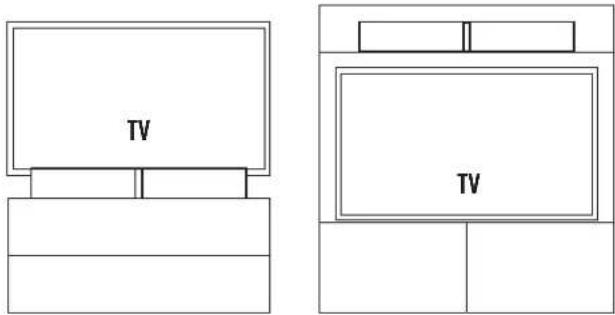
Placing/wall-mounting the soundbar: The soundbar is designed to be placed on a flat surface directly in front of your TV on its two supplied cradles, on a shelf directly above or below your TV in a piece of furniture or wall-mounted (via keyholes on the rear of the soundbar) under a TV that is also wall-mounted. If wall-mounting, first, use the supplied wall-mount template to mount soundbar. If the two mounting holes drill into wall studs, screw two wood screws in those holes to hang the soundbar on. If there are no wall studs where the holes are drilled, use wall anchors that support at least 7 pounds (3kg) each to hang the soundbar on. Connect cable from TV (see Connection section) to soundbar and hang soundbar on wall.
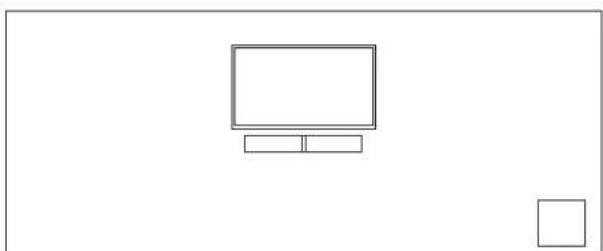
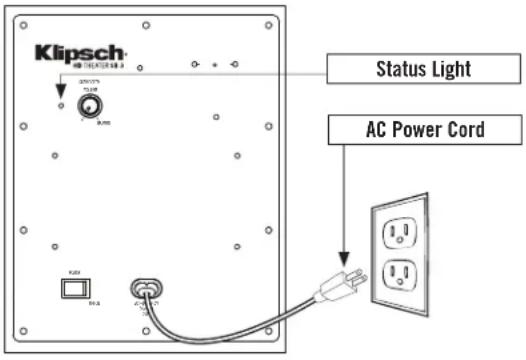
Placing the subwoofer: The subwoofer is designed to be placed on the floor in the same room within 50 feet (15m) of the soundbar near an electrical outlet. For maximum bass output, place the subwoofer in a corner on the same wall as the TV and soundbar. Once the soundbar has been connected to the TV and plugged into a wall outlet, plug the subwoofer into a wall outlet.
natural_image
Simple line drawing of a monitor and two boxes on a plain background (no text or symbols)
CONNECTION
Connecting the soundbar to your TV: The soundbar part of your Klipsch HD Theater SB 3 system is what needs to be connected to your TV, Cable Box or Satellite Receiver. If you have other devices connected to your TV, such as a DVD / BluRay player, gaming system, etc., connect the soundbar to the TV so that you can listen to all those and your TV through the soundbar. If there are no other devices connected to your TV other than a cable or satellite box and you receive all of your television programs from that box, you can connect the soundbar to either that box or your TV. There are three different ways to connect the soundbar to your TV, Satellite or Cable box.
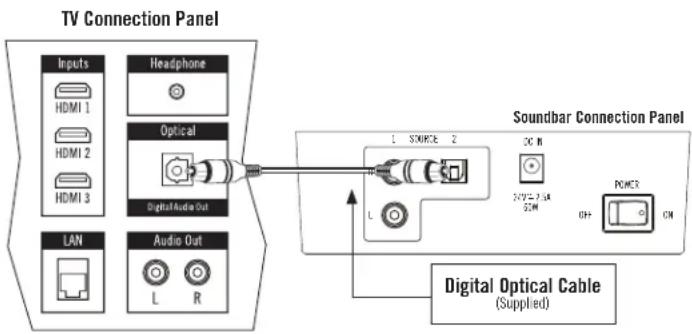
A. Digital Optical Cable (Preferred Method)
Most High Definition TV's, Satellite and Cable boxes have an DIGITAL OPTICAL AUDIO OUTPUT. Simply connect one end of a digital optical cable (included) into the corresponding output of your TV, Satellite or Cable box and connect the other end of the cable into the DIGITAL OPTICAL INPUT on the back panel of the soundbar.
flowchart
graph LR
    A["Inputs"] --> B["HDMI 1"]
    A --> C["HDMI 2"]
    A --> D["HDMI 3"]
    E["Headphone"] --> F["Optical"]
    G["Digital Audio Out"] --> F
    H["L"] --> I["1 SOURCE 2"]
    I --> J["DC IN"]
    J --> K["SOYA-2.1A 2CM"]
    K --> L["POWER ON"]
    M["LAN"] --> N["Audio Out"]
    O["Digital Optical Cable (Supplied)"] --> P["1 SOURCE 2"]
    P --> Q["L"]
    Q --> R["1 SOURCE 2"]
    R --> S["DC IN"]
    S --> T["SOYA-2.1A 2CM"]
    T --> U["POWER ON"]
B. RCA Cable
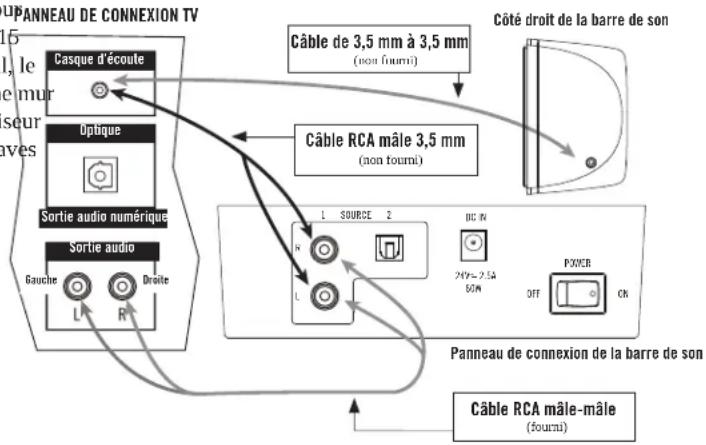
If you do not have an optical digital output, you can use analog left and right audio outputs on your device and connect them to the analog left and right inputs on the soundbar (cable supplied).
flowchart
graph TD
    A["Headphone"] -->|3.5mm to 3.5mm Cable (Not Supplied)| B["Soundbar Right Side"]
    C["Optical"] -->|3.5mm to Male RCA Cable (Not Supplied)| D["Soundbar Connection Panel"]
    E["Audio Out"] -->|L/R| F["1/2SOURCE"]
    G["DC IN"] --> H["2W = 2mA 60Hz"]
    I["POWER"] --> J["ON/OFF"]
    K["Male RCA to Male RCA Cable (Supplied)"] --> L["Soundbar Connection Panel"]
    M["Digital Audio Out"] --> N["Headphone"]
    O["Radio"] --> P["Soundbar Connection Panel"]
C. 3.5mm Output (Headphone Jack)
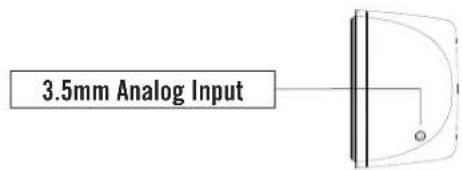
Other choices would be to connect from a headphone output on your device to the analog left and right inputs on the soundbar (cable NOT supplied) OR from a headphone output on your device to the 3.5mm input on the right side of the soundbar.
Once you have made any of the above audio cable connections, connect the supplied soundbar power supply into the "DC Input" on the back of the soundbar, plug the other end into an active electrical socket and turn the Main Power Switch on the back of the soundbar on. Select the input you connected the TV to by pushing the input button on the soundbar.
Connecting the subwoofer to the soundbar: Once you have placed the subwoofer in the room, take the supplied subwoofer power cord, plug one end into the subwoofer where it is labeled "AC In" and plug the other end into an active electrical socket. Turn the Main Power Switch on the back of the subwoofer on. On the soundbar, make sure the left status light is either solid green or orange (press SOURCE button once if light is steady red). The red light will turn on until it finds the wireless signal coming from the soundbar. Once it finds that signal (approximately 15 seconds), the solid red light will change to solid blue, indicating the subwoofer is now connected to the soundbar.
Subwoofer Rear Connection Panel
PROGRAMMING YOUR TV REMOTE TO OPERATE THE SOUNDBAR
The following 3 steps should be used to program each function of your TV or cable box remote control buttons (MUTE, VOLUME UP, & VOLUME DOWN). IF THE SOUNDBAR IS IN STANDBY MODE (solid red status light), push the button on the soundbar until the status light is solid GREEN.
SOUNDBAR FRONT CONTROL PANEL
flowchart
graph TD
    A["○"] --> B["SOURCE"]
    B --> C["MUTE"]
    C --> D["VOLUME DOWN"]
    D --> E["VOLUME UP"]
    E --> F["○"]
    style A fill:#fff,stroke:#000
    style F fill:#fff,stroke:#000
Place the unit in learning mode: With the status light showing solid GREEN, press and hold down both the and buttons on the front of the soundbar at the same time (approximately 3 seconds) until the status light flashes RED and GREEN
Select the function to learn: Press the button once on the soundbar (the status light changes to solid ORANGE). (Substitute the VOLUME UP & VOLUME DOWN in place of when programming the other buttons during this step)
Learn the function: Hold your remote control within one foot and pointed at the front of the soundbar. Slowly press the button on your remote control four times. On the first three presses, the status indicator light will flicker ORANGE with each press. If the unit has successfully learned the function, on the fourth press of the button, the light will flash GREEN several times and then turn to solid GREEN. (Remember to use the VOLUME UP & VOLUME DOWN in place of when programming the other buttons during this step)
To program the remaining functions, simply repeat all steps, substituting with the new function and button presses (VOLUME UP, and VOLUME DOWN) on steps TWO and THREE.
IMPORTANT NOTE: There is not a power on/off button on the front of the soundbar (there is a "Main Power" switch on the soundbar's rear panel). You DO NOT need to turn off the soundbar (or subwoofer) when finished watching TV. When finished, turn off your TV (or Satellite or Cable box if the soundbar is connected to that). The soundbar (and the subwoofer) will automatically go into a Standby or "sleep" mode if they do not receive an audio signal from your TV, Satellite or Cable Box for approximately 10 minutes. Standby "On" mode is indicated by a solid red left status light on the soundbar front and on the subwoofer rear panel. When your TV, Satellite or Cable box is turned back on and a signal is again received the soundbar (and subwoofer) will automatically come out of Standby mode and turn on.
OPERATING THE KLIPSCH HD THEATER SB 3
Once your soundbar is connected and operating, you will want to complete a few basic steps to get the most enjoyment out of your system. First, you will want to turn off the speakers on your TV and let your soundbar be your new sound source. Some TV's will automatically turn off their speakers when you connect the soundbar, while others you must manually turn their speakers off. Refer to your TV's owner's manual for instructions to turn off the TV speakers. If you cannot turn your TV speakers off, the soundbar will still give you an excellent enhancement to the sound coming from your TV, and you can easily adjust your TV sound to blend with the soundbar's sound. To make this adjustment, first program your TV remote to operate the soundbar, then manually turn your TV volume down all the way down from the controls on the TV itself. Next, press the VOLUME UP (+) control on the front of the soundbar until you have a comfortable TV listening volume level coming from the soundbar. Finally, to make sure the Klipsch HD Theater SB 3 subwoofer has a balanced sound with the soundbar, set the subwoofer volume on the subwoofer rear to approximately the halfway point, and then adjust up or down.
3D SURROUND
The Klipsch HD Theater SB 3 features a 3D Surround Mode which adds spaciousness to the sound, simulating the effect of having multiple speakers surrounding you such as in a movie theater. This feature requires no distinct speaker placement, special room requirements or specific program material to work properly. To turn on, simply push the "3D" button on the remote and the soundbar will show a white light indicating the feature is on. To turn off, push the 3D button again and the white light will turn off, along with the feature. This effect will work at multiple listening positions in your room. The four control buttons can be programmed into other remote controls using the built-in Learning Remote feature, but the 3D Surround mode On/Off button cannot be learned by any other remote and must be controlled with the included remote.
flowchart
graph LR
    A["STANDBY"] --> B["3D SURROUND"]
    C["MUTE"] --> B
    D["3D"] --> B
    B --> E["VOLUME UP"]
    B --> F["VOLUME DOWN"]
    B --> G["SOURCE"]
    H["Klipsch"] --> I["Speaker Icon"]
    H --> J["Speaker Icon"]
TROUBLESHOOTING
No sound from soundbar
Is it plugged into a "live" outlet and "Main Power" rear switch on?
Are all connections from TV/Cable or Satellite box pushed in tightly?
Is TV/Cable or satellite box turned on and the volume turned up?
• Is the soundbar volume turned up?
Is the soundbar "STANDBY" off? (LED green or orange solid)
• Is the soundbar on the correct source input?
No sound from subwoofer
Is it plugged into a "live" outlet and "Main Power" rear switch turned on?
• Is the rear subwoofer volume control turned up?
Has the subwoofer "paired" with the soundbar?
Soundbar does not power on
Is the power supply plugged into a "live" outlet?
Is the soundbar "Main Power" rear switch on?
Subwoofer will not wirelessly "pair" with the soundbar
(subwoofer status light is solid red)
Move subwoofer closer to soundbar
If other wireless devices nearby (i.e. baby monitors, cordless phones, Wi-Fi, etc.) have multiple channel selection, switch their channel
Turn both the soundbar and subwoofer off, then turn on again to initiate a new pairing sequence.
If the above procedure fails to pair the subwoofer with the soundbar you can manually pair the two:
Manual pairing of the soundbar to the subwoofer:
Make sure both the sound bar and subwoofer are turned on (mains power switches on both).
Press one of the buttons on the front panel of the SOUND BAR so its LED is either green or orange (not RED, this means it is in standby).
On the back of the soundbar on the bottom panel of the bar, next to the LEFT/RIGHT analog audio input there is a small "pinhole" for this resetting procedure. Use a paper clip or similial device and insert it into the hole to depress the internal button; press and hold this for at least 5 (five) seconds.
Immediately go to the subwoofer and insert the paper clip into the small hole on the amp panel in the upper-right hand corner (it is labeled "FACTORY USE ONLY"); press and hold the button for at least 5 (five) seconds. The LED on the subwoofer should go to a solid blue if it successfully paired.
Manual pairing of the soundbar to the subwoofer
• Make sure both the sound bar and subwoofer are turned on.
- Press one of the buttons on the front panel of the SOUND BAR so its LED is either green or orange (not RED, this means it is in standby).
- On the back of the soundbar on the bottom panel of the bar, next to the LEFT/RIGHT analog audio input there is a small "pinhole" for this resetting procedure. Use a paper clip or similial device and insert it into the hole to depress the internal button; press and hold this for at least 5 (five) seconds.
- Immediately go to the subwoofer and insert the paper clip into the small hole on the amp panel in the upper-right hand corner (it is labeled "FACTORY USE ONLY"); press and hold the button for at least 5 (five) seconds. The LED on the subwoofer should go to a solid blue if it successfully paired.
TV/Cable Box/Satellite Box Remote Will Not Program
Carefully follow all programming instructions
Program your original TV remote to the soundbar, then try using your universal remote without programming it
You may need to repeat the programming of a function in some cases
There may be some cases where the soundbar will not be able to learn all remote control codes
For Questions, contact Klipsch Customer Service:
In the United States: 800-KLIPSCH (1-800-554-7724)
CARE AND CLEANING
Occasional dusting or wiping of the cabinets with a soft cloth is all that is required. Never use water, abrasive or solvent type cleaners or detergents. Never spray polishes or cleaners on the drive units (woofer, midrange or tweeter) or on any controls or connection points. A vacuum cleaner with a soft brush attachment may be used to clean the grille fabric.
DOLBY DIGITAL
Manufactured under license from Dolby Laboratories. Dolby and the double-D symbol are registered trademarks of Dolby Laboratories.
MERCI
natural_image
Simple line drawing of a monitor and two boxes on a plain background (no text or symbols)
RACCORDEMENT
natural_image
Simple line drawing of a monitor and two boxes on a plain background (no text or symbols)
CONEXIÓN
natural_image
Simple line drawing of a monitor and two empty square boxes on a plain background (no text or symbols)
NSCHLÜSSE
natural_image
Simple line drawing of a monitor and two boxes on a plain background (no text or symbols)
CONEXÃO
natural_image
Simple line drawing of a monitor and a square on a plain background (no text or symbols)
连接
A wholly-owned subsidiary of VOXX International Corporation
💬 Hi! I'm your manual assistant.I know your KLIPSCH HD Theater SB 3.
How can I help you? (use, settings, error codes, maintenance, explaining a step from the manual, etc.)💡 Examples :
• How do I use it ?
• Error code E3 ?
• How do I clean it ?