
KH 2376 - Car radio SILVERCREST - Free user manual and instructions
Find the device manual for free KH 2376 SILVERCREST in PDF.



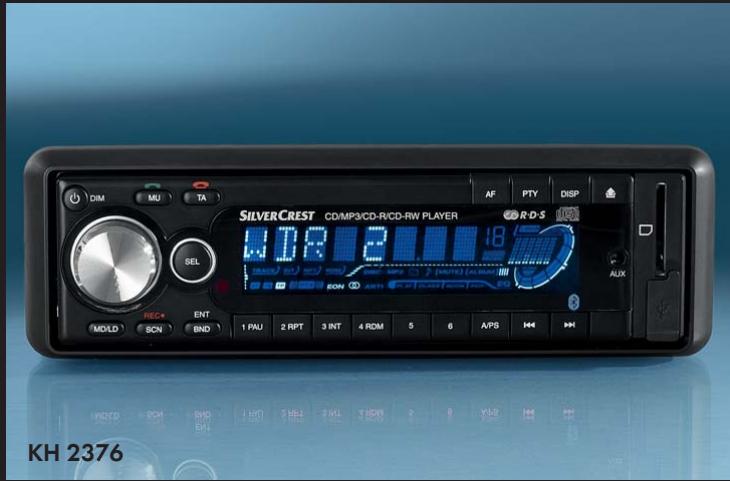
| Product Type | Bluetooth car stereo with CD/MP3 player, FM/AM tuner, USB port, SD/MMC reader, AUX input, and Bluetooth hands-free and A2DP streaming |
| Brand | SILVERCREST |
| Model | KH 2376 |
| Dimensions (W x D x H) | 18.6 x 20.6 x 5.7 cm |
| Weight | Approx. 1475 g |
| Power Supply | 12 V DC (car battery), max. current consumption 10 A |
| Fuse | Car blade fuse 10 A |
| Max. Output Power | 4 x 40 W (peak), 4 x 13.5 W (at 1% distortion) |
| Radio Frequency Ranges | FM: 87.5 - 108 MHz; AM: 522 - 1620 kHz |
| Number of Radio Presets | FM: 18; AM: 12 |
| Supported Audio Formats | Audio CD, MP3 CD, MP3, WMA (on USB/SD) |
| Max. USB/SD Capacity | Up to 8 GB (FAT32), max. 1024 folders, max. 4096 files, folder depth 8 levels |
| Auxiliary Audio Input | 3.5 mm stereo jack (AUX IN) |
| Bluetooth | Hands-free (calls) and A2DP audio streaming, range up to 8 m |
| Recording Function | Record audio CD, radio or AUX source to USB stick or SD/MMC card (MP3 or WMA format, 128 kbps, 44 kHz) |
| Anti-Shock Protection (ESP) | Audio CD: 10 seconds; MP3 CD: 120 seconds |
| Operating Temperature | +5 °C to +40 °C |
| Permissible Humidity | 5 to 90% (non-condensing) |
| Remote Control Battery | CR2025 (3 V) |
| Care and Cleaning | Wipe with a soft, slightly damp cloth and mild detergent; avoid moisture ingress |
| Safety | Class 1 laser; do not open the housing; use only in a vehicle with a 12 V battery; observe traffic regulations |
| Warranty | 3 years |
| Supplied Accessories | Car stereo (with faceplate), mounting frame, mounting plate, remote control, CR2025 battery, two removal keys, faceplate case, microphone unit with adhesive tape, instruction manual |
Frequently Asked Questions - KH 2376 SILVERCREST
User questions about KH 2376 SILVERCREST
0 question about this device. Answer the ones you know or ask your own.
Ask a new question about this device
Download the instructions for your Car radio in PDF format for free! Find your manual KH 2376 - SILVERCREST and take your electronic device back in hand. On this page are published all the documents necessary for the use of your device. KH 2376 by SILVERCREST.
USER MANUAL KH 2376 SILVERCREST
Operating instructions
GB
Návod k obsluze
CZ
Návod na obsluhu
SK
BLUETOOTH CAR RADIO GB
AUTORÁDIO S BLUETOOTH CZ
AUTORÁDIO S FUNKCIOU BLUETOOTH

GB Operating instructions 5
CZ Návod k obsluze. 43
SK Návod na obsluhu 81
Index
Introduction 6
Preface 6
Information for these operating
instructions 6
Copyright 6
Limited liability 7
Warnings 7
Proper use. 8
Safety. 8
Basic Safety Instructions 8
Danger from laser radiation. 9
Traffic safety 10
Interaction with batteries 10
Package contents and transport
inspection 11
Disposal of the packaging 11
Operating elementse
(see foldout sides) 12
Installation 14
Connection 14
Installation 16
Uninstalling the device 18
Initial operation 19
Face plate. 19
Remote control 20
Handling and operation . . .20
Switching On and Off 21
Settings. 21
Radio reset (RESET) 23
Radio functions. 23
General CD functions 26
MP3 CDs functions 28
USB port. 29
Card reader (SD/MMC) 30
Record function. 30
Connecting an external audio
device to the car radio 32
Bluetooth operation 32
Cleaning 34
Safety instructions. 34
Cleaning. 34
Troubleshooting 35
Safety instructions. 35
Malfunction causes and remedies .35
Disposal. 38
Disposal of the device 38
Disposing of the batteries. 38
Appendix 38
Technical data 38
Declaration of EC conformity 39
Warranty 40
Importer 40
GB
Introduction
Preface
Dear customer,
by purchasing the Bluetooth car radio you have decided on a quality product from SilverCrest, which, in terms of technology and functionality, meets the most up-to-date development standards.
Read the information included here so that you can quickly familiarize yourself with your device and thus make full use of its functions.
We wish you a great deal of enjoyable use.
Information for these operating instructions
These operating instructions are a component of the KH 2376 Bluetooth car radio (henceforth designated as the device) and supplies you with important information for intended use, safety, installation and connection as well as operation of the device.
The operating instructions must be constantly kept available close to the device. They are to be read and used by anyone assigned to install, service and repair faults in the device.
Keep these operating instructions and hand them over with the device to any future owners.
Copyright
This documentation is copyright protected.
All rights including those of photographic reproduction, duplication and distribution by means of particular methods (for example data processing, data carriers and data networks), wholly or partially as well as substantive and technical changes are reserved.
Limited liability
All technical information, data and information for installation, connection and operation contained in these operating instructions correspond to the latest at time of printing and, to the best of our knowledge, take into account our previous experience and know-how.
No claims can be derived from the details, illustrations and descriptions in these instructions.
The manufacturer assumes no responsibility for damage caused by failure to observe the instructions, improper use, inappropriate repairs, making unauthorized changes or for using unapproved replacement parts.
Warnings
In the existing operation instructions the following warnings are used:

WARNING
A warning of this danger level signifies a possible dangerous situation.
If the dangerous situation is not avoided it can lead to injuries.
The directives in this warning are there to avoid personal injuries.
IMPORTANT
A warning of this danger level signifies possible property damage.
If the situation is not avoided it can lead to property damage.
The directives in this warning are there to avoid property damage.
NOTICE
A notice signifies additional information that assists in the handling of the device.
Proper use
This device is intended only for reception of FM/AM radio stations as well as for the playback of audio and MP3 CDs, MP3 files from USB data carriers and SD/MMC memory cards as well as audio signals of external audio devices. In addition you can couple the device with a Bluetooth mobile phone and with the microphone unit use the device as a hands free facility.
This device is not intended for any other use or for uses beyond those mentioned.
WARNING
Danger from unintended use!
Danger can come from the device if used for unintended purposes and/or other types of use.
Use the device exclusively for intended purposes.
Observe the procedures described in these operating instructions.
Claims of any kind for damage resulting from unintended use will not be excepted. The operator alone bears liability.
Safety
In this chapter you receive important safety information regarding handling of the device.
This device complies with the statutory safety regulations. Incorrect usage can, however, lead to personal injury and property damage.
Basic Safety Instructions
For safe handling of the device observe the following safety information:
Before use check the device for visible external damage. Do not put into operation a device that is damaged or has been dropped.
- Damaged cables or connections should be replaced by authorized qualified persons or by the customer service department.
- Persons who, due to their physical, intellectual or motor abilities, are incapable of operating the device safely may only use the device under supervision or direction from a responsible person.
Only permit children to use the device under supervision.
Repairs should only be carried out by authorized specialist companies or by the customer service department. Incorrect repairs can result in significant dangers for the user. In addition warranty claims become void.
A repair to the device during the warranty period may only be carried out by a customer service department authorized by the manufacturer otherwise no additional warranty claims can be considered for subsequent damages.
Defective components may only be replaced with original replacement parts. Only by using original replacement parts can you guarantee that the safety requirements are complied with.
Protect the device from moisture and liquid penetration.
Danger from laser radiation

WARNING

The device is equipped with a class 1 laser. Laser radiation is dangerous to the eyesight!
Observe the following safety instructions to avoid exposure of yourself or others to laser radiation:
NEVER open the device.
Have the device repaired only by a specialist.
Do not make any modifications to the device.
GB
Traffic safety

WARNING
Safety in traffic has the highest priority!
Observe the following safety instructions so that you do not put yourself or others in danger:
Before travel commencement familiarize yourself with the operation of the device.
- Only operate the device when the traffic situation allows. Stop in a suitable place to carry out comprehensive operations.
- Only remove or insert the face plate when the vehicle is parked.
Set to a moderate volume so that acoustic signals from the police, fire department and other rescue services can be heard in good time.
Interaction with batteries

WARNING
Danger from improper use!
For safe handling of batteries observe the following safety instructions:
Do not throw the batteries into a fire.
Do not short circuit the batteries.
Do not attempt to recharge the batteries.
Regularly check the condition of the batteries. Leaking battery acid can cause permanent damage to the device. Special caution should be shown when handling damaged or leaking batteries. Danger from acid burns! Wear protective gloves.
- Store batteries in a place inaccessible to children. If swallowed seek immediate medical attention.
- Remove the batteries from the remote control if you do not intend to use the device for extended periods of time.
Package contents and transport inspection

WARNING
Risk of suffocation!
Packaging material should not be used as a play thing.
There is a risk of suffocation!
The device is delivered with the following components as standard:
Car radio (incl. face plate)
- Installation bracket (Attached)
- Bezel frame (Attached)
- Fixture plate (incl. securing material)
Remote control
1 Battery CR2025, 3 V DC
- Keys for installation frame (2x)
Case for face plate
- Microphone unit with adhesive strip
- Operating instructions
NOTICE
- Check the contents to make sure everything is there and for visible damage.
If the contents are not complete or are damaged due to defective packaging or through transportation contact the service hotline (see warranty card).
Disposal of the packaging
The packaging protects the device from transport damage. The packaging materials are selected from the point of view of their environmental friendliness and disposal technology and are therefore recyclable.

The recirculation of packaging into the material circuit saves on raw material and reduces generated waste. Dispos of packaging material that is no longer needed according to the regionally established regulations.
NOTICE
If possible preserve the device's original packaging during the warranty period so that in the case of a warranty claim you can package the device properly for return.
Operating elementse (see foldout sides)
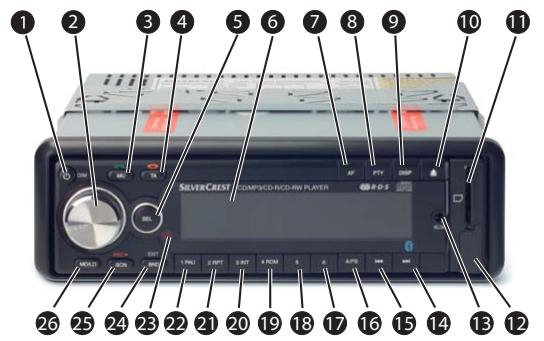
1 POWER/DIM: Switch device on and off/ dim display illumination
2 Multi controller: Turn to set value/volume
3 MU: Switch off sound/button
4 TA: Activate traffic radio/ button
SEL: Press or hold down to access adjustment options
6 Display
AF: Alternative frequency search / activate regional programmes
8 PTY: Station search by PTY group
DISP: Show display information
10 Unlocking the face plate
11 Card slot for SD/MMC cards
12 USB port
13 AUX IN: 3,5 mm stereo input socket for the connection of an external audio device
14▶I: Title / Station search forwards
15 Title/Station search backwards
16 A/PS: Automatic station saving
17 Station button 6/next directory
18 Station button 5/previous directory
19 RDM/4: Random playback in the CD/ MP3 operation mode, station button 4
INT/3: Intro function in the CD/MP3 operation mode, station button 3
21 RPT/2: Repeat function in the CD/ MP3 operation mode, station button 2
PAU/1: Stop playback in the CD/ MP3 operation mode, station button 1
23 Sensor for remote control
24 BND/ENT: Select band range/confirm selection
SCN/REC: Automatic station search/ Record to a data carrier at the USB port or the SD/MMC card slot
MD/LD: Set operating mode/ switch to loudness
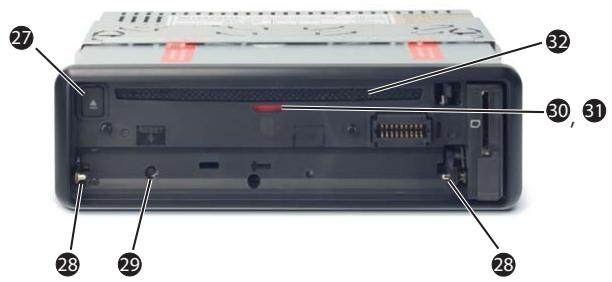
27 OPEN: Reject disc
Holder for the face plate
29 RESET: Resetting the device
30 Theft protection LED
31 Positions LED of the CD compartment
CD compartment
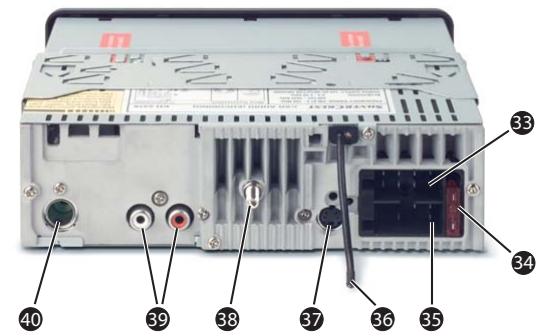
ISO-Block connection B
34 Automotive blade type fuse 10 A
ISO block connection A
36 Bluetooth antenna
37 Socket for microphone unit
38 Securing screw (incl. M5 nut and washer)
LINE OUT: Audio cinch output L/R for amplifier
40 Antenna connection for DIN antenna plug
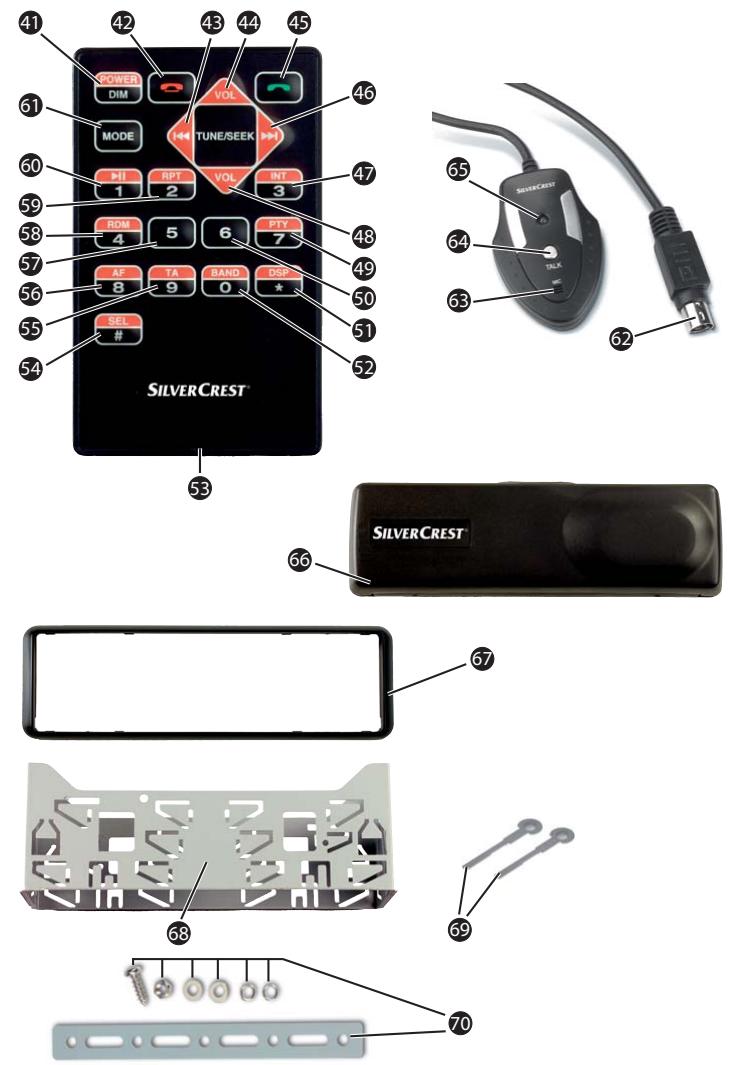
41 POWER/DIM: Switch device on and off/ dim display illumination
42 Button
43 Title/Station search backwards
44 VOL+: Volume increase
45 Button
46 Title / Station search forwards
INT/3: Intro function in the CD/ MP3 operation mode, number button 3
48 VOL: Volume decrease
49 PTY/7: Station search by PTY group/ number button 7
50 Number button 6
DSP/*: Sound setting/button*
52 BAND/O:
Select frequency range/ number button 0
Battery compartment
54 SEL/#:
Press or hold down to access adjustment options/button #
55 TA/9:
Activate traffic radio station/ number button 9
56 AF/8:
Alternative Frequency search/ regional programme activation/ number button 8
5 Number button 5
58 RDM/4:
Random playback in the CD/ MP3 operation mode/ number button 4
59 RPT/2:
Repeat function in the CD/ MP3 operation mode/ number button 2
60 11/1:
Playback start or stop/ number button 1
61 MODE:
Set operation type/ Loudness function
Microphone unit plug
Microphone
64 TALK button
65 green LED for connection status
Case for face plate
67 Bezel frame
Installation bracket
Key for installation bracket
70 Fixture plate
(incl. securing material)
GB
Installation

Configuration of the ISO connections
WARNING
With the installation of the device damage can occur!
If possible have the device installed by a qualified technician.
If you want to install the device yourself, for safe and flawless operation of the device follow the instructions for connection and installation.
Connection
IMPORTANT
The use of incorrect connections can lead to damage to the device.
For installation use the device's ISO connections. The vehicle specific ISO adapter that you may possibly require can be obtained from a specialist establishment, from a local dealer or from the store's technical department. When using other connection types the warranty becomes void!
| 1 3 5 7 2 4 6 8 | ISO A | Configuration | |
| 1 | unconfigured | ||
| 2 | unconfigured | ||
| 3 | unconfigured | ||
| 4 | Permanent positive | ||
| 5 | Antenna power | ||
| 6 | unconfigured | ||
| 7 | 12 V (Ignition positive) | ||
| 8 | Minus (-) | ||
| 1 3 5 7 2 4 6 8 | ISO B | Configuration | |
| 1 | Rear right + | ||
| 2 | Rear right - | ||
| 3 | Front right + | ||
| 4 | Front right - | ||
| 5 | Front left + | ||
| 6 | Front left - | ||
| 7 | Rear left + | ||
| 8 | Rear left - | ||
To connect the device to two speakers use only the cables for the front speakers.
NOTICE
Make sure that a permanent positive connection is applied to the station memory of connection 4 in the ISO block A.
In some automobile models the standard configuration of the connections [4] and [7] in ISO block A are interchanged at the factory. If this is the case the station memory can be lost. To correct this, the connections 7 (Ignition positive) and 4 (Permanent positive) in the ISO Block A must be swapped.
- You can connect an external amplifier to the audio cinch output. For this follow the operating instructions for the external amplifier.
Antenna power connection
IMPORTANT
Possible damage to the device!
- Never attach the antenna power connection with the antenna's motor power cable.
The connection for the antenna power is available for a relay controlled antenna. The relay then automatically extends the antenna when the device is switched on. When switched off the antenna retracts. This connection can also be used to control an external amplifier. For exact connection information please consult the amplifier's operating instructions.
Connection of an external amplifier
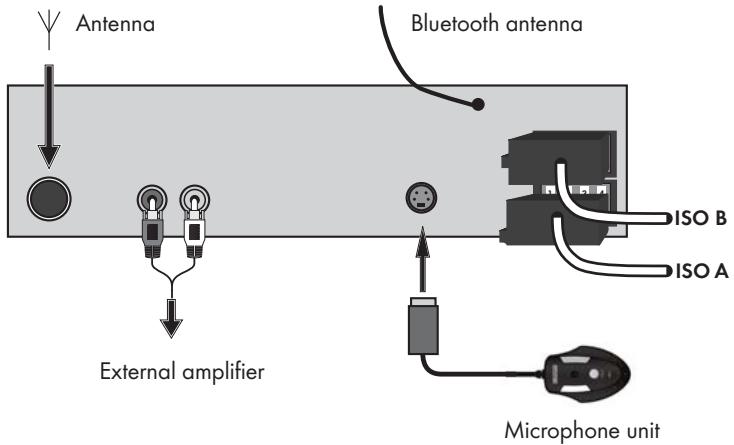
For the connection of an external amplifier use the audio cinch output LINE OUT 39. For this follow the operating instructions for the external amplifier.
Connecting the microphone unit
For connection of the microphone unit use the microphone unit socket 37.
Connection schematic
Installation
The device can be installed into any standard ISO mounting duct. In the event that your vehicle does not have an ISO mounting duct contact your local specialist establishment, local dealer or the technical department of the store.
NOTICE
Before installation remove, without fail, the two transport securing screws on the top of the housing (marked with a red sticker)!
- Connect the cable before finally installing the device. Make sure that it is plugged in properly and that the system functions correctly.
Installation instructions
Install the device in the duct provided for it or select the installation location so that all buttons can be comfortably reached and the driver is not impeded.
Only connect the device to a properly installed 12V automotive battery.
Only connect the device in the vehicle via an ISO plug.
Install the device in such a way as to avoid the development of heat accumulation and so that the device is sufficiently ventilated.
To avoid function disturbances the installation angle should be less than 30^
- Do not install the device in a location where it will be subjected to high temperatures (i.e. direct sunlight or heating vents), heavy contamination and strong vibrations.
In the event that changes to the vehicle are necessary contact your vehicle dealer/qualified radio installation facility.
Installing the device into the ISO duct
Pull the installation bracket ③8 and the bezel frame ⑤7 from the device's housing.
Place the installation bracket into the ISO mounting duct.
Bend the tabs on the installation bracket with a screw driver so that the bracket is fixed firmly into the mounting duct (see diagram).
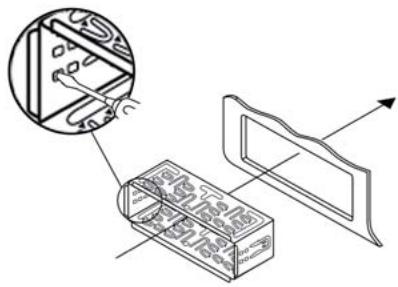
Check to make sure that the bracket is securely fixed.
Connect the ISO socket block of the device with the two ISO plugs on your vehicle.
Connect the antenna cable from the vehicle antenna to the antenna socket on the device.
Feed the microphone unit cable into the mounting duct and connect it to the microphone unit socket. Lay the cable in such a way that the microphone unit can be secured later in the vehicle interior see chapter "Using the microphone" on page 32.
Contingently connect the audio cinch cable of an external amplifier to the LINE OUT socket 39 on the device.
If necessary secure your device against theft with additional measures. Attach the securing screw with the anchoring plate 70 and the securing material to the engine firewall of the vehicle.
Carefully push the device into the mounting duct until it locks into place.
After all connections have been made activate the RESET button with a ball point pen or other pointed object.
Attach the face plate as described under "Installing the face plate".
IMPORTANT
Possible damage to the cable!
Observe the position of the cable when sliding the device into the duct so as to avoid damaging it.
Finally put on the bezel frame.
Uninstalling the device
To remove the installed device proceed as follows:
Remove the bezel frame 57.
Insert the right and left keys into their respective slots on the sides of the device. (The tabs are now bent back.)
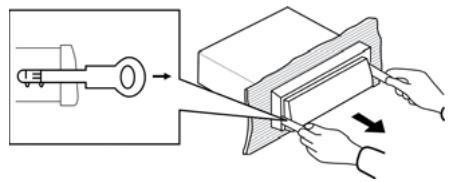
Pull the device out.
Initial operation
Face plate
To protect against theft you can remove the face plate from your device. Do not store the removed face plate in your vehicle.
NOTICE
When the face plate is not inserted into the frame the theft protection LED 30 on the device blinks.
To safeguard the face plate always keep it stored in its case.
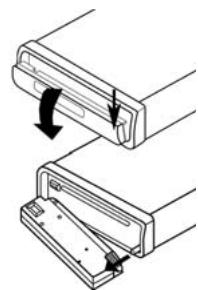
Installing the face plate
Place the face plate with the left side in the frame first.
Then firmly press the right side until it locks into place.
Check to make sure that the face plate is firmly and correctly installed in the frame. If the face plate is incorrectly installed it can result in malfunctions when operating the device.
Removing the face plate
Press the 10 button to unlock the face plate.
Tilt the face plate completely forward.
Slide the face plate to the left and then pull first the right and then the left side away.
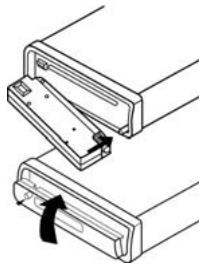
GB
Remote control
Inserting the battery
Remove the supplied battery from the packing.
To insert the battery and/or change the battery proceed as follows:
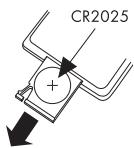
Pull the battery compartment out of the remote control by pressing the lateral locking device and at the same time pull the battery compartment out.
Remove the depleted battery and insert a new battery of the type CR2025 (Button cell) into the battery compartment. Be sure to insert the battery with the correct polarity.
Slide the battery compartment back into the remote control.
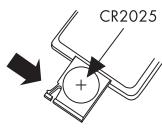
Using the remote control
Point the remote control to the Infrared sensor 23 on the front panel of the device.
NOTICE
You can use the remote control up to a distance of 8m from the device.
Handling and operation
In this chapter you receive important information for the handling and operation of the device.
NOTICE
- Most of the functions can be operated by the buttons on the device as well as by the buttons on the remote control. In these instructions operation via the buttons on the device is described. Any reference to the pushbuttons on the remote control will be specifically highlighted.
If no setting is made and/or no button pushed within approx. 5 seconds the device returns to its previous operating mode. Changed settings are saved.
Switching On and Off
Press briefly the POWER/DIM button to switch the device on. In the display the notice WELCOME appears.
Briefly touch the POWER/DIM button to dim the display illumination.
To switch off hold down the POWER/DIM button longer.
Settings

WARNING
Hearing damage as a result of too high a volume!
If the volume is set too high it can lead to permanent hearing damage.
Set the volume to moderate levels only.
Volume
Turn the multi controller to set the volume.
Bass/Treble/Balance/Fader
Press the SEL button. The current volume level is shown. Each further press of the SEL button accesses the next setting point.
The following settings are possible:
VOL - Volume (from 0 to 45),
BAS-Bass(from-7to+7),
TRE - Treble (from -7 to +7)
BAL - Balance (sound distribution between the right and left speakers) (from 8L to 8R)
FAD - Fader (sound distribution between the rear and front speakers) (from 8R to 8F)
Turn the multi controller to change the settings of the displayed menu items.
further settings with the SEL button
Hold down the SEL button for approx. 2 seconds and then press the SEL button repeatedly until the desired function is shown in the display.
INVOL - switch on volume
Turn the multi controller to set the volume level, with which the device is to be set when turned on.
ADJ - Time of day
NOTICE
The device is equipped with an RDS controlled clock. The clock sets itself automatically when the EON function is switched on and also continues to run when the radio is switched off. If you do not receive any RDS signal you can also set the time of day manually.
Turn the multi controller to the right to set the hours and to the left to set the minutes.
TAVOL - Volume for traffic radio
Turn the multi controller to set the volume level, with which traffic reports are to be played back.
EON - Information from other stations
When the EON function is switched on the radio switches to traffic radio or PTY groups if the TA or PTY function has been activated.
Turn the multi controller in order to switch the EON function on (EON ON) or off (EON OFF).
REC - Recording format
Turn the multi controller to set the record format for recording on SD/MMC and/or USB data carriers, MP3 (MP3 data) or WMA (Windows Media Audio).
DSP - Equalizer (Digital Sound Processing)
Turn the multi controller to select one of the settings DSP CLASSIC, DSP ROCK, DSP POP, DSP FLAT or DSP NONE. In the setting DSP NONE no DSP is switched on. The DSP equalizer setting is shown at the bottom of the display.
You can also set the equalizer by pressing the DSP button on the remote control. With this setting DSP is switched off when the radio frequency is shown again.
Loudness
Hold down the MD/LD button to switch the loudness function on or off.
Operating mode
Press the MD/LD button to switch between radio reception (frequency indicator), CD/MP3 operation (CD), card slot (SD/MMC), USB port (USB) and audio input (AUX).
NOTICE
The operating modes CD, SD/MMC and USB can only be accessed when the corresponding medium is inserted.
Display
Press repeatedly the DISP button to display successively the following information:
Radio station, title + interpret, time of day (will automatically be set with RDS reception), PTY settings (these RDS functions are transmitted by the broadcast institutions in various formats; see also the chapter "Radio functions") and frequencies.
NOTICE
- When you are not receiving any RDS or PTY information, "PS NONE" or "PTY NONE" is shown in the display.
Radio reset (RESET)
To reset the device to its factory default settings, press the RESET button with a pointed object, such as a pen.
Reset the device:
- when operating for the first time,
after the cable connection, - if not all function buttons are working
- when an error message appears in the display.
Radio functions
Select frequency range
Press the BND/ENT button to switch between USW (FM1, FM2, FM3) and medium wave (MW1, MW2).
Automatic station search
Press briefly the buttons 1 or to start a station search. The search will stop when a station is found.
Manual station selection
Hold down one of the buttons I or for two seconds. MANUAL appears in the display.
Now press the buttons I or to change the frequency in steps of 0,05 MHz (USW) and/or 9kHz (MW) until the desired frequency is set.
If no button is pressed for approx. two seconds the automatic station search is set again. AUTO appears in the display..
Saving radio stations
For each frequency range 6 stations can be saved.
Hold down for approx. 3 seconds one of the station buttons 1 to 6 to save the currently set station. Successful saving is indicated by a brief switching off of the tone.
Accessing saved stations
Select with BND/ENT the frequency range.
Press one of the station buttons 1 to 6, to access the saved station.
Automatic saving
Hold down the A/PS button for 3 seconds. A search immediately starts whereby each found station remains for approx. five seconds. The station indicator and/or the station frequency blinks and the memory cell is displayed. With weak stations the search will automatically continue.
Running through saved stations
Press briefly the A/PS button. All stations will be briefly selected.
When you hear the desired station press briefly the A/PS button. The chosen station remains selected.
Alternative Frequency (AF)
You can search for alternative frequencies of a station so that it will always have optimal reception.
Press the AF button. The display shows AF. The device then always searches for the optimal frequency of the currently selected station.
Regional programmes
A few stations broadcast regional programmes.
In order to playback only the station's regional programme hold down the AF button until the notice REG ON appears in the display.
To again playback the national programme hold down the AF button until the notice REG OFF appears in the display.
Programme mode (PTY)
With the help of this function you can search for stations in a designated genre. The following settings are possible:
| NEWS | VARIED | FINANCE | COUNTRY |
| AFFAIRS | POP M | CHILDREN | NATION M |
| INFO | ROCK M | SOCIAL | OLDIES |
| SPORT | EASY M | RELIGION | FOLK M |
| EDUCATE | LIGHT M | PHONE IN | DOCUMENT |
| DRAMA | CLASSICS | TRAVEL | TEST |
| CULTURE | OTHER M | LEISURE | ALARM |
| SCIENCE | WEATHER | JAZZ |
NOTICE
- Please note that this information is dependent on the region, the broadcasting corporation and the station.
For this function the EON function must be switched on.
Switching the PTY function on/off
To activate the PTY search press the PTY button. In the display the notice PTY appears.
With the station search only stations of the currently selected PTY identification will be considered.
To deactivate the PTY search press the PTY button again.
Setting the PTY identification
Hold down the PTY button and then turn the multi controller to set the individual PTY identification.
Station search by PTY identification
During the display of a PTY identification if you press briefly the PTY button or the buttons I and/or a search immediately starts for stations, which correspond to this PTY identification.
If no station is found that corresponds to this PTY identification the notice NOT FND appears briefly and then the search ends with the last set station.
Traffic radio (TA - "Traffic Announcement")
For this function the EON function must be switched on.
Press the TA button to switch this mode on or off.
In the TA mode the device will immediately switch from other stations or operation modes to the radio station, which is currently broadcasting traffic information. With this the volume level entered under TAVOL will be set.
During the playback of traffic radio press the TA button to stop the TA function without switching off this function.
General CD functions
NOTICE
- Dampness and high humidity can cause the CD player to malfunction. In this case switch on the vehicle heating to dissipate the dampness before using the device. Do not subject the device to any extremely high or low temperatures.
Anti-Shock function (ESP - "Electric Shock Protection")
The device is equipped with an anti shock function. This function serves to compensate for vibrations, for example on uneven streets, and to provide an uninterrupted playback even with device movement. When the device is switched on the memory automatically fills with data:
with audio CDs for 10 seconds;
with MP3-CDs for 120 seconds.
Inserting and removing CDs
fold the face plate downward by pressing the face plate's unlocking device.
Push the CD into the CD slot with the inscribed side facing up.
Lock the face plate back into place by folding it upwards. Playback of the CD begins. TOC READ appears in the display (Read directory contents).
To remove the CD open the face plate again. Press the OPEN button. The CD will be ejected. The device switches to radio mode.
Immediately remove the CD from the CD slot. If an ejected CD is not removed within approx. 5 seconds the device will draw it back in, however playback of the CD will not start.
Title skip
Press the buttons or I to select the next and/or previous title. The title number will be shown in the display.
Fast forward/backward
Hold down the buttons or longer to start fast forward or backward.
Stop playback
Press the PAU/1, button to stop playback.
To continue playback press the PAU/1 button once more.
Repeat function (RPT - Repeat)
Press several times the RPT/2 button to switch between the repeat functions. The following settings are possible:
RPT ONE: The current title is repeated.
- RPT ALL: The entire CD will be repeated. RPT will not be displayed.
Additionally with MP3 CDs:
RPT DIR: All titles in the current directory will be repeated.
If the functions RPT ONE or RPT DIR are activated RPT will appear in the display.
Title sampling
Press the INT/3 button. In the display INT will be shown. Approx. 10 seconds from all titles will playback one after the other.
Press the INT/3 button once more to activate normal playback.
Random playback of all titles (RDM - Random)
Press the RDM/4 button. In the display RDM is shown. A random controlled playback is started. A repeat pressing launches the normal playback.
MP3 CDs functions
Playback
The device can playback files in the MP3 and WMA formats.
A mixture of titles and directories on the same level can result in problems when playing back.
During playback the information from the ID3 tag of the MP3 files are read and are shown successively in the display.
Skip directory
Press the station button 6 to playback the next directory and/or the station button 5 to playback the previous directory. The name of the directory will appear briefly in the display after which playback begins automatically.
NOTICE
If files are located in the CD's main directory the directory name ROOT will be shown in the display.
Search functions
Title number search
Press the A/PS button. The notice 001 appears in the display.
The last digit of the three digit title input blinks.
Press the SEL button to switch between the 3 digits of the title number. The selected digit blinks.
Turn the multi controller to set the blinking digit.
When you have entered the desired title number confirm the entry with BND/ENT. The title will immediately playback.
NOTICE
If a title number is selected that does not exist the title with the largest title number will playback.
Title name search
Press the A/PS button twice. The notice A^** appears in the display.
The first symbol blinks.
Press the SEL button to switch between the 3 digits of the title name. The selected symbol blinks.
Turn the multi controller to set the blinking symbol.
When you have set the desired symbol press the BND/ENT button to show all titles that begin with the searched for symbol.
NOTICE
If no titles are found that begin with the set symbol then NO MATCH will be shown briefly and you can carry out the setting again.
Turn the multi controller to select a title and start playback with BND/ENT.
Search for directories
Press the A/PS button three times. The directory that is currently playing back appears.
Turn the multi controller to switch between the available directories.
Press the BND/ENT button to select the currently displayed directory. Playback of the first title from the selected directory starts immediately.
USB port
The device can handle USB data carriers up to 8 GB. With this the directory structure may contain a maximum of 1024 folders, 4096 files and a directory depth of 8 levels.
Connecting data carriers
Open the protective cap from the USB port.
Connect your USB device to the port. The device searches for MP3 or WMA files on the data carrier and the notice USB appears in the display.
Place the protective cap back on the USB port when no USB device is connected to avoid contamination.
Playback and search functions
The operations for playing files on the external data carrier as well as the search function are exactly the same as with MP3 CDs.
If the device is in another mode (CD, Radio, AUX or MMC) you can select the USB data carrier with the MD/LD button.
Card reader (SD/MMC)
The device can handle SD/MMC memory cards up to 8 GB. With this the directory structure may contain a maximum of 1024 folders, 4096 files and a directory depth of 8 levels.
Connecting data carriers
Slide a memory card into the memory card slot with the marking pointing to the right. Playback of the MP3 or WMA title on the memory card begins automatically.
Playback and search functions
The operations for playing files on the external data carrier as well as the search function are exactly the same as with MP3 CDs.
If the device is in another mode (CD, Radio, AUX or USB) you can select the card reader with the MD/LD button.
Record function
NOTICE
- Please observe the legal regulations valid in your place of residence regarding the duplication of copyrighted works. In case of doubt please consult a specialist in your area.
With your device you can record data from audio CDs, radio or external audio devices onto USB or SD/MMC data carriers and copy MP3 and/or WMA data from an MP3 CD onto USB or SD/MMC data carriers.
The data will be saved with the following notations:
Title of audio CDs: Track001, Track002, ...
Data from MP3 CDs: Music001, Music002, ...
Radio recordings: Tuner001, Tuner002, ...
Recordings have a bitrate of 128 kbps and a sampling frequency of 44kHz
Recording
Place a memory medium into the card slot or connect a data carrier to the USB port.
Insert the CD, if necessary, and/or switch on the external audio device.
With the MD/LD button set the desired operations mode (CD, Radio, AUX).
If necessary start playback of the external audio device.
Hold down the button SCN/REC until REC MMC or REC USB is displayed. In the operation mode CD, MMC ALL or USB ALL will be displayed. If no data carrier is connected, on which recordings can be made NO MEDIA will be displayed.
Press repeatedly the button SCN/REC until the desired recording option is displayed. When recording an audio CD you can make an additional setting depending on whether you want to record all titles from the CD (USB/MMC ALL) or only the current title (USB/MMC ONE).
Start recording by pressing the BND/ENT button.
The audio data is now saved on the data carrier in the format that was set (MP3 or WMA). At the beginning of the recording the notice RECORD appears in the display. After that the recording is characterized by a prefixed "R".
NOTICE
- When the selected data carrier is full recording automatically moves to the other data carrier as long as a corresponding data carrier is connected.
To stop the recording press briefly the BND/ENT button once more. After which WAIT is shown briefly in the display, the recording is saved.
Copying data from an MP3 CD
You can copy individual titles from an MP3-CD to the external USB data carrier or an SD/MMC memory card.
Place a memory medium into the card slot or connect a data carrier to the USB port.
During playback of a title from an MP3 CD hold down the SCN/REC button. The notice COPY MMC and/or COPY USB appears. If no data carrier is connected, on which recordings can be made NO MEDIA will be displayed.
Press the SCN/REC button several times to select either the copy option COPY USB (copy to a USB data carrier) or COPY MMC (copy to an SD/MMC memory card).
Start the copy process by pressing the BND/ENT button.
During the copy process COPY appears in the display and a percentage indicator from 01 - 100 shows the copying progress. After the notice COPY 100 the copying process is ended and playback of the MP3 title continues.
Connecting an external audio device to the car radio
Connect the audio output of an external audio device (i.e. an MP3 player) via a 3.5 mm stereo jackplug to the socket AUX IN on the front panel of the device.
Select playback of the audio input by pressing, several times, the MD/LD button until AUX is shown in the display.
Bluetooth operation
The microphone unit must be connected to the device in order to use the Bluetooth functions. In addition a mobile phone is required that supports the Bluetooth data transmission.
Connecting the telephone to the device
Activate the Bluetooth function on your mobile telephone and conduct a search for Bluetooth devices.
After a successful search the entry CAR-BT appears for the device in the display of the mobile telephone.
Select this entry for the connection and for the subsequent password request enter the password 0000 for the device. You may possibly have to confirm the connection structure once more.
After a successful coupling CONNECT briefly appears in the device's display and the green LED on the microphone unit lights up.
Using the microphone
During the telephone call you will hear the caller via the speaker connected to the device.
For optimal transmitting of your voice place the microphone unit close to you.
Attach the microphone unit, for example, to the dashboard. For this purpose you can use the supplied sticky tape. In this case clean beforehand dust and grease from the surface. The sticky tape can be used for securing on almost all smooth surfaces.
NOTICE
Do not mount the microphone in the vicinity of speakers otherwise the voice quality may deteriorate.
Call accept/end
With an incoming call you hear the call signal via your mobile telephone, whilst in the device's display is shown the call number.
You accept an incoming call by pressing the TALK button on the microphone unit or the button on the device and/or on the remote control.
You end the call by pressing the TALK button again on the microphone unit or the button on the device and/or on the remote control.
Rejecting a call
With an incoming call press, for longer than 2 seconds, the TALK button on the microphone unit or press the button on the device and/or on the remote control to reject the call.
To call
Press the button on the remote control. A blinking cursor appears in the display.
With the number buttons enter the telephone number that you want to call.
Press the button again. The number will be dialed.
Redial
Hold down the TALK button on the microphone unit or the button on the device and/or on the remote control for approx. 2 seconds.
- If no call number was previously selected via the remote control's number buttons REDIAL appears briefly in the display and then the last number dialed from the mobile telephone will be dialed.
- If one or more call numbers were already dialed via the remote control's number buttons REDIAL appears in the display.
Turn the multi controller or press the VOL- and/or VOL+ buttons on the remote control to show the last 10 dialed numbers one after the other.
Press the button on the remote control to select the chosen call number.
Select the entry REDIAL and then press the button on the remote control to end radial.
Audio streaming (A2DP)
The device uses the A2DP profile (Advanced Audio Distribution Profile) and therefore can playback your mobile telephone's audio data.
Select an audio file from your mobile telephone and start the playback.
In the device's display appears the entry A2DP and the audio data will be played back via the speakers connected to the device.
NOTICE
On the mobile telephone it may possibly be necessary to switch playback via the Bluetooth stereo headset. Consult the operating manual of your mobile telephone for more information.
- With a few mobile telephones the device does not automatically switch to the A2DP mode. In this case you switch to the A2DP mode by pressing the MD/LD button several times until the notice A2DP appears in the display.
Cleaning
Safety instructions
IMPORTANT
Possible damage to the device
Make sure when you are cleaning the device that no moisture gets inside in order to avoid irreparable damage to it.
Cleaning
Clean the housing exclusively with a soft damp cloth and a mild dishwashing liquid.
Troubleshooting
In this chapter you will receive important information for malfunction localization and remedies. Observe the instructions in order to avoid danger and damage.
Safety instructions
WARNING
Observe the following safety information to avoid danger and property damage:
Repairs to electronic devices may only be carried out by specialists who have been trained by the manufacturer. Considerable danger to the consumer and damage to the device can occur as a result of incorrect repairs.
Malfunction causes and remedies
The following table will help with localizing and remedying minor malfunctions:
| Defect | Possible cause | Solution |
| The device will not switch on | The ignition is not switched on | Switch the ignition on by turning the key. |
| The fuse is defective. | Replace the fuse. | |
| No sound | The volume is set to minimum. | Increase the volume. |
| The cables are not connected correctly. | Check the cable connections. | |
| The sound is switched off. | Press the MU button to switch the sound back on. |
GB
| Defect | Possible cause | Solution |
| The CD will not load or eject | A CD is already inserted into the device. | Remove the CD. |
| The CD has been inserted the wrong way up. | Insert the CD with the inscripted side up. | |
| The CD is dirty or defective. | Clean the CD or insert a different CD. | |
| The temperature in the vehicle is too high. | Allow the vehicle to air out until the temperature has again dropped to the operational temperature. | |
| Condensation on the laser lens | Switch the device off for a few hours and then try it again. | |
| Function buttons are not functioning | There is a malfunction with the device. | Press the RESET button. |
| The face plate is not correctly installed. | Check to see that the face plate is installed correctly. | |
| The CD jumps | The mounting angle exceeds 30°. | Correct the mounting angle. |
| The CD is very dirty or defective. | Clean the CD or insert a different CD. | |
| Failure with burnt CDs | Check the burnt CD in another playback device. | |
| The radio and/or the automatic station saving is not functioning | The antenna cable is not connected correctly. | Check the antenna cable for correct connection. |
| The station signals are too weak. | Set the station manually. | |
| Station memory is not functioning | The connection 4 in the ISO block A (Permanent positive) is not connected correctly. | Check the cable connections. For this consult the chapter "Connections". |
| The device's USB port does not function | The USB port is intended for devices that function according to the USB standard. Not all market available devices conform to this standard. It is possible that a device is connected that does not function according to the USB standard. | Connect a device that functions according to the USB standard. Make sure that the data carrier is formatted for the FAT32 file system. |
| The card reading device does not read the cards | The card is possibly defective, dirty or not properly inserted. | Check the card. Slide it in with the in-scribed side facing to the right. Make sure that the data carrier is formatted for the FAT32 file system. |
| The Bluetooth connection does not function | The mobile telephone does not support Bluetooth transmissions. | Reconnect the mobile telephone and the device. For this also read, without fail, your mobile telephone's instructions. |
| The mobile telephone is not coupled with the device. |
NOTICE
If you cannot solve the problem with the aforementioned methods please contact customer service.
GB
Disposal
Disposal of the device
Do not dispose of the device in your normal domestic waste. This product is subject to the European directive 2002/96/EC-WEEE (Waste Electrical and Electronic Equipment).
Dispos of the device through an approved disposal centre or at your community waste facility. Observe the currently applicable regulations. In case of doubt, please contact your waste disposal centre.
Disposing of the batteries
Used batteries/rechargeable batteries may not be disposed of in household waste. Every consumer is legally obliged to dispose of batteries at a collection site in his community / city district or at a retail store. The purpose of this obligation is to ensure that batteries are disposed of in a non-polluting manner. Only dispose of batteries when they are fully discharged.
Appendix
Technical data
| General | ||
| Input voltage | 12 | VDC |
| Input current | max. 10 | A |
| Max. Impulse output | 4 × 40 | w |
| Power rating (with 1% distortion factor) | 4 × 13,5 | w |
| Operating temperature | +5 - +40 | °C |
| Humidity (no condensation) | 5 - 90 | % |
| Dimensions (L × D × H): | 18,6 × 20,6 × 5,7 | cm |
| Weight | approx. 1475 | g |
| Device fuse Automotive blade type fuse | 10 | A |
Radio frequency range
| Frequency FM (USW) | 87,5 - 108 | MHz |
| Frequency AM (MW) | 522 - 1620 | kHz |
| Station memory cells FM (USW) | 18 | Cells |
| Station memory cells AM (MW) | 12 | Cells |
Remote control
| Button cell battery (CR 2025) | 3 | v |
Audio input (AUX IN):
| Stereo jackplug | 3,5 | mm |
USB port
USB 1.1 and 2.0 compatible data carrier
Card slot
SD/MMC memory card slot
Declaration of EC conformity
This device complies in regard to conformity with the fundamental requirements and other relevant regulations of the vehicle directive 2004/104/EC and the directive R&TTE 99/5/EC.
The complete original declaration of conformity can be obtained from the importer.
C E
GB
Warranty
You receive a 3-year warranty for this device as of the purchase date. Should you, in spite of our high quality standards, have grounds for complaint please contact our Service Hotline. In the event that processing of your complaint is not possible by telephone, here you will receive
- a processing number (RMA number)
as well as
- an address to which you can send your device for repair under warranty.
In the case of a mail-in shipment please enclose a copy of the purchase receipt (sales slip). The device must be securely packed and the RMA number clearly visible. Products sent in without an RMA number cannot be processed.
NOTICE
The warranty is valid only for material or manufacturing defects. The warranty is not valid;
to parts subject to wear and tear
for damage to breakable parts, such as switches or rechargeable batteries.
This product is for private use only and is not intended for commercial applications. In the event of misuse and improper handling, use of force and interference not carried out by our authorized service branch, the warranty will become void. Your statutory warranty claims are not restricted by this warranty.
Importer
KOMPERNASS GMBH
BURGSTRASSE 21
44867 BOCHUM, GERMANY
www.kompernass.com
SILVERCREST®
Warranty
Bluetooth Car Radio KH 2376
In order to guarantee a cost free repair procedure please get in touch with the service hotline. Ensure you have your sales slip handy.
Sender, please write clearly:
Last name
First name
Street
Postcode/Place
Country
Telephone
Date/Signature
GB DES Ltd
Tel.: 0870/787-6177
Fax: 0870/787-6168
e-mail: support.uk@kompernass.com
IE Kompernass Service Ireland
Tel: 1850930412 (0,082 EUR/Min.)
Standard call rates apply. Mobile operators may vary.
e-mail: support.ie@kompernass.com
www.mysilvercrest.de
Description of the defect:
Obsah
Uvod 44
Predmluva. 44
Informace k tomuto
námodu k obsluze 44
Autorské pravo...
Omezeni ruceni 45
- Index
- Introduction 6
- Operating elementse
- (see foldout sides) 12
- Installation 14
- Initial operation 19
- Handling and operation . . .20
- Cleaning 34
- Troubleshooting 35
- Disposal. 38
- Appendix 38
- Introduction
- Preface
- Information for these operating instructions
- Copyright
- Limited liability
- Warnings
- WARNING
- A warning of this danger level signifies a possible dangerous situation.
- IMPORTANT
- A warning of this danger level signifies possible property damage.
- NOTICE
- Proper use
- Danger from unintended use!
- Safety
- Basic Safety Instructions
- Danger from laser radiation
- The device is equipped with a class 1 laser. Laser radiation is dangerous to the eyesight!
- Traffic safety
- Safety in traffic has the highest priority!
- Interaction with batteries
- Danger from improper use!
- Package contents and transport inspection
- Risk of suffocation!
- Disposal of the packaging
- Operating elementse (see foldout sides)
- Installation
- With the installation of the device damage can occur!
- Connection
- The use of incorrect connections can lead to damage to the device.
- Antenna power connection
- Possible damage to the device!
- Connection of an external amplifier
- Connecting the microphone unit
- Connection schematic
- Installation instructions
- Installing the device into the ISO duct
- Possible damage to the cable!
- Uninstalling the device
- Initial operation
- Face plate
- Installing the face plate
- Removing the face plate
- Remote control
- Inserting the battery
- Using the remote control
- Handling and operation
- Switching On and Off
- Settings
- Hearing damage as a result of too high a volume!
- Volume
- Bass/Treble/Balance/Fader
- further settings with the SEL button
- INVOL - switch on volume
- ADJ - Time of day
- TAVOL - Volume for traffic radio
- EON - Information from other stations
- REC - Recording format
- DSP - Equalizer (Digital Sound Processing)
- Loudness
- Operating mode
- Display
- Radio reset (RESET)
- Radio functions
- Select frequency range
- Automatic station search
- Manual station selection
- Saving radio stations
- Accessing saved stations
- Automatic saving
- Running through saved stations
- Alternative Frequency (AF)
- Regional programmes
- Programme mode (PTY)
- Switching the PTY function on/off
- Setting the PTY identification
- Station search by PTY identification
- Traffic radio (TA - "Traffic Announcement")
- General CD functions
- Anti-Shock function (ESP - "Electric Shock Protection")
- Inserting and removing CDs
- Title skip
- Fast forward/backward
- Stop playback
- Repeat function (RPT - Repeat)
- Title sampling
- Random playback of all titles (RDM - Random)
- MP3 CDs functions
- Playback
- Skip directory
- Search functions
- Title number search
- Title name search
- Search for directories
- USB port
- Connecting data carriers
- Playback and search functions
- Card reader (SD/MMC)
- Record function
- Recording
- Copying data from an MP3 CD
- Connecting an external audio device to the car radio
- Bluetooth operation
- Connecting the telephone to the device
- Using the microphone
- Call accept/end
- Rejecting a call
- To call
- Redial
- Audio streaming (A2DP)
- Cleaning
- Safety instructions
- Possible damage to the device
- Troubleshooting
- Malfunction causes and remedies
- Disposal
- Disposal of the device
- Disposing of the batteries
- Appendix
- Technical data
- Card slot
- Declaration of EC conformity
- Warranty
- Importer
- SILVERCREST®
- Obsah
- Uvod 44
Brand : SILVERCREST
Model : KH 2376
Category : Car radio