KH 2296 - Radio SILVERCREST - Free user manual and instructions
Find the device manual for free KH 2296 SILVERCREST in PDF.


User questions about KH 2296 SILVERCREST
0 question about this device. Answer the ones you know or ask your own.
Ask a new question about this device
Download the instructions for your Radio in PDF format for free! Find your manual KH 2296 - SILVERCREST and take your electronic device back in hand. On this page are published all the documents necessary for the use of your device. KH 2296 by SILVERCREST.
USER MANUAL KH 2296 SILVERCREST
Operating instructions
text_image
1 2 3 4 5 6 7 8 9 Digital Kitchen Radio 20 Presset Radio Station 18 Clicking Times SILVERCREST Digital Kitchen Radio 20 Presset Radio Station 18 Clicking Times| Intended Use | 2 |
| Items supplied | 2 |
| Technical data | 2 |
| Safety instructions | 3 |
| The appliance components | 6 |
| Fixing the kitchen radio beneath a wall cabinet | 6 |
| Setting up the kitchen radio | 7 |
| Setting up the appliance | 7 |
| Radio operation | 11 |
| Cleaning | 13 |
| Disposal | 14 |
| CE Conformity | 14 |
| Importer | 14 |
| Warranty & Service | 15 |
Read the operating instructions carefully before using the appliance for the first time and preserve this booklet for later reference. Pass this booklet on to whoever might acquire the appliance at a future date.
Intended Use
This Kitchen Radio is intended for use either free-standing or for assembly beneath a wall cabinet. The intended uses for this Kitchen Radio are the reception of FM radio transmissions and as an alarm/timer, using either signal tones or the radio itself.
This Kitchen Radio is not intended for utilisation in commercial or industrial applications. The warranty does not provide compensation for damage caused by improper use of the appliance!
Items supplied
1 Kitchen radio KH 2296
1 Mounting plate
4 Screws
1 Operating manual
Technical data
| Power supply: | 220 - 240 V~, 50 Hz |
| Power consumption: | |
| Operation: | 5 Watt |
| Standby: | Max. 2 Watt |
| Output level: | 1 Watt at 10% THD |
| Frequency range | UKW (FM) 87.5 - 108 MHz |
| Operating temperature: | +5 ~ +35°C |
| Humidity: | 5 ~ 90 %(No condensation) |
| Dimensions(W x H x D): | 21,5 x 10,3 x 5 cm |
| Weight: | 575 g |
| Protection class: | II / ☐ |
| Backup batteries | 2 x 1.5 V Type AAA/Micro |
The technical features of this appliance enable an adjustable reception capability that exceeds the permitted frequency range of 87,5 - 108,0 MHz. In some countries, different national regulations may apply to the assigned radio frequency ranges. Please note that information received outside of the assigned radio frequency ranges may not be utilised, passed on to third parties or otherwise misused.
- This appliance is not intended for use by individuals (including children) with restricted physical, physiological or intellectual abilities or deficiencies in experience and/or knowledge unless they are supervised by a person responsible for their safety or receive from this person instruction in how the appliance is to be used. Children should be supervised to ensure that they do not play with the appliance.
- Always remove the power plug before cleaning the appliance.
- Check the appliance and all parts for visible damages. The safety concept can work only if the appliance is in a faultless condition.
- The power plug must always be easily accessible, so that in the event of an emergency the appliance can be quickly disconnected from the mains power supply.
⚠️ Risk of electrical shocks.
- Connect the appliance only to correctly installed and earthed mains power sockets. Ensure that the rating of the local power supply tallies completely with the details given on the rating plate of the appliance.
- Arrange for Customer Services to repair or replace connecting cables and/or appliances that are not functioning properly or have been damaged.
- NEVER submerse the appliance in water. Wipe it only with a slightly damp cloth.
- Do not expose the appliance to rain and never use it in a humid or wet environment.
- Always take hold of the power cable by the plug. Do not pull on the cable itself and never touch the power cable with wet hands, this could result in either a short circuit or you receiving an electric shock.
- Do not place the appliance, furniture or anything else on the power cable and ensure that it does not become clamped.
- NEVER make a knot in the power cable and do NOT bind it together with other cables. The power cable should be positioned so that no one can step on or trip over it.
- Ensure that the power cable does not become wet during operation.
- You are not permitted to open the appliance housing or repair the appliance. If the housing is opened, you run the risk of receiving a potentially fatal electric shock and the warranty lapses.
- Protect the appliance against drip and spray water. Do not place any water-filled vessels (e.g. flower vases) on or near the appliance.
Risk of fire!
- Do not use the appliance near hot surfaces.
- Do not place the appliance in locations that are subject to direct sunlight. Otherwise, it may overheat and become irreparably damaged.
- Do not locate the kitchen radio directly above hotplates. The kitchen radio may be damaged. There is a danger of fire!
- Never leave the appliance unattended while it is being used.
- Never cover the ventilation slots of the appliance while it is on.
- Do not place open fire sources, such as candles, on or near the appliance.
Risk of personal injury!
- Keep the power cable and appliance away from children. Children frequently underestimate the dangers of electrical appliances.
- Provide a stable location for the appliance.
- Do not operate the appliance if it has sustained a fall or is damaged.
- Arrange for the appliance to be checked and/or repaired by qualified technicians.
- Keep batteries well away from children. Children can put batteries into their mouths and swallow them.
- If a battery is swallowed medical assistance must be sought immediately.
(i) Note:
- Some aggressive furniture finishes can have a destructive influence on the appliance's rubber pads. If necessary, place the appliance on a nonslip pad.
Thunderstorms!
- Equipment connected to a power supply can be damaged during a thunderstorm. You should therefore always remove the plug from the power socket when there is a storm.
⚠️ Notice regarding separation from mains-power
The POWER switch does not completely disconnect the appliance from the power network. Additionally, the appliance consumes power when in standby-mode.
To completely separate the appliance from mains power, the power plug MUST be removed from the mains power socket.
⚠️ Notice regarding electrical power surges (EFT / electrical fast transient) and electrostatic discharges:
In a case of malfunction due to an electrical fast transient (power surge) and/or electrostatic discharge, the appliance must be returned to default settings in order to re-establish normal operation. Possibly the power supply must be separated and then reconnected. The batteries (if present) must be removed and then reinserted.
⚠️ Information regarding the handling of batteries
The appliance uses batteries for memory conservation. For the handling of batteries please observe the following:
Risk of explosion!
- Do not throw batteries into a fire. Do not recharge the batteries.
- Never open batteries, never solder or weld batteries. The risk of explosions and injuries exists!
- Regularly check the condition of the batteries. Leaking batteries can cause damage to the appliance.
- If you do not intend to use the appliance for an extended period, remove the batteries.
- Should the batteries leak, put on a pair of protective gloves and clean the battery compartment and terminals with a dry cloth.
⚠️ Important!
No liability/warranty will be considered for damage to the Kitchen Radio caused by the effects of moisture, water penetration or overheating!
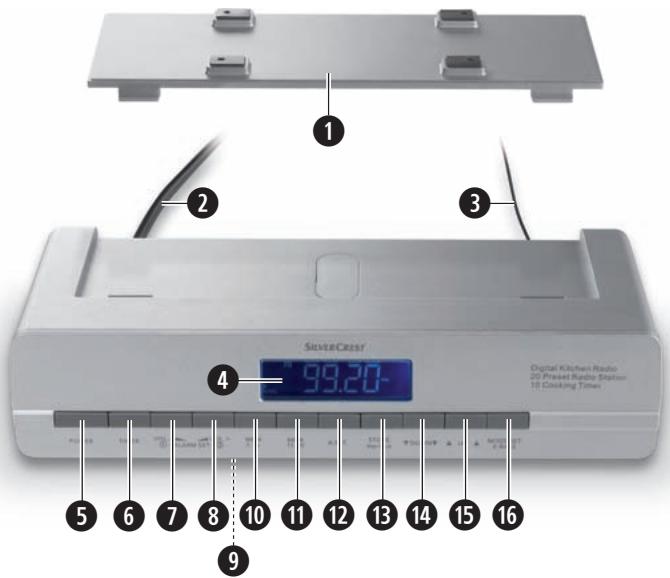
① Mounting plate/Baseplate
② Power cable
③ Wire aerial
4 Display
5 POWER - On/Off switch for radio function
6 TIMER - controls the timer programming
⑦ VOL. – Volume reduction
ALARM SET ① - controls the alarm function 1
⑧ VOL. + Volume increase
ALARM SET ② - controls the alarm function 2
⑨ Battery compartment
⑩ MEM. 01-10 - for saving radio stations
⑪ MEM. 11-20 - for saving radio stations
⑫ A.O.T. - controls the switch-off timer
⑬ STORE/Key-Lock - Save button/Button lock
14 ▼ DOWN ▼ - Selection button downwards
15 ▲ UP ▲ - Selection button upwards
16 MODE SET/X-BASS - switches the display options, activates the Extra-Bass function
Fixing the kitchen radio beneath a wall cabinet
With the supplied mounting plate ① you can fix the kitchen radio below, for example, a kitchen wall cabinet:
- Determine a suitable location for the kitchen radio.
- Press the two retaining levers on the back of the appliance down. Push the mounting plate ① back and remove it.
- Place the mounting plate ① against the installation location. Allow 3 cm space to the front edges.
This way the kitchen radio will later fit flush. - Mark the four points for the drillholes with a pencil.
- Mark the drillhole with a mandril. Firmly secure the mounting plate ① with the supplied screws.
- Hold the kitchen radio slanted, with the two recesses in the retaining lugs on the mounting plate ①.
Press the kitchen radio upwards until it audibly engages.
Disassembly
- To disassemble the kitchen radio, press the two retaining levers at the rear of the appliance downwards. Then pull the radio out to the front and remove it.
- Unscrew the screws and remove the assembly plate.
Setting up the kitchen radio
Do not set the kitchen radio up without the mounting plate 1. Otherwise the speakers are covered and the sound is scarcely audible.
To set up the kitchen radio with the enclosed mounting plate ①:
- Simultaneously press the two retaining levers on the back of the appliance down.
Push the mounting plate ① back and remove it. - Push the two retainer lugs on the mounting plate ① into the recesses on the lower rear side of the kitchen radio.
- Firmly press the front part of the mounting plate ① down until you hear it engage. You can now set up the radio.
Setting up the appliance
First take all appliance components from the packaging and remove all packing foil and tape.
Inserting the back-up batteries
The back-up batteries ensure that the time, date and alarm time setting are not lost in the event of a power cut. For this you require two 1.5 V batteries of the type AAA/Micro.
They are not supplied.
- Open the lid of the battery compartment ⑨ on the underside of the kitchen radio.
- Insert the batteries. Make sure the polarities are correct.
- Close the lid of the battery compartment ⑨.
The lid must audibly engage.
(i) Note:
The back-up batteries must be checked at least once per year and, if necessary, exchanged for new ones.
Providing mains power
- Insert the plug into a mains power socket. The display 4 is illuminated, the time begins to run but the radio is switched off (Automatic mode).
Setting the time
If a subsequent button is not pressed within 15 seconds, the kitchen radio switches back into automatic mode (the currently set time is displayed). The radio must be off to set the time.
- In automatic mode press the button MODE SET - X-BASS ⑯ once. The time blinks.
- Press the buttons UP/DOWN 15/14 to set the time at minute intervals. Pressing and holding the button changes the time at ten-minute intervals
Setting the date
-
In automatic mode press the button MODE SET - X-BASS 16 twice. In the display 4 appears "01.01.09", the date display flashes.
-
Press the buttons UP/DOWN 15/14 to set the date at day intervals. Pressing and holding the buttons changes the date at intervals of 10 days.
If a button is not pressed within 15 seconds, the kitchen radio defaults back to automatic mode.
Setting the display brightness
-
In automatic mode press the button SET - X-BASS ⑯ three times. In the display ④ appears "L" (low) and indicates the lower of two brightness levels.
-
Press the button UP 15 to switch over to the brighter illumination level "H" (high). Press the button DOWN 14 to switch back to the lower illumination level.
Selecting 12 or 24 hour time display
-
In automatic mode press the button MODE SET - X-BASS ⑯ four times. In the display ④ appears "24" for the 24 hour modus.
-
Press the button DOWN 14 to select the 12 hour modus. In the display 4 appears "12". Press the button UP 15 to return to the 24 hour modus.
In the 12 hour modus, "PM" appears in the display after 12 noon.
Press the button MODE SET - X-BASS 16 once again to complete the programmings.
Kitchen timer
- Press the button TIMER ⑥.
- Using the buttons UP/DOWN 15/14, set the desired time interval (a time span between 1 minute and 23:59 h is possible).
- Press the button TIMER ⑥ once again to start the kitchen timer. A backwards-running clock appears in the display ④ as well as a saucepan symbol.
From 30 seconds before expiry of the time span an acoustic signal sounds every 5 seconds, repeating at shorter intervals the closer the set time approaches. When the time has expired a permanent signal is sounded.
- Press the button TIMER ⑥ to terminate the acoustic signal.
Interrupting the kitchen timer.
- You can interrupt the kitchen timer by briefly pressing the button TIMER ⑥.
The time is halted, the indicator blinks for 15 seconds. After this period the appliance returns to automatic modus. Then briefly press the button TIMER ⑥ to change over to the Timer modus.
- Press the button TIMER ⑥ once again. The time then continues to run.
Switching the kitchen timer off
- To cancel the kitchen timer, press and hold the button TIMER ⑥ until the clock symbol extinguishes and the kitchen radio once again indicates the current time.
Programming the kitchen timer
You can save up to 10 kitchen timer time intervals.
- Press the button TIMER ⑥.
- Using the buttons UP/DOWN 15/14 programme in the desired time.
- Press the button STORE/Key Lock ⑬. In the display ④ "T" blinks.
-
Repeatedly press the button MEM. 01-10 ^10 to save the time to one of the memory positions T0-4. Or, repeatedly press the button MEM. 11-20 ^11 to save the time to one of the memory positions T5-9. In the display ^4 the number of the selected memory save location appears.
-
Press the button STORE/Key Lock ⑬ once more.
The time period is now saved.
To display the time once again, press the button MODE SET/X-BASS 16.
- To recall the saved kitchen timer intervals, in automatic modus press the button TIMER ⑥ and then, correspondingly frequently, the button MEM. 01-10 ⑩ resp. MEM. 11-20 ⑪ for the memory locations 0-4 resp. 5-9.
- Press the button TIMER ⑥ once again to start the kitchen timer. In the display ④ a clock symbol running in an anticlockwise direction appears.
- To return to automatic mode, press and hold the button TIMER ⑥ for two seconds.
Setting alarm times (Alarms 1 and 2)
You can programme two alarm times into your kitchen radio.
| Alarm function | Symbol in the display 4 |
| Acoustic signal |  |
| Radio | 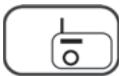 |
| Switched off | no symbol |
- In automatic mode, press the button VOL. —/ALARM SET 1 ⑦ (or VOL. +/ALARM SET 2 ⑧). In the display ④ the last set alarm time and the symbol for the type of alarm are shown.
- Press the buttons UP/DOWN 15/14 to set the desired alarm time.
- Press the button VOL. —/ALARM SET 1 ⑦ (or VOL. +/ALARM SET 2 ⑧) repeatedly until the desired alarm function (see the table above) is indicated in the display ④.
- Press the button A.O.T. ⑫ to set the weekdays on which you require the alarm function:
You can choose between "workdays" (MON, TUE, WED, THU, FRI), "weekends" (SAT, SUN) and "every day" (MON, TUE, WED, THU, FRI, SAT, SUN).
- If you hold the button A.O.T. ⑫ pressed down for 2 seconds, you can also, through repeated brief pressing of the A.O.T. ⑫ button, select a specific weekday (e.g. only WED). The selected setting is indicated in the display ④.
- To return to the selection of workdays, weekends or whole weeks, once again hold the button A.O.T. 12 pressed down for 2 seconds.
- Press the button MODE SET/X-BASS 16 to save the settings and return to automatic modus.
When the alarm signal sounds...
- and the alarm function "Radio" has been selected, the radio plays for one hour at a pre-defined alarm volume. To halt it, press the button VOL. —/ALARM SET 1 ⑦ or VOL. +/ALARM SET 2 ⑧.
- and the alarm function "Signaltones" has been selected, the signal tone sounds for 10 minutes, with an increasing volume. To halt it, press the button VOL. —/ALARM SET 1 or VOL. +/ALARM SET 2
Radio operation
For radio reception, completely unwind the wire aerial ③ and, with the radio switched on, determine the most favourable positioning for it.
Switching the radio on and off
- Press the button POWER ⑤. In the display ④ the currently selected frequency is shown.
- Press the button POWER ⑤ once again to switch the radio off and return the appliance to the automatic modus.
Manual station selection
- Press the button UP ⑮ to raise the frequency.
- Press the button DOWN 14 to lower the frequency.
Automatic station search
You can have the kitchen radio search for stations.
The kitchen radio searches the frequency range until it finds a station.
-
Press and hold the button UP ⑮ for two seconds: the kitchen radio searches for the station with the next highest frequency.
-
Press and hold the button DOWN 14 for two seconds: the kitchen radio searches for the station with the next lowest frequency.
Repeat these steps until you have found a radio station to your liking.
Programming stations
You can save 20 radio stations in the appliance.
- Tune in to the desired station.
- Press the button STORE/Key Lock ⑬. In the display ④ "MEM" blinks.
-
Repeatedly press the button MEM. 01-10 ^10 to save the radio station to one of the memory positions 1-10. Or, repeatedly press the button MEM. 11-20 ^11 to save the radio station to one of the memory positions 11-20. In the display ^4 the number of the selected memory save location appears.
-
Press the button STORE/Key Lock ⑬ once again. "MEM" and the memory position are constantly indicated, the radio station is saved.
- To recall saved radio stations, when in radio modus press the appropriate memory button (MEM. 01-10 ^10 or MEM. 11-20 ^11 ) repeatedly until the number of the memory position is indicated in the display ^4 .
AMS (Automatic Memory System)
With the AMS function the radio searches automatically for radio stations and then saves them to the 20 memory positions.
- Switch the radio on using the button POWER 5.
- Press and hold the button MODE SET/X-BASS 16 for two seconds. The kitchen radio automatically searches for sufficiently powerful radio stations and saves them in the memory.
- The station search can be stopped by pressing on the button MODE SET/X-BASS 16. The last tuned frequency is played.
- Should you wish to tune into a saved radio station, when in radio modus repeatedly press the button MEM. 01-10 or MEM. 11-20.
Adjusting the volume.
- In radio modus, repeatedly press the button VOL-/ALARM SET 1 ⑦ to reduce the sound volume.
- Repeatedly press the button VOL. +/ALARM SET 2 ⑧ to increase the sound volume.
X-Bass
Should you wish to have an amplified reproduction of the lower frequencies, press the button MODE SET/X-BASS 16 when in radio modus.
Press this button once again to deactivate the function.
Lock function
You can lock the kitchen radio so that settings cannot be altered by unauthorised people or children.
- Press and hold the button STORE/Key-Lock ⑬ for 2 seconds. A key symbol appears in the display ④.
- When a key is pressed and the lock is activated, the key symbol blinks but no other functions are carried out.
- To disable the lock function, press and hold the button STORE/Key-Lock ⑬ until the key symbol extinguishes.
A.O.T. - Switch-off timer
This appliance is fitted with a switch-off timer for up to 120 minutes.
- Press the button A.O.T. ⑫ to call up the function and, if need be, to switch the radio on.
- Repeatedly press the A.O.T. 12 button, or hold it down, to enter in the number of minutes for which the appliance should remain switched on. After a few seconds, the frequency is indicated once again.
- At any time you can press the A.O.T. ⑫ button to blend in the remaining countdown time for a few seconds.
- On expiry of the time period the appliance switches itself off.
- To switch the timer off prematurely, press the POWER ⑤ button.
Cleaning

Warning!
Always remove the plug before cleaning the appliance!
Moisture penetrating into the appliance creates the risk of electric shock! Additionally, the kitchen radio could become irreparably damaged!
Clean the housing of the kitchen radio with a slightly moist cloth and a mild detergent only. Ensure that moisture cannot permeate into the appliance during cleaning!
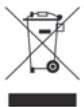
Do not dispose of the appliance in your normal domestic waste. This product is subject to the provisions of European Directive 2002/96/EC.
Disposing of the appliance
- Arrange for the product, or parts of it, to be disposed of by a professional disposal company or by your communal waste facility.
- Observe the currently applicable regulations. In case of doubt, please contact your waste disposal centre.
Disposal of batteries/accumulators
- Used batteries/rechargeable batteries may not be disposed of in household waste.
- Batteries/rechargeable batteries can contain toxic substances which may damage the environment. Therefore, dispose of the batteries/rechargeable batteries in accordance with statutory regulations.
- Every consumer is statutorily obliged to dispose of batteries/rechargeable batteries to a community collection centre in their district or to a dealer. The purpose of this obligation is to ensure that batteries are disposed of in a non-polluting manner.
- Only dispose of batteries when they are fully discharged.
Disposal of packaging

Dispose of all packaging materials in an environmentally friendly manner.
CE Conformity
This appliance and been tested against, and found to be in compliance with, the fundamental requirements and other relevant stipulations of the EMC Directive 2004/108/EC, as well as the Guidelines of the Low Voltage Directive 2006/95/EC.
Importer
KOMPERNASS GMBH BURGSTRASSE 21 44867 BOCHUM, GERMANY
www.kompernass.com
You receive a 3-year warranty for this appliance as of the purchase date. Should you, in spite of our high quality standards, have grounds for complaint please contact our Service Hotline.
In the event that processing of your complaint is not possible by telephone here you will receive
- a processing number (RMA number) as well as
- an address to which you can send your appliance for repair under warranty.
In the case of mailing shipment please enclose a copy of the purchase receipt (sales slip). The appliance must be securely packed and the RMA number clearly visible. Products sent in without the RMA number cannot be processed.
i Note:
The warranty provisions cover only material or manufacturing defects.
The warranty is not valid;
- for worn out parts
- for damages to breakable parts such as switches and batteries.
This product is for private use only and is not intended for commercial use. The warranty is void in the case of abusive and improper handling, use of force and internal tampering not carried out by our authorized service branch. Your statutory warranty claims are not restricted by this warranty.
GB DES Ltd
Tel.: 0870/787-6177 Fax: 0870/787-6168 e-mail: support.uk@kompernass.com
IE Kompernass Service Ireland
Tel: 1850 930 412 (0,082 EUR/Min.) Standard call rates apply. Mobile operators may vary. e-mail: support.ie@kompernass.com
www.mysilvercrest.de