
SJ-PT520R - Fridge SHARP - Free user manual and instructions
Find the device manual for free SJ-PT520R SHARP in PDF.


| Product type | Refrigerator with freezer compartment |
| Brand | SHARP |
| Model | SJ-PT520R |
| Plasmacluster ionizer | Built-in, neutralizes bacteria and mold |
| Refrigerant | R600a (isobutane) - flammable |
| Insulating gas | Cyclopentane |
| Defrost | Automatic |
| Refrigerator temperature setting | 0°C to 6°C in 1°C increments |
| Freezer temperature setting | -13°C to -21°C in 1°C increments |
| Door alarm | Yes, audible |
| Reversible door | Yes (hinge kit SJ-L55CRD required) |
| Hybrid aluminum panel | Indirect cooling of food |
| Lighting | LED |
| Casters | Yes, for moving |
| Adjustable feet | Two front feet |
| Temperature indicator | Yes, coldest zone (blue/white) |
| Flexible door bin | Yes, liftable divider |
| Half shelf | 1 pair |
| Bottle separator | 2 pieces |
| Separation plate | Yes (for SJ-PT520R and SJ-PT590R) |
| Ice making | Ice cube tray with crank |
| Use | Freestanding |
| Recommended cleaning | Warm water and mild detergent |
| Repairability | SHARP authorized after-sales service |
| Disposal | Do not dispose of with household waste (WEEE) |
Frequently Asked Questions - SJ-PT520R SHARP
User questions about SJ-PT520R SHARP
0 question about this device. Answer the ones you know or ask your own.
Ask a new question about this device
Download the instructions for your Fridge in PDF format for free! Find your manual SJ-PT520R - SHARP and take your electronic device back in hand. On this page are published all the documents necessary for the use of your device. SJ-PT520R by SHARP.
USER MANUAL SJ-PT520R SHARP

Plasmacluster is a trademark of SHARP Corporation
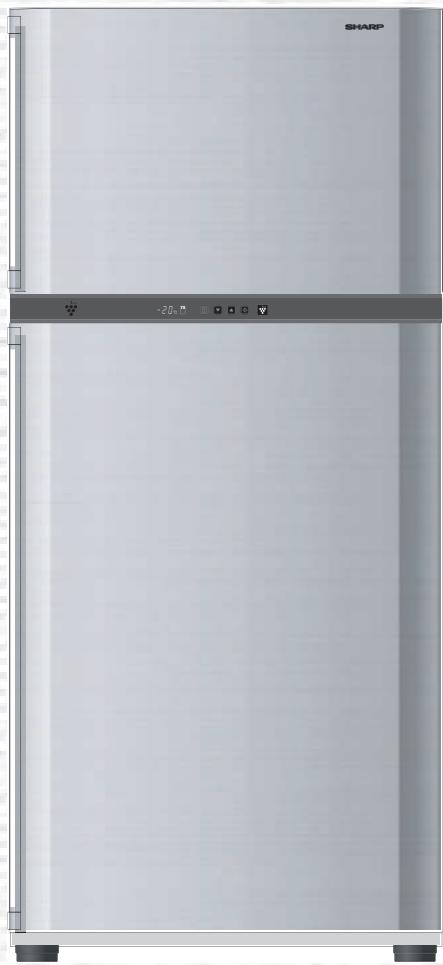
SJ-PT690R
SJ-PT520R SJ-PT640R
SJ-PT590R SJ-PT690R
REFRIGERATOR-FREEZER
Household use only Free standing type
FRIGORIFICO-CONGELADOR
E MANUAL DE MANEJO 8
E I O - K A T A Y K T H Z
GR EΓXEIP'IAIO AEITOYPRIGK'ΩN OΔHΓI'ΩN . .32
Oikiakn xpno n ovo Mn staepou tUU
KÜHLSCHRANK MIT TIEFKÜHLFACH
PbKOBOCTBO3A PAEBOTA. 110
ДаCVEиЗПОЛЗВаcamоздOMAKINHСКИцELN
Cbo6oJHO (OTDeJIHO) CTOI TIN
WARNING
- This refrigerator contains flammable refrigerant (R600a: isobutane) and insulation blowing gas (cyclopentane). Observe the following rules to prevent ignition and explosion.
- The refrigeration system behind and inside the refrigerator contains refrigerant. Do not allow any sharp objects to come into contact with the refrigeration system.
- Do not use mechanical devices or other means to accelerate the defrosting process. (This refrigerator has adopted automatic defrosting system.)
- Do not use electric appliances inside the refrigerator.
- Use only the specified lamp for the refrigerator compartment.
- Do not block the openings on the circumference of the refrigerator.
- If the refrigeration system should get punctured, do not touch the wall outlet and do not use open flames. Open the window and air out the room. Then ask a service agent approved by SHARP for servicing.
- This refrigerator should be disposed appropriately. Take the refrigerator to a recycling plant for flammable refrigerant and insulation blowing gases.
- Highly volatile and flammable materials such as ether, petrol, propane gas, adhesive agents and pure alcohol etc. are liable to explode. Do not store these materials in the refrigerator.
- Dust deposited on the power plug may cause fire. Wipe it off carefully.
- Do not attempt to change or modify this refrigerator. This may result in fire, electric shock or injury.
- Ensure that the refrigerator presents no danger to children while being stored for disposal. (e.g. remove the magnetic door seals to prevent child entrapment.)
CAUTION
- Do not touch the compressor unit or its peripheral parts, as they become extremely hot during operation and the metal edges may cause injury.
- Do not touch foods or metal containers in the freezer compartment with your wet hands. This may cause frostbite.
- Do not use an extension cord or adapter plug.
- Do not place bottled and canned drinks in the freezer as they may crack when frozen.
- Make sure that the power cord has not been damaged during installation or moving. If the power plug or cord is loose, do not insert the power plug. There is a risk of electric shock or fire.
- Disconnect from the mains electricity supply by removing the mains plug from the electricity supply socket. Do not remove by pulling the mains lead. This may cause electric shock or fire.
- Should the flexible supply cord be damaged, it must be replaced by service agent approved by SHARP as a special cord is required.
In case of gas leak, ventilate the area by opening a window, etc. Do not touch the refrigerator or the power outlet. - Do not place objects containing liquid or unsteady objects on top of refrigerator.
- This refrigerator is not intended for use by persons (including children) with reduced physical, sensory or mental capabilities, or lack of experience and knowledge, unless they have been given supervision or instruction concerning use of the refrigerator by a person responsible for their safety. Young children should be supervised to ensure that they do not play with the refrigerator.
INSTALLATION
WARNING
- Do not install the refrigerator in a damp or wet location as this may cause damage to the insulation and a leak. Condensation may also build on the outer cabinet and cause rust.
1 Keep adequate ventilation space around the refrigerator.
- The figure shows the minimum required space for installing the refrigerator. It differs from the space in the measurement condition of the amount of power consumption.
- It is possible to use the refrigerator with a less amount of power consumption by keeping greater space.
- If using the refrigerator in the space below dimension of the figure, it may cause the temperatures in the unit to rise, loud noise, and failure.
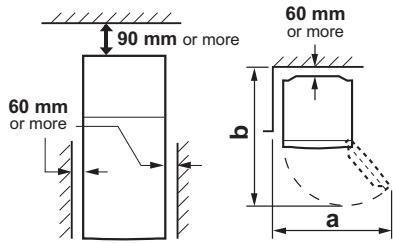
| SJ-PT520R SJ-PT590R | SJ-PT640R SJ-PT690R | |
| a | 1230mm | 1400mm |
| b | 1400mm | 1500mm |
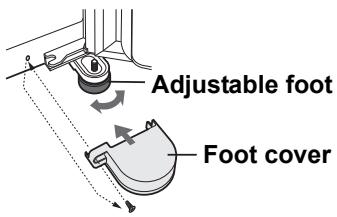
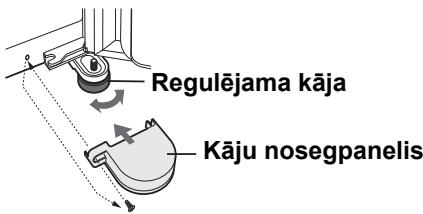
2 Using the two front adjustable feet, ensure that the refrigerator is positioned firmly and level on the floor.
3 Remove the 2 screws of the cabinet lower part, and use these to fit the foot covers. (supplied inside the refrigerator compartment)
NOTE
- Position your refrigerator so that the plug is accessible.
- Keep your refrigerator out of direct sunlight.
- Do not place next to heat generating appliance.
- Do not place directly on the ground.
Provide suitable stand.
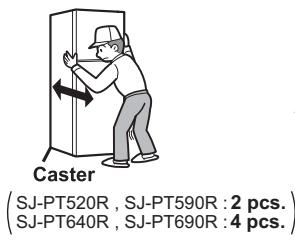
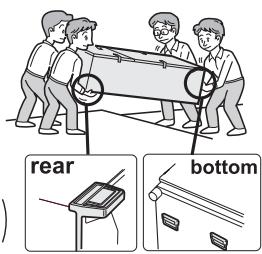
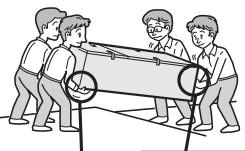
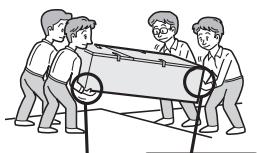
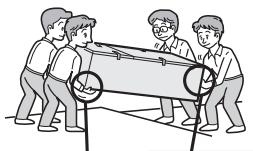
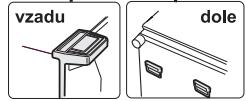
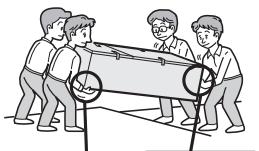
When transporting
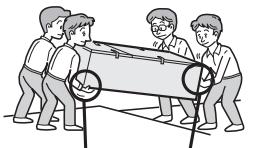
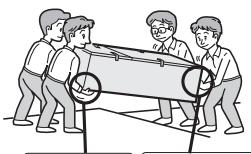
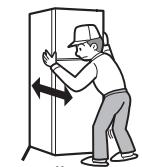
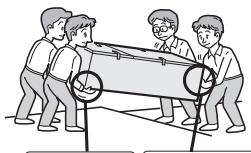
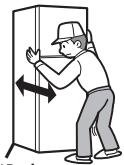
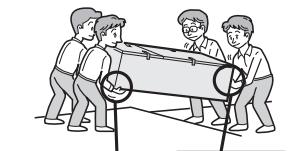
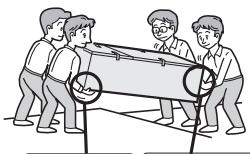
- Using the casters, it is possible to move back and forth.
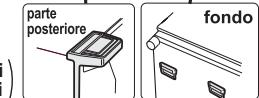
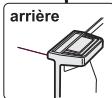
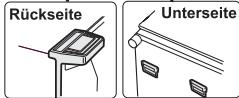
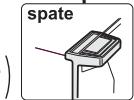
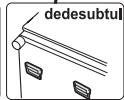
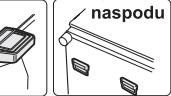
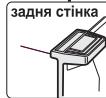
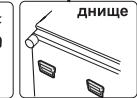
- Carry the refrigerator by holding the handles located on the rear and bottom.
Before using your refrigerator
Clean the inside parts with a cloth soaked in warm water. If soapy water is used, wipe it off thoroughly with water.
INDICATOR OF TEMPERATURE
This refrigerator is provided with a indicator of temperature in the refrigerator compartment to allow you to control the average temperature in the coldest zone.
Coldest zone
The symbol indicates the coldest zone in the refrigerator compartment.
(The door pocket positioned at the same height isn't the coldest zone.)

Checking the temperature in the coldest zone
You can carry out regular checks to ensure the temperature in the coldest zone is correct and, if necessary, adjust the refrigerator temp. control. To maintain a correct temperature inside the appliance, check that the indicator of temperature is always BLUE. If the indicator of temperature turns WHITE, the temperature is too high; in this case, increase the refrigerator temp. control setting and wait for 6 hours before checking the indicator of temperature again.

BLUE
Correct setting
WHITE
Temperature too high, adjust the refrigerator temp. control.
NOTE
- The internal temperature of the refrigerator depends on various factors such as the ambient temperature of the room, the amount of food stored and the frequency of door opening.
- When fresh food has been introduced or the door has been left open for some time, it is normal for the indicator of temperature to turn WHITE.
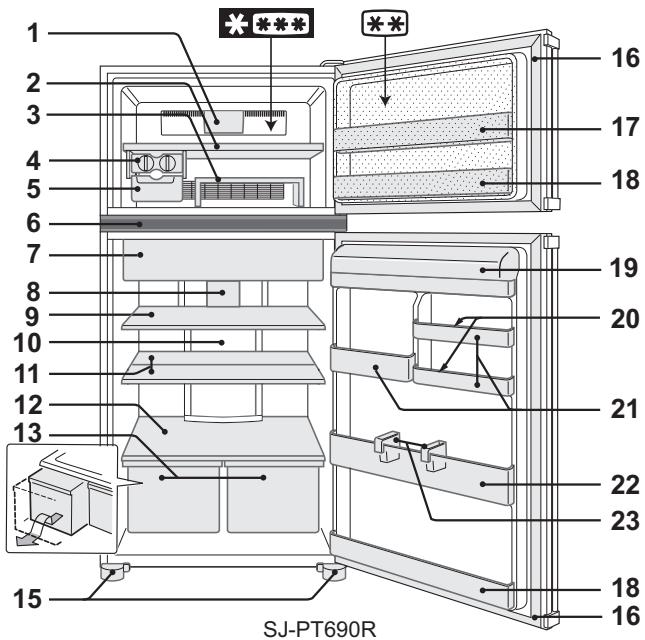
- 2 star section ** for storing frozen food only.
1. Freezer LED light
2. Freezer shelf
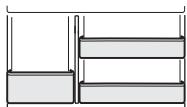
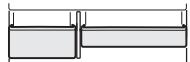
3. Movable shelf
You can make two levels, enabling you to store food separately. If used upside down, you can keep foods neatly within this shelf.
(In the refrigerator compartment)
4. Ice cube maker
1) Do not over fill the ice cube trays; otherwise the ice cubes will be joined together when frozen.
2) When the ice cubes are made, turn the lever clockwise to empty the ice into the Ice cube box.
NOTE To prevent damage to the Ice cube box, do not make ice in the Ice cube box or pour oil into it.
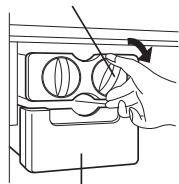
Lever
Ice cube box
5. Ice cube box
6. Control panel
0. Hybrid cooling panel (Aluminum panel)
The panel is cooled from the rear, thus indirectly cooling the refrigerator compartment. In this way, food is refrigerated gently, without exposing it to cold air flow.
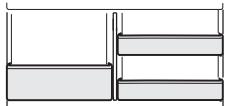
11. Half shelf (1 pair)
The position of the shelf can be arranged according to the size of the foods to be stored.
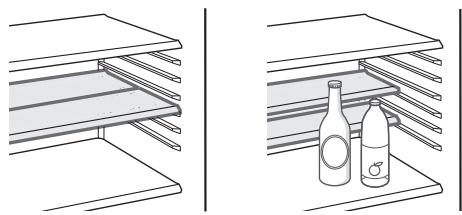
12. Fruit and vegetable shelf
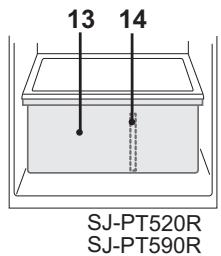
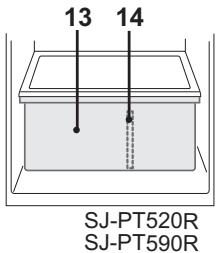
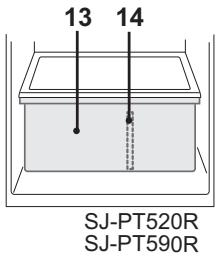
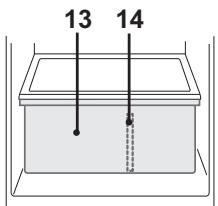
13. Fruit and vegetable crisper
( - PT520R, SJ - PT640R, ) SJ-PT590R:1 pc.
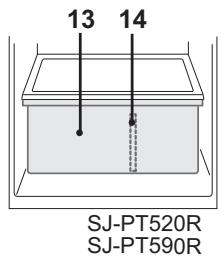
14. Divider
(Only for SJ-PT520R, SJ-PT590R)
15. Adjustable feet & covers (2 pcs.)
16. Magnetic door seals (2 pcs.)
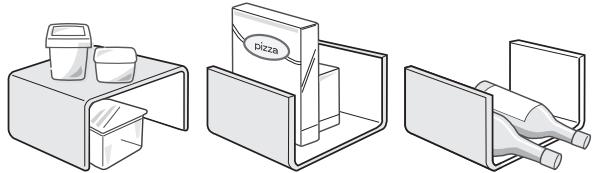
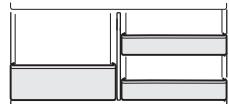
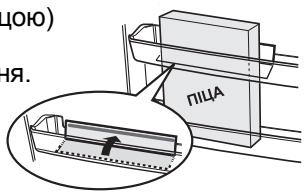
17. Flexible pocket
Tall food items (e.g. pizza box) can be stored by lifting the partition from the bottom of the pocket.
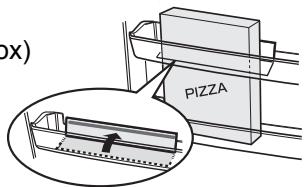
18. Door pockets (2 pcs.)
19. Refrigerator pocket & cover
20. Egg holders (2 pcs.)
21. Utility pockets
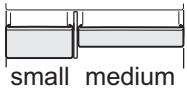
SJ-PT520R
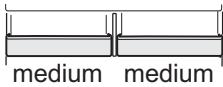
SJ-PT640R
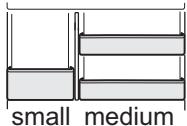
SJ-PT590R
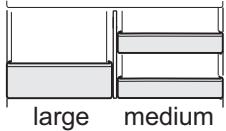
SJ-PT690R
NOTE (Only for SJ-PT690R)
Do not replace the right utility pocket with that of the left, and vice versa.
22. Bottle pocket
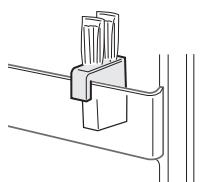
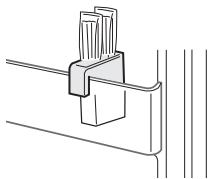
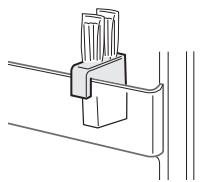
23. Bottle stoppers / Tube stands (2 pcs.)
Prevents bottles etc. from falling. Stick-type food products can also be stored inside.
Deodorizing unit
Deodorizing catalyst is installed on the routes of cold air. No operation and cleaning are required.
Reversible door
It is possible to change the door to left side opening. To modify the door a REFRIGERATOR HINGE KIT (for left side opening) will be required, SJ-L55CRD. For details of the kit and the modification work, please contact the service agent approved by SHARP.
CAUTION SHARP recommends that all modification work will be carried out by a competent person.
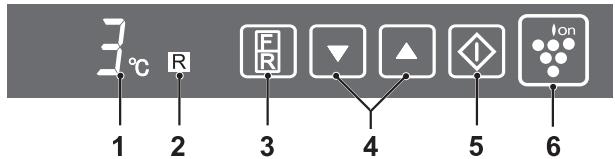
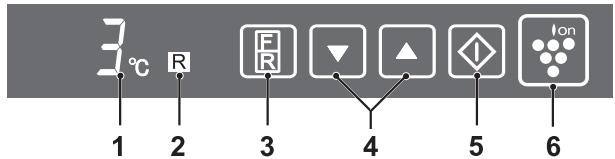
Control panel
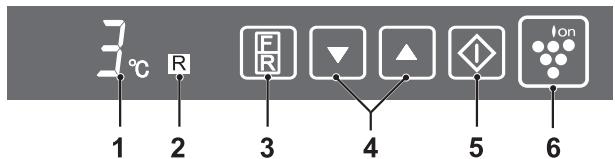
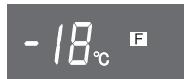
1. Display for temperature setting
The preset temperature of compartment selected is displayed. It is not an actual temperature in the compartment.
2. Display for compartment selected
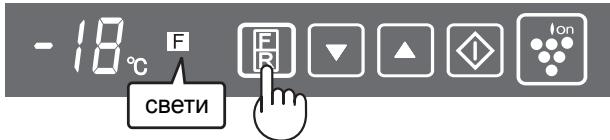
3. Select button
The compartment selected can be changed by pressing the select button.
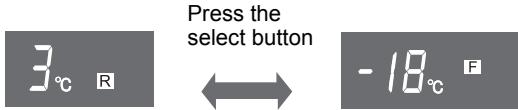
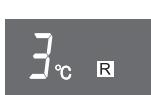
Initial display for refrigerator compartment
Initial display for freezer compartment
4. / button
Use to select temperature.
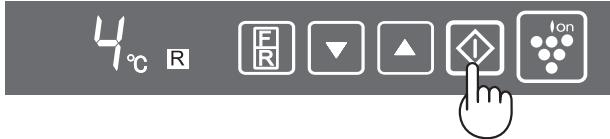
5. button
Finalizes the temperature setting.
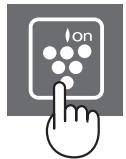
6. Plasmacluster button and display
Press to start / cancel the plasmacluster operation.
NOTE
- The display for temperature setting and selected compartment will turn off when there is no operation for 1 minute. (When either of buttons is pressed, it lights again.)
- The plasmacluster display stays alight.
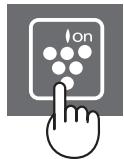
Plasmacluster
The plasmacluster automatically starts operating when the refrigerator is powered on.
To cancel operation
Press the " l " button (The light turns off).
To start operation
Press the " l " button again.
Notes about PLASMACLUSTER operation
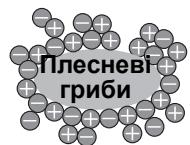
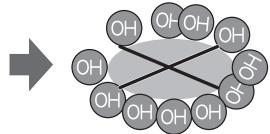
The ionizer inside your refrigerator releases clusters of ions, which are collective masses of positive and negative ions, into the freezer and refrigerator compartments. These ion clusters inactivate airborne mold fungus.
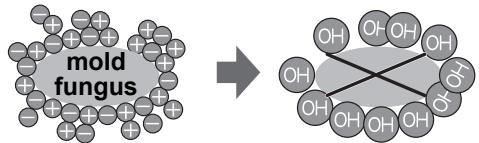
- There may be a slight odors in the refrigerator. This is the smell of ozone generated by the ionizer. The amount of ozone is minimal, and quickly decomposes in the refrigerator.
Controlling temperature
The refrigerator controls its temperature automatically. However, if needed, adjust the temperature as follows.
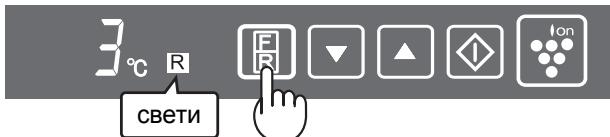
Refrigerator compartment
Adjustable between 0^ and 6^ in steps of 1^ .
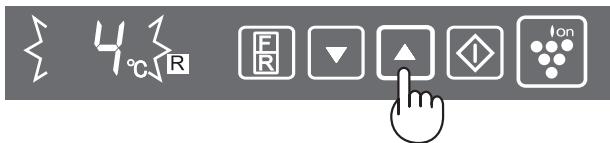
1 Press the select button.
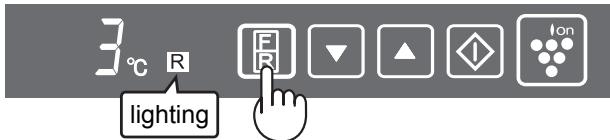
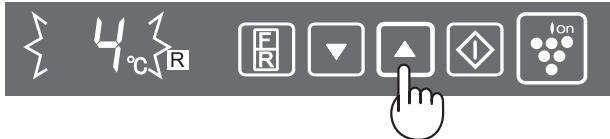
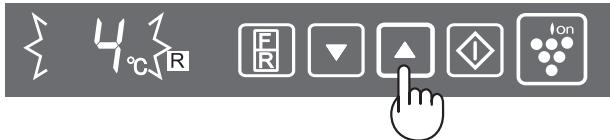
2 Press the / button and set the temperature. [▲: increase, : decrease]
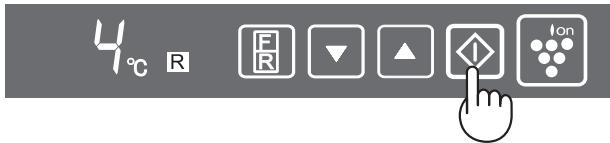
3 Press the " " button.
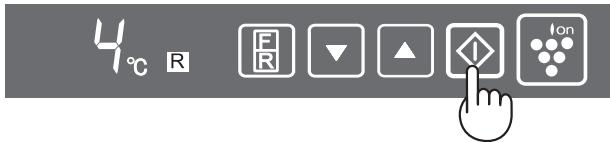
Freezer compartment
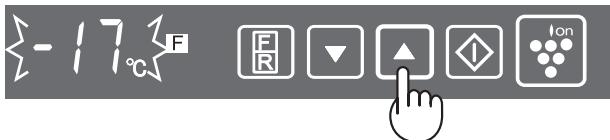
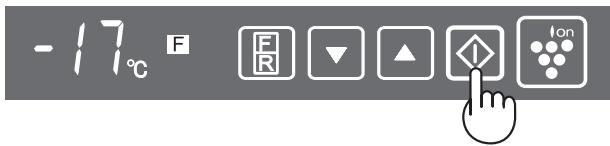
Adjustable between -13^ and -21^ in steps of 1^ .
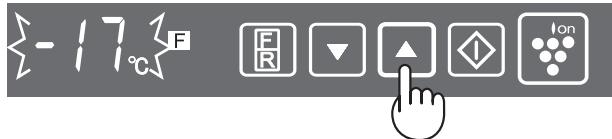
1 Press the select button.
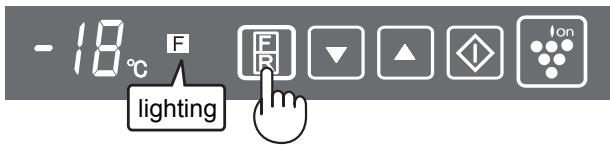
2 Press the / button and set the temperature. [▲: increase,▼: decrease]
3 Press the " " button.
Door Alarm
When the refrigerator or freezer door is left open, the door alarm will sound.
- The door alarm will sound 1 minute after opening the door and again after 1 minute (once in each case).
- If the door is left open for approx. 3 minutes, the alarm will sound continuously.
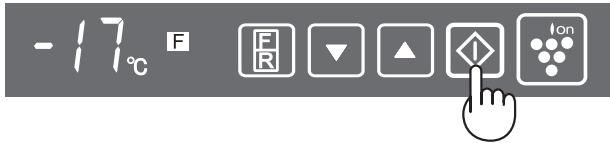
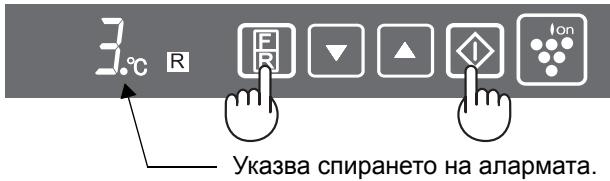
To cancel alarm signal
Press the select button continuously 3 seconds or more while holding down the "◇" button.
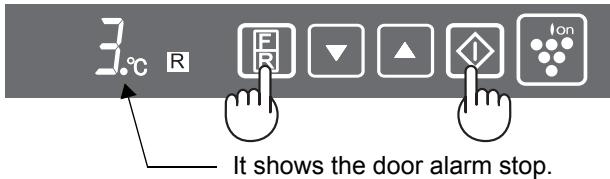
It is the same method also when restarting the alarm signal.
STORING FOOD
Refrigeration reduces the rate of food spoilage.
To maximize the shelf life of perishable food products, ensure that the food is the freshest possible quality. The following is a general guide to help promote longer food storage.
Fruit / Vegetables
To minimize moisture loss, fruit and vegetables should be loosely enclosed in a plastic material e.g. wrap, bags (do not seal) and place in the fruit and vegetable crisper.
Dairy Products & Eggs
- Most dairy products have a use by date on the outer packaging which informs the recommended temperature and shelf life of the product.
- Eggs should be stored in the Egg holder.
Meats / Fish / Poultry
- Place on a plate or dish and cover with paper or plastic wrap.
- For larger cuts of meat, fish, or poultry, place to the rear of the shelves.
- Ensure all cooked food is wrapped securely or placed in an airtight container.
NOTE
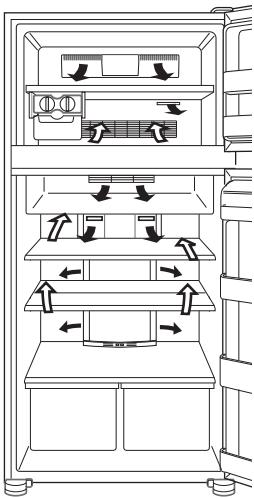
- Evenly place the food on the shelves to allow the cooling air to circulate efficiently.
- Hot foods should be cooled before storing. Storing hot foods increases the temperature in the unit and increases the risk of food spoilage.
- Do not block the outlet and inlet of the cool air circulating circuit with foods or containers; otherwise the foods will not be evenly cooled throughout the refrigerator.
- Keep the door securely closed.

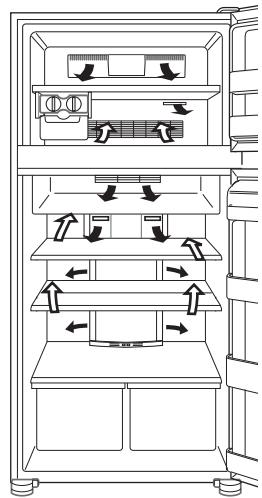
Do not place food directly in front of cold air outlet. This may lead to the food freezing.
For best freezing
- Quality of foods should be fresh.
- Freeze small quantities of food at a time to freeze them quickly.
- Food should be properly stored or covered and the air should be removed to seal tightly.
- Evenly place the food in the freezer.
- Label bags or containers to keep an inventory of freezing food.
CARE AND CLEANING
WARNING
- Unplug the refrigerator first to prevent electric shock.
- Do not splash water directly on the outer cabinet or the interior. This may lead to rusting and deterioration of the electrical insulation.
IMPORTANT
To prevent cracking on inside surfaces and plastic components, follow these tips.
- Wipe any food oils adhered to plastic components.
- Some household chemicals may cause damage, so use only diluted washing-up liquid (soapy water).
- If undiluted detergent is used or soapy water is not wiped off thoroughly, cracking of plastic parts can result.
1 Remove the shelves and pockets from the cabinet and door. Wash them in warm soapy dishwashing water; rinse in clean water and dry. (Only fruit and vegetable shelf is not removable.)
2 Clean the inside with a cloth soaked in warm soapy dishwashing water. Then, use cold water to wipe off soapy water.
3 Wipe the exterior with a soft cloth each time it is soiled.
4 Clean the Magnetic door seal with a toothbrush and warm soapy dishwashing water.
5 Wipe the control panel with the dry cloth.
NOTE
- To prevent damage to your refrigerator, do not use heavy duty cleansers or solvents (lacquer, paint, polishing powder, benzine, boiled water, etc.).
- If the power supply is disconnected, please wait for at least 5 minutes before re-connecting power.
- The glass shelves weigh approximately 3kg each. Hold firmly when removing from the cabinet or carrying.
- When dropped the juice and the like near the control panel, wipe off directly. It becomes cause of failure of the control panel.
- Do not drop objects inside the refrigerator or strike the inner wall. This may cause the inner surface to crack.
Defrosting
Defrosting is fully automatic due to a unique energy saving system.
When the compartment light is blown
Contact the service agent approved by SHARP to request a replacement compartment light. The compartment light is not to be removed other than by qualified service personnel.
Switching off your refrigerator
If you switch your refrigerator off when you are going away for an extended period, remove all food, clean the interior thoroughly. Remove the power cord plug from the power socket and leave all doors open.
WHAT TO DO BEFORE YOU CALL FOR SERVICE
Before you call for service, check the following points.
| Problem | Solution |
| The outside of a cabinet is hot when touched. | It is normal. The hot pipe is in the cabinet in order to prevent dew generation. |
| When there is refrigerator noise. | It is normal for the refrigerator to produce the following sounds. • Loud noise produced by the compressor when operation starts --- Sound becomes quieter after a while. • Loud noise produced once a day by the compressor --- Operating sound produced immediately after automatic defrost operation. • Sound of flowing fluid (gurgling sound, fizzling sound) --- Sound of refrigerant flowing in pipes (sound may become louder from time to time). • Cracking or crunching sound, squeaking sound --- Sound produced by expansion and contraction of inner walls and internal parts during cooling. |
| Frosting or dew generation occurs inside or outside the refrigerator. | This may occur in one of the following cases. Use a wet cloth for wiping frost and a dry cloth for wiping dew. • When the ambient humidity is high. • When the door is frequently opened and closed. • When foods containing plenty of moisture are stored. (Wrapping is required.) |
| The foods in the refrigerator compartment freeze. | • Is the refrigerator operated for a long time with refrigerator temp. control set at 0°C? • Is the refrigerator operated for a long time with freezer temp. control set at -21°C? • Low ambient temperature may cause placed foods to freeze even if refrigerator temp. control is set to 6°C. |
| It smells in the compartment. | • Wrapping is required for the foods with strong smell. • Deodorizing unit cannot remove all of smell. |
IF YOU STILL REQUIRE SERVICE
Refer to your nearest service agent approved by SHARP.
Information on Disposal for Users (private households)
1. In the European Union
Attention: If you want to dispose of this equipment, please do not use the ordinary dust bin! Used electrical and electronic equipment must be treated separately and in accordance with legislation that requires proper treatment, recovery and recycling of used electrical and electronic equipment.
Following the implementation by member states private households within the EU states may return their used electrical and electronic equipment to designated collection facilities free of charge. In some countries your local retailer may also take back your old product free of charge if you purchase a similar new one.
*) Please contact your local authority for further details.
If your used electrical or electronic equipment has batteries or accumulators, please dispose of these separately beforehand according to local requirements.
By disposing of this product correctly you will help ensure that the waste undergoes the necessary treatment, recovery and recycling and thus prevent potential negative effects on the environment and human health which could otherwise arise due to inappropriate waste handling
2. In other Countries outside the EU
If you wish to discard this product, please contact your local authorities and ask for the correct method of disposal.
For Switzerland: Used electrical or electronic equipment can be returned free of charge to the dealer, even if you don't purchase a new product. Further collection facilities are listed on the homepage of www.swico.ch or www.sens.ch.
ADVERTENCIA
| SJ-PT520R SJ-PT590R | SJ-PT640R SJ-PT690R | |
| a | 1230mm | 1400mm |
| b | 1400mm | 1500mm |
SJ-PT520R, SJ-PT590R: 1 pza. SJ-PT640R, SJ-PT690R: 2 pzas.
14. Placa del separator
17. Compartmento flexible
SJ-PT690R
grande mediano
SJ-PT520R,SJ-PT590R:2 pezzi SJ-PT640R,SJ-PT690R:4 pezzi
SJ-PT520R, SJ-PT590R: 1 pezzo SJ-PT640R, SJ-PT690R: 2 pezzi
(Solo per i modelli SJ-PT520R, SJ-PT590R)
Compartmenti freezer
| SJ-PT520R SJ-PT590R | SJ-PT640R SJ-PT690R | |
| a | 1230mm | 1400mm |
| b | 1400mm | 1500mm |
SJ-PT520R, SJ-PT590R: 2 pieces SJ-PT640R, SJ-PT690R: 4 pieces
SJ-PT520R,SJ-PT590R:1 piece SJ-PT640R,SJ-PT690R:2 pieces
SJ-PT690R
grand moyen
Compartment congélateur
(SJ-PT520R, SJ-PT590R: 1 τεμ.)
SJ-PT640R, SJ-PT690R: 2 tεμ.
S.J-PT520R
SJ-PT590R
14. Δiaxωpiotikn πλακα
(Móvo yia SJ-PT520R, SJ-PT590R)
SJ-PT590R
μikpn μεσαia
HMEIOsH (Moyo yia SJ-PT690R)
Mny aalacet Tn 8eia thkntoaaattawx npoeewv me Tnv apiotepn kai avtioptpqa.
| SJ-PT520R SJ-PT590R | SJ-PT640R SJ-PT690R | |
| a | 1230mm | 1400mm |
| b | 1400mm | 1500mm |
(SJ-PT520R, SJ-PT590R: 2 St. SJ-PT640R, SJ-PT690R: 4 St.)
(Nur Modelle SJ-PT520R, SJ-PT590R)
VOOR REPARATIE TE BELLEN
| SJ-PT520R SJ-PT590R | SJ-PT640R SJ-PT690R | |
| a | 1230mm | 1400mm |
| b | 1400mm | 1500mm |
SJ-PT520R
male srednie
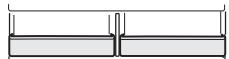
SJ-PT640R
srednie srednie
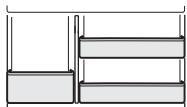
SJ-PT590R
male srednie
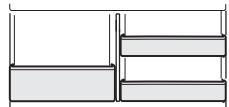
SJ-PT690R
duze srednie
UWAGA (Tylko dla modeli SJ-PT690R)
| SJ-PT520R SJ-PT590R | SJ-PT640R SJ-PT690R | |
| a | 1230mm | 1400mm |
| b | 1400mm | 1500mm |
(Csak SJ-PT520R, SJ-PT590R)
MEGJEGYZÉS (Csak SJ-PT690R)
| SJ-PT520R SJ-PT590R | SJ-PT640R SJ-PT690R | |
| a | 1230mm | 1400mm |
| b | 1400mm | 1500mm |
Rotiţă
SJ-PT520R, SJ-PT590R: 2 bac. SJ-PT640R, SJ-PT690R: 4 bac.
Inainte de a folosi frigiderul
[▲:crestere,▼:scadere]
3 Apasati butonul 一 _ 1 ^ 一
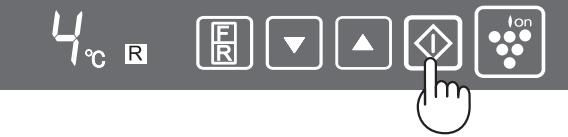
[△:crestere,▼:scadere]
| SJ-PT520R SJ-PT590R | SJ-PT640R SJ-PT690R | |
| a | 1230mm | 1400mm |
| b | 1400mm | 1500mm |
SJ-PT520R, SJ-PT590R: 2 ks SJ-PT640R, SJ-PT690R: 4 ks
(Pouze pro SJ-PT520R, SJ-PT590R)
| SJ-PT520R SJ-PT590R | SJ-PT640R SJ-PT690R | |
| a | 1230mm | 1400mm |
| b | 1400mm | 1500mm |
(SJ-PT520R, SJ-PT590R:2 ks) SJ-PT640R, SJ-PT690R:4 ks
Vzadu
(Iba SJ-PT520R, SJ-PT590R)
| SJ-PT520R SJ-PT590R | SJ-PT640R SJ-PT690R | |
| a | 1230mm | 1400mm |
| b | 1400mm | 1500mm |
Perstumimo
ratukas
(SJ-PT520R, SJ-PT590R: 2 vnt.)
SJ-PT640R, SJ-PT690R: 4 ynt.
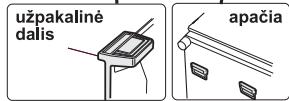
(Tik SJ-PT520R, SJ-PT590R)
- Reguliuojamos kojelès ir uždengimo elementai (2 vnt.)
- Magnetiné duru izoliacija (2 vnt.)
- Lankstusis déklas
PASTABA (Tik SJ-PT690R)
| SJ-PT520R SJ-PT590R | SJ-PT640R SJ-PT690R | |
| a | 1230mm | 1400mm |
| b | 1400mm | 1500mm |
2 Izmantojotdivas prieksejjasregulejamaskas ir iespejams nodrosinat ledusskapja stabilati.
3 Izskruvejiet no nodalijuma apaksdalias 2 skruves un izmantojiet, lai piestiprinatu kaju nosegpanelus (piegadajot ievietoti ledusskapja nodalijumā).
UZMANIBU
SJ-PT520R, SJ-PT590R:2 gab. SJ-PT640R, SJ-PT690R:4 gab.
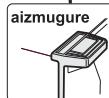
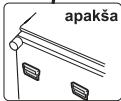
(Tikai SJ-PT520R, SJ-PT590R)
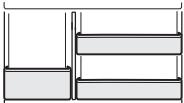
SJ-PT590R
mazes medium
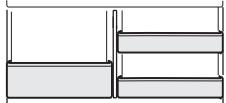
SJ-PT690R
liels
videjs
UZMANIBU (Tikai SJ-PT690R)
| SJ-PT520R SJ-PT590R | SJ-PT640R SJ-PT690R | |
| a | 1230mm | 1400mm |
| b | 1400mm | 1500mm |
(Ainult mudelitel SJ-PT520R, SJ-PT590R)
15. Reguleeritavad jalad & katted (2 tk)
Ionizer "Plasmacluster"
| SJ-PT520R SJ-PT590R | SJ-PT640R SJ-PT690R | |
| a | 1230mm | 1400mm |
| b | 1400mm | 1500mm |
(Leza SJ-PT520R, SJ-PT590R)
| SJ-PT520R SJ-PT590R | SJ-PT640R SJ-PT690R | |
| a | 1230MM | 1400MM |
| b | 1400MM | 1500MM |
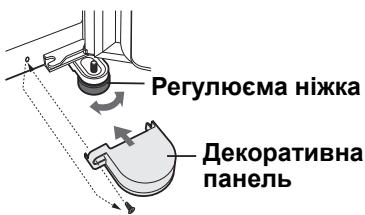
2 BiDperynobatn Dbi nepeHi perynoMi HixkTuK, 06 XOIOINbHNI MiHO i pIBHO cTOrB Ha niIIO3i.
3 BnkyTb 2 HxHhi rBnHTn XoNoIbHOro RaNka i BCTaHOBiT DeKopatNBHi NaHeJI. (rki 3hAxOJaTBcR BCEpeDiHI OCHOBHorO BiDIneHH)
ПРИМITKA
- Поставити Холдуньнк тak, соб 3абeзpeHTи ДОCTунdo
pO3ETkn.
-ПoctabNTI XOJIOJIbHnK B MICTI NO3a nprMm COHcHm OCBITJIeHHaM. - He CTaBtɪn Iopəd 3 ḤarpiBaIbHmɪn pɪŋlaɪdaɪm.
He cTaubTu npraMo Ha 3emnIO. IiIroTyBaTu BiIIOBiiHy niIDCTaBky.
Pn nepeBe3eHHi
SJ-PT520R,SJ-PT590R:2wT. SJ-PT640R,SJ-PT690R:4wT.
Ipeid noaTkom ekcnjyaTaucii XOJOnJIbHnka
IpoTpiB BHyTpiiHNO qACTNHy TKAHNHOIO, 3MOeHOIO B TeJIiB ODi. JaKIO BKNOPNCOTOBYETbCRA MJIbHNI PO3uH, To petelbHO 3MnTe INoTO YNCTOHO BOIOJ.
IHДИКATOP TEMПЕPATYPИ
Даннхлольнкоблданний iHДикatopom Tempepatypn,якni 3нaxоДичсВхлODиьнiКamepi i D03BOJIЯБИЗHAЧATNCEpeDHIOTempepatypy HauXOLONDHIшДiIЯнц.
HaixoJodhiwa dIinaHka
Dahn CmB0N I03Naac HauXoJOnHiUy DiJIaHky B XOJOnJIbHi Kamepi. (DbepHe BiDiJIeHHa, 3HaxOJNTbcra Ha TiI camiBvocTi, He HanExKnTb Do HauXoJOnHiWoI DiJIaHKn.)

CNMBOJ
IpeBipka TemnepaTypu y NaixoJodHiSi dIJIHci
Bn mojete peylnpno nepebiprtn TemnepaTypy y haixoJNDiHii dIJIHci, i JaIO Heo6xIDHO, HAcTPOOBaTu ii peryIaTOPOM TemnepaTpni.
Ioka3HnKOM npaBnJbHOI Tempepatyn B XOJIOINbHNky CNIHI KOIp iNDnKaTopa Tempepatyn. Jkso iNDnKaTOp Tempepatyn 3miHoe KOpip Ha BIINI, To ue O3Naue, So TEMpepatya y XoJIOINbHNky HAnTo BnCOKa. Y TaKOMy BnnaDKy 36JIbShuNTb HAcTpoNky peRyIaTopa Tempepatyn Ta 3aueKaIte pnpOIn3Ho 6 roDnH neped nobTOpHOI nepeBipKOIO INdNKaTopa Tempepatyn.
(TiNbKnДЯ SJ-PT520R, SJ-PT590R)
15. PerylloεMi Hixkni i dekopaTnbH niHaHeJI. (2 wI.)
16. Marhitni yuǐneHnǎ Dēpçú (2 wt.)
17. BīdǐneHnγ, po3mip ykoRo moXHa pēryJlHOBaTn
Bucoki Bnpo6n (Kopo6ky 3 niOHO) MoXHa 36epiratN, NiHbUIN neperopokny 3 dHa BiDIneHH.
SJ-PT690R
BeliKe cepeHc
ПРМITKA (Тлбкидя SJ-PT690R)
He 3miHIOIte po3TaUyBaHHn IpaBOrO DoaTkoBOro BiiDJIeHNHa NJIbe i HabNaKn.
22. BidaileHHra nna nnawoK
IPOJyKTny BVCOKNX EMKOCTX.
ДeЗдоруюа сиСтema
De3oDopyuOHa peOvBnHa po3TaUoBaHa Ha 7JxMy, kIM pyxAeTbC xOJOnHe nobiTp. He notpe6yE o6cnyroByaHn Ta OunIeHHN.
ПоворOTи Деверi
CTOPOHy BiIkpNbAHNa DBepe MoKHa 3MiHHT Na IiBy. IJIy cIbOro nOtpiBn HABIP UAPHIPIB IJIY XOLOINJBHKA (IJIy NIOCHNIBHKA) SJ-L55CRD. 3a DeTJIbHiOIO INΦopMaciEIO CTOCOBHO Ha6Opy i nepeBCTaHOBNeHH ADBepe 3BepTaIteCb Do aBTopu3OBAHOrO cepBicHOrO ueThpy SHARP.
YBAGA SHARP peKomeHnye dOpuyaTu BnKoHaHHa 6yDb-aykX MoDnΦikaui DonOMorOIO KbJIΦIKOBaHomy nepcoHaIy.
PanaHeIb kepyBaHHa
- 3o6paXeHHa TempeaTpyHx yCTaHOBOK BiOobpaXaTbc7aHa TaMepeaTpa.BoHa He c ΦakTuHIO TeMpeaTpoU y BiDIneHHi.
- BiodobpaKeHHa TempepaTpyn dIy oboHarO BIdiJeHHa
- Khonka Bn6opy (Select) Bi6pahe BiDJIeHHa MOxHa 3MiHHTu HATNCKaHHaM KhoIKN Select.
HaTnCiTb KhoNky Select.
IouatKoBi yCTaHOBKn DnYXOJIOuNbHOrO BiDineHH.
IouatKobiyctaHOBKn DnMOP03NJbHOro BIDineneHH.
- KhoIIka /
BukopncobuyTe dny Bv6bpy Tempepatypn.
- Khonka
3aBepuHnactpoKny Tempeatypn.
- Khonka i dincpnei Pna3maKnaCTep
HaTnCHiTb, 06B yBIMKHyTN/BUMKHyTN nJa3MaKNaCTep.
PIMMITKA
-Дисплей Вб��ановьнг Temпepатурно ржиму i BИбран BiДділінг АВТOMATУНО BUMKHYТьСЕ YПROДOBЖ OДHIEI XВЛПИНи,якso He BИКOHYHTьСЯ кODHI dii.(KоЛЯксь i3 KHOПОК HaTCHYТN,BOH N 3HOBY 3aCBITЯТьСЯ.)
-Диспл徳 плазмaklnactepa CBITINbCЯ NOCTIIMHO.
CnCTema iOni3aui i OunuIeHnY NOBITpR Plasmacluster
CnCTema Plasmacluster BKIIOUaEcTbcS aBTOMaTHNO npBKJIIOUeHHI XOJODINJBHnka.
Ioo6 3ynnnn noepaio
HaTnCHiB KHONky" [CbITIO BUMKHeTBcA]
Iio6 po3nooyuTN BVKoHaHHn opeauii
3Hoby HaTnCHiTb KHOJIky [1 1]
Ppimitkn npo po60ty cnCTemn Plasmacluster
Iohi3atop B xOIOINbHnky BInpo6JIe i BnYcKae ioHHI KJIaCTepn, kЯ JBIAHbT cO6IO HAKONUeHHN NO3NTBnHx I HeraTINBHnX IOHiB, B MOpO3INbHy i XOIOINbHy KaMepn. Ll iOHHI KJIaCTepn pyHnyoTB pnicHeBi rpi6n, kЯ 3HaXoJaTbcra NOBiTpi.
B XOJOnIbHnky MoKe BiIyBaTncsЯrKm 3anax. Lc 3anax O3OHy BiI IOHI3aTopa. KiJIbKICTb O3OHy MiHImaIbHa, BIn WbNIDKO p03KJaIaEeTBcR B XOJOnIbHnky.
KoHTpoJIb 3a TeMnepePaTPOIO
Tempepatya y xoIoJbHnky peryIHOeTbcra bTOMaTHNO. Ondak, Bm moKeTe taKx BiDpeYIOBAtu Tempeatpy hAcTyNHIM YINOM.
XoIounlbHe BiDJIeHnHa
Temnepatypa peryioeTbCmK 0^ C i 6^ 3 kpkokom 1^
1 HaTusChiTb KhoNkY Bn6opy (select)
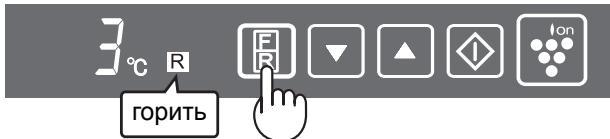
2 HaTnCHiB KONky / i BCTaHOBiTe TMnPepaTypy [ : 3MeH uNTn, : 36Ib uNTn]
3 HaTnCHiBt KhONKy "
Mopo3nIbHe BiDJIeHNa
Temnepatypa peryIIOeTbCMAk-13°C i -21°C 3 kpkokom 1°C.
1 HaTnCHITb KhoNkY Bn6opy (select)
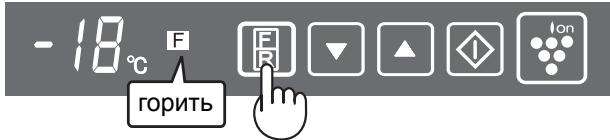
2 HaTnCHiB KHOJky / i BCTaHOBiTB Tempeatypey [▲:3MeHUnTI, :36iJIbUnTI]
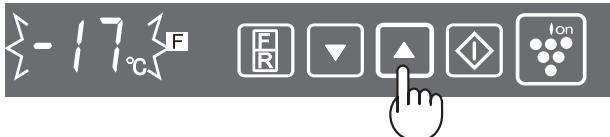
3 HaTnCHiTB KhoNky "
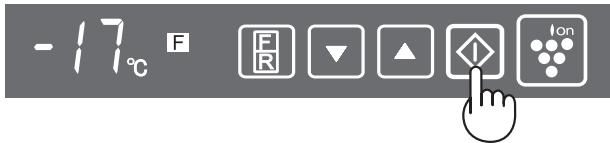
CnHaJ DBepuT
JaKIO DBePcTa XoJIoNbHnKa YN MOpO3NJbHOI KamepN 3aJIuShTu BiDkPntUm, IpOJyHaE 3ByKOBn CnHaJ.
3ByKOBn CnHnJ DBePcT npOpyHae Chepe3 1 XBUNHy nICJIrTO ROK BOH6bUIn BiDUnHeHi i NOTIM 3HOB Chepe3 XBUNHy (y KOKHOMy BUnaKnY 1 CnHAn).
CunHan 6ynde TpNBaIIM, kUo DBePcTa BIDKpnti npu6n3Ho 3 XBUNHn.
Uo6 ckacybatn nonepejxbyalbHn cnHan
HaTnCKaIte KhONky Bn6bpy npOTyROM Tpbox CeKHyD YI DOBSe, OJHOaCHO TpIMaOuH KhONky "
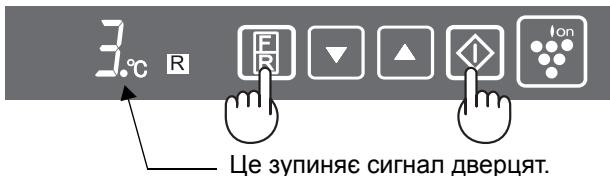
Lcien camn cnocio 3actocobyetbca TakoJ npe3anycky nonepedkybaIbHOrO cnHany.
(Camo 3a SJ-PT520R, SJ-PT590R)
15. Perynpemy Kpaeta Kanau (26p.)
16. MarHnTHn yIyIbTHeHna 3a BpaTaTa (2 6p.)
17.ГьвkaBaNoctaKa
Bucoknte npeImetn, (Haip. Kytni 3a Pnca) MOrat Da ce CbXpaHraBAT, KaTO BmHete nperpaData OT DOJHata Yact Ha noCTabkata.
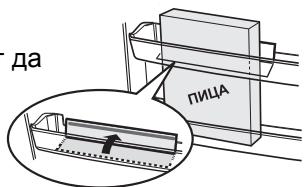
18. NocTaBKn Ha BpaTaTa (26p.)
19. NocTaBka Ha XJaDiJIHnKa i Kanak
20.ΦopMn3aЯиca(26p.)
21. NocTabk 3a pa3Hn Heua
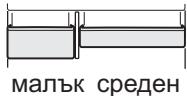
SJ-PT520R
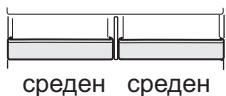
SJ-PT640R
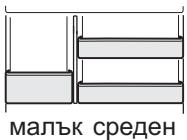
SJ-PT590R
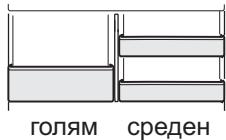
SJ-PT690R
3A6EJIEXKA (Camo 3a SJ-PT690R)
He pa3mehyTe cTpaHnTe Ha IaBata N JaCHaTa nocTabKn 3a pa3Hn HeIa nn ObpaTHO.
22. NocTabka 3a 6yTnIkn
23. OrpaHnUHTe 3a 6byTnIKN / Tpb6H n CToiKn (2 6p.)
Pa3n 6yTuNkN n np.OT naDahe. B Hero MoKe Da DbPxKe Te N Dblr N TbHKn No fOpMa npOdyKtN.
Apomatn3aTop
Apomatn3aTopbTe mOHTnpaHa nTbTa Ha cTydeHnBb3dUx.He n3nckBa ynpabJIeHne I nouchCTbaHe.
Obpbuaa Ce BpTa
Bb3MOxH0 e da ce npomeHn OTbaprHeTo Ha Bpata, taKa, ye Ta da ce OTbapr OTJRABO. 3a da CMeHnTe OTbaprHeTo Ha Bpatae Heo6xoDm KOMPJIeKT PAHTN 3A XIAIINHK (3a JnBO OTbaprHe) SJ-L55CRD. 3a nHOpMaun OTHOCHO KOMPJIeKTA I pOueDypaTn PO CMHa Na NocOKaTa Ha BpataTc Ce ObpHete KbM cepBn3eH areHT, OTOpN3nPaH ot SHARP.
BHHMAHNE
SHARP npenopbya BCnukn pnoeDpyn no MoOnfNkaun da ce n3BbPWBat OT KOMneTeHTHO JInCe.
KoHTpOJIeH naHeI
HOnn3aTOp "Plasmacluster"
Функцята яонизатop "Plasmacluster" ce akTNbupa aBTOMaTNUHо ри BKЛHQUBaHe Ha XJaДИNHИКа.
OTMЯHa Ha onepaunra
HaTnCHeTe 6yToHa "TO" (CBeTJIuHHnAIT HnDnKaTop n3racBa).
Ctaptnpahe Ha onepaunraTa
HaTnchTe 6yToHa "OTHOB.
1 HaTnucHeTe 6yToHa 3a n36Op.
2 HaTnchete 6byToHa ▲/v n 3aJaTe TempePaTypaTa. [▲: yBEnuHaBaHe,▼: HamaJIYaBaHe]
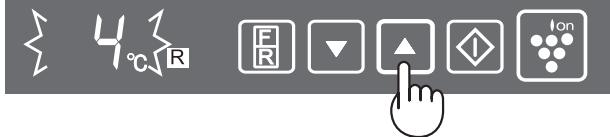
3 HaTnCHete 6yToHa "
ΦpɪnʒepHo OTeJeHne
Temnepaypata ce perynpa mejdy -13°C n -21°C ha CTbIKN OT 1°C.
1 HaTnuchTe 6bToHa 3a n36Op.
2 HaTnchete 6yToHa / n 3aJaIte TeMnepaTypaTa. [A: yBeJIuYaBaHe, V: HAmJIYaBaHe]
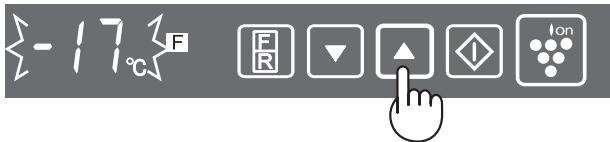
3 HaTnchTe 6byToHa "D".
AJaPMa 3a OTBopeHa BpaTa
Korato BpataHa XnaIINHka IIn Ha 0ctaHe OTBOpEHa, aIapMaTa 3a OTBOpEHa Bpata Ce BKJIouBa.
- AnapMaTa 3a OTBopeHa BpaTa npo3Byuaba 1 MInHyTa CneI OTBapAne Ha BpaTata N OTHOBO CJeI Oue 1 MNHyTa (N DBaTa NbTu N0 BeDnBx).
- Ako BpaTata octaHe OTbOpeHa OKoNo 3 MInHyTu, anapMaTa 3anOyBa Da 3BbHn PpOdbJxKITeJIHO.
OTMЯHa ha anapMeH cnrHan
HaTnCHeTe 3aIdpbXTe 6yToHa 3a IscBop 3a 3ceKynIINIOBeYe, KaTO eNHOBpeMeHHO C TOBa 3aIbpxKaTe 6yToHa "
Bb3ctahOBraHTo Ha aIapMeHnCnHaJI CTaba NO cbuHa NaHH.
Съхра_HEне HA XPAHn
CbXpaHЯBaHeTO B XlaIaIIHnK HaMaJIyBa CkOPOCTTa Ha pa3BaJIaIYe Ha XpaHInTe. 3a Da yIbJnxIte MaKcImaJIHO roIHOCTTa Ha HETpaHInTe npOlykTn, Te TpIbBA da 6bDaT Bb3MOxHn HaI-PeCSn. CpeDbAT O6uN HanbTCTBn 3a IIO-ДЛrO cbXpaHEnE Ha xpaHn.
Плобов/3eJIeHcyu
3a da ce HamaI IO MInHmym 3aIy6bTa Ha Bnara, IIOIOBete n 3eJeHcyuTe Tp8Ba Da 6bDaT JeKo yBHTn HAnpIMep B INaCTMaOBu ONAKO BKN, PNIKHeTa (He 3aneuATBaIte) n np6paHn B OTdJeHneTo 3a IIOOBe n 3eJeHcyu.
MJIeUHn npOdyKtn n Ia
-Повачето Mнechи порукту Имат срок на roдоч, otбелян на опakOBkaTA, Кдeto ce yka3Ba npenopbЧаHaTeMперatype nсрok на cbхра themselves.
- 壬匝ata Tp6Ba Da ce Dbpxkat BvB fopMaTa 3a yu.
Meco / Pn6a /Пиileшko
CLOXeTe B YHnIa NJIcBdN yBnIte C XapTna NJIa FOJIO.
-По-roJIemIte napYeTa Meco, pI6a uIu nIJIeUko CLOKETe B IbHOTo Ha paΦTOBete.
Crotbehata xpana Tpr6ba da ce yBne do6pe nIa ce CLOKIN B XepMeTnueH CbI.
3A6EJIENKKA
- Pa3npeJeIeTe paBHomepHo xpaHaTa no paΦTobete c ceI eФИКаСhaЦрКуПaциЯ Ha CTyДeHЯ Bb3dYx.
- TopeuTe XpaHn Tp86Ba Da n3CTnHaT, npeDn Da ce npBepaT. PnpBpuHeTo Ha ropeuXpaHn NOBnUba TempepaTypaTa B ypeDa u YBeJIuYaba pNcKa OT pa3BaJIyHe Ha xpaHaTa.
He 6IokupaTe nToKa Ha cnRPkyinpaunCTyDeH Bb3dyxC XpaHa IINn CbDoBE;B npOTuBeH CnyaH xpaHITe HMa Da Ce N3CTyDЯBaT paBHOMepHO B celeny XJaDiNJHK.
-ДрьжTeВраТаТдобpe3aTBоpeHa.
HABbTPE
→HABbH
He cnaraite xpaana Ha nTbTa Ha n3XoJzmaI cyTeH b3dyx. Toba moKe da npuHn 3aMp3aBaHe Ha xpaHata.
3a ha- do6po 3ampa3raBaHe
-XpaHnTe Tpra6Ba Da 6bDaT pecHi.
- 3ampa3aBaIe MaIKN KOJIuYeCTBa XpaHa 3aEДHo 3a NO6bP3O 3ampa3aBaHe.
Xpahata Tpr6Ba Da e Do6pe 3aTbOpeHa NIn NOKpnta N Bb3dyxb Tpr6Ba Da e OTcTaPHeN C cen PnTHO 3aTBapraHe.
Pa3npedeJeTe paBHomepeHo xpaHaTa BbB pnp3epa.
- 0603NaYeTe CbIbPkaHHeTo Ha PIIIKOBeTe N CbIOBete BbB pIn3epa C eTnKETn.
ГРИЖИ ПОЧИCTBAHE
ПЕДУПЕЖДЕНС
■ПьрВОИЗКЛЮЧЕТХДАДИЛНИКАOTKOHTaKTA,3aДапpeДOTВРATNTETOKOBудap.
He n3IINBaIte BOda BbTpe Nn OTBbH NO Kopnyca. ToBa MoKe Da npeiN3BnKa NnBa Ha pJxJa I NOBpeDa Ha eNEKtpueeCKaTa N3OJaCnA.
BAXHO
3aДапгдOTВРАТИЕнанукВаHToHa BbTppeSHHITe NOBbPxHOCTHи ПЛЯСТмСOBNTe DeTaJIIN,СLEДВATETe3N yKa3aHn.
- IV36bpcBaTe pactnteHnTe Ma3HNH, 3aJIeHnJN NO NNactMacOBte DeTaJIN.
HЯkonДомakunHcN npenapatu MOraT da npuynHrT NOBpeKdane, 3aTOBa n3IPOJ3BaIte cAmo pa3peDeHa MneUa TeuHOCT (canyHeHa B0Da). - AKO ce Ι3N0N3Ba Herapa3TBOpen DeTepreHT INIINcanyHeHaTa BOa He 6bJe I3MnTa HAnbJIHO,IINaCTMacOBIne Yactn MOKe Da ce HanyKAT.
1 N3BaTe paΦTOBte I NOCTaBknte OT BbTpeHNOCTTa n BpaTata. N3MnIte rC TOnJa canyHeHa BOda; N3PJIaKHeTe rC YnCTa BOda I rN IOcSyWeTe. (CaMo paΦTbT 3a PLOBOe I 3eJeHcyuN He Ce N3BaJda).
2Почисте Вьтpeшонctа Cкьрna,нанoeнс толл calунehа BOДa.Cпд това почstete calyhena t BOДa CBС CTуdeHa BOДa.
3Почистваite BCИЧКВ bHшн 3ambpсяваня C Meka Kbpna.
4 NocTeMaHHTHOTo yNtBTHHe Ha BpaTaTa C YeTka 3a 3b6n n TOnna canyHeHa BOda.
5 N36bpyeTe KOHTpOJIHnI naHeI cbc cyXa Kbpna.
3A6EJIEXKKA
3a da npedotbpaTne NOBpeJdaHe Ha BaunxJaunHnK, He n3noI3BaIte arpecNBn npenapatn 3a noocTbaHe n pa3peiTeIn (pa3peiTeN 3a JakoBe, bOn, npax 3a IuaFpHaNe, bEnOJI, BpAa BOa n dp.).
Ako n3KJIOHnTe ypeDa, n3yakaiTe nOhe 5 MmHyTn, npedn da FO BKJIOHnTE OTHOBO.
CTbKHeHTe paToBe TeXaT OKONo 3 Kr BCEKn. DpbXte 3dpaBO, KOrato rN BaInTe OT ypeDa nJn rnpenacrTe.
Ako pa3neete TeuHocCT B 6n30cT Do KOHTpOHNnaHeI, n3bpeTe He3a6abHO. KOHTPOHNrTaHeJ MoKe da ce nobpei.
- He n3nyckaTe npedMeTn B xlaadinHnka N He ydpraTe BbTpewHaTa CteHa. Toba MoKe da npuHn HanyKbaHe Ha BbTpewHaTa NOBbpxHOCT.
Pa3Mpa3ЯBaHe
Pa3mpa3raBaHeTo e HantbIHO aBtOMaTHUHO 6IaTQapeHne Ha yHnKaJIHaTa CnCTema 3a neCTeHe Ha eHeprna.
Korato kpykkata B OTdelenHneTo n3ropn
Cbpxte ce cbc CepBn3Hna uehtbp Ha SHARP, 3a da npbuaTe HOBA Kpyka 3a BbTpewHO OCBetIeHne. Kpykata 3a BbTpewHO OCBetIeHne MOxE da ce cmEHn camo OT KBaIIuΦnUpaH cepBn3eH TexHKn.
N3KJIIOUBaHe Ha XJaIINHnKa
Ako OTCbCTBaTe DbJnro N nCKaTe Da n3KnHouHnTe XnaDnHnKa, n3BaJeTe BCnUkata XpaHa N noChCTeTe N3zraNo BbTpeShOcTTa. N3BaJeTe eenceJa OT KOHTaKTA N OCTaBeTe BCnHKn BpATN OTBOpEHN.
KAKBO DA HANPABNTE, PPEIN DA NOBUKATE TEXHnK
Ipei Da nOBnKaTe TexHnK, npOBePeTe cJeHTo.
| ПюбLEM | Рeusене |
| Овьн корпуньт e ropeц priдопир. | Тoba e hopmalно. Harpopета Трьба e в Корпuya с цen преотьразвае на kondeнза. |
| Хладиелникът Издаваш汞. | Hopmalno e xладиелкьт дa Издава сtleднite 3byц. • Слиенш汞 OT komпесора priд залочане на работа --- 3byкьт OTслаба сtleд Врeme. • Слиенш汞 OT komпесора Ведьж дhevно --- 3byк, постдвац осяразута AVTomatчно pa3mpa3явае. • 3byк OT teчаша түност (былбуханe, CBИСтэн) --- 3byкьт OT xладиелnia arent, кото тучь в ТрьбITE (3byкьт може дa ce услва OTВрeme Ha Врeme). • Пужане ил scьрцанe --- 3byк, п绿色发展и ЗвиганOT ra3шеряваенTo и CBИВанETO Ha BtpeшнITE CTehи и чAstNi NO Врeme Ha Oxлajждаи. |
| Вътpe и OTьн на xладиелниka ce образува скрж ил конден3. | Тoba може дa ce снын b edna OT сtleднite ситуаци. ИЗбьршete скржca c мокра Кьрna и КОНданa сbcсуха Кьрna. • Korato okолна Тьалжноct e Висoka. • Korato Brpatata ce OTваря и 3atВаря чесTo. • Korato Ima xpaHn C BISCOKcБДьржанe Ha BlaRa. (ИзickBa ce onakobahe.) |
| ХсанITE B xладиелно OTдelenhoe замрьзВат. | • Дьлг Врeme Лп рабotи xладиелньт C Термocstatura на xладиелниka hab相对较oen Ha 0°C? • Дьлг Врeme Лп рабotи xладиелньт C Термocstatura на Фризера hab相对较oen Ha -21°C? • Нската okonla Temпepатура може дa причими заимаЗявае на xpanite дори akO ТермocstТВТ Ha Xладиелниka e hab相对较oen Ha 6°C. |
| В OTдelenhoeTO миршие. | • ХсанITE сьс сilians Мирис Трьба дa ce уВиВаT. • ApomatinasTorpьт He можe дa пremaxne BCИЧКМириЗМ. |
AKO BCE OUICE CE HUJKDAETE OT TEXHNIK
CbpxeTe c hai-6n3kn cepBn3, oOobpeH O T SHARP.
HΦopMaζηa 3a έXbρJIaHeTo 3a ΠOTpeBιTeIa (uaCTHnДOMaKInHcTba)

BhIMaHne:
Ha BaWeTo n3dJIeNe
Hm Ma MapKnpaH To3n
CmBOn. Toba
O3NaUaBa, ye
yNtOpBe6raBaHNTe
eJeKtpuYeCKn N
eJeKtpoHNn n3dEInna
He Tp8Ba Da ce
cMeCBat C o6bnte
6bTOBn OTpaDbu.
CbIeCTByBa OTdENH
cnCTema 3a cb6npaH
Ha Te3n n3dEInna.
1. B Ebponeecknca bjo3
BHMaHHe: Ako JeJaTe Da n3XbPnTe TOBa o6OpyDbaHe, MoJr He n3POn3BaTe ObIKHOBeHnte KOHTeHepu 3a CMeT!
YnOtpe6BaHnTe eNeKtpnueckn ypeDi n eJcKtpOnHo oBOpyDbaHe Tp8Ba Da ce TpeTnpaT OTrJIHO N B CbOTBeTCTBnE CbC 3aKoHOdaTeJIcTBOTO, KOeTO n3NCKBa IpaBnHa npepa6oTKa, pereHepaZnI n pezIKnPaHne Ha yNoTpe6BaHnTe eJcKtpnueckn ypeDi n eJcKtpOnHo oBOpyDbaHe.
CleB VbBexJaHTo OT cTpaHnTe-QuEnKn, YacTHnTe DomaknHCTBa Ha TepHTOpnTa Ha Ebponeckn CbI03 MoRat Da BbPnat yNtpe6BaHnTe eJeKtpOpyeNi n eJeKTPoHNo obOpyDbaHe Ha onpeDeJIeHnTe 3a TOBa MeCTa 6e3JIaTHo. B HЯКо n cTpaHn MecTHnRTbProBeu, OT KOROTO cTe 3aKynPiNn ObOpUdBaHTo, MoKe da B3eMe 6e3JIaTHo CTapnYpei, aKO KynITE pIoO6eH HO.
*) MoЯ CBbpxKeTe Ce C MeCTHnTe BnAclTn 3a NOBue He nOIpObHocTn.
Ako eNeKtpOypeIte IINeEKeTPOHHTO oBOpUdBaHe IMaT 6aTePn INIaKymJaTOpN, MoJI npEDbapNTeJIHO rN 3xVBbpJIteOTDeJIHO B cBJTBETCTBNE C MeCTHnte N3NCKBaHnJ.
C npabnHTo n3XbBpIa He Ha ToBa n3dJIe BHe rapaHTnpaTe, ye OTnaIbIcIte IpeMnHaT Heo6xOIMMaTAppepa0TaKa, pereHepaunr H peuKInpAne H NO To3n HauN IpEOTBpaTBAte IOTeHuaJIHnTe OtpuCaTeHN Bb3JeCTBnB bPxy OkJHnTa CpeJa N OBeUkOTo 3dpBe, KOnTO 6bxa Bb3HKnHaII INaue B Pe3yIaT ha HenpabnHTo TpeTpIaNe Ha OTnaIbUcIte.
2. B pyr n ctpaHn n3BbH EC
Ako JeJaTe Da N3XBpNITe TOBa N3DeJIne, MOJIa CBbPKeTe Ce C MeCTHNTe BJIaCTn INIOniTaNTE KaKbB e IpaBUNHrT Haun H Na N3XBpJIrHe.
3a ⅢBeIacapn: YnOTpe6BaHnte eNEKTPOpyPei n eNEKTPoHHO o6OpyDbaHe MOrat da ce BbPNaT 6e3PiAtHO B MaRa3InHa, OT KOITo Ca 3aKynHeN, IOpn I Da He 3aKynTe HOBo N3dJIne.
GB Tips for saving energy
Keep the ventilation space as much as
possible around the refrigerator.
■ Keep your refrigerator out of direct sunlight and do not place next to heat generating
gnt,
and do not place next to heat generating
appliance.
Open your refrigerator door as briefly as
Hot foods should be cooled before storing
Place the food evenly on the shelves to
the cooling air to circulate efficiently.
The position of the inner parts
Federal Republic of Germany
Printed in Thailand
Impreso en Tailandia
Stampato in Tailandia
Imprimé en Thailande
Impresso na Thailândia
Túπωθηκε στην Taúλάνδη
Gedruckt in Thailand
Gedrukt in Thailand
Wydrukowano w Tajlandii
Nyomtatva Thaifoldon
Tiparit in Thailanda
Vytišteno v Thajsku
Vytlacné v Thajsku
Atspaudinta Tailande
Drukāts Taizemē
Trükitud Tais
Natisnjeno na Tajsken
HaúpykoBaHO B TaɪlaNaDi
ÖtneuṭaHo B TaɪlaNaHd