
S-CN301-LR - Loudspeaker PIONEER - Free user manual and instructions
Find the device manual for free S-CN301-LR PIONEER in PDF.


| Product type | 2-way bookshelf speaker, bass-reflex |
| Dimensions (W x H x D) | 135 mm x 230 mm x 220 mm |
| Weight | 2.9 kg |
| Nominal impedance | 6 Ω |
| Frequency response | 45 Hz - 40 kHz |
| Sensitivity | 81 dB |
| Maximum allowable power | 100 W |
| Crossover frequency | 3 kHz |
| Woofer | 10 cm cone |
| Tweeter | 2.0 cm dome |
| Cabinet type | Bookshelf, bass-reflex |
| Wall/ceiling mounting | M5 screw holes (depth 9 mm), anti-fall fittings supplied |
| Supplied accessories | Speaker cable (2.5 m) x 2, anti-slip pads, anti-fall support fittings, screws, warranty card, instruction manual |
| Cabinet cleaning | Dry cloth or diluted neutral detergent (5-6 times water), wring out. Do not use chemical products. |
| Speaker protection | Self-resetting circuit breaker against overloads |
| Environmental conditions | Temperature 15-25°C, relative humidity 35-70% |
| Installation precautions | Place on stable surface, do not expose to sun or heating, avoid condensation |
| Usage precautions | Do not use at distorted volume, do not sit or place heavy objects on it |
| Recycling | Do not dispose of with household waste, follow local WEEE regulations |
Frequently Asked Questions - S-CN301-LR PIONEER
User questions about S-CN301-LR PIONEER
0 question about this device. Answer the ones you know or ask your own.
Ask a new question about this device
Download the instructions for your Loudspeaker in PDF format for free! Find your manual S-CN301-LR - PIONEER and take your electronic device back in hand. On this page are published all the documents necessary for the use of your device. S-CN301-LR by PIONEER.
USER MANUAL S-CN301-LR PIONEER
Register your product on:
http://www.pioneerelectronics.com (US)
http://www.pioneerelectronics.ca (Canada)
Thank you for buying this Pioneer product.
Please read through these operating instructions so you will know how to operate your model properly. After you have finished reading the instructions, put them away in a safe place for future reference.
Before you start
- The nominal impedance of this speaker system is 6Ω . Connect the speaker system to an amplifier with a load impedance ranging 6Ω (a model with "6 Ω " displayed on the speaker output terminals).
In order to prevent damage to the speaker system resulting from input overload, please observe the following precautions:
- Do not supply power to the speaker system in excess of the maximum permissible input.
- When using a graphic equalizer to emphasize loud sounds in the high-frequency range, do not use excessive amplifier volume.
- Do not try to force a low-powered amplifier to produce loud volumes of sound (the amplifier's harmonic distortion will be increased, and you may damage the speaker).
Caution: installation
- Switch off and unplug your AV equipment and consult the instructions when connecting up components. Make sure you use the correct connecting cables.
- Do not install the speaker system in areas exposed to direct sunlight nor near heating appliances. Such conditions may result in shrinkage of the wood materials and finish, leading to deformation of the enclosure, discoloration, or damage to the speakers.
Conditions considered unpleasant by humans are detrimental to speakers as well. Providing a comfortable environment for the speakers will assist them in demonstrating their best performance. Please maintain the usage environment as follows:
For U.S. model
WARNING: Handling the cord on this product or cords associated with accessories sold with the product may expose you to chemicals listed on proposition 65 known to the State of California and other governmental entities to cause cancer and birth defect or other reproductive harm.
Wash hands after handling.
D36-P5_B1_En
For European model

If you want to dispose this product, do not mix it with general household waste. There is a separate collection system for used electronic products in accordance with legislation that requires proper treatment, recovery and recycling.
Private households in the member states of the EU, in Switzerland and Norway may return their used electronic products free of charge to designated collection facilities or to a retailer (if you purchase a similar new one).
For countries not mentioned above, please contact your local authorities for the correct method of disposal.
By doing so you will ensure that your disposed product undergoes the necessary treatment, recovery and recycling and thus prevent potential negative effects on the environment and human health.
K058b_A1_En
How to install
Choosing where to place the speaker systems
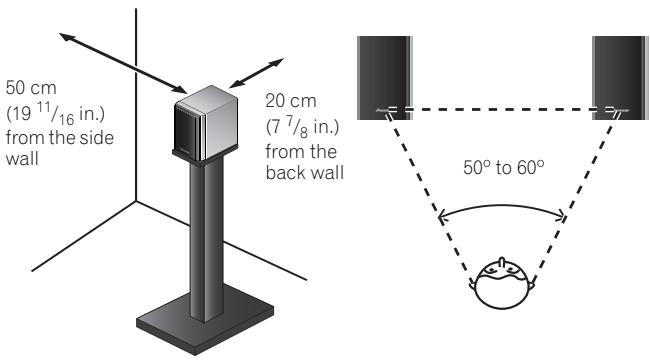
- Sounds played through speaker systems are easily affected in subtle ways by the conditions in the listening space.
- For best sound, choose a solid floor upon which to place the speakers, and position the speakers as illustrated above. The level of low sounds can be adjusted by moving the speakers closer to or further from the back wall. Adjust the speakers so that they are equidistant from their respective side walls to assure balanced sound.
- Place the left and right speakers equal distances from your listening position for good stereo sound. Use speaker cords of the same length for each speaker.
- If the room has a lot of reverberation, we recommend hanging heavy fabric on the walls, and/or putting a carpet on the floor to damp the sound. For best results, cover walls completely.

Caution
- Do not place the speaker on an unstable surface. It could present a hazard if it falls, as well as damaging the equipment.
- These speakers are bookshelf-type speakers which will give their best performance when placed on a solid, level surface off the floor. Placing the speakers directly on the floor will result in boomy, undefined sound. Ideally, the tweeters should be at about ear level when seated in your listening position.
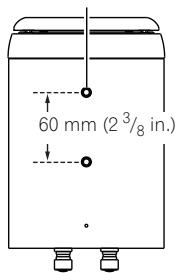
- This unit has two screw holes on the bottom panel. These holes are meant for joint use with speaker brackets and speaker stands:
Use M5 screws. The screw hole depth: 9 mm (3/8 in.)
speaker brackets are commercially available and can be used to mount the speakers on a wall or ceiling. The diagram on the right shows the spacing and size of the holes. When choosing a speaker bracket, make sure that it can hold at least 2.9kg (6 lbs 6 oz.). Please read through the safety cautions on this operating instruction, also the instructions
that come with the bracket. Speakers that are not mounted properly are a hazard.
Mounting the Safety support fixture
- Make sure that the wall you intend to mount the speakers on is strong enough to support them.
- Pass a commercially-available strong cord through the safety support fixture to securely support the speaker to the wall. Be sure that the wall to which you fasten the speaker is strong enough to support the weight of the speaker. After fastening the speaker, make sure that it does not fall over.
- Do not attach the safety support fixture directly to the wall. It should only be used in conjunction with strong cord to prevent the speaker from falling.
- Do not install your speakers overhead on the ceiling or wall. The grill is designed to be detachable, and as such it may fall and cause damage or personal injury if installed overhead.
- Using the accessory screws, fasten the safety support fixtures to the holes in the bottom of the speakers.

Examples of mounting the speaker system using the safety support fixture
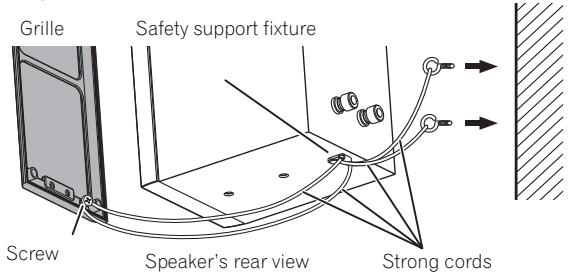
Mounting on the wall

Mounting on the ceiling
- Loosen the screw on the grille's back once, then bind the strong cord around the screw several times and tighten the screw.
- Pass two strong cords through the safety support fixture, and fasten the speaker to the wall or ceiling as shown above.
- If you mount the speakers on the wall or ceiling, first make sure that the mounting surface can bear at least 2.9kg (6 lbs 6 oz.). If you're unsure of the load capability, please seek professional advice.
- When installing the speaker on the ceiling, the speaker will be upside down. Even so, putting the grille in the proper way (the way you can read Pioneer logo in the right way) is recommended.
After installing, make sure the speakers are securely fixed.

Important
- Pioneer is not responsible for any accidents or damage that result from improper installation, misuse or modification of the product, or natural disasters.
Applying non skid pads
The use of non skid pads is recommended depending on the installation location. Apply the pads to the four corners of the side of the speaker which will be on the bottom. Note that depending on the location, the pads may not provide fully sufficient traction to prevent slipping, so care should be taken not to install the speakers in conditions where they may be prone to side.
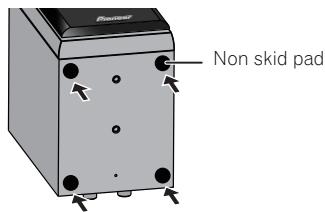

Caution
- When applying non skid pads, laid down the speaker on the soft cloth etc. to avoid working with unstable position.
Attaching and removing the grille
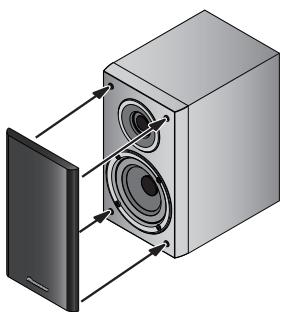
The front grille net can be removed if desired. To remove, follow these instructions:
1 To remove the grille, place your hands at the bottom of the grille and pull gently outward. Then do the same at the top to detach.
2 To reattach the grille, align the four holes on the grille's back with the pins on the speaker and press in firmly.
Connections
1 Switch off the power of your amplifier.
2 Connect the speaker cables to the input terminals on the back of the speaker. For input terminal polarity, red is positive (+) and black is negative (-).
Loosen the knobs on the input terminals and insert the speaker cable wires into each of the terminal post holes, then tighten the knobs.
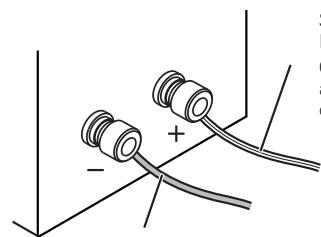
Speaker cable with white line
Connect to the stereo amplifier's positive (+) output terminal.
Speaker cable without line
Connect to the stereo amplifier's negative (-) output terminal.
3 Connect the other ends of the cables to the amplifier's speaker output terminals (for details, refer to your amplifier's instruction manual).

Caution
- You can also connect the speaker's terminals with a banana plug.
- When using a banana plug, first remove the caps covering the speaker terminal.
- After connecting the plugs, pull lightly on the cables to make sure that the ends of the cables are securely connected to the terminals. Poor connections can create noise and interruptions in the sound.
- If the cables' wires happen to be pushed out of the terminals, allowing the wires to come into contact with each other, it places an excessive additional load on the amplifier. This may cause the amplifier to stop functioning, and may even damage the amplifier.
- When using a set of speakers connected to an amplifier, you won't be able to obtain the normal stereo effect if the polarity (+, -) of one of the speakers (left or right) is reversed.
CAUTION
These speaker terminals carry HAZARDOUS LIVE voltage. To prevent the risk of electric shock when connecting or disconnecting the speaker cables, disconnect the power cord before touching any uninsulated parts.
D3-4-2-2-3_A1_En
Specifications
Enclosure. Bass-reflex bookshelf type
Configuration 2-way
Woofer 10 cm (315)16 in.) cone
Tweeter .2.0 cm (3 / 4 in.) dome
Impedance. 6Ω
Frequency response 45 Hz to 40 kHz
Sensitivity. 81 dB
Maximum power. 100 W
Crossover frequency. 3 kHz
Exterior dimensions . 135 (W) mm x 230 (H) mm x 220 (D) mm
55 / 16 W) in. × 91 / 16 H) in. × 811 / 16 D) in.
Weight 2.9 kg (6 lbs 6 oz.)
Supplied accessories
Speaker cable (2.5 m (8.2 ft.)) 2
Non-skid pads 2 set
Safety support fixture 2
Screws for safety support fixture. 2
Warranty card
Operating instructions (this document)

Note
- The S-CN301-LR is shipped with two speaker systems included.
- Specifications and design are subject to possible modification without notice, due to improvements.
© 2012 PIONEER CORPORATION.
All rights reserved.
For U.S. model
The Safety of Your Ears is in Your Hands
Get the most out of your equipment by playing it at a safe level – a level that lets the sound come through clearly without annoying blaring or distortion and, most importantly, without affecting your sensitive hearing.
Sound can be deceiving. Over time, your hearing "comfort level" adapts to higher volumes of sound, so what sounds "normal" can actually be loud and harmful to your hearing. Guard against this by setting your equipment at a safe level BEFORE your hearing adapts.
ESTABLISH A SAFE LEVEL:
- Set your volume control at a low setting.
- Slowly increase the sound until you can hear it comfortably and clearly, without distortion.
- Once you have established a comfortable sound level, set the dial and leave it there.
BE SURE TO OBSERVE THE FOLLOWING GUIDELINES:
- Do not turn up the volume so high that you can't hear what's around you.
- Use caution or temporarily discontinue use in potentially hazardous situations.
- Do not use headphones while operating a motorized vehicle; the use of headphones may create a traffic hazard and is illegal in many areas.
S001a_A1_En
© 2012 PIONEER CORPORATION.
© 2012 PIONEER CORPORATION.
© 2012 PIONEER CORPORATION.
© 2012 PIONEER CORPORATION.
© 2012 PIONEER CORPORATION.
© 2012 PIONEER CORPORATION.
© 2012 PIONEER CORPORATION.
Kopiering forbjuden.
© 2012 af PIONEER CORPORATION.
© 2012 PIONEER CORPORATION.
Alle rettigheter reservert.
© 2012 PIONEER CORPORATION.
PIONEER CORPORATION, 2012.
Bce npaba 3auiuieHbI.
© 2012 PIONEER CORPORATION.
All rights reserved.
© 2012 PIONEER CORPORATION.
PIONEER ELECTRONICS (USA) INC.
P.O. BOX 1540, Long Beach, California 90801-1540, U.S.A. TEL: (800) 421-1404
PIONEER ELECTRONICS OF CANADA, INC.
340 Ferrier Street, Unit 2, Markham, Ontario L3R 2Z5, Canada TEL: 1-877-283-5901, 905-479-4411
PIONEER EUROPE NV
Haven 1087, Keetberglaan 1, B-9120 Melsele, Belgium TEL: 03/570.05.11
PIONEER ELECTRONICS ASIACENTRE PTE. LTD.
253 Alexandra Road, #04-01, Singapore 159936 TEL: 65-6472-7555
PIONEER ELECTRONICS AUSTRALIA PTY. LTD.
5 Arco Lane, Heatherton, Victoria, 3202, Australia, TEL: (03) 9586-6300
PIONEER ELECTRONICS DE MEXICO S.A. DE C.V.
Blvd. Manuel Avila Camacho 138 10 piso Col.Lomas de Chapultepec, Mexico, D.F. 11000 TEL: 55-9178-4270 K002_B4_Ru
- Before you start
- Caution: installation
- For U.S. model
- For European model
- How to install
- Choosing where to place the speaker systems
- Caution
- Mounting the Safety support fixture
- Examples of mounting the speaker system using the safety support fixture
- Important
- Applying non skid pads
- Attaching and removing the grille
- Connections
- Switch off the power of your amplifier.
- Specifications
- Supplied accessories
- Note
- The Safety of Your Ears is in Your Hands
- ESTABLISH A SAFE LEVEL:
- BE SURE TO OBSERVE THE FOLLOWING GUIDELINES:
- PIONEER ELECTRONICS (USA) INC.
- PIONEER ELECTRONICS OF CANADA, INC.
- PIONEER EUROPE NV
- PIONEER ELECTRONICS ASIACENTRE PTE. LTD.
- PIONEER ELECTRONICS AUSTRALIA PTY. LTD.
- PIONEER ELECTRONICS DE MEXICO S.A. DE C.V.
Brand : PIONEER
Model : S-CN301-LR
Category : Loudspeaker