
S-31B-LR-QL - Loudspeaker PIONEER - Free user manual and instructions
Find the device manual for free S-31B-LR-QL PIONEER in PDF.



| Product type | Passive speaker |
| Brand | PIONEER |
| Model | S-31B-LR-QL |
| Enclosure type | Bookshelf, bass-reflex |
| Configuration | 2-way |
| Woofer | 10 cm cone |
| Tweeter | 2.5 cm dome |
| Impedance | 6 Ω |
| Frequency response | 45 Hz – 40 kHz |
| Sensitivity | 82 dB (2.83 V) |
| Maximum input power | 120 W |
| Crossover frequency | 3 kHz |
| Dimensions (W x H x D) | 152 x 235 x 197 mm |
| Weight | 2.5 kg |
| Supplied accessories | 2 speaker cords (7 m), 2 metal safety brackets, 2 screws, 2 sets of non-slip pads, warranty card, instruction manual |
| Connection | Screw terminals (red +, black -) |
| Recommended use | Front or surround speaker for home theater system |
| Maintenance | Clean with a dry cloth; avoid thinners, benzine, insecticides |
| Safety | Use the safety brackets to prevent falling; do not sit or stand on the speaker; do not place on unstable surface |
| Installation | Place on a solid, flat surface; tweeters at ear level; 50 cm distance from walls |
| Amplifier compatibility | Load impedance 4 Ω to 16 Ω |
| Warranty | See provided warranty card |
| Repairability | Entrust to a Pioneer authorized technician |
Frequently Asked Questions - S-31B-LR-QL PIONEER
User questions about S-31B-LR-QL PIONEER
0 question about this device. Answer the ones you know or ask your own.
Ask a new question about this device
Download the instructions for your Loudspeaker in PDF format for free! Find your manual S-31B-LR-QL - PIONEER and take your electronic device back in hand. On this page are published all the documents necessary for the use of your device. S-31B-LR-QL by PIONEER.
USER MANUAL S-31B-LR-QL PIONEER
S-31B-LR-K S-31B-LR-QL
Speaker System / Enceintes acoustiques / Lautsprechersystem / Sistema di diffusori / Luidsprekersysteem / Sistema de altavoces / Sistema de Colunas / Högtalarsystem / Højtalersystem / Høyttalersystem / Kaiutinjärjestelmä / Акустическая система / 揚聲器系統 / 扬声器
Discover the benefits of registering your product online at http://www.pioneer.co.uk (or http://www.pioneer.eu) Découvrez les nombreux avantages offerts en enregistrant votre produit en ligne maintenant sur http://www.pioneer.fr (ou http://www.pioneer.eu). Bitte nutzen Sie die Möglichkeit zur Registrierung Ihres Produktes unter http://www.pioneer.de (oder http://www.pioneer.eu) Registra il tuo prodotto su http://www.pioneer.it (o http://www.pioneer.eu) e scopri subito quali vantaggi puoi ottenere! Ontdek nu de voordelen van online registratie! Registreer uw Pioneer product via http://www.pioneer.nl - http://www.pioneer.be (of http://www.pioneer.eu) Registre su producto en http://www.pioneer.es (o en http://www.pioneer.eu) Descubra los beneficios de registrarse on-line: Registe o seu produto em http://www.pioneer.pt (ou em http://www.pioneer.eu). Descubra as vantagens de o fazer agora on-line. Registrera din produkt på http://www.pioneer.se (eller på http://www.pioneer.eu). Upptäck fördelarna med att göra det on-line nu. Registrer dit produkt på http://www.pioneer.dk (eller http://www.pioneer.eu). Oplev fordelene ved at gå online nu. Registrer produktet ditt på http://www.pioneer.no (http://www.pioneer.eu). Oppdag fordelene med dette på nettet i dag. Rekisteröi tuote sivustossa http://www.pioneer.fi (http://www.pioneer.eu). Tutustu nyt online-rekisteröitymisen etuihin. Зарегистрируйте Ваше изделие на http://www.pioneer-rus.ru (или http://www.pioneer.eu). Ознакомьтесь с преимуществами регистрации в Интернет
Register your product on:
http://www.pioneerelectronics.com (US) http://www.pioneerelectronics.ca (Canada)
http://www.pioneerelectronics.com (US) http://www.pioneerelectronics.ca (Canada)
Operating Instructions / Mode d'emploi / Bedienungsanleitung / Istruzioni per l'uso / Handleiding /
Manual de instrucciones / Manual de instruções / Bruksanvisning / Brugsanvisning / Bruksanvisning /
Käyttöohjeet / Инструкции по эксплуатации / 操作手册 / 使用说明书
Thank you for buying this Pioneer product.
Please read through these operating instructions so you will know how to operate your model properly. After you have finished reading the instructions, put them away in a safe place for future reference.
Before you start
- The nominal impedance of this speaker system is 6 Ω. Connect the speaker system to an amplifier with a load impedance ranging from 4 Ω to 16 Ω (a model with “4 Ω to 16 Ω” displayed on the speaker output terminals).
In order to prevent damage to the speaker system resulting from input overload, please observe the following precautions:
- Do not supply power to the speaker system in excess of the maximum permissible input.
- When using a graphic equalizer to emphasize loud sounds in the high-frequency range, do not use excessive amplifier volume.
- Do not try to force a low-powered amplifier to produce loud volumes of sound (the amplifier's harmonic distortion will be increased, and you may damage the speaker).
Caution: installation
- Switch off and unplug your AV equipment and consult the instructions when connecting up components. Make sure you use the correct connecting cables.
Caution: in use
- Do not place the speaker on an unstable surface. It could present a hazard if it falls, as well as damaging the equipment.
- Do not use the speaker to output distorted sound for long periods of times. This can result in a fire hazard.
For U.S. model
WARNING: Handling the cord on this product or cords associated with accessories sold with the product will expose you to chemicals listed on proposition 65 known to the State of California and other governmental entities to cause cancer and birth defect or other reproductive harm.
Wash hands after handling
D36-P4_A_En
For European model

If you want to dispose this product, do not mix it with general household waste. There is a separate collection system for used electronic products in accordance with legislation that requires proper treatment, recovery and recycling.
Private households in the member states of the EU, in Switzerland and Norway may return their used electronic products free of charge to designated collection facilities or to a retailer (if you purchase a similar new one).
For countries not mentioned above, please contact your local authorities for the correct method of disposal.
By doing so you will ensure that your disposed product undergoes the necessary treatment, recovery and recycling and thus prevent potential negative effects on the environment and human health. K058
K058_A_En
- Do not sit or stand on the speaker, or let children play on the speaker.
- Do not put large or heavy objects on top of the speaker.
Cleaning the speaker cabinet
With normal use, wiping with a dry cloth should be sufficient to keep the cabinet clean. If necessary, clean with a cloth dipped in a neutral cleanser diluted five or six times with water, and wrung out well. Do not use furniture wax or cleansers.
Never use thinners, benzine, insecticide sprays or other chemicals on or near this unit since these will corrode the surfaces.
What's in the box
Speaker cable (7 m) x 2
Safety metal x 2

Screw (for safety metal) x 2

Non-skid pads x 2 set
Warranty card
Operating instructions (this document)
How to install
Choosing where to place the speaker systems
- Sounds played through speaker systems are easily affected in subtle ways by the conditions in the listening space.
- For best sound, choose a solid floor upon which to place the speakers, and position the speakers as shown below. The level of low sounds can be adjusted by moving the speakers closer to or further from the wall. Adjust the speakers so that they are equidistant from their respective side walls to assure balanced sound.
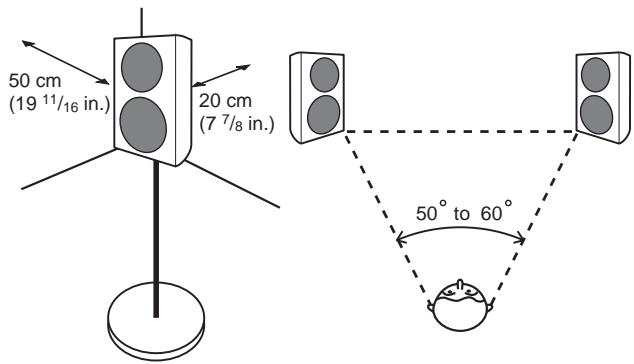
- Place the left and right speakers equal distances from your listening position for good stereo sound. Use speaker cords of the same length for each speaker.
- So far as possible, place the front left and front right speakers on the same plane as the TV screen.
- To achieve optimum surround sound, you should place the TV between the left and right speakers, with the speakers pointing at a 50 to 60 degree angle toward the listening position.
- If the room has a lot of reverberation, we recommend hanging heavy fabric on the walls, and/or putting a carpet on the floor to damp the sound. For best results, cover walls completely.
- These speakers are bookshelf-type speakers which will give their best performance when placed on a solid, level surface off the floor. Placing the speakers directly on the floor will result in boomy, undefined sound. Ideally, the tweeters should be at about ear level when seated in your listening position. We recommend using the CP-31B speaker stand for optimal sound and stability.
If you choose to use the CP-31B speaker stand, make sure you secure it with the screws provided. (for more details, refer to the operating instructions of CP-31B)
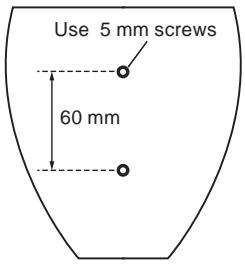
- This unit has two screw holes on the bottom panel. These holes are meant for joint use with speaker brackets and speaker stands; speaker brackets are commercially available and can be used to mount the speakers on a wall. The diagram below shows the spacing and size of the holes. When choosing a speaker bracket, make sure that it can hold at least 2.5 kg. Please also read the instructions that come with the bracket. Speakers that are not mounted properly are a hazard.
- Pass a commercially-available reinforced string through the safety metal to securely support the speaker to the wall. Be sure that the wall to which you fasten the speaker is strong enough to support the weight of the speaker. After fastening the speaker, make sure that it does not fall over.
Mounting the Safety metal for Fall-Prevention
- Do not attach the safety metal directly to the wall. It should only be used in conjunction with reinforced string to prevent the speaker from falling.
- Using the included screw, tightly secure the safety metal to the backside of the speaker.
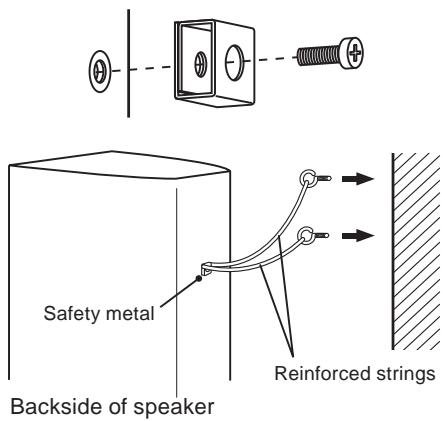
- Pass two reinforced strings through the safety metal, and fasten the speaker to the wall as shown above.
- If you mount the speakers on the wall or ceiling, first make sure that the mounting surface can bear at least 2.5 kg. If you're unsure of the load capability, please seek professional advice.
After installing, make sure the speakers are securely fixed.

Important
- Pioneer assumes no liability whatsoever for damages resulting from assembly, improper mounting, insufficient reinforcement, misuse of the product, acts of nature, etc.
Applying non skid pads
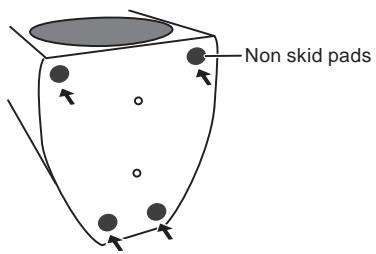
The use of non skid pads is recommended depending on the installation location. Apply the pads to the four corners of the side of the speaker which will be on the bottom. Note that depending on the location, the pads may not provide fully sufficient traction to prevent slipping, so care should be taken not to install the speakers in conditions where they may be prone to side.
Attaching and Removing the Grille
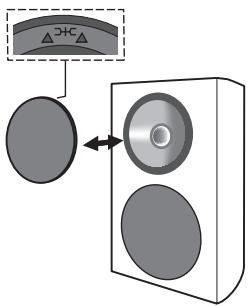
It is recommended that this speaker system be used with the grille net attached, but it can be removed if desired. To remove, follow these instructions:
1 To remove the grille, place your fingers at the outside of the grille toward the bottom and pull gently outward. Then do the same at the top to detach.
2 To reattach the grille, hold the speaker grille with the triangular symbol pointing upward, then align the four pins on the back side of the grille with the holes in the speaker and press in firmly.
Connections
This speaker does not include speaker cables used for connecting to an amplifier.
Connecting the cables
1 Switch off the power to your amplifier.
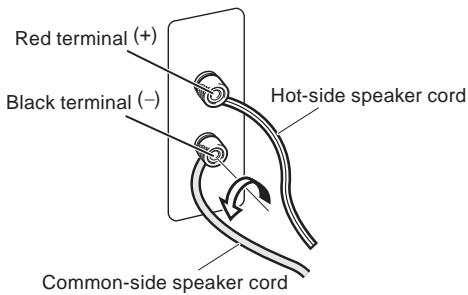
2 Connect the speaker cables to the input terminals on the back of the speaker. For input terminal polarity, red is positive (+) and black is negative (−).
Loosen the knobs on the input terminals and insert the speaker cable wires into each of the terminal post holes, then tighten the knobs.
3 Connect the other ends of the cables to the amp's speaker output terminals (for more details, refer to your amp instrucion manual).
- You can also connect the speaker's terminals with a banana plug.
- After connecting the plugs, pull lightly on the cables to make sure that the ends of the cables are securely connected to the terminals. Poor connections can create noise and interruptions in the sound.
- If the cables' wires happen to be pushed out of the terminals, allowing the wires to come into contact with each other, it places an excessive additional load on the amp. This may cause the amp to stop functioning, and may even damage the amp.
- When using a set of speakers connected to an amplifier, you won't be able to obtain the normal stereo effect if the polarity (+, -) of one of the speakers (left or right) is reversed.
CAUTION
These speaker terminals carry HAZARDOUS LIVE
voltage. To prevent the risk of electric shock when
connecting or disconnecting the speaker cables,
disconnect the power cord before touching any
uninsulated parts.
D3-4-2-2-3_A_En
Specifications
Enclosure.... Bass-reflex bookshelf type
Configuration 2-way
Woofer/Tweeter.... 10 cm (4 in.) cone/2.5 cm (1 in.) dome
Impedance....6Ω
Frequency response 45 Hz to 40 kHz
Sensitivity.....82 dB (2.83 V)
Maximum input power 120 W
Crossover frequency....3 kHz
Exterior dimensions ..... 152 (W) mm x 235 (H) mm x 197 (D) mm
6 (W) in. × 9 1 / 4 (H) in. × 7 3 / 4 (D) in.
Weight 2.5 kg (5 lbs 8 oz.)
Supplied accessories
Speaker cable (7 m) 2
Safety metal.... 2
Screw (for safety metal) 2
Non-skid pads 2 set
Warranty card
Operating instructions (this document)

Note
- The S-31B-LR is shipped with two speaker systems included.
- Specifications and design subject to possible modification without notice, due to improvements.

is a trademark placed on a product with Pioneer's Phase Control technology. This technology enables high-grade sound reproduction through each component by improving overall phase matching.
Published by Pioneer Corporation.
Copyright © 2009 Pioneer Corporation.
All rights reserved.
For U.S. model


Dear Customer:
Selecting fine audio equipment such as the unit you've just purchased is only the start of your musical enjoyment. Now it's time to consider how you can maximize the fun and excitement your equipment offers. This manufacturer and the Electronic Industries Association's Consumer Electronics Group want you to get the most out of your equipment by playing it at a safe level. One that lets the sound come through loud and clear without annoying blaring or distortion-and, most importantly, without affecting your sensitive hearing.
Sound can be deceiving. Over time your hearing “comfort level” adapts to higher volumes of sound. So what sounds “normal” can actually be loud and harmful to your hearing. Guard against this by setting your equipment at a safe level BEFORE your hearing adapts.
To establish a safe level:
- Start your volume control at a low setting.
- Slowly increase the sound until you can hear it comfortably and clearly, and without distortion.
Once you have established a comfortable sound level:
- Set the dial and leave it there.
Taking a minute to do this now will help to prevent hearing damage or loss in the future. After all, we want you listening for a lifetime.
We Want You Listening For A Lifetime
Used wisely, your new sound equipment will provide a lifetime of fun and enjoyment. Since hearing damage from loud noise is often undetectable until it is too late, this manufacturer and the Electronic Industries Association's Consumer Electronics Group recommend you avoid prolonged exposure to excessive noise. This list of sound levels is included for your protection.
Decibel
Level Example
30 Quiet library, soft whispers
40 Living room, refrigerator, bedroom away from traffic
50 Light traffic, normal conversation, quiet office
60 Air conditioner at 20 feet, sewing machine
70 Vacuum cleaner, hair dryer, noisy restaurant
80 Average city traffic, garbage disposals, alarm clock at two feet.
THE FOLLOWING NOISES CAN BE DANGEROUS UNDER CONSTANT EXPOSURE
90 Subway, motorcycle, truck traffic, lawn mower
100 Garbage truck, chain saw, pneumatic drill
120 Rock band concert in front of speakers,
thunderclap
140 Gunshot blast, jet plane
180 Rocket launching pad
Information courtesy of the Deafness Research Foundation.


S001_En
Connexions
Publication de Pioneer Corporation.
© 2009 Pioneer Corporation.
Collegamenti
Copyright © 2009 Pioneer Corporation.
Copyright © 2009 Pioneer Corporation.
Conexiones
Copyright © 2009 Pioneer Corporation.
Ligações
"Copyright" © 2009 Pioneer Corporation.
Anslutningar
Copyright © 2009 Pioneer Corporation.
Tilslutninger
Published by Pioneer Corporation. Copyright © 2009 Pioneer Corporation. Alle rettigheder forbeholdes.
Anti-glifelt x 2 sett
Garantikort
Bruksanvisning (dette dokumentet)

Tilkoblinger
Opphavsrett © 2009 Pioneer Corporation.
Alle rettigheter reserververt.
Liitännät
Copyright-oikeudet © 2009 : Pioneer Corporation.
Соединения
Издано Pioneer Corporation.
© Pioneer Corporation, 2009.
Все права защищены.
Примечание:
連接
连接
本扬声器不带连接到放大器的扬声器电缆。
连接电缆
Published by Pioneer Corporation. Copyright © 2009 Pioneer Corporation. All rights reserved.
PIONEER ELECTRONICS (USA) INC.
P.O. BOX 1540, Long Beach, California 90801-1540, U.S.A. TEL: (800) 421-1404
PIONEER ELECTRONICS OF CANADA, INC.
300 Allstate Parkway, Markham, Ontario L3R 0P2, Canada TEL: 1-877-283-5901, 905-479-4411
PIONEER EUROPE NV
Haven 1087, Keetberglaan 1, B-9120 Melsele, Belgium TEL: 03/570.05.11
PIONEER ELECTRONICS ASIACENTRE PTE. LTD.
253 Alexandra Road, #04-01, Singapore 159936 TEL: 65-6472-7555
PIONEER ELECTRONICS AUSTRALIA PTY. LTD.
178-184 Boundary Road, Braeside, Victoria 3195, Australia, TEL: (03) 9586-6300
PIONEER ELECTRONICS DE MEXICO S.A. DE C.V.
Blvd.Manuel Avila Camacho 138 10 piso Col.Lomas de Chapultepec, Mexico,D.F. 11000 TEL: 55-9178-4270
K002_Ru
日本先锋公司
日本国东京都目黒区目黒1-4-1
销售商:先锋电子(中国)投资有限公司
- S-31B-LR-K S-31B-LR-QL
- Before you start
- Caution: installation
- Caution: in use
- For U.S. model
- For European model
- Cleaning the speaker cabinet
- What's in the box
- How to install
- Choosing where to place the speaker systems
- Mounting the Safety metal for Fall-Prevention
- Important
- Applying non skid pads
- Attaching and Removing the Grille
- Connections
- Connecting the cables
- CAUTION
- Specifications
- Supplied accessories
- Note
- Dear Customer:
- To establish a safe level:
- Once you have established a comfortable sound level:
- We Want You Listening For A Lifetime
- Decibel
- Level Example
- THE FOLLOWING NOISES CAN BE DANGEROUS UNDER CONSTANT EXPOSURE
- thunderclap
- Connexions
- Collegamenti
- Conexiones
- Ligações
- Anslutningar
- Tilslutninger
- Tilkoblinger
- Liitännät
- Соединения
- Примечание:
- 連接
- 连接
- 连接电缆
- PIONEER ELECTRONICS (USA) INC.
- PIONEER ELECTRONICS OF CANADA, INC.
- PIONEER EUROPE NV
- PIONEER ELECTRONICS ASIACENTRE PTE. LTD.
- PIONEER ELECTRONICS AUSTRALIA PTY. LTD.
- PIONEER ELECTRONICS DE MEXICO S.A. DE C.V.
- 日本先锋公司
- 销售商:先锋电子(中国)投资有限公司
Brand : PIONEER
Model : S-31B-LR-QL
Category : Loudspeaker