
FUNTOUCH 2 - Digital Camera NIKON - Free user manual and instructions
Find the device manual for free FUNTOUCH 2 NIKON in PDF.



| Product type | 35mm compact autofocus camera |
| Film format | 24 mm x 36 mm (135 film) |
| Lens | 34 mm F4.5 (3 elements in 3 groups) |
| Focus | Automatic infrared with focus lock (range 1.2 m to infinity) |
| Exposure | Automatic: daylight F9.0 (1/130 s), flash F4.5 (1/130 s) |
| Built-in flash | Automatic and daylight sync; range 1.2 m - 3.5 m (ISO 100) |
| Viewfinder | Reverse Galilean type with illuminated frame and parallax correction |
| Sensitivity setting | Automatic DX for ISO 100 and 400 (non-DX set to 100) |
| Film loading | Automatic with check window |
| Film advance | Motorized, automatic |
| Rewind | Automatic via rewind button |
| Frame counter | Mechanical, progressive |
| Power supply | 2 LR6 alkaline batteries 1.5 V |
| Battery life | Approximately 15 rolls (24 exposures, 50% with flash) |
| Dimensions (approx.) | Not specified in the manual, standard compact model |
| Weight (approx.) | Approximately 200 g (with batteries) |
| Special features | Daylight sync, pre-focus, sliding lens cover |
| Maintenance and cleaning | Clean the flash reflector if necessary; avoid touching the lens |
| Safety | Close the lens cover when not in use; do not use NiCd rechargeable batteries |
| Spare parts and repairability | Repair by authorized dealer; do not attempt to open yourself |
| General information | Manual available in multiple languages; manufacturer's warranty |
Frequently Asked Questions - FUNTOUCH 2 NIKON
User questions about FUNTOUCH 2 NIKON
0 question about this device. Answer the ones you know or ask your own.
Ask a new question about this device
Download the instructions for your Digital Camera in PDF format for free! Find your manual FUNTOUCH 2 - NIKON and take your electronic device back in hand. On this page are published all the documents necessary for the use of your device. FUNTOUCH 2 by NIKON.
USER MANUAL FUNTOUCH 2 NIKON
Fig.B
For Figs. C, D, E, F, G, H, I & J, refer to P. 121 ~ P. 124.
Dear Owner
Thank you for selecting this Auto Focus 35mm Compact Camera. We welcome you to the growing family of satisfied owners of our products around the world. We feel certain you will be satisfied with this new aid to your photographic creativity. Please read this operating instructions booklet and keep it handy for your reference.
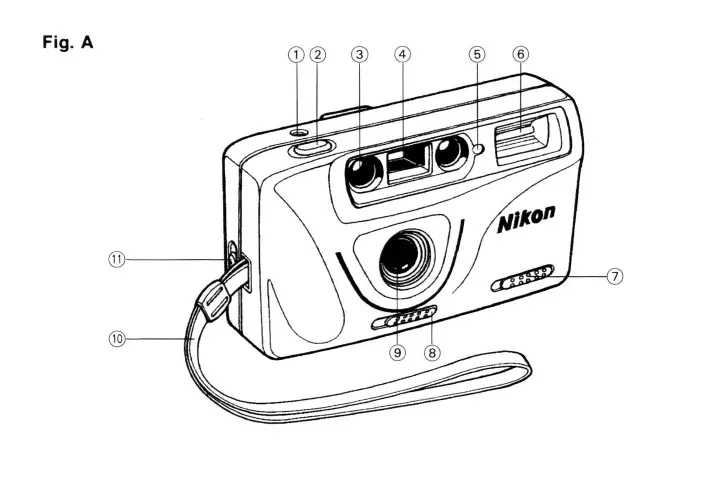
Parts Identification
(Fig. A)
① Film frame counter window
②Shutter release button
③ Infrared auto focus window
Viewfinder window
⑤ Exposure sensor
Electronic flash
Daylight synchro switch
Lens cover switch
⑨ 34mmF4.5 lens
⑩ Strap
① Back cover latch
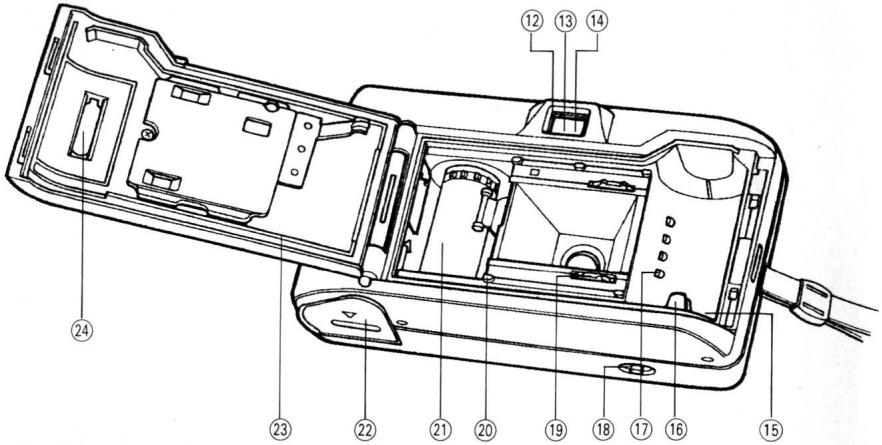
(Fig. B)
Viewfinder eyepiece
Green LED (Flash ready indicator)
14 Red LED (Low light warning indicator)
⑤ Film chamber
⑥ Film rewind spindle
⑦ DX decoding contacts
18 Film rewind switch
⑨ Film sprocket
② Film guide
Take-up spool
2 Battery compartment cover
Back cover
② Film confirmation window
1 Installing the Batteries
(1) Open the battery compartment cover by pushing in the direction of arrow.
(2) Insert two new AA size alkaline batteries with the correct positive (+) and negative (-) polarity as indicated by the printed diagram inside the battery compartment.
(3) Push down the battery compartment cover to close securely.
Replace the batteries when:
A) The film winding speed is slower than usual.
B) The green LED does not come on within 10 sec., after depressing the shutter release button halfway with the lens cover opened.
A or B means that the batteries are weak and there may be insufficient power to operate the camera.
NOTE: Manganese batteries and Ni-Cd re-chargeable batteries cannot be used.
2
Sliding the Lens Cover (Fig. C)
To open the lens cover, slide its switch to the right.
To close the cover, slide the switch to the left.
NOTE: When the lens cover is closed, the shutter does not operate. When the camera is not in use, close the lens cover to prevent accidental exposures.
3
The Film Speed is Set Automatically for Flash.
| ISO Number of Film | DX Setting Position of Camera |
| ISO 50 | |
| ISO 100 | 100 |
| ISO 200 | |
| Non-DX coded Film | |
| ISO 400 | |
| ISO 1000 | 400 |
| ISO 1600 |
(Low light warning only)
NOTE: Using a higher speed film, you may have an overexposed picture.
4
Loading the Film
(1) Push the back cover latch in direction of arrow and pull open the cover.
(2) Insert the bottom of the cartridge into the bottom of the film chamber, then lower the other end in and snap into position.
(3) Pull the film leader across and align it with the yellow film illustration, shown on the left hand corner of the take-up spool. Be careful not to let the leader extend too far beyond the yellow illustration, as it may cause excessive film slack. Make sure film rests flat between the guides and over the teeth of the sprockets. (Fig. D, E)
(4) Close the back cover until you hear a click, indicating that it is securely locked. If the cover does not close properly with the film in place, check to make sure that it is lying flat between the guides and the cartridge is snug in the chamber.
(5) After the cover is closed, depress the shutter release button and advance the film until the number "1" appears in the frame counter window.
NOTE: The counter will only work with film properly installed in the camera. If film counter will not advance, repeat steps (1) to (5).
5
Holding the Camera
The camera must be held correctly to ensure consistently sharp photographs. It should be held steadily and comfortably while you are taking photographs. Illustrations show the correct ways to hold the camera in both the vertical and horizontal positions. Be careful not to block the flash, exposure sensor and lens with your fingers. (Fig. F)
6
Viewfinder
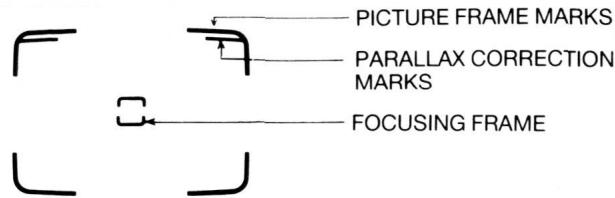
Look through the eyepiece, compose your picture so that your main subject is located in the center of the viewfinder. The camera will automatically focus on whatever subject the focusing frame covers. When photographing subjects at distances of 1.3m or more, use the yellow frame marks. The image within these frame marks will appear on the film. When the subject distance is between 1.2m and 1.3m , tilt the camera up slightly and use the parallax correction marks to center your picture.
7
Taking Pictures
1. Automatic Photography
(1) Your camera is totally automatic. If there is sufficient light, simply compose and shoot. Exposure, focus and film advance are all handled automatically by the camera.
(2) Flash Photography
If there is not enough light for a proper exposure (either indoors or out), the red LED (Low light indicator) in the viewfinder will glow when you depress the shutter release button halfway. This indicates that the flash should be used. Wait for the green LED (Flash ready indicator) to glow, and depress the shutter release button fully. You can then take a flash picture.
Proper flash exposure depends on the film speed and the camera-to-subject distance.
Photograph range with flash
| Film Speeds | Flash Range |
| ISO 100 | 1.2m - 3.5m (3.9 - 11.5 ft) |
| ISO 400 | 1.5m - 7.0m (4.9 - 22.9 ft) |
2. Daylight synchro Photography
When photographing a subject in the shade, or against the sun or bright window, the flash can be used.
After making sure the green LED is lit, push the daylight synchro switch in the direction of arrow and hold it in place, then release the shutter. (Fig. G) The daylight synchro switch is automatically returned to its original-position after use.
3. Prefocusing
When composing a picture where a principal subject is not in the center of the viewfinder, it is necessary to prefocus the camera lens. To do so:
(1) Look through the viewfinder and compose the picture so that your subject is located directly behind the focusing frame. (Fig. H)
(2) Gently press the shutter release button halfway and maintain gentle pressure to lock in the correct focus.
(3) While maintaining pressure on the shutter release button, recompose the picture as you desire and then press the shutter release button all the way down to take the photograph. (Fig. 1) (The autofocus can be cancelled simply by removing pressure from the shutter release button.)
4. Special Auto Focus Situations
The auto focus system will focus accurately on the majority of the subjects you wish to photograph. However, there are a few situations where the auto focus mechanism may not function properly. These are:
(1) When the subject has strong reflections, such as polished-metals, exterior of cars, bodies of water, or mirrors.
(2) Subjects with little or no reflectance, such as black objects, hair, a flame or smoke.
(3) Subjects that are very small.
(4) Subjects with an object in front of them, such as a wire net or a cage. In situations (1)-(4), prefocus on another subject approximately the same distance away and then recompose the scene and take the picture. (See Section 3 on Prefocusing.)
(5) Taking pictures through glass windows: Shoot with camera lens near the glass and at an angle of approximately 20^ .
8
Removing the Film
At the end of the film roll, the frame counter will cease to advance. Rewind the film by pushing the film rewind switch in the direction of arrow.(Fig. J) When rewinding is complete and the motor has stopped, open the back cover and remove the film cartridge from the chamber. The film rewind switch will return to its original position automatically.
Trouble Shooting Guide
[Description]
Subject out of focus
Flash fails to function
[Solution]
If the subject is not located in the center of the viewfinder, use prefocusing. See Section 7-3.
Subjects must be 1.2m or more from the camera.
Review Sections 6, 7-3, 7-4.
Replace the battery.
Flash pictures have dark area(s)
Flash pictures too dark overall
Flash pictures too light
Subject's eyes reflect red
Make certain fingers are clear of flash.
(Have subject watch for this.)
Subject(s) must be within specified flash range.
See Section 7-1.
Place subjects at least 1.2m from flash and make sure focusing frame covers main subject.
Increase room light if possible. Have subject(s) look slightly away from flash—towards room light is beneficial.
Specifications
| Type: | 35mm lens shutter camera with built-in flash |
| Film Format: | 24mm X 36mm (135 film magazine) |
| Lens: | 34mm F4.5 (3 elements in 3 groups) |
| Focus: | Auto-focus (with prefocus) |
| Focus Range: | 1.2m - infinity |
| Exposure: | ISO 100/400 |
| Daylight F9.0 (1/130 sec.) | |
| Flash F4.5 (1/130 sec.) | |
| Viewfinder: | Reverse galilean type with bright frame |
| Film-speed Setting (ISO): | DX automatic settings (100, 400)(Low light warning only) |
| Film Loading: | Automatic (with film confirmation window) |
| Film Advance: | Automatic winding |
| Film Rewind: | Automatic via film rewind switch |
| Built-in Flash: | Auto mode: automatic switchover for low lighting levels (ISO 100: less than EV9.5) Daylight synchronization mode: flash |
| Flash Operating Range: | ISO 100: 1.2m - 3.5m (3.9 - 11.5 ft) |
| Flash Recycling Time: | Approx. 5 sec. (with new AA alkaline batteries) |
| Battery Life: | Approx. 15 rolls of 24 exposures film (with new alkaline batteries, using flash for approx. 50% of shots) |
| Power Source: | Two 1.5V AA size alkaline batteries |
| Dimensions: | 128 (W) × 48 (D) × 71 (H)mm [5.0 (W) × 1.9 (D) × 2.8 (H) in.] |
| Weight: | Approx. 200g (7.1 oz) (without batteries and film) |
Specifications subject to change without notice.
128(L) X 48(P) X 71(H)mm.
Poids:
Approx. 200g (sans les piles ni le film).
4. Speciale autofocus situations
Luce diurna F9,0 (1/130 sec.)
Flash F4,5 (1/130 sec.)
$$ (a \div 1 5 \cdot 1) a, \therefore a \vert l g q = c \div $$
$$ \left(\text {i} \frac {1}{2} \times 1. 7 \cdot 1\right) 2, 0 \quad \text {a l} \quad \text {a l} \quad \text {a l} \quad \text {a l} $$
$$ \cos \alpha = \frac {1}{2} \sin \alpha $$
$$ (\varepsilon \dots , \dots) D X j a r l l _ {j} \leqslant i a l o g i a l b d $$
$$ \leqslant \lim _ {j \rightarrow \infty} \log_ {2} (1 + j) $$
$$ \leq \lim _ {j \rightarrow \infty} \frac {\log_ {2} (1 + j)}{j} $$
$$ p _ {i} \text {a l l} \quad \text {a l o a l} \quad c _ {i} \text {l i e a} \quad \text {a b u l a} \quad \text {l i s l o g i} $$
$$ : j \vert j _ {\mathrm {p l l}} $$
$$ : p a l l \quad p a w a i $$
$$ : \ddot {a} _ {\omega , \omega_ {1}} $$
$$ : c s \text {的} $$
$$ \therefore \left| \sum_ {j = 1} ^ {n} \right| = \sum_ {j = 1} ^ {n} \left| \sum_ {k = 1} ^ {n} \right| $$
$$ \therefore \dot {\mathrm {d i s p}} $$
$$ : \sqrt [ 3 ]{1 1} + \sqrt [ 3 ]{2 0} $$
$$ \mathrm {p h i l l} \overline {{a}} _ {\mathrm {i n t e r}} b _ {\mathrm {i n t e r}} $$
$$ : (\mathrm {I S O}) $$
$$ : \mathrm {p a i l l} $$
$$ : p \text {a l l} p \text {a i} $$
$$ : \rho_ {i} \rho_ {j} \dots \rho_ {l} \rho_ {k} $$
$$ \therefore \lim _ {w \to 0} \frac {\log_ {1 0} w}{\log_ {2 0} 2} $$
$$ \therefore \frac {1}{2} \frac {1}{3} \frac {1}{4} \frac {1}{5} \frac {1}{6} \dots $$
$$ \ddot {a} \dot {a} \dot {b} g $$
$$ j \in J _ {i} (J) \cup J _ {j} (J), j \in J _ {i} (J) $$
$$ (1) \therefore \lim _ {x \to 0} \frac {\log_ {2} x}{\log_ {3} x} $$
$$ \dot {w} \dot {y} \dot {z} \dot {l} \dot {l} \dot {l} \dot {l} \dot {l} \dot {l} \dot {l} \dot {l} \dot {l} \dot {l} \dot {l} \dot {l} \dot {l} \dot {l} \dot {l} \dot {l} \dot {l} \dot {l} \dot {l} \dot {l} \dot {1} \left(\rho_ {\text {L J L}}\right) $$
$$ . 1 - V \epsilon j > j d i a l. $$
$$ \because \exists x \in I, \exists y \in J, \exists z \in K $$
$$ \therefore \text {g a m m a} \text {j i t} \text {p w e l l} \text {a b s} \text {s g a m m a} \text {b o l d} \text {j b o l} \text {j i} \text {S t i g} $$
$$ p w \text {a l l} j _ {i} i. L S O A \quad \text {d} j \quad j _ {i} \quad 1 5 \quad a _ {j} \quad a _ {i} \quad a _ {j} \quad b _ {j} $$
$$ \therefore \text {a d} \text {f i l l} \text {o c l o l}, \text {d a n o l y l i ,} \text {d a n o l y l i} \text {c y c l o l} (\text {p l u s t 2 1}) $$
$$ \dot {a} \dot {b} \dot {c} \dot {d} \dot {e} \dot {f} \dot {g} \dot {h} $$
$$ \therefore i a _ {i} e _ {i} (\text {i j b l i o}) \quad \text {i j b i b l i o} $$
$$ \because \omega_ {i} = \frac {1}{2} \frac {\partial f _ {i}}{\partial x _ {i}} $$
$$ \text {L o} \ddot {o} \ddot {a} \ddot {a} \ddot {a} \dot {a} $$
$$ \because y l l l \quad a b e l l \quad y d d $$
$$ \ddot {o} \dot {o} \dot {o} \dot {o} $$
$$ l a _ {2} = \frac {1}{2} l _ {1} l _ {1} l _ {1} l _ {1} l _ {1} $$
$$ j a \overline {{a}} j g \overline {{g}} j w k a i l b a i l $$
+ ·s + 1 > 1 - 1
A
1yduo yoo 0000000000000000000000000000000000000000000
(HJ)
s jll bll 1 111 111 111 111 111 111 111
aal lal uLulogjI buaa auauuauuauuauuuuauuauuauuauuauuauuauuauuauuauuauuauuauuauuauuauuauuauuauuauuuuuuuuuuuuuuuuuuuuuuuuuuuuuuuuuuuuuuuuuuuuuuuuuuuuuuuuuuuuuuuuuuuuuuuuuuuuuuuuuuuuuuuuuuuuuuuuuuuuuuuuuuuuuuuuuuuuuuuuuuuuuuuuuuuuuuuuuuuuuuuuuuuuuuuuuuuuuuuuuuuuuuuuuuuuuuuUU
jaiy jil. y gail qia aay b ay jaiy 1aal 1aai 1aai
(0) ( 1) , cb + ab = 1 , p k l m n
gaiilui dIuol
aIbI aI bI aI aI aI aI aI aI aI aI aI aI aI aI aI aI aI aI aI aI aI aI aI aI aI aI aI aI aI aI aI aI aI aI aI aI aI aI aI aI aI aI aI aI aI aI aI aI aI aI aI aI
jill
1
jgl 851 jn labua ego go plll j no still aol . aoo go plall bally elbail
a a 1
J. J. J. J. J. J. J. J. J. J. J. J. J. J. J. J. J. J. J. J. J. J. J. J. J. J. J. J. J. J. J. J. J. J. J. J. J. J. J. J. J. J. J. J. J. J. J. J. J. J. J.
10 1000000000000000000000000000000000000000000000
.
Lsioggi bvi piell aow
| DX  |  |
| ... | ISO ISO ISO ISO DX a .a . a . a . a . a . a . a . a . a . a . a . a . a . a . a . a . a . a . a . a . a . a . a . a . a . a . a . a . a . a . a . a . a . a . a . a . a . a . a . a . a . a . a . a . a . a . a . a . a . a . a .a . a . a . a . a . a . a . a . a . a . a . a . a . a . a . a . a . a . a . a . a . a . a . a . a . a . a . a . a . a . a . a . a . a . a . a . a . a . a . a . a . a . a . a . a . a . a . a . a. a . a . a . a . a . a . a . a . a . a . a . a . a . a . a . a . a . a . a . a . a . a . a . a . a . a . a . a . a . a . a . a . a . a . a . a . a . a . a . a . a . a . a . a . a . a . a . a . a . a. a .a . a .a . a .a . a .a . a .a . a .a . a .a . a .a . a .a . a .a . a .a . a .a . a .a . a .a . a .a . a .a . a .a . a .a . a .a . a .a . a .a . a .a . a .a . a .a . a .a . a .a. a .a . a .a . a .a . a .a . a .a . a .a . a .a . a .a . a .a . a .a . a .a . a .a . a .a . a .a . a .a . a .a . a .a . a .a . a .a . a .a . a .a . a .a . a .a . a .a . a . a . a . a . a . a . a . a . a . a . a . a . a . a . a . a . a . a . a . a . a . a . a . a . a . a . a . a . a . a . a . a . a . a . a . a . a . a . a . a . a . a . a . a . a . a . a .a . a .a . a .a . a .a . a .a . a .a . a .a . a .a . a .a . a .a . a .a . a .a . a .a . a .a . a .a . a .a . a .a . a .a . a .a . a .a . a .a . a .a . a .a . a .a . a . a. a .a .a .a .a .a .a .a .a .a .a .a .a .a .a .a .a .a .a .a .a .a .a .a .a .a .a .a .a .a .a .a .a .a .a .a .a .a .a .a .a .a .a .a .a .a .a .a .a .a .a . a .a .a .a .a .a .a .a .a .a .a .a .a .a .a .a .a .a .a .a .a .a .a .a .a .a .a .a .a .a .a .a .a .a .a .a .a .a .a .a .a .a .a .a .a .a .a .a .a .a. a .a .a .a .a .a .a .a .a .a .a .a .a .a .a .a .a .a .a .a .a .a .a .a .a .a .a .a .a .a .a .a .a .a .a .a .a .a .a .a .a .a .a .a .a .a .a .a .a . a . a .a . a .a . a .a . a .a . a .a . a .a . a .a . a .a . a .a . a .a . a .a . a .a . a .a . a .a . a .a . a .a . a .a . a .a . a .a . a .a . a .a . a .a . a .a . a .a .a .a .a .a .a .a .a .a .a .a .a .a .a .a .a .a .a .a .a .a .a .a .a .a .a .a .a .a .a .a .a .a .a .a .a .a .a .a .a .a .a .a .a .a .a .a . a .a . a .a . a .a . a .a . a .a . a .a . a .a . a .a . a .a . a .a . a .a . a .a . a .a . a .a . a .a . a .a . a .a . a .a . a .a . a .a . a .a . a .a . a .a . a .a .a . a .a . a .a . a .a . a .a . a .a . a .a . a .a . a .a . a .a . a .a . a .a . a .a . a .a . a .a . a .a . a .a . a .a . a .a . a .a . a .a . a .a . a .a . a .a . a . a .a . a .a . a .a . a .a . a .a . a .a . a .a . a .a . a .a . a .a . a .a . a .a . a .a . a .a . a .a . a .a . a .a . a .a . a .a . a .a . a .a . a .a . a .a . a . a .a .a . a .a . a .a . a .a . a .a . a .a . a .a . a .a . a .a . a .a . a .a . a .a . a .a . a .a . a .a . a .a . a .a . a .a . a .a . a .a . a .a . a .a . a .a . a .a .a . a .A A A A A A A A A A A A A A A A A A A A A A A A A A A A A A A A A A A A A A A A A A A A A A A A A A A A A A A A A A A A A A A A A A A A A A A A A A A A A A A A A A A A A A A A A A A A A A A A A A A A A B B B B B B B B B B B B B B B B B B B B B B B B B B B B B B B B B B B B B B B B B B B B B B B B B B B B B B B B B B B B B B B B B B B B B B B B B B B B B B B B B B B B B B B B B B B B B B B B B B B B BB BB BB BB BB BB BB BB BB BB BB BB BB BB BB BB BB BB BB BB BB BB BB BB BB BB BB BB BB BB BB BB BB BB BB BB BB BB BB BB BB BB BB BB BB BB BB BB BB BB BB BB BB BB BB BB BB BB BB BB BB BB BB BB BB BB BB BB BB BB BB BB BB BB BB BB BB BB BB BB BB BB BB BB BB BB BB BB BB BB BB BB BB BB BB BB BB BB BB BBBB BB BB BB BB BB BB BB BB BB BB BB BB BB BB BB BB BB BB BB BB BB BB BB BB BB BB BB BB BB BB BB BB BB BB BB BB BB BB BB BB BB BB BB BB BB BB BB BB BB BB BB BB BB BB BB BB BB BB BB BB BB BB BB BB BB BB BB BB BB BB BB BB BB BB BB BB BB BB BB BB BB BB BB BB BB BB BB BB BB BB BB BB BB BB BB BB BB BB BB bb BB BB BB BB BB BB BB BB BB BB BB BB BB BB BB BB BB BB BB BB BB BB BB BB BB BB BB BB BB BB BB BB BB BB BB BB BB BB BB BB BB BB BB BB BB BB BB BB BB BB BB BB BB BB BB BB BB BB BB BB BB BB BB BB BB BB BB BB BB BB BB BB BB BB BB BB BB BB BB BB BB BB BB BB BB BB BB BB BB BB BB BB BB BB BB BB BB BB BBbb BB BB BB BB BB BB BB BB BB BB BB BB BB BB BB BB BB BB BB BB BB BB BB BB BB BB BB BB BB BB BB BB BB BB BB BB BB BB BB BB BB BB BB BB BB BB BB BB BB BB BB BB BB BB BB BB BB BB BB BB BB BB BB BB BB BB BB BB BB BB BB BB BB BB BB BB BB BB BB BB BB BB BB BB BB BB BB BB BB BB BB BB BB BB BB BB BB BB BB BTBTBTBTBTBTBTBTBTBTBTBTBTBTBTBTBTBTBTBTBTBTBTBTBTBTBTBTBTBTBTBTBTBTBTBTBTBTBTBTBTBTBTBTBTBTBTBTBTBTBTBTBTBTBTBTBTBTBTBTBTBTBTBTBTBTBTBTBTBTBTBTBTBTBTBTBTBTBTBTBTBTBTBTBTBTBTBTBTBTBTBTBTBTBTBTBTBTBTBTBTFTBTBTBTBTBTBTBTBTBTBTBTBTBTBTBTBTBTBTBTBTBTBTBTBTBTBTBTBTBTBTBTBTBTBTBTBTBTBTBTBTBTBTBTBTBTBTBTBTBTBTBTBTBTBTBTBTBTBTBTBTBTBTBTBTBTBTBTBTBTBTBTBTBTBTBTBTBTBTBTBTBTBTBTBTBTBTBTBTBTBTBTBTBTBTBTBTBTBTBTBBB |
J
aalolololololololololololololololololololololololololololololololololololololololololololololololololol
. 111111111111111111111111111111
Jai Jai Jai Jai Jai Jai Jai Jai Jai
:loic 1y jui
Jlall no Jl plll al aegsw gS (1
11 111111111111111111111111
.10g2o aunall 1b6 g
15-12
山山
$$ \omega_ {j} \tag {19} $$
$$ \mu_ {1} \text {l l} \mu_ {2} \tag {20} $$
$$ \text {p i l l} \rightarrow \text {w e l o} \tag {21} $$
$$ \therefore \square \cup \square \cup \square \cup \square \cup \square \tag {22} $$
$$ \frac {1}{2} \frac {1}{2} \frac {1}{2} \frac {1}{2} \frac {1}{2} \frac {1}{2} \frac {1}{2} \frac {1}{2} \frac {1}{2} \frac {1}{2} \frac {1}{2} \frac {1}{2} \frac {1}{2} \frac {1}{2} \frac {1}{2} \frac {\dots}{2} $$
$$ \left. \int_ {0} ^ {1} \frac {d y}{y - 1} \right| _ {0} ^ {1} \cdot \int_ {1} ^ {2} \frac {d y}{y - 1} \cdot \int_ {2} ^ {\infty} \frac {d y}{y - 1} \cdot \int_ {3} ^ {\infty} \dots \int_ {4} ^ {\infty} \dots \int_ {5} ^ {\infty} \dots \int_ {6} ^ {\infty} \dots \int_ {7} ^ {\infty} \dots \int_ {8} ^ {\infty} \dots \int_ {9} ^ {\infty} \dots \int_ {1 0} ^ {\infty} \dots \int_ {1 1} ^ {\infty} \dots \int_ {1 2} ^ {\infty} \dots \int_ {1 3} ^ {\infty} \dots \int_ {1 4} ^ {\infty} \dots \int_ {1 5} ^ {\infty} \dots \int_ {1 6} ^ {\infty} \dots \int_ {1 7} ^ {\infty} \dots \int_ {1 8} ^ {\infty} \dots \int_ {1 9} ^ {\infty} \dots \int_ {2 0} ^ {\infty} \dots \int_ {2 1} ^ {\infty} \dots \int_ {2 2} ^ {\infty} \dots \int_ {2 3} ^ {\infty} \dots \int_ {2 4} ^ {\infty} \dots \int_ {2 5} ^ {\infty} \dots \int_ {2 6} ^ {\infty} \dots \int_ {2 7} ^ {\infty} \dots \int_ {2 8} ^ {\infty} \dots \int_ {2 9} ^ {\infty} \dots $$
$$ \epsilon , 0, \omega_ {1} = \rho \tau \epsilon \ddot {\omega} _ {2} \epsilon \tag {9} $$
$$ \left. \quad p a a l l b u _ {j} \hat {\Delta} \right. \tag {10} $$
$$ \left. \right.\left. \right.\left. \right.\left.\left.\left.\left.\left.\left.\left.\left.\left.\left.\left.\left.\left.\left.\left.\left.\left.\left.\left.\left.\left.\left.\left.\left.\left.\left.\left.\left.\left.\left.\left.\right.\right.\right.\right.\right.\right.\right.\right.\right.\right.\right.\right.\right.\right.\right.\right.\right.\right.\right.\right.\right.\right.\right.\right.\right.\right.\right.\right.\right.\right.\right. $$
$$ (B \downarrow \dot {\omega}) $$
$$ j _ {i} \text {b i l l} j _ {i} \text {a d a n c e} \text {a w s c} \tag {12} $$
$$ \left(\mathrm {a d} \mathrm {a g} \mathrm {g l l} \mathrm {j a} \mathrm {a} \mathrm {a} \mathrm {l} \mathrm {d} \mathrm {a} \mathrm {i} \mathrm {a} \mathrm {i} \mathrm {a} \mathrm {i} \mathrm {a}\right) \mathrm {r} \dot {\mathrm {a}} \dot {\mathrm {s}} \dot {\mathrm {t}} \dot {\mathrm {a}} \dot {\mathrm {s}} (1 3 $$
$$ (a \dots a) (a \dots b) (b \dots c) (c \dots d) (d \dots e) (e \dots f) (f \dots g) (g \dots h) (h \dots i) $$
$$ \text {p h i l l} \overrightarrow {a} \overrightarrow {c} \tag {15} $$
$$ \therefore \text {a l l} \text {a} \text {a l c l} \text {j} \text {j} \text {j} \text {j} \tag {16} $$
$$ D X j o j l l \mu \omega x _ {0} \tag {17} $$
$$ \text {p l l l} \quad \text {a d j c l} \quad \text {l i a o} \tag {18} $$
y
(AJ)
$$ \int_ {D} \cup \cup \cup \cup \cup \cup \cup \cup \cup \cup \cup \cup \cup \cup \cup \cup \cup \cup \cup \cup \cup \cup \cup \cup \cup \cup \cup \cup \cup \cup \cup \cup \cup \cup \cup \cup \cup \cup \cup \cup \cup $$
$$ j _ {1} \dots j _ {n - 1} \dots j _ {1} \dots j _ {n} \tag {2} $$
$$ \leq \sin \alpha \geq 1 \text {s} \geq \frac {1}{2} \text {b} \geq \frac {1}{2} \text {a} \geq \frac {1}{2} \text {d} \leq \tag {3} $$
$$ \therefore \angle A D C = 1 8 0 ^ {\circ} $$
$$ j \text {s i l l} j \text {s i l l} (4 $$
$$ \omega \omega \omega \omega \omega \omega \omega \omega \omega \omega \omega \omega \omega \omega \omega \omega \omega \omega \omega \omega \omega \omega \omega \omega \omega \omega \omega \omega \omega \omega \omega \omega \omega \omega \omega \omega \omega \omega \omega \omega \omega \omega \omega \omega \omega \omega \omega \omega \omega \omega \omega $$
$$ \omega \leqslant \omega \leqslant \omega \leqslant \omega \leqslant \omega \leqslant \omega \leqslant \omega \leqslant \omega \leqslant \omega \leqslant \omega \leqslant \omega \leqslant \omega \leqslant \omega \leqslant \omega \leqslant \omega \leqslant \omega $$
$$ j o l j i l l j a g i l l c t i o n $$
$$ a. a. a. a l b. c l i a o \tag {8} $$
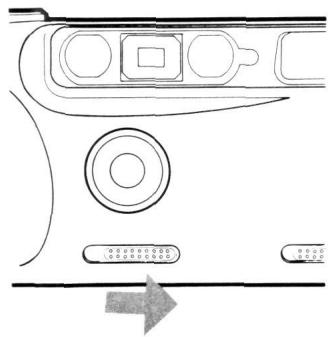
Fig. C
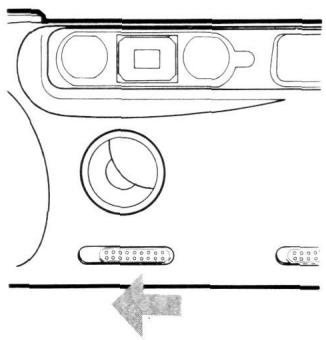
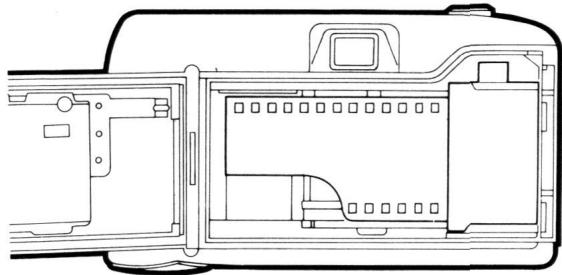
Fig. D

Fig. E
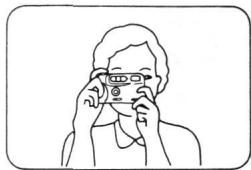
Fig. F
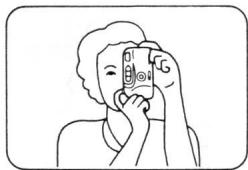
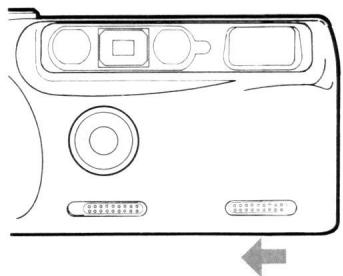
Fig. G
—123—
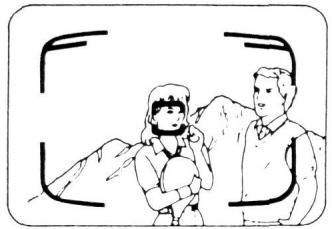
Fig. H
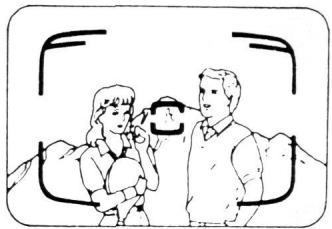
Fig.1
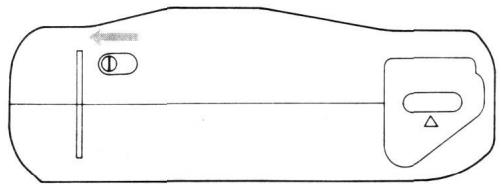
Fig.J
NOTE: REWOUND FILM CARTRIDGE
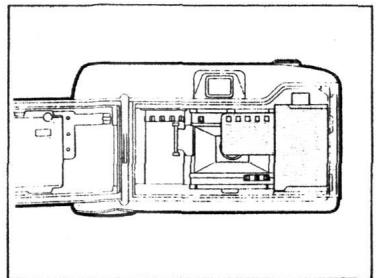
The end of the film leader will intentionally not be totally rewound into the cartridge. To ensure that you do not confuse used films with new ones simply push the rest of the leader back into the old cartridge.
HINWEIS: ZURUCKGESPULTE FILMPATRONE
Should you wish to remove the film from your camera before it is finished (either because you want your photos quickly or because you think the film is jammed) please note the following information:
- Do not open the back of the camera when a film is loaded. Any attempt to pull the film out yourself may have the following results:
A. You will expose the film to light & ruin your photos.
B. You could damage the camera's precision made film gears.
- To remove the film push the "Film Rewind Switch". This will activate the motor, which will stop when the film is completely rewound.
- Should step 2 prove unsuccessful, change the batteries for a new set & repeat step 2.
- If step 3 proves unsuccessful, immediately return your camera to the dealer. Please note: Most apparent problems are caused by either misloading the film or by low battery power. Please carefully read the user manual to avoid these things.
VORSICHT:
YOU MUST PRESENT THE ATTACHED WARRANTY FORM (PART 1) TOGETHER WITH PROOF-OF-PURCHASE AND PROOF-OF-PURCHASE DATE TO OBTAIN WARRANTY SERVICE.
Nikon Fun Touch 2
This is your Nikon Inc. One Year Limited Warranty (valid in the Continental United States, Alaska, Hawaii, Puerto Rico, U.S. and U.S. Virgin Islands).
YOU MUST PRESENT THIS FORM (PART 1) TOGETHER WITH PROOF-OF-PURCHASE AND PROOF-OF-PURCHASE DATE TO OBTAIN WARRANTY SERVICE.
This Milton Product is warranted by Nkton Inc. to be free from defects in material and workmanship for a period of one (1) year from the date of purchase. During this period, if this Product is found to be defective in material or workmanship, Nkton Inc. or its authorized service station will at its option either repair or replace this Product without charge subject to the following limitations and exclusions:
This warranty extends to the original consumer purchaser only and is not assignable or transferable.
This warranty shall not apply to the following:
-
Any product which has been subject to misuse, abuse, negligence or accident.
-
Any defects or damage directly or indirectly caused by the use of unauthorized replacement parts and/or service performed by unauthorized personnel.
-
Any batteries.
ALL WARRANTYES IMPLIED BY LAW INCLUDING ANY WARRANTY OF MERCHANTABILITY OR FITNESS FOR A PARTICULAR PURPOSE SHALL BE OF A DURATION OF ONE (1) YEAR FROM DATE OF PURCHASE. THE WARRANTYES HEREIN ARE EXPRESSLY IN LIEU OF ALL OTHER EXPRESS WARRANTYES INCLUDING THE PAYMENT OF CONSEQUENTIAL OR INCIDENTAL DAMAGES FOR THE BREACH OF ANY WARRANTY.
Some states do not allow (a) limitations on how long an implied warranty lasts or (b) the exclusion or limitation of incidental or consequential damages so the above limitations or exclusions may not apply to you. This warranty gives you specific legal rights and you may also have other rights which vary from state to state.
In order to obtain performance of the warranty obligations, the original consumer purchaser must return this warranty and this Nikon product together with proof of purchase and proof of purchase data (bill of sale) either in person or addressed to the warranty department of Nikon Inc., at 1300 Walt Whitman Rd. Melville, N.Y. 11747-3064 or any one of the authorized service stations at their respective addresses listed on the reverse side. The original consumer purchaser in returning this Nikon product must prepay all postage, shipping, transportation, insurance and delivery costs to the repair facility.
LAST NAME FIRST NAME

ADDRESS

CITY

ZIP

THIS WARRANTY FORM MAY NOT BE REPRODUCED OR COPIED AND SHALL BE VALID ONLY WITH PRODUCTS
SOLD BY Nikon Inc.
Nikon
PART1
Nikon AUTHORIZATION SERVICE STATIONS
ALABAMA
Brysh & Millimaki Services Inc.
800C Arcadia Drive
Huntsville, AL 35801
Principal-Wayne D. Millmaki
James L. Sims
(206)533-9274 75 76 77
California Precision Service Inc. 1714 28th Street
Sacramento, CA 95816
Principal Ted Mozzore (916) 451-1330
Pro Camera Service Inc.2965 E Hilcrellr Dr .
Thousand Oaks, CA 91362-3159
Principal-Klaus or Karl (d05)497-7240
COLORADO
Metro Camera Service Inc 1470 S. Federal Blvd
Denver CO 80219
Principal: James Todd Amos (303) 934-2471
Rocky Mountain Camera Repair 240 Broadway
Denver CO 80203
Principal Richard E. Carson (303) 744-3459
Tucson Camera Repair
742 West Limberlost
Tycson.AZ 85708
Principal Kirk Cookson
(602) 887-1841
CALIFORNIA
Nikon Inc.
19601 Hamilton Avenue
Torrance, CA 90502-1309
(213)516-7124
Authorised Camera Service
12918 Riverside Drive
Sherman Oaks, CA 91423
Principal: Will Winkenberg (818) 788-0404
Camera Services Center
4355 So. Sepulveda Blvd
Culver City, CA 90203
Principal-Ridy Long (213) 397-0072
International Camera Technicians
914 West El Camino Real
Mountain View, CA 94040
Principal Manfred Mueller (415) 961-5825
Kurt's Camera Repair Inc.
7805 Mission Gorge Road
San Diego, CA 92120
Principal: Kurt Huepper Paul Bracken (714) 266-1810
Mel Pierce Camera
5645 Hollywood Blvd
Hollwood, CA 90028
Principal Ray Pierce (213) 465-2191
Metro Camera Service Inc30 Mason Street
San Francisco, CA 94102-2113
Principal-Nathan Lee (415) 421-3551
Pacific Camera Service
730 West 19th Street
Costa Mesa, CA 92627
Principal-John Fiona (714) 542-7800
DISTRICT OF COLUMBIA
Strauss Photo-Tech Service Inc.
1240 Mt Oliver Road N E
Washington, DC 20002
Principal Steve Strass
(202)529-3200
FLORIDA
Dan's Camera Clinic Inc. 5142 Biscayne Blvd
Miami, FL 33137
Principal: Manfred Wenzel (306) 759-2541
So Photo Tech Service Inc
3241 Beach Boulevard
Jacksonville, FL 32207
Principal Michael R Van Langen (904) 396-7577
So Photo Tech Service Inc.
14352 Biscayne Blvd Miami,FL 33181
Principal-Karl Witt (305)947-2470
So Photo Tech Service Inc.
1201 North Mills Avenue
Orlando, FL 32803
Principal-Sam Bud Baker (305) 896-6141
So Photo Tech Service Inc.
750-9th Avenue North
St.Petersburg,FL 33713
Principal-Bud Baker (813) 896-6141
GEORGIA
Nikon Inc. Atlanta
5355 Oakbrook Parkway Norcross, GA 30093
Att: Photo Service Dept. (404) 564 2394
Camera Service Company
4391 Atlanta Road
Smyrna.GA 30080
Principal-D J. Pack (404) 432-4257
HAWAII
Photocine Servicenter, Inc. 738 Kaneka Street
Honolulu, H1 96814
Principal-Vladimir Bosak
(608)941-4133
ILLINOIS
Nikon Inc. Illinois
7550 N Oak Park Ave
Niles. IL 60648
Art: Photo Service Dept
(312)647-1075
International Camera Corp 847 West Jackson Boulevard
Chicago, IL 60607
Principal Joseph Price (312) 738-6320
INDIANA
Focal Point Camera Service
3309 East State Bldn
PO Box 15026
Ft Wayne, IN 46805
Principal David Lindguist
(219)484-2643
KANSAS
Photo-Tech Service Center
110 North Main Street
PQBox 659
Hesslon, KS 67062
Principal Bernie Barge
(316)327-2190
KENTUCKY
Camera Service Inc.
216 South Selby St
Louisville KY 40202
Principal Ronald Adams
(502)583-5385
LOUISIANA
So Photo Tech Service, Inc.
2630 Jefferson Highway
Jefferson, LA 70121
Principal-Jerry Money (504) 835-3379
MASSACHUSETTS
Precision Camera Repair Inc.
43 Sheridan St, PO Box 180
Chicopee Falls, MA 01020
Principal Theodore J. Kordi (413) 598-8005
Sanford Camera & Proj Repair
1064 Massachusets Ave
Arimington, MA 02174
Principal Paul C. Sanford
(617) 648-2505
S.K.Grimes
23 Dry Dock Avenue
Boston, MA 02210
Principal Steve Grimes
(617)951-1480
MICHIGAN
Midwest Camera
318 Oak Street
Wyandotte, MI 46192
Principal Raymond J. Heinbockel
(313)285-2220
MINNESOTA
Marquette Camera Repair
6311 Wayzala Blvd
Minneapolis, MN 55411
Principal Robert A. Poethke
(612)332-5787
Northwest Camera Repair Co
529 South 7th Street
Minneapolis, MN 55415
Principal Jack W Pearson
(612)333-4125
Custom Camera
823 W Lake Street
Minneapolis, MN 55408
Principal Robert Moen
612872-0573
MISSOURI
CSI Camera Repair Center
7935 Clayton Road
St Louis, MO 63117
Principal Thomas J Brown
(314)725-5649
NEVADA
Lamb's Camera Repair
4229 W Sahara
Las Vegas, NV 89102
Principal George Wolf
(702)876-0964
NEW YORK
Nikon Inc.
1300 Walt Whitman Road
Melville, NY 11747
(516)547-4320
Hudson Valley Camera Repair
233 West Route 50
Nanuet, NY 10954
Principal-Raimund Fontaine
(914)623-8057
Kipling's Camera Repair
488Sunrise Highway
Rockville Centre, NY 11570
Principal John Kipling
(516)678-6665
Photo-Tech Repair Service Inc.
132-4th Avenue
New York, NY 10003
Principal Harry Fren
(212)673-8400
Professional Camera Service
37 West 47th Street
New York, NY 10036
Principal-Rick Renken
(212)382-0550
Russo Camera Repair
941.5 North Salina St
Syzyvy NY 13208
Principal-Joe Russo
(315)471-5825
NORTH CAROLINA
So Photo-Tech Service, Inc.
2610 South Blvd
Charlotte NC 28209
Principal-Ed Ormsby
(704)523-0012 or 0013
OHIO
Camera Service & Repair Co.
18 Wei 7th Stn
Cincinnati, OH 45202
Principal-Charles McLaughlin
Alberti Lindsey
(513)241-8100
Carmiromus
4345 North High Street
Columbus OH 43214
Principal William R. Schoen
(614)262-2784
OKLAHOMA
Photo Products Repair Inc.
3109 Class Bnd
Oklahoma City, OK 73118
Principal-Charles Smith
(405)521-8022
OREGON
Associated Camera Repair
3333 N E Sandy Blvd
Portland, OR 97232
Principal-Paul Osburn/Terry Poor
(503)232-5625
PENNSYLVANIA
Comel Camera Repair Shop
400N.8D SMTT
Philadelphia, PA 10123
Principal-Richard E. Weaver
(215)569-2822
TENNESSEE
So Photo-Tech Service Inc.
3388 Summer Art
Memphis, TN 38128
Principal:J.C.Brewer Jr
(901)452-0726
TEXAS
Archinal Camera Repair
3100 Commerce SI
Dallas, Texas 75226
Principal John Ferraro
(214)939-0606
Camera Services Inc.
3407 South Shepherd St
Houston, TX 77098-3398
Principal-Ernest Greely
(713)528-6652
Havel Camera Service
1102 Basse Road
San Antonio, TX 78212
Principal-Curtis Harei
(512)735-7412
VIRGINIA
Strauss Photo-Tech Service Inc.
434 West 21st Street
Norfolk, VA 23517
Principal-Quincy Wedde
(804)625-5341
WASHINGTON
Yakima Camera Repair
406 S. 3rd Street
Yakima,WA 98901
Principal Michael Hoffman
(509)575-1538
Photo-Tronics Inc.
223 Westlake Avenue North
Seattle, WA 98109
Principal J R. Spencer
(307)234-4262
WISCONSIN
BDC Enterprises Inc.
313 West Johnson Street
Madison, WI 53703
Principal James Remeir
(608)257-6315
WYOMING
Photo-Electronics
145 So. Washington St.
Casper, WY 82601
Principal Sid Wallingford
(307)234-8262
Nikon Fun Touch 2
Retain this Worldwide Warranty with proof of purchase for your records
Nikon ONE YEAR WORLDWIDE LIMITED WARRANTY
(Excluding the Continental United States, Alaska, Hawaii, Puerto Rico, U.S. and U.S. Virgin Islands)
Welcome to the worldwide family of Nikon owners.
Your Nikon equipment has been manufactured to the highest quality standards by NIKON CORPORATION, Tokyo, Japan.
This warranty entitles the original consumer to worldwide warranty protection in accordance with the terms and conditions. It affords the consumer warranty protection outside the continental United States, Alaska, Hawaii, Puerto Rico and the U.S. Virgin Island. Such warranty coverage is supplemental to and not in lieu of the United States Nikon One Year Limited Warranty which is received by the customer with the Nikon product.
This Nikon product except for batteries is warranted by NIKON CORPORATION, Tokyo, Japan to be free from defects in materials or workmanship for a period of one year from the date of purchase. During this period any one of the worldwide repair facilities listed on the reverse side will repair without charge any parts or assembly of parts found to be defective in material or workmanship subject to the following limitations:
- This warranty extends to the original consumer purchaser only and is not assignable or transferable.
- This warranty shall not extend to any product which has been subject to misuse, abuse, negligence, accident or unauthorized repair.
All warranties implied by law including any warranty of merchantability or fitness for a particular purpose shall be of a durable nature, and the use of such a warranty shall not constitute an express warranty. The use of all other express warranties including the payment of consequential or incidental damages for the breach of any warranty.
No warranties, whether express or implied, including the warranties of merchantability or fitness for a particular purpose are reserved. Terms and conditions may not be changed without written warranted; nor shall such dealer or distributor be liable for the payment of any direct incidental or consequential damages.
In order to obtain worldwide service, the consumer should return the Nikon product, either in person or addressed to the Warranty Department of any authorized service repair station listed on the reverse side together with proof of purchase and this warranty. The original consumer in returning this product, must prepay all postage, shipping, transportation, insurance and delivery costs to the repair facility.
For prompt response of worldwide warranty inquiries, please direct all correspondence to:
NIKON CORPORATION
Nikon
PART 2
Nikon SERVICE FACILITIES
| S.A.C.I.F.I. | Phone: 1425358 |
| Australia: Maxwell Optical Pty Ltd. | Unit 27, 100 Harris Street Pyrmont 2009, N.S.W. Phone: (61) 2-660-7088 |
| Austria: Pliroda & Beck Ges m.b.H. | 1072 W. Schonleitzstraße 14, P.O. Box 104 |
| Belgium: H. De Beukeker & Co. | Phone: 222/931501-931532 |
| Brazil: T. Tanaka & Cia. Ltda. | Polo: 11 825 2255 |
| Canada: Nikon Canada Inc. Montreal | 3300 Chemin CoteVertu Road, Montreal, Quebec, H4R 287 |
| Toronto | Phone: (416) 625 9910 |
| Vancouver | Unit 1111-1111-1111-1111-1111-1111-1111-1111-1111-1111-1111-1111-1111-1111-1111-1111-1111-1111-1111-1111-1111 |
| Chile: Refischneider Foto S.A.C.I. | 1366 Airwood Drive, Mississippia, Ontario, L4W 1C1 |
| Cyprus: X H Papasian Ltd. | 240 Liga Street, Niceo P. O. Box 1607 |
| Denmark: Hans Foggetentur A/S | Productionskjres 238, P.O. Box 269, DK 2600 Glostrup |
| Finland: Suomel I.C. Oy | Phone: 42 84702 |
| France: Nikon France S.A. | Halsen 100-8420; Helens P.O. Box 15.5F-00401 Helsinki: Phone: (358) 0-50701 |
| Franco: Nikon France S.A. | 191, rue du Marché Rolay, 94504 Champagne Sur Maire Cedex Phone: 331-145 16 45 16 |
| Greece: D & J. Damkalisidis S.A. | 7. Karapoglou Servis Stn., Athens 126 |
| Fed. Rep. of Germany: Nikon GmbH Automatischer Nikon Vertragswerkstätten | Phone: 132 489 39 41 |
| Hong Kong: Shiro (H.K.) Ltd. | Tiefenbrother Weg 25, W-4000 Düsseldorf 30 |
| Phone: 0000000000000000000000000000000000000000000000000000000000000000000000000000000000000000000000000000 | |
| Hungary: Nikon Kft | International Trade Center Building FI. 2 No 207 Bajcsy Zalmzky ul. 12 Budapest |
| Phone: 36-1-138 2975 | |
| Ireland: Somerton Fólo Ltd | 12, Grafton St., Dublin 2. Phone: (1) 737133 |
| Israel: Hadar Photo Supply Agencies Ltd. | P.O. Box 186, Tel Aviv 61015, Israel |
| Italy: Nital S.p.A. | Phone: 342340786 |
| Via Tabacch 33, 101322, Torino, Cassella Postale 1200 | |
| Kuwait: Ahmad & Co. Ltd. | Phone: (011)3120151 |
| P.O. Box 3555, Salat, P. Code 13036-Salat, Kuwait | |
| Malaysia: Shiro (Malaysia) SND BHO | Phone: 5312960/5312961/5312962 |
| Lagos 22 & 24, jalan 235, Section 51A, 46100 Petaling Jaya, Selangor (P.O. Box 10571, 50718 Kuala Lumpur) | |
| Phone: (60) 3-7749842 | |
| Mexico: Mayoritas Fotograficas, S.A. Netherlands: Inba B.V. | Dr. Jiménez 159, Mexico 7, D.F. Phone: 5-5887011 |
| New Zealand: T.A. Macalister Limited | B.P. 2358, Noumé, Phone: 721-70 |
| Norway: Interfoto A.S. | O.C. Hangover 51, 1322 Hövik, Norway |
| Portugal: Sílto LDA. | Phone: (2) 53-97-94 |
| Rua das Dorodógenes P. P. 1100 Lisboa | |
| Phone: (351) 1-87-87-30, 87-76-71 |

Memo
No reproduction in any form of this manual, in whole or in part (except for brief quotation in critical articles or reviews), may be made without written authorization from NIKON CORPORATION.