
AF-S DX NIKKOR 18-55MM F-3.5-5.6G VR ED - Camera lens NIKON - Free user manual and instructions
Find the device manual for free AF-S DX NIKKOR 18-55MM F-3.5-5.6G VR ED NIKON in PDF.



User questions about AF-S DX NIKKOR 18-55MM F-3.5-5.6G VR ED NIKON
0 question about this device. Answer the ones you know or ask your own.
Ask a new question about this device
Download the instructions for your Camera lens in PDF format for free! Find your manual AF-S DX NIKKOR 18-55MM F-3.5-5.6G VR ED - NIKON and take your electronic device back in hand. On this page are published all the documents necessary for the use of your device. AF-S DX NIKKOR 18-55MM F-3.5-5.6G VR ED by NIKON.
USER MANUAL AF-S DX NIKKOR 18-55MM F-3.5-5.6G VR ED NIKON
User's Manual PP.12-19
Notes on Safety Operations

Do not disassemble
Touching the internal parts of the camera or lens could result in injury. Repairs should be performed only by qualified technicians. Should the camera or lens break open as the result of a fall or other accident, take the product to a Nikon-authorized service representative for inspection after unplugging the product and/or removing the battery.
Turn off immediately in the event of malfunction
Should you notice smoke or an unusual smell coming from the camera or lens, remove the battery immediately, taking care to avoid burns. Continued operation could result in injury.
After removing or disconnecting the power source, take the product to a Nikon-authorized service representative for inspection.
Do not use the camera or lens in the presence of flammable gas
Operating electronic equipment in the presence of flammable gas could result in an explosion or fire.
Do not look at the sun through the lens or viewfinder
Viewing the sun or other strong light sources through the lens or viewfinder could cause permanent visual impairment.
Keep out of reach of children
Particular care should be taken to prevent infants from putting the batteries or other small parts into their mouths.
Observe the following precautions when handling the camera and lens
- Keep the camera or lens unit dry. Failure to do so could result in fire or electric shock.
- Do not handle or touch the camera or lens unit with wet hands. Failure to do so could result in electric shock.
- When shooting with back-lighting, keep the sun well out of the frame. Sunlight could be focused into the lens body and cause a fire. Sunlight not directly in the frame, but even near the frame, can also be the cause of fire.
- When the lens will not be used for an extended period of time, attach both front and rear lens caps and store the lens away from direct sunlight. Failure to do so could result in a fire, as the lens may focus sunlight onto a flammable object.
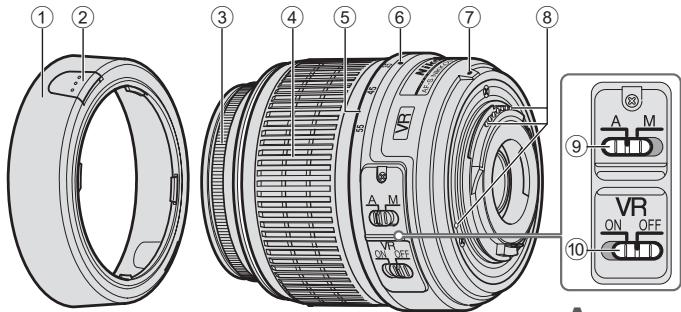
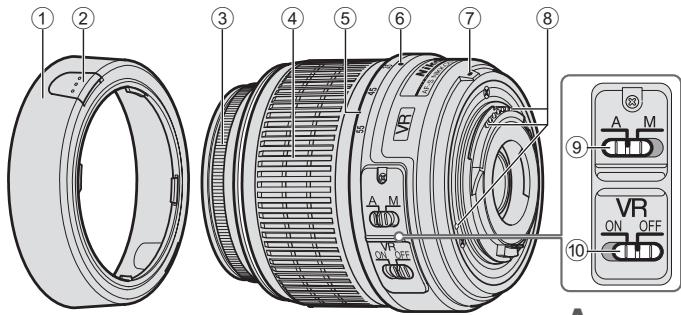
Nomenclature
():reference page
A
① Lens hood* (P.14)
Lens hood attachment button (P. 14)
③ Focus ring
④ Zoom ring (P. 15)
⑤ Focal length scale
(6) Focal length scale index
⑦ Mounting index (P. 14)
⑧ CPU contacts (P.17)
⑨ A-M mode switch (P.15)
10 Vibration reduction ON/OFF switch (P. 16)
*Optional
Thank you for purchasing the AF-S DX NIKKOR 18-55mm f/3.5-5.6G VR. DX Nikkor lenses are specially designed for use with Nikon digital-SLR (Nikon DX format) cameras, such as the D2-series and D40-series. When mounted on Nikon DX-format cameras, the lens' picture angle is equivalent to approximately 1.5 × the focal length in 35mm format. Before using this lens, please read these instructions and refer to your camera's User's Manual.
Major features
- Enabling vibration reduction (VR) allows for shooting at shutter speeds approximately three stops slower (at a focal length of 55mm ) than when vibration reduction is disabled, thus expanding the range of effective shutter speed options, and simplifying hand-held shooting at a variety of zoom positions. (Based on results achieved under Nikon measurement conditions. The effects of vibration reduction may vary by individual and/or shooting conditions.)
- This lens employs a Silent Wave Motor to drive the focusing mechanism, making autofocusing smooth, silent and almost instantaneous. The A-M mode switch (9) is provided for simple selection of autofocus (A) or manual focus (M) operation.
- More accurate exposure control is possible because subject distance information is transferred from the lens to the camera body.
- The use of one aspherical lens elements ensures sharp pictures virtually free of color fringing. Also, by utilizing a seven-blade diaphragm that results in a nearly circular aperture, out-of-focus objects in front of, or behind, the subject are rendered as pleasing blurs.
Mounting the lens
1 Turn the camera off.
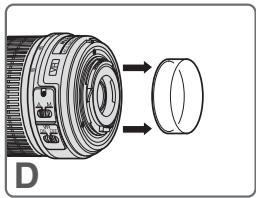
2 Remove the rear lens cap (Fig. D).
3 Keeping the mounting index ⑦ on the lens aligned with the mounting mark on the camera body, rotate the lens counterclockwise until it clicks into place. Be sure that the mounting index ⑦ is on the uppermost side.
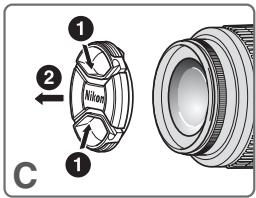
4 Remove the front lens cap. (Fig. C)
Removing the lens
Be sure to turn the camera off before removing the lens. Press and hold the lens-release button while turning the lens clockwise to remove.
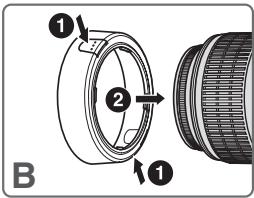
Using the lens hood HB-45 ①^* (Fig.B)
*Optional.
Attaching the hood
Hold down the lens hood attachment buttons ② when attaching the lens hood ① . To store the lens hood ① , attach it in the reverse position.
Removing the hood
Hold down the lens hood attachment buttons ② when removing the lens hood ①
Focusing, zooming, and depth of field
Before focusing, rotate the zoom ring 4 to adjust the focal length until the desired composition is framed in the viewfinder. If your camera has a
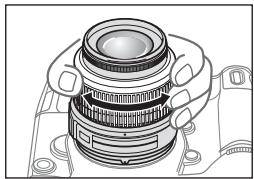
depth of field preview (stop-down) button or lever, depth of field can be previewed through the camera viewfinder.
Focusing (Fig. A)
Autofocus mode
Set the camera focus mode to AF-A, AF-S or AF-C and set the A-M mode switch ⑨ on the lens to [A]. The camera focuses automatically (autofocus) while the shutter-release button is pressed halfway.
Be careful not to touch the focus ring ③ when it is turning during autofocus operation.
Manual focus mode
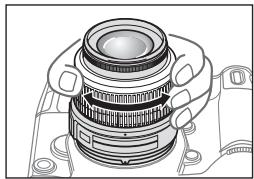
Set the A-M mode switch ⑨ on the lens to [M]. Rotate the focus ring ③ manually to focus. Shooting is possible when camera focus mode is set to either AF or M.
| Lens' A-M mode switch ⑨ | Camera focus mode | |
| AF-A/AF-S/AF-C | M | |
| A | Autofocus | — |
| M | Manual focus (focus assist is available) | |
For more information on camera focus modes, refer to your camera's User's Manual.
Getting good results with autofocus
Refer to "Notes on using wide or super-wide angle AF Nikkor lenses" (P. 19).
Vibration reduction mode (VR)
Enabling vibration reduction (VR) allows for shooting at shutter speeds approximately three stops slower (at a focal length of 55mm) than when vibration reduction is disabled. Panning is also supported. (Based on results achieved under Nikon measurement conditions. The effects of vibration reduction may vary depending on individual and shooting conditions.)
Turning the vibration reduction on and off
1 Set the vibration reduction ON/OFF switch to [ON]. Note: Be sure to set the switch so that the indicator is precisely aligned with [ON].
2 Camera shake is reduced when the shutter-release button is pressed halfway. Autofocus and manual focusing, as well as precise framing of the subject, are simplified because camera shake visible through the viewfinder is also reduced.
3 To disable vibration reduction, set the vibration reduction ON/OFF switch to [OFF].
Notes on using vibration reduction
After pressing the shutter-release button halfway, wait until the image in the viewfinder stabilizes before pressing the shutter-release button the rest of the way down.
- If the camera is panned in a wide arc, compensation for camera shake in the panning direction is not performed. For example, with horizontal panning only vertical camera shake is reduced, making smooth pans much easier.
- Due to the characteristics of the vibration reduction mechanism, the image in the viewfinder may be blurred after the shutter is released. This is not a malfunction.
- Do not turn the camera off or remove the lens from the camera while vibration reduction is operating. Failure to observe this note could result in the lens sounding and feeling as if an internal component is loose or broken when it is shaken. This is not a malfunction. Turn the camera on again to correct this.
- With cameras such as D300 and D40-series models, featuring a built-in flash, vibration reduction does not function while the built-in flash is charging.
- When the camera is mounted on a tripod, set the vibration reduction ON/OFF switch (10) to [OFF]. However, set the switch to [ON] when using a tripod without securing the tripod head, or when using a monopod.
- With autofocus cameras such as D2-series and D300 models, featuring an AF start (AF-ON) button, vibration reduction does not function even when the AF-ON button is pressed.
Setting the aperture
Use the camera to adjust the aperture setting.
Variable maximum apertures
Zooming the lens from 18mm to 55mm decreases the maximum aperture by 1^1 / 3 stop.
However, there is no need to adjust the aperture setting to achieve correct exposures because the camera automatically compensates for this variable.
Flash photography using cameras with a built-in flash
Vignetting is the darkening of the corners around the image that occurs when the light emitted by the flash is obstructed by the lens hood ① , or lens barrel depending on the focal length or shooting distance.
- To prevent vignetting, do not use the lens hood ①.
- It is not possible to shoot at distances shorter than 0.6m (2.0 ft.) using the camera's built-in flash.
| Digital-SLR cameras | Supported focal length / Shooting distance |
| D300, D200, D100, D80, D70-series, D60, D50, D40-series | No vignetting occurs at any focal length |
The built-in flash on the D100 and D70 supports focal lengths of 20mm or more.
Vignetting occurs at a focal length of 18mm.
Lens care
- Be careful not to soil or damage the CPU contacts (8).
- Clean lens surfaces with a blower brush. To remove dirt and smudges, use a soft, clean cotton cloth or lens tissue moistened with ethanol (alcohol) or lens cleaner. Wipe in a circular motion from the center to the outer edge, taking care not to leave traces or touch other parts of the lens.
- Never use thinner or benzene to clean the lens, as this could cause damage, result in a fire, or cause health problems.
- NC filters are available to protect the front lens element. The lens hood (1) also helps to protect the front of the lens.
- When storing the lens in its flexible lens pouch, attach both the front and rear lens caps. The lens can also be stored with the lens hood ① attached in the reverse position.
- When the lens is mounted on a camera, do not pick up or hold the camera and lens by the lens hood ①.
- When the lens will not be used for an extended period of time, store it in a cool, dry place to prevent mold. Be sure to store the lens away from direct sunlight or chemicals such as camphor or naphthalene.
- Do not get water on the lens or drop it in water as this will cause it to rust and malfunction.
- Reinforced plastic is used for certain parts of the lens. To avoid damage, never leave the lens in an excessively hot place.
Standard accessories
- 52mm snap-on front lens cap LC-52
Optional accessories
- 52mm screw-in filters
Rear lens cap LF-1 - Flexible lens pouch CL-0815
- Lens hood HB-45
Incompatible accessories
- Teleconverters (all models)
- Auto Ring BR-4 and all models of Auto Extension Ring PK, K Ring and Bellows focusing attachment.
- Attachment Ring SX-1
Other accessories may not be suitable for use with this lens. For details, refer to the User's Manual provided with accessories.
Specifications
Type of lens G-type AF-S DX Zoom-Nikkor lens with built-in CPU and Nikon bayonet mount (Specially designed for use with Nikon digital-SLR—Nikon DX-format—cameras)
Focal length 18mm-55mm
Maximum f/3.5-5.6 aperture
Lens 11 elements in 8 groups (1 aspherical construction lens element)
Picture angle 76^ - 28^50^
Focal length scale 18,24,35,45,55mm
Distance Output to camera body information
Zoom control Manually via separate zoom ring
Focusing Autofocus using a Silent Wave Motor; manually via separate focus ring
Vibration Lens-shift method using voice coil reduction motors (VCMs)
Closest focus 0.28 m (0.9 ft.) at all zoom settings distance
No. of diaphragm 7 pcs. (rounded) blades
Diaphragm Fully automatic
Aperture range f/3.5 to f/22 (at 18mm), f/5.6 to f/36 (at 55mm)
Exposure Via full-aperture method measurement
Attachment size 52mm (P = 0.75mm)
Dimensions Approximately 73mm dia.) × 79.5 mm (extension from the camera's lens-mount flange)
Weight Approximately 265 g (9.4 oz)
Specifications and designs are subject to change without notice or obligation on the part of the manufacturer.
Notes on using wide or super-wide angle AF Nikkor lenses
In the following situations, autofocus may not perform as expected when shooting with wide or super-wide angle AF Nikkor lenses.
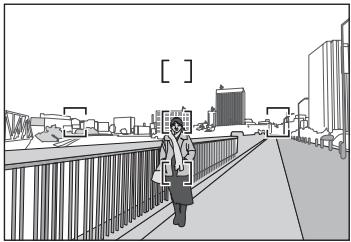
A person standing in front of a distant background
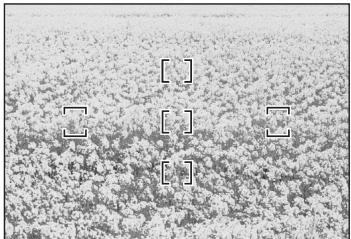
F A field filled with flowers
1. When the main subject in the focus brackets is relatively small
When a person standing in front of a distant background is placed within the focus brackets, as shown in Fig. E, the background may be in focus, while the subject is out of focus.
2. When the main subject is a finely patterned subject or scene
When the subject is finely patterned or of low contrast, such as a field filled with flowers, as shown in Fig. F, focus may be difficult to acquire using autofocus.
Responses to these types of situations
(1) Focus on a different subject located at the same distance from the camera, apply focus lock, recompose, and shoot.
(2) Set the camera focus mode selector to M (manual) and focus manually on the subject.
Refer to "Getting Good Results with Autofocus" in the camera's User's Manual.
Forvara utom rackhall for barn
He pa36paaiTe foToKamepy
PnIKKOCHOBHeM K BHYTpEHNM qACTm FOTOKaMEpbI nnn oBekTbMa MOKET pINBEcTN K NOJYeHNO TpaBM. PEmoHT DoJXeN PnON3BOiNTbCra ToNkBo KBAJIuNtIOPOBaHbIMn CneUAnIcTAMn. B CnUYae NOBpeXJeHnK KopNyca FOTOKaMEpbI nnn OBeKtNbA B pe3yIbTaTe NaDEHn IIN DpyrTO pONCIeCTBnO tKlIOHNTe CeTEBn 6I0K nTaNHaNn IIN N3BNeKeTte BataPeN u DocTabBe N3dEIne DnI npOBepKn B ABTOPIN3OBAHbN bcpBnCHbI cENTp Nikon.
B clyae HeNCnpaBHOCTn HEmeIeHNO BbIKIOHTe FOtOKaMepy
PnI npoBnEHNI dbMa IIN HeoBbHNO 3aNaXa, IcXOJaero
n3 FOToKAMepbl NmN ObkEtnBa, HemeJENHO m3BNeKeTME
batapeR, CTapaeR B HeOnyCTMb TOKOBR. PpOdoJIKeHne
paOBoTb C yCTpoiCTBOM MOKeT npuBeCTM K NOUyeHNO TpABM.
PoCne IBnEChueHNI batapeR NmIKTOJeHUYNtOCTOHyNA
nITAHNIO DocTaBte N3dEmeI dI npOBeRPK B 6bnKaWsi
ABTOP3OBaHHN CepBcHbN tceHTP KOMnAHNI Nikon.
He noJIb3yIteCb foToKamepo nJIn oBSeKTHBOM npn HAIyuN B BO3dyXe JERKOBOcPiMaHEnHOxxCra3OB
Paobota c 3eKTePOHBBHM 6OpOyUOBaHnEM pIIN HAIuNIN B BO3dyXe JERKOBOCIIpMaHeIOUxNCr A30B MOKeT pIINBcK N B3bBy UINI NOXApY.
He cmOTpuTe Ha coJIHcE uepe3 oBbektNB nII BnONckaTeIb
ECNI CMOTPet HCoHNIE INI INDpyNE ITOCHNIKI RPKORO CBeta Uepe3 O6bEKNB INI BINOCKATENB, TO 3TO MOKET BB3aBt HeOBpatIMOE yUxDSeHNE 3PENH.
XpaHnTe B HeNoCTynHom IJRA TeTmecTe
PIMMTe OOC6bI MEpbI ppeoCTOPOXHOCTN BO 136exHne NOpanaHn Batapeu n Dpynx He60bnx npMeDToB DetmB POT.
C6bnJdaTe CneIyoUe MeBpI npEoCTOPOKHcOTo BO BpeM3KcIIpyaTcuN FOtOKaMePbI N O6bEKTBA
He donyckaiTe nonadaHnB OdbI Ha foToKamepu IInn oBejkTb. HecobniDeHne 3tOro TpeboAHn MOKeT npivcTe N KnojAp Yu nPi npaKeHnO 3JeKtpueeCKm TOKOM.
He npKacaiTebc K FOToKampe HINn OobEeKtNBy MOKpbIMN pykAMN. Heco6HIODeHne 3TOrTO Tpe6oBaHnRA MOKeT PnIBeCTN K nopAkeHmIO JNEKTPnueCKMn TOKOM.
- PnCsbEMKObeBkTOB C 3aDNHMOCBEUHNEM, CneDyET N36eRaTb NOJADAHNA COJNHa B KaDp. DInTeBHeO Bo3EJICTBNe pRmBIX COJNEHbIy JUey H KaPnyc ObEktNa BOMeT npINBeCTn K Bo3rOpAHIO. CoNHeHcy IyuH, He nonJaDAUShne B KaDp, HO HaxoJIAuNecr PdOM C HIM, TAKKe MOrYt CTaTb PrnHHoNBo3rOpAHN.
Ecnn obkektnb He oydet NcnoIb3ObaTbC8 B TeueHne DnnteBbHoro BpeMeHH, npKpeNtte nepeDHOIO y 3aDIOIO KpBISIKN ObkektnBa H oe OCTABJIte OobekTbN IO pRnMbIM CONHeYbIMn LyuAMN. HecO6JIIODeHne 3TOrO ycNoBria MOKeT npVBceNTK BO3OrApAHNO, NOCKONbky ObkeTbMOKeT COcpeDToOTHTc ONHeUHbIe LyuHa KaKOM-Im60 JeKOBOCnAmehNoOEMcnpEdMeTe.
06o3haueHna HnllcTpaun
A
OCHOBHbIE BO3MOXHOCTN
-При ВКИLOVENHо Функши NOДАБЛЕнЯ ВИБРАЙ (VR) DOCTRAIOTc
ретьлытаты, АHAОТИНBE CBМКЕ CBдЕРЖКД, ДИNTБИНСТБ
КOTOPО PRIPбИЗITБУНа ТуР CTуРЕЧМ ПЕБИ (ФОСЧОЕ
pacSTORHNE 55 MM), СЕМР CBМКЕ БЗ ИСПЛБ3OBAHNY DAHNH
Функши. КомТО.TORI, PRIP 3OM TBYEINHVAETC KOLINCHETO
ФФФEVTNIBHxФункши BДЕРЖК, A TAKKE OБЛECHAETC PNYH
CBМКЕ PRIP INCSNBJ3OBAHNY PAZNCHIVBHX 3HAENH YZMIA. (*OCHBOHAN
ha pe3yIbTATAX, NOПЕЧИНБ X YCOLOBIX M3HEPENK KOMПAHIN
Nikon. Pe3yIbTATY NOДАБЛЕнЯ ВИБРАЙ MOYТ PAZNCHYBSCB
3ABVICIMOCTN OT OTДЛБHx YCOLOBIM (ИЛIM) YCULOBIM CBМКЕ).
- DAnHbI OobEeTINB INCOnb3yET BecUWMHbI BOJHOBOI npmbOd Silent Wave Motor dЯ ynpabNeHmexAHm3MOF φokycuropBKn, YTO DeJaT ePiocEEC ABToΦokycuropBKn pIaBbIM, BocUHMbIM nPpAteNCEK MHOBeHbIM. PpeKlouatTe b peKImoB A-M ⑨ cncnbl3yeTcra dЯ yD6hORo nepeKJIIOUeHnM EMeXdy aBtOMaTHeCKM (A) n pyuHbIM (M) peKImaMn φokycuropBKn.
BoeonTcHoe npabnEHe 3KIO3UneI DOCTNtAeTcN opeDCTBOM nepaun HINΦOPMaunO paCSTOrHIM Do oBekTa OT oBekeTbIA K fOToKApMe
-Прии Истльовим Догюги зассчесхи Зем entob
обектва доститацета розкeme chiammki ррактунecку 6e3цетон
OKАТВОКИ. КрOME TOGO, Рпс Истльовим сemililentecTKOBI
Дадлрмы, содалдшо почTNКурлгу anepTy, HepeKme
прдmetы, раснолженьь садду Инс crepeDi OБектca sbemkn,
ПOLУЧАТСЕК Красьпь cheясье oуераня.
YctaHOBka O6bekTNBa
1 BbIKJIIOHTe FOToKAmepy.
2 CHMNTe 3aHIOO KpbIbUky O6bEKTbBa (Pnc. D).
3 CoMBcTbY kya3aTeB KpENJIeHn ⑦ Ha o6bEKTbC yka3aTeNem KpENJIeHn HA Kopnyce fOToKampebl, NOBOpaUNBaIte o6bEKTb NpOTNb YacBOB cTpEnKn Do NIOHn FHKcauN. Y6eJntecB, YTO yka3aTeB KpENJIeHn ⑦ HaxoJITcB CbEPxy.
4 CHHMMTe nepeDHIOKpbIiKy o6BeKTnBa.(Pnc.C)
ChyTne 06bekTnBa
Ipeed ChrTnem ObbKtNbA ob3aTeIbHO BbIKIOHHTe FOtOKaMcyE. IIn ChrTaNOb bokkTbNA hXKMITE uYepKbNAbTe KONKy OTOCoEdINHeHbOBKtNbA, NOBopaUHbRa npH 3OTOM ObbKtNbNo YacOBoCTpeJIke.
ИспожьзOBане 6Лeнды 0БъЕкТиВа HB-45 ① ^ 水 (Pnc. B)
*Pnpno6peTaetcIOnJNHTeJIbHO.
YctaHObKa 6JIeHdbI
YdePKNBAte KHNIOI dI npKPNENHn 6neHdb ObBeTnBa 2 pyn TcAHTNKe 6neHdb I.ДЯхpaHnE 6bnHeI bI npKpnte ee 3aDOM Hao6oPOT.
ChyTne 6JeHdbI
UdepKnBaIe KHOpKn IJIN npIKpeNHe 6NeHdbI 0bEketna ② npi ChTm 6neHdbI ①.
ФokycnpoBka,yBeIyuHneu rJy6nHa pe3KoCTn
Ipejde Yem
BbIOJNHaTb
fOKyCnPOBky,
NOBEpHnTe KOJIbUO
yBeJIuYeHnE ④ dIpy
peryIINPOBKn
fOKyCHOrO paCtOraHn,
NOKa B VIOJOnKaTeNe He
6yDet BvIeJeHa
Heo6xOdIma KOMnO3nIy.
Ecnn foTOkamepa ochaueHa KHONKoI IIN
pbYauKOM npocMToPa rnyuBnHb pe3KoCTn
(3aTeMHene),TO CTeNeb rnyuBnHb pe3KoCTn MOH0
npedBaupHeIbHO pNoBepNTb Yepe3 BINOCKaTebl
fOTOKaMepl.
Фokycиropовka(Pnc.A)
Pexim aBTOΦOKyCnPOBKn
UctahOBITE ha foToKampe pexHM fokycnOBKn AF-A, AF-S nIiN AF-C n yCTaHOBITE nepeKJIouateIb peXIMOB A-M ⑨ ha obBeKtNBe B noIOJKeHne [A]. ABTomATnueckar fokycnOBKa (aBTOfokycnOBKa) BblONHReTcP npn HaxaTN CnyCKOBo KNOHKn 3aTBopa HANOBOHy.
БудытBE BHNMATEbHb. He DOTparrBaITeBc Do ФokycuPiyUoIero KOnla ③ npn erO nobopoTe BO ВсрмБьlONHNeA BATOfOkycuPobKb.
Puyho npexn m ookcnpobkn
UctaHOBtnepeKJIOuateJIb pexIMoB A-M ⑨ Ha o6bEKTnBE B NIOJOKeHHe [M].ДЯ BbIIOJIHeHnI ΦOcysPOBKn BpaaaIteФOcysPHyOuIe KOnbI O ③ BpyHyI. CbEmKy MoXHo BbIIOJIrTb,ecm yCTaHOBtnepeKIMΦOcysPOBKnΦOTOKaMepbI AF IIn M.
PexkIM POnaBLeHnBn6paun (VR)
PnB KINUeHHO FyHKmI NODaBnEHHA Bbpaum (VR) DOCTRAOTCBApeYbTbTa, hAnoTnHtBu C bMeKc C bVIEpRKKO, dNITENTbHOCTb KOTOPONPiN3iHTbHO H Tn PCTynHe MEnbIe (ΦokCyHoae paccTOHne 5 MM), CEM PnC bEme6 Be3 cNIOb3OBaHn DaHNOf FyHKmI. TAnOpAMHaBcMeMa TAKKe DcSTyTHa. (^*OCHBOA n Ha pe3yblTatax, NOUYehbIX BycNoBHX N3MEpeHn KOMFaHn NIKon. Pe3yblTbTa NODaBHeHHA BbpaumMOyT paJIuHcTaBC B 3aBcImMoCTn OT cTpyaMn U yCIOBn CbeMn.)
UcTaHOBKa nepeKJIIOuATEIe IIOaBNeHnBnBaPauN B NOIOKeHHe BKNIOUChEHN N BbIKIOUChEHN
1 UctahOBHTe nepeKIOuateJIb NOaBLeHnA B6paunz ON/OFF 10 B noJooXHeH [ON]. PtmeUaHne. O63aTeJIbHO yCTAHOBHTe nepeKIOuateJIb 10 TaK, YTO6bI HINDKATOP TOHO COBaN C METKO [ON].
2 NqDabNeHMe Bn6paun FOKoAmepeBbIIOJIHReTc npn HaxaTHn CnyckOBO KNKOn 3ATBopa HanoIOBNHy. ABOMATuHEeN uPyHAn FQyCnUPBOKA, aTOke ToUHOe KADpOBAHNe ObeBkTA CbEMKn, BbIOINHrOHTc IpOCTo, TAK KaK Bn6paun FOKoAmepeBbIIOJDAeMBe B BINOINCKATENe, TaKKe NpOABJIHOTc.
3ДлгоТКИЧЕНЯ рекима noДавьнеля Вибрашу yctановITE nepeкlioquateь noДавьнеля Вибрашу ON/OFF 1B noIIOJOHENE [OFF].
PpimcuaHnno nCIOJIb3OBAHHIO npaBHeNn Bn6paun
- Pioene haoKTHaTNI CNYCKOBH KONIKH 3aTbOPA HANOIOBHy HEo6XoDMIO JOKdTaCBy CStbMI3auuN I3o6paKeHHY B VIOOMcATEnepeD TEM, KAK HAXbTI CNYCKBYKO KHONYI 3aTbOPA DO KOHua.
- PnI cBEmke NaHOpambl NO IIMPOKIO TPAEKOTOKIN NODaBHeNHE BIBpaZMI FOJTOKAMpeBn HApaBJIeMn CbEMKNI NaHOpambl He OyDET BILNOHNHTBcY. HApuImpe, npI cBEmke NaHOpambl B ROP3HOHTbOM HApraBeHm 6OyTe BILNOHNHTCSOnTo KIO NODaBHeNHE BIBpaZMI No BEPTKANl, YTO n03BOJRE T CENaTb BOJee MRTKE NaHOpamblte CHIMIK.
BcndtBmeOooBHeHocTeaXkapTePNCTKMeHXaHMA3NoDabBeHnE Hb6paun NoceTo toro, KaK bdyet OTnyuema KhoNkA cnTcyka 3aTbOpa, N30b4aKeHMeB B VIOIDCKATEK OE MOKOT Ke3aTbCBA3Maah3hM.
He BkIIOUaIte foTOKAmepy n He ChIMaIe C foTOKAmepbI oBeKtBnPn pAOBeT BpeKHMpe NpOABNHeN Bb6paun. EcnI npHe6peBy 3mN pImMeAHmEN, TOn pOcTpCEnH NObEeKbVA MoKET NocbluAaTbC8yK, KaN pONoCeoMHN HIN NIONOkE BHyTPeHHN KOMTOHEHTOB. 3To HE YAnIeTc HNEiPABHOCTbO. IyucTpAneHHN 3To CNYaUN CHOBA BkIOVHTe foTOKAmepy.
PnI nCpHb3OBAHmO moJeH oToKaMeP D300 n D40, OCAuHeHHb BCTPOeHHoB BCbluHoi, npi 3apJe BcbluHK cyHKnO naDabEHHa Blpaan He paboTaet.
- Ecni foToKampeyctaHOBnEHa HcTATINB, yCTAHOBtne nepeKIOHTeB noIabEHeNn Bm6bApun ON/OFF 10 B noIooKeHne [OFF]. Ondako pni nCIOB3ObaHm WtATINBa 63 3aKpENHeN erO TOLBOk INI pRn INCIOB3ObaHm OdInHOHOn onOpbl yCTaHOBtne nepeKIOHTeB bNoIooKeHne [ON].
Пи ИСОпьЗOBАМИ ПФOTOKAMЕС АВTOФОКУСЮВКИ (нанример, моделя сepingи D2 n D300), осанeeньх кНОКК BKNUHENAH FA (AF-ON), Функциюпадаьгеля ВИБРAZM И БДет равотаь даме пир Нжати КНОКN AF-ON.
UcTaHObKa DnaΦpaRmbI
HaΦOTOKamepe MoXHO HAcTpOntb NapaMeTpbl Dnappaarmbl.
I3MeHeHne MaKcMaJIbHOrO 3HaueHnA dnaΦparMbI
PnIyBENUChEnC 18 MM Do 55 MM Ha ObSeKtNBe MAKCNMAJIbHOe 3NaHeNe DnaΦpaMbl yMeHbSaTeCTCR CTyNEHMn NO 1 / 3
Ondako HactpaBbT 3NaueHne DnaaparmI dIra nOpuyenHn npabInbHO 3Kc0n3uHNe IHe noTp6yETc, TAK KaΦotoKaMepa abOTMaTHeCKN COMNEHCUPyET 3NaueHne DnaaparmI.
CbeMaΦOTorpaHn C nOJIb3OBAHnEMΦOTOaIInpaTOB CO BCTPOEHHO BCnblIKoN
BnHbTeHpOBaHne -3To 3aTeMHeHne yrIIOB
H3O6paXeHHa, BO3HnKaIOoee npn 3aRpaXdEHm
CBeta BCbIbIKn 6JIeHDoI OBeKtNbA ① IJIN erO
ONpaB0B 3aBNCUMOCTN OT pOKyCHOro pacCTOHNnPacCTOHNr CbEMKn.
Дпгпрдтбрашения STOTOЯВLEнIGNCNoJIb3yIte 6IeHnIy ObSeKtNBA ①.
-Пи ИСЮЛБЗОВАнИ BCTРоЕнHО BCПБИШК
фOTOKамерь He удacia РыпОПНИТь CBeМКУ,ecПи
pacSTОДе до оБектacoCTaBЯгTe MeHee 0,6 m.
Hecobmctmbie npHaJnxKHOCTN
TeJIeKoHBePtepeBb (BcMoJeN)
- ABOTMATIYNECKOE KOJIbO BR-4 I N BCE MOJELN aBOMATIYNECKORO KOJIbCa yUBeIYNeHnPK, KOJIbO K N OOKYCINPOBOUHbI MEX.
3aKpePnIooJe KcIbIoc SOX-1 Dpyrme nHauNdxHcOCTM Moryt 6blT He npriroDhl Iy INCIOJIb3OBAHm C DaHbHm OBekETbOM. DOnOIJIHTeBHe BcDEeHNc.M.BpyKoBOdCTBe NO 3KCIpyTAuIN. pInpIraeMOM K ToH INH INHO npriHaNdxHcOHTN.
TexHnueckne xapaKTepeNCTNKn
TnI obektnBa TnIG AF-S DX 3ym-06bektNB Nikor co BCTpoehNbIM CPU i baiohetno onpaboi Nikon (pa3pa6o7a) cneuMaJIbNo I dny nCnloBzOBAHnca UdpobIMn foTOkAmepamNiKo SLR fOpMaTaNikon DX)
Φokychoe 18 MM-55 MM
pacctoHne
CnocobI DeiCTBn BIOO6hBx CNTyaunx
(1) BbyIOnIHHe foKcysOBoKbY Ha dpyrom o6bKeTe, paCIOJIOeHOM HA TOM xe PaCtOaHIM OT FOToKoAmeBbl, 3aTEM IcN0lb3yte BoKoPbOeKfo KfocysOBoKbN, NOBTOpHO CKOMnOHyTE KaDp N CdenaHte CHMOK.
(2) YCTAHOBHTe nepeKJIHOUATEIb pexIMMOB fOKYCIPOBKIN B noIPOXJHHe M (pyHNA) N bIbIOnHNTe fOKYCIPOBKHa 6oBeKeB cBeMKn BpYHyO.
No reproduction in any form of this manual, in whole or in part (except for brief quotation in critical articles or reviews), may be made without written authorization from NIKON CORPORATION.




