E-335B - Headphones Sven - Free user manual and instructions
Find the device manual for free E-335B Sven in PDF.


User questions about E-335B Sven
0 question about this device. Answer the ones you know or ask your own.
Ask a new question about this device
Download the instructions for your Headphones in PDF format for free! Find your manual E-335B - Sven and take your electronic device back in hand. On this page are published all the documents necessary for the use of your device. E-335B by Sven.
USER MANUAL E-335B Sven
natural_image
Black SVEN wireless earbuds with open case, no visible text or symbols on device bodyE-335B
www.sven.fi
Congratulations on your purchase of the SVEN stereo headphones!
COPYRIGHT
© SVEN PTE. LTD. Version 1.0 (17.08.2021).
This Manual and information contained in it are copyrighted. All rights reserved.
TRADEMARKS
All trademarks are the property of their legal holders.
NOTICE OF RESPONSIBILITY RESTRICTION
Despite the exerted efforts to make this Manual more exact, some discrepancies may occur. The information in this Manual is given on «as is» terms. The author and the publisher do not bear any liability to a person or an organization for loss or damage which has arisen from the information contained in this Manual.
CONTENTS
ENG 2
RUS....6
UKR 11
BUYER RECOMMENDATIONS
- Unpack the device carefully. Make sure there are no accessories left in the box. Check up the device for damage; if the product was damaged during transportation, address the firm which carried out the delivery; if the product functions incorrectly, address the dealer at once.
- Check up the package contents and availability of the warranty card. Make sure the warranty card has a shop stamp, a legible signature or the seller's stamp and purchase date, and the goods number corresponds to that in the warranty card. Remember: in case of warranty card loss or discrepancy of numbers you forfeit the right for warranty repairs.
- Before installing and using the speaker system, read this Manual carefully and keep it for future reference.
- Shipping and transportation equipment is permitted only in the original container.
- Does not require special conditions for realization.
- Dispose of in accordance with regulations for the disposal of household and computer equipment.
- The date of manufacture of the product is indicated on the box.
APPLICATION
SVEN E-335B wireless stereo headphones with microphone are designed for operation with PC, notebooks and other mobile devices by means of data transfer via Bluetooth protocol. They can be also used in internet telephony, during video conferences, in multimedia applications, in interactive games, for speech recognition and foreign language teaching.
PACKAGE CONTENTS
- Wireless stereo headphones set — 1 pc
• USB power cord to Type-C — 1 pc - Charging case — 1 pc
- User Manual — 1 pc
- Warranty card — 1 pc
Technical support is on www.sven.fi.
SAFETY PRECAUTIONS
- Don't use the stereo headphones while driving.
- Don't use the stereo headphones at high volume for a long time (more than 15 minutes), as this may cause hearing impairment.
SPECIAL FEATURES
- Bluetooth wireless signal transmission
- Touch control of incoming calls and track switching
- Battery operation time up to 3 hours
- Operating time using a charging case up to 12 hours
DESCRIPTION
① Charging case LED indicator
② Headphones LED indicator
③ Multifunction sensor button
④ Magnetic contact with charging case
⑤ Charging case
⑥ TYPE-C jack for battery charging
CONNECTION
First connection
- Remove both headphones from the charging case, then put them back to the case to activate the headphones.
- If there is a protective film on the contacts, you must remove it before using the headphones.
- The battery in the headphones and case is used as an integral part of the device. Before using for the first time, make sure that the headphones are fully charged. If the headphones are discharged, they need to be fully charged (see headphone charging section).
Headset to a device interfacing
- It is necessary first to interconnect the device with a signal source (see the connection diagram in Fig. 2) to transfer signals via Bluetooth. To pair the headphones with the device, put them to the charging case, then get them out. Both earphones are automatically switched on and connected to each other. At the same time on the right earphone LED indicator ② will alternate blue and red glow, and indicator ② on the left earphone will light blue.

text_image
Technical diagram of an wireless earbuds with labeled parts in ChineseFig. 1.
SVEN®
Wireless Stereo Headphones
with Microphone
- It is necessary to select Bluetooth device search mode on a signal source (telephone, notebook, smartphone, etc.). «SVEN E-335B» massage will be displayed on the screen, which is to be connected to*.
- If connection successful, there will be a short beep signal in the headphones; the search mode indication on the headphones is over. If no devices connected, headphones will turned off automatically in 2 minutes.
Bluetooth Technology
- Wireless data transfer via the Bluetooth protocol enables to connect wireless headphones to compatible devices. Maximum radius of action of data transfer is 10 m. Such obstacles as walls or other electronic devices can interfere with the signal transfer.
OPERATION
Case Charging
- Connect the charging case (jack ⑥) to PC USB port or USB charger using USB to USB type-C (included). During battery charging indicator ① will alternately flash white. When the case is fully charged, all 4 LEDs will light up continuously. Each LED symbolizes approximately 25% of the charge.
Case Headset Charging
- Put the headphones to the charging case. During battery charging indicator ② lights red. When device is charged full, indicator ② is blue within 1 minute, then go out.
- The battery in the headphones and case is used as an integral part of the device, therefore do not try to extract or replace it, because this can result in the warranty cancellation or the device damage.
Device switching on
- Remove the headphones from the charging case and they will automatically turn on. Make sure the headphones are charged.
Device switching off
- Put the headphones to the charging case. They will automatically turn off, or long touch of button ③ of the headphones - turn off each headphone separately.
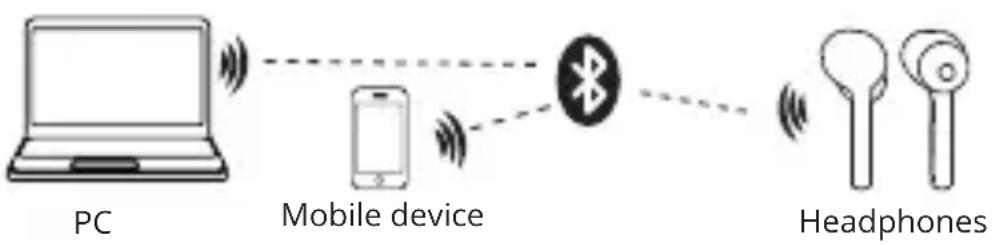
flowchart
graph LR
    PC["PC"] -->|Signal| Mobile_Device["Mobile device"]
    Mobile_Device -->|Signal| Bluetooth["Bluetooth"]
    Bluetooth -->|Signal| Headphones["Headphones"]
Fig. 2. Connection diagram
Headphone control
When connected to a telephone:
- In order to receive an incoming call, touch the earphone once. Long press either of earphone 2 seconds to reject the incoming call.
- Siri or Google Assistant: touch the either of earphone three times.
- Play/pause: touch either of earphone once.
- Previous track: long press the left earphone 2 seconds.
- Next track: long press the right earphone 2 seconds.
- Reset function: touch button ③ on the two earbuds five times at the same time.
TECHNICAL SPECIFICATIONS
| Parameter, measurement unit Value | |
| Sensitivity, dB headphones: 102 ± 3 | microphone: -58 ± 3 |
| Frequency range, Hz headphones: 20 – 20 000 | microphone: 30 – 16 000 |
| Impedance, Ohm 32 | |
| Membrane, mm ∅ 14 | |
| Connection type Bluetooth | |
| Bluetooth supported profiles HSP, HFP, A2DP, AVRCP | |
| Radius of operation, m up to 10 | |
| Operation time, h up to 3 | |
| Operation time using a charging case, h up to 12 | |
| Weight, g 30 |
Notes:
- Technical specifications given in this table are supplemental information and cannot give occasion to claims.
- Technical specifications and package contents are subject to change without notice due to the improvement of SVEN production.
Wireless Stereo Headphones with Microphone
SVEN®
Model: E-335B
Importer: Tiralana OY, Office 102, Kotolah-dentie 15, 48310 Kotka, Finland.
Модель: E-335B
Manufacturer: SVEN PTE. LTD, 176 Joo Chiat Road, No 02-02, Singapore, 427447. Produced under the control of Oy Sven Scandinavia Ltd. 15, Kotolahdentie, Kotka, Finland, 48310. Made in China.
® Registered Trademark of Oy SVEN Scandinavia Ltd. Finland.

EACCE
E-335B