CVP-94 - Digital piano YAMAHA - Free user manual and instructions
Find the device manual for free CVP-94 YAMAHA in PDF.


User questions about CVP-94 YAMAHA
0 question about this device. Answer the ones you know or ask your own.
Ask a new question about this device
Download the instructions for your Digital piano in PDF format for free! Find your manual CVP-94 - YAMAHA and take your electronic device back in hand. On this page are published all the documents necessary for the use of your device. CVP-94 by YAMAHA.
USER MANUAL CVP-94 YAMAHA
Table of Contents (English)
Messages 2
Troubleshooting 6
MIDI and Data Compatibility 8
MIDI Data Format 9
MIDI Implementation Chart 19
Voice List. 20
Drum/key Assignment List 26
Style List 28
Parameter Chart 29
Fingering Chart 30
Specifications 31
CVP-94:Assembly 32
CVP-92:Assembly 38
Effect Parameter List 44
Effect Data Value Assign Table 45
This prompt appears when there is no disk in the disk drive.
Put the proper disk in the drive and attempt the operation again.
No sons!
When renaming the original song or converting the data this prompt will warn you in the event that there is no song data.
Select a data-containing song, or insert a disk with song data into the floppy disk drive.
No file!
This message appears if there is no Registration Memory, Micro Tuning, or related data on the currently inserted disk when you attempt a file-related operation.
Create a file or insert a disk with a proper file.
Start disk format?
OK CANCEL
This message appears when a new disk or a non-Clavinova formatted disk has been inserted into the disk drive. (See page 94 in the Owner's Manual.)
Press OK if you want to format the disk. Press CANCEL if you want to abort the formatting process.
Protected disk!
This message appears when you attempt to record or perform other file operations to a disk whose write-protect tab is set to "write protect."
Set the write-protect tab to the recordable position (page 7 in the Owner's Manual) then try the operation again. If the operation still cannot be performed, the disk itself has internal write protection, making it impossible to perform recording or file operations on the disk.
Protected sons!
This message appears when you attempt to record over parts or perform other operations on files that are incompatible or do not allow such operations. Depending on the file type, operations such as additional recording, copying, deleting, etc. may not be possible on the CVP-94/92.
Disk read/write error!
OK
An error occurred while writing to (as in recording or storing files) or reading from the disk.
Try the operation again after pressing the OK button. If the error occurs a second time, the disk or the disk drive unit may be faulty. If you suspect the drive to be at fault, refer the problem to your Yamaha dealer.
Completed!
This appears for a few seconds when a time consuming operation such as format, song copy, etc. is finished.
Don't remove the disk!
This message appears when data is being transferred between the Clavinova and the disk.
The message disappears automatically when the operation is finished.
Are you sure?
YES NO
When operations such as Song Delete or Format are selected, this prompts you to confirm whether you want to go ahead with the operation or not.
Press YES to execute the operation. Press NO to return to the previous display.
Disk full!
OK
The currently loaded disk is full and cannot hold any more data.
Press the OK button, then delete any unnecessary data in the disk (page 123 in the Owner's Manual), or use a disk that has more available space. If this appears during song recording, recording will stop and recorded data up to that point will be saved automatically.
| Too many files! OK | A 2DD and a 2HD disk can hold up to 60 song files each. A 2DD disk can hold about 110 files (of various types), and a 2HD disk can hold up to about 220 files. This message appears when you try to produce more files than the disk is capable of storing. ⇒ Press the OK button, then delete any unnecessary files in the disk (page 123 in the Owner's Manual), or use a disk that has more available space. | |
| Same name! Overwrite? OK CANCEL | A file with the same name exists. ⇒ Press the OK button if you wish to overwrite the original file with new data, or press CANCEL toabort the operation. | |
| This button can't be used during recordings or playback! | This message appears when you try to perform operations which cannot be done during recording or playback, such as data conversion, etc. ⇒ Stop song recording or playback, or exit from the recording/playback mode, then perform the operation again. | |
| This button can't be used during playback! | This appears when you try to execute operations that cannot be performed during play-back, such as changing the number of repeats of the Guide function. ⇒ Stop song playback, or exit from the playback mode, then perform the operation again. | |
| Button not valid! | A button that does not have a function in the current mode has been pressed. | |
| Disk read/write operation in process! | This message appears when you try to execute other operations while reading data from the disk or saving data. ⇒ Wait until the data read/write operation is completed, then perform the operation again. | |
| Memory write operation in process! | This message appears when you attempt to execute another operation while writing ed-ited data of a song recorded to internal RAM. ⇒ Complete the data write operation, then perform the other operation. | |
| Delete CVP MEMORY? YES NO | This message appears when executing an operation that results in deleting data recorded to the internal RAM, such as playback of disk software. ⇒ Press YES to delete the data recorded to the internal RAM, then perform the de-sired operation. Press the NO button if you want to keep the data. | |
| Convert to CVP songs? YES NO | This message appears when you attempt to record over or edit data of commercially available software or data recorded on Clavinovas other than the CVP-94/92/98/96. ⇒ Press YES to convert the data for recording/editing on the CVP-94/92/98/96. Press NO if you don't want to convert the data. | |
| Song Copy Related Messages | ||
| Number of disk exchange (1) OK CANCEL | This message informs you of the number of times the disks must be exchanged when copying a song to a different disk before starting the song copy operation. (See page 122 in the Owner's Manual.) | |
| Insert Disk 2. (1/3) CANCEL | Insert the destination disk to be copied. (See page 122 in the Owner's Manual.) | |
| Please select destination songs number. OK CANCEL | When copying a song from the source disk to another disk, this message prompts you to specify the song number in the destination disk to which the song is to be copied, when the disk is first inserted. (See page 122 in the Owner's Manual.) | |
| Insert Disk 1. (2/3) CANCEL | This message prompts you to insert the source disk when copying songs to a second disk. (See page 122 in the Owner's Manual.) | |
| Select a different number! | This appears when the same song number is selected for both source and destination in the song copy operation. → Change the destination song number. | |
| Custom Style Related Messages | ||
| CUSTOM STYLE Please select a source style. | This message appears for a few seconds when the Custom Style mode is engaged. (See page 59 in the Owner's Manual.) | |
| Clear style? OK GCancel | This confirmation prompt appears when you attempt to change the beat parameter in the Custom Style mode. (See page 60 in the Owner's Manual.) | |
| Clear section? OK GCancel | This confirmation prompt appears when you attempt to change the number of measures in the Custom Style mode. (See page 61 in the Owner's Manual.) | |
| Clear part? OK GCancel | This confirmation prompt appears when you attempt to perform operations which can only be done after deleting the part of the original style in the Custom Style mode. (See page 62 in the Owner's Manual.) | |
| Store Bossa NovaX? NEOY NO. 1 ITEMP,STYLE OK GCancel | This confirmation prompt appears when you attempt a store operation in the Custom Style mode. (See page 64 in the Owner's Manual.) This also appears when you attempt to change styles before storing. (See page 68 in the Owner's Manual.) | |
| Store Bossa NovaX? NEOY NO. 1 ITEMP,STYLE YES NO GCancel | This confirmation prompt appears when you attempt to exit from the Custom Style mode before storing data. (See page 68 in the Owner's Manual.) → Select YES to store. Press NO to exit without storing data. Press CANCEL to return to the previous display without storing data. (See page 68 in the Owner's Manual.) | |
| Can't recall! OK | This message appears when the Recall Section operation in the Custom Style mode cannot be performed, due to changes in the time signature (beat). (See page 64 in the Owner's Manual.) | |
| Please store to memory before saving to disk OK | If the data has not been stored to memory before saving to disk in the Custom Style mode, this message prompts you to store the data before proceeding. (See page 66 in the Owner's Manual.) | |
| Not enough memory! Please delete an unneeded style or simplify the current style. DELETE GCancel | This message appears if there is not enough internal memory space left when storing data in the Custom Style mode. (See page 67 in the Owner's Manual.) | |
| Delete style? NEOY NO. 1 ITEMP,style OK GCancel | This message appears when DELETE is selected from the display shown above. → Select the style to be deleted and press the OK button. Press CANCEL if you do not want to delete the style. | |
| Not enough memory! OK | This message appears when memory capacity has become full during recording in the Custom Style mode (page 68 in the Owner's Manual). This also appears when memory has become full during recording of a song to internal RAM. In this case, recording will stop and data recorded up to that point will be saved automatically. | |
- Recorded Data Conversion Related Messages

2HD disk not valid! Please copy to 2DD disk.
OK
This message appears if a 2HD disk is used when performing conversion of the recorded data.
Press OK and copy the song data to be converted to a 2DD disk, then perform the data conversion using the disk.

Completed! SONG No. 2
Following conversion of the song data, this message displays the song number to which the data was saved.
- Initial Data Change Related Messages

Write edited data?
YES
NO
CANCEL
This confirmation message appears if you attempt to exit the Initial Edit function without writing the data.
Press YES to write the changed data. Press NO to exit without writing. Press CANCEL to return to the Initial Edit display without writing.
- Chord Sequence Related Messages

Save recorded data?
YES
NO
CANCEL
This confirmation message appears if you attempt to exit the Chord Sequence function during recording.
Press YES to store the recorded data. Press NO to exit without storing. Press CANCEL to return to the Chord Sequence display without storing.

Button not valid!
Enter at the top of measure.
This message appears during Chord Sequence recording when you attempt to enter an accompaniment style or section change at a position other than the beginning of a measure.
Record changes of accompaniment style or section only at the beginning of the measure. (See page 105 in the Owner's Manual.)
- Style File Load Related Messages

Not enough memory!
Delete an unneeded style?
DELETE CANCEL
This message appears when you attempt to load a Style file without there being enough memory to hold the specified file. (See page 70 in the Owner's Manual.)

Too much data for LISTEN function! Please load data.
Some Style Files are too large to be handled by the LISTEN feature in the Style File Load function. (See page 70 in the Owner's Manual.)
Other Messages

HOST is offline!
This message appears when the host computer is not turned on, the connecting cable is not properly connected, the HOST SELECT switch is not in the proper position, or the MIDI driver or MIDI application is not active. In this case, turn the power off on both the CVP-94/92 and the computer, and check the cable connection and the position of the HOST SELECT switch. Once the connection and HOST SELECT switch position is verified, turn the power of the computer on first, then the CVP-94/92, to check if the MIDI driver and MIDI application function properly.

Back up data erased and replaced by factory data.
As long as the Clavinova is regularly used, data is retained in memory. If the instrument is left unused for a week or longer before being turned on again, the data is erased and this message appears. This message also appears when you recall all factory data. (See page 132 in the Owner's Manual.)

Hardware error!
A problem has been detected in the hardware system during power on.
Refer the problem to your Yamaha dealer.

Clean the disk head!
The disk head is dirty. Clean the disk head using a commercially available head cleaning disk.
| Problem | Cause | Solution |
| The power of the CVP-94/92 does not turn on. | The power cable plugs are not in-serted either in the CVP-94/92 or a proper AC outlet. | Securely insert one of the cable plugs into the instrument itself, and the other plug into a proper AC outlet. |
| A click or pop sound is produced when turning on/off the power. | Electrical current is flowing into the instrument. | This is normal, and is no cause for concern. |
| The LCD display is too bright or too dark to read. | The brightness may be changed by the surrounding temperature. | Adjust the contrast of the display by using the [CONTRAST] control. (See page 15 in the Owner's Manual.) |
| The pop-up display does not open. | The [DISPLAY HOLD] lamp is lit. | Press the [DISPLAY HOLD] button so that the lamp goes out. (See page 14 in the Owner's Manual.) |
| The keyboard sound volume is low compared to that of the Auto Accompaniment or disk playback. | The independent volume level of the keyboard performance sound is too low. | Raise the volume of the keyboard performance in the Mixer display. (See page 82 in the Owner's Manual.) |
| The sound of the Auto Accompaniment or disk playback is low compared to that of the keyboard. | The [ACMP/SONG VOLUME] is low. | Raise the [ACMP/SONG VOLUME] level. |
| The entire sound is low or no sound comes out. | The [MASTER VOLUME] is low. | Raise the [MASTER VOLUME]. |
| Headphones are connected. | Unplug the headphones. | |
| Local Control is set to off. | Set Local Control to on. (See page 128 in the Owner's Manual.) | |
| The damper pedal has no effect, or the sound continuously sustains even when the damper pedal is not pressed. | The pedal cord plug is not connected. | Securely insert the pedal cord plug into the proper jack. (See pages 34 and 40 in this Manual.) |
| Auto Accompaniment or disk play-back does not start. | MIDI Sync is set to “EXT.”. | Set MIDI Sync to “INT.”. (See page 129 in the Owner's Manual.) |
| When the keyboard is played, not all of the notes sound. | Notes have been played beyond the total simultaneous polyphonic capacity (maximum number of notes). | The tone generation system is configured such that later notes have priority, occasionally resulting in previous notes being cut off. See the “Specifications” section on page 31 in this Manual for information on the simultaneous polyphonic capacity. |
| Auto Accompaniment does not play back. | Auto Accompaniment is not turned on. | Press the [ACMP ON] button to turn on Auto Accompaniment. |
| The desired chord cannot be recog-nized or output by the Auto Accom- paniment. | The keys are not being played cor-rectly. | Refer to the “Fingering Chart” (page 30 in this Manual). |
| The keys are not being played ac-cording to the selected Auto Accom- paniment type. | Check the Auto Accompaniment type, and play the keys according to the selected type. (See page 47 in the Owner’s Manual.) | |
| The maximum of 60 songs cannot be recorded. | The memory capacity is full because the playing time of one or more songs is long, or many functions were used. | Delete unnecessary songs (page 123 in the Owner’s Manual) or record to a new disk. |
| Some tracks do not played back when playing back data. | Playback of the track(s) is set to off. | Set playback for the non-sounding tracks to on. (See pages 79 and 82 in the Owner’s Manual.) |

CAUTION
- If a "Hardware Error!" message appears in the display when turning on the power, contact your local Yamaha dealer immediately, since this indicates some sort of internal damage to the instrument.
■MIDI
MIDI (Musical Instrument Digital Interface) is a worldwide standard communication interface that allows MIDI-compatible musical instruments and equipment to share musical information and control one another.
- Depending on the MIDI device, the transmittable/receivable data differs, and only data which is commonly recognized among the connected MIDI devices can be transmitted or received. You can check whether your instrument supports certain data types by referring to the MIDI Implementation Chart in the owner's manual for that instrument. The MIDI Implementation Chart for the CVP-94/92 is found on page 19 in this Manual.
MIDI Terminals
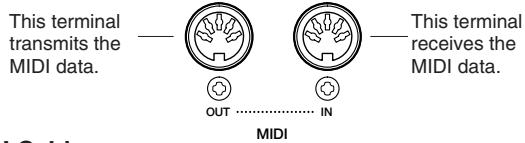
MIDI Cable
Connect MIDI devices with special MIDI cables.
- The various MIDI settings can be made from the Function section's MIDI 1 - 3 pages.
Further information on MIDI and its applications is available in various music books and magazines.
Data Compatibility
This section covers basic information on data compatibility: whether or not other MIDI devices can playback the data recorded by CVP-94/92, and whether or not the CVP-94/92 can playback commercially available song data or song data created for other instruments or on a computer.
Depending on the MIDI device or data characteristics, you may be able to play back the data without any problem, or you may have to perform some special operations before the data can be played back. If you run into problems playing back data, please refer to the information below.
Basic Check Points
The data and the MIDI device must match in regards to the items below.
- Disk Format
Sequence format
Voice allocation format
Disk format
Floppy disks are the main storage medium for data used with various devices, including computers. Different devices have different systems of storing data, therefore it is necessary to first configure the floppy disk to the system of the device being used. This operation is called "formatting."
- There are two types of floppy disks: MF2DD (double sided, double density) and MF2HD (double sided, high density), and each type has different formatting systems.
- CVP-94/92 can record and playback with both types of floppy disks.
- When formatted by the CVP-94/92, a 2DD disk stores up to 720 KB (kilobytes) and a 2HD disk stores up to 1.44 MB (megabytes). (The figures “720 KB” and “1.44 MB” indicate the data memory capacity. They are also used to indicate the format type of disk.)
- Playback is only possible when the MIDI device to be used is compatible with the format of the disk.
Sequence Format
The system which records song data is called "sequence format."
- Playback is only possible when the sequence format of the disk matches that of the MIDI device.
[Common Sequence Formats] SMF (Standard MIDI File)
This is the most common sequence format.
- Standard MIDI Files are generally available as one of two types: Format 0 or Format 1.
- Many MIDI devices are compatible with Format 0, and most commercially available software is recorded as Format 0.
- The CVP-94/92 is compatible with both Format 0 and Format 1 (for Format 1, up to a maximum of 17 chunks).
- Song data recorded on the CVP-94/92 is automatically recorded as SMF Format 0.
ESEQ
This sequence format is compatible with many of Yamaha's MIDI devices, including the Clavinova series instruments.
This is a common format used with various Yamaha software.
The CVP-94/92 is compatible with ESEQ.
Voice Allocation Format
With MIDI, voices are assigned to specific numbers, called "program numbers." The numbering standard (order of voice allocation) is referred to as the "voice allocation format."
- Voices may not play back as expected unless the voice allocation format of the song data matches that of the compatible MIDI device used for playback.
[Main Voice Allocation Formats] GM System Level 1
This is one of the most common voice allocation formats.
- Many MIDI devices are compatible with GM System Level 1, as is most commercially available software.
The CVP-94/92 is compatible with GM System Level 1.
XG
XG is a major enhancement of the GM System Level 1 format, and was developed by Yamaha specifically to provide more voices and variations, as well as greater expressive control over voices and effects, and to ensure compatibility of data well into the future.
The CVP-94/92 is compatible with XG.
- Song data recorded on the CVP-94/92 is automatically given XG voice allocation.
DOC
This voice allocation format is compatible with many of Yamaha's MIDI devices, including the Clavinova series instruments.
This is also a common format used with various Yamaha software.
The CVP-94/92 is compatible with DOC.
Even if the devices and data used satisfy all the conditions above, the data may still not be completely compatible, depending on the specifications of the devices and particular data recording methods.
2HD disk not valid! Please copy to 2DD disk.
OK
Completed! SONG No. 2
Button not valid!
Enter at the top of measure.
Not enough memory!
Delete an unneeded style?
18Beat Pop1 (X17KB)
DELETE CANCEL
Too much data for LISTEN function! Please load data.
Back up data erased and replaced by factory data.
Clean the disk head!
| Save recorded data? | ||
| YES | NO | CANCEL |
Please copy to 2DD disk.
OK

Completed! SONG No. 2
Delete an unneeded style?
1[8Re]
EMOR
NO. 1(17KB)
DELETE CANCEL
Too much data for LISTEN
function!
Please load data.
Back up data erased and
replaced by factory data.
Clean the disk head!
Many MIDI messages listed in the MIDI Data Format are expressed in decimal numbers, binary numbers and hexadecimal numbers. Hexadecimal numbers may include the letter "H" as a suffix. Also, "n" can freely be defined as any whole number.
To enter data/values, refer to the table below.
| Decimal | Hexadecimal | Binary |
| 0 | 00 | 0000 0000 |
| 1 | 01 | 0000 0001 |
| 2 | 02 | 0000 0010 |
| 3 | 03 | 0000 0011 |
| 4 | 04 | 0000 0100 |
| 5 | 05 | 0000 0101 |
| 6 | 06 | 0000 0110 |
| 7 | 07 | 0000 0111 |
| 8 | 08 | 0000 1000 |
| 9 | 09 | 0000 1001 |
| 10 | 0A | 0000 1010 |
| 11 | 0B | 0000 1011 |
| 12 | 0C | 0000 1100 |
| 13 | 0D | 0000 1101 |
| 14 | 0E | 0000 1110 |
| 15 | 0F | 0000 1111 |
| 16 | 10 | 0001 0000 |
| 17 | 11 | 0001 0001 |
| 18 | 12 | 0001 0010 |
| 19 | 13 | 0001 0011 |
| 20 | 14 | 0001 0100 |
| 21 | 15 | 0001 0101 |
| 22 | 16 | 0001 0110 |
| 23 | 17 | 0001 0111 |
| 24 | 18 | 0001 1000 |
| 25 | 19 | 0001 1001 |
| 26 | 1A | 0001 1010 |
| 27 | 1B | 0001 1011 |
| 28 | 1C | 0001 1100 |
| 29 | 1D | 0001 1101 |
| 30 | 1E | 0001 1110 |
| 31 | 1F | 0001 1111 |
| 32 | 20 | 0010 0000 |
| 33 | 21 | 0010 0001 |
| 34 | 22 | 0010 0010 |
| 35 | 23 | 0010 0011 |
| 36 | 24 | 0010 0100 |
| 37 | 25 | 0010 0101 |
| 38 | 26 | 0010 0110 |
| 39 | 27 | 0010 0111 |
| 40 | 28 | 0010 1000 |
| 41 | 29 | 0010 1001 |
| 42 | 2A | 0010 1010 |
| 43 | 2B | 0010 1011 |
| 44 | 2C | 0010 1100 |
| 45 | 2D | 0010 1101 |
| 46 | 2E | 0010 1110 |
| 47 | 2F | 0010 1111 |
| 48 | 30 | 0011 0000 |
| 49 | 31 | 0011 0001 |
| 50 | 32 | 0011 0010 |
| 51 | 33 | 0011 0011 |
| 52 | 34 | 0011 0100 |
| 53 | 35 | 0011 0101 |
| 54 | 36 | 0011 0110 |
| 55 | 37 | 0011 0111 |
| 56 | 38 | 0011 1000 |
| 57 | 39 | 0011 1001 |
| 58 | 3A | 0011 1010 |
| 59 | 3B | 0011 1011 |
| 60 | 3C | 0011 1100 |
| 61 | 3D | 0011 1101 |
| 62 | 3E | 0011 1110 |
| 63 | 3F | 0011 1111 |
| Decimal | Hexadecimal | Binary |
| 64 | 40 | 0100 0000 |
| 65 | 41 | 0100 0001 |
| 66 | 42 | 0100 0010 |
| 67 | 43 | 0100 0011 |
| 68 | 44 | 0100 0100 |
| 69 | 45 | 0100 0101 |
| 70 | 46 | 0100 0110 |
| 71 | 47 | 0100 0111 |
| 72 | 48 | 0100 1000 |
| 73 | 49 | 0100 1001 |
| 74 | 4A | 0100 1010 |
| 75 | 4B | 0100 1011 |
| 76 | 4C | 0100 1100 |
| 77 | 4D | 0100 1101 |
| 78 | 4E | 0100 1110 |
| 79 | 4F | 0100 1111 |
| 80 | 50 | 0101 0000 |
| 81 | 51 | 0101 0001 |
| 82 | 52 | 0101 0010 |
| 83 | 53 | 0101 0011 |
| 84 | 54 | 0101 0100 |
| 85 | 55 | 0101 0101 |
| 86 | 56 | 0101 0110 |
| 87 | 57 | 0101 0111 |
| 88 | 58 | 0101 1000 |
| 89 | 59 | 0101 1001 |
| 90 | 5A | 0101 1010 |
| 91 | 5B | 0101 1011 |
| 92 | 5C | 0101 1100 |
| 93 | 5D | 0101 1101 |
| 94 | 5E | 0101 1110 |
| 95 | 5F | 0101 1111 |
| 96 | 60 | 0110 0000 |
| 97 | 61 | 0110 0001 |
| 98 | 62 | 0110 0010 |
| 99 | 63 | 0110 0011 |
| 100 | 64 | 0110 0100 |
| 101 | 65 | 0110 0101 |
| 102 | 66 | 0110 0110 |
| 103 | 67 | 0110 0111 |
| 104 | 68 | 0110 1000 |
| 105 | 69 | 0110 1001 |
| 106 | 6A | 0110 1010 |
| 107 | 6B | 0110 1011 |
| 108 | 6C | 0110 1100 |
| 109 | 6D | 0110 1101 |
| 110 | 6E | 0110 1110 |
| 111 | 6F | 0110 1111 |
| 112 | 70 | 0111 0000 |
| 113 | 71 | 0111 0001 |
| 114 | 72 | 0111 0010 |
| 115 | 73 | 0111 0011 |
| 116 | 74 | 0111 0100 |
| 117 | 75 | 0111 0101 |
| 118 | 76 | 0111 0110 |
| 119 | 77 | 0111 0111 |
| 120 | 78 | 0111 1000 |
| 121 | 79 | 0111 1001 |
| 122 | 7A | 0111 1010 |
| 123 | 7B | 0111 1011 |
| 124 | 7C | 0111 1100 |
| 125 | 7D | 0111 1101 |
| 126 | 7E | 0111 1110 |
| 127 | 7F | 0111 1111 |
- Except the table above, for example 144-159(decimal)/9nH/1001 0000-1001 1111binary) displays the Note On Message for each channel (1-16). 176-191/ BnH/1011 0000-1011 1111 displays the Control Change Message for each channel (1-16). 192-207/CnH/1100 0000-1100 1111 displays the Program Change Message for each channel (1-16). 240/FOH/1111 0000 denotes the start of a System Exclusive Message. 247/F7H/1111 0111 denotes the end of a System Exclusive Message.
- aaH (hexadecimal)/0aaaaaaa (binary) denotes the data address. The address contains High, Mid, and Low.
- bbH/0bbbbbb denotes the byte count.
- ccH/OCCCCCC denotes the check sum.
- ddH/0ddddddd denotes the data/value.
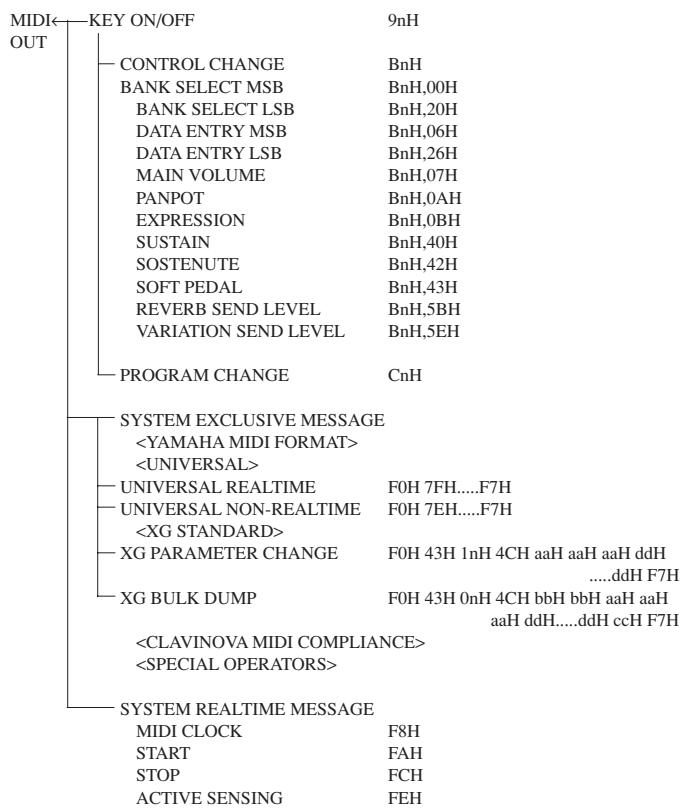
(1) TRANSMIT FLOW
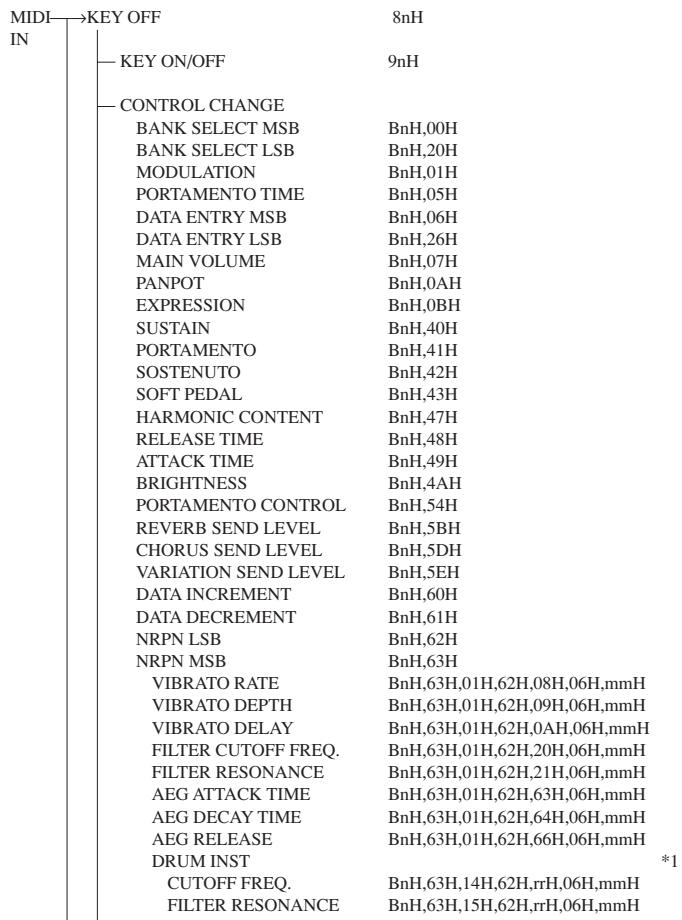
(2) RECEIVE FLOW
| AEG ATTACK RATE | BnH,63H,16H,62H,rrH,06H,mmH |
| AEG DECAY RATE | BnH,63H,17H,62H,rrH,06H,mmH |
| PITCH COARSE | BnH,63H,18H,62H,rrH,06H,mmH |
| PITCH FINE | BnH,63H,19H,62H,rrH,06H,mmH |
| LEVEL | BnH,63H,1AH,62H,rrH,06H,mmH |
| PANPOT | BnH,63H,1CH,62H,rrH,06H,mmH |
| REVERB SEND | BnH,63H,1DH,62H,rrH,06H,mmH |
| CHORUS SEND | BnH,63H,1EH,62H,rrH,06H,mmH |
| VARIATION SEND | BnH,63H,1FH,62H,rrH,06H,mmH |
| RPN LSB | BnH,64H |
| RPN MSB | BnH,65H |
| PITCH BEND SENS. | BnH,65H,00H,64H,00H,06H,mmH |
| FINE TUNING | BnH,65H,00H,64H,01H,06H,mmH,26H,IIH |
| COARSE TUNING | BnH,65H,00H,64H,02H,06H,mmH |
| NULL | BnH,65H,7FH,64H,7FH |
| ALL SOUND OFF | BnH,78H,00H |
| RESET ALL CONTROLLER | BnH,79H,00H |
| ALL NOTES OFF | BnH,7BH |
| OMNI OFF | BnH,7CH |
| OMNI ON | BnH,7DH |
| MONO | BnH,7EH |
| POLY | BnH,7FH |
| PROGRAM CHANGE | CnH |
| CHANNEL AFTER TOUCH | DnH |
| PITCH BEND CHANGE | EnH |
| SYSTEM EXCLUSIVEMESSAGE | |
| <YAMAHA MIDI FORMAT> | |
| <UNIVERSAL> | |
| UNIVERSAL REALTIME | F0H 7FH......F7H |
| UNIVERSAL NON-REALTIME | F0H 4EH......F7H |
| <XG STANDARD> | |
| XG PARAMETER CHANGE | F0H 43H 1nH 4CH aaH aaH ddH......ddH F7H |
| XG BULK DUMP | F0H 43H 0nH 4CH bbH bbH aaH aaH aaH ddH......ddH ccH F7H |
| PARAMETER REQUEST | F0H 43H 3nH 4CH aaH aaH aaH F7H |
| DUMP REQUEST | F0H 43H 2nH 4CH aaH aaH aaH F7H |
| <CLAVINOVA MIDI COMPLIANCE> | |
| <SPETIAL OPERATORS> | |
| <Others> | |
| SYSTEM REALTIMEMESSAGE | |
| MIDI CLOCK | F8H |
| START | FAH |
| STOP | FCH |
| ACTIVE SENSING | FEH |
(3) TRANSMIT/RECEIVE DATA
(3-1) CHANNEL VOICE MESSAGES
(3-1-1) KEY OFF(Recive only)
STATUS 1000nnn(8nH) n = 0 - 15 VOICE CHANNEL NUMBER
NOTE NUMBER 0kkkkkkk k = 0 (C-2) - 127 (G8)
VELOCITY 0vcccc v: ignored
(3-1-2) KEY ON/OFF
STATUS 1001nnnn(9nH) n = 0 - 15 VOICE CHANNEL NUMBER
NOTE NUMBER 0kkkkkkk k = 0 (C-2)-127 (G8)
VELOCITY 0vvvvvv (v≠0) NOTE ON
00000000 (v = 0) NOTE OFF
(3-1-3) PROGRAM CHANGE
STATUS 1100nnn(CnH) n = 0 - 15 VOICE CHANNEL NUMBER
PROGRAM NUMBER 0ppppppp = 0 -127
- PROGRAM NUMBER: XG DRUM VOICE number correspondence
P = 0 Standard Kit
P=1 Standard2Kit
P = 8 RoomKit
P = 16 RockKit
P = 24 Elctrnic Kit
P = 25 Analog Kit
P=27 DanceKit
P = 32 JazzKit
P = 40 BrushKit
P = 48 Classic Kit
- PROGRAM NUMBER: XG SFX KIT number correspondence
P=1 SFX1 Kit
P = 2 SFX2 Kit
When DRUM VOICE is selected and program change data for a different DRUM VOICE is received, the currently selected DRUM VOICE will be replaced with the new DRUM VOICE.
(3-1-4) CHANNEL AFTER TOUCH (Recive only)
STATUS 1101nnnn(DnH) n = 0 - 15 VOICE CHANNEL NUMBER
VALUE 0vvvvvv v = 0 - 127 AFTER TOUCH VALUE
(3-1-5) PITCH BEND CHANGE
STATUS 1110nnn(EnH) n = 0 - 15 VOICE CHANNEL NUMBER
LSB 0vcccc PITCH BEND CHANGE LSB
MSB 0vvvvvv PITCH BEND CHANGE MSB
(3-1-6) CONTROL CHANGE
STATUS 1011nnnn(BnH) n = 0 - 15 VOICE CHANNEL NUMBER
CONTROL NUMBER 0cccccc
CONTROL VALUE 0vcccc
- Transmit CONTROL NUMBER.
| c = 0 | BANK SELECT MSB ; v = 0:XG NORMAL,64:SFX NORMAL,126:XG SFX KIT,127:XG DRUM | |
| c = 32 | BANK SELECT LSB ; v = 0 - 127 | *3 |
| c = 6 | DATA ENTRY MSB ; v = 0 - 127 | *1 |
| c = 38 | DATA ENTRY LSB ; v = 0 - 127 | *1 |
| c = 7 | MAIN VOLUME ; v = 0 - 127 | |
| c = 10 | PANPOT ; v = 0 - 127 | |
| c = 11 | EXPRESSION ; v = 0 - 127 | |
| c = 64 | SUSTAIN ; v = 0-63:OFF , 64-127:ON | *2 |
| c = 66 | SOSTENUTO ; v = 0-63:OFF , 64-127:ON | *2 |
| c = 67 | SOFT PEDAL ; v = 0-63:OFF , 64-127:ON | *2 |
| c = 91 | REVERB SEND LEVEL ; v = 0 - 127 | |
| c = 94 | VARIATION SEND LEVEL ; v = 0 - 127 | |
| (When only Connection = 1 [System]) | ||
- Receive CONTROL NUMBER.
| c = 0 | BANK SELECT MSB ; v = 0:XG NORMAL,64:SFX NORMAL,126:XG SFX KIT,127:XG DRUM | |
| c = 32 | BANK SELECT LSB ; v = 0 - 127 | *3 |
| c = 1 | MODULATION ; v = 0 - 127 | *2 |
| c = 5 | PORTAMENTO TIME ; v = 0 - 127 | *2 |
| c = 6 | DATA ENTRY MSB ; v = 0 - 127 | *1 |
| c = 38 | DATA ENTRY LSB ; v = 0 - 127 | *1 |
| c = 7 | MAIN VOLUME ; v = 0 - 127 | |
| c = 10 | PANPOT ; v = 0 - 127 | |
| c = 11 | EXPRESSION ; v = 0 - 127 | |
| c = 64 | SUSTAIN ; v = 0-63:OFF , 64-127:ON | *2 |
| c = 65 | PORTAMENTO ; v = 0-63:OFF , 64-127:ON | *2 |
| c = 66 | SOSTENUTO ; v = 0-63:OFF , 64-127:ON | *2 |
| c = 67 | SOFT PEDAL ; v = 0-63:OFF , 64-127:ON | *2 |
| c = 71 | HARMONIC CONTENT ; v = 0:-64 - 64:0 - 127:+63 | *2 |
| c = 72 | RELEASE TIME ; v = 0:-64 - 64:0 - 127:+63 | *2 |
| c = 73 | ATTACK TIME ; v = 0:-64 - 64:0 - 127:+63 | *2 |
| c = 74 | BRIGHTNESS ; v = 0:-64 - 64:0 - 127:+63 | *2 |
| c = 84 | PORTAMENT CONTROL ; v = 0 - 127 | *2 |
| c = 91 | REVERB SEND LEVEL ; v = 0 - 127 | |
| c = 93 | CHORUS SEND LEVEL ; v = 0 - 127 | |
| c = 94 | VARIATION SEND LEVEL ; v = 0 - 127(When only Connection = 1[System]) | |
| c = 96 | DATA INIncrement ; v = 127 | *1 |
| c = 97 | DATA DECREMENT ; v = 127 | *1 |
1 Only when setting the appointed parameter with RPN, NRPN.
2 Does not effect Rhythm Voice.
*3 MSB=0, anything other than 63 is 0.
- Until a PROGRAM CHANGE message is received, the BANK SELECT operation will be suspended. When a Voice, including VOICE BANK, is changed, set the BANK SELECT and Program Change Message, and transmit in the following order, BANK SELECT MSB, LSB, PROGRAM CHANGE.
-
MODULATION controls the Vibrato Depth.
-
PORTAMENTO TIME controls the Pitch Change Speed when the Portamento Switch = ON. 0 being the shortest time, and 127 being the longest.
-
PANPOT changes the value for the melody voice and rhythm voice in relation to the preset value.
- Portamento time is fixed to 0 when the PORTAMENTO CONTROL is used.
- HARMONIC CONTENT applies adjustment to the resonance value that is set by the voice. This parameter specifies relative change with the value of 64 producing 0 adjustment. As values get higher the sound becomes increasingly eccentric. Note that for some voices the effective parameter range is narrower than the legal parameter range.
- RELEASE TIME applies adjustment to the envelope release time set by the voice. This parameter specifies relative change with the value of 64 producing 0 adjustment.
- ATTACK TIME applies adjustment to the envelope attack time set by the voice. This parameter specifies relative change with the value of 64 producing 0 adjustment.
- BRIGHTNESS applies adjustment to the cut-off frequency set by the voice. This parameter specifies relative change with the value of 64 producing 0 adjustment. Lower voices produce a softer sound. For some voices the effective parameter range is narrower than the legal parameter range.
(3-2) CHANNEL MODE MESSAGES
STATUS 1011nnn(BnH) n = 0 - 15 VOICE CHANNEL NUMBER
CONTROL NUMBER 0cccccc c = CONTROL NUMBER
CONTROL VALUE 0vyyyyvv v = DATA VALUE
(3-2-1) ALL SOUND OFF (Recive only)
(CONTROL NUMBER = 78H, DATA VALUE = 0)
Switches off all sound from the channel. Does not reset Note On and Hold On conditions established by Channel Messages.
(3-2-2) RESET ALL CONTROLLERs (Recive only)
(CONTROL NUMBER = 79H, DATA VALUE = 0)
Resetscontrollersasfollows.
PITCH BEND CHANGE 0 (Center)
AFTER TOUCH 0 (min.)
MODULATION 0 (min.)
EXPRESSION 127 (max.)
SUSTAIN 0 (off)
SOSTENUTO 0 (off)
SOFT PEDAL 0 (off)
NRPN Sets number to null. (Internal data remains unchanged)
RPN Sets number to null. (Internal data remains unchanged)
PORTAMENT CONTROL Resets portamento source note number
PORTAMENTO 0 (off)
(3-2-3) ALL NOTES OFF (Recive only)
(CONTROL NUMBER = 7BH, DATA VALUE = 0)
Switches off all of the channel's "on" notes. However, any notes being held by SUSTAIN or SOSTENUTO continue to sound until SUSTAIN/SOSTENUTO goes off.
(3-2-4) OMNI OFF (Recive only) (CONTROL NUMBER = 7CH, DATA VALUE = 0) Same processing as for All Notes Off.
(3-2-5) OMNI ON (Recive only) (CONTROL NUMBER = 7DH, DATA VALUE = 0)
Same processing as for All Notes Off. Omni On is not executed.
(3-2-6) MONO (Recive only) (CONTROL NUMBER = 7EH, DATA VALUE = 0)
Same processing as for All Notes Off. If the 3rd byte is in a range of 0-16 the corresponding channel will be changed to Mode 4 (m = 1) .
(3-2-7) POLY (Recive only) (CONTROL NUMBER = 7FH, DATA VALUE = 0)
Same processing as for All Sounds Off and the corresponding channel will be changed to Mode 3.
(3-3) REGISTERED PARAMETER NUMBER(RPN)
STATUS 1011nnnn(BnH) n = 0 - 15 VOICE CHANNEL NUMBER
RPN LSB 01100100(64H)
RPN LSB NUMBER 0ppppppp
RPN MSB 01100101(65H)
RPN MSB NUMBER 0qqqqq
DATA ENTRY MSB 00000110(06H)
DATA VALUE 0mmmmmm
DATA ENTRY LSB 00100110(26H)
DATA VALUE 0lllll
p = RPNLSB(refer to the list below)
q = RPNMSB (refer to the list below)
m = Data Value
1 = Data Value
First appoints the parameter for RPN MSB/LSB, then sets the parameter value for data entry MSB/LSB.
RPN D.ENTRY
LSB MSB MSB LSB PARAMETER NAME DATA RANGE
00H 00H mmH — PITCH BEND SENSITIVITY 00H - 18H (0 - 24 semitones)
01H 00H mmH lIH FINE TUNE mmH,IIH = 00H,00H -40H,00H -7FH,7FH
(-8192100 / 8192) - 0 - (+8192100 / 8192)
02H 00H mmH COARSE TUNE 28H-40H-58H(-24-0+24semitones)
7FH 7FH -NULL
Cleared the current RPN number setting. Does not change the internal parameter settings.
(3-4) NON-REGISTERED PARAMETER NUMBER(NRPN) (Recive only)
STATUS 1011nnnn(BnH) n = 0 - 15 VOICE CHANNEL NUMBER
NRPN LSB 01100010(62H)
NRPN LSB NUMBER Oppppppp
NRPN MSB 01100011(63H)
NRPN MSB NUMBER 0qqqqq
DATA ENTRY MSB 00000110(06H)
DATA VALUE 0mmmmmm
p = NRPNLSB(refer to the list below)
q = NRPNMSB(refer to the list below)
m = Data Value
First appoints the parameter for NRPN MSB/LSB, then sets the parameter value for data entry MSB/LSB.
NRPN D.ENTRY
MSB LSB MSB LSB PARAMETER NAME DATA RANGE
01H 08H mmH VIBRATO RATE 00H-40H-7FH(-64-0-+63)
01H 09H mmH VIBRATO DEPTH 00H-40H-7FH(-64-0-+63)
01H 0AH mmH VIBRATO DELAY 00H-40H-7FH(-64-0-+63)
01H 20H mmH — FILTER CUTOFF FREQUENCY 00H - 40H - 7FH (-64 - 0 - +63)
01H 21H mmH FILTER RESONANCE 00H-40H-7FH(-64-0-+63)
01H 63H mmH — EG ATTACK TIME 00H - 40H - 7FH (-64 - 0 - +63)
01H 64H mmH — EG DECAY TIME 00H - 40H - 7FH (-64 - 0 - +63)
01H 66H mmH — EG RELEASE 00H - 40H - 7FH (-64 - 0 - +63)
14H rrH mmH DRUM FILTER CUTOFF FREQ. 00H - 40H - 7FH (-64 - 0 - +63)
15H rrH mmH DRUM FILTER RESONANCE 00H-40H-7FH(-64-0-+63)
16H rrH mmH DRUM AEG ATTACK RATE 00H -40H-7FH(-64-0-+63)
17H rrH mmH DRUM AEG DECAY RATE 00H-40H-7FH(-64-0-+63)
18H rrH mmH DRUM PITCH COARSE 00H-40H-7FH(-64-0-+63)
19H rrH mmH DRUM PITCH FINE 00H-40H-7FH(-64-0-+63)
1AH rrH mmH DRUM LEVEL 00H-7FH(0-max.)
1CH rrH mmH DRUM PANPOT 00H,01H-40H-7FH
(random,left - center - right)
1DH rrH mmH DRUM REVERB SEND LEVEL 00H-7FH (0-max.)
1EH rrH mmH DRUM CHORUS SEND LEVEL 00H-7FH (0-max.)
1FH rrH mmH DRUM VARIATION SEND LEVEL 00H -7FH (0 - max.)
The MSG14H-1FH (for drums) message is accepted as long as the channel is set with a drum voice.
rrH : drum instrument note number
(3-5) SYSTEM REALTIME MESSAGES
(3-5-1)MIDI CLOCK
STATUS 1111000 (F8H)
Transmission: 96 clocks per measure are transmitted.
Reception: If the instrument's clock is set to external, after FAH is received from the
external device the instrument's clock will sync with the 96 beats per measure
received from the external device.
Decides whether the internal clock, or Timing Clocks received via the MIDI IN will be used.
(3-5-2) START
STATUS 11111010 (FAH)
Transmission: Transmitted when instrument's Rhythm or Song playback is started.
Reception: Depending upon the condition, Rhythm, Song Playback, or Song Rec will start.
(3-5-3) STOP
STATUS 11111100 (FCH)
Transmission: Transmitted when instrument's Rhythm or Song playback is stopped.
Reception: Depending upon the condition, Rhythm, Song Playback, or Song Rec will stop.
(3-5-4) ACTIVE SENSING
STATUS 1111110 (FEH)
Transmission: Transmitted approximately once every 200msec.
Reception: Sensing is started once this Code is received. If Status or Data is no
received within 400ms, the MIDI Receive Buffer will be cleared, and all notes,
including those being sustained, will be cut OFF. Also, all control values will be reset
(3-6) SYSTEM EXCLUSIVEMESSAGE
(3-6-1)YAMAHA MIDI FORMAT
(3-6-1-1) SECTION CONTROL
| binary | hexadecimal | |
| 11110000 | F0 | Exclusive status |
| 01000011 | 43 | YAMAHA ID |
| 01111110 | 7E | Style |
| 00000000 | 00 | |
| 0sssssss | SS | Switch No. |
| 00H : INTRO A | ||
| 01H~07H : INTRO B | ||
| 08H : MAIN A | ||
| 09H~0FH : MAIN B | ||
| 10H : FILL IN AA | ||
| 11H~17H : FILL IN BB | ||
| 18H : FILL IN AB | ||
| 19H~1FH : FILL IN BA | ||
| 20H : ENDING A | ||
| 21H~27H : ENDING B | ||
| 0dddddd | DD | Switch On/Off: 00H(Off),7FH(On) |
| 11110111 | F7 | End of Exclusive |
When an ON code is received, the appointed section will be changed.
(3-6-1-2) TEMPO CONTROL
| binary | hexadecimal | |
| 11110000 | F0 | Exclusive status |
| 01000011 | 43 | YAMAHA ID |
| 01111110 | 7E | Style |
| 00000000 | 01 | |
| 0ttttttt | TT | Tempo4 |
| 0ttttttt | TT | Tempo3 |
| 0ttttttt | TT | Tempo2 |
| 0ttttttt | TT | Tempo1 |
| 11110111 | F7 | End of Exclusive |
The internal clock will be set to the received Tempo value.
Tempo Meta Event is a large data block (24-bit), it is divided into 4 groups with 7-bits going into each of the Tempos 1-4 (4 receives the remaining 3 bits).
(3-6-2) UNIVERSAL SYSTEM EXCLUSIVE
(3-6-2-1) UNIVERSAL REALTIMEMESSAGE
(3-6-2-1-1) MIDI MASTER VOLUME (Recive only)
| binary | hexadecimal | |
| 11110000 | F0 | Exclusive status |
| 0111110 | 7F | Universal Realtime |
| 0111111 | 7F | ID of target Device |
| 00001001 | 04 | Sub-ID #1=Device Control Message |
| 00000001 | 01 | Sub-ID #2=Master Volume |
| 0sssssss | SS | Volume LSB |
| 0ttttttt | TT | Volume MSB |
| 11110111 | F7 | End of Exclusive |
| or | ||
| 11110000 | F0 | Exclusive status |
| 01111110 | 7F | Universal Realtime |
| 0xxxnnnnn | XN | When N is received N=0-F, whichever is received. When N is transmitted N always=0. X = don't care |
| 00001001 | 04 | Sub-ID #1=Device Control Message |
| 00000001 | 01 | Sub-ID #2=Master Volume |
| 0sssssss | SS | Volume LSB |
| 0ttttttt | TT | Volume MSB |
| 11110111 | F7 | End of Exclusive |
The volume for all channels will be changed simultaneously.
The TT value is used as the MIDI Master Volume value. (the ss value is ignored.)
(3-6-2-2) UNIVERSAL NON REALTIMEMESSAGE
(3-6-2-2-1) GENERAL MIDI SYSTEM ON
| binary | hexadecimal | |
| 11110000 | F0 | Exclusive status |
| 01111110 | 7E | Universal Non-Realtime |
| 01111111 | 7F | ID of target Device |
| 00001001 | 09 | Sub-ID #1=General MIDI Message |
| 00000001 | 01 | Sub-ID #2=General MIDI On |
| 11110111or | F7 | End of Exclusive |
| 11110000 | F0 | Exclusive status |
| 01111110 | 7E | Universal Non-Realtime |
| 0xxxnnnnn | XN | When N is received N=0-F, whichever is received.When N is transmitted N always=0.X = don't care |
| 00001001 | 09 | Sub-ID #1=General MIDI Message |
| 00000001 | 01 | Sub-ID #2=General MIDI On |
| 11110111 | F7 | End of Exclusive |
Depending upon the received ON message, the System Mode will be changed to XG. Except MIDI Master Tuning, all control data be reset to default values.
This message requires approximately 50ms to execute, so sufficient time should be allowed before the next message is sent.
(3-6-3) XG STANDARD
(3-6-3-1) XG PARAMETER CHANGE
(3-6-3-1-1) XG SYSTEM ON
| binary | hexadecimal | |
| 11110000 | F0 | Exclusive status |
| 01000011 | 43 | YAMAHA ID |
| 0001nnnn | 1N | Device Number |
| 01001100 | 4C | Model ID |
| 00000000 | 00 | Address High |
| 00000000 | 00 | Address Mid |
| 01111110 | 7E | Address Low |
| 00000000 | 00 | Data |
| 11110111 | F7 | End of Exclusive |
Depending upon the received ON message, the SYSTEM MODE will be changed to XG.Controllers will be reset, all values of Multi Part and Effect, and All System values denoted by "XG" data within All System will be reset to default values in the table.
This message requires approximately 50ms to execute, so sufficient time should be allowed before the next message is sent.
(3-6-3-1-2) XG PARAMETER CHANGE
| binary | hexadecimal | |
| 11110000 | F0 | Exclusive status |
| 01000011 | 43 | YAMAHA ID |
| 0001nnnn | 1N | Device Number |
| 01001100 | 4C | Model ID |
| 0aaaaaa | AA | Address High |
| 0aaaaaa | AA | Address Mid |
| 0aaaaaa | AA | Address Low |
| 0dddddd | DD | Data |
| | | | | |
| 11110111 | F7 | End of Exclusive |
For parameters with data size of 2 or 4, transmit the appropriate number of data bytes. For more information on Address and Parameters, refer to < Table 1-2> (page 14) and < Table 1-4 > < Table 1-6 > (pages 15-18).
The 4 data types listed below are transmitted and received.
(These are transmitted only after a Parameter change request is received.)
XG System Data
Multi Effect Data
Multi Part Data
Drums Setup Data
(3-6-3-2) XG BULK DUMP
| binary | hexadecimal | |
| 11110000 | F0 | Exclusive status |
| 01000011 | 43 | YAMAHA ID |
| 0000nnnn | ON | Device Number |
| 01001100 | 4C | Model ID |
| 0bBBBBbb | BB | ByteCount |
| 0bBBBBbb | BB | ByteCount |
| 0aaaaaa | AA | Address High |
| 0aaaaaa | AA | Address Mid |
| 0aaaaaaa | AA | Address Low |
| 0dddddd | DD | Data |
| | | | | |
| 0cccccc | CC | Check sum |
| 11110111 | F7 | End of Exclusive |