
BAR 669H - Weather Station OREGON SCIENTIFIC - Free user manual and instructions
Find the device manual for free BAR 669H OREGON SCIENTIFIC in PDF.


| Product type | Weather station |
| Brand | Oregon Scientific |
| Model | BAR 669H |
| Dimensions (main unit) | 140 x 100 x 30 mm |
| Weight (main unit) | 200 g (without batteries) |
| Power supply | 2 LR6/AA 1.5 V batteries |
| Outdoor sensor | Wireless, range 30 m, powered by 1 LR03/AAA battery |
| Indoor temperature | From 0°C to +50°C |
| Outdoor temperature | From -20°C to +60°C |
| Indoor/outdoor humidity | 25% RH to 95% RH |
| Barometric pressure | 700 to 1050 hPa |
| Weather forecast | Forecast icons (sunny, cloudy, rainy, snowy) |
| Radio-controlled clock | DCF77 signal, automatic time setting |
| Alarm | Single alarm with snooze |
| Calendar | Display of date and day of week |
| Display | LCD screen, backlight (LIGHT button) |
| Maintenance and cleaning | Clean with a soft, dry cloth. Do not use abrasive products or solvents. Avoid exposure to water and excessive humidity. |
| Safety | Do not open the device. Keep batteries out of reach of children. Remove batteries if not used for a long time. |
| Spare parts and repairability | Outdoor sensor THN132N available. For any repairs, contact Oregon Scientific after-sales service. |
| General information | Indoor/outdoor weather station with forecast and radio-controlled clock. Domestic use. |
Frequently Asked Questions - BAR 669H OREGON SCIENTIFIC
User questions about BAR 669H OREGON SCIENTIFIC
0 question about this device. Answer the ones you know or ask your own.
Ask a new question about this device
Download the instructions for your Weather Station in PDF format for free! Find your manual BAR 669H - OREGON SCIENTIFIC and take your electronic device back in hand. On this page are published all the documents necessary for the use of your device. BAR 669H by OREGON SCIENTIFIC.
USER MANUAL BAR 669H OREGON SCIENTIFIC
Color Changing Weather Clock
Model: BAR669H
USER MANUAL
使用指南
Color Changing Weather Clock Model: BAR669 / BAR669A
USER MANUAL
CONTENTS
Introduction 2
Overview 2
Front view / LCD display 2
Back view 2
Bottom view 3
Getting Started 3
Clock 3
Clock reception 3
Clock reception signal 4
Alarm 4
Clock Reception 4
Weather Forecast 5
Temperature 5
Light Box 5
Backlight 6
Reset 6
Precautions 6
Specifications 7
About Oregon Scientific 7
FCC Statement 8
Declaration of Conformity 8
EU-Declaration of Conformity 9
INTRODUCTION
Thank you for selecting the Color Changing Weather Clock (BAR669 / BAR669A).
NOTE Please keep this manual handy as you use your new product. It contains practical step-by-step instructions, as well as technical specifications and warnings you should know about.
OVERVIEW
FRONT VIEW / LCD DISPLAY
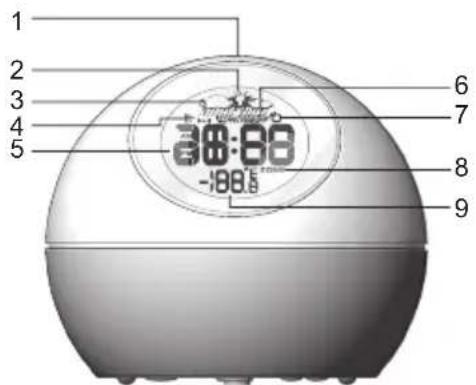
- SNOOZE / LIGHT: Activate snooze / backlight
- Weather display
-
Alarm mode
-
Alarm activated
- Time / alarm
- AUTO: The light is set to turn ON / OFF at a preset time; ON / OFF: ON / OFF time being set
- Clock signal reception
- Time zone offset
- Indoor temperature area (°C / °F)
BACK VIEW

- : Display and set alarm time; activate / deactivate alarm
- Light box
BOTTOM VIEW

- WEATHER FORECAST / DEMO: Select weather forecast or rainbow light box display
- CLOCK: Display and set clock time
- ON, OFF, AUTO ON / OFF: Turn light ON / OFF continuously or at a preset time
- EU / UK: Select clock signal (BAR669 only)
- ▼ / ▲: Increase / decrease a setting
- RESET: Reset the unit
- °C / °F: Select temperature unit
- AC adapter
GETTING STARTED
POWER
Insert the 4.5V adapter as shown:


CLOCK
CLOCK RECEPTION
This product is designed to synchronize its calendar and clock automatically once it is brought within range of a radio signal:
BAR669:
- DCF-77 generated from Frankfurt, Germany for Central Europe.
• MSF-60 generated from Rugby, England.
The radio signal range is 1500km (932 miles).
BAR669A:
- WWVB-60 generated from the atomic clock in Collins, Colorado.
The radio signal range is 3219km (2000 miles).
NOTE BAR669: Slide the EU / UK switch to the appropriate position for your location. Repeat each time you reset the unit.
NOTE Initial reception takes 2-10 minutes for first set up or when RESET is pressed. Light box will toggle red / green during reception. Once complete, the reception icon will stop blinking. If the signal is weak, it can take up to 24 hours to get a valid signal.
CLOCK RECEPTION SIGNAL
| STRONG | WEAK | NO SIGNAL |
 |  |  |
To enable clock signal reception:
Press and hold ▲ for two seconds.
To disable clock signal reception
Press and hold ▼ for two seconds.
CLOCK
To set the clock:
- Press and hold CLOCK to enter clock setting mode. The setting will blink.
- Use ▲ / ▼ to change the setting.
- Press CLOCK to confirm and move onto the next setting. The setting sequence is: time zone offset, 12 / 24 hour format, hour, minute, preset light time ON, preset light time OFF.
NOTE The time zone offset can be used to set the clock up to + / - 23 hours from the received clock signal time.
BAR669A: Time zone offset can be set to the US time zone: (P) Pacific, (M) Mountain, (C) Central or (E) Eastern.
ALARM
To set the alarm:
- Press ▶ to switch to alarm display. (●) appears when you are in the alarm display.
-
Press and hold ▶ to enter alarm setting mode. The setting will blink.
-
Use ▲ /▼ to change the setting.
- Press ▶ to confirm and move onto the next setting
NOTE When the alarm sounds the light box will flash quickly. When snooze is pressed it will flash slowly.
To activate or deactivate the alarm:
Press ▶ when in the alarm display. ▶ appears on the LCD display when the alarm is activated.
To silence the alarm:
- Press SNOOZE / LIGHT to silence it for 8 minutes.
OR - Press ▶ to turn the alarm off and activate it again after 24 hours.
WEATHER FORECAST
The animated display forecasts the weather for the next 12 to 24 hours within a 19-31 mile (30-50 km) radius, with 70 to 75 percent accuracy.
| SUNNY | |||
| PARTLY CLOUDY | |||
| CLOUDY | |||
| RAINY | |||
TEMPERATURE
To select temperature unit:
Press °C / °F .
LIGHT BOX
The light box has 2 different types of display:
- Weather forecast: the color changes according to the different weather forecast.
| SUNNY | PARTLY CLOUDY | CLOUDY RAINY | |
| Red Pink | Bluish-Green | Blue | |
- DEMO: the color gradually changes between red and blue (rainbow display).
Simply slide the WEATHER FORECAST / DEMO switch to your preferred setting.
To activate / deactivate the light box weather forecast or rainbow display, slide the ON, OFF, AUTO ON / OFF switch to one of the following options:
- ON – The light is turned on
- OFF – The light is turned off
- AUTO ON / OFF – The light turns on and off at a preset time. (To set this option, see the Clock section)
BACKLIGHT
Press SNOOZE / LIGHT to activate the backlight for 5 seconds.
RESET
To return the unit to the default settings, press RESET.
PRECAUTIONS
This product is engineered to give you years of satisfactory service if you handle it carefully. Here are a few precautions:
- Placement of this product on wood surfaces with certain types of finishes, such as clear varnish, may result in damage to the finish. Consult the furniture
manufacturer's care instructions for direction as to the types of objects that may safely be placed on the wood surface. Oregon Scientific shall not be responsible for any damage to wood surfaces from contact with this product.
- Do not subject the unit to excessive force, shock, dust, temperature or humidity, which may result in malfunction, shorter electronic life span, damaged battery and distorted parts.
- Do not immerse the unit in water. If you spill liquid over it, dry it immediately with a soft, lint-free cloth.
- Do not clean the unit with abrasive or corrosive materials.
- Do not tamper with the unit's internal components. Doing so will invalidate the warranty on the unit and may cause unnecessary damage. The unit contains no user-serviceable parts.
- Do not dispose this product as unsorted municipal waste. Collection of such waste separately for special treatment is necessary.
- Due to printing limitations, the displays shown in this manual may differ from the actual display.
- The contents of this manual may not be reproduced without the permission of the manufacturer.
NOTE The technical specifications for this product and the contents of the user manual are subject to change without notice
SPECIFICATIONS
TYPE DESCRIPTION
Temperature unit °C / °F
Indoor temperature -5°C to 50°C
(23°F to 122°F)
Resolution 0.1°C (0.2°F)
Weather display Rainy, cloudy, partly cloudy, sunny
Clock Radio Controlled
Clock display format 12 or 24 hour format
Clock display HH:MM
Alarm duration 2 minutes
Snooze 8 minutes
Power 4.5V adapter
ABOUT OREGON SCIENTIFIC
Visit our website (www.oregonscientific.com) to learn more about Oregon Scientific products such as digital cameras; MP3 players; children's electronic learning products and games; projection clocks; health and fitness gear; weather stations; and digital and conference phones. The website also includes contact information for our Customer Care department in case you need to reach us, as well as frequently asked questions and customer downloads. We hope you will find all the information you need on our website, however if you're in the US and would like to contact the Oregon Scientific Customer Care department directly, please visit:
www2.oregonscientific.com/service/default.asp
OR
Call 1-800-853-8883.
For international inquiries, please visit:
www2.oregonscientific.com/about/international.asp
FCC STATEMENT
This device complies with Part 15 of the FCC Rules. Operation is subject to the following two conditions:
(1) This device may not cause harmful interference, and (2) This device must accept any interference received, including interference that may cause undesired operation.
WARNING Changes or modifications not expressly approved by the party responsible for compliance could void the user's authority to operate the equipment.
NOTE This equipment has been tested and found to comply with the limits for a Class B digital device, pursuant to Part 15 of the FCC Rules. These limits are designed to provide reasonable protection against harmful interference in a residential installation.
This equipment generates, uses and can radiate radio frequency energy and, if not installed and used in accordance with the instructions, may cause harmful interference to radio communications.
However, there is no guarantee that interference will not occur in a particular installation. If this equipment does cause harmful interference to radio or television reception, which can be determined by turning the equipment off and on, the user is encouraged to try
to correct the interference by one or more of the following measures:
- Reorient or relocate the receiving antenna.
- Increase the separation between the equipment and receiver.
- Connect the equipment into an outlet on a circuit different from that to which the receiver is connected.
- Consult the dealer or an experienced radio / TV technician for help.
DECLARATION OF CONFORMITY
The following information is not to be used as contact for support or sales. Please call our customer service number (listed on our website at www.oregonscientific.com), or on the warranty card for this product) for all inquiries instead.
We
Name: Oregon Scientific, Inc.
Address: 19861 SW 95th Ave., Tualatin, Oregon 97062 USA
Telephone No.: 1-800-853-8883
Fax No.: 1-503-684-3332
declare that the product
Product No.: BAR669 / BAR669A
Product Name: Color Changing Weather Clock
Manufacturer: IDT Technology Limited
Address: Block C, 9/F, Kaiser
Estate Phase 1,41 Man Yue St.,
Hung Hom, Kowloon,
Hong Kong
is in conformity with Part 15 of the FCC Rules.
Operation is subject to the following two conditions:
1) This device may not cause harmful interference.
2) This device must accept any interference received, including interference that may cause undesired operation.
EU-DECLARATION OF CONFORMITY
Hereby, Oregon Scientific, declares that this Color Changing Weather Clock Model: BAR669 / BAR669A is in compliance with the essential requirements and other relevant provisions of Directive 1999/5/EC. A copy of the signed and dated Declaration of Conformity is available on request via our Oregon Scientific Customer Service.

COUNTRIES RTTE APPROVED COMPLIED
All EU countries, Switzerland CH
and Norway N
FUNKUHR
ZEITSIGNALEMPFANG
HORLOGE
RECEPTION DE L'HORLOGE
For international inquiries, please visit: www2.oregonscientific.com/about/international
EU-DÉCLARATION DE CONFORMITÉ
OROLOGIO
RICEZIONE OROLOGIO
KLOK
KLOKONTVANGST
RELÓGIO
RECEPÇÃO DO RELÓGIO

時鐘
欲設定時鐘:
时钟
设定时钟
Oregon Scientific Inc.
Tualatin, Oregon USA
© 2006 Oregon Scientific c. All rights reserved
086L004225-030
- COLOR CHANGING WEATHER CLOCK MODEL: BAR669 / BAR669A
- CONTENTS
- INTRODUCTION
- OVERVIEW
- BOTTOM VIEW
- GETTING STARTED
- POWER
- CLOCK
- CLOCK RECEPTION
- BAR669
- BAR669A
- TO SET THE CLOCK
- ALARM
- TO SET THE ALARM
- TO ACTIVATE OR DEACTIVATE THE ALARM
- TO SILENCE THE ALARM
- WEATHER FORECAST
- TEMPERATURE
- LIGHT BOX
- BACKLIGHT
- RESET
- PRECAUTIONS
- SPECIFICATIONS
- TYPE DESCRIPTION
- ABOUT OREGON SCIENTIFIC
- FCC STATEMENT
- DECLARATION OF CONFORMITY
- WE
- DECLARE THAT THE PRODUCT
- EU-DECLARATION OF CONFORMITY
- COUNTRIES RTTE APPROVED COMPLIED
- FUNKUHR
- ZEITSIGNALEMPFANG
- HORLOGE
- RECEPTION DE L'HORLOGE
- EU-DÉCLARATION DE CONFORMITÉ
- OROLOGIO
- RICEZIONE OROLOGIO
- KLOK
- KLOKONTVANGST
- RELÓGIO
- RECEPÇÃO DO RELÓGIO
- 時鐘
- 欲設定時鐘:
- 时钟
- 设定时钟
Brand : OREGON SCIENTIFIC
Model : BAR 669H
Category : Weather Station