EVO-29T - Fan Evolar - Free user manual and instructions
Find the device manual for free EVO-29T Evolar in PDF.


| Product Type | Tower Fan |
| Brand | Evolar |
| Model | EVO-29T |
| Fan Size | 29 inches (75 cm) |
| Rated Voltage | 220V |
| Rated Frequency | 50 Hz |
| Input Power | 45 W |
| Speed Settings | 0 (Off), 1 (Low), 2 (Medium), 3 (High) |
| Timer Function | Yes, rotary knob |
| Oscillation | Yes, oscillation switch |
| Overheat Protection | Built-in thermostat, cuts off motor if temperature exceeds limit |
| Control Type | Rotary switches (speed, timer, oscillation) |
| Base Assembly | Two base parts with dowel pins, secured with four screws and a nut |
| Cord Management | Power cord runs through slot in base |
| Safety Features | Do not insert objects through grille; unplug before cleaning/moving |
| Maintenance | Vacuum rear vents; wipe exterior with soft damp cloth; do not disassemble |
| Parts Included | Tower fan chassis, timer switch, speed switches, oscillation switch, base, nut, screw threaded post |
| Support Website | www.evolar.nl |
Frequently Asked Questions - EVO-29T Evolar
User questions about EVO-29T Evolar
0 question about this device. Answer the ones you know or ask your own.
Ask a new question about this device
Download the instructions for your Fan in PDF format for free! Find your manual EVO-29T - Evolar and take your electronic device back in hand. On this page are published all the documents necessary for the use of your device. EVO-29T by Evolar.
USER MANUAL EVO-29T Evolar
natural_image
White vertical outdoor fan with grid grille and base, no visible text or symbolsHandleiding torenventilator 29" 75CM:

natural_image
Close-up of a circular industrial rotary dial with numbered terminals (1–6) and no visible text or symbols on the dial itself.Onderdelenlijst:
natural_image
Diagram of a dual-side mechanical component with internal gear-like structure and directional arrows (no text or symbols)
natural_image
Close-up of a cylindrical electronic device with internal structure and a bulb (no visible text or symbols)
natural_image
Diagram of a mechanical device with two views: top shows a circular component with internal structure, bottom shows a mechanical assembly with a rod inserted (no text or symbols)
natural_image
Diagram showing a mechanical assembly with an upper circular component and a lower gear-like base, no text or symbols present.GEBRUIKSAANWIJZING
VENTILATORREGELING (AAN/UIT & SNELHEID)
natural_image
Close-up of a circular industrial control knob with three buttons and a central dial (no visible text or symbols)ONDERHOUD INSTRUCTIES
natural_image
White vertical electric fan with grid grille and base, isolated on white background (no text or symbols visible)Manual tower fan:
Installation and operation Manual
Evolar EVO-29T
evolar
User Manual tower fan Evolar EVO-29T
(Before use read and save these instructions carefully)
Assemble diagram:


natural_image
Close-up of a circular industrial control dial with numbered terminals (1-4) and directional arrows, no readable text or symbols beyond labels.Parts:
- Tower fan chassis
- Timer switch
- Speed switches
- Oscillation switch
- Base
- Nut
- Screw threaded post
SPECIFICATION:
Rated voltage: 220V
Rated frequency: 50Hz
Input power: 45W
Size Fan: 29" 75CM
Rules for safe operation:
- Before use read these installation and operation manual carefully
- Please match the power with the rated voltage and frequency of the fan.
- Don't insert fingers, pencils or any other objects through the grille when the fan is running.
- Disconnect always the power when you move the fan.
- Unplug the power plug before cleaning the fan.
OVER-HEAT PROTECTION FUNCTION:
A thermostat is built in the motor of the fan. The fuse will be automatically cut out when the motor temperature exceeds the limit caused by any accidents. The plastic pieces will be well protected for burning out and distortion.
ASSEMBLY INSTRUCTIONS
BASE AND CHASSIS ASSEMBLY:
- Remove the nut on the bottom of the tower fan. Turn it anti-clockwise to open.
- Assemble the two base foot parts together, The base fits together by inserting the dowel pins together. Push the base parts together firmly.
- Screw the base parts together with four screws.
- Attach the tower fan tot the base. Insert the thread through the foot. The smooth side of the foot must point upwards. Make sure that the power cord runs through the slot in the base.
- Lock the tower fan and the base together by tightening the nut on the thread. The nut must be tightened clockwise.

natural_image
Diagram of a circular mechanical component with radial slots and central hub, showing directional arrows (no text or symbols)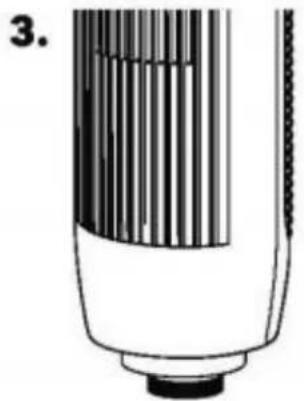
natural_image
Illustration of a cylindrical device with internal structure and a base (no text or symbols)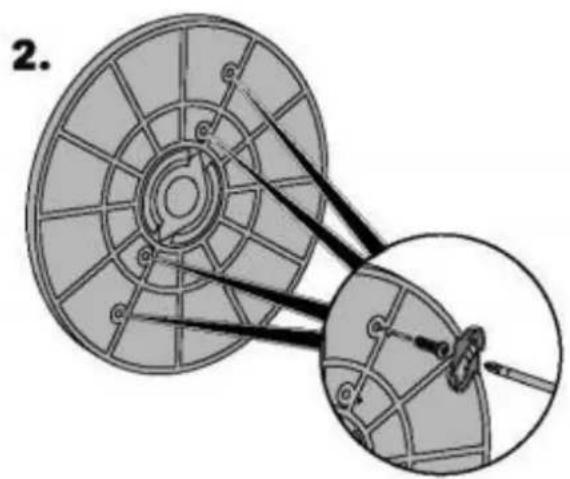
natural_image
Diagram of a mechanical pulley system with two views showing internal components and connecting rods (no text or labels)
natural_image
Diagram showing a mechanical assembly with a circular component and a gear-like base, no text or symbols present.OPERATION INSTRUCTIONS
FAN SPEED CONTROLL (ON/OFF & SPEED)
Use the position switch to switch on / off and adjust the speed of the fan. Turn the rotary switch to ON to switch on the fan. The fan has four positions: 0 = off, 1 = low, 2 = medium, 3 = high.
TIMER
Use the rotary knob to switch on the fan via timer. After setting, the fan will operate for te set time. The fan can be switched off again by turning the rotary switch to OFF.

natural_image
Close-up of a circular industrial control knob with three buttons and a dial (no visible text or symbols)MAINTENANCE INSTRUCTIONS
The fan requires little maintenance. Do not attempt to repair the fan yourself. If the fan is damaged or damaged, contact the supplier or go to an authorized repair company.
MAINTENANCE:
- Disconnect the fan from the power supply before cleaning, assembling or disassembling the fan.
- To ensure adequate air circulation to the motor, keep vents at the rear of the motor housing room dust and dirt free. You can use a vacuum cleaner to clean these vents. Always remove the plug from the power socket before cleaning the fan. Don't dissemble the fan to remove the dust.
- Wipe the outer ports with a soft cloth soaking. Do not use abrasive detergent or solvents to avoid scratching the surface.
- Do not allow water or any other liquid in to the motor housing or interior parts.
- If the power cord is damaged, the fan cannot be used at all times. Request a specialist to repair the fan.
- Never replace parts on the fan.
SUPPORT
All available information and parts can be found on www.evolar.nl
- Onderdelenlijst:
- GEBRUIKSAANWIJZING
- VENTILATORREGELING (AAN/UIT & SNELHEID)
- ONDERHOUD INSTRUCTIES
- User Manual tower fan Evolar EVO-29T
- Assemble diagram:
- Parts:
- SPECIFICATION:
- Rules for safe operation:
- OVER-HEAT PROTECTION FUNCTION:
- ASSEMBLY INSTRUCTIONS
- BASE AND CHASSIS ASSEMBLY:
- OPERATION INSTRUCTIONS
- FAN SPEED CONTROLL (ON/OFF & SPEED)
- TIMER
- MAINTENANCE INSTRUCTIONS
- MAINTENANCE:
- SUPPORT
Brand : Evolar
Model : EVO-29T
Category : Fan