
920-532 - Loudspeaker Marquant - Free user manual and instructions
Find the device manual for free 920-532 Marquant in PDF.


| Product Type | Portable Bluetooth Speaker |
| Brand | Marquant |
| Model | 920-532 |
| Dimensions | Approx. 20 x 10 x 8 cm |
| Weight | Approx. 500 g |
| Power Source | Rechargeable Li-ion battery 1800 mAh |
| Charging Time | Approx. 3 hours |
| Playback Time | Up to 8 hours at moderate volume |
| Connectivity | Bluetooth 5.0, AUX-in, USB (for charging), microSD card slot |
| Radio | FM radio with built-in antenna |
| Speaker Power | 2 x 5W RMS |
| Frequency Range | 100 Hz - 20 kHz |
| Controls | Power, Volume, Play/Pause, Track skip, Mode, EQ presets |
| Additional Functions | Hands-free calling with built-in microphone, TWS pairing |
| Water Resistance | Not specified (use indoors) |
| Cleaning and Maintenance | Wipe with a soft, dry cloth; avoid liquids and abrasives |
| Safety Precautions | Do not disassemble; keep away from heat sources; charge with provided cable only |
| Spare Parts and Repairability | Battery replaceable by technician; other parts not user-serviceable |
| Package Contents | Speaker, USB charging cable, AUX cable, manual |
| Warranty | 2 years (depending on region) |
Frequently Asked Questions - 920-532 Marquant
User questions about 920-532 Marquant
0 question about this device. Answer the ones you know or ask your own.
Ask a new question about this device
Download the instructions for your Loudspeaker in PDF format for free! Find your manual 920-532 - Marquant and take your electronic device back in hand. On this page are published all the documents necessary for the use of your device. 920-532 by Marquant.
USER MANUAL 920-532 Marquant
natural_image
Black industrial air conditioner tower with control panel and keypad (no visible text or symbols)SE Bruksanvisning för Bluetooth-högtalare
NO Bruksanvisning for Bluetooth-høyttaler
PL Instrukcja obsługi głośnika Bluetooth
EN Operating instructions for Bluetooth speaker
SE - Bruksanvisning i original
EN - Operating instructions (Translation of the original instructions)
Jula reserves the right to make changes. In the event of problems, please contact our service department.
www.jula.com
Tillverkare/ Produsent / Produenci/ Manufacturer
Jula AB, Box 363, 532 24 SKARA
Importör/ Importør/ Importer/ Importer
Care for the environment!
Must not be discarded with household waste! This product contains electrical or electronic components that should be recycled. Leave the product for recycling at the designated station e.g. the local authority's recycling station.
SVENSKA....5
SÄKERHETSANVISNINGAR....5
TEKNISKA DATA....7
BESKRIVNING 8
HANDHAVANDE 10
FELSÖKNING 13
NORSK 14
SIKKERHETSANVISNINGER 14
TEKNISKE DATA 16
BESKRIVELSE....17
BRUK....19
FEILS∅KING....22
POLSKI 23
ZASADY BEZPIECZEŃSTWA 23
DANE TECHNICZNE 26
OPIS 26
OBSŁUGA 28
WYKRYWANIE USTEREK 31
ENGLISH 32
SAFETY INSTRUCTIONS....32
TECHNICAL DATA 34
DESCRIPTION 35
USE....37
TROUBLESHOOTING 40
SÄKERHETSANVISNINGAR
natural_image
Illustration of four different devices with a magnifying glass, showing different states of movement (no text or symbols present)SYNKNING
OBS!
natural_image
Illustration of four different mechanical or electronic components with arrows indicating motion, no text or symbols present.SYNKRONISERING
OBS!
INNSTILLING AV KLOKKESLETT
1234567
natural_image
Technical line drawing of a mechanical component with red vertical lines and circular features (no text or symbols)8 9

22

PANEL GÓRNY
natural_image
Illustration of three steps to switch a device, showing a lock, alarm clock, and stopwatch (no text or symbols present)SYNCHRONIZACJA
UWAGA!
Read the operating instructions carefully before use.
Save them for future reference.
- Protect the appliance, the power cord and battery from heat, sunlight, water, fire and sharp edges.
- Do not expose the appliance to splashing, dripping water or other liquids.
- Do not put containers with water, burning candles etc. over the appliance.
- Check that there is at least 20 cm of free space around the appliance to ensure adequate ventilation.
- Do not install near sources of heat, e.g. radiators, cookers or other equipment that produces heat.
- Do not expose the product to rain or moisture – risk of fire and/or electric shock.
- Never poke any metal objects into the appliance – risk of short circuiting.
- Do not use the appliance in extremely dry air – risk of static electricity.
- Do not attempt to repair the appliance. Never modify the product in any way. The manufacturer cannot accept liability for any damage caused by unauthorised modifications. Any repairs must be carried out by an authorised service centre or other qualified personnel.
- Do not use the product near water.
- Do not cover the ventilation openings on the product. Follow the manufacturer's instructions when installing.
- Only use accessories recommended by the manufacturer.
- Only use with a trolley, stand, bracket or table as supplied, or as recommended by the manufacturer. Be careful when moving the product on a trolley – risk of tipping.
- None of the components in this product must be repaired by the user. Service must only be carried out by qualified personnel. Have the product serviced if the power cord and/or plug are damaged, if the product has been exposed to liquid, knocks and blows, or if it is not working properly.
- Never attempt to open the product – risk of electric shock.
- Connect the power cord on the appliance to an easily accessible mains outlet.
- Place the power cord so that it cannot be stood on, or clenched.
- Unplug the power cord from the mains during thunder storms, and when the product is not going to be used for some time.
- The appliance is double insulated(safety class II) and therefore does not need to be earthed.
Additional safety instructions
- Protect the battery from heat, direct sunlight and naked flames.
- Do not consume or swallow the battery – risk of corrosive burn injury. The supplied remote control contains a button cell battery. If button cell batteries are consumed or swallowed highly dangerous internal burn injuries can occur within just two hours, which can cause death. Keep new and used batteries at a safe distance from children. In the event of suspected consumption or swallowing of a battery, seek medical attention immediately. If the battery flap cannot be closed properly, stop using the product and store it out of the reach of children.
- The incorrect insertion of batteries can result in a risk of explosion. Only use batteries of the recommended type.
- The use of controllers, settings or procedures that are not described in these instructions could result in exposure to harmful radiation.
- Fluorescent tubes and other similar lighting can interfere with the functionality of the remote control. If the unit is not working properly, try moving it away from any fluorescent tubes.
- Do not place the product on soft, porous or sensitive surfaces. The rubber feet can leave marks or stains on the surface. We recommend placing a cloth, tray etc. under the product.
- Clean with a dry cloth.
- NOTE: This equipment has been tested and complies with the limiting values for Class B digital appliances, according to part 15 of the FCC regulations. These limiting values are designed to provide sufficient protection from harmful interference when installed in the home. The equipment generates, uses and can emit radio frequency energy, and if not installed and used according to the instructions can cause interference to radio communication. Interference can occur in separate installations. If the equipment produces harmful interference to radio or television reception (which can be checked by switching the equipment on and off), we recommend that users attempt to rectify interference in one of the following ways:
- Realign or move the receiver antenna.
– Increase the gap between the equipment and the receiver. - Connect the equipment to an output in another circuit than the one the receiver is connected to.
SYMBOLS
 | Read these instructions carefully before use. |
 | Warning: |
 | Warning for uninsulated dangerous voltage inside the product casing, which can cause electric shock. |
 | Safety class II |
TECHNICAL DATA
Voltage 230 V
Output 24W RMS
Range Bluetooth 10 m
Weight 5,1 kg
Dimensions W14 x H99.6 x D14 cm
Safety class II
Sensitivity 60 dB
Impedance 8 Ω
Frequency range 20 Hz-85 kHz
DESCRIPTION


TOP PANEL
- ON/OFF
- MODE: FM radio, Bluetooth, AUX IN
- Go to the previous track (in Bluetooth mode)
- ▶/II Play/Pause (in Bluetooth mode) / Sound off in FM radio/AUX IN
- Go to next track (in Bluetooth mode)
- VOL- Lower volume
- VOL+ Higher volume
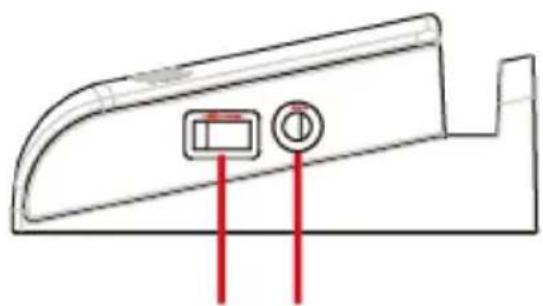
SIDE PANEL
- USB charging connection (for charging of other units)
- AUX IN port
REMOTE CONTROL
- Standby ON/OFF
- FM SCAN: Automatic search for FM radio stations (in FM radio mode)
- Go to the previous track (in Bluetooth mode)
- PAIR: Press to enable Bluetooth pairing mode or to interrupt pairing (in Bluetooth mode)
- MODE: FM radio, Bluetooth, AUX IN
- ☒ Sound off
- CH- Go to previously set FM radio station (in FM radio mode)
- CH+ Go to next set FM radio station (in FM radio mode)
- Go to next track (in Bluetooth mode)
- ▶/II Play/pause music (in Bluetooth mode)
- VOL- Lower volume
- VOL+ Higher volume
ACCESSORIES
- 3.5 mm AUX cable
NOTE: After about 15 minutes of inactivity, the speaker switches to standby mode to save the battery.
INSERTING THE BATTERY
NOTE: Battery for remote control supplied (1 lithium battery CR2025). The remote control is supplied with a plastic battery protection flap. Before using the remote control remove the protective flap by carefully pulling the part of the flap that sticks out under the battery cover.
- Open the battery cover on the remote control.
- Insert the battery with the positive terminal (+) up.
- Replace the battery cover.

natural_image
Illustration of four steps of a device with a magnifying glass, showing a step from opening to closing (no text or symbols present)SYNCHRONISATION
NOTE:
- If there are no paired units within range when the Bluetooth mode is activated, the synchronisation mode will be activated automatically.
-
If a paired unit is within range the speaker will be automatically connected to it.
-
Start the speaker by pressing the button on the speaker or the remote control.
- Press the MODE button on the speaker or remote control to enable Bluetooth mode. An audio prompt will be heard and BL flashes on the LED display to show that the speaker is in Bluetooth synchronisation mode.
- Place the speaker and Bluetooth unit within 1 metre of each other during the pairing.
-
Activate search for compatible Bluetooth units on the mobile phone or unit to be paired with the speaker.
-
iPhone: Go to SETTINGS > BLUETOOTH (check that Bluetooth is enabled)
- Blackberry: Go to SETTINGS/OPTIONS > BLUETOOTH Enable BLUETOOTH
- Android: Go to SETTINGS > BLUETOOTH > MENU > Search for devices (check that Bluetooth is enabled)
-
Other mobile phones/units: See the instructions for the unit.
-
When the Bluetooth unit has found the speaker, select T04 in the list of found units.
-
Enter password 0000 (four zeros), if necessary. Press OK or YES to pair the units.
-
An audio prompt is heard when the synchronisation is successful. BL is shown on the LED display without flashing, to show that the unit is connected.
NOTE: If the speaker is to be connected to another unit it must first be disconnected from the unit it is paired with. Select T04 under Bluetooth settings on the connected unit and then select Disconnect or Unpair, or press the PAIR button on the remote control. When the connection is broken, repeat the synchronisation process with the other unit.
ON/OFF
- Plug the speaker's plug into a power point.
- Start/switch off the speaker by pressing the button on the speaker or the remote control.
ADJUSTING THE VOLUME
NOTE: The sound can also be controlled via the volume control on the connected unit.
- Tap the VOL+ button on the speaker or remote control to increase the volume gradually. Keep the button pressed to successively increase to the maximum volume.
- Tap the VOL-button on the speaker or remote control to reduce the volume gradually. Keep the button pressed to successively reduce to the lowest volume.
- Press the 📊 button on the remote control to switch off the sound. Press again to activate the sound.
MODE SWITCHING
Press the MODE button repeatedly on the speaker to switch between FM radio, Bluetooth and AUX.
CHARGING UNITS
NOTE: The USB connection can only be used for charging, NOT for data transfer.
When the speaker is on the USB port on the side panel can be used to charge external units, such as smartphones, hand-held computers, wireless headphones or MP3 players.
SETTING THE TIME
- Press the MODE button for about 3 seconds. The HOURS field on the LED display will start flashing.
- Set the hour with the VOL+ and VOL- buttons on the speaker.
- Tap the MODE button to switch to the MINUTES field.
- Set the minutes with the VOL+ and VOL- buttons.
- Press MODE to confirm.
PLAYING MUSIC
Playing music via Bluetooth
- Check that the speaker is connected to a Bluetooth unit.
- Press PLAY on the Bluetooth unit.
- Control the music via the connected unit or with the buttons on the speaker (for units with Bluetooth profile AVRCP).
Play/pause
- Tap the button on the speaker or remote control to pause the music.
- Tap the ▶ button again to resume the music.
Switch tracks
- Tap the button on the speaker or remote control to go to the next track.
- Tap the button on the speaker or remote control to go to the previous track.
Adjusting the volume
- Tap the VOL+ button on the speaker or remote control to increase the volume gradually. Keep the button pressed to successively increase to the maximum volume.
- Tap the VOL- button on the speaker or remote control to reduce the volume gradually. Keep the button pressed to successively reduce to the lowest volume.
- Press the 📂 button on the remote control to switch off the sound. Press again to activate the sound.
Playing music via AUX cable
- Start the speaker with the button on the speaker or the remote control.
- Press the MODE button on the speaker or remote control until AUX LINE is shown on the LED display on the speaker.
- Connect one end of the supplied 3.5 mm AUX cable to the AUX IN port on the side of the speaker and the other end to the headphone connection on an external unit (smartphone, hand-held computer or MP3 player).
- Open a media player on the unit and press PLAY to start playing the music.
- Control the music and volume with the controls on the connected unit.
FM radio mode
NOTE: Pull out the FM wire aerial on the back of the speaker for best radio reception.
- Press the MODE button on the speaker or remote control to activate FM RADIO mode.
- Press the FM SCAN button on the remote control. Up to 20 stations are stored automatically. NOTE: If the FM SCAN button is pressed again the stored stations will be deleted from the speaker.
- When the FM search is finished, press the CH+ or CH- buttons on the remote control to select a preset station.
- Press the button on the speaker or the button on the remote control to switch off the sound.
TROUBLESHOOTING
The Bluetooth unit will not pair with the speaker.
- Check that the speaker is on before starting the synchronisation.
- Place the speaker and Bluetooth unit within 1 metre of each other during the synchronisation.
- Press the MODE button on the speaker or remote control to enable Bluetooth mode. An audio prompt will be heard and BL flashes on the LED display to show that the speaker is in Bluetooth synchronisation mode.
- Check that Bluetooth is enabled on the unit.
- Repeat the synchronisation according to the instructions.
The Bluetooth unit can be synchronised with the speaker, but no music can be heard.
- Check that the Bluetooth unit supports the profile A2DP.
- Increase the volume on the Bluetooth unit.
- Interrupt the synchronisation and re-pair the units again.
Synchronisation mode cannot be enabled on the speaker.
- Check that the speaker is on before starting the pairing.
- Press the MODE button on the speaker or remote control to enable Bluetooth mode. An audio prompt will be heard and BL flashes on the LED display to show that the speaker is in Bluetooth synchronisation mode.
CE
EC DECLARATION OF CONFORMITY
EG FÖRSÄKRAN OM ÖVERENSSTÄMMELSE
EF SAMSVARSERKLÆRING
DEKLARACJA ZGODNOŚCI WE

Jula AB, Box 363, SE-532 24 SKARA, SWEDEN
Radio and Telecommunications Terminal Equipment 1999/5/EC
EN 61000-3-2:2014, EN 61000-3-3:2013, EN301 489-1 V1.9.2,
EN301 489-17 V2.2.1, ETSI EN300 328 V1.9.1
ERP Implementing Measure Regulation (EC) No 1278/2008 +801/2013
RoHS Directive 2011/65/EU
This product was CE marked in year -16
Name and address of the person authorised to compile the technical file:
Johan Broberg Box 363, SE-532 37 Skara, Sweden
Skara 2016-04-11

Mattias Lif
PRODUCT MANAGER
- Care for the environment!
- SVENSKA....5
- SÄKERHETSANVISNINGAR....5
- TEKNISKA DATA....7
- BESKRIVNING 8
- HANDHAVANDE 10
- FELSÖKNING 13
- NORSK 14
- SIKKERHETSANVISNINGER 14
- TEKNISKE DATA 16
- BESKRIVELSE....17
- BRUK....19
- FEILS∅KING....22
- POLSKI 23
- ZASADY BEZPIECZEŃSTWA 23
- DANE TECHNICZNE 26
- OPIS 26
- OBSŁUGA 28
- WYKRYWANIE USTEREK 31
- ENGLISH 32
- SAFETY INSTRUCTIONS....32
- TECHNICAL DATA 34
- DESCRIPTION 35
- USE....37
- TROUBLESHOOTING 40
- SÄKERHETSANVISNINGAR
- SYNKNING
- OBS!
- SYNKRONISERING
- INNSTILLING AV KLOKKESLETT
- PANEL GÓRNY
- SYNCHRONIZACJA
- UWAGA!
- Read the operating instructions carefully before use.
- Additional safety instructions
- TECHNICAL DATA
- DESCRIPTION
- TOP PANEL
- SIDE PANEL
- REMOTE CONTROL
- ACCESSORIES
- INSERTING THE BATTERY
- SYNCHRONISATION
- NOTE:
- ON/OFF
- ADJUSTING THE VOLUME
- MODE SWITCHING
- CHARGING UNITS
- SETTING THE TIME
- PLAYING MUSIC
- Playing music via Bluetooth
- Play/pause
- Switch tracks
- Playing music via AUX cable
- FM radio mode
- TROUBLESHOOTING
- The Bluetooth unit will not pair with the speaker.
- The Bluetooth unit can be synchronised with the speaker, but no music can be heard.
- Synchronisation mode cannot be enabled on the speaker.
- CE
- EC DECLARATION OF CONFORMITY
- EG FÖRSÄKRAN OM ÖVERENSSTÄMMELSE
- EF SAMSVARSERKLÆRING
- DEKLARACJA ZGODNOŚCI WE
Brand : Marquant
Model : 920-532
Category : Loudspeaker