
002-121 - Loudspeaker Marquant - Free user manual and instructions
Find the device manual for free 002-121 Marquant in PDF.


| Product Type | Bluetooth speaker tower |
| Model | 002-121 |
| Dimensions | 14 x 97 x 12 cm |
| Weight | 3.4 kg |
| Mains Voltage | 230 V ~ 50 Hz |
| Transformer Output | 5 V DC |
| Speaker Output | 10 W |
| Bluetooth Version | 4.2 |
| Connections | 3.5 mm AUX, USB 2.1 A, SD card |
| Signal/Noise Ratio | ≥ 65 dB |
| Remote Control Battery | 1 x Li-Ion CR2025 |
| Supported Audio Formats | MP3 (32–320 kb/s) |
| Max MP3 Files | 999 |
| Indoor Use Only | Yes |
| Cleaning | Soft, dry cloth only |
| Assembly | Mount on base plate with screws and washers |
| Equalizer Modes | Multiple (selectable via EQ button) |
| Mute Function | Yes (on remote control) |
| Factory Reset | Press RESET button |
Frequently Asked Questions - 002-121 Marquant
User questions about 002-121 Marquant
0 question about this device. Answer the ones you know or ask your own.
Ask a new question about this device
Download the instructions for your Loudspeaker in PDF format for free! Find your manual 002-121 - Marquant and take your electronic device back in hand. On this page are published all the documents necessary for the use of your device. 002-121 by Marquant.
USER MANUAL 002-121 Marquant
natural_image
Black vertical electronic tower with four circular speakers (no text or symbols visible)
SE BLUETOOTH-HÖGTALARE
Operating instructions (Translation of the original instructions) Important! Read the user instructions carefully before use. Save them for future reference.
Värna om miljön!
Care for the environment!
Must not be discarded with household waste! This product contains electrical or electronic components that should be recycled. Leave the product for recycling at the designated station e.g. the local authority's recycling station.
Jula reserves the right to make changes. In the event of problems, please contact our service department.
www.jula.com

Tillverkare/ Produsent/ Producenci/ Manufacturer
Jula AB, Box 363, 532 24 SKARA
Distributör/ Distributør/ Dystrybutor/ Distributor
Jula Poland Sp. z o.o., ul.
EC DECLARATION OF CONFORMITY
EG FÖRSÄKRAN OM ÖVERENSSTÄMMELSE
EF SAMSVARSERKLÆRING
DEKLARACJA ZGODNOŚCI WE

Jula AB, Box 363, SE-532 24 SKARA, SWEDEN
RoHS Directive 2011/65/EU
EN 50581:2012
This product was CE marked in year -17
Skara 2018-07-11
JONAS ÖSTERBACKA
BUSINESS AREA MANAGER


natural_image
Technical line drawing of a vertical-mounted server unit with three circular fans and a base plate, showing mounting hardware (no text or symbols)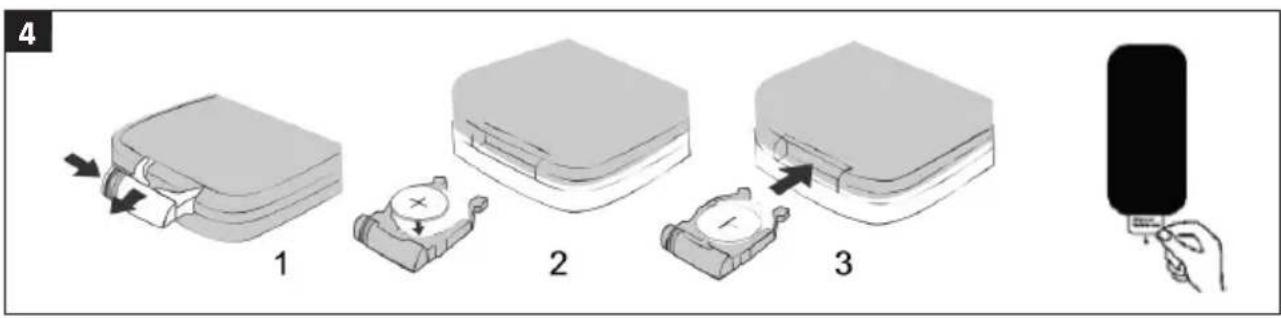
natural_image
Technical line drawing of a device housing with internal compartments and a connector (no text or symbols)



SÄKERHETSANVISNINGAR
- Follow the instructions to avoid electric shock, fire and/or serious personal injury.
- Only use the appliance indoors.
- Check that the mains voltage matches the rated voltage on the type plate before connecting the appliance to the mains.
- Connect the appliance by following these instructions.
- Handle the appliance with care, and do not expose it to knocks or blows.
- Unplug the appliance from the mains during thunder storms and when the product is not in use for long periods.
- The appliance must only be repaired by qualified personnel.
- Only use the mains adapter supplied.
- Protect the adapter and cord to ensure they are not stepped on or become pinched or trapped, especially close to plugs,
power strips or by the appliance case.
- Do not attempt to carry out any maintenance or repairs that are not described in these instructions, it may be dangerous and result in the invalidation of the warranty.
- Never remove the case from the unit.
- Leave at least a few centimetres of free space the appliance for ventilation.
- Do not expose the appliance to moisture or liquid.
- Do not install the appliance in direct sunlight or near other equipment that produces heat.
- Do not place the appliance above any other electrical equipment.
- Do not place any sources of danger on the unit, for example, flower vases or candles.
- Do not place watches, credit cards or the like on the appliance as the speakers' magnetic fields can affect the above products.
- The product may only be cleaned with a soft, dry cloth.
- Equipment that is connected to a protective earth via an earthed wall socket and/or via other equipment and at the same time is connected to a cable TV network can in some instances result in a risk of fire. To avoid this when connecting equipment to the cable TV network, there must be a galvanic isolator between the equipment and the cable TV network.
SYMBOLS
 | Only intended for indoor use. |
 | Approved as per applicable directives. |
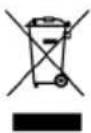 | Recycle a discarded product in accordance with applicable regulations. |
TECHNICAL DATA
| Mains voltage 230 V ~ 50 Hz |
| Transformer 5 V DC |
| Speaker output 10 W |
| Connections Bluetooth 4.2 |
| 3.5 mm AUX |
| USB 2.1 A |
| SD card |
| Signal/noise ratio ≥ 65 dB |
| Battery remote control 1 x Li-Ion CR2025 |
| Dimensions 14 x 97 x 12 cm |
| Weight 3.4 kg |
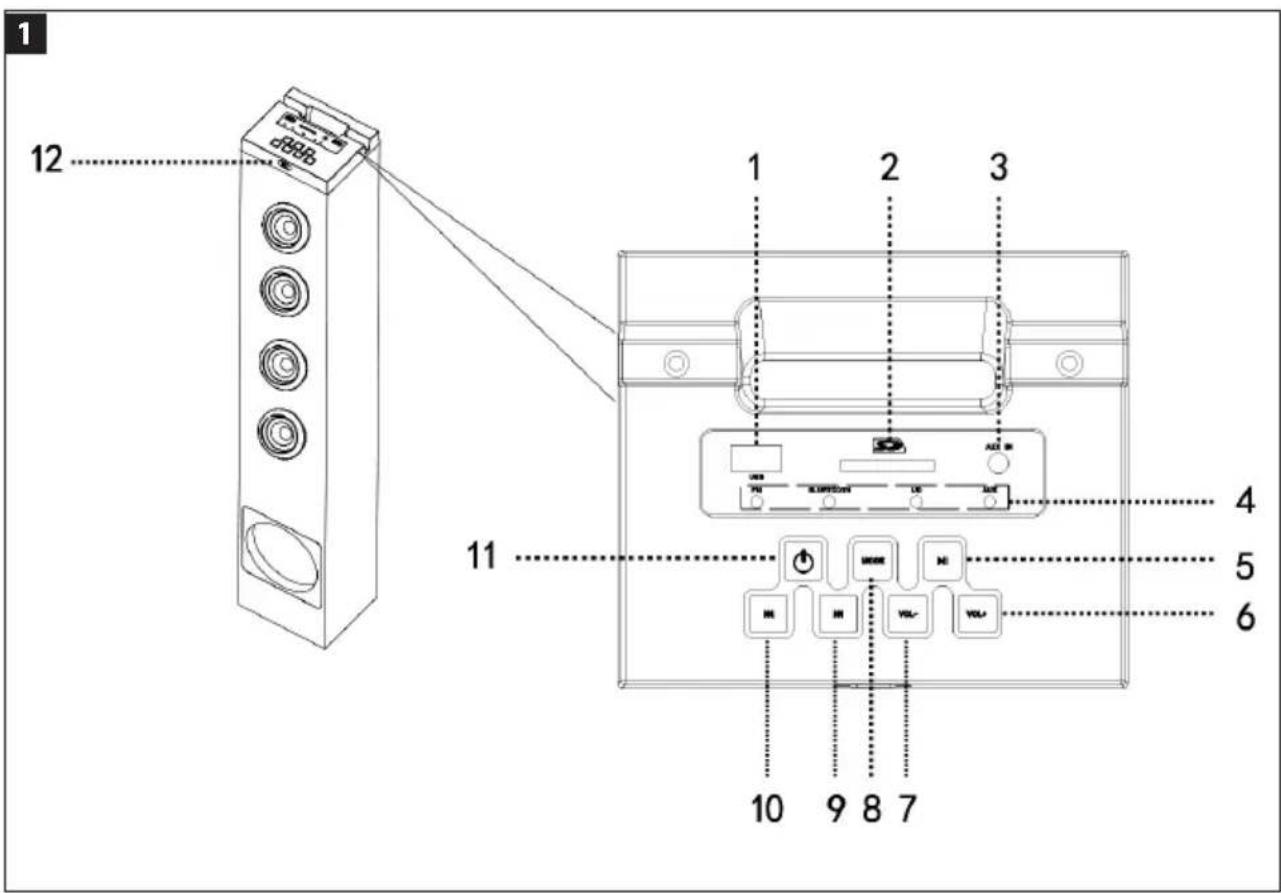
DESCRIPTION
Speakers
- USB port
- SD card
- AUX connection
- LED indicators for the selected function
- Play/Pause
- Volume +
- Volume -
- Selection of input source
- Next track
- Previous track
- Power switch On/Off
- IR sensor for remote control
FIG. 1
Remote control
- Off/On
- Previous track/Next track
- Volume +/-
- Selector for input source
- Mute
-
Play/Pause
-
Reset
- Equalizer
- Track number
FIG. 2
ASSEMBLY
Mount the speaker on the base plate using the supplied screws and washers.
FIG. 3
USE
Insert the battery in the remote control
- Hold the remote control with the rear facing upwards.
- Remove the battery holder from the remote control.
- Insert the battery with positive terminal (+) upwards.
- Refit the battery holder.
FIG. 4
Basic settings
- Start the speaker by pressing either on the speaker or the remote control. A LED indicator lights green when the speaker is on. The light goes off when the speaker is switched off.
- Press repeatedly on MODE on the speaker or remote control to switch between playback sources. The equivalent LED indicator lights green.
- Press VOL+/VOL- on the speaker or +/-on the remote control to adjust the volume.
-
Press EQ to set the required Equalizer-mode.
-
Press on the remote control to mute the sound.
- Press ✉ again to activate the sound.
AUX mode
- Connect one end of the AUX cable with a 3.5 mm jack to the headphone socket on the unit.
- Connect the other end of the AUX cable to the AUX connection on top of the speaker.
- Start the speaker with ⏻.
- Press repeatedly on MODE on the speaker or remote control until the AUX indication lights green.
- Control the music with the controls on the connected unit.
NOTE:
The speaker controls (except MODE) cannot be used when a unit is connected to the AUX connection.
Playback from USB device/SD card
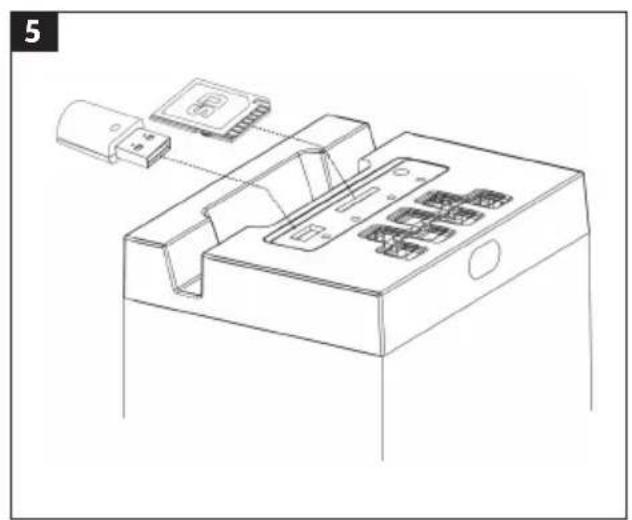
- Connect a USB device to the USB port or insert a SD card in the SD card slot on the speaker to play MP3 music files.
FIG. 5
-
Start the speaker with Ⓗ.
-
Press repeatedly on MODE on the speaker or remote control until the LED indication for USB/SD card lights green.
-
Press ▶II to pause.
-
Press ▶II again to resume playback.
-
Press ▶▶▶ to go to the next track and on ▶◀◀ to go to the previous track.
-
Select the desired track using the numeric keys. For example, press 2 + 1 to select track 21.
NOTE:
- The songs are played in the order set out in the playlist on the USB device/SD card.
- It is not possible to play music stored in folders. The song files must be stored in the device's root directory.
- Supported formats are MP3 (32–320 kb/s). A maximum of 999 MP3 files may be stored on the memory unit. For playback from a USB device/SD card, connect the USB device/SD card when the speaker is in standby mode. Start the speaker and go to USB/SD card mode using the MODE button.
- There are numerous USB devices/SD cards available on the market. We cannot guarantee that all models are supported. If the USB device/SD card is not supported, try with another device.
Bluetooth pairing
- Place the speaker and Bluetooth unit within 1 metre of each other during pairing.
FIG. 6
- Start the speaker with Ⓤ.
- Press repeatedly on MODE on the speaker or remote control until the Bluetooth indication flashes green. Once pairing is successful the Bluetooth indication will light green.
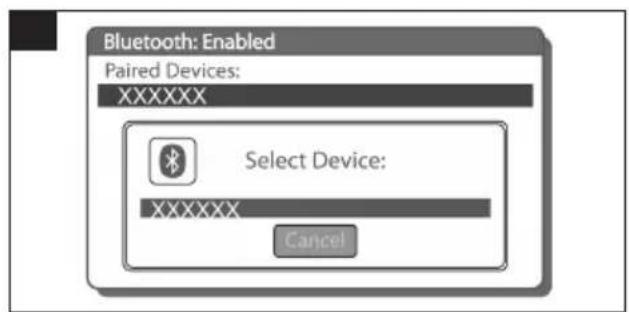
- Activate search for Bluetooth units on the mobile phone or unit you wish to pair with the speaker.
FIG. 7
- When the unit has found the speaker, confirm by selecting it in the list.
FIG. 8
- Select Pair to connect the speaker to the Bluetooth unit.
FIG. 9
- It may be necessary, depending on the unit to be connected, to enter a password and a message may be shown on the unit's display. If the unit asks for a password, enter 0000.
FIG. 10
- The Bluetooth unit confirms that pairing has been completed and shows a prompt to accept the connection. Select YES to connect the speaker to the Bluetooth unit.
FIG. 11
- When the speaker is connected to a Bluetooth unit, a message is shown, and the Bluetooth unit shows a prompt to accept the connection to the speaker "Tower 002121", along with an option to select that this message should not appear again. Accept the connection. If Don't ask this again is selected, the Bluetooth unit will in future automatically accept the connection request form the relevant speaker.
FIG. 12
NOTE:
- Flashes green indication: Pairing mode.
- Fixed green indication: Bluetooth unit connected.
If another Bluetooth unit wants to connect to the speaker, the first unit must be disconnected via the unit's Bluetooth menu. If the speaker is switched off when not paired, the Bluetooth indicator lamp flashes green the next time the speaker is started, to show that it is in pairing mode.
Bluetooth playback
Check that the Bluetooth unit is activated and connected to the speaker.
- Press ▶II to pause.
-
Press ▶II again to resume playback.
-
Press to go to the next track and on to go to the previous track.
-
Press VOL+/VOL- on the speaker or +/- on the remote control to adjust the volume.
Factory reset
To reset the factory settings on the unit, press RESET. The speaker then returns to its original settings.
TROUBLESHOOTING
No sound from the speaker
• Volume set too low. Press VOL+ on the speaker or + on the remote control to increase the volume.
- The connected unit is not in playback mode.
- Play music from the connected Bluetooth unit.
- The sound from the connected unit is weak. Increase the volume on the connected Bluetooth unit.
Too high volume from the speaker
- Press VOL—on the speaker or — on the remote control to lower the volume.
- The volume on the connected Bluetooth unit is too high. Lower the volume on the connected Bluetooth unit.
Bluetooth connection does not work
- Check that no other units are connected to the speaker and try again. If another unit is connected to the speaker, disconnect it using the unit's Bluetooth menu.
NOTE:
Fluorescent tubes and similar lighting can interfere with the operation of the remote control. If the unit works abnormally, try to move away from any fluorescent tubes.
- SE BLUETOOTH-HÖGTALARE
- EC DECLARATION OF CONFORMITY
- EG FÖRSÄKRAN OM ÖVERENSSTÄMMELSE
- EF SAMSVARSERKLÆRING
- DEKLARACJA ZGODNOŚCI WE
- SÄKERHETSANVISNINGAR
- DESCRIPTION
- Speakers
- ASSEMBLY
- USE
- Insert the battery in the remote control
- Basic settings
- AUX mode
- NOTE:
- Playback from USB device/SD card
- 5
- Bluetooth pairing
- 6
- 7
- 8
- 9
- 10
- 11
- 12
- Bluetooth playback
- Factory reset
- TROUBLESHOOTING
- No sound from the speaker
- Too high volume from the speaker
- Bluetooth connection does not work
Brand : Marquant
Model : 002-121
Category : Loudspeaker