
ER-GK40 - Electric mower PANASONIC - Free user manual and instructions
Find the device manual for free ER-GK40 PANASONIC in PDF.

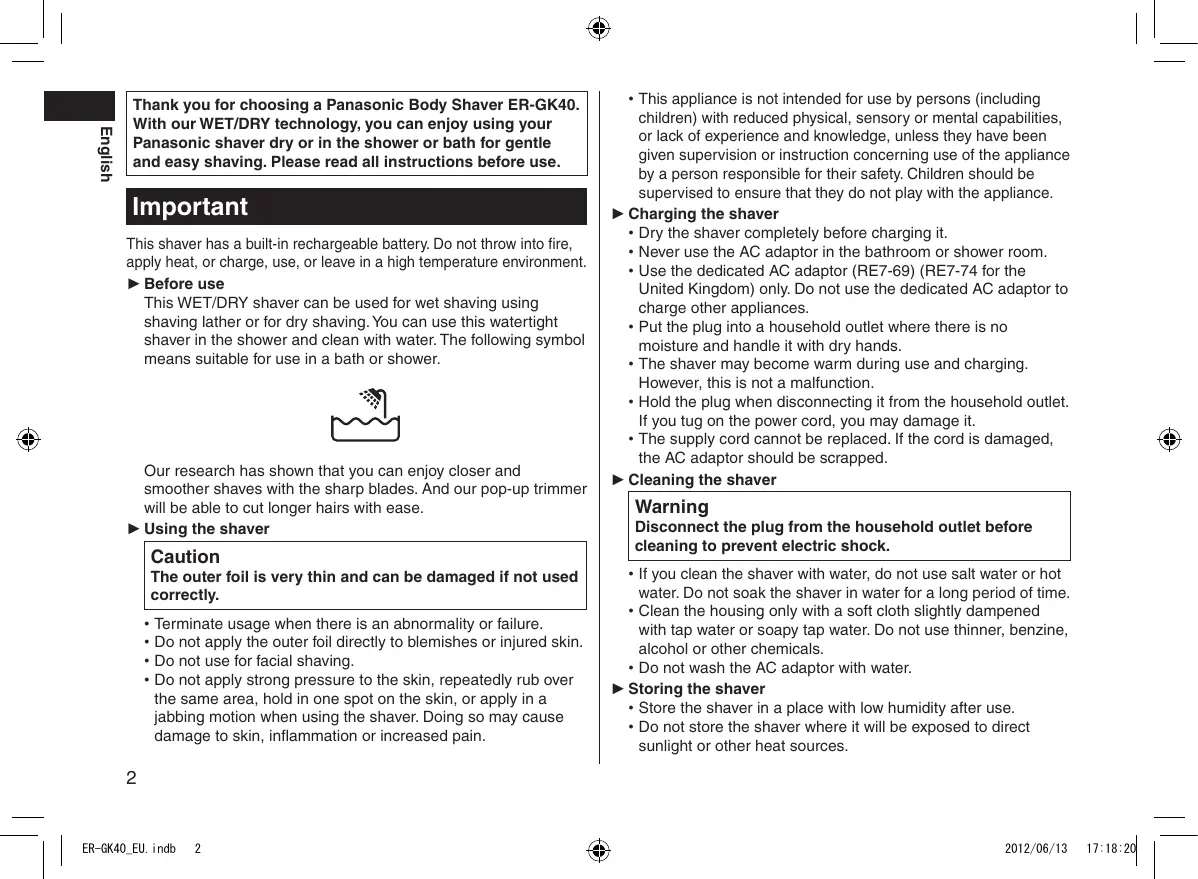


| Product type | Electric body hair trimmer |
| Brand | Panasonic |
| Model | ER-GK40 |
| Usage | Wet and dry shaving, usable in the shower |
| Power supply | Rechargeable Nickel-Metal Hydride (Ni-MH) battery 1.2 V |
| AC adapter | RE7-69 (RE7-74 for United Kingdom) |
| Charging time | Approximately 8 hours (230 V) / 10 hours (240 V) |
| Battery life | Approximately 4 shaves of 7 minutes (full charge) |
| Dimensions (L × W × H) | 7.0 cm × 11.6 cm × 8.8 cm |
| Weight | 245 g |
| Noise level | 65 dB (shaving) / 66 dB (trimmer) |
| Included combs | 3 mm, 6 mm, 9 mm |
| Pop-up trimmer | Yes, for hairs longer than 5 mm |
| Outer protective foil | Fine, replaceable (every 1 year recommended) |
| Inner blade | Replaceable (every 2 years recommended) |
| Cleaning | Washable under water, cleaning brush included |
| Safety | Do not use on face, on injured or irritated skin |
| Use | Domestic only |
| Warranty | Not specified |
Frequently Asked Questions - ER-GK40 PANASONIC
User questions about ER-GK40 PANASONIC
0 question about this device. Answer the ones you know or ask your own.
Ask a new question about this device
Download the instructions for your Electric mower in PDF format for free! Find your manual ER-GK40 - PANASONIC and take your electronic device back in hand. On this page are published all the documents necessary for the use of your device. ER-GK40 by PANASONIC.
USER MANUAL ER-GK40 PANASONIC
Operating Instructions
(Household) Rechargeable Body Shaver
Model No. ER-GK40
| English | 2 | Dansk | 50 | Česky | 97 |
| Deutsch | 10 | Português | 58 | Slovensky | 105 |
| Français | 18 | Norsk | 66 | Magyar | 113 |
| Italiano | 26 | Svenska | 74 | Română | 122 |
| Nederlands | 34 | Suomi | 82 | Türkçe | 130 |
| Español | 42 | Polski | 89 |
Before operating this unit, please read these instructions completely and save them for future use.
natural_image
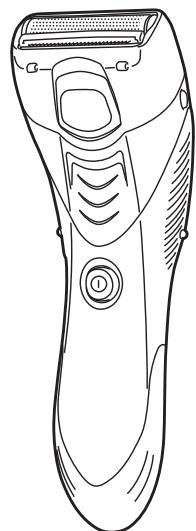
Line drawing of a pair of electric shaver with handle and button (no text or symbols)Thank you for choosing a Panasonic Body Shaver ER-GK40. With our WET/DRY technology, you can enjoy using your Panasonic shaver dry or in the shower or bath for gentle and easy shaving. Please read all instructions before use.
Important
This shaver has a built-in rechargeable battery. Do not throw into fire, apply heat, or charge, use, or leave in a high temperature environment.
▶ Before use
This WET/DRY shaver can be used for wet shaving using shaving lather or for dry shaving. You can use this watertight shaver in the shower and clean with water. The following symbol means suitable for use in a bath or shower.

Our research has shown that you can enjoy closer and smoother shaves with the sharp blades. And our pop-up trimmer will be able to cut longer hairs with ease.
▶ Using the shaver
Caution
The outer foil is very thin and can be damaged if not used correctly.
- Terminate usage when there is an abnormality or failure.
- Do not apply the outer foil directly to blemishes or injured skin.
- Do not use for facial shaving.
- Do not apply strong pressure to the skin, repeatedly rub over the same area, hold in one spot on the skin, or apply in a jabbing motion when using the shaver. Doing so may cause damage to skin, inflammation or increased pain.
- This appliance is not intended for use by persons (including children) with reduced physical, sensory or mental capabilities, or lack of experience and knowledge, unless they have been given supervision or instruction concerning use of the appliance by a person responsible for their safety. Children should be supervised to ensure that they do not play with the appliance.
▶ Charging the shaver
- Dry the shaver completely before charging it.
- Never use the AC adaptor in the bathroom or shower room.
- Use the dedicated AC adaptor (RE7-69) (RE7-74 for the United Kingdom) only. Do not use the dedicated AC adaptor to charge other appliances.
- Put the plug into a household outlet where there is no moisture and handle it with dry hands.
- The shaver may become warm during use and charging. However, this is not a malfunction.
- Hold the plug when disconnecting it from the household outlet. If you tug on the power cord, you may damage it.
- The supply cord cannot be replaced. If the cord is damaged, the AC adaptor should be scrapped.
▶ Cleaning the shaver
Warning
Disconnect the plug from the household outlet before cleaning to prevent electric shock.
- If you clean the shaver with water, do not use salt water or hot water. Do not soak the shaver in water for a long period of time.
- Clean the housing only with a soft cloth slightly dampened with tap water or soapy tap water. Do not use thinner, benzine, alcohol or other chemicals.
- Do not wash the AC adaptor with water.
▶ Storing the shaver
- Store the shaver in a place with low humidity after use.
-
Do not store the shaver where it will be exposed to direct sunlight or other heat sources.
-
Remove the plug from the household outlet when storing the shaver.
- Do not bend the power cord or wrap it around the AC adaptor.
Parts identification
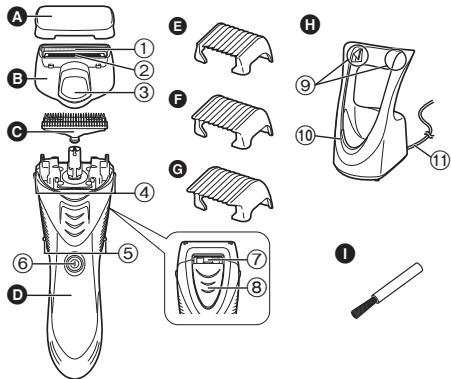
A Protective cap
B Foil frame
① Outer foil
② Pop-up trimmer
③ Pop-up trimmer switch
© Inner blade
D Main body
④ Foil frame release buttons
⑤ Side terminals
⑥ Power switch
⑦ Water outlet
⑧ Cleaning shutter
E 3 mm comb attachment
F 6 mm comb attachment
G 9 mm comb attachment
H AC adaptor (RE7-69) (RE7-74 for the United Kingdom)
⑨ Charging terminals
⑩ Charge indicator lamp
⑪ Power cord
Cleaning brush
Charge
Charging the shaver
Perform the following steps to charge the shaver if it seems to lose the speed.
1 Turn off the shaver and insert it in the AC adaptor until it clicks as illustrated.
- The shaver will not charge unless the side terminals are in contact with the charging terminals.
- Wipe off any water droplets on the side terminals.
- If you charge the shaver with power switch turned on, it will start working when you remove from the AC adaptor.
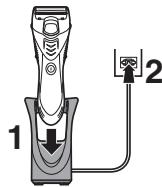
2 Put the plug into a household outlet.
The charge indicator lamp glows red.
- Charging time differs depending on the rated voltage. (See page 8.)
- When charging the shaver for the first time or when it has not been in use for more than 6 months, the charge indicator lamp may not glow for a few minutes, or the operating time may shorten. Please charge it for more than 20 hours in such cases.
3 Disconnect the plug after charging is completed.
- To keep charging the battery will not affect battery performance.
- Recommended ambient temperature for charging is 0 - 35 °C. The battery may not charge properly or not at all under extreme low or high temperatures.


- The charge indicator lamp glows and stays on until the plug is disconnected from a household outlet.
- A full charge will supply enough power for approx. 4 shaves of 7 minutes each. (This will differ depending on usage.)
You cannot operate the shaver while charging.
Shave
Using the shaver
Trim your hair using the pop-up trimmer if it is longer than 5 mm.
Wet/Foam shaving
Shaving with soap lather makes the skin slippery for a closer shave.
Do not use shaving creams or face cleansers containing scrubbing compounds as these may cause the outer foil to clog.
1 Wet the area you want to shave and apply soap lather.
2 Remove the protective cap.
3 Wet the outer foil and place a small quantity of liquid body soap on the outer foil.
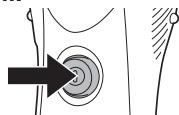
4 Press the power switch to turn on the shaver.
natural_image
Medical illustration showing a surgical procedure with an arrow pointing to a circular target (no text or labels)5 Press gently so that the whole of the outer foil is in close contact with the skin.
4
Caution
- Before shaving, check that the cleaning shutter is closed.
- Do not place your fingers on the power switch while using the shaver. This may cause the shaver to turn off.
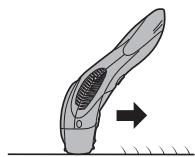
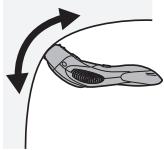
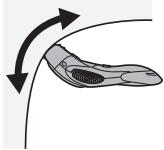
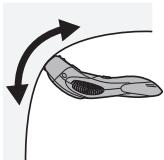
6 Apply the shaver to your skin and press gently while moving it slowly against the direction the hair grows.
natural_image
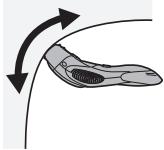
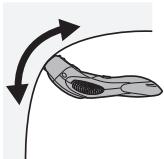
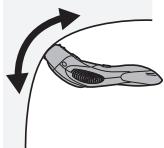
Illustration of a hairpin with a curved blade and textured grip, showing an arrow indicating motion (no text or symbols)Underarm
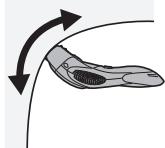
natural_image
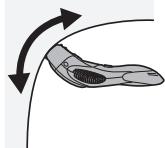
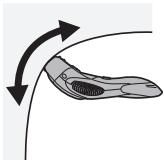
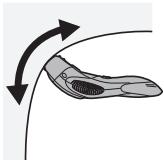
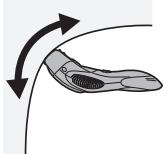
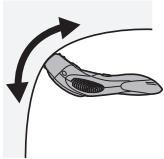
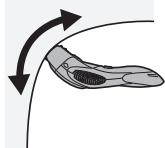
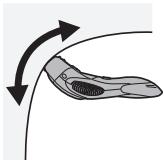
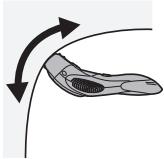
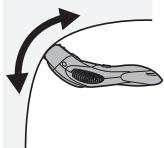
Diagram of a curved object with arrows indicating direction, no text or symbols presentHold your arm up enough to stretch the skin and shave back and forth.
Legs
natural_image
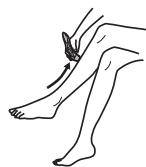
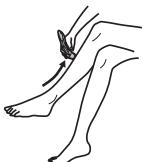
Line drawing of a person's lower leg and foot with a wristband, no text or symbols presentMove the shaver from ankle to knee.
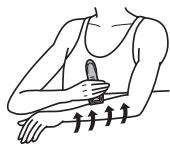
Arms
natural_image
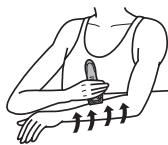
Illustration of a person applying a brush to their arm, with arrows indicating motion direction (no text or symbols)Move the shaver from outside to inside.
For the best results
Pull the skin taut where the area is prone to sagging (on the inside of the knees and elbows).
Dry shaving
You can also shave without wetting your skin or the outer foil.
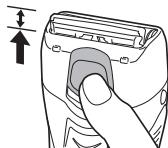
Using the pop-up trimmer
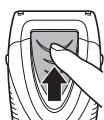
- Slide the pop-up trimmer switch upwards.
- Press the power switch to turn on the shaver.
- Apply the shaver to your skin and press gently while moving it slowly.
natural_image
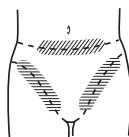
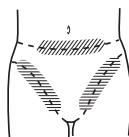
Illustration of a hand holding a device with a scroll wheel, showing a finger pressing the button (no text or symbols)For bikini-line
Use the pop-up trimmer for bikini-line.
Using the comb attachments
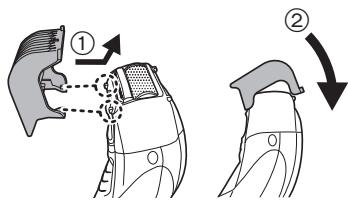
Attaching the comb attachments
Select the attachment and attach it onto the shaver.
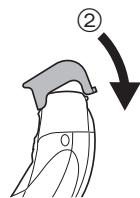
- Insert the hook at the front of comb attachments, and then snap in the rear hook.
- Slide the pop-up trimmer switch upwards.
- Press the power switch to turn on the shaver.
- Apply the shaver to your skin and press gently while moving it slowly against the direction the hair grows.
- Trim slowly and with care to avoid hairs being caught in the comb attachment.
- Clean the shaver when it is no longer shaving well or when it is clogged.
Removing the comb attachments
Push up the tab at the back of comb attachments.
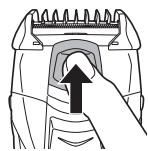
natural_image
Illustration of a hand pressing down on a mechanical component with an upward arrow (no text or symbols)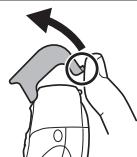
natural_image
Illustration of a hand holding a car seatbelt with an arrow indicating direction (no text or symbols)
Clean
Cleaning the shaver
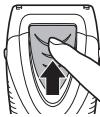
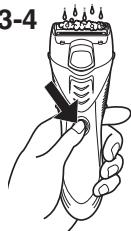
- Remove the shaver from the AC adaptor.
- Close the cleaning shutter.
- Apply some hand soap and some water to the outer foil.
- Turn the shaver on.
2
3-4
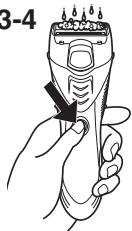
To remove light dirt
- Slide the cleaning shutter until it clicks.

- Slide the pop-up trimmer switch upwards.
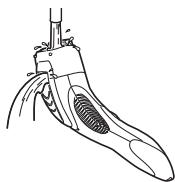
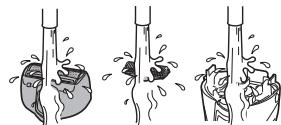
- Clean the foil frame with running water.
natural_image
Line drawing of a mechanical device with a handle and internal gear (no text or symbols)- Turn the shaver off.
- Rinse with water and shake up and down several times to remove the water.
For heavy dirt
- Turn the shaver off after 10 - 20 seconds.
- Press the foil frame release buttons to remove the foil frame.
- Remove the inner blade by grasping it firmly at both ends and pulling straight away from the shaver.
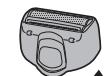
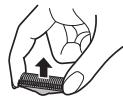
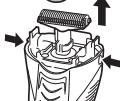

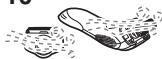
- Clean the shaver, the foil frame (including the pop-up trimmer) and inner blade with running water.
natural_image
Three-step illustration showing a hand holding a small object through three different angles (no text or symbols)-
Wipe off any drops of water with a dry cloth.
-
Dry the foil frame and the shaver completely in a shaded area.
- The foil frame will dry faster if removed from the main body.
- Attach the foil frame to the shaver.
10
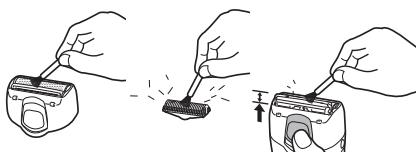
Cleaning with the brush
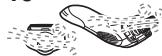
You can also clean the shaver with the cleaning brush.
natural_image
Three-step illustration showing hands using a tool to adjust a device (no text or symbols present)Replacing the outer foil and the inner blade
| outer foil | once every year |
| inner blade | once every two years |
English
Never remove the outer foil at any time other than when replacing it.
- Press the foil frame release buttons to remove the foil frame.
- Squeeze the front and the back side of the foil frame and lift up one of the two knobs on the outer foil.
- Slip the outer foil into the frame and guide the plastic edges onto the hooks in the foil frame until it clicks into the shaver.
natural_image
Three-step diagram showing hand tool application, internal component disassembly, and final assembled device (no text or symbols)▶ Replacing the inner blade
- Press the foil frame release buttons to remove the foil frame.
- Remove the inner blade by grasping it firmly at both ends and pulling straight away from the shaver.
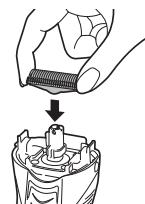
- To insert the new inner blade, hold the blade at both ends and press downward until it snaps into the shaver.
natural_image
Illustration of a hand holding a threaded component being inserted into a mechanical component (no text or symbols)Removing the built-in rechargeable battery
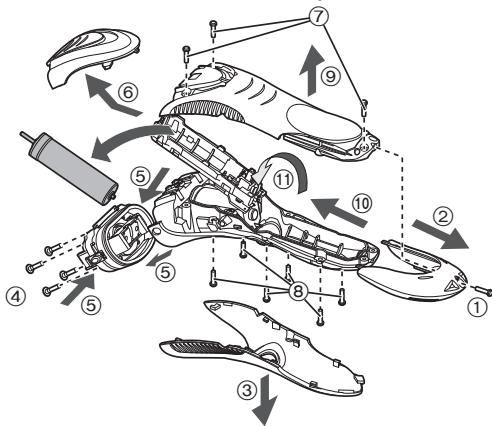
Remove the built-in rechargeable battery before disposing of the shaver. Please make sure that the battery is disposed of at an officially designated location if there is one. Do not dismantle or replace the battery so that you can use the shaver again. This could cause fire or an electric shock.
Please contact an authorised service center.
- Remove the shaver from the AC adaptor when removing the battery.
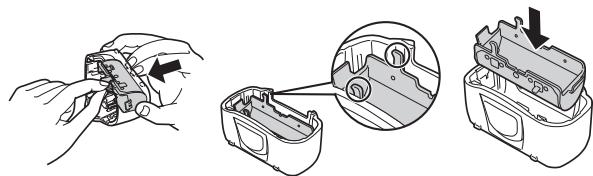
- Perform steps ① to ⑪ and lift the battery, and then remove it.
- Please take care not to short-circuit the battery.
For environmental protection and recycling of materials
This shaver contains a Nickel-Metal Hydride battery.
Please make sure that the battery is disposed of at an officially assigned location, if there is one in your country.
Specifications
| Power source | See the name plate on the AC adaptor. | ||
| Motor voltage | 1.2 V--- | ||
| Charging time | RE7-69 | 230 V~ | Approx. 8 hours |
| RE7-74 for the United Kingdom | 240 V~ | Approx. 8 hours | |
| 230 V~ | Approx. 10 hours | ||
| Airborne Acoustical Noise | In shaving mode: 65 (dB (A) re 1 pW)In trimmer mode: 66 (dB (A) re 1 pW) | ||
This product is intended for household use only.
Information for Users on Collection and Disposal of Old Equipment and used Batteries
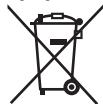
These symbols on the products, packaging, and/or accompanying documents mean that used electrical and electronic products and batteries should not be mixed with general household waste.

For proper treatment, recovery and recycling of old products and used batteries, please take them to applicable collection points, in accordance with your national legislation and the Directives 2002/96/EC and 2006/66/EC.
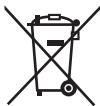
By disposing of these products and batteries correctly, you will help to save valuable resources and prevent
any potential negative effects on human health and the environment which could otherwise arise from inappropriate waste handling.
For more information about collection and recycling of old products and batteries, please contact your local municipality, your waste disposal service or the point of sale where you purchased the items.
Penalties may be applicable for incorrect disposal of this waste, in accordance with national legislation.
For business users in the European Union
If you wish to discard electrical and electronic equipment, please contact your dealer or supplier for further information.
[Information on Disposal in other Countries outside the European Union]
These symbols are only valid in the European Union. If you wish to discard these items, please contact your local authorities or dealer and ask for the correct method of disposal.
![PANASONIC ER-GK40 - [Information on Disposal in other Countries outside the European Union] - 1](/content/2019/11/105289/images/a24f5e8bbe132c93b84412fd7a187ade1d2473f42338a7601a12d8627df89a66.jpg)
![PANASONIC ER-GK40 - [Information on Disposal in other Countries outside the European Union] - 2](/content/2019/11/105289/images/78203cd06dd1492cf8252516949e3d378986cc6fe86bcc975d19ba47041bf73d.jpg)
![PANASONIC ER-GK40 - [Information on Disposal in other Countries outside the European Union] - 3](/content/2019/11/105289/images/94db51828265aa334a5d146f3596bd87f45795ce337ffe8e89432ce19491204d.jpg)

A Schutzkappe
B Folienrahmen
natural_image
Medical illustration showing a surgical procedure with concentric circles and an arrow pointing to a specific area (no text or labels)
Vorsicht
natural_image
Illustration of a curved mechanical component with a textured center and directional arrow (no text or symbols)Achselhöhle
natural_image
Diagram of a curved object with arrows indicating direction, no text or symbols presentnatural_image
Line drawing of a person's lower leg and foot with a bandage around the ankle (no text or symbols)natural_image
Line drawing of a person applying a brush to their arm, with arrows indicating motion or pressure direction (no text or symbols)natural_image
Illustration of a hand holding a handheld device with a scroll wheel (no text or symbols)Für Bikini-Zone


natural_image
Illustration of a hand pressing down on a mechanical component with an upward arrow (no text or symbols)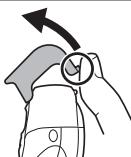
natural_image
Illustration of a hand holding a circular object with an arrow, no text or symbols presentReinigung
natural_image
Line drawing of a mechanical device with a curved handle and textured internal structure (no text or symbols)natural_image
Diagram showing a device with a top component and a close-up of its internal structure, no text or symbols present.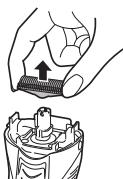
natural_image
Illustration of a hand holding a screwdriver above a mechanical component (no text or symbols)natural_image
Three-step illustration showing a hand holding a small object, with no visible text or symbols.natural_image
Illustration of three hands using a tool to apply a component, showing step-by-step assembly (no text or symbols)natural_image
Three-step diagram showing a hand holding a small mechanical component, then inspecting a device with a close-up view (no text or symbols present)natural_image
Illustration of a hand holding a threaded component being inserted into a mechanical housing (no text or symbols)natural_image
Medical illustration showing a cross-sectional view of a joint with concentric circles and a black arrow pointing to a specific area (no text or labels)natural_image
Illustration of a mechanical device with a curved blade and internal gear, showing an arrow indicating motion (no text or symbols)Aisselle
natural_image
Diagram of a curved object with arrows indicating direction, no text or symbols presentnatural_image
Line drawing of a person's lower legs and foot with a finger pressing on the ankle area (no text or symbols)natural_image
Illustration of a person applying a brush to their lower abdomen with upward arrows indicating motion (no text or symbols)natural_image
Illustration of a hand holding a device with a scroll wheel, showing a finger and handle (no text or symbols)Maillot
natural_image
Illustration of a hand pressing down on a mechanical component with an upward arrow (no text or symbols)natural_image
Illustration of a hand holding a magnifying glass over a car body, with an arrow indicating direction (no text or symbols)Entretien
Nettoyage du rasoir
natural_image
Line drawing of a mechanical device with a curved handle and textured internal structure (no text or symbols)- Éteignez le rasoir.
natural_image
Diagram showing a device with a top component and a close-up of its internal structure, no text or symbols present.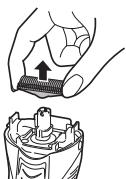
natural_image
Illustration of a hand holding a mechanical component with an upward arrow, shown in two views (no text or symbols)natural_image
Three-step illustration showing a hand holding a small object through different angles of the mouth (no text or symbols)natural_image
Illustration of three hands using a tool to adjust a device (no text or symbols present)natural_image
Three-step diagram showing hands assembling a mechanical component, with an inset close-up highlighting the internal structure (no text or symbols present)▶ Remplacement de la lame interne
natural_image
Illustration of a hand holding a threaded component being inserted into a mechanical housing (no text or symbols)natural_image
Medical illustration showing a surgical procedure with concentric circles and an arrow pointing to a specific area (no text or labels)
Attenzione
natural_image
Illustration of a curved mechanical component with a textured center and directional arrow (no text or symbols)Ascelle
natural_image
Diagram of a larva with curved arrows indicating movement or force (no text or symbols)natural_image
Line drawing of a person's lower legs and foot with a finger pointing to the ankle area (no text or symbols)natural_image
Illustration of a person applying a bandage to their lower abdomen (no text or symbols)natural_image
Illustration of a hand holding a device with a scroll wheel, showing a finger pressing the button (no text or symbols)Per la zona inguinale


natural_image
Illustration of a hand pressing down on a mechanical component with an upward arrow (no text or symbols)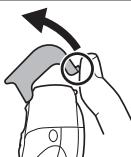
natural_image
Illustration of a hand holding a circular object with an arrow, no text or symbols presentPulizia
Pulizia del rasoio
natural_image
Line drawing of a mechanical device with a curved handle and textured base (no text or symbols)- Spegnere il rasoio.
natural_image
Three-step illustration showing a hand holding a small object, with no text or symbols present.natural_image
Three-step illustration showing hands using a tool to adjust a device (no text or symbols present)
natural_image
Three-step diagram showing hand tool application, close-up of internal components, and final assembled device (no text or symbols)natural_image
Illustration of a hand holding a threaded component being inserted into a mechanical component (no text or symbols)A Beschermkap
B Scheerbladhouder
① Buitenste scheerblad
② Uitklapbare trimmer
③ Schakelaar uitklapbare trimmer
© Messenblok
D Hoofdbehuizing
natural_image
Medical illustration showing a surgical procedure with concentric circles and an arrow pointing to a specific area (no text or labels)
Opgelet
natural_image
Illustration of a curved mechanical component with a textured center and directional arrow (no text or symbols)Onderarm
natural_image
Diagram of a larva with curved arrows indicating movement or force (no text or symbols)natural_image
Line drawing of a person's lower legs and foot with a finger pointing to the ankle area (no text or symbols)natural_image
Illustration of a person applying a bandage to their lower abdomen (no text or symbols)natural_image
Illustration of a hand holding a device with a scroll wheel, showing a finger pressing the button (no text or symbols)Voor bikinilijn
Nederlands

natural_image
Illustration of a hand pressing down on a mechanical component with an upward arrow (no text or symbols)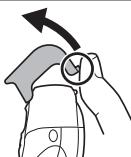
natural_image
Illustration of a hand holding a circular object with an arrow indicating upward motion (no text or symbols)Reinigen
natural_image
Line drawing of a mechanical tool or device with a textured handle and curved base (no text or symbols)natural_image
Three-step illustration showing a hand holding a small object through three different angles (no text or symbols)natural_image
Illustration of three hands using a tool to adjust a device (no text or symbols present)

Nederlands
natural_image
Three-step diagram showing hands assembling a mechanical component, then inspecting the internal housing (no text or symbols present)natural_image
Illustration of a hand holding a screw and then pressing into a mechanical component (no text or symbols)natural_image
Medical illustration showing a cross-sectional view of a joint with concentric circles and a black arrow pointing to a specific area (no text or labels)natural_image
Illustration of a mechanical device with a curved blade and internal gear, showing an arrow indicating motion (no text or symbols)Axila
natural_image
Diagram of a curved object with arrows indicating direction, no text or symbols presentnatural_image
Line drawing of a person's lower leg and foot with a wristpin, no text or symbols presentnatural_image
Illustration of a person applying a bandage to their chest area with upward arrows indicating pressure points (no text or symbols)natural_image
Illustration of a hand holding a handheld device with a scroll wheel (no text or symbols)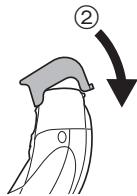


natural_image
Illustration of a hand pressing down on a mechanical component with an upward arrow (no text or symbols)natural_image
Illustration of a hand holding a magnifying glass over a garment, with an arrow indicating direction (no text or symbols)Limpieza
natural_image
Line drawing of a mechanical tool or device with a curved handle and textured internal structure (no text or symbols)natural_image
Three-step illustration showing hand holding a bottle with liquid, no text or symbols presentnatural_image
Illustration of three hands using a tool to apply a device to a battery pack (no text or symbols present)
Español
natural_image
Three-step diagram showing hands assembling a mechanical component, then inspecting the internal housing (no text or symbols present)natural_image
Illustration of a hand holding a threaded component being inserted into a mechanical component (no text or symbols)natural_image
Diagram showing a black arrow pointing to concentric circular patterns around a central point, with no visible text or symbols.natural_image
Diagram of a mechanical component with a curved blade and internal gear, showing an arrow indicating motion (no text or symbols present)Underarmen

natural_image
Diagram of a curved object with arrows indicating direction, no text or symbols presentnatural_image
Line drawing of a person's lower legs and foot with a curved arrow indicating motion (no text or symbols)natural_image
Illustration of a person applying a bandage to their lower abdomen with directional arrows indicating movement (no text or symbols)natural_image
Illustration of a hand holding a device with a scroll wheel, showing a finger pressing the button (no text or symbols)Til bikinilinjen
natural_image
Illustration of a hand pressing down on a mechanical component with an upward arrow (no text or symbols)natural_image
Illustration of a hand holding a circular object with an arrow, no text or symbols presentRengør
For at fjerne let snavs
natural_image
Line drawing of a mechanical tool or device with a textured handle and curved base (no text or symbols)- Sluk for barbermaskinen.
natural_image
Three-step illustration showing a hand holding a small object, with no text or symbols present.natural_image
Three-step illustration showing hands using a tool to adjust a device (no text or symbols present)

Dansk
natural_image
Three-step diagram showing hands installing a component, then inspecting a mechanical housing with a close-up view (no text or symbols)natural_image
Illustration of a hand holding a threaded component being inserted into a mechanical housing (no text or symbols)natural_image
Medical illustration showing a surgical procedure with an arrow pointing to a circular target (no text or labels)natural_image
Illustration of a mechanical device with a curved blade and internal gear, showing motion direction (no text or symbols)Axilas
natural_image
Diagram of a curved object with directional arrows indicating motion or movement (no text or symbols)natural_image
Line drawing of a person's lower leg and foot with a bandage around the ankle (no text or symbols)natural_image
Illustration of a person applying a bandage to their chest area with directional arrows indicating movement (no text or symbols)natural_image
Illustration of a hand holding a handheld device with a scroll wheel (no text or symbols)Português


natural_image
Illustration of a hand pressing down on a mechanical component with an upward arrow (no text or symbols)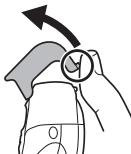
natural_image
Illustration of a hand holding a car with an arrow indicating direction (no text or symbols)Limpar
Limpeza do aparelho de rapar
- Remova a máquina de rapar do transformador de CA.
-
Feche o fecho de limpeza.
-
Aplique sabonete e água à lâmina exterior.
- Ligue o aparelho de rapar.
2
3-4
natural_image
Line drawing of a mechanical tool or device with a textured handle and curved base (no text or symbols)natural_image
Diagram showing a hairdryer with an open mouth and a close-up of the brush (no text or symbols)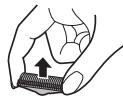

natural_image
Three-step illustration showing hand holding a bottle with liquid, then holding a tube with bubbles and liquid droplets (no text or symbols)natural_image
Three-step illustration showing hands using a tool to remove a device from a container, with no text or symbols present.

natural_image
Three-step diagram showing hands assembling a mechanical component, then inspecting the internal part with a close-up view (no text or symbols)natural_image
Illustration of a hand holding a threaded component being inserted into a mechanical component (no text or symbols)A Beskyttelsesdeksel
B Folieramme
① Ytre folie
② Pop-up trimmer
③ Bryter til pop-up trimmer
© Innerblad
D Karosseri
④ Utløserknapper for folieramme
natural_image
Medical illustration showing a cross-sectional view of a joint with concentric circles and a black arrow pointing to a specific area (no text or labels)natural_image
Illustration of a hairpin with a textured grip and arrow indicating direction (no text or symbols)Underarmer
natural_image
Diagram of a biological structure with curved arrows indicating direction (no text or symbols)natural_image
Line drawing of a person's lower leg and foot with a wristpin, no text or symbols presentnatural_image
Illustration of a person applying a brush to their lower abdomen with upward arrows indicating motion (no text or symbols)Beveg barbermaskinen fra utsiden til innsiden.
For best mulig resultat
natural_image
Illustration of a hand holding a device with a scroll wheel, showing a finger pressing the button (no text or symbols)For bikinilinje
Bruke pop-up trimmeren for bikinilinjen.
Bruke kamtilbehøret
natural_image
Illustration of a hand pressing down on a mechanical component with an upward arrow (no text or symbols)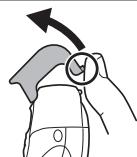
natural_image
Illustration of a hand holding a magnifying glass over a car seat, with an arrow indicating direction (no text or symbols)
natural_image
Line drawing of a mechanical device with a handle and internal components (no text or symbols)natural_image
Three-step illustration showing a hand holding a small object through three different angles (no text or symbols)-
Tørk av eventuelle vanndråper med en tørr klut.
-
Folierammen og barbermaskinen tørkes grundig.
natural_image
Illustration of three hands using a tool to adjust a device (no text or symbols present)natural_image
Three-step diagram showing hand tool application, internal component insertion, and final assembly (no text or symbols)▶ Bytte innerbladet
natural_image
Illustration of a hand holding a small mechanical component being inserted into a cylindrical housing (no text or symbols)Ta ut det innebygde oppladbare batteriet
A Skyddshuva
B Bladram
① Ytterfolie
② Popup trimmer
③ Popup trimmer-omkopplare
natural_image
Diagram showing a black arrow pointing to concentric circular patterns around a central point, with no visible text or symbols.natural_image
Diagram of a mechanical component with a curved blade and internal gear, showing an arrow indicating motion (no text or symbols present)Underarm
natural_image
Diagram of a biological structure with curved arrows indicating direction (no text or symbols)natural_image
Line drawing of a person's lower leg and foot with a wristpin, no text or symbols presentnatural_image
Line drawing of a person applying a brush to their arm, with arrows indicating motion (no text or symbols)natural_image
Illustration of a hand holding a handheld device with a scroll wheel (no text or symbols)För bikinilinjen
natural_image
Illustration of a hand pressing down on a mechanical component with an upward arrow (no text or symbols)natural_image
Illustration of a hand holding a circular object with an arrow, no text or symbols presentRengör
natural_image
Line drawing of a mechanical tool or device with a curved handle and textured internal structure (no text or symbols)natural_image
Three-step illustration showing a hand holding a small object with liquid, connected to a vertical tube and another to a hand holding a container (no text or symbols present)natural_image
Three-step illustration showing hands using a tool to adjust a device (no text or symbols present)natural_image
Three-step diagram showing hands assembling a mechanical component, with an inset close-up highlighting the internal structure (no text or symbols present)▶ Byta innerbladet
natural_image
Illustration of a hand holding a screw and then pressing into a mechanical component (no text or symbols)A Suojus
B Teräverkon kehys
natural_image
Medical illustration showing a cross-sectional view of a joint with concentric circles and a black arrow pointing to a specific area (no text or labels)natural_image
Illustration of a hairpin with a textured handle and arrow indicating direction (no text or symbols)Kainalo
natural_image
Diagram of a larva with curved arrows indicating movement or force (no text or symbols)natural_image
Line drawing of a person's lower leg and foot with a wristpin, no text or symbols presentnatural_image
Illustration of a person applying a bandage to the lower arm with directional arrows indicating movement (no text or symbols)natural_image
Illustration of a hand holding a small object with an arrow indicating upward motion (no text or symbols)natural_image
Illustration of a hand pressing down on a mechanical component with an upward arrow (no text or symbols)natural_image
Illustration of a hand holding a magnifying glass over a car seat, with an arrow indicating direction (no text or symbols)Puhdas
Koneen puhdistus
natural_image
Line drawing of a mechanical tool or device with a textured handle and curved base (no text or symbols)natural_image
Three-step illustration showing a hand holding a small object, with no visible text or symbols.natural_image
Three-step illustration showing hands using a tool to adjust a device (no text or symbols present)natural_image
Three-step diagram showing hand tool application, internal component disassembly, and final assembled device (no text or symbols)natural_image
Illustration of a hand holding a screw and then pressing into a mechanical component (no text or symbols)natural_image
Diagram showing a directional arrow pointing to concentric circles around a central point, with no text or symbols present.natural_image
Illustration of a mechanical device with a curved blade and internal gear, showing an arrow indicating motion (no text or symbols)Pachy
natural_image
Diagram of a curved object with directional arrows indicating motion or movement (no text or symbols)natural_image
Line drawing of a person's lower leg and foot with a bandage around the ankle (no text or symbols)natural_image
Illustration of a person applying a brush to their arm, with upward arrows indicating motion or pressure (no text or symbols)natural_image
Illustration of a hand holding a handheld device with a scroll wheel (no text or symbols)Okolice bikini
natural_image
Illustration of a hand pressing down on a mechanical component with an upward arrow (no text or symbols)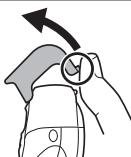
natural_image
Illustration of a hand holding a circular object with an arrow, no text or symbols presentCzyszczenie
natural_image
Line drawing of a mechanical device with a handle and internal components (no text or symbols)- Wyłącz maszynkę.
natural_image
Three-step illustration showing a hand holding a small object, with no visible text or symbols.natural_image
Three-step illustration showing hands using a tool to remove a device from a container, with no text or symbols present.natural_image
Three-step diagram showing hand tool application, close-up of internal components, and final assembly (no text or symbols)natural_image
Illustration of a hand holding a threaded component being inserted into a mechanical housing (no text or symbols)A Ochranné víčko
B Rám fólie
natural_image
Diagram showing a black arrow pointing to concentric circles around a central point, with no visible text or symbols.natural_image
Diagram of a mechanical component with a curved blade and internal gear, showing an arrow indicating motion (no text or symbols present)Podpaží
natural_image
Diagram of a biological structure with curved arrows indicating direction (no text or symbols)natural_image
Line drawing of a person's lower leg and foot with a wristpin, no text or symbols presentnatural_image
Illustration of a person applying a brush to their arm, showing motion arrows (no text or symbols)natural_image
Illustration of a hand holding a device with a scroll wheel, showing a finger pressing the button (no text or symbols)Pro linii bikin

natural_image
Illustration of a hand pressing down on a mechanical component with an upward arrow (no text or symbols)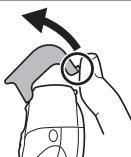
natural_image
Illustration of a hand holding a circular object with an arrow, no text or symbols present
Čištění
natural_image
Line drawing of a mechanical tool or device with a curved handle and textured internal structure (no text or symbols)natural_image
Three-step illustration showing a hand holding a small object with liquid, connected to a vertical tube and another to a hand holding a container (no text or symbols present)natural_image
Three-step illustration showing hands using a tool to adjust a device (no text or symbols present)natural_image
Three-step diagram showing hands assembling a mechanical component, with an inset close-up highlighting the internal structure (no text or symbols present)natural_image
Illustration of a hand holding a screw and then pressing into a mechanical component (no text or symbols)natural_image
Diagram showing a directional arrow pointing to concentric circles around a central point, with no text or symbols present.


Slovensky
Pozor
natural_image
Illustration of a mechanical device with a curved handle and internal gear-like structure, showing an arrow indicating motion (no text or symbols present)Podpazušie
natural_image
Diagram of a curved object with arrows indicating direction, no text or symbols presentVzpažte ruku tak, aby sa dostatočne natiahla pokožka a oholte ju pohybmi dopredu a dozadu.
Nohy
natural_image
Line drawing of a person's lower leg and foot with a wristpin, no text or symbols presentPohybujte holiacim strojčekom od členka ku kolenu.
Ruky
natural_image
Line drawing of a person applying a brush to their arm, with motion arrows indicating movement (no text or symbols)natural_image
Illustration of a hand holding a handheld device with a scroll wheel (no text or symbols)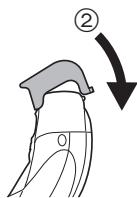


natural_image
Illustration of a hand pressing down on a mechanical component with an upward arrow (no text or symbols)Čistenie
natural_image
Line drawing of a mechanical tool or device with a curved handle and textured internal structure (no text or symbols)- Vypnite holiaci strojček. • Opláchnite vodou a zvyšnú vodu vytraste.
natural_image
Three-step illustration showing hand holding a bottle with liquid, no text or symbols present- Čepel'dôkladne utrite do sucha pomocou suchej handričky.
- Hlavu s planžetou a strojček dôkladne vysušte na tienenom mieste.
- Hlava s planžetou uschne skôr, ak bude odpojená od hlavnej časti.
- Nasad'te hlavu s planžetou na strojček.
10
Čistenie kefkou
natural_image
Three-step illustration showing hands using a tool to adjust a device (no text or symbols present)
natural_image
Three-step diagram showing hands assembling a mechanical component, then inspecting the internal housing (no text or symbols present)natural_image
Illustration of a hand holding a screw and then pressing into a mechanical component (no text or symbols)natural_image
Diagram showing a directional arrow pointing to concentric circles around a central point, with no text or symbols present.


Magyar
Figyelem
natural_image
Illustration of a mechanical device with a curved handle and internal gear-like structure, showing an arrow indicating motion (no text or symbols present)Hónalj
natural_image
Diagram of a larva with curved arrows indicating movement or force (no text or symbols)natural_image
Line drawing of a person's lower leg and foot with a wristpin, no text or symbols presentnatural_image
Line drawing of a person applying a brush to their arm, with motion arrows indicating movement (no text or symbols)natural_image
Illustration of a hand holding a device with a scroll wheel, showing a finger and handle (no text or symbols)Bikinivonalhoz

natural_image
Illustration of a hand pressing down on a mechanical component with an upward arrow (no text or symbols)natural_image
Illustration of a hand holding a circular object with an arrow, no text or symbols presentTisztítás
natural_image
Line drawing of a mechanical device with a handle and internal components (no text or symbols)natural_image
Three-step illustration showing a hand holding a small object, with no visible text or symbols.natural_image
Three-step illustration showing hands using a tool to remove a device from a container, with no text or symbols present.
natural_image
Three-step diagram showing hands assembling a mechanical component, with an inset close-up highlighting the internal structure (no text or symbols present)natural_image
Illustration of a hand holding a threaded component being inserted into a mechanical housing (no text or symbols)natural_image
Diagram showing a directional arrow pointing to concentric circles around a central point, with no text or symbols present.
natural_image
Illustration of a hairpin with a curved blade and textured grip, showing a right-hand rule (no text or symbols)Sub braț
natural_image
Diagram of a curved object with arrows indicating direction, no text or symbols presentnatural_image
Line drawing of a person's lower legs and feet with a bandage around the ankle (no text or symbols)natural_image
Line drawing of a person applying a brush to their arm, with arrows indicating motion (no text or symbols)Mişcați aparatul de ras dinspre exterior spre interior.
natural_image
Illustration of a hand holding a device with a handle, showing a finger and a curved grip (no text or symbols)Româna
natural_image
Illustration of a hand pressing down on a mechanical component with an upward arrow (no text or symbols)Scoaterea accesoriiilor pieptene
natural_image
Illustration of a hand holding a circular object with an arrow, no text or symbols presentCurățare
natural_image
Line drawing of a mechanical tool or device with a curved handle and textured internal structure (no text or symbols)- Opriti aparatul de ras.
natural_image
Three-step illustration showing a hand holding a small object, with no visible text or symbols.natural_image
Three-step illustration showing hands using a tool to remove a device from a container, with no text or symbols present.natural_image
Three-step diagram showing a hand holding a mechanical component, then inspecting a housing with a close-up view (no text or symbols)natural_image
Illustration of a hand holding a screw and then pressing into a mechanical component (no text or symbols)natural_image
Medical illustration showing a surgical procedure with concentric circles and an arrow pointing to a specific area (no text or labels)Dikkat
natural_image
Illustration of a mechanical device with a curved handle and internal gear, showing an arrow indicating motion (no text or symbols)Koltukaltı
natural_image
Diagram of a curved object with arrows indicating direction, no text or symbols presentnatural_image
Line drawing of a person's lower legs and feet with a hand near the ankle area (no text or symbols)natural_image
Line drawing of a person applying a brush to their arm, with motion arrows indicating movement (no text or symbols)natural_image
Illustration of a hand holding a device with a scroll wheel, showing a finger pressing the button (no text or symbols)Hassas bölge için

natural_image
Illustration of a hand pressing down on a mechanical component with an upward arrow (no text or symbols)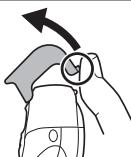
natural_image
Illustration of a hand holding a circular object with an arrow indicating direction (no text or symbols)Temizle
natural_image
Line drawing of a mechanical device with a handle and internal components (no text or symbols)natural_image
Three-step illustration showing hand holding a bottle with liquid, no text or symbols presentnatural_image
Three-step illustration showing hands using a tool to remove a device from a container, with no text or symbols present.

Türkçe
natural_image
Three-step diagram showing hand tool interacting with a mechanical component, then close-up of internal components (no text or symbols)natural_image
Illustration of a hand holding a threaded component being inserted into a mechanical housing (no text or symbols)

- Important
- ▶ Before use
- ▶ Using the shaver
- Caution
- ▶ Charging the shaver
- ▶ Cleaning the shaver
- Warning
- ▶ Storing the shaver
- Parts identification
- Charge
- Charging the shaver
- Shave
- Using the shaver
- Wet/Foam shaving
- For the best results
- Dry shaving
- Using the pop-up trimmer
- For bikini-line
- Using the comb attachments
- Attaching the comb attachments
- Removing the comb attachments
- Clean
- Cleaning the shaver
- To remove light dirt
- For heavy dirt
- Cleaning with the brush
- Replacing the outer foil and the inner blade
- ▶ Replacing the inner blade
- Removing the built-in rechargeable battery
- For environmental protection and recycling of materials
- Information for Users on Collection and Disposal of Old Equipment and used Batteries
- For business users in the European Union
- [Information on Disposal in other Countries outside the European Union]
- A Schutzkappe
- B Folienrahmen
- Vorsicht
- Für Bikini-Zone
- Reinigung
- Maillot
- Entretien
- Nettoyage du rasoir
- ▶ Remplacement de la lame interne
- Attenzione
- Per la zona inguinale
- Pulizia
- Pulizia del rasoio
- Opgelet
- Voor bikinilijn
- Reinigen
- Limpieza
- Español
- Til bikinilinjen
- Rengør
- For at fjerne let snavs
- Limpar
- Limpeza do aparelho de rapar
- For best mulig resultat
- For bikinilinje
- Bruke kamtilbehøret
- ▶ Bytte innerbladet
- Ta ut det innebygde oppladbare batteriet
- För bikinilinjen
- Rengör
- ▶ Byta innerbladet
- Puhdas
- Koneen puhdistus
- Okolice bikini
- Czyszczenie
- Pro linii bikin
- Čištění
- Slovensky
- Pozor
- Čistenie
- Čistenie kefkou
- Figyelem
- Bikinivonalhoz
- Tisztítás
- Scoaterea accesoriiilor pieptene
- Curățare
- Dikkat
- Hassas bölge için
- Temizle
Brand : PANASONIC
Model : ER-GK40
Category : Electric mower